

Private practice management software gives healthcare professionals a central system for scheduling, billing, records, and communication. If you're searching for better ways to manage daily administrative tasks, reduce manual paperwork, or keep your focus on patient care, the right platform can make a difference.
In this guide, you’ll find my top picks for the best private practice management software, with options for solo providers, small teams, and growing clinics. Explore what sets each tool apart and see which one fits your practice’s needs.
Why Trust Our Software Recommendations
6,700+
Reviews
20
Industry experts
16+
Evaluation factors
14
Years
Our team has been testing and reviewing software since 2012. As medical practice leaders ourselves, we know how difficult—and important—it is to choose the right software.
For this guide, we evaluated tools using hands-on testing and independent research, scoring tools using our selection criteria.
Our reviews reflect our human editorial judgment, not a sales pitch.
Best Private Practice Management Software Summary
This comparison chart summarizes pricing details for my private practice management software to help you find the best one for your budget and business needs.
| Tool | Best For | Trial Info | Price | ||
|---|---|---|---|---|---|
| 1 | Best documentation tools for therapists | 30-day free trial | From $69/month | Website | |
| 2 | Best no-cost cloud-based solution | Free demo available | From $199/user/month | Website | |
| 3 | Best real-time analytics for operations | Free demo available | Pricing upon request | Website | |
| 4 | Best all-in-one compliance management | Free demo available | Pricing upon request | Website | |
| 5 | Best interoperability with health networks | Free demo available | Pricing upon request | Website | |
| 6 | Best for unified billing and scheduling | Free demo available | Pricing upon request | Website | |
| 7 | Best native iPad and mobile charting | Free demo available | Pricing upon request | Website | |
| 8 | Best for multi-specialty group practices | Free demo available | Pricing upon request | Website | |
| 9 | Best customizable workflow automation | Free demo available | Pricing upon request | Website | |
| 10 | Best integrated telehealth and EHR platform | Free demo available | Pricing upon request | Website |


Best Private Practice Management Software Reviews
Below are my detailed summaries of the best private practice management software that made it onto my shortlist. My reviews offer a detailed look at the features, best use cases, and integrations of each platform to help you find the best one for you.
 Best documentation tools for therapists
- 30-day free trial
- From $69/month
Visit WebsiteCustomer Rating:4.4/5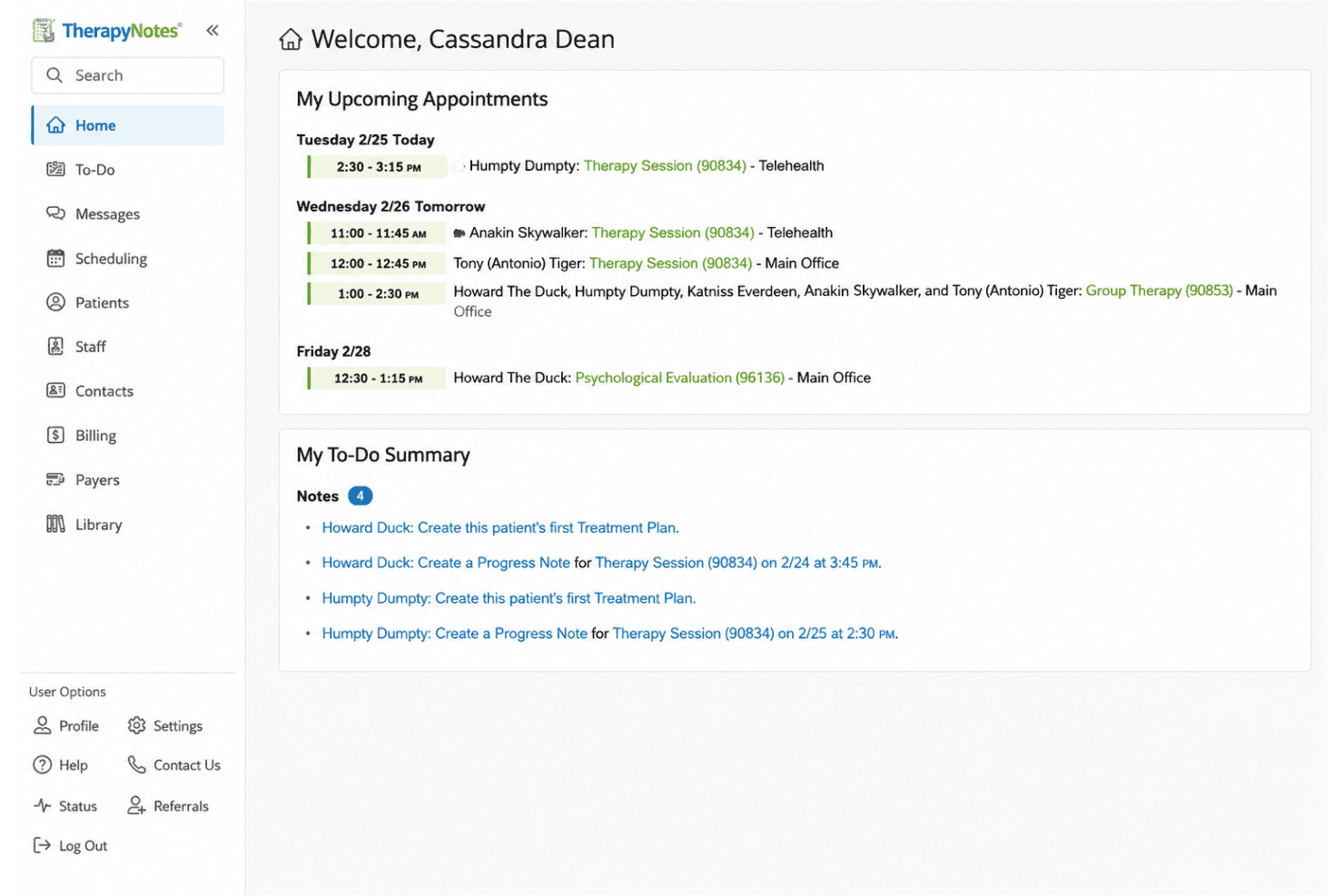
TherapyNotes manages clinical notes, scheduling, billing, and secure telehealth. TherapyNotes is a behavioral health EHR and practice management platform built for mental health clinicians, covering clinical documentation, appointment scheduling, insurance billing, and HIPAA-compliant telehealth.
Who Is TherapyNotes Best For?
TherapyNotes is a strong fit for solo therapists and small-to-mid-sized behavioral health group practices that need a dedicated, all-in-one clinical and billing system.
Why I Picked TherapyNotes
TherapyNotes earns its spot as one of the best on my shortlist because of how purpose-built its documentation tools are for behavioral health clinicians. I love that TherapyFuel, the built-in AI documentation suite, generates contact notes and client history summaries directly within the platform. The DSM-5-aligned charting templates and structured Outcome Measures library also make clinical documentation far more consistent than what I've seen in general-purpose EHRs.
TherapyNotes Key Features
- Appointment scheduling and reminders: Manage provider calendars with automated text, voice, and email reminders.
- Insurance claims processing: Submit electronic and paper claims, post ERAs, and handle secondary claim submission.
- Client portal (TherapyPortal): Allow clients to request appointments, complete intake forms, and message securely.
- HIPAA-compliant telehealth: Run video sessions with built-in waiting room, guest access, and chat options.
TherapyNotes Integrations
TherapyNotes offers native integrations with its built-in credit card processing, ePrescribe for electronic prescriptions, ERA and claims clearinghouse channels, and the TherapyPortal client portal. An API for custom integrations is not clearly documented.
Pros and Cons
Pros:
- Built-in real-time eligibility verification tool
- Reliable insurance claims and billing workflows
- Extensive library of behavioral health templates
Cons:
- Limited customization of clinical note templates
- No bulk actions for patient records
Learn more about TherapyNotes: Best no-cost cloud-based solution
- Free demo available
- From $199/user/month
Visit WebsiteCustomer Rating:3.7/5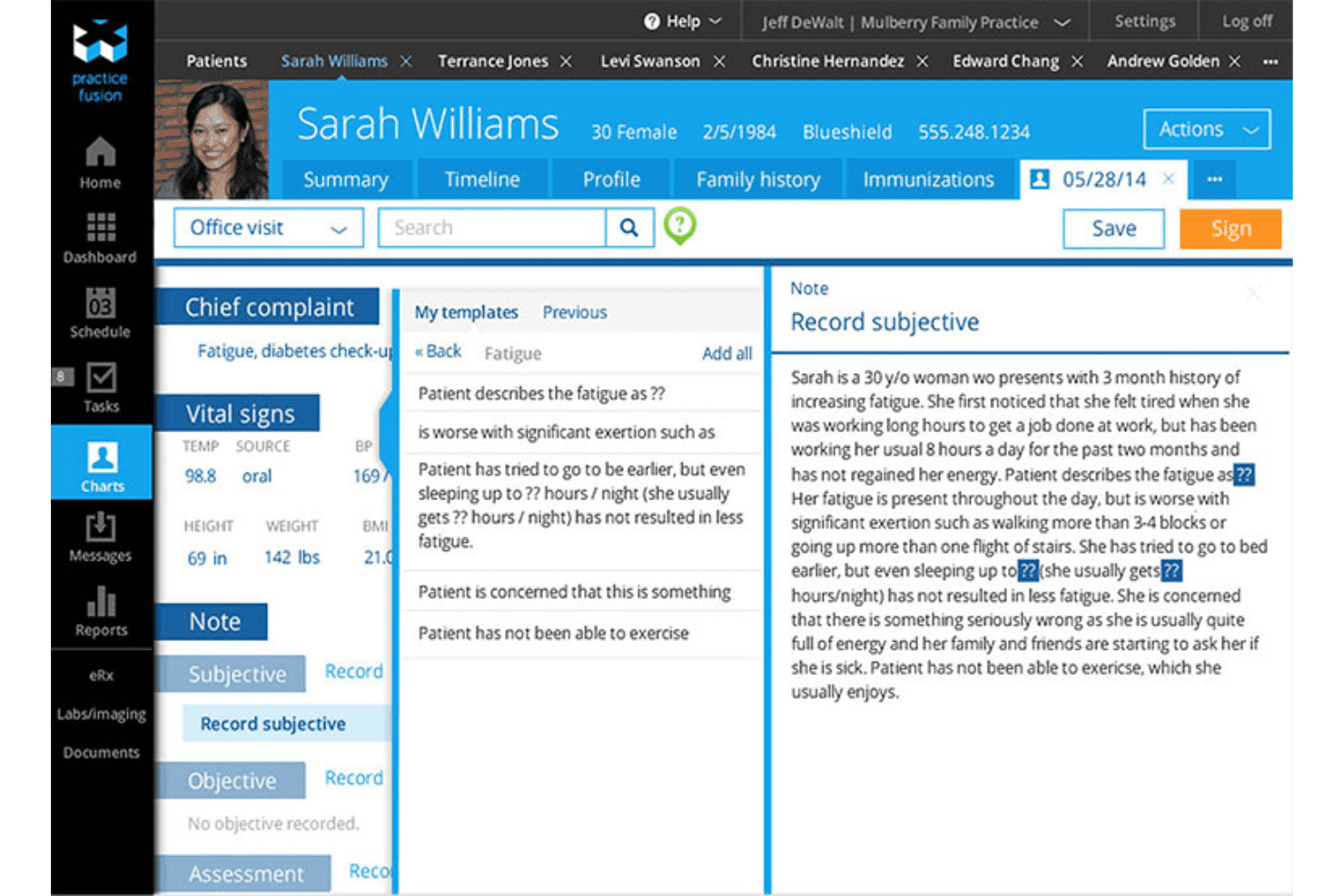
Practice Fusion delivers charting, e-prescribing, labs, scheduling, and portal. Practice Fusion is a cloud-based EHR designed for small independent practices, combining clinical charting, e-prescribing, lab integrations, appointment scheduling, and a patient portal in one platform.
Who Is Practice Fusion Best For?
Practice Fusion is a strong fit for solo physicians and small independent primary-care practices looking for an accessible, cloud-based EHR without heavy IT overhead.
Why I Picked Practice Fusion
I picked Practice Fusion as one of the best because the no-credit-card free trial gives you access to a fully functional EHR before any financial commitment. I also like that EPCS is built in across all 50 US states and DC. Structured lab results from Quest, LabCorp, and hundreds of other centers land directly in the patient chart with automatic abnormal-value flagging.
Practice Fusion Key Features
- Customizable charting templates: Choose from a library of specialty templates or create your own for faster documentation.
- Patient Fusion portal: Enable patients to securely view their health information, request appointments, and communicate with your practice online.
- Integrated billing services: Access claims scrubbing, payer enrollment, A/R follow-up, and detailed reporting through an optional billing add-on.
- Multi-user access controls: Assign different roles and permissions to providers, clinical staff, and front office team members.
Practice Fusion Integrations
Practice Fusion offers native integrations with Quest Diagnostics, LabCorp, CGM LABDAQ, Updox, Medsender, Avalon Laboratory System, OpenPM, DeepScribe, Service Center, and QuickSlot Health. An API is also available for custom integrations.
Pros and Cons
Pros:
- Specialty charting templates for multiple practice types
- E-prescribing for controlled substances in all states
- Unlimited non-signing staff accounts for front office
Cons:
- Billing features require a paid add-on
- Reports of slow support ticket response times
Learn more about Practice Fusion: Best real-time analytics for operations
- Free demo available
- Pricing upon request
Visit WebsiteCustomer Rating:3.6/5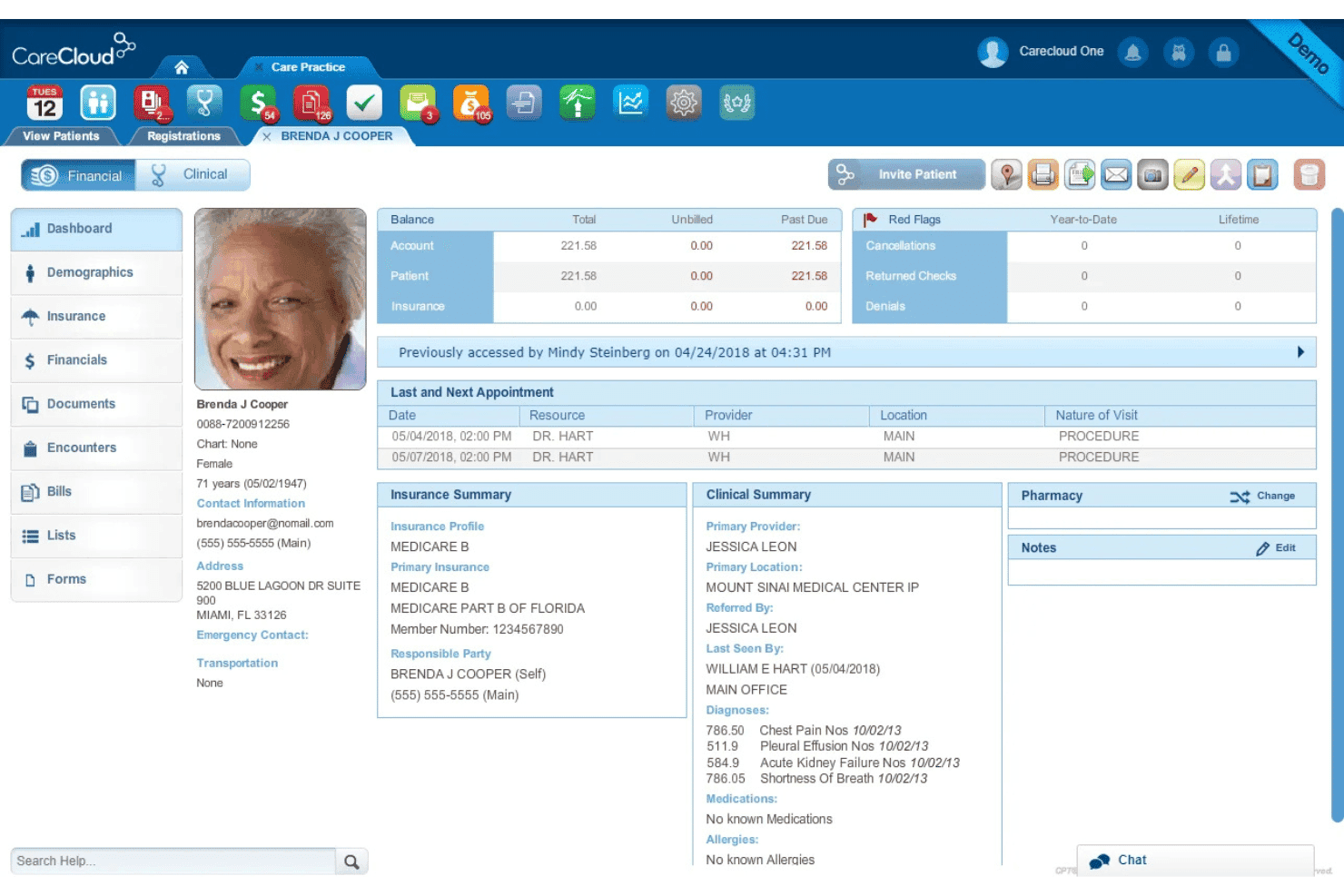
CareCloud covers scheduling, billing, claims, RCM, and clinical documentation. CareCloud is a cloud-based practice management and EHR platform that combines appointment scheduling, medical billing, claims management, revenue cycle management, and clinical documentation for independent medical practices.
Who Is CareCloud Best For?
CareCloud is a strong fit for small to mid-sized independent medical practices that handle high billing volumes across multiple specialties.
Why I Picked CareCloud
CareCloud earns its spot on my shortlist because of how its Performance Dashboard centralizes real-time KPI tracking across scheduling, billing, and claims in one place. I'm also a fan of CollectiveIQ, which scrubs claims against over 180 million billing rules before submission, catching denial risks before they reach the payer. On top of that, cirrusAI automates appeal letter generation by analyzing payer-specific data to build the case for each rejected claim.
CareCloud Key Features
- Integrated patient portal: Lets patients access records, see test results, and communicate securely with providers.
- Breeze patient intake: Supports digital pre-registration, mobile check-in, and payment collection through any device.
- Native EHR module: Offers customizable templates, e-prescribing, and lab integration for efficient clinical documentation.
- Batch insurance eligibility verification: Allows practices to verify coverage for multiple patients at once directly within the system.
CareCloud Integrations
CareCloud offers native integrations with pVerify for insurance eligibility, Clover POS kiosks via Breeze, and lab systems. Its RCM services also support integration with third-party EHRs. An API is available for custom integrations.
Pros and Cons
Pros:
- Digital patient intake via mobile and kiosk
- Efficient claims scrubbing and denial prevention
- Real-time analytics for key practice metrics
Cons:
- Long-term contract required for new clients
- Occasional delays in customer support response
Learn more about CareCloud: Best all-in-one compliance management
- Free demo available
- Pricing upon request
Visit WebsiteCustomer Rating:3.5/5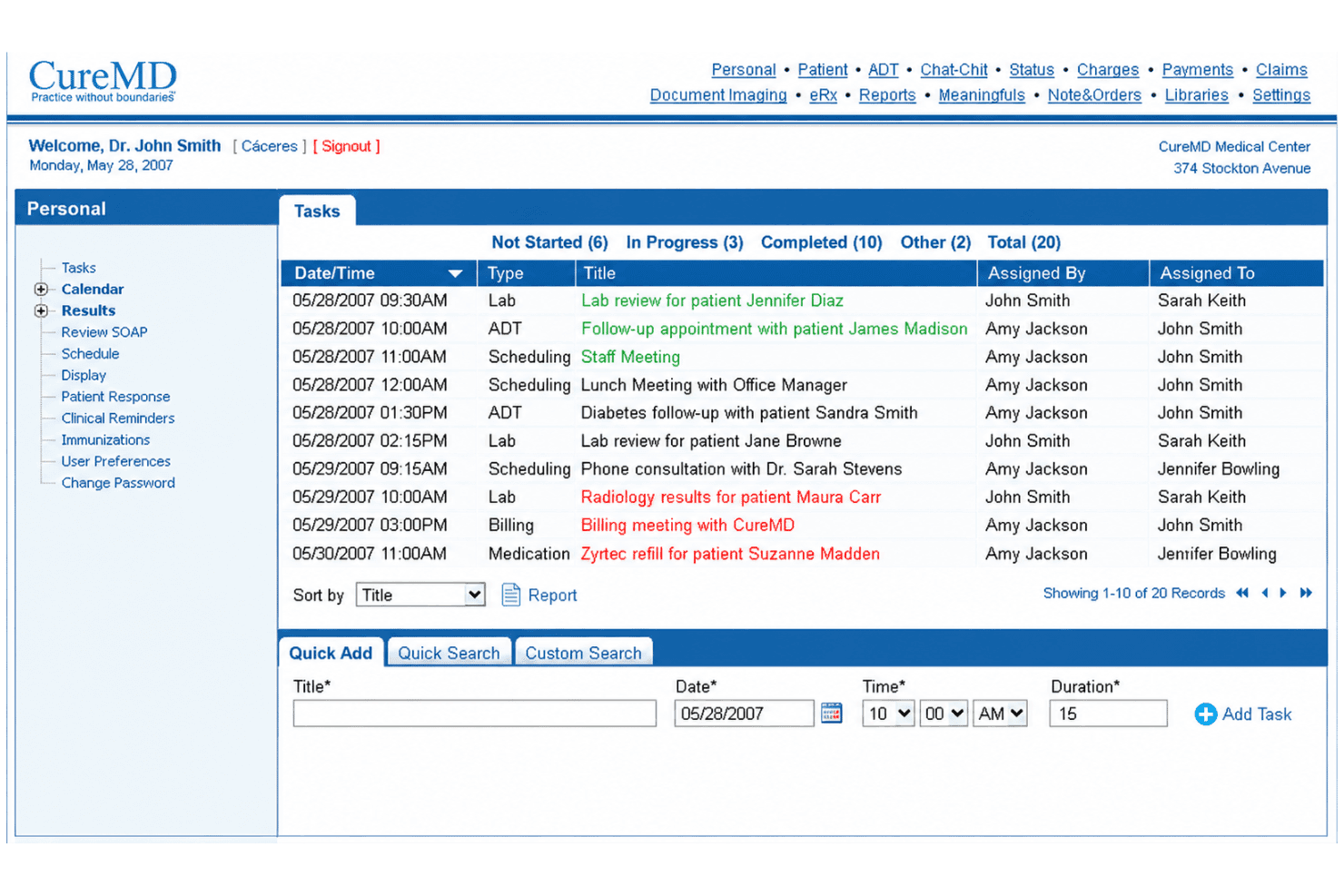
CureMD centralizes EHR, billing, RCM, scheduling, and patient portal tools. CureMD is a cloud-based practice management platform that combines EHR, medical billing, RCM, appointment scheduling, and patient portal tools in a single system built for independent medical practices.
Who Is CureMD Best For?
CureMD is a good fit for solo practitioners and small-to-midsize independent practices that need a single platform covering clinical, billing, and administrative workflows.
Why I Picked CureMD
CureMD earns its spot on my shortlist because of how thoroughly it handles compliance across clinical and billing workflows. I particularly like the built-in audit trail and granular access controls, which let me track exactly who accessed what patient data and when. It's HIPAA, SOC 2 Type II, and ONC-certified, and the MIPS/MACRA compliance tools mean I'm not managing that regulatory layer in a separate system.
CureMD Key Features
- Enterprise scheduling: Manage appointments across multiple providers and locations with built-in reminders.
- Integrated patient portal: Patients can review test results, request appointments, and make payments online.
- Electronic prescribing: Send prescriptions directly to over 40,000 pharmacies with full medication history tracking.
- Revenue cycle automation: Use rules-based claims scrubbing, denial management, and built-in clearinghouse for billing workflows.
CureMD Integrations
CureMD offers native integrations with electronic labs, PACS systems, FramesData, and telemedicine platforms. It connects to over 40,000 pharmacies for electronic prescribing and provides an API for custom integrations.
Pros and Cons
Pros:
- Real-time MIPS/MACRA compliance tracking
- Specialty-specific clinical documentation templates
- Built-in audit trail for all data access
Cons:
- Outdated user interface compared to other options
- Reports of slow system performance
Learn more about CureMD: Best interoperability with health networks
- Free demo available
- Pricing upon request
Visit WebsiteCustomer Rating:3.4/5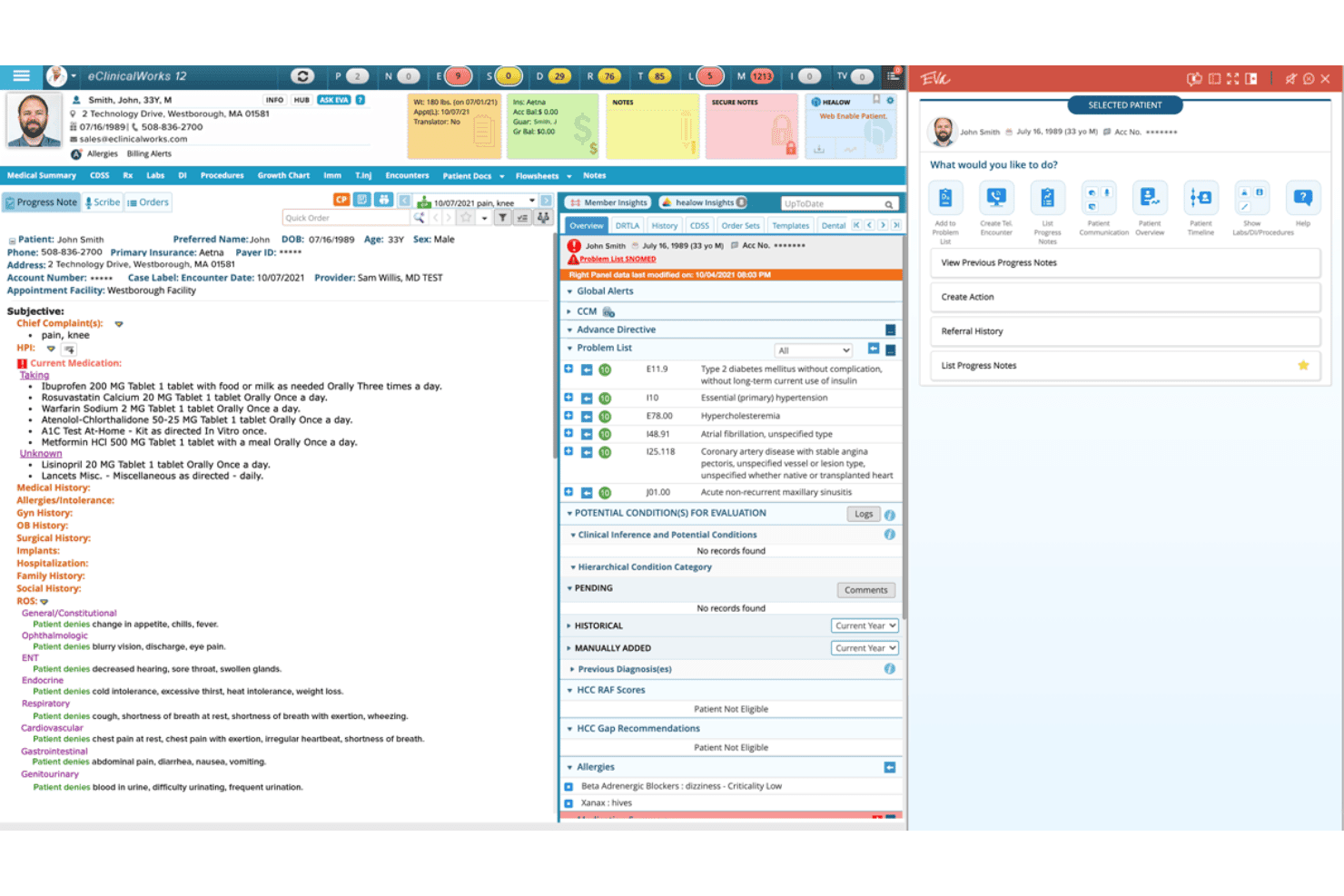
eClinicalWorks coordinates notes, scheduling, billing, RCM, and engagement. eClinicalWorks is a cloud-based EHR and practice management platform that combines clinical documentation, appointment scheduling, medical billing, RCM, and patient engagement tools for independent and ambulatory practices.
Who Is eClinicalWorks Best For?
eClinicalWorks is a strong fit for small to mid-sized ambulatory practices that need a single platform for both clinical and administrative operations.
Why I Picked eClinicalWorks
I picked eClinicalWorks as one of the best because of PRISMA, its health information search engine. PRISMA pulls fragmented patient records from across multiple health networks into one consolidated view. In practice, my team can access outside hospital records, specialist notes, and lab results without chasing faxes. The eClinicalWorks P2P network also enables direct clinical data sharing between connected practices.
eClinicalWorks Key Features
- AI-powered clinical documentation: Automates charting and note creation with Sunoh.ai and Image AI modules.
- Patient self-scheduling portal: Lets patients book, reschedule, or cancel appointments online without staff intervention.
- Integrated revenue cycle management: Handles claim creation, denial management, and payment posting within a unified dashboard.
- Custom clinical templates: Provides specialty-specific templates and forms for consistent clinical data capture and workflow customization.
eClinicalWorks Integrations
eClinicalWorks offers native integrations with Sunoh.ai, healow Genie, Dragon Medical, and Inbox Health for voice dictation, AI clinical documentation, statement management, and patient contact center functions. An API is available for custom integrations.
Pros and Cons
Pros:
- Customizable specialty templates for diverse practices
- Aggregates records from multiple health networks
- AI-driven clinical documentation tools included
Cons:
- System updates can affect clinical workflows
- Offboarding often requires paid data extraction
Learn more about eClinicalWorks: Best for unified billing and scheduling
- Free demo available
- Pricing upon request
Visit WebsiteCustomer Rating:3.9/5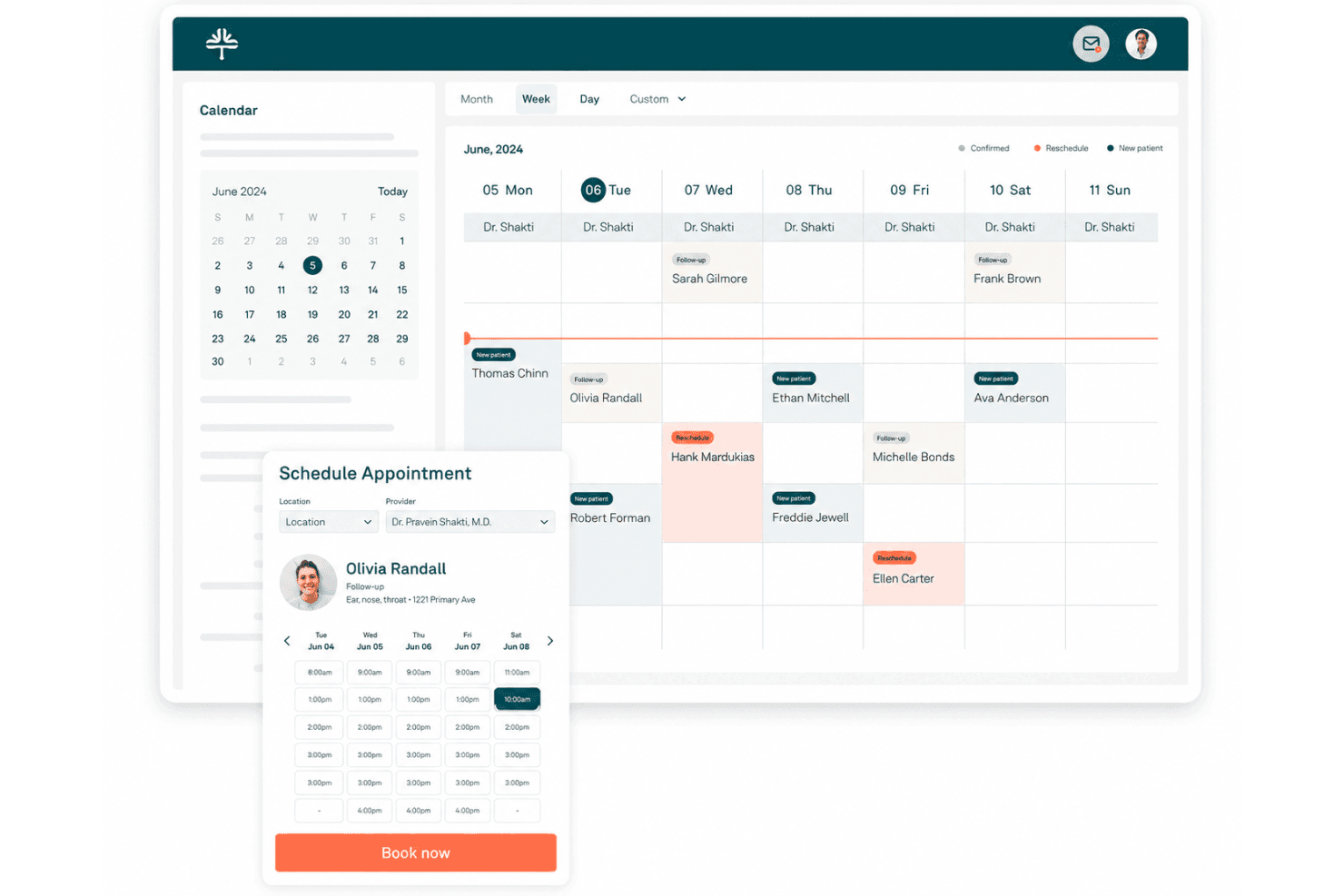
Tebra unifies EHR, billing, scheduling, engagement and practice marketing tools. Tebra is a cloud-based practice management platform for independent healthcare practices that combines EHR, medical billing, appointment scheduling, patient engagement, and practice marketing in one system.
Who Is Tebra Best For?
Tebra is a strong fit for solo practitioners and small independent practices that need billing and clinical workflows managed within a single platform.
Why I Picked Tebra
Tebra earns its spot as one of the best on my shortlist because billing and scheduling aren't separate modules bolted together — they're built into the same clinical workflow. I like that charge capture happens directly from the patient chart, so claims move into the queue the moment a visit is documented. The real-time eligibility checks and automated A/R posting also cut down on the manual back-and-forth that typically slows a billing team down.
Tebra Key Features
- AI-powered clinical documentation: Generate visit notes and chart entries using natural language with AI Note Assist.
- Integrated patient portal: Give patients secure access to personal health records, forms, and secure messaging.
- Custom practice website builder: Design and manage a practice website with appointment links and patient education content.
- Multi-channel appointment reminders: Send automated reminders to patients via SMS, email, and voice calls.
Tebra Integrations
Tebra offers native integrations with Quest Diagnostics, LabCorp, DrFirst, and Fullscript for labs, e-prescribing, and supplements. Additional integrations are available through Keragon, and an API is available for custom integrations.
Pros and Cons
Pros:
- Customizable patient intake and consent forms
- Includes unlimited admin and non-provider logins
- Billing and scheduling use the same workflow
Cons:
- Document scanning sometimes slows down charting
- Specialty templates limited for some disciplines
Learn more about Tebra: Best native iPad and mobile charting
- Free demo available
- Pricing upon request
Visit WebsiteCustomer Rating:3.9/5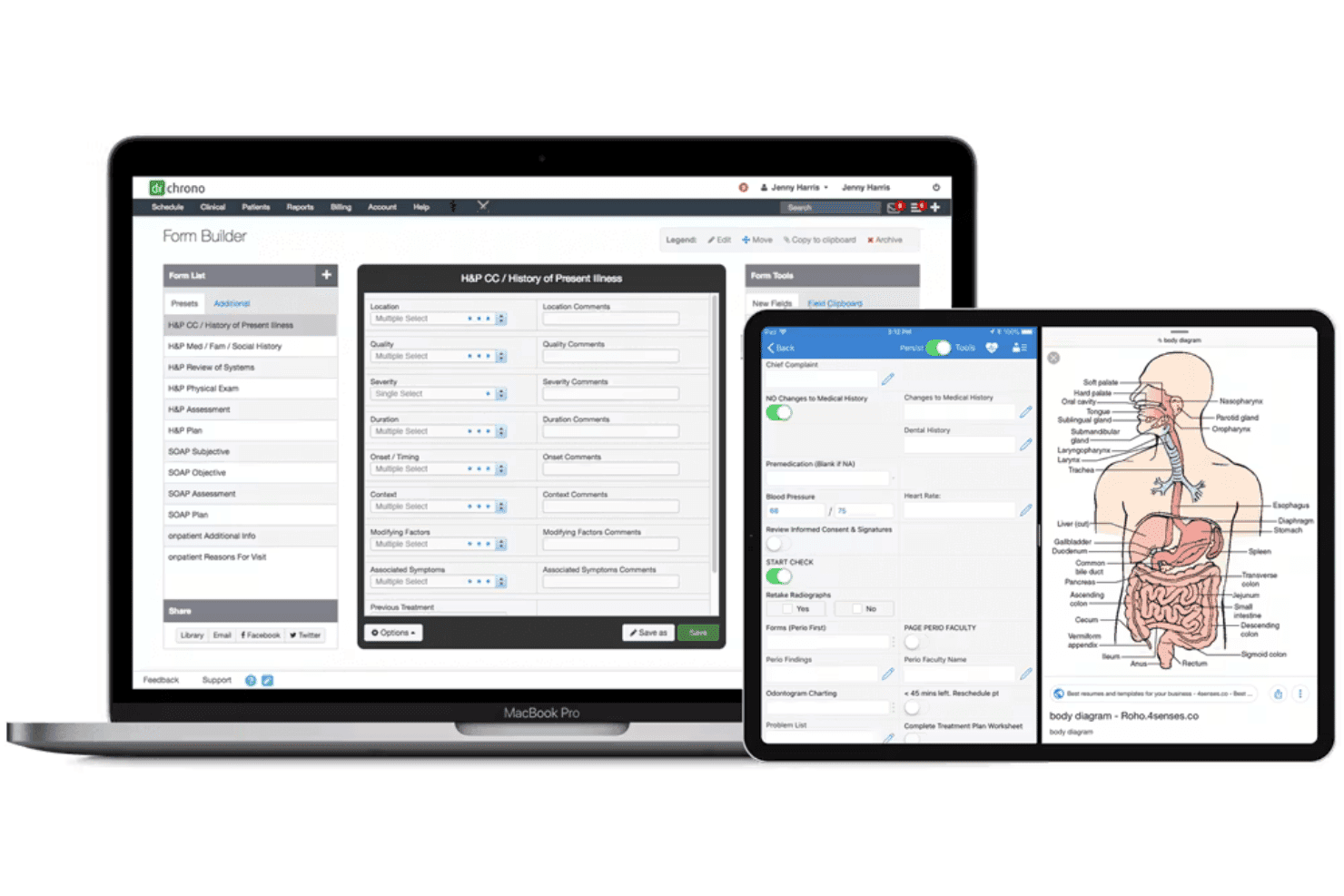
DrChrono combines EHR, documentation, scheduling, billing, telehealth, and RCM. DrChrono is a cloud-based EHR and private practice management platform that combines clinical documentation, appointment scheduling, medical billing, revenue cycle management, and telehealth in a single system built for independent practices.
Who Is DrChrono Best For?
DrChrono is a strong fit for solo practitioners and small independent medical practices that run on Apple devices and want one platform for charting, scheduling, and billing.
Why I Picked DrChrono
DrChrono earns its spot on my shortlist because no other platform matches its native iPad charting experience. I particularly like the EHR drawing tools, which let you annotate diagrams directly on the iPad screen mid-visit, and the AI Scribe for hands-free, speech-to-text documentation. On top of that, the custom charting templates let me build specialty-specific SOAP note workflows that reflect how I actually see patients, not a generic clinical structure imposed by the software.
DrChrono Key Features
- Automated patient reminders: Send SMS, email, and phone reminders to reduce no-shows and keep schedules full.
- Integrated payments processing: Accept payments directly from patients at the point of care or online.
- Real-time insurance eligibility checks: Verify patient insurance coverage during scheduling or check-in.
- Customizable scheduling rules: Set up appointment types, durations, and provider-specific availability across locations.
DrChrono Integrations
DrChrono offers native integrations with Box, Ambra, Curogram, DeepScribe, Collectly, ClearGage, Holly, Fullscript, Demandforce, and Square Point of Sale. An API is available for custom integrations.
Pros and Cons
Pros:
- Full-featured mobile experience for clinicians
- Robust automation for reminders and intake
- Best-in-class iPad charting tools
Cons:
- Support responsiveness varies after onboarding
- No Android mobile app available
Learn more about DrChrono: Best for multi-specialty group practices
- Free demo available
- Pricing upon request
Visit WebsiteCustomer Rating:3.7/5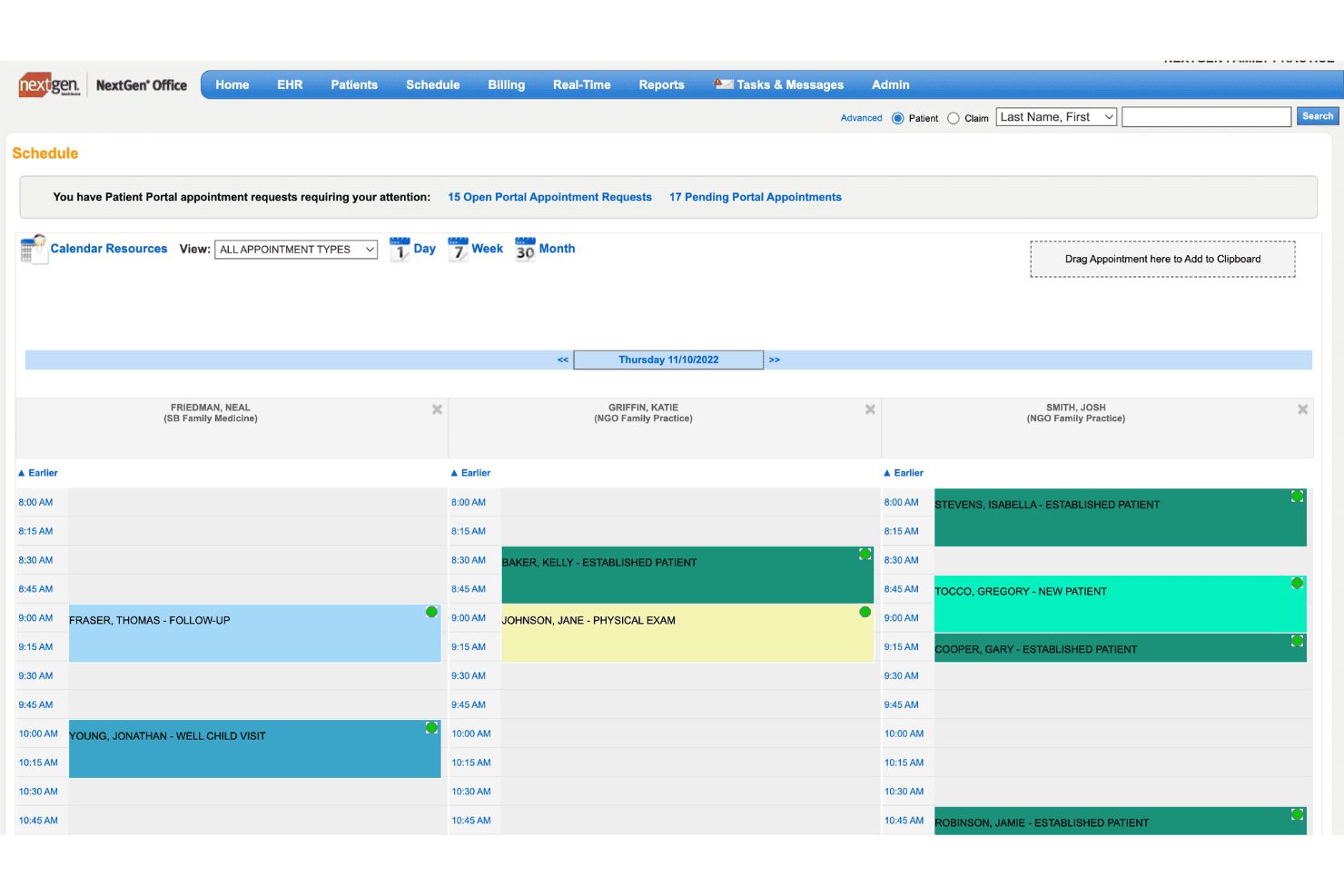
NextGen Office brings EHR, documentation, scheduling, billing, and messaging. NextGen Office is a cloud-based EHR and practice management platform built for independent practices, combining clinical documentation, appointment scheduling, medical billing, and patient communication tools in one system.
Who Is NextGen Healthcare Best For?
NextGen Office suits independent multi-specialty practices with up to 10 providers that need specialty-specific clinical workflows and integrated billing in a single platform.
Why I Picked NextGen Healthcare
I picked NextGen Office as one of the best because it's one of the few platforms that ships with specialty-specific EHR templates across orthopedics, dermatology, cardiology, and behavioral health out of the box. When running a multi-specialty group, your providers aren't retrofitting a generic charting workflow to fit their specialty. I also like Ambient Assist, which converts live patient-provider conversations into structured SOAP notes and pushes them directly into the patient's chart.
NextGen Healthcare Key Features
- Integrated clearinghouse: Processes claims and remittance advice directly from within the platform.
- Self-scheduling portal: Lets patients book appointments online without staff intervention.
- In-app secure messaging: Enables HIPAA-compliant communication with patients and staff.
- Digital intake forms: Collects medical and insurance information electronically before a patient visit.
NextGen Healthcare Integrations
NextGen Office offers native integrations with Doctible, Solutionreach, Clearwave, InstaMed, and Mirth Connect, and provides an API for custom integrations.
Pros and Cons
Pros:
- Supports multi-location independent practices
- Built-in claims and eligibility processing
- Specialty-specific templates for multiple disciplines
Cons:
- Mobile experience can be inconsistent
- Limited template customization options
Learn more about NextGen Healthcare: Best customizable workflow automation
- Free demo available
- Pricing upon request
Visit WebsiteCustomer Rating:3.6/5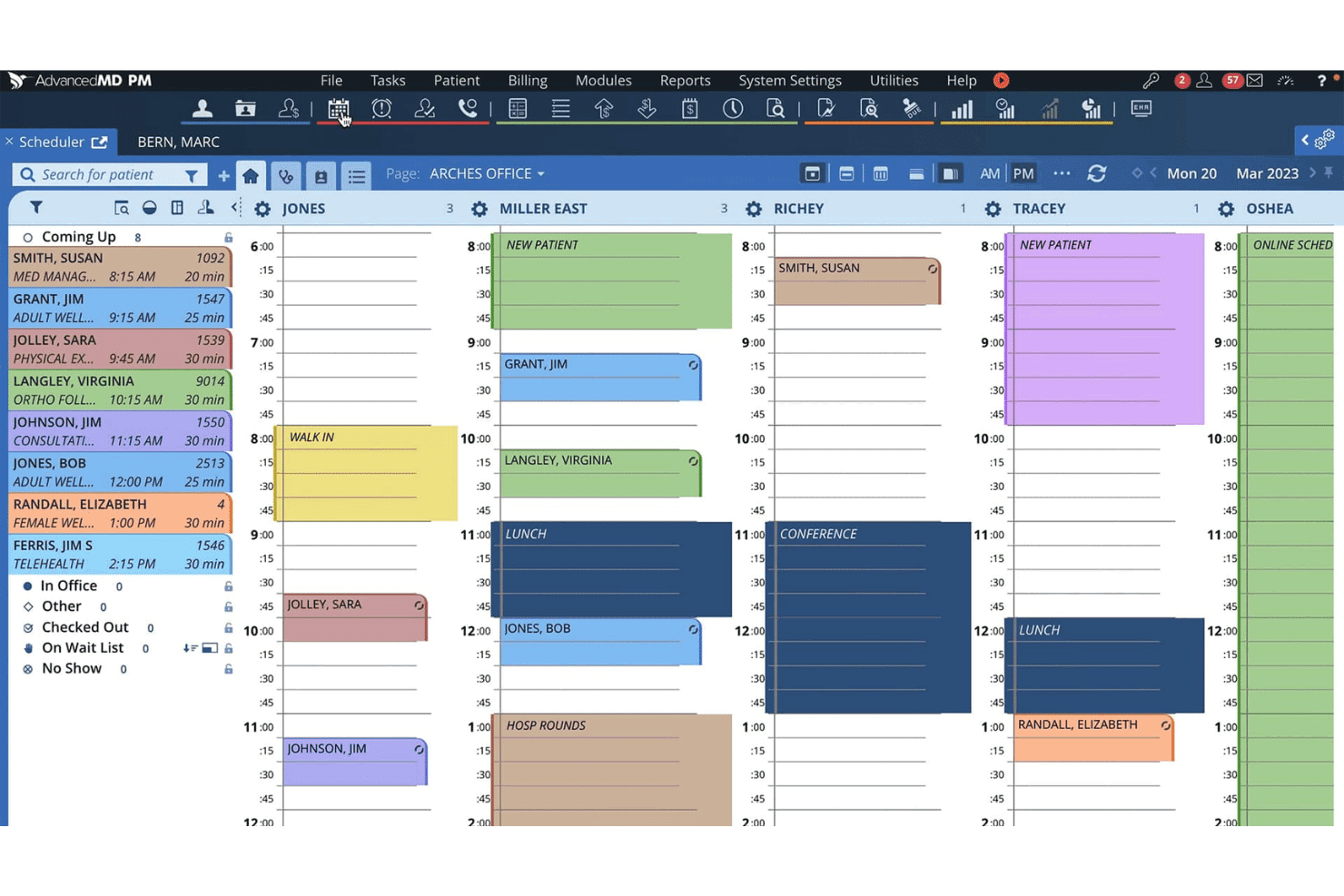
AdvancedMD coordinates EHR, billing, scheduling, engagement, and revenue cycles. AdvancedMD is a cloud-based private practice management platform that unifies EHR, medical billing, appointment scheduling, patient engagement, and revenue cycle management in a single system built for independent practices.
Who Is AdvancedMD Best For?
AdvancedMD is a strong fit for multi-provider group practices that manage complex billing workflows across multiple specialties or locations.
Why I Picked AdvancedMD
AdvancedMD earns its spot on my shortlist because of how deeply configurable its clinical workflows are across specialties. I particularly like that practices can select specialty-specific EHR templates for mental health, MedSpa, physical medicine, and more, rather than adapting a one-size-fits-all system. The AI Clinical Assistant adds another layer, generating notes in five formats from ambient transcription so providers can document exactly how they prefer.
AdvancedMD Key Features
- Patient portal: Lets patients complete intake forms, pay bills, and message providers securely online.
- Integrated telehealth: Delivers embedded video sessions directly within appointment workflows for virtual care.
- Multi-location scheduling: Supports complex scheduling across multiple offices, providers, or specialties in one platform.
- Real-time insurance eligibility verification: Checks patient insurance details instantly before visits, reducing claim rejections.
AdvancedMD Integrations
AdvancedMD offers native integrations with Change Healthcare for clearinghouse services, e-prescribing systems including EPCS and PDMP registries, and provides API access for custom integrations.
Pros and Cons
Pros:
- Customizable multi-location scheduling tools
- Extensive specialty-specific EHR templates
- AI-powered ambient clinical documentation
Cons:
- Overengineered for most solo practitioners
- Customer support responsiveness is inconsistent
 Best integrated telehealth and EHR platform
- Free demo available
- Pricing upon request
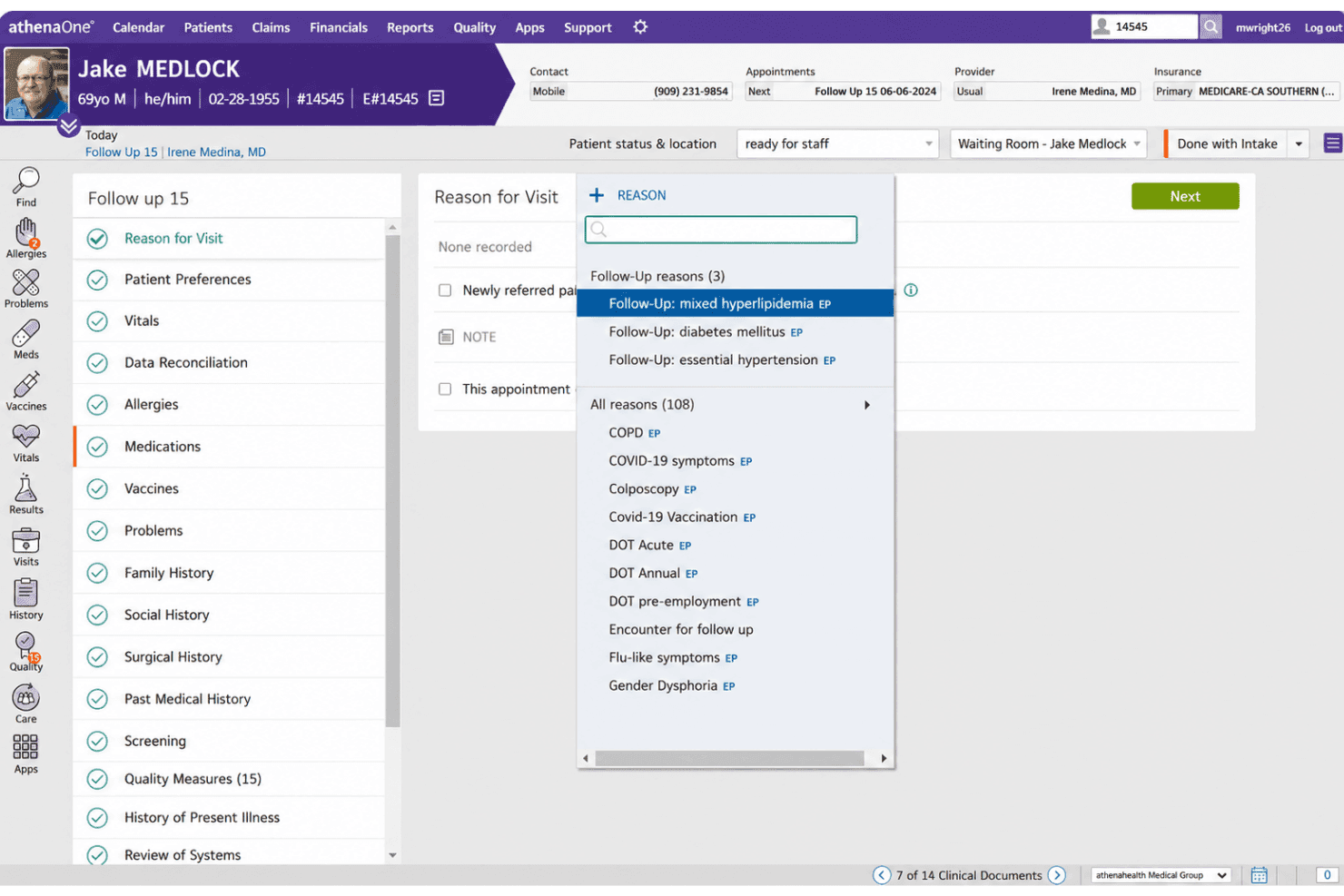
athenaOne links EHR, documentation, scheduling, billing, telehealth, and RCM. athenaOne is a cloud-based EHR, medical billing, and practice management platform that combines clinical documentation, revenue cycle management, patient scheduling, and embedded telehealth in a single system.
Who Is athenahealth (athenaOne) Best For?
athenaOne is a strong fit for independent and small-to-mid-sized medical practices across primary care, urgent care, and specialty settings.
Why I Picked athenahealth (athenaOne)
I picked athenahealth (athenaOne) because its telehealth visits run entirely within the same scheduling, charting, and billing workflow as in-person encounters. There's no separate platform to launch — a patient joins via browser, I complete the visit, and the claim submits through the same billing engine. The Ambient Notes AI scribe also captures telehealth conversations across 80+ languages, which I find genuinely useful for multilingual patient panels.
athenahealth (athenaOne) Key Features
- Automated insurance eligibility verification: Instantly checks patients’ insurance coverage and benefits for every appointment.
- Customizable charting templates: Lets providers tailor clinical documentation to their specialty and workflow preferences.
- Integrated patient portal: Enables patients to access health records, message providers, and manage appointments securely online.
- Real-time clinical decision support: Surfaces network-informed diagnosis suggestions and care gap reminders during charting.
athenahealth (athenaOne) Integrations
athenaOne offers native integrations with Zoom, CertifyOS, Stanson Health, Avhana, Fullscript, Epion, DeepScribe, TimeDoc Health, LucidAct, and Clearwave. An API is available for custom integrations.
Pros and Cons
Pros:
- Real-time eligibility verification at check-in
- Automated chart curation from external records
- Fully embedded telehealth in patient workflow
Cons:
- Percentage-based pricing may affect smaller practices
- Customer support response times can vary
Learn more about athenahealth (athenaOne):
Other Private Practice Management Software
Here are some additional private practice management software options that didn’t make it onto my shortlist, but are still worth checking out:
- 11SimplePracticeBest client portal for solo providers
- 12RXNTBest built-in e-prescribing tools
- 13MedeskBest analytics dashboard for small teams
- 14CarepatronBest collaborative patient management tools
- 15PracticeSuiteBest revenue cycle management customization
- 16PabauBest solution for med spa practices
- 17NoterroBest SOAP note automation for therapists
- 18JaneBest booking system for chiropractors
- 19Azalea HealthBest rural healthcare adaptability
- 20CharmHealthBest built-in telemedicine workflow
How I Evaluate Private Practice Management Software
I evaluate tools across two layers: core billing and scheduling capabilities every tool must have, and the differentiators that reflect how real practices operate.
Core Functionality (Table Stakes for This List)
When I'm selecting tools for my list, I rank each one on a scale from 0 (does not offer the functionality) to 5 (excels in this area) for each core functionality listed below. Then, I calculate the tool's total score into a percentage. Each tool needs to achieve a minimum total score of 65% to be considered for inclusion.
- Appointment Scheduling: I look for multi-provider calendars with automated reminders, waitlist management, and self-service patient booking that reduce front-desk phone volume.
- Medical Billing & Claims: Each tool should support claims submission through an integrated clearinghouse, with ERA posting, denial tracking, and claim scrubbing before send-off.
- EHR/EMR Integration: I check whether the platform includes a native EHR module or connects to external systems, plus charting templates and e-prescribing support.
- Patient Records Management: A centralized database for demographics, insurance details, visit history, and uploaded documents is what I evaluate for day-to-day usability.
- HIPAA Compliance: I look for a signed BAA, role-based access controls, audit logs, and encrypted messaging to confirm patient data stays protected at every touchpoint.
- Insurance Eligibility Verification: Real-time eligibility checks that return detailed benefits breakdowns before a patient visit help prevent billing surprises and claim denials.
Once I have a list of tools that meet the criteria, I consider what sets each platform apart.
Differentiating Factors (What Sets Vendors Apart)
Here's how I compare and contrast different vendors:
Standout Features
Built-in telehealth is a major differentiator because it lets clinicians launch a video visit directly from the patient chart without switching to a separate platform. I also evaluate automated patient engagement tools like two-way texting and digital intake forms, which reduce no-shows and take pressure off front-desk staff. Customizable clinical templates matter just as much—specialty-specific note layouts and macros help providers document visits faster without sacrificing detail.
Beyond Features
Practice specialty fit is one of the first things I consider. A mental health practice needs very different templates and billing codes than a chiropractic or primary care office, and the wrong match creates daily friction. I also evaluate how pricing scales—whether per-provider or flat-fee—since a solo practitioner shouldn't pay the same as a ten-provider group. Billing model matters too: some vendors offer full RCM services alongside the software, which is worth exploring if your team doesn't have a dedicated billing specialist.
How to Choose Private Practice Management Software
It’s easy to get bogged down in long feature lists and complex pricing structures. To help you stay focused as you work through your unique software selection process, here’s a checklist of factors to keep in mind:
| Factor | What to Consider |
|---|---|
| FactorScalability | What to ConsiderWill the software handle your practice’s future growth, like adding more providers, locations, or specialties, without major disruption? |
| FactorIntegrations | What to ConsiderDoes it connect with your existing EHRs, billing partners, telehealth tools, or labs smoothly enough to avoid double entry and data gaps? |
| FactorCustomizability | What to ConsiderCan you tailor templates, billing codes, and workflows to your specialty's needs and unique office processes? |
| FactorEase of use | What to ConsiderIs the interface clean and intuitive for all staff roles—from reception to billing—or will it require ongoing hand-holding or retraining? |
| FactorImplementation and onboarding | What to ConsiderHow much support will you need to migrate data, configure settings, and get your whole team up and running without losing productivity? |
| FactorCost | What to ConsiderDo pricing tiers, contract terms, and incidental fees align with your budget, expected volume, and staffing model? |
| FactorSecurity safeguards | What to ConsiderAre there reliable audit trails, role-based permissions, and proven HIPAA-compliant storage for sensitive patient data? |
| FactorSupport availability | What to ConsiderWhat support channels are available (chat, phone, email) and are service hours a fit for your office schedule and typical needs? |
What Is Private Practice Management Software?
Private practice management software are digital platforms that help healthcare providers coordinate scheduling, billing, patient records, and daily operations in one place.
These systems are designed for small group or solo medical practices, making it easier to manage appointments, process claims, store clinical documentation, and keep sensitive data secure and organized.
Features of Private Practice Management Software
When selecting private practice management software, keep an eye out for the following key features:
- Appointment scheduling: This feature lets staff book, reschedule, or cancel patient appointments with multi-provider calendar support, automated reminders, and waitlists to reduce no-shows.
- Patient records management: Store and manage patient demographics, visit history, insurance details, and documents—all in a centralized and searchable system.
- Medical billing and claims: Submit insurance claims, generate superbills, post payments, and manage denials or rejections directly from the platform to speed up reimbursements.
- EHR/EMR integration: Enables clinical charting, note-taking, and streamlined access to patient health information within or connected to the practice management platform.
- Insurance eligibility verification: Check patient insurance coverage in real time before visits to help avoid claim denials and increase payment reliability.
- HIPAA-compliant data security: Incorporates role-based access, audit logs, and data encryption to ensure sensitive health information is handled securely.
- Reporting and analytics: Generate dashboards and standard reports for financials, billing, appointment volume, and outstanding claims to aid decision-making.
- Patient portal: Offer patients secure access to their records, appointment scheduling, messaging, billing, and online payments from any device.
- Document management: Upload, store, and organize key files like lab results, referrals, and consent forms for fast retrieval during patient visits.
- Task and workflow management: Assign tasks, set reminders, and track office activities to keep your team on top of clinical and administrative work.
Common Private Practice Management Software AI Features
Beyond the standard private practice management software features listed above, many of these solutions are incorporating AI with features like:
- Predictive appointment scheduling: Uses AI to analyze patient history and provider availability, suggesting optimal appointment times to reduce gaps and minimize no-shows.
- Automated coding assistance: AI reviews clinical notes and recommends accurate billing codes, helping reduce claim errors and speed up reimbursement cycles.
- Intelligent claims scrubbing: Scans claims for potential errors or missing information before submission, flagging issues that could lead to denials or delays.
- Natural language charting: Allows providers to dictate or type notes in plain language, with AI converting them into structured clinical documentation for faster charting.
- Patient sentiment analysis: Analyzes patient messages and feedback to identify satisfaction trends or potential concerns, supporting proactive patient engagement.
- Smart document classification: AI automatically sorts and tags uploaded documents, making it easier to retrieve lab results, referrals, or consent forms when needed.
Benefits of Private Practice Management Software
Implementing private practice management software provides several benefits for your team and your business. Here are a few you can look forward to:
- Streamlined operations: Centralized calendars, billing, and patient records simplify administrative workflows and reduce time spent on manual tasks.
- Fewer no-shows: Automated reminders, self-scheduling, and two-way texting help patients remember appointments and make rescheduling more convenient.
- Faster reimbursements: Integrated billing tools, claims scrubbing, and real-time eligibility checks support clean claims and shorter payment cycles.
- Enhanced patient experience: Secure portals, digital intake forms, and easy online payments improve patient satisfaction and make it easier to access care.
- Improved compliance and security: HIPAA-compliant data handling, role-based access, and automated audit logs protect sensitive patient information.
- Better team collaboration: Task assignments, workflow tools, and document sharing keep clinicians and staff connected and on track.
- Data-driven decision making: Built-in dashboards, analytics, and reporting give you a clear view into finances, scheduling trends, and practice performance.
Costs and Pricing of Private Practice Management Software
Selecting private practice management software requires an understanding of the various pricing models and plans available. Costs vary based on features, team size, add-ons, and more. The table below summarizes common plans, their average prices, and typical features included in private practice management software solutions:
Plan Comparison Table for Private Practice Management Software
| Plan Type | Average Price | Common Features |
|---|---|---|
| Plan TypeFree Plan | Average Price$0 | Common FeaturesBasic appointment scheduling, limited patient records, email support, and simple reporting. |
| Plan TypePersonal Plan | Average Price$30-$80/user/month | Common FeaturesFull scheduling, basic billing, electronic charting, insurance verification, and standard data security. |
| Plan TypeBusiness Plan | Average Price$100-$200/user/month | Common FeaturesMulti-provider scheduling, integrated billing, claims management, patient portal, telehealth, and advanced reporting. |
| Plan TypeEnterprise Plan | Average Price$200+/user/month | Common FeaturesCustom integrations, dedicated onboarding, premium support, workflow automation, custom analytics, and API access. |
Private Practice Management Software FAQs
Here are some answers to common questions about private practice management software:
How do I evaluate if a system fits my specialty?
Start by asking if the software supports your specific workflow, documentation templates, billing codes, and compliance needs. For example, mental health, PT, and chiropractic practices each require unique charting and reporting.
Can I migrate data from my old system?
Yes, most solutions offer data migration tools or onboarding support to transfer your patient records, scheduling history, and billing data. Always check for any additional fees or downtime during the process.
Is cloud-based software secure enough for patient records?
Yes, reputable vendors use encryption, role-based access, audit logs, and sign a Business Associate Agreement (BAA) to ensure HIPAA compliance and protect patient data.
What support options are available if my team needs help?
Most vendors provide chat, email, and phone support. Look for published service hours, dedicated reps, or onboarding specialists if your team is new to practice management software.
Can I customize templates and workflows to match how my office operates?
Yes, many platforms let you design your own note templates, schedule types, intake forms, and task lists. Some have more flexible customization than others—always confirm during evaluation.