

Cloud practice management software is a digital platform that lets your healthcare team handle scheduling, billing, patient records, and daily operations from any location with internet access. If you’re looking for dependable software that cuts down on administrative headaches, keeps your team organized, and helps you deliver excellent patient care, you’re in the right place. Choosing the right solution means less time troubleshooting tech and more time focusing on patients. I’ll walk you through the top tools available, what sets them apart, and how you can match your specific practice needs to the platform that fits best.
Why Trust Our Software Recommendations
6,700+
Reviews
20
Industry experts
16+
Evaluation factors
14
Years
Our team has been testing and reviewing software since 2012. As medical practice leaders ourselves, we know how difficult—and important—it is to choose the right software.
For this guide, we evaluated tools using hands-on testing and independent research, scoring tools using our selection criteria.
Our reviews reflect our human editorial judgment, not a sales pitch.
Cloud Practice Management Software Comparison Table
This comparison table summarizes pricing details for my top cloud practice management software selections:
| Tool | Best For | Trial Info | Price | ||
|---|---|---|---|---|---|
| 1 | Best for allied health scheduling and client intake | 14-day free trial | From $19/month | Website | |
| 2 | Best for straightforward medical billing workflows | Free demo available | Pricing upon request | Website | |
| 3 | Best for affordable cloud-based management | Free demo available | From $199/user/month | Website | |
| 4 | Best for data-driven practice and management | Free demo available | Pricing upon request | Website | |
| 5 | Best for multi-specialty practice management | Free demo available | Pricing upon request | Website | |
| 6 | Best for growing independent healthcare practices | Free demo available | Pricing upon request | Website | |
| 7 | Best for mobile-first practice management | Free demo available | Pricing upon request | Website | |
| 8 | Best for integrated clinical and revenue workflows | Free demo available | Pricing upon request | Website | |
| 9 | Best for practices needing scalable workflows | Not available | Pricing upon request | Website | |
| 10 | Best for independent practice operations | Free demo available | Pricing upon request | Website |


Best Cloud Practice Management Software Reviews
Below are my detailed summaries of the best cloud practice management software that made it onto my shortlist. My reviews offer a detailed look at the features, pricing, and integrations of each platform to help you find the best one for you.
 Best for allied health scheduling and client intake
- 14-day free trial
- From $19/month
Visit WebsiteCustomer Rating:4.7/5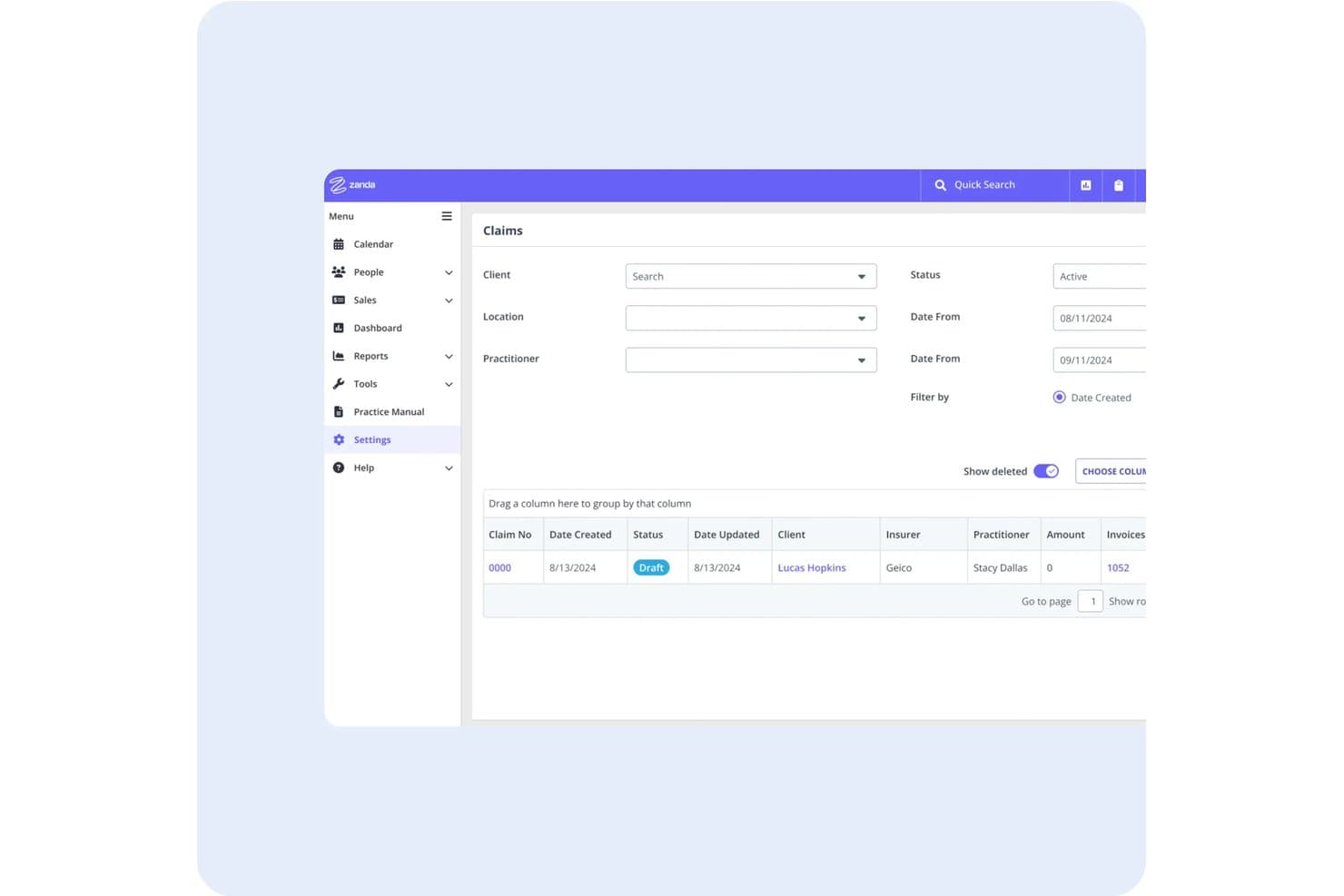
Zanda lets users track and filter insurance claims by status, date, and practitioner. Zanda is a cloud-based practice management platform built for allied health and mental health providers, offering scheduling, client intake, clinical notes, invoicing, and telehealth in one system.
Who Is Zanda Best For?
Zanda is a strong fit for allied health and mental health practitioners—such as psychologists, physiotherapists, and occupational therapists—who need scheduling and client intake in one cloud-based system.
Why I Picked Zanda
I've included Zanda in my top picks because it's one of the few cloud practice management platforms built specifically for allied health and mental health providers, and that focus shows in the scheduling tools. Its calendar handles multiple practitioners, room and equipment booking, and drag-and-drop appointment management across locations. I also like that the online self-booking portal runs 24/7 and pairs directly with automated intake forms, so new clients can book, pay, and complete consent forms before their first appointment.
Zanda Key Features
- BizzyAI session scribe: Automatically transcribes clinical sessions into structured notes, which can be reviewed, refined, and saved directly to the client profile.
- Customizable clinical note templates: Build note templates with body charts, diagrams, and visibility controls to suit different disciplines and multi-disciplinary team setups.
- ISO 27001-certified cloud hosting: Zanda runs on AWS with encrypted data storage, hourly backups, role-based access controls, 2FA, and audit logs.
- Xero and Stripe accounting integrations: Connect invoicing and payment processing to Xero for accounting reconciliation, with Stripe handling PCI Level 1-compliant online payments.
Zanda Integrations
Zanda offers integrations with Stripe, Square, Xero, Ensora Clearinghouse, Google Calendar, Outlook, Apple Calendar, Zoom, Mailchimp, and Physitrack. A read-only public API in beta supports custom integrations.
Pros and Cons
Pros:
- Reviewers praise responsive support and AI notes
- Client intake forms save directly to profiles
- Allied health scheduling handles rooms and resources
Cons:
- No native mobile app for field access
- Physician billing workflows lack deeper RCM tools
Learn more about Zanda: Best for straightforward medical billing workflows
- Free demo available
- Pricing upon request
Visit WebsiteCustomer Rating:4.1/5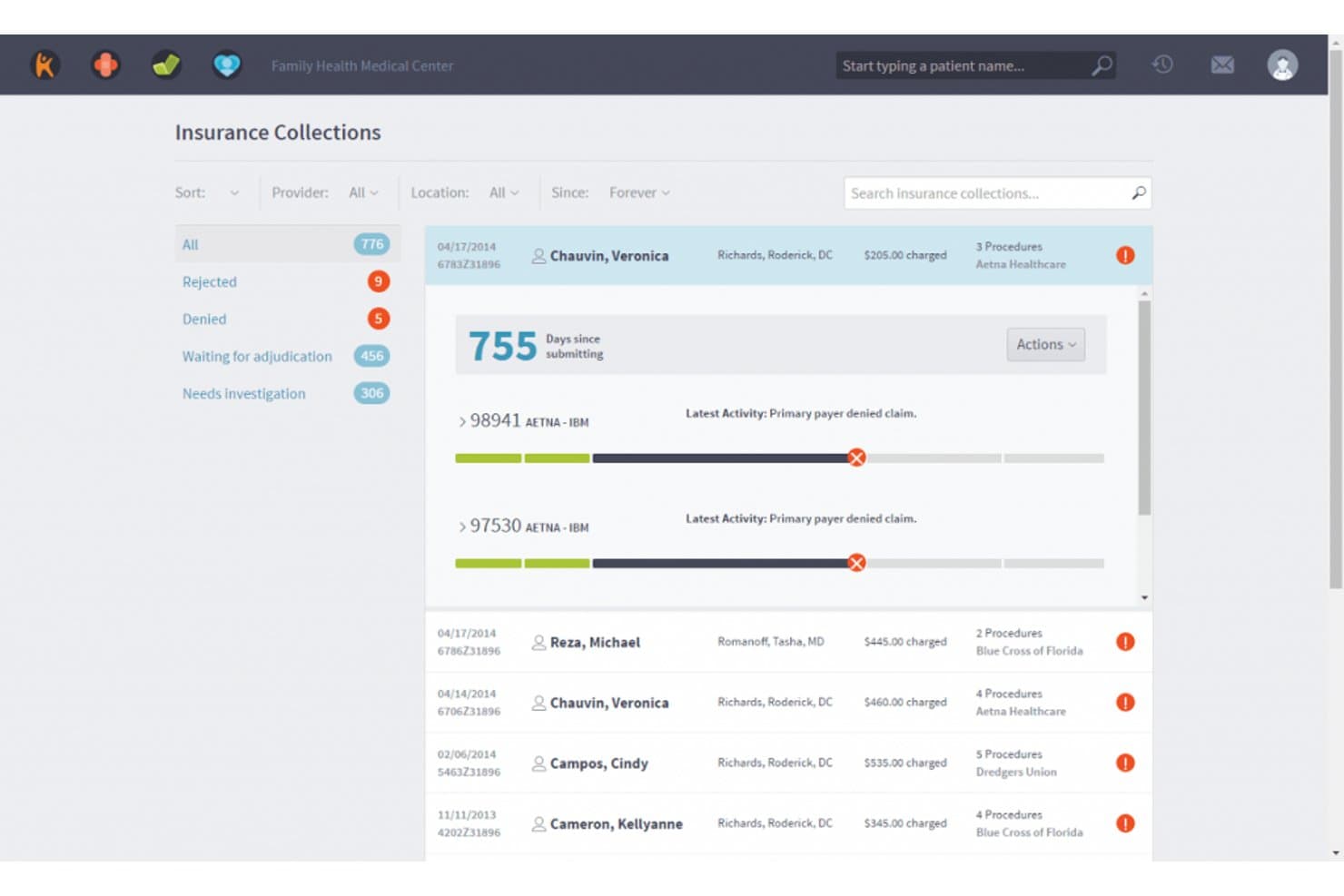
Kareo Billing offers an Insurance Collections dashboard that displays claim statuses, days since submission, and payer activity for efficient billing management. Kareo Billing is a cloud-based medical billing and practice management platform built for independent practices, combining electronic claims submission, insurance eligibility verification, revenue cycle management, patient scheduling, and EHR tools in one system.
Who Is Kareo Billing Best For?
Kareo Billing is a strong fit for small to mid-sized independent practices with 1–10 providers who manage billing in-house.
Why I Picked Kareo Billing
Kareo Billing earns its spot on my shortlist because of how cleanly it handles the claim lifecycle from submission to payment. I particularly like the automated claim scrubbing, which applies payer-specific rules before submission and flags errors before they trigger denials. The eligibility engine checks coverage against 2,700+ payers in seconds, and ERA auto-posting via RPA closes the loop by matching payments to claims without manual posting.
Kareo Billing Key Features
- Provider calendar and scheduling: Manage appointments, track provider availability, and coordinate multiple schedules in one interface.
- Patient portal: Offer patients secure access to records, appointment requests, and billing through a cloud-based portal.
- Integrated e-prescribing: Send prescriptions electronically to pharmacies with controlled substance and PDMP support.
- Automated patient statements: Generate digital or mailed billing statements with QR codes and payment links for patients.
Kareo Billing Integrations
Kareo Billing offers native integrations with WebPT, Stripe, Microsoft Excel, and QuickBooks Online Advanced. It also integrates with over 60 EHR systems and provides an API for custom integrations.
Pros and Cons
Pros:
- Connects billing with scheduling, EHR, and patient records
- Supports in-house and third-party medical billing teams
- Automates claims, payments, and patient billing workflows
Cons:
- Some features and fees depend on the selected Tebra package
- Kareo is now branded and sold as part of Tebra
Learn more about Kareo Billing: Best for affordable cloud-based management
- Free demo available
- From $199/user/month
Visit WebsiteCustomer Rating:3.7/5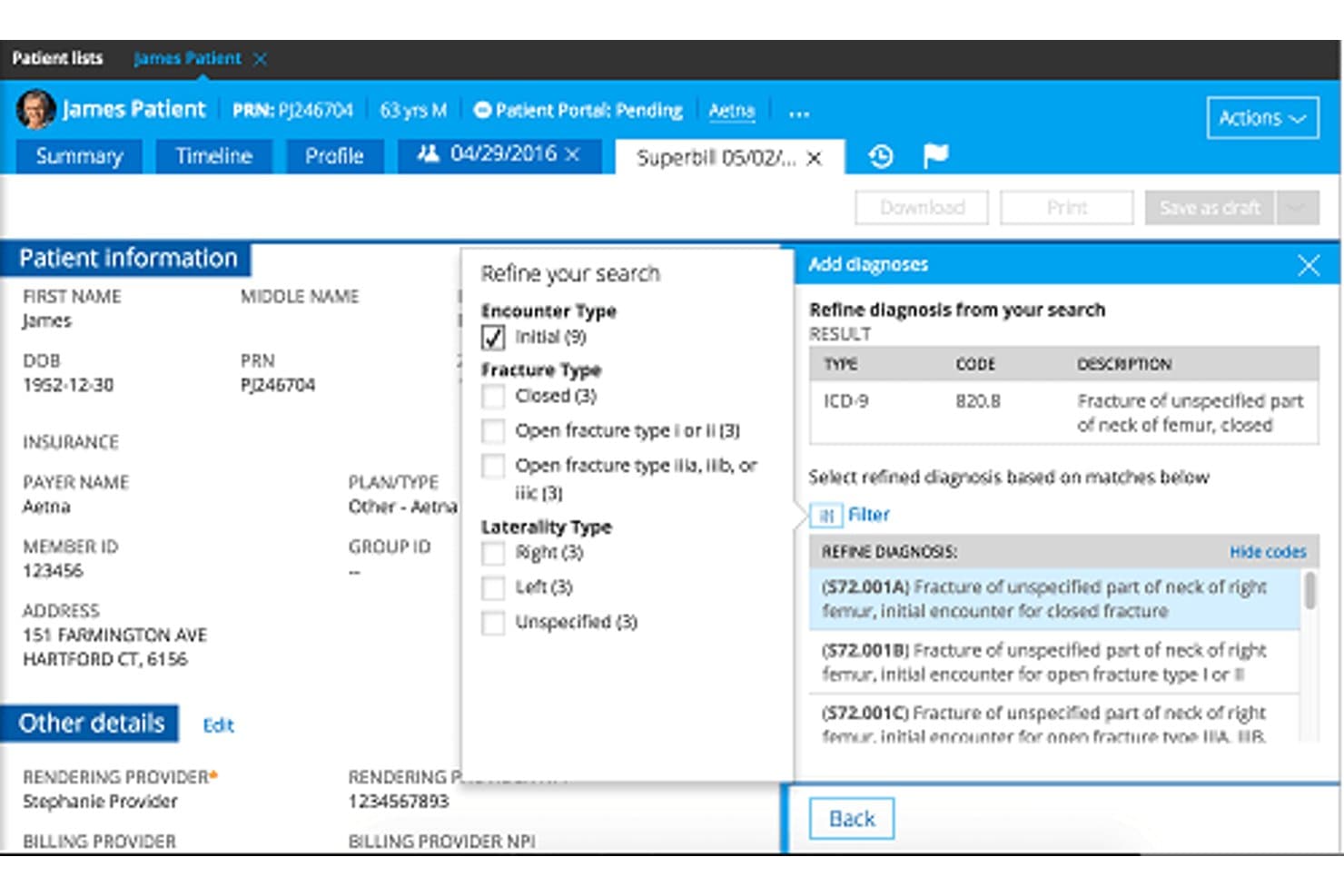
Practice Fusion offers a cloud-based superbill interface with diagnosis search, ICD-9 code selection, and patient insurance details for streamlined billing workflows. Practice Fusion is a cloud-based EHR and practice management platform for independent and small practices, combining charting, e-prescribing, patient scheduling, a patient portal, and medical billing services in one system.
Who Is Practice Fusion Best For?
Practice Fusion is a strong fit for independent physicians and small clinic teams who want a cloud-based EHR and billing system without heavy IT overhead.
Why I Picked Practice Fusion
Practice Fusion earns its spot as one of the best on my shortlist because the per-provider pricing bundles three signing staff licenses and unlimited non-signing staff into a single rate, which I think is genuinely rare in the EHR market. I like that the billing services layer includes same-day claims submission and denial management without requiring a separate RCM vendor. The free library of customizable charting templates also keeps documentation manageable for solo providers running high patient volumes.
Practice Fusion Key Features
- Cloud-based EHR platform: Access records, charting, and documentation from any web browser without on-premise servers.
- Integrated e-prescribing (including EPCS): Send electronic prescriptions for both regular and controlled substances directly to pharmacies.
- Patient portal and mobile access: Let patients view records, manage appointments, and complete intake forms online via the FollowMyHealth portal.
- Lab and imaging center integration: Receive structured results directly in the chart from major labs and imaging providers.
Practice Fusion Integrations
Practice Fusion offers native integrations with Quest Diagnostics, LabCorp, CGM LABDAQ, Updox, Medsender, Avalon Laboratory System, OpenPM, DeepScribe, Service Center, and QuickSlot Health. An API is available for custom integrations.
Pros and Cons
Pros:
- Transparent pricing and a 14-day free trial
- Customizable templates and connections with labs and imaging centers
- Cloud-based EHR with scheduling, charting, e-prescribing, and patient engagement tools
Cons:
- Advanced billing services may involve additional costs
- Requires an annual commitment
Learn more about Practice Fusion: Best for data-driven practice and management
- Free demo available
- Pricing upon request
Visit WebsiteCustomer Rating:3.6/5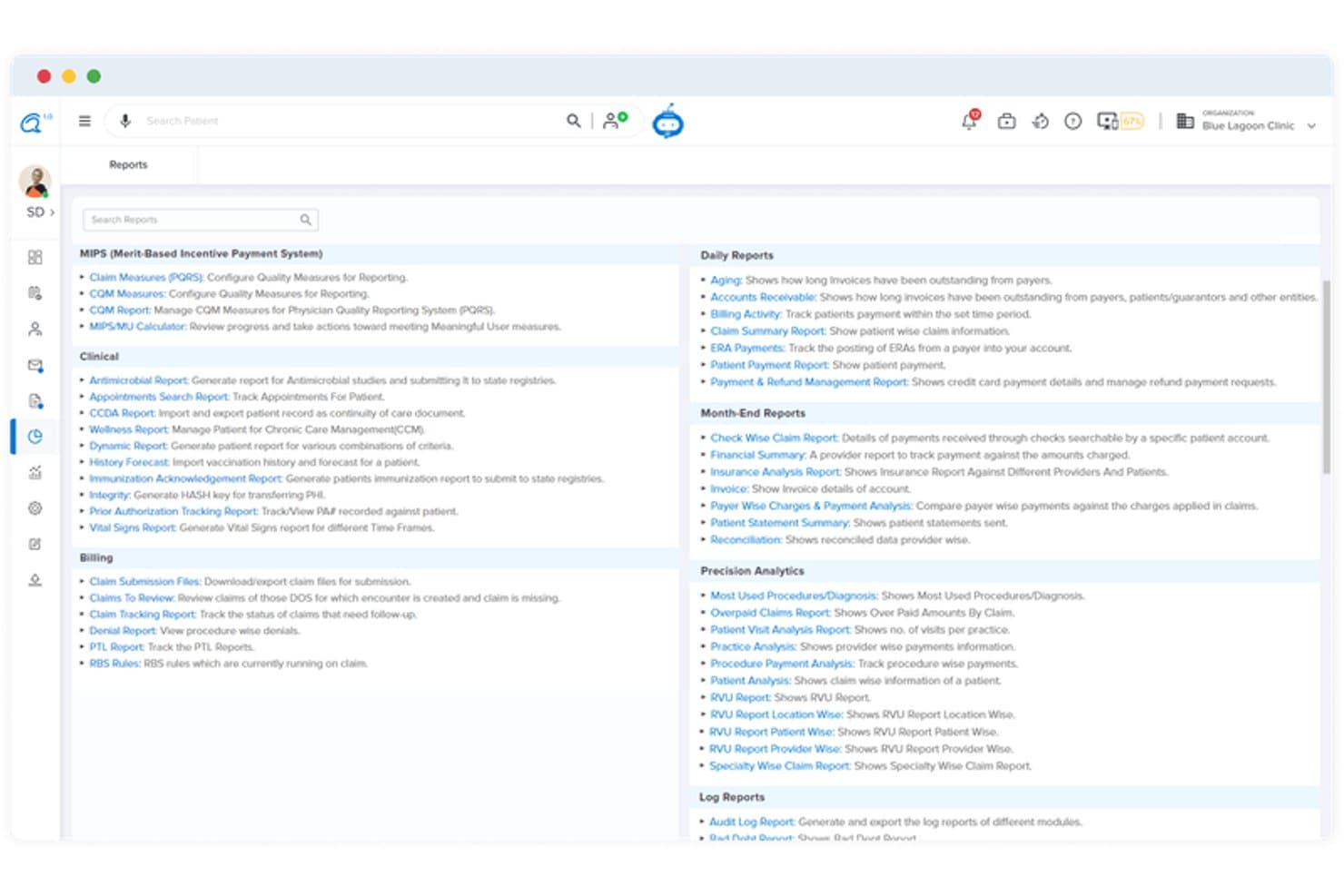
CareCloud offers a comprehensive Reports module with categorized reporting options including MIPS, Clinical, Billing, Daily, Month-End, Precision Analytics, and Log Reports. CareCloud is a cloud-based practice management platform that combines EHR, medical billing, patient scheduling, revenue cycle management, and AI-assisted clinical documentation in a single system.
Who Is CareCloud Best For?
CareCloud is a strong fit for independent and multi-location medical practices that need centralized billing, scheduling, and clinical workflows managed from a single platform.
Why I Picked CareCloud
I picked CareCloud because of how tightly its analytics layer connects clinical and financial performance in one view. The KPI dashboard surfaces billing bottlenecks and payer trends in real time, and the CollectiveIQ rules engine applies payer-specific edits before claims go out the door. I've found that combination especially useful when tracking denial patterns and identifying where A/R cycles are losing time.
CareCloud Key Features
- Integrated EHR: Manage patient records, charting, and e-prescribing within the same platform.
- Patient self-scheduling: Allow patients to book and manage their appointments online.
- Telehealth module: Conduct secure virtual visits and remote consultations with patients.
- Automated patient reminders: Send appointment reminders via SMS, email, or voice to reduce no-shows.
CareCloud Integrations
CareCloud offers native integrations with EHRYourWay, CodoniX EHR, ICANotes, MD Logic, Optivate, Praxis EMR, Sevocity, TeleVox, and Vital Interaction. An API is available for custom integrations.
Pros and Cons
Pros:
- Multi-location scheduling and centralized billing
- KPI dashboard for billing and clinical metrics
- Built-in claim scrubbing with payer-specific edits
Cons:
- Occasional system downtime interrupts workflows
- Support responsiveness is frequently reported as slow
Learn more about CareCloud: Best for multi-specialty practice management
- Free demo available
- Pricing upon request
Visit WebsiteCustomer Rating:3.7/5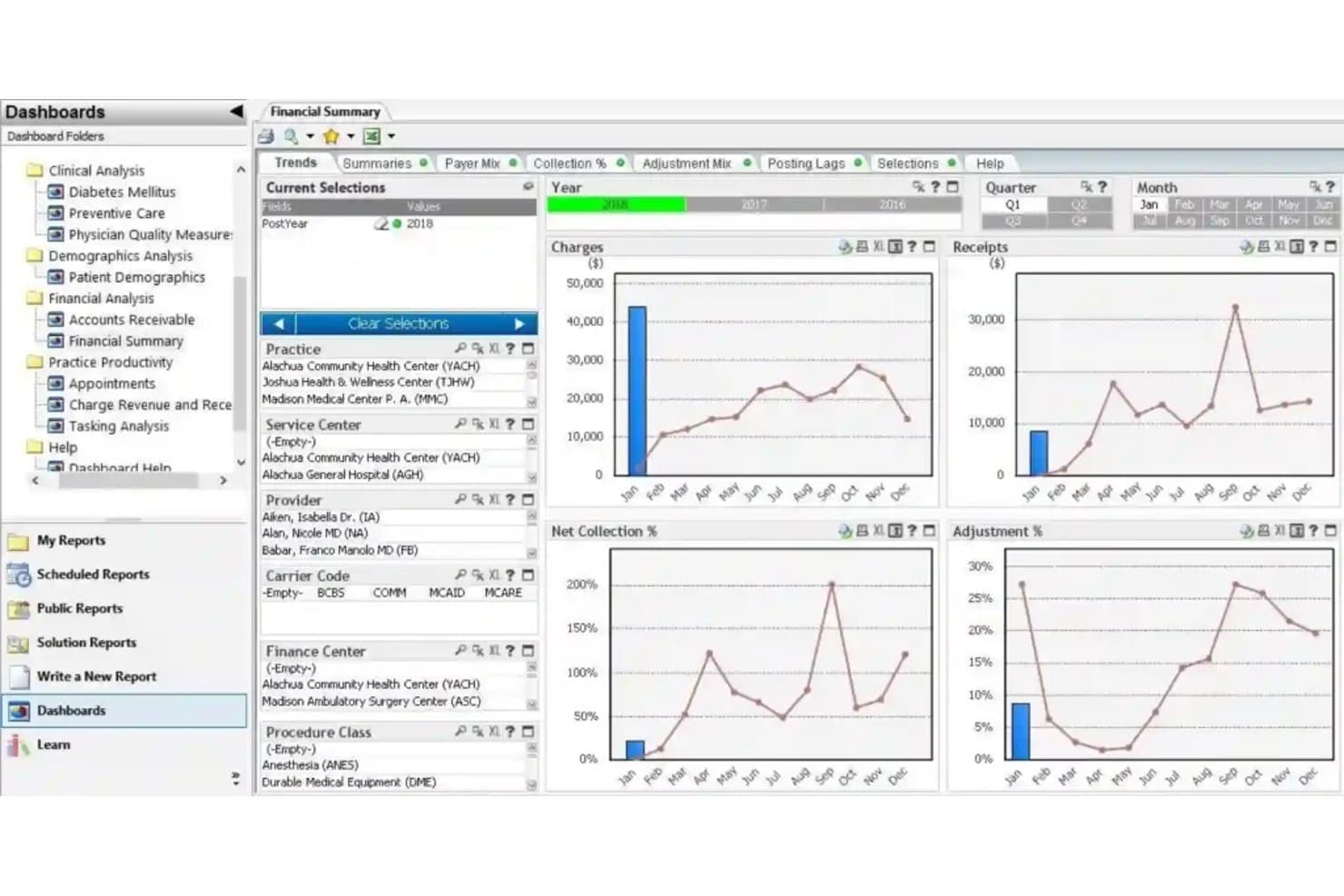
Greenway Health offers a comprehensive Financial Summary dashboard with trend charts for charges, receipts, net collection percentage, and adjustment percentage across monthly and quarterly views. Greenway Health is a cloud-based EHR and practice management platform that combines patient scheduling, medical billing, revenue cycle management, and clinical documentation tools for multi-specialty and multi-location medical practices.
Who Is Greenway Health Best For?
Practice administrators and billing managers at independent multi-specialty clinics will get the most out of Greenway Health's unified scheduling and RCM tools.
Why I Picked Greenway Health
Greenway Health earns its spot on my shortlist because its configurable specialty templates support how different clinical workflows can operate side by side. I like that a single Intergy instance handles OB/GYN charting, cardiology documentation, and pediatric scheduling without forcing each department into the same structure. Novare's AI-assisted coding also surfaces specialty-specific code suggestions and initiates prior authorizations in context.
Greenway Health Key Features
- Integrated patient portal: Lets patients view records, request appointments, and communicate with providers online.
- Automated eligibility verification: Checks insurance coverage in real time at scheduling and check-in.
- Multi-location scheduling: Handles appointments and provider calendars across several clinic sites.
- Built-in revenue cycle management: Supports claim submission, ERA/EOB processing, and payment posting within the platform.
Greenway Health Integrations
Greenway Health offers native integrations with Clearwave, CheckinAsyst, Charge Capture, Luma Health, MotionMD, PatientPop, Breg Vision, and InstaMed. Its Greenway Exchange platform supports data exchange via HL7 FHIR, Direct messaging, and Commonwell Health Alliance. An API is available for custom integrations.
Pros and Cons
Pros:
- Multi-location provider scheduling capabilities
- Real-time insurance verification at check-in
- Configurable templates for multiple specialties and workflows
Cons:
- Support response times are frequently delayed
- Cloud migration can disrupt legacy workflows
Learn more about Greenway Health: Best for growing independent healthcare practices
- Free demo available
- Pricing upon request
Visit WebsiteCustomer Rating:3.9/5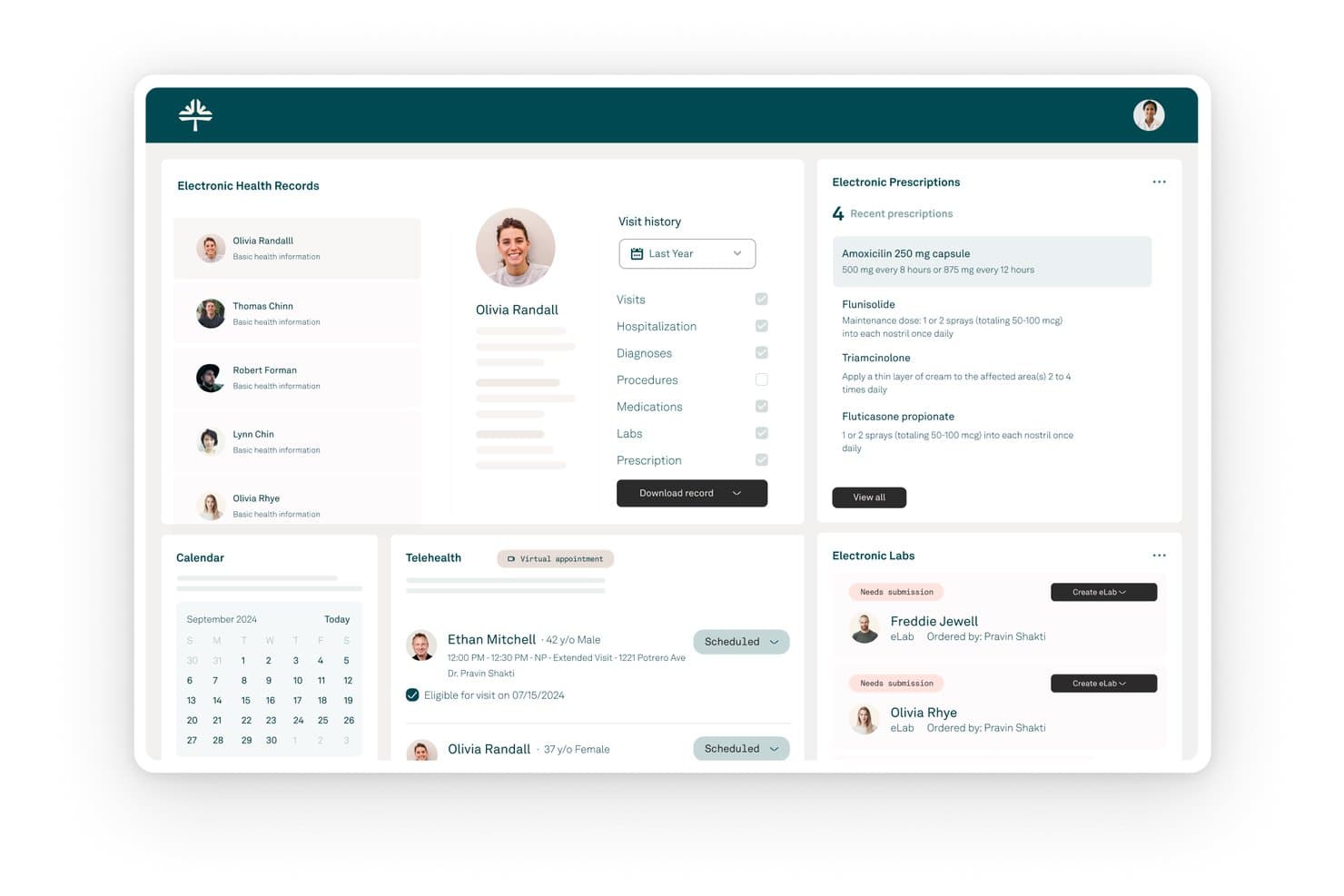
Tebra offers a unified cloud-based dashboard combining electronic health records, prescriptions, telehealth scheduling, labs, and a calendar in one interface. Tebra is a cloud-native practice management platform built for independent medical practices, combining EHR, patient scheduling, medical billing, revenue cycle management, and patient engagement tools in a single system.
Who Is Tebra Best For?
Tebra is a strong fit for small to mid-size independent practices, from solo providers to multi-provider clinics looking to manage growth without adding administrative headcount.
Why I Picked Tebra
I've included Tebra in my top picks because its per-provider pricing model is genuinely built around how independent practices grow. You pay per clinical provider, not per seat, so your entire front desk and billing team can work in the platform without adding to your monthly bill. I also like that Tebra bundles practice marketing tools, including reputation management and AI Review Replies across 80+ directories, inside the same platform where you manage scheduling and billing.
Tebra Key Features
- AI Note Assist: Creates clinical documentation from visit notes to speed up encounters.
- Automated eligibility checks: Verifies patient insurance coverage directly inside the workflow before appointments.
- Advanced telehealth: Hosts HIPAA-compliant virtual visits integrated with patient scheduling and charting.
- Digital intake forms: Lets patients complete and submit registration fields electronically before their appointment.
Tebra Integrations
Tebra offers native integrations with lab providers, imaging centers, Appriss Health for PDMP, EPCS providers, and Google Business Profile, and provides an API for custom integrations.
Pros and Cons
Pros:
- Real-time eligibility checks before appointments
- Built-in patient reputation management tools
- Unlimited non-provider staff seats per account
Cons:
- Built-in telehealth sometimes experiences minor glitches
- Occasional reports of slow customer support
Learn more about Tebra: Best for mobile-first practice management
- Free demo available
- Pricing upon request
Visit WebsiteCustomer Rating:3.9/5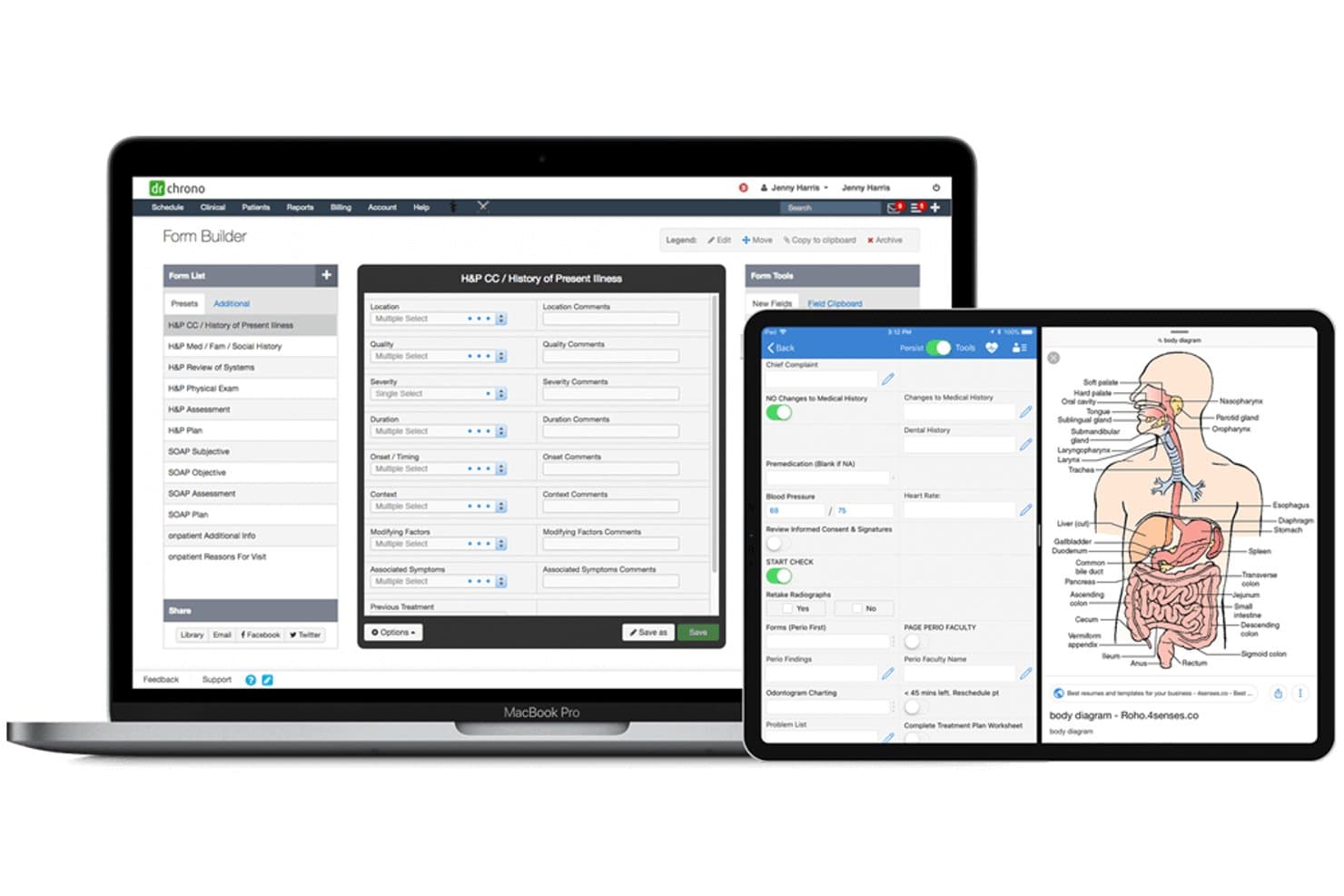
DrChrono offers a cloud-based Form Builder with customizable H&P templates, a mobile patient intake interface, and an anatomical body diagram tool across desktop and tablet devices. DrChrono is a cloud-native EHR and practice management platform that combines patient scheduling, medical billing, clinical charting, and revenue cycle management, built natively for Apple iOS devices alongside full browser-based access.
Who Is DrChrono Best For?
DrChrono is a strong fit for independent physician practices and specialty clinics that run Apple devices and want EHR, scheduling, and billing in one cloud platform.
Why I Picked DrChrono
I picked DrChrono as one of the best because it's built iOS-native from the ground up, not retrofitted for mobile after the fact. Charting on an iPad includes free-drawing directly on diagnostic images, and EverHealth Scribe captures notes hands-free during visits. I can complete a full clinical encounter from an iPhone without ever needing to open a desktop browser.
DrChrono Key Features
- Integrated telehealth: Hosts secure video visits with screen sharing and document upload directly inside the EHR.
- Real-time insurance eligibility checks: Verifies patient insurance coverage within the appointment workflow.
- Automated patient reminders: Sends SMS, email, and phone reminders to reduce no-shows and late cancellations.
- Practice chat: Enables secure in-app messaging between front office, clinical, and billing teams.
DrChrono Integrations
DrChrono offers native integrations with Fullscript, Square, Box, DeepScribe, CrelioHealth, Updox, Ambra Health, and Demandforce, plus marketplace integrations with Birdeye, Weave, Swell, rater8, Beam Health, and InvoiceSherpa. An open API is available for custom integrations.
Pros and Cons
Pros:
- Built-in check-in kiosk for patients
- AI-powered no-show and payment prediction
- Full clinical workflow from an iPad
Cons:
- Support response times can be inconsistent
- Occasional syncing delays with Apple devices
Learn more about DrChrono: Best for integrated clinical and revenue workflows
- Free demo available
- Pricing upon request
Visit WebsiteCustomer Rating:3.8/5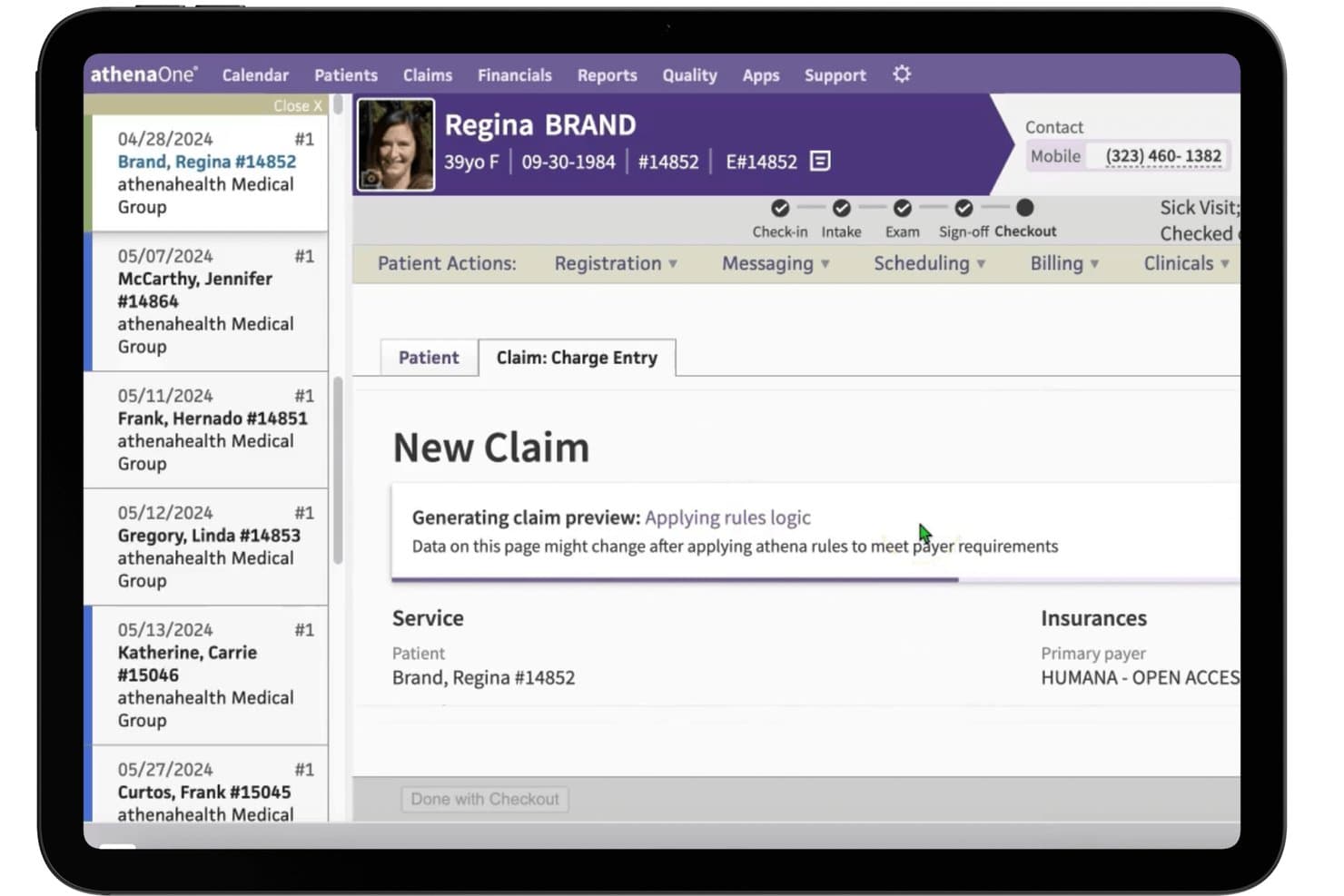
athenaOne offers automated claim scrubbing with rules logic applied during checkout to meet payer requirements before submission. athenaOne is a cloud-native platform that integrates EHR, practice management, medical billing, and patient engagement tools in a single suite built for ambulatory medical practices.
Who Is athenaOne Best For?
It's a strong fit for independent and small-to-mid-sized ambulatory practices that want clinical, billing, and patient engagement tools under one roof.
Why I Picked athenaOne
athenaOne earns its spot on my shortlist because the clinical and billing sides of the platform genuinely talk to each other. I like how Express Coding translates a completed encounter note into CPT and E&M codes in a single click, cutting the gap between documentation and claims submission. The automated claim scrubbing layer then catches errors before submission, which keeps denial rates low without requiring my billing team to manually review every claim.
athenaOne Key Features
- Patient portal: Patients can view lab results, request prescription refills, and message their provider online.
- Automated patient reminders: The system sends appointment reminders by SMS, email, or voice without manual effort.
- Eligibility verification: Insurance eligibility is checked automatically before each visit using data from card images.
- Executive summary dashboards: Management dashboards display revenue, claim status, and workflow bottlenecks in real time.
athenaOne Integrations
athenaOne offers 250+ native integrations through its Marketplace, including Surescripts, CommonWell Health Alliance, Carequality, Dulcian Health CCM Solution, Epion, GetWell Practice, PatientPop, Solutionreach, Experian Health, and esvyda. An API is available for custom integrations.
Pros and Cons
Pros:
- Built-in scheduling, telehealth, patient portal, and digital check-in tools
- AI-assisted billing workflows help reduce manual work and identify claim issues
- Combines practice management, EHR, medical billing, and patient engagement in one platform
Cons:
- The broad feature set may require more onboarding than simpler standalone tools
- Pricing is customized and based partly on practice collections
Learn more about athenaOne: Best for practices needing scalable workflows
- Not available
- Pricing upon request
Visit WebsiteCustomer Rating:3.7/5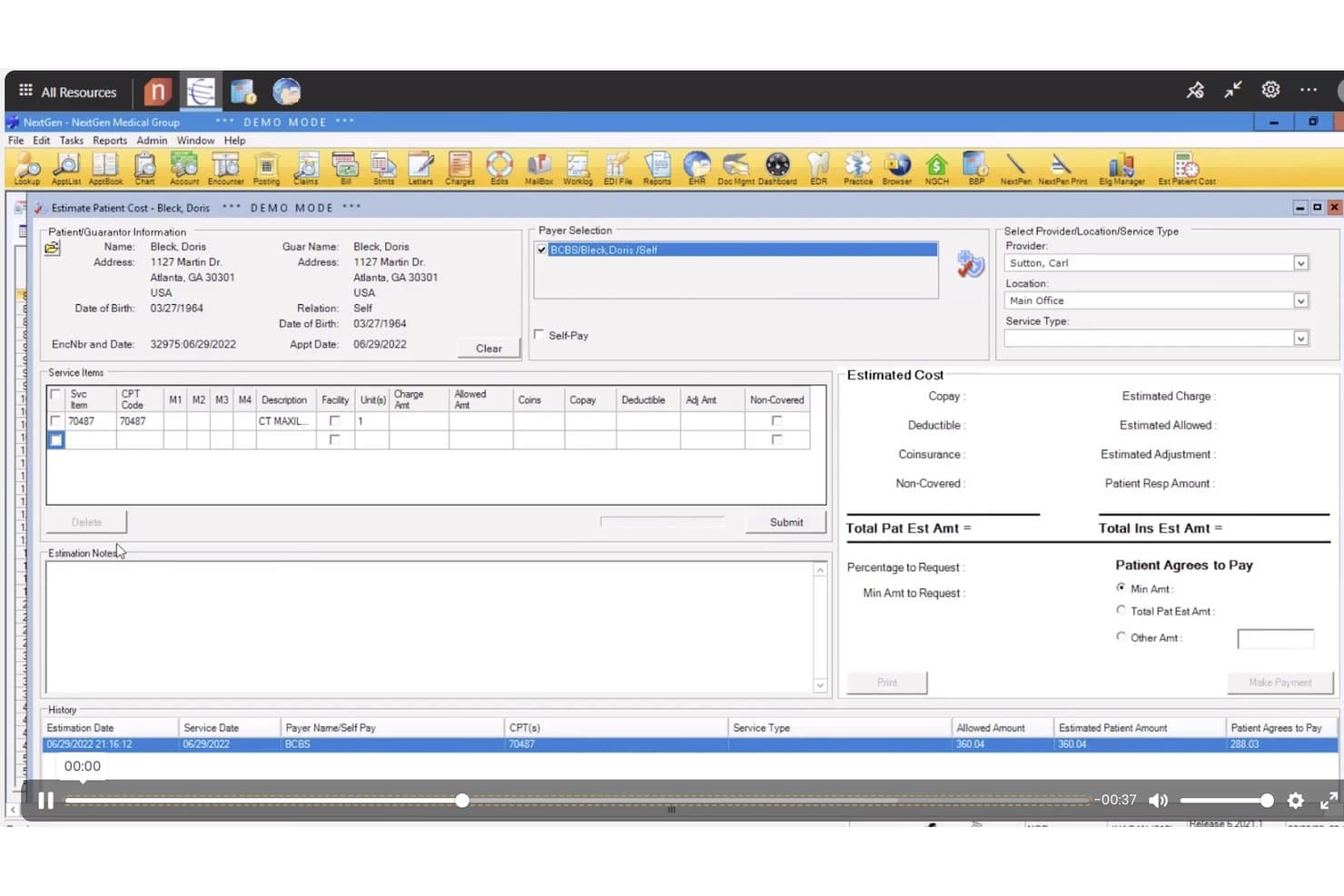
NextGen Office offers an Estimate Patient Cost tool that displays service items, payer selection, and estimated cost breakdowns including copay, deductible, and patient responsibility amounts. NextGen Office is a cloud-based EHR and practice management platform for small independent practices that combines clinical documentation, medical billing, patient scheduling, and revenue cycle management in a single system.
Who Is NextGen Office Best For?
NextGen Office is a strong fit for independent physicians and small practice administrators managing fewer than 10 providers who need an integrated clinical and billing platform.
Why I Picked NextGen Office
I picked NextGen Office as one of the best because the Closed Loop Experience links every patient touchpoint, from self-scheduling to billing, inside one cloud platform. The Clinical AI feature turns live provider-patient conversations into structured SOAP notes in seconds, cutting documentation time after visits. That means scaling your patient volume doesn't require reworking how your practice runs.
NextGen Office Key Features
- Integrated practice management system: Manage patient scheduling, billing workflows, and insurance eligibility checks in one interface.
- Specialty-specific EHR templates: Use prebuilt templates designed for a range of specialties and clinical documentation needs.
- Automated appointment reminders: Send customizable SMS and email reminders to reduce no-shows and keep appointment calendars up to date.
- Cloud-based patient portal: Let patients access their records, lab results, and financial statements securely from any device.
NextGen Office Integrations
NextGen Office offers native integrations with CoverMyMeds, Appriss Health, Surescripts, InstaMed, eFax/Consensus Cloud, Elsevier Infobutton, Waystar, TriZetto, and First Databank. An API is available for custom integrations.
Pros and Cons
Pros:
- Ambient AI auto-generates SOAP notes
- Specialty-specific templates for many practice types
- Closed Loop Experience links all workflows
Cons:
- Mobile app features are not comprehensive
- Reporting customization is limited for power users
Learn more about NextGen Office: Best for independent practice operations
- Free demo available
- Pricing upon request
Visit WebsiteCustomer Rating:3.6/5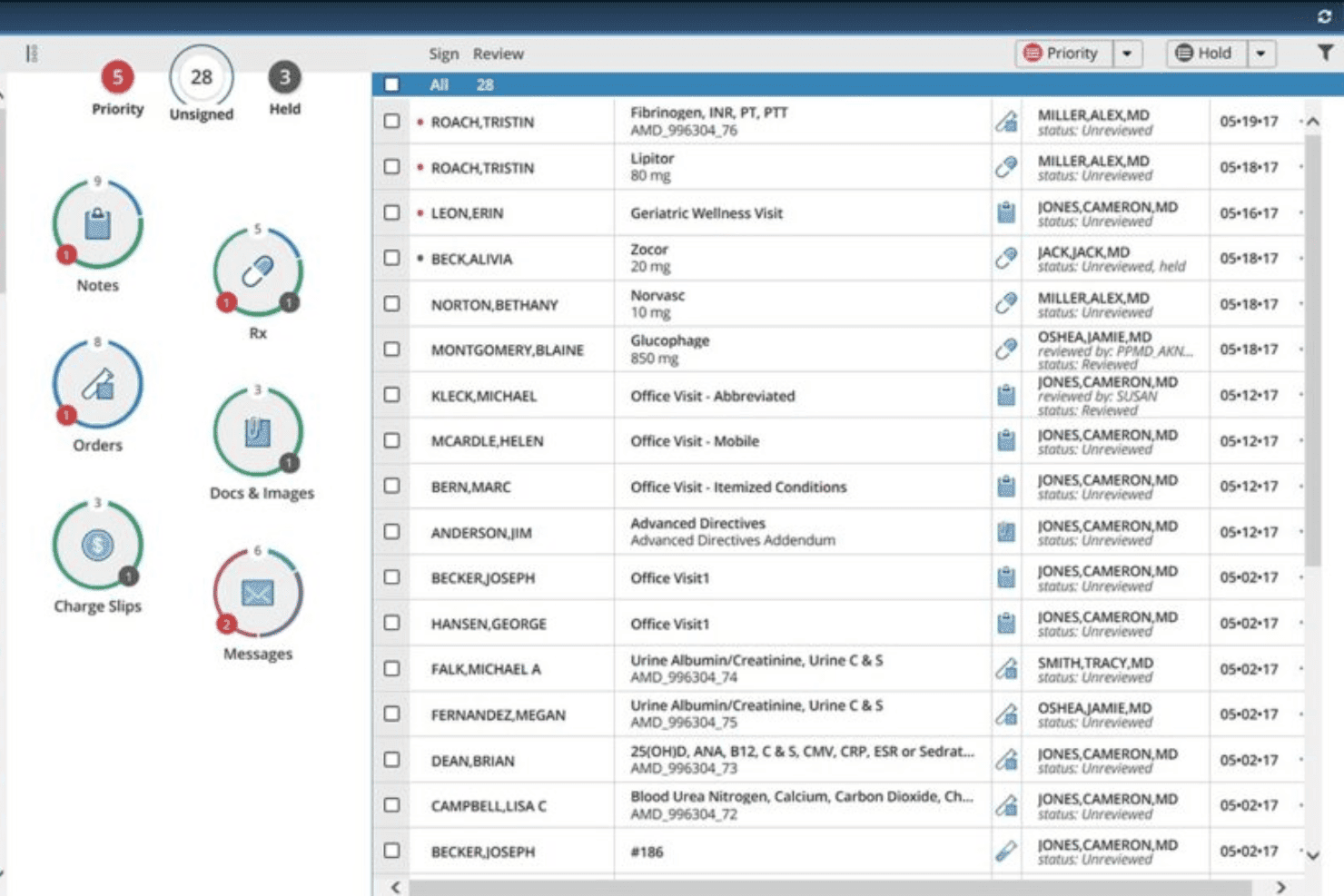
AdvancedMD dashboard for reviewing clinical notes, prescriptions, orders, documents, charge slips, and patient messages AdvancedMD is a cloud-based practice management platform combining EHR, scheduling, medical billing, RCM, and patient engagement in a single unified suite built for independent practices.
Who Is AdvancedMD Best For?
AdvancedMD is a strong fit for independent physician practices and specialty clinics that need a single platform covering clinical, billing, and front-office workflows.
Why I Picked AdvancedMD
I've included AdvancedMD in my top picks because independent practices get a genuinely unified operation, not a patchwork of tools. I particularly like the A/R Control Center, which gives billing staff a single dashboard for tracking outstanding claims, payment posting, and denial management. The AI Clinical Assistant is also worth noting, generating ambient visit notes in five formats directly from the patient encounter.
AdvancedMD Key Features
- Customizable chart templates: Lets you tailor clinical documentation to each provider’s workflow and specialty needs.
- Real-time insurance eligibility checks: Confirms patient coverage instantly before appointments or procedures.
- Integrated telehealth visits: Provides HIPAA-compliant video appointments from directly within the platform.
- Patient portal: Offers online access for patients to manage appointments, view records, and securely message your office.
AdvancedMD Integrations
AdvancedMD offers native integrations with QuickBooks, multiple lab providers, immunization registries, and PDMP registries. An integration marketplace is available, and an API supports custom integrations for group and enterprise practices.
Pros and Cons
Pros:
- Mobile EHR and practice management apps
- Granular A/R dashboard for billing staff
- Patient portal with customizable self-scheduling options
Cons:
- Frequent updates can disrupt user workflow
- Occasional delays with claims status updates
- 11CureMDBest for billing and administrative workflows
- 12eClinicalWorksBest for unified practice and patient management
- 13SimplePracticeBest for behavioral health and wellness practices
- 14RXNTBest for integrated practice management
- 15PracticeSuiteBest for flexible medical billing and RCM
Related Reviews
How I Evaluate Cloud Practice Management Software
I split my evaluation into baseline criteria—like cloud deployment, HIPAA compliance, and billing workflows—and the differentiating factors that separate good tools from great ones.
Core Functionality (Table Stakes for This List)
When I'm selecting tools for my list, I rank each one on a scale from 0 (does not offer the functionality) to 5 (excels in this area) for each core functionality listed below. Then, I calculate the tool's total score into a percentage. Each tool needs to achieve a minimum total score of 65% to be considered for inclusion.
- Cloud-Based Deployment: I check whether the platform runs entirely in a browser without requiring local server installs, and whether it offers mobile apps for providers who need chart access between exam rooms.
- Patient Scheduling & Appointments: Scheduling should include automated reminders, online self-booking, and waitlist management so your front desk isn't buried in phone calls confirming tomorrow's appointments.
- Medical Billing & Claims: I evaluate whether the platform supports electronic claims submission, CPT/ICD coding, ERA/EOB processing, and denial management—the full billing cycle from charge capture to payment posting.
- Patient Records & Demographics: Each tool should maintain patient demographics, insurance details, and chart data, ideally with integrated EHR/EMR functionality like e-prescribing and interoperability via HL7 or FHIR standards.
- HIPAA Compliance & Security: I look for documented HIPAA compliance with a signed BAA, role-based access controls, MFA, and audit trails that let you track exactly who accessed a patient record and when.
- Insurance Eligibility Verification: Real-time eligibility checks before a patient visit prevent claim denials down the line, so I evaluate whether verification is automated or requires manual lookups outside the system.
Once I have a list of tools that meet the criteria, I consider what sets each platform apart.
Differentiating Factors (What Sets Vendors Apart)
Here's how I compare and contrast different vendors:
Standout Features
A patient portal where individuals can book appointments, message providers, and view billing statements saves your front desk hours of phone time. Workflow automation matters too—I look for platforms that auto-assign tasks like pre-visit insurance checks or post-visit follow-ups based on appointment triggers. Reporting dashboards that show provider utilization, claim denial rates, and revenue trends help practice owners spot issues before they become costly.
Beyond Features
Practice size matters—a solo dermatologist needs a different setup than a multi-location primary care group, so I evaluate whether a platform scales from a handful of providers to dozens without requiring a costly tier jump. Integrations with lab systems, clearinghouses, and EHR platforms also factor heavily into my assessment. I look at onboarding support too, especially data migration help, since moving patient records from a legacy system mid-operations is one of the riskiest transitions a practice can make.
How to Choose Cloud Practice Management Software
It’s easy to get bogged down in long feature lists and complex pricing structures. To help you stay focused as you work through your unique software selection process, here’s a checklist of factors to keep in mind:
| Factor | What to Consider |
| Scalability | Can the platform handle your current and projected patient volumes, provider headcount, and location growth? Will you have to migrate again as you expand? |
| Integrations | Does the software connect with your EMR, billing clearinghouse, lab systems, or other core tools? Missing integrations can create duplicate data entry headaches. |
| Customizability | Can you adjust workflows, templates, and reporting to fit your practice type and specialty needs without heavy IT support? |
| Ease of use | How quickly can staff learn the basics and get back to patient care? Watch for clunky menu layouts and hidden settings that slow your team down. |
| Implementation and onboarding | What timeline and support does the vendor offer for setup and data migration? Are resources provided for training new staff and handling legacy record imports? |
| Cost | Look beyond base fees—are patient portal logins, e-prescribe, or claim volumes counted as add-ons? Watch for surprise costs as your usage grows. |
| Security safeguards | Does the tool provide multi-factor authentication, role-based permissions, audit logs, and regular security updates to keep PHI safe? |
| Support availability | When issues arise, can you access help quickly by chat, phone, or email? If you run a lean team, real-time support during clinic hours is crucial. |
What Is Cloud Practice Management Software?
Cloud practice management software are web-based platforms that help medical practices manage patient scheduling, billing, records, and insurance tasks securely from any internet-connected device. These systems let you centralize clinical and administrative workflows without maintaining local servers, support remote access for your team, and provide built-in security and compliance tools to protect sensitive health information.
Features of Cloud Practice Management Software
When selecting cloud practice management software, keep an eye out for the following key features:
- Cloud-based accessibility: Users can access all critical practice data and workflows securely through any web browser without the need for local servers or hardware.
- Patient scheduling: Tools to book, reschedule, and confirm appointments, manage provider calendars, and automatically send patient reminders to reduce no-shows.
- Medical billing and claims management: Supports CPT/ICD coding, electronic claims submission, ERA/EOB processing, and payment posting to simplify your revenue cycle.
- Electronic health records (EHR) integration: Maintains comprehensive patient charts, clinical notes, and histories while supporting secure information sharing among authorized providers.
- Insurance eligibility verification: Real-time checks of patient coverage before appointments help avoid denials and improve front-office workflow efficiency.
- HIPAA-compliant security: Ensures sensitive patient data is protected through encryption, audit logs, role-based access controls, and required compliance documentation.
- Reporting and analytics: Customizable dashboards and reports that track clinical, operational, and financial KPIs help practice administrators make informed decisions.
- Patient portal: A secure, user-friendly portal that gives patients access to appointment scheduling, health records, billing information, and secure messaging with staff.
- Document management: Digital tools to store, share, and organize scanned forms, referrals, insurance cards, and signed consent documents in one central location.
- Task and workflow automation: Automates repetitive administrative steps like follow-up reminders, claims tracking, and intake forms so staff can focus on care delivery.
Common Cloud Practice Management Software AI Features
Beyond the standard cloud practice management software features listed above, many of these solutions are incorporating AI with features like:
- Predictive appointment scheduling: AI analyzes historical appointment data and patient behavior to suggest optimal scheduling times, reducing no-shows and improving provider utilization.
- Automated coding assistance: AI reviews clinical notes and recommends accurate CPT/ICD codes, helping reduce claim errors and speed up billing workflows.
- Intelligent claims denial analysis: AI identifies patterns in denied claims, flags common issues, and suggests corrective actions to improve future claim acceptance rates.
- Natural language processing for documentation: AI converts spoken or typed provider notes into structured chart entries, saving time on manual data entry and improving record accuracy.
- Patient sentiment analysis: AI scans patient messages and feedback to detect dissatisfaction or urgent needs, helping staff prioritize outreach and improve patient experience.
Benefits of Cloud Practice Management Software
Implementing cloud practice management software provides several benefits for your team and your business. Here are a few you can look forward to:
- Anywhere access: Staff and providers can securely manage schedules, patient records, and billing tasks from any device with internet access.
- Improved billing efficiency: Built-in billing workflows, coding tools, and claims management minimize manual errors and speed up revenue collection.
- Streamlined scheduling: Automated reminders and self-service appointment features reduce no-shows and free up administrative time for more valuable tasks.
- Enhanced compliance and data security: HIPAA-compliant security measures, audit logs, and access controls help protect sensitive information and simplify regulatory requirements.
- Patient empowerment: Patient portals let individuals view health records, pay bills online, and communicate securely, improving engagement and satisfaction.
- Reduced IT burden: Eliminating on-premise servers and reducing software maintenance frees up time and resources for your practice.
- Data-driven decision-making: Dashboards and custom reports surface trends in workflow, financials, and patient engagement, helping you optimize operations.
Costs and Pricing of Cloud Practice Management Software
Selecting cloud practice management software requires an understanding of the various pricing models and plans available. Costs vary based on features, team size, add-ons, and more. The table below summarizes common plans, their average prices, and typical features included in cloud practice management software solutions:
Plan Comparison Table for Cloud Practice Management Software
| Plan Type | Average Price | Common Features |
| Free Plan | $0 | Basic scheduling, limited patient records, restricted billing tools, and minimal support. |
| Personal Plan | $25–$60/user/month | Standard scheduling, basic billing, document management, and essential reporting features. |
| Business Plan | $65–$130/user/month | Advanced scheduling, full claims management, integrated patient portal, in-depth analytics, and practice workflow automation. |
| Enterprise Plan | $140–$250/user/month | Custom integrations, premium support, advanced security controls, multi-location management, and dedicated onboarding assistance. |
Cloud Practice Management Software FAQs
Here are some answers to common questions about cloud practice management software:
How secure is cloud practice management software?
Cloud practice management software uses encryption, role-based permissions, and audit logs to protect patient data. Many platforms also offer multi-factor authentication and regular compliance updates to meet regulatory standards like HIPAA.
Can I migrate my existing patient data to cloud practice management software?
Yes, most vendors provide data migration assistance. This includes tools or professional services to transfer appointments, patient records, and billing data from your previous system to the new platform.
Will cloud practice management software work with my current EHR or billing systems?
Many providers offer integrations with electronic health records, laboratory systems, and billing clearinghouses via built-in connections or APIs. Always check for compatibility with your essential tools before purchasing.
What kind of support can I expect?
Support options vary but often include live chat, phone, email, and access to help centers. Some vendors also assign a dedicated onboarding specialist to guide your setup and staff training.
Do I need IT staff to manage cloud practice management software?
No, cloud-based systems are designed to reduce IT workload. Vendors handle server maintenance, security updates, and backups, so your team can focus on patient care instead of technical upkeep.
Can I access the system when working remotely?
Yes, as long as you have an internet connection and appropriate login credentials, you can securely access your practice’s data and workflows from any device, including when working offsite.