

10 Best Practice Management Software Of 2026

10 Best Practice Management Software Shortlist


Practice management software helps healthcare teams organize scheduling, billing, and patient records from one central platform. If you’re searching for the best practice management software, you want tools that remove friction—from checking insurance to tracking claims and making patient workflows less stressful for your staff.
With changing regulations, evolving tech, and the constant challenge of balancing efficiency with compliance, choosing the right system matters more than ever. This list will help you quickly compare trusted options and decide which software fits your practice’s size, specialty, and growth plans.
Why Trust Our Software Reviews
We’ve been testing and reviewing medical software since 2023. As medical practice leaders ourselves, we know how critical and difficult it is to make the right decision when selecting software.
We invest in deep research to help our audience make better software purchasing decisions. We’ve tested more than 2,000 tools for different medical practice use cases and written over 1,000 comprehensive software reviews. Learn how we stay transparent & our software review methodology.
Best Practice Management Software Summary
This comparison chart summarizes pricing details for my top medical practice management software.
| Tool | Best For | Trial Info | Price | ||
|---|---|---|---|---|---|
| 1 | Best for specialty practices streamlining billing and scheduling | Free demo available | Pricing upon request | Website | |
| 2 | Best for specialty clinics needing billing and scheduling support | Free demo available | $280/provider/month | Website | |
| 3 | Best for medical billing, claims, and payment tracking | Free demo available | Price upon request | Website | |
| 4 | Best for small practices needing EHR, billing, and patient management | Free demo available | Pricing upon request | Website | |
| 5 | Best for rural and community clinics managing scheduling and billing | Free demo available | Pricing upon request | Website | |
| 6 | Best for scalable scheduling, billing, and practice operations | Free demo available | Pricing upon request | Website | |
| 7 | Best for simple practice management and medical billing | Free demo available | Pricing upon request | Website | |
| 8 | Best for mobile-friendly scheduling, billing, and patient engagement | Free demo available | Pricing upon request | Website | |
| 9 | Best for independent practices needing billing and workflow tools | Free demo available | Price upon request | Website | |
| 10 | Best for small practices needing cloud-based billing and scheduling | Free demo available | Pricing upon request | Website |



Best Medical Practice Management Software Reviews
Below are my detailed summaries of the best practice management software that made it onto my shortlist. My reviews offer a detailed look at the key features, pros & cons, integrations, and ideal use cases of each tool to help you find the best one for you.
ModMed
Best for specialty practices streamlining billing and scheduling
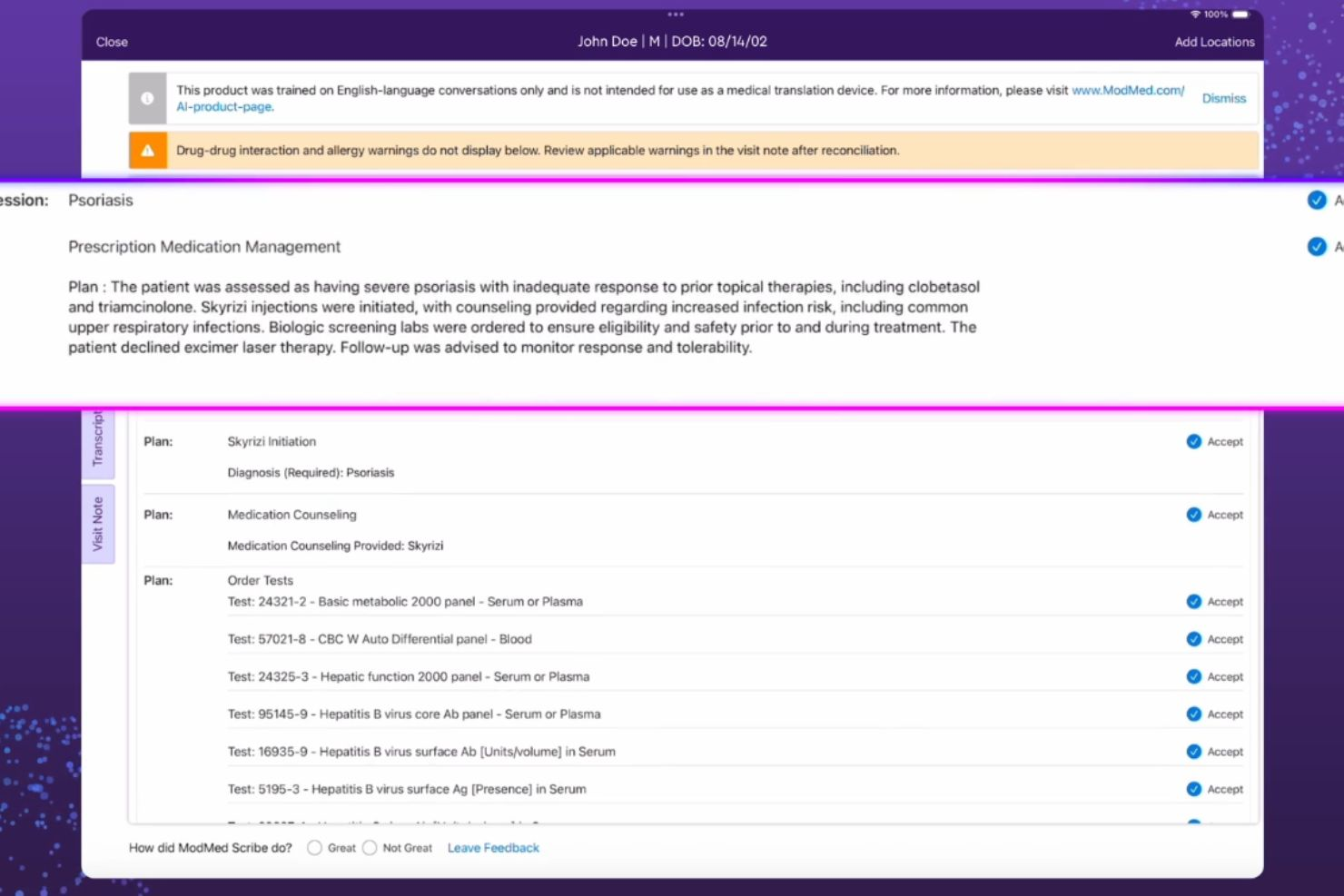
ModMed Practice Management is a specialty-specific practice management platform that combines EHR, scheduling, billing, claims processing, and analytics tools built around the workflows of individual medical specialties.
Who Is ModMed Practice Management Best For?
ModMed Practice Management is built for single-specialty and multi-specialty medical practices that need workflows, templates, and billing logic tailored to their specific clinical area.
Why I Picked ModMed Practice Management
I've included ModMed Practice Management in my top picks because what separates it from generalist practice management platforms is how deeply it's built around individual specialties. The PM software connects directly to ModMed's EMA EHR, and when a provider finalizes a visit note, it auto-generates a clinical bill with pre-populated CPT and ICD-10 codes matched to that specialty's typical procedures. I also like its Appointment Finder tool, which lets schedulers locate available slots based on specific criteria, paired with automated waitlists that keep the schedule dense without manual follow-up.
ModMed Practice Management Key Features
- Patient self-scheduling: Lets patients book their own appointments online, reducing front-desk call volume.
- Paperless check-in via kiosk and mobile: Patients complete check-in digitally using ModMed Kiosk or a mobile device before their visit.
- Quoting tool: Generates out-of-pocket cost estimates and easy-to-read patient quotes before services are rendered.
- Customizable claim scrubbing: Reviews and flags claim errors before payer submission to reduce rejections and denials.
ModMed Practice Management Integrations
ModMed connects to third-party systems through its synapSYS healthcare community, which supports app marketplace connections, SMART on FHIR apps, radiology system data exchange, pathology and clinical lab interfaces, hospital connections, and health information exchange (HIE) networks. Its interface with Change Healthcare connects practices with over 1,200 lab entities. ModMed also offers a proprietary API (EMA Proprietary API) that allows connected applications to access key functionality of the EMA EHR and Practice Management software. The API is built using FHIR standards and supports bi-directional data sharing for clinical data, demographics, insurance, payments, and appointments.
Pros and Cons
Pros:
- Built-in automated coding suggestions
- iPad-first design with tap-and-swipe charting
- Specialty-specific templates for clinical workflows
Cons:
- Limited scalability for larger enterprise practices
- Analytics reports load slowly during peak use
Best for specialty clinics needing billing and scheduling support

PrognoCIS is a cloud-based EHR and practice management platform that combines appointment scheduling, medical billing, prior authorization tracking, referral management, and specialty-specific clinical documentation tools.
Who Is PrognoCIS Best For?
PrognoCIS is a strong fit for specialty clinics, including orthopedics, cardiology, and behavioral health practices, that need tailored clinical workflows alongside billing and scheduling tools.
Why I Picked PrognoCIS
PrognoCIS earns its spot as one of the best on my shortlist because of how well it handles specialty-specific clinical workflows alongside billing. I particularly like the pre-authorization tracking, which automatically creates an authorization request the moment an order is placed, then links incoming responses directly back to that order. The specialty template library is also impressive, covering everything from pain management to OB-GYN, and every template is fully customizable per provider.
PrognoCIS Key Features
- Referral management: Track, document, and store incoming referrals, with each referral linked directly to the relevant patient chart.
- Patient portal and mobile app: Lets patients complete intake forms, schedule appointments, request prescription refills, and message providers from any device.
- Document management: Attaches faxed and scanned documents directly to patient charts, with a filterable document list for quick retrieval.
- PrognoAI: Delivers real-time clinical documentation, patient history summarization, and AI-assisted provider support built into the EHR workflow.
PrognoCIS Integrations
PrognoCIS integrates with Surescripts, AP Easy, OpenEdge, Stax, and Nuance, as well as Zocdoc, Braintree and PayPal, IdenTrust, TriZetto Provider Solutions, and DrFirst. PrognoCIS also builds custom integrations and offers API access for connecting with labs, radiology companies, vaccine registries, and other clinical systems.
Pros and Cons
Pros:
- Built-in task assignment between billers and clinicians
- Unified EMR-to-billing navigation in one click
- Deep specialty template customization per provider
Cons:
- Claims submission process can be complex
- Mobile app lacks full desktop functionality


CollaborateMD is a cloud-based practice management and medical billing software that centralizes claims processing, denial management, eligibility verification, patient payments, and EHR integrations.
Who Is CollaborateMD Best For?
CollaborateMD is a strong fit for independent medical practices and billing companies that handle high claims volumes and need detailed payment tracking.
Why I Picked CollaborateMD
CollaborateMD earns its spot on my shortlist because of how tightly its billing and claims workflows are built around denial prevention. I like that it uses a built-in clearinghouse with Level 2 Claim Edits, including CCI and NCD/LCD checks, that catch errors before a claim ever leaves the practice. Its AI-powered Universal Import also stands out to me, letting teams pull patient and claims data from any EHR without manual field mapping, which cuts down significantly on re-entry errors.
CollaborateMD Key Features
- Real-time eligibility verification: Checks patient insurance eligibility automatically before appointments and at the point of service.
- Appointment scheduling and digital check-in: Manages front-office scheduling and enables patients to complete check-in digitally before their visit.
- ERA auto-posting: Automatically posts electronic remittance advice to the correct patient accounts, reducing manual payment reconciliation.
- Customizable reporting dashboards: Lets billing teams build and configure reports around specialty-specific metrics and revenue cycle performance.
CollaborateMD Integrations
CollaborateMD integrates with EHR and EMR platforms through standard and custom HL7 interfaces, with preferred partners including Practice Fusion, Nexus Clinical, Alleva, PBO MD, Stride, The Tree, Amazing Charts, Praxis, PrognoCIS, KIPU, and Hello Health. It also has direct lab integrations with Quest Diagnostics, LabCorp, and LabDAQ, and offers an API-powered Universal Import tool for importing data from any EHR.
Pros and Cons
Pros:
- Quick claims billing with low startup costs
- Over 125 built-in reporting options
- High first-pass claims submission rate
Cons:
- No built-in EHR module included
- No mobile apps for Android or iOS
Tebra
Best for small practices needing EHR, billing, and patient management
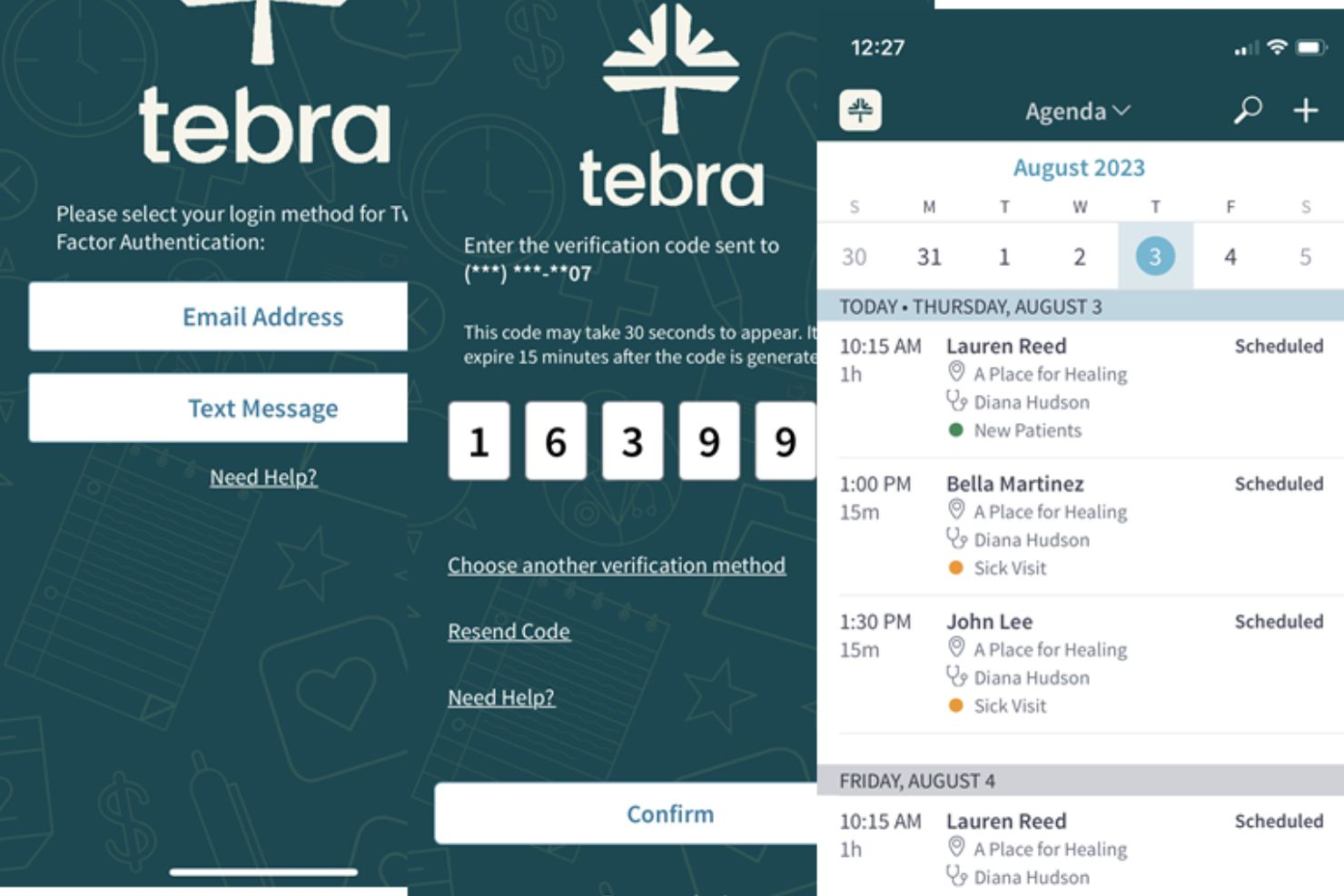
Tebra is a cloud-based EHR+ platform built for independent practices that combines clinical documentation, billing, scheduling, patient engagement, and practice marketing in one connected system.
Who Is Tebra Best For?
Tebra is a strong fit for independent and small group practices that want a single platform covering clinical, billing, and patient-facing workflows.
Why I Picked Tebra
Tebra earns its spot on my shortlist because it's one of the few platforms built specifically for independent practices, where there's no IT department and every tool has to pull its weight. I like the AI Note Assist feature, which drafts clinical notes so providers spend less time at the keyboard after each visit. The built-in patient intake tools also stand out: digital forms reduce waiting room time without requiring a separate solution. For small practices that can't afford to stitch together multiple vendors, that level of coverage in one login matters.
Tebra Key Features
- Electronic labs: Order tests and view lab results in one place, without paper, extra portals, or additional clicks.
- Insurance eligibility verification: Verify coverage, copays, and deductibles instantly before appointments to prevent claim denials.
- Two-way text communication: Send and receive messages with patients directly through the platform on their preferred channel.
- Robotic process automation (RPA): Automate ERA posting, data transfers, and A/R updates to reduce manual billing errors.
Tebra Integrations
Tebra integrates with 60+ EHRs, including athenahealth, AdvancedMD, DrChrono, Allscripts, Elation, NextGen, Practice Fusion, and Easy Dental. It also integrates with tools like Fullscript, Medsender, DoctorConnect, ScribeHealth, and QuickSlot Health. A SOAP API is available for custom integrations.
Pros and Cons
Pros:
- Mobile app for charting on the go
- AI-assisted clinical note drafting
- Built-in practice marketing and reputation tools
Cons:
- Claim rejection reasons can be unclear
- Occasional system slowdowns during uploads

Best for rural and community clinics managing scheduling and billing

A cloud-based practice management and EHR platform, Azalea Health covers patient scheduling, clinical documentation, billing, and telehealth for outpatient and community care settings.
Who Is Azalea Health Best For?
Azalea Health suits independent practice administrators and clinical staff who manage both patient care workflows and revenue cycle operations within a single system.
Why I Picked Azalea Health
Azalea Health earns its spot on my shortlist because it's built specifically around the workflows rural and community clinics actually run. I like that the scheduling module includes automated patient reminders, which directly addresses appointment adherence in lower-density markets. The built-in real-time eligibility verification checks insurance coverage before each visit, so billing staff aren't chasing claim issues after the fact.
Azalea Health Key Features
- Patient portal: Lets patients view records, request prescription refills, and message their care team online.
- Clinical documentation: Provides customizable charting templates tailored to common visit types and specialties.
- Claims management: Tracks claim status and flags denials so billing staff can resubmit without leaving the platform.
- Chronic care management: Supports care plan creation and tracking for patients with ongoing conditions.
Azalea Health Integrations
Azalea Health offers an API Marketplace with a library of approved third-party applications that connect using SMART on FHIR APIs. Verified integrations include Labcorp and Quest Diagnostics for lab connections, Phreesia for patient intake, PatientPay and DoctorConnect for patient payments and engagement, RevSpring for billing engagement, and Medsender for fax-to-workflow automation. An API is available for custom integrations.
Pros and Cons
Pros:
- Drag-and-drop scheduling with appointment notes
- Telehealth is included at no extra cost
- Combines EHR, billing, and scheduling on one platform
Cons:
- Prescribing workflow requires too many clicks
- MIPS reporting tools are limited and unreliable

Best for scalable scheduling, billing, and practice operations
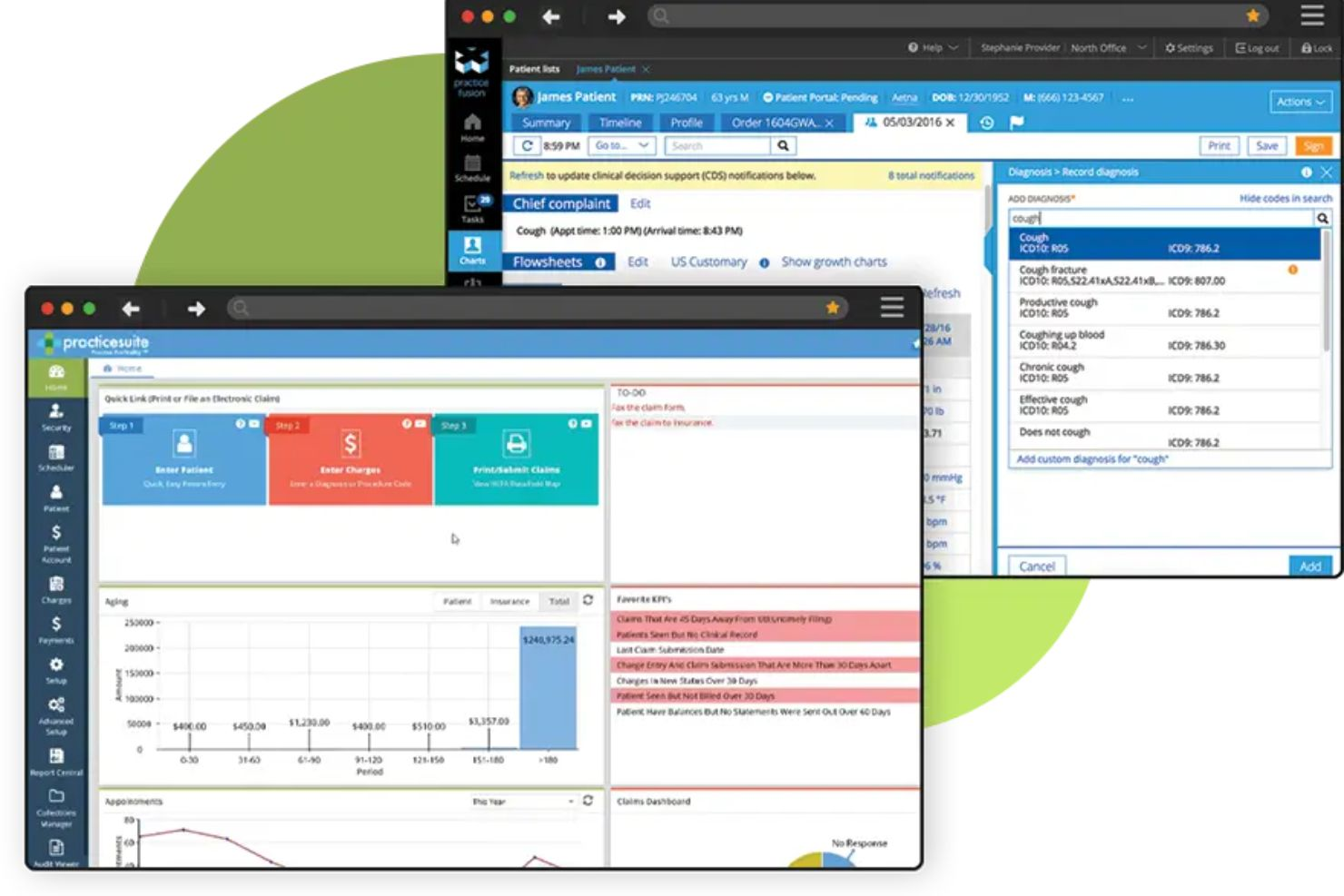
PracticeSuite is a cloud-based medical office platform covering practice management, scheduling, EHR documentation, medical billing, revenue cycle management, and patient engagement tools.
Who Is PracticeSuite Best For?
PracticeSuite is a strong fit for independent practices and billing companies that need a scalable system to manage operations across multiple providers or locations.
Why I Picked PracticeSuite
I picked PracticeSuite as one of the best because it's genuinely built to scale, whether you're a solo provider or a multi-location group handling billing for dozens of clients. I particularly like the Central Billing Office feature, which lets billing teams access all client accounts through a single sign-on and monitor practice health KPIs across every client from one dashboard. The mass claim correction tool is also something I find useful at scale: when denials hit across multiple accounts, you can batch-correct submissions instead of fixing them one by one. The modular pricing model means you're not locked into the full platform from day one either.
PracticeSuite Key Features
- Automated eligibility checks: Automatically verify patient insurance eligibility before appointments, with on-demand checks available for last-minute bookings.
- Resource-based scheduling: Assign appointments across multiple providers and locations, with color-coded appointment types and configurable default durations.
- Report Central: Access 140 built-in financial and operational reports, with the ability to save favorites and interact with live report data.
- Charge validation: Flag coding errors and claim issues before submission to reduce avoidable denials at the point of entry.
PracticeSuite Integrations
PracticeSuite's partner marketplace includes integrations across categories like e-prescribing, direct messaging, lab integrations, clearinghouse, e-faxing, and appointment notifications. It offers a bi-directional integration with Practice Fusion, and provides a Plug and Play API for custom integrations along with FHIR API support for clinical data interoperability.
Pros and Cons
Pros:
- Fully customizable eval and SOAP templates
- Handles both UB04 and CMS1500 billing
- Supports 160+ billing specialties natively
Cons:
- No built-in clinical dictation tool
- Setting up new patient cases takes effort


NueMD is a cloud-based practice management platform that combines medical billing, appointment scheduling, claims management, and EHR tools for small to mid-sized medical practices across nearly 100 specialties.
Who Is NueMD Best For?
NueMD is a good fit for independent and small group practices that need a straightforward system without the complexity of enterprise-level platforms.
Why I Picked NueMD
I picked NueMD as one of the best because it keeps billing and practice management genuinely uncomplicated. What I like most is its built-in claims clearinghouse, which lets you process unlimited claims and run them against a database of over 10 million federal, state, and commercial edits without logging into a separate platform. For practices that don't need a deeply customized system, that's a real operational advantage. I also appreciate the optional Certified Professional Coder consultation, which gives smaller practices access to coding expertise without hiring additional staff.
NueMD Key Features
- Patient demographics management: Centralizes patient information from the first encounter, with all details, including billing history, updated in real time.
- Multi-physician scheduling: Handles multi-physician, multi-day, and multi-office scheduling with automated appointment reminders to reduce no-shows.
- E-prescribing and lab report tracking: Lets clinicians send prescriptions electronically and track laboratory results directly within the EHR.
- Patient statements and collections: Generates patient statements and manages the collections process from within the same platform.
NueMD Integrations
NueMD integrates with Sevocity EHR, and it connects with labs, pharmacies, and claims clearinghouses through its built-in billing and e-prescribing workflows. Native integrations are not broadly documented, and Zapier and API support are not clearly available.
Pros and Cons
Pros:
- Billing integration keeps revenue flow steady
- Runs on both Mac OS and Windows
- Clearinghouse and EDI tracking included at no extra charge
Cons:
- Some important reports are missing or broken
- Performance slows down during peak hours

DrChrono
Best for mobile-friendly scheduling, billing, and patient engagement
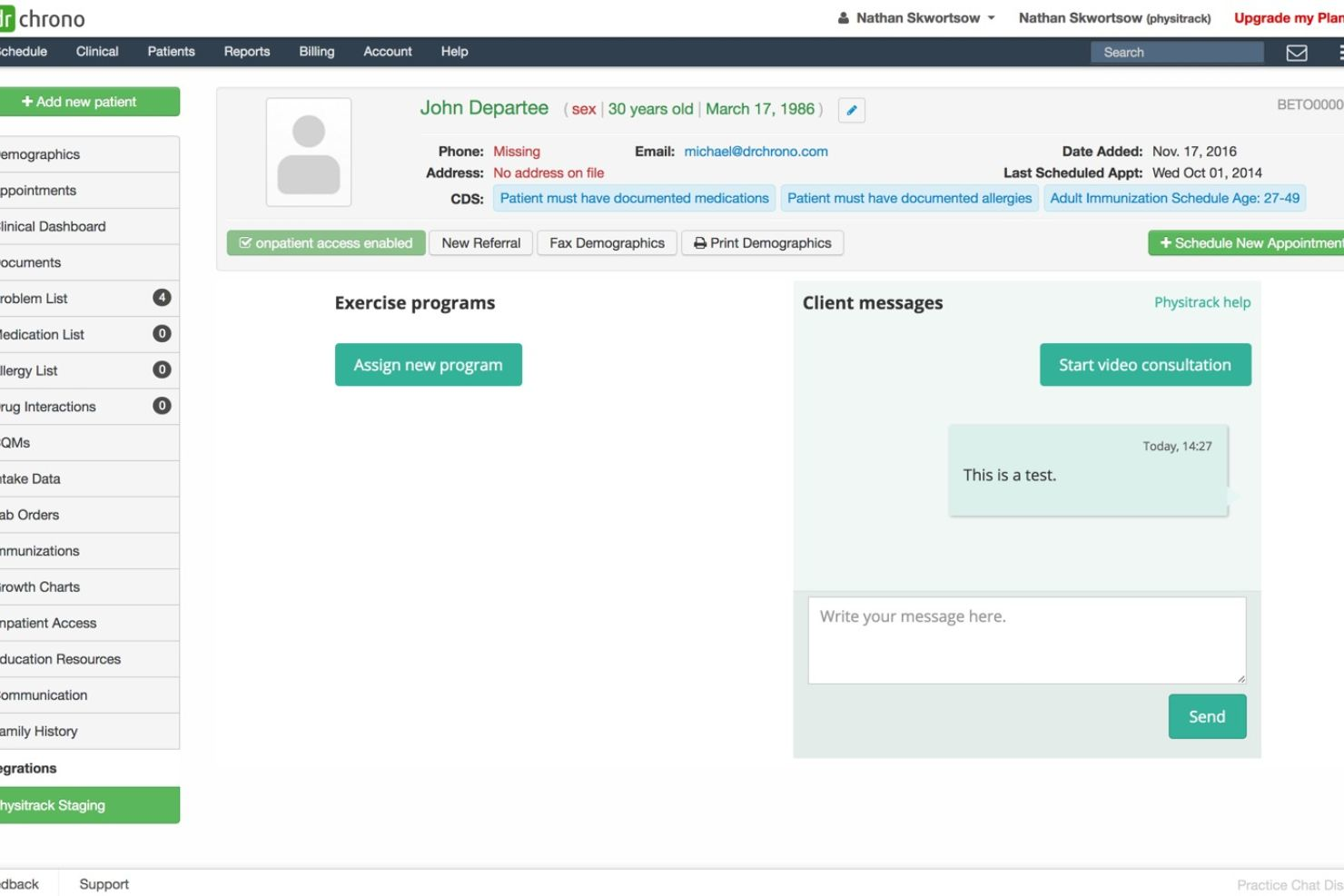
DrChrono is a cloud-based EHR and practice management platform built for iOS and web, covering clinical documentation, medical billing, appointment scheduling, and patient engagement tools.
Who Is DrChrono Best For?
DrChrono is a natural fit for independent practices and solo practitioners who want an iOS-native platform that handles scheduling, charting, and billing without relying on desktop-only workflows.
Why I Picked DrChrono
I picked DrChrono as one of the best because it's the only EHR on my shortlist built natively for iOS first. The AI-powered no-show predictor flags at-risk appointments before gaps hit your schedule, which I find genuinely useful. I also like the OnPatient Portal, where patients handle booking, digital intake forms, e-signatures, and payments before they even arrive. That covers scheduling, billing, and engagement without any additional tools.
DrChrono Key Features
- Speech-to-text clinical documentation: Dictate notes directly into the EHR using voice input rather than manual typing.
- Insurance eligibility verification: Automatically check patient insurance eligibility in real time before appointments.
- Proprietary clearinghouse: Submit and track claims through DrChrono's built-in clearinghouse for end-to-end claims management.
- Customizable specialty templates: Build and configure clinical templates tailored to your specific specialty and workflow.
DrChrono Integrations
DrChrono's marketplace includes integrations with partners like CoverMyMeds, Square, DemandForce, and NextPatient, along with lab integrations through Health Gorilla, Labcorp, Quest Diagnostics, and Lifepoint, and specialty partners like Beam Health, Jamf, and DeepScribe. An open API is available for custom integrations, and the platform also supports FHIR endpoints for healthcare data exchange.
Pros and Cons
Pros:
- Free EHR data migration included
- iPad-native charting with voice dictation
- Built-in telehealth for virtual visits
Cons:
- Financial reports can show inaccurate figures
- Mobile app limited to Apple devices only

NextGen Office is a cloud-based practice management and EHR platform built for small independent practices, combining clinical documentation, medical billing, scheduling, and revenue cycle management in one system.
Who Is NextGen Office Best For?
NextGen Office is a strong fit for independent and small group practices that need a fully managed billing and RCM solution without a large administrative team.
Why I Picked NextGen Office
NextGen Office is one of my top picks because of how tightly its billing and workflow tools are built around the realities of running a small independent practice. I like the Background Business Processor, which runs claim scrubbing, eligibility checks, and report generation overnight without anyone on staff having to trigger those tasks manually. The claims scrubbing and editing tools also catch coding and contract-rate errors before submission, which I've found keeps days in accounts receivable low without constant manual oversight.
NextGen Office Key Features
- Patient portal: Lets patients view visit summaries, request appointments, pay balances, and message their care team online.
- Telehealth visits: Supports built-in video consultations that connect directly to the patient record and scheduling workflow.
- Customizable reporting dashboards: Tracks financial, clinical, and operational metrics across configurable report views.
- Referral management: Tracks and manages incoming and outgoing referrals directly within the platform.
NextGen Office Integrations
NextGen Office connects to a large ecosystem of third-party applications through its API Marketplace, which includes vendors like Weave, Birdeye, Rectangle Health, Clearwave, Demandforce, NextPatient, SamaCare, Inbox Health, and Unite Us. NextGen also offers FHIR-based APIs and 800+ Enterprise API routes for custom integrations and data exchange.
Pros and Cons
Pros:
- Drag-and-drop scheduling across multiple providers
- Real-time insurance eligibility verification built in
- Specialty-specific templates for clinical documentation
Cons:
- Frequent screen freezes after weekend updates
- Patient portal lacks full functionality consistently

AllegianceMD
Best for small practices needing cloud-based billing and scheduling
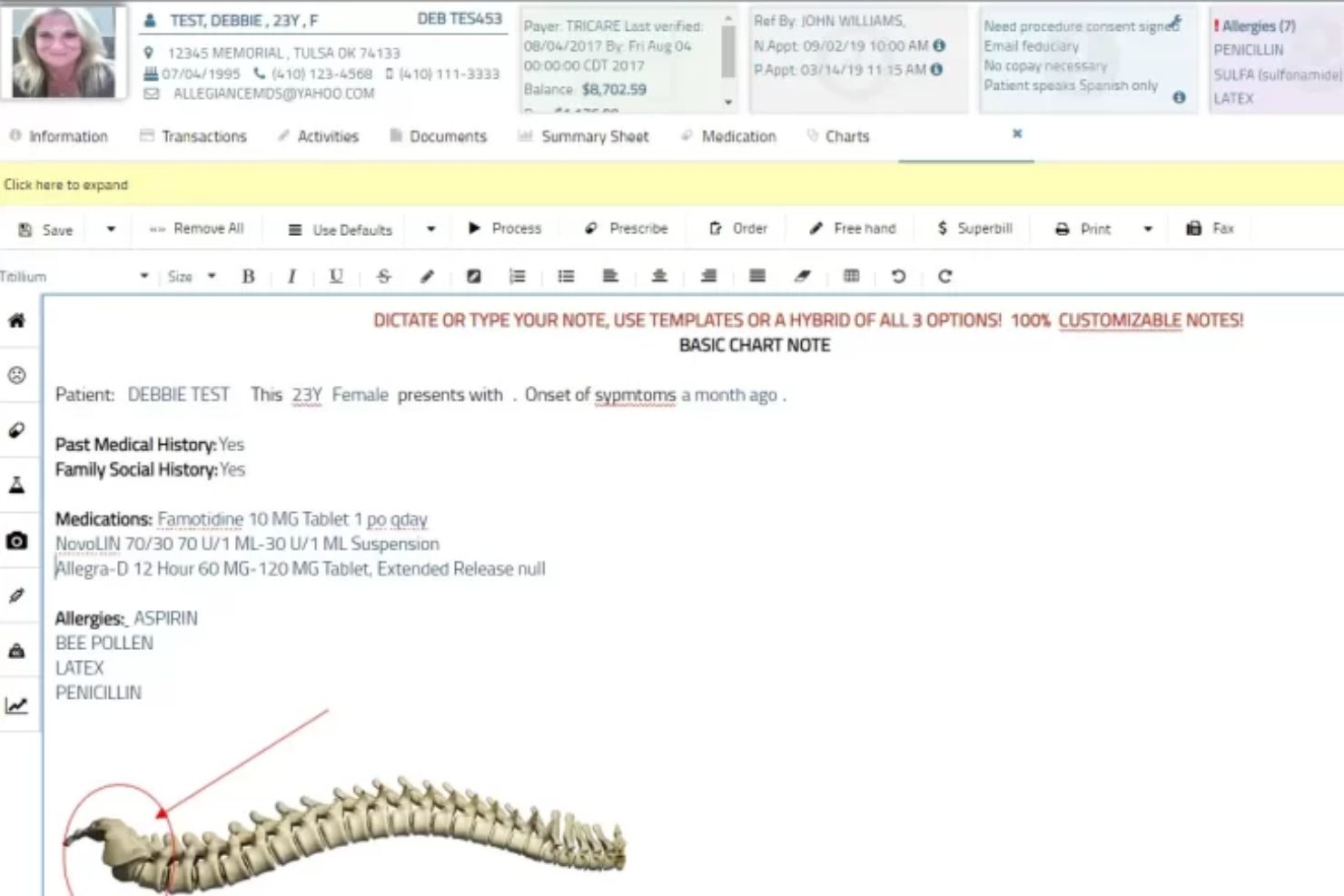
AllegianceMD is a cloud-based medical software platform that combines EHR, practice management, billing, patient portal, and self check-in tools in one system. Its practice management features focus on automating front-office and back-office workflows, including appointment confirmations, eligibility checks, charge capture, claims, reporting, and billing support.
Who Is AllegianceMD Best For?
AllegianceMD is best for small to mid-sized practices that want an all-in-one system for managing patient scheduling, billing, claims, and day-to-day administrative workflows.
Why I Picked AllegianceMD
I included AllegianceMD because it gives practices a practical way to manage scheduling and billing without relying on separate systems. I like that it supports automated appointment confirmations and automated eligibility checks, which can reduce manual front-desk work before the patient visit. Its charge capture and claims-focused tools also help connect the clinical visit to billing faster, making it a useful option for clinics that want smoother revenue cycle workflows.
AllegianceMD Key Features
- Automated eligibility: Checks patient insurance eligibility to help staff confirm coverage before appointments.
- Appointment confirmations: Automates appointment reminders and confirmations to reduce no-shows and manual follow-ups.
- Charge capture: Lets practices capture charges from the schedule or EHR to support faster billing workflows.
- Patient portal: Gives patients access to online tools for communication, forms, and practice engagement.
AllegianceMD Integrations
AllegianceMD offers integrations and connectivity options for clinical, billing, and administrative workflows. Specific integration partners are not clearly listed publicly, so practices should confirm available interfaces directly with AllegianceMD during the demo process.
Pros and Cons
Pros:
- Useful for small to mid-sized practices
- Combines EHR, billing, and practice management
- Automated eligibility and appointment confirmations
Cons:
- Integration details are limited publicly
- Pricing is not clearly listed upfront
Other Medical Practice Management Software
Here are some additional practice management software options that didn’t make it onto my shortlist, but are still worth checking out:
- AdvancedMD EMR
For automating scheduling, billing, and claims workflows
- athenaOne
For cloud-based practice management and revenue cycle support
- Office Practicum
For pediatric practices managing scheduling and billing
- ChartLogic
For clinics needing EHR, scheduling, and revenue cycle tools
- CareCloud Central
For managing appointments, billing, and collections in one platform
- CureMD
For all-in-one practice management and revenue cycle workflows
- eClinicalWorks
For integrated EHR, scheduling, billing, and patient access
- Kareo Billing
For independent practices focused on billing efficiency
- RXNT
For affordable scheduling, billing, and EHR tools
- PracticeEHR
For combining EHR, scheduling, billing, and RCM


How I Evaluate Practice Management Software
I evaluate practice management software in two layers: the core features a billing team or practice admin needs daily, and the differentiators that separate one platform from another.
Core Functionality (Table Stakes For This List)
When I'm selecting tools for my list, I rank each one on a scale from 0 (does not offer the functionality) to 5 (excels in this area) for each core functionality listed below. Then, I calculate the tool's total score into a percentage. Each tool needs to achieve a minimum total score of 65% to be considered for inclusion.
- Patient Scheduling Tools: I look for multi-provider calendar management, automated appointment reminders, and online self-booking that lets patients grab open slots without calling the front desk.
- Medical Billing & Claims: Each platform should support CPT/ICD-10 coding and electronic claims submission, ideally with built-in scrubbing to catch errors before claims go to the clearinghouse.
- Insurance Eligibility Verification: Real-time eligibility checks that pull benefits details before a patient walks in are what I evaluate here, since manual verification slows down check-in considerably.
- Patient Records Management: I check whether the system handles demographics, intake forms, and document uploads with HIPAA-compliant access controls and audit logging for every PHI interaction.
- Revenue Cycle Reporting: Dashboards tracking A/R aging, denial rates, and collections by payer give billing managers visibility into where revenue is leaking, and I evaluate depth and customizability here.
- EHR/EMR Integration: Whether through a native module or bi-directional connections with platforms like Epic, athenahealth, or DrChrono, I look for tight clinical-to-administrative data sync.
Once I have a list of tools that meet this criteria, I consider what sets each platform apart.
Differentiating Factors (What Sets Vendors Apart)
Here's how I compare and contrast different vendors:
Standout Features
A patient portal that handles online booking, bill pay, and intake forms reduces front-desk calls and gives patients control over their own experience. I also evaluate whether a platform includes built-in telehealth with HIPAA-compliant video visits and virtual waiting rooms, since practices offering remote care shouldn't need a separate tool to bill for it. Specialty-specific templates matter too—a behavioral health practice and an orthopedic clinic need very different charting workflows and code sets.
Beyond Features
Integrations matter here more than in most software categories. I check whether a platform supports HL7/FHIR standards and connects to clearinghouses like Availity or Change Healthcare, since a billing team's workflow breaks down fast without that connectivity. Pricing transparency is another factor I weigh—some vendors charge per provider while others take a percentage of collections, and hidden clearinghouse or claims fees can shift the total cost significantly. I also consider onboarding support, especially data migration from a legacy system.
How to Choose Practice Management Software
It’s easy to get bogged down in long feature lists and complex pricing structures. To help you stay focused as you work through your unique software selection process, here’s a checklist of factors to keep in mind:
| Factor | What to Consider |
| Scalability | Will the system meet your needs as you add providers, locations, or specialties? Check for flexible configuration and license options. |
| Integrations | Does it connect natively with your EHR, billing services, clearinghouses, and devices? Assess the cost and complexity of additional integration work. |
| Customizability | Can you tailor workflows, templates, and reporting to your practice’s unique requirements without costly developer involvement? |
| Ease of use | Is the platform intuitive for clinical and administrative users? Evaluate how much training new staff will need and how support handles common pain points. |
| Implementation and onboarding | What is the expected timeline for setup, data migration, and go-live? Ask about vendor-provided training and project management support. |
| Cost | Make sure to clarify fees beyond licensing—such as for clearinghouses, add-on modules, training, or premium support. |
| Security safeguards | Are security certifications, data encryption, and role-based access controls documented and regularly audited? Confirm BAA availability for HIPAA compliance. |
| Support availability | Are support channels (phone, email, chat) reliably available when you’ll need help most, like during claims processing or billing cycles? |
What is Practice Management Software?
Practice management software is a digital platform that centralizes scheduling, billing, patient intake, insurance verification, and records management for healthcare practices. It helps medical offices run day-to-day operations more efficiently, track performance with revenue cycle reporting, and maintain compliance with health data privacy regulations. Most systems integrate with electronic health records to support a coordinated flow of clinical and administrative information across teams.
Features
When selecting practice management software, keep an eye out for the following key features:
- Appointment scheduling: Lets staff quickly book, cancel, or reschedule appointments across multiple providers, rooms, and locations, often with waitlist support and automated reminders to reduce no-shows.
- Patient registration: Enables digital collection of demographic, insurance, consent, and medical history details, reducing manual entry and saving time at check-in.
- Billing and claims management: Automates insurance eligibility checks, claims submission, payment posting, and follow-up on denied claims, helping practices manage the revenue cycle accurately.
- Patient portal: Gives patients secure 24/7 access to request appointments, view statements, pay bills, message providers, and complete intake forms online.
- E-prescribing: Supports electronic prescription writing, refills, and pharmacy communication, including safety checks for allergies and interactions.
- Reporting and analytics: Offers user-defined reports for finances, scheduling, productivity, and patient volume to support data-driven decisions and compliance tracking.
- Insurance verification: Verifies patient insurance coverage and benefits in real time before visits, minimizing claim rejections and payment delays.
- Document management: Organizes consent forms, test results, correspondence, and scanned IDs, making it easier to find and share documents securely as needed.
- Task and workflow management: Assigns, tracks, and automates administrative tasks like recalls, authorizations, and billing follow-ups to keep operations running smoothly.
Benefits
Implementing practice management software provides several benefits for your team and your business. Here are a few you can look forward to:
- Increased operational efficiency: Automates appointment scheduling, billing, and workflow management, so staff spend less time on manual administrative tasks.
- Improved patient experience: Offers self-service through portals for scheduling, bill payments, and secure provider messaging, making care more accessible and convenient.
- Better billing and collections: Supports electronic claim management, payment posting, and insurance verification, reducing denials and speeding up the revenue cycle.
- Enhanced data accuracy: Centralizes registration, documentation, and reporting, helping teams avoid double entry, lost information, and administrative errors.
- Compliance support: Provides documentation tools and reporting features tailored for regulatory standards, making it easier to maintain HIPAA and data privacy compliance.
- Stronger team coordination: Enables seamless communication and task assignment across clinical, front-desk, and billing teams within a single system.
- Data-driven decisions: Gives clear insight into finances, visit volumes, and operational trends so leadership can make informed plans using built-in analytics.
Costs & Pricing
Selecting practice management software requires an understanding of the various pricing models and plans available. Costs vary based on features, team size, add-ons, and more. The table below summarizes common plans, their average prices, and typical features included in practice management software solutions:
Plan Comparison Table for Practice Management Software
| Plan Type | Average Price | Common Features |
| Free Plan | $0 | Basic appointment scheduling, limited patient records, and simple reporting. |
| Personal Plan | $30-$80/user/month | Appointment scheduling, basic billing tools, patient registration, and standard reporting features. |
| Business Plan | $100-$350/user/month | Advanced billing and claims, patient portal, document management, insurance verification, and analytics. |
| Enterprise Plan | $400-$1,500+/month | Custom workflows, integrations, enhanced support, compliance management, and multi-site capabilities. |
Practice Management Software FAQs
Here are some answers to common questions about practice management software:
How does practice management software help with insurance claim processing?
It automates eligibility verification, claim submission, and payment posting, which reduces manual data entry and follow-up time. This helps speed up reimbursements and lowers the risk of denied or delayed claims.
Can practice management software integrate with my existing electronic health record (EHR) system?
Yes, most practice management software can integrate with popular EHR platforms. Integration allows patient and appointment data to flow between systems, eliminating double entry and improving workflow efficiency.
What security measures are included in practice management software?
Most solutions use encryption, role-based access, audit trails, and secure cloud hosting to safeguard patient data. These features help practices stay compliant with regulations like HIPAA and protect sensitive information from unauthorized access.
Is training and support available for new users?
Yes, vendors typically offer onboarding, training sessions, user guides, and customer support to help new users get started. Ongoing support is often available by phone, email, or chat for troubleshooting and continued learning.
How can practice management software improve patient satisfaction?
Online scheduling, digital forms, secure messaging, and timely reminders make care more convenient and communication more accessible for patients. These features help practices build trust and deliver a smoother overall patient experience.
What’s Next:
If you're in the process of researching practice management software, connect with a SoftwareSelect advisor for free recommendations.
You fill out a form and have a quick chat where they get into the specifics of your needs. Then you'll get a shortlist of software to review. They'll even support you through the entire buying process, including price negotiations.