

Strong ModMed alternatives are practice management platforms that fit your specialty’s workflows, support your billing model, and can grow with your practice.
I grew Symphony Health MD from a solo practice to 15 physicians, so I know how software choices shape daily operations. This guide compares alternatives by specialty fit, charting, patient-facing tools, revenue cycle support, and scalability to help you choose a system that suits your practice.
What Is ModMed?
ModMed is a healthcare software company offering specialty-specific EHR, practice management, patient engagement, and revenue cycle tools and services. Its products support specialties including dermatology, gastroenterology, ophthalmology, and orthopedics.
The platform also includes AI features, such as clinical documentation support for its EMA EHR. Practices can assess whether its specialty-focused workflows and combined clinical and administrative tools fit their needs.
Comparison Table: ModMed Alternatives
Compare pricing and specs side by side for the ModMed alternatives that made it onto my shortlist.
| Tool | Best For | Trial Info | Price | ||
|---|---|---|---|---|---|
| 1 | Best for surgical and procedural specialty billing | Free demo available | Pricing upon request | Website | |
| 2 | Best for surgical specialty charting and RCM | Free demo available | Pricing upon request | Website | |
| 3 | Best for collections-based billing with bundled RCM | Free demo available | Pricing upon request | Website | |
| 4 | Best for multi-site PM and RCM in one database | Free demo available | Pricing upon request | Website | |
| 5 | Best for AI scribing across 80-plus specialties | Free demo available | Pricing upon request | Website | |
| 6 | Best for multi-location billing and RCM depth | Free demo available | Pricing upon request | Website | |
| 7 | Best for eye care and ASC surgical workflows | Free demo available | Pricing upon request | Website | |
| 8 | Best for outsourced billing with built-in EHR | Free demo available | Pricing upon request | Website | |
| 9 | Best for broad ambulatory EHR with AI scribing | Free demo available | Pricing upon request | Website | |
| 10 | Best for health systems scaling across care settings | Not available | Pricing upon request | Website |


Why Trust Our Software Recommendations
6,700+
Reviews
20
Industry experts
16+
Evaluation factors
14
Years
Our team has been testing and reviewing software since 2012. As medical practice leaders ourselves, we know how difficult—and important—it is to choose the right software.
For this guide, we evaluated tools using hands-on testing and independent research, scoring tools using our selection criteria.
Our reviews reflect our human editorial judgment, not a sales pitch.
ModMed Alternatives Reviews
Below are my detailed summaries of the best ModMed alternatives that made it onto my shortlist. My reviews look at each platform’s features, specialty fit, and revenue cycle support to help you find the best option for your practice.
 Best for surgical and procedural specialty billing
- Free demo available
- Pricing upon request
Visit WebsiteCustomer Rating:4.1/5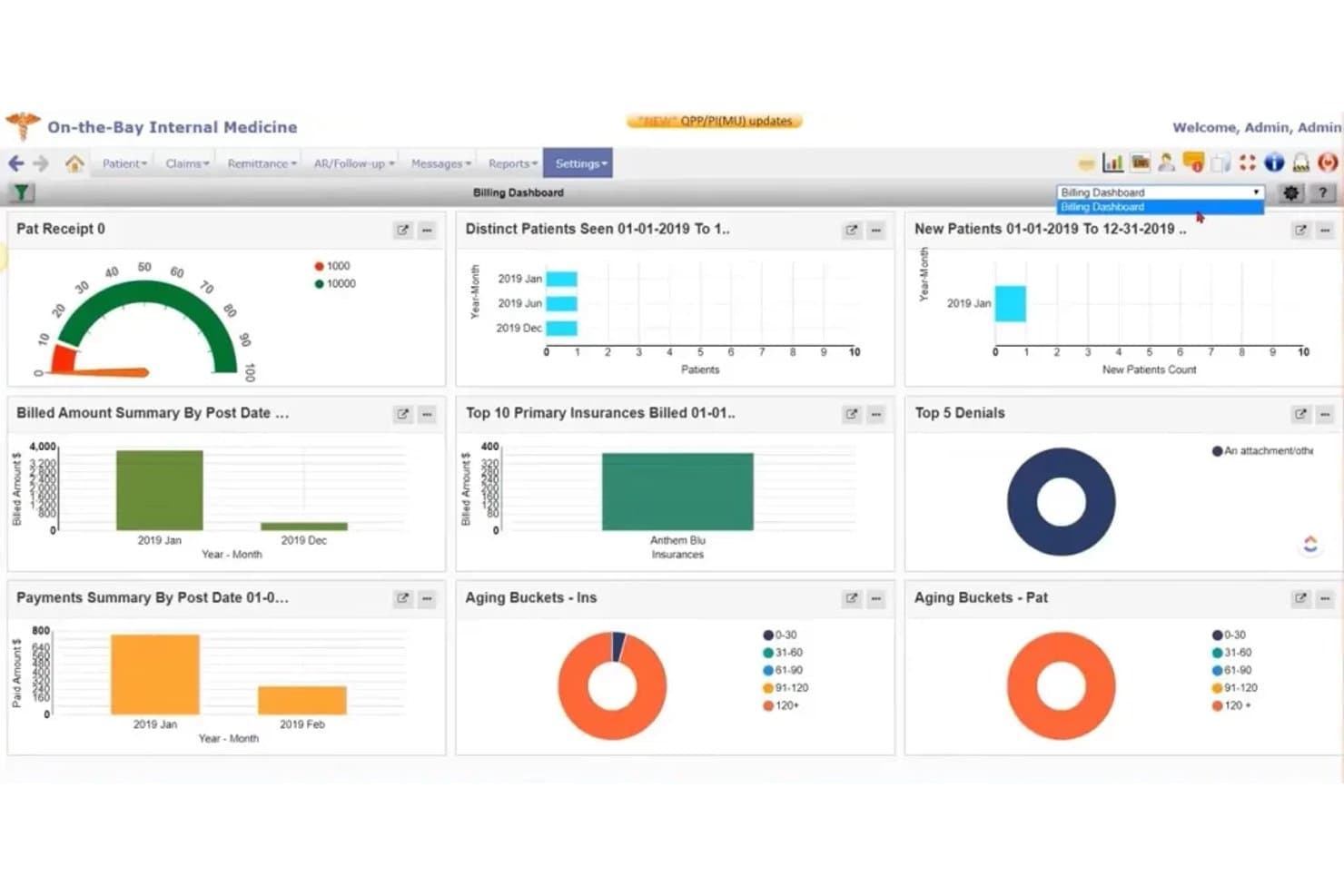
PrognoCIS combines EHR, scheduling, clinical documentation, and billing. PrognoCIS combines cloud-based EHR and practice management tools for specialty and ambulatory practices, bringing scheduling, clinical documentation, and revenue-cycle workflows into one system.
Who Is PrognoCIS Best For?
PrognoCIS suits surgical and procedural specialty practices that need billing and revenue-cycle workflows connected to clinical documentation and practice management.
Why I Picked PrognoCIS
I picked PrognoCIS as a ModMed alternative because it’s a strong fit for surgical and procedural specialty billing. Its EHR connects encounter documentation with charge capture and claims, while claim scrubbing flags missing or inconsistent data before submission. Denial management gives billing staff a way to review claims that need follow-up.
PrognoCIS Key Features
- Appointment scheduling: Schedule visits and manage appointment workflows.
- Patient portal: Let patients complete forms, pay balances, and message providers.
- E-prescribing: Send prescriptions electronically through the platform.
- Referral tracking: Track referrals and prior-authorization requests.
PrognoCIS Integrations
PrognoCIS documents interfaces with LabCorp, Quest, Cerner, SimonMed, and Zocdoc, plus financial connections for clearinghouses, payment imports, and payment processing. It supports third-party API connectivity, including charge exports and patient and insurance imports; custom connections require a feasibility assessment.
Pros and Cons
Pros:
- Pain-management users praise billing workflows
- Claim scrubbing and denial tools support RCM
- Specialty templates connect documentation with billing
Cons:
- Mobile app receives poor usability reviews
- Claim submission can require many clicks
Learn more about PrognoCIS: Best for surgical specialty charting and RCM
- Free demo available
- Pricing upon request
Visit WebsiteCustomer Rating:4.3/5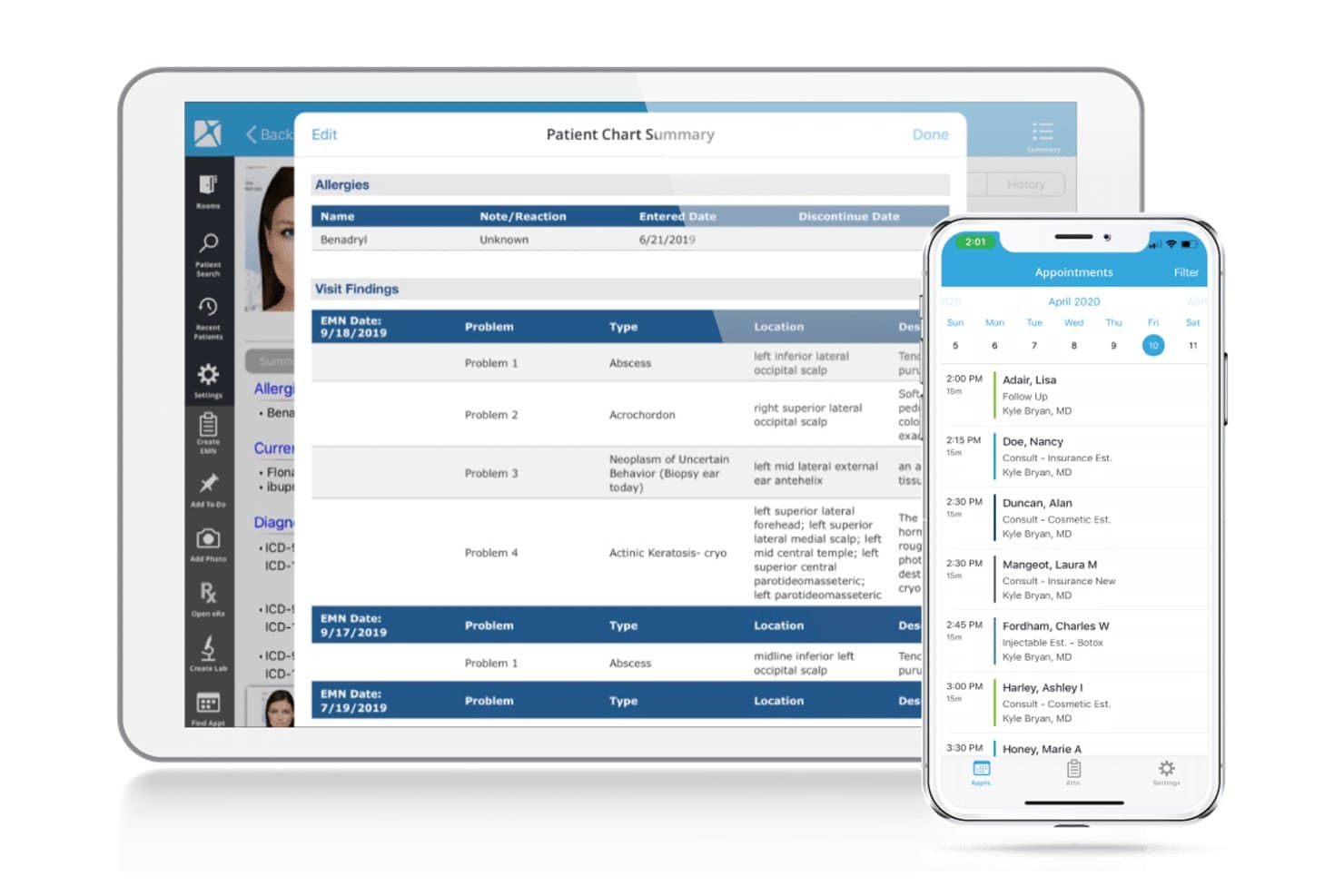
Nextech unifies specialty EHR, practice management, and medical billing tools. Nextech combines EHR, practice management, and billing tools for specialty medical practices in fields such as ophthalmology, dermatology, plastic surgery, and orthopedics, helping teams manage clinical and administrative workflows in one platform.
Who Is Nextech Best For?
Nextech fits ophthalmology, dermatology, plastic surgery, and orthopedic practices that need specialty-specific surgical charting and revenue cycle management.
Why I Picked Nextech
I picked Nextech as a ModMed alternative because it’s Best for surgical specialty charting and RCM. I like that its specialty-specific EHR offers configurable charting for practices such as ophthalmology and plastic surgery. Its RCM services add billing visibility from submission through payment, useful when a surgical claim needs follow-up.
Nextech Key Features
- Appointment scheduling: Manage patient appointments through Nextech Practice Management.
- Patient portal: Let patients access appointments, records, and billing.
- Patient payments: Offer flexible payment options and automated reconciliation.
- Practice analytics: Review consolidated data to identify risks and trends.
Nextech Integrations
Nextech documents integrations with TriZetto Provider Solutions, Solutionreach, Zocdoc, IBRA Treatment Planner, and Pulse; available connections vary by product and workflow. Nextech also offers FHIR APIs for connecting apps and building custom integrations.
Pros and Cons
Pros:
- Customizable notes support dermatology and plastic surgery
- Clinical workflows connect with revenue cycle
- Specialty-specific charting for surgical practices
Cons:
- Users report glitches and update downtime
- Finding and configuring reports can be difficult
Learn more about Nextech: Best for collections-based billing with bundled RCM
- Free demo available
- Pricing upon request
Visit WebsiteCustomer Rating:3.8/5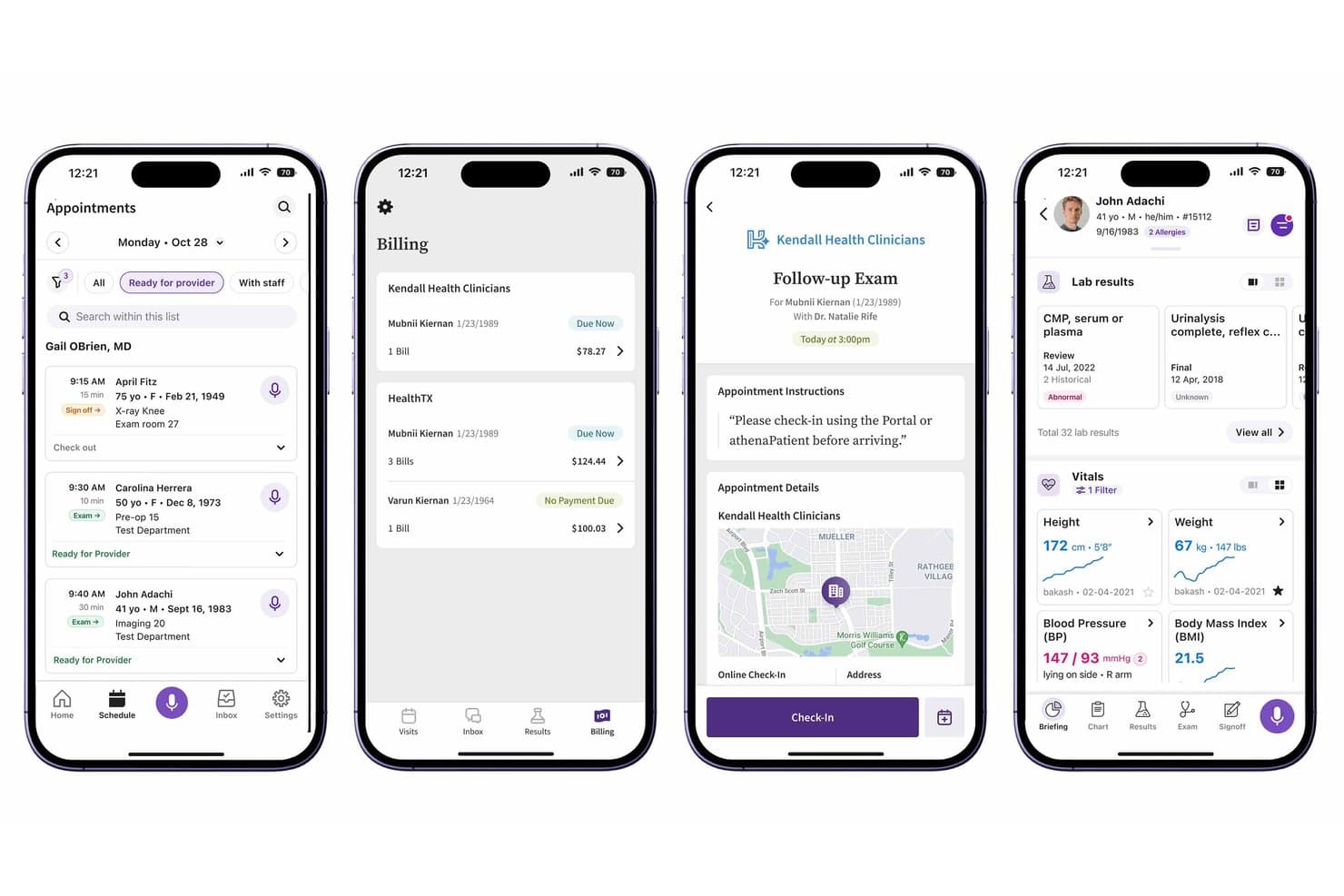
athenaOne combines patient care, clinical workflows, and practice management. athenaOne is an all-in-one platform for medical practices, bringing clinical and administrative workflows together so care teams and practice administrators can manage patient care and daily operations in one system.
Who Is athenaOne Best For?
athenaOne suits medical practices that want collections-based billing with revenue cycle management bundled into their practice platform.
Why I Picked athenaOne
I picked athenaOne as a ModMed alternative for collections-based billing with bundled RCM. Its rules engine and billing experts identify claim errors before submission, while Enhanced Claim Resolution lets athenahealth billing teams rework denials on your practice’s behalf.
athenaOne Key Features
- Patient self-scheduling: Patients can book and manage appointments online.
- Self check-in: Patients can complete check-in tasks, screeners, and consent forms before arrival.
- Mobile patient app: Patients can manage appointments, message your team, and view health information on their phones.
- Online records access: Patients can securely view test results, visit summaries, and appointment details through the portal.
athenaOne Integrations
athenaOne offers marketplace integrations with partners including OhMD, Relatient, and Salesforce Connect. It also provides 800+ API endpoints for custom integrations.
Pros and Cons
Pros:
- Patient portal supports self-service scheduling
- Automated billing and claims workflows
- Bundled RCM supports claims follow-through
Cons:
- Charting can involve excessive clicks
- Support response times can lag
Learn more about athenaOne: Best for multi-site PM and RCM in one database
- Free demo available
- Pricing upon request
Visit WebsiteCustomer Rating:3.7/5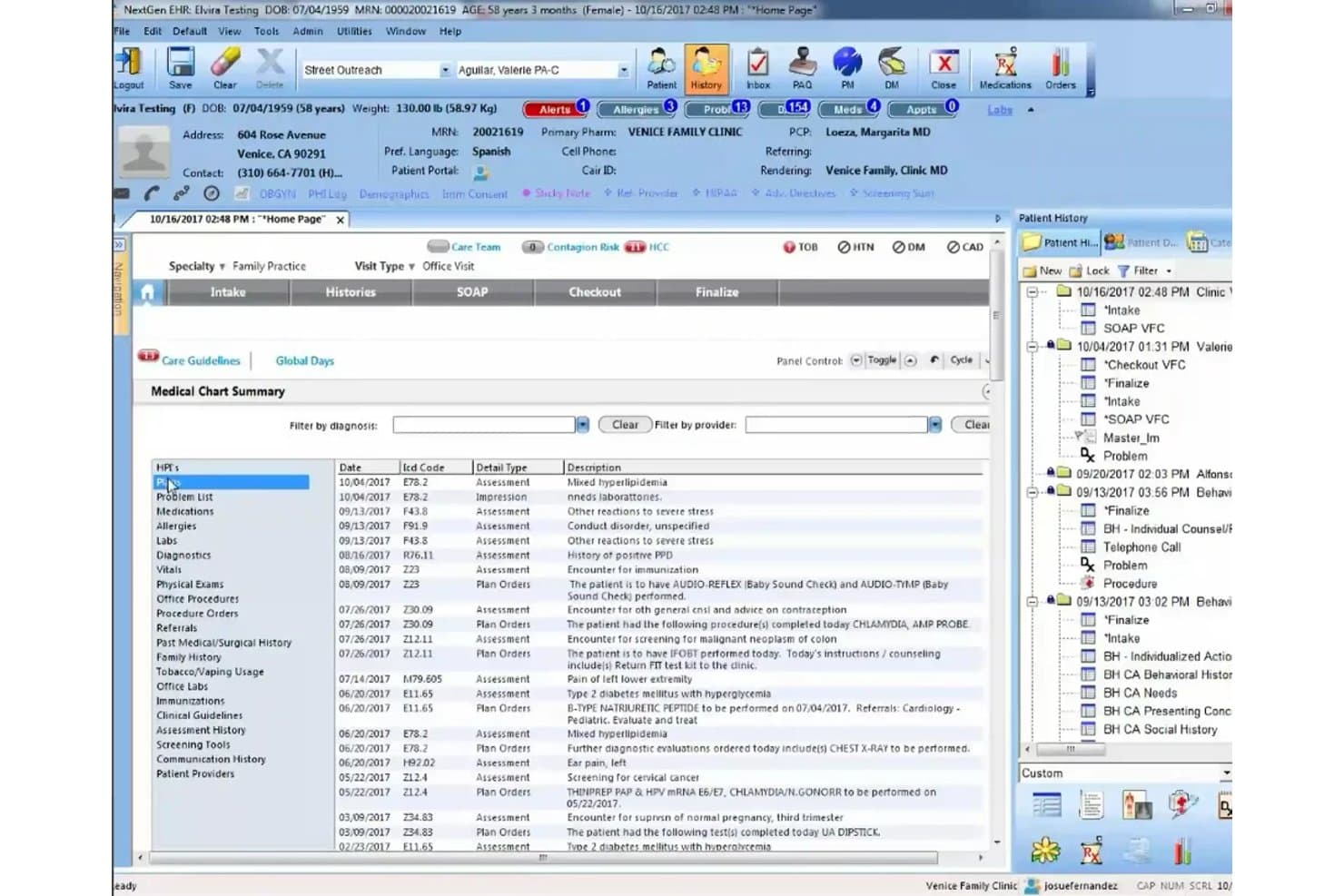
NextGen Healthcare supports EHR, practice management, billing, and patient care. NextGen Healthcare combines EHR, practice management, patient experience, and revenue-cycle tools for medical practices that need connected clinical and administrative workflows across specialties and practice sizes.
Who Is NextGen Healthcare Best For?
NextGen Healthcare suits practice administrators and revenue cycle leaders at mid-size to enterprise medical groups managing operations across multiple locations.
Why I Picked NextGen Healthcare
I picked NextGen Healthcare because it’s Best for multi-site PM and RCM in one database. NextGen Enterprise brings practice management and revenue-cycle workflows together, so I can track operations and billing across locations in a shared system. I also like its customizable EHR and PM workflows for coordinating specialty-specific processes.
NextGen Healthcare Key Features
- Self-scheduling: Patients can book appointments through an online scheduling tool.
- Appointment reminders: Send reminders in more than 33 languages and manage cancellations.
- Patient portal: Patients can access results, education, and electronic bill payment.
- Population health: Identify care gaps and patient risk levels, then plan outreach.
NextGen Healthcare Integrations
NextGen’s API Marketplace includes third-party practice management and revenue-cycle apps such as Inbox Health, LinkMD AI, and revBot. NextGen Enterprise also provides 800+ REST API routes for custom integrations.
Pros and Cons
Pros:
- Claims tracking and payment auto-posting
- Configurable specialty templates support varied workflows
- Unified EHR, PM, and RCM across locations
Cons:
- Upgrades can trigger glitches and downtime
- Click-heavy screens slow routine charting
Learn more about NextGen Healthcare: Best for AI scribing across 80-plus specialties
- Free demo available
- Pricing upon request
Visit WebsiteCustomer Rating:3.6/5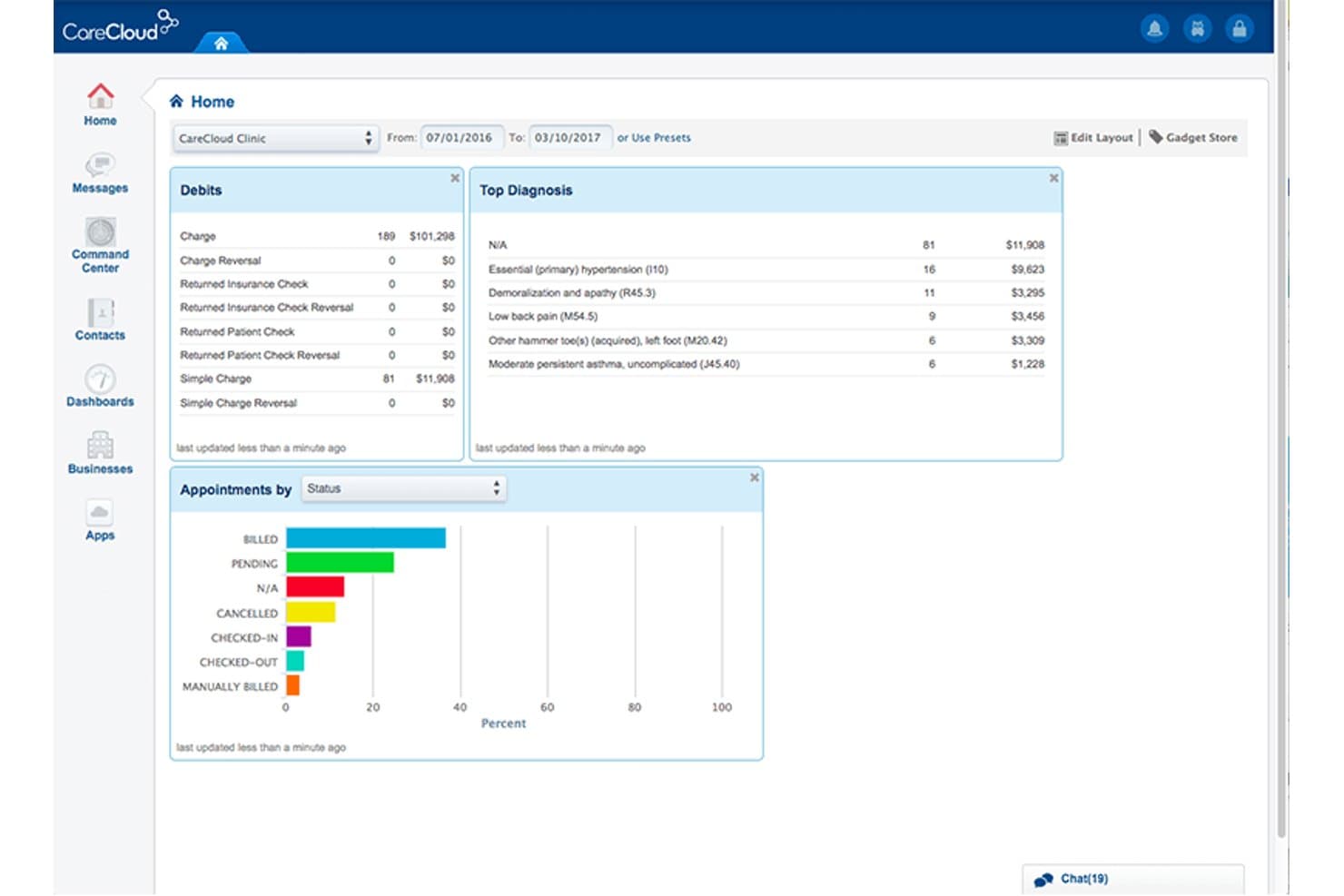
CareCloud's dashboard centralizes billing, diagnoses, and appointment data. For medical groups that want practice management tied to clinical and financial workflows, CareCloud combines appointment and staff scheduling with EHR, billing, and patient engagement tools in one cloud-based healthcare platform.
Who Is CareCloud Best For?
CareCloud is a fit for clinicians in multispecialty practices who want ambient AI scribing tailored to more than 80 specialties and notes saved to the EHR.
Why I Picked CareCloud
I picked CareCloud as a ModMed alternative for its “Best for AI scribing across 80-plus specialties” focus. cirrusAI Notes listens to patient-provider conversations, generates clinical documentation, and saves notes to the EHR, so I can use it to capture visits without switching out of the charting workflow.
CareCloud Key Features
- Appointment scheduling: Manage appointments within CareCloud’s practice management tools.
- Staff scheduling: Organize staff schedules and practice resources.
- Patient engagement: Use Breeze for patient experience and engagement tools.
- KPI dashboards: View customizable analytics for financial and revenue-cycle metrics.
CareCloud Integrations
CareCloud provides a REST API for custom integrations, subject to application approval. CareCloud Connector offers integration libraries for lab systems, EHR and other software, and immunization data, with FHIR and CCDA support.
Pros and Cons
Pros:
- Reviewers praise customizable charts and reporting
- Scheduling, charting, and billing share one platform
- Ambient AI notes cover 80-plus specialties
Cons:
- Support delays complicate issue resolution
- Some users report slow screens and outages
Learn more about CareCloud: Best for multi-location billing and RCM depth
- Free demo available
- Pricing upon request
Visit WebsiteCustomer Rating:3.6/5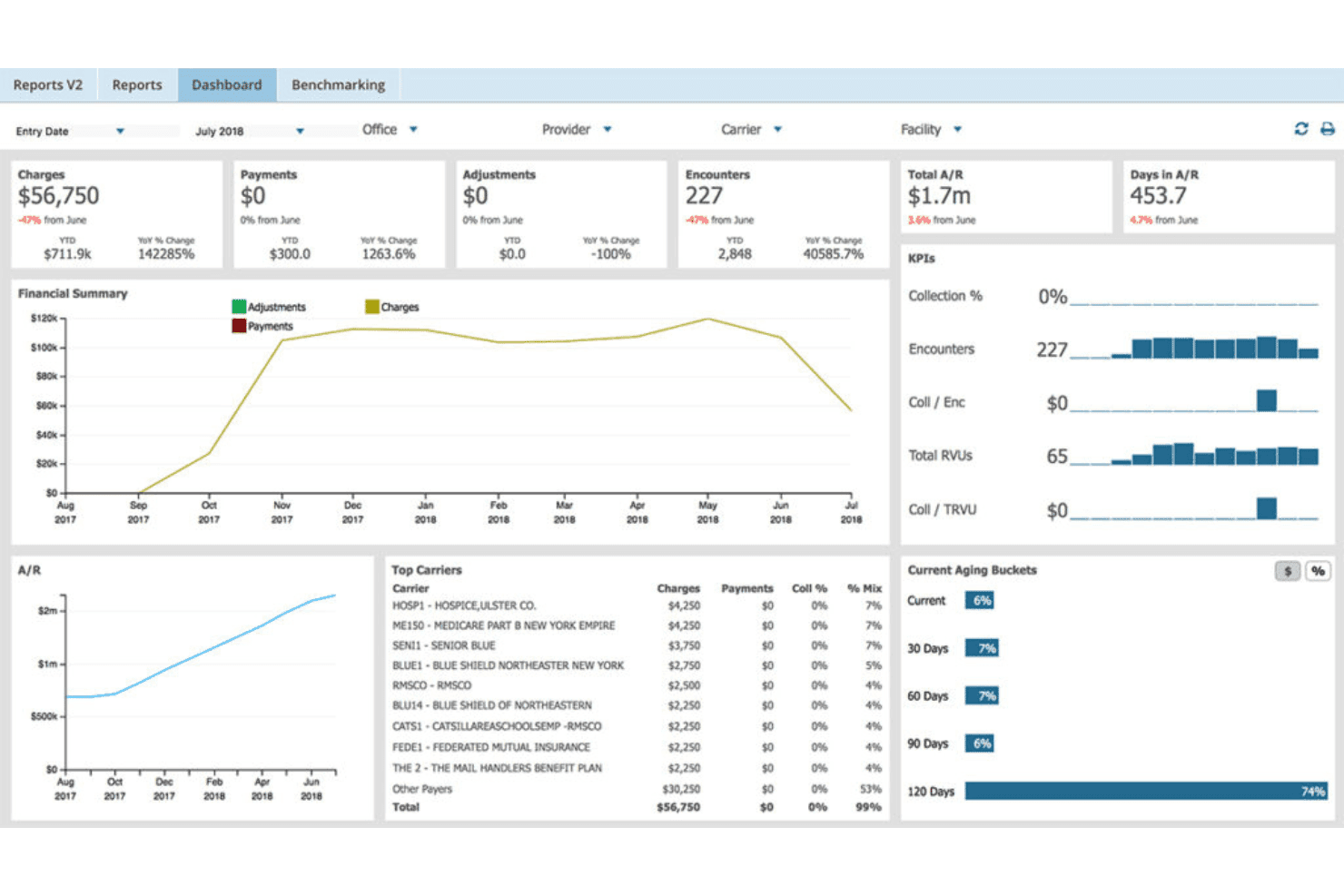
AdvancedMD unites EMR, documentation, billing, claims, eligibility, and RCM. AdvancedMD is a cloud-based EHR, practice management, and patient engagement platform for independent medical practices that want to connect clinical and administrative workflows and manage documentation, scheduling, and patient communication in one system.
Who Is AdvancedMD Best For?
AdvancedMD suits billing leaders and practice administrators at multi-location medical groups who need revenue cycle oversight and financial reporting across sites.
Why I Picked AdvancedMD
I picked AdvancedMD as a ModMed alternative for its fit: Best for multi-location billing and RCM depth. I like its Central Billing Office, which manages providers and locations in one database with a single login, alongside financial dashboards and claim scrubbing. Those tools let me review billing across sites and flag claim errors before submission.
AdvancedMD Key Features
- Online appointment requests: Patients can request an appointment day and time through the portal.
- Prescription renewals: Patients submit renewal requests online for staff review and digital sign-off.
- Online bill pay: Patients can view and pay bills securely by credit card.
- Patient messaging: Patients can message clinical or billing staff with questions.
AdvancedMD Integrations
AdvancedMD’s partner marketplace lists 1,400+ app and technology integrations, including Apollo CRM, LeadSquared, LunaJoy, Salesforce (custom per instance), Suite CRM, WebVehicle, and Zoho. Connect APIs are available in XML-RPC and REST, alongside read-only FHIR R4 APIs and ODBC access for custom data exchange.
Pros and Cons
Pros:
- Users praise charge entry and code lookup
- Cross-location financial dashboards support RCM oversight
- Central billing office consolidates providers and locations
Cons:
- Billing workflows can feel time-consuming
- Users report uneven support handoffs
 Best for eye care and ASC surgical workflows
- Free demo available
- Pricing upon request
Visit WebsiteCustomer Rating:3.9/5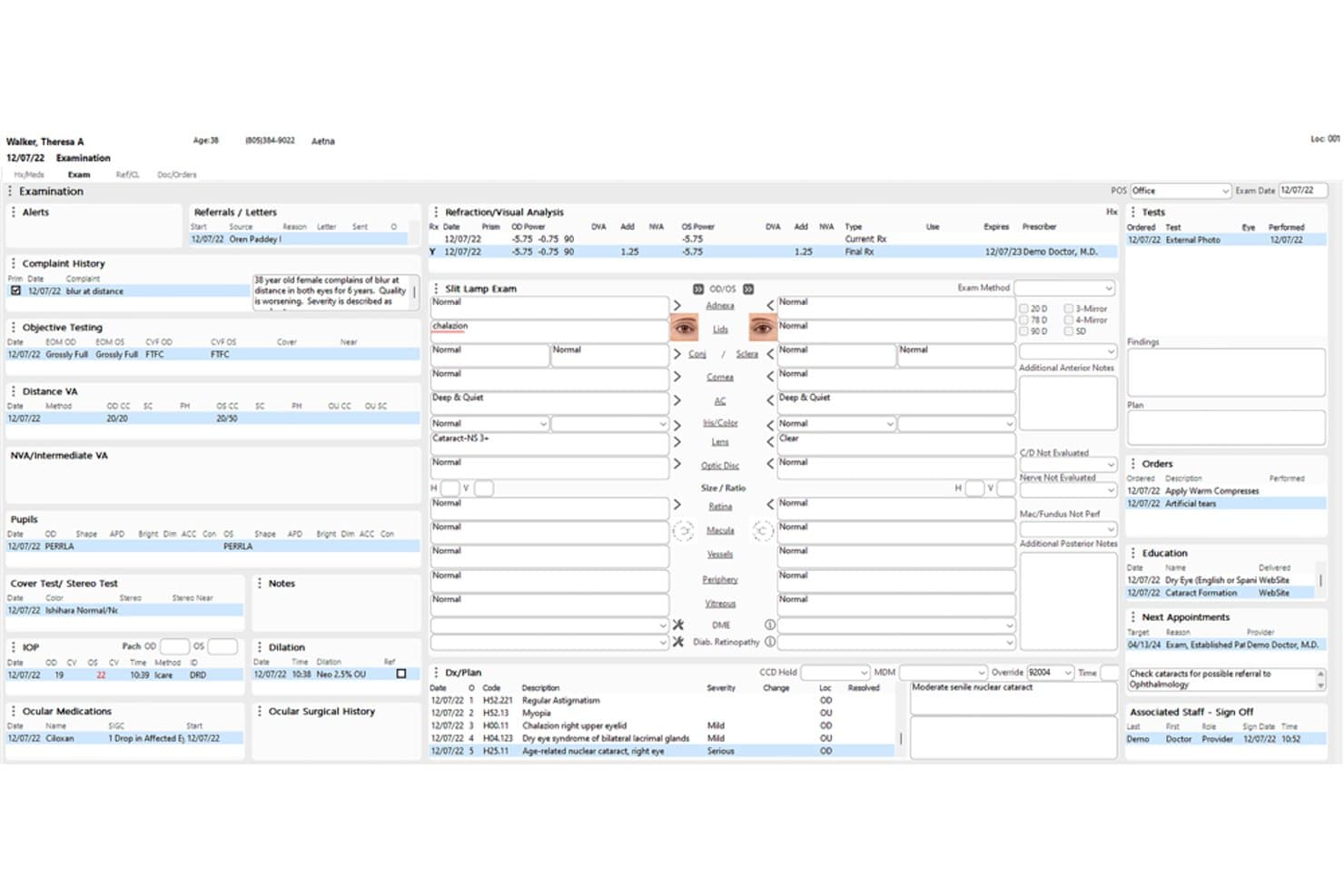
Compulink Advantage combines eye care EHR, billing, and optical operations. Compulink Advantage (Eyecare Advantage) is a practice management and EHR platform for eye care practices that need to coordinate clinical records, billing, optical operations, and patient administration within specialty workflows.
Who Is Compulink Advantage (Eyecare Advantage) Best For?
Compulink Advantage is a good fit for eye care practices and ambulatory surgery centers managing clinical and surgical workflows.
Why I Picked Compulink Advantage (Eyecare Advantage)
I picked Compulink Advantage as a ModMed alternative because it’s best for eye care and ASC surgical workflows. ASC Advantage covers surgery-center workflows from EHR through case costing, while Optical POS manages lens catalogs, inventory, lab orders, and job costing. I like that these tools address surgical and optical operations alongside practice records.
Compulink Advantage (Eyecare Advantage) Key Features
- Eligibility verification: Verify patient eligibility as part of practice management.
- Online scheduling: Let patients book appointments online.
- Digital check-in: Support preregistration, consent signing, and check-in by phone, tablet, or kiosk.
- Interactive reports: Filter clinical, financial, and operational reports, with drill-downs to patient level.
Compulink Advantage (Eyecare Advantage) Integrations
Compulink documents API connections with dozens of partners, including ABB, VisionWeb, EdgePro, Clearwave, and Relatient, as well as integrations with Weave, Updox, and Surescripts; it also interfaces with more than 400 ophthalmic devices. Compulink provides APIs for partner connections and accepts requests from prospective API partners.
Pros and Cons
Pros:
- Users praise responsive support and reporting
- Customizable exam templates and specialty charting
- Integrated ophthalmology, optical, and ASC workflows
Cons:
- Customization and setup can take substantial effort
- Updates can trigger glitches or freezes
Learn more about Compulink Advantage (Eyecare Advantage): Best for outsourced billing with built-in EHR
- Free demo available
- Pricing upon request
Visit WebsiteCustomer Rating:3.5/5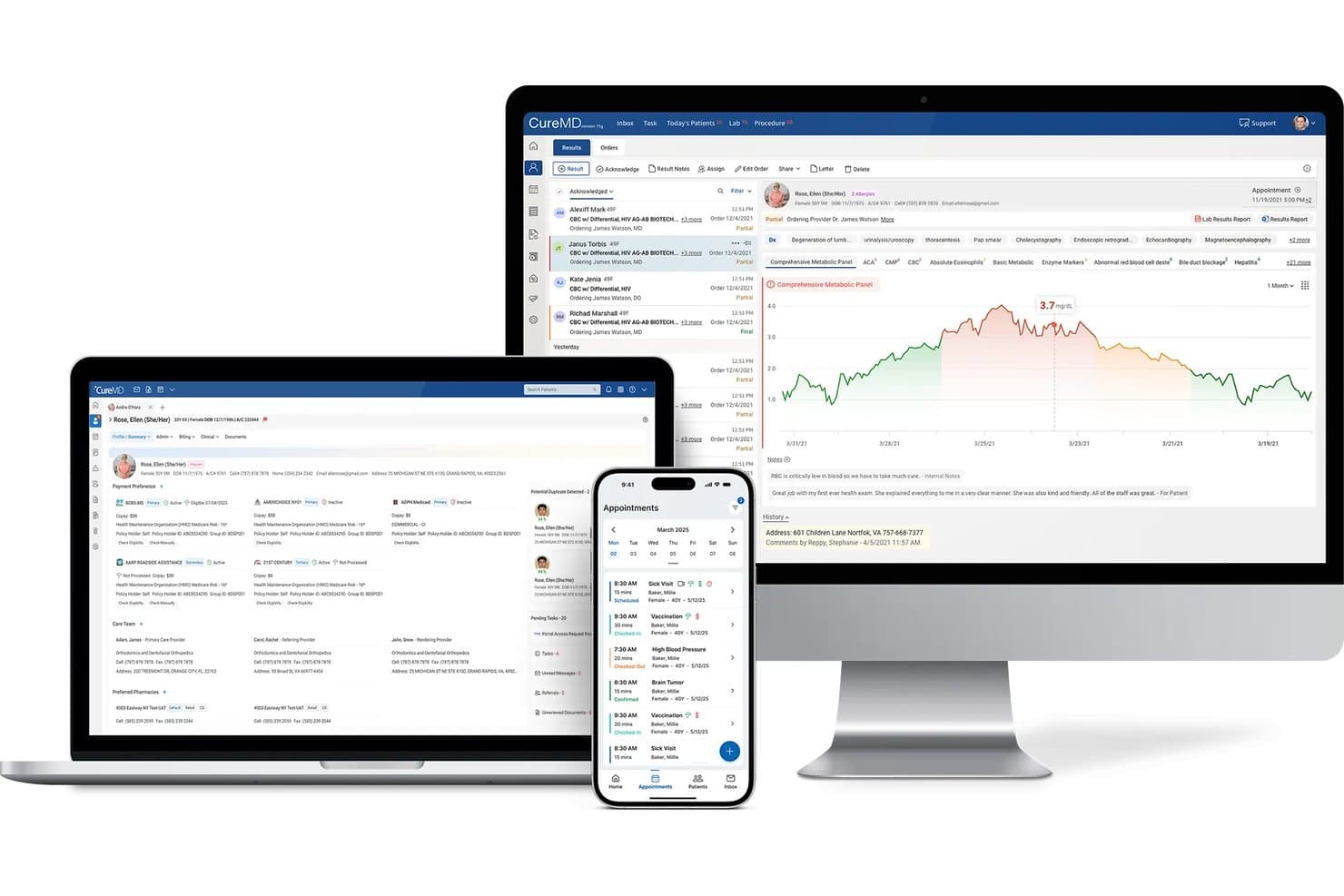
CureMD delivers EHR, scheduling, and lab results across devices. CureMD is an integrated EHR and practice management platform for independent and specialty medical practices, combining specialty-focused charting, scheduling, patient engagement, and administrative workflows in one system.
Who Is CureMD Best For?
CureMD suits independent and growing medical practices that want to outsource billing and revenue cycle work while keeping clinical records in an integrated EHR.
Why I Picked CureMD
I picked CureMD as a ModMed alternative because its USP is “Best for outsourced billing with built-in EHR.” Its revenue cycle services address claim review and denials, while specialty-focused charting keeps clinical records in the same platform. I like that combination when a practice wants billing support without separating it from its EHR workflows.
CureMD Key Features
- Appointment scheduling: Manage practice appointments through the integrated scheduling tools.
- Eligibility checks: Check patient eligibility in real time.
- Patient portal: Give patients access to a portal for practice interactions.
- Digital intake: Collect patient intake information digitally.
CureMD Integrations
CureMD lists pre-built integrations with Allscripts, eClinicalWorks, Practice Fusion, Oracle Health, NextGen, and Cerner. It also provides a FHIR API for custom integrations.
Pros and Cons
Pros:
- Specialty-specific charting and templates
- Billing and EHR share workflows
- Outsourced claims and denial management
Cons:
- Implementation and support experiences vary
- Users report slow screens and freezes
Learn more about CureMD: Best for broad ambulatory EHR with AI scribing
- Free demo available
- Pricing upon request
Visit WebsiteCustomer Rating:3.4/5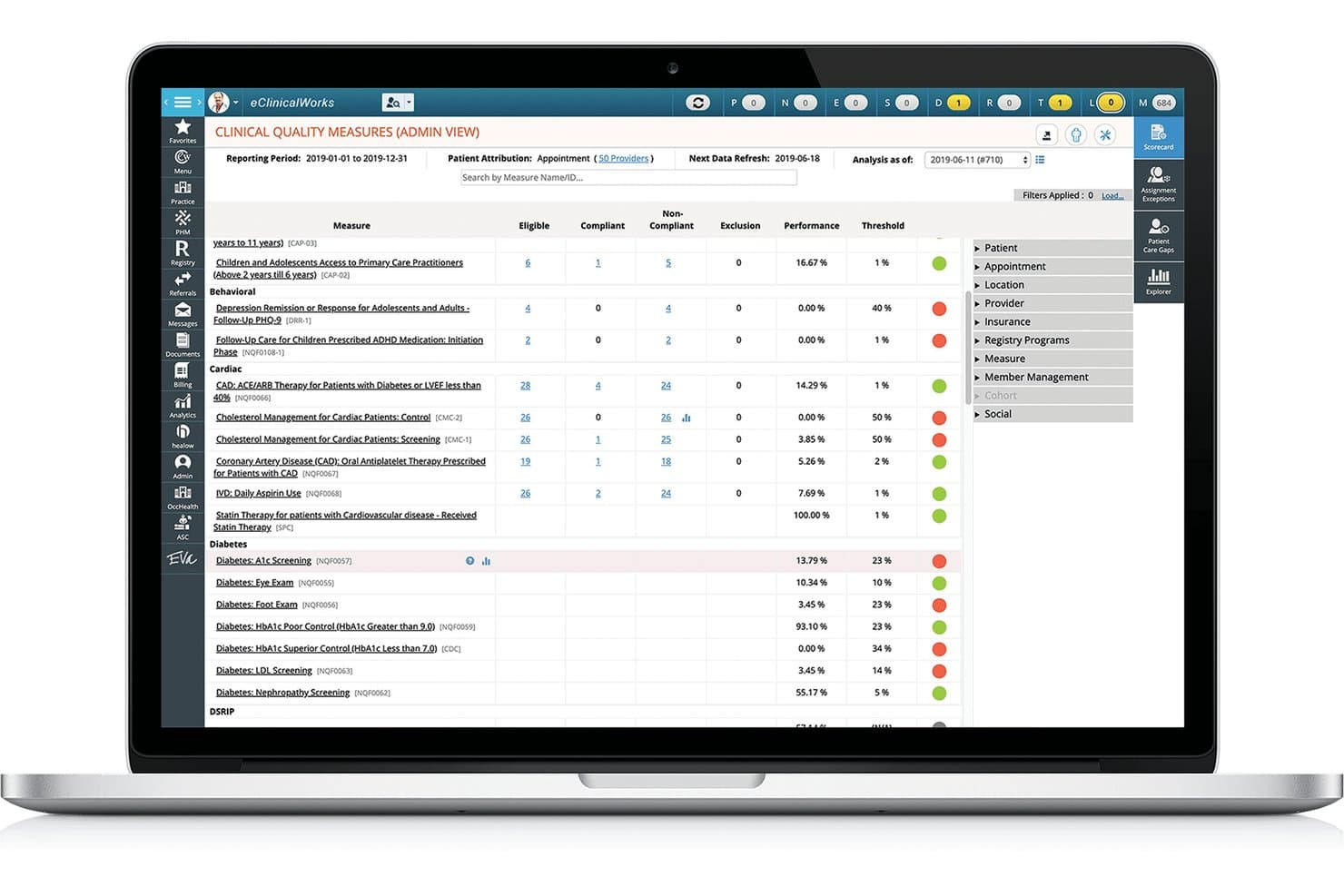
eClinicalWorks offers ambulatory EHR, AI scribing, billing, and patient engagement. eClinicalWorks is a broad ambulatory EHR with AI scribing and practice management tools for clinics that need support with clinical documentation, patient engagement, care coordination, and revenue cycle workflows.
Who Is eClinicalWorks Best For?
eClinicalWorks fits outpatient clinicians and practice administrators who need clinical records, practice workflows, and AI-assisted note creation in one platform.
Why I Picked eClinicalWorks
I picked eClinicalWorks as a ModMed alternative because it fits “Best for broad ambulatory EHR with AI scribing.” Sunoh.ai turns provider-patient conversations into draft clinical documentation, while its AI Assistant supports scheduling, documentation, and chart search. I like that it brings AI note creation into an ambulatory EHR with practice management workflows.
eClinicalWorks Key Features
- Claims and denial management: Scrubs claims, tracks rejections, and supports appeals.
- Digital patient check-in: Lets patients review insurance details, complete forms, and pay balances.
- Patient portal: Gives patients access to visit summaries, lab results, medications, and secure provider messaging.
- E-prescribing: Sends prescriptions to pharmacies and supports eligibility and formulary checks.
eClinicalWorks Integrations
eClinicalWorks documents integrations with Waystar, TriZetto, Optum RPA, TSI, IC System, USPS, Dexcom, Fitbit, Glooko, and Surescripts. It supports FHIR APIs for third-party applications and HL7 interfaces for exchanging clinical, scheduling, and financial data.
Pros and Cons
Pros:
- Sunoh.ai adds AI-assisted visit documentation
- Integrated EHR, scheduling, and billing workflows
- Custom Smart Forms fit varied clinic workflows
Cons:
- Support tickets can take time to resolve
- Chart navigation often takes too many clicks
Learn more about eClinicalWorks: Best for health systems scaling across care settings
- Not available
- Pricing upon request
Visit WebsiteCustomer Rating:3.1/5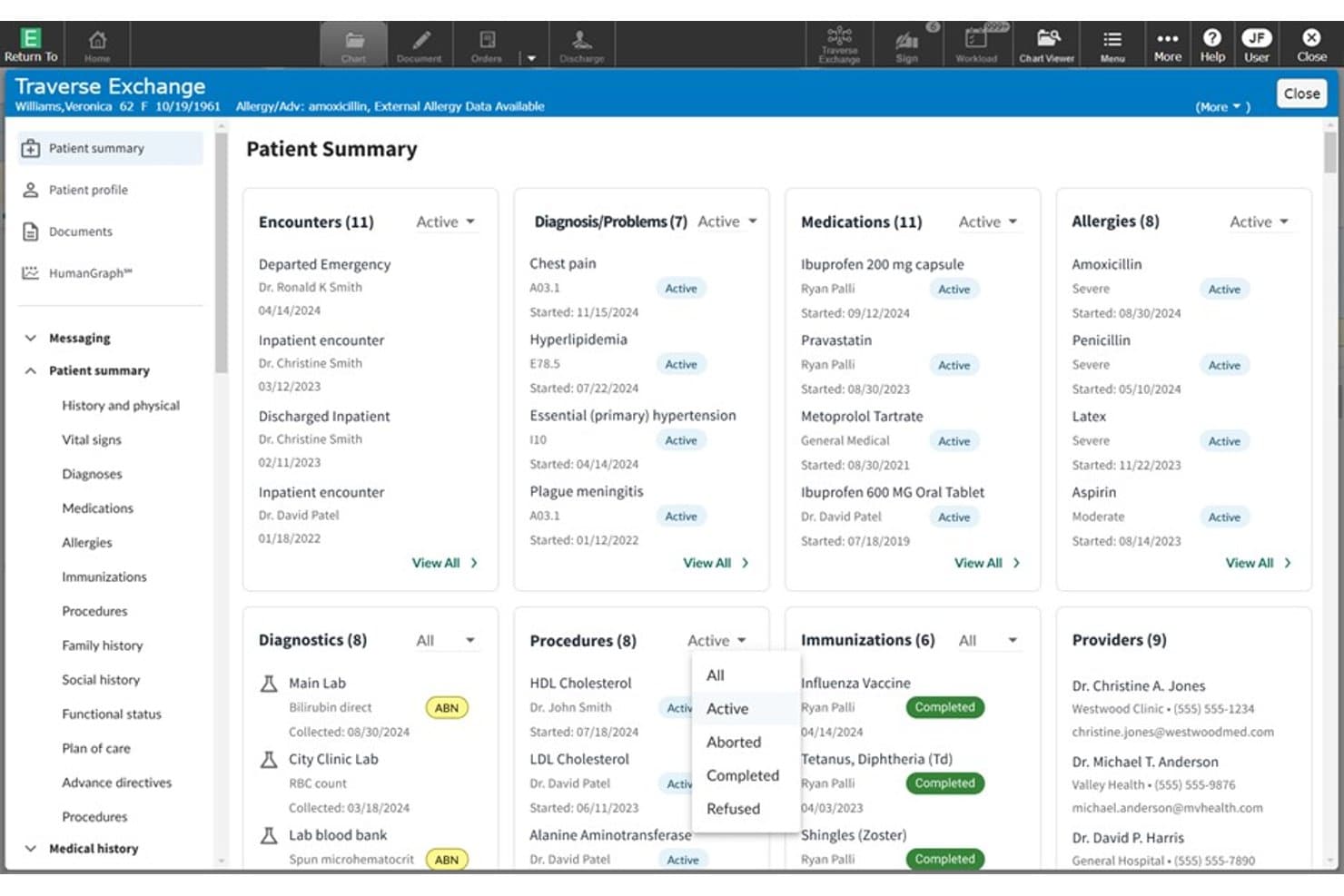
MEDITECH Expanse displays a unified patient summary across key clinical domains. MEDITECH Expanse is a cloud-native, mobile-first EHR for hospitals and health systems that need shared patient records and connected clinical and revenue-cycle workflows across inpatient and outpatient care.
Who Is MEDITECH Expanse Best For?
MEDITECH Expanse is a good fit for health systems coordinating clinical and administrative workflows across hospitals, outpatient clinics, and other care settings.
Why I Picked MEDITECH Expanse
I picked MEDITECH Expanse as a ModMed alternative because it’s Best for health systems scaling across care settings. Its longitudinal patient view gives clinicians a shared record across hospitals and outpatient clinics, while its unified revenue-cycle solution connects financial workflows. When a patient moves between care settings, teams can access their record in their clinical workflows.
MEDITECH Expanse Key Features
- Ambient intelligence: Captures and summarizes patient conversations within clinical workflows.
- Clinical decision support: Provides decision-support tools within the EHR.
- Integrated genomics: Makes genomic information available in the EHR.
- Virtual care: Includes self-service and virtual care tools.
MEDITECH Expanse Integrations
MEDITECH has documented Expanse partner integrations with Google Cloud, Microsoft, Commure, DrFirst, Health Gorilla, and Suki. Its Greenfield Workspace provides US Core FHIR R4 and FHIR Scheduling APIs for developers to test applications against Expanse.
Pros and Cons
Pros:
- Patient portal and mobile access support care
- Unified clinical and revenue-cycle workflows
- Shared records span inpatient and ambulatory workflows
Cons:
- Upgrade outages can disrupt record access
- Complex needs may outgrow customization
Learn more about MEDITECH Expanse:
Other ModMed Alternatives
Here are a few additional options that didn’t make my shortlist but are still worth checking out:
- 11MeditabBest for allergy and multi-specialty charting
- 12RXNTBest for transparent pricing and built-in AI scribing
- 13TebraBest for independent practice EHR and billing
- 14DrChronoBest for mobile-first charting and built-in RCM
- 15CharmHealthBest for free-tier EHR with usage-based billing
- 16Greenway HealthBest for FQHC and OB-GYN clinical-financial workflows
- 17Practice FusionBest for solo practices with outsourced billing
- 18NextGen OfficeBest for small-practice EHR with ambient AI notes
- 19VeradigmBest for independent practice EHR and claims
- 20Oracle HealthBest for enterprise-wide EHR interoperability
How I Evaluate ModMed Alternatives
I split my evaluation into three parts. First, core functionality: I look for platforms that document patient encounters and integrate scheduling with claims—these carry the most weight. Then I check for standout features like specialty-specific workflows or AI-assisted documentation. Finally, I consider implementation support and total cost of ownership.
Core Functionality (Table Stakes For This List)
When I'm selecting tools for my list, I score each one on a scale from 0 (does not offer the functionality) to 5 (excels in this area) for each core functionality listed below. I then convert the total into a percentage to help assess each tool's overall fit, with extra weight on any functionalities I’ve deemed essential.
- EHR & Charting (Essential): I look for structured encounter notes, adaptable templates, and clear access to patient histories for routine visits and specialty-specific documentation.
- Practice Management & Billing (Essential): I assess how scheduling, claims, and billing connect to clinical records, including the steps from documenting a visit to following up on a claim.
- Patient Engagement: I check for practical patient-facing tools such as appointment reminders, online scheduling, intake forms, and secure messaging.
- Specialty Templates: I evaluate whether templates and workflows fit the practice’s clinical needs, from specialty-specific exams to procedure documentation.
- Interoperability & Exchange: I look for data exchange with labs, pharmacies, payers, and other care systems that limits repeated manual entry.
- Reporting & Analytics: I consider whether reports help teams review clinical, operational, and financial measures, such as appointment patterns and claims status.
Once I have a list of tools that meet the criteria, I consider what sets each platform apart.
Differentiating Factors (What Sets Vendors Apart)
Here's how I compare and contrast different vendors:
Standout Features
I look for surgical workflow support that covers pre-op, intra-op, and post-op documentation natively. An orthopedic practice tracking implants through surgery needs that documentation tied to billing codes automatically, not stitched together with workarounds. I also evaluate whether a vendor bundles actual RCM services or just billing software, since practices without dedicated billing staff need hands-on claims follow-up. AI ambient documentation is another factor I check—tools like eClinicalWorks and CareCloud approach this differently, and I want to see how notes generate from real encounters, not just demos.
Beyond Features
I evaluate how each vendor handles implementation support, since migrating from a legacy EHR involves data conversion, staff retraining, and workflow redesign. Vendors like NextGen and athenaOne offer dedicated implementation teams, while others lean on self-service onboarding that can stall a go-live. Total cost of ownership matters just as much—percentage-of-collections billing models look different from flat per-provider fees once you factor in interface charges and add-on modules. I also check whether a platform supports MIPS/MACRA reporting and holds ONC certification, especially for ASC-heavy practices where compliance gaps carry real financial risk.
Why Look for ModMed Alternatives?
While ModMed is a good choice for specialty-focused practice management software, some teams seek alternatives when their needs, budget, or care setting differ. You might be looking for an alternative to ModMed because…
- Your specialty isn’t among ModMed’s listed clinical focus areas
- You need published pricing to compare costs before a sales demo
- Your multisite group needs tools across a wider range of care settings
- Your team wants to select EHR, billing, and engagement tools separately
If any of these sound like you, you’ve come to the right place. My list includes practice management software options better suited to teams facing these challenges with ModMed and looking for an alternative.
ModMed Key Features
Here are the key features of ModMed to help you compare it with alternative options:
- Integrated EHR and practice management: ModMed connects its practice management system with EMA, sharing clinical and administrative data. This links visit documentation with scheduling, billing, and checkout workflows.
- Appointment scheduling: Staff can run eligibility checks before appointments, use Appointment Finder, and manage automatic waitlists. Patient self-scheduling is also available with patient reminders.
- Patient check-in and checkout: ModMed Kiosk and Mobile Check-In support paperless intake, while staff can view patient status and room location. At checkout, teams can display follow-up recommendations and sync payments.
- Patient estimates: The Quoting Tool creates estimates for out-of-pocket costs, patient quotes, and bills. Practices can also track packaged products and services, helping staff explain expected charges before care.
- Billing and claims management: The system includes a clearinghouse interface, customizable claim scrubbing, automated claim submission, timely-filing reminders, and remittance posting. Teams can review rejection and denial reports as claims move through the billing workflow.
- Revenue cycle services: ModMed RCM offers additional revenue cycle support alongside the software, including claims follow-up. Availability varies by specialty, so confirm service coverage for your practice.
- Payment processing: ModMed Pay posts and reconciles payments in Practice Management. The platform also supports Autopay and Text-to-Pay, giving staff options for collecting patient balances.
- Financial reporting and analytics: Built-in dashboards and reports cover revenue cycle measures and practice KPIs. Premium Analytics adds customizable reports and interactive views of clinical, operational, and financial performance.
Costs and Pricing
Costs vary by features, practice size, add-ons, and pricing model. Here are typical price ranges for ModMed alternatives.
Plan Comparison Table for ModMed Alternatives
| Plan Type | Average Price | Common Features |
|---|---|---|
| Plan TypeFree Plan | Average Price$0/provider/month | Common FeaturesBasic charting, appointment scheduling, patient intake, and limited billing tools. |
| Plan TypePersonal Plan | Average Price$50-$200/provider/month | Common FeaturesEHR access, appointment scheduling, patient portal, and basic billing tools. |
| Plan TypeBusiness Plan | Average Price$200-$700/provider/month | Common FeaturesEHR and practice management, specialty templates, claims management, and reporting. |
| Plan TypeEnterprise Plan | Average Price$700-$1,500/provider/month, often custom-quoted | Common FeaturesMultisite management, advanced integrations, analytics, and implementation support. |