

O software EMR para Mac resolve problemas de compatibilidade e de experiência do utilizador em consultórios baseados em dispositivos Apple, permitindo à sua equipa conceber melhores fluxos de trabalho para os pacientes utilizando ferramentas familiares. Lidar com ineficiências entre plataformas pode ser desafiante, mas o suporte adequado pode garantir um acesso contínuo e aumentar a produtividade diária.
Neste artigo, comparo e analiso as melhores ferramentas de software EMR para Mac para apoiar a sua decisão de compra.
Why Trust Our Software Recommendations
6,700+
Reviews
20
Industry experts
16+
Evaluation factors
14
Years
Our team has been testing and reviewing software since 2012. As medical practice leaders ourselves, we know how difficult—and important—it is to choose the right software.
For this guide, we evaluated tools using hands-on testing and independent research, scoring tools using our selection criteria.
Our reviews reflect our human editorial judgment, not a sales pitch.
Tabela de comparação de software EMR para Mac
Esta tabela de comparação resume os detalhes de preços das minhas principais seleções de software EMR para Mac:
| Tool | Best For | Trial Info | Price | ||
|---|---|---|---|---|---|
| 1 | Best for charting that adapts to specialists | Free demo available | Pricing upon request | Website | |
| 2 | Best for FHIR-based patient data exchange | Free plan available | From $25/month | Website | |
| 3 | Best for primary care workflows on Mac | Free demo available | Pricing upon request | Website | |
| 4 | Best for comprehensive revenue cycle management | Free demo available | Pricing upon request | Website | |
| 5 | Best for chart access on Mac and iPad | Free demo available | Pricing upon request | Website | |
| 6 | Best for small Mac practices with staff access | Free demo available | From $199/user/month | Website | |
| 7 | Best for Mac-and-iPad clinical workflows | Free demo available | Pricing upon request | Website | |
| 8 | Best for interconnected care network management | Free demo available | Pricing upon request | Website | |
| 9 | Best for Mac clinics avoiding Windows-based EHRs | Free demo available | From $229/user/month | Website | |
| 10 | Best for integrated Mac-based clinic operations | Free demo available | Pricing upon request | Website |


Análises do melhor software EMR para Mac
Abaixo encontram-se os meus resumos detalhados do melhor software EMR para Mac que integrou a minha lista restrita. As minhas análises apresentam uma visão detalhada das principais funcionalidades, vantagens e desvantagens, integrações e casos de utilização ideais de cada ferramenta, para o ajudar a encontrar a melhor opção para si.
 Best for charting that adapts to specialists
- Free demo available
- Pricing upon request
Visit WebsiteCustomer Rating:4.5/5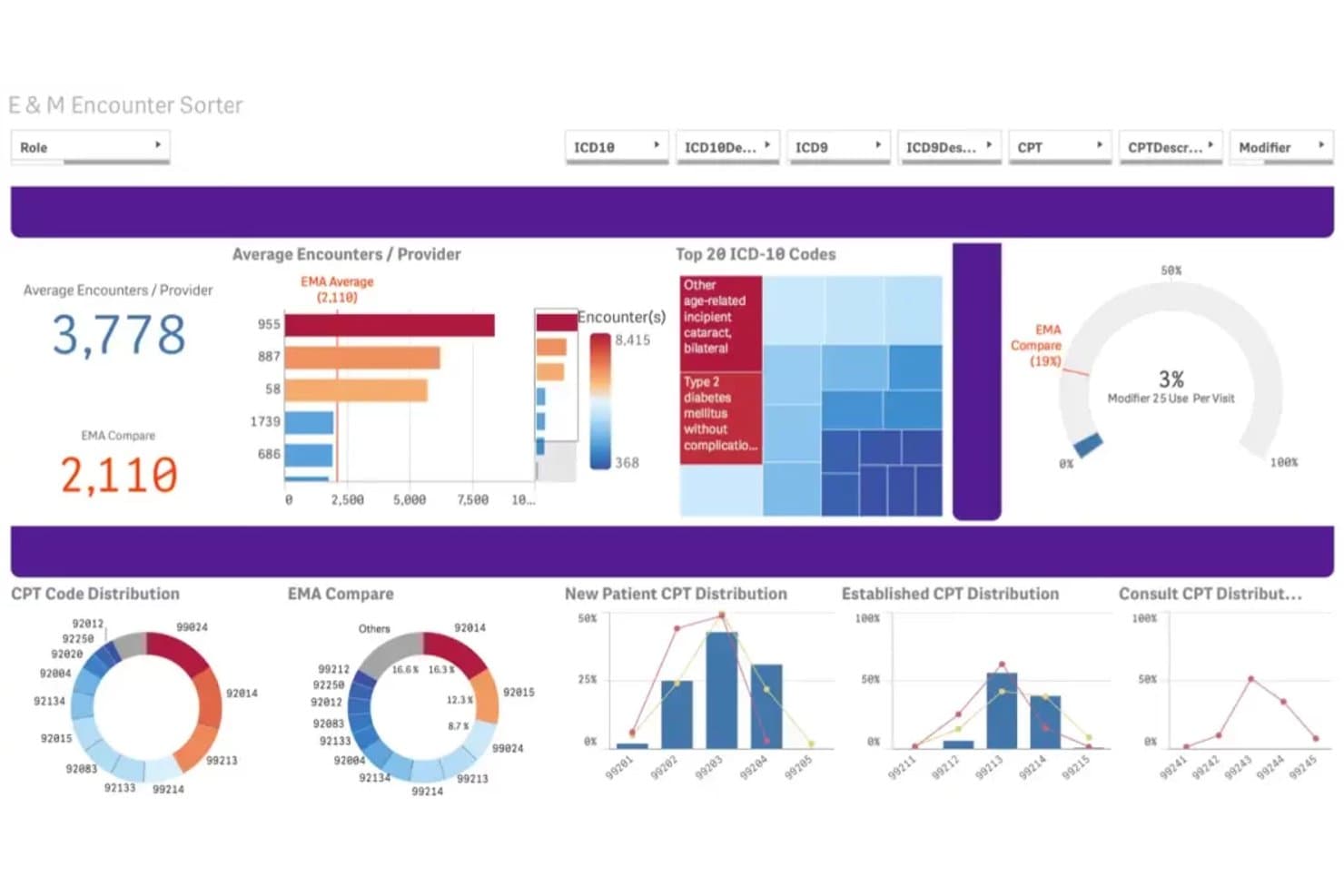
ModMed's E&M Encounter Sorter visualizes billing patterns and CPT code usage. ModMed EMA is a cloud-based, specialty-specific EHR accessible on Mac via browser that offers adaptive clinical charting, AI-assisted ambient documentation, e-prescribing, and lab order integration across more than a dozen medical specialties.
Who Is ModMed Best For?
ModMed EMA is a strong fit for specialty care physicians in private practice who need a charting system that learns and adapts to how they personally practice medicine.
Why I Picked ModMed
ModMed earns its spot on my shortlist because its EMA system genuinely adapts to how individual specialty physicians work, rather than forcing them into rigid templates. I find the adaptive charting particularly compelling: EMA learns your preferences for exam descriptions, procedures, and prescriptions, then surfaces suggested diagnoses and treatment plans specific to your specialty. Paired with ModMed Scribe's ambient AI documentation, it can draft clinical notes from natural patient conversations and queue orders for review without breaking your flow.
ModMed Key Features
- Surescripts-certified e-prescribing: Send prescriptions to a patient's preferred pharmacy, manage refill requests, and check drug-to-drug and drug-to-allergy interactions from within EMA.
- Electronic prior authorization: Initiate and track prior authorizations, respond to payer questions, submit attachments, and appeal denials directly in the ePA Rx queue.
- Electronic lab ordering and results: Order labs and receive results electronically from more than 1,200 connected lab entities via the Change Healthcare interface.
- MIPS tracking and analytics: Monitor practice performance and regulatory compliance through built-in MIPS tracking and near-real-time analytics dashboards.
ModMed Integrations
EMA has documented integrations with Surescripts, Appriss Health PMP, GoodRx, Change Healthcare, Quest Diagnostics, Labcorp/Dianon, and BioReference Laboratories. It supports HL7, SMART on FHIR, Certified FHIR, and proprietary APIs for custom integrations.
Pros and Cons
Pros:
- iPad workflows support charting away from desks
- Adaptive specialty notes reduce repetitive documentation
- Supported browsers enable Mac-based charting
Cons:
- Computer workflows can take extra clicks
- No dedicated native macOS application
Learn more about ModMed: Best for FHIR-based patient data exchange
- Free plan available
- From $25/month
Visit WebsiteCustomer Rating:4.2/5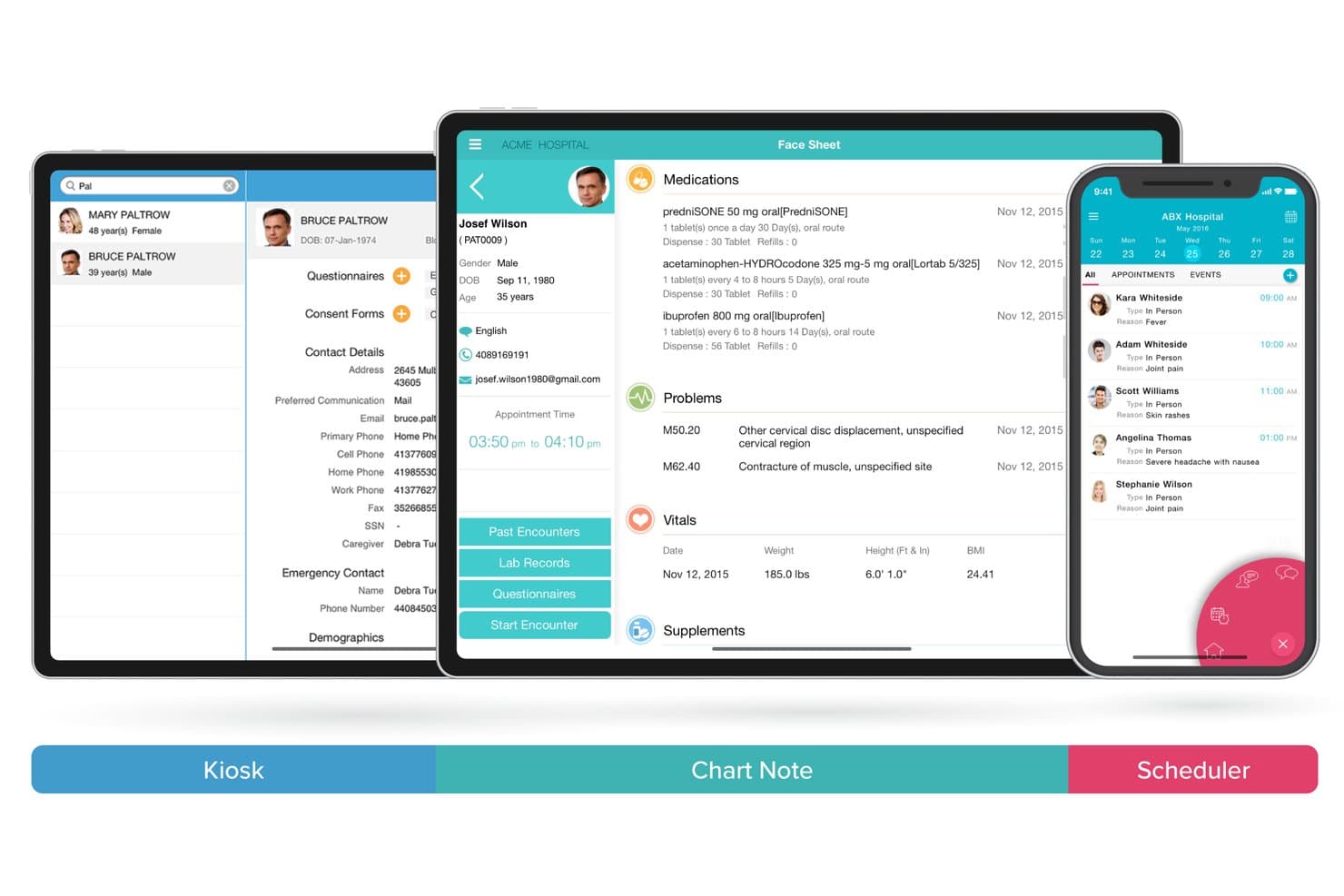
CharmHealth supports mobile EMR access across kiosk, chart note, and scheduler. CharmHealth is a cloud-based EHR that combines clinical charting, e-prescribing, lab order integration, practice management, and FHIR-based patient data exchange in one browser-accessible platform.
Who Is CharmHealth Best For?
CharmHealth is a strong fit for small to mid-sized independent practices that need an affordable, all-in-one cloud EHR with solid interoperability and customizable clinical workflows.
Why I Picked CharmHealth
CharmHealth earns its spot on my shortlist because its FHIR 4.0.1 API makes patient data exchange genuinely practical, not just a checkbox. I like that it documents specific FHIR resources like MedicationRequest, DiagnosticReport, and DocumentReference, with SMART-on-FHIR authorization for third-party apps. Running entirely in the browser, it works on any Mac without extra software, and its lab interfaces with Quest and LabCorp route orders and return results directly into the chart.
CharmHealth Key Features
- AI Scribe: Transcribes patient-provider conversations in real time and generates chart notes for SOAP, Comprehensive, and Brief encounter types.
- Customizable templates: Lets providers build, import, and modify specialty templates, configure SOAP sections, and add custom vitals like LMP for gynecology.
- Patient portal: Gives patients browser-based access to health records, lab results, prescription updates, questionnaires, and secure messaging with their care team.
- Role-based access controls: Lets administrators set granular access privileges for each practice member and review audit trails for PHI and other sensitive actions.
CharmHealth Integrations
Native integrations include Surescripts, LabCorp, Quest Diagnostics, QuickBooks, Bluefin, Optum, and digital scales; Fullscript is a marketplace integration. CharmHealth also provides FHIR 4.0.1, CCDA, and bulk-export APIs for custom connectivity.
Pros and Cons
Pros:
- Cloud access avoids practice server requirements
- Configurable SOAP templates support specialty workflows
- FHIR exchange supports patient data portability
Cons:
- Reviewers report charting and note-format friction
- No documented native macOS application
Learn more about CharmHealth: Best for primary care workflows on Mac
- Free demo available
- Pricing upon request
Visit WebsiteCustomer Rating:4.4/5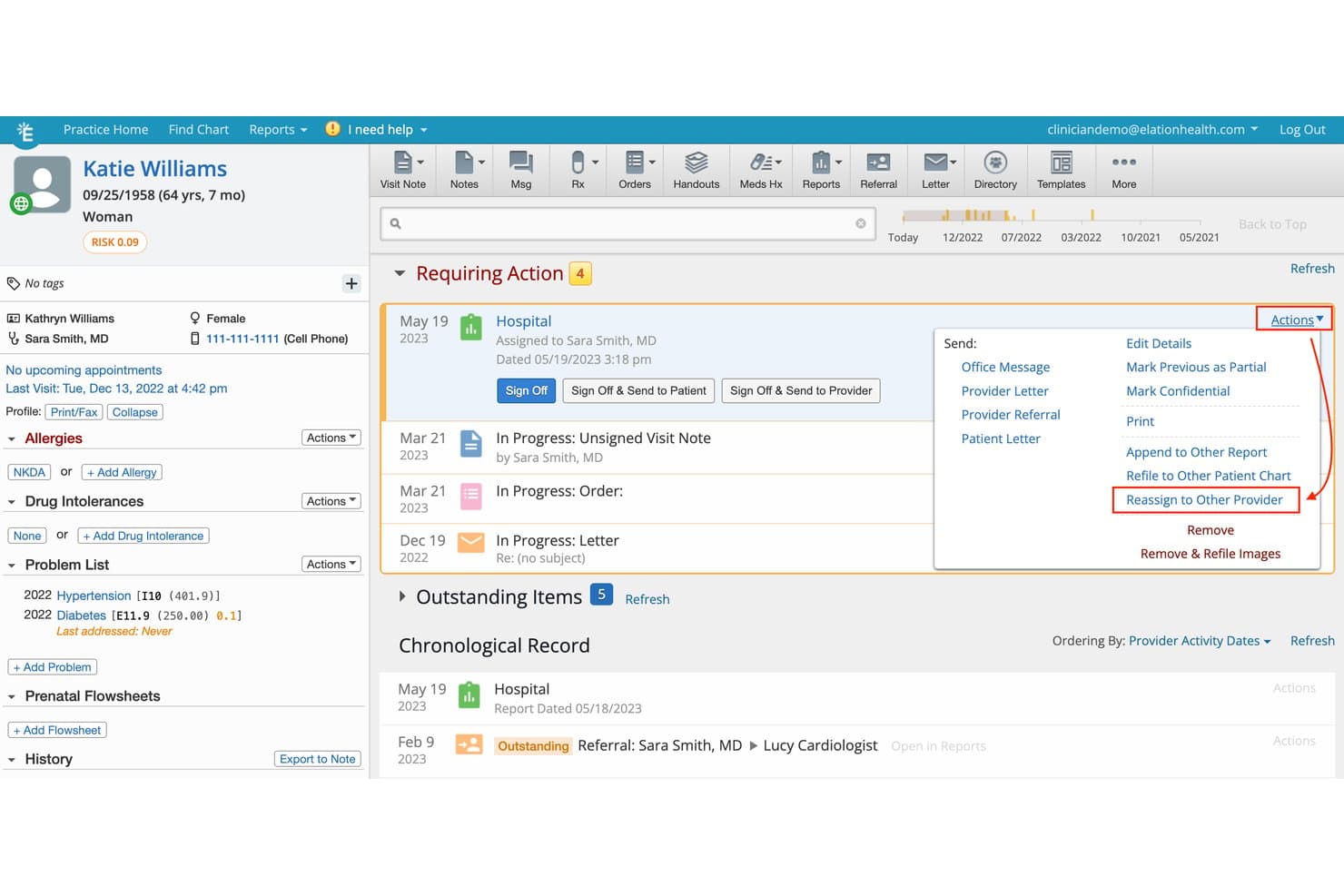
Elation Health lets users reassign reports to other providers from the chart. Elation Health is a browser-based EHR built for independent primary care practices, offering clinical charting, ePrescribing, lab order management, referral coordination, and integrated telehealth.
Who Is Elation Health Best For?
Elation Health is a strong fit for independent primary care physicians who want a browser-based EHR with clean charting, built-in ePrescribing, and AI-assisted note documentation.
Why I Picked Elation Health
Elation Health earns its spot on my shortlist because its browser-based EHR runs cleanly on any Mac with Chrome or Firefox, making it a natural fit for primary care physicians who live in their charting workflows. I particularly like the three-panel console, which keeps the patient chart, clinical tools, and documentation on one screen without constant tab-switching. Note Assist goes a step further by listening during visits and generating structured SOAP or Complete H&P notes directly from the conversation, which cuts post-visit documentation time noticeably.
Elation Health Key Features
- ePrescribing with formulary data: The desktop prescription form supports non-controlled and controlled medications, with drug interaction checks, formulary status, and real-time cost estimates at the point of care.
- Electronic lab ordering and results routing: Orders go out electronically through bidirectional lab interfaces, and structured results land directly in the provider inbox with abnormal values flagged for sign-off.
- Visit note templates with multiple formats: Practices can build, duplicate, and customize templates across Simple, SOAP, Complete H&P, and Pre-Op note formats.
- Elation Passport patient portal: Patients access signed visit summaries, appointment details, and provider-shared attachments through a browser-based or mobile portal that also supports secure messaging.
Elation Health Integrations
Elation Health reports 300+ integrations, including native connections with Google Calendar, Ribbon, and Zoom, plus marketplace integrations with Acadian Diagnostic Laboratories and Access Medical Labs. It also supports API and webhook connectivity, including FHIR R4, SMART on FHIR, and OAuth2.
Pros and Cons
Pros:
- SOAP and H&P templates support Mac charting
- Note Assist drafts structured visit notes
- Three-panel chart keeps clinical context visible
Cons:
- Full EHR isn't designed for iPad use
- No dedicated native Mac app
Learn more about Elation Health: Best for comprehensive revenue cycle management
- Free demo available
- Pricing upon request
Visit WebsiteCustomer Rating:4.1/5
Here's PracticeSuite mac EMR software interface PracticeSuite is a holistic medical practice management software offering a wide range of functionalities. It also excels in providing comprehensive revenue cycle management, a vital component of medical practice operations that directly impacts financial health.
Why I Picked PracticeSuite: My selection of PracticeSuite was driven by its comprehensive approach to revenue cycle management (RCM). Also, In comparing many medical management tools, PracticeSuite stood out with its efficient handling of every phase of the revenue cycle, from appointment scheduling to insurance claim processing. This level of detailed attention to revenue operations justifies its position as the best choice for comprehensive revenue cycle management.
Standout features & integrations:
Key features of PracticeSuite include intuitive patient scheduling, robust electronic health record (EHR) management, and an in-depth billing module. The software also excels in providing detailed analytics that allows for thorough financial management. When it comes to integrations, PracticeSuite doesn't disappoint, with compatibility with leading EHR systems, clearinghouses for billing, and laboratories for seamless data exchange.
Pros and Cons
Pros:
- Detailed analytics for financial management
- Strong suite of integrations with other healthcare systems
- Comprehensive revenue cycle management features
Cons:
- Annual billing may deter practices seeking more flexible payment terms
- Steeper learning curve for those new to medical billing
- Some users may find the interface somewhat dated
Learn more about PracticeSuite: Best for chart access on Mac and iPad
- Free demo available
- Pricing upon request
Visit WebsiteCustomer Rating:3.9/5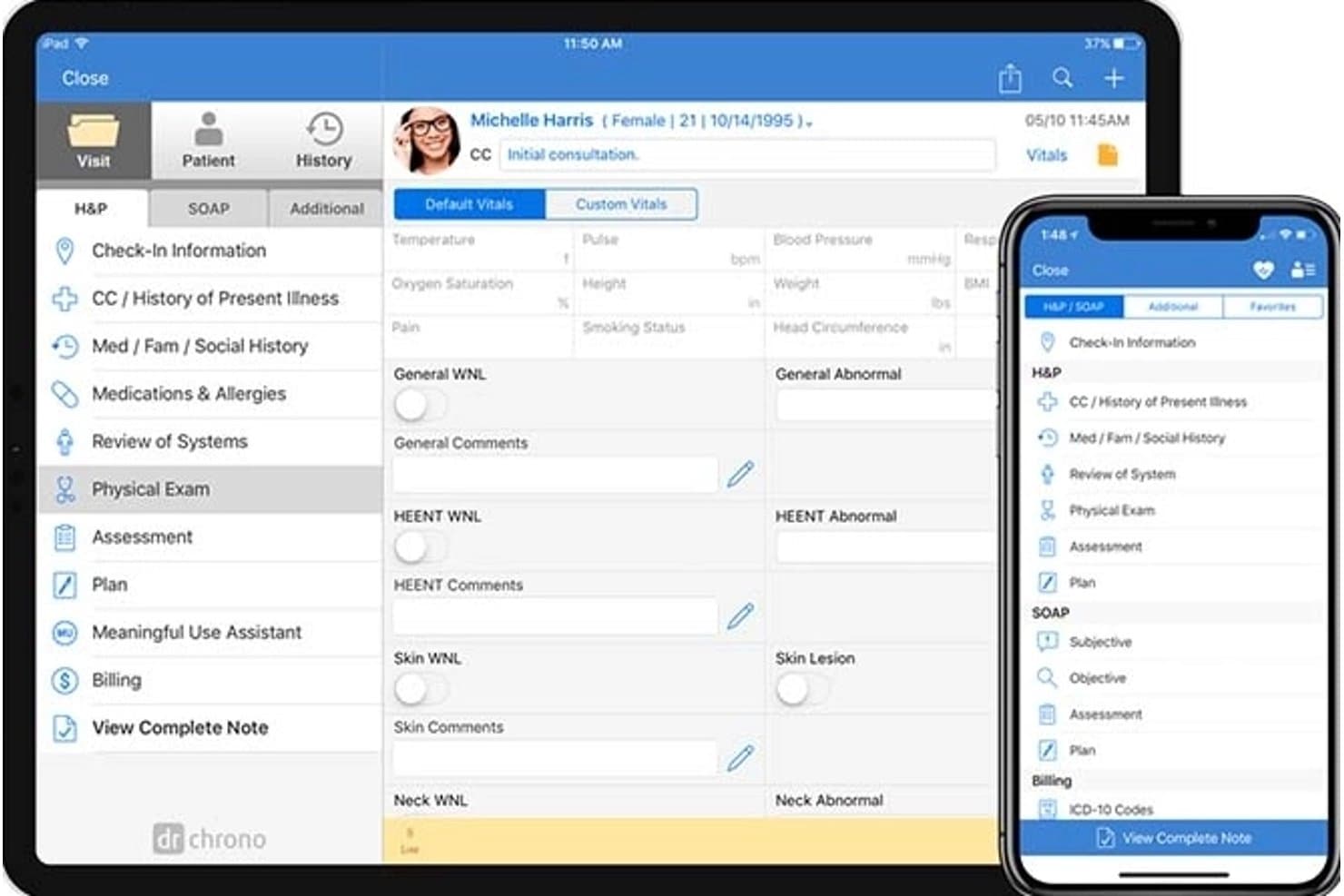
DrChrono displays patient physical exam fields across iPad and iPhone. DrChrono is a cloud-based EHR platform by EverHealth that combines clinical charting, scheduling, medical billing, e-prescribing, lab ordering, and patient engagement tools, with dedicated apps for iPad and iPhone alongside browser-based access on Mac.
Who Is DrChrono Best For?
DrChrono is a strong fit for independent practice physicians and their administrative teams who need a single platform for charting, scheduling, and billing across Mac browsers and Apple mobile devices.
Why I Picked DrChrono
DrChrono earns its spot on my shortlist because it's one of the few EHR platforms that genuinely treats Mac and iPad as co-equal access points rather than an afterthought. I like that clinicians can open a full charting session in Safari or Chrome on macOS, then pick up the same patient chart on an iPad mid-workflow using the dedicated iOS app. The specialty-specific template library spans 20-plus medical fields, so physicians can document a PHQ-9 screening or a sports physical without building forms from scratch.
DrChrono Key Features
- OnPatient patient portal: Patients can schedule appointments, message providers, pay balances, access lab results, and complete intake forms through a web browser or iOS/Android app.
- RecordSync record exchange: Bi-directional HL7 FHIR exchange with Surescripts retrieves prior encounters, diagnoses, medications, allergies, and immunizations from outside providers connected to Carequality.
- EverHealth Scribe: Ambient AI listens to clinician-patient conversations and drafts structured clinical notes—including HPI, Assessment, Plan, and ICD-10 codes—for clinician review before saving to the EHR.
- Automated appointment reminders: Configurable email, text, and phone reminders notify patients about upcoming visits, with overage rates applying beyond each plan's included volume.
DrChrono Integrations
DrChrono offers documented native integrations with Quest Diagnostics, Labcorp, Iron Bridge, Surescripts, CoverMyMeds, and eProvider Solutions. It also supports REST and FHIR APIs, OAuth, webhooks, and iframe integrations for custom connectivity.
Pros and Cons
Pros:
- OnPatient supports digital intake and chart access
- Mac browser access pairs with iPad apps
- Reviewers praise customizable clinical notes
Cons:
- Users report outages and failed saves
- No dedicated native macOS app
Learn more about DrChrono: Best for small Mac practices with staff access
- Free demo available
- From $199/user/month
Visit WebsiteCustomer Rating:3.7/5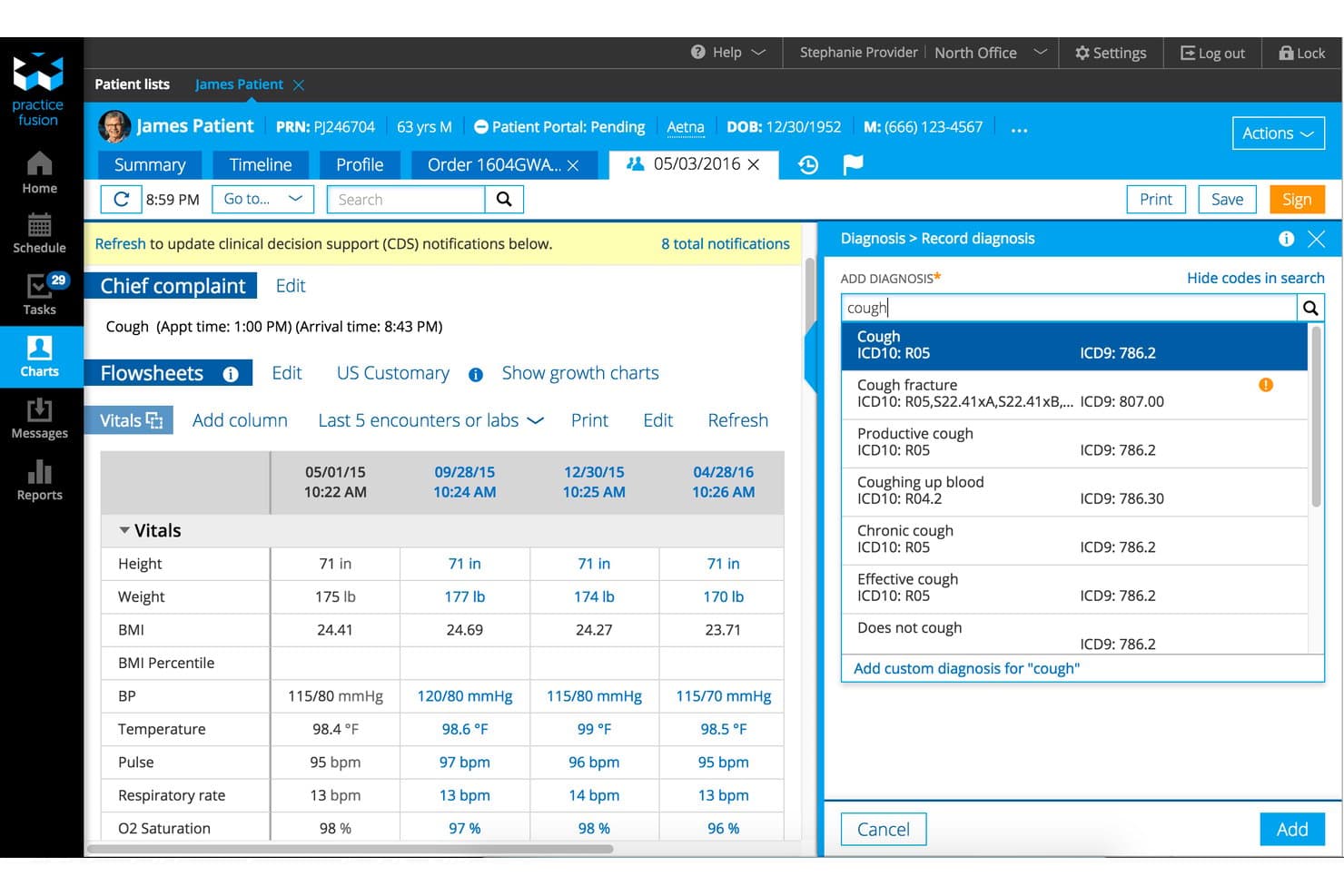
Practice Fusion lets users search and assign ICD10 diagnosis codes quickly. Practice Fusion is a cloud-based EHR for independent medical practices that runs entirely through a web browser, offering clinical charting, e-prescribing, lab and imaging order management, scheduling, and a built-in patient portal.
Who Is Practice Fusion Best For?
Practice Fusion suits solo physicians and small independent practices—typically one to three clinicians—who want a browser-based EHR with built-in e-prescribing, staff access controls, and lab ordering without installing platform-specific software.
Why I Picked Practice Fusion
Practice Fusion earns its spot on my shortlist because it runs entirely in Chrome on Mac with no installation, no emulation, and no workarounds. I particularly like how each provider license includes three signing staff licenses plus unlimited non-signing staff, so front-desk and clinical staff can work in the same system with appropriate permissions. From a Mac workflow perspective, you can move between a MacBook and an iPad browser mid-shift without losing context, and e-prescribing, including controlled substances, stays fully accessible throughout.
Practice Fusion Key Features
- SOAP charting templates: Build and reuse customizable templates within SOAP encounter sections, including patient-data placeholders and shortcut creation.
- Patient portal (Patient Fusion): Gives patients browser-based access to medications, diagnostic history, allergies, immunizations, and appointments.
- Flowsheets: Track patient care longitudinally by reviewing orders, results, and adherence trends across visits in a single view.
- MIPS and eCQM reporting dashboards: Monitor quality measure performance and track Meaningful Use program requirements directly within the EHR.
Practice Fusion Integrations
Practice Fusion reports integrations with over 600 companies and lists Labcorp, Quest, CVS, and Change Healthcare. FHIR, Labs, Imaging, Billing, and proprietary APIs support custom connectivity.
Pros and Cons
Pros:
- Staff permissions support shared clinic workflows
- Reusable SOAP templates speed repeat documentation
- Mac browser access avoids Windows emulation
Cons:
- Specialty notes can slow higher-volume visits
- No native Mac app or offline charting
Learn more about Practice Fusion: Best for Mac-and-iPad clinical workflows
- Free demo available
- Pricing upon request
Visit WebsiteCustomer Rating:3.6/5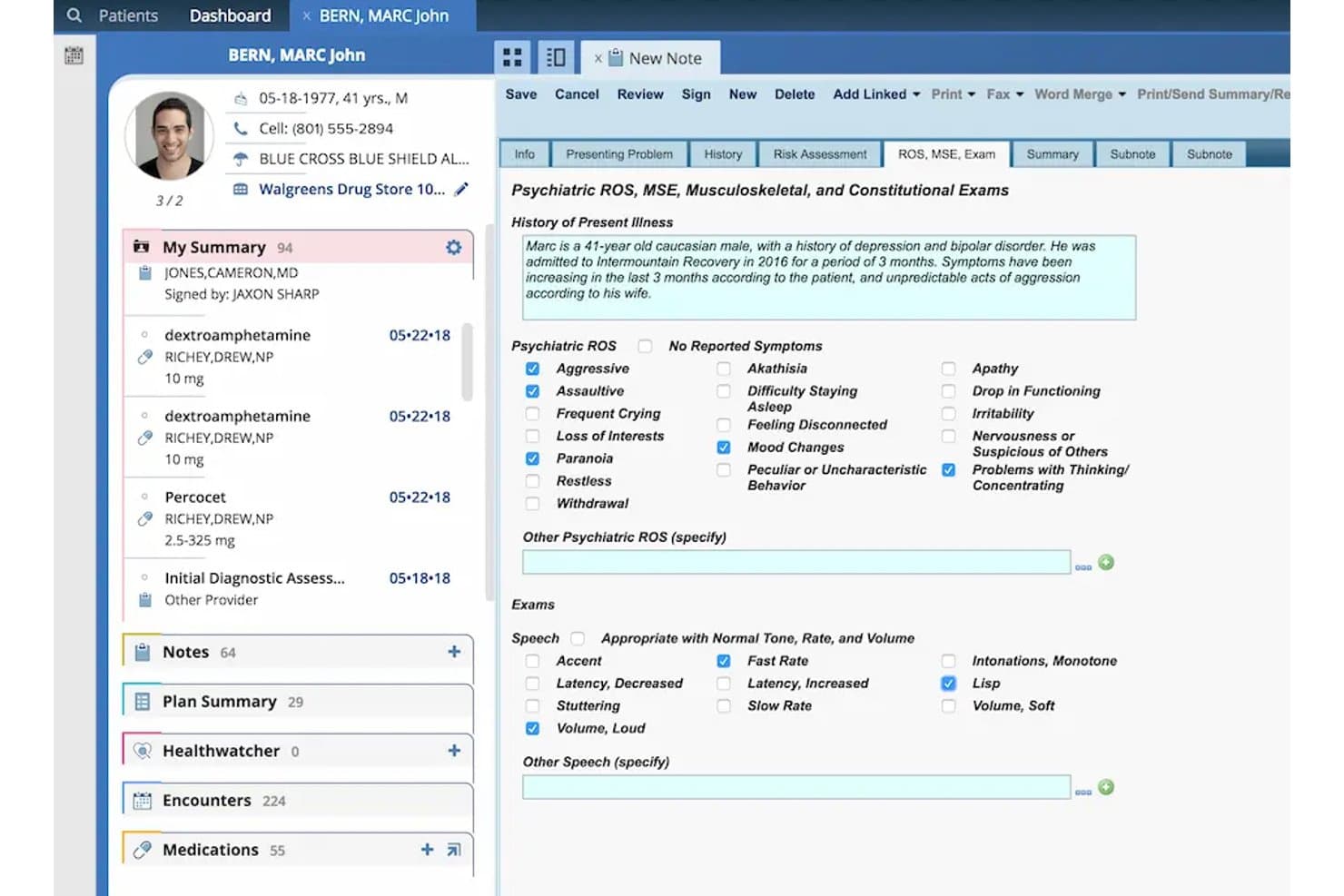
AdvancedMD structures psychiatric exams and ROS documentation in one view. AdvancedMD is a cloud-based EHR and practice management platform for independent practices that combines clinical charting, e-prescribing, lab order management, scheduling, billing, and patient engagement tools across Mac browsers and a native iOS app for iPhone and iPad.
Who Is AdvancedMD Best For?
AdvancedMD suits independent specialty practices where physicians handle charting, e-prescribing, and lab orders across Mac browsers and iPads.
Why I Picked AdvancedMD
I picked AdvancedMD as one of the best because it's built around the clinical workflows physicians actually run on Mac browsers and iPads. The iOS Clinical app lets you document encounters, manage controlled-substance prescriptions, and place lab orders from an iPad, with changes syncing instantly to the cloud-based chart. I also like that its AI ambient listening captures visit conversations and outputs structured notes in formats like SOAP or treatment plans, cutting post-visit documentation time significantly.
AdvancedMD Key Features
- Physician dashboard: Lets each physician personalize a daily view of appointments, outstanding tasks, priority flags, and staff communications.
- Real-time insurance eligibility verification: Checks patient coverage automatically during scheduling before the visit begins.
- AI pre-visit summary: Pulls together recent notes, labs, medications, allergies, and risk factors into a single summary before each encounter.
- Patient kiosk: Runs on iPad to let patients check in and complete electronic forms without paper at the front desk.
AdvancedMD Integrations
Native integrations are not clearly documented. AdvancedMD offers FHIR R4 APIs for authorized, read-only patient-data access, while separate Partner APIs support real-time reading and writing.
Pros and Cons
Pros:
- iPad app supports charting, prescribing, and labs
- Specialty templates can speed configured charting
- Mac browser access avoids Windows emulation
Cons:
- Users report repetitive, click-heavy e-prescribing workflows
- No dedicated macOS app or offline charting
 Best for interconnected care network management
- Free demo available
- Pricing upon request
Visit WebsiteCustomer Rating:3.4/5
Here's Athenahealth's EHR service feature. Athenahealth offers a robust healthcare platform focusing on creating an interconnected care network. Its solutions encompass electronic health records (EHR), practice management, patient engagement, and care coordination. The key selling point is its cloud-based platform's ability to effectively manage a vast network of care providers, which directly relates to its standing as best for interconnected care network management.
Why I Picked Athenahealth: When choosing the best healthcare software, the extensive networking capabilities of Athenahealth made it stand out from other competitors. I found it to be the best for interconnected care network management due to its focus on creating an expansive care network, making it possible to deliver a coordinated and efficient care experience.
Standout features & integrations:
Athenahealth’s platform includes a range of noteworthy features like electronic health records, patient engagement tools, and billing services. The standout feature is its ability to create an interconnected network of care providers, which greatly enhances coordination and efficiency. As for integrations, Athenahealth works well with a variety of systems, including billing and laboratory management tools.
Pros and Cons
Pros:
- Offers seamless integration with a variety of other tools
- The interconnected network feature enhances care coordination
- Robust suite of tools covering multiple aspects of healthcare management
Cons:
- There's a learning curve to effectively utilize all its capabilities
- The vast range of features might be overwhelming for some users
- Pricing information is not readily available, which might deter some potential users
Learn more about athenahealth: Best for Mac clinics avoiding Windows-based EHRs
- Free demo available
- From $229/user/month
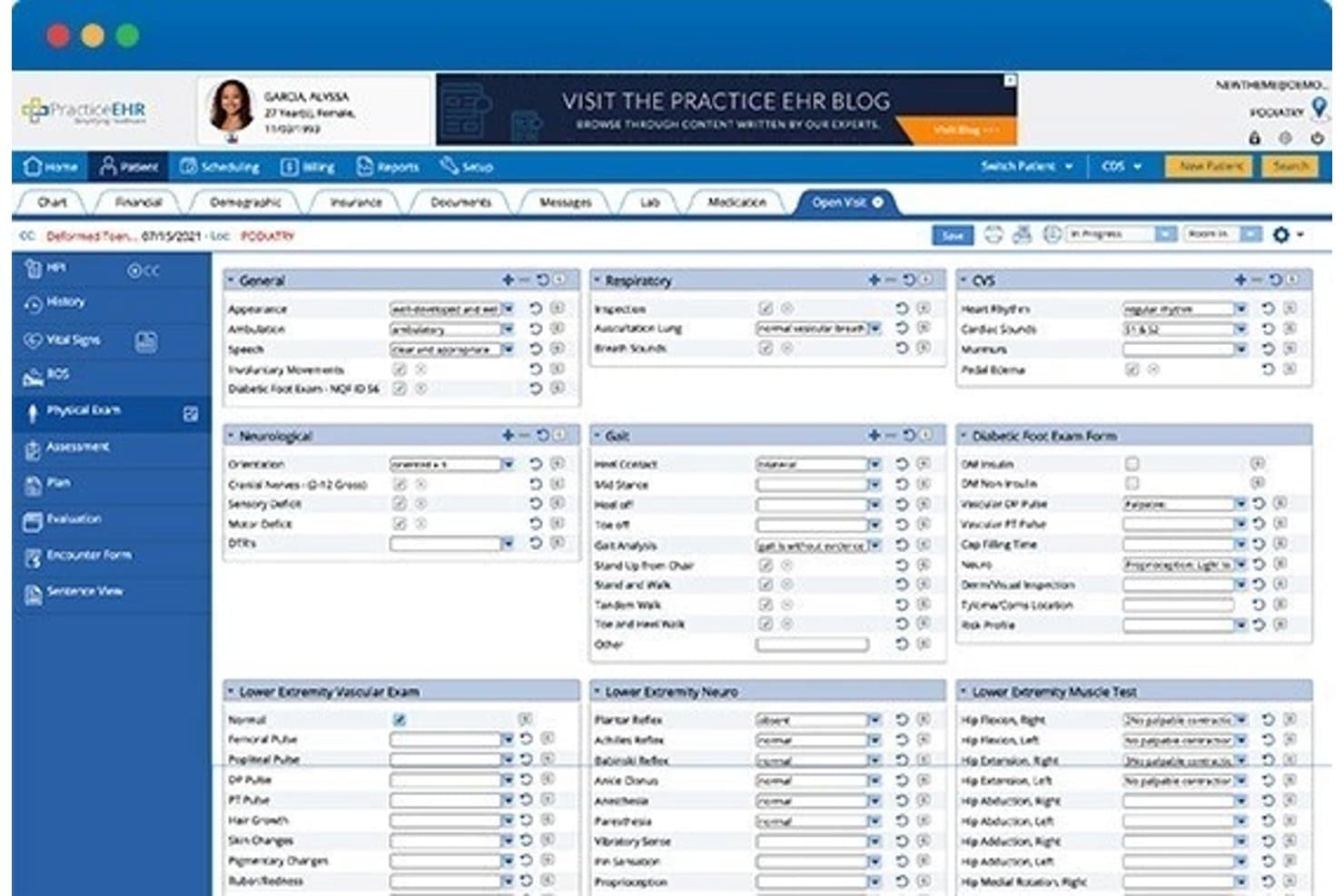
Practice EHR streamlines physical exam documentation across multiple body systems. PracticeEHR is a cloud-based EHR platform for independent and specialty practices that covers clinical charting, e-prescribing, lab ordering, scheduling, and billing in one browser-accessible system.
Who Is PracticeEHR Best For?
PracticeEHR fits independent and specialty practices that want a fully browser-based EHR they can run on Mac without being locked into a Windows-dependent system.
Why I Picked PracticeEHR
PracticeEHR earns its spot on my shortlist because it runs entirely in a modern web browser, meaning a Mac-based clinic can access the full EHR without installing Windows-dependent software or maintaining a local server. I particularly like the AI Scribe feature, which listens to patient visits and structures transcription directly into SOAP notes with ICD-10 and CPT code suggestions, all reviewable before signing. The platform also supports EPCS-certified e-prescribing through Surescripts and lab ordering with LabCorp and Quest, so Mac workflows stay intact from charting through prescribing.
PracticeEHR Key Features
- Specialty-specific templates: Configure templates, abbreviations, intake forms, and workflows for 25+ specialties, including podiatry, psychiatry, and mental health, during onboarding.
- Patient check-in kiosk: Supports tablet-based check-in for patient intake, consent collection, and copay processing at the front desk.
- Multi-location calendar: Displays providers, rooms, and locations in a color-coded calendar for managing schedules across multiple practice sites.
- Role-based access controls: Applies granular user permissions to define what each staff member can view and do within the system.
PracticeEHR Integrations
PracticeEHR documents integrations with Surescripts, LabCorp, Quest, and Kno2, plus HL7 connections for labs and imaging centers. An ONC-certified FHIR API supports custom integrations with SMART-on-FHIR and OAuth 2.0.
Pros and Cons
Pros:
- Reviewers praise centralized charting and scheduling
- Users report editable specialty templates
- Mac browser access avoids Windows installs
Cons:
- Reviewers report fields missing from later notes
- No dedicated macOS app or offline mode
Learn more about Practice EHR: Best for integrated Mac-based clinic operations
- Free demo available
- Pricing upon request

Here's the patient portal screenshot of MacPractice, which shows detailed reporting capabilities. MacPractice is a Mac-native practice management and EHR platform that combines clinical charting, scheduling, billing, e-prescribing, and lab order management in a single system built exclusively for macOS.
Who Is MacPractice Best For?
MacPractice suits independent and specialty practices that run entirely on Mac hardware and want a single system for scheduling, charting, billing, and e-prescribing without managing a Windows environment.
Why I Picked MacPractice
MacPractice earns its spot on my shortlist because it's built from the ground up for macOS, which means there's no emulation layer or Windows workaround getting between your clinical workflow and your Mac hardware. I particularly like that specialty-specific EHR templates span over 100 specialties, so a dermatology or pain management practice can chart using a structure that actually matches how they document care. The iEHR iPad app mirrors the desktop experience and syncs simultaneously, so a provider can complete a chart note tableside and have it reflected in the practice-management system without any extra steps.
MacPractice Key Features
- Electronic lab ordering and results filing: Send lab requisitions electronically and receive results as HL7 messages or PDFs, with automatic filing and clinical alerts for follow-up.
- Patient portal with CCDA record access: Patients can view lab results, visit summaries, and appointment history, and download CCDA health records directly from the portal.
- MacPractice Engage two-way SMS: Send automated appointment reminders, recall notices, and confirmations, and receive patient replies through a dedicated messaging portal.
- Role-based user permissions and activity logs: Control staff access to sensitive areas of the software and review a full change history through built-in user-activity reporting.
MacPractice Integrations
MacPractice documents integrations with NewCrop, Change Healthcare, Inovalon, DentalXChange, Updox, Planmeca/Romexis, Global Payments, and HL7 lab messaging. MacPractice Engage and MacPractice Payments are documented native integrations; API availability isn’t stated.
Pros and Cons
Pros:
- Scheduling, charting, and billing share one system
- Desktop and tablet charting update together
- Specialty templates cover over 100 clinical fields
Cons:
- Reviewers cite crashes and lost chart work
- Reviewers report slow notes and billing errors
Learn more about MacPractice:
How I Evaluate Mac EMR Software
I split my evaluation into three parts, giving the most weight to core needs: run on Mac without Windows workarounds and document structured patient visits. Next, I look for differentiators such as specialty-specific templates. Finally, I consider factors beyond features, including Mac-specific onboarding, data migration help, and total cost.
Core Functionality (Table Stakes For This List)
When I'm selecting tools for my list, I score each one on a scale from 0 (does not offer the functionality) to 5 (excels in this area) for each core functionality listed below. I then convert the total into a percentage to help assess each tool's overall fit, with extra weight on any functionalities I’ve deemed essential.
- Mac Compatibility (Essential): I check that staff can use the system on macOS through a supported browser or Mac client, without Windows emulation or virtual machines.
- Charting & Notes (Essential): For routine and specialty visits, I look for structured notes, usable templates, and easy retrieval of histories and prior encounters.
- E-Prescribing: I assess whether clinicians can send prescriptions electronically and review medication and allergy checks during prescribing.
- Lab & Diagnostic Orders: I look for in-system ordering and results filed to the correct patient chart, so providers can review them during follow-up.
- Apple Device Access: I check whether teams can securely access charts on Mac and iPad, including during rooming and other clinic workflows.
- Data Interoperability: I evaluate secure record exchange with outside systems, including support for standards such as HL7 or FHIR where available.
Once I have a list of tools that meet the criteria, I consider what sets each platform apart.
Differentiating Factors (What Sets Vendors Apart)
Here's how I compare and contrast different vendors:
Standout Features
I look for offline charting mode because clinic internet outages shouldn't stop a provider mid-encounter. I check whether charts sync cleanly once connectivity returns, since gaps create compliance risks. Voice-to-text dictation tuned for clinical terminology is another separator—it cuts charting time on Mac and iPad, especially for specialties with dense documentation like orthopedics or cardiology. I also evaluate patient portal tools, specifically whether online scheduling, intake forms, and messaging feed directly into the chart without manual re-entry.
Beyond Features
I check whether a vendor has a real track record on macOS, not just a recent browser port. Vendors like DrChrono that have supported Apple devices for years tend to handle OS updates without breaking workflows. I also evaluate onboarding support—specifically, whether the vendor offers data migration from a Windows-based legacy system and Mac-specific setup help. A practice switching from a Windows EMR to a Mac-native platform can lose weeks if migration planning falls short.
Como escolher software EMR para Mac
É fácil perder-se em listas extensas de funcionalidades e estruturas de preços complexas. Para o ajudar a manter-se concentrado enquanto avança no seu processo específico de seleção de software, segue-se uma lista de verificação dos fatores a ter em conta:
| Fator | O que considerar |
|---|---|
| FatorEscalabilidade | O que considerarO software acompanhará o crescimento do seu consultório? Tenha em conta o volume de pacientes, o número de utilizadores e a expansão futura. Escolha uma solução que não fique limitada pelas suas necessidades. |
| FatorIntegrações | O que considerarFunciona com as suas ferramentas atuais? Verifique a compatibilidade com sistemas de faturação, laboratórios e outro software que utilize diariamente. Evite problemas de integração. |
| FatorPersonalização | O que considerarPode adaptá-lo aos seus fluxos de trabalho? Procure opções para ajustar modelos, campos e relatórios de modo a corresponderem aos processos do seu consultório. |
| FatorFacilidade de utilização | O que considerarA interface é intuitiva? Teste a facilidade de utilização para garantir que a sua equipa consegue navegar sem formação extensa. Esteja atento a curvas de aprendizagem acentuadas. |
| FatorImplementação e integração inicial | O que considerarQuanto tempo demorará até estar operacional? Avalie o tempo de configuração e os recursos necessários. Procure fornecedores que ofereçam apoio abrangente durante a integração inicial. |
| FatorCusto | O que considerarO preço cabe no seu orçamento? Compare o custo das licenças, subscrições e eventuais taxas ocultas. Equilibre a acessibilidade com as funcionalidades essenciais. |
| FatorMedidas de segurança | O que considerarComo protege os dados dos pacientes? Garanta a conformidade com a HIPAA e outros regulamentos. Procure encriptação, controlos de acesso e registos de auditoria. |
| FatorDisponibilidade do suporte | O que considerarQuando pode contactar o suporte? Avalie a disponibilidade e a capacidade de resposta do apoio ao cliente. Tenha em conta os fusos horários e canais como telefone, chat ou e-mail. |
O que é o software EMR para Mac?
O software EMR para Mac é um software de registos médicos eletrónicos compatível com o macOS. Desenvolvido para profissionais de saúde que utilizam dispositivos Apple, este software resolve problemas de compatibilidade e simplifica o registo clínico, a faturação e o agendamento em sistemas Mac, muitas vezes através de aplicações nativas para Mac ou baseadas no navegador.
Funcionalidades
Ao selecionar um software EMR para Mac, procure as seguintes funcionalidades essenciais:
- Gestão de registos dos pacientes: Organiza e mantém históricos completos dos pacientes, tornando os dados facilmente acessíveis aos profissionais de saúde.
- Agendamento de consultas: Simplifica a marcação e a gestão das consultas dos pacientes, reduzindo os tempos de espera e melhorando a eficiência do consultório.
- Faturação e emissão de faturas: Automatiza os processos de faturação e acompanha os pagamentos, ajudando a simplificar as operações financeiras da clínica.
- Segurança dos dados: Garante a proteção dos dados dos pacientes através de encriptação e do cumprimento de regulamentações como a HIPAA, salvaguardando informações sensíveis.
- Modelos personalizáveis: Permite aos utilizadores adaptar formulários e documentos às necessidades específicas da clínica, melhorando a personalização dos fluxos de trabalho.
- Relatórios e análises: Fornece informações sobre o desempenho da clínica através de relatórios detalhados, ajudando a tomar decisões fundamentadas.
- Funcionalidades de telemedicina: Facilita consultas virtuais, alargando o acesso dos pacientes aos serviços de saúde e melhorando a conveniência.
- Acesso ao portal do paciente: Permite aos pacientes acederem online aos seus registos de saúde e marcarem consultas, promovendo o seu envolvimento.
- Integração com aplicações de terceiros: Liga-se a outras ferramentas de software, como sistemas de faturação e laboratórios, promovendo um fluxo de dados contínuo entre plataformas.
- Interface intuitiva: Disponibiliza um design intuitivo que reduz a curva de aprendizagem, facilitando a adoção e a utilização eficaz por parte da equipa.
Benefícios
A implementação de um software EMR para Mac proporciona vários benefícios para a sua equipa e para a sua empresa. Eis alguns dos benefícios que pode esperar:
- Melhoria dos cuidados prestados aos pacientes: O acesso a registos organizados dos pacientes ajuda os profissionais de saúde a tomar rapidamente decisões fundamentadas, melhorando a qualidade dos cuidados.
- Maior eficiência: Funcionalidades como o agendamento de consultas e a automatização da faturação reduzem as tarefas administrativas, permitindo que a equipa se concentre mais na interação com os pacientes.
- Maior segurança dos dados: O cumprimento das regulamentações e a encriptação protegem as informações sensíveis, garantindo a confiança e a confidencialidade dos pacientes.
- Maior envolvimento dos pacientes: Os portais dos pacientes e as funcionalidades de telemedicina proporcionam aos pacientes um maior acesso às suas informações de saúde e aos cuidados, melhorando a satisfação.
- Poupança de custos: A automatização da faturação e a redução da documentação em papel podem diminuir os custos operacionais, contribuindo para uma clínica mais rentável.
- Informações baseadas em dados: Os relatórios e as análises fornecem informações valiosas sobre as operações da clínica, ajudando a identificar áreas de melhoria e crescimento.
- Fluxos de trabalho personalizados: Os modelos personalizáveis permitem às clínicas adaptar os processos às suas necessidades específicas, melhorando a eficiência geral dos fluxos de trabalho.
Custos e preços
A seleção de um software EMR para Mac exige uma compreensão dos vários modelos e planos de preços disponíveis. Os custos variam consoante as funcionalidades, o tamanho da equipa, os complementos e outros fatores. A tabela abaixo resume os planos comuns, os respetivos preços médios e as funcionalidades normalmente incluídas nas soluções de software EMR para Mac:
Tabela de comparação de planos de software EMR para Mac
| Tipo de plano | Preço médio | Funcionalidades comuns |
|---|---|---|
| Tipo de planoPlano gratuito | Preço médio$0 | Funcionalidades comunsGestão básica de registos dos pacientes, agendamento limitado e relatórios básicos. |
| Tipo de planoPlano pessoal | Preço médio$10-$30/utilizador/mês | Funcionalidades comunsGestão de registos dos pacientes, agendamento de consultas, faturação e emissão de faturas, e relatórios básicos. |
| Tipo de planoPlano empresarial | Preço médio$50-$100/utilizador/mês | Funcionalidades comunsAgendamento avançado, funcionalidades completas de faturação, modelos personalizáveis, portais dos pacientes e análises. |
| Tipo de planoPlano empresarial de grande escala | Preço médio$150-$300/utilizador/mês | Funcionalidades comunsTodas as funcionalidades dos escalões inferiores, funcionalidades de telemedicina, segurança avançada e suporte premium. |
Perguntas frequentes sobre software EMR para Mac
Eis algumas respostas a perguntas comuns sobre software EMR para Mac:
O software EMR para Mac pode integrar-se com sistemas existentes?
Sim, muitas soluções de software EMR para Mac oferecem capacidades de integração com sistemas existentes, como faturação, laboratórios e portais de pacientes. Antes de escolher um sistema, certifique-se de que suporta as integrações específicas de que necessita para manter um fluxo de trabalho eficiente e evitar silos de dados.
Quão seguro é o software EMR para Mac?
O software EMR para Mac inclui normalmente funcionalidades de segurança, como encriptação, controlos de acesso e atualizações regulares, para proteger os dados dos pacientes. Verifique sempre se o software cumpre regulamentações como a HIPAA, para garantir que satisfaz os seus requisitos de segurança.
O software EMR para Mac é adequado para consultórios pequenos?
Sim, o software EMR para Mac pode ser uma excelente opção para consultórios pequenos, disponibilizando funcionalidades como a gestão de pacientes e a faturação, que ajudam a otimizar as operações. Procure soluções adequadas à dimensão do seu consultório e que ofereçam opções de escalabilidade caso planeie expandir a atividade.
Quão fácil de utilizar é o software EMR para Mac?
O software EMR para Mac foi concebido para ser intuitivo, especialmente para utilizadores familiarizados com produtos Apple. No entanto, a facilidade de utilização pode variar, por isso considere software com navegação simples, uma curva de aprendizagem reduzida e recursos de formação para apoiar a sua equipa.
Que tipo de suporte está disponível para o software EMR para Mac?
As opções de suporte podem incluir serviços de assistência disponíveis 24 horas por dia, 7 dias por semana, recursos online e materiais de formação. Verifique se o fornecedor disponibiliza vários canais de suporte, como telefone, e-mail ou chat, para garantir que pode obter ajuda quando precisar.