

Navegar pelo mundo dos EMR oncológicos pode ser assustador, especialmente quando está focado em prestar os melhores cuidados. A sua equipa precisa de ferramentas que simplifiquem os fluxos de trabalho complexos e melhorem a gestão dos doentes. É aqui que entro eu.
Durante anos, testei e analisei software médico, e compreendo os desafios específicos que enfrenta. Neste artigo, partilharei as minhas principais escolhas de soluções de EMR oncológicos que podem ajudá-lo a gerir os dados dos doentes de forma eficiente.
Obterá uma análise imparcial e bem fundamentada, centrada no que realmente importa para si. Vamos analisar as opções que podem fazer uma verdadeira diferença na sua prática.
Why Trust Our Software Recommendations
6,700+
Reviews
20
Industry experts
16+
Evaluation factors
14
Years
Our team has been testing and reviewing software since 2012. As medical practice leaders ourselves, we know how difficult—and important—it is to choose the right software.
For this guide, we evaluated tools using hands-on testing and independent research, scoring tools using our selection criteria.
Our reviews reflect our human editorial judgment, not a sales pitch.
Tabela de comparação de EMR oncológicos
| Tool | Best For | Trial Info | Price | ||
|---|---|---|---|---|---|
| 1 | Best for complex treatment workflows | Free demo available | Pricing upon request | Website | |
| 2 | Best for integrated healthcare and revenue management | Free demo available | Pricing upon request | Website | |
| 3 | Best for customizable templates | Free demo available | Pricing upon request | Website | |
| 4 | Best for multi-disciplinary care coordination | Not available | Pricing upon request | Website | |
| 5 | Best for large-scale chemo protocol management | Not available | Pricing upon request | Website | |
| 6 | Best for general practice management | Not available | Pricing upon request | Website | |
| 7 | Best for cross-modality oncology ordering workflows | Not available | Pricing upon request | Website | |
| 8 | Best for comprehensive oncology management | Free demo available | Pricing upon request | Website | |
| 9 | Best for comprehensive data analytics | Not available | Pricing upon request | Website |


Análises dos melhores EMR oncológicos
 Best for complex treatment workflows
- Free demo available
- Pricing upon request
Visit WebsiteCustomer Rating:5/5
NextGen Healthcare dashboard displaying recent activity summaries and financial reporting tools. NextGen is a specialty-focused electronic medical record (EMR) system that supports oncology practices with AI-enabled documentation, customizable templates, and oncology-specific tools like chemo treatment planning and toxicity tracking.
Why I Picked NextGen:
I chose NextGen for its Ambient Assist tool, which captures doctor-patient conversations and turns them into structured SOAP notes with a single tap—saving time and reducing burnout. It also offers oncology-specific templates, ASCO and NCCN guidelines access, and support for chemotherapy protocols and toxicity monitoring. These tailored features make it a strong choice for cancer care teams balancing high documentation demands with complex treatment workflows.
Standout Features & Integrations:
Features include an oncology home screen for quick patient insights, AI-assisted ICD-10 coding and lab orders, and tools for nutrition assessments and clinical documentation.Integrations include Relaymed, Medsender, Klara, Surgimate, Transform9, CallMyDoc, rater8, Arcadia, and more.
Pros and Cons
Pros:
- AI-generated SOAP notes via mobile
- Broad third-party integration marketplace
- Built-in templates for various specialties
Cons:
- Some features are iOS-optimized; Android support varies
- Learning curve with more advanced capabilities
Learn more about NextGEN: Best for integrated healthcare and revenue management
- Free demo available
- Pricing upon request
Visit WebsiteCustomer Rating:5/5
Athenahealth offers a centralized place to access patient records and manage information. Athenahealth is a cloud-based healthcare IT solution that offers a comprehensive suite of products designed to enhance efficiency and patient care for medical practices. The flagship product, athenaOne, integrates electronic health records (EHR), practice management, and care coordination into a single platform.
Why I Picked Athenahealth: The platform is designed to support various medical specialties, including oncology, by providing tailored workflows that streamline clinical tasks and improve patient care. For instance, the system's ability to offer real-time patient insights helps oncologists make informed decisions quickly. Athenahealth also offers integrated revenue cycle management to help efficiency and profitability in billing and collections.
Standout Features & Integrations:
Standout features include communication and care tools for patient engagement, simplified documentation processes, a patient portal, automated reminders, telehealth capabilities, and mobile accessibility. Integrations include NextPatient, DocResponse, Yosi Health, Secondwave, Recovery Plus, TSI, VaxCare, Fullscript, QueueDr, and CallMyDoc.
Pros and Cons
Pros:
- Cloud-based system for remote access
- Robust patient engagement tools
- Broad range of integrations with other healthcare systems and devices
Cons:
- Data migration can be time-consuming
- Learning curve for new users
Learn more about Athenahealth: Best for customizable templates
- Free demo available
- Pricing upon request
Visit WebsiteCustomer Rating:3.5/5
CureMD all devices dashboard sample CureMD is an electronic medical records system that caters specifically to the complex needs of oncology care. It aims to streamline clinical workflows, enhance patient engagement, and improve overall care quality, making it best for practices that require robust patient engagement tools.
Why I Picked CureMD: I selected CureMD for its strong emphasis on patient engagement and collaboration. It stands out due to its ability to connect patients, care teams, and data, creating a more holistic view of patient health. I determined that it would be the ideal tool for practices requiring an enhanced focus on patient engagement.
Standout Features & Integrations:
CureMD provides a suite of features tailored to oncology care, including treatment planning, clinical documentation, and patient portal. Its integrated telemedicine feature allows for convenient and secure virtual consultations. In terms of integrations, CureMD syncs with numerous third-party applications, facilitating information exchange with labs, pharmacies, and hospitals.
Pros and Cons
Pros:
- Integrated telemedicine capabilities
- Emphasis on patient engagement
- Comprehensive features tailored for oncology care
Cons:
- Third-party integrations may require additional setup time
- The interface may be less intuitive compared to other solutions
- Pricing details are not directly available
Learn more about CureMD: Best for multi-disciplinary care coordination
- Not available
- Pricing upon request
Visit WebsiteCustomer Rating:3.1/5
Meditech Expanse Oncology patient summary feature screenshot Meditech Expanse Oncology is a comprehensive electronic health record solution tailored specifically for oncology practices. It is designed to assist healthcare providers in navigating complex treatment plans, making it best for oncology departments in need of a streamlined tool for treatment planning and tracking.
Why I Picked Meditech Expanse Oncology: I chose Meditech Expanse Oncology because it offers a specialized solution that addresses the unique needs of oncology departments. Its ability to handle complex treatment plans and its emphasis on patient safety measures set it apart from other tools. I found it to be the best fit for oncology departments that require an efficient tool for planning and tracking treatment plans.
Standout Features & Integrations:
Meditech Expanse Oncology offers noteworthy features such as customizable treatment plans, dynamic charting, and patient safety alerts. It also supports integration with Meditech's other healthcare solutions, facilitating a seamless exchange of information across different areas of patient care.
Pros and Cons
Pros:
- Integrated patient safety alerts
- Features for complex treatment planning and tracking
- Specialized solution for oncology departments
Cons:
- May require extensive training for staff
- Could be complex to use for some users due to its range of specialized features
- Pricing is not directly available
Learn more about Meditech Expanse Oncology: Best for large-scale chemo protocol management
- Not available
- Pricing upon request
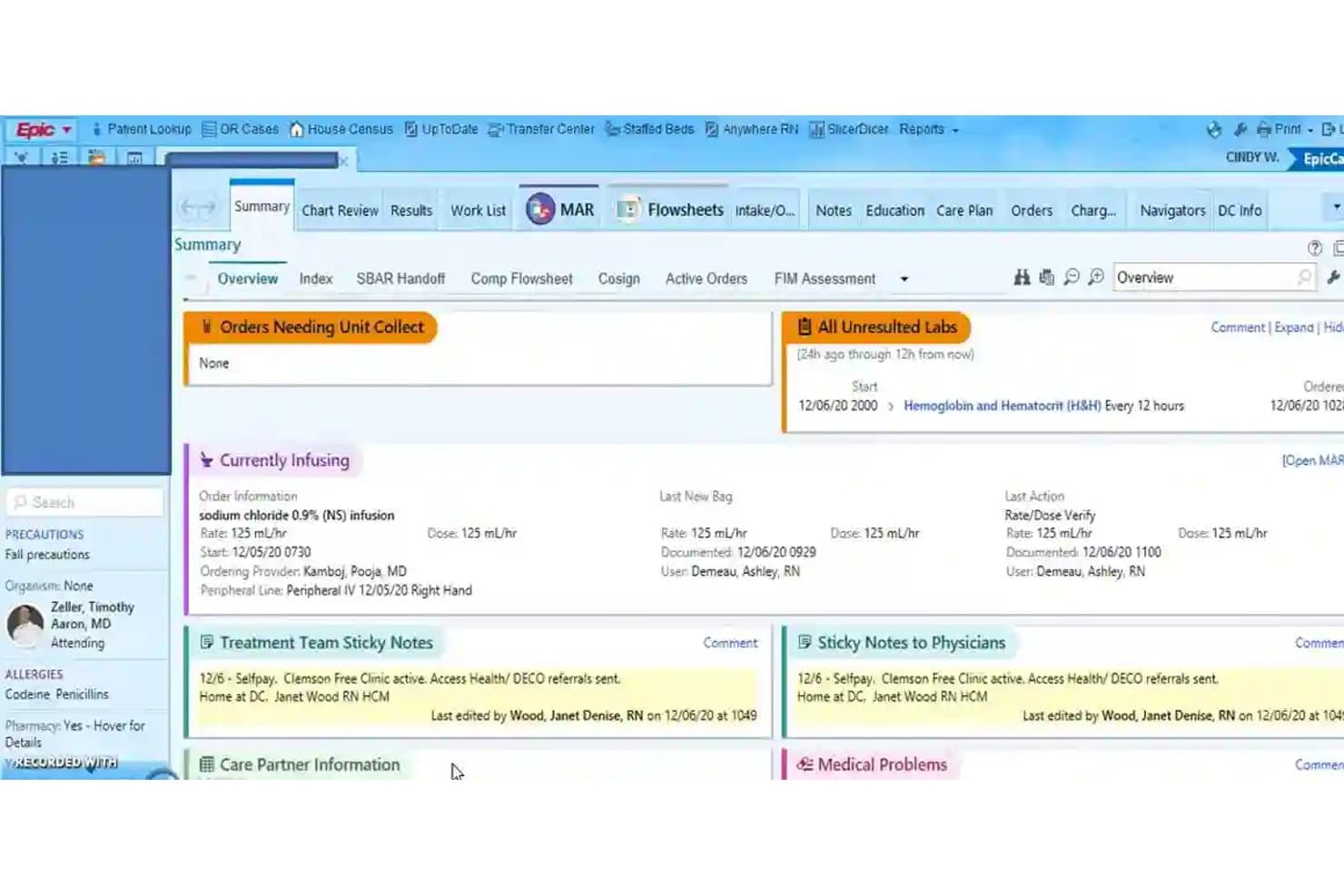
Epic Systems centralizes patient summaries, labs, and active infusions. Epic's Beacon is an oncology and hematology EMR module built for adult and pediatric cancer care, covering chemotherapy protocol management, cancer staging, registry reporting, and survivorship documentation.
Who Is Epic Systems Best For?
Epic's Beacon module is a strong fit for large academic medical centers and health systems that need enterprise-grade chemotherapy protocol management across adult and pediatric oncology programs.
Why I Picked Epic Systems
I picked Epic's Beacon module as one of the best because it handles the full complexity of chemotherapy protocol management at a scale most oncology systems can't match. I love how Beacon centers on standardized, protocol-based ordering that teams can still customize per patient, so a clinician at a large academic cancer center can modify a treatment plan mid-cycle without losing the structure that keeps administration safe. The IHE Point-of-Care Infusion Verification interface, which electronically prepopulates pump parameters and reduces manual programming, is the kind of detail that matters when your infusion volume is high.
Epic Systems Key Features
- AJCC cancer staging forms: Beacon's certified Cancer Registry Reporting module includes AJCC staging forms for structured, standardized cancer staging documentation.
- Outgoing cancer-registry reporting interface: Beacon electronically transmits cancer case documents to state and regional cancer registries across named jurisdictions.
- Survivorship treatment summaries: Beacon generates survivorship documentation to support post-treatment planning and longitudinal patient care.
- Care Everywhere record exchange: Epic's interoperability network shares patient information across both Epic and non-Epic EHRs to support continuity of care.
Epic Systems Integrations
Epic Beacon offers native integrations with Carequality, eHealth Exchange, the Social Security Administration, Department of Defense, and Veterans Health Administration. It also supports integrations with Surescripts, Medi-Span, FDB, PACS, and ECG systems, plus FHIR, HL7v2, and IHE APIs for custom connectivity.
Pros and Cons
Pros:
- AJCC staging and survivorship summaries support documentation
- KLAS users praise chemotherapy plan management
- Flexible chemotherapy plans accommodate patient-specific changes
Cons:
- Lab-order visibility and integrations draw user complaints
- Users report crowded screens and tricky navigation
Learn more about Epic Systems: Best for general practice management
- Not available
- Pricing upon request
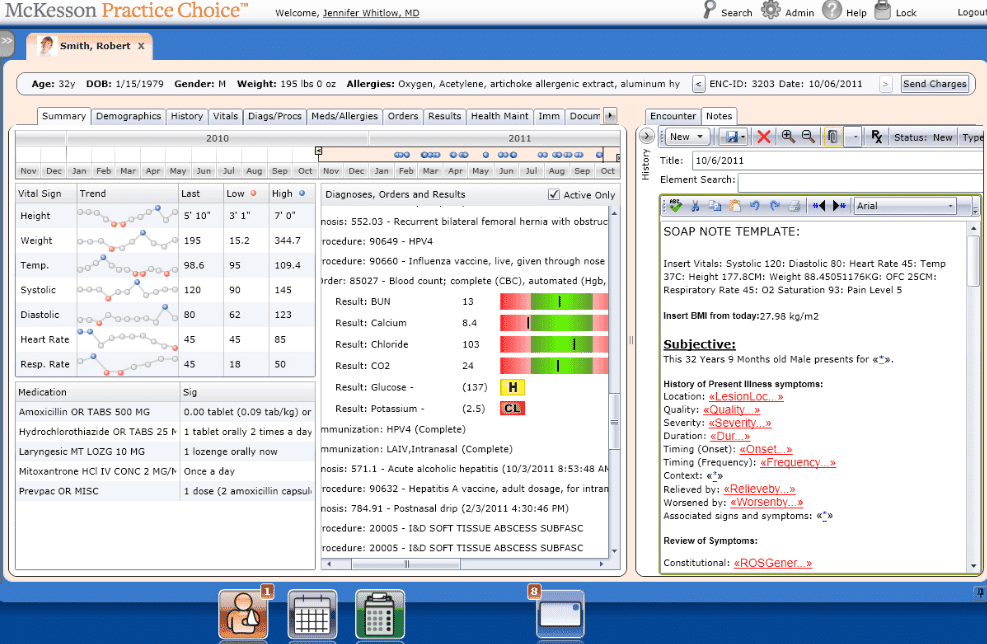
McKensson Oncology Practice Solutions patient summary dashboard screenshot McKesson's iKnowMed is an oncology-specific EHR that brings together point-of-care treatment decision support, NCCN-based pathway guidance, practice performance analytics, and patient engagement tools across the oncology care cycle.
Who Is McKesson Oncology Practice Solutions Best For?
iKnowMed suits independent community oncology practices that need a purpose-built EHR with NCCN-based pathway guidance and practice performance analytics built into daily clinical workflows.
Why I Picked McKesson Oncology Practice Solutions
I've included McKesson Oncology Practice Solutions in my top picks because iKnowMed is built specifically for the day-to-day demands of running a community oncology practice. I especially value how Clear Value Plus puts NCCN-based pathway guidance and real-time treatment cost comparisons directly into the clinical workflow, so oncologists can weigh evidence and financial impact in the same step. Practice Insights adds a layer of performance analytics that tracks drug utilization, clinical pathway compliance, and CMS quality measures through its 2026 QCDR designation.
McKesson Oncology Practice Solutions Key Features
- Biomarker test guidance: Suggests molecular tests by disease type and connects you to vetted laboratory vendors to support personalized treatment decisions.
- Ontada Health patient portal: Gives patients secure online access to their care plan, health information, and condition and medication education from cancer resources.
- Clinical trial patient identification: Flags patients who may be eligible for clinical trials directly within the Practice Insights analytics module.
- FHIR R4 API with SMART on FHIR: Provides a standards-based API for integrating iKnowMed data with external applications using HL7 FHIR R4 and OAuth 2.0 authentication.
McKesson Oncology Practice Solutions Integrations
The Ontada App Marketplace lists 12 marketplace integrations, including Carequality, DeepScribe, Augmedix, and Carevive by Health Catalyst. iKnowMed also supports REST, HL7 FHIR R4, SMART on FHIR, and OAuth 2.0 for custom integrations.
Pros and Cons
Pros:
- Chemotherapy frequency changes support regimen adjustments
- Oncology flowsheets surface patient data
- NCCN guidance supports pathway decisions
Cons:
- Users report crashes and outages
- Similar regimens risk accidental duplication
Learn more about McKesson Oncology Practice Solutions: Best for cross-modality oncology ordering workflows
- Not available
- Pricing upon request
Visit WebsiteCustomer Rating:3.2/5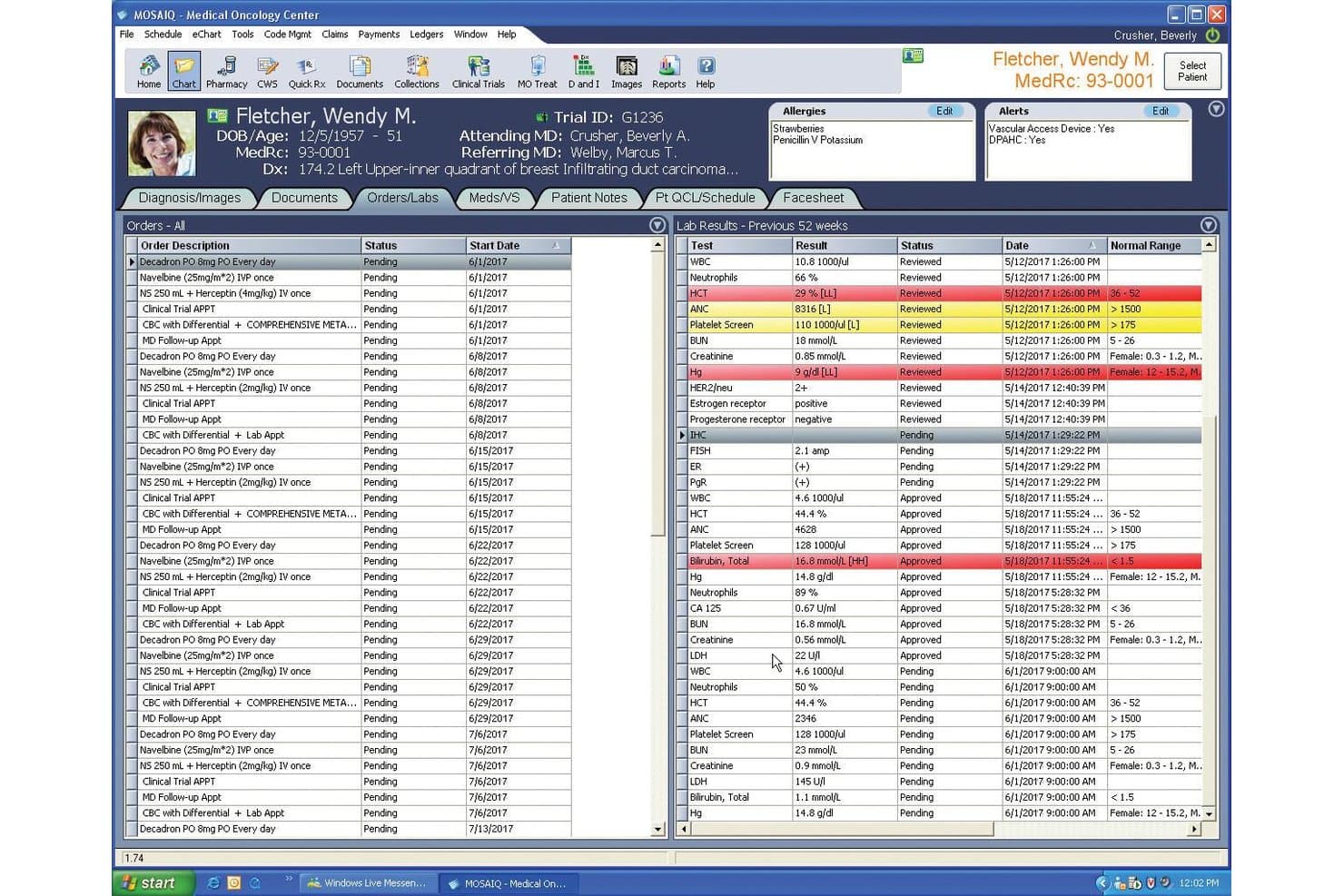
Mosaïq centralizes patient lab results and orders in one view. MOSAIQ 3 is an oncology informatics platform by Elekta that covers radiation oncology, medical oncology, and systemic therapy workflows, including chemotherapy ordering, dose calculation, staging documentation, and multidisciplinary care coordination.
Who Is MOSAIQ Best For?
MOSAIQ is a strong fit for oncology centers that need to manage both radiation and medical oncology workflows within a single, unified platform.
Why I Picked MOSAIQ
I've included MOSAIQ in my top picks because it's one of the few oncology platforms that handles radiation, medical oncology, and systemic therapy ordering within a single environment. I especially like MOSAIQ Plaza's single-screen chemotherapy ordering workflow, which supports dose and diluent calculation, cumulative dose management, and multi-provider cosign workflows without jumping between systems. The SmartClinic mobile app also lets clinicians pull up patient synopses and complete tasks across departments during multidisciplinary team meetings.
MOSAIQ Key Features
- Cancer staging documentation: Records cancer staging from oncology-specific, standards-based menus to support consistent clinical documentation.
- Survivorship monitoring: Tracks late effects, provides educational resources for cancer survivors, and stores long-term follow-up data directly in MOSAIQ.
- Patient Companion integration: Collects patient-reported outcomes, symptom data, and questionnaire responses via Kaiku Health and feeds them into the clinical record.
- MOSAIQ Voice: Enables voice-driven documentation and automation within MOSAIQ and the SmartClinic mobile app to reduce manual data entry.
MOSAIQ Integrations
MOSAIQ offers integrations with Epic and Cerner through an interoperability framework built on HL7, plus FHIR connectivity for registered third-party applications. API availability is not stated, and Elekta’s 2023 testing reported no live FHIR applications.
Pros and Cons
Pros:
- Analytics users praise reporting over alternatives
- Single-screen chemotherapy ordering includes dose calculations
- Cross-modality oncology workflows support coordinated care
Cons:
- Some users describe unresolved support requests
- Users report clunky workflows and extra steps
Learn more about Mosaïq: Best for comprehensive oncology management
- Free demo available
- Pricing upon request

Varian ARIA Oncology Information System website screenshot Varian ARIA Oncology Information System is a comprehensive software that integrates radiation, medical, and surgical oncology information into a complete, oncology-specific EMR. With its complete suite of tools dedicated to managing clinical, administrative, and financial aspects of oncology, it is particularly useful for practices seeking a fully integrated solution.
Why I Picked Varian ARIA Oncology Information System: I chose the Varian ARIA system because of its all-encompassing approach to oncology care. Its ability to combine multiple areas of oncology into a singular system sets it apart. This tool excels as a complete solution for practices looking for a unified platform that can streamline different areas of oncology care.
Standout Features & Integrations:
Varian ARIA provides a wide array of features including scheduling, treatment planning, medical oncology, radiation oncology, and patient medical records. In terms of integrations, it works well with Varian's suite of tools and services and offers the ability to integrate with PACS, treatment devices, and other healthcare IT systems.
Pros and Cons
Pros:
- Features cover clinical, administrative, and financial aspects of care
- Compatible with a wide range of devices and systems
- Comprehensive platform integrating different areas of oncology
Cons:
- Might be more feature-rich than needed for smaller practices
- May require significant training due to the system's complexity
- Pricing information is not directly available
Learn more about Varian ARIA Oncology Information System:
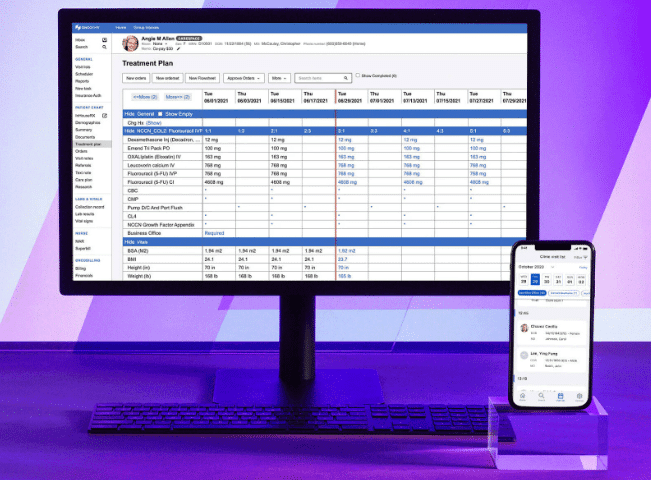
OncoEMR patient summary sample OncoEMR® is a dedicated oncology EHR from Flatiron Health that supports specialty-specific clinical documentation, chemotherapy ordering, regimen management, and practice operations for oncology practices.
Who Is OncoEMR Best For?
OncoEMR is a strong fit for community oncology practices that want a dedicated, specialty-built EHR with deep regimen management and data analytics capabilities.
Why I Picked OncoEMR
OncoEMR earns its spot on my shortlist because Flatiron Health built it from the ground up for oncology, and that specialization shows up directly in its data analytics capabilities. I particularly like how Flatiron Assist pulls continually updated NCCN content into the ordering workflow, narrowing treatment recommendations using actual patient context like staging, ER status, or EGFR mutation status. The structured clinical and pathologic staging fields, including TNM values and diagnosis status tracking ("Responding," "Stable," "Worsening"), give practices real data to work with across a patient's treatment history.
OncoEMR Key Features
- Molecular profiling integration: Order molecular profiling tests, track order status, and view genomic results directly within the patient chart.
- HCC code notifications: Surfaces real-time HCC code alerts within clinical workflows to support accurate risk-adjustment coding.
- ONC-certified CPOE: Includes certified medication, laboratory, and diagnostic-imaging order entry with drug-drug and drug-allergy interaction checks.
- CareSpace® patient portal: Connects patients with their care team and personal health information between appointments.
OncoEMR Integrations
OncoEMR has documented integrations with Foundation Medicine, Guardant Health, Tempus, Caris Life Sciences, Natera, LabCorp, Quest Diagnostics, Elekta, Varian Medical Systems, and Epic. It also supports REST-based FHIR APIs, SMART-on-FHIR, OAuth 2.0, and Bulk Data Access for custom connectivity.
Pros and Cons
Pros:
- Updated NCCN guidance informs treatment ordering
- Diagnosis grouping helps plan subspecialty clinics
- Regimens easy to find, modify, and sign
Cons:
- Referral workflows frustrate cross-specialty coordination
- Lab results can be hard to track
Learn more about OncoEMR:
How I Evaluate Oncology EMRs
I split my evaluation into three parts, giving the most weight to core functions: building and verifying chemo plans, and documenting staging and treatment response. Next, I look for differentiators such as interoperable tumor boards. Finally, I consider beyond-feature factors, including oncology-specific onboarding, support, and pricing value.
Core Functionality (Table Stakes For This List)
When I'm selecting tools for my list, I score each one on a scale from 0 (does not offer the functionality) to 5 (excels in this area) for each core functionality listed below. I then convert the total into a percentage to help assess each tool's overall fit, with extra weight on any functionalities I’ve deemed essential.
- Chemotherapy Orders (Essential): I look for structured multi-cycle plans, dose calculations, verification steps, and clear administration records for infusion visits.
- Oncology Documentation (Essential): I assess whether templates capture stage, pathology, tumor characteristics, and response over time without relying on scattered free-text notes.
- Regimen & Protocol Library: I check for maintained protocols, customization options, and coverage across cancer types to support varied treatment pathways.
- Lab & Pathology Integration: I evaluate how lab, pathology, and genomic results enter the chart and whether clinicians can review trends alongside treatment decisions.
- Oncology Decision Support: I look for regimen-linked dose and interaction checks, plus alerts that support safe ordering while preserving clinician review.
- Cross-Setting Coordination: I consider how records move among infusion, radiation, surgery, and referring teams, including shared documentation and handoffs.
Once I have a list of tools that meet the criteria, I consider what sets each platform apart.
Differentiating Factors (What Sets Vendors Apart)
Here's how I compare and contrast different vendors:
Standout Features
I look for clinical trial matching that flags eligible patients based on diagnosis, staging, and genomic markers—missing a match can mean a patient loses access to a promising therapy. I also evaluate patient-reported outcomes tracking, since capturing symptom data between visits gives oncologists earlier signals to adjust treatment. Mobile infusion chair-side access matters too; I check whether nurses can pull up chemo administration records and vitals on a tablet without leaving the patient's side.
Beyond Features
I evaluate whether a vendor has deep oncology roots or simply bolts cancer modules onto a general EMR. Dedicated oncology vendors tend to ship regimen libraries that reflect real treatment patterns, not generic order sets. Implementation support matters just as much—I look for onboarding that includes oncology clinical content specialists who help build and verify regimen templates before go-live, since errors at that stage carry safety risk. I also check interoperability with tumor registries, genomic labs, and radiation systems, because gaps there create manual workarounds that slow care coordination.
Como escolher um EMR oncológico
É fácil ficar perdido entre longas listas de funcionalidades e estruturas de preços complexas. Para o ajudar a manter-se focado enquanto percorre o seu processo específico de seleção de software, apresentamos uma lista de fatores a ter em conta:
| Fator | O que deve considerar |
|---|---|
| FatorEscalabilidade | O que deve considerarO software pode crescer com a sua prática? Considere o volume de doentes, o número de utilizadores e a expansão futura. Certifique-se de que consegue lidar com volumes de dados maiores. |
| FatorIntegrações | O que deve considerarFunciona com os seus sistemas atuais? Verifique a compatibilidade com ferramentas como software de faturação e sistemas laboratoriais. |
| FatorPersonalização | O que deve considerarPode adaptá-lo às suas necessidades? Procure opções para ajustar os fluxos de trabalho e os campos de dados de modo a corresponderem aos processos da sua prática. |
| FatorFacilidade de utilização | O que deve considerarA interface é intuitiva? Certifique-se de que a sua equipa consegue utilizá-la sem formação extensa. Um design simples poupa tempo. |
| FatorImplementação e integração inicial | O que deve considerarQuanto tempo demora a configuração? Avalie o tempo necessário para a implementação completa e a formação. Procure apoio durante a transição. |
| FatorCusto | O que deve considerarO que se enquadra no seu orçamento? Compare os planos de preços e esteja atento a custos ocultos. Avalie o valor a longo prazo em comparação com os custos iniciais. |
| FatorMedidas de segurança | O que deve considerarComo são protegidos os dados dos doentes? Procure encriptação, controlos de acesso dos utilizadores e conformidade com regulamentos de saúde, como a HIPAA. |
| FatorRequisitos de conformidade | O que deve considerarCumpre as normas legais? Certifique-se de que está em conformidade com a legislação de saúde local e nacional para evitar penalizações. |
O que é um EMR oncológico?
Um EMR oncológico é um software de registos médicos eletrónicos concebido especificamente para gerir os cuidados prestados a doentes com cancro. Os oncologistas, enfermeiros e profissionais de saúde utilizam normalmente estas ferramentas para acompanhar os planos de tratamento e a evolução dos doentes. O agendamento de consultas, a integração da faturação e a gestão dos dados dos doentes contribuem para fluxos de trabalho eficientes e para a conformidade. De um modo geral, estas ferramentas melhoram os cuidados prestados aos doentes ao organizarem a informação e apoiarem as decisões clínicas.
Funcionalidades
Ao selecionar um EMR de oncologia, tenha em atenção as seguintes funcionalidades essenciais:
- Gestão dos dados dos doentes: Centraliza os registos dos doentes, facilitando o acesso e a atualização das informações durante o tratamento.
- Planeamento do tratamento: Ajuda a conceber e ajustar os planos de tratamento com base nas necessidades e na evolução dos doentes.
- Agendamento de consultas: Simplifica a marcação e a gestão de consultas, garantindo uma utilização eficiente dos recursos e do tempo.
- Integração da faturação: Liga-se aos sistemas de faturação para facilitar a emissão atempada e rigorosa de faturas e os pedidos de reembolso às seguradoras.
- Acompanhamento da conformidade: Ajuda a manter o cumprimento dos regulamentos de saúde, reduzindo o risco de problemas legais.
- Fluxos de trabalho personalizáveis: Permite às instituições adaptar os processos às suas necessidades específicas e melhorar a eficiência.
- Segurança dos dados: Protege as informações dos doentes através de encriptação e controlos de acesso, garantindo a confidencialidade.
- Capacidades de telemedicina: Permite consultas à distância, alargando o acesso dos doentes aos cuidados de saúde.
- Análise preditiva: Disponibiliza informações sobre os resultados dos tratamentos, apoiando a tomada de decisões clínicas.
- Portais dos doentes: Proporciona aos doentes acesso às suas informações de saúde e facilita a comunicação com os prestadores de cuidados de saúde.
Benefícios
A implementação de um EMR de oncologia proporciona vários benefícios à sua equipa e à sua empresa. Eis alguns dos benefícios que pode esperar:
- Melhoria dos cuidados prestados aos doentes: A gestão centralizada dos dados e o planeamento dos tratamentos conduzem a decisões clínicas mais bem fundamentadas e a melhores resultados para os doentes.
- Maior eficiência: Funcionalidades como o agendamento de consultas e a integração da faturação poupam tempo e reduzem a carga de trabalho administrativo.
- Maior conformidade: O acompanhamento da conformidade garante o cumprimento dos regulamentos de saúde, minimizando os riscos legais.
- Maior segurança dos dados: O armazenamento seguro e os controlos de acesso protegem as informações sensíveis dos doentes, mantendo a confidencialidade.
- Maior acessibilidade: As capacidades de telemedicina alargam o acesso dos doentes aos cuidados de saúde, especialmente no caso de pessoas que vivem em zonas remotas.
- Fluxos de trabalho personalizados: Os fluxos de trabalho personalizáveis permitem às instituições adaptar os processos às suas necessidades específicas, aumentando a produtividade.
- Análises esclarecedoras: As análises preditivas fornecem informações valiosas sobre os resultados dos tratamentos, apoiando uma tomada de decisões mais eficaz.
Custos e preços
A seleção de um EMR de oncologia exige uma compreensão dos vários modelos de preços e planos disponíveis. Os custos variam consoante as funcionalidades, a dimensão da equipa, os complementos e outros fatores. A tabela abaixo resume os planos mais comuns, os respetivos preços médios e as funcionalidades normalmente incluídas nas soluções de EMR de oncologia:
Tabela de comparação de planos de EMR de oncologia
| Tipo de plano | Preço médio | Funcionalidades comuns |
|---|---|---|
| Tipo de planoPlano gratuito | Preço médio$0 | Funcionalidades comunsGestão básica dos dados dos doentes, agendamento de consultas e suporte limitado. |
| Tipo de planoPlano pessoal | Preço médio$25-$50/utilizador/mês | Funcionalidades comunsGestão dos dados dos doentes, planeamento dos tratamentos, integração da faturação e relatórios básicos. |
| Tipo de planoPlano empresarial | Preço médio$50-$100/utilizador/mês | Funcionalidades comunsPlaneamento avançado dos tratamentos, acompanhamento da conformidade, fluxos de trabalho personalizáveis e suporte melhorado. |
| Tipo de planoPlano empresarial de grande dimensão | Preço médio$100+/utilizador/mês | Funcionalidades comunsCapacidades completas de integração, análise preditiva, telemedicina e gestão dedicada da conta. |
Perguntas frequentes (FAQs)
O EMR oncológico pode integrar-se com outros sistemas de saúde?
Sim, a maioria das soluções de EMR oncológico oferece capacidades de integração. Verifique se o EMR pode estabelecer ligação aos seus sistemas laboratoriais existentes, ao software de faturação e aos portais dos doentes. A troca de dados contínua entre sistemas aumenta a eficiência e reduz os erros de introdução manual. Confirme as opções de integração com o fornecedor e debata as necessidades específicas durante a demonstração.
A migração de dados para um novo EMR oncológico é difícil?
A migração de dados pode ser desafiante, mas muitos fornecedores oferecem apoio para facilitar o processo. Prepare-se organizando e limpando os seus dados existentes. Escolha um fornecedor de EMR que disponibilize planos de migração detalhados, formação e apoio. Pergunte sobre os prazos habituais de migração e sobre eventuais períodos de inatividade para minimizar as interrupções na sua prática.
Que medidas de segurança deve ter um EMR oncológico?
Um EMR oncológico deve dispor de medidas de segurança robustas, como encriptação, autenticação de utilizadores e controlos de acesso, para proteger os dados dos doentes. Garanta o cumprimento de regulamentações de saúde como a HIPAA. As atualizações e auditorias de segurança regulares são essenciais para proteger contra violações. Debata os protocolos de segurança com os fornecedores para garantir a segurança dos seus dados.