

Strong NextGen alternatives are free EHR options that fit your clinic’s charting and administrative needs, with clear limits on billing, patient access, and data migration. If you’re searching for a free replacement, compare what each option includes and whether it suits your specialty, team size, and workflows. I’ll cover differences in charting, billing, prescribing, patient portals, and migration support so you can assess fit and costs before moving your records.
What Is NextGen?
NextGen is an electronic health record and practice-management platform for medical practices. It supports clinical documentation and administrative workflows, which can include billing and patient access. What your clinic gets depends on the specific products and configuration, so check how they fit your specialty, team size, and daily processes.
Comparison Table: NextGen Alternatives
Compare pricing and specs, side by side, for the NextGen alternatives that made it onto my shortlist.
Score legend (out of 5)
- Excellent4.5–5
- Good4–4.4
- Average3–3.9
- Below average2–2.9
- Poor1–1.9
Sorted by: Default
| Tool | Starting Price | Website | |||||||
|---|---|---|---|---|---|---|---|---|---|
Best for wellness practices between visits | 3.5 out of 5 | 4 | 3 | 3 | 4 | 4 | 3 | $35/month 14-day trial + free demo available | Website |
Best for free AI-assisted clinical notes | 3.5 out of 5 | 3 | 3 | 4 | 4 | 4 | 3 | $349/user/month Free plan + free demo available | Website |
Best free EHR with NextGen migration support | 3.7 out of 5 | 4 | 3 | 3 | 4 | 4 | 4 | $25/month Free plan + free demo available | Website |
Best for independent primary care practices | Not rated | 4 | Not rated | 3 | 4 | 4 | 4 | Pricing upon request Free demo available | Website |
Best for independent practices beyond charting | Not rated | 4 | Not rated | 4 | 4 | 4 | 3 | Pricing upon request Free demo available | Website |
Best for network-linked EHR and billing | Not rated | 4 | Not rated | 4 | 4 | 5 | 4 | Pricing upon request Free demo available | Website |
Best for solo practices seeking lighter setup | Not rated | 5 | Not rated | 3 | 3 | 4 | 4 | $199/provider/month 14-day free trial + free demo available | Website |
Best for connected charting and billing workflows | 3.2 out of 5 | 4 | 1 | 4 | 3 | 4 | 3 | $130/user/month 30-day free trial + free demo available | Website |
Best for NextGen data migration | Not rated | 4 | Not rated | 4 | 4 | 4 | 3 | Pricing upon request Free demo available | Website |
Best for clinics seeking open-source control | 3.5 out of 5 | 3 | 4 | 3 | 4 | 4 | 3 | Free forever plan Free forever plan + free demo available | Website |


Why Trust Our Software Recommendations
6,700+
Reviews
20
Industry experts
16+
Evaluation factors
14
Years
Our team has been testing and reviewing software since 2012. As medical practice leaders ourselves, we know how difficult—and important—it is to choose the right software.
For this guide, we evaluated tools using hands-on testing and independent research, scoring tools using our selection criteria.
Our reviews reflect our human editorial judgment, not a sales pitch.
NextGen Alternatives Reviews
Below are my detailed summaries of the best NextGen alternatives that made it onto my shortlist. My reviews cover features, billing workflows, and migration support for each EHR platform to help you find the best fit.
 Best for wellness practices between visits
- 14-day trial + free demo available
- From $35/month
Visit WebsiteCustomer Rating:4.8/5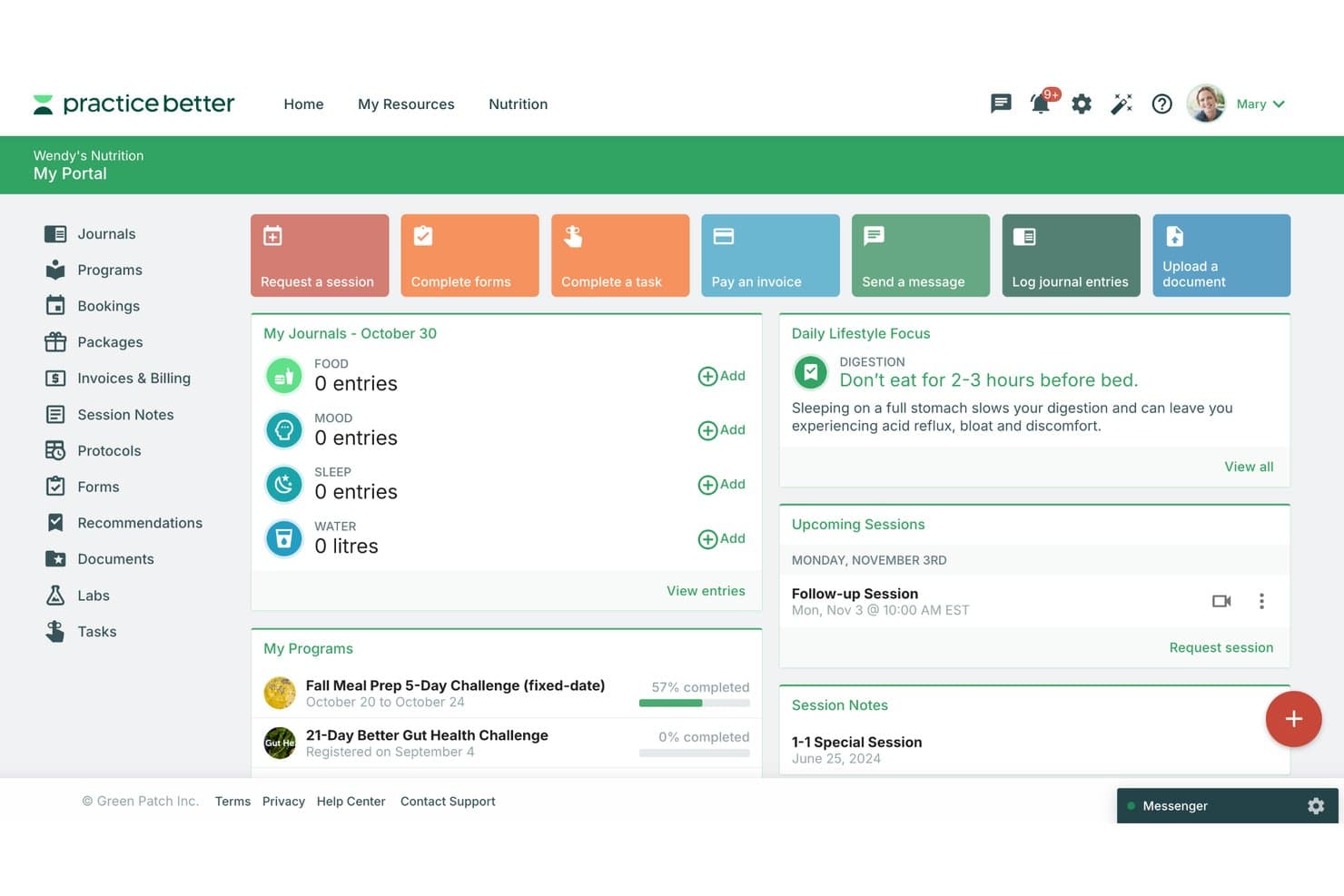
Practice Better's client portal centralizes sessions, journals, and programs. Practice Better is an EHR and practice management platform built for health and wellness professionals, bringing client charting, scheduling, billing, telehealth, and secure messaging into one place.
Who Is Practice Better Best For?
Practice Better is a strong fit for health and wellness practitioners—nutritionists, dietitians, and integrative health providers—who want to manage client care, scheduling, and billing in one place.
Why I Picked Practice Better
I picked Practice Better because its between-visit tools are genuinely built into the clinical workflow, not bolted on. Clients log food and lifestyle activity in daily journals that sync directly into their chart, and I can attach protocols with supplement recommendations from connected dispensaries like Fullscript right to a session note. The AI Session Insights feature surfaces trends and patterns from session history, so I'm walking into follow-up appointments already knowing what's shifted since last time.
Practice Better Key Features
- Client portal: Give clients a dedicated space to access shared notes, forms, documents, and lab results, and message your practice securely.
- Insurance claims manager: Create, submit, and track insurance claims through the Claim.MD integration, with status updates moving from draft to paid or denied.
- Built-in telehealth: Run one-to-one and group video sessions directly in the platform, with session notes syncing to client charts after each visit.
- Sprout free plan: Access charting, session notes, scheduling, payment processing, and superbill creation at no cost for up to three active clients.
Practice Better Integrations
Practice Better offers 36+ native integrations, including Claim.MD, DrFirst, Fullscript, Rupa Health, Google Calendar, QuickBooks, and Xero. Paid-plan users can also request access to its REST API beta for custom integrations.
Pros and Cons
Pros:
- Scheduling and reminders organize practice workflows
- Clients can access shared records and message
- Wellness journals keep between-visit data in charts
Cons:
- Reviewers report occasional video and login issues
- Free tier caps practices at three clients
Learn more about Practice Better: Best for free AI-assisted clinical notes
- Free plan + free demo available
- From $349/user/month
Visit WebsiteCustomer Rating:4.8/5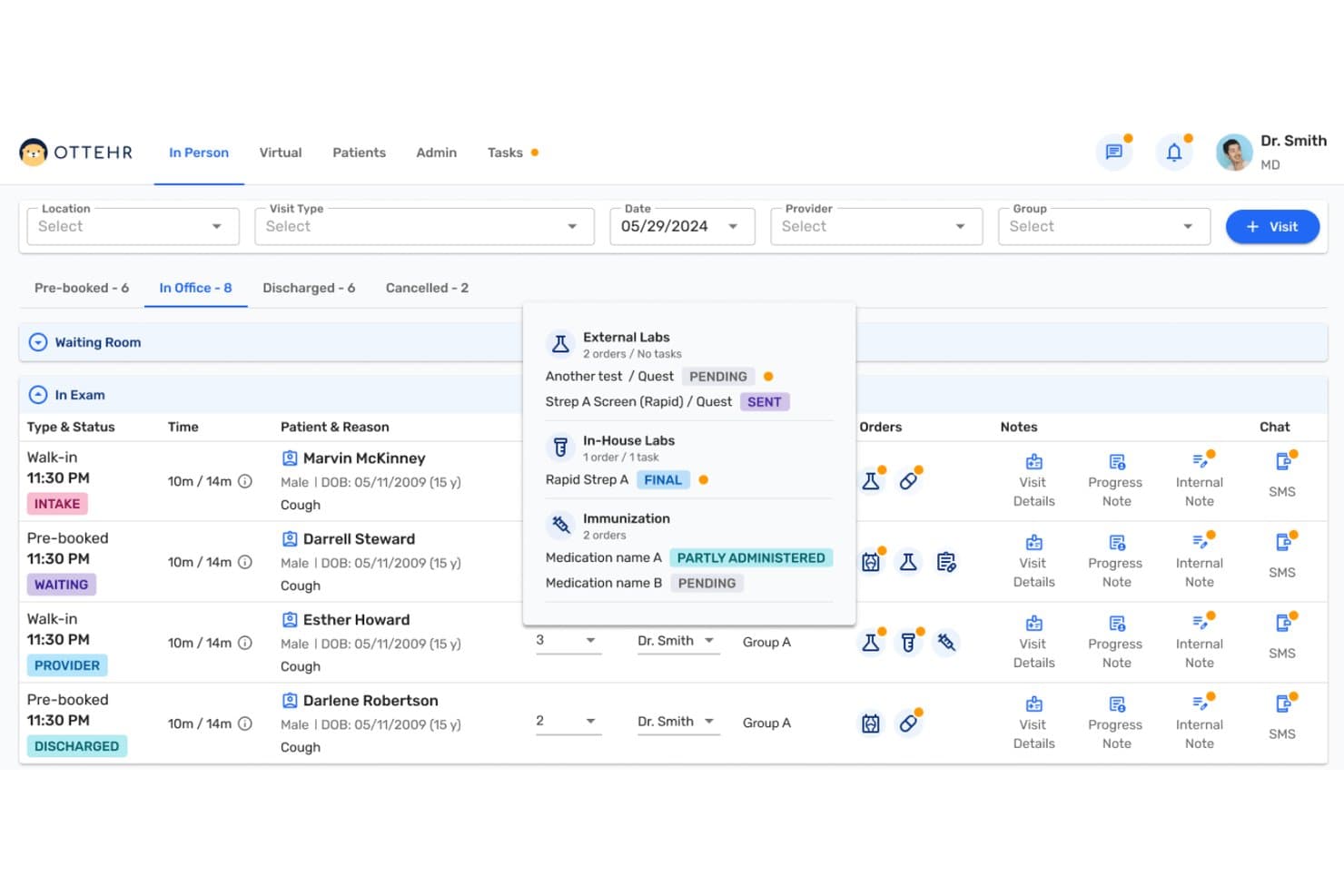
Ottehr includes patient visit tracking and access to clinical progress notes. Ottehr is an open-source, FHIR-native EHR built for clinics that want scheduling, charting, telehealth, and billing in one system—with a genuinely functional free tier that includes AI-assisted documentation tools.
Who Is Ottehr Best For?
Ottehr is a strong fit for urgent care clinics and small practices that want a customizable, open-source EHR with a functional free tier for charting and AI-assisted documentation.
Why I Picked Ottehr
I've included Ottehr in my top picks because its free Ottehr AI tier gives clinics real, clinical-grade documentation tools without a subscription. I particularly like the AI ambient scribe, which listens to a visit and drafts the clinical note for provider review, and the AI HPI chatbot, which gathers patient history before the encounter even begins. That combination means providers can walk into a room with a pre-populated chart and walk out with a signed note, all on the free plan.
Ottehr Key Features
- Patient self-scheduling: Patients can book immediate or future in-person and virtual visits directly from the patient portal without staff involvement.
- Claims submission and denial management: Ottehr Clinical generates and submits claims after a provider signs an encounter, with dedicated work queues for denials, rejections, and stale claims.
- E-prescribing with medication history: Providers can order prescriptions electronically with drug interaction checks, allergy history, and automatic pharmacy rerouting when a medication is out of stock.
- Open-source, FHIR-native architecture: Ottehr's modular codebase can be forked, customized, and white-labeled, with full FHIR data exports available at any time.
Ottehr Integrations
Ottehr has documented integrations with Labcorp, Quest, and PACS for lab and radiology workflows. Its FHIR API supports custom integrations, while claims connect to Candid and patient-responsibility payments use Stripe.
Pros and Cons
Pros:
- Patient self-scheduling covers virtual visits
- FHIR-native exports support data portability
- Best for free AI-assisted clinical notes
Cons:
- Customization may require engineering support
- Billing and e-prescribing require paid tier
Learn more about Ottehr: Best free EHR with NextGen migration support
- Free plan + free demo available
- From $25/month
Visit WebsiteCustomer Rating:4.2/5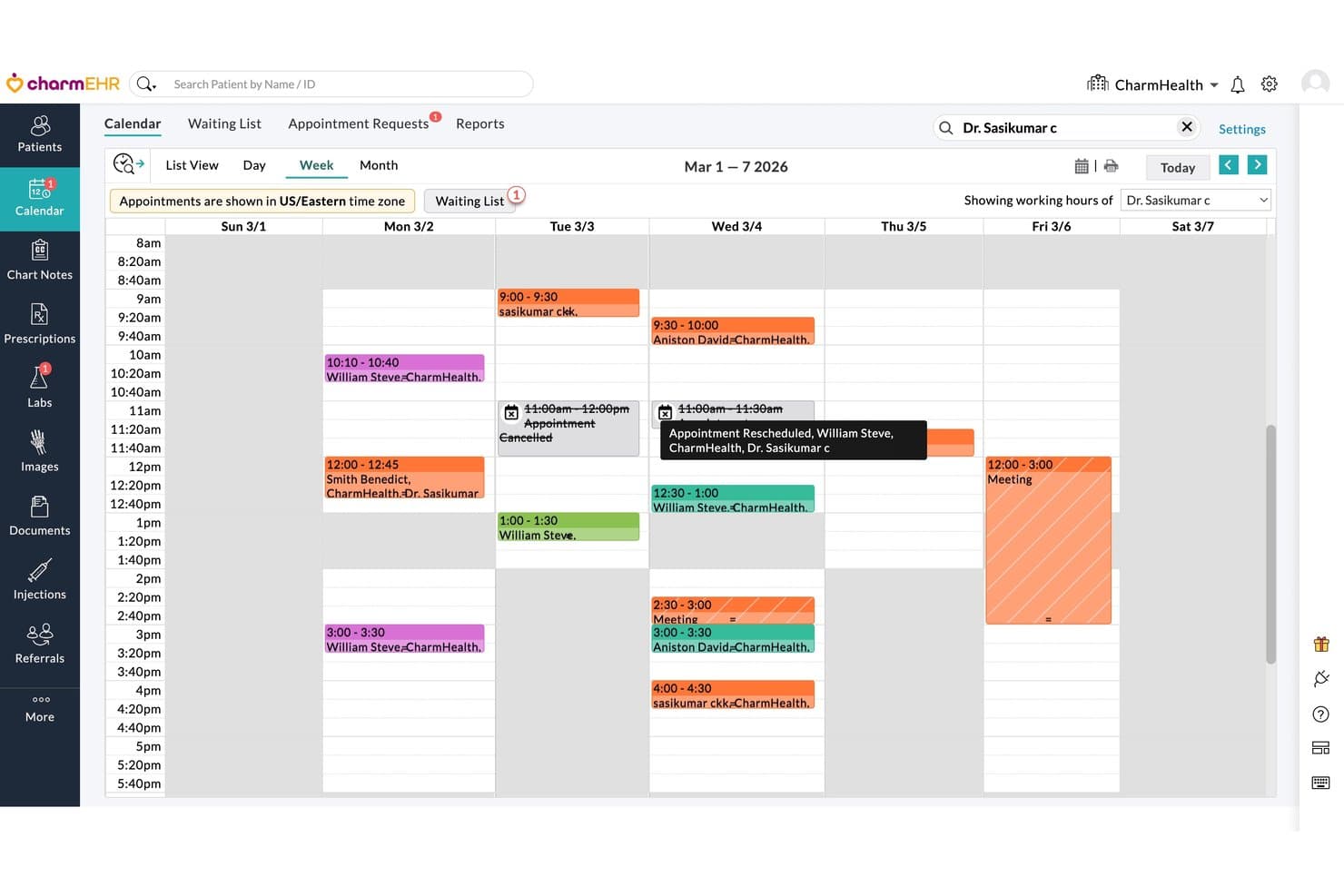
CharmHealth features a weekly provider calendar with scheduled appointments. CharmHealth is a cloud-based EHR built for small and independent practices that need charting, scheduling, e-prescribing, and billing tools in one place without the cost commitment of larger systems like NextGen.
Who Is CharmHealth Best For?
CharmHealth is a strong fit for solo providers and small independent practices ready to move off NextGen without committing to another expensive monthly subscription.
Why I Picked CharmHealth
I picked CharmHealth because it's the rare EHR that offers a genuinely free, ongoing plan rather than a time-limited trial, making it a credible first stop for solo providers leaving NextGen without a budget for a new subscription. What I appreciate most is that the free tier includes real charting tools: SOAP notes, specialty templates, flowsheets, and e-prescribing through Surescripts to 70,000+ pharmacies. CharmHealth also has an in-house migration team that lists NextGen as a source system and can typically complete a migration in three to four weeks.
CharmHealth Key Features
- Flowsheets: Track vitals and lab results across multiple patient visits in a single, longitudinal view.
- Lab order routing: Send electronic orders to 29 integrated lab interfaces, including Labcorp and Quest, and receive results directly in the patient chart.
- Role-based access controls: Assign permissions by role to manage who can view or edit patient data, billing records, and practice settings.
- Patient check-in kiosk: Let patients enter their details and medical history via an iPad-based kiosk, with that data flowing directly into the patient chart.
CharmHealth Integrations
CharmHealth offers native integrations with Surescripts, Labcorp, Quest, Optum, Google Calendar, QuickBooks, Bluefin, and Fullscript. It also supports REST APIs, HL7 FHIR 4.0.1, SMART on FHIR, CCDA, and bulk export for custom connectivity.
Pros and Cons
Pros:
- NextGen migration has an in-house team
- Specialty templates support adaptable clinical documentation
- Patient histories, notes, and prescriptions stay together
Cons:
- Claims enrollment and support may delay billing
- Custom note templates can take substantial setup
Learn more about CharmHealth: Best for independent primary care practices
- Free demo available
- Pricing upon request
Visit WebsiteCustomer Rating:4.4/5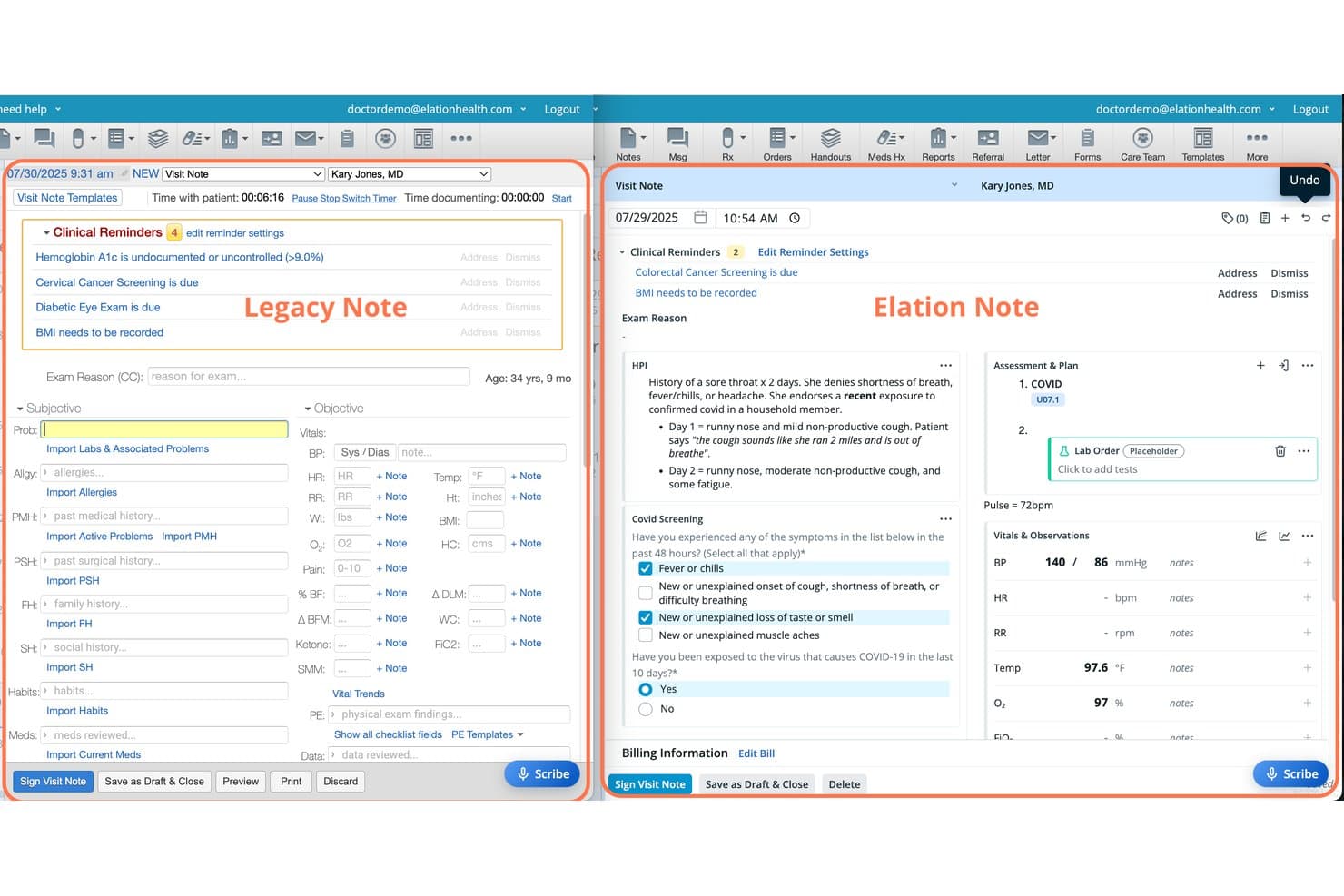
Elation Health features Legacy and Elation note formats side by side. Elation Health is a primary care EHR built for independent practices that need unified charting, scheduling, e-prescribing, and billing workflows—along with AI-assisted note generation and a patient portal—in a single clinical platform.
Who Is Elation Health Best For?
Elation Health is a strong fit for independent primary care physicians who want charting, scheduling, e-prescribing, and billing in one purpose-built platform.
Why I Picked Elation Health
I picked Elation Health because it's purpose-built for independent primary care, which makes it a genuinely focused alternative to NextGen's broader, more complex system. I especially like how the three-panel clinical console keeps charting, scheduling, and billing visible in one view, so I'm not toggling between disconnected modules mid-visit. Note Assist goes further by pulling directly from patient-chart context to draft structured notes, which cuts real documentation time during busy clinic days.
Elation Health Key Features
- Patient Passport portal: A built-in patient portal where patients can access their health records and exchange messages with the care team.
- Note Assist with Actions: An AI scribing tool that identifies clinical intent during a visit and queues follow-up tasks like lab orders, referrals, and patient messages.
- Elation Go mobile app: A physician mobile app that supports e-prescribing and calendar management when away from the office, included at no additional cost.
- 300+ lab integrations: Connects with national and regional labs to deliver electronic results directly into structured patient charts for provider review.
Elation Health Integrations
Elation Health lists 300+ integrations, including native integrations with Zoom and Ribbon, plus Google Calendar, Snowflake, Tableau, and Power BI. Its API and webhooks support custom clinical-data integrations.
Pros and Cons
Pros:
- Chart-aware AI drafts notes and follow-up actions
- Scheduling, charting, and billing share workflows
- Reviewers praise accessible patient records
Cons:
- Users report billing glitches and limited reporting
- Reviewers report slow chart loading
Learn more about Elation Health: Best for independent practices beyond charting
- Free demo available
- Pricing upon request
Visit WebsiteCustomer Rating:3.9/5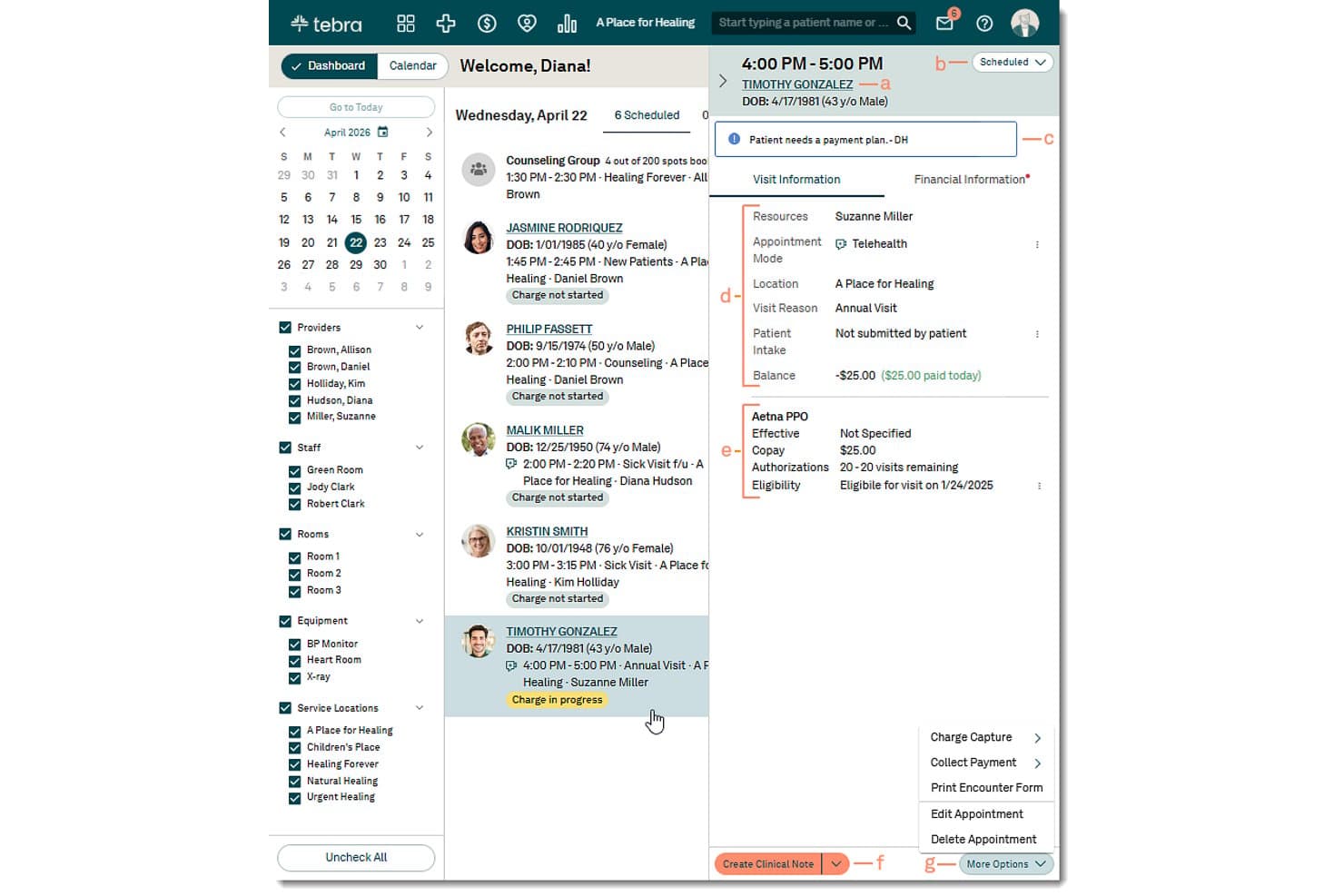
Tebra lets users view appointment details and billing from the dashboard. Tebra is a cloud-based EHR built for independent practices that connects clinical charting, scheduling, e-prescribing, and billing in one platform.
Who Is Tebra Best For?
Tebra is a strong fit for independent physicians and small clinic owners who need charting, scheduling, billing, and e-prescribing to work together in a single platform.
Why I Picked Tebra
I've included Tebra in my top picks because it goes well beyond charting to connect scheduling, billing, and e-prescribing in one platform built specifically for independent practices. I particularly like AI Note Assist, which generates structured clinical notes from patient conversations, and the integrated claims workflow that links encounter approval directly to charge capture and claims submission. A Capterra reviewer who switched from NextGen confirmed Tebra worked better across most of their workflows and offered clinical customizations they hadn't found elsewhere.
Tebra Key Features
- Specialty-specific workflows: Access templates, codes, and clinical workflows tailored to your practice's specialty directly within the EHR.
- HIPAA-compliant telehealth: Conduct integrated video visits connected to your schedule and clinical notes from a browser-based platform.
- Electronic lab orders and results: Send lab orders electronically and receive results directly in the patient chart, with patient access through the portal.
- Role-based permissions and two-factor authentication: Control staff access to patient and practice data with configurable security settings and multi-factor login.
Tebra Integrations
Tebra has two documented native integrations: First Databank for drug information and formularies, and Appriss Health for PDMP queries. Its SOAP API supports custom connections, but it doesn't support HL7 or push updates.
Pros and Cons
Pros:
- Specialty templates support tailored charting
- Clear claim tracking supports billing follow-up
- NextGen switchers praise workflow fit
Cons:
- Billing reports sometimes miss requested details
- Extra fees and contract disputes concern reviewers
Learn more about Tebra: Best for network-linked EHR and billing
- Free demo available
- Pricing upon request
Visit WebsiteCustomer Rating:3.8/5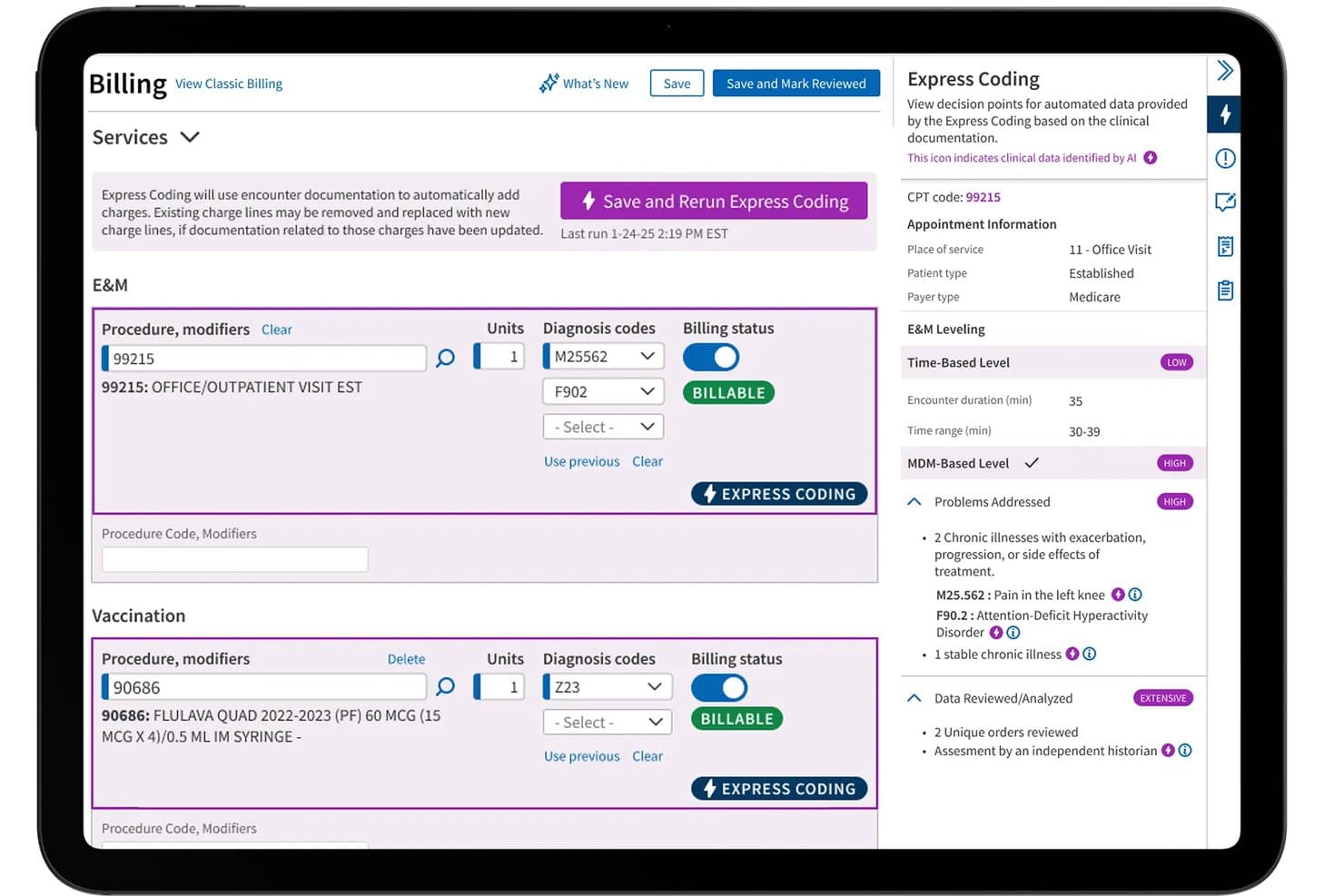
athenaOne automates charge entry using AI-powered Express Coding. athenaOne is an integrated EHR, billing, and patient engagement platform from athenahealth that connects clinical documentation, scheduling, and revenue-cycle workflows in a single system for ambulatory practices.
Who Is athenaOne Best For?
athenaOne is a strong fit for multi-provider ambulatory practices that want EHR, billing, and patient engagement managed in one network-connected platform.
Why I Picked athenaOne
I picked athenaOne because its network-linked architecture is what genuinely sets it apart from NextGen and most other EHR platforms. When a patient's chart pulls in real-time records, orders, and results from across athenahealth's network, I'm not hunting down faxes or chasing outside providers for discharge summaries. I also appreciate that athenaClinicals, athenaCollector, and athenaCommunicator ship as one integrated suite, so clinical documentation, claims submission, and patient communication all move through the same system without manual handoffs between separate tools.
athenaOne Key Features
- athenaAmbient: A native ambient scribe that listens to patient encounters and generates a structured draft note, including suggested diagnoses and orders, for clinician review.
- Waitlist scheduling: Automatically scans patient waitlists and contacts eligible patients by SMS to fill cancelled or rescheduled appointment slots.
- Express Coding: Automates charge capture with one-click E&M and CPT code suggestions drawn from clinical documentation, orders, and practice rules.
- Patient Conversations: AI-assisted two-way texting and secure chat that handles routine patient questions, routes requests, and triages messages to the appropriate staff.
athenaOne Integrations
athenaOne offers 277K+ direct clinical integrations, including CommonWell Health Alliance and Carequality, plus native Nuance dictation and rater8 reputation management. It supports FHIR REST, HL7, C-CDA, and proprietary APIs for custom connectivity.
Pros and Cons
Pros:
- Reporting dashboards track collections and denials
- Scheduling calendars and reminders organize appointments
- Specialty templates support structured clinical documentation
Cons:
- Click-heavy tasks and delayed support frustrate users
- Reviewers report unresolved claims and denials
Learn more about athenaOne: Best for solo practices seeking lighter setup
- 14-day free trial + free demo available
- From $199/provider/month
Visit WebsiteCustomer Rating:3.7/5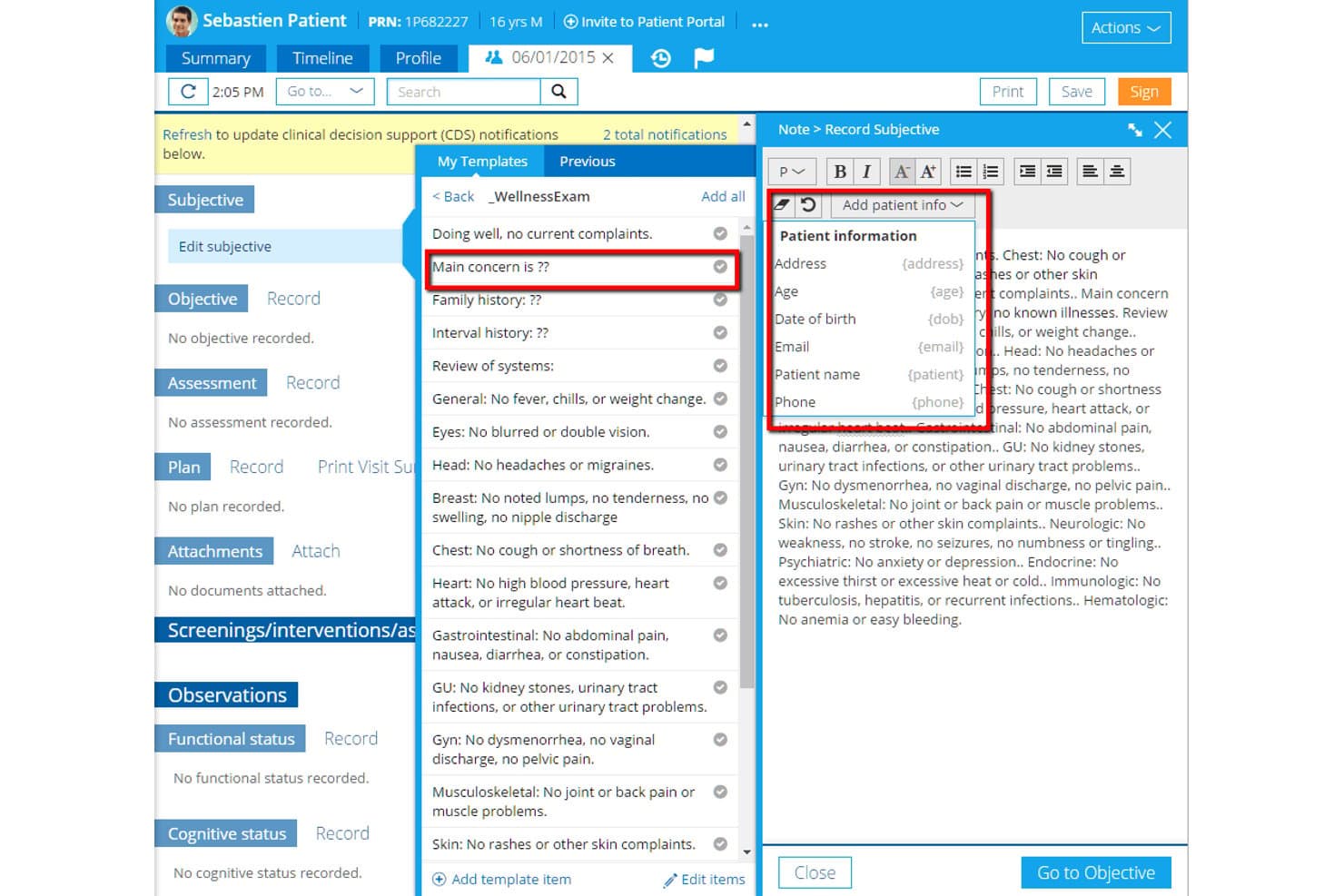
Practice Fusion lets users insert patient info into chart notes via templates. Practice Fusion is a cloud-based EHR built for independent and solo practices that need charting, e-prescribing, scheduling, and lab integration in a single system without a complicated setup.
Who Is Practice Fusion Best For?
Practice Fusion is a good fit for independent physicians and solo providers who want charting, e-prescribing, and scheduling up and running quickly without a lengthy implementation.
Why I Picked Practice Fusion
I picked Practice Fusion as one of the best because it gets solo providers charting on day one, with no setup fees and a same-day onboarding process that cuts out the lengthy implementation typical of larger EHR platforms. I particularly appreciate the built-in e-prescribing workflow, which handles controlled substances, formulary checks, drug-allergy interaction checks, and two-click refill requests all from within the patient chart. The customizable charting templates with patient-information shortcuts also make it easy to build documentation workflows that fit a solo practice's specific clinical style.
Practice Fusion Key Features
- Lab and imaging order templates: Save frequently used panels as reusable templates to speed up ordering directly from the patient chart.
- MIPS dashboard: Track MIPS performance categories and clinical quality measures from within the EHR for incentive program reporting.
- Patient portal with structured data sharing: Share lab results, diagnoses, medications, immunizations, and allergies with patients through the integrated free portal.
- Batch patient data export: Export CCD files for all active and inactive patients or download demographics as a CSV file from the account administrator view.
Practice Fusion Integrations
Practice Fusion documents integrations with Quest, Labcorp, Change, and CVS, plus an API ecosystem spanning over 600 companies. It offers proprietary Labs and Imaging APIs and read-only FHIR APIs for custom connectivity.
Pros and Cons
Pros:
- Convenient chart-based e-prescribing workflows
- Reviewers praise customizable chart templates
- Same-day setup suits solo practices
Cons:
- Reviewers report billing cleanup burdens
- No ongoing free tier for budget buyers
Learn more about Practice Fusion: Best for connected charting and billing workflows
- 30-day free trial + free demo available
- From $130/user/month
Visit WebsiteCustomer Rating:3.6/5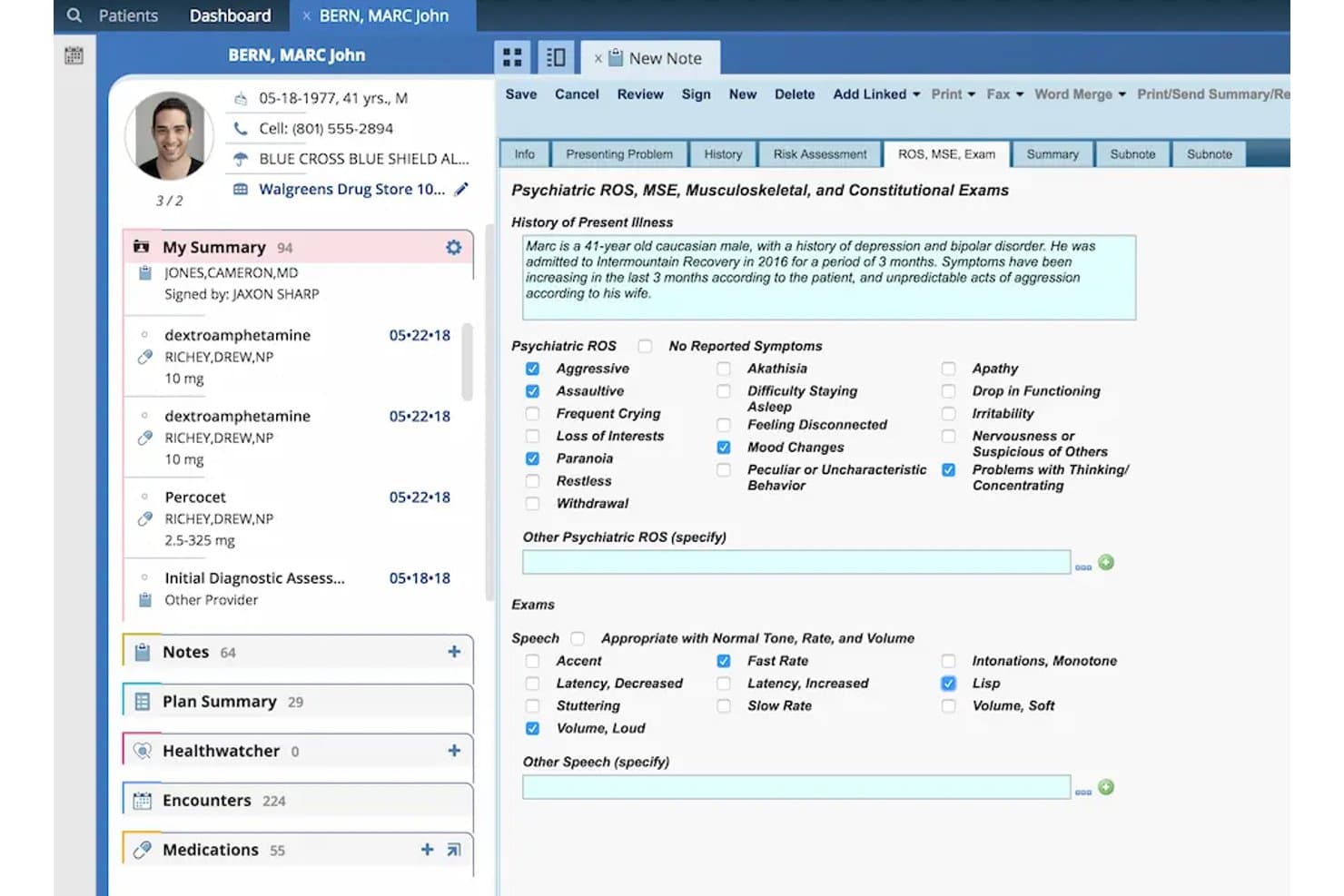
AdvancedMD captures psychiatric ROS, MSE, and exam findings in one view. AdvancedMD is a cloud-based EHR built for independent practices and small clinics that need scheduling, clinical charting, and billing to work together in one connected system.
Who Is AdvancedMD Best For?
AdvancedMD is a strong fit for independent physicians and small clinic owners who need scheduling, charting, and billing to run as one connected system rather than separate tools.
Why I Picked AdvancedMD
I've included AdvancedMD in my top picks because it handles connected charting and billing workflows better than most independent-practice EHRs I've used. When a provider signs a note, the charges automatically flow into the practice management system, with ClaimInspector scrubbing claims before submission. I also appreciate the physician-designed, specialty-specific templates that let you configure charting to match your clinical workflow rather than adapting your workflow to the software.
AdvancedMD Key Features
- AI Clinical Assistant: Ambient listening and transcription tools generate clinical notes in five formats and surface suggested chart action items during or after a visit.
- Patient portal: Patients can schedule appointments, request prescription renewals, pay bills, complete consent forms, and view lab results through a self-service portal.
- Mobile EHR app: The iOS clinical app lets providers create and edit notes, review and sign lab results, approve medication refill requests, and message patients or staff from outside the office.
- Telehealth: Built-in video visit capabilities let providers see patients remotely without switching to a separate platform.
AdvancedMD Integrations
AdvancedMD offers marketplace integrations with InstaMed, Medical Financial, qbSolutioneers, Falkondata, and Ellkay. It also supports XML-RPC and REST Connect APIs, read-only FHIR R4 APIs, and ODBC access for custom integrations and data extraction.
Pros and Cons
Pros:
- Scheduling calendars support intake and billing
- Signed notes flow into billing charges
- Configurable templates fit specialty workflows
Cons:
- No ongoing free EHR access tier
- Prescribing workflows can require repeated clicks
 Best for NextGen data migration
- Free demo available
- Pricing upon request
Visit WebsiteCustomer Rating:3.5/5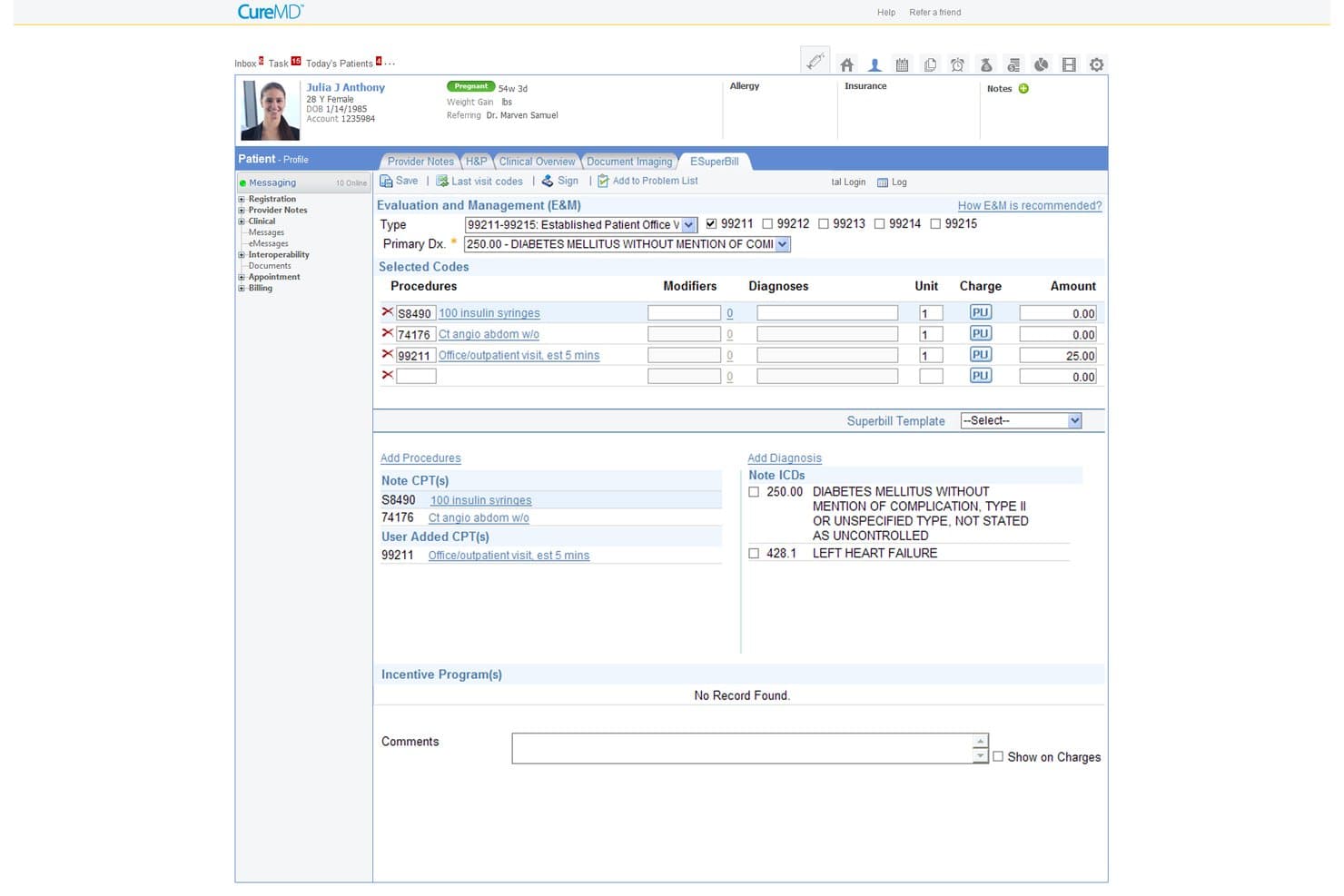
CureMD helps users manage billing codes and diagnoses on a superbill. CureMD is a unified healthcare platform that brings together EHR, practice management, and medical billing for practices ready to move off legacy systems like NextGen and into a fully integrated clinical and administrative workflow.
Who Is CureMD Best For?
CureMD is a good fit for multi-provider practices across 30+ specialties that are ready to migrate off an existing EHR and want clinical documentation, scheduling, and billing in one place.
Why I Picked CureMD
I've included CureMD in my top picks because it's one of the few platforms that treats NextGen data migration as a first-class feature, not an afterthought. The dedicated migration team transfers patient demographics, charts, problem lists, allergies, medications, and historical claims directly into CureMD's unified EHR and practice management environment. I also appreciate that the AI Scribe generates specialty-tailored clinical notes from encounter conversations, so your team isn't rebuilding documentation workflows from scratch after switching.
CureMD Key Features
- SureScripts Gold-certified e-prescribing: Send electronic prescriptions, process refills, check formulary and eligibility, and prescribe controlled substances directly from the EHR.
- Denial management tools: Track denials and denial reasons, and apply pre-submission rules to catch claim errors before they reach the payer.
- Multi-provider scheduling: Book appointments across providers, locations, and days, with recurring appointment support and automated insurance eligibility checks at check-in.
- AI Medical Coder: Converts clinical notes into ICD-10, CPT, and HCPCS codes, checks them against payer rules, and routes ambiguous claims to human coders for review.
CureMD Integrations
CureMD documents integrations with Quest Diagnostics, Labcorp, Surescripts, and FramesData, plus 400+ third-party connectors. Its API supports FHIR, HL7, and SMART on FHIR for custom connections.
Pros and Cons
Pros:
- Combined practice management and billing
- Reviewers praise organized appointment scheduling
- Migration support for NextGen records
Cons:
- Onboarding and support experiences vary
- Reviewers report lag, freezes, and slow rendering
Learn more about CureMD: 10Best for clinics seeking open-source control
OpenEMR
- Free forever plan + free demo available
- Free forever plan
Visit WebsiteCustomer Rating:3.9/5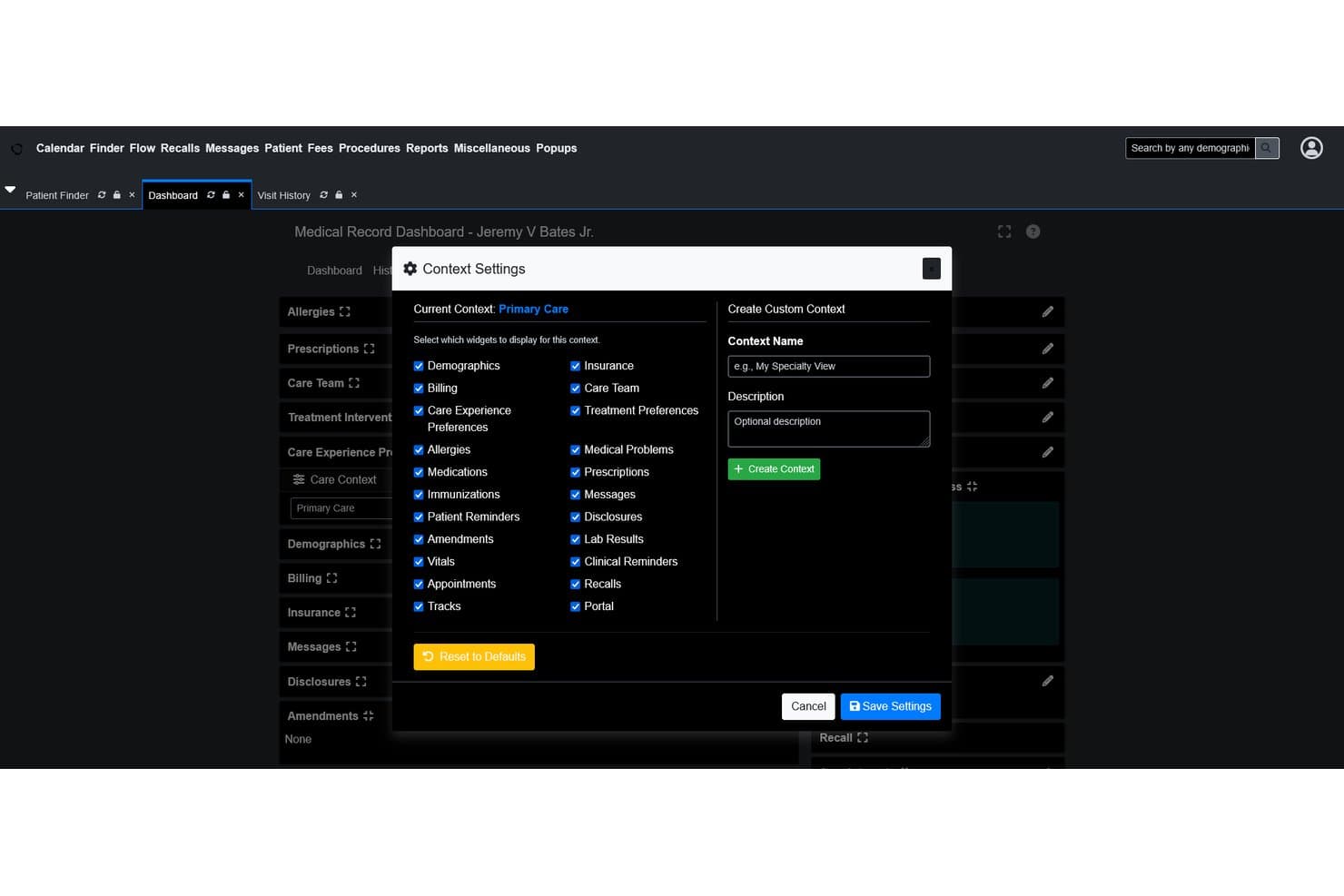
OpenEMR lets users customize dashboard widgets per care context. OpenEMR is a free, open-source EHR and practice management system that lets small clinics and solo providers handle scheduling, charting, billing, and e-prescribing without paying for software licenses.
Who Is OpenEMR Best For?
OpenEMR is a good fit for solo providers and small clinic owners who have the technical capacity—or access to a developer—to self-host and configure their own EHR system.
Why I Picked OpenEMR
I picked OpenEMR because it's the rare EHR that gives small clinics full control over their own system without a software license fee. The open-source codebase means you can build and customize clinical forms, documentation templates, and workflows to fit how your practice actually runs, not how a vendor assumes it does. I also appreciate that scheduling, structured charting with SOAP notes and encounter records, and ANSI X12 claims billing all live in one place natively.
OpenEMR Key Features
- Patient portal: Patients can access their health information, send secure messages, submit appointment requests, and download lab reports and care records directly from the portal.
- Clinical decision rules engine: Guides providers through complex patient algorithms to flag relevant care considerations during an encounter.
- CCDA import and export: Imports and exports patient records in CCDA format, supporting data exchange and merging incoming records into existing charts.
- Multilingual support: The interface is available in over 30 languages, with the option to add more through customization.
OpenEMR Integrations
OpenEMR has five documented marketplace integrations: WENO Exchange, Comlink, ClaimRev, Sphere Payment, and Fax. It also offers FHIR and Standard APIs, plus CCDA exchange, for custom connectivity.
Pros and Cons
Pros:
- Solo practice reviewer replaced NextGen
- Scheduling, charting, and claims coexist
- Open-source customization supports tailored documentation
Cons:
- Reviewer found billing workflow rudimentary
- NextGen data migration proved labor-intensive
Learn more about OpenEMR:
Other NextGen Alternatives
Here are a few additional options that didn’t make my shortlist but are still worth checking out:
- 11SimplePracticeBest for portal-led private practice care
- 12RXNTBest for ambient AI notes and prescribing
- 13HealthieBest for wellness care between visits
- 14CarepatronBest for free charting with an AI scribe
- 15eMedicalPracticeBest for NextGen switchers with free EHR migration
- 16eClinicalWorksBest for NextGen switchers: free data conversion
- 17CareCloudBest for EHR with managed billing support
- 18Amazing ChartsBest for small-practice specialty charting
- 19OpenMRSBest for multilingual global health programs
- 20PracticeEHRBest paid EHR for small-practice AI workflows
How I Evaluate NextGen Alternatives
I split my evaluation into three parts: core functionality first, where I look for tools that can store and update structured patient records electronically and offer a genuinely usable free tier—these two carry the most weight. Then I consider standout features like open-source customization or built-in telehealth. Finally, I check what a tool offers beyond features, such as onboarding support, BAA availability, and data portability.
Core Functionality (Table Stakes For This List)
When I'm selecting tools for my list, I score each one on a scale from 0 (does not offer the functionality) to 5 (excels in this area) for each core functionality listed below. I then convert the total into a percentage to help assess each tool's overall fit, with extra weight on any functionalities I’ve deemed essential.
- Patient Charting (Essential): I look for structured records that capture visit notes, medications, allergies, and history, so clinicians can follow a patient’s care over time.
- Free Access (Essential): I assess whether the free plan supports ongoing clinical work, including charting and everyday practice needs, rather than offering only a time-limited trial.
- E-Prescribing: I check whether clinicians can send prescriptions electronically to pharmacies and review the prescribing steps that fit their workflows.
- Scheduling & Appointments: I look for appointment booking and tracking features that support a provider’s schedule, with reminders or patient self-booking where available.
- Billing & Claims: I evaluate whether teams can enter encounter codes, generate claims, and track submissions as part of their billing workflow.
- Lab Results: I check whether staff can order tests or attach results to the right chart, and whether results arrive as structured data.
Once I have a list of tools that meet the criteria, I consider what sets each platform apart.
Differentiating Factors (What Sets Vendors Apart)
Here's how I compare and contrast different vendors:
Standout Features
I check whether a platform includes a patient portal that lets patients view records, request refills, and message your team—this cuts front-desk phone volume fast. Built-in telehealth matters too, since a native video visit tool saves you from managing a separate subscription. I also look at open-source access, because platforms like OpenEMR let your team modify workflows at the code level. Finally, I evaluate community support forums, which help small clinics troubleshoot without paying for a support tier.
Beyond Features
I check whether a vendor signs a BAA on its free tier, since some platforms reserve that agreement for paid plans. Data portability matters just as much—I look for CCDA export support so your practice isn't locked into a proprietary format if you switch later. I also evaluate onboarding resources like free migration tools or setup webinars, because most small clinics don't have dedicated IT staff to handle a full EHR rollout alone.
Why Look for NextGen Alternatives?
NextGen is an established EHR and practice-management platform, but it may not suit every clinic’s budget or workflows. You might be looking for a NextGen alternative because:
- You need a free option for a small or newly opened clinic
- Your team wants a simpler setup for day-to-day charting
- Your specialty needs charting templates that better match its visits
- You need clearer data export and migration support
- Your clinic needs billing tools that fit its existing processes
If any of these sound like you, you’ve come to the right place. My list includes several free EHR options that may better suit teams facing these challenges with NextGen and looking for an alternative.
NextGen Key Features
Here are key features of NextGen to help you compare it with alternative options. NextGen Office is presented as a commercial product, not a free EHR plan. Confirm pricing and included modules with the vendor.
- Clinical charting: Clinicians can document visits in the EHR using specialty-specific workflows and templates. NextGen says its platform includes more than 2,000 clinical templates across specialties.
- Practice management: The platform combines practice-management tools with the EHR, including appointment scheduling and real-time eligibility checks. Staff can coordinate schedules and verify coverage within the practice workflow.
- Billing and claims: Integrated billing, revenue-cycle tools, and a clearinghouse support claims workflows. Teams can review billing activity and manage claim submissions, with available capabilities depending on the product configuration.
- E-prescribing: Clinicians can send prescriptions electronically as part of their visit workflow. This keeps prescribing connected to the patient record rather than handled as a separate charting task.
- Lab connections: NextGen Office connects with major labs. These connections support ordering tests and associating lab-related information with patient care, though available connections should be confirmed for your practice.
- Patient portal: Patients can use the portal for online scheduling, payments, messaging, and refill requests. Teams can also use it to share information and manage common post-visit requests.
- Digital intake and reminders: The platform supports digital forms and appointment reminders by text or email. Patients can complete intake before a visit, while staff can send reminders through the available communication channels.
- Telehealth: NextGen Office includes virtual visits. Your team can use them for remote appointments, subject to the product setup and your clinical workflows.
- Reporting and analytics: Practice-wide financial analytics and reporting support operational review. NextGen also describes reporting for MACRA/MIPS requirements, which practices should verify against their specific reporting needs.
- Care management: The vendor lists chronic care management support and remote patient monitoring. These services can support follow-up beyond office visits, but confirm which elements are included in your configuration.
Pricing
Pricing varies by features, practice size, and deployment needs. Here are typical price ranges and features you’ll find across NextGen alternatives.
Plan Comparison Table for NextGen Alternatives
| Plan Type | Average Price | Common Features |
|---|---|---|
| Plan TypeFree Plan | Average Price$0 | Common FeaturesBasic charting, appointment scheduling, limited telehealth, and secure messaging. |
| Plan TypePersonal Plan | Average Price$25-$200/user/month | Common FeaturesPatient charting, e-prescribing, appointment scheduling, telehealth, and a patient portal. |
| Plan TypeBusiness Plan | Average Price$100-$600/provider/month | Common FeaturesMulti-user access, billing and claims, reporting, integrations, and onboarding support. |
| Plan TypeEnterprise Plan | Average Price$500-$1,000+/provider/month | Common FeaturesSpecialty templates, advanced revenue cycle tools, data migration, dedicated support, and custom integrations. |