

O software EMR na nuvem é uma tecnologia de registo médico eletrónico, frequentemente designada por registos de saúde eletrónicos, que armazena, gere e partilha com segurança os dados dos pacientes na nuvem, para que a sua equipa possa aceder aos registos a partir de qualquer lugar. Se procura o melhor software EMR na nuvem, é provável que esteja a lidar com acessos inconsistentes, atualizações complexas ou a pressão de acompanhar normas de conformidade em constante mudança.
Este guia centra-se nas principais soluções EMR na nuvem e nos sistemas EHR baseados na nuvem para 2026, ajudando-o a filtrar o excesso de informação, avaliar as suas opções e escolher ferramentas concebidas para apoiar cuidados mais seguros e interligados, sem perder tempo a analisar informações pouco fiáveis.
Why Trust Our Software Recommendations
6,700+
Reviews
20
Industry experts
16+
Evaluation factors
14
Years
Our team has been testing and reviewing software since 2012. As medical practice leaders ourselves, we know how difficult—and important—it is to choose the right software.
For this guide, we evaluated tools using hands-on testing and independent research, scoring tools using our selection criteria.
Our reviews reflect our human editorial judgment, not a sales pitch.
Tabela de comparação de softwares EMR na nuvem
Esta tabela de comparação resume os detalhes de preços das minhas principais seleções de software EMR na nuvem
| Tool | Best For | Trial Info | Price | ||
|---|---|---|---|---|---|
| 1 | Best for AI-driven documentation workflow | Free demo available | Pricing upon request | Website | |
| 2 | Best for specialty-specific clinical charting | Free demo available | Pricing upon request | Website | |
| 3 | Best for specialty practice adaptability | Free demo available | Pricing upon request | Website | |
| 4 | Best for flexible per-encounter or per-provider pricing | Free plan available | From $25/month | Website | |
| 5 | Best for intuitive charting and patient care tools | Free demo available | Pricing upon request | Website | |
| 6 | Best for telemedicine integration features | Free demo available | Pricing upon request | Website | |
| 7 | Best for mobile-friendly clinical documentation | Free demo available | Pricing upon request | Website | |
| 8 | Best for streamlined e-prescribing capabilities | Free demo available | From $199/user/month | Website | |
| 9 | Best for customizable clinical workflows | Free demo available | Pricing upon request | Website | |
| 10 | Best for rapid implementation options | Free demo available | Pricing upon request | Website |


Avaliações dos melhores softwares EMR na nuvem
Apresentamos abaixo os meus resumos detalhados dos melhores softwares EMR na nuvem que foram incluídos na minha lista de selecionados. As minhas avaliações oferecem uma análise detalhada das funcionalidades, integrações e melhores casos de utilização de cada plataforma, para o ajudar a encontrar a mais adequada para si.
 Best for AI-driven documentation workflow
- Free demo available
- Pricing upon request
Visit WebsiteCustomer Rating:5/5
Praxis EMR offers a patient dashboard for clinical documentation and care. Praxis EMR is a cloud-based EMR built around a concept-based documentation engine rather than fixed templates, combining charting, e-prescribing, scheduling, and medical coding in a single platform.
Who Is Praxis EMR Best For?
Praxis EMR is a strong fit for independent physicians and small specialty practices who document heavy patient volumes and need charting that adapts to their clinical style.
Why I Picked Praxis EMR
Praxis EMR earns its spot on my shortlist because no other cloud EMR I've used builds documentation intelligence from your own clinical history the way the Concept Processor does. Rather than selecting from pre-built templates, you chart naturally and the system learns your patterns over time. I also like that PraxCoder works within the same workflow to flag coding gaps before a claim is submitted, keeping the entire documentation-to-billing loop inside one system.
Praxis EMR Key Features
- e-Prescribing: Send prescriptions electronically, including controlled substances, directly from within the patient chart.
- Patient portal: Patients access visit summaries, request appointments, and message their care team through a web-based portal.
- Appointment scheduler: Book, modify, and track patient appointments using a built-in scheduling calendar.
- PraxMobile: Access patient records, charts, and clinical tools from a mobile device.
Praxis EMR Integrations
Praxis EMR interfaces with leading laboratory, billing, health information exchange (HIE), e-prescribing, and patient demographic systems. All interfaces use HL7 following ONC MU interoperability standards. Documented interfacing partners include Surescripts for e-prescribing, plus billing and practice management systems like athenahealth, Allscripts, Kareo (Tebra), CollaborateMD, Azalea Health, and NetPractice, and laboratory systems like Labcorp, Quest, Dynacare, and Orchard Software. Praxis EMR supports HL7-based data exchange, but Zapier and a public API for custom integrations are not clearly documented.
Pros and Cons
Pros:
- Notes improve with each patient encounter
- Automated MIPS and quality measure reporting
- Template-free AI adapts to your charting style
Cons:
- Interface looks dated compared to competitors
- Initial database setup takes significant patience
Learn more about Praxis EMR: Best for specialty-specific clinical charting
- Free demo available
- Pricing upon request
Visit WebsiteCustomer Rating:4.5/5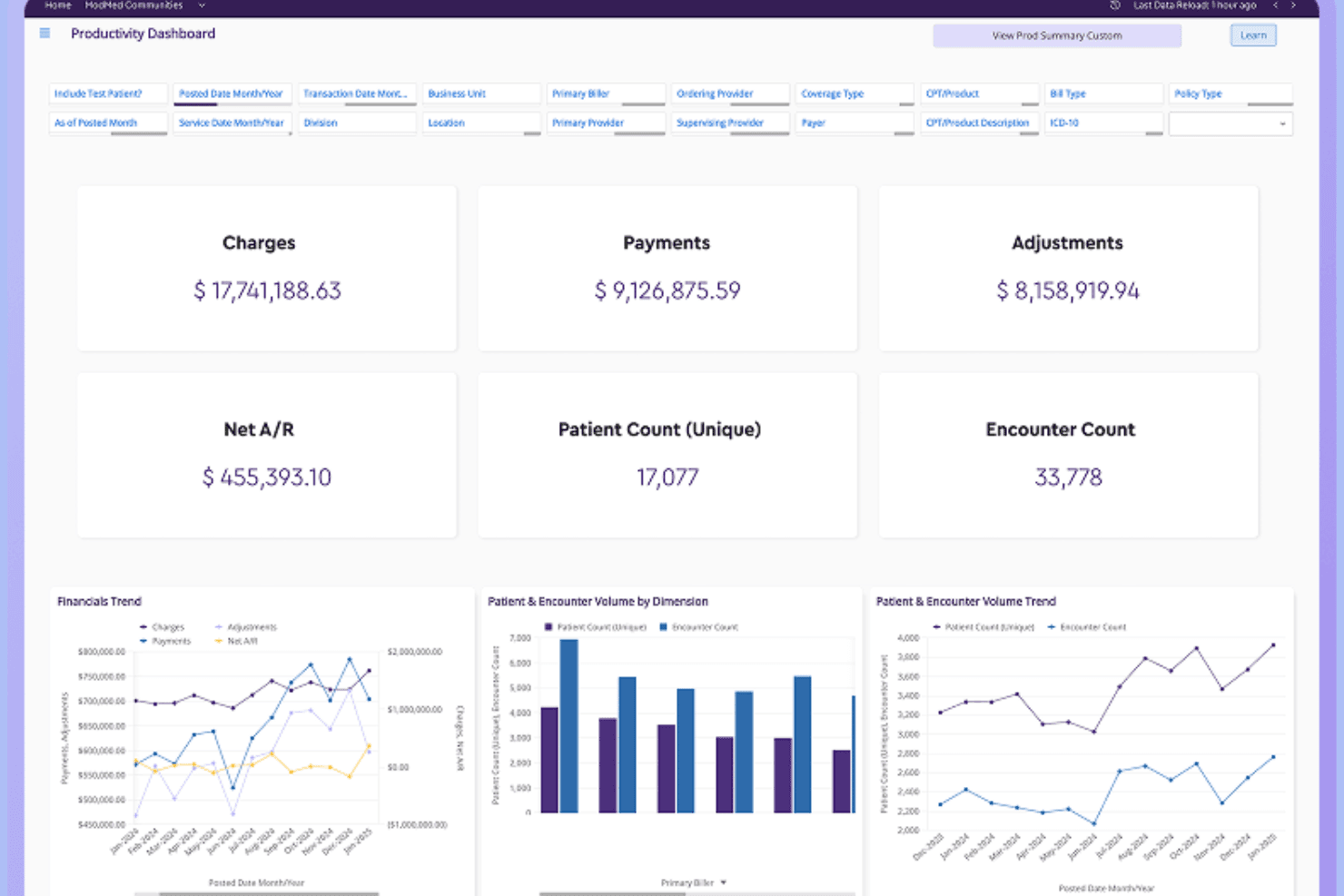
ModMed offers a comprehensive podiatry exam interface with condition-specific treatment plans, findings, and billing tools tailored for foot and ankle care. ModMed EMA is a cloud-based EHR built for specialty medical practices, offering adaptive clinical documentation, AI-assisted charting, e-prescribing, lab ordering, patient engagement tools, and integrated practice management workflows.
Who Is ModMed Best For?
ModMed EMA is a strong fit for specialty medical practices—dermatology, orthopedics, OBGYN, podiatry, and similar fields—that need clinical documentation built around their specific workflows.
Why I Picked ModMed
I picked ModMed as one of the best because its EMA EHR is built from the ground up for specialty practices, not retrofitted. I love how EMA preloads clinical content specific to your specialty, whether that's dermatology, orthopedics, or podiatry, so charting reflects how you actually work. ModMed Scribe 2.0 listens to patient-provider conversations and suggests visit notes, lab orders, and ICD-10 codes for your review, cutting documentation time without removing clinical judgment from the process.
ModMed Key Features
- Patient portal and APPatient app: Patients can view lab results, notes, and handouts, message the practice, request refills, and manage appointments through a web portal or mobile app.
- Surescripts-certified e-prescribing: Providers can queue and send prescriptions to a patient's preferred pharmacy directly from the visit workflow, with formulary lookup and electronic refill requests.
- Bidirectional lab integration: EMA connects with 1,200+ lab entities across the U.S. to send electronic orders and receive results, including digital photos and visit notes with pathology orders.
- AI Analytics dashboard: Built-in administrative, clinical, and financial analytics let practices track visit volume, E/M distribution, reimbursement trends, and high-risk diagnosis follow-ups in near real time.
ModMed Integrations
EMA connects with more than 1,200 lab entities through Change Healthcare, plus 100+ practice-management systems and 150+ pathology labs, including Labcorp and Quest Diagnostics. Its FHIR/OAuth2 APIs support custom integrations.
Pros and Cons
Pros:
- iPad charting supports work away from desk
- AI drafts notes for clinician review
- Specialty-specific charting reduces repetitive entry
Cons:
- Reviewers report mobile crashes and uneven workflows
- Extra clicks interrupt encounter documentation
Learn more about ModMed: Best for specialty practice adaptability
- Free demo available
- Pricing upon request
Visit WebsiteCustomer Rating:4.4/5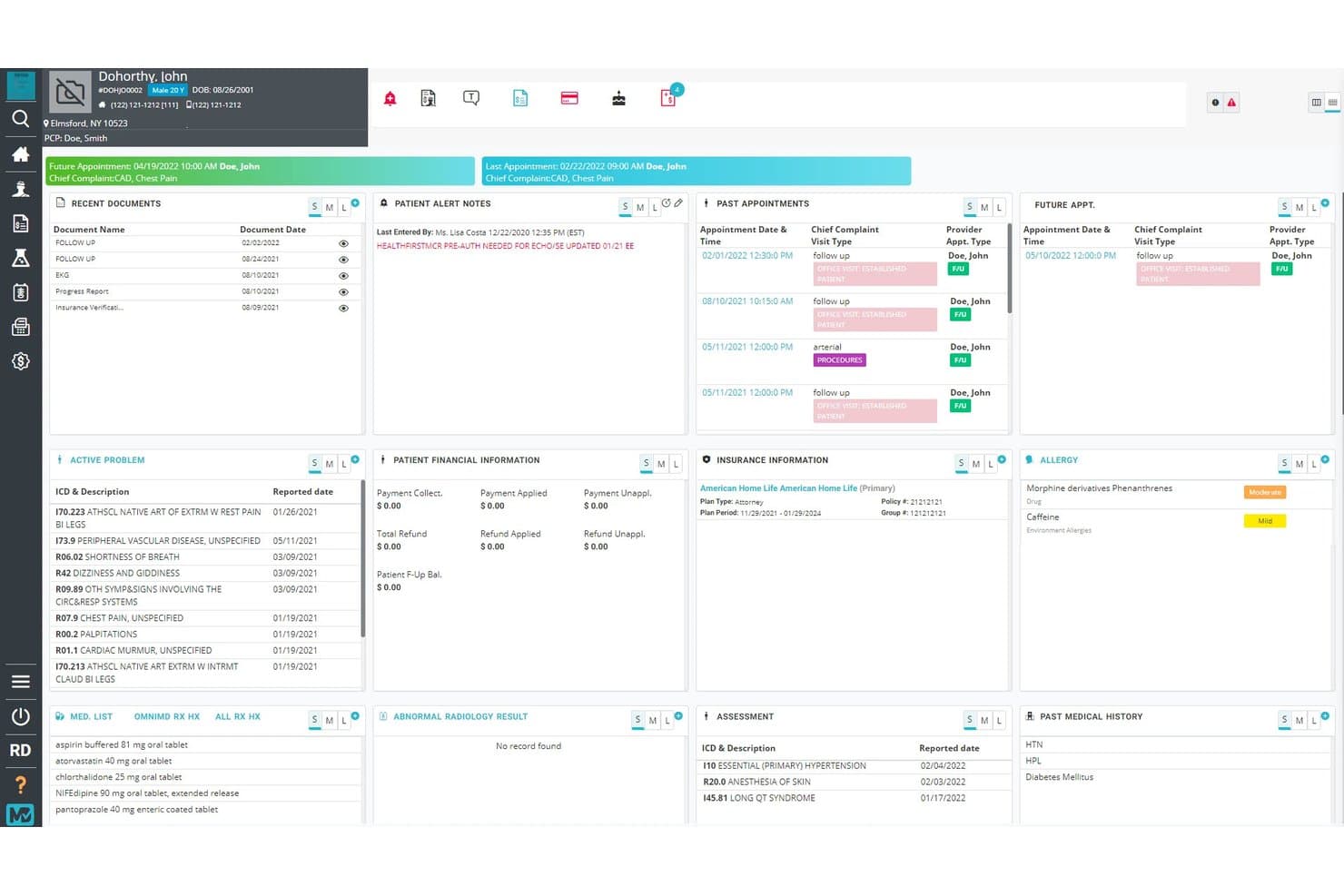
OmniMD centralizes patient health data in one cloud dashboard. OmniMD is a cloud-based EHR platform built for ambulatory practices that combines clinical documentation, AI-assisted charting, e-prescribing, specialty templates, patient portal, and telehealth across more than 20 specialty areas.
Who Is OmniMD Best For?
OmniMD is a strong fit for ambulatory practices that serve patients across multiple specialty areas and need documentation tools that adapt to each one.
Why I Picked OmniMD
I've included OmniMD in my top picks because no other tool on this list matches its depth of specialty-specific clinical documentation, with preloaded templates for more than 50 specialties covering everything from cardiology and OB/GYN to nephrology and ASC. I particularly like how the AI Medical Scribe generates specialty-aware draft notes during the visit, pulling in patient history, medications, and prior encounters as context. A cardiologist and a mental health provider can each work from templates built for their discipline, without reconfiguring anything.
OmniMD Key Features
- E-prescribing with EPCS: Providers can send prescriptions, including controlled substances, directly from the patient chart with drug-interaction and allergy-risk alerts built in.
- Patient portal: Patients can view lab results, visit notes, medications, and visit history through a browser-based portal that syncs directly with the EHR.
- Telehealth integration: Providers launch video visits from within the EHR, with documentation and billing workflows running in the same system.
- OmniXchange lab interface: Bidirectional lab data exchange sends orders and returns structured results to the patient chart, with abnormal-value notifications for the provider.
OmniMD Integrations
OmniMD lists Athenahealth as a native integration, plus Epic, Cerner, eClinicalWorks, Allscripts, LabCorp, and Quest Diagnostics. It supports SMART-on-FHIR, FHIR APIs, HL7, and secure API bridges for custom healthcare data exchange.
Pros and Cons
Pros:
- Reviewers praise responsive, patient support
- Charting connects with billing and scheduling
- Specialty-aware drafts reduce documentation burden
Cons:
- Complex-case templates may need clinician edits
- Older notes can take effort to retrieve
Learn more about OmniMD: Best for flexible per-encounter or per-provider pricing
- Free plan available
- From $25/month
Visit WebsiteCustomer Rating:4.2/5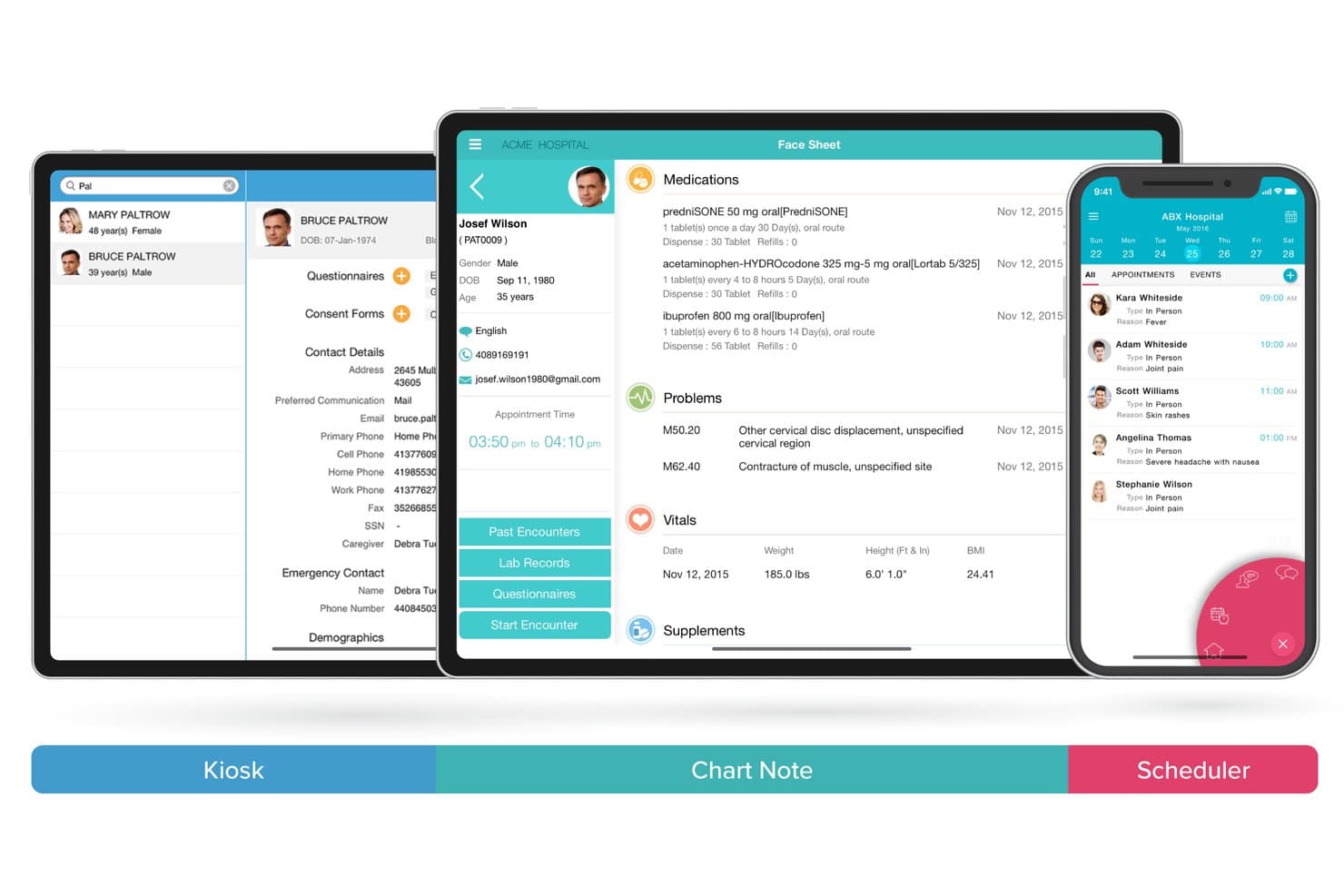
CharmHealth unifies kiosk, chart notes, and scheduling across devices. CharmHealth is a cloud-based EHR platform that covers clinical documentation, e-prescribing, practice management, patient engagement, telehealth, and medical billing across solo practices and multi-location organizations.
Who Is CharmHealth Best For?
CharmHealth is a strong fit for solo providers and small practices that want to pay only for what they use, thanks to its encounter-based pricing model.
Why I Picked CharmHealth
I've included CharmHealth in my top picks because its flexible pricing model is genuinely rare in the EHR space: you can pay $0.50 per encounter with a $25 monthly minimum, or switch to a flat $200 per-provider monthly rate once volume justifies it. I love that solo providers can start on the free plan (capped at 50 encounters and one provider) and scale up without renegotiating a contract. The AI Scribe add-on, which transcribes consultations and generates categorized SOAP note sections with suggested diagnosis codes, makes CharmHealth especially practical for high-volume practices watching costs closely.
CharmHealth Key Features
- FHIR API access: CharmHealth exposes FHIR Version 4.0.1 APIs covering patient, encounter, condition, care plan, medication, and lab data for third-party integrations.
- Patient engagement portal: Patients can request appointments, complete pre-visit questionnaires, view lab results, send refill requests, and message their care team securely.
- Specialty-customizable SOAP templates: Clinicians can import templates from CharmHealth's library, modify them, or build their own to match specialty-specific documentation workflows.
- Telehealth video consultations: The TeleHealth add-on enables video visits with patients directly within the EHR, with support also available through the Charm Chart Note iPad app.
CharmHealth Integrations
CharmHealth offers native integrations with Surescripts, LabCorp, Quest Diagnostics, Google Calendar, QuickBooks, Bluefin, and Fullscript. It also supports HL7-based lab interfaces and REST and FHIR APIs for custom integrations.
Pros and Cons
Pros:
- Scheduling, charting, and billing share one platform
- Patient portal supports records and refill requests
- Customizable SOAP templates support varied workflows
Cons:
- Large charts can load slowly, reviewers report
- Reviewers report delayed support for complex issues
Learn more about CharmHealth: Best for intuitive charting and patient care tools
- Free demo available
- Pricing upon request
Visit WebsiteCustomer Rating:4.4/5
ElationEMR offers a cloud-based EHR for records, e-prescribing, and practice management. Elation Health is a cloud-based EHR and medical billing platform built specifically for independent primary care practices, combining clinical documentation, AI-assisted note-taking, revenue cycle management, and patient care tools in one system.
Who Is Elation Health Best For?
Elation Health is a strong fit for independent primary care physicians and small practices that prioritize clinical documentation quality over administrative complexity.
Why I Picked Elation Health
Elation Health earns its spot on my shortlist because of its three-panel console, which puts the patient chart, visit note, and a summary of relevant history on one screen simultaneously. That layout alone cuts a significant amount of clicking during visits. I also find Note Assist genuinely useful: it records the encounter, pulls in existing chart data, and generates a structured note in real time, without requiring manual cleanup afterward. The referral management workflow, including built-in provider directory access and close-the-loop tracking, rounds out what makes charting here feel complete.
Elation Health Key Features
- Patient passport: A patient-facing health record that gives patients access to their own clinical summaries, medications, and visit history.
- E-prescribing: Send prescriptions electronically, including controlled substances, directly to pharmacies from within the chart.
- Care plans: Build and assign structured care plans to individual patients to support chronic condition management between visits.
- Lab and imaging orders: Order labs and imaging directly from within a patient's chart and receive results back into the EHR automatically.
Elation Health Integrations
Elation Health integrates with labs, pharmacies, and care coordination tools, offering 300+ integrations through its Partner Hub, including Zocdoc, Fullscript, Zus Health, and Nsight Health, along with national labs, health information exchanges, and radiology centers. Additional integrations include Dock Health, IntakeQ, Kareo, Updox, and Puredi, and Elation's API platform supports custom integrations for practices that need to connect with other systems.
Pros and Cons
Pros:
- Single-page chart layout minimizes navigation
- Longitudinal records support chronic care tracking
- AI-assisted documentation reduces daily note time
Cons:
- Reporting tools lack detailed customization
- No phone-based customer support option
Learn more about Elation Health: Best for telemedicine integration features
- Free demo available
- Pricing upon request
Visit WebsiteCustomer Rating:4/5
PrognoCIS offers an appointment scheduler for managing patient visits. PrognoCIS is a cloud-based EHR platform built for multi-specialty and single-specialty practices, combining clinical documentation, telemedicine, medical billing, and patient engagement tools in one system.
Who Is PrognoCIS Best For?
PrognoCIS is a strong fit for independent and group practices across 50+ specialties that want to run in-person and virtual care visits from a single platform.
Why I Picked PrognoCIS
I've included PrognoCIS in my top picks because its telemedicine module is built directly into the EHR, not bolted on as a third-party add-on. I particularly like the virtual waiting room, which notifies providers the moment a patient checks in, and the ability to add family members or staff to a live session for real-time triage. You can also collect payments, order labs, and send e-prescriptions without leaving the virtual visit.
PrognoCIS Key Features
- AI medical scribe: PrognoAI transcribes provider-patient conversations in real time and auto-generates chart notes without manual documentation.
- Specialty-specific templates: Pre-built, customizable templates span 25+ specialties to support structured and consistent clinical documentation.
- Insurance eligibility verification: PrognoCIS checks patient coverage in real time before each appointment so billing issues are caught before the visit.
- Patient portal: Patients can schedule appointments, request prescription refills, make payments, and message their care team directly.
PrognoCIS Integrations
PrognoCIS integrates with a wide variety of healthcare systems, including lab systems, pharmacies, and insurance providers. The platform supports ordering, results, and reporting through integrations with labs, radiology companies, and vaccine registries. PrognoCIS supports HL7 and FHIR interoperability to connect with other third-party solutions, and it supports integration with various third-party applications via an API, allowing users to import patient and clinical data.
Pros and Cons
Pros:
- Shared database between EMR and billing
- Configurable to 25+ medical specialties
- AI scribe auto-generates notes during visits
Cons:
- Custom report generation is limited
- Sluggish screen transitions during heavy use
Learn more about PrognoCIS Psychiatry EHR: Best for mobile-friendly clinical documentation
- Free demo available
- Pricing upon request
Visit WebsiteCustomer Rating:3.9/5
DrChrono offers a provider dashboard for schedules and patient visits. DrChrono is a cloud EHR platform built for specialty practices, combining mobile charting, voice dictation, customizable templates, scheduling, and revenue cycle management in one system.
Who Is DrChrono Best For?
DrChrono suits physicians and clinicians who document primarily at the point of care and need a native iOS EHR that works across iPhone and iPad.
Why I Picked DrChrono
I picked DrChrono as one of the best because its mobile charting experience is genuinely built for clinical use, not just adapted for it. The native iOS app lets you chart, prescribe, review labs, and annotate images directly from an iPad or iPhone at the point of care. I also like the Free Draw tool, which lets providers mark up diagrams or images inline during a visit, a feature that's especially useful in specialties like orthopedics or wound care.
DrChrono Key Features
- Customizable clinical templates: Build and use specialty-specific templates for exams, assessments, and procedures directly within the charting workflow.
- Electronic prescribing (eRx): Send controlled and non-controlled substance prescriptions electronically from within the EHR, including Electronic Prescribing of Controlled Substances (EPCS) support.
- Integrated lab and imaging orders: Order labs, X-rays, and imaging from the EHR and receive results directly in the patient chart.
- Telehealth: Run HIPAA-compliant virtual visits directly from the platform, with no downloads required for patients.
DrChrono Integrations
DrChrono offers marketplace integrations through the DrChrono Marketplace, which connects third-party partner apps to the platform. Verified marketplace partners include Box, Square Point of Sale, Birdeye, Weave, Fullscript, Beam Health, and Podium. DrChrono also connects with Health Gorilla for lab ordering, with access to labs like Labcorp, Quest Diagnostics, and Lifepoint, and supports Iron Bridge for immunization registry reporting. A RESTful API is available for custom integrations. Zapier support is not clearly documented as native.
Pros and Cons
Pros:
- Built-in telehealth with no patient downloads
- Specialty-specific templates across 20+ disciplines
- Native iPad charting with photo annotation
Cons:
- Financial reporting figures often unreliable
- Support relies on email ticket system
Learn more about DrChrono: Best for streamlined e-prescribing capabilities
- Free demo available
- From $199/user/month
Visit WebsiteCustomer Rating:3.7/5
Practice Fusion offers an EHR workspace for clinical documentation and patient care. Practice Fusion is a cloud-based EHR and billing services platform built for independent practices, combining clinical documentation, e-prescribing, charting, and practice billing management in a single system.
Who Is Practice Fusion Best For?
Practice Fusion is a natural fit for small to mid-sized ambulatory practices, particularly those in primary care, pediatrics, and family medicine.
Why I Picked Practice Fusion
I picked Practice Fusion as one of the best because its e-prescribing workflow is genuinely one of the tightest I've seen built into a cloud EHR. You can send prescriptions to any e-prescribing-enabled pharmacy in the country directly from the patient chart, with automatic drug-drug and drug-allergy interaction checks running in real time. Prior authorization management and formulary checks also happen inside the EHR, which removes a common back-and-forth that eats up time. Two-click refill requests and prescription fulfillment tracking round out a workflow that keeps medication management fully contained.
Practice Fusion Key Features
- Customizable charting templates: Build and save specialty-specific note templates to match how your practice documents visits.
- Lab and imaging ordering: Send orders directly from the patient chart and receive results back into the record automatically.
- Patient scheduling: Manage appointment booking, provider calendars, and visit types from a single scheduling interface.
- Medical billing management: Submit claims, track denials, and manage the full revenue cycle from within the platform.
Practice Fusion Integrations
Practice Fusion partners with laboratories, imaging centers, billing solutions, ACOs, and numerous other service providers, with over 600 partners across its ecosystem. Practice Fusion offers proprietary APIs for custom bi-directional integration, and verified integrations include Updox, Medsender, CollaborateMD, PracticeSuite, OpenPM, Office Ally Service Center, DeepScribe, FollowMyHealth, OhMD, and Persivia CareTrak.
Pros and Cons
Pros:
- Charting templates are quick to customize
- Browser-based access with no installation needed
- Built-in e-prescribing includes controlled substances
Cons:
- Server slowdowns reported during peak hours
- Interoffice messaging lacks shared inbox access
Learn more about Practice Fusion: Best for customizable clinical workflows
- Free demo available
- Pricing upon request
Visit WebsiteCustomer Rating:3.6/5
AdvancedMD offers a practice management platform for scheduling, clinical documentation, billing, and patient management. AdvancedMD is a cloud-based EHR and practice management platform that covers scheduling, clinical documentation, billing, revenue cycle management, and patient engagement in a single unified system.
Who Is AdvancedMD Best For?
AdvancedMD is a strong fit for independent medical practices and multi-specialty groups that need a configurable clinical and billing workflow in one platform.
Why I Picked AdvancedMD
I picked AdvancedMD as one of the best because of how far it goes with clinical workflow customization. What I find particularly useful is the specialty-specific template library, which lets clinicians build and tailor documentation to match exactly how they practice, whether that's family medicine, mental health, or pain management. The multi-location template sharing feature is also a clear differentiator, letting group practices standardize note structures across sites without rebuilding from scratch at every location.
AdvancedMD Key Features
- Electronic prescribing: Send prescriptions, including controlled substances, directly to pharmacies from within the EHR.
- Remote patient monitoring: Collect and review patient health data between visits to support ongoing clinical oversight.
- Patient health questionnaires: Send and receive intake forms and health assessments digitally before or during a visit.
- Immunization registry: Submit patient immunization data directly to state registries from within the platform.
AdvancedMD Integrations
AdvancedMD offers over 1,400 apps, software, and technology integrations through its Partner Marketplace, including QuickBooks, InstaMed, Healthix, Salesforce, NextPatient, and Insight Health. The platform also provides an open API that lets you push and pull data to and from AdvancedMD, including patient records, scheduling, and charge data, for custom integrations.
Pros and Cons
Pros:
- Built-in telemedicine for virtual visits
- Charge capture happens during charting automatically
- Templates are editable without vendor involvement
Cons:
- Onboarding and setup take significant effort
- E-prescribing workflows can be clunky
 10Best for rapid implementation options
CureMD
- Free demo available
- Pricing upon request
Visit WebsiteCustomer Rating:3.5/5
CureMD offers an EHR workspace for clinical documentation and patient records. CureMD is a cloud EMR platform that combines clinical documentation, practice management, medical billing, and patient engagement tools within a single system built across 30+ specialty-specific workflows.
Who Is CureMD Best For?
CureMD is a strong fit for independent specialty practices and multi-location medical groups that need a fully integrated clinical and billing system up and running quickly.
Why I Picked CureMD
I picked CureMD as one of the best because of its fast-track implementation approach, which is rare to find paired with this level of specialty depth. The onboarding process includes pre-built, specialty-specific workflows across 30+ disciplines, so your team isn't configuring documentation templates from scratch. I also like that the Avalon iPad app lets providers start seeing patients and collecting charges right away, without waiting for full desktop deployment.
CureMD Key Features
- Electronic prescribing: Connect to over 40,000 pharmacies with built-in medication reconciliation, formulary checks, controlled substance e-prescribing, and age/weight-based dose adjustment.
- Electronic lab ordering and results: Send lab orders and receive results electronically, with abnormal result alerts, trend tracking, and side-by-side comparison of current and past values.
- Interoperability: Exchange data with health information exchanges, payers, hospital networks, imaging services, immunization registries, and DICOM-compliant equipment.
- AI contact center: Automates appointment booking, patient intake, and patient queries without staff involvement.
CureMD Integrations
CureMD integrates with leading laboratory systems, including LabCorp and Quest Diagnostics. It supports interoperability standards like HL7 and FHIR for data exchange with health information exchanges, pharmacies, payers, hospital networks, immunization registries, and PACS/DICOM imaging systems. APIs are available to connect CureMD with other healthcare applications.
Pros and Cons
Pros:
- Adapts workflows across 30+ specialties
- EHR, billing, and PM in one suite
- Includes free hosting, upgrades, and support
Cons:
- Interface screens feel dense and cluttered
- Cloud performance lags on slower connections
Learn more about CureMD:
Outros softwares EMR na nuvem
Eis algumas opções adicionais de software EMR na nuvem que não foram incluídas na minha lista de selecionados, mas que vale a pena considerar:
- 11Kareo ClinicalBest for independent practice end-to-end records
- 12RXNTBest for integrated scheduling and charting
- 13HealthieBest for wellness-focused multi-tool patient records
- 14eClinicalWorksBest for robust patient engagement options
- 15CareCloudBest for advanced workflow automation
- 16athenaOneBest for network-connected ambulatory EHR
- 17PCCBest for pediatric-only clinical charting
- 18Oracle HealthBest for enterprise-scale EHR interoperability
- 19Canvas MedicalBest for developer-extensible cloud EMR workflows
- 20EPICBest for large-scale care network interoperability
How I Evaluate Cloud EMR Software
I split my evaluation into three parts, giving the most weight to core needs: keep patient charts in the cloud and document encounters and clinical notes. Next, I look for standout features such as specialty-specific templates. Finally, I consider beyond-feature value, including onboarding, support, and pricing as a practice grows.
Core Functionality (Table Stakes For This List)
When I'm selecting tools for my list, I score each one on a scale from 0 (does not offer the functionality) to 5 (excels in this area) for each core functionality listed below. I then convert the total into a percentage to help assess each tool's overall fit, with extra weight on any functionalities I’ve deemed essential.
- Cloud Records (Essential): I look for cloud-hosted charts that keep notes, medication lists, and results accessible to authorized staff in the clinic or remotely.
- Clinical Documentation (Essential): I assess whether encounter templates capture diagnoses, plans, and specialty-specific notes without forcing clinicians into one-size-fits-all charting.
- Privacy Safeguards: Check for role-based access, audit trails, encryption, and privacy controls that support applicable health-data rules.
- E-Prescribing: I check whether clinicians can send prescriptions electronically and manage renewals within the chart, including applicable medication classes.
- Data Exchange: I look for secure exchange of records, lab results, and referrals with outside providers, not just downloadable files.
- Remote Access: Consider whether authorized clinicians can retrieve charts and document follow-ups across locations and devices.
Once I have a list of tools that meet the criteria, I consider what sets each platform apart.
Differentiating Factors (What Sets Vendors Apart)
Here's how I compare and contrast different vendors:
Standout Features
I look for AI-assisted documentation that auto-generates notes from visit audio, since it cuts charting time for physicians who'd otherwise spend evenings catching up. Specialty-specific templates matter just as much. A behavioral health practice needs intake forms and progress notes built for that workflow, not adapted from a general medicine template. I also evaluate telehealth integration, checking whether video visits run inside the chart so clinicians aren't toggling between apps mid-encounter.
Beyond Features
I evaluate how each vendor handles data migration, since a botched transition from a legacy system can mean lost charts and stalled operations during go-live. Total cost of ownership matters just as much—some platforms charge per-provider while others bill per-encounter, and add-on fees for things like controlled substance e-prescribing can quietly inflate the budget as your team grows. I also check whether the EMR connects natively to health information exchanges and existing billing systems, because duplicate data entry across disconnected tools drains staff time fast.
Como escolher um software EMR na nuvem
É fácil ficar perdido entre listas extensas de funcionalidades e estruturas de preços complexas. Para o ajudar a manter o foco enquanto percorre o seu processo específico de seleção de software, apresentamos uma lista de verificação dos fatores a ter em conta:
| Fator | O que deve considerar |
| Escalabilidade | O software acomodará profissionais a trabalhar individualmente, consultórios de grupo e configurações com várias localizações (à semelhança das soluções empresariais da Cerner), à medida que a sua organização cresce ou muda? |
| Integrações | O EMR consegue ligar-se aos laboratórios, sistemas de faturação, centros de imagiologia ou redes de referenciação que utiliza atualmente ou planeia utilizar em breve? |
| Personalização | A plataforma permite ajustar modelos, formulários e fluxos de trabalho para se adaptarem à sua especialidade ou aos processos clínicos locais? |
| Facilidade de utilização | A sua equipa conseguirá aprender a utilizá-lo rapidamente ou este irá atrasar a prestação de cuidados ou exigir muita formação contínua? |
| Implementação e integração inicial | Que recursos, assistência na migração e suporte em direto estão incluídos durante a configuração? Terá de coordenar separadamente com consultores externos? |
| Custo | Os preços são transparentes e incluem todos os elementos essenciais? Procure taxas ocultas para integrações, utilizadores adicionais ou suporte premium. |
| Medidas de segurança | A solução oferece encriptação, registos de auditoria e controlos de acesso robustos para proteger os registos e cumprir os requisitos de privacidade? |
| Requisitos de conformidade | O fornecedor suporta a HIPAA, a ONC e outras certificações relevantes para a sua localização geográfica e contexto de prestação de cuidados? Que documentação é disponibilizada? |
O que são os softwares EMR na nuvem?
O software de EMR na nuvem consiste em plataformas online que armazenam, gerem e protegem registos médicos eletrónicos através da Internet, eliminando a necessidade de servidores locais. Estas soluções permitem aos profissionais de saúde e ao pessoal clínico aceder às informações dos doentes, documentar os cuidados prestados e coordenar fluxos de trabalho a partir de qualquer dispositivo, apoiando a colaboração segura, o acesso remoto, a conformidade e a integração com ferramentas clínicas e administrativas.
Funcionalidades do software de EMR na nuvem
Ao selecionar um software de EMR na nuvem, tenha em atenção as seguintes funcionalidades essenciais:
- Registo clínico e notas clínicas: Permite aos prestadores de cuidados criar, consultar e editar documentação estruturada ou em texto livre sobre os episódios dos doentes, garantindo um registo preciso e um acompanhamento clínico adequado.
- Prescrição eletrónica: Permite a transmissão eletrónica de receitas diretamente para as farmácias, contribuindo para a segurança da medicação e reduzindo o volume de trabalho associado a chamadas telefónicas e faxes.
- Portal do doente integrado: Dá aos doentes acesso online aos seus registos de saúde, à marcação de consultas, a mensagens seguras e à faturação, melhorando a comunicação e a comodidade.
- Marcação de consultas: Gere os calendários dos prestadores, permite a marcação online, acompanha cancelamentos e faltas e envia lembretes automáticos para reduzir as consultas não realizadas.
- Gestão de pedidos: Facilita a realização de pedidos digitais e a obtenção de resultados de análises laboratoriais, exames de imagiologia e testes de diagnóstico, com acompanhamento do estado e alertas que ajudam a concluir os ciclos de cuidados.
- Integração de sinistros e faturação: Liga de forma integrada a documentação clínica aos fluxos de trabalho de codificação e faturação, reduzindo erros e a duplicação da introdução de dados administrativos.
- Interoperabilidade: Permite a troca segura de dados com prestadores externos, laboratórios ou parceiros de referenciação, utilizando HL7, FHIR ou outras normas de dados de saúde.
- Controlos de acesso baseados em funções: Restringe o que os diferentes utilizadores podem consultar e editar, protegendo informações sensíveis e apoiando o cumprimento das normas de privacidade.
- Relatórios regulamentares: Gera relatórios de conformidade, qualidade e exigidos pelas autoridades utilizando dados clínicos em tempo real, tornando as tarefas regulamentares menos onerosas.
Funcionalidades comuns de IA no software de EMR na nuvem
Para além das funcionalidades padrão do software de EMR na nuvem acima indicadas, muitas destas soluções estão a incorporar IA com funcionalidades como:
- Registo clínico ambiente: A IA ouve durante as consultas dos doentes e gera automaticamente notas clínicas estruturadas, reduzindo a documentação manual e libertando tempo dos prestadores.
- Análise preditiva: A IA analisa os dados dos doentes para identificar aqueles que apresentam risco de readmissão, progressão da doença ou perda de consultas de acompanhamento, apoiando uma gestão proativa dos cuidados.
- Assistência automatizada à codificação: A IA analisa a documentação clínica e sugere códigos de faturação precisos, ajudando a reduzir as recusas de sinistros e a melhorar a eficiência do ciclo de receitas.
- Apoio à decisão clínica: A IA fornece alertas em tempo real sobre interações medicamentosas, riscos de alergias e recomendações de cuidados baseadas em evidências no momento da prestação dos cuidados.
- Otimização inteligente de consultas: A IA prevê faltas e recomenda padrões de agendamento ideais para maximizar a produtividade dos prestadores e minimizar os intervalos vazios nos calendários.
Vantagens do software de EMR na nuvem
A implementação de um software de EMR na nuvem proporciona várias vantagens para a sua equipa e para a sua organização. Eis algumas das vantagens que pode esperar:
- Acesso remoto: Permite aceder e atualizar os registos dos doentes de forma segura a partir de qualquer lugar com ligação à Internet, apoiando equipas de cuidados híbridas e móveis.
- Melhor coordenação dos cuidados: O acesso aos registos em tempo real, a interoperabilidade e as mensagens seguras permitem que vários prestadores contribuam para os cuidados dos doentes em diferentes locais.
- Redução da carga de documentação: Os modelos integrados, o registo clínico estruturado e ferramentas como o registo clínico ambiente ajudam os prestadores a concluir as notas mais rapidamente e a concentrarem-se nos doentes.
- Maior envolvimento dos doentes: Os portais dos doentes disponibilizam marcação, comunicação e acesso aos registos de saúde online, facilitando a participação dos doentes nos seus cuidados.
- Escalabilidade para o crescimento: A arquitetura baseada na nuvem e os modelos de subscrição permitem às organizações acrescentar prestadores, especialidades ou locais sem grandes alterações técnicas.
- Maior conformidade e segurança: Os registos de auditoria automatizados, o acesso baseado em funções e a encriptação ajudam a cumprir os requisitos da HIPAA e regulamentares, protegendo simultaneamente os dados sensíveis.
- Custos de TI e manutenção mais baixos: O alojamento na nuvem elimina a necessidade de servidores locais, atualizações de rotina e suporte técnico interno, reduzindo os custos gerais.
Custos e preços do software de EMR na nuvem
A seleção de software de EMR na cloud requer uma compreensão dos vários modelos de preços e planos disponíveis. Os custos variam consoante as funcionalidades, o tamanho da equipa, os complementos, entre outros fatores. A tabela abaixo resume os planos comuns, os respetivos preços médios e as funcionalidades normalmente incluídas nas soluções de software de EMR na cloud:
Tabela de comparação de planos de software de EMR na cloud
| Tipo de plano | Preço médio | Funcionalidades comuns |
| Plano gratuito | $0 | Registo clínico básico, agendamento de consultas, armazenamento limitado, apoio da comunidade e acesso para um profissional. |
| Plano pessoal | $50-$100/utilizador/mês | Documentação segura, prescrição eletrónica, gestão de consultas, portal do doente e integração de faturação simples. |
| Plano empresarial | $100-$250/utilizador/mês | Suporte para vários profissionais, faturação integrada, telessaúde, análise de dados, interoperabilidade básica, suporte melhorado e formulários personalizados. |
| Plano empresarial avançado | $250+/utilizador/mês | Interoperabilidade avançada, análise de dados empresarial, fluxos de trabalho personalizados, suporte prioritário, migração de dados e relatórios de conformidade. |
Perguntas frequentes sobre software de EMR na cloud
Eis algumas respostas a perguntas comuns sobre software de EMR na cloud:
Qual é o nível de segurança do software de EMR na cloud para dados médicos sensíveis?
Sim, o software de EMR na cloud foi concebido com normas de segurança como encriptação, acesso baseado em funções e registos de auditoria. Verifique sempre se o seu fornecedor garante a conformidade com a HIPAA e está disposto a assinar um acordo de associado empresarial, para assegurar o cumprimento dos requisitos legais de proteção de dados.
O software de EMR na cloud pode dar suporte a consultórios especializados ou com várias localizações?
Sim, a maioria das plataformas de EMR na cloud foi criada para servir consultórios de várias dimensões e especialidades. Procure modelos flexíveis, acesso de utilizadores escalável e gestão de vários locais se planear crescer ou trabalhar em diferentes áreas clínicas.
O que está envolvido na migração de um sistema em papel ou antigo para um EMR na cloud?
A migração envolve normalmente a extração de registos e documentos dos doentes, a conversão dos formatos de dados e a validação dos registos após a importação. Pergunte aos fornecedores sobre o suporte incluído, o tempo de inatividade, a formação e se os custos estão incluídos ou são cobrados separadamente, para evitar interrupções.
Com que frequência são aplicadas as atualizações e correções de segurança?
Os fornecedores de EMR na cloud tratam geralmente das atualizações de forma automática, pelo que recebe correções de segurança regulares e novas funcionalidades sem intervenção manual nem tempo de inatividade, ajudando-o a manter-se atualizado em relação aos regulamentos e às normas do setor.
De que tipo de suporte informático a nossa clínica precisará com um sistema de EMR na cloud?
Os EMR na cloud reduzem a necessidade de suporte informático no local, uma vez que o alojamento, a manutenção e as atualizações são assegurados pelo fornecedor. No entanto, a sua equipa deve designar uma pessoa responsável pela gestão dos utilizadores, pela supervisão dos fluxos de trabalho e pela coordenação com o fornecedor.