


RXNT vs. AdvancedMD: 2026 Comparison Guide



RXNT offers a user-friendly EHR solution that simplifies practice management for healthcare providers.
AdvancedMD, on the other hand, provides a robust platform with integrated tools to enhance patient care and operational efficiency.
While RXNT and AdvancedMD both aim to streamline healthcare operations, they differ in customization options and scalability, making them suitable for different practice sizes and needs.
In this article, you'll find a comparison of the tools, their features, pros and cons, and pricing to help you decide which EHR software fits your practice best.
RXNT vs. AdvancedMD: An Overview
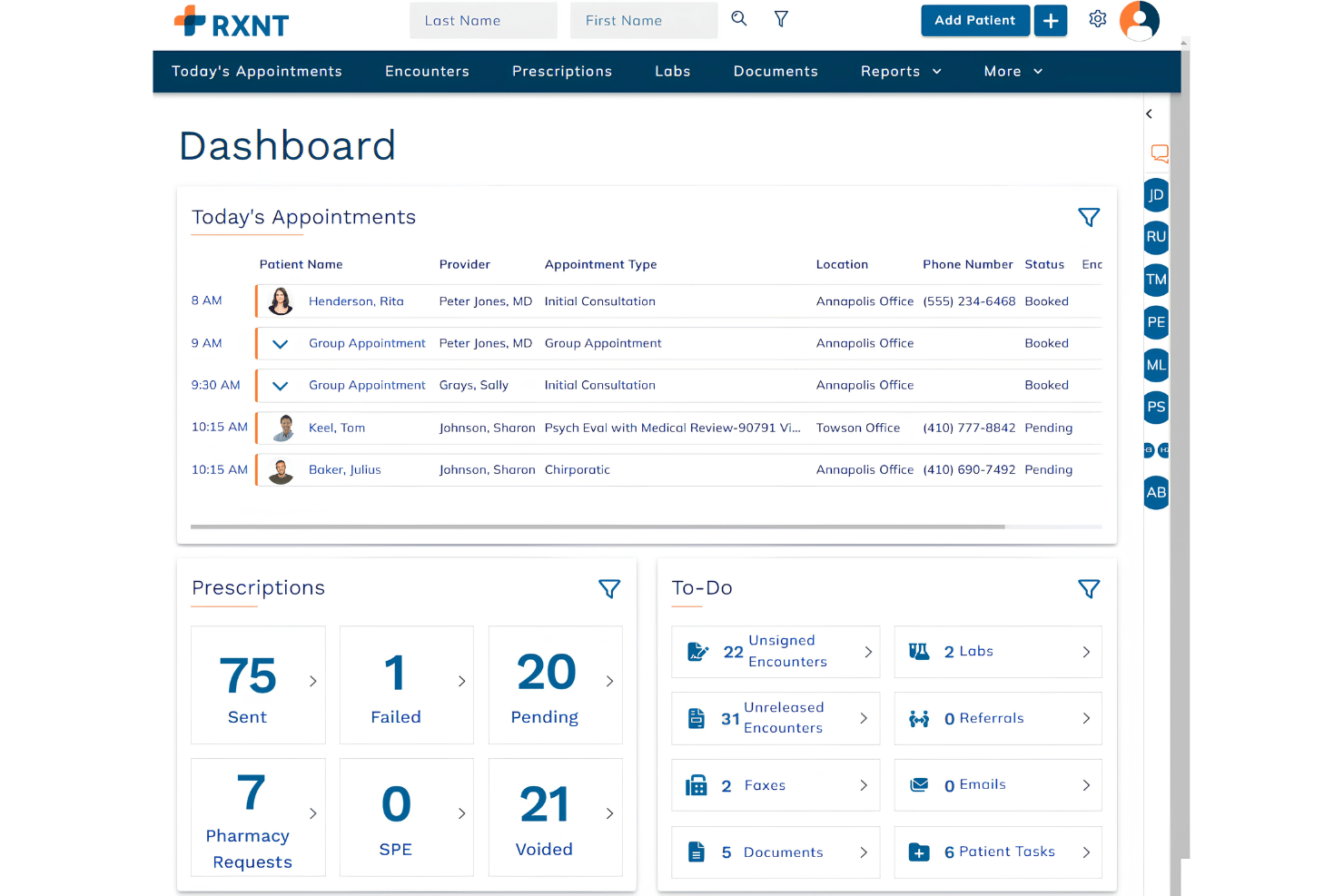
RXNT


AdvancedMD


Why Trust Our Software Reviews
We’ve been testing and reviewing medical software since 2023. As medical practice leaders ourselves, we know how critical and difficult it is to make the right decision when selecting software.
We invest in deep research to help our audience make better software purchasing decisions. We’ve tested more than 2,000 tools for different medical practice use cases and written over 1,000 comprehensive software reviews. Learn how we stay transparent & our software review methodology.
RXNT vs. AdvancedMD Pricing Comparison
| RXNT | AdvancedMD | |
|---|---|---|
| Free Trial | Free demo available | Free demo available |
| Pricing | From $319/month/provider | From $429/user/month (billed annually) |
RXNT vs. AdvancedMD Pricing & Hidden Costs
RXNT pricing follows a subscription model with options for different practice sizes, but users should watch for additional fees for upgrades or support services.
AdvancedMD pricing also operates on a subscription basis, and it may include setup fees or charges for premium features.
To choose the right vendor, evaluate your practice's specific needs, such as the scale of operations and desired features, and compare those against the pricing structures and any extra costs to ensure the chosen solution aligns with your long-term financial plan.
RXNT vs. AdvancedMD Feature Comparison
With RXNT's billing and scheduling feature, you can efficiently manage appointments and streamline billing processes, making it invaluable for a practice manager juggling multiple tasks. With a clean, web-based, user-friendly interface, RXNT specialized in electronic medical records, electronic prescriptions (EPCS), practice management, and HIPAA compliant medical billing software.
AdvancedMD's telemedicine capabilities are great for expanding patient care options, especially when remote consultations are necessary. It has a highly rated mobile app and patient portal, emphasizing patient engagement with easy messaging and notifications.
While RXNT excels in administrative tasks like electronic prescribing and refills and appointment scheduling, AdvancedMD offers robust options for virtual patient interactions, electronic health records, revenue cycle management, charting templates, and invoicing.
RXNT vs. AdvancedMD Feature Comparison
With RXNT’s billing and scheduling feature, you can efficiently manage appointments and streamline billing processes, making it invaluable for a practice manager juggling multiple tasks. With a clean, web-based, user-friendly interface, RXNT specialized in electronic medical records, electronic prescriptions (EPCS), practice management, and HIPAA compliant medical billing software.
AdvancedMD’s telemedicine capabilities are great for expanding patient care options, especially when remote consultations are necessary. It has a highly rated mobile app and patient portal, emphasizing patient engagement with easy messaging and notifications.
While RXNT excels in administrative tasks like electronic prescribing and refills and appointment scheduling, AdvancedMD offers robust options for virtual patient interactions, electronic health records, revenue cycle management, charting templates, and invoicing.
| RXNT | AdvancedMD | |
|---|---|---|
| API | ||
| Appointment Scheduling | ||
| Audit Management | ||
| Compliance Tracking | ||
| Customer Management | ||
| Data Export | ||
| Data Import | ||
| Electronic Prescribing | ||
| External Integrations | ||
| HIPAA Compliance | ||
| Multi-User | ||
| Notifications | ||
| Patient Management | ||
| Regulatory Alerts | ||
| Risk Assessment |
RXNT vs. AdvancedMD Integrations
| Integration | RXNT | AdvancedMD |
|---|---|---|
| QuickBooks | ✅ | ✅ |
| Google Workspace | ✅ | ❌ |
| Microsoft 365 | ❌ | ✅ |
| Slack | ❌ | ✅ |
| DocuSign | ✅ | ❌ |
| Microsoft Teams | ❌ | ✅ |
| Dropbox | ✅ | ❌ |
| Salesforce | ❌ | ✅ |
| API | ✅ | ✅ |
| Zapier | ✅ | ✅ |
With RXNT's integration with QuickBooks, you can easily manage financial transactions, which is particularly valuable for keeping your practice's accounting streamlined.
AdvancedMD's integration with Microsoft 365 is great for enhancing team collaboration and communication, especially if your practice relies heavily on Microsoft's suite.
Both offer unique integrations that cater to different operational needs, helping you choose based on what fits your practice's workflow best.
RXNT vs. AdvancedMD Security, Compliance & Reliability
| Factor | RXNT | AdvancedMD |
|---|---|---|
| Data Encryption | RXNT uses AES-256 encryption to protect patient data during storage and transmission. | AdvancedMD employs end-to-end encryption to secure data across its platform. |
| Regulatory Compliance | RXNT meets HIPAA requirements with features like role-based access control. | AdvancedMD adheres to HIPAA standards, offering audit trails and access controls. |
| Uptime Reliability | RXNT guarantees 99.9% uptime with redundant systems in place. | AdvancedMD provides 99.9% uptime, supported by cloud-based infrastructure. |
| Data Backup | RXNT performs daily automated backups to ensure data integrity. | AdvancedMD offers real-time data backup to prevent data loss. |
RXNT and AdvancedMD both excel in maintaining high standards for security and compliance, but their approaches to data protection and system reliability differ slightly.
To choose the right vendor, assess your practice's specific security needs and review how each tool's features align with those requirements, considering factors like encryption, compliance, and backup options.
RXNT vs. AdvancedMD Ease of Use
| Factor | RXNT | AdvancedMD |
|---|---|---|
| User Interface | RXNT features a straightforward interface with customizable dashboards for easy navigation. | AdvancedMD offers an intuitive layout with drag-and-drop functionality for quick access. |
| Onboarding Experience | RXNT provides step-by-step tutorials and live support during the onboarding process. | AdvancedMD includes video tutorials and a dedicated onboarding specialist to assist new users. |
| Setup | RXNT offers a quick setup with minimal technical requirements, ideal for smaller practices. | AdvancedMD requires a more complex setup process but provides comprehensive guidance. |
| Support | RXNT's support team is available via phone and email, offering prompt responses. | AdvancedMD provides 24/7 phone support and an extensive online help center. |
RXNT's straightforward interface makes it easy to navigate, but its setup might be too basic for larger practices needing more customization.
AdvancedMD's drag-and-drop functionality simplifies complex tasks, though its setup process can be daunting without technical support.
RXNT vs AdvancedMD: Pros & Cons
RXNT
- E-prescribing tools meet state and federal regulations.
- Appointment scheduling connects seamlessly with patient communication tools.
- Custom chart templates are included for various specialties.
- Reporting features lack advanced analytics customization.
- Mobile functionality is limited for some workflows.
- Billing tools require additional setup to access full features.
AdvancedMD
- You can easily manage appointments and schedules with its intuitive calendar.
- The software offers robust reporting tools to help you analyze your practice's performance.
- Your team will appreciate the comprehensive patient charting capabilities.
- You might find the initial setup a bit complex and time-consuming.
- Some users report that customer support response times can be slower than expected.
- Your team may need time to adapt to the software's extensive features and functionalities.
Best Use Cases for RXNT and AdvancedMD
RXNT
- Outpatient Clinics RXNT’s specialty templates and quick scheduling make it easy to manage high patient volume and routine visits.
- Behavioral Health Specialty charts and secure patient messaging help therapists keep accurate, confidential records.
- Solo Practices One-login access to EMR, billing, and scheduling creates a simple, self-managed setup for solo providers.
- Family Medicine Versatile charting and e-prescribing support diverse case mixes and frequent prescription needs.
- Ambulatory Surgical Centers Integrated document management and scheduling fit onsite care, post-op documentation, and patient handoffs.
- Small Medical Groups Gives small teams the essential workflow tools—charting, claims, and reminders—without requiring multiple vendors.
AdvancedMD
- Small Practices AdvancedMD’s intuitive tools make managing appointments and patient records simple for smaller teams.
- Family Medicine The software’s scheduling and charting features align well with the needs of family medicine practices.
- Dermatology Offices AdvancedMD supports specialized practices with its detailed patient charting capabilities.
- Pediatrics Its robust scheduling tools help pediatric offices manage appointments efficiently.
- Healthcare Administrators With comprehensive reporting tools, AdvancedMD aids administrators in making informed decisions.
- Mid-Sized Clinics The software’s extensive feature set is ideal for clinics needing a comprehensive management solution.
Who Should Use RXNT, and Who Should Use AdvancedMD?
In my opinion, RXNT is best suited for smaller practices or solo practitioners who need a cost-effective, easy-to-use EHR solution with straightforward features. One of it’s specialties is e-prescribing, which is key for telehealth in the modern age.
AdvancedMD, on the other hand, is ideal for larger practices or medical groups that require more comprehensive functionality and customization options. It boasts robust, customizable EMR, customer support services, and patient scheduling.
If your team values robust telemedicine capabilities and integration with Microsoft 365, AdvancedMD might be the better fit. For those looking for quick setup and strong billing features, RXNT should be your go-to choice.
Differences Between RXNT and AdvancedMD
| RXNT | AdvancedMD | |
|---|---|---|
| Integrations | RXNT integrates with QuickBooks and Google Workspace, among others. | AdvancedMD integrates with Microsoft 365 and Salesforce, among others. |
| Pricing | RXNT offers a subscription model with potential additional fees for upgrades. | AdvancedMD uses a subscription model that may include setup fees and premium charges. |
| Setup Complexity | RXNT provides a quick setup, ideal for smaller practices. | AdvancedMD's setup is more complex but offers comprehensive guidance. |
| Telemedicine | RXNT lacks advanced telemedicine capabilities. | AdvancedMD provides robust telemedicine features for virtual care. |
| User Interface | RXNT features a straightforward interface with customizable dashboards. | AdvancedMD offers an intuitive layout with drag-and-drop functionality. |
| Read RXNT ReviewOpens new window | Read AdvancedMD ReviewOpens new window |
Similarities Between RXNT and AdvancedMD
| API Access | Both provide API access, enabling you to create custom integrations that fit your practice's unique workflows. |
|---|---|
| HIPAA Compliance | RXNT and AdvancedMD both meet HIPAA standards, ensuring patient data is secure and access is controlled. |
| Subscription Model | Both RXNT and AdvancedMD use a subscription pricing model, allowing flexibility in scaling services as your practice grows. |
| Support | RXNT and AdvancedMD both offer responsive support teams, available via phone and online to assist with any issues. |
| Uptime Reliability | Each offers 99.9% uptime reliability, ensuring your practice experiences minimal disruptions. |
| Read RXNT ReviewOpens new window Read AdvancedMD ReviewOpens new window | |