

EHR software for iPad lets you handle patient charts, notes, scheduling, and billing on your Apple tablet, right at the point of care. If you’re looking for a smooth, reliable way to manage electronic health records on your iPad, you want tools that actually work with clinical workflows—without clunky workarounds or desktop-only features. In this guide, I’ll break down which EHR apps deliver real mobility, which specialties they serve best, and what you should consider to get the most out of your iPad in 2026.
Why Trust Our Software Recommendations
6,700+
Reviews
20
Industry experts
16+
Evaluation factors
14
Years
Our team has been testing and reviewing software since 2012. As medical practice leaders ourselves, we know how difficult—and important—it is to choose the right software.
For this guide, we evaluated tools using hands-on testing and independent research, scoring tools using our selection criteria.
Our reviews reflect our human editorial judgment, not a sales pitch.
Comparison Table: EHR Software for iPad
This comparison table outlines pricing for my top ehr software for ipad picks.
| Tool | Best For | Trial Info | Price | ||
|---|---|---|---|---|---|
| 1 | Best for mobile therapy documentation | 30-day free trial | From $69/month | Website | |
| 2 | Best for affordable mobile EHR access | Free plan available | From $25/month | Website | |
| 3 | Best for mobile behavioral health charting | Free demo available | Pricing upon request | Website | |
| 4 | Best for independent practice mobility | 14-day free trial; Free demo available | Pricing upon request | Website | |
| 5 | Best for enterprise mobile patient care | Not available | Pricing upon request | Website | |
| 6 | Best for specialty charting on iPad | Free demo available | Pricing upon request | Website | |
| 7 | Best for mobile behavioral health workflows | 30-day free trial | From $49/month | Website | |
| 8 | Best for iPad-native clinical workflows | Free demo available | Pricing upon request | Website | |
| 9 | Best for mobile specialty practice workflows | Free demo available | Pricing upon request | Website | |
| 10 | Best for mobile cloud-based EHR access | Free demo available | Pricing upon request | Website |


Best EHR Software for iPad Reviews
Below are my detailed summaries of the best EHR software for iPad that made it onto my shortlist. My reviews offer a detailed look at the features, best use cases, and pros and cons of each software to help you find the best one for you.
 Best for mobile therapy documentation
- 30-day free trial
- From $69/month
Visit WebsiteCustomer Rating:4.4/5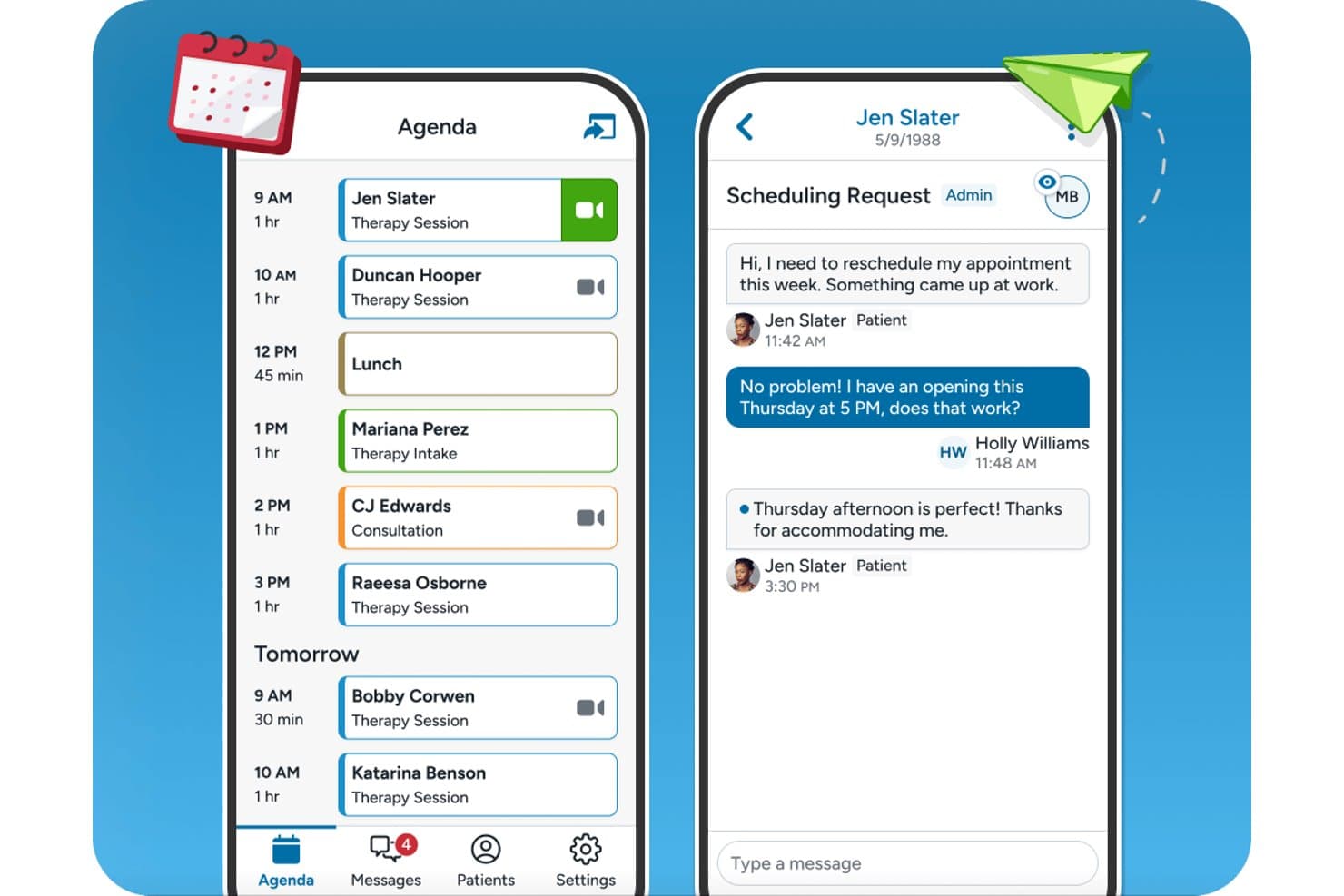
TherapyNotes offers a mobile-friendly agenda view and patient messaging interface designed for seamless scheduling and communication on iPad. TherapyNotes is a behavioral health EHR with a native iPad companion app that covers scheduling, secure client messaging, telehealth sessions, and offline access to client records and appointments.
Who Is TherapyNotes Best For?
Solo and small-group behavioral health practices — therapists, psychologists, and counselors — will find TherapyNotes fits their day-to-day clinical and billing workflows well.
Why I Picked TherapyNotes
I've included TherapyNotes in my top picks because its dedicated mobile companion app gives behavioral health clinicians on-the-go access to their schedule, client records, and telehealth sessions. I like that the app supports offline access to client details and appointments, so connectivity gaps during a packed day don't interrupt client prep. Biometric login via Face ID or Touch ID and secure messaging with clients and staff are both built directly into the iPad app.
TherapyNotes Key Features
- Telehealth integration: Launch HIPAA-compliant video sessions directly from the iPad companion app.
- Appointment management: View upcoming appointments, client schedules, and agenda details from your iPad.
- Secure messaging: Exchange encrypted messages with clients and staff right from the app.
- Client data access: Review essential client information and appointment history online or offline.
TherapyNotes Integrations
TherapyNotes offers native integrations with Google Calendar, Zee Medical Billing, OneLogin, and DemandHub. An API for custom integrations is not available.
Pros and Cons
Pros:
- DSM-aligned note templates for behavioral health
- Biometric login supported on the mobile app
- Built-in telehealth accessible from the iPad app
Cons:
- Low App Store rating signals usability concerns
- Mobile app lacks full note-writing capability
Learn more about TherapyNotes: Best for affordable mobile EHR access
- Free plan available
- From $25/month
Visit WebsiteCustomer Rating:4.2/5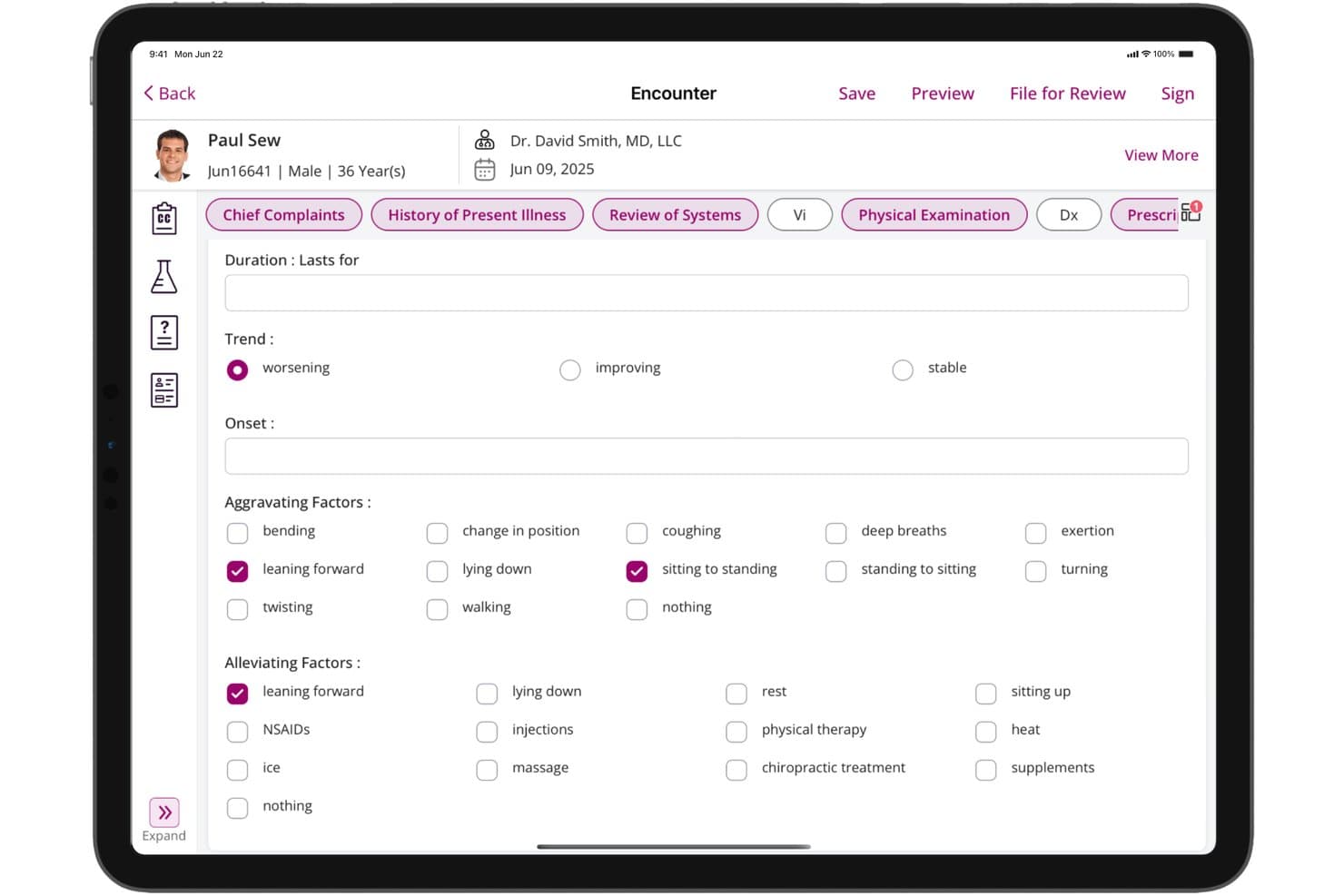
CharmHealth offers a detailed History of Present Illness form on iPad, capturing trend, onset, aggravating, and alleviating factors for patient encounters. CharmHealth is a cloud-based EHR platform with dedicated native iPadOS apps for clinical charting, e-prescribing, lab ordering, offline documentation, and integrated practice scheduling and billing.
Who Is CharmHealth Best For?
CharmHealth is a strong fit for independent practitioners and small practices that need a full-featured, iPad-compatible EHR without committing to high per-provider licensing costs.
Why I Picked CharmHealth
CharmHealth earns its spot on my shortlist because the Charm Chart Note iPad app supports full offline charting with auto-sync, so I can document encounters without reliable connectivity. I also like CharmAI Scribe, which listens in real time and generates the full clinical note, including assessment, diagnosis, and treatment plan, directly on the tablet. The free tier means I can access the full iPad EHR, including offline charting and AI scribing, before committing to a paid plan.
CharmHealth Key Features
- Native scheduling app: Manage appointments and track daily schedules using the dedicated Charm EHR Scheduler iPad app.
- Customizable specialty templates: Access and tailor SOAP note templates to fit behavioral health, pediatrics, primary care, and more.
- Patient portal with mobile branding: Offer a branded patient app for appointment access, secure messaging, and records review on iPad.
- Lab and imaging integration: Order labs and imaging, and review results directly within the iPad app connected to LabCorp and Quest.
CharmHealth Integrations
CharmHealth offers native integrations with Surescripts, LabCorp, Quest Diagnostics, Bluefin, QuickBooks, Optum clearinghouse, Fullscript, and Wellevate. An API is available for custom integrations.
Pros and Cons
Pros:
- EPCS-certified e-prescribing available directly on iPad
- CharmAI Scribe generates notes in real time
- Offline charting supported natively on iPad
Cons:
- iPad app lacks full desktop parity
- Apple Pencil support not clearly documented
Learn more about CharmHealth: Best for mobile behavioral health charting
- Free demo available
- Pricing upon request
Visit WebsiteCustomer Rating:4.1/5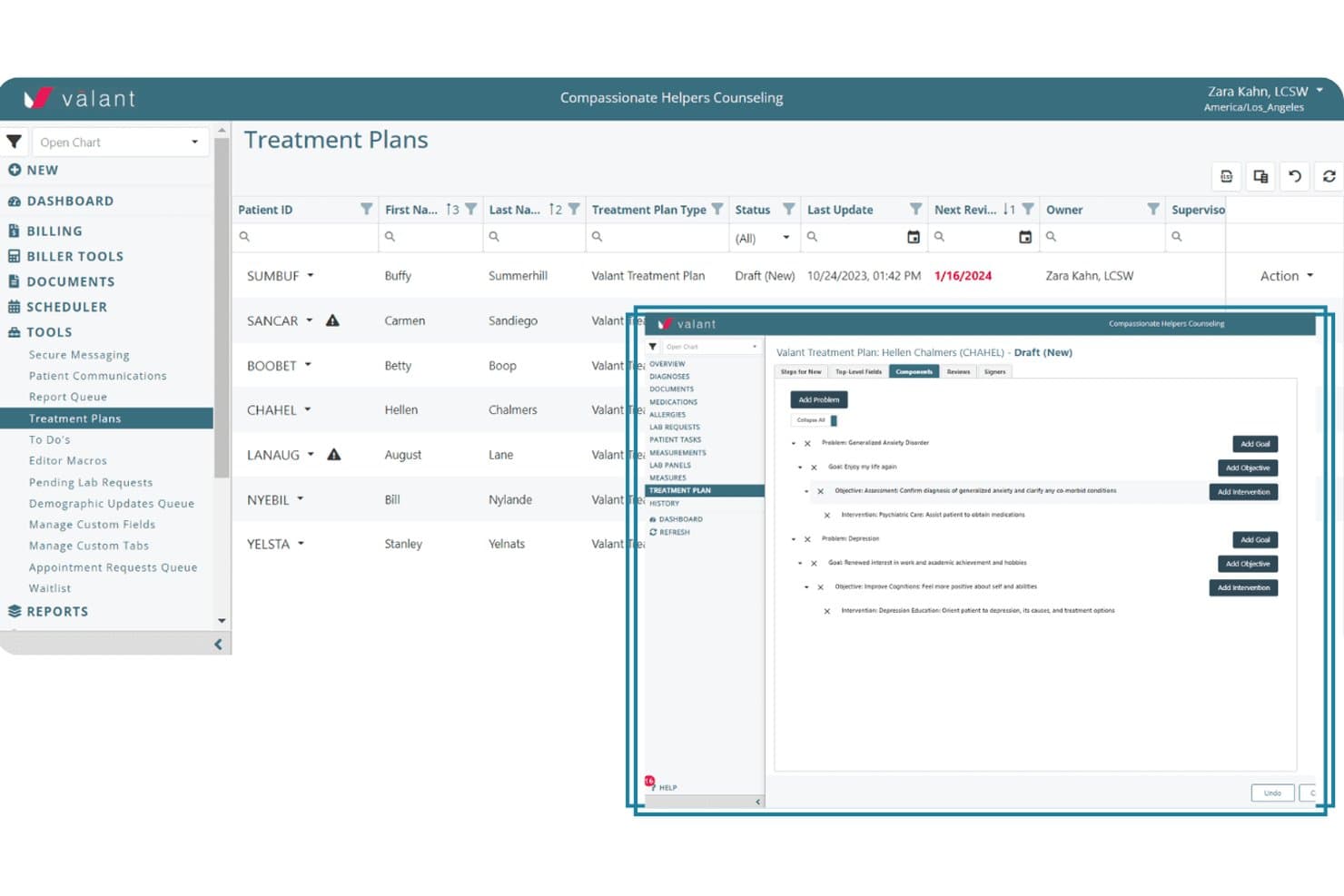
Valant offers a structured treatment planning interface where clinicians can add problems, goals, objectives, and interventions within a patient's EHR. Valant is a cloud-based behavioral health EHR that covers clinical documentation, AI-assisted note generation, e-prescribing, telehealth, lab ordering, scheduling, and billing, all accessible from a mobile browser on iPad.
Who Is Valant Best For?
Valant is purpose-built for behavioral health clinicians — including psychiatrists, therapists, and mental health practitioners — working in solo or small group practice settings.
Why I Picked Valant
I've included Valant in my top picks because its 100+ note templates, built specifically for psychiatric evaluations, CBT, DBT, and MFT workflows, let clinicians chart accurately right from a mobile session. The AI-assisted documentation auto-generates narrative notes mid-encounter, cutting documentation time on a tablet. I also like that EPCS-certified e-prescribing via DrFirst and native eLabs ordering are both accessible from the same mobile session.
Valant Key Features
- Integrated telehealth sessions: Launch HIPAA-compliant video visits directly within the platform from your iPad browser.
- Behavioral health outcome measurement tools: Track and document patient progress with over 80 standardized assessments and automated scoring.
- Comprehensive scheduling management: Access, adjust, and manage multiple calendars for providers and group sessions all from the mobile interface.
- Claim tracking and revenue cycle reporting: Monitor claims status and revenue analytics in real time, accessible from the same iPad session.
Valant Integrations
Valant offers native integrations with DrFirst for e-prescribing, Waystar and Optum for clearinghouse claim submission, and supports native eLabs ordering. An API is available for custom integrations.
Pros and Cons
Pros:
- EPCS e-prescribing accessible from iPad browser
- AI scribe generates notes mid-session
- 100+ behavioral health-specific charting templates included
Cons:
- No offline charting when connectivity drops
- No dedicated native clinician iPad app
Learn more about Valant: Best for independent practice mobility
- 14-day free trial; Free demo available
- Pricing upon request
Visit WebsiteCustomer Rating:3.9/5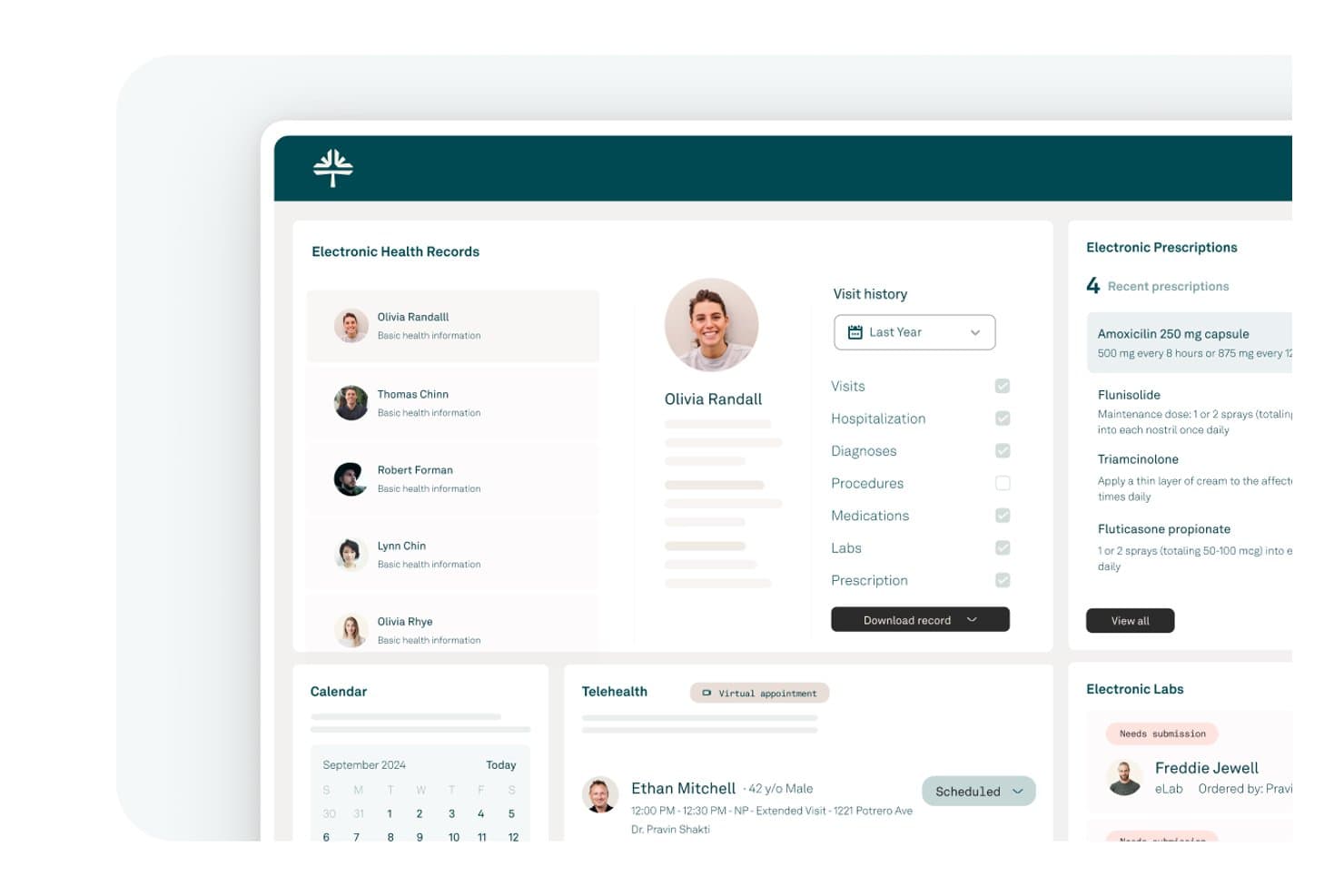
Tebra offers a comprehensive EHR dashboard displaying patient records, electronic prescriptions, telehealth appointments, and lab management in a clean iPad-friendly interface. Tebra is a cloud-based EHR and practice management platform built for independent practices, combining clinical charting, e-prescribing, scheduling, billing, and patient engagement in a single native iPad-compatible app.
Who Is Tebra Best For?
Tebra is a strong fit for independent, small-to-medium practices where providers need full EHR and billing access across both desktop and mobile devices.
Why I Picked Tebra
I've included Tebra in my top picks because it's genuinely built around mobile-first independent practice workflows. The single-login app covers clinical charting, scheduling, and billing across iPhone, iPad, and Apple Watch, so providers aren't locked to a desktop between patient encounters. I particularly like the AI Note Assist feature, which generates structured SOAP notes on the go, and the SALT shortcut that pulls details from a patient's last visit to speed up charting mid-encounter.
Tebra Key Features
- Native iPad EHR app: Access clinical, scheduling, and billing modules through a dedicated iPad application, not just a browser.
- HIPAA-compliant e-prescribing: Includes EPCS certification and PDMP monitoring for qualified providers within the integrated platform.
- Integrated telehealth: Launch HIPAA-compliant video visits directly from your iPad schedule or patient chart.
- Patient portal and digital intake: Enable patients to check in, complete forms, and update details via a secure, mobile-accessible platform.
Tebra Integrations
Tebra offers native integrations with LabCorp, Quest Diagnostics, DoseSpot, and Stripe, and provides an API for custom integrations.
Pros and Cons
Pros:
- Scheduling, billing, and charting in one app
- Single login works across all Apple devices
- AI Note Assist speeds up mobile charting
Cons:
- No documented offline charting mode
- iPad app can't send e-prescriptions
Learn more about Tebra: 5Best for enterprise mobile patient care
Epic
- Not available
- Pricing upon request
Visit WebsiteCustomer Rating:4.2/5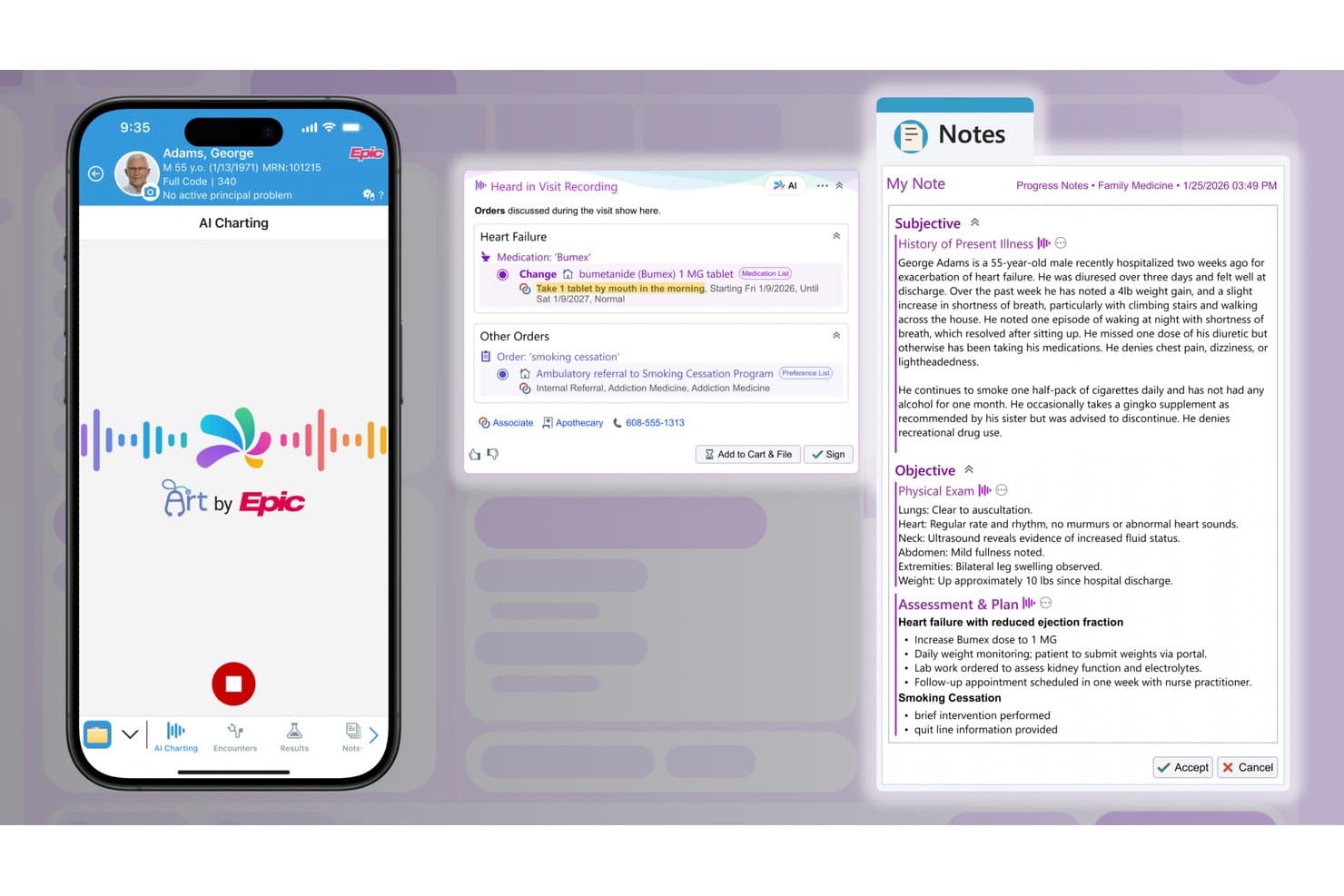
Epic offers AI-powered charting on iPad, automatically generating clinical notes and medication orders from recorded patient visits. Epic is an enterprise EHR platform that delivers clinical documentation, patient record access, medication administration, and care coordination through dedicated mobile apps, including a native iPad application for hospital-based clinicians.
Who Is Epic Best For?
Epic is a strong fit for large hospitals and enterprise health systems that need mobile EHR access across inpatient and outpatient settings at scale.
Why I Picked Epic
I picked Epic as one of the best because its mobile ecosystem for enterprise clinical teams is unmatched in scope. Canto gives physicians a native iPad interface for chart review and rounding workflows, while Rover handles nursing tasks like medication administration, vitals capture, and specimen collection at the bedside. That split-role mobile design means a single health system can deploy iPad-based workflows across both physician and nursing staff simultaneously.
Epic Key Features
- Customizable clinical templates: Clinicians can use specialty-specific templates to document patient encounters on their iPad.
- Secure messaging integration: Enables HIPAA-compliant communications between care team members within the mobile app.
- Patient list management: Provides fast access to schedules and filtered patient lists directly on iPad, supporting inpatient and outpatient workflows.
- Access to real-time test results: Clinicians can quickly view updated lab and imaging outcomes on their iPad as soon as they are available.
Epic Integrations
Epic offers native integrations with billing and revenue cycle management platforms, third-party clinical documentation tools, and diagnostic labs such as LabCorp and Quest. An API is available for custom integrations.
Pros and Cons
Pros:
- Enterprise-grade biometric login on shared devices
- Real-time chart access across inpatient units
- Canto and Rover support distinct iPad roles
Cons:
- Not suited for small or independent practices
- Outpatient note editing unavailable on iPad
Learn more about Epic: Best for specialty charting on iPad
- Free demo available
- Pricing upon request
Visit WebsiteCustomer Rating:4.5/5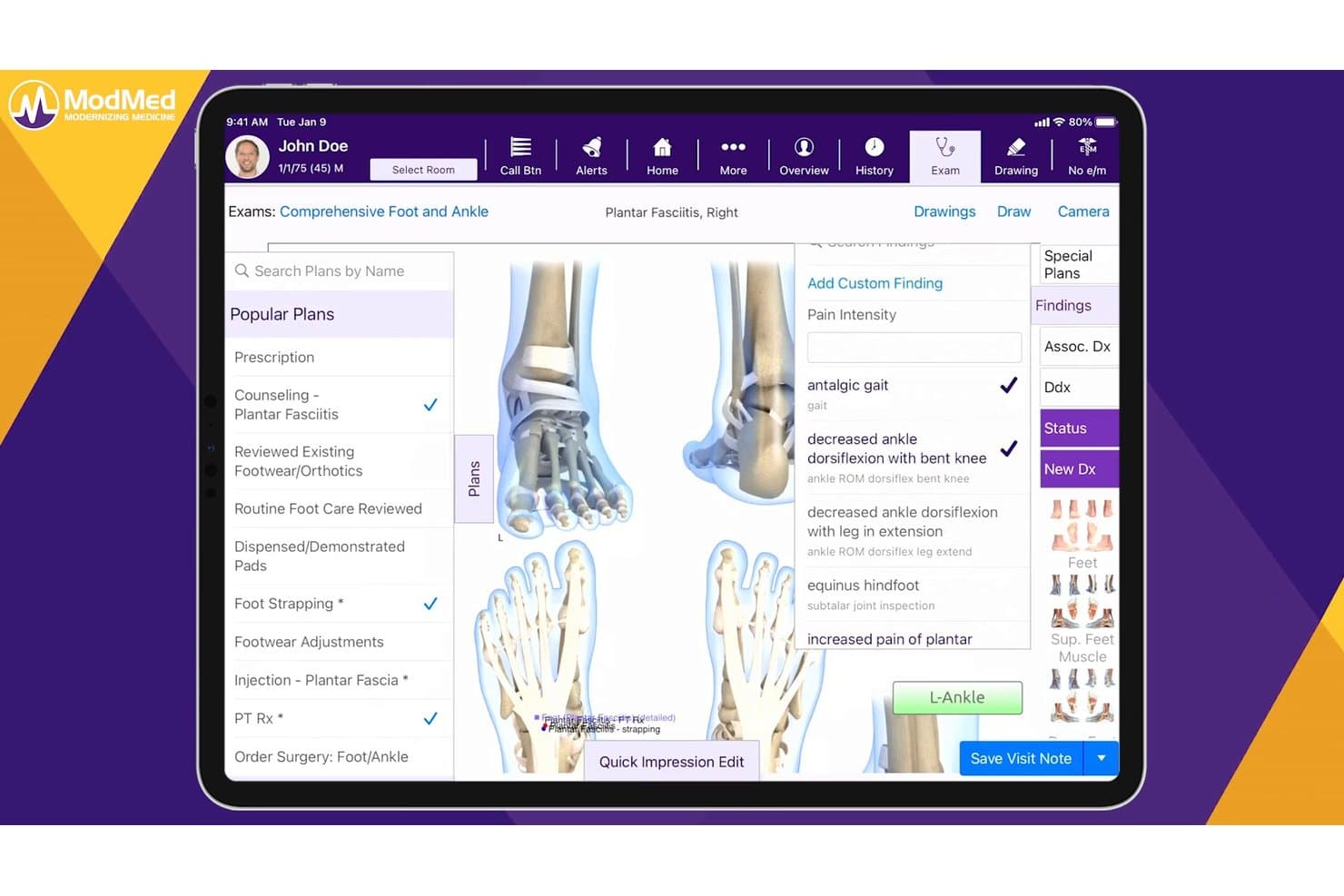
ModMed offers a comprehensive podiatry exam interface with condition-specific treatment plans, findings, and billing tools tailored for foot and ankle care. ModMed EMA is an iPad-native EHR built exclusively for medical specialists, combining specialty-specific charting, e-prescribing, lab ordering, and integrated practice management in a single touch-optimized platform.
Who Is ModMed Best For?
ModMed is a strong fit for independent specialty practices in fields like dermatology, ophthalmology, orthopedics, and gastroenterology that do most of their charting on iPad.
Why I Picked ModMed
ModMed EMA earns its spot as one of the best on my shortlist because the iPad isn't an afterthought: the entire EHR is designed around it. I especially like how EMA's adaptive engine learns your charting habits and autopopulates specialty-specific diagnoses and treatments as you tap through an encounter. Add ModMed Scribe 2.0, which listens to the patient conversation and suggests visit notes and ICD-10 codes in real time, and you can finalize charts before the patient leaves the room.
ModMed Key Features
- Integrated practice management: Scheduling, billing, and coding tools are fully accessible within the iPad app.
- HIPAA-compliant mobile authentication: Secure login with Face ID and Touch ID for added device security.
- Bidirectional lab and imaging ordering: Order and receive lab and imaging results directly from the iPad app.
- Customizable specialty templates: Each supported specialty includes tailored charting templates and protocols for efficient documentation.
ModMed Integrations
ModMed offers native integrations with Surescripts, LabCorp, Quest Diagnostics, and over 150 pathology labs. An API is available for custom integrations, and data can be exchanged via HL7 and FHIR standards.
Pros and Cons
Pros:
- Full practice management suite accessible on iPad
- Ambient scribe suggests ICD-10 codes in real time
- Specialty-specific adaptive charting on iPad
Cons:
- Customer support response times are inconsistent
- Only supports 11 medical specialties
Learn more about ModMed: Best for mobile behavioral health workflows
- 30-day free trial
- From $49/month
Visit WebsiteCustomer Rating:4.6/5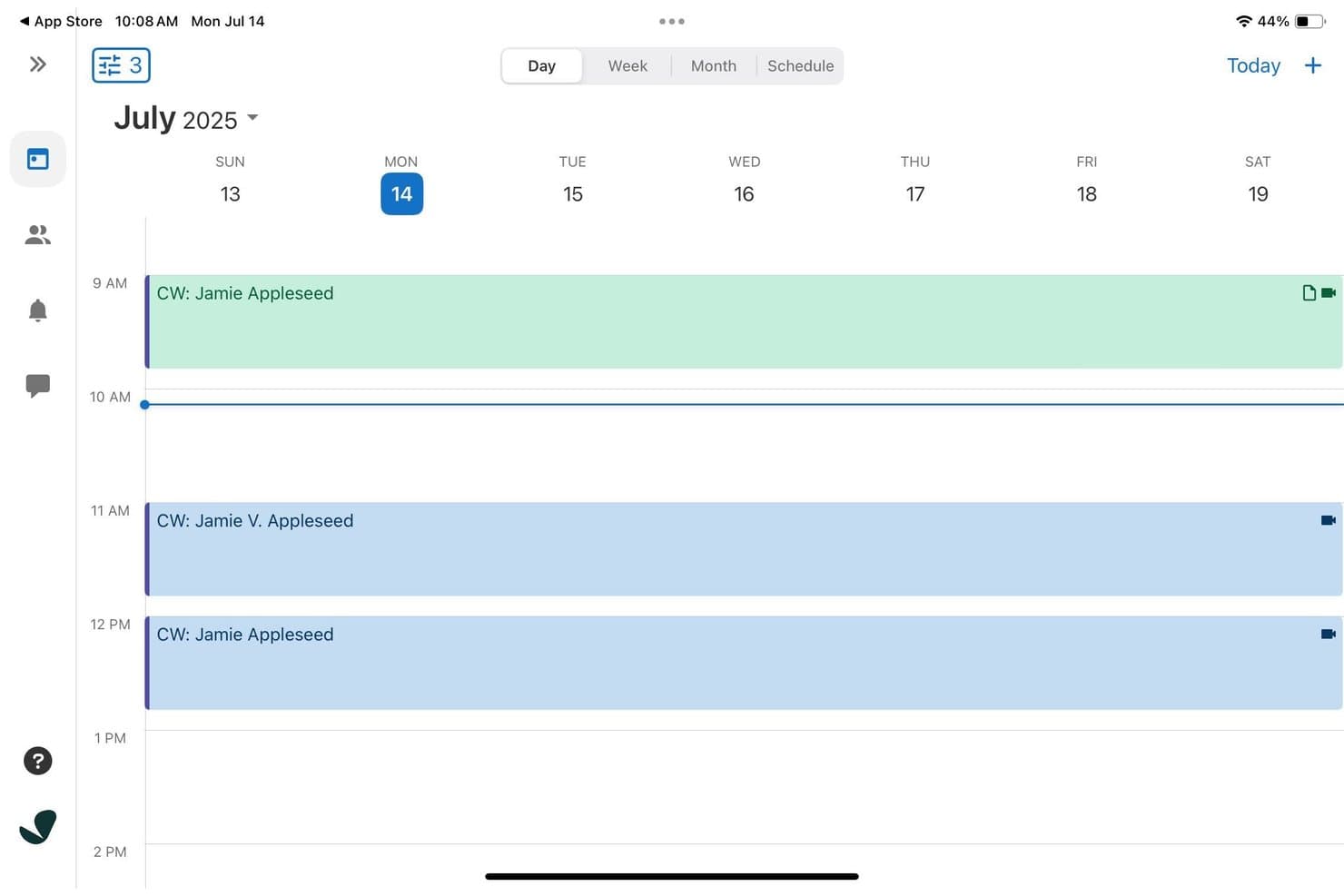
SimplePractice offers a weekly calendar view on iPad displaying color-coded client appointments with video session indicators throughout the day. SimplePractice is a cloud-based EHR and practice management platform for behavioral health practitioners, with a native iPad app that covers scheduling, clinical documentation, telehealth, billing, and insurance tools in one place.
Who Is SimplePractice Best For?
SimplePractice is built for solo and small-group behavioral health practitioners, including therapists, counselors, and social workers running private practices.
Why I Picked SimplePractice
I've included SimplePractice in my top picks because its July 2025 iPad update genuinely redesigned the tablet experience for behavioral health workflows. I like that you can pull up a client's full appointment history, outstanding balances, and intake forms from one screen without switching views. The AI Note Taker add-on transcribes and drafts therapy notes directly after a session, which cuts post-appointment documentation down significantly.
SimplePractice Key Features
- Integrated telehealth sessions: Launch secure video visits directly from the iPad app without third-party software.
- Customizable documentation templates: Choose and tailor forms for intake, progress, and treatment planning within your workflows.
- Insurance billing and claims management: Submit and track insurance claims in-app alongside session documentation and patient data.
- Secure client portal access: Enable clients to schedule appointments, complete intake paperwork, and message their provider from mobile devices.
SimplePractice Integrations
SimplePractice offers native integrations for calendar sync, e-prescribing (via DrFirst), and insurance clearinghouses. An API for custom integrations is not documented.
Pros and Cons
Pros:
- Telehealth video visits launch within the app
- AI Note Taker drafts therapy notes automatically
- iPad app redesigned specifically for behavioral health
Cons:
- Mobile note history limited to 30 days
- No offline charting mode for disconnected use
Learn more about SimplePractice: Best for iPad-native clinical workflows
- Free demo available
- Pricing upon request
Visit WebsiteCustomer Rating:3.9/5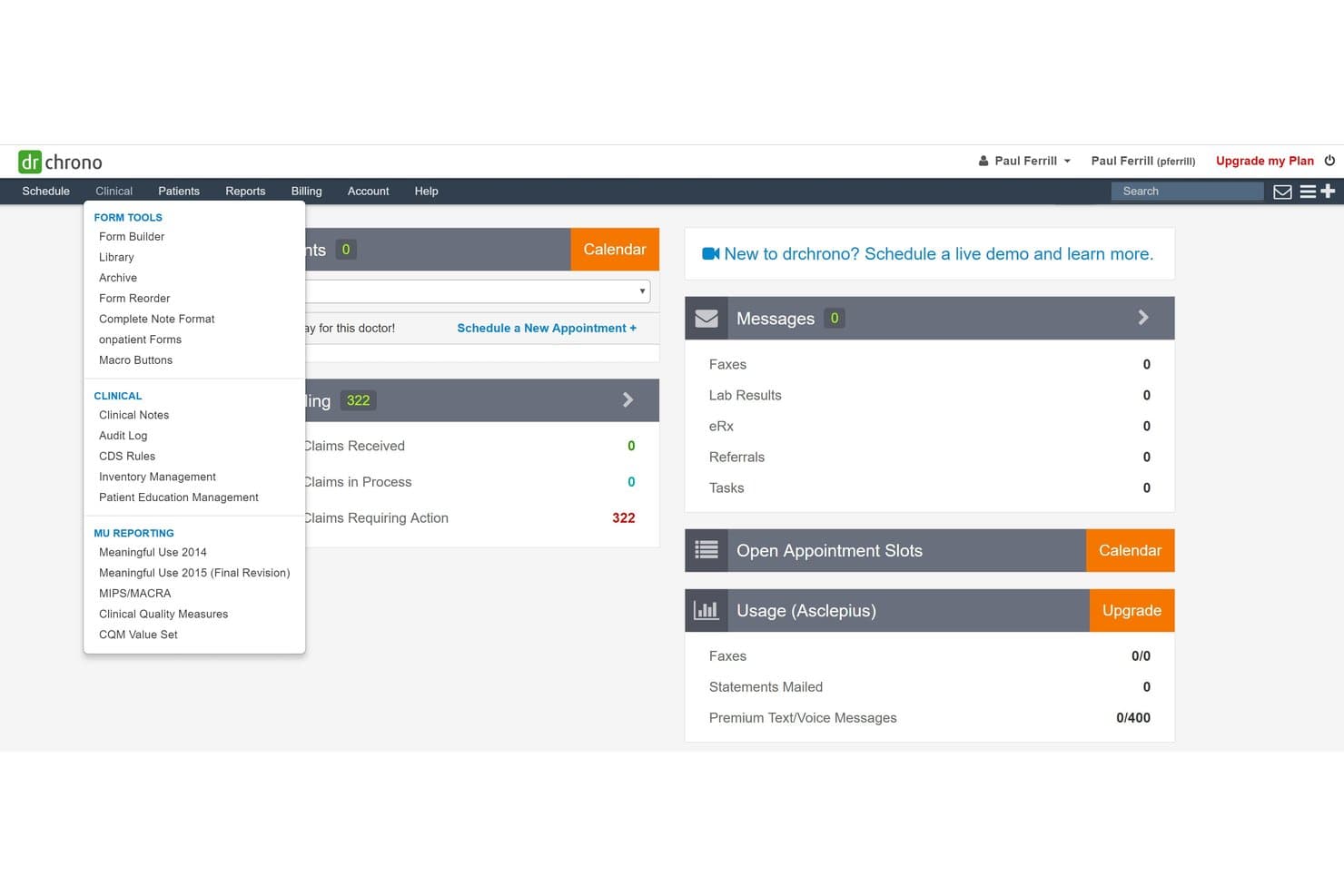
DrChrono offers a Clinical dropdown menu with Form Tools, Clinical, and MU Reporting sections accessible from the main dashboard. DrChrono is an iPad-native EHR platform that combines clinical charting, e-prescribing, lab ordering, practice management, and medical billing in a single iOS-first environment built for ambulatory and mobile care settings.
Who Is DrChrono Best For?
It's a natural fit for independent and small-group practices that run entirely on Apple devices and need a single platform for both clinical documentation and billing.
Why I Picked DrChrono
DrChrono earns its spot on my shortlist because it's the only EHR built from the ground up for iPadOS, not retrofitted from a desktop codebase. I particularly like EverHealth Scribe, which listens during a visit and writes structured notes directly into the patient chart on the iPad. What I find most useful is the ability to run a telehealth video visit while reviewing the full patient record in a separate window, all on one iPad screen.
DrChrono Key Features
- Customizable clinical forms: Create and modify pre-built templates to match different specialties and practice needs directly on the iPad.
- Integrated patient scheduling: Book, confirm, and manage appointments with real-time calendar syncing across devices.
- e-Prescribing with EPCS: Order both regular and controlled medications electronically from within the iPad app.
- OnPatient patient portal: Allow patients to access records, complete digital intake forms, and communicate securely with your practice on mobile or web.
DrChrono Integrations
DrChrono offers native integrations with Labcorp, Quest Diagnostics, Lifepoint, Box, Square Point of Sale, Updox, Birdeye, and Reputation.com, and provides an open API for custom integrations.
Pros and Cons
Pros:
- Full billing suite runs natively on iPad
- Scribe AI writes notes during patient visits
- Built exclusively for iPad from the start
Cons:
- Customer support response times can be slow
- Steep initial setup and onboarding process
Learn more about DrChrono: Best for mobile specialty practice workflows
- Free demo available
- Pricing upon request
Visit WebsiteCustomer Rating:3.7/5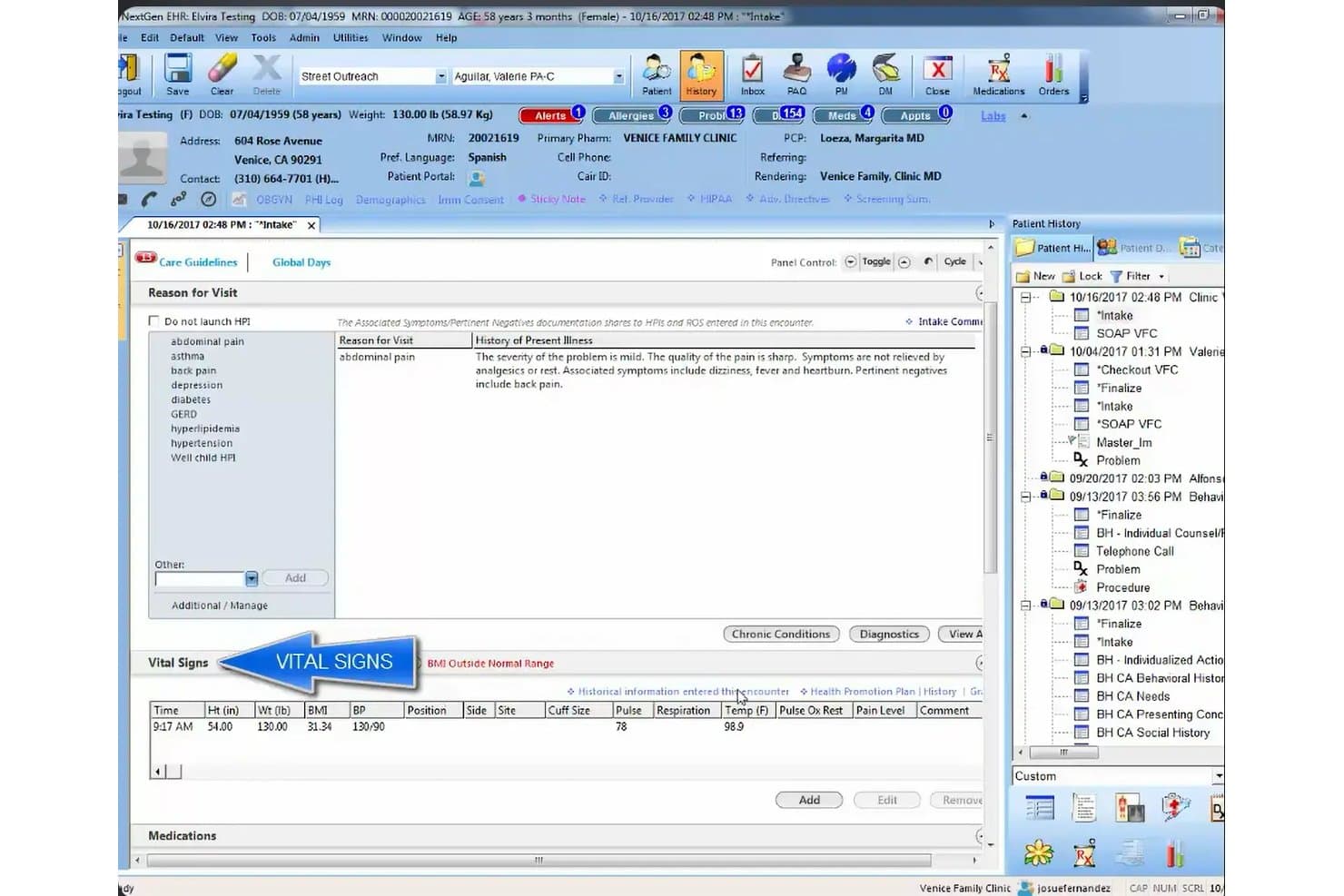
NextGen Healthcare offers a comprehensive EHR intake screen displaying patient vitals, reason for visit, and history of present illness in a structured clinical workflow. NextGen Healthcare is a cloud-based ambulatory EHR platform with a native mobile companion app that supports iPad-based charting, e-prescribing, lab ordering, telehealth visits, and integrated practice management across 30+ specialties.
Who Is NextGen Healthcare Best For?
It's a strong fit for independent specialty practices that need mobile-first clinical workflows, particularly those with providers charting across multiple locations or care settings.
Why I Picked NextGen Healthcare
I've included NextGen Healthcare in my top picks because of how well its mobile ecosystem supports specialty-specific clinical workflows on the go. The NextGen Mobile companion app lets providers generate fully structured SOAP notes directly from patient conversations using ambient AI, without typing a word. Pair that with 2,000+ specialty-specific templates across 30+ specialties, and you get a mobile charting environment built around clinical discipline, not generic documentation.
NextGen Healthcare Key Features
- Integrated patient portal: Patients can manage appointments, request refills, and access charts directly from their mobile devices.
- EPCS-certified e-prescribing: Secure prescribing of controlled and non-controlled substances is supported from the tablet interface.
- Lab and diagnostic ordering hub: Order labs and access results with connections to over 700 lab vendors through a unified platform.
- Role-based access controls: Customizable user permissions maintain HIPAA compliance and limit access to sensitive information on any device.
NextGen Healthcare Integrations
NextGen Healthcare offers native integrations with Surescripts for e-prescribing, a diagnostic hub for lab vendors like LabCorp and Quest Diagnostics, Inbox Health, SamaCare, and LinkMD AI. An API is available for custom integrations.
Pros and Cons
Pros:
- Telehealth built directly into the EHR
- Ambient AI generates SOAP notes hands-free
- 2,000+ specialty-specific charting templates available
Cons:
- Mobile app lacks full desktop parity
- No offline charting mode on iPad
Learn more about NextGen Healthcare: Best for mobile cloud-based EHR access
- Free demo available
- Pricing upon request
Visit WebsiteCustomer Rating:5/5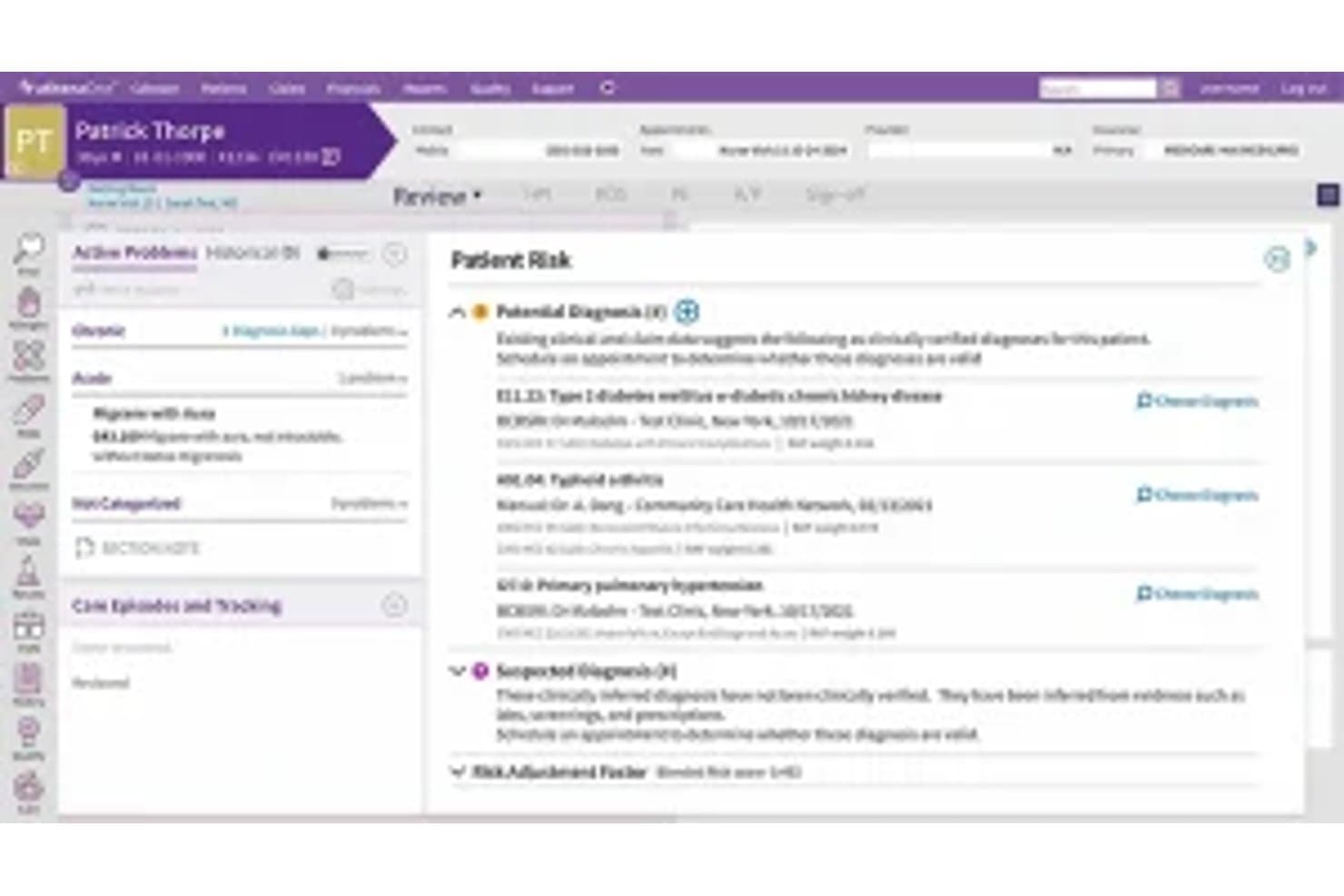
Athenahealth offers a Patient Sick visit summary screen displaying potential diagnoses, active problems, and clinical findings within its EHR interface. Athenahealth is a cloud-native EHR platform with a dedicated iOS app for iPad that gives clinicians access to patient records, clinical documentation, e-prescribing, lab ordering, scheduling, and revenue cycle management from a single mobile environment.
Who Is Athenahealth Best For?
Athenahealth is a strong fit for independent ambulatory practices and mobile clinicians who need full EHR access on an iPad rather than being tethered to a desktop workstation.
Why I Picked Athenahealth
I picked athenahealth as one of the best because its iOS-only mobile strategy means the iPad is a primary device, not an afterthought. The Athenahealth app carries the same templates, macros, and order sets as the desktop EHR, so documenting an encounter on an iPad feels identical to working at a workstation. I especially like the Ambient Notes feature: I can start recording at the top of a visit and Athenahealth automatically summarizes the conversation into a structured note placed directly in the patient's chart.
Athenahealth Key Features
- EPCS e-prescribing and lab ordering: Write, send, and track prescriptions including controlled substances, and order labs directly from the iPad app.
- Full practice management integration: Manage scheduling, billing, patient demographics, and authorizations inside the same mobile interface.
- HIPAA-compliant biometric login: Secure access via Face ID or Touch ID on supported iPad models with full BAA support.
- Patient portal access on iPad: Patients and staff can review charts, sign forms, and communicate securely through the mobile interface.
Athenahealth Integrations
Athenahealth offers native integrations with LabCorp, Quest Diagnostics, Surescripts, Nuance, and supports additional apps through the athenahealth Marketplace. An API is available for custom integrations.
Pros and Cons
Pros:
- Full RCM accessible on iPad
- Ambient Notes auto-generates notes from voice
- iOS-only app prioritizes native iPad experience
Cons:
- Android users have no mobile app option
- Limited offline charting capability
Learn more about Athenahealth:
Other EHR Software for iPad
Here are some additional EHR software for iPad options that didn’t make it onto my shortlist, but are still worth checking out:
- 11Practice FusionBest for simple cloud EHR access
- 12AdvancedMDBest for mobile EHR and billing workflows
- 13RXNTBest for mobile charting and prescribing
- 14JaneBest for mobile allied health workflows
- 15Elation HealthBest for mobile primary care workflows
- 16NextechBest for mobile specialty care workflows
- 17ICANotesBest for mobile mental health charting
- 18eClinicalWorksBest for mobile patient care coordination
- 19CareCloudBest for cloud-based mobile practice management
How I Evaluate EHR Software for iPad
I split my evaluation into must-have baseline criteria—like native iPadOS apps and offline charting—and the differentiators that separate vendors for specific practice types.
Core Functionality (Table Stakes For This List)
When I'm selecting tools for my list, I rank each one on a scale from 0 (does not offer the functionality) to 5 (excels in this area) for each core functionality listed below. Then, I calculate the tool's total score into a percentage. Each tool needs to achieve a minimum total score of 65% to be considered for inclusion.
- Native iPad App: I check for a dedicated App Store download—not just a responsive website in Safari—that runs with full feature parity on iPadOS.
- Touch-Optimized Charting: Tap-and-swipe note entry, template dropdowns, and Apple Pencil support for annotations or consent signatures matter here.
- HIPAA-Compliant Security: I look for encryption, a signed BAA, and biometric login like Face ID so providers can securely switch users on shared iPads.
- Cloud Sync & Offline Mode: Home-visit clinicians need offline charting that auto-syncs once connectivity returns, so I evaluate how each app handles that.
- E-Prescribing & Orders: The iPad app should support EPCS-certified prescribing and lab ordering so providers can send scripts bedside without a desktop.
- Integrated Practice Workflows: Scheduling, billing, coding, and patient demographics should all be accessible within the same iPad app environment.
Once I have a list of tools that meet the criteria, I consider what sets each platform apart.
Differentiating Factors (What Sets Vendors Apart)
Here's how I compare and contrast different vendors:
Standout Features
Offline charting mode is a big deal for house-call providers or rural clinics where Wi-Fi drops mid-encounter. I look for apps that let you document a full visit offline and auto-sync once you're back online. Apple Pencil support also separates the best iPad EHRs—annotating diagrams, capturing patient signatures, or sketching wound assessments on-screen speeds up point-of-care documentation. Voice-to-text dictation matters too, especially when a provider needs to narrate notes between patients without typing on a tablet keyboard.
Beyond Features
Specialty fit matters—a behavioral health therapist needs SOAP note templates and treatment plan workflows that differ from what a pediatrician uses, so I evaluate how well each vendor's template library matches specific disciplines. Whether the iPad app is truly native or a browser wrapper also counts. I check for Split View support and smooth adaptation across iPad screen sizes. Pricing structure deserves a close look too. Some vendors include the iPad app in the base subscription while others charge extra, and migration fees can add up for a small practice.
How to Choose EHR Software for iPad
It’s easy to get bogged down in long feature lists and complex pricing structures. To help you stay focused as you work through your unique software selection process, here’s a checklist of factors to keep in mind:
| Factor | What to Consider |
| Scalability | Will the software still be a good fit as your patient roster grows or your team expands? Consider if it can support multiple providers and locations. |
| Integrations | Does it connect smoothly with your billing, labs, or telehealth platforms? Make a list of required integrations before you start comparing vendors. |
| Customizability | Can you adjust templates and workflows to fit your specialty? Consider how much time it takes to tweak forms, note types, and scheduling layouts. |
| Ease of use | Is the day-to-day workflow intuitive for clinicians and office staff on iPad? Ask for a demo to see charting, scheduling, and data entry in action. |
| Implementation and onboarding | How much internal time and outside help will go into setup, migration, and staff training? Watch for hidden onboarding fees and lengthy timelines. |
| Cost | Look beyond monthly fees. Calculate add-on costs, hardware requirements, migration, and support—especially if the iPad app costs extra per user. |
| Security safeguards | Does the vendor offer encryption, remote wipe, and Face ID or Touch ID? Make sure their mobile security meets your practice’s compliance needs. |
| Support availability | What support channels are available and when can you reach them? If something isn’t working on your iPad mid-clinic, you’ll want real help fast. |
What Is EHR Software for iPad?
An iPad EHR is a mobile version of EHR software that lets healthcare providers access, document, and manage patient charts directly on their iPad. These apps are built for touch-based clinical workflows, supporting secure data entry, e-prescribing, scheduling, and billing from anywhere. Using an iPad for EHR enables bedside charting, real-time updates, and flexible access throughout the care journey.
Features of EHR Software for iPad
When selecting EHR software for iPad, keep an eye out for the following key features:
- Native iPad app: A purpose-built application for iPadOS that optimizes performance, gesture controls, and adapts smoothly to different iPad screen sizes.
- Touch-based charting: Tap, swipe, and drag to complete clinical notes, templates, and assessments directly on the tablet for fast, intuitive data entry.
- Apple Pencil support: Annotate diagrams, sign consent forms, and convert handwriting to text for more natural clinical documentation and patient engagement.
- Offline access and sync: Document visits and view records without internet, with automatic data sync once you’re back online to prevent information gaps.
- HIPAA-compliant security: Built-in encryption, secure logins with Face ID or Touch ID, and comprehensive audit trails keep patient data safe on mobile devices.
- Real-time cloud syncing: Any updates on the iPad instantly sync with the cloud, enabling seamless access to patient records across mobile and desktop apps.
- E-prescribing capabilities: Send prescriptions, including controlled substances, to pharmacies directly from the iPad without switching devices.
- Integrated scheduling and billing: Manage appointments, demographic details, and claims from the same app, streamlining daily office workflows on the go.
- Patient photo and media capture: Take and securely store patient images, scan documents, and add media files directly to patient charts using the iPad camera.
- Built-in telehealth: Launch secure, HIPAA-compliant video visits from the EHR app, so remote consultations are fully integrated into your mobile workflow.
Benefits of EHR Software for iPad
Implementing mobile EHR software on an iPad provides several benefits for your team and your business. Here are a few you can look forward to:
- Mobile charting flexibility: Document encounters, review charts, and update records from anywhere—bedside, at home, or during house calls—with a touch-optimized iPad app.
- Faster clinical workflows: Use tap, swipe, and Apple Pencil input to streamline note-taking, signatures, orders, and patient photo capture without desktop bottlenecks.
- Secure, on-the-go access: Keep patient data protected while allowing Face ID, Touch ID, and HIPAA-compliant features to support secure and convenient record handling.
- Real-time data syncing: Instantly sync information between iPad, desktop, and the cloud, so practice staff and clinicians always have access to up-to-date patient records.
- All-in-one practice management: Schedule, bill, and manage patient demographics directly from the iPad app, reducing administrative silos and improving workflow continuity.
- Improved patient engagement: Show images, collect signatures, and conduct telehealth video visits during appointments, all from the iPad, enhancing patient interaction and understanding.
- Reduced connectivity disruptions: Offline documentation and auto-sync ensure you stay productive in rural areas or busy clinics with unreliable internet access.
Costs and Pricing of EHR Software for iPad
Selecting EHR software for iPad requires an understanding of the various pricing models and plans available. Costs vary based on features, team size, add-ons, and more. The table below summarizes common plans, their average prices, and typical features included in EHR software for iPad solutions:
Plan Comparison Table for EHR Software for iPad
| Plan Type | Average Price | Common Features |
| Free Plan | $0 | Basic charting, scheduling, limited support, and cloud backup. |
| Personal Plan | $50-$100/user/month | Full charting, e-prescribing, offline mode, basic billing, and patient management. |
| Business Plan | $100-$200/user/month | Advanced scheduling, team messaging, integrated billing, lab ordering, native iPad app, and enhanced security features. |
| Enterprise Plan | $200+/user/month | Custom integrations, priority support, advanced analytics, multi-location support, MDM options, and dedicated training. |
EHR Software for iPad FAQs
Here are some answers to common questions about EHR software for iPad:
Can I use EHR software for iPad without an internet connection?
Yes, many EHR apps for iPad support offline access. You can document visits, view patient records, and then sync your data automatically when you reconnect to the internet, which is essential for mobile or rural settings.
Is EHR software for iPad secure and HIPAA compliant?
Yes, leading vendors design their iPad EHR apps to meet HIPAA requirements with encryption, audit logs, Face ID or Touch ID, and MDM compatibility. Always confirm your vendor signs a Business Associate Agreement (BAA) before storing patient data.
Do iPad EHRs integrate with labs, billing, or other medical systems?
Most iPad-focused EHRs offer integrations with labs, billing tools, and e-prescribing networks. Check if your vendor supports HL7, FHIR, and common interfaces for seamless information exchange.
Can I customize templates and forms on an iPad EHR app?
Yes, many solutions let you adjust note templates, quick texts, and order sets right on the iPad. Some vendors offer specialty libraries, making customization easier for your clinical workflow.
What should I consider when switching to an iPad-based EHR?
Evaluate your hardware needs, migration support, staff training requirements, and check for hidden fees. Make sure the vendor’s iPad app offers the features and integrations your practice relies on day-to-day.