

Cloud EHR software lets your practice securely access patient records and manage care from any internet-connected device—no servers or on-premise installs needed. If you’re looking for the best cloud EHR software, you’re likely aiming to cut IT headaches, boost collaboration, and keep your team focused on patient care instead of tech troubleshooting.
This guide highlights the options I think will help you work smarter, remain compliant, and adapt fast to constant change in 2026.
Why Trust Our Software Recommendations
6,700+
Reviews
20
Industry experts
16+
Evaluation factors
14
Years
Our team has been testing and reviewing software since 2012. As medical practice leaders ourselves, we know how difficult—and important—it is to choose the right software.
For this guide, we evaluated tools using hands-on testing and independent research, scoring tools using our selection criteria.
Our reviews reflect our human editorial judgment, not a sales pitch.
Best Cloud EHR Software Summary
This comparison chart summarizes pricing details for my cloud EHR software to help you find the best one for your budget and business needs.
| Tool | Best For | Trial Info | Price | ||
|---|---|---|---|---|---|
| 1 | Best for specialty-driven automation | Free demo available | Pricing upon request | Website | |
| 2 | Best for rapid multi-location access | Free plan available | From $25/month | Website | |
| 3 | Best for longitudinal patient records | Free demo available | Pricing upon request | Website | |
| 4 | Best for integrated billing and scheduling | Free demo available | Pricing upon request | Website | |
| 5 | Best for quick implementation | Free demo available | From $199/user/month | Website | |
| 6 | Best for streamlined patient intake | Free demo available | Pricing upon request | Website | |
| 7 | Best specialty-specific configuration | Free demo available | Pricing upon request | Website | |
| 8 | Best patient charting flexibility | Free demo available | Pricing upon request | Website | |
| 9 | Best telehealth tools integration | Free demo available | Pricing upon request | Website | |
| 10 | Best for customizable clinical workflows | Free demo available | Pricing upon request | Website |


Best Cloud EHR Software Reviews
Below are my detailed summaries of the best cloud EHR software that made it onto my shortlist. My reviews offer a detailed look at the features, integrations, and best use cases of each platform to help you find the best one for you.
 Best for specialty-driven automation
- Free demo available
- Pricing upon request
Visit WebsiteCustomer Rating:4.4/5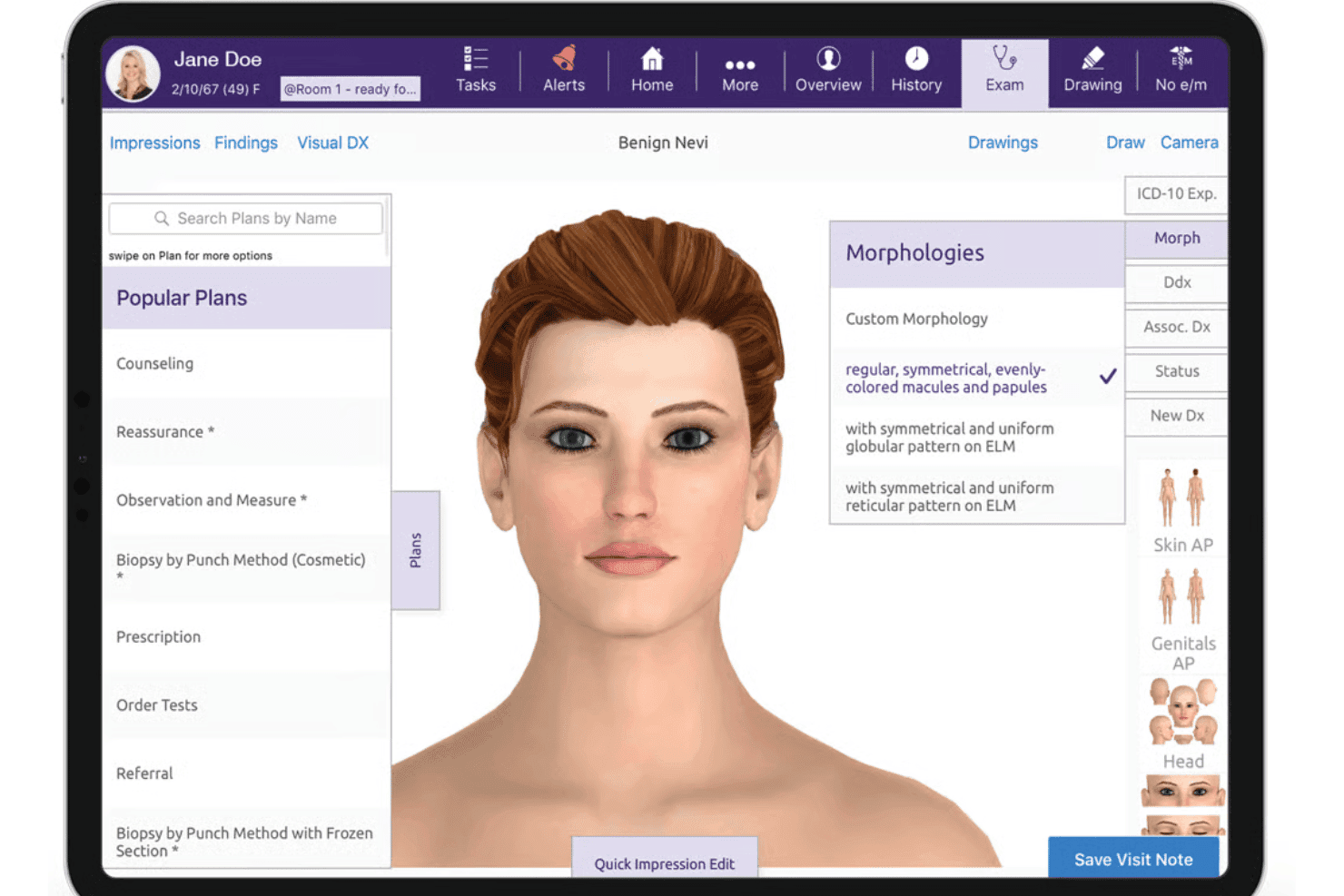
ModMed delivers specialty EHR, AI documentation, e-prescribing, billing, and RCM. ModMed is a cloud-based EHR, practice management, and RCM platform built for specialty medical practices, combining AI-assisted clinical documentation, e-prescribing, and integrated billing workflows.
Who Is ModMed Best For?
ModMed is a strong fit for independent specialty practices in dermatology, gastroenterology, ophthalmology, orthopedics, and related fields that need a fully integrated, specialty-configured clinical system.
Why I Picked ModMed
I picked ModMed as one of the best because no other cloud EHR matches its depth of specialty-specific automation. ModMed Scribe 2.0 listens to exam room conversations and suggests structured notes, billing codes, and downstream orders like prescriptions and lab requests, all without manual data entry. The EMA templates are built by practicing dermatologists, gastroenterologists, and other specialists, so the documentation logic already matches how those visits actually flow.
ModMed Key Features
- Integrated practice management: Offers appointment scheduling, patient check-in, and insurance verification within the same platform.
- Real-Time Prescription Benefit: Displays estimated patient drug costs and alternatives during prescribing.
- Pathology and image tracking: Supports image-based charting and organizes pathology results for specialties like dermatology.
- Certified FHIR API integration: Enables secure data exchange with labs, imaging centers, and external health systems.
ModMed Integrations
ModMed offers native integrations with Klara, Relatient, and TouchMD for patient communication, reminders, and photo documentation. It also supports data exchange via certified FHIR API and provides an API for custom integrations.
Pros and Cons
Pros:
- Real-Time Prescription Benefit for price transparency
- Templates tailored to nine medical specialties
- AI-driven note creation with Scribe 2.0
Cons:
- Occasional delays after software updates
- Limited flexibility for non-specialty practices
Learn more about ModMed: Best for rapid multi-location access
- Free plan available
- From $25/month
Visit WebsiteCustomer Rating:4.2/5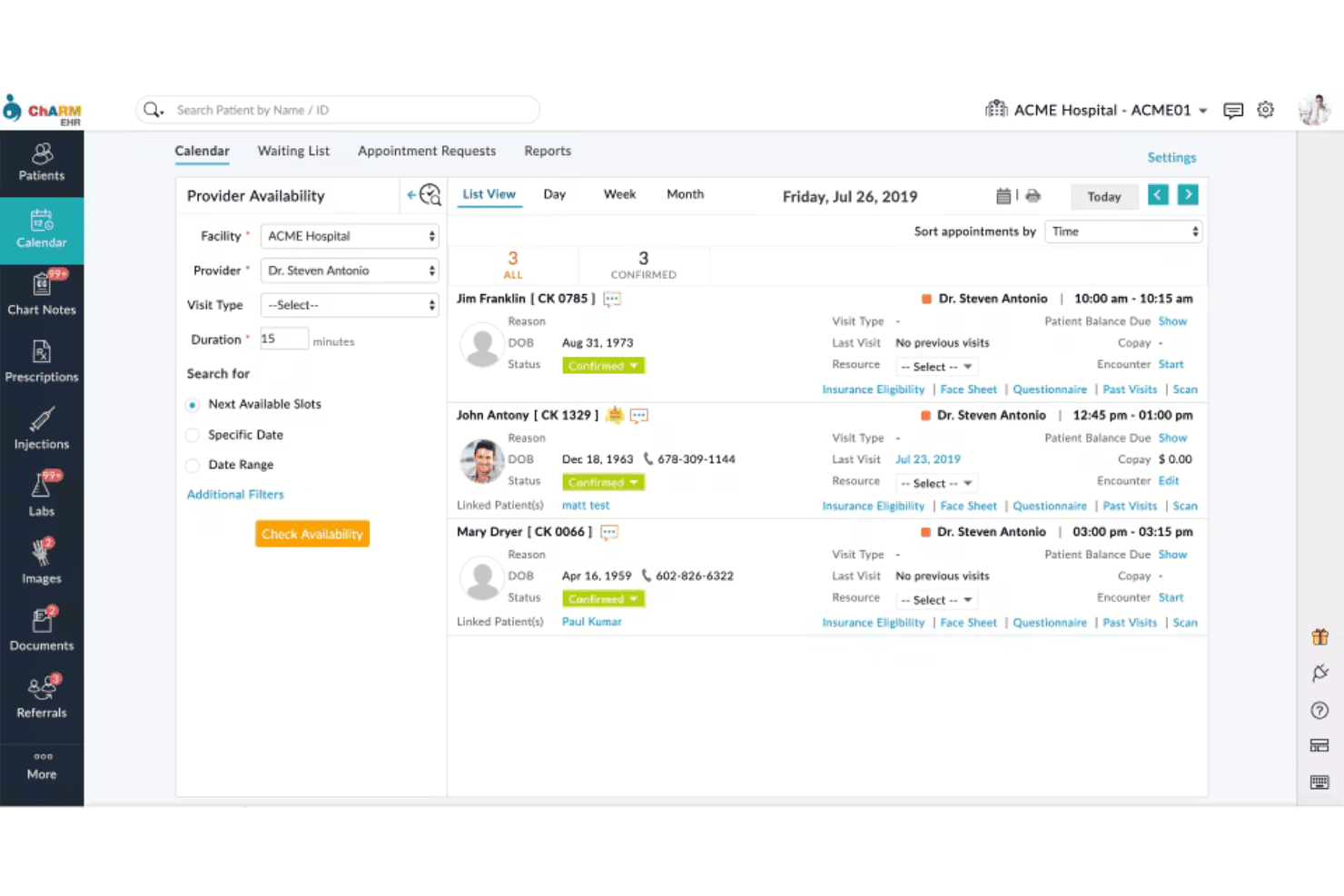
CharmHealth blends charting, e-prescribing, AI notes, billing, and virtual care. CharmHealth is a cloud-based EHR platform that combines clinical charting, e-prescribing, AI-assisted documentation, practice management, medical billing, and telehealth in a single browser-accessible system built for ambulatory practices.
Who Is CharmHealth Best For?
CharmHealth is a strong fit for small to mid-sized ambulatory practices, particularly independent providers and practice administrators managing one or more clinic locations.
Why I Picked CharmHealth
CharmHealth earns its spot on my shortlist because of how well it handles multi-site clinical workflows without any local setup required. I particularly like the location-filtered calendar, which lets providers and admins switch between clinic sites instantly without toggling between separate systems. Paired with its device-agnostic HTML5 architecture, I can pull up a full patient chart from any browser at any location, whether that's a satellite clinic, an urgent care site, or a remote session.
CharmHealth Key Features
- AI-powered charting tools: Streamline documentation with CharmAI Scribe and CharmAssist for real-time clinical content suggestions.
- Specialty-specific SOAP templates: Access customizable templates for family medicine, pediatrics, gynecology, psychiatry, and more.
- Integrated lab and pharmacy connections: Order labs, receive results, and send e-prescriptions directly within the patient chart.
- Configurable patient portal: Offer patients secure access to their medical records, forms, and communication tools online.
CharmHealth Integrations
CharmHealth offers native integrations with Zoom Workplace, Fullscript, Wellevate, Twilio, QuickBooks Online Advanced, Zoho CRM, Sfax, DeepScribe, LabCorp, Quest Diagnostics, and supports an open API for custom integrations.
Pros and Cons
Pros:
- Specialty templates for diverse ambulatory practices
- AI-powered charting and scribe tools included
- Multi-location appointment scheduling and reporting
Cons:
- E-prescribing features require additional fees
- Limited built-in reporting customization options
Learn more about CharmHealth: Best for longitudinal patient records
- Free demo available
- Pricing upon request
Visit WebsiteCustomer Rating:4.4/5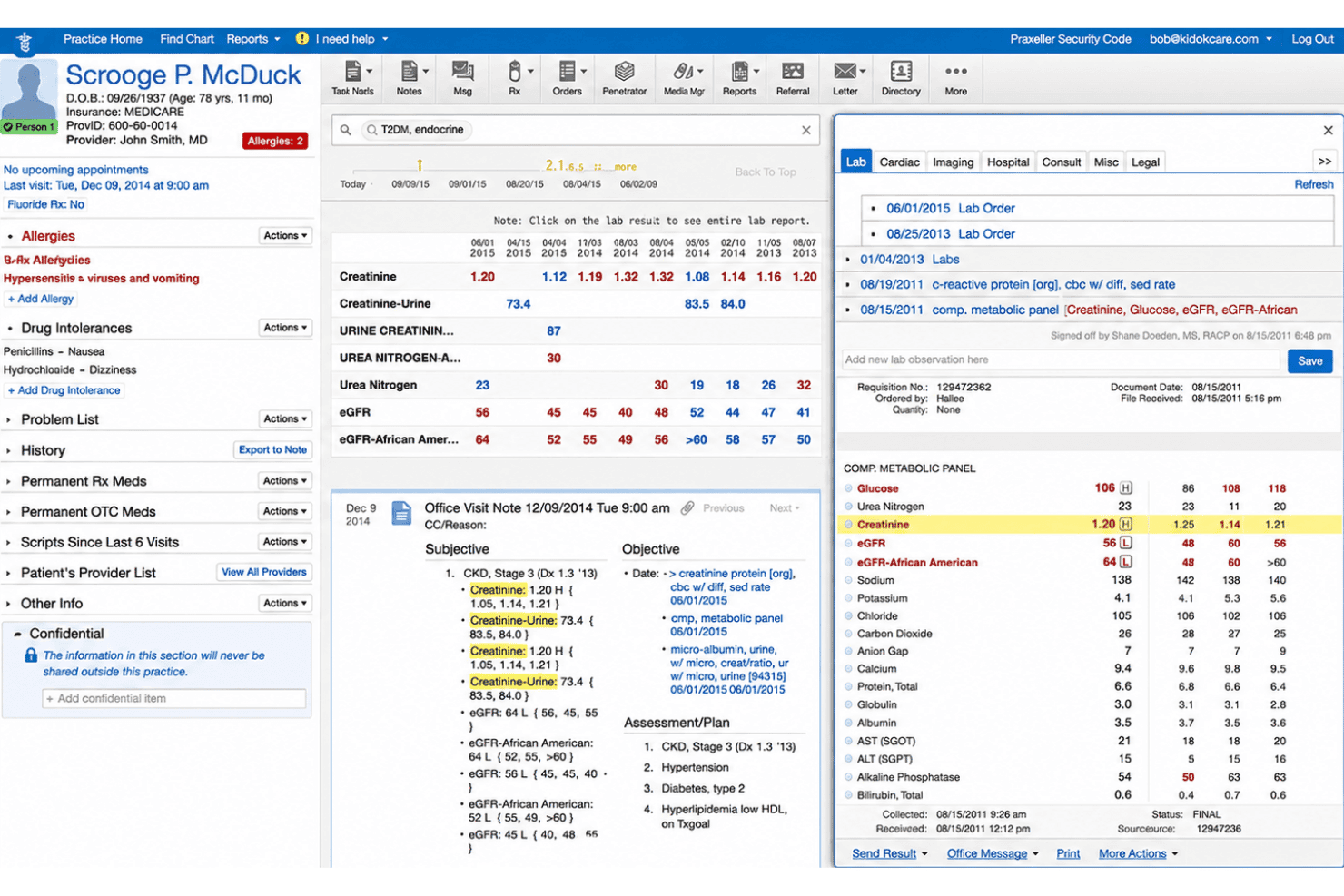
Elation Health pairs charting, e-prescribing, telehealth, billing, and AI tools. Elation Health is a cloud-based EHR platform built specifically for independent primary care practices, combining longitudinal patient charting, e-prescribing, telehealth, integrated billing, and AI-assisted clinical documentation.
Who Is Elation Health Best For?
Elation Health is a strong fit for small independent primary care clinics, including direct primary care and family medicine practices managing continuity-focused patient relationships.
Why I Picked Elation Health
I picked Elation Health because its consolidated patient chart is genuinely built around continuity of care. Each chart pulls together a patient's full medical history, active medications, allergies, and lab results into a single view my team can access from any browser. The Clinical Insights AI feature then surfaces relevant context from that longitudinal record before I walk into an appointment, which makes a real difference when managing patients with complex histories across multiple visits.
Elation Health Key Features
- Integrated e-prescribing with EPCS: Write and send prescriptions directly to pharmacies, including support for controlled substance prescribing.
- Telehealth powered by Zoom: Conduct secure video visits with patients using a built-in telehealth tool integrated in the platform.
- Referral management with provider directory: Manage outgoing referrals with an up-to-date directory and close-the-loop tracking system.
- Patient engagement portal (Elation Passport): Allow patients to view labs, message clinicians, and access their health records online.
Elation Health Integrations
Elation Health offers native integrations with Surescripts, Zocdoc, Ribbon Health, Zoom, Anthropic Claude, and Alliance Diagnostics, and provides an API for custom integrations.
Pros and Cons
Pros:
- AI note assist for clinical documentation
- Three-pane UI for fast chart navigation
- Longitudinal chart unifies complete patient history
Cons:
- Limited template customization for notes
- No Android mobile app available
Learn more about Elation Health: Best for integrated billing and scheduling
- Free demo available
- Pricing upon request
Visit WebsiteCustomer Rating:3.9/5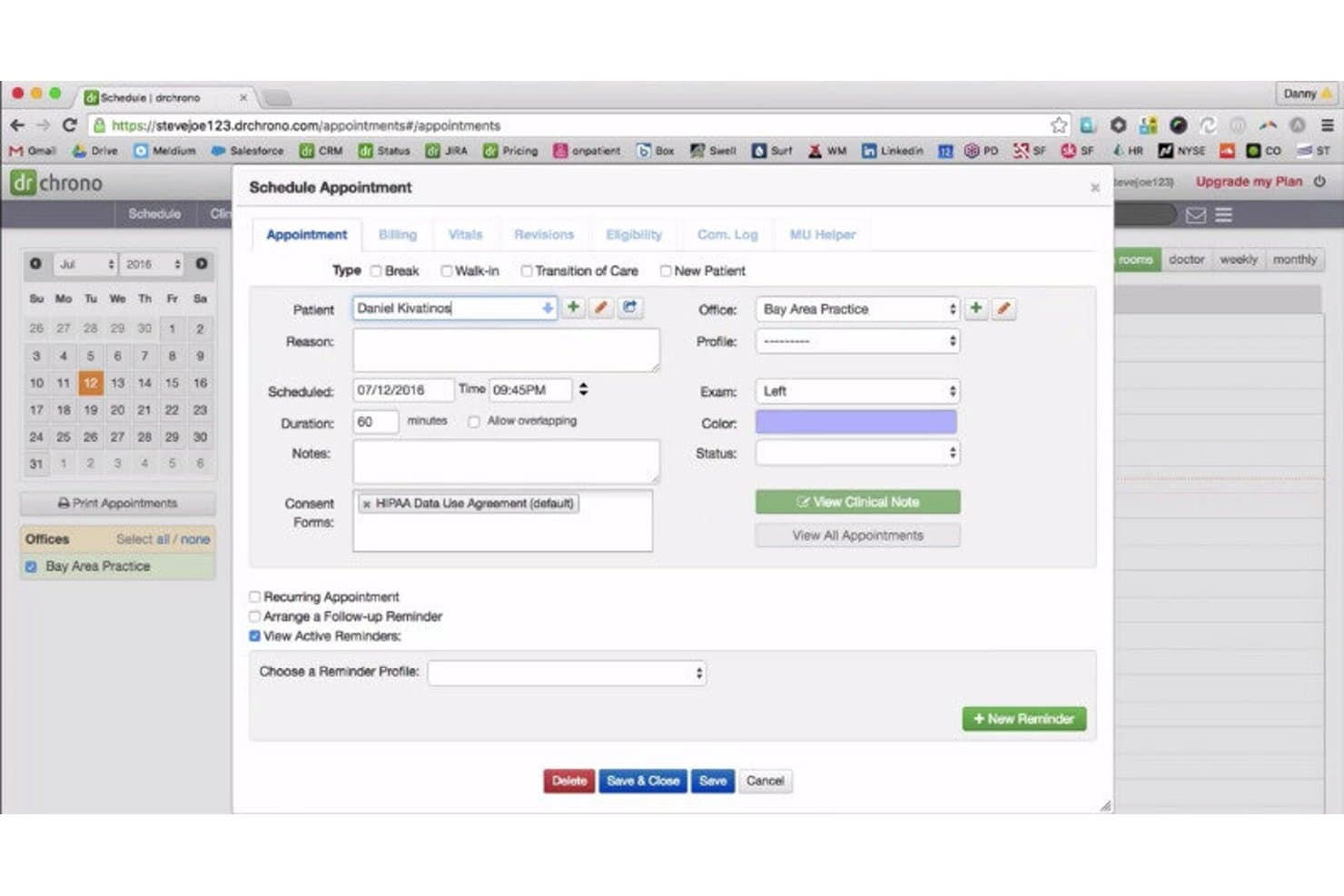
DrChrono EHR offers a cloud-based Schedule Appointment form with fields for patient details, billing, vitals, and consent forms. DrChrono is a cloud-based, iPad-native EHR platform that unifies clinical charting, e-prescribing, scheduling, and medical billing in a single system built for independent ambulatory practices.
Who Is DrChrono EHR Best For?
DrChrono is a strong fit for small to mid-sized independent practices that run on Apple devices and need a single system for charting, billing, and scheduling.
Why I Picked DrChrono EHR
DrChrono EHR earns its spot as one of the best on my shortlist because of how tightly its billing and scheduling connect to the clinical chart. I love that real-time insurance eligibility checks run directly from the scheduling view, so billing prep happens before a patient even arrives. The integrated claim management dashboard lets me track claim status and catch coding issues without jumping between separate systems.
DrChrono EHR Key Features
- iPad-native mobile app: Access all core EHR features on an iPad or iPhone for real-time charting in the exam room.
- Customizable clinical templates: Build, modify, or import specialty-specific charts to fit unique documentation workflows.
- EverHealth Scribe AI notes: Automatically generate draft clinical notes from visit conversations using integrated AI.
- Patient portal (OnPatient): Let patients request appointments, view results, and message your team securely online.
DrChrono EHR Integrations
DrChrono EHR offers native integrations with Surescripts, CoverMyMeds, Iron Bridge, eProvider Solutions, iHCFA, and Iron Bridge for immunization registry connections. An API is available for custom integrations and app marketplace connectivity.
Pros and Cons
Pros:
- EverHealth Scribe provides AI-generated visit notes
- Specialty templates include 20+ built-in options
- Real-time eligibility checks from the scheduler
Cons:
- Customer support responsiveness has declined recently
- No native Android mobile app
Learn more about DrChrono EHR: Best for quick implementation
- Free demo available
- From $199/user/month
Visit WebsiteCustomer Rating:3.7/5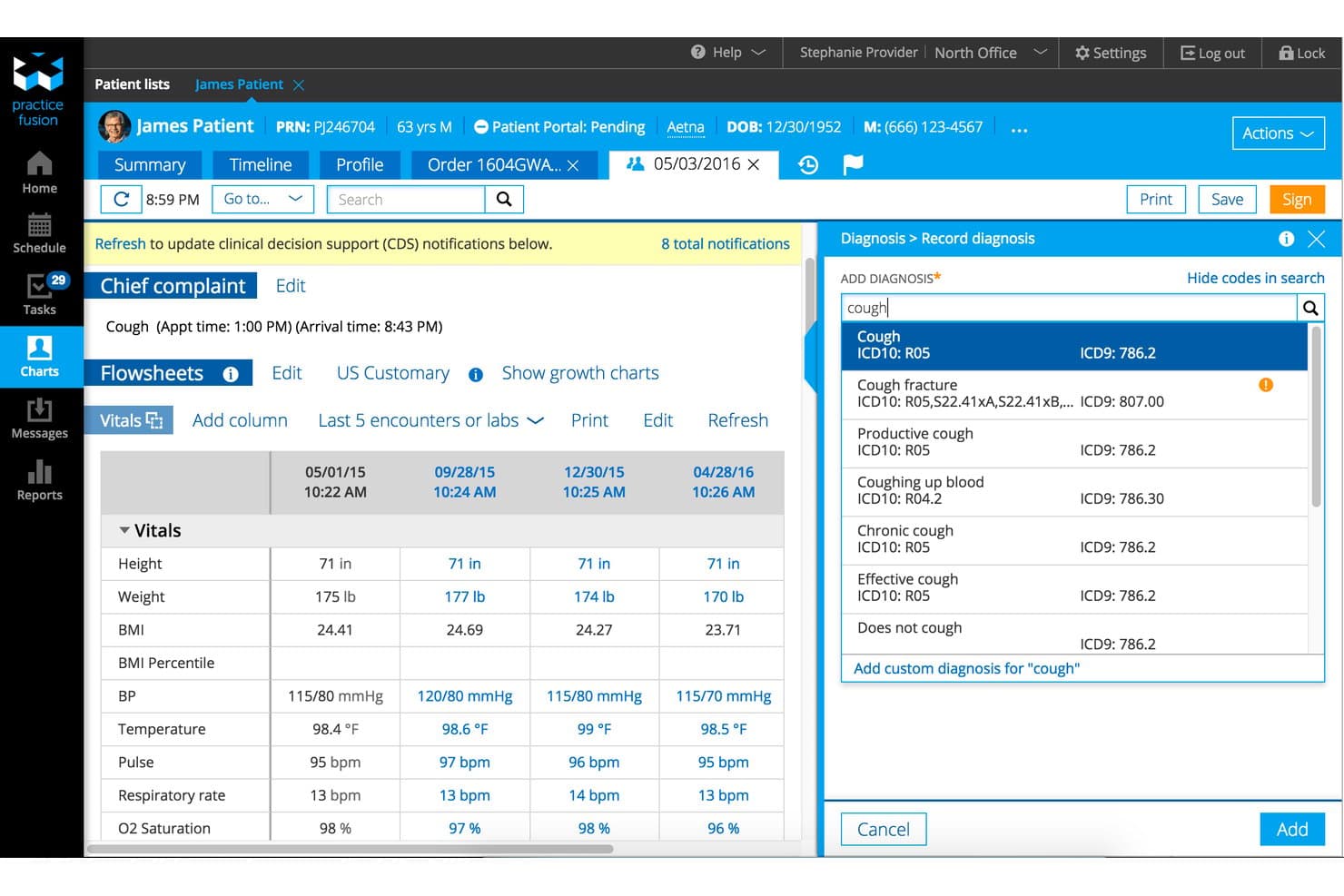
Practice Fusion offers a cloud-based EHR with integrated patient flowsheets, vitals tracking, and real-time ICD-10 diagnosis search within a single encounter view. Practice Fusion is a cloud-based EHR built for independent practices, combining customizable charting templates, e-prescribing (including EPCS), lab and imaging ordering, and integrated billing and practice management tools.
Who Is Practice Fusion Best For?
Practice Fusion is a strong fit for small to mid-sized independent practices looking for an affordable, easy-to-deploy cloud EHR without a steep learning curve.
Why I Picked Practice Fusion
Practice Fusion earns its spot on my shortlist because of how genuinely fast the path from sign-up to seeing patients is. Since it's fully cloud-based with no software to install, you can test-drive the system in minutes and go live in under 30 days. I particularly like the pre-built charting template library, which lets providers start documenting visits right away without building workflows from scratch.
Practice Fusion Key Features
- Integrated e-prescribing: Allows providers to send prescriptions electronically, including for controlled substances, directly from the patient chart.
- Patient portal: Lets patients access their health records, view lab results, and communicate securely with their provider online.
- Lab and imaging center connectivity: Supports direct ordering and receipt of results from over 500 connected labs and imaging centers.
- Quality and compliance dashboards: Provides real-time MIPS, Meaningful Use, and clinical quality measure tracking and reporting.
Practice Fusion Integrations
Practice Fusion offers native integrations with more than 500 labs and imaging centers, plus Surescripts for e-prescribing and pharmacy connectivity. An API is available for custom integrations.
Pros and Cons
Pros:
- Integrated e-prescribing with EPCS support
- Prebuilt templates for multiple specialties
- Quick workflow setup for new practices
Cons:
- Post-migration customer support delays reported
- No dedicated mobile app available
Learn more about Practice Fusion: Best for streamlined patient intake
- Free demo available
- Pricing upon request
Visit WebsiteCustomer Rating:3.9/5
Tebra offers a comprehensive cloud EHR dashboard featuring electronic health records, prescriptions, telehealth scheduling, lab management, and a calendar in one unified interface. Tebra is a cloud-based EHR and practice management platform built for independent medical practices that combines clinical documentation, e-prescribing, billing, scheduling, and patient engagement in one system.
Who Is Tebra Best For?
Tebra is a strong fit for small independent practices with up to 10 providers looking for a single platform that handles both clinical and administrative workflows.
Why I Picked Tebra
Tebra earns its spot on my shortlist because of how tightly its patient intake tools connect to the clinical record. Digital intake forms flow directly into the patient chart, so providers aren't re-entering data that's already been collected. I also like the two-way texting and custom appointment reminders, which cut down on no-shows before a patient even walks through the door.
Tebra Key Features
- AI Note Assist: Automatically generates clinical notes from patient encounters using artificial intelligence.
- Customizable chart templates: Lets you tailor documentation templates to match provider or specialty requirements.
- Integrated e-prescribing with EPCS: Allows electronic prescribing of controlled substances directly from the patient chart.
- Bidirectional lab integrations: Connects with LabCorp and Quest Diagnostics for ordering and receiving lab results within the EHR.
Tebra Integrations
Tebra offers native integrations with Surescripts, LabCorp, Quest Diagnostics, WebPT, and Practice Fusion, and provides API access for custom integrations.
Pros and Cons
Pros:
- AI-powered clinical note generation
- EPCS and PDMP built in for e-prescribing
- Digital intake forms populate patient charts
Cons:
- Specialty template options are somewhat limited
- Billing module lacks full cloud functionality
Learn more about Tebra: Best specialty-specific configuration
- Free demo available
- Pricing upon request
Visit WebsiteCustomer Rating:3.6/5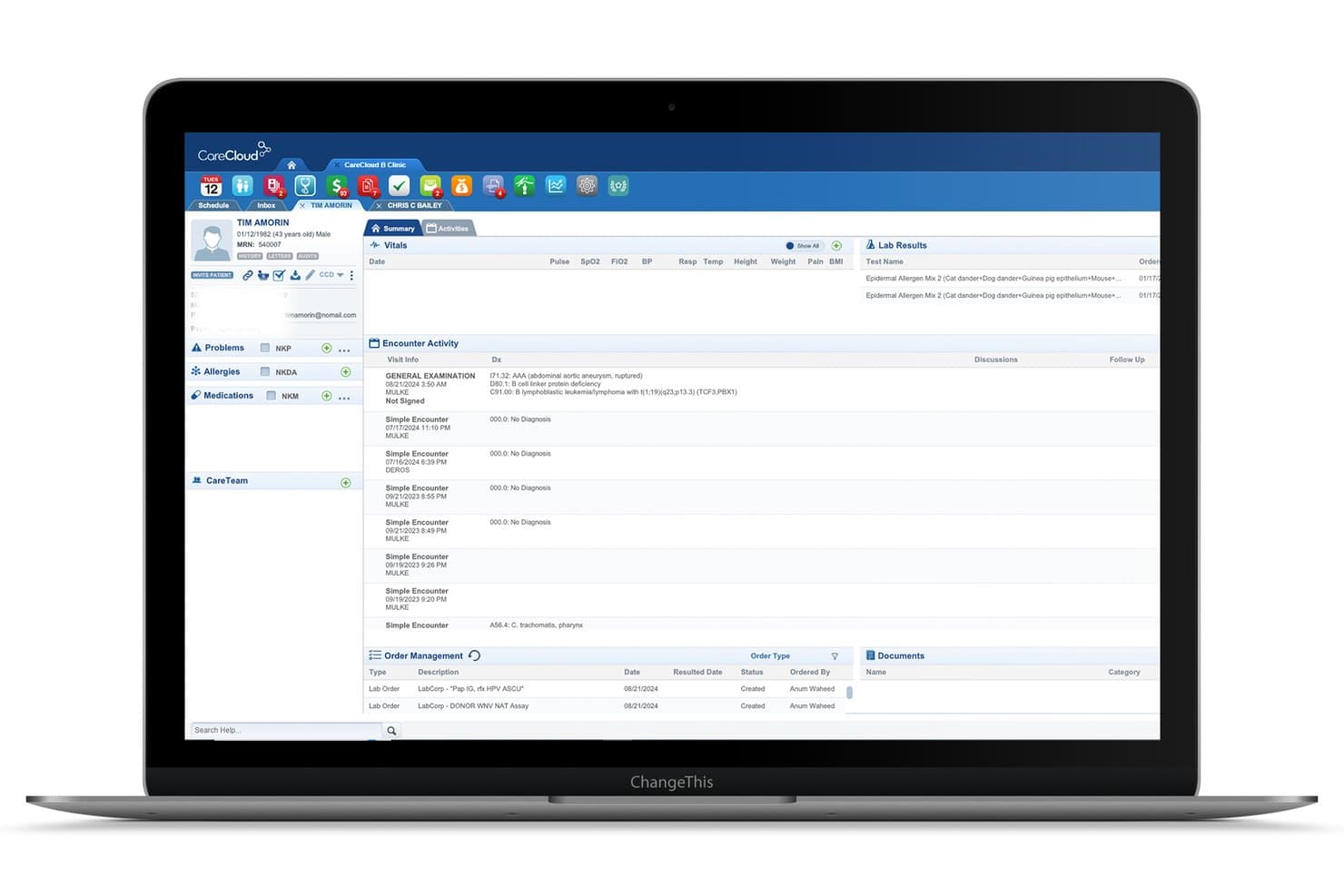
CareCloud offers a comprehensive patient summary view with encounter activity, lab results, vitals, and order management in its cloud EHR platform. CareCloud is a cloud-based EHR platform that combines clinical charting, e-prescribing, practice management, revenue cycle management, and AI-assisted documentation tools in a unified system for ambulatory medical practices.
Who Is CareCloud Best For?
CareCloud is a strong fit for independent and small-to-mid-size specialty practices that need an EHR configured to their clinical discipline from day one.
Why I Picked CareCloud
CareCloud earns its spot as one of the best on my shortlist because of how deeply it configures to individual specialties. Predefined templates and order sets span over 70 disciplines, from cardiology to rheumatology. That means I'm not rebuilding a generic SOAP note from scratch for each specialty. I also like cirrusAI Notes, which captures live patient conversations and generates structured documentation in real time, shaped to the clinical language of each specific discipline.
CareCloud Key Features
- Unified inbox: Manage all messages, tasks, lab results, and notifications from a single centralized location.
- CollectiveIQ rules engine: Access an automated library of over 180 million billing rules to detect errors in claims before submission.
- Integrated patient portal: Offer patients secure online scheduling, bill pay, forms, and messaging through the Breeze portal.
- Command Center dashboard: Monitor clinical and financial metrics in real time with customizable analytics and performance widgets.
CareCloud Integrations
CareCloud offers native integrations with Epic, ProPath, Meditech, HealthLink, CubixxMD, Contexture, and BRONSON, and supports HL7 and API-based connections for labs, imaging centers, pharmacies, and billing systems. An API is available for custom integrations.
Pros and Cons
Pros:
- Command Center dashboard for live analytics
- CirrusAI Notes generates ambient clinical documentation
- Specialty templates for 70+ disciplines
Cons:
- Support responsiveness varies after onboarding
- Occasional system reliability issues reported
Learn more about CareCloud: Best patient charting flexibility
- Free demo available
- Pricing upon request
Visit WebsiteCustomer Rating:3.6/5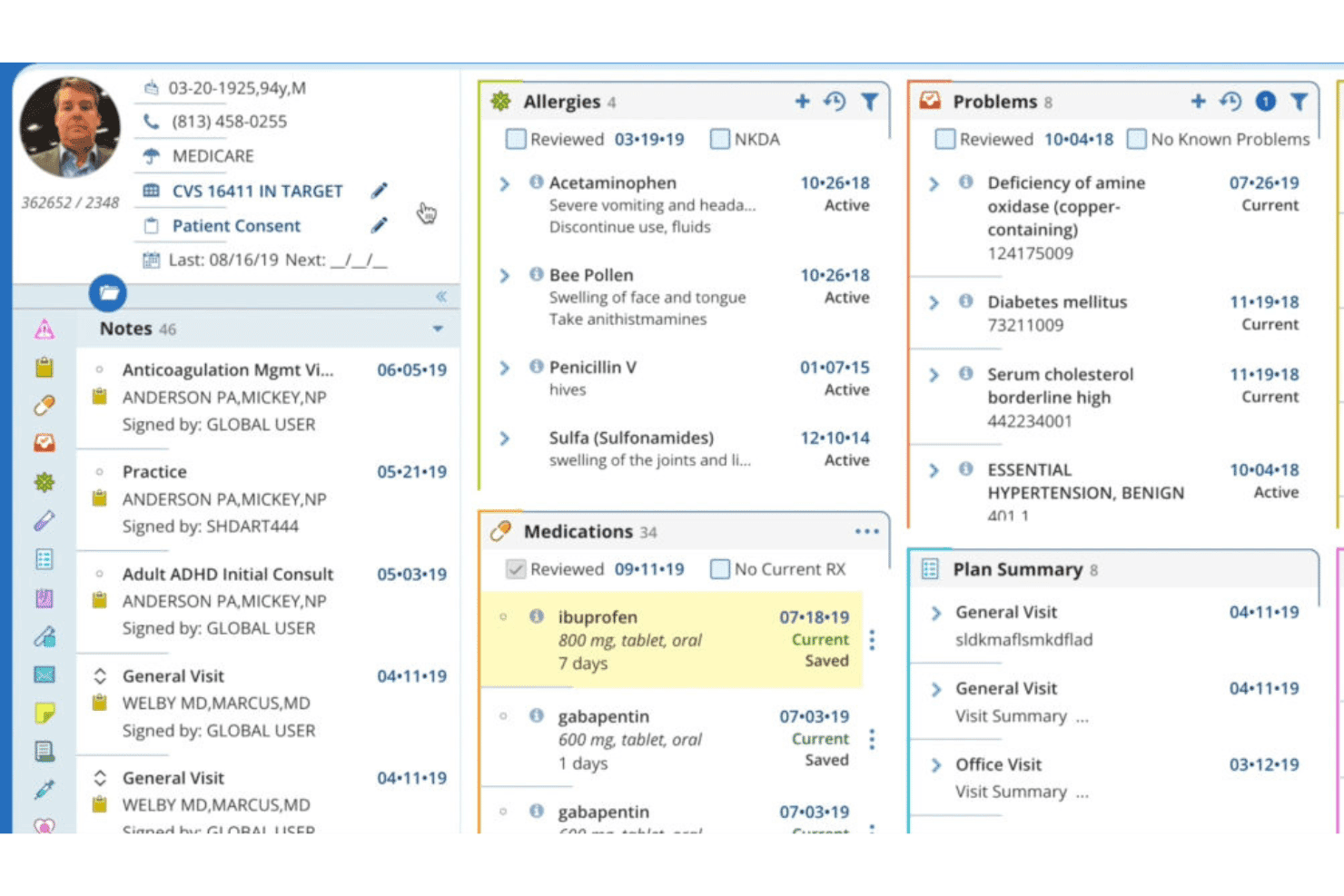
AdvancedMD unifies EHR, documentation, e-prescribing, billing, and engagement. AdvancedMD is a cloud-based EHR platform for independent and group medical practices that combines clinical documentation, e-prescribing, practice management, medical billing, and patient engagement tools in a unified system.
Who Is AdvancedMD Best For?
AdvancedMD is a strong fit for multi-provider independent practices and medical groups that need a unified EHR, billing, and practice management system under one platform.
Why I Picked AdvancedMD
AdvancedMD earns its spot on my shortlist because of its template builder, which lets admins customize clinical forms directly without submitting requests to the vendor. I use it to configure specialty-specific SOAP notes, treatment plans, and procedure documentation across more than 40 built-in specialty templates. More recently, the AI-generated notes feature has made charting noticeably faster during high-volume clinic days.
AdvancedMD Key Features
- Patient portal: Gives patients online access to lab results, secure messaging, appointment scheduling, and bill payment.
- Revenue cycle management suite: Automates claims scrubbing, denial management, and integrated payment processing.
- Mobile app support: Lets providers access schedules, charts, and clinical documentation on both iOS and Android devices.
- Telehealth integration: Offers HIPAA-compliant video visits directly through the EHR with scheduling and patient reminders.
AdvancedMD Integrations
AdvancedMD offers native integrations with Practice Fusion, QuickBooks Enterprise, and Zoom for telehealth. It provides an Integrations Marketplace, supports clearinghouse connectivity, and has an API for custom integrations.
Pros and Cons
Pros:
- Mobile apps for iOS and Android devices
- AI note assistant for rapid charting
- Template builder for custom clinical documentation
Cons:
- E-prescribing workflow can feel cumbersome
- Occasional system downtime during business hours
 Best telehealth tools integration
- Free demo available
- Pricing upon request
Visit WebsiteCustomer Rating:3.4/5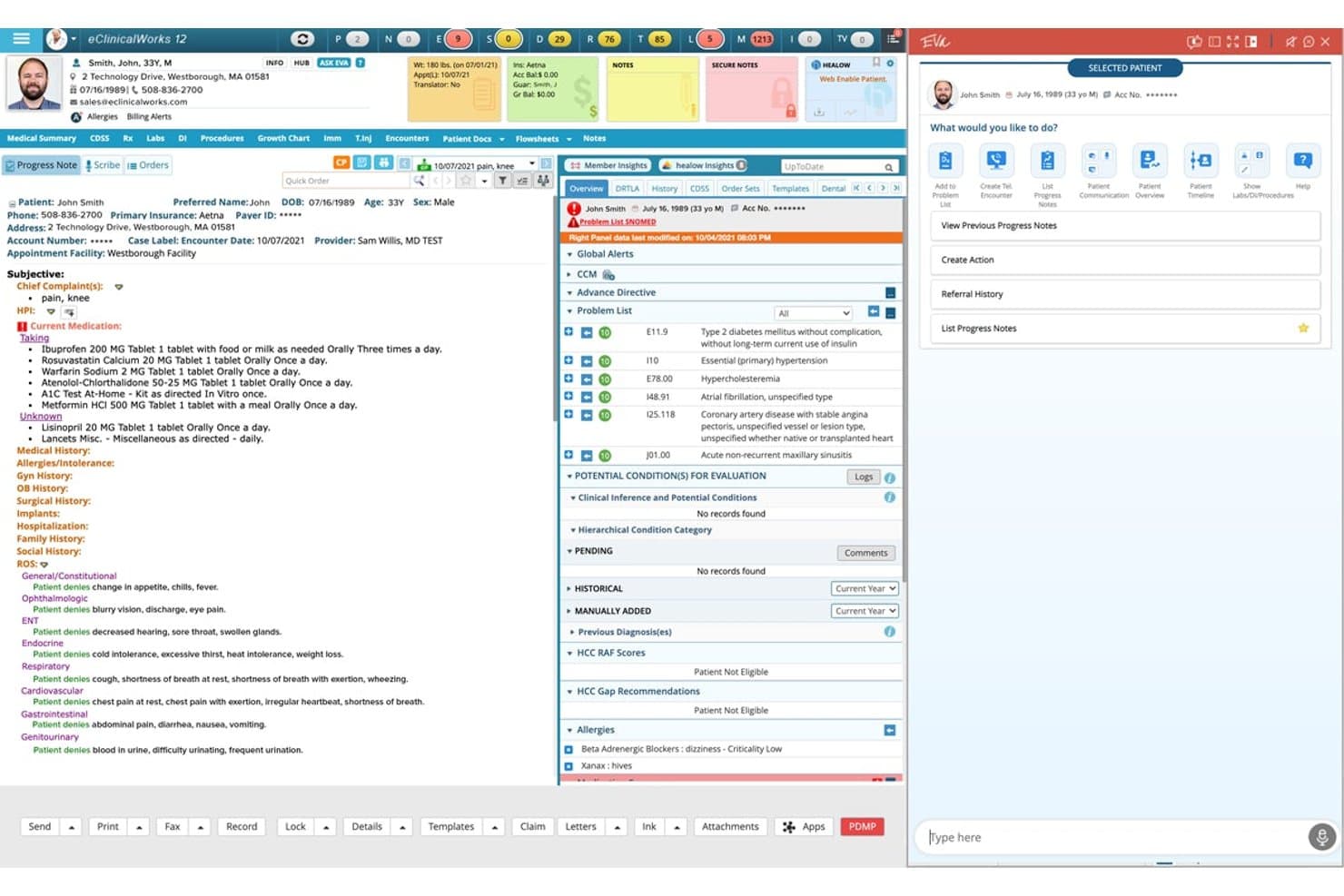
eClinicalWorks offers a comprehensive cloud EHR interface featuring patient progress notes, problem lists, medication management, and an AI assistant panel in a single unified view. eClinicalWorks is a cloud-based EHR platform for ambulatory practices that unifies clinical documentation, practice management, revenue cycle management, population health tools, and AI-assisted charting in a single system.
Who Is eClinicalWorks Best For?
It's a strong fit for independent and multi-location ambulatory practices that need a single platform covering both clinical and billing operations.
Why I Picked eClinicalWorks
eClinicalWorks earns its spot on my shortlist because of how tightly its telehealth tools are woven into the clinical workflow. I picked it specifically for healow TeleVisits and healow Meet, two native telehealth tools that live inside the EHR rather than linking out to a third-party platform. healow Meet supports group video visits, which I find particularly useful for behavioral health and patient education sessions that other EHRs route through external tools.
eClinicalWorks Key Features
- Customizable chart templates: Build and modify templates for SOAP notes, problem lists, and specialty-specific workflows.
- AI virtual assistant: Use Eva to pull up patient records, compare progress notes, and navigate data during clinical encounters.
- PRISMA health information search engine: Aggregate patient data from hospitals, clinics, and other EHRs nationwide for a unified view.
- Integrated revenue cycle management: Access claim creation, denial management, and A/R analytics within the same platform.
eClinicalWorks Integrations
eClinicalWorks offers native integrations with CommonWell, Carequality, Nuance Dragon Medical, M*Modal, and Sunoh.ai, and provides certified FHIR APIs for custom integrations with labs, imaging centers, and other health systems.
Pros and Cons
Pros:
- Extensive mobile and tablet support
- Customizable chart templates for multiple specialties
- Telehealth visits embedded within patient charts
Cons:
- Reporting module setup is time-consuming
- System updates can trigger workflow interruptions
Learn more about eClinicalWorks: Best for customizable clinical workflows
- Free demo available
- Pricing upon request
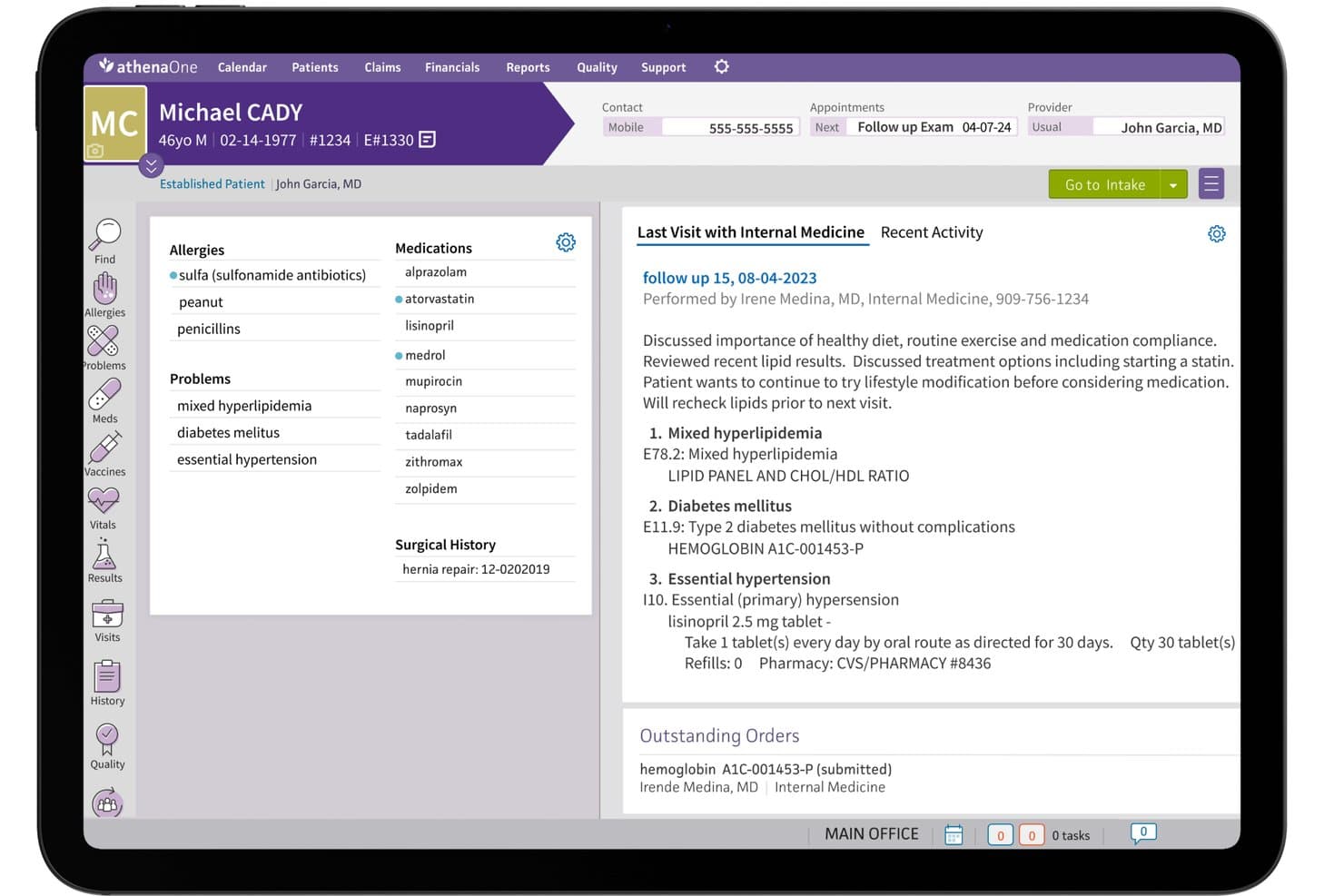
athenahealth (athenaOne) offers a comprehensive patient chart view displaying allergies, medications, problems, surgical history, and last visit notes in a cloud-based EHR interface. athenahealth's athenaOne is a cloud-based EHR platform that combines electronic charting, e-prescribing, practice management, revenue cycle management, and patient engagement in a single unified system.
Who Is athenahealth (athenaOne) Best For?
It's a strong fit for ambulatory practices of any size that need a single platform covering clinical documentation, billing, and patient communication.
Why I Picked athenahealth (athenaOne)
athenaOne earns its spot on my shortlist because of how far the clinical workflow customization actually goes. I can configure documentation templates at the encounter level, adjust workflow steps by provider or specialty, and layer in AI ambient notetaking to cut time spent on charting. The guided encounter model walks through each visit stage in a structured sequence, so my team builds consistent documentation without losing the flexibility to tailor it.
athenahealth (athenaOne) Key Features
- E-prescribing with EPCS: Providers send prescriptions, including controlled substances, directly to pharmacies from the patient chart.
- Integrated patient portal: Patients access records, request refills, schedule appointments, and send secure messages within one interface.
- Revenue cycle management tools: Built-in claim scrubbing and eligibility verification connect billing tasks with clinical workflows.
- Mobile app access: Clinicians review schedules, charts, and tasks from iOS and Android devices.
athenahealth (athenaOne) Integrations
athenaOne offers over 250 marketplace integrations, including Surescripts, CommonWell, Carequality, LabCorp, Quest Diagnostics, and Salesforce. The platform also supports FHIR R4 APIs for custom integrations.
Pros and Cons
Pros:
- Fast claim scrubbing and billing tools
- Built-in mobile app for clinicians
- Highly customizable encounter workflows
Cons:
- Support response times can be inconsistent
- Specialty template options may require setup
Learn more about athenahealth (athenaOne):
Other Cloud EHR Software
Here are some additional cloud EHR software options that didn’t make it onto my shortlist, but are still worth checking out:
- 11NextGen HealthcareBest for integrated population health tools
- 12RXNTBest for easy e-prescribing tools
- 13PrognoCISBest for advanced template customization
- 14OmniMDBest for specialty care workflows
- 15SimplePracticeBest for practice management and telehealth tools
- 16OptiMantraBest for integrative health practitioners
- 17Cerbo EHRBest for direct primary care practices
- 18Kipu EMRBest for behavioral health organizations
- 19Office Ally EHR 24/7Best for built-in clearinghouse integration
How I Evaluate Cloud EHR Software
I evaluate cloud EHR platforms in two layers: the baseline clinical and security requirements every ambulatory practice needs, and the differentiators that separate good tools from the right fit.
Core Functionality (Table Stakes For This List)
When I'm selecting tools for my list, I rank each one on a scale from 0 (does not offer the functionality) to 5 (excels in this area) for each core functionality listed below. Then, I calculate the tool's total score into a percentage. Each tool needs to achieve a minimum total score of 65% to be considered for inclusion.
- Cloud-Based Deployment: I check whether I can log in from a browser or mobile app and chart without needing a VPN or on-premise server setup.
- Electronic Charting & Documentation: I look for customizable SOAP note templates, structured problem lists, and specialty-specific workflows beyond basic free-text entry.
- E-Prescribing (eRx): EPCS support matters here. I evaluate whether providers can send controlled substance prescriptions and review drug interactions in-chart.
- HIPAA Compliance & Security: Every platform should offer a signed BAA, audit trails, and role-based access so a front-desk user can't view clinical notes meant for providers.
- Interoperability & Integrations: I look at whether the platform supports HL7, FHIR, or CCDA for exchanging data with labs, pharmacies, imaging centers, and HIEs.
- Practice Management Integration: Charting needs to connect to scheduling, demographics, and billing. I evaluate whether claims and appointments live in one system or require workarounds.
Once I have a list of tools that meet the criteria, I consider what sets each platform apart.
Differentiating Factors (What Sets Vendors Apart)
Here's how I compare and contrast different vendors:
Standout Features
Ambient AI scribing is a major differentiator. I look for platforms where providers can dictate during a visit and get a structured SOAP note drafted automatically, cutting after-hours charting. Integrated telehealth matters too, especially when video visits and charting happen on the same screen without a third-party add-on. I also evaluate revenue cycle analytics dashboards that track claim denials, days in A/R, and payer mix in real time so billing managers can spot issues before they snowball.
Beyond Features
Practice size and specialty fit shape everything. A solo dermatology clinic needs turnkey setup, while a multi-location group needs centralized reporting and location-level controls. I also evaluate implementation support—specifically whether a vendor handles data migration from legacy systems, including scanned documents and structured charts. Pricing transparency matters just as much. I check whether telehealth, patient portals, and EPCS are included or billed as add-ons, since those extras can quietly inflate total cost of ownership.
How to Choose Cloud EHR Software
It’s easy to get bogged down in long feature lists and complex pricing structures. To help you stay focused as you work through your unique software selection process, here’s a checklist of factors to keep in mind:
| Factor | What to Consider |
|---|---|
| FactorScalability | What to ConsiderWill this platform handle your growth—multiple locations, new providers, or added specialties—without a major migration? |
| FactorIntegrations | What to ConsiderCan you connect to your preferred billing, labs, or patient engagement tools natively, or will it require extra work? |
| FactorCustomizability | What to ConsiderDo you need to adapt chart templates, intake forms, or reporting to your unique workflows and regulatory requirements? |
| FactorEase of use | What to ConsiderWill staff quickly understand the interface, or is extensive training required? Try demos or request a workflow walkthrough. |
| FactorImplementation and onboarding | What to ConsiderDoes the vendor offer hands-on data migration, setup help, and ongoing training, or will your IT team manage it alone? |
| FactorCost | What to ConsiderAre key modules (like telehealth or eRx) included, or do add-ons and support quickly push costs past your budget? |
| FactorSecurity safeguards | What to ConsiderWhat security certifications, user access controls, and disaster recovery protocols does the vendor guarantee in writing? |
| FactorSupport availability | What to ConsiderWhat are the true support hours? Will you reach someone live when it matters, especially after-hours or during an outage? |
What Is Cloud EHR Software?
Cloud EHR software is a type of EHR software that stores patient charts and clinical data on secure remote servers, allowing access from any internet-connected device. You can chart, e-prescribe, and manage workflows without installing software onsite.
This approach reduces IT burden, supports remote and multi-location teams, and helps keep your practice’s health information HIPAA-compliant.
Features of Cloud EHR Software
When selecting cloud electronic health record software, keep an eye out for the following key EHR software features:
- Cloud-based access: Log in from any browser or mobile device without installing or maintaining software on local servers.
- Electronic charting: Create structured patient records using customizable templates, SOAP notes, and checklists tied to ongoing care.
- E-prescribing (eRx): Send prescriptions—including controlled substances—electronically to pharmacies directly from the chart with drug interaction checking.
- Practice management integration: Connect scheduling, billing, insurance claims, and patient demographics in a single system to avoid double data entry.
- Patient self-service portal: Give patients a secure way to schedule visits, complete intake forms, view results, message staff, and pay bills online.
- Interoperability: Exchange data with labs, imaging centers, clearinghouses, and other systems using standards like HL7 or FHIR.
- Role-based security controls: Set granular permissions so users only access the information relevant to their roles—protecting patient privacy.
- Audit trails and logs: Automatically track system logins, record changes, and user actions for compliance and forensic review.
- Automated reminders: Send appointment confirmations, medication reminders, or follow-up tasks to patients and staff to reduce no-shows.
- Reporting and analytics: Generate real-time reports on clinical quality, financials, and productivity to support data-driven decisions.
Benefits of Cloud EHR Software
Implementing cloud EHR software provides several benefits for your team and your business. Here are a few you can look forward to:
- Remote access: You can view and update patient records from anywhere, supporting flexible work and multi-location teams.
- Simplified IT management: With no local servers or software to maintain, your practice reduces technology headaches and long-term hardware costs.
- Secure data storage: HIPAA-compliant encryption, audit trails, and role-based access ensure patient information stays protected.
- Streamlined workflows: Integrated scheduling, billing, and charting in one cloud platform helps reduce double data entry and administrative burden.
- Better patient engagement: Patient portals and automated reminders empower patients to stay informed, complete forms online, and communicate securely.
- Faster implementation: Cloud delivery means you can get new staff up and running quickly, without lengthy installs or disruptive upgrades.
- Scalable for growth: Add locations, specialties, or providers without a complex technical overhaul, making the system fit your evolving needs.
Costs and Pricing of Cloud EHR Software
Selecting cloud EHR software requires an understanding of the various pricing models and plans available. Costs vary based on features, team size, add-ons, and more. The table below summarizes common plans, their average prices, and typical features included in cloud EHR software solutions:
Plan Comparison Table for Cloud EHR Software
| Plan Type | Average Price | Common Features |
|---|---|---|
| Plan TypeFree Plan | Average Price$0 | Common FeaturesLimited user seats, basic charting, standard security, and restricted support. |
| Plan TypePersonal Plan | Average Price$30–$80/user/month | Common FeaturesSingle provider access, electronic charting, e-prescribing, scheduling, and standard reporting tools. |
| Plan TypeBusiness Plan | Average Price$100–$180/user/month | Common FeaturesMulti-provider support, billing integration, patient portal, telehealth, customizable templates, and analytics. |
| Plan TypeEnterprise Plan | Average Price$200–$350/user/month | Common FeaturesAdvanced integrations, API access, enhanced security, dedicated support, location management, and compliance tools. |
Cloud EHR Software FAQs
Here are some answers to common questions about cloud EHR software:
What should I look for when evaluating cloud EHR software?
Focus on workflow fit, ease of use, integration options, data security certifications, and transparency in pricing. Pay attention to implementation support and whether core modules like telehealth or e-prescribing are included or require extra fees.
How do cloud EHR software handle data migration from my old system?
Most vendors offer data migration services including structured data import and conversion of scanned documents. Ask about their experience with your current system, turnaround time, and validation processes to avoid data loss during the switch.
Are cloud EHR software secure enough for sensitive health information?
Yes, leading cloud EHR platforms use encryption, audit trails, and role-based access controls to maintain HIPAA compliance. Always verify the vendor offers a signed BAA, publishes security policies, and undergoes regular third-party security audits.
Can I customize cloud EHR software for my specialty?
Many cloud EHR software platforms provide customizable templates, specialty-specific charting options, and configurable workflows. Confirm whether forms, documentation fields, and clinical processes can be adjusted without custom development or ongoing technical support.
What ongoing support does cloud EHR software provide?
Support options vary across cloud EHR software vendors and may include live chat, phone assistance, knowledge bases, training resources, and dedicated account managers. Review support hours, response times, and whether urgent issues receive priority outside regular business hours.