EMR integrations connect your EMR software to tools like medical billing, practice management, and telehealth platforms. They keep patient data flowing across every system your practice relies on. From my experience, the right integrations transform daily operations—but choosing them isn't always straightforward.
This guide walks you through 6 impactful EMR integrations, what each one does, and what to look for when evaluating your options.
Why Integrate EMR Software?
You should integrate Electronic Medical Record (EMR) software because it eliminates the manual data entry and system-switching that slow down clinical and administrative workflows. In my experience, connecting billing software alone saved hours of duplicate work every week.
Here are the top reasons practices connect other tools to their EMR:
- Billing accuracy: Syncing your EMR with medical billing software reduces coding errors and claim rejections by pulling diagnoses and procedures directly from patient records.
- Care coordination: Integrations with lab and imaging systems bring diagnostic results into the patient chart automatically, so clinicians have the full picture at the point of care.
- Patient communication: Connecting patient engagement tools lets you automate appointment reminders, intake forms, and follow-up messages without leaving your EMR.
- Telehealth access: Linking a telehealth platform to your EMR keeps virtual visit notes, prescriptions, and patient data in one place.
- Prescription management: E-prescribing integrations let you send prescriptions directly from the patient chart, reducing call-backs and medication errors.
Most Common Integrations For EMR Software
Exploring the integration features available in EMR software is key to building an efficient, hassle-free workflow that keeps your team focused on care. Here are the most common EMR software integrations I’ve relied on in daily practice.

Medical Billing and Revenue Cycle Management Software
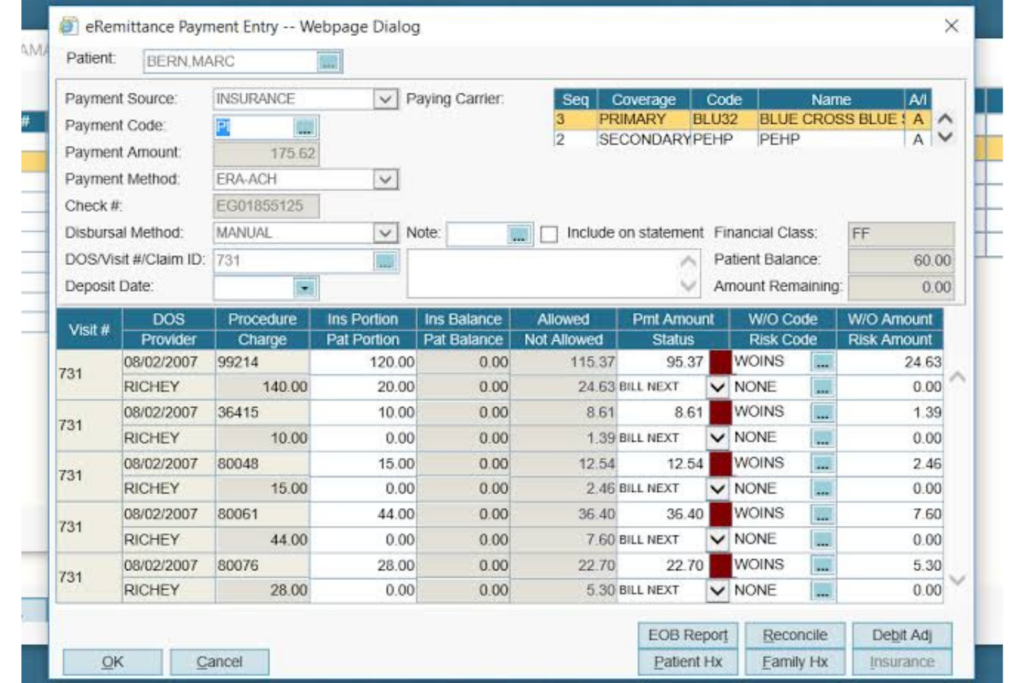
Integrating medical billing and revenue cycle management (RCM) software with your EMR is one of the highest-impact moves you can make for your practice's financial health.
From my experience, tools like Kareo and AdvancedMD pull diagnosis codes, procedure codes, and patient data directly from the EMR, which means fewer manual entries and cleaner claims. I've seen claim rejection rates drop noticeably after connecting billing workflows to a properly configured EMR.
Without this integration, your billing team is manually re-entering clinical data from the EMR into a separate system—a process that's slow, error-prone, and a consistent source of revenue leakage.
Here are the use cases I've found most valuable when connecting medical billing and RCM software to an EMR:
- Automated charge capture: Procedure and diagnosis codes flow directly from clinical notes into billing, eliminating the need to manually transfer charges after each visit.
- Real-time eligibility verification: Patient insurance eligibility is checked against payer databases at the point of scheduling or check-in, reducing claim denials before they happen.
- Claim scrubbing: Billing software cross-references EMR data to flag coding errors or missing information before a claim is submitted to the payer.
- Payment posting: Remittance data from payers is matched back to patient accounts automatically, keeping your accounts receivable current without manual reconciliation.
- Denial management: When a claim is denied, the integration surfaces the relevant clinical documentation from the EMR so your billing team can respond quickly with supporting evidence.
- Reporting and analytics: Combining clinical and financial data gives you a clear view of revenue by provider, payer, or procedure—something that's nearly impossible to do accurately when your systems aren't connected.
Practice Management Software
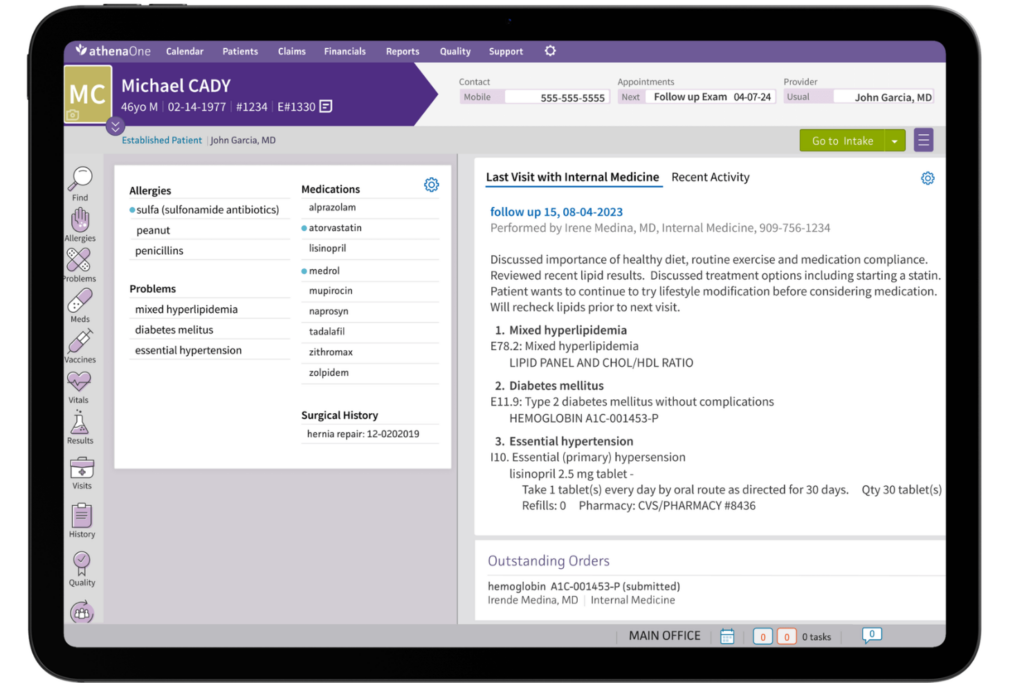
Integrating practice management software with your EMR connects scheduling, patient registration, and clinical documentation into a single coordinated workflow. Tools like
Athenahealth and SimplePractice are good examples—when linked to your EMR, appointment data, patient demographics, and intake information flow directly into the clinical record before the visit even starts. From my experience, this is the integration that most visibly reduces friction for both front desk staff and clinicians.
Without it, your administrative and clinical teams are essentially operating in parallel systems—manually syncing schedules, re-entering patient details, and chasing down information that should already be in the chart.
Here are the use cases I've found most impactful when connecting practice management software to your EMR:
- Appointment scheduling sync: When a patient books an appointment in your practice management system, the visit populates directly in the EMR so clinicians can prepare charts, review history, and queue up documentation in advance.
- Patient registration and demographics: Intake forms and patient details entered at registration flow into the clinical record automatically, so your care team isn't asking patients to repeat information they already provided.
- Referral tracking: Outgoing and incoming referrals are logged in both systems, giving your clinical and administrative teams visibility into referral status without manual follow-up.
- Visit documentation workflow: When a clinician completes a note in the EMR, the visit status updates in the practice management system—keeping your scheduling and billing queues accurate in real time.
- Waitlist and recall management: Cancellations and open slots in the practice management system trigger recall outreach to patients on the waitlist, a workflow that's nearly impossible to run smoothly across disconnected systems.
- Compliance and credentialing: Provider credentials and payer enrollments managed in your practice management system stay aligned with the clinical users and roles configured in your EMR, reducing gaps in billing eligibility.
Patient Engagement and Communication Software
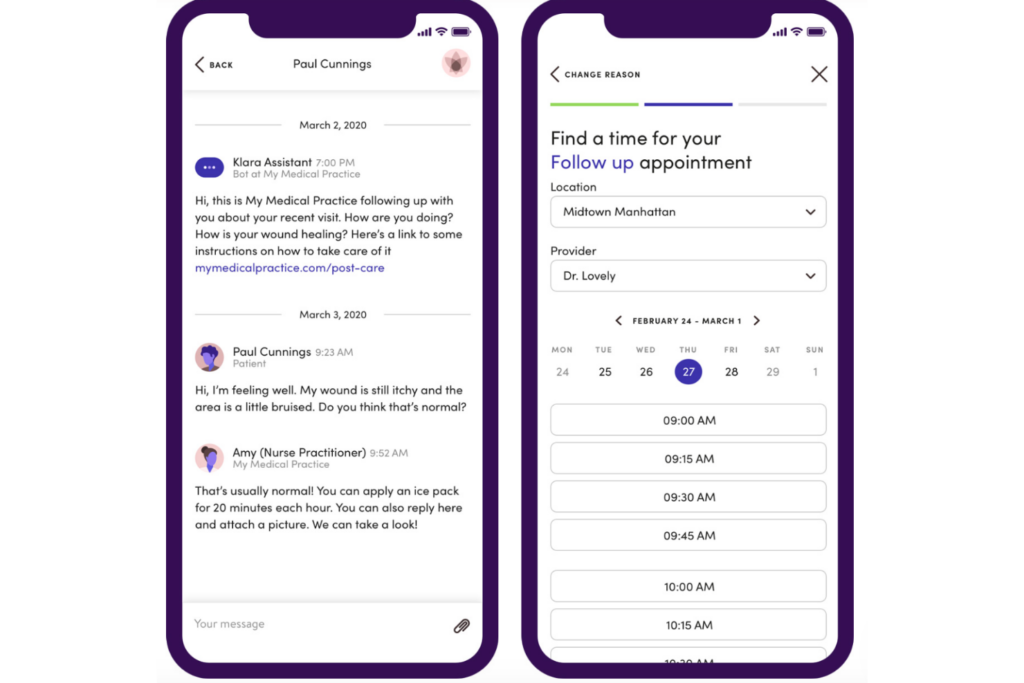
Connecting patient engagement and communication software to your EMR brings your outreach and clinical data into alignment, so every message, reminder, or form is grounded in accurate, up-to-date patient information.
Platforms like Klara and Phreesia are strong examples—when integrated with your EMR, appointment reminders pull directly from your schedule, and patient-submitted intake forms write back into the chart without any manual data entry. In my experience, this integration noticeably reduces no-show rates and cuts down the administrative work that typically piles up before and after each visit.
Without it, your team ends up managing patient communication from a separate system with no live connection to your schedule or records—meaning reminders go out based on stale data, and intake responses have to be manually transferred into the chart before the clinician can review them.
Here are the use cases I think matter most when connecting patient engagement and communication software to your EMR:
- Appointment reminders: Reminders are triggered automatically from your EMR schedule and sent via the patient's preferred channel—text, email, or portal message—without any manual outreach from your front desk team.
- Digital intake and pre-visit forms: Patients complete intake forms, health history updates, and consent documents before arriving, and responses write directly into the clinical record so the chart is ready when the clinician walks in.
- Post-visit follow-up: Discharge instructions, care summaries, and follow-up surveys are sent automatically based on visit type and documentation in the EMR, keeping patients informed without adding to your staff's workload.
- Secure messaging: Patients send questions or updates through a HIPAA-compliant messaging channel, and conversations are logged directly in the EMR alongside the rest of the patient's record.
- Chronic care and preventive outreach: Your EMR data triggers targeted outreach to patients who are due for screenings, vaccinations, or chronic disease check-ins—turning a manual recall process into an automated workflow.
- Patient satisfaction surveys: Surveys go out automatically after visits and responses are tied back to specific encounters in the EMR, giving you actionable feedback at the provider and visit-type level.
Laboratory and Diagnostic Imaging Software

Integrating laboratory and diagnostic imaging software with your EMR closes the loop between ordering and results—so clinicians aren't waiting on faxes or logging into separate portals to see whether a result has come back.
Solutions like Ambra Health for imaging and LabCorp's connectivity tools for lab results are good examples of this in practice. When connected to your EMR, orders are placed directly from the clinical record and results route back into the chart automatically, where they're immediately available for review and documentation. From my experience, this is the integration that has the most direct impact on clinical decision-making speed.
Without it, your clinical team is manually checking external portals or waiting on paper or fax-based result delivery—a workflow that creates delays, increases the risk of missed results, and puts the burden of documentation squarely on the clinician rather than the system.
Here are the use cases I'd prioritize when connecting laboratory and diagnostic imaging software to your EMR:
- Electronic order entry: Lab and imaging orders are placed directly from the clinical record, eliminating the need for paper requisitions and reducing transcription errors between the ordering clinician and the performing facility.
- Automatic result routing: Completed lab and imaging results route back into the patient's chart as soon as they're available, so clinicians can review and act on findings without checking a separate system or waiting on manual delivery.
- Critical value alerts: When a result falls outside a defined threshold, the integration triggers an alert within the EMR and notifies the ordering clinician directly—supporting faster response to time-sensitive findings.
- Results review and sign-off: Clinicians review, annotate, and sign off on results from within the EMR workflow, and that acknowledgment is logged in the chart as part of the patient's clinical record.
- Diagnostic image viewing: Imaging studies open directly within or alongside the EMR, so radiologists and ordering clinicians can view scans in the same workflow where they're documenting findings and updating the care plan.
- Trend tracking and longitudinal data: Because results flow into the same system over time, your EMR can surface historical lab trends and prior imaging comparisons within the chart—context that's hard to reconstruct when results live in a separate platform.
Telehealth Software
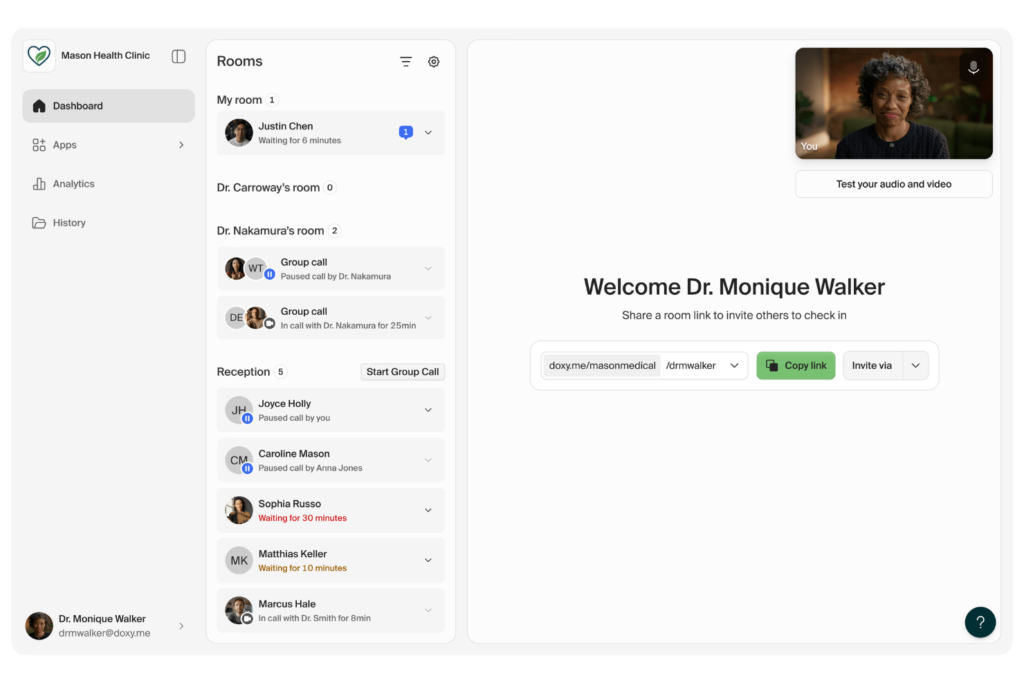
Connecting telehealth software to your EMR treats virtual visits the same way your system treats in-person encounters—with full access to the patient's chart, documentation tools, and scheduling data in one place.
Platforms like Doxy.me and Mend connect with EMR features such as patient records, clinical documentation, and scheduling, so clinicians can enter a virtual visit, document in real time, and close the encounter without switching platforms.
In my experience, this type of EMR integration separates a true telehealth workflow from a video call with a clipboard—the clinical record remains at the center of the visit, regardless of where the patient is.
Without the integration, clinicians are typically running the video visit in one window and the EMR in another, taking notes separately and then manually entering documentation after the call ends—a workflow that extends charting time and increases the likelihood that visit details get lost between the two systems.
Here are the use cases I find most valuable when connecting telehealth software to your EMR:
- Integrated visit launch: Clinicians start the virtual visit directly from the patient's scheduled encounter in the EMR, so the chart, medication list, and visit history are already open and ready when the session begins.
- Real-time documentation: Clinicians document notes, update problem lists, and enter orders during the telehealth visit using the same EMR tools they use for in-person encounters—keeping the charting workflow consistent regardless of visit type.
- Virtual waiting room and check-in: Patients check in through the telehealth platform and their arrival status updates in the EMR schedule, giving your front desk team visibility into virtual visit flow the same way they'd track an in-office queue.
- E-prescribing during virtual visits: Because the telehealth session is connected to the EMR, clinicians can review the patient's current medications and send prescriptions electronically from within the same encounter—no separate login or delayed prescribing step required.
- Billing and coding for virtual encounters: Visit type, duration, and documentation from the telehealth session feed directly into your billing workflow, ensuring virtual visits are coded and submitted with the same accuracy as in-person claims.
- Asynchronous care and messaging: Some telehealth integrations support store-and-forward workflows, where patients submit photos, symptom updates, or questions that are reviewed and responded to within the EMR—logged as a formal encounter in the patient's record.
Pharmacy and E-Prescribing Software

Integrating pharmacy and e-prescribing software with your EMR puts medication management where it belongs—inside the clinical workflow, with full visibility into the patient's current medications, allergies, and diagnosis history at the point of prescribing.
Tools like Surescripts and DrFirst connect directly to EMRs, enabling clinicians to send prescriptions electronically to the patient's preferred pharmacy, check for drug interactions, and confirm prescription status without leaving the chart.
From my experience, this integration is one of the clearest examples of technology directly supporting patient safety—because the more context a clinician has at the moment of prescribing, the fewer errors make it through.
Without it, clinicians are either printing or calling in prescriptions manually, and there's no reliable feedback loop in the chart to confirm whether a prescription was filled, modified, or flagged by the pharmacy. That gap creates real risk—both clinically and from a documentation and compliance standpoint.
Here are the use cases I think are most important when connecting pharmacy and e-prescribing software to your EMR:
- Electronic prescription transmission: Clinicians send prescriptions directly to the patient's preferred pharmacy from within the EMR encounter, eliminating paper scripts and phone-in orders while creating an automatic record in the chart.
- Drug interaction and allergy checking: The integration cross-references a new prescription against the patient's current medication list and documented allergies in real time, surfacing potential conflicts before the order is finalized.
- Medication history import: Pharmacy dispensing data pulls into the EMR automatically, giving clinicians a more complete picture of what the patient is actually filling—not just what was previously prescribed in your system.
- Controlled substance prescribing and PDMP access: Clinicians access the Prescription Drug Monitoring Program (PDMP) registry directly from the prescribing workflow in the EMR, supporting compliance with controlled substance regulations without requiring a separate login or lookup.
- Prescription status and fill confirmation: Once a prescription is sent, fill status updates route back into the chart—so your care team knows whether a patient picked up their medication and can follow up if a critical prescription goes unfilled.
- Medication reconciliation: At transitions of care—admissions, discharges, or referrals—the integration supports a structured medication reconciliation process by pulling current pharmacy records alongside the EMR medication list, reducing discrepancies between the two.
Common Integration Methods
Most EMR integrations run on one of three foundational approaches: HL7 messaging standards, FHIR (Fast Healthcare Interoperability Resources) APIs, or vendor-built direct integrations. In practice, HL7 has been the backbone of clinical data exchange for decades—you'll encounter it most often when connecting lab systems or imaging platforms to an EMR like Epic or Oracle Health—while FHIR-based APIs are increasingly the standard for newer, cloud-based tools like patient engagement platforms or telehealth software.
From my experience, vendor-built direct integrations are the fastest to set up but also the least flexible, whereas HL7 and FHIR connections give you more control at the cost of more technical lift upfront.
Setup time varies widely—a pre-built integration between two major platforms might take days to configure, while a custom HL7 interface can take weeks and typically requires an implementation specialist or your EMR vendor's integration team.
Maintenance is where a lot of teams get caught off guard: integrations need ongoing monitoring, and any update to either connected system can break a data feed if it isn't properly tested and revalidated first.
Use this table to compare the strengths and limitations of each integration method:
| Integration Method | Pros | Cons |
|---|---|---|
| Integration MethodHL7 Messaging Standards | ProsWidely supported across legacy and modern systems; well-understood by most EMR vendors and implementation teams | ConsOlder standard with limited flexibility; custom interfaces require specialist configuration and ongoing maintenance |
| Integration MethodFHIR APIs | ProsModern, flexible, and increasingly required for regulatory compliance; faster data exchange and better support for patient-facing applications | ConsNewer standard means inconsistent adoption across vendors; implementation still requires technical resources and API management |
| Integration MethodVendor-Built Direct Integrations | ProsFastest to deploy; typically supported and maintained by the vendor with less internal technical lift | ConsLimited to approved partner ecosystems; less customizable and dependent on the vendor's roadmap and update schedule |
How To Choose The Right Integrations for EMR Software
Use this table to evaluate which tools are the right fit for your EMR environment, workflows, and team:
| Factor | What to Consider |
|---|---|
| FactorEMR compatibility | What to ConsiderNot every tool integrates with every EMR. Before evaluating a product, confirm it has a documented, tested integration with your specific EMR and version. Ask vendors for a list of certified EMR partners—if your system isn't on it, expect a custom build that adds cost and timeline. |
| FactorWorkflow fit | What to ConsiderThe best integration is one your clinical and administrative teams will actually use. Map out the specific workflow the tool needs to support before you buy. If it requires staff to change how they currently work in the EMR, adoption is going to be a challenge regardless of how well the technical connection works. |
| FactorData ownership | What to ConsiderUnderstand exactly where patient data lives once it moves between systems. Who owns it? Can you export it? What happens to it if you end the vendor relationship? This matters especially for imaging archives and lab result histories that accumulate over time. |
| FactorRegulatory compliance | What to ConsiderAny tool that exchanges patient data with your EMR must meet HIPAA requirements and, depending on your region, additional data protection standards. Confirm the vendor has a signed Business Associate Agreement (BAA) in place before you move forward—this is non-negotiable. |
| FactorImplementation resources | What to ConsiderSome integrations are plug-and-play; most aren't. Find out whether setup requires your internal IT team, the vendor's implementation team, or a third-party integration specialist. Factor that cost and timeline into your decision—I've seen integrations that looked affordable on paper become expensive once implementation hours were accounted for. |
| FactorOngoing maintenance | What to ConsiderIntegrations break when either connected system updates. Ask vendors how they handle version updates, who is responsible for revalidation after changes, and what their average response time is for integration issues. A tool with a poor support model is a liability once it's embedded in a clinical workflow. |
| FactorTotal cost | What to ConsiderLook beyond the subscription fee when comparing EMR pricing. Integration setup fees, per-transaction charges, API access, bidirectional data exchange, and ongoing support contracts can raise the total cost quickly. Request a full pricing breakdown before committing to a vendor. |
| FactorScalability | What to ConsiderIf your organization grows, adds locations, or expands service lines, your integrations need to grow with you. Ask whether the integration supports multi-site configurations, increased data volume, or additional user licenses without requiring a full reimplementation. |
More Articles
Best Practices For Implementing EMR Software Integrations
Use this process to set your integrations up for long-term success from the start:
Map your workflows before you configure anything: The most common implementation mistake I've seen is teams jumping into technical setup before they've documented how data actually needs to move between systems. Sit down with the clinical and administrative staff who will use the integration daily, and map the exact workflow—what triggers the data exchange, who receives it, and what they do with it. That map becomes your configuration guide and your testing checklist.
Run a phased go-live with real patient scenarios: Don't activate a new integration across your full environment on day one. Test it against real-world scenarios using a small group of clinicians or a single department first. In my experience, edge cases—like how the integration handles a patient with duplicate records or an unusual order type—only surface once you're working with actual clinical data.
Establish a data governance agreement upfront: Before any integration goes live, confirm with your vendor who owns the data, how it's stored, and what happens to it if the relationship ends. Get this in writing alongside your BAA. Skipping this step creates serious compliance exposure that's far harder to resolve after the integration is already running.
Build a revalidation plan into your contract: Every time your EMR or a connected tool pushes a major update, your integration is at risk of breaking. I'd strongly recommend negotiating a defined revalidation process with your vendor before you sign—specifying who is responsible for testing after updates, how quickly issues are resolved, and what your downtime protocol looks like while a fix is in progress.
Train staff on the integrated workflow, not just the tool: A technically sound integration will still fail if your team doesn't know how to use it. Training should focus on the end-to-end workflow across both systems—not just how to use the new tool in isolation. The goal is for staff to understand what the integration does automatically so they're not duplicating work or misreading data that's already been captured.
Ready To Make the Most of Your EMR?
Choosing the right integrations is a big piece of the puzzle—but getting your system configured, staffed, and optimized is what drives long-term results. If you're building out your setup from scratch or looking to tighten up what you already have, this step-by-step guide on how to use EMR software walks through everything from data migration to performance monitoring.