Getting the most out of EMR software starts long before your first patient login—it takes deliberate setup, staff buy-in, and a clear plan for how your practice will actually use it day to day. I've seen teams go live too quickly and spend months untangling avoidable issues with data, workflows, and integrations.
This guide walks you through the key steps I'd follow to set up and use an EMR system the right way—from migrating your existing records to monitoring long-term performance—so your team can spend less time troubleshooting and more time on patient care.
Selecting the Best EMR Software
Keep these considerations in mind when you're evaluating your options:
- Specialty-specific templates: Look for a system that includes charting tools, documentation workflows, and billing features built for your specific medical specialty—a generic setup will create friction from day one. For example, hospice organizations may need EMR software built specifically for hospice care.
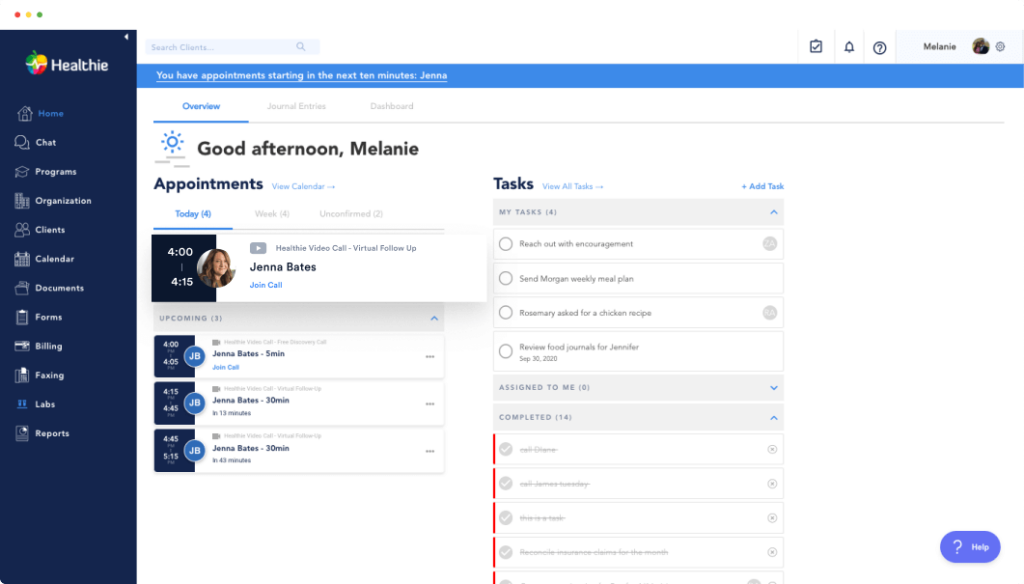
- Charting flexibility: Confirm whether the system supports your preferred documentation formats (SOAP and non-SOAP), allows template customization, and lets you integrate intake forms directly into the patient chart.
- Lab and e-prescribing integrations: Prioritize platforms with bi-directional lab communication that automatically populates results into the patient chart, rather than one-way result pulls that require manual entry.
- HIPAA compliance and data security: Verify that any system you consider meets current HIPAA standards, supports role-based access control, audit trail capabilities, and end-to-end encryption for protected health information.
- Patient portal functionality: A built-in EMR patient portal should support digital intake forms, secure provider messaging, appointment scheduling, and access to medical records—not just serve as a static information page.
- Total cost of ownership: License fees are only part of the picture—factor in implementation costs, staff training, interface setup, and ongoing support contracts before committing to a platform.
Step-by-Step Guide to Using EMR Software
Getting started with any type of EMR software means more than just logging in—it’s about building a foundation for reliable, patient-centered care. Here’s how I set up and use these tools for smooth, day-to-day practice operations:

1. Plan Data Migration From Existing Records
Data migration is the foundation of a successful EMR setup—skip the planning here and you'll spend weeks fixing misplaced records after go-live. I'd start by auditing your existing data to identify duplicates, outdated entries, and gaps before anything moves. Determine exactly which records need to be migrated—including active patients, historical data, and archived records—and minimize scope to reduce exposure risk. For example, a small practice transitioning from paper charts may choose to migrate only active patient records electronically and scan legacy files separately rather than attempting a full transfer at once.
Use these best practices to approach data migration with confidence:
- Audit before you migrate: Catalog all data sources—active patient records, legacy system data, and archived files—before moving anything. I'd prioritize active patients first and decide separately how you'll handle archived records.
- Clean your data first: Legacy data often contains duplicate patient records, missing identifiers, or outdated entries, which must be addressed before or during migration. Skipping this step is one of the most common causes of post-migration headaches.
- Map your data fields carefully: Each EHR vendor defines its own method of storing information—your new system may represent allergies, encounters, or lab results differently than your existing vendor. Confirm how non-matching fields will be handled before the transfer begins.
- Choose the right migration method: There are two main ways to migrate data: manually or electronically. Manual entry involves staff retyping key information into the new EMR—time-consuming, but it may work well for small practices or focused datasets. Electronic migration moves data in bulk, which is faster but requires careful testing to avoid formatting issues or data mismatches.
- Consider a phased approach: Some facilities opt for a phased approach where current census data is migrated immediately and legacy data is added later, in order to increase timeline flexibility. I think this is especially smart for larger practices with years of records in older systems like Epic or Oracle Health (Cerner).
- Test before go-live: Testing involves checking that clinical notes display properly, medication histories are intact, and appointment data appear as expected—ask clinicians and support staff to walk through real-life scenarios using the new system.
- Document everything: Keep a detailed record of the migration process, including a thorough breakdown of every step—this provides transparency and accountability, and documenting all original data sources and formats makes future audits and troubleshooting far easier.
2. Train Staff on System Navigation and Workflows
Even the best EMR setup will underperform if your team doesn't know how to use it. I'd treat training as a structured process, not a one-time walkthrough—different roles need different instruction. A front desk coordinator needs to master scheduling and insurance verification, while a clinical nurse focuses on charting and medication management. Role-based training keeps sessions relevant and reduces the overwhelm that comes with trying to cover every feature at once.
Use this process to build a training program that actually sticks:
- Identify role-based training needs: Map out which features each staff role will use daily before building any training materials. A billing specialist needs to understand coding workflows and claim submission, while a physician's training should prioritize charting, order entry, and clinical decision support tools.
- Leverage vendor-provided resources: Most EMR vendors—including Epic, athenahealth, and Kareo—offer dedicated training environments, video libraries, and sandbox accounts where staff can practice without affecting live patient data. I'd make full use of these before go-live.
- Run workflow-specific simulations: Walk staff through real scenarios they'll encounter on day one—scheduling a new patient, documenting a visit, or processing a prescription refill. Simulations are far more effective than slide decks for building practical confidence.
- Designate internal super users: Identify two or three staff members per department to receive advanced training directly from the vendor. These super users become your first line of internal support when colleagues hit roadblocks post-launch.
- Schedule training close to go-live: I've found that training staff too far in advance leads to knowledge gaps by the time they actually need to use the system. Aim to complete primary training within two weeks of your go-live date.
- Plan for ongoing education: EMR platforms update regularly, and new features often go unused simply because staff weren't notified. Build a recurring process—monthly check-ins or quarterly refreshers—to keep your team current on system changes.
3. Customize Templates for Your Practice's Needs
Out-of-the-box EMR templates are a starting point, not a finished product. Customizing them to reflect your practice's specific workflows, documentation standards, and specialty requirements is what turns a generic system into one your team actually wants to use. A pediatric clinic, for example, needs growth chart fields and vaccination tracking built into every well-child visit note—not a generic adult physical template. I'd prioritize template customization early, before your team develops habits around a suboptimal default setup.
Keep these tips in mind when building and refining your templates:
- Start with vendor defaults: Most EMR systems include dozens of pre-built templates, but customization is what makes the difference. Start with vendor templates as a foundation, then modify them based on your actual practice patterns. Platforms like athenahealth and AdvancedMD ship with specialty-specific starting points that are worth exploring before you build from scratch.
- Align templates to your specialty: Adjust documentation templates so they align with your specific medical specialty—dermatologists might incorporate fields for tracking lesions, while cardiologists would focus on areas for EKG data.
- Keep templates lean: Avoid the temptation to create overly comprehensive templates that include every possible data point. Lean templates focused on clinically relevant information produce better notes faster. Reserve detailed templates for complex conditions, and use streamlined versions for routine encounters.
- Build in smart phrases and macros: Smart phrases—text expansions that insert pre-written content with brief shortcuts—dramatically reduce typing. Create them for common diagnoses, treatment plans, patient instructions, and referral recommendations. I find this alone saves a noticeable amount of documentation time per day.
- Standardize across providers: Standardizing templates ensures consistency in documentation and better data sharing among team members, while reducing the potential for missed charges. I'd discourage each provider from maintaining their own private template library—shared, editable templates are far easier to govern and update.
- Involve clinicians in the design process: The best templates are developed collaboratively with input from all users and refined based on real-world testing. A template built without input from the providers who use it daily will almost always need to be reworked.
- Treat templates as living documents: Templates aren't "set and forget" solutions—they require continuous refinement as clinical practice evolves, regulations change, and new efficiency opportunities emerge. Schedule periodic reviews to keep them aligned with how your practice actually operates.
4. Configure Patient Portal Access and Settings
A patient portal is only valuable if patients actually use it—and that starts with configuring it correctly before anyone logs in. Proper setup determines what patients can see, request, and submit, which directly affects your front desk workload and patient satisfaction. I'd configure access permissions, notification settings, and available features based on your practice's capacity. For example, enabling online appointment requests only makes sense if your scheduling workflow can handle the volume without creating bottlenecks.
Review these dos and don'ts before going live with your patient portal:
| Do | Don't | |
|---|---|---|
| Access permissions | DoDefine exactly which features each patient can access—lab results, appointment requests, secure messaging, billing—based on your practice's capacity to respond. | Don'tDon't enable every available feature by default. Turning on appointment requests before your scheduling workflow is ready creates bottlenecks your front desk will struggle to manage. |
| Security settings | DoEnable multi-factor authentication and ensure your portal runs over HTTPS. Authentication should be both user-friendly and compliant, given the sensitivity of protected health information. Platforms like Epic's MyChart and athenahealth build this in at the system level. | Don'tDon't skip identity verification steps in the name of simplicity. Security gaps in a patient portal create significant compliance exposure. |
| Mobile access | DoOptimize your portal for mobile use. 57% of patients used a smartphone app to view their health records in 2024, so a mobile-unfriendly portal is a real adoption barrier. | Don'tDon't assume a desktop-only setup will meet patient expectations. Most leading EMR portals—including Epic's MyChart app and the athenahealth app—offer dedicated mobile experiences worth enabling. |
| Staff authorization | DoAssign staff portal permissions deliberately. I'd recommend limiting which team members appear as messageable contacts in the portal to avoid overwhelming clinical staff with unmanaged inbox volume. | Don'tDon't give all staff members portal messaging access by default. Unmanaged message threads create liability and documentation gaps if they go unacknowledged. |
| Patient onboarding | DoWalk patients through portal registration at check-in and send follow-up instructions by email. Interventions that used one-on-one patient training were associated with the highest portal use. | Don'tDon't assume patients will self-enroll without prompting. Despite 90% of health care systems offering patient portals, only 15% to 30% of patients actually use them. |
| Notification settings | DoConfigure automated reminders for appointments, test results, and prescription refills based on what your team can support. | Don'tDon't over-notify. Too many alerts train patients to ignore portal messages—or worse, to call your office for every notification they receive. |
5. Integrate With Billing and Insurance Systems
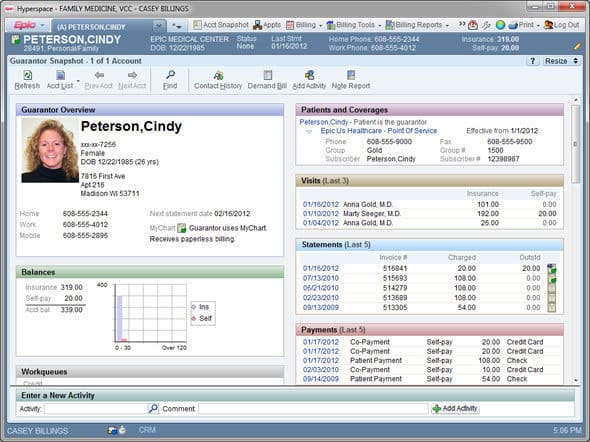
Billing integration is where clinical documentation meets revenue—and gaps here are expensive. Connecting your EMR to your billing and insurance systems ensures that diagnoses, procedures, and visit data flow directly into claims without manual re-entry. I'd treat this integration as a clinical and administrative priority, not just an IT task. A misconfigured billing integration can cause claim denials, delayed reimbursements, and compliance issues that take months to untangle if they aren't caught early.
Use these best practices to set up a billing integration that reduces claim errors and speeds up reimbursement:
- Automate charge capture: Charges from clinical encounters documented in your EMR can automatically be captured and sent to the billing platform. I'd prioritize this over manual charge entry—fragmented workflows that force staff into manual data entry invite human errors that can cost your practice dearly.
- Enable real-time eligibility verification: Verifying insurance eligibility before every visit is one of the most effective ways to reduce claim denial rates. Verify at least 72 hours before the initial visit and re-verify for returning patients before each appointment, since insurance policies can change frequently—even monthly. Most major EMR platforms handle this natively: Epic's practice management module sends eligibility inquiries for scheduled patients and displays results in registration workflows, while athenahealth includes eligibility verification in its revenue cycle management.
- Use claim scrubbing tools: Claims scrubbing software validates every claim against payer-specific rules before submission. Practices using scrubbing tools consistently achieve first-pass acceptance rates of 92–95%, compared to the 78–82% industry average for those relying on manual review.
- Map data fields between systems carefully: The clinical notes and data in your EMR are the direct source material for creating claims—every service you bill must be justified by the clinical documentation. Without that connection, critical data gets lost in translation, leading to billing errors, claim denials, and delayed payments.
- Track key revenue cycle metrics: After integration goes live, monitor performance consistently. Continuously track key metrics like claim submission speed, denial rates, and staff efficiency—this data validates the integration's success and identifies areas for further optimization. I'd also watch days in accounts receivable closely. Integrated EMR-billing systems can improve clean claim rates to 95–98% and reduce days in accounts receivable to under 35 days.
- Set measurable goals upfront: Vague targets won't move the needle. Define specific, quantifiable goals—such as reducing claim denial rates by 15% or decreasing the average time from service to claim submission by 48 hours.
- Plan for a stabilization window: Don't expect perfect performance immediately after go-live. A 90-day optimization window post-go-live is a reasonable expectation for billing performance to stabilize. Use that time to identify configuration gaps before they become costly patterns.
- Address denied claims quickly: Industry claim denial rates range from 6–13%, yet 90% of denials are preventable and 65% of denied claims are never resubmitted. Build a structured process for categorizing and reworking denials—leaving them unaddressed is one of the most common sources of lost revenue in practices I've seen.
6. Establish Data Backup and Security Protocols
Patient data is your practice's most sensitive asset—and one of its most targeted. Establishing clear backup and security protocols protects against data loss, ransomware attacks, and HIPAA violations that can carry penalties in the millions. I'd approach this step as foundational infrastructure, not an afterthought. A practice that loses access to patient records—even temporarily—faces real clinical risk. Configure automated backups, define access controls, and document your security policies before your system goes live.
Follow these protocols to protect patient data and keep your practice compliant:Follow these protocols to protect patient data and keep your practice compliant:
- Automate your backups: HIPAA mandates secure data storage with regular backups to prevent data loss. Configure automated, scheduled backups for all systems that store patient records—don't rely on manual processes that depend on someone remembering to run them. I'd also confirm your EMR vendor's backup frequency and verify that your own backup schedule fills any gaps.
- Encrypt data at rest and in transit: Healthcare buyers should expect encryption such as AES-256 or an equivalent standard for stored data, encrypted backups, and secure network transmission over TLS. Verify that your EMR platform meets this standard out of the box, and confirm that backups are encrypted with the same rigor as your live environment.
- Implement role-based access controls: Not every staff member needs access to all patient information. Role-Based Access Control (RBAC) restricts access based on the user's job role. A front desk coordinator doesn't need access to clinical notes. Map access levels to job functions deliberately, and review them whenever a staff member changes roles or leaves.
- Enable audit trails: Keeping track of who accessed patient data, when, and why is vital for both security and compliance. Every change made to patient records should be traceable, making it easier to investigate potential breaches. Audit trails aren't just helpful for compliance—they ensure transparency within your practice and deter potential internal misuse. Most major EMR platforms, including Epic and Oracle Health, log this activity natively.
- Require multi-factor authentication: Every user with access to systems containing ePHI should have a unique identity. Shared administrative accounts should be avoided because they make it difficult to prove who accessed or changed data. I'd treat MFA as non-negotiable for any role with access to the EMR—especially remote access.
- Test your disaster recovery plan: EMRs should offer redundant storage and disaster recovery plans, but having a plan isn't enough. Run tabletop exercises and actual restore tests at least annually to confirm you can recover data within an acceptable timeframe. A backup that's never been tested is a backup you can't rely on.
- Understand the threat landscape: Healthcare is the top target for ransomware attackers, accounting for 17% of ransomware attacks across all industries. 458 ransomware events were tracked in the healthcare sector in 2024 alone. The average cost of a data breach in healthcare reached $9.8 million in 2024. The threat is real and growing—these protocols aren't administrative overhead, they're clinical risk management.
- Sign a Business Associate Agreement with your vendor: You must ensure that your EMR vendor signs a Business Associate Agreement (BAA) and accepts the responsibility to protect patient data and comply with HIPAA guidelines. This is a legal requirement, not a formality. Don't go live with any vendor—your EMR, your backup provider, or your cloud hosting service—without a signed BAA in place.
7. Monitor System Performance and Gather Staff Feedback
Going live with your EMR is a milestone, not a finish line. Ongoing monitoring of system performance and regular staff feedback collection are what separate practices that get lasting value from their EMR from those that plateau after implementation. I'd build a rhythm of structured check-ins and performance reviews into your operations from day one. Slow load times, documentation bottlenecks, and workflow friction rarely resolve themselves—they need to be surfaced, tracked, and addressed systematically.
Keep these best practices in mind as you build your monitoring and feedback process:
- Track technical performance metrics: Monitor system uptime, page load times, and login response times on a regular basis. Most enterprise EMR platforms—including Epic and Oracle Health—offer built-in dashboards that surface these metrics. I'd designate someone on your team to review them weekly rather than waiting for a slowdown to prompt investigation.
- Measure clinical efficiency indicators: Technical uptime alone doesn't tell the full story. Track documentation time per encounter, time-to-order completion, and the number of clicks required for common workflows. These metrics reveal friction that system dashboards won't show you—and they're often where the biggest efficiency gains are hiding.
- Survey staff regularly: Structured feedback from clinicians and administrative staff is one of the most reliable signals you have. Short, targeted surveys—sent monthly or quarterly—give you insight into pain points that aren't visible in performance data. Ask specific questions about documentation speed, workflow clarity, and feature gaps rather than vague satisfaction ratings.
- Create a formal feedback channel: Staff need a clear, low-friction way to flag issues in real time—not just during scheduled reviews. A shared intake log, a dedicated Slack channel, or a simple ticketing system works well. I've found that informal feedback shared verbally in hallways rarely makes it into a system where it can be acted on.
- Hold regular optimization reviews: Schedule quarterly reviews that bring together clinical leads, administrative staff, and your IT or EMR administrator. Use these sessions to assess what's working, prioritize fixes, and plan configuration updates. Ad hoc troubleshooting without structured reviews tends to address symptoms rather than root causes.
- Benchmark against industry standards: Your internal metrics are more meaningful when compared against external benchmarks. For context, top-performing practices achieve EMR system uptime of 99.9%, and leading organizations maintain documentation times of under eight minutes per encounter. If your numbers fall significantly outside these ranges, that's a signal worth investigating.
- Act on feedback visibly: Staff stop submitting feedback when they don't see it lead to change. When a reported issue gets resolved, communicate that back to the team—even briefly. Closing the feedback loop builds trust and keeps your monitoring process functioning as intended.
- Involve your vendor in performance reviews: Your EMR vendor should be a partner in ongoing optimization, not just a support desk. Most major vendors offer customer success resources or optimization programs—athenahealth's customer success teams and Epic's ongoing training resources are examples worth tapping. If your practice's performance metrics are consistently below target, escalate that conversation with your vendor directly.
Common Challenges of Using EMR Software (and How to Address Them)
Even well-implemented EMR systems create friction—and knowing where problems tend to surface puts you in a better position to fix them before they affect care delivery or staff morale. Use this table to identify the most common EMR challenges and how to address them head-on:
| Problem | Solution |
|---|---|
| ProblemHigh clinical documentation time | SolutionReduce per-encounter documentation time by enabling specialty-specific templates, voice-to-text dictation, and AI-assisted note generation—features available in platforms like Nuance DAX integrated with Epic or Dragon Medical One integrated with Oracle Health. |
| ProblemLow patient portal adoption | SolutionAssign a staff member to walk every new patient through portal registration at check-in and send a follow-up enrollment link by email within 24 hours of their first visit. |
| ProblemFrequent claim denials post-integration | SolutionRun a full audit of your EMR-to-billing data mapping within 30 days of go-live to identify fields that aren't transferring correctly, and enable claims scrubbing tools before any claim leaves your system. |
| ProblemStaff resistance to new workflows | SolutionAddress resistance by involving reluctant staff in workflow configuration decisions early—clinicians who help design templates and order sets are significantly more likely to adopt them consistently. |
| ProblemInteroperability gaps with outside systems | SolutionConfirm that your EMR vendor supports HL7 FHIR standards and request a documented integration roadmap before signing any contract with a specialist system, lab platform, or referral network. |
| ProblemUnmanaged patient message volume | SolutionConfigure portal messaging with defined response time expectations, assign inbox management to a dedicated care coordinator role, and use automated replies to acknowledge receipt and set patient expectations. |
| ProblemSlow system performance at peak hours | SolutionWork with your vendor to analyze usage patterns and identify whether slowdowns stem from server capacity, local network limitations, or inefficient query loads—then address the root cause rather than the symptom. |
More Articles
Advanced Uses & Maximizing ROI From EMR Software
Most practices use their EMR for documentation and scheduling—and stop there. But the platforms with the highest ROI potential go much further, turning clinical data into strategic insights and operational leverage. Here are the most impactful advanced use cases worth building toward:
- AI-assisted ambient documentation: Platforms like Nuance DAX and Abridge consistently save clinicians one to two hours of documentation time per day. I think this is one of the highest-ROI investments a practice can make—not just because of the time savings, but because it directly reduces clinician burnout. athenahealth's athenaAmbient, launching in 2026, is available at no additional cost to all athenahealth users—a meaningful departure from the typical pricing model for ambient AI tools.
- Predictive analytics and population health management: Epic has utilized AI to automate documentation, patient communications, and scheduling, with notable tools including chart summarization, patient risk scoring, and population health analytics. For practices managing chronic disease panels, this kind of proactive visibility is where EMR data starts generating real clinical value—not just recording what happened, but anticipating what's next.
- AI-powered clinical decision support: AI enhances diagnosis and treatment through risk stratification, predictive modeling, and automated alerts. Machine learning algorithms analyze historical and real-time patient data to identify high-risk cases, predict disease progression, and detect potential drug interactions—supporting faster, more accurate clinical decisions and reducing medical errors. I'd treat this as a patient safety investment as much as an efficiency one.
- Revenue cycle optimization through AI: eClinicalWorks offers users a virtual assistant and AI scribe called Sunoh.ai, predictive healthcare analytics, and intelligent appointment management, with agentic AI solutions to modernize revenue cycle management. For practices with high claim volumes, AI-driven revenue cycle tools can meaningfully improve first-pass acceptance rates and reduce the manual workload on billing staff.
- Automated care gap outreach: Platforms like Innovaccer's Gravity deploy AI agents that execute operational work—prior authorization, care gap outreach, enrollment, and scheduling—with configurable human oversight at every step. From my perspective, this is one of the most underdeveloped opportunities in mid-sized practices—your EMR already has the data to identify patients who've missed preventive screenings or follow-ups, and automation can act on it without requiring staff time.
- Interoperability-driven care coordination: About nine in ten hospitals enabled patient electronic access through APIs in 2026, while seven in ten used standards-based APIs such as FHIR. Practices that invest in full FHIR-based interoperability can connect their EMR to specialist networks, labs, and imaging platforms in ways that eliminate redundant data entry and give clinicians a complete picture of the patient across care settings.
Your EMR Is Only as Good as How You Use It
Getting your EMR setup right is just the beginning—how well it connects to the rest of your revenue cycle determines your bottom line. If you're still evaluating your billing stack, our guide to the best medical billing software breaks down the top platforms to help you find the right fit for your practice.