Key Takeaways
User Types: Primary care providers, specialists, surgery centers, behavioral health, and rehab facilities all commonly use EMR software.
Benefits and Risks: EMR software increases efficiency and accuracy but comes with up-front costs, training needs, and possible data security issues.
Case Study Outcomes: Real-world EMR implementations led to reduced no-shows, faster processes, improved staff retention, and higher patient satisfaction.
EMR vs EHR: Understanding what is an EMR versus an EHR will help you choose a system for single-practice or multi-provider needs.
EMR software is the digital backbone of modern clinical documentation—and choosing the wrong system creates real problems for your team and your patients. From fragmented records to compliance gaps, I've seen how the wrong setup slows care delivery and increases administrative burden. This guide walks you through what EMRs are, how they work, their core features, and what to look for when evaluating options.
What Is EMR Software?
EMR software is a digital platform that manages, stores, and organizes patient medical records within a single practice or clinic. It replaces paper charts and manual processes with electronic workflows, supporting tasks like appointment scheduling, clinical documentation, and e-prescribing. These systems make patient data accessible to authorized staff, help safeguard information privacy, and support compliance with industry standards. EMR software lays the groundwork for more coordinated, accurate, and efficient healthcare delivery.
Examples of EMR Software
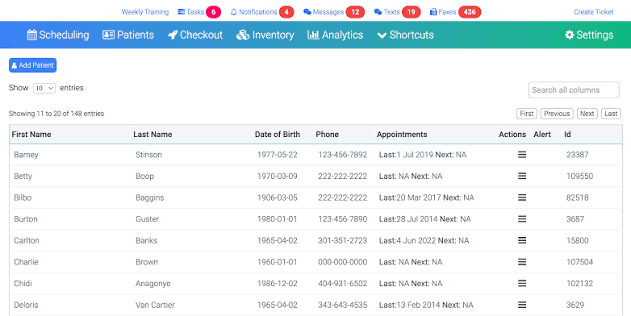
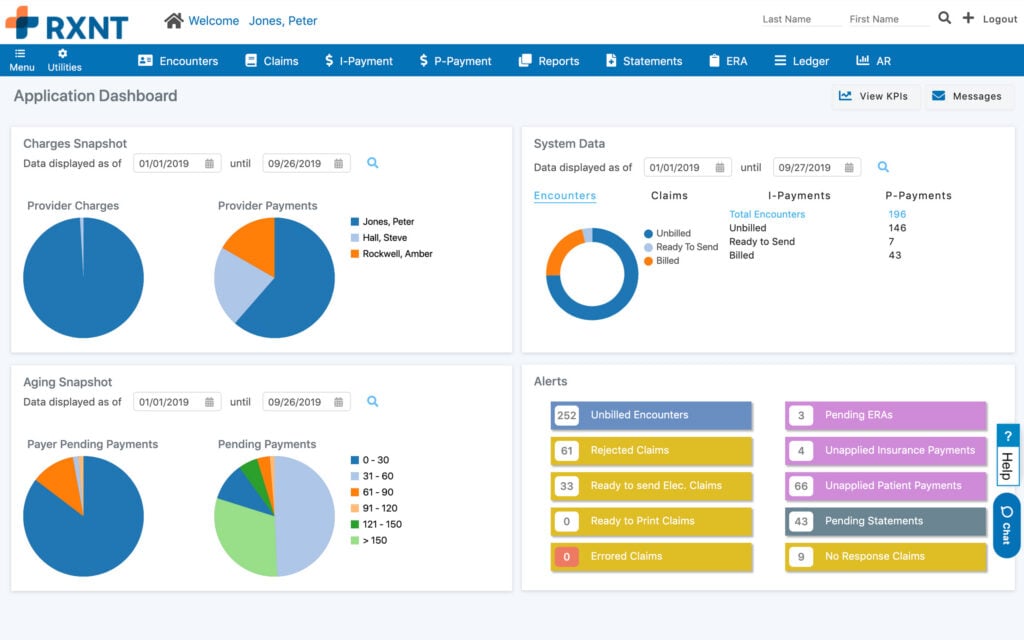
Here are a few visual examples of EMR software interfaces to give you a sense of what these systems look like in practice:
Top EMR Software to Consider
Here's my shortlist of the best EMR software solutions:

Who Uses EMR Software?
You’ll typically find EMR software used by these types of healthcare teams and organizations:
- Primary care clinics: Used for managing patient charts, visit notes, and preventive care reminders.
- Specialty practices: Supports documentation, treatment planning, and follow-up for focused areas like cardiology or pediatrics.
- Outpatient surgery centers: Manages pre-op checklists, operative reports, and recovery documentation.
- Behavioral health providers: Tracks therapy notes, medication management, and treatment outcomes.
- Rehabilitation facilities: Records physical therapy progress, care plans, and discharge information.
Key EMR Software Benefits & Potential Business Impacts
EMR software helps your practice work faster, reduce documentation errors, meet compliance standards, and capture billing opportunities you might otherwise miss. While these systems can be a significant investment and come with data security risks, the right EMR often pays off in improved productivity and fewer costly mistakes.
Use this table to understand the tradeoffs of EMR software, including how its benefits stack up against some of the most common risks:
| Benefits | Risks |
|---|---|
| BenefitsFaster access to patient records | RisksHigh initial implementation cost |
| BenefitsFewer documentation errors | RisksPotential for data breaches |
| BenefitsEasier regulatory compliance | RisksWorkflow disruption during rollout |
| BenefitsImproved billing and coding accuracy | RisksStaff resistance to change |
| BenefitsEnhanced care coordination | RisksSystem downtime or technical issues |
| BenefitsReduced paperwork and storage needs | RisksVendor lock-in with long-term contracts |
| BenefitsTrackable audit trails | RisksTraining requirements for all staff |
EMR Software Case Studies
These case studies highlight how organizations transitioned from paper records or legacy systems to EMR software, showing clear changes in workflow and outcomes. Reviewing real-world results can help you picture what implementation might look like for your own practice.
Case Study: Small Primary Care Practice's Implementation of athenahealth + Curogram
A small primary care practice with three providers, around 8,000 active patients, and a primary challenge of manual appointment entry across two disconnected systems chose to integrate Curogram with athenahealth. The three-week setup involved mapping existing workflows, connecting both systems, and hands-on staff training using real patient scenarios before go-live.
Here are the results of this primary care practice's implementation of EMR software:
- No-show rate reduction: No-shows dropped by 35% after automated text reminders replaced manual phone calls.
- Staff time savings: The practice saved 12 staff hours per week previously spent on manual data entry and phone reminders.
- Fast ROI: The integration paid for itself within two months of going live.
- Reduced same-day cancellations: Patients who received day-before texts were more likely to reschedule in advance, helping the office fill open slots.
- Improved staff retention: Job satisfaction improved enough that two key front desk team members who had considered leaving chose to stay.
Case Study: Multi-Location Cardiology Group's Implementation of eClinicalWorks + Curogram
A cardiology group with 15 providers across six locations and 25,000 patients struggled with inconsistent patient communication across sites. They integrated Curogram with eClinicalWorks using a phased rollout over six weeks, starting at the highest-volume location before expanding to the remaining five offices.
Here are the results of this cardiology group's implementation of EMR software:
- Missed appointment reduction: Missed appointments dropped by 40% across all six locations.
- Patient satisfaction improvement: The group's Net Promoter Score increased by 22 points after implementation.
- Unified communication workflow: All six locations moved to a single shared communication process, cutting confusion between offices.
- Organization-wide outreach: Campaign coordination, like flu shot reminders, went from requiring dozens of phone calls and spreadsheets to running from a single dashboard.
- Stronger referral network: Referring physicians noticed the improved patient experience and continued sending more patients to the group.
Core Features & Capabilities of EMR Software
Expect these features in EMR software that matter most to medical practice managers:
- Electronic charting: Lets providers document visits, update notes, and manage histories in one digital record.
- Scheduling and appointment management: Helps coordinate staff, providers, and patient visits with built-in reminders and confirmations.
- e-Prescribing: Sends prescriptions directly to pharmacies, tracks renewals, and checks for possible drug interactions.
- Billing and coding tools: Links clinical documents to claims, ensures correct coding, and helps decrease denied claims.
- Document management: Safely stores labs, imaging, referral letters, and patient-uploaded files for easy retrieval.
- Reporting and analytics: Provides dashboards and reports on clinical outcomes, financial metrics, and compliance items.
- Interoperability: Connects with labs, imaging centers, and other practices to exchange patient information securely.
- Audit trails and security: Tracks user activity and protects patient data to help practices meet privacy regulations.
EMR Software Use Cases: Typical Processes & Workflows
EMR software centralizes clinical and administrative tasks like charting, scheduling, prescription management, and billing into a single platform. By digitizing and connecting these workflows, EMR software helps teams cut down errors, speed up repetitive processes, and make real-time patient information available to everyone involved in care. This coordination supports faster decision-making and lets your team adapt to daily priorities as they come up.
Use this overview to understand how EMR software supports key processes for medical practice managers:
| Process | Description | How Software Helps |
|---|---|---|
| ProcessPatient registration | DescriptionCollects and updates patient demographics, insurance details, and consents. | How Software HelpsAutomates data entry, verifies eligibility, and flags missing information. |
| ProcessClinical documentation | DescriptionRecords medical histories, exam notes, diagnoses, and treatment plans. | How Software HelpsProvides templates, voice dictation, and coding prompts to reduce errors and save time. |
| ProcessAppointment scheduling | DescriptionBooks patient visits, manages calendars, and coordinates provider availability. | How Software HelpsUses online booking, automated reminders, and waitlist management to cut no-shows and overbooking. |
| ProcessMedical billing and claims | DescriptionPrepares, submits, and tracks insurance claims and patient bills. | How Software HelpsLinks encounter notes to billing codes and sends claims directly to payers for faster reimbursement. |
| ProcessResults and referral management | DescriptionTracks lab results, imaging, and referral notes from outside providers. | How Software HelpsAlerts staff to new results, files documents to charts, and automates provider communication. |
More Articles
Types of EMR Software & Similar Tools
Understanding how EMR software fits within the broader landscape of healthcare IT tools helps you make smarter purchasing decisions and avoid investing in overlapping systems:
| Type | Differentiator |
|---|---|
| TypeElectronic Health Records (EHR) | DifferentiatorDesigned for cross-provider data sharing beyond a single practice |
| TypePractice Management Software | DifferentiatorFocuses on administrative and financial operations without clinical documentation |
| TypePatient Portal Software | DifferentiatorPatient-facing tool for accessing records, messaging providers, and booking appointments |
| TypeTelemedicine Platforms | DifferentiatorBuilt for remote video consultations rather than in-person documentation |
| TypeMedical Billing Software | DifferentiatorSpecializes in claims processing and revenue cycle management without clinical features |
EMR vs. EHR Software
EMR and EHR are often used interchangeably, but they're not quite the same thing. An EMR is a digital version of a patient's chart within a single practice. An EHR is built to share patient data across multiple providers, specialists, and health systems. If your practice regularly coordinates care with outside providers, an EHR is the more functional choice.
Ready to Find the Right EMR for Your Practice?
Now that you understand what EMR software does and how it supports key clinical and administrative workflows, the next step is identifying which type fits your practice. Explore the types of EMR software available so you can narrow your options with confidence.