

EMR billing software lets you manage patient medical records and billing workflows in one system, helping your team keep claims accurate and revenue predictable. If you’re searching for the best EMR billing software, you need solutions that adapt to changing compliance standards, make documentation less tedious, and ease staff workload—without slowing down patient care.
With so many choices, picking the right fit can feel overwhelming. This guide breaks down top options with real-world insights, so you know exactly which platforms offer the features, reliability, and flexibility your practice needs.
Why Trust Our Software Recommendations
6,700+
Reviews
20
Industry experts
16+
Evaluation factors
14
Years
Our team has been testing and reviewing software since 2012. As medical practice leaders ourselves, we know how difficult—and important—it is to choose the right software.
For this guide, we evaluated tools using hands-on testing and independent research, scoring tools using our selection criteria.
Our reviews reflect our human editorial judgment, not a sales pitch.
EMR Billing Software Comparison Table
This comparison table summarizes pricing details for my EMR billing software.
| Tool | Best For | Trial Info | Price | ||
|---|---|---|---|---|---|
| 1 | Best for specialty-driven workflow customization | Free demo available | Pricing upon request | Website | |
| 2 | Best for rural and community practices | Free demo available | Pricing upon request | Website | |
| 3 | Best for small practice scalability | Not available | Pricing upon request | Website | |
| 4 | Best for easy cloud-based access | Free demo available | From $199/user/month | Website | |
| 5 | Best for specialty-specific billing modules | Free demo available | Pricing upon request | Website | |
| 6 | Best for clinical-first documentation tools | Free demo available | Pricing upon request | Website | |
| 7 | Best for all-in-one practice management | Free demo available | Pricing upon request | Website | |
| 8 | Best for integrated mobile access | Free demo available | Pricing upon request | Website | |
| 9 | Best customizable workflow automation | Free demo available | Pricing upon request | Website | |
| 10 | Best for automated claims tracking | Free demo available | Pricing upon request | Website |


Best EMR Billing Software Reviews
Below are my detailed summaries of the best EMR billing software that made it onto my shortlist. My reviews offer a detailed look at the features, pricing, and integrations of each platform to help you find the best one for you.
 Best for specialty-driven workflow customization
- Free demo available
- Pricing upon request
Visit WebsiteCustomer Rating:4.4/5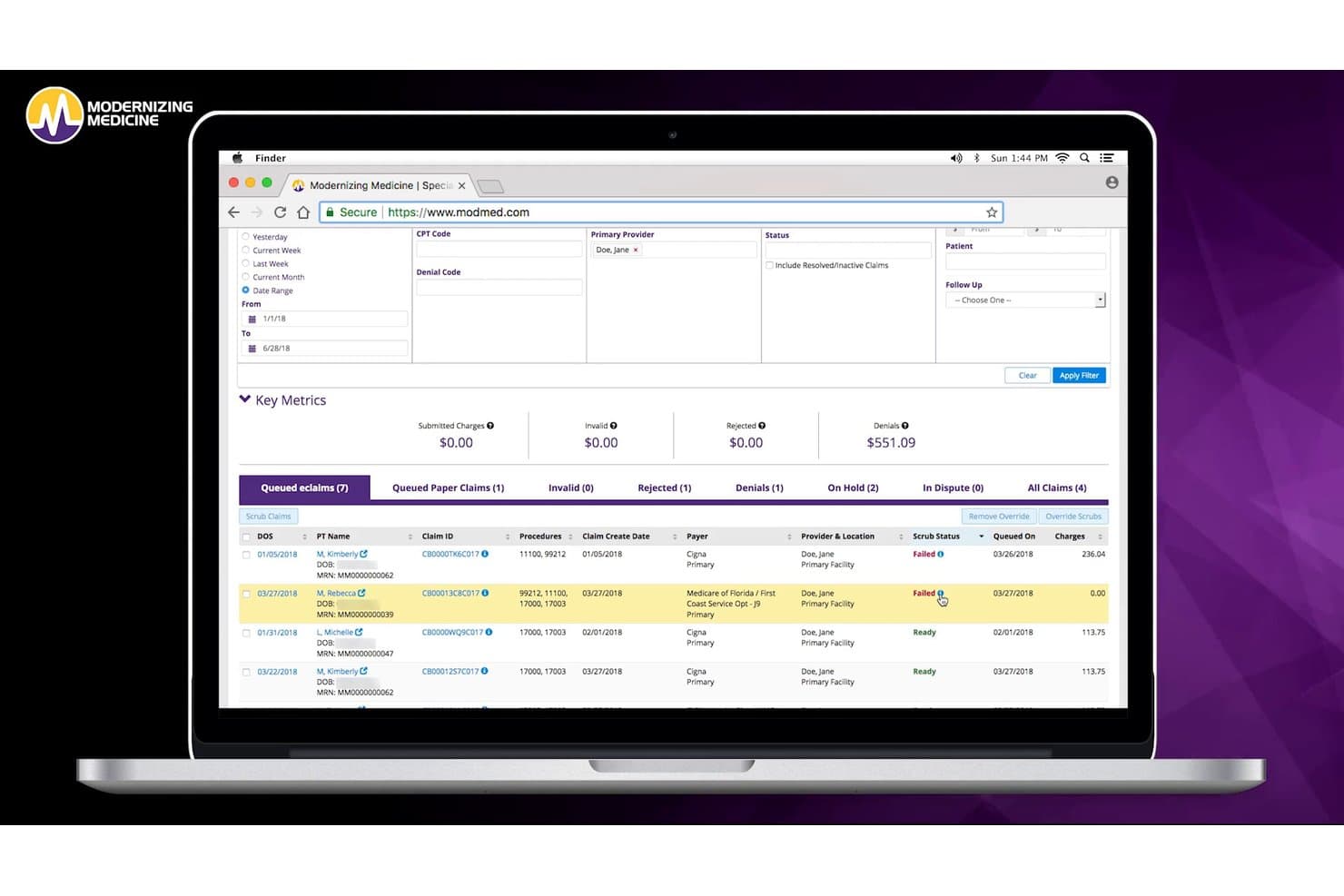
ModMed offers a detailed claims management dashboard with scrub status, key billing metrics, and filterable eclaim queues for streamlined medical billing. ModMed is a specialty-specific EMR and practice management platform that combines clinical documentation, medical coding, claims management, eligibility verification, and revenue cycle management in one integrated system.
Who Is ModMed Best For?
ModMed is purpose-built for physician-owned specialty practices across dermatology, gastroenterology, orthopedics, ophthalmology, and several other specialties.
Why I Picked ModMed
I picked ModMed as one of the best because no other EMR billing platform I've used matches its depth of specialty-specific clinical and coding workflows. The EHR templates are built around each specialty's actual documentation patterns, so a dermatologist and an orthopedic surgeon aren't working from the same generic note structure. ModMed Scribe 2.0 listens to the patient encounter and suggests ICD-10 codes in near real time, then auto-generates an electronic superbill the moment the note is finalized.
ModMed Key Features
- Integrated clearinghouse interface: Submit electronic claims, check real-time eligibility, and process electronic remittance advice without leaving the platform.
- Denial assessment and automated routing: Identify likely claim denials before submission and route issues directly to the right billing team inboxes.
- APPatient mobile app: Let patients complete digital intake forms, schedule appointments, and make payments through a mobile platform.
- Premium analytics dashboard: Access real-time dashboards to monitor financial, operational, and MIPS performance within your practice.
ModMed Integrations
ModMed offers native integrations with Labcorp, Quest Diagnostics, Change Healthcare, Klara, DrFirst, GoodRx, DermLite, CubixxMD, Providerflow, Relatient Dash, Medsender, and DocSpera. An API is available for custom integrations.
Pros and Cons
Pros:
- Electronic superbill generation from visit note
- Real-time denial assessment and claims scrubbing
- Specialty-specific documentation templates for many fields
Cons:
- Occasional under-coding flagged by some users
- Billing support responsiveness can be inconsistent
Learn more about ModMed: Best for rural and community practices
- Free demo available
- Pricing upon request
Visit WebsiteCustomer Rating:4.1/5
Azalea Health combines EHR, documentation, RCM, billing and clearinghouse. Azalea Health is a cloud-based EHR and billing platform that integrates clinical documentation, practice management, RCM billing services, and a native clearinghouse into a single system for ambulatory practices and small hospitals.
Who Is Azalea Health Best For?
Azalea Health is a strong fit for rural health clinics, critical access hospitals, and small multispecialty practices that need integrated EHR and billing without enterprise-level IT infrastructure.
Why I Picked Azalea Health
I've included Azalea Health in my top picks because of how specifically it handles rural health clinic billing, which most general-purpose EMR platforms get wrong. The platform automates CG modifier application for Medicare RHC claims and supports claim splitting and CPT bundling natively, so billers aren't manually correcting those every time. I also like that a clearinghouse is built directly into the platform, removing a vendor dependency that small rural practices often can't absorb.
Azalea Health Key Features
- AI Billing Assistant: Suggests real-time coding and flags issues before claims are submitted.
- Combined Encounters feature: Lets you view and manage multiple non-qualifying services within a 30-day window from a single screen.
- MyPractice mobile app: Supports mobile charge capture, ICD and CPT code lookup, and quick billing submissions.
- Native EHR with specialty templates: Offers customizable charting workflows for ambulatory, hospital, and specialty care settings.
Azalea Health Integrations
Azalea Health offers native integrations with DrFirst, RevSpring, Updox, Signal Health, Health iPASS, Labcorp, and Quest Diagnostics, supports connections to state HIEs, and provides an API for custom integrations.
Pros and Cons
Pros:
- Strong reporting on claims and denials
- Native clearinghouse reduces billing errors
- Rural health clinic and hospital billing logic
Cons:
- Limited specialty templates outside primary care
- Occasional issues with payment posting and ERA
Learn more about Azalea Health: Best for small practice scalability
- Not available
- Pricing upon request
Visit WebsiteCustomer Rating:3.7/5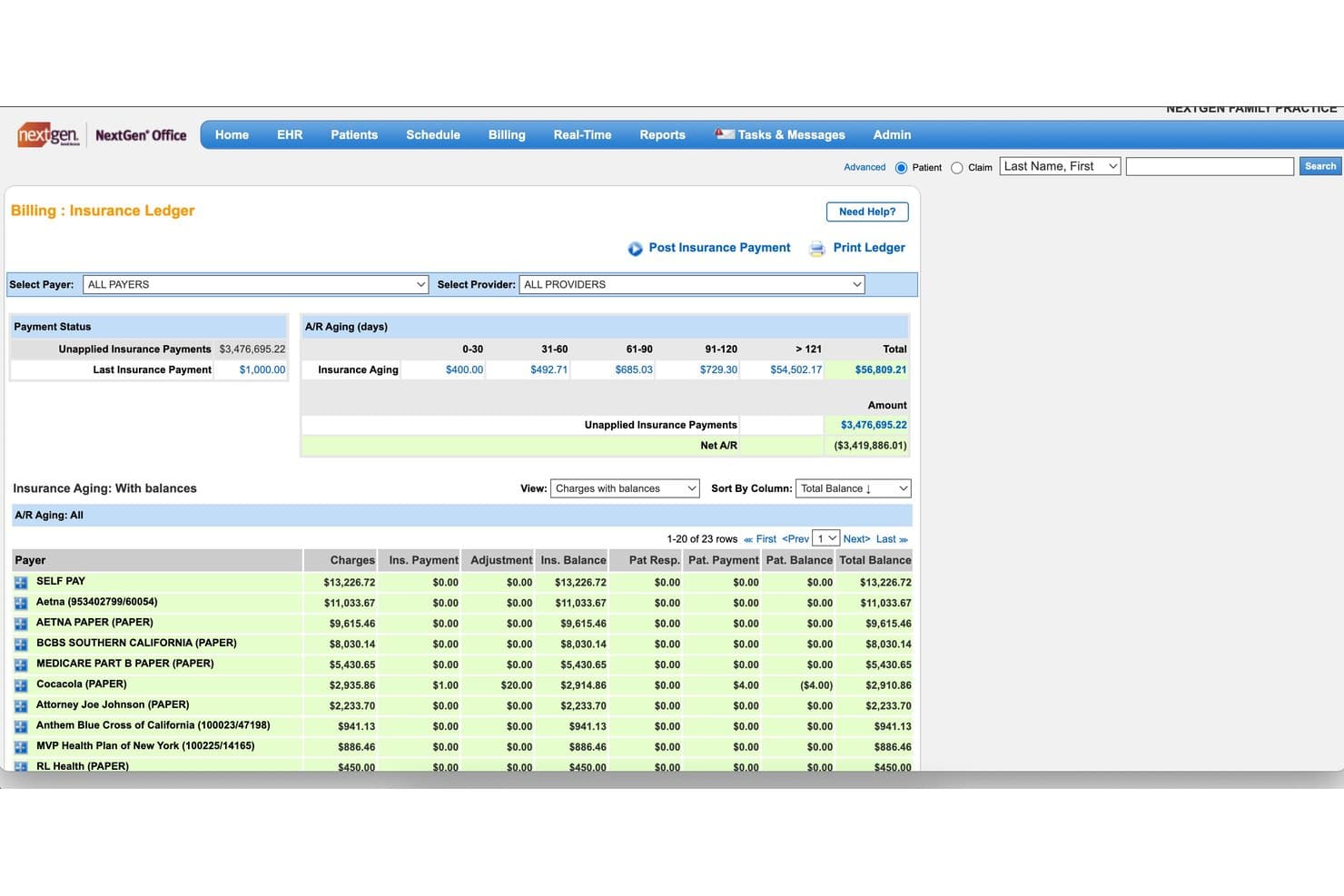
NextGen Office offers a detailed Insurance Ledger billing screen with A/R aging, unapplied payments, and payer-level balance tracking. NextGen Office is a cloud-based EHR and practice management system for small independent practices that integrates clinical documentation, charge capture, clearinghouse claims submission, and real-time eligibility verification.
Who Is NextGen Office Best For?
NextGen Office is built for independent practices with fewer than 10 providers that need a single system for both clinical and billing workflows.
Why I Picked NextGen Office
I picked NextGen Office as one of the best because its built-in clearinghouse handles claim submission, scrubbing, and denial tracking without a third-party middleman. As a practice adds providers or specialties, the specialty-specific templates and ambient AI SOAP notes slot directly into the same billing workflow. I like that the closed-loop encounter-to-claim structure scales without requiring a platform migration.
NextGen Office Key Features
- Patient portal: Patients can request appointments, view statements, and access visit summaries online.
- E-prescribing: Manage prescribing, medication refill requests, and integration with CoverMyMeds directly in chart workflows.
- Real-time eligibility verification: Instantly verify patient insurance coverage before service within the system.
- Electronic remittance auto-posting: Automatically apply insurance payments from ERAs to patient accounts.
NextGen Office Integrations
NextGen Office offers native integrations through its partner marketplace with Labcorp, SamaCare, Inbox Health, Rectangle Health, Rivet Health, LinkMD AI, Commure, Weave, Birdeye, NextPatient, and Clearwave. An API is available for custom integrations.
Pros and Cons
Pros:
- Autoposts insurance payments from ERAs
- Specialty-specific clinical templates for small practices
- Cloud-based with real-time eligibility verification
Cons:
- Support response time can be inconsistent
- Issues with autoposting $0 and takeback payments
Learn more about NextGen Office: Best for easy cloud-based access
- Free demo available
- From $199/user/month
Visit WebsiteCustomer Rating:3.7/5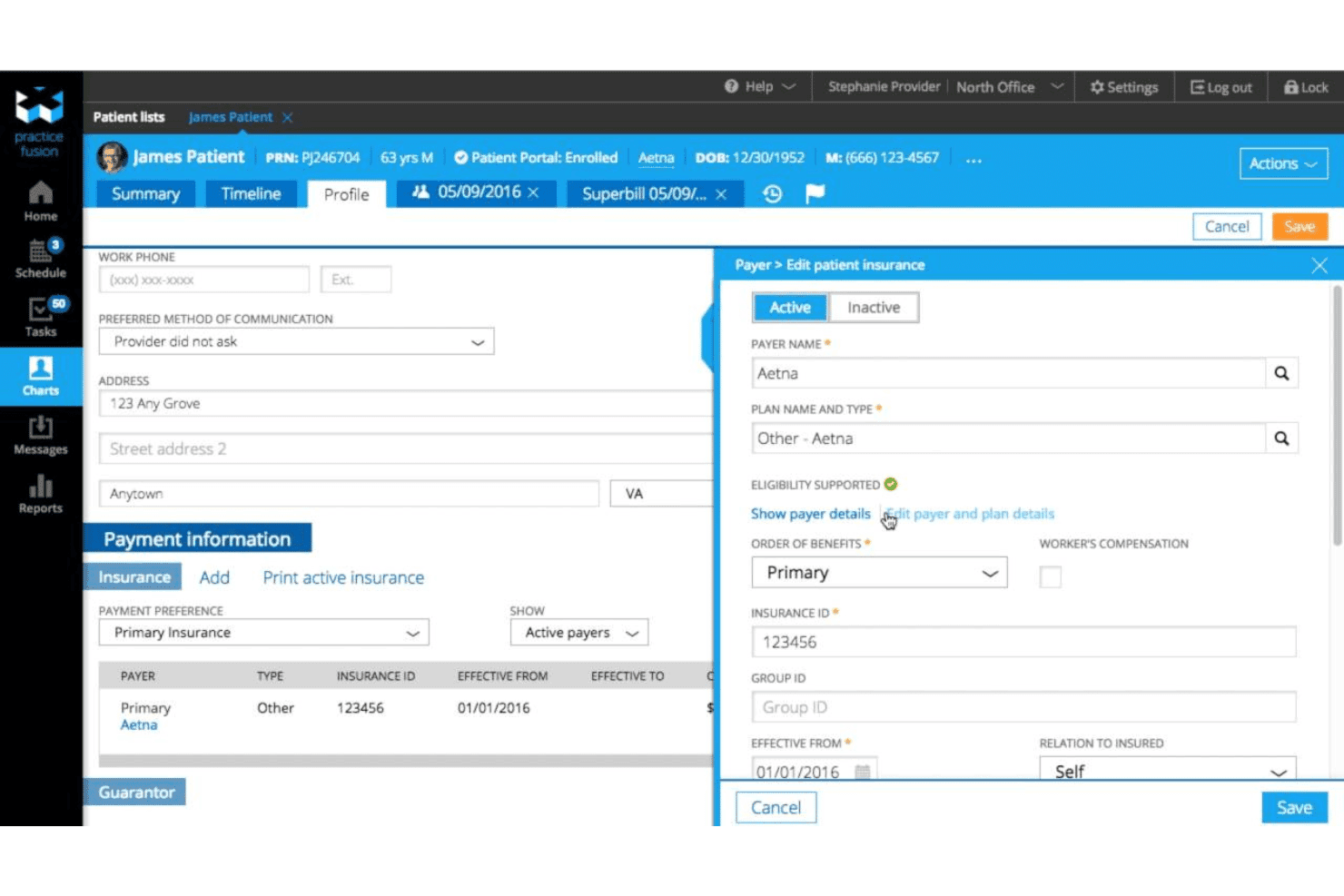
Practice Fusion links EHR charting, e-prescribing, claims, denials and payments. Practice Fusion is a cloud-based EHR platform for independent practices that combines clinical charting, e-prescribing, and integrated billing services including claim scrubbing, denial management, and payment posting.
Who Is Practice Fusion Best For?
Practice Fusion suits small to mid-sized independent practices that want a single platform for both clinical documentation and billing without managing separate systems.
Why I Picked Practice Fusion
Practice Fusion earns its spot on my shortlist because its cloud-based architecture means my team can access patient charts, run claims, and review billing status from any device. I particularly like that EPCS e-prescribing and MIPS quality dashboards are built directly into the platform, so clinical and billing workflows stay connected without extra configuration. The integrated clearinghouse handles claim scrubbing and submission from within the same interface my providers are already charting in.
Practice Fusion Key Features
- Lab and imaging integration: Connects with over 500 lab and imaging centers for seamless order management.
- Patient portal (FollowMyHealth): Offers secure, 24/7 access to personal health records and appointments via web and mobile.
- Denial management dashboard: Displays status and resolution steps for denied or rejected insurance claims.
- Customizable chart templates: Lets clinicians create tailored templates to streamline clinical documentation efficiency.
Practice Fusion Integrations
Practice Fusion offers native integrations with AdvancedMD, Kareo, Updox, and over 500 lab and imaging centers. An API is available for custom integrations.
Pros and Cons
Pros:
- Simple insurance eligibility verification tool
- Direct chart-to-bill workflow integration
- Cloud-based with minimal IT setup required
Cons:
- Support response times can be inconsistent
- Limited configurability for large multi-site practices
Learn more about Practice Fusion: Best for specialty-specific billing modules
- Free demo available
- Pricing upon request
Visit WebsiteCustomer Rating:3.6/5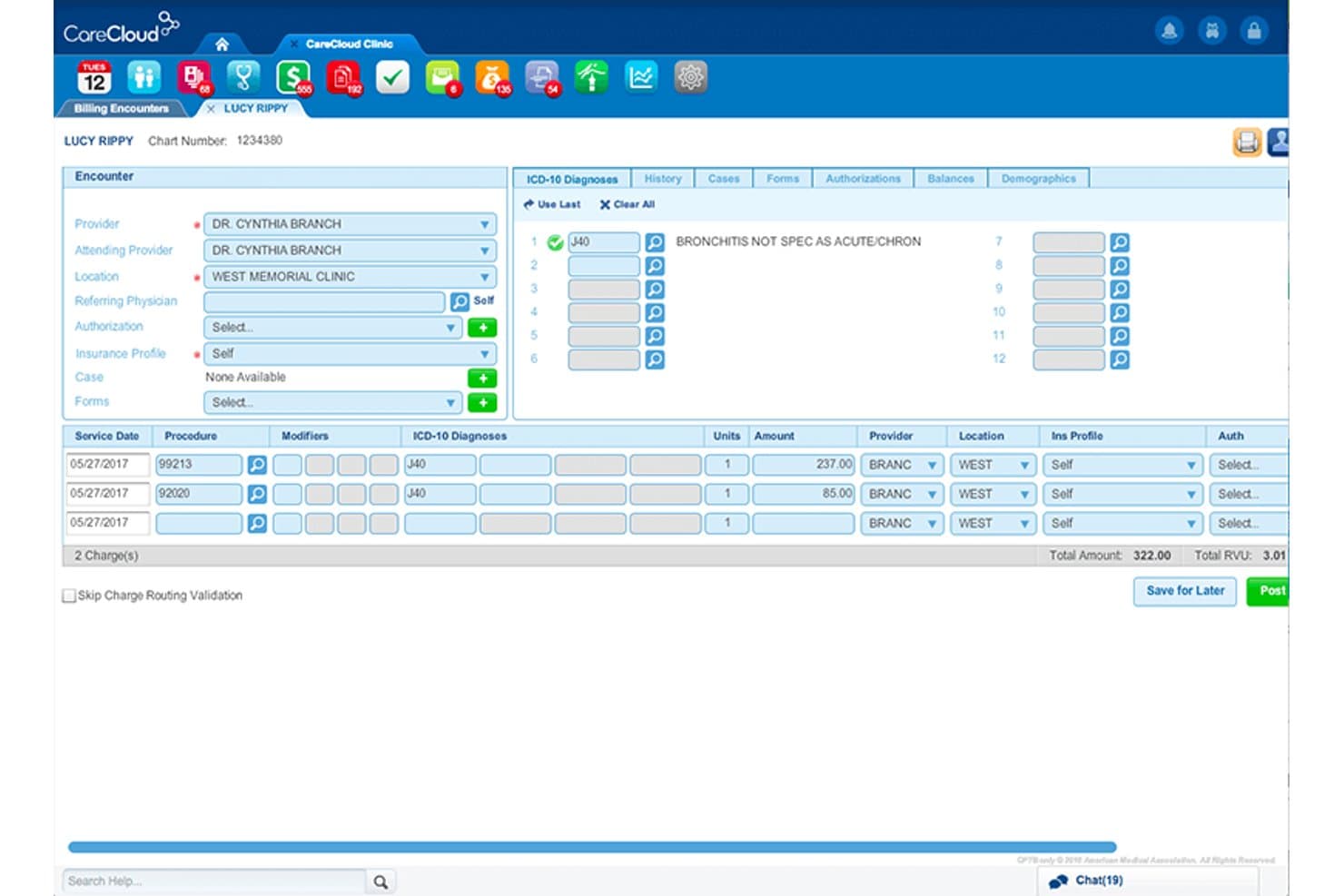
CareCloud offers a detailed billing encounter screen with ICD-10 diagnosis coding, procedure charges, and total amount summary for streamlined EMR billing. CareCloud is a cloud-based EMR and revenue cycle management platform that combines clinical documentation, practice management, and billing workflows—including claim scrubbing, denial management, and ERA processing.
Who Is CareCloud Best For?
CareCloud is a strong fit for specialty practices that need billing workflows and clinical documentation tailored to their specific care setting.
Why I Picked CareCloud
CareCloud earns its spot on my shortlist because of how deeply it tailors billing to specific care settings. The platform supports 70+ specialties, with an AI rule engine that applies payer-specific billing rules and flags coding issues before a claim is submitted. I also like cirrusAI Appeals, which generates customized appeal letters by pulling from the patient's specific claim details and payer denial reasons, rather than relying on generic templates.
CareCloud Key Features
- CareCloud Charts EHR: Provides clinical documentation tools with specialty-specific templates and integrated charting.
- Electronic claims submission: Supports end-to-end claim creation, automated scrubbing, and electronic submission through multiple clearinghouses.
- ERA and EOB auto-posting: Automatically posts electronic remittance advice and explanations of benefits to patient accounts.
- Breeze patient experience platform: Enables digital patient intake, appointment reminders, and online payment collection within the billing workflow.
CareCloud Integrations
CareCloud offers native integrations with Surescripts, EMR Direct, Medline Plus, and Domain Time. An API is also available for custom integrations.
Pros and Cons
Pros:
- Real-time eligibility verification before patient visits
- AI-driven denial prevention and appeals workflow
- Specialty-specific billing templates for 70+ specialties
Cons:
- Long-term contracts required for most customers
- Reports of occasional platform slowdowns or crashes
Learn more about CareCloud: Best for clinical-first documentation tools
- Free demo available
- Pricing upon request
Visit WebsiteCustomer Rating:4.4/5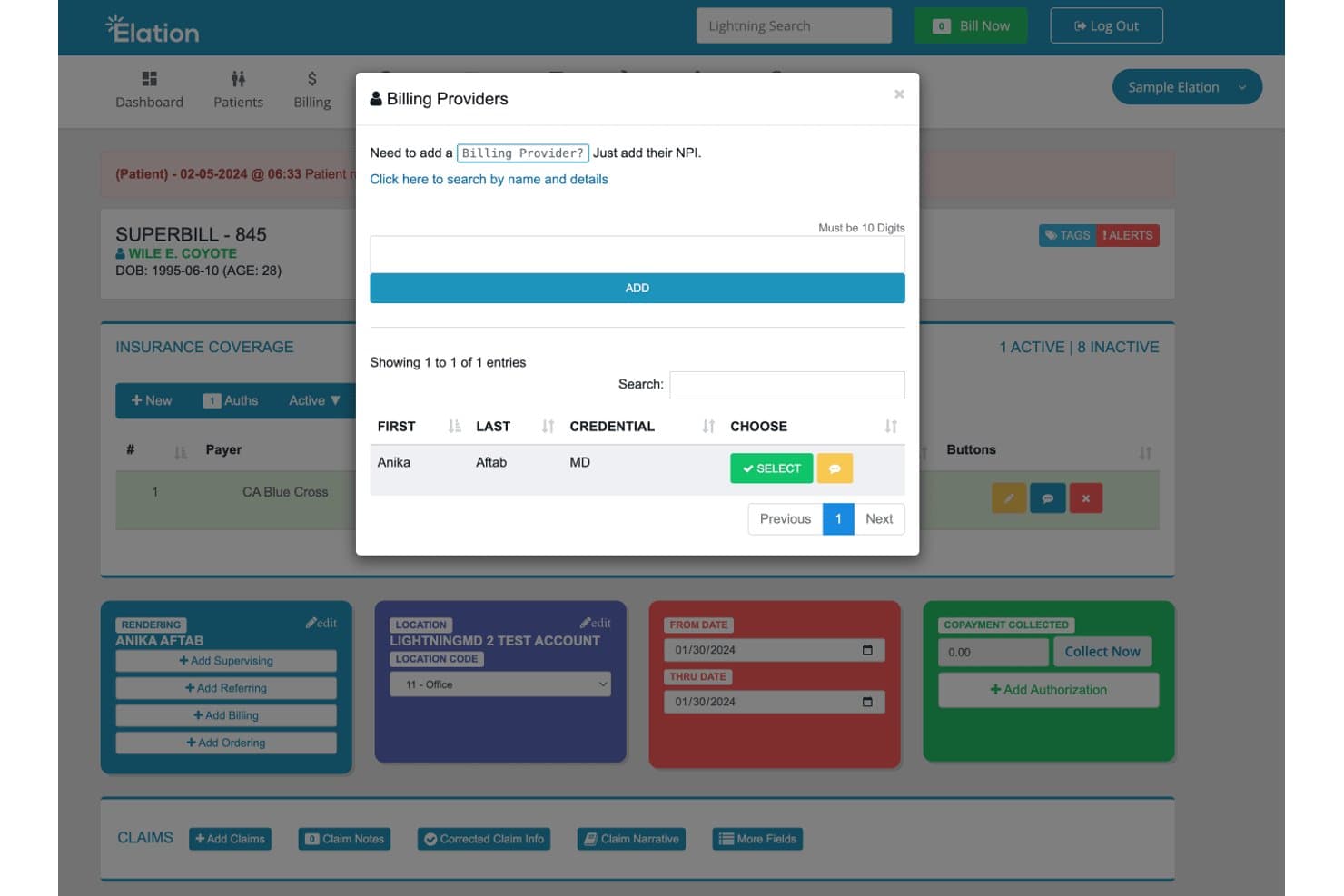
Elation Health offers a Billing Providers modal within its Superbill workflow, allowing users to select or add a billing provider by NPI for claims submission. Elation Health is a cloud-based EHR and medical billing platform built for independent primary care practices, combining clinical charting, AI-assisted coding, claim scrubbing, eligibility verification, and ERA posting in a single integrated system.
Who Is Elation Health Best For?
Elation Health is a strong fit for physicians running small independent or direct primary care practices who need clinical documentation and billing in one place.
Why I Picked Elation Health
Elation Health earns its spot on my shortlist because the billing workflow is built around the clinical note, not the other way around. I particularly like the AI-assisted coding feature, which reads the signed note and chart context to suggest ICD-10, E/M, and quality codes automatically. That means when I sign off on a chart, more than 95% of eligible claims are already prepped for submission through Elation's fast lane, with no manual code entry required.
Elation Health Key Features
- Real-time eligibility verification: Check patient insurance coverage and benefits automatically before visits.
- Electronic remittance posting: Auto-post ERA files and reconcile payments to open claims within the billing module.
- Patient portal with payment collection: Allow patients to view statements and pay balances online through the portal.
- Collaborative billing workflows: Support incident-to-billing and team-based billing tasks in practices with multiple clinicians.
Elation Health Integrations
Elation Health offers native integrations with PracticeSuite, Spruce, AdvancedMD, Candid Health, DeepScribe, Fullscript, RingRx, Suki, Tebra, Updox, and TextExpander. An API is available for custom integrations.
Pros and Cons
Pros:
- Real-time insurance eligibility verification
- AI-assisted coding from clinical notes
- Chart-driven claim workflows tightly integrated
Cons:
- Add-on fees reported for certain features
- Limited support for large multi-specialty groups
Learn more about Elation Health: Best for all-in-one practice management
- Free demo available
- Pricing upon request
Visit WebsiteCustomer Rating:3.9/5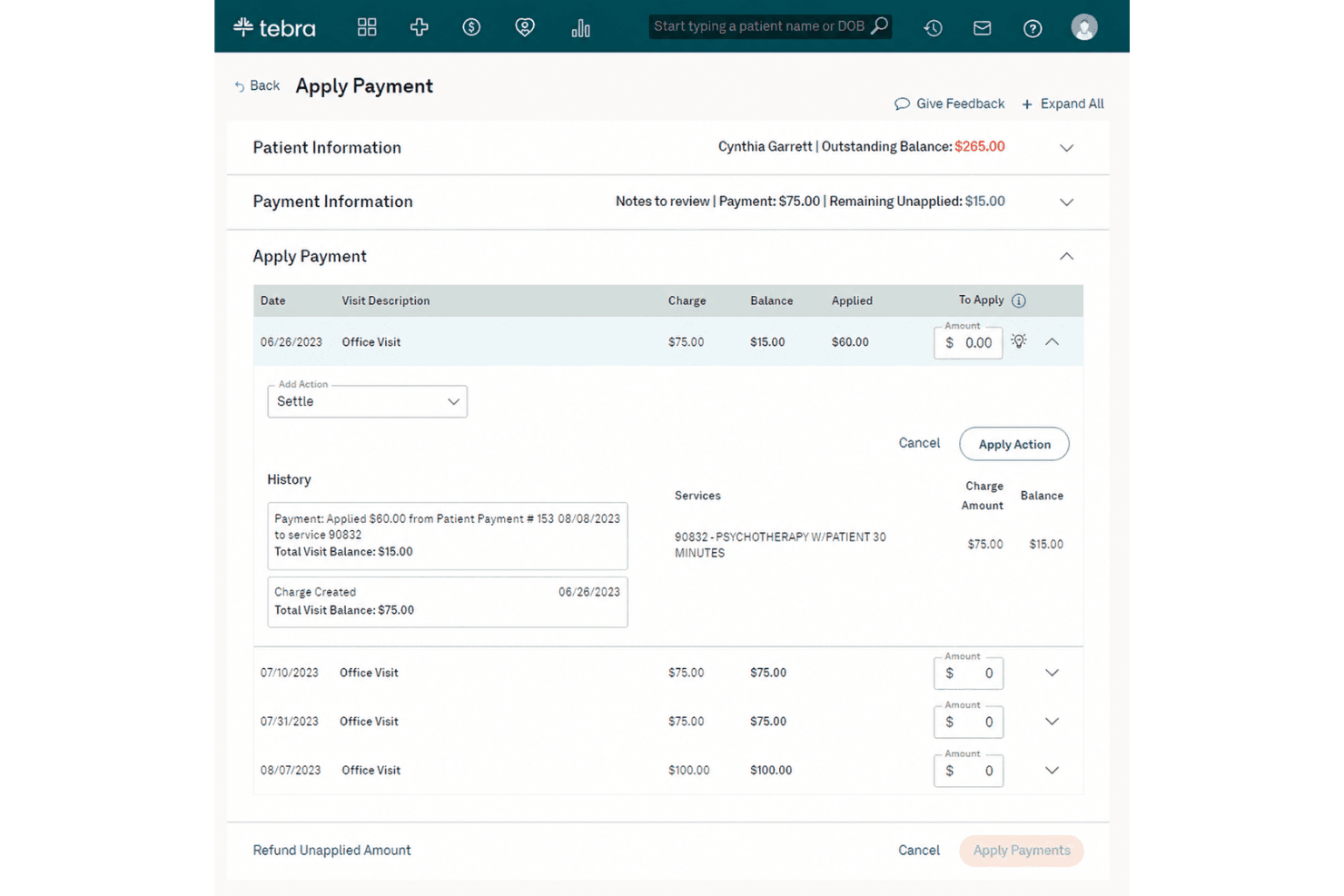
Tebra brings EHR, documentation, billing, charge capture, ERA and payment tools. Tebra is an EHR and practice management platform that combines clinical documentation, insurance billing, charge capture, ERA processing, and patient payment tools in a single system built for independent practices.
Who Is Tebra Best For?
Tebra is a strong fit for small to mid-size independent practices that want to manage clinical workflows and revenue cycle operations without running separate systems.
Why I Picked Tebra
Tebra earns its spot as one of the best on my shortlist because the EHR and billing modules share the same data layer, so a clinical encounter directly generates a billing claim without manual re-entry. I particularly like AI Note Assist, which auto-generates structured notes from patient encounters and keeps billing codes tied to the chart. The ERA auto-posting feature handles payment reconciliation without manual EOB entry, which I find especially useful when processing high claim volumes across multiple payers daily.
Tebra Key Features
- Online patient portal: Patients can access records, appointments, and statements securely from any device.
- Customizable encounter templates: Providers can tailor charting templates for different specialties or visit types.
- Automated appointment reminders: The system sends text, email, or voice reminders to reduce missed visits.
- Eligibility verification: Practice staff can check insurance benefits for patients in real time before appointments.
Tebra Integrations
Tebra offers native integrations with TriZetto for clearinghouse claims, Quest Diagnostics and LabCorp for labs, Jopari for electronic claim attachments, and Fullscript for supplements and labs. An API is available for custom integrations.
Pros and Cons
Pros:
- Patient portal includes online bill pay
- Claims scrubbing reduces error rates
- EHR and billing are fully integrated
Cons:
- Reporting options lack customization
- Claim denial reasons are sometimes unclear
Learn more about Tebra: Best for integrated mobile access
- Free demo available
- Pricing upon request
Visit WebsiteCustomer Rating:3.9/5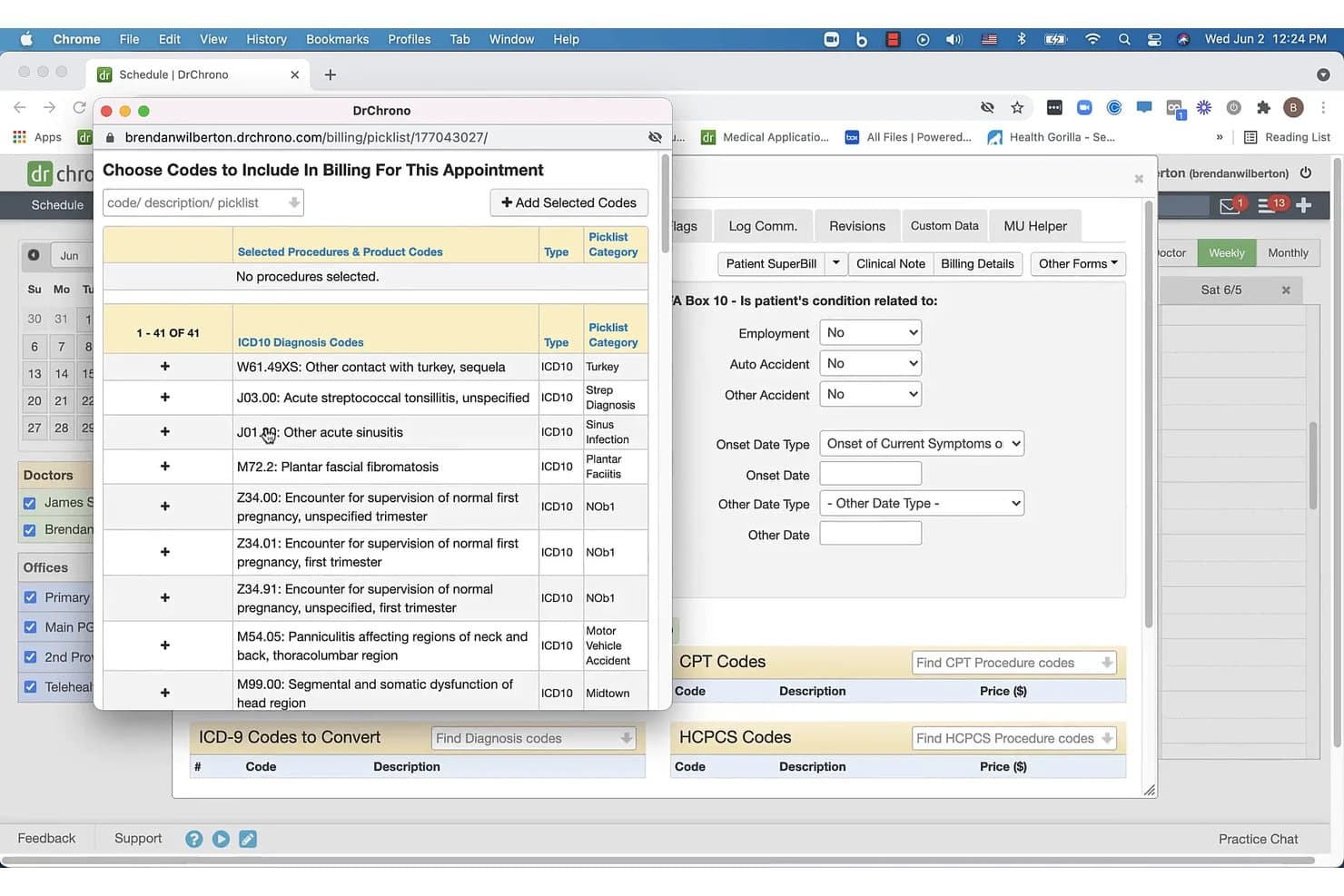
DrChrono offers a billing picklist interface where users can select ICD-10 diagnosis codes and procedure codes to include in appointment billing. DrChrono is a cloud-based EMR and medical billing platform built natively for iOS, combining clinical charting, practice management, revenue cycle management, and electronic claim submission in one system.
Who Is DrChrono Best For?
DrChrono is a strong fit for independent and small-to-mid-sized practices already running on Apple devices across specialties like family medicine, psychiatry, and urgent care.
Why I Picked DrChrono
I picked DrChrono as one of the best because it's the only EMR billing platform built natively for iPad from day one, not retrofitted from a desktop system. When I sign off on a patient chart, the encounter data pushes directly to the billing module with CPT and ICD-10 codes already attached. I can capture charges and review the live claims feed using Apple Pencil-optimized charting, all without leaving the iOS environment.
DrChrono Key Features
- Live claims feed: View claim status, payer details, and billing amounts in real time.
- Customizable clinical templates: Create specialty-specific charting workflows to match different medical disciplines.
- Integrated patient portal: Give patients access to records, appointment scheduling, and secure messaging.
- Electronic prior authorization: Automate insurance prior authorizations directly from the patient chart.
DrChrono Integrations
DrChrono offers over 20 native integrations, including Collectly, ClearGage, Holly, Ambra, Square Point of Sale, Curogram, Box, DeepScribe, and Demandforce. An API is available for custom integrations.
Pros and Cons
Pros:
- Specialty-specific templates for multiple disciplines
- Real-time billing and claims feed visibility
- Native iPad and iPhone clinical charting
Cons:
- Reports of delayed customer support responses
- No Android mobile support
Learn more about DrChrono: Best customizable workflow automation
- Free demo available
- Pricing upon request
Visit WebsiteCustomer Rating:3.6/5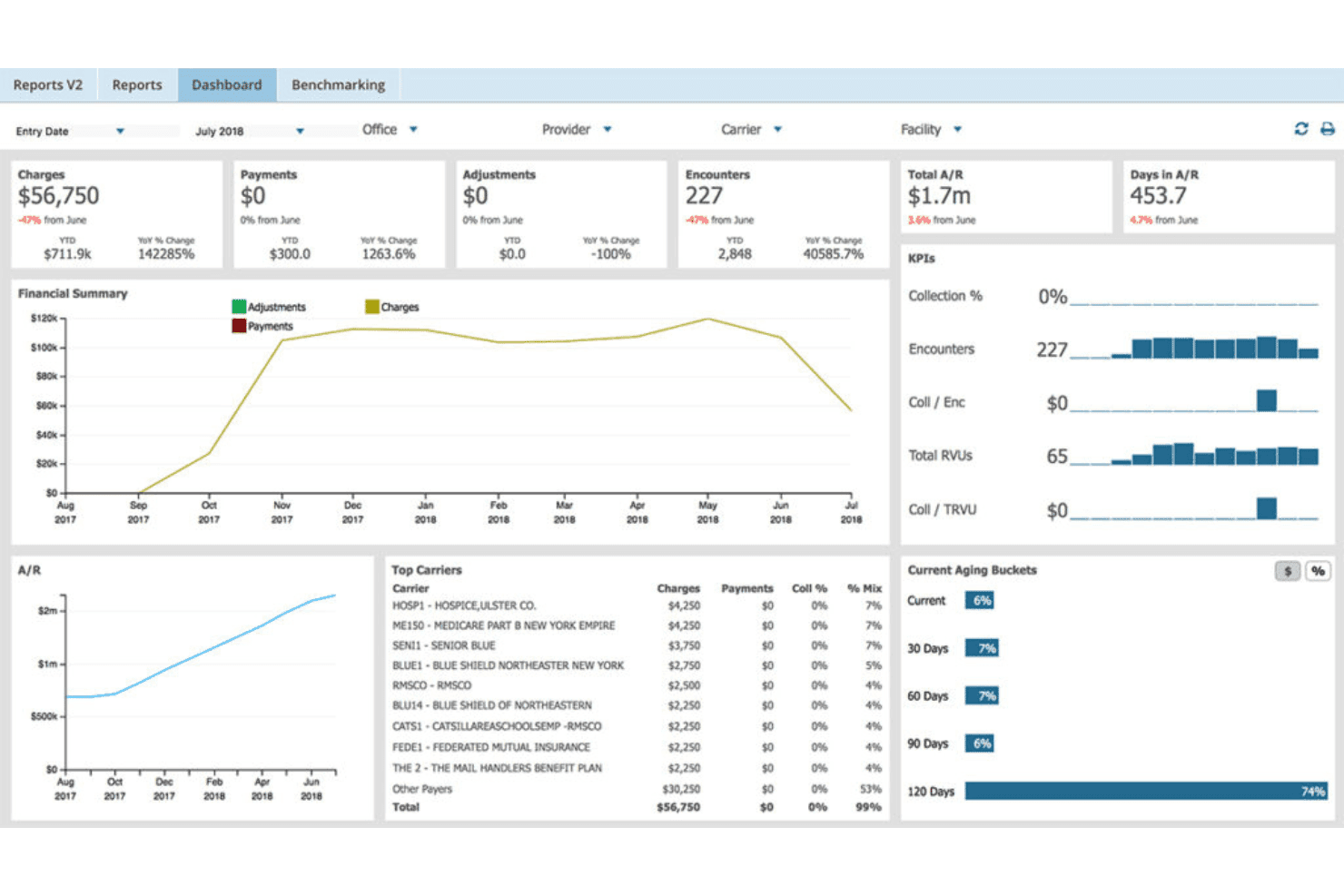
AdvancedMD unites EMR, documentation, billing, claims, eligibility, and RCM. AdvancedMD is a cloud-based EMR and practice management platform that combines clinical documentation, medical billing, claims scrubbing, eligibility verification, and revenue cycle management in a single unified system for independent practices.
Who Is AdvancedMD Best For?
AdvancedMD is a strong fit for independent multi-provider practices and medical billing companies that manage complex revenue cycles across multiple locations or client accounts.
Why I Picked AdvancedMD
I picked AdvancedMD as one of the best because the level of workflow customization goes well beyond what most EMR billing platforms offer. The ClaimInspector scrubbing engine runs nearly 3.5 million edits per claim, and practices can configure it around their specific payer mix and specialty rules. I also like the AdvancedInsight reporting tool, which lets my team build custom reports directly from chart note data we've defined, not just standard financial snapshots.
AdvancedMD Key Features
- AI Insurance card capture: Scans and auto-populates insurance details into patient charts using OCR technology.
- Patient portal: Lets patients access statements, make payments, and communicate securely online.
- Centralized Billing Office (CBO): Supports billing operations across multiple locations or client databases in a single dashboard.
- ERA auto-posting and reconciliation: Automatically posts electronic remittance advice and matches payments to claims.
AdvancedMD Integrations
AdvancedMD offers native integrations through its Partner Marketplace, including Practice Fusion and QuickBooks Enterprise, and has an API available for custom integrations.
Pros and Cons
Pros:
- Centralized Billing Office handles multi-client workflows
- AdvancedInsight supports custom clinical-billing reports
- ClaimInspector runs millions of edits per claim
Cons:
- Limited in-app payer-specific automation options
- Setup and onboarding process is time intensive
 Best for automated claims tracking
- Free demo available
- Pricing upon request
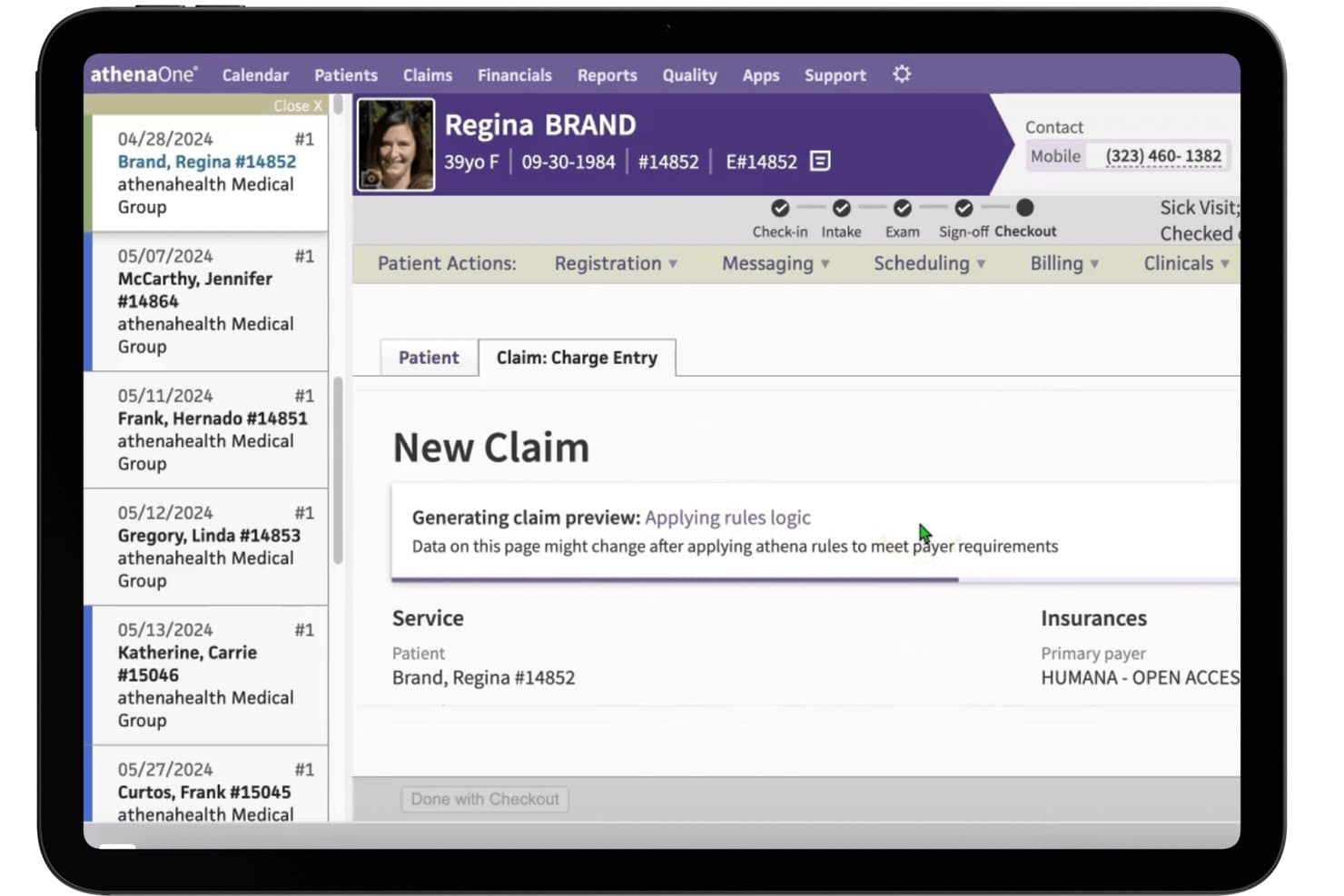
athenahealth (athenaOne) offers a New Claim charge entry screen with real-time rules logic applied to meet payer requirements during patient checkout. athenaOne is an AI-native EHR and medical billing platform that combines clinical documentation, revenue cycle management, claims scrubbing, payment posting, and patient engagement in a single integrated system.
Who Is athenahealth (athenaOne) Best For?
athenaOne is a strong fit for independent physician practices and multi-provider groups that need a single platform covering both clinical and billing workflows.
Why I Picked athenahealth (athenaOne)
athenaOne earns its spot on my shortlist because of its claims scrubbing engine, which runs every claim through 30,000+ rules before submission to catch errors and flag denials automatically. In practice, that means my team can resolve coding mismatches and payer policy conflicts before a claim ever leaves the system. I also like that the engine updates using real-world data from over 160,000 providers, so payer-specific rule changes get reflected without manual configuration.
athenahealth (athenaOne) Key Features
- Native EHR workflows: Customizable charting, patient histories, and encounter notes integrated into billing.
- Automatic payment posting: Matches and posts remittances from payers without manual intervention.
- Patient portal and mobile app: Lets patients handle self-scheduling, secure messaging, and online bill payment.
- Real-time insurance eligibility checks: Confirms coverage and benefits before appointments with payer connections.
athenahealth (athenaOne) Integrations
athenaOne offers native integrations with Fullscript, Epion, DeepScribe, TimeDoc Health, LucidAct, and Clearwave, and provides direct connections to over 277,000 labs and pharmacies. An API is available for custom integrations.
Pros and Cons
Pros:
- Native patient portal for online bill payment
- Real-time updates for payer policy changes
- Automated claims scrubbing identifies denial risks
Cons:
- Limited in-depth reporting for billing analytics
- Custom workflow setup can require vendor support
Learn more about athenahealth (athenaOne):
Other EMR Billing Software
Here are some additional EMR billing software options that didn’t make it onto my shortlist, but are still worth checking out:
- 11eClinicalWorksBest for real-time financial analytics
- 12RXNTBest for built-in e-prescribing features
- 13PrognoCISBest for telemedicine billing integration
- 14CollaborateMDBest for rapid claims submission workflows
- 15PracticeSuiteBest for end-to-end revenue cycle automation
- 16NueMDBest for easy multi-location management
- 17ChartLogicBest for voice-powered data entry
- 18WRS HealthBest for surgical practice support
- 19MicroMDBest for flexible deployment options
How I Evaluate EMR Billing Software
I evaluate EMR billing software across two layers: the core claim submission and documentation requirements a platform must meet, and the differentiators that set the best ones apart.
Core Functionality (Table Stakes for This List)
When I'm selecting tools for my list, I rank each one on a scale from 0 (does not offer the functionality) to 5 (excels in this area) for each core functionality listed below. Then, I calculate the tool's total score into a percentage. Each tool needs to achieve a minimum total score of 65% to be considered for inclusion.
- Integrated EMR/EHR: I check whether charting, encounter notes, and clinical documentation connect directly to billing codes so providers aren't toggling between disconnected systems at the point of care.
- Claims Management: Electronic claim creation, submission, and scrubbing through clearinghouses matter here. I look for how well a platform catches errors before claims go out the door.
- Medical Coding Support: Proper ICD-10, CPT, and HCPCS code assignment tied to encounters is essential. I evaluate whether charge capture flows naturally from the clinical note or requires manual re-entry.
- ERA/EOB Processing: I look at how each platform handles electronic remittance advice, auto-posts payments, and reconciles against submitted claims to keep your A/R accurate and current.
- Patient Billing & Statements: Statement generation, balance tracking, and patient payment collection all fall here. I evaluate whether patients can view and pay bills online or if you're stuck mailing paper statements.
- Eligibility Verification: Real-time insurance verification before a patient visit prevents surprises at checkout. I look for multi-payer verification that confirms coverage details and flags potential issues ahead of the appointment.
Once I have a list of tools that meet the criteria, I consider what sets each platform apart.
Differentiating Factors (What Sets Vendors Apart)
Here's how I compare and contrast different vendors:
Standout Features
AI-powered coding assistance is a big differentiator. I look for platforms that suggest ICD-10 and CPT codes from encounter notes and flag NCCI edits before claims go out. Denial management workflows matter too—automated denial categorization and appeal letter generation keep your billing team out of spreadsheets. Patient payment portals round out the picture. Text-to-pay, card-on-file, and payment plan options all shorten your collection cycle on patient balances.
Beyond Features
Practice size and specialty fit shape everything. A solo dermatology office and a multi-location FQHC have very different needs around role-based permissions, multi-site billing, and specialty compliance rules. I also evaluate total cost of ownership—pricing models like per-provider, per-claim, or percentage of collections hit differently depending on your volume. Interoperability rounds things out. I check for HL7/FHIR support, Surescripts connectivity, and open APIs that let you connect to labs, telehealth, and analytics tools.
How to Choose EMR Billing Software
It’s easy to get bogged down in long feature lists and complex pricing structures. To help you stay focused as you work through your unique software selection process, here’s a checklist of factors to keep in mind:
| Factor | What to Consider |
|---|---|
| FactorScalability | What to ConsiderWill the system work as your practice grows or adds new locations and specialties? Look for tools that can handle your current and future workflows. |
| FactorIntegrations | What to ConsiderDoes the software connect easily with labs, telehealth, clearinghouses, patient engagement platforms, or your accounting tools? |
| FactorCustomizability | What to ConsiderHow easy is it to adapt templates, billing workflows, and roles to fit your specialty and staff structure without extensive add-ons or IT support? |
| FactorEase of use | What to ConsiderWill providers and billing teams adopt it quickly, or is there a steep learning curve? Check how much hands-on training is needed for daily use. |
| FactorImplementation and onboarding | What to ConsiderHow long should you expect to migrate records, set up users, and go live? Ask about support, data transfer help, and upfront onboarding resources. |
| FactorCost | What to ConsiderBeyond monthly fees, are there costs for claims, clearinghouse submissions, updates, or support? Get a full breakdown to avoid hidden charges. |
| FactorSecurity safeguards | What to ConsiderIs the platform HIPAA-compliant, with encryption, audit logs, and permission controls? Verify certifications and ask how often they run security audits. |
| FactorCompliance requirements | What to ConsiderDoes the system support government, payer, and specialty compliance rules for claims and reporting? Ask about support for current and future standards. |
What Is EMR Billing Software?
EMR billing software are digital platforms that combine electronic medical records with billing tools in one system. These solutions let your team document patient encounters, assign codes, and submit insurance claims directly—all from within the same workflow.
By automating both clinical and revenue cycle processes, EMR billing software help you reduce errors, keep billing compliant, and create a smoother experience for staff and patients.
Features of EMR Billing Software
When selecting EMR billing software, keep an eye out for the following key features:
- Integrated EMR/EHR: Lets you chart, document encounters, and store clinical data directly tied to billing, streamlining your team's daily workflow.
- Claims management: Supports electronic claim creation, automated error checking, and submission to clearinghouses, speeding up payment and reducing denials.
- Medical coding tools: Provides ICD-10, CPT, and HCPCS lookup, plus automated code suggestions based on documentation to reduce claim errors.
- ERA/EOB processing: Enables auto-posting and reconciliation of electronic remittance advice, eliminating manual entry and speeding up account balance updates.
- Patient billing and statements: Generates patient statements, tracks outstanding balances, and supports digital or mailed delivery to keep collections moving.
- Eligibility verification: Checks patients’ insurance coverage in real time before visits to prevent insurance rejections and payment delays.
- Patient payment portal: Offers secure online access for patients to view, manage, and pay balances, supporting card payments and payment plans.
- Denial management workflows: Automates denial tracking, categorization, and follow-up action steps, reducing lost revenue from unresolved claims.
- Specialty-specific templates: Supplies customizable visit and coding templates for specialties like pediatrics or cardiology, helping capture every billable detail.
- Interoperability: Connects with labs, e-prescribing, telehealth platforms, and reporting tools to support seamless data exchange across your healthcare ecosystem.
Benefits of EMR Billing Software
Implementing EMR billing software provides several benefits for your team and your business. Here are a few you can look forward to:
- Reduced claim errors: Automated code suggestions and claim scrubbing help prevent denials and speed up reimbursements.
- Faster payment cycles: Electronic submission and real-time eligibility checks shorten the delay between care delivery and payment.
- Improved compliance: Integrated audit trails, access controls, and up-to-date regulatory tools support HIPAA and payer requirements.
- Streamlined workflows: Tying clinical documentation to billing eliminates double entry and reduces time spent on repetitive tasks.
- Better patient experience: Patient portals, clear statements, and online payment options make it easy for patients to manage balances.
- Actionable financial insights: Real-time reporting and denial tracking provide transparency over collections and help drive smarter business decisions.
- Adaptability for specialty practices: Specialty templates and custom workflows ensure billing processes fit your unique care and documentation needs.
Costs and Pricing of EMR Billing Software
Selecting EMR billing software requires an understanding of the various pricing models and plans available. Costs vary based on features, team size, add-ons, and more. The table below summarizes common plans, their average prices, and typical features included in EMR billing software solutions:
Plan Comparison Table for EMR Billing Software
| Plan Type | Average Price | Common Features |
|---|---|---|
| Plan TypeFree Plan | Average Price$0 | Common FeaturesBasic EMR charting, simple patient scheduling, limited claims submission, and manual billing setup. |
| Plan TypePersonal Plan | Average Price$30-$80/user/month | Common FeaturesIntegrated EMR and billing, electronic claim filing, standard coding tools, and basic patient statements. |
| Plan TypeBusiness Plan | Average Price$100-$300/user/month | Common FeaturesAutomated claims scrubbing, ERA/EOB auto-posting, real-time eligibility checks, online payment portal, and specialty templates. |
| Plan TypeEnterprise Plan | Average Price$400+/user/month | Common FeaturesMulti-location support, custom workflows, advanced denial management, open API integrations, and dedicated onboarding and support. |
EMR Billing Software FAQs
Here are some answers to common questions about EMR billing software:
How does EMR billing software help reduce billing errors?
EMR billing software links clinical documentation directly to billing, suggests appropriate codes, and includes claim scrubbing tools that catch errors before submission. This reduces the risk of denied or delayed claims and makes it easier for your team to stay compliant with payer requirements.
Can EMR billing software handle multiple practice locations?
Yes, many EMR billing platforms offer multi-location support with centralized billing, customizable user permissions, and location-specific reporting; this helps larger practices manage patient data and revenue cycle tasks across several offices.
What kind of training is needed to implement EMR billing software?
Most vendors include onboarding support and training modules for providers, billing staff, and front desk users. Expect a mix of live sessions, recorded tutorials, and help center resources to guide your team through daily operations and ensure smooth adoption.
Is it possible to migrate existing billing and patient data into new EMR billing software?
Yes, reputable vendors provide tools and hands-on assistance for migrating patient charts, historic A/R, and billing records from previous systems. Always ask about data migration timelines and any potential downtime during this conversion.
How secure is patient and financial data in EMR billing systems?
Top EMR billing systems use encryption, permission-based access, audit trails, and regular security audits to protect sensitive patient and financial data. Make sure your vendor meets HIPAA, SOC 2, or similar regulatory standards for peace of mind.