

Epic tilbyder omfattende kliniske og administrative funktioner, men det er ikke alle sundhedsorganisationer, der har brug for et EHR på virksomhedsniveau. Afhængigt af din praksisstørrelse og dit speciale foretrækker du måske et system med enklere dokumentation, mere fleksibel fakturering eller dedikerede værktøjer til patientengagement.
Jeg har sammenlignet alternativer til Epic på tværs af kliniske arbejdsgange, interoperabilitet, rapportering og praksisadministration for at identificere muligheder, der imødekommer forskellige behov inden for sundhedssektoren.
Hvad er Epic?
Epic er en elektronisk patientjournalplatform (EHR), der er udviklet af Epic Systems for at forbinde patientjournaler og arbejdsgange i sundhedssektoren. Softwaren understøtter klinisk behandling, patientadgang og dataudveksling på tværs af sundhedsorganisationer. Epic er et integreret system snarere end et værktøj udelukkende til journalføring, så vurder, om systemets omfang passer til din praksisstørrelse, dine specialer og dine driftsbehov, før du sammenligner alternativer.
Sammenligningstabel: Alternativer til Epic
Sammenlign priser og specifikationer side om side for de alternativer til Epic, der kom med på min korte liste.
| Tool | Best For | Trial Info | Price | ||
|---|---|---|---|---|---|
| 1 | Best for ongoing specialty-care programs | 14-day free trial + free demo available | From $19.99/month | Website | |
| 2 | Best for behavioral health practice workflows | 30-day free trial + free demo available | From $69/user/month | Website | |
| 3 | Best for AI-powered healthcare automation | Free demo available | Pricing upon request | Website | |
| 4 | Best for small-practice pricing options | Free plan available | From $25/month | Website | |
| 5 | Best for independent practice care and billing | Free demo available | Pricing upon request | Website | |
| 6 | Best for iPad charting in specialty practices | Free demo available | Pricing upon request | Website | |
| 7 | Best for hands-on billing support | Free demo available | Pricing upon request | Website | |
| 8 | Best for specialty care and billing workflows | Free demo available | Pricing upon request | Website | |
| 9 | Best for EHR-based CMS quality reporting | Free demo available | Pricing upon request | Website | |
| 10 | Best for AI-powered patient records | Free demo available | Pricing upon request | Website |


Hvorfor du kan stole på vores softwareanbefalinger
6,700+
Reviews
20
Industry experts
16+
Evaluation factors
14
Years
Vores team har testet og anmeldt software siden 2012. Vi leder selv lægeklinikker, så vi ved, hvor svært og hvor vigtigt det er at vælge den rigtige software.
Til denne guide har vi vurderet værktøjerne gennem praktisk afprøvning og uafhængig research og givet dem point ud fra vores udvælgelseskriterier.
Vores anmeldelser bygger på vores egen redaktionelle vurdering. De er ikke et salgsargument.
Anmeldelser af alternativer til Epic
Nedenfor finder du mine opsummeringer af de bedste alternativer til Epic på min korte liste. Mine anmeldelser dækker hvert systems funktioner, faktureringsarbejdsgange og anvendelsesområder for at hjælpe dig med at vælge den rigtige løsning til din praksis.
 Best for ongoing specialty-care programs
- 14-day free trial + free demo available
- From $19.99/month
Visit WebsiteCustomer Rating:4.4/5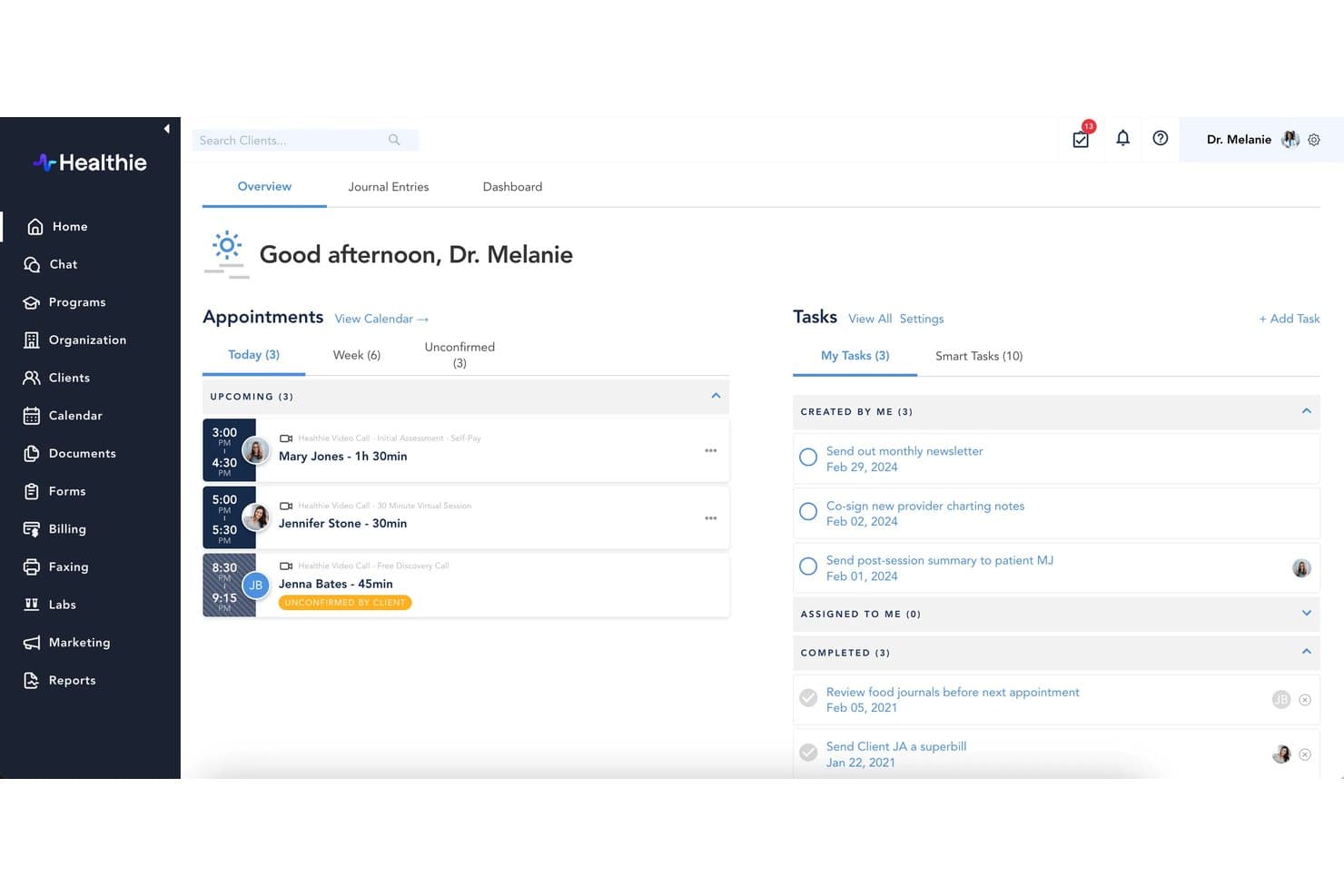
Healthie delivers AI-powered EHR charting, scheduling, billing, and patient engagement. Healthie is an AI-powered EHR and practice management platform built for independent and group practices that want charting, scheduling, billing, and patient engagement in one place.
Who Is Healthie Best For?
Healthie is a strong fit for independent and small-to-mid-sized specialty practices that need charting, scheduling, billing, and patient engagement in one connected platform.
Why I Picked Healthie
I picked Healthie as one of the best because it's purpose-built for specialty practices that run ongoing, structured care programs, think dietitians managing nutrition protocols or behavioral health providers running phased treatment plans. I love that providers can build out rolling or fixed-date care programs, pair them with journaling and care plan tracking, and deliver them directly through the patient portal. AI Scribe then captures session notes automatically, using templates like SOAP or ADIME, so clinicians stay focused on care rather than documentation between program touchpoints.
Healthie Key Features
- Insurance eligibility checks: Providers can run real-time eligibility checks through the Claim.MD integration directly within Healthie's billing workflow.
- Multi-provider scheduling: Healthie supports calendars across multiple providers, locations, and appointment types, with two-way sync to Google Calendar, iCal, and Outlook.
- Customizable intake forms: Providers can build and send intake forms electronically, with responses flowing directly into the client's EHR record.
- Group telehealth and webinars: Healthie supports both individual and group video sessions integrated with scheduling, charting, and billing workflows.
Healthie Integrations
Healthie offers native integrations with Claim.MD, DoseSpot, E-Labs Direct, Fullscript, Zoom, Google Calendar, iCal, and Outlook. It also supports a GraphQL API, SDKs, webhooks, and marketplace integrations including Metriport, Zus Health, and Candid Health.
Pros and Cons
Pros:
- AI drafts structured notes for clinician review
- Links care plans, journaling, and visit documentation
- Fits smaller specialty practices replacing enterprise-scale EHRs
Cons:
- Insurance claims workflows can feel clunky
- Migration imports don't maintain ongoing EHR sync
Learn more about Healthie: Best for behavioral health practice workflows
- 30-day free trial + free demo available
- From $69/user/month
Visit WebsiteCustomer Rating:4.4/5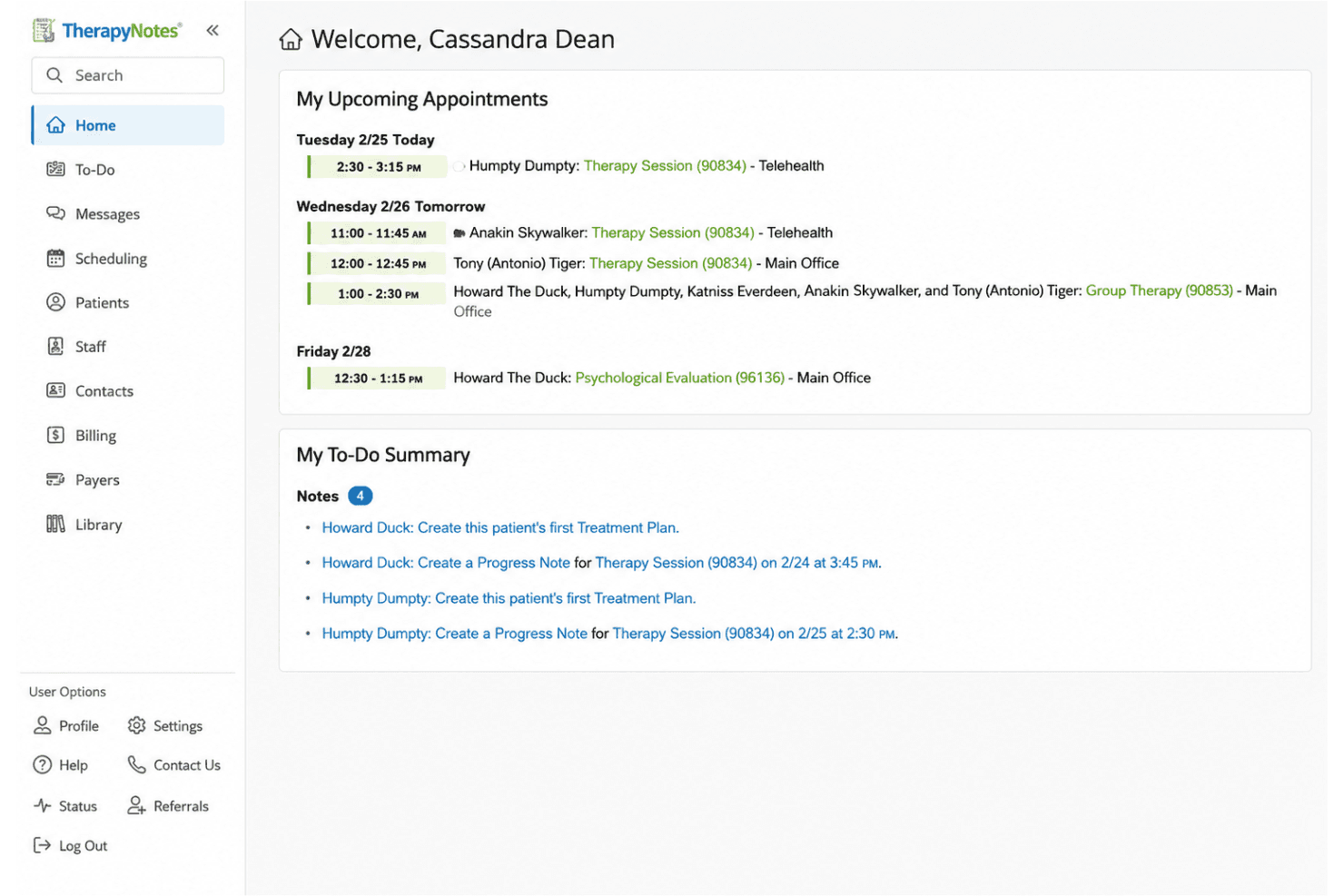
TherapyNotes manages clinical notes, scheduling, billing, and secure telehealth. TherapyNotes is a behavioral health EHR and practice management platform built for mental health clinicians and solo or group practices that need integrated clinical documentation, insurance billing, scheduling, and client engagement in one system.
Who Is TherapyNotes Best For?
TherapyNotes is a strong fit for solo and group behavioral health practices that need clinical documentation, scheduling, and insurance billing in one place.
Why I Picked TherapyNotes
I picked TherapyNotes as one of the best because it's purpose-built for behavioral health workflows in a way that general EHRs simply aren't. I especially appreciate how appointment details carry forward automatically into progress notes and claims, cutting the manual re-entry that slows down clinical and billing staff alike. TherapyFuel Scribe listens to sessions and drafts SOAP note sections in real time, so clinicians spend less time documenting and more time with clients.
TherapyNotes Key Features
- DSM-5 and ICD-10 diagnosis search: Note templates include a built-in search for DSM-5 and ICD-10 codes, letting clinicians find and apply diagnoses directly within documentation.
- TherapyPortal client portal: Clients can complete intake forms, request appointments, pay balances, and exchange secure messages through a branded self-service portal.
- Electronic claims and ERA: The billing module supports electronic claim submission to over 2,800 payers, ERA receipt and posting, and real-time eligibility checks via Claim.MD.
- HITRUST-certified security controls: TherapyNotes includes two-factor authentication, role-based permissions, activity audit trails, and FIPS 140-2-compliant encryption across stored data.
TherapyNotes Integrations
TherapyNotes connects to HealthConnex and Connie HIEs, Surescripts for medication history and formulary data, and Claim.MD for claims, ERA, and eligibility. An API and broader lab-interface ecosystem aren’t documented.
Pros and Cons
Pros:
- Appointment details carry into notes and claims
- Therapy-specific templates support behavioral-health charting
- Reviewers praise organized clinical documentation
Cons:
- Health-system data exchange remains narrow
- Behavioral-health focus excludes multispecialty care
Learn more about TherapyNotes: Best for AI-powered healthcare automation
- Free demo available
- Pricing upon request
Visit WebsiteCustomer Rating:4.4/5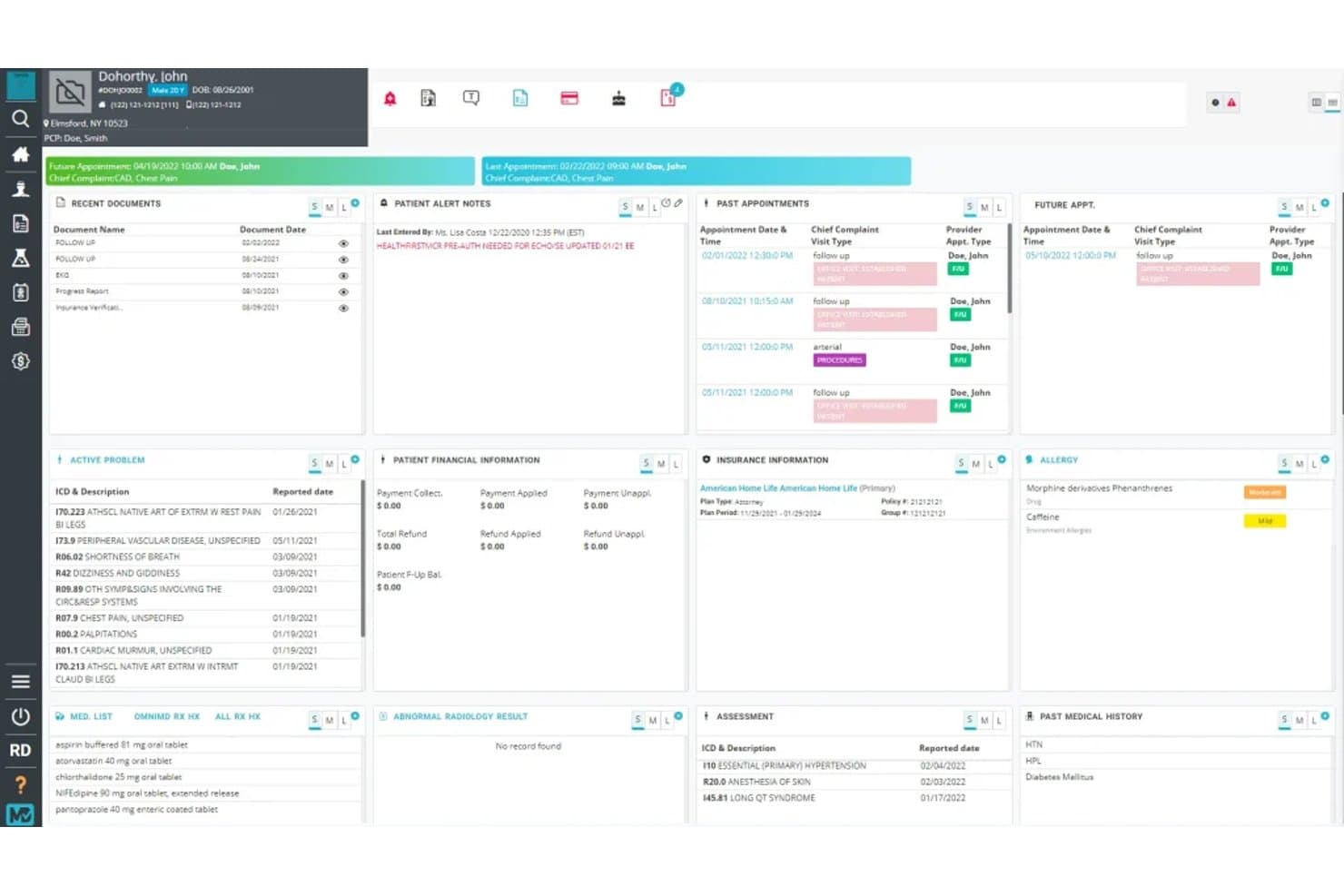
OmniMD offers cloud-based EHR, clinical charting, billing, and remote patient monitoring. OmniMD is a cloud-based EHR platform built for solo, small, and mid-sized practices that want to unify clinical charting, practice management, billing, and remote patient monitoring under one login—without the overhead that comes with enterprise-scale systems like Epic.
Who Is OmniMD Best For?
OmniMD is a strong fit for independent and small-to-mid-sized practices that want AI-driven documentation, billing, and clinical workflows unified in a single platform.
Why I Picked OmniMD
I picked OmniMD as one of the best because its AI-powered automation touches every layer of the clinical day, not just documentation. The AI Medical Scribe listens to patient-provider conversations and drafts specialty-aware SOAP notes for clinician review, while the AI Front Desk handles scheduling, eligibility checks, and copay collection automatically. I also appreciate that the AI Medical Coder generates ICD, CPT, and HCPCS codes directly from those notes and flags denial risks before a claim is ever submitted.
OmniMD Key Features
- Patient kiosk: Lets patients check in, complete intake forms, sign documents, and update demographic details through a self-service kiosk at the point of care.
- Remote patient monitoring: Collects data from connected devices and surfaces it in the patient chart, with alerts to support ongoing monitoring workflows.
- OmniXchange interoperability: Exchanges structured health data between EHRs, labs, and third-party systems using HL7 and FHIR standards.
- MIPS reporting dashboard: Tracks performance across all four QPP reporting categories from a single dashboard view.
OmniMD Integrations
OmniMD integrates with LabCorp and Quest for lab orders and results. Its AI Medical Scribe connects with 50+ EHR systems, including Epic, Cerner, athenahealth, eClinicalWorks, and Allscripts, using FHIR, HL7, and secure API bridges.
Pros and Cons
Pros:
- Reviewers praise organized charting and support
- AI drafts specialty-aware notes for review
- Unified EHR, practice management, and RCM
Cons:
- Reviewers cite inconsistent reports and limited filters
- Reviewers report extra steps finding prior notes
Learn more about OmniMD: Best for small-practice pricing options
- Free plan available
- From $25/month
Visit WebsiteCustomer Rating:4.2/5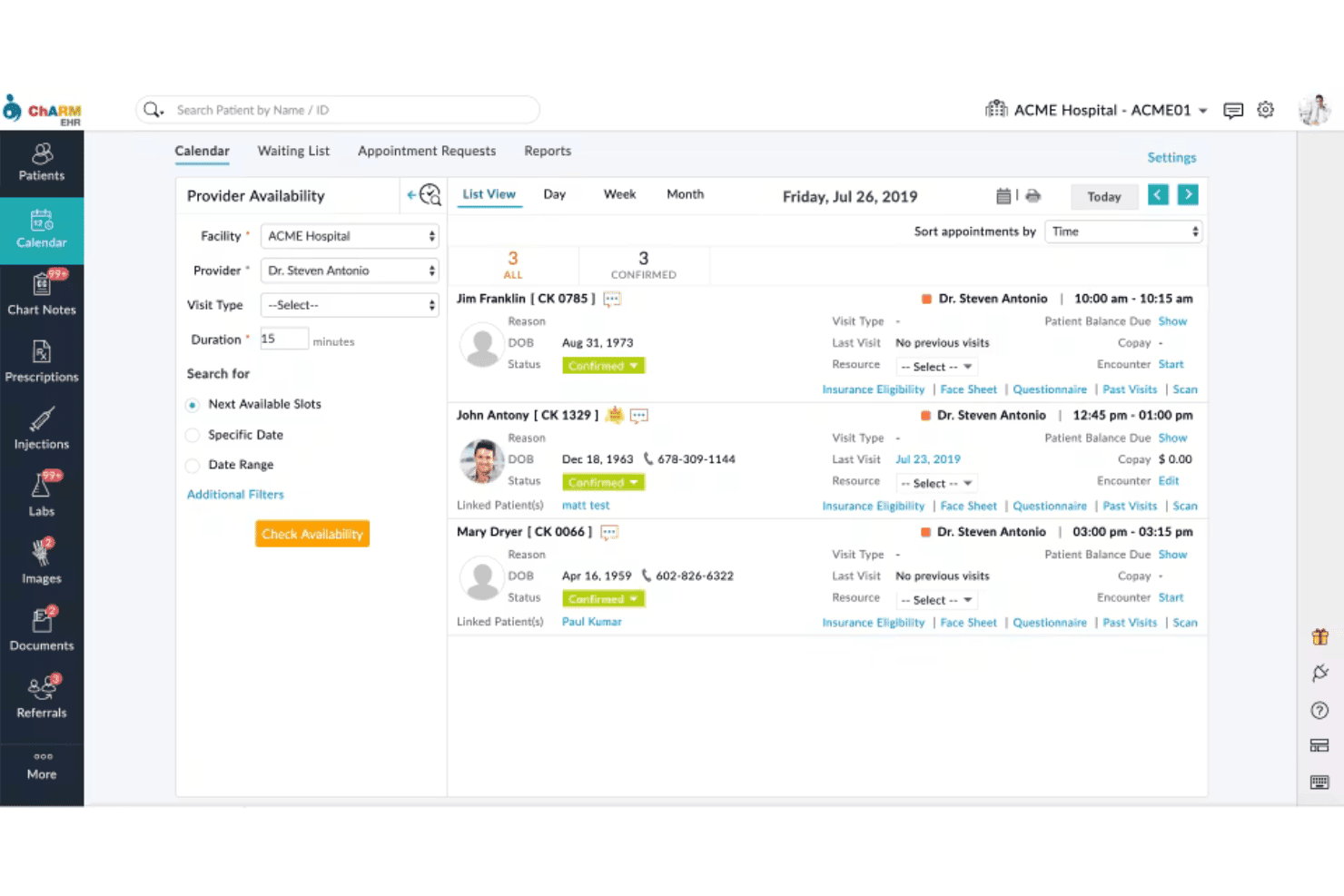
CharmHealth blends charting, e-prescribing, AI notes, billing, and virtual care. CharmHealth is a cloud-based EHR built for independent and small-to-midsize practices that need charting, e-prescribing, scheduling, and billing in one place—without the complexity or cost of enterprise systems like Epic.
Who Is CharmHealth Best For?
CharmHealth is a strong fit for independent and small-to-midsize practices that want transparent, usage-based pricing and a full suite of clinical and billing tools without an enterprise price tag.
Why I Picked CharmHealth
I've included CharmHealth in my top picks because its tiered pricing structure is genuinely built for smaller practices that can't justify Epic's enterprise costs. I appreciate that you can start on the encounter-based plan at $0.50 per visit, then move to the $200 per provider per month plan as your volume grows, without locking into a rigid contract upfront. The free plan (capped at 50 encounters per month) also makes it easy to test charting, SOAP notes, and the patient portal before committing.
CharmHealth Key Features
- AI Scribe: Records and transcribes patient encounters in real time, then generates structured clinical notes for SOAP, Comprehensive, and Brief encounter types.
- Bidirectional PointClickCare integration: Automatically syncs demographics, diagnoses, allergies, medications, and insurance between CharmHealth and PointClickCare, with signed notes transmitted back in real time.
- Drag-and-drop template builder: Lets clinicians build custom consultation, diagnosis, lab-order, and referral templates using configurable components like checklists, single choice, and multiple choice fields.
- FHIR R4 API with SMART App support: Provides HL7 FHIR 4.0.1 APIs and OAuth 2 authentication for connecting third-party applications to patient data.
CharmHealth Integrations
CharmHealth offers documented integrations with PointClickCare, LabCorp, Quest Diagnostics, Surescripts, Optum, Change Healthcare, Bluefin, QuickBooks, Google Calendar, and Fullscript. It also supports REST and HL7 FHIR APIs with SMART App support and OAuth 2 authentication for custom connections.
Pros and Cons
Pros:
- Patient portal supports self-service appointment requests
- Configurable templates support practice-specific documentation
- Small-practice workflows combine charting and billing
Cons:
- Some note formats constrain specialty workflows
- Payer enrollment delays can stall billing
Learn more about CharmHealth: Best for independent practice care and billing
- Free demo available
- Pricing upon request
Visit WebsiteCustomer Rating:3.9/5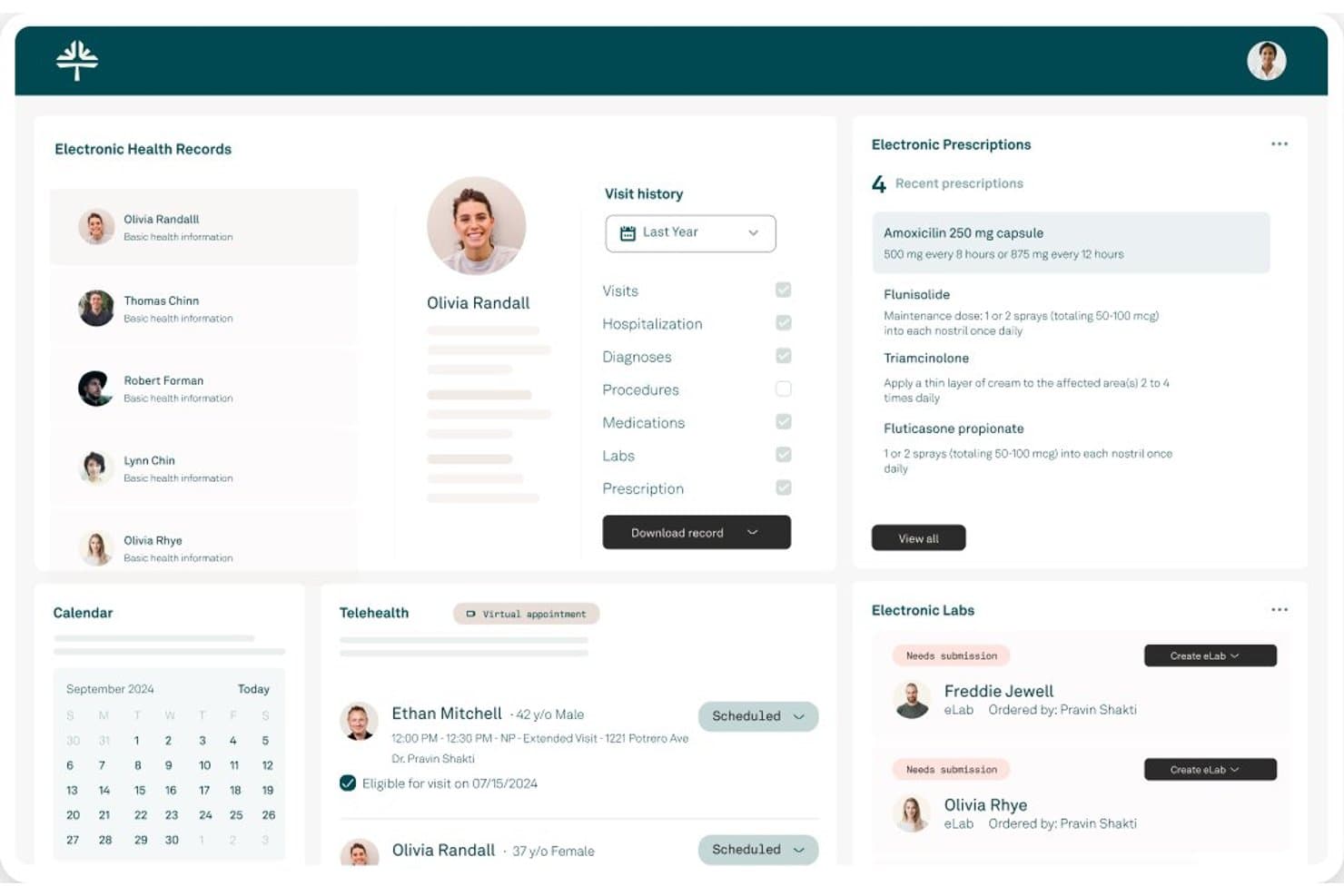
Tebra centralizes EHR, prescriptions, labs, and scheduling in one dashboard. Tebra is a cloud-based EHR built for independent practices that unifies clinical charting, e-prescribing, lab orders, billing, and patient engagement in one platform—making it a practical fit for small-to-mid-sized practices looking to move away from enterprise-heavy systems.
Who Is Tebra Best For?
Tebra is a strong fit for independent practices with up to 50 providers that need clinical charting, e-prescribing, and billing managed in a single platform.
Why I Picked Tebra
I picked Tebra as one of the best because it's purpose-built for independent practices that need clinical care and billing to work as one system, not two. I particularly like how AI Note Assist generates structured SOAP and therapy notes directly from patient conversations, and how charge capture ties those clinical notes straight into claims. The integrated denial management and payment posting mean my team isn't toggling between separate platforms to close out a visit from documentation to payment.
Tebra Key Features
- Patient portal: Patients can view lab results, problems, medications, and treatment plans, make payments, and send secure messages to providers.
- Electronic lab orders: Send lab requests to over 700 labs, receive real-time results, and have them automatically matched and recorded in the patient chart.
- MIPS dashboard: Tracks Promoting Interoperability measure scores, eligible-patient denominators, numerators, and gap lists for individual providers.
- Telehealth: Conduct video visits integrated directly with the provider schedule and clinical notes workflow.
Tebra Integrations
Tebra connects to over 700 labs for electronic orders and results and uses First Databank for formulary data. Its SOAP and FHIR APIs, delivered through SmileCDR for FHIR, support custom integrations.
Pros and Cons
Pros:
- Reviewers praise supportive onboarding and training
- Scheduling and billing share patient workflows
- Clinical notes connect directly to charge capture
Cons:
- Reviewers report glitches and service interruptions
- Complex billing tasks can require extra steps
Learn more about Tebra: Best for iPad charting in specialty practices
- Free demo available
- Pricing upon request
Visit WebsiteCustomer Rating:3.9/5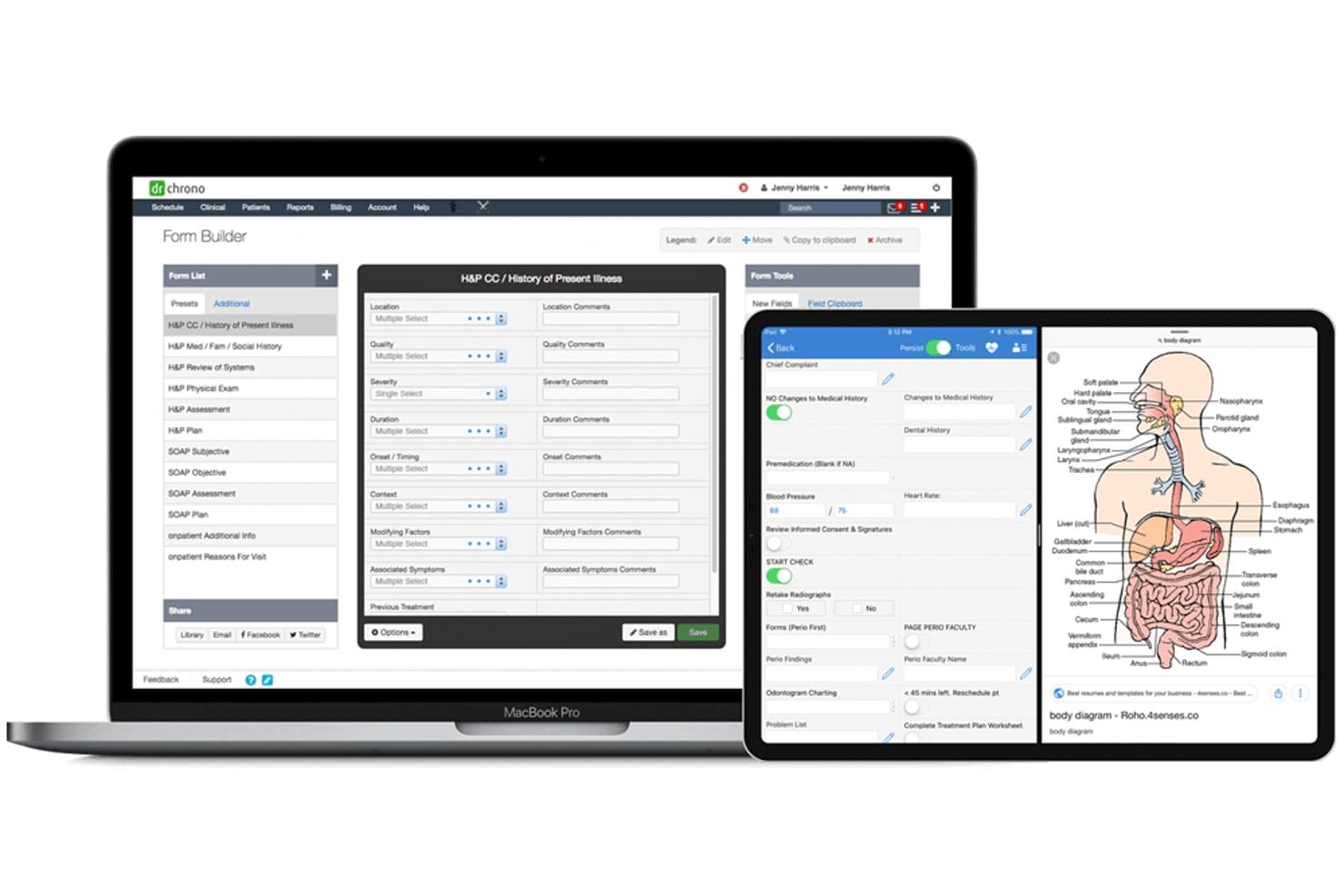
DrChrono lets users build custom clinical forms across devices. DrChrono is a cloud-based EHR built by EverHealth that combines clinical charting, billing, scheduling, and patient engagement for independent and specialty practices looking to replace or avoid large enterprise systems like Epic.
Who Is DrChrono Best For?
DrChrono is a strong fit for independent and specialty practices that run clinical workflows on iPads and want charting, billing, and patient engagement in one place.
Why I Picked DrChrono
I picked DrChrono as one of the best because it's built from the ground up around iPad workflows, which makes a genuine difference for specialty clinicians who chart bedside or room-to-room. Specialty-specific templates covering more than 20 medical fields let providers document within the clinical context of their discipline, and EverHealth Scribe layers ambient AI on top to draft structured SOAP and H&P notes for review before they ever reach the chart.
DrChrono Key Features
- OnPatient portal: Gives patients access to health records, test results, prescriptions, visit summaries, and billing details, with built-in appointment requests and secure messaging.
- Real-time insurance eligibility verification: Runs eligibility checks individually or in bulk before appointments and flags patients who may need billing follow-up.
- Electronic prior authorization: Submits and tracks prior authorizations through CoverMyMeds directly within the e-prescribing workflow.
- RecordSync record exchange: Uses HL7 FHIR transactions to retrieve records from prior providers in real time and merge them into the patient chart at no added cost.
DrChrono Integrations
DrChrono has native integrations with Quest Diagnostics, Labcorp, Iron Bridge, Surescripts RecordSync, Surescripts eRx, and CoverMyMeds, plus API integrations with Epic, eClinicalWorks, and Allscripts. It supports REST and FHIR APIs, webhooks, OAuth 2.0, and iframe integration for custom connectivity.
Pros and Cons
Pros:
- RecordSync brings outside records into charts
- Custom templates support specialty documentation
- iPad charting suits specialty workflows
Cons:
- Reviewers report inconsistent billing and slow support
- Users report notes failing to save
Learn more about DrChrono: Best for hands-on billing support
- Free demo available
- Pricing upon request
Visit WebsiteCustomer Rating:3.8/5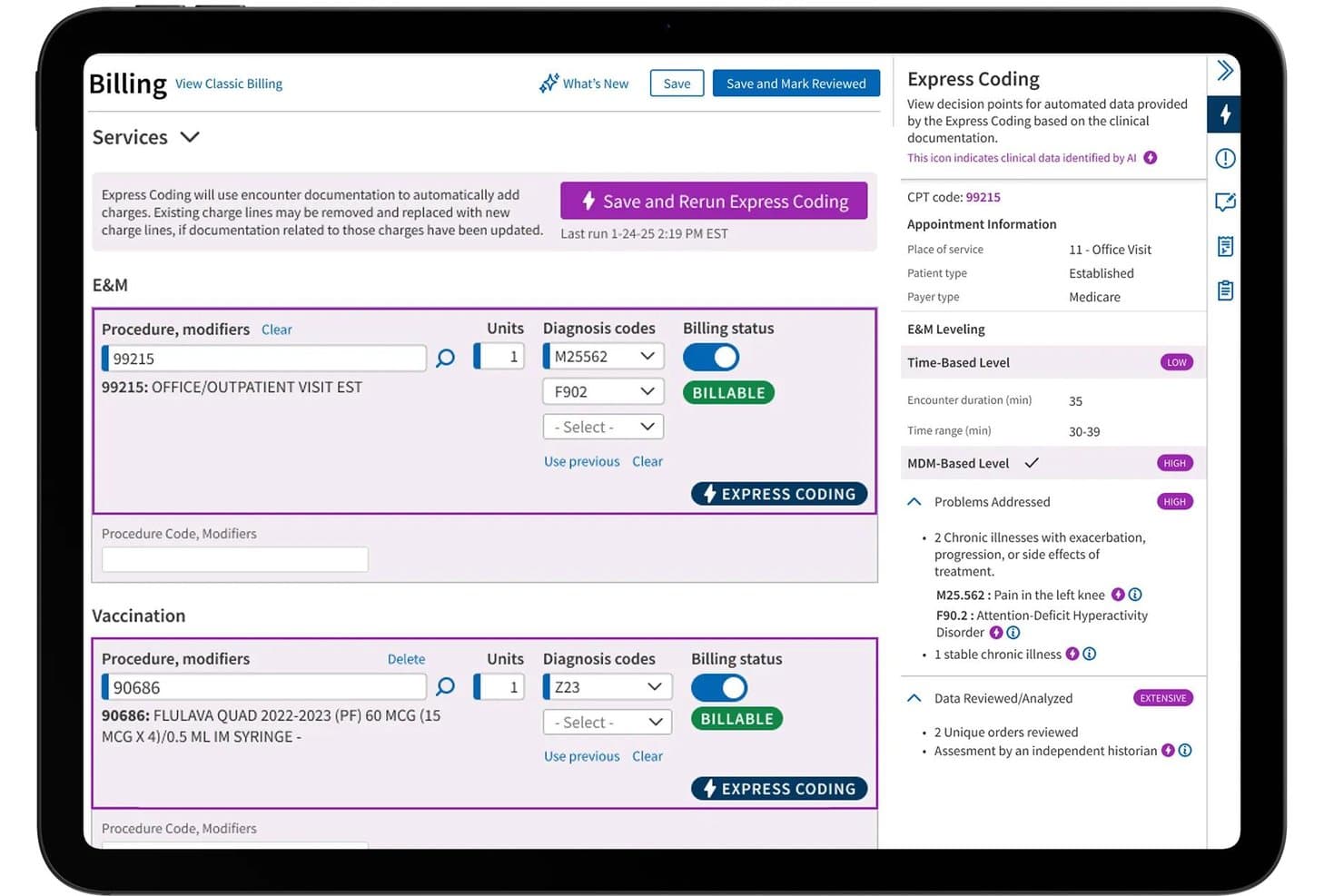
athenaOne delivers EHR, clinical charting, billing, revenue cycle, and patient engagement. athenaOne is an integrated EHR, billing, and practice management platform built for ambulatory practices that need clinical documentation, revenue cycle workflows, and patient engagement tools in one system.
Who Is athenaOne Best For?
athenaOne is a strong fit for ambulatory practices that want billing, clinical documentation, and patient engagement managed in one place—with dedicated support built into the service.
Why I Picked athenaOne
I picked athenaOne as one of the best because its billing support goes beyond software. A dedicated billing team actively reviews claims before submission, flags errors, and handles prior authorizations, which means your revenue cycle isn't just automated but actively managed. I also appreciate that the service description commits to specific performance thresholds: 95% of claims move forward within three business days, and 95% of payments are posted within four days of receipt.
athenaOne Key Features
- Ambient AI scribe: athenaAmbient listens to patient conversations and generates a structured draft note with suggested diagnoses and orders for clinician review.
- Patient portal and mobile app: Patients can access health records, lab results, and billing, send secure messages, and self-schedule appointments through the portal or athenaPatient app.
- CommonWell and Carequality integration: athenaOne automatically exchanges patient records with more than 84,000 care sites across both national health data networks.
- Population health dashboard: Data Explorer lets practices analyze patient populations, track care gaps, and monitor performance across quality programs like MIPS and ACO MSSP.
athenaOne Integrations
athenaOne supports 277K+ direct clinical integrations, including Epic and Cerner through CommonWell and Carequality, plus Surescripts and Zoom. Its marketplace offers 500+ third-party tools, and its developer portal provides 800+ API endpoints for custom integrations.
Pros and Cons
Pros:
- Integrated scheduling, charting, and billing suit outpatient practices
- Ambient scribe drafts notes for clinician review
- Defined claim and payment posting service commitments
Cons:
- Extra clicks and glitches slow outpatient workflows
- Users report claims and denial follow-up problems
Learn more about athenaOne: Best for specialty care and billing workflows
- Free demo available
- Pricing upon request
Visit WebsiteCustomer Rating:3.7/5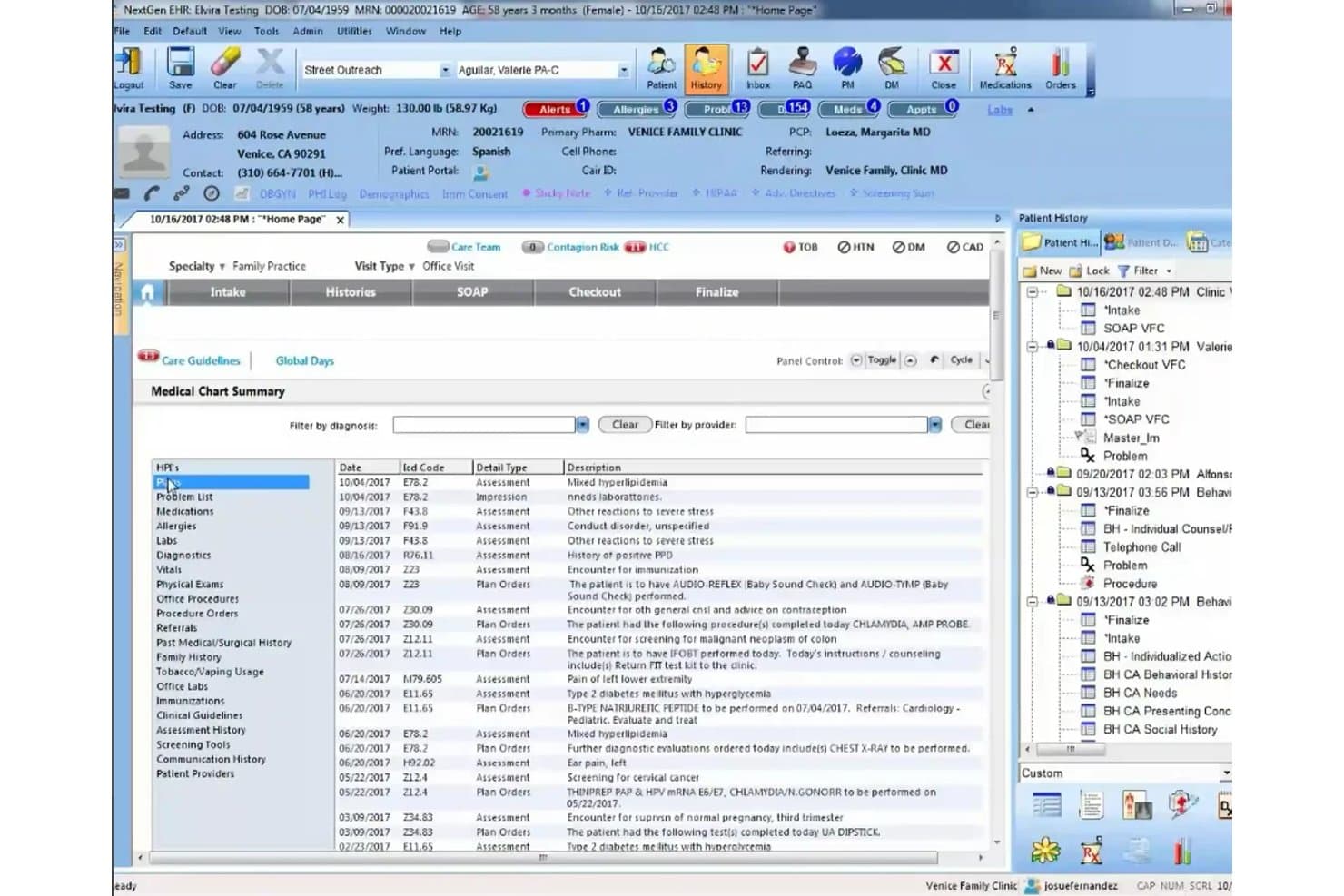
NextGen Healthcare supports EHR, practice management, billing, and patient care. NextGen Healthcare is an EHR platform built for ambulatory and specialty practices that want integrated clinical documentation, billing, and practice management in a single system.
Who Is NextGen Healthcare Best For?
NextGen Healthcare is a strong fit for mid-size ambulatory and specialty practices that need integrated clinical documentation, billing, and practice management in one platform.
Why I Picked NextGen Healthcare
I picked NextGen Healthcare because it's one of the few EHR platforms built around specialty practice workflows from the ground up, not retrofitted for them. I appreciate how specialty-specific templates let practices document cardiology, orthopedics, or behavioral health encounters without forcing a generic structure onto complex visits. The integrated billing and practice management module handles claims submission, real-time eligibility checks, and batch claim-status reporting in one place, which I find especially valuable when revenue cycle and clinical teams need to stay aligned without switching systems.
NextGen Healthcare Key Features
- Ambient AI documentation: Listens to patient-provider conversations and generates structured SOAP notes directly into the patient's EHR chart for provider review.
- Mirth Connect integration engine: Transforms, maps, and routes healthcare data across 800+ API routes using REST, FHIR, and SMART on FHIR protocols.
- Population health analytics: Provides care-management and value-based-care insights, including tools to identify care gaps and generate patient reminder communications.
- PxP patient portal: Lets patients view health records, schedule appointments, request prescription renewals, view lab results, and make payments online.
NextGen Healthcare Integrations
NextGen Healthcare supports integrations with Carequality, Surescripts Record Locator and Exchange, and Amazon Web Services through NextGen Share and cloud hosting. It also offers REST, FHIR, JSON, and SMART on FHIR APIs, plus Mirth Connect for custom data exchange.
Pros and Cons
Pros:
- Clinical and billing workflows share one platform
- Ambient notes can reduce charting time
- Specialty templates fit complex ambulatory visits
Cons:
- Patient portal setup can frustrate practices
- Routine charting takes multiple clicks
Learn more about NextGen Healthcare: Best for EHR-based CMS quality reporting
- Free demo available
- Pricing upon request
Visit WebsiteCustomer Rating:3.6/5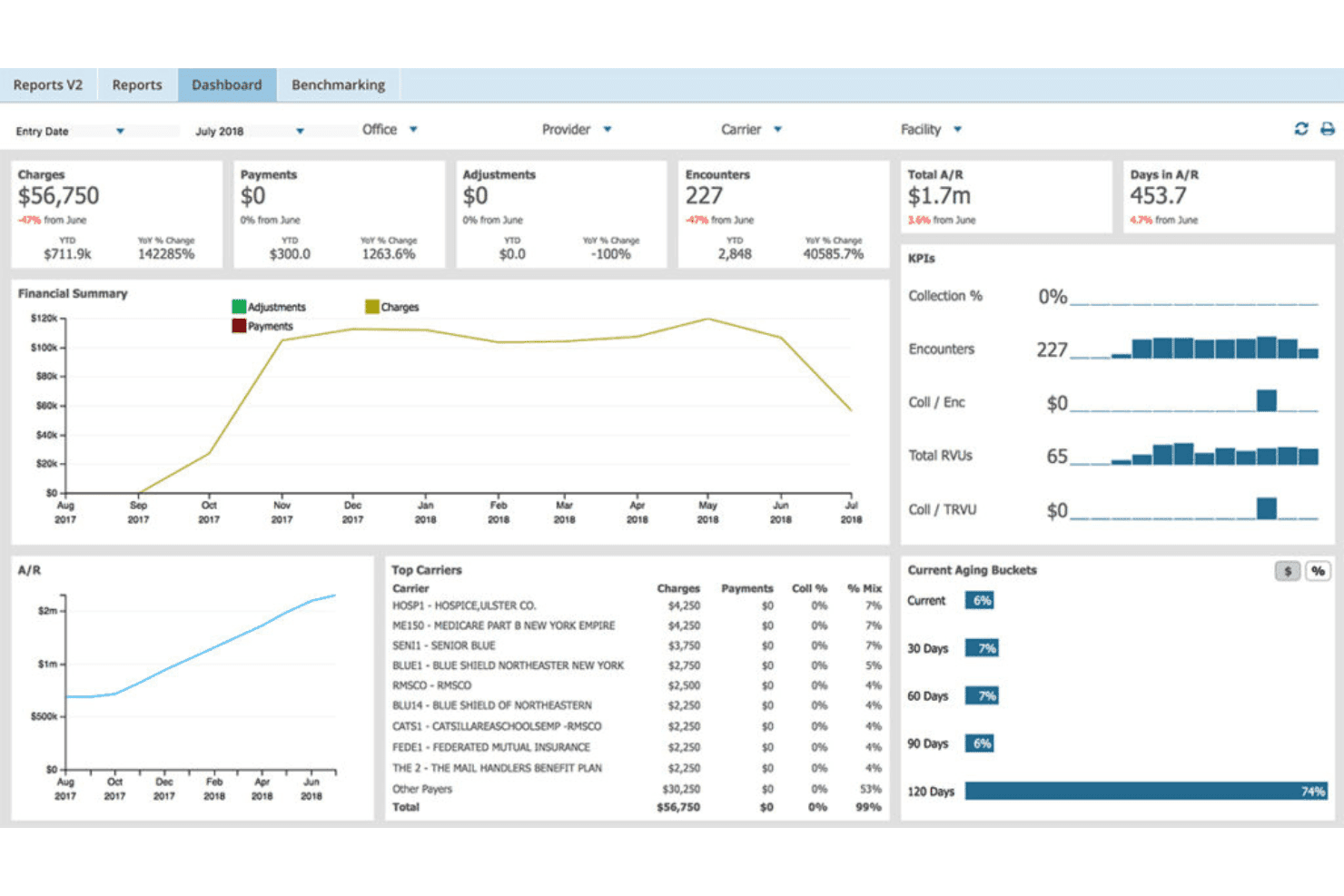
AdvancedMD unites cloud EHR, clinical charting, scheduling, billing, claims, and reporting. AdvancedMD is a cloud-based EHR built for independent and mid-sized practices that want scheduling, billing, claims, and clinical documentation managed in one platform.
Who Is AdvancedMD Best For?
AdvancedMD is a strong fit for independent and mid-sized specialty practices that need EHR, billing, and scheduling in one cloud-based system without enterprise-level complexity.
Why I Picked AdvancedMD
I picked AdvancedMD as one of the best because its built-in qualified registry and QCDR let you report Quality, Promoting Interoperability, and Improvement Activities data directly to CMS from inside the EHR, without routing through a third-party reporting tool. I especially like the patient-level quality measure filtering, daily score updates, and the all-in-one Population Health reporting system added in 2025 with MIPS and Qualified Registry capabilities. That's a meaningful advantage for independent practices that need CMS quality reporting without Epic's enterprise overhead.
AdvancedMD Key Features
- AI Clinical Assistant: Uses ambient listening and transcription to generate patient notes in five formats and suggest chart action items during visits.
- Clinical mobile app: Lets providers create and edit notes, review and sign lab results, manage documents, and message patients or staff from a mobile device.
- Telehealth scheduling and sessions: Supports browser-based video visits booked directly from the EHR, with screen sharing, participant controls, and file transmission to patient charts.
- Bidirectional practice-management sync: Automatically synchronizes patient, scheduling, and charge data across billing, claims, and clinical workflows in real time.
AdvancedMD Integrations
AdvancedMD lists 1,400+ integration offerings and 50+ billing partners, including Salesforce, Ellkay, and Falkon Data for lab and imaging interfaces. Connect APIs, FHIR R4, SMART on FHIR, and ODBC support custom data exchange.
Pros and Cons
Pros:
- Scheduling and billing share one ambulatory workflow
- Reviewers praise editable clinical note templates
- CMS quality reporting stays inside the EHR
Cons:
- Group scheduling can complicate billing workflows
- Reviewers report click-heavy controlled-substance prescribing
 Best for AI-powered patient records
- Free demo available
- Pricing upon request
Visit WebsiteCustomer Rating:3.4/5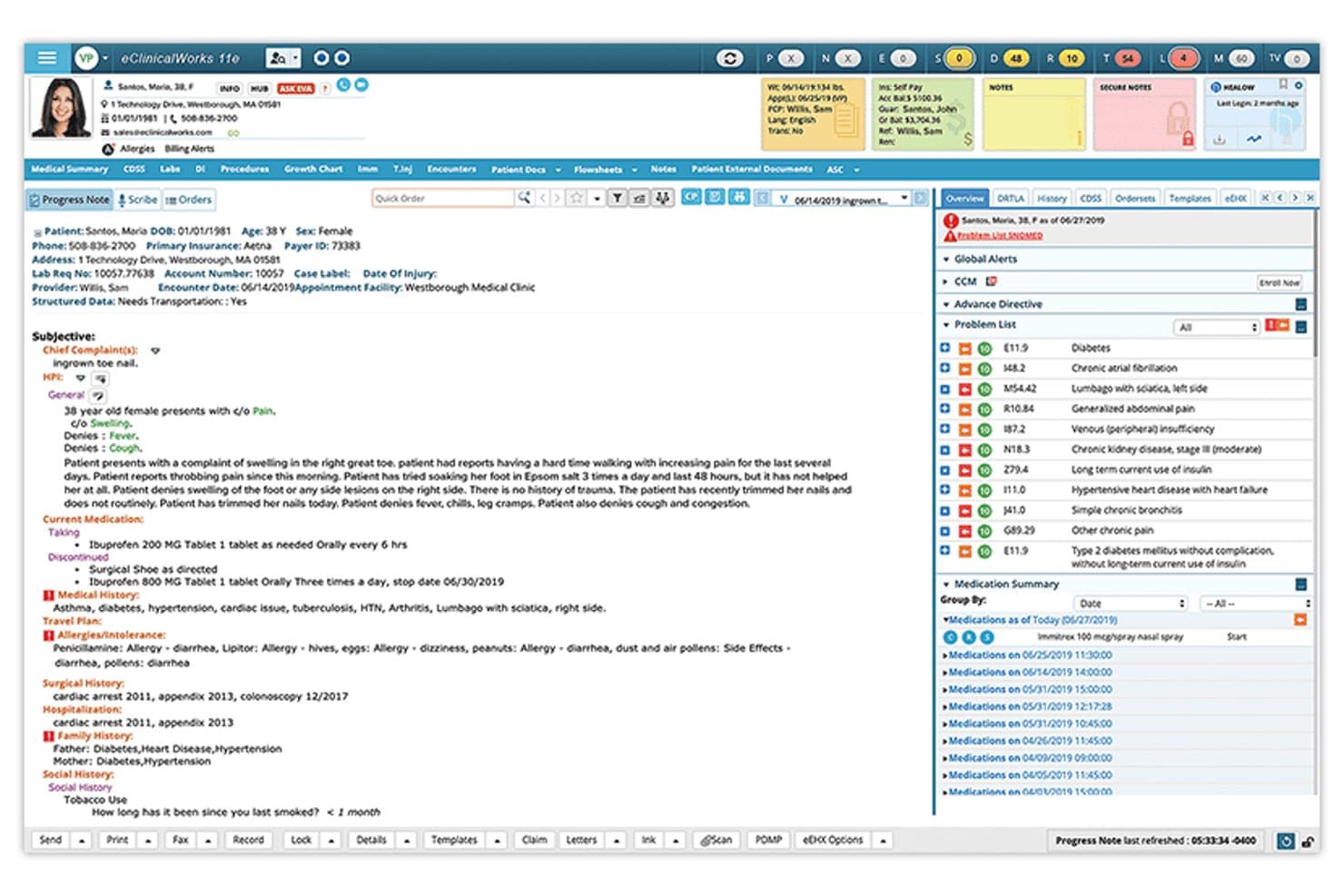
eClinicalWorks covers cloud EHR, progress notes, clinical charting, scheduling, and billing. eClinicalWorks is a cloud-based EHR platform built for ambulatory practices that want to consolidate clinical documentation, scheduling, billing, and patient engagement in one system—without the complexity and cost typically associated with enterprise-grade solutions like Epic.
Who Is eClinicalWorks Best For?
eClinicalWorks is a strong fit for ambulatory practices that want AI-assisted clinical documentation, like Sunoh.ai ambient note capture, without the complexity of a large health system platform.
Why I Picked eClinicalWorks
I've included eClinicalWorks in my top picks because its AI-powered approach to patient records genuinely sets it apart from other Epic alternatives. I particularly like Sunoh.ai, which listens in on provider-patient conversations and automatically generates draft notes, cutting down the documentation burden without requiring any manual transcription. PRISMA adds another layer by pulling records from outside providers, payers, and even wearable devices into a single searchable patient timeline.
eClinicalWorks Key Features
- healow CHECK-IN: A contactless patient check-in solution that lets patients verify demographics, sign consent forms, update intake forms, and pay copays before their appointment.
- FHIR API platform: An open development platform that lets third-party developers build and integrate healthcare applications directly with the eClinicalWorks EHR.
- TEFCA participation: eClinicalWorks connects to the Trusted Exchange Framework and Common Agreement to support nationwide health record sharing across care settings.
- eBO View reporting: A built-in reporting tool that gives practices access to Meaningful Use Dashboards, registry reporting, and population-level data within the EHR.
eClinicalWorks Integrations
eClinicalWorks connects with Epic through Carequality and Surescripts for e-prescribing. Its FHIR APIs support custom integrations, but the vendor doesn’t publish a complete integration count.
Pros and Cons
Pros:
- Ambient notes reduce documentation burden
- Patient and billing workflows share one system
- Customizable templates support specialty workflows
Cons:
- Support experiences vary across practices
- Clinical tasks can require multiple clicks
Learn more about eClinicalWorks:
Andre alternativer til Epic
Her er et par yderligere muligheder, som ikke kom med på min korte liste, men som stadig er værd at undersøge:
- 11WRS HealthBest for specialty care with managed billing
- 12RXNTBest for ambient notes across EHRs
- 13ModMedBest for dermatology image and pathology records
- 14Elation HealthBest for charting with fewer screen changes
- 15NextechBest for visual procedure documentation
- 16KipuBest for residential bed and occupancy planning
- 17OptiMantraBest for functional medicine supplement care
- 18MEDITECH ExpanseBest for reducing enterprise EHR hosting work
- 19Oracle HealthBest for AI-guided review of patient history
- 20Canvas MedicalBest for teams building custom EHR workflows
How I Evaluate Epic Alternatives
I split my evaluation into three parts: core functionality, where I look for tools that can structure and store patient records and exchange data with labs, pharmacies, and other providers—this carries the most weight. Then I look at standout features like AI-assisted documentation. Finally, I consider implementation support and pricing transparency.
Core Functionality (Table Stakes For This List)
When I'm selecting tools for my list, I score each one on a scale from 0 (does not offer the functionality) to 5 (excels in this area) for each core functionality listed below. I then convert the total into a percentage to help assess each tool's overall fit, with extra weight on any functionalities I’ve deemed essential.
- Electronic Charting (Essential): I look for structured notes, useful templates, and ways to retrieve a patient’s history across visits and care settings.
- Interoperability (Essential): I assess how tools exchange records with labs, pharmacies, and other providers, including support for standards such as HL7 or FHIR.
- Practice & Billing: I check whether scheduling, encounter documentation, claims, and billing work together across the practice’s day-to-day workflows.
- Security & Compliance: I look for access controls, audit trails, and documented safeguards for protecting patient data and meeting applicable requirements.
- E-Prescribing: I evaluate prescription creation and transmission, including controlled medications and medication history checks where supported.
- Patient Engagement: I consider whether patients can access records, schedule visits, and communicate securely through a portal or similar tools.
Once I have a list of tools that meet the criteria, I consider what sets each platform apart.
Differentiating Factors (What Sets Vendors Apart)
Here's how I compare and contrast different vendors:
Standout Features
I look for AI-assisted documentation that generates clinical notes from patient conversations, since it directly cuts charting time after visits. Specialty-specific templates also matter—a cardiology practice migrating off Epic needs structured workflows on day one, not a blank slate. I evaluate self-service configuration tools that let your admin team adjust forms and reports without filing a vendor change request.
Beyond Features
I evaluate how quickly a practice can go live, since migrating off Epic often means moving years of patient history. Vendors like athenaOne and NextGen Healthcare offer dedicated migration support, but timelines vary widely. I also check whether pricing stays predictable as you add providers or locations—per-transaction fees for claims or e-prescribing can quietly erode savings. Cloud hosting and clear data-export rights matter too, especially if you need to switch systems later without losing records.
Hvorfor se efter alternativer til Epic?
Selvom Epic er et godt valg af EHR-software, ser nogle teams sig om efter andre løsninger, når systemets omfang eller arbejdsgange ikke passer til deres behov. Du leder måske efter et alternativ til Epic, fordi:
- En mindre praksis har brug for et system, der er tilpasset de daglige arbejdsgange
- Dit speciale har brug for tilpassede skabeloner, der er klar før lanceringen
- Flytning af flere års patientjournaler gør migrering til en væsentlig bekymring
- Du har brug for tydeligere omkostninger, når du tilføjer behandlere eller lokationer
- Dit team ønsker værktøjer til patientadgang og fakturering, der passer til driften
Hvis noget af dette lyder bekendt, er du kommet til det rette sted. Min liste omfatter flere EHR-softwareløsninger, der er bedre egnet til teams, som står over for disse udfordringer med Epic og leder efter alternativer.
Epics vigtigste funktioner
Her er Epics vigtigste funktioner, så du kan sammenligne systemet med alternative løsninger:
- Langsgående patientjournal: Epic samler patientoplysninger i en fælles medicinsk journal på tværs af patientens behandlingsforløb. Klinikere kan bruge journalen til at gennemgå patientens historik og dokumentere behandling.
- Interoperabilitet: Care Everywhere understøtter udveksling af journaler mellem Epic og andre EHR-organisationer. Det hjælper behandlingsteams med at få adgang til eksterne patientoplysninger, herunder notater og billeddiagnostik, når de koordinerer behandlingen.
- AI-assisteret klinisk arbejde: Art kan opsummere patientens historik, udarbejde udkast til notater og forberede svar på patientbeskeder. Klinikere gennemgår og redigerer udkast, før de bruger dem i patientbehandlingen.
- Aftalebooking: Integreret planlægning understøtter konsultationer, procedurer og diagnostiske aftaler. Patienter kan administrere aftaler via MyChart, mens personalet kan koordinere planlægningen i systemet.
- Patientadgang via MyChart: Patienter kan bruge MyChart til at få adgang til sundhedsoplysninger, kommunikere med behandlingsteams og administrere aftaler. Portalen understøtter også digital indtjekning og økonomiske værktøjer til patienter.
- Håndtering af henvisninger og godkendelser: Epic understøtter arbejdsgange for godkendelser og sporing af henvisninger på tværs af en organisation. Teams kan administrere henvisninger elektronisk og følge deres status.
- Værktøjer til indtægtscyklus: Arbejdsgange for indtægtscyklus omfatter elektronisk kontrol af dækning, registrering, opkrævning, krav og patientbetalinger. Organisationer kan forbinde administrative trin med arbejdsgange for planlægning og behandling.
- Fjernmonitorering af patienter: Epic kan forbinde hjemmemonitoreringsenheder med MyChart og indsamle patientmålinger til behandlingsteams. Disse målinger kan understøtte løbende gennemgang mellem aftaler.
Priser
Priserne varierer afhængigt af funktioner, antal behandlere og behov for implementering. Intervallerne nedenfor er vejledende månedlige estimater i USD pr. behandler; mange leverandører fastsætter priser efter tilbud.
Sammenligningstabel over abonnementer for Epic-alternativer
| Abonnementstype | Gennemsnitspris | Almindelige funktioner |
|---|---|---|
| AbonnementstypeGratis abonnement | Gennemsnitspris$0 | Almindelige funktionerGrundlæggende journalføring, patientjournaler, aftalebooking og begrænset support. |
| AbonnementstypePersonligt abonnement | Gennemsnitspris$25-$100 pr. behandler/måned | Almindelige funktionerElektronisk journalføring, elektronisk ordination, patientadgang og grundlæggende fakturering. |
| AbonnementstypeVirksomhedsabonnement | Gennemsnitspris$100-$500 pr. behandler/måned | Almindelige funktionerPraksisadministration, arbejdsgange for krav, rapportering, integrationer og adgang for flere behandlere. |
| AbonnementstypeAbonnement til større organisationer | Gennemsnitspris$500-$1,000+ pr. behandler/måned eller individuelt tilbud | Almindelige funktionerAvanceret interoperabilitet, administration af flere lokationer, support ved migrering, implementeringstjenester og dedikeret support. |