

Choosing the right Healthie alternative starts with identifying where the platform falls short of your practice’s needs, whether that involves specialty-specific charting, insurance billing, patient engagement, or managing multiple providers. Some EHRs focus on behavioral health documentation and treatment planning, while others offer broader clinical tools for medical practices.
I've compared Healthie alternatives based on their documentation capabilities, practice management features, and care delivery workflows to identify where each platform stands out.
What Is Healthie?
Healthie is a cloud-based electronic health record (EHR), practice management, and patient engagement platform for health and wellness providers. It combines intake forms, charting, care plans, scheduling, billing, telehealth, and a patient portal. Teams can also use shared resources and permissions for multi-provider care.
Compare the Best Healthie Alternatives
Compare pricing and specs side by side for the Healthie alternatives that made it onto my shortlist.
Score legend (out of 5)
- Excellent4.5–5
- Good4–4.4
- Average3–3.9
- Below average2–2.9
- Poor1–1.9
Sorted by: Default
| Tool | Starting Price | Website | |||||||
|---|---|---|---|---|---|---|---|---|---|
Best for importing charts from Healthie | 4.0 out of 5 | 4 | 4 | 4 | 4 | 4 | 4 | $59/month Free demo available | Website |
Best for chart-linked outcome tracking | 4.0 out of 5 | 4 | 4 | 4 | 4 | 4 | 4 | $39/user/month Free plan + 30-day trial available | Website |
Best for visual aesthetic treatment records | 4.0 out of 5 | 3 | 4 | 4 | 4 | 4 | 5 | Pricing upon request Free demo available | Website |
Best for recurring group care programs | 3.8 out of 5 | 4 | 4 | 3 | 4 | 4 | 4 | $31/user/month Free plan + 14-day free trial + free demo available | Website |
Best for keeping therapy process notes separate | 4.0 out of 5 | 4 | 4 | 4 | 4 | 4 | 4 | $69/user/month 30-day free trial + free demo available | Website |
Best for behavioral health case management | 4.0 out of 5 | 4 | 4 | 4 | 4 | 4 | 4 | $29/user/month 21-day free trial + free demo available | Website |
Best for IOP/PHP group care | 4.2 out of 5 | 4 | 4 | 5 | 4 | 4 | 4 | Pricing upon request Free demo available | Website |
Best for insurance-billing practices | 3.8 out of 5 | 4 | 3 | 4 | 4 | 4 | 4 | Pricing upon request Free demo available | Website |
Best for traditional clinical care workflows | 3.8 out of 5 | 3 | 4 | 4 | 4 | 4 | 4 | Pricing upon request Free demo available | Website |
Best for practices managing claims in one EHR | 4.0 out of 5 | 4 | 4 | 4 | 4 | 4 | 4 | Pricing upon request Free demo available | Website |


Why Trust Our Software Recommendations
6,700+
Reviews
20
Industry experts
16+
Evaluation factors
14
Years
Our team has been testing and reviewing software since 2012. As medical practice leaders ourselves, we know how difficult—and important—it is to choose the right software.
For this guide, we evaluated tools using hands-on testing and independent research, scoring tools using our selection criteria.
Our reviews reflect our human editorial judgment, not a sales pitch.
Healthie Alternatives Reviews
Below are my detailed summaries of the best Healthie alternatives that made it onto my shortlist. My reviews cover each option’s features, pricing, and workflows to help you find the right software for your practice.
 1Best for importing charts from Healthie
Jane
- Free demo available
- From $59/month
Visit WebsiteCustomer Rating:4.8/5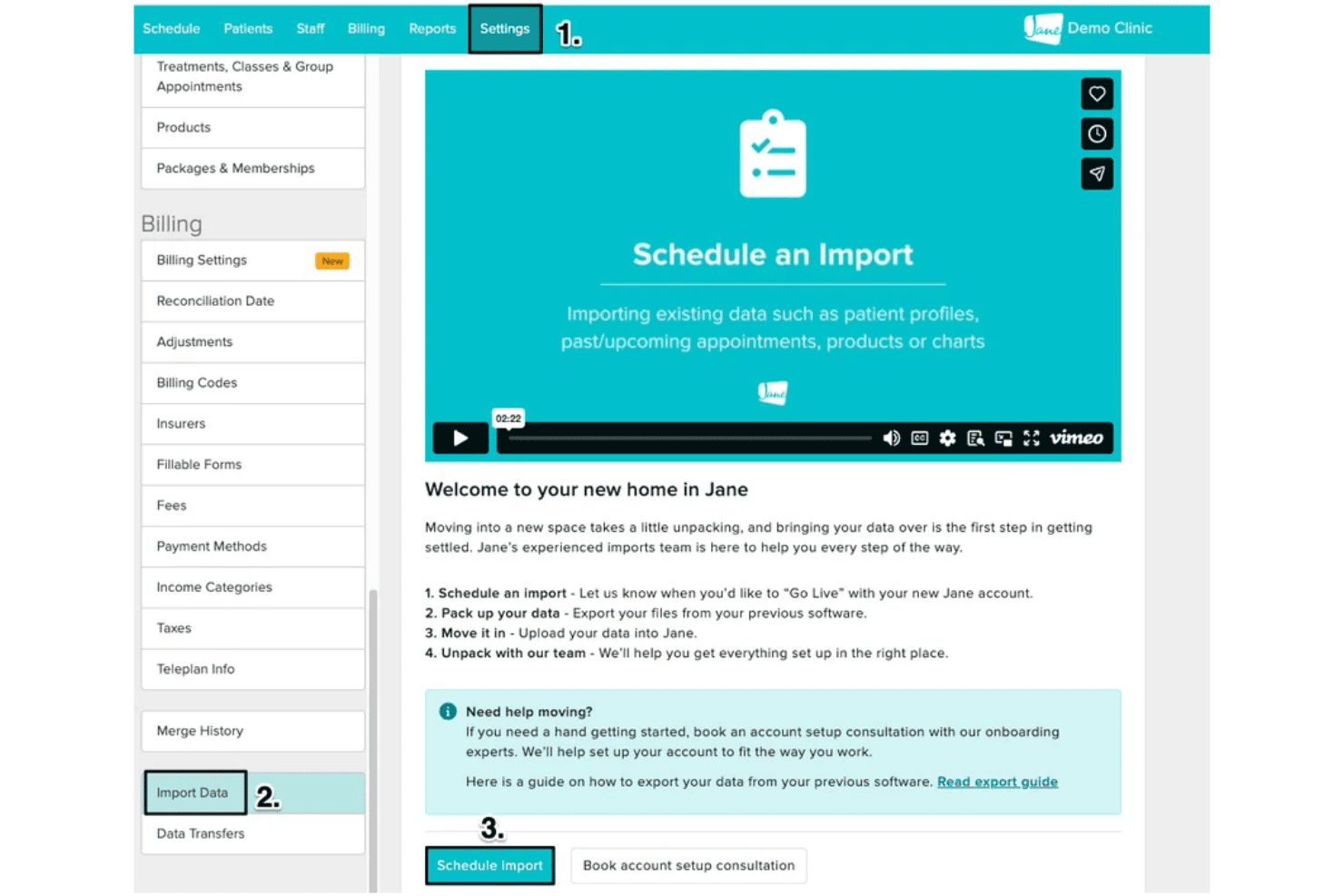
Jane imports Healthie client profiles, appointments, and clinical charts for continued care. Jane is a practice management platform for allied health clinics, offering customizable clinical charting, appointment scheduling, payment processing, telehealth, and patient communication.
Who Is Jane Best For?
Jane suits allied health practices transitioning from Healthie that need to transfer existing patient charts, appointment histories, and client records while maintaining customizable clinical documentation.
Why Jane Is a Good Healthie Alternative
I picked Jane as a Healthie alternative because of its documented Healthie data migration process. I like that Jane supports importing client profiles, past and future appointments, and clinical charts, with its import team handling the uploaded files. Once transferred, clinicians can continue documenting care using customizable chart templates. However, Jane doesn't import invoices, payments, or other billing records, so practices need to preserve that information separately.
Jane Key Features
- Online booking: Patients can book appointments, group sessions, and classes through a clinic booking page.
- Telehealth: Jane includes one-to-one video appointments; group sessions are a paid add-on.
- Secure messaging: Patients and practitioners can exchange messages linked to patient records.
- Insurance billing: A paid add-on supports claims, eligibility checks, remittances, and rejection management.
Jane Integrations
Jane lists 20 marketplace integrations, including Claim.MD for insurance claims, TELUS eClaims for direct billing, Physitrack for exercise programs, and Fullscript for supplement dispensing.
Pros and Cons
Pros:
- Scheduling, charting, and payments share records
- Custom SOAP and narrative chart templates
- Healthie charts and appointments can transfer
Cons:
- Outcome scores lack red-flag alerts
- Healthie invoices and payments won’t migrate
Learn more about Jane: Best for chart-linked outcome tracking
- Free plan + 30-day trial available
- From $39/user/month
Visit WebsiteCustomer Rating:4.9/5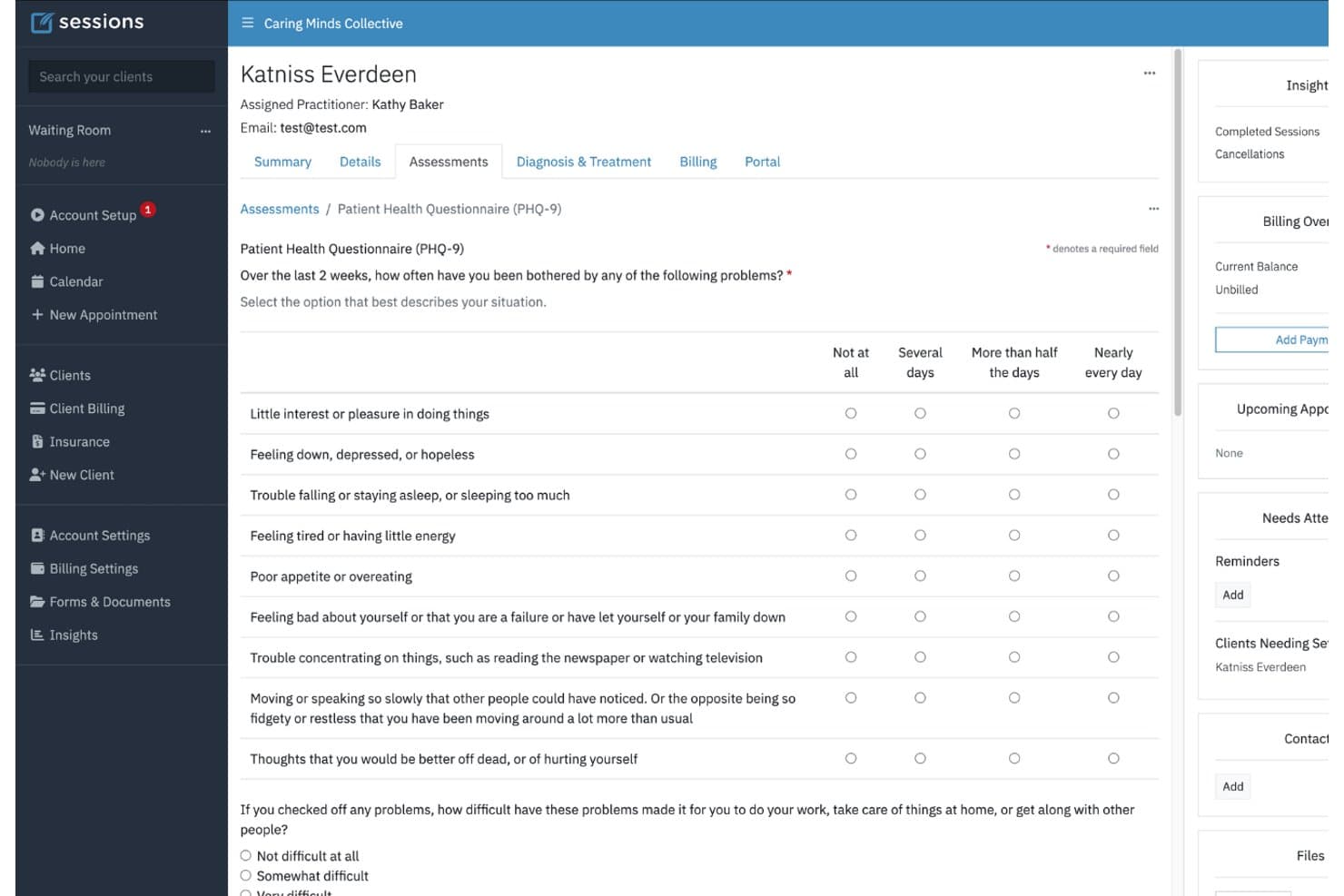
Sessions Health charts PHQ-9/GAD-7 scores, symptom trends, and treatment goal progress. Sessions Health is a mental health EHR and practice management platform for solo therapists and group practices, covering clinical documentation, appointment scheduling, billing, secure messaging, and telehealth.
Who Is Sessions Health Best For?
Sessions Health suits mental health clinicians considering a switch from Healthie who need automated symptom assessments, treatment-plan monitoring, and progress tracking within client records.
Why Sessions Health Is a Good Healthie Alternative
I chose Sessions Health because of its clinical assessment and treatment progress tracking capabilities. Its auto-scored assessments, including PHQ-9 and GAD-7, record results directly in client charts and display graphs showing symptom changes over time. I particularly like how clinicians can update treatment objectives, document interventions, and record progress within session notes. This keeps assessment results and treatment goals connected throughout ongoing care.
Sessions Health Key Features
- Appointment reminders: Send customizable email and SMS reminders, with calendar sync options.
- Electronic claims: Submit claims individually or in batches and track their status.
- Client portal: Share forms and documents, message clients, and let clients request appointments.
- Integrated telehealth: Offer browser-based video sessions with screen sharing and up to four participants.
Sessions Health Integrations
Sessions Health supports two-way synchronization with Google Calendar and one-way synchronization with Apple Calendar and Microsoft Outlook. It also connects with Stripe for payment processing and Claim.MD for electronic insurance claims, eligibility checks, and remittance tracking. A public API for custom integrations is not documented.
Pros and Cons
Pros:
- Reviewers praise adaptable forms and reusable notes
- Treatment objectives carry into progress notes
- Chart-linked PHQ-9 and GAD-7 progress graphs
Cons:
- Default treatment plans cannot be customized
- Group telehealth remains a reported limitation
Learn more about Sessions Health: Best for visual aesthetic treatment records
- Free demo available
- Pricing upon request
Visit WebsiteCustomer Rating:4.7/5
Pabau organizes aesthetic treatment notes, patient records, bookings, billing, and follow-ups. Pabau is a clinical practice management platform for aesthetic and private clinics, covering patient records, appointment scheduling, billing, client engagement, and treatment documentation.
Who Is Pabau Best For?
Pabau suits aesthetic clinics considering a switch from Healthie that need visual treatment records, injection mapping, and before-and-after photo documentation.
Why Pabau Is a Good Healthie Alternative
I picked Pabau as a Healthie alternative because of its specialized aesthetic charting capabilities. Its injection plotting tool allows clinicians to mark treatment sites directly on facial diagrams or patient photos while recording products, dosages, and batch numbers. I particularly like how these annotated images are stored alongside clinical notes and treatment histories, allowing practitioners to review previous injection placements and monitor changes during follow-up consultations.
Pabau Key Features
- Online booking: Clients can book, reschedule, or cancel appointments through a configurable portal.
- Waitlist: Automatically fill cancelled appointment slots from the waitlist.
- Video consultations: Host virtual consultations within the practice-management platform.
- Insurance claims: Submit and track US payer claims through a connected Claim.MD account.
Pabau Integrations
Pabau offers native integrations with Claim.MD for US insurance claims, Labcorp and Quest Diagnostics for laboratory orders and results, and Stripe for payment processing. Additional connections include Google Calendar, Xero, and Healthcode. It also provides open APIs and webhooks for custom integrations.
Pros and Cons
Pros:
- Appointment scheduling and reminders connect with records
- Reviewers praise organized clinical records and forms
- Visual treatment photos include injection plotting
Cons:
- Video consultations cannot be recorded
- Setup can require multiple meetings
Learn more about Pabau: Best for recurring group care programs
- Free plan + 14-day free trial + free demo available
- From $31/user/month
Visit WebsiteCustomer Rating:4.4/5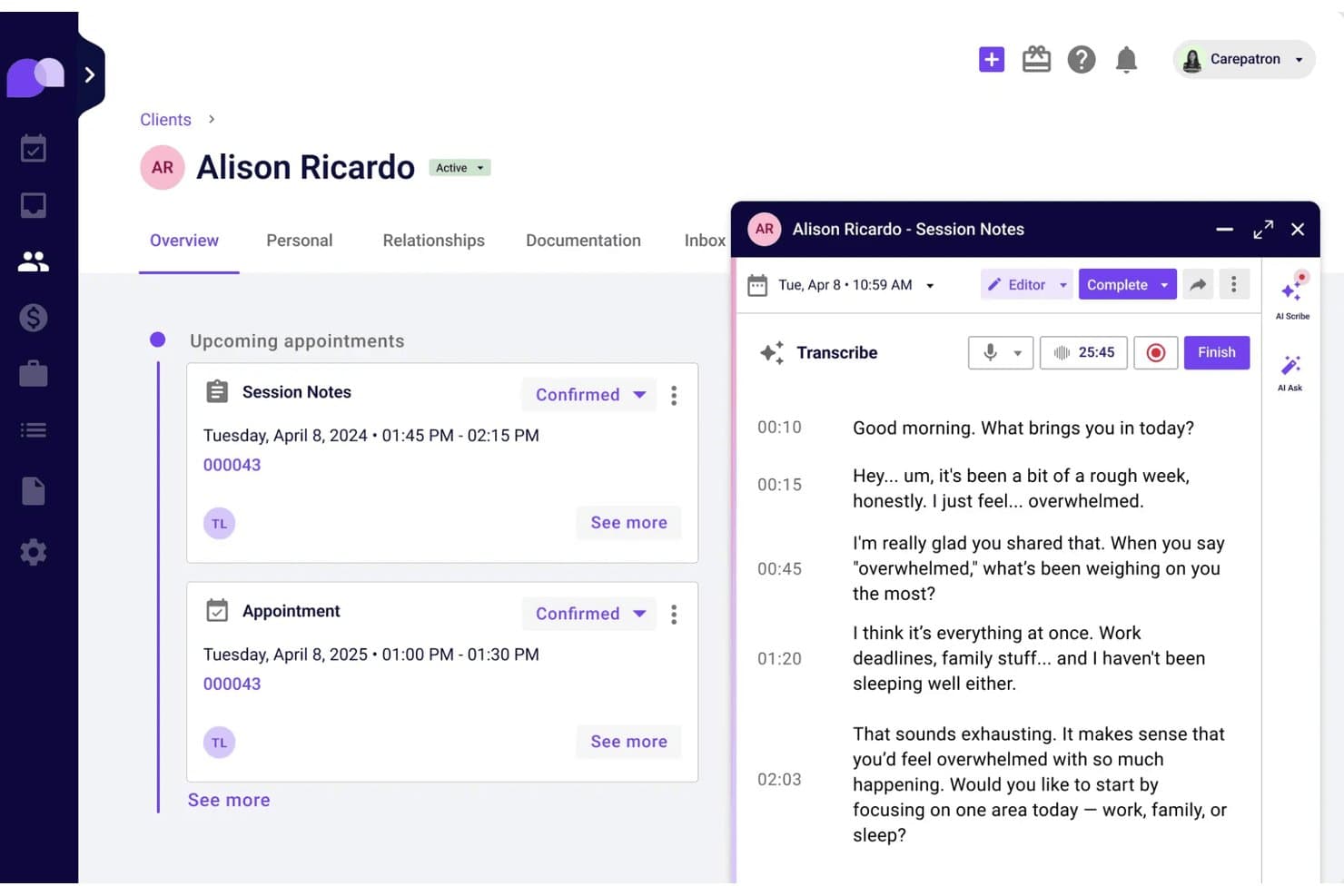
Carepatron offers custom EHR charting, telehealth, scheduling, billing, and client messaging. Carepatron is a cloud-based EHR and practice management platform for independent clinicians and small practices, covering customizable charting, scheduling, telehealth, client communication, and billing.
Who Is Carepatron Best For?
Carepatron suits small practices considering a switch from Healthie that need flexible scheduling for recurring group programs, workshops, and multi-session care services.
Why Carepatron Is a Good Healthie Alternative
I picked Carepatron as a Healthie alternative because of its customizable program scheduling and group care capabilities. Its program templates allow practices to organize recurring workshops and multi-session services, with options to assign different hosts, locations, or services to individual sessions. I particularly like the flexibility to adjust each session independently while coordinating group telehealth through the same platform.
Carepatron Key Features
- Online booking: Clients can book, reschedule, or cancel through a branded page synced with your calendar.
- Secure messaging: Send client messages and attachments linked to their records.
- Claims and superbills: Create CMS-1500 claims and superbills using client and appointment data.
- Practice dashboard: View revenue, unpaid invoices, appointments, and notes by date range.
Carepatron Integrations
Carepatron connects with Google Calendar and Microsoft Outlook for calendar synchronization, Stripe for payment processing, and DoseSpot for electronic prescribing. It also supports Google Analytics for booking activity tracking and provides a public REST API for custom connections, with API functionality currently focused on contact data exports.
Pros and Cons
Pros:
- Specialty templates support varied clinical documentation
- Group telehealth supports up to 20 participants
- Recurring programs allow session-specific hosts and locations
Cons:
- Reviewers report friction navigating claims and invoices
- Program sessions must be scheduled upfront
Learn more about Carepatron: Best for keeping therapy process notes separate
- 30-day free trial + free demo available
- From $69/user/month
Visit WebsiteCustomer Rating:4.4/5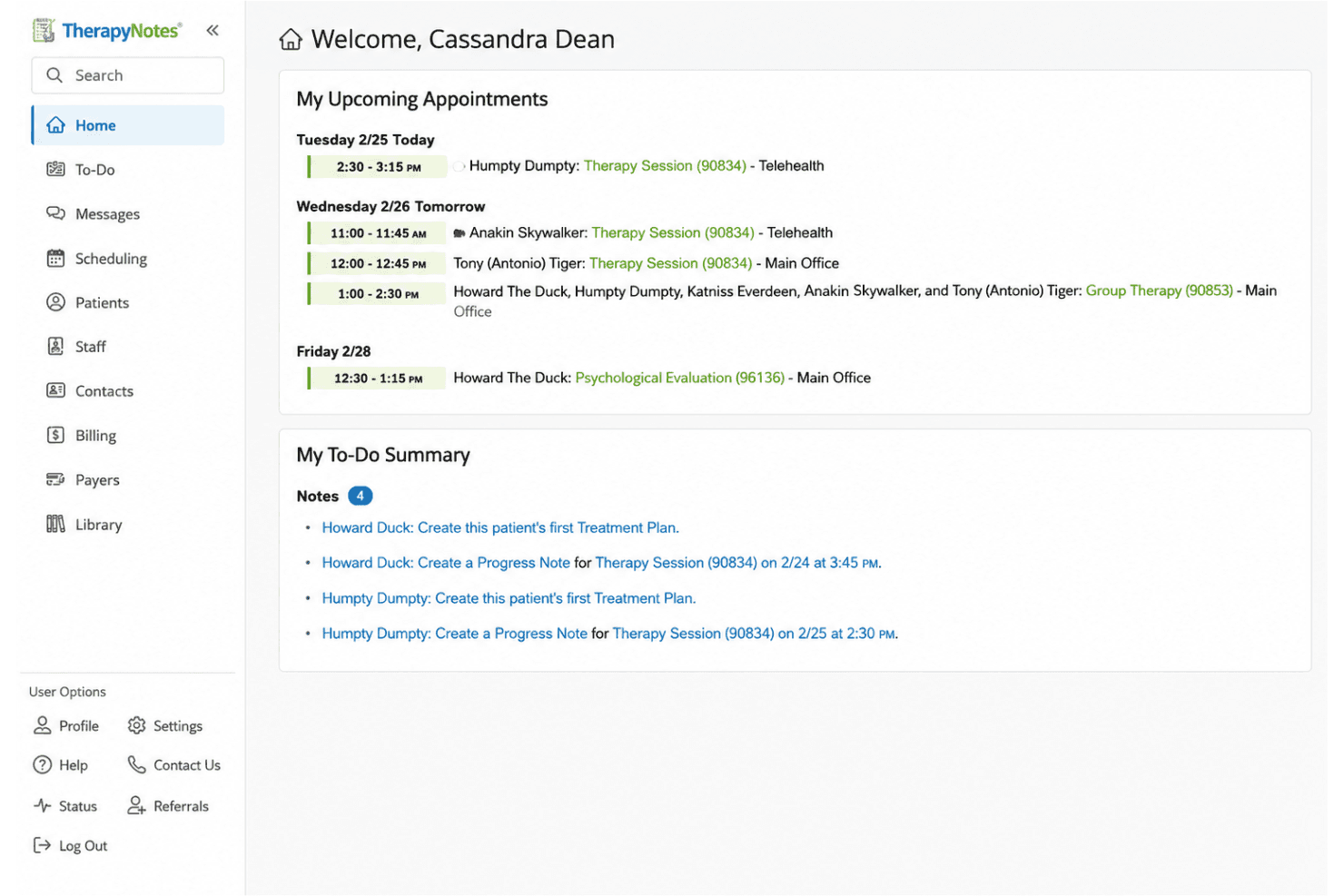
TherapyNotes manages clinical notes, scheduling, billing, and secure telehealth. TherapyNotes is a behavioral health EHR and practice management platform for solo and group practices, covering clinical documentation, appointment scheduling, insurance billing, telehealth, and client communication.
Who Is TherapyNotes Best For?
TherapyNotes suits mental health clinicians who need to maintain private psychotherapy notes separately from formal clinical records while managing documentation, appointments, and insurance claims.
Why TherapyNotes Is a Good Healthie Alternative
I chose TherapyNotes as a Healthie alternative because it lets clinicians keep private psychotherapy notes separate from standard progress notes. I particularly like how its dedicated note functionality protects sensitive session observations, while structured templates support treatment planning and clinical documentation. TherapyNotes also includes safeguards to prevent psychotherapy notes from being unintentionally shared when exporting patient records.
TherapyNotes Key Features
- Claims and eligibility checks: Submit electronic claims and check coverage through the billing workflow.
- Appointment reminders: Send clients reminders by email, text, or phone.
- Premium telehealth: Host sessions with up to 16 participants and share screens.
- Outcome measures: Score measures automatically and review insights into client progress.
TherapyNotes Integrations
TherapyNotes connects with Claim.MD for electronic claims processing and works with the American Psychological Association (APA) and Healthmonix for MIPS reporting. It also supports encounter-data submission to NC HealthConnex. TherapyNotes does not publicly document a general-purpose API for custom integrations.
Pros and Cons
Pros:
- Responsive support helps resolve billing questions
- Appointment-linked notes and claims reduce duplicate entry
- Process notes stay separate from client charts
Cons:
- Billing workflows can complicate secondary-payment tracking
- Progress-note templates require fixed clinical fields
Learn more about TherapyNotes: Best for behavioral health case management
- 21-day free trial + free demo available
- From $29/user/month
Visit WebsiteCustomer Rating:4.5/5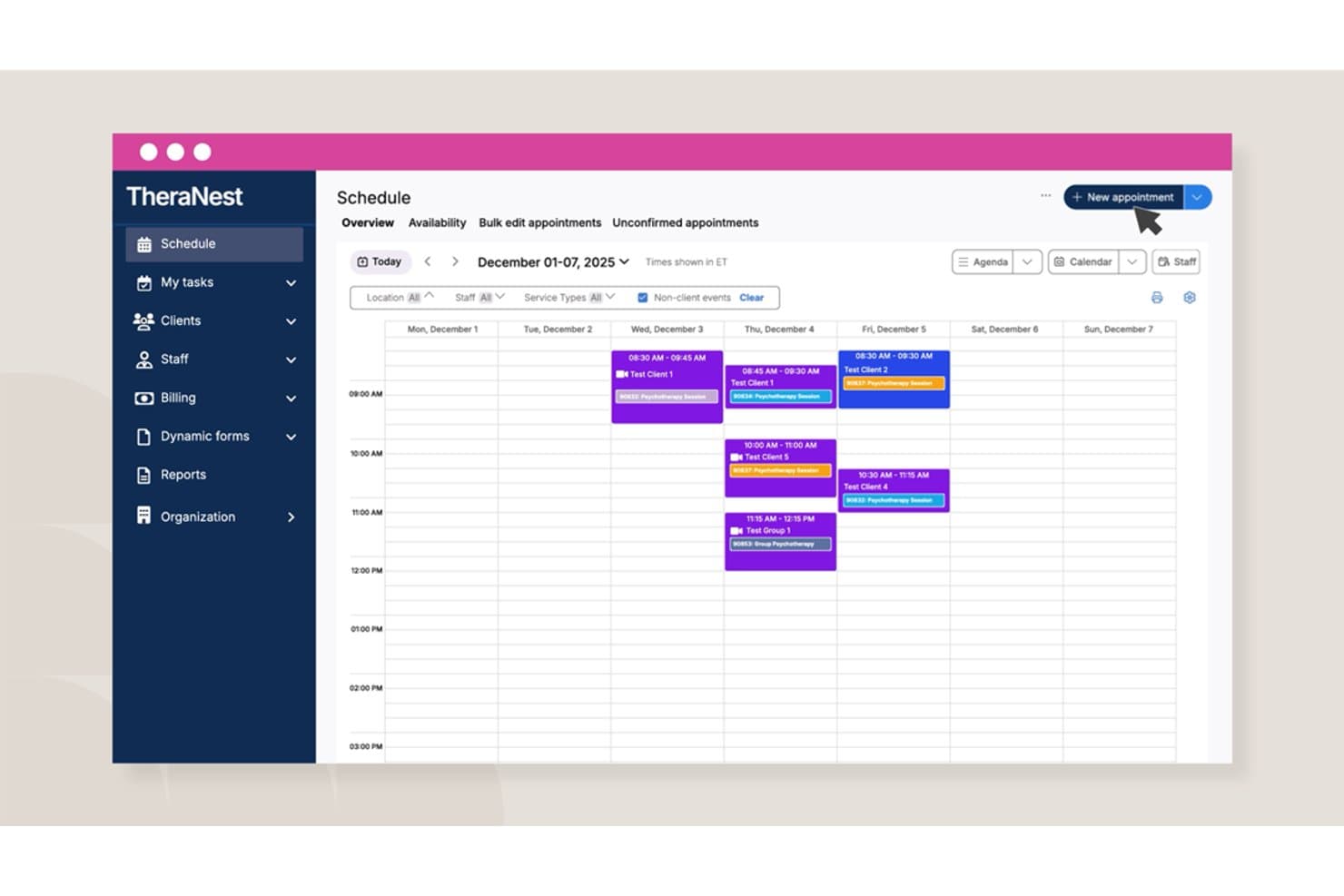
Ensora Health TheraNest tracks therapy notes, treatment goals, claims, and appointment schedules. Ensora Health TheraNest is a mental health EHR and practice management platform for solo therapists and group practices, covering clinical documentation, treatment planning, appointment scheduling, insurance billing, and client communication.
Who Is Ensora Health TheraNest Best For?
Ensora Health TheraNest suits mental health practices considering a switch from Healthie that need structured case documentation, diagnosis tracking, and customizable treatment plans.
Why Ensora Health TheraNest Is a Good Healthie Alternative
I picked Ensora Health TheraNest as a Healthie alternative because of its case management and clinical documentation capabilities. Its case records connect ICD-10 diagnoses with treatment plans and progress notes, allowing clinicians to maintain consistent documentation throughout care. I particularly like how treatment plans track goals and objectives by status, while the Dynamic Form Builder supports custom assessments, case forms, and progress notes. This gives therapists greater flexibility when documenting different client needs and treatment approaches.
Ensora Health TheraNest Key Features
- Appointment scheduling: Manage recurring sessions, group rosters, room assignments, staff availability, and multiple locations.
- Billing and claims: Process electronic claims and eligibility checks on Advanced; Premier adds insurance-billing automation.
- Client portal: Let clients complete intake forms, request appointments, send secure messages, and pay balances.
- Telehealth: Offer individual and group video sessions with waiting rooms, screen sharing, and device checks on Advanced and Premier.
Ensora Health TheraNest Integrations
Ensora Health TheraNest supports two-way synchronization with Google Calendar and one-way synchronization with Apple Calendar. It also connects with Stripe for payment processing and Claim.MD for electronic insurance claims and eligibility verification. Additional clearinghouse connections can be configured through SFTP, while a general-purpose public API is not documented.
Pros and Cons
Pros:
- Portal centralizes intake, messaging, and payments
- Dynamic forms support tailored clinical documentation
- Case goals and ICD-10 tools support tracking
Cons:
- Reviewers report claim visibility and payment-record issues
- Signed treatment plans require new versions
Learn more about Ensora Health TheraNest: Best for IOP/PHP group care
- Free demo available
- Pricing upon request
Visit WebsiteCustomer Rating:4.1/5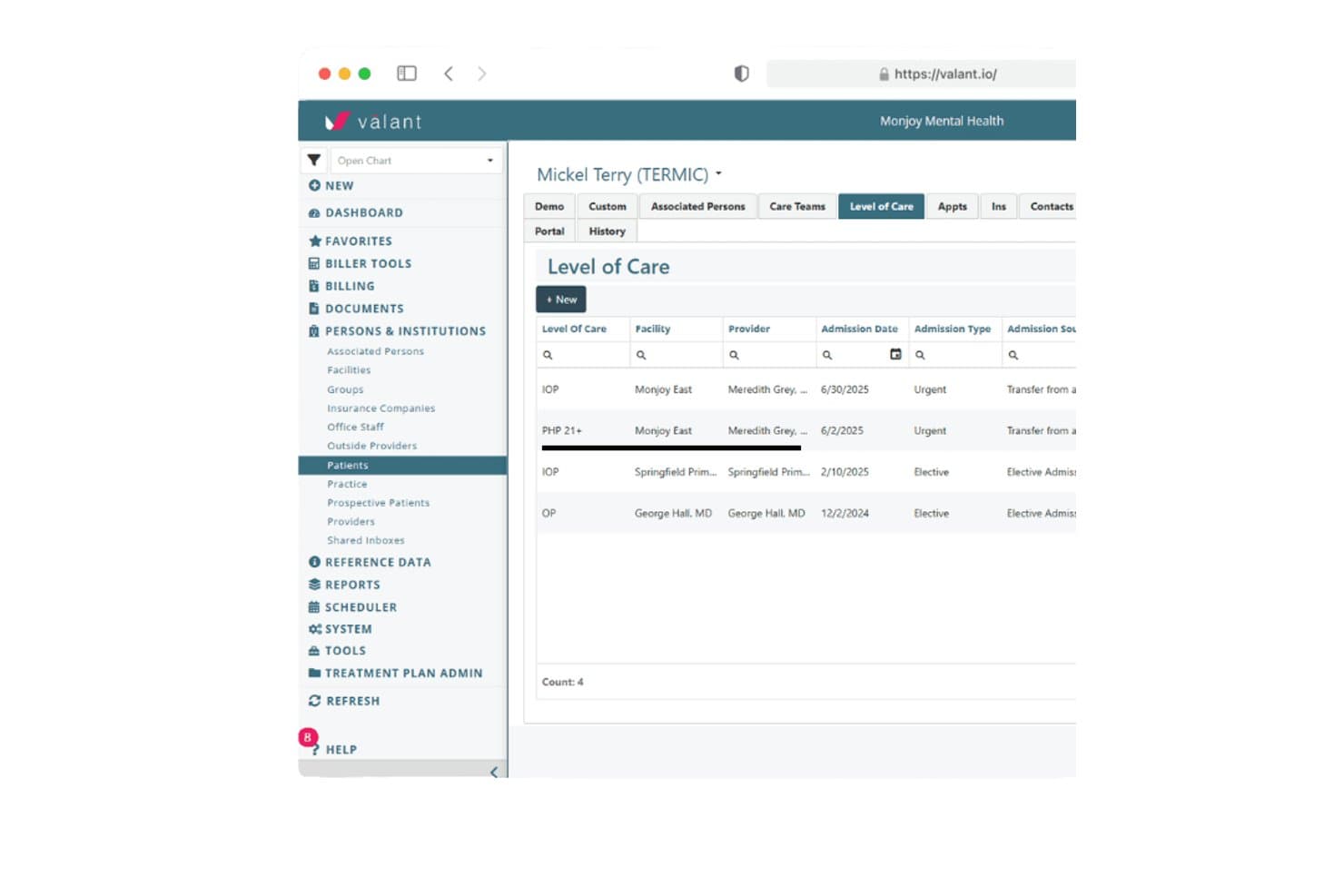
Valant tracks patient level of care history across IOP, PHP, and OP programs. Valant is a behavioral health EHR and practice management platform for mental health practices, covering clinical documentation, appointment scheduling, insurance billing, telehealth, and patient engagement.
Who Is Valant Best For?
Valant suits behavioral health practices delivering intensive outpatient programs (IOP) and partial hospitalization programs (PHP) that need recurring group scheduling, attendance tracking, clinical documentation, and billing.
Why Valant Is a Good Healthie Alternative
I picked Valant as a Healthie alternative because of its dedicated IOP/PHP group care workflows. I like that administrators can schedule recurring group sessions, monitor attendance, and coordinate multiple clinicians, while providers document treatment within the EHR. Its group telehealth functionality also connects scheduling and attendance records with billing workflows. Through the MYIO patient portal, patients can join recurring sessions and complete outcome assessments, keeping clinical progress connected to ongoing treatment.
Valant Key Features
- Behavioral-health note templates: Choose SOAP, DAP, BIRP, narrative, or custom formats.
- ePrescribing: Review medication histories, receive interaction alerts, and track prescriptions.
- Eligibility checks: Run real-time or batch checks for coverage and cost-share information.
- Revenue cycle management: Valant billing specialists can submit claims, address denials, and post payments.
Valant Integrations
Valant connects with DrFirst for electronic prescribing, controlled substance prescriptions (EPCS), and access to state Prescription Drug Monitoring Programs (PDMPs). It also provides inbound, outbound, and bidirectional APIs for exchanging patient, appointment, and billing data with external systems. Detailed API specifications are not publicly documented.
Pros and Cons
Pros:
- Billing workflows connect claims and payment posting
- Outcome measures feed into clinical notes
- Recurring IOP/PHP groups track attendance
Cons:
- Slow screens frustrate some clinicians
- Reviewers report intermittent video-visit failures
Learn more about Valant: Best for insurance-billing practices
- Free demo available
- Pricing upon request
Visit WebsiteCustomer Rating:3.9/5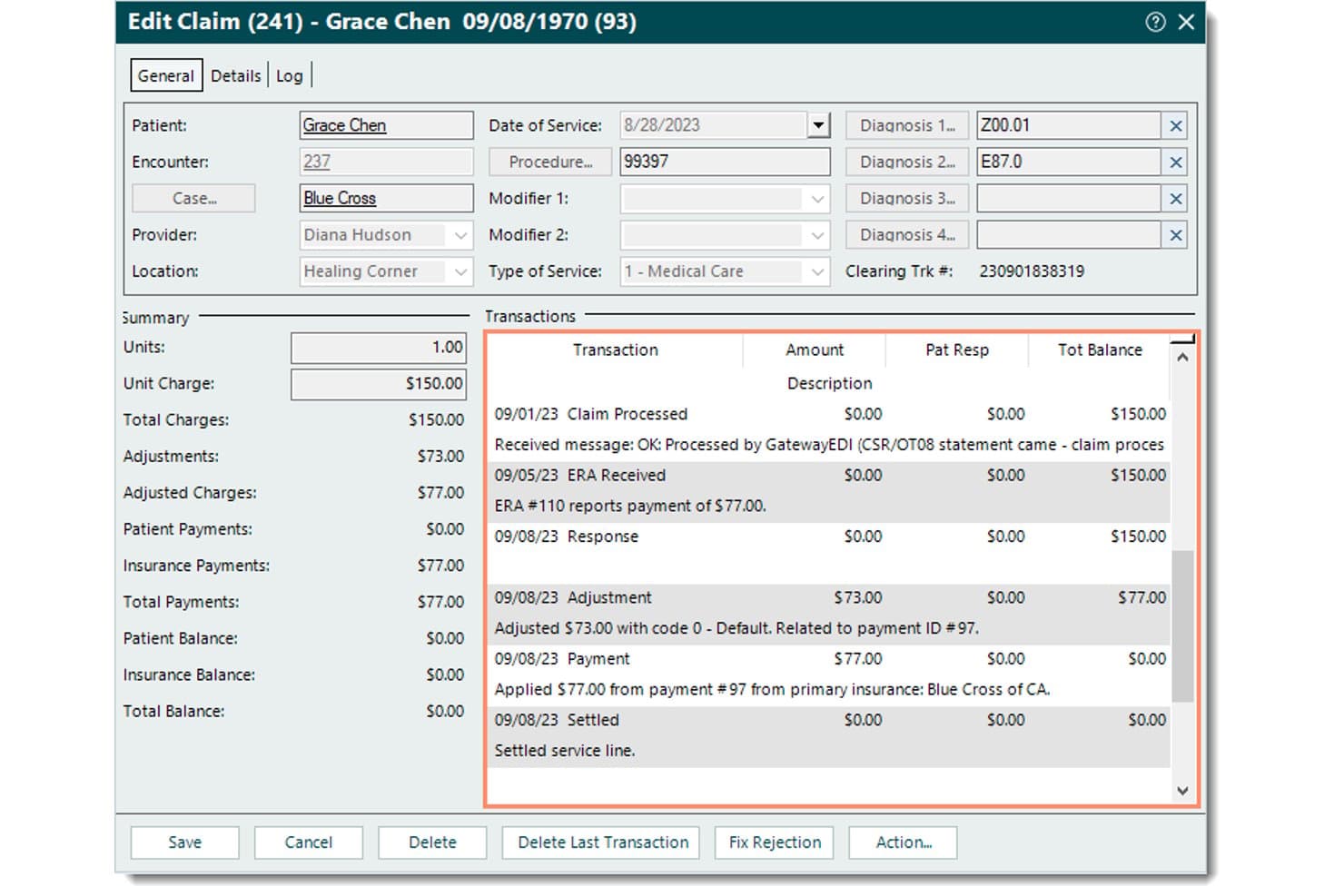
Tebra connects EHR charting, scheduling, medical billing, claim and denial tracking, patient messaging, and marketing tools. Tebra is a cloud-based EHR and practice management platform for independent medical practices, covering clinical documentation, appointment scheduling, insurance billing, patient engagement, and telehealth.
Who Is Tebra Best For?
Tebra suits independent medical practices considering a switch from Healthie that need clinical documentation, insurance claims, and patient payments managed within one platform.
Why Tebra Is a Good Healthie Alternative
I picked Tebra as a Healthie alternative because of its focus on insurance-based clinical workflows and revenue cycle management. Its EHR connects clinical documentation with eligibility checks, electronic claims submission, and patient payments. I particularly like its claim-rejection guidance, which allows administrators to identify missing or incorrect patient, subscriber, provider, and payer information before correcting and resubmitting claims. This makes Tebra worth considering for practices that prioritize insurance billing alongside patient care.
Tebra Key Features
- E-prescribing: Send prescriptions, review medication history, track refill requests, and receive drug and allergy alerts.
- Electronic lab orders: Send lab, radiology, and imaging orders and match results to patient charts.
- Group telehealth: Host video appointments with up to 200 participants.
- Patient portal: Let patients access visit summaries, test results, and secure messages.
Tebra Integrations
Tebra uses First Databank for medication information and Surescripts for electronic prescription transactions. It also supports electronic laboratory connections and offers SOAP and FHIR APIs for third-party data exchange and custom integrations.
Pros and Cons
Pros:
- Group telehealth supports up to 200 participants
- Specialty templates support therapy documentation
- Claim-status tracking clarifies outstanding insurance claims
Cons:
- Imports cap patient files and incur fees
- Billing reports and adjustments frustrate reviewers
Learn more about Tebra: Best for traditional clinical care workflows
- Free demo available
- Pricing upon request
Visit WebsiteCustomer Rating:3.9/5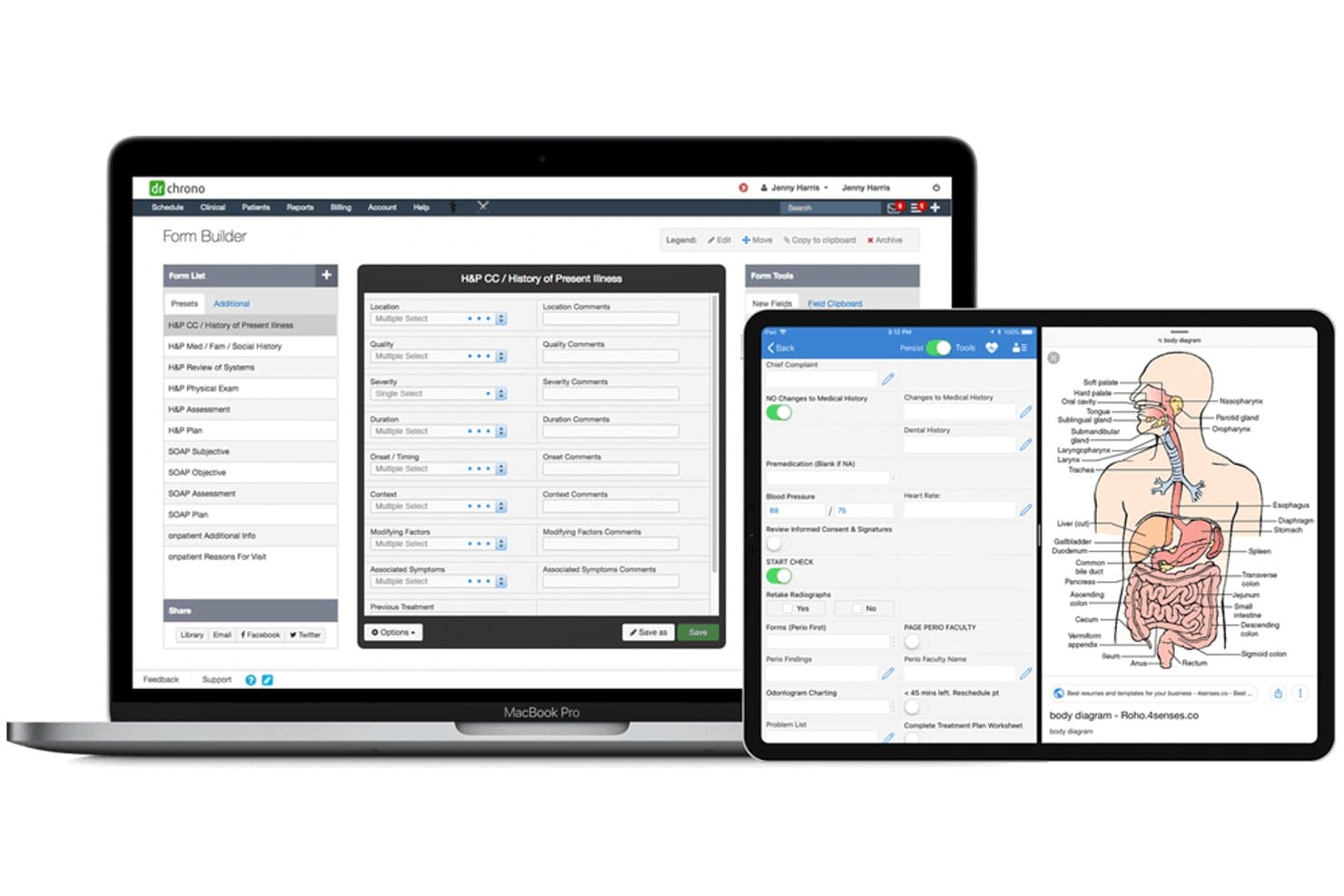
DrChrono combines EHR charting, scheduling, billing, and patient messaging for clinics. DrChrono is a cloud-based EHR and practice management platform for independent medical practices, covering clinical documentation, appointment scheduling, insurance billing, telehealth, and patient communication.
Who Is DrChrono Best For?
DrChrono suits independent medical practices that need specialty-specific charting templates, electronic prescribing, lab management, and insurance billing within one EHR.
Why DrChrono Is a Good Healthie Alternative
I picked DrChrono as a Healthie alternative because of its customizable clinical documentation and medical practice management capabilities. I like that clinicians can create specialty-specific templates, modify clinical forms, and document patient encounters according to their workflows. Its electronic prescribing and laboratory connections also allow providers to order tests, review results, and manage medications within patient charts. Combined with appointment scheduling, claims management, and insurance eligibility checks, these features support practices handling both clinical care and administrative tasks.
DrChrono Key Features
- Patient portal: OnPatient supports secure messaging and access to visit summaries, lab results, and health records.
- Patient self-check-in: Patients can complete intake forms, sign documents, and pay balances on a device or kiosk.
- Integrated video visits: Patients can join visits by link, complete forms, and pay balances during the visit.
- Audit log: Filter activity by patient, username, log type, or date range.
DrChrono Integrations
DrChrono connects with Quest Diagnostics and Labcorp for laboratory testing, Surescripts for health information exchange, and CoverMyMeds for medication prior authorizations. Its partner marketplace also lists Spruce Health for patient communication. DrChrono supports REST APIs, FHIR-based connectivity, and webhooks for third-party data exchange and custom applications.
Pros and Cons
Pros:
- Portal combines messaging, forms, and records
- Scheduling and claims share one workflow
- Custom specialty templates support clinical charting
Cons:
- Billing histories cannot transfer from other EHRs
- Users report unsaved notes and appointments
Learn more about DrChrono: Best for practices managing claims in one EHR
- Free demo available
- Pricing upon request
Visit WebsiteCustomer Rating:3.8/5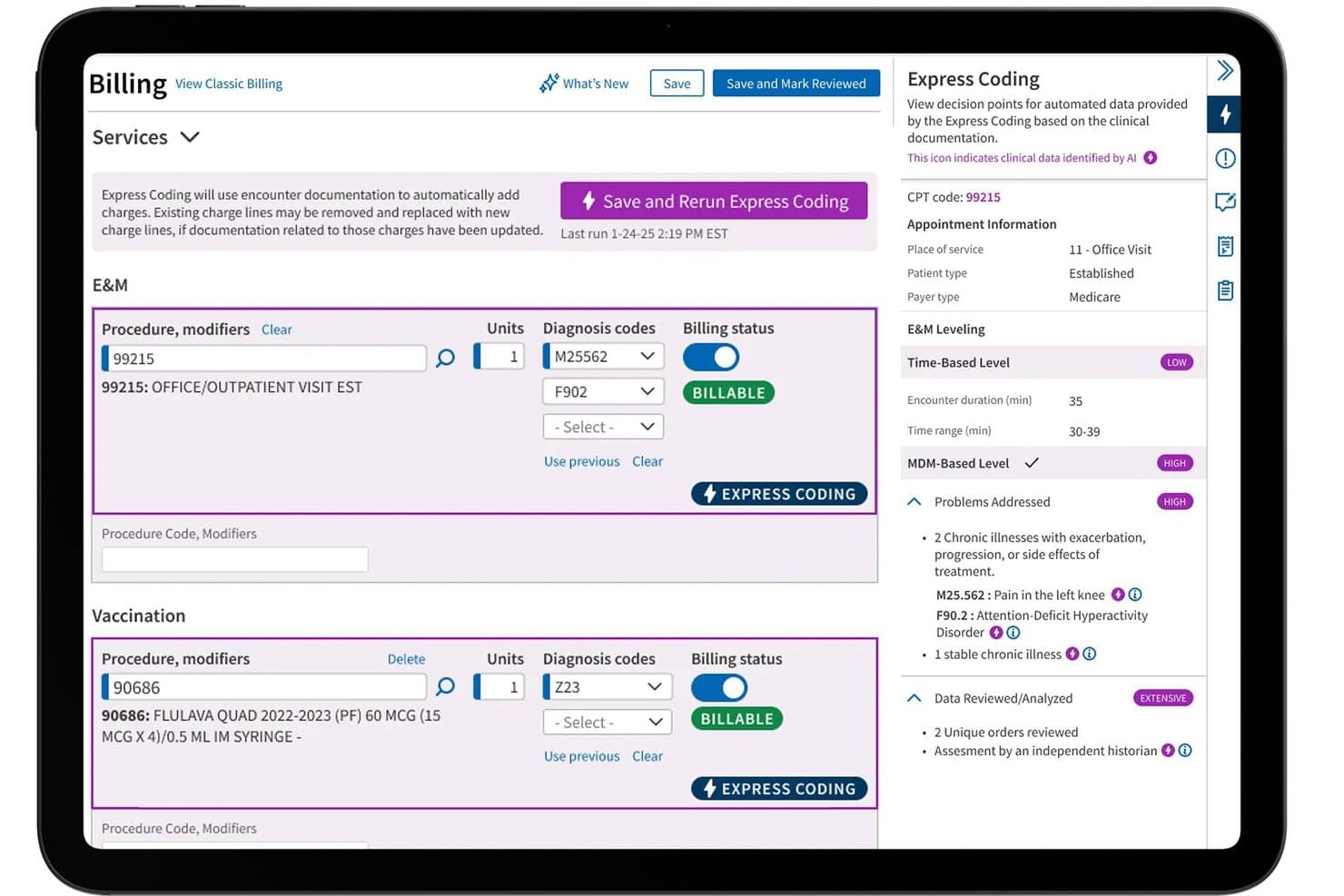
athenaOne uses AI-powered Express Coding for medical billing, claims, and clinical documentation. athenaOne is a cloud-based EHR and practice management platform for ambulatory practices, covering clinical documentation, medical billing, revenue cycle management, patient engagement, and scheduling.
Who Is athenaOne Best For?
athenaOne suits ambulatory practices considering a switch from Healthie that need insurance eligibility verification, claims processing, and denial management connected to clinical workflows.
Why athenaOne Is a Good Healthie Alternative
I picked athenaOne as a Healthie alternative because of its extensive medical billing and revenue cycle management capabilities. Its claims management tools automatically check insurance eligibility, review claims for potential errors, and provide guidance for resolving denials. I particularly like its billing rules engine, which identifies coding and payer-related issues before claim submission. This allows practices to connect clinical documentation with billing activities while reducing manual claim corrections.
athenaOne Key Features
- Patient self-scheduling: Patients can book through the portal, app, or a configured guest workflow.
- Secure patient messaging: Patients can message the care team and attach files; conversation history is retained in the patient record.
- Telehealth tools: Visits support screen sharing, live captions, a virtual whiteboard, and group sessions.
- PROM screener workflows: Practices can set rules to send selected patient-reported outcome screeners after qualifying appointments.
athenaOne Integrations
athenaOne provides access to more than 277,000 direct clinical integrations, including connections with laboratories, pharmacies, imaging centers, and healthcare organizations. It also supports medical record exchange through CommonWell Health Alliance and Carequality, alongside proprietary APIs, FHIR APIs, HL7 interfaces, and C-CDA connections for custom interoperability.
Pros and Cons
Pros:
- Specialty templates support structured encounter charting
- Portal messaging and self-scheduling support patient access
- Claims workflows sit alongside clinical documentation
Cons:
- Reviewers report unresolved claims and billing issues
- Behavioral health notes need template workarounds
Learn more about athenaOne:
Other Healthie Alternatives
Here are a few additional options that didn’t make my shortlist but are still worth checking out:
- 11AdvancedMDBest for behavioral health outcome tracking
- 12SimplePracticeBest for therapy planning and symptom tracking
- 13CharmHealthBest for a practice-branded patient app
- 14TheraPlatformBest for multidisciplinary therapy teams
- 15OptiMantraBest for integrative clinics selling supplements
- 16ZandaBest for Australian Medicare, DVA, and NDIS workflows
- 17PracticeQBest for tracking chiropractic spine findings
- 18eClinicalWorksBest for coordinating across hospital EHRs
- 19Practice BetterBest for nutrition care tracking food and labs
- 20CounSolBest for counselor note review and sign-off
How I Evaluate Healthie Alternatives
I split my evaluation into three parts. First, I check that a tool can document and chart patient records and keep data HIPAA-compliant—these are the essentials, and they carry the most weight. Then I look for specialty-specific templates or outcome tracking tools. Beyond features, I consider onboarding support and total cost of ownership.
Core Functionality (Table Stakes For This List)
When I'm selecting tools for my list, I score each one on a scale from 0 (does not offer the functionality) to 5 (excels in this area) for each core functionality listed below. I then convert the total into a percentage to help assess each tool's overall fit, with extra weight on any functionalities I’ve deemed essential.
- Clinical Charting (Essential): I look for structured notes, editable templates, and treatment plans that support follow-ups across providers and specialties.
- Data Security (Essential): I assess safeguards such as a BAA, role-based access, secure data exchange, and audit trails for sensitive records.
- Scheduling: I check whether teams can manage provider calendars, recurring visits, rescheduling, and appointment reminders.
- Billing & Claims: I consider how the system handles invoicing, payments, and claims tracking for practices that bill insurers.
- Telehealth: I look for virtual visits built into care workflows, including options for one-to-one sessions or group appointments.
- Client Engagement: I assess whether clients can use a portal for secure messaging, forms, reminders, and document sharing.
Once I have a list of tools that meet the criteria, I consider what sets each platform apart.
Differentiating Factors (What Sets Vendors Apart)
Here's how I compare and contrast different vendors:
Standout Features
I look for specialty-specific templates that match real clinical workflows—a dietitian's food journal note is nothing like a therapist's progress note, and generic templates slow charting down. Group and cohort program support also matters if your practice runs IOPs or classes, since retrofitting a one-on-one platform for group care creates workarounds. I check whether outcome tracking is built into the chart so clinicians can link assessments to treatment plans without exporting data. Finally, open API access tells me a platform can grow with your practice's custom needs.
Beyond Features
I check whether a vendor offers structured data migration support, since moving from Healthie mid-practice means transferring charts, intake forms, and billing history without gaps. Total cost of ownership matters too—some platforms charge per-provider fees that look affordable until you add claims processing, payment processing, or required add-on modules. I also evaluate compliance posture by looking for a signed BAA, role-based access controls, and audit logging, especially for multi-provider groups where accountability across clinicians is non-negotiable.
Why Look for Healthie Alternatives?
Healthie is a good choice of EHR software for health and wellness practices, but some teams need workflows tailored to different specialties or care models. You might be looking for an alternative because:
- Your IOP or PHP needs group-first scheduling and documentation
- Your therapy team needs separate process notes and progress notes
- Your practice needs claims workflows built for traditional clinical care
- You need chart migration support tailored to your current EHR
If any of these sound like you, you’ve come to the right place. My list includes EHR options better suited to teams facing these challenges with Healthie and looking for an alternative.
Healthie Key Features
Here are the key features of Healthie to help you compare it with alternative options:
- Clinical charting: Providers can write notes during or after appointments, use customizable templates, and share chart notes securely with other providers. This supports documentation across visits and helps care teams review relevant records.
- Digital intake forms: Create forms or upload existing ones to collect health information, signatures, and payment details. Send forms when adding clients or scheduling appointments, then track completion and send reminders.
- Scheduling: Manage provider calendars, configure appointment settings, and let clients book online. Appointment reminders and calendar tools help teams coordinate visits and keep scheduling details organized.
- Billing and payments: Create invoices, process payments, and manage insurance claims and superbills. Healthie supports CMS 1500 forms and electronic claim submission for practices that bill insurers.
- Telehealth: Host one-to-one and group sessions, classes, and webinars through built-in video or HIPAA-compliant Zoom. Virtual appointments can connect with charting workflows, so providers can document care during or after a session.
- Patient portal and messaging: Clients can access a portal to manage appointments, view billing information, share documents, and message providers securely. Providers can also use group chats or send messages to selected clients.
- Care plans and tracking: Create care plans with recommendations, documents, and goals, then review clients’ progress in their records. Clients can track goals and log food, activity, symptoms, and other lifestyle information between visits.
- Team access and shared calendars: Group practices can use a shared calendar, internal team chat, and role-based permissions. Administrators can control what team members can access, supporting coordination across providers.
Costs and Pricing of Healthie Alternatives
Pricing varies by features, team size, and add-ons. Here are typical monthly price ranges for Healthie alternatives:
Plan Comparison Table for Healthie Alternatives
| Plan Type | Average Price | Common Features |
|---|---|---|
| Plan TypeFree Plan | Average Price$0 | Common FeaturesBasic scheduling, limited client records, intake forms, and secure messaging. |
| Plan TypePersonal Plan | Average Price$20-$60/month | Common FeaturesAppointment scheduling, charting templates, a client portal, and telehealth. |
| Plan TypeBusiness Plan | Average Price$60-$155/month | Common FeaturesTeam calendars, shared records, billing tools, role-based access, and reporting. |
| Plan TypeEnterprise Plan | Average Price$150-$500+/month or custom pricing | Common FeaturesCustom onboarding, data migration, advanced permissions, integrations, and dedicated support. |