

A strong SimplePractice alternative fits your specialty and practice size, with the documentation, scheduling, patient communication, and billing workflows your team needs. The right choice can look different for a solo therapist, a multidisciplinary clinic, or a growing medical practice. After growing Symphony Health MD from a solo practice to 15 physicians, I know how much the right systems matter to daily operations. This guide compares options across therapy, medical, allied health, and wellness practices so you can find a better fit for your care model.
What Is SimplePractice?
SimplePractice is a cloud-based EHR and practice management platform for health and wellness professionals, especially therapists. It combines tools for scheduling, clinical documentation, billing, telehealth, and client communication. The platform also serves speech-language pathologists, occupational therapists, and psychiatrists, so its fit depends on your specialty, team structure, and day-to-day workflows.
Comparison Table: SimplePractice Alternatives
Compare pricing and specs side by side for the SimplePractice alternatives that made it onto my shortlist.
Why Trust Our Software Recommendations
6,700+
Reviews
20
Industry experts
16+
Evaluation factors
14
Years
Our team has been testing and reviewing software since 2012. As medical practice leaders ourselves, we know how difficult—and important—it is to choose the right software.
For this guide, we evaluated tools using hands-on testing and independent research, scoring tools using our selection criteria.
Our reviews reflect our human editorial judgment, not a sales pitch.
SimplePractice Alternatives Reviews
Below are my detailed summaries of the best SimplePractice alternatives that made it onto my shortlist. My reviews cover each platform’s features, pricing, and best-fit use cases to help you find the right option for your practice.
 1Best for allied health multi-discipline clinics
Jane
- Free demo available
- From $59/month
Visit WebsiteCustomer Rating:4.8/5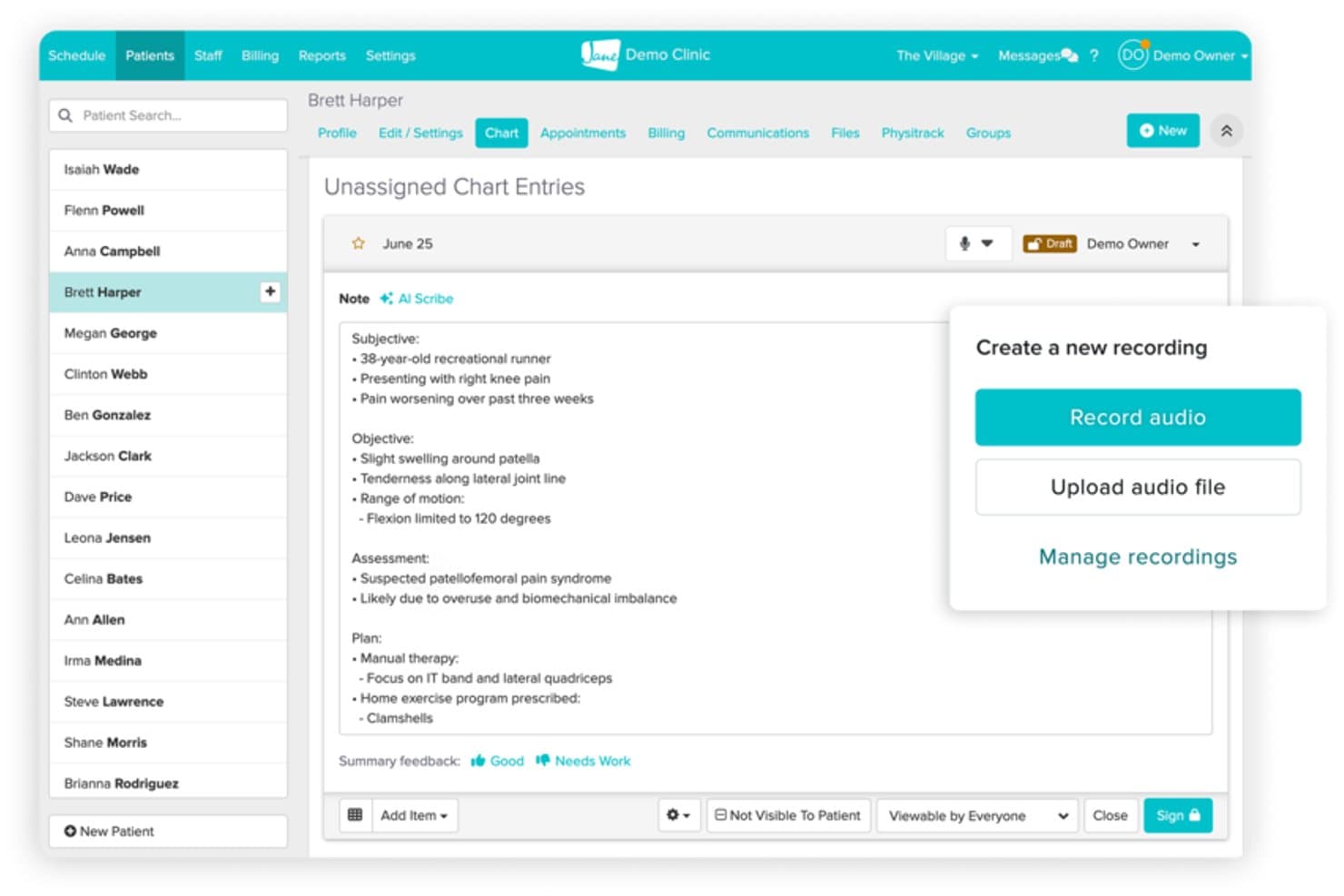
Jane's AI Scribe turns recorded audio into structured SOAP notes. Jane is practice management software for allied health multi-discipline clinics, bringing appointment scheduling, charting, billing, and patient communication into one system.
Who Is Jane Best For?
Jane suits owners and administrators of multi-discipline allied health clinics who need one practice system for clinical and front-office work.
Why I Picked Jane
I picked Jane as a SimplePractice alternative because it’s best for allied health multi-discipline clinics. I like that teams can manage appointments and online booking alongside charting, intake forms, and smart templates in one system. That gives a clinic with several disciplines one place to coordinate bookings and document care.
Jane Key Features
- Billing and invoicing: Create invoices and manage billing within Jane.
- Insurance claims: Submit insurance claims through the platform.
- Appointment reminders: Send automated email and text reminders.
- Virtual sessions: Meet with patients through video sessions.
Jane Integrations
Jane’s directory lists 18 integrations, including TELUS eClaims, Pacific Blue Cross, Teleplan, Claim.MD, Fullscript, Physitrack, Wibbi, and Documo. It also lists Mailchimp and Google Tag Manager; Jane’s API is limited to approved partners, not clinic-built integrations.
Pros and Cons
Pros:
- Scheduling, charting, and billing share one platform
- Online booking and waitlists help fill cancellations
- Supports charts across allied health disciplines
Cons:
- Accounts receivable reports lack useful filtering
- Chart templates offer limited customization
Learn more about Jane: Best for solo therapists on predictable pricing
- 30-day free trial
- From $39/month
Visit WebsiteCustomer Rating:4.9/5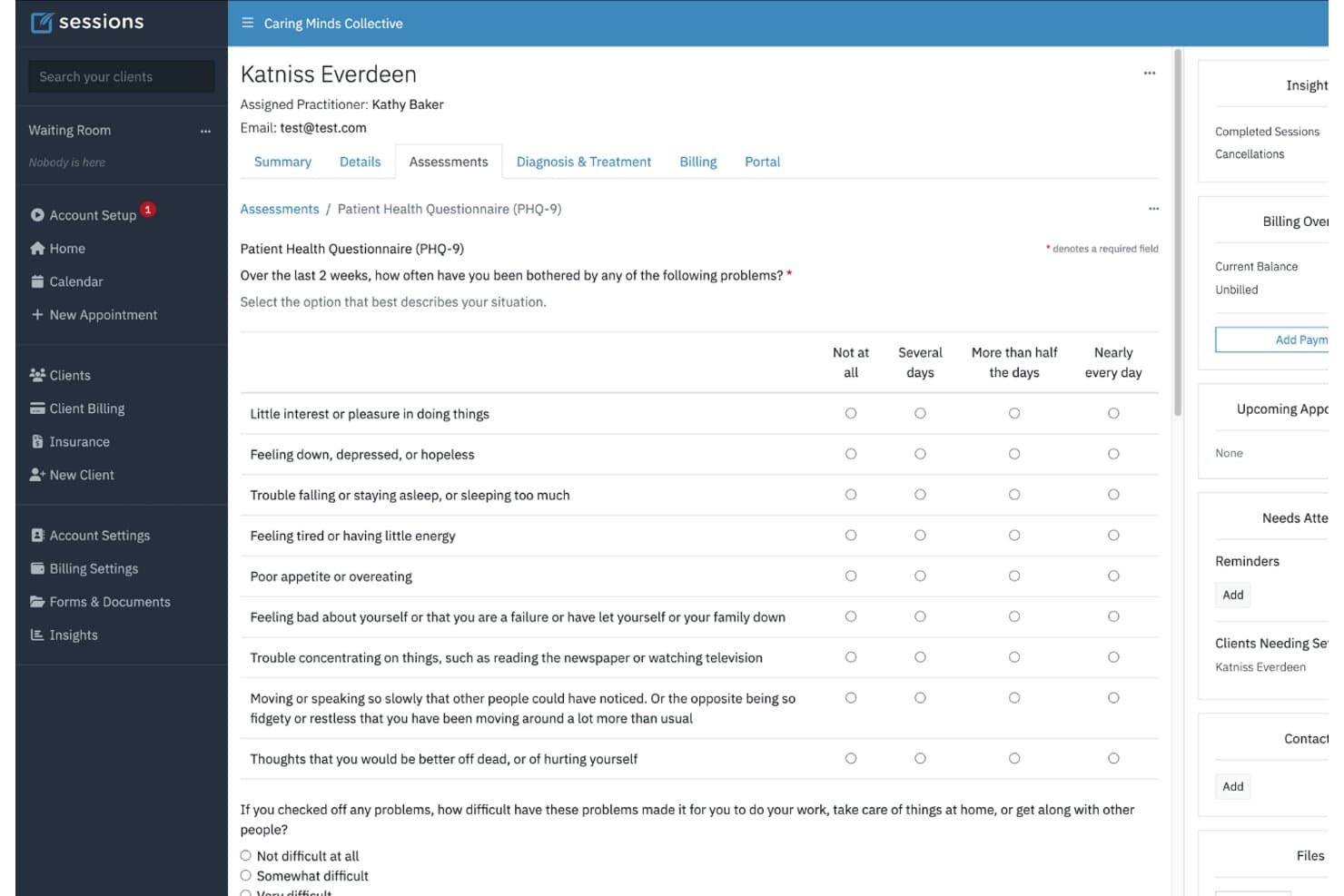
Sessions Health lets users complete PHQ-9 assessments directly in the client profile. Sessions Health is a therapist-designed EHR for solo clinicians who want to manage clinical documentation, scheduling, billing, telehealth, and client communication in one place as an alternative to SimplePractice.
Who Is Sessions Health Best For?
Sessions Health suits solo therapists who want predictable pricing for managing their practice.
Why I Picked Sessions Health
I picked Sessions Health as a SimplePractice alternative because it’s best for solo therapists on predictable pricing, with plans starting at $39 per month. I like that custom notes can carry treatment-plan objectives forward, while auto-scored assessments and progress graphs help track client changes over time.
Sessions Health Key Features
- Online booking: Clients can request appointments through the online booking page.
- Automated reminders: Send appointment reminders by email or text.
- Telehealth sessions: Meet with clients in-browser, with chat and screen sharing.
- Client portal: Clients can complete intake forms, manage appointments, and make payments.
Sessions Health Integrations
Sessions Health integrates with Claim.MD for insurance claims and Stripe for payments, and supports two-way Google Calendar sync plus one-way sync with Outlook and Apple Calendar.
Pros and Cons
Pros:
- Client portal supports appointment and payment management
- Responsive support earns repeated reviewer praise
- Custom notes carry treatment-plan objectives forward
Cons:
- Reviewers report occasional telehealth connectivity interruptions
- Reporting lacks deeper billed-session and outcome analysis
Learn more about Sessions Health: Best for insurance-heavy RCM across specialties
- Free demo available
- From $4/visit
Visit WebsiteCustomer Rating:4.8/5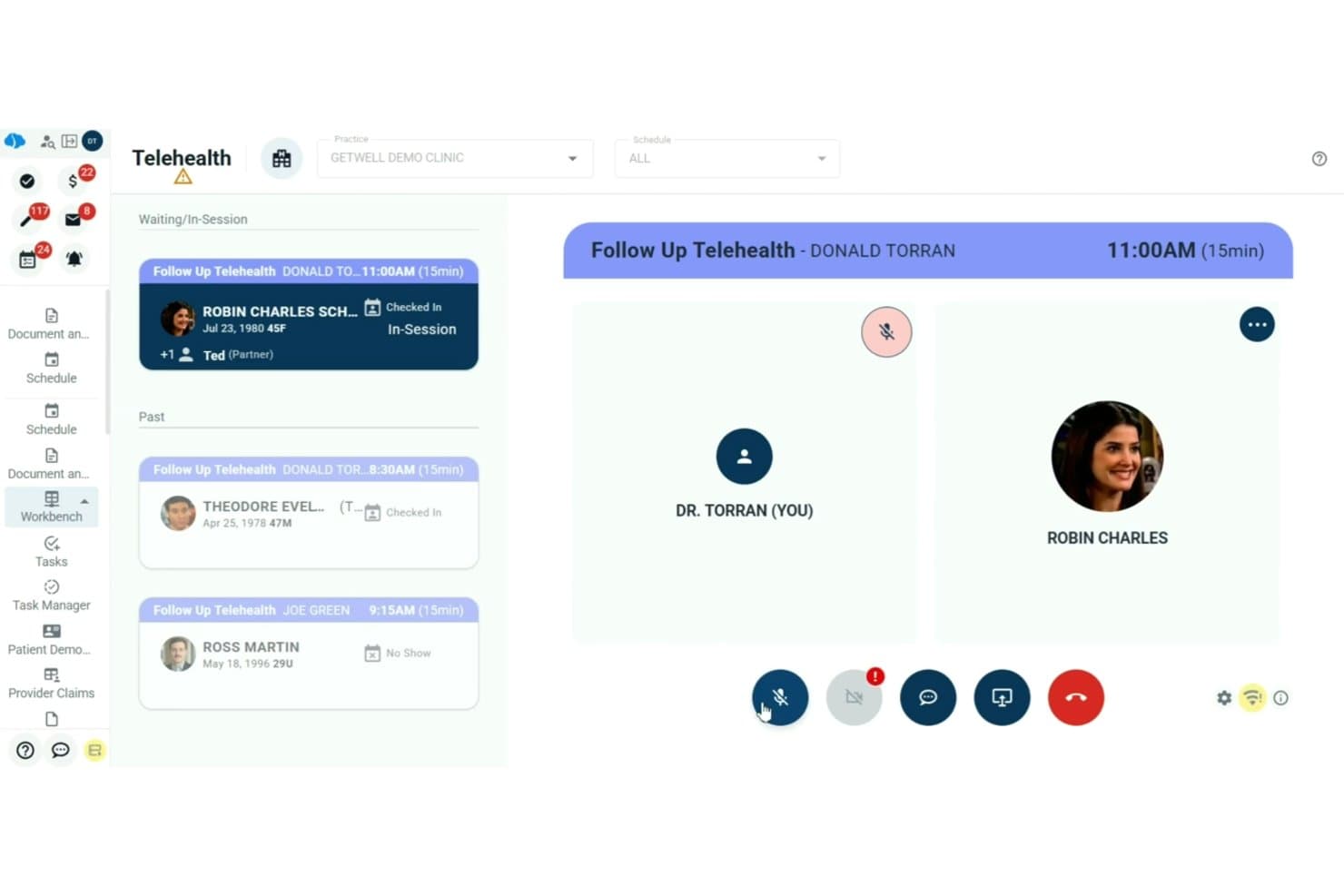
ClinicMind supports live telehealth video visits with patient queue management. ClinicMind is an integrated EHR and practice management platform for independent healthcare practices, combining clinical documentation, billing, and patient engagement to replace disconnected tools and support daily operations across specialties.
Who Is ClinicMind Best For?
ClinicMind suits revenue cycle teams at specialty clinics that handle high volumes of insurance billing and claims.
Why I Picked ClinicMind
I picked ClinicMind as a SimplePractice alternative for its stated fit: “Best for insurance-heavy RCM across specialties.” Claims 360 checks eligibility and authorizations at scheduling, reviews documentation against payer rules, and follows denials through resolution. I like that this connects billing work with clinical documentation across specialties.
ClinicMind Key Features
- PatientHub engagement: Manage patient outreach across attraction, confirmation, rebooking, reactivation, and referrals.
- Task ownership: Assign EHR tasks and manage handoffs between team members.
- Cross-specialty reporting: Review practice activity across specialties in shared reports.
- Mobile access: Give staff and patients access to ClinicMind through mobile devices.
ClinicMind Integrations
ClinicMind documents connections to clearinghouses, payment processors, labs, patient engagement tools, and RCM platforms, and cites secure API frameworks; it doesn’t name third-party vendors or specify a number of native integrations.
Pros and Cons
Pros:
- Reviewers praise training and responsive support
- Billing and charting share one workflow
- Claims workflows flag rejections for correction
Cons:
- Schedule settings may resist modification
- Billing tasks can feel tedious
Learn more about ClinicMind: Best for free AI notes from day one
- Free plan available; 14-day free trial
- From $31/user/month
Visit WebsiteCustomer Rating:4.4/5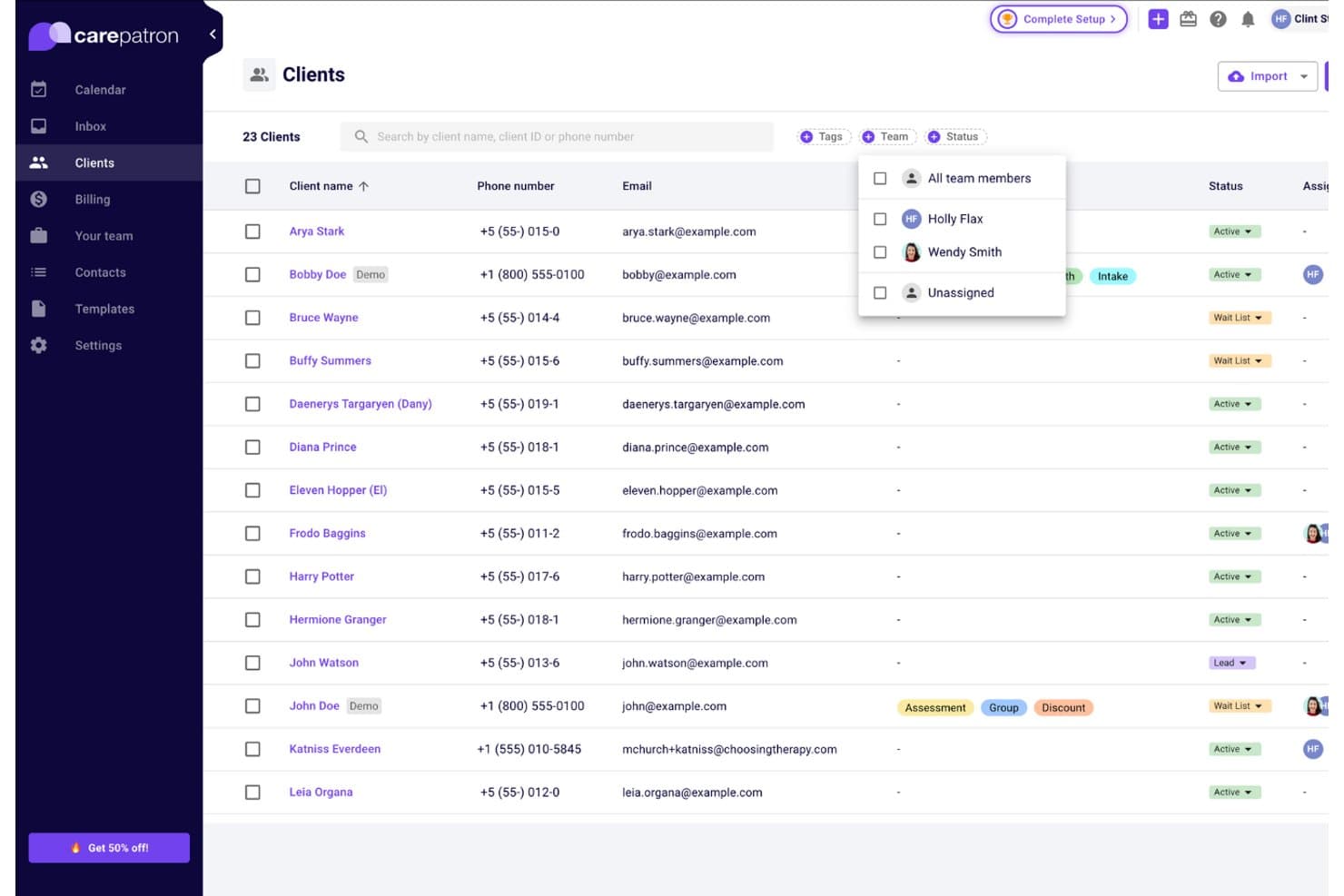
Carepatron organizes client records with filtering by team member. For independent clinicians and growing care teams, Carepatron combines practice management and EHR tools for scheduling, telehealth, client communication, documentation, and billing in one platform.
Who Is Carepatron Best For?
Carepatron suits solo clinicians and small care practices that want a free AI scribe alongside scheduling, telehealth, and billing tools.
Why I Picked Carepatron
I picked Carepatron as a SimplePractice alternative because it’s best for free AI notes from day one. I like that its AI scribe supports documentation alongside scheduling and telehealth, so I can manage visit logistics and notes in one platform.
Carepatron Key Features
- Client portal: Clients can book, pay, message, and fill out forms in their secure portal.
- Treatment plans: Build plans from templates and track progress across sessions.
- ePrescribing: Send prescriptions from the same screen you use for treatment planning.
- Insurance claims: Validate claims before sending them.
Carepatron Integrations
Carepatron connects with Zoom for video sessions, Stripe for payments, and DoseSpot for e-prescribing; it has no native accounting integration. Its public API currently supports contact exports, and billing data exports are compatible with Xero, FreshBooks, Wave, Sage, and QuickBooks.
Pros and Cons
Pros:
- Scheduling and billing sit alongside telehealth
- Templates cover SOAP, DAP, and intake notes
- AI scribe included with free plan
Cons:
- Users report video-call problems during telehealth
- Note-saving and calendar-sync glitches appear in reviews
Learn more about Carepatron: Best for rehab therapy billing and compliance
- Free demo available
- Pricing upon request
Visit WebsiteCustomer Rating:4.4/5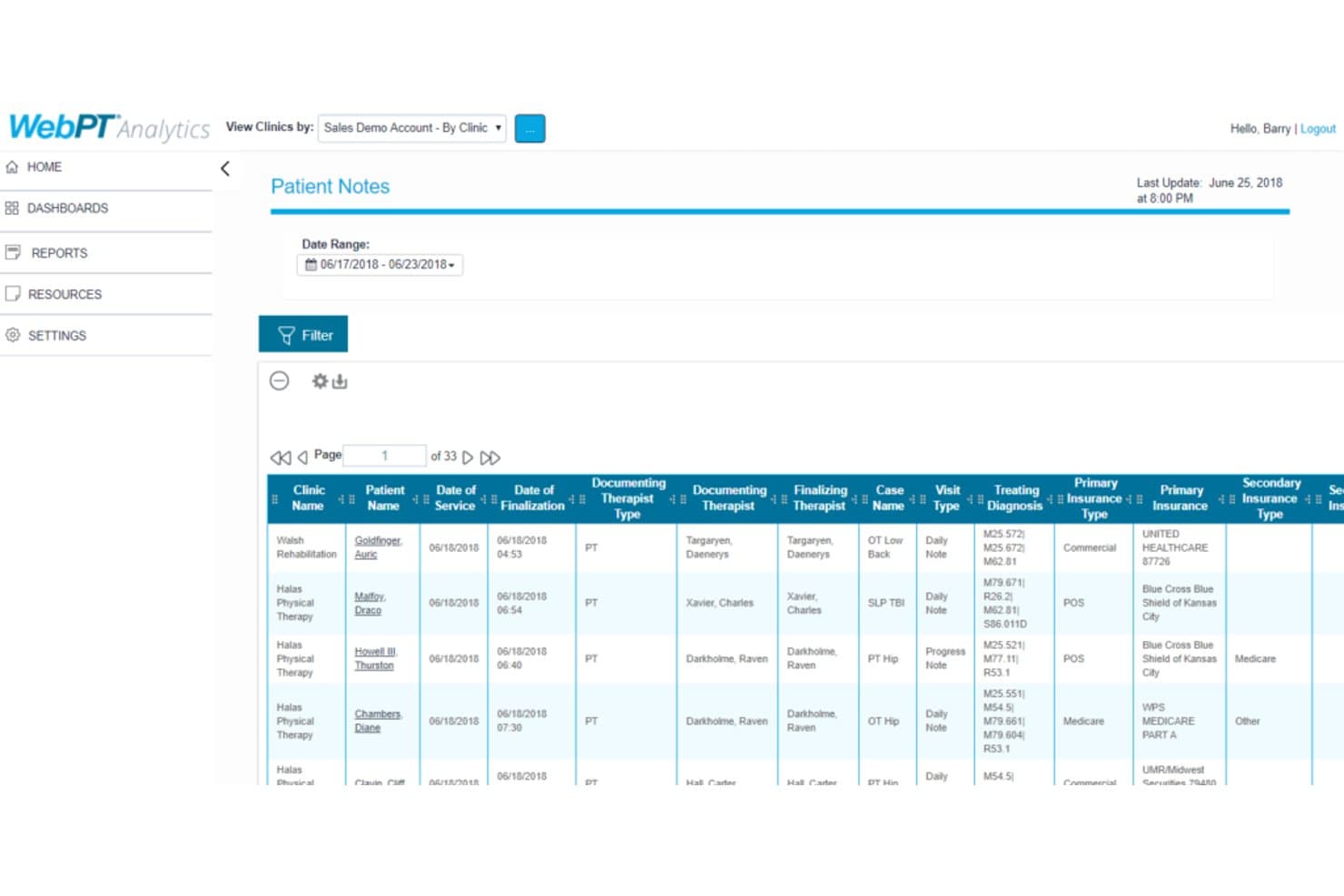
WebPT lets users review patient notes with therapist and insurance details. WebPT is a rehab-focused practice management platform for physical and occupational therapy clinics, with documentation, billing, scheduling, and front-office workflows tailored to therapy practices.
Who Is WebPT Best For?
WebPT is a good fit for physical and occupational therapy practices that need rehab-focused billing and compliance workflows.
Why I Picked WebPT
I picked WebPT because its rehab-focused billing and compliance workflows make it a relevant SimplePractice alternative for physical and occupational therapy clinics. I like that it combines therapy-specific documentation with billing, so a clinic can manage visit records and billing tasks within a system built for rehab practices.
WebPT Key Features
- Scheduling: Manage appointments and identify scheduling gaps.
- Patient intake: Collect patient information before appointments.
- Patient payments: Accept payments and track outstanding balances.
- Business reports: Review practice data through built-in reports.
WebPT Integrations
WebPT connects with more than 60 software vendors, including Waystar for billing, PatientPay and Worldpay for payments, Better Healthcare for online scheduling, and Kno2 for digital fax and Direct Secure Messaging. WebPT also offers custom integration solutions; an API isn’t clearly documented.
Pros and Cons
Pros:
- Scheduling and intake share one platform
- Billing tools include compliance checks
- Therapy-specific templates support rehab documentation
Cons:
- Billing support response delays draw complaints
- Users report outages and recurring glitches
Learn more about WebPT: Best for nutrition and wellness multi-specialty clinics
- 14-day free trial
- From $19.99/month
Visit WebsiteCustomer Rating:4.4/5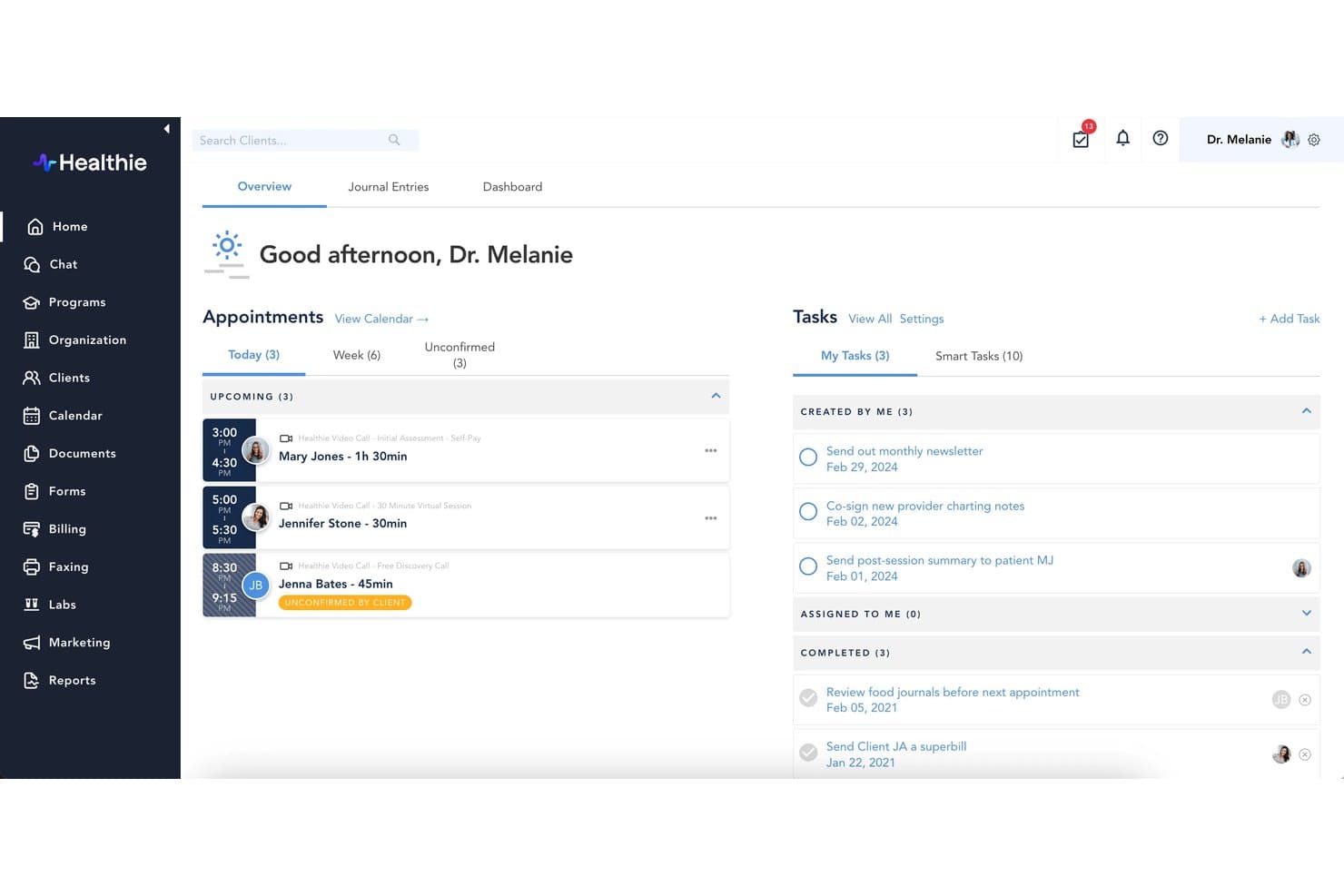
Healthie centralizes appointments, tasks, and client management in one dashboard. Healthie is a practice management platform for nutrition and wellness providers, bringing scheduling, charting, telehealth, billing, and patient communication together for teams coordinating care across multiple specialties.
Who Is Healthie Best For?
Healthie suits nutrition and wellness clinics with multiple specialties that need shared tools for providers and support staff.
Why I Picked Healthie
I picked Healthie as a SimplePractice alternative for its fit with “Best for nutrition and wellness multi-specialty clinics.” I like its collaborative charting and multi-provider scheduling for coordinating clinicians around shared patient records, while care plans support follow-up across specialties.
Healthie Key Features
- Customizable intake forms: Forms can populate patient charts and billing details.
- Telehealth sessions: Run video visits with chart notes, metrics, and forms on screen.
- Billing and payments: Accept card, insurance, and HSA/FSA details, with options for packages and recurring subscriptions.
- Secure messaging: Patients and care teams can message through the portal or mobile app.
Healthie Integrations
Healthie supports two-way calendar integrations with Google Calendar and Microsoft Outlook, plus built-in Stripe-powered payment processing. Its app marketplace lists Google Fit, Apple Health, and Fitbit, and its GraphQL API supports custom integrations.
Pros and Cons
Pros:
- Built-in care plans support wellness follow-up
- Telehealth keeps notes and forms onscreen
- Shared charts support cross-specialty care
Cons:
- Insurance billing has limited claims automation
- Email-based support can delay issue resolution
Learn more about Healthie:
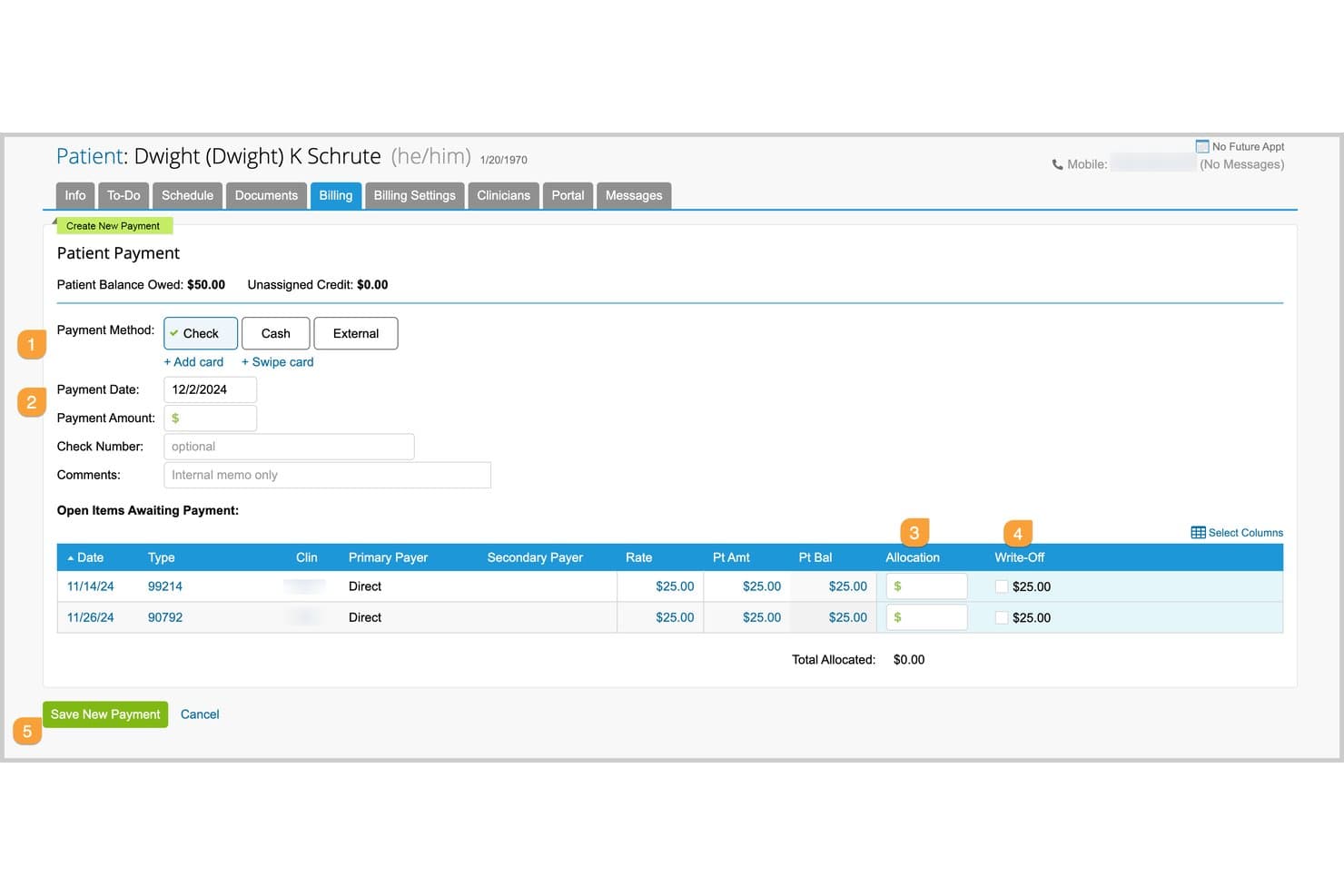
TherapyNotes offers a structured patient payment screen where staff can record payment method, date, amount, and allocate funds across open billing items. Built for behavioral health clinicians and practices, TherapyNotes combines client records, scheduling, clinical documentation, a client portal, and telehealth in one practice management system.
Who Is TherapyNotes Best For?
TherapyNotes suits behavioral health practices whose clinicians or billing staff need detailed insurance billing workflows.
Why I Picked TherapyNotes
I picked TherapyNotes as a SimplePractice alternative because it’s my choice for Best for insurance billing depth. I like that I can scrub electronic claims, receive and post ERAs, and check real-time eligibility. Those tools let me catch claim issues and verify coverage within the billing workflow.
TherapyNotes Key Features
- Appointment reminders: Send automated reminders for scheduled appointments.
- Clinical documentation templates: Create records with templates designed for clinical documentation.
- Client portal: Let clients access forms, appointments, and messages through TherapyPortal.
- Telehealth: Conduct secure video appointments integrated with TherapyPortal.
TherapyNotes Integrations
TherapyNotes doesn’t publish a broad native-integration catalog, but it supports one-way calendar sync with Google Calendar and Outlook, plus health data submissions to HealthConnex and Connie. Payment processing is managed by CardConnect.
Pros and Cons
Pros:
- Reviewers praise responsive 24/7 support
- Structured notes support audits and co-signing
- Detailed insurance billing includes claim scrubbing
Cons:
- Users report occasional telehealth and claims glitches
- Rigid templates limit specialty documentation
Learn more about TherapyNotes: Best for telehealth-centered therapy practices
- 30-day free trial
- From $39/month
Visit WebsiteCustomer Rating:4.4/5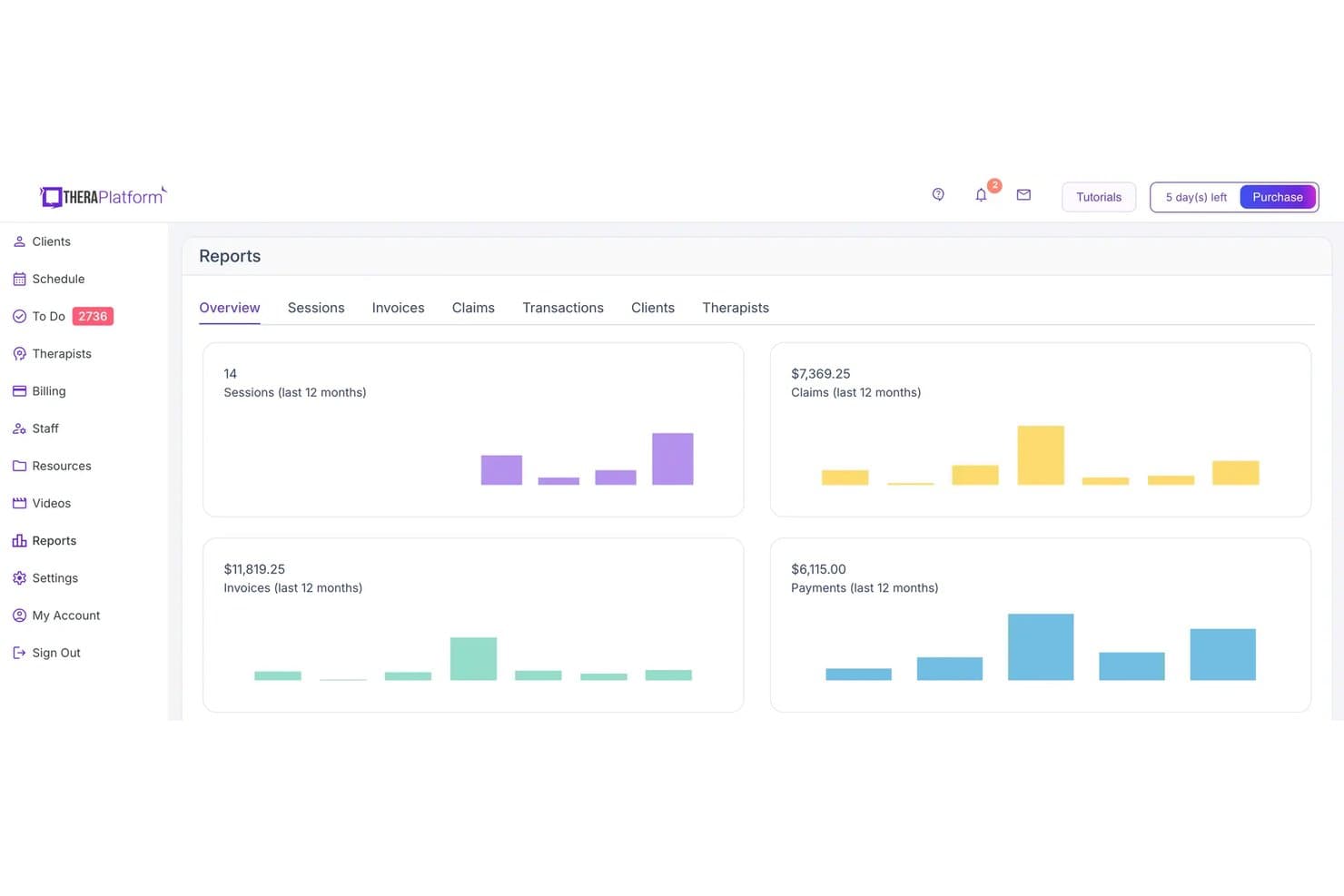
TheraPlatform displays a Reports overview dashboard with metrics for sessions, claims, invoices, and payments over the last 12 months. TheraPlatform is a web-based practice management and EHR platform for mental health and allied therapy practices, combining scheduling, documentation, billing, client communication, and therapy resources in one system.
Who Is TheraPlatform Best For?
TheraPlatform suits mental health and allied therapy clinicians who deliver remote sessions and want teletherapy built into their practice management platform.
Why I Picked TheraPlatform
I picked TheraPlatform as a SimplePractice alternative because teletherapy sits at the center of its practice tools. I like that its HIPAA-compliant video sessions include two-way screen sharing and secure chat, so I can review an exercise with a client during an appointment. Built-in therapy apps and resources also let me bring session materials into the visit.
TheraPlatform Key Features
- Scheduling: Manage availability, self-service appointments, reminders, and to-dos.
- Billing and invoicing: Automate invoices, schedule delivery, and track payment status.
- Claims management: Validate, batch, and track claims, and create superbills.
- Clinical documentation: Use customizable templates and treatment plans to record notes and track progress.
TheraPlatform Integrations
TheraPlatform supports one-way Google Calendar sync into its calendar and Stripe integration for client credit card payments.
Pros and Cons
Pros:
- Claims tools cover validation, batching, and tracking
- Built-in therapy activities support engaging remote sessions
- Interactive telehealth includes screen sharing and whiteboards
Cons:
- Users report occasional video glitches and freezing
- Form customization may feel limited for some workflows
Learn more about TheraPlatform: Best for group behavioral health billing at scale
- Free demo available
- Pricing upon request
Visit WebsiteCustomer Rating:4.1/5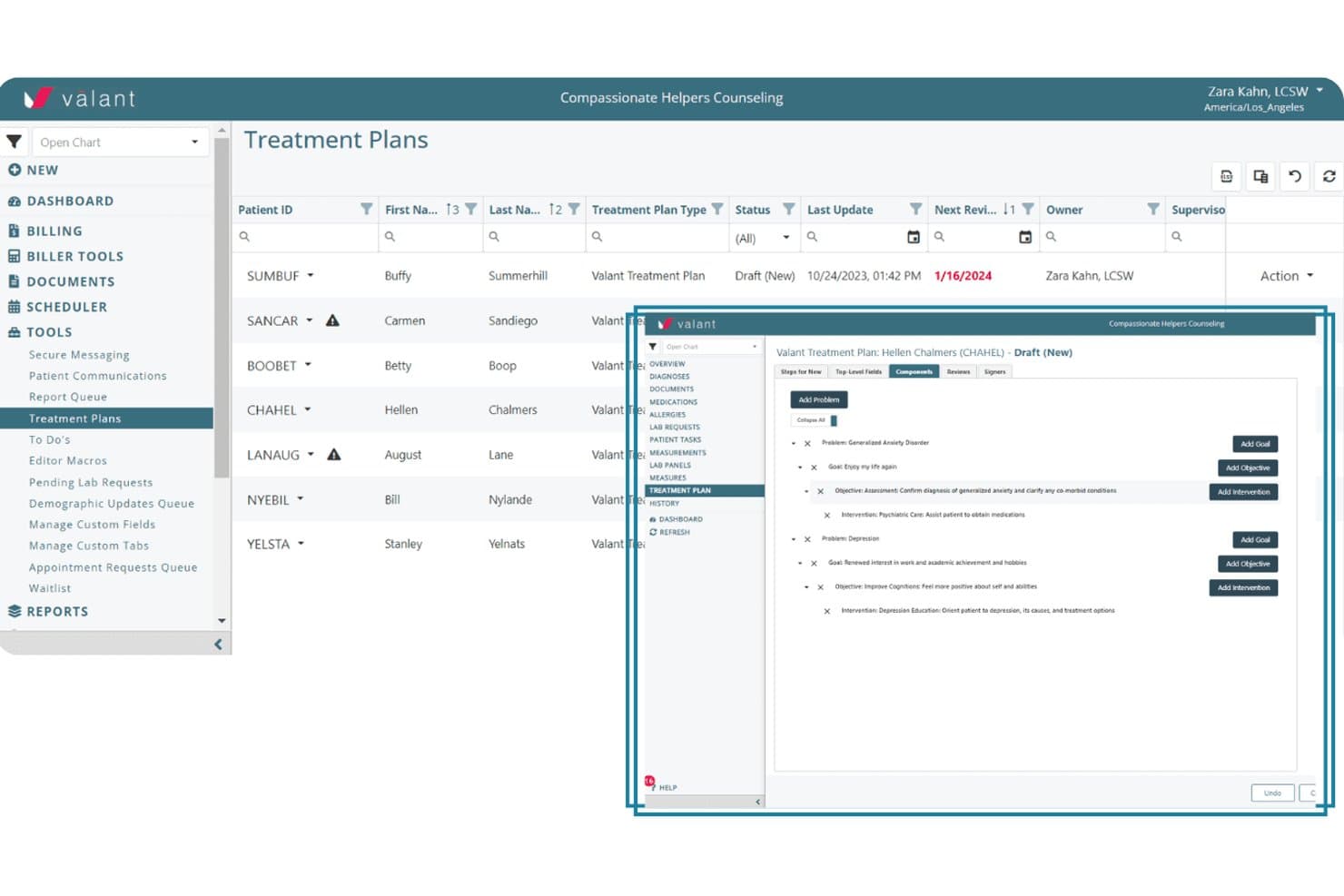
Valant lets users build structured treatment plans with goals and interventions. Valant is a behavioral health EHR and practice management platform for clinics that need clinical documentation, scheduling, and billing alongside outpatient services such as IOP and PHP.
Who Is Valant Best For?
Valant is a good fit for behavioral health organizations managing billing across group practices, multiple clinicians, or several locations.
Why I Picked Valant
I picked Valant as a SimplePractice alternative because it is Best for group behavioral health billing at scale. I like that teams can manage eligibility checks, claims, clearinghouse workflows, and utilization review alongside scheduling. Valant also offers a behavioral health billing team to manage revenue-cycle tasks.
Valant Key Features
- E-prescribing: Send prescriptions electronically from the clinical workflow.
- Outcome measures: Record and track patient assessment results.
- Telehealth: Conduct virtual visits within the platform.
- Patient portal: Give patients access to portal tools and online bill payment.
Valant Integrations
Valant offers integrated clearinghouse connections with Waystar and Optum, plus integrated credit card processing through Elavon. Its API supports custom connections with third-party systems.
Pros and Cons
Pros:
- Behavioral health workflows include group documentation
- Team scheduling and reporting support scale
- Integrated billing suits multi-clinician practices
Cons:
- Users report outages and unresolved support tickets
- Documentation can require several clicks
Learn more about Valant: 10Best for behavioral health-only EHR documentation
ICANotes
- 30-day free trial
- From $55/month
Visit WebsiteCustomer Rating:4.1/5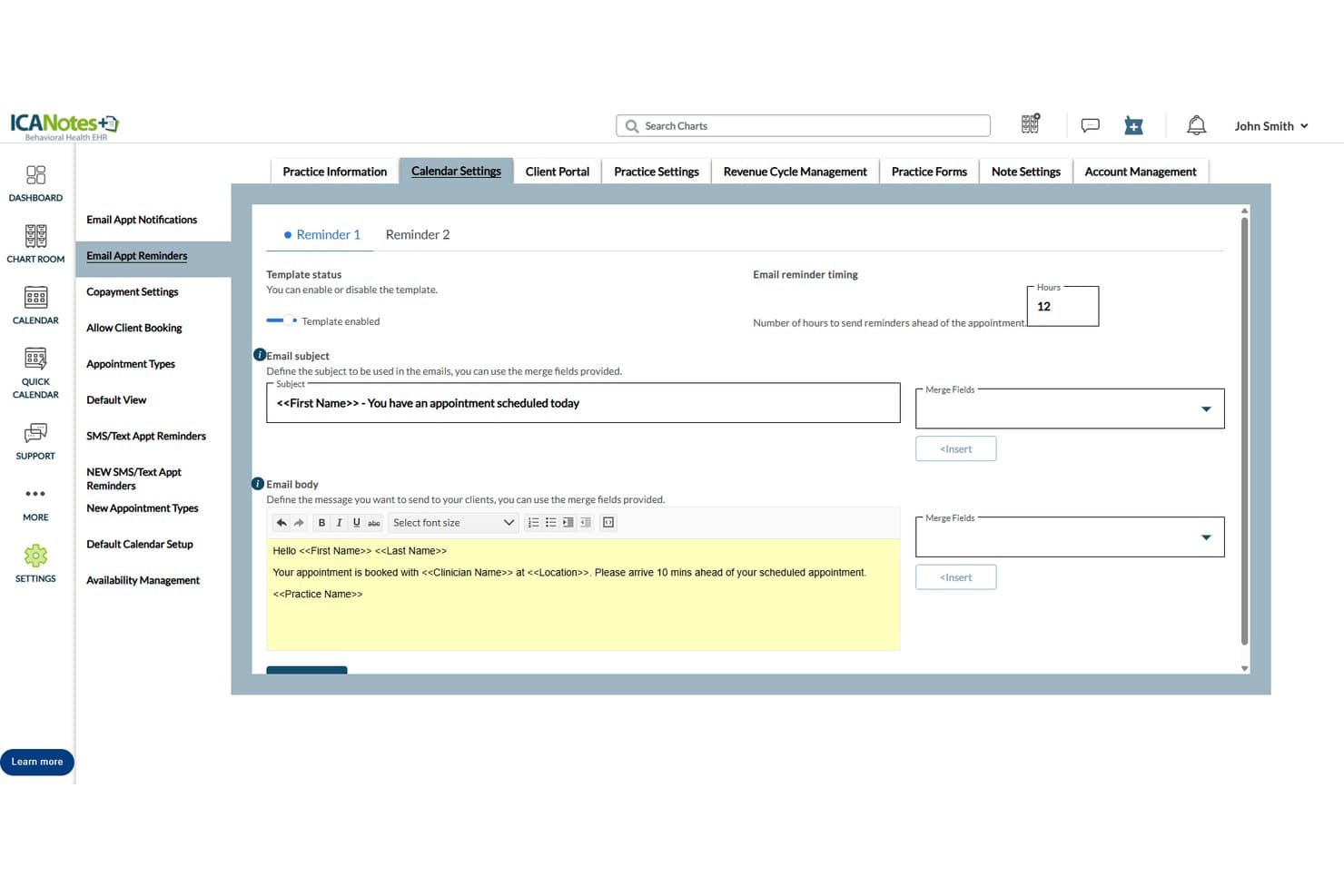
ICANotes lets users customize automated email appointment reminders. For behavioral health practices that need clinical and administrative workflows in one system, ICANotes combines customizable documentation with scheduling, billing, telehealth, and client portal tools as an alternative to SimplePractice.
Who Is ICANotes Best For?
Psychiatrists, therapists, and other behavioral health clinicians who need specialized templates for assessments, progress notes, treatment plans, and group therapy.
Why I Picked ICANotes
I picked ICANotes as a SimplePractice alternative when behavioral health documentation needs to go beyond standard progress notes. I like its customizable templates for assessments, BIRP and DAP notes, and treatment plans. For group therapy, it generates individualized participant notes linked to treatment-plan goals.
ICANotes Key Features
- Scheduling: Manage appointments with self-scheduling and automated reminders.
- Client portal: Let clients book appointments, complete forms, message, and pay online.
- Billing: Submit electronic claims, verify insurance, and track payments.
- ePrescribing: Send prescriptions with EPCS-compliant tools and integrated PDMP checks.
ICANotes Integrations
ICANotes integrates with health information exchanges including HealthInfoNet, THA, and Health Information Network, and supports connections with labs and clearinghouses. It also offers a partner-facing FHIR R4 API for custom integrations.
Pros and Cons
Pros:
- Built-in rating scales support structured assessments
- Group notes link individual clients to goals
- Behavioral-health templates cover BIRP and DAP
Cons:
- No dedicated mobile app for clinicians
- Navigation can require many clicks
Learn more about ICANotes:
Other SimplePractice Alternatives
Here are a few additional options that didn’t make my shortlist but are still worth a look:
- 11TebraBest for billing-heavy group practices
- 12OptiMantraBest for integrative and allied health clinics
- 13DrChronoBest for multi-specialty billing and RCM
- 14Ensora Health TheraNestBest for insurance-billing mental health practices
- 15BestNotesBest for addiction and behavioral health programs
- 16ZandaBest for allied health with AI-assisted notes
- 17Practice BetterBest for wellness and allied health practices
- 18SPRYBest for PT and rehab clinic billing
- 19CounSolBest for dedicated account manager support
- 20CarePathsBest for behavioral health billing at group scale
How I Evaluate SimplePractice Alternatives
I split my evaluation into three parts: core functionality first, where I check that a tool can schedule appointments across providers and support structured clinical documentation—these carry the most weight. Then I look at standout features like AI-assisted note generation and insurance eligibility checks. Finally, I consider pricing transparency and onboarding support.
Core Functionality (Table Stakes For This List)
When I'm selecting tools for my list, I score each one on a scale from 0 (does not offer the functionality) to 5 (excels in this area) for each core functionality listed below. I then convert the total into a percentage to help assess each tool's overall fit, with extra weight on any functionalities I’ve deemed essential.
- Scheduling & Calendar (Essential): I look for recurring appointments, reminders, and calendars that handle multiple providers, so teams can coordinate care across a busy schedule.
- Clinical Notes (Essential): I assess structured, searchable notes and treatment plans, including whether clinicians can adapt templates to their specialties and workflows.
- Billing & Payments: I check how the tool handles invoices, online payments, claims, and tracking, including how billing connects to appointments and services.
- Client Portal: I look for secure client access to appointments, forms, documents, payments, and messaging that supports common intake and follow-up tasks.
- Telehealth: I evaluate how clients join virtual sessions and whether video is built in or closely integrated with session workflows.
- Data Security & Compliance: I consider access permissions, encryption, audit logs, and consent controls for protecting sensitive health records across a team.
Once I have a list of tools that meet the criteria, I consider what sets each platform apart.
Differentiating Factors (What Sets Vendors Apart)
Here's how I compare and contrast different vendors:
Standout Features
I look for AI-assisted note generation that drafts progress notes from session audio, since it can save clinicians significant documentation time between appointments. Insurance eligibility checks matter just as much—I evaluate whether a tool verifies benefits in real time at booking so your front desk isn't chasing down coverage details after the fact. I also check for practice analytics dashboards that report on caseload, revenue, and utilization, because tools like Tebra and Valant handle this differently depending on practice size.
Beyond Features
I check whether a platform offers guided data migration or just self-serve tutorials, since switching EHRs mid-caseload can stall a group practice for weeks. Pricing structure matters just as much—some tools charge per clinician while others use flat-rate plans, and gated features like telehealth or insurance billing can inflate costs fast as you scale. I also evaluate how responsive support is during billing emergencies, because a ticket-only system won't cut it when a claim rejection holds up revenue for your entire panel.
Why Look for SimplePractice Alternatives?
While SimplePractice is a good choice for practice management, some users look elsewhere when their needs, budget, or workflows change. You might be looking for an alternative to SimplePractice because:
- Per-clinician pricing grows as your provider team expands
- E-prescribing and AI note tools add monthly costs
- No public interface for connecting custom systems
- No built-in eFax for practices that rely on faxed referrals
- Therapy-focused workflows may not fit a multidisciplinary clinic
If any of these sound like you, you’ve come to the right place. My list includes several practice management software options that may better suit teams facing these challenges with SimplePractice and looking for an alternative.
SimplePractice Key Features
Here are the key features of SimplePractice to help you compare it with alternative options:
- Appointment scheduling and reminders: Manage appointments on a calendar, set recurring sessions, and send automated text, voice, or email reminders. Calendar syncing and appointment requests help coordinate scheduling with clients and providers.
- Clinical notes and treatment plans: Document sessions with progress-note templates and create treatment plans for client care. Templates and customizable documentation support different clinical workflows.
- Billing and online payments: Create invoices, process client payments, and manage billing within the platform. Clients can pay through the portal, while practitioners can track payments alongside appointments and services.
- Insurance claims and ERAs: Submit insurance claims electronically, track their status, and receive electronic remittance advice. These tools help practices manage payer billing and follow up on claim outcomes.
- Client portal and paperless forms: Give clients a place to complete intake documents, request appointments, view information, and pay bills. Digital forms can be sent through the portal before a first visit or during follow-up.
- Telehealth sessions: Hold virtual appointments through SimplePractice’s integrated telehealth feature. Clients can join sessions online, while practitioners can access related records and documentation within their practice workflow.
- Secure client messaging: Exchange messages with clients through the platform instead of relying on standard email for private communication. This gives clients and practitioners a channel for practice-related follow-up.
- Electronic prescribing: Add ePrescribe to send prescriptions electronically and manage refills. It’s a paid add-on, so practices should account for its separate monthly and setup fees.
Costs and Pricing
Costs vary by features, practice size, and add-ons. SimplePractice alternatives typically range from free trials to custom-priced enterprise plans.
Plan Comparison Table for SimplePractice Alternatives
| Plan Type | Average Price | Common Features |
| Personal Plan | $10–$80 per clinician/month | Appointment scheduling, clinical notes, client portal, and billing tools. |
| Business Plan | $40–$160 per clinician/month | Multi-provider calendars, team documentation, insurance claims, and administrative controls. |
| Enterprise Plan | Custom quote, often $100+ per clinician/month | Multi-location management, expanded access controls, reporting tools, and implementation support. |
Free options are uncommon; many vendors offer a trial instead. Actual costs depend on provider count, billing needs, and paid add-ons.