

Free medical practice management software lets you organize electronic health records, schedule appointments, and handle basic billing without the upfront cost. If you’re searching for ways to reduce admin work, stay compliant, and improve care without a big price tag, these tools offer real alternatives to paid systems like Practice Fusion. Below, you’ll find the leading options that clinics and practices—just like yours—use to boost efficiency and handle the daily demands of modern healthcare. This list is built for medical professionals who want trusted, practical solutions that fit real-world budgets and staffing limits.
Why Trust Our Software Recommendations
6,700+
Reviews
20
Industry experts
16+
Evaluation factors
14
Years
Our team has been testing and reviewing software since 2012. As medical practice leaders ourselves, we know how difficult—and important—it is to choose the right software.
For this guide, we evaluated tools using hands-on testing and independent research, scoring tools using our selection criteria.
Our reviews reflect our human editorial judgment, not a sales pitch.
Free Medical Practice Management Comparison Table
This comparison table summarizes pricing details for my top free medical practice management software.
| Tool | Best For | Trial Info | Price | ||
|---|---|---|---|---|---|
| 1 | Best for allied health documentation tools | 30-day free trial | From $45/user/month (billed annually) | Website | |
| 2 | Best for online patient appointment booking | Free plan available | From $11.9/month (billed annually) | Website | |
| 3 | Best for multidisciplinary practice collaboration | Free plan available; 14-day free trial | From $31/user/month | Website | |
| 4 | Best for customizable open source workflows | Free demo available | Pricing upon request | Website | |
| 5 | Best for modular global health projects | Free demo available | Free | Website | |
| 6 | Best for telehealth and digital prescriptions | Free plan available | From $25/month | Website | |
| 7 | Best for integrated electronic claims submission | No | Pricing upon request | Website | |
| 8 | Best for global healthcare directory integration | Free plan available | From $3.75/month | Website | |
| 9 | Best for solo and small psychology practices | Free plan available | Pricing upon request | Website | |
| 10 | Best for multi-provider clinic coordination | Free plan available | From $50/month | Website |


 Best for allied health documentation tools
- 30-day free trial
- From $45/user/month (billed annually)
Visit WebsiteCustomer Rating:4.8/5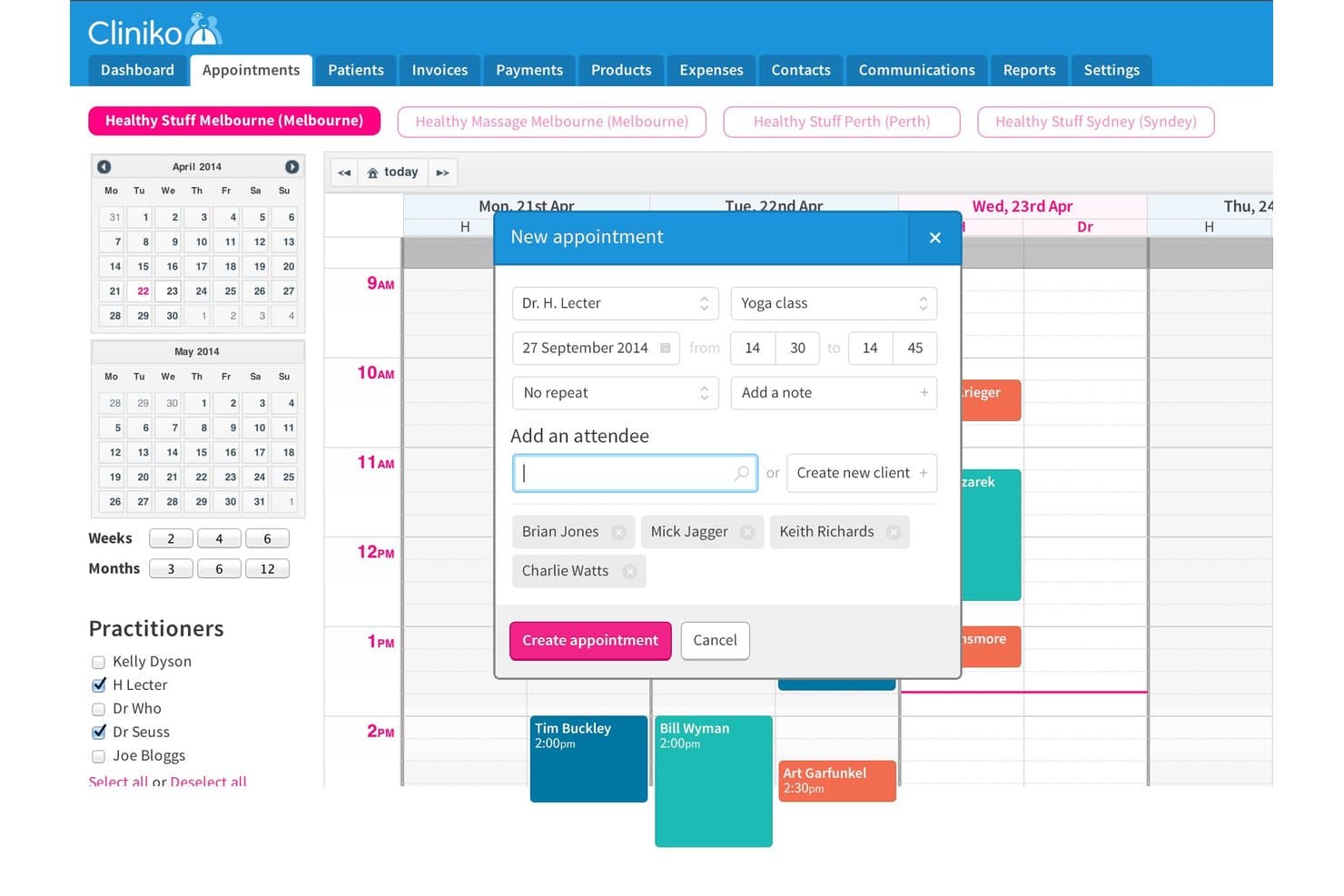
Cliniko offers a group appointment scheduling feature that allows practitioners to add multiple attendees to a single session, such as a yoga class. Cliniko is an allied health practice management platform that covers appointment scheduling, clinical documentation, patient records, invoicing, and telehealth for solo practitioners and small clinics.
Who Is Cliniko Best For?
Cliniko is a strong fit for physiotherapists, chiropractors, osteopaths, and other allied health practitioners running small independent practices.
Why I Picked Cliniko
I picked Cliniko as one of the best because its clinical documentation tools are built specifically around how allied health practitioners work. I particularly like the customizable treatment note templates, which let practitioners structure SOAP notes to match their discipline, whether that's a physiotherapy assessment or a psychology session. The body chart annotation feature stands out as something I rarely see in general practice management tools, and it's genuinely useful for musculoskeletal clinicians documenting injury sites.
Cliniko Key Features
- Online bookings portal: Patients can schedule appointments themselves using a secure, mobile-friendly portal.
- Integrated invoicing: Generate invoices, track payments, and manage expenses directly from within the platform.
- Telehealth video consultations: Host secure video consultations for remote patient care without third-party tools.
- Multi-location management: Oversee schedules, appointments, and records across multiple clinic locations from a single account.
Cliniko Integrations
Cliniko offers native integrations with Xero, Mailchimp, Tyro Health, Physitrack, HealthEngine, HotDoc, MyHealth1st, Finger-Ink, Snapforms, and Heidi. An API is available for custom integrations.
Pros and Cons
Pros:
- Patient online self-booking portal
- Built-in telehealth for remote consultations
- Custom treatment note templates for allied health
Cons:
- Lacks native electronic insurance claims
- No ongoing free plan after trial
Learn more about Cliniko: Best for online patient appointment booking
- Free plan available
- From $11.9/month (billed annually)
Visit WebsiteCustomer Rating:4.6/5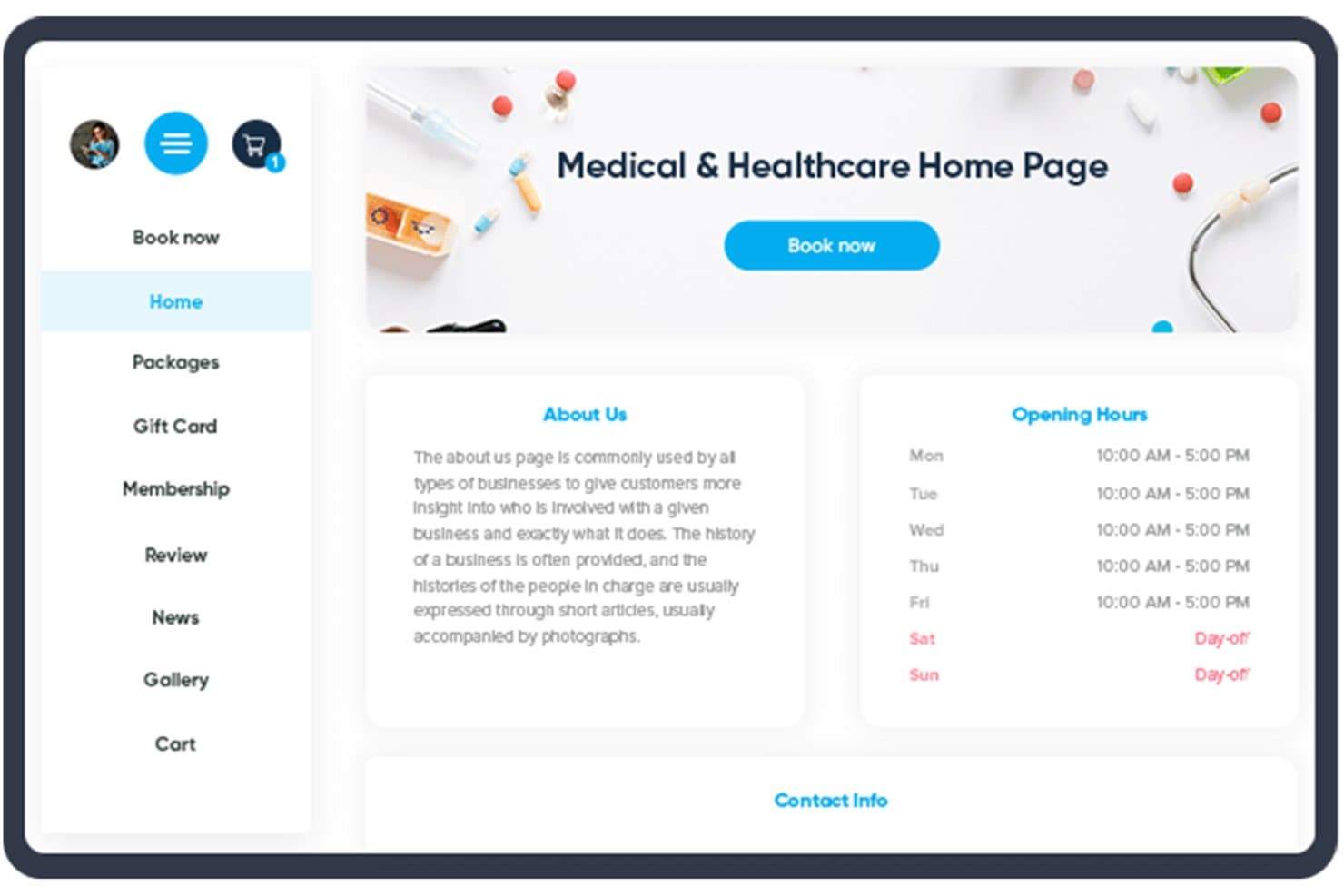
SimplyBook.me offers a medical and healthcare home page with booking, opening hours, and navigation menus for practice management. SimplyBook.me is an online appointment scheduling platform for medical practices that includes patient self-booking, calendar management, automated reminders, intake forms, and a patient portal.
Who Is SimplyBook.me Best For?
SimplyBook.me is a natural fit for solo practitioners and small clinics that prioritize patient-facing booking over full practice management.
Why I Picked SimplyBook.me
I picked SimplyBook.me as one of the best because its 24/7 patient self-booking gives patients a branded booking page where they can select a provider, service, and time slot without calling the front desk. I also like the built-in intake forms, which collect patient information before the appointment rather than at the door. The automated SMS and email reminders run in the background, cutting no-shows without any manual follow-up.
SimplyBook.me Key Features
- HIPAA compliance controls: Lock down access to patient records with two-factor authentication and audit logs.
- SOAP note templates: Enter subjective, objective, assessment, and plan notes for each appointment within secure client records.
- Waiting list management: Add patients to a digital waitlist and fill last-minute cancellations automatically.
- Customizable booking website: Build a branded site with clinic photos, service lists, and intake forms for patient use.
SimplyBook.me Integrations
SimplyBook.me offers native integrations with Zoom, Google Meet, Google Calendar, Outlook, QuickBooks, Xero, and FreshBooks, and has an API for custom integrations. Zapier is not available when using HIPAA compliance features.
Pros and Cons
Pros:
- Offers HIPAA features for healthcare scheduling
- Supports online booking, automated reminders, payments, and intake forms
- Free plan includes up to 50 bookings per month
Cons:
- It focuses more on scheduling than full medical practice management
- Free plan includes only one custom feature
Learn more about SimplyBook.me: Best for multidisciplinary practice collaboration
- Free plan available; 14-day free trial
- From $31/user/month
Visit WebsiteCustomer Rating:4.4/5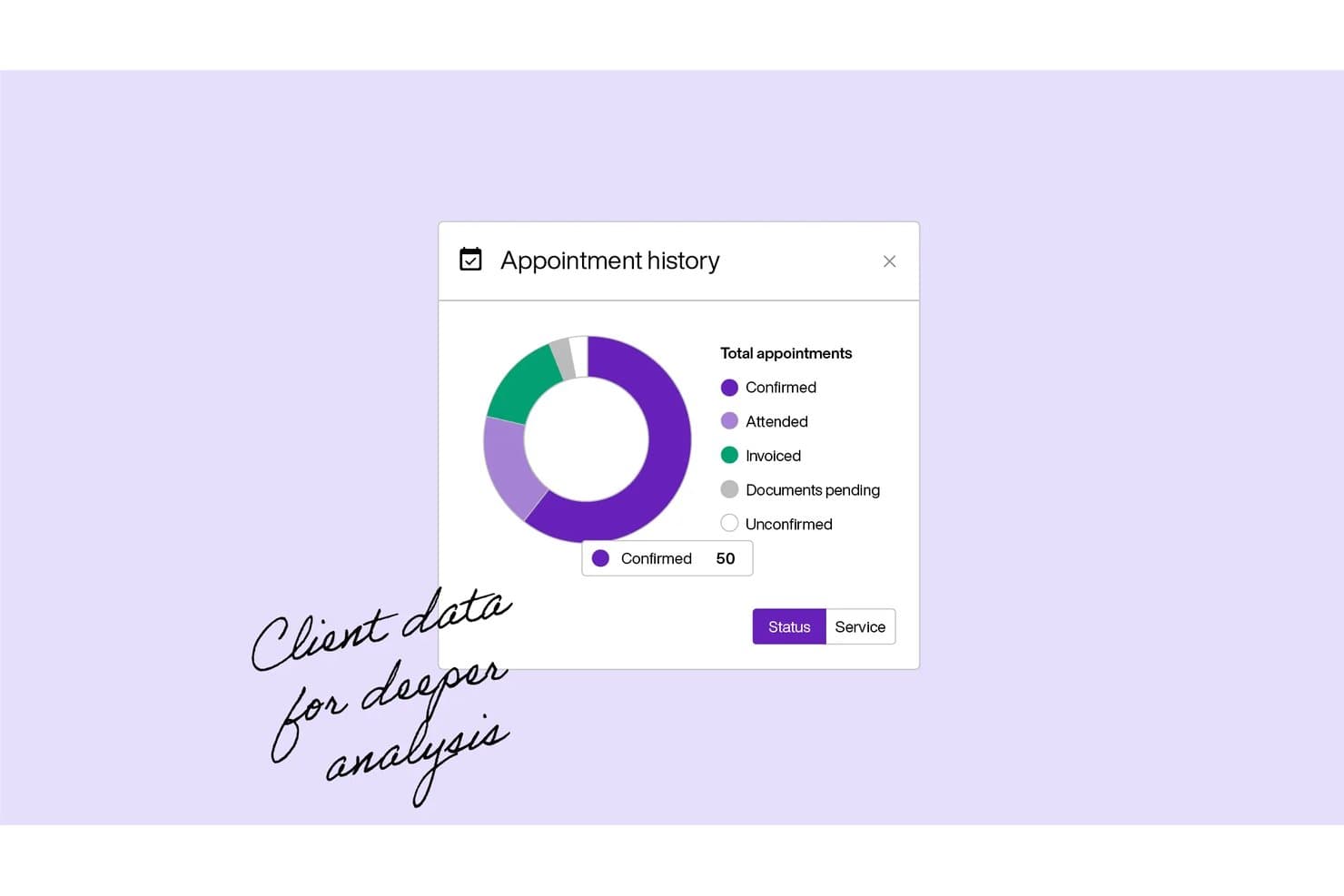
Carepatron offers an appointment history dashboard with a donut chart breaking down appointments by status, including Confirmed, Attended, Invoiced, Documents Pending, and Unconfirmed. Carepatron is a free practice management platform for healthcare teams that covers scheduling, patient records, telehealth, clinical documentation, AI-assisted note-taking, and billing in a single workspace.
Who Is Carepatron Best For?
Carepatron is a strong fit for solo practitioners and small multidisciplinary clinics—particularly in behavioral health and allied health—that need a no-cost starting point for managing their practice.
Why I Picked Carepatron
I picked Carepatron as one of the best because its free plan supports unlimited practitioners sharing client records, task workflows, and documentation in a single workspace. What I like is that clinicians across different disciplines, like a therapist and a care coordinator, can co-manage shared client charts and assign tasks to each other. The AI scribe generates notes in SOAP format, keeping clinical handoffs consistent across the team.
Carepatron Key Features
- Telehealth suite: Built-in video visits with document access and screen sharing for remote sessions.
- Smart billing tools: Stripe-powered online invoicing, payment collection, and tracking are included in the platform.
- Calendar sync: Integrates with Google and Outlook for appointment management across calendars.
- Mobile apps: Native apps for iOS and Android enable access to scheduling, records, and communication on the go.
Carepatron Integrations
Carepatron offers native integrations with Google Calendar, Outlook, Stripe, Zoom, Microsoft Teams, and Doxy.me. An API is available for custom integrations.
Pros and Cons
Pros:
- Supports telehealth and digital patient intake
- Built-in AI scribe for SOAP notes
- Unlimited clients and practitioners on free plan
Cons:
- No direct integration with Medicare systems
- Electronic insurance billing requires paid upgrade
Learn more about Carepatron: Best for customizable open source workflows
- Free demo available
- Pricing upon request
Visit WebsiteCustomer Rating:3.9/5
OpenEMR offers a Billing Manager interface with filtering criteria, patient records, and billing status columns for streamlined medical practice billing. OpenEMR is a free, open-source EHR and medical practice management platform that covers appointment scheduling, patient records, medical billing, e-prescribing, and lab integration.
Who Is OpenEMR Best For?
OpenEMR is a strong fit for independent and small practices that have some IT capability and want a fully self-hosted or free cloud-based system with no vendor lock-in.
Why I Picked OpenEMR
OpenEMR earns its spot on my shortlist because its open-source architecture lets you reshape workflows at the code level, which no commercial free tier allows. I particularly like the custom form builder, which lets you design encounter forms for specific visit types without workarounds. The built-in Clinical Decision Rules engine can also be configured to run practice-specific patient algorithms that trigger based on your own clinical logic.
OpenEMR Key Features
- Appointment scheduling: Manage multi-provider calendars, repeat appointments, and check-in-triggered workflows.
- e-Prescribing: Send prescriptions directly to pharmacies from within patient encounters.
- Lab integration: Transmit lab orders electronically and import lab results into patient charts.
- Patient portal: Give patients secure access to their health records, appointment details, and communication tools.
OpenEMR Integrations
OpenEMR offers native integrations with WENO Exchange for e-prescribing, Comlink for telehealth, ClaimRev Clearinghouse for billing, Sphere Payment, and Fax/SMS services. An API is available for custom integrations.
Pros and Cons
Pros:
- Supports advanced role-based access controls
- Custom form builder for specialized visit types
- Entirely open source with no usage limits
Cons:
- Interface feels dated compared to commercial products
- Requires technical setup and ongoing maintenance
Learn more about OpenEMR:
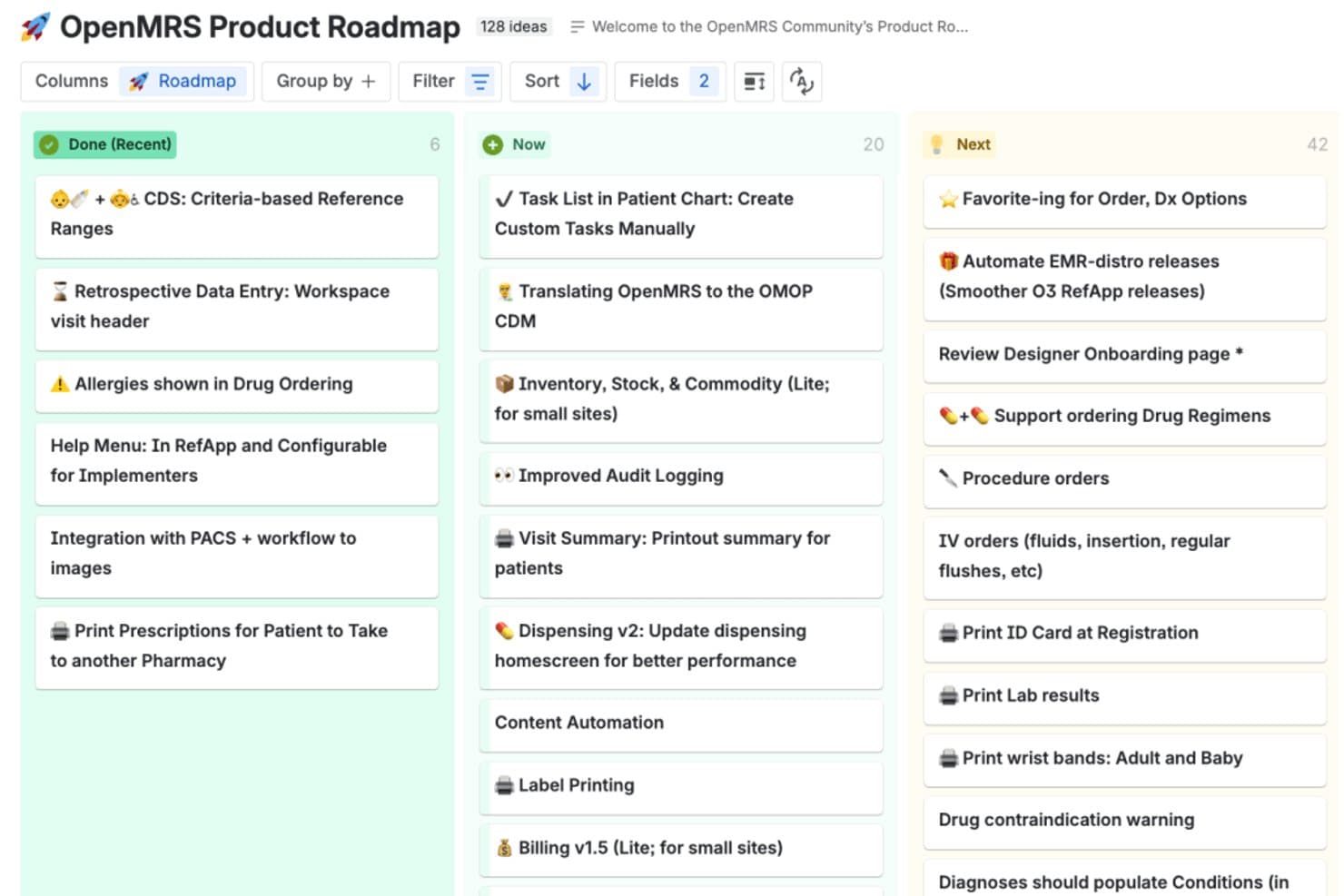
OpenMRS offers a visual product roadmap board organizing 128 feature ideas across Done, Now, and Next columns for transparent development planning. OpenMRS is a free, open-source electronic medical record system that covers patient registration, clinical documentation, appointment queues, billing, and pharmacy and lab management.
Who Is OpenMRS Best For?
OpenMRS is a strong fit for NGOs, public health programs, and community health facilities operating in resource-limited or low-infrastructure environments.
Why I Picked OpenMRS
I've included OpenMRS in my top picks because its modular architecture lets health programs activate only the clinical workflows they need, whether that's HIV tracking, TB management, or maternal and child health. The concept dictionary is what really distinguishes it: it stores clinical findings, lab results, and program-specific data without altering the underlying database structure. I also like that the FHIR2 module lets patient data connect directly to DHIS2 and national health exchanges.
OpenMRS Key Features
- User management and access controls: Assign users roles and privilege levels to control access to sensitive patient information.
- Multi-language support: Configure the system for multiple languages and right-to-left scripts for global deployments.
- Appointment and queue management: Set up patient registration, schedule appointments, and manage patient queues.
- Clinical data reporting: Generate data exports and build custom clinical and operational reports.
OpenMRS Integrations
OpenMRS offers native integrations with DHIS2, the OHDSI ecosystem through OMOP CDM mapping, national health exchanges, and laboratory information systems. It also supports REST and FHIR APIs for custom integrations.
Pros and Cons
Pros:
- Handles complex clinical documentation and reporting
- Supports multiple languages and country formats
- Customizable workflows for local health programs
Cons:
- Limited support for insurance claims processing
- Requires technical setup and ongoing development
Learn more about OpenMRS: Best for telehealth and digital prescriptions
- Free plan available
- From $25/month
Visit WebsiteCustomer Rating:4.2/5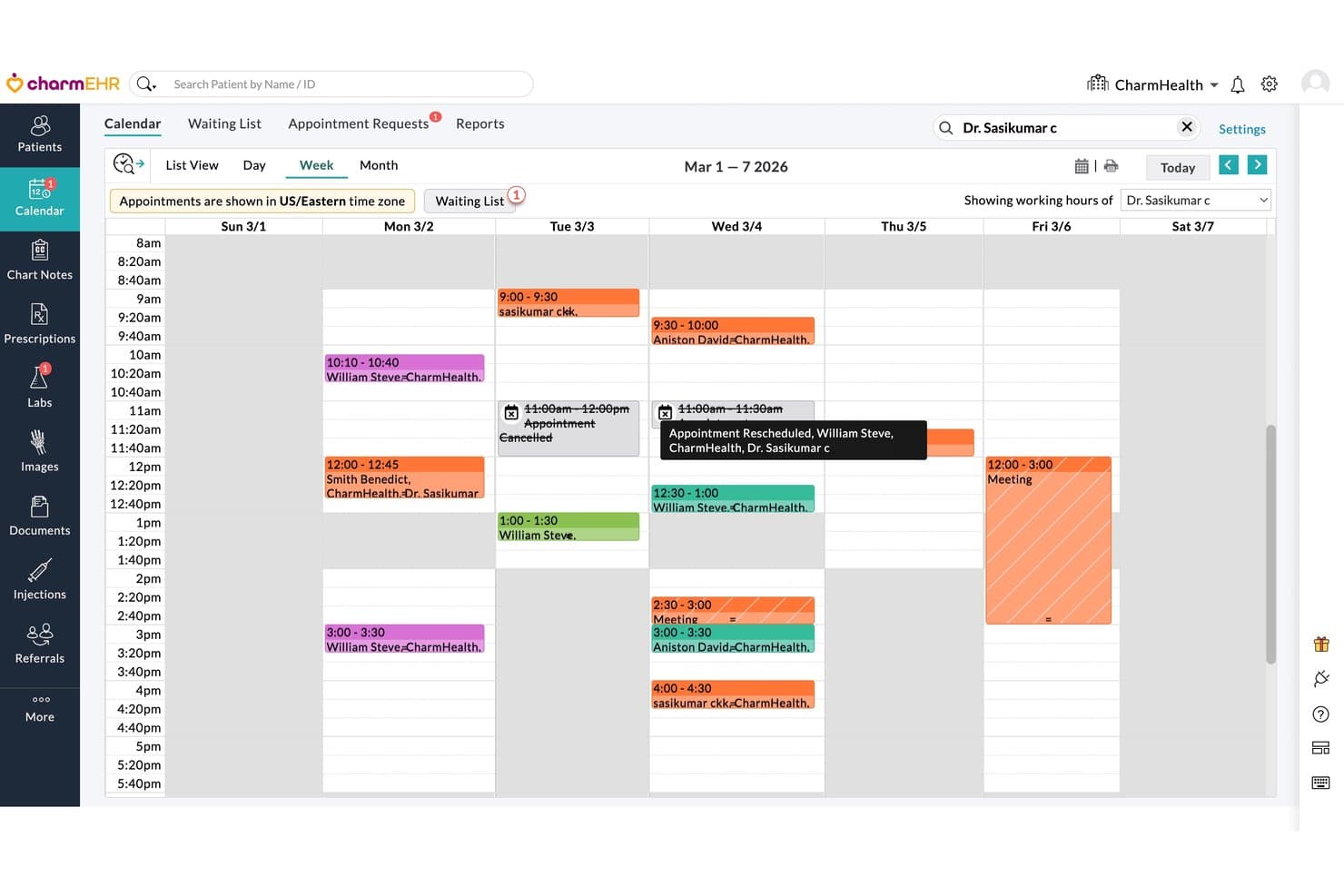
CharmHealth offers a provider week view calendar with color-coded appointments, rescheduling tooltips, and waiting list management for medical practice scheduling. CharmHealth is a cloud-based EHR and practice management platform that combines clinical documentation, appointment scheduling, patient records, e-prescribing, billing, and telehealth in a single free-to-start system.
Who Is CharmHealth Best For?
CharmHealth is a strong fit for solo practitioners and small independent practices that need a full clinical and billing workflow without upfront software costs.
Why I Picked CharmHealth
CharmHealth earns its spot on my shortlist because its telehealth and e-prescribing capabilities go well beyond what most free-tier practice management tools offer. I particularly like that the built-in e-prescribing connects to over 70,000 pharmacies, and the EPCS add-on lets providers prescribe controlled substances electronically without needing a separate platform. The HIPAA-compliant telehealth module generates visit links directly within the scheduling workflow, so providers can run a remote appointment and send a prescription in the same session.
CharmHealth Key Features
- Customizable SOAP templates: Create templates tailored to your specialty for fast and consistent clinical documentation.
- Patient portal: Give patients access to securely view records, request appointments, and upload documents online.
- Integrated lab ordering: Order labs electronically and receive results directly within patient charts.
- Task and inventory management: Assign tasks to staff and track medical supplies from a central dashboard.
CharmHealth Integrations
CharmHealth offers native integrations with LabCorp, Quest Diagnostics, Surescripts, Optum, Bluefin, and QuickBooks. An API is available for custom integrations, and a marketplace provides access to additional third-party healthcare apps.
Pros and Cons
Pros:
- Built-in HIPAA-compliant telehealth visits
- Templates optimized for medical specialties
- Includes controlled substance electronic prescribing
Cons:
- Encounter caps limit free plan scalability
- Support response times can be inconsistent
Learn more about CharmHealth:
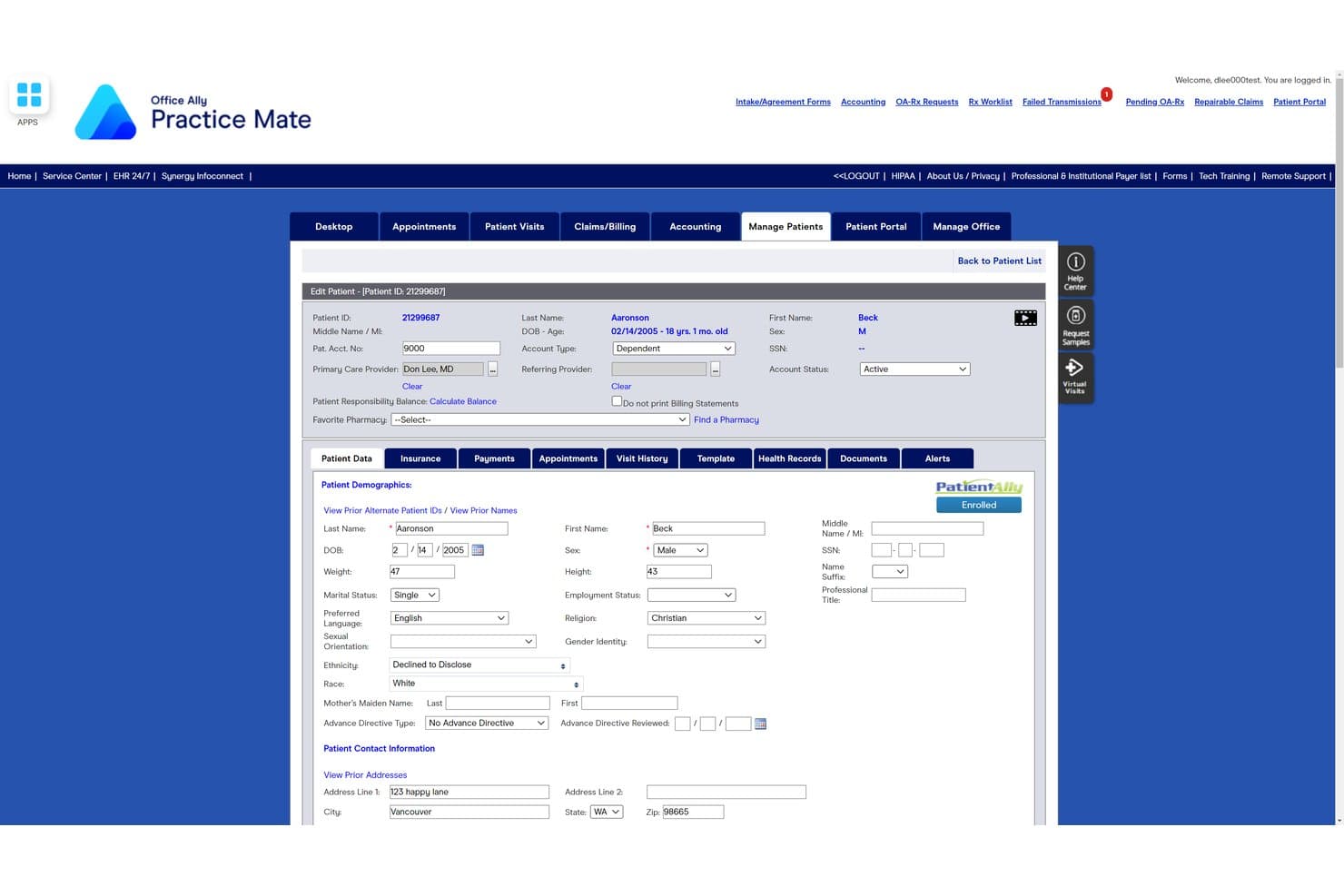
Practice Mate offers a detailed patient demographics and edit patient form with fields for personal, contact, and account information within its free practice management software. Practice Mate is a free practice management platform by Office Ally that covers appointment scheduling, patient billing, claim creation, and electronic remittance advice within a clearinghouse-connected workflow.
Who Is Practice Mate Best For?
Practice Mate is a strong fit for solo practitioners and small independent clinics that need a no-cost billing and scheduling solution with built-in claims submission.
Why I Picked Practice Mate
I've included Practice Mate in my top picks because its native clearinghouse connection to over 5,000 payers means you can submit electronic claims without routing through a third-party service. I like that claim acknowledgments, status tracking, and ERA auto-posting are all built into the free tier, so you're not piecing together a workflow from separate tools. Configurable superbills with ICD-10 and CPT codes make claim creation straightforward from the point of documentation.
Practice Mate Key Features
- Patient scheduling and calendar management: Schedule appointments for multiple providers and view availability using a central calendar.
- Patient portal access: Give patients secure online access to book appointments, view statements, and complete intake forms.
- Customizable superbills: Create and modify billing forms that include common codes for your practice’s services.
- Batch patient statement generation: Generate and send bulk statements to patients for outstanding balances.
Practice Mate Integrations
Practice Mate offers native integrations with Office Ally’s EHR 24/7 and Patient Ally portal, and supports direct electronic connections to more than 5,000 insurance payers through the Office Ally clearinghouse.
Pros and Cons
Pros:
- Unlimited users and providers in free plan
- Patient portal for appointment and billing access
- Built-in electronic claims submission workflow
Cons:
- Document storage limits file size per upload
- Real-time eligibility checks require paid upgrade
Learn more about Practice Mate: Best for global healthcare directory integration
- Free plan available
- From $3.75/month
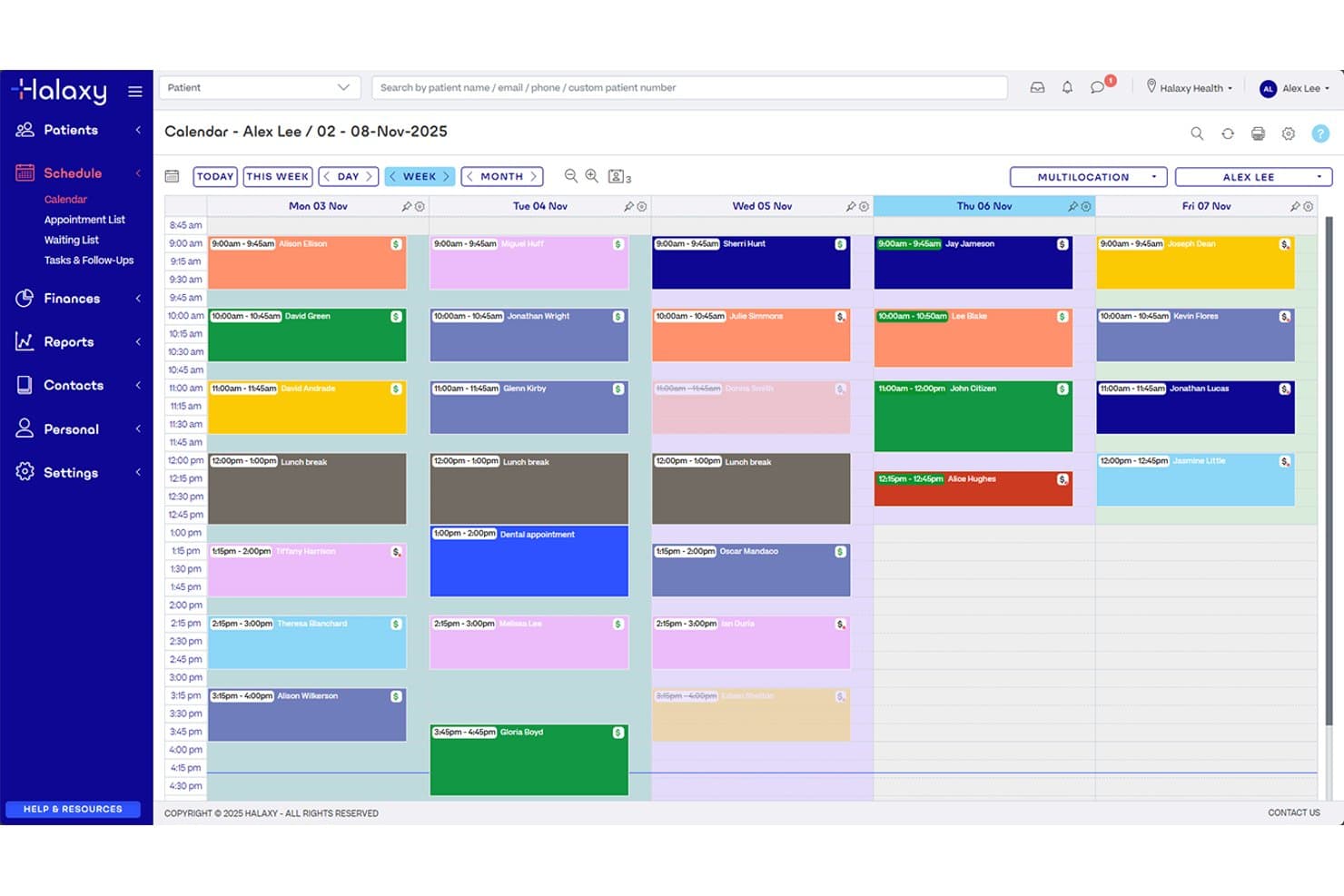
Halaxy offers a weekly calendar view for scheduling patient appointments, with color-coded sessions and time slots across multiple days. Halaxy is a free, cloud-based practice management platform for 90+ healthcare professions, combining appointment scheduling, patient records, clinical invoicing, and a searchable global practitioner directory.
Who Is Halaxy Best For?
Halaxy is a strong fit for solo practitioners and small multidisciplinary clinics, particularly those operating outside the US who need a free platform with built-in patient directory visibility.
Why I Picked Halaxy
Halaxy earns its spot on my shortlist because of how it handles practitioner visibility at a global scale. Every account includes a searchable directory profile that patients can find and book from directly, and you can embed that same booking widget on your own website at no cost. I particularly like that this directory spans 90+ healthcare professions across multiple health systems, so whether you're a physio in Sydney or a psychologist in London, your profile is surfacing to relevant local patients.
Halaxy Key Features
- Smart calendar: Manage unlimited appointments, providers, and locations all from a single dashboard.
- Clinical tools and templates: Access over 700 built-in clinical assessment tools, forms, and templates for streamlined documentation.
- Full clinical invoicing: Generate invoices and track payments for a variety of billing scenarios in healthcare practices.
- Patient personal health record: Allow patients to access and manage their own health data securely online.
Halaxy Integrations
Halaxy offers native integrations with Xero, QuickBooks, Reckon, Argus, and ReferralNet. It connects directly to Australian funding bodies like Medicare, DVA, ECLIPSE, and HICAPS, and provides an API for custom integrations.
Pros and Cons
Pros:
- Built-in patient health record portal
- Unlimited appointments, providers, and locations
- Public global practitioner directory listing
Cons:
- No built-in US medical coding libraries
- Insurance claims focused on Australia only
Learn more about Halaxy: Best for solo and small psychology practices
- Free plan available
- Pricing upon request
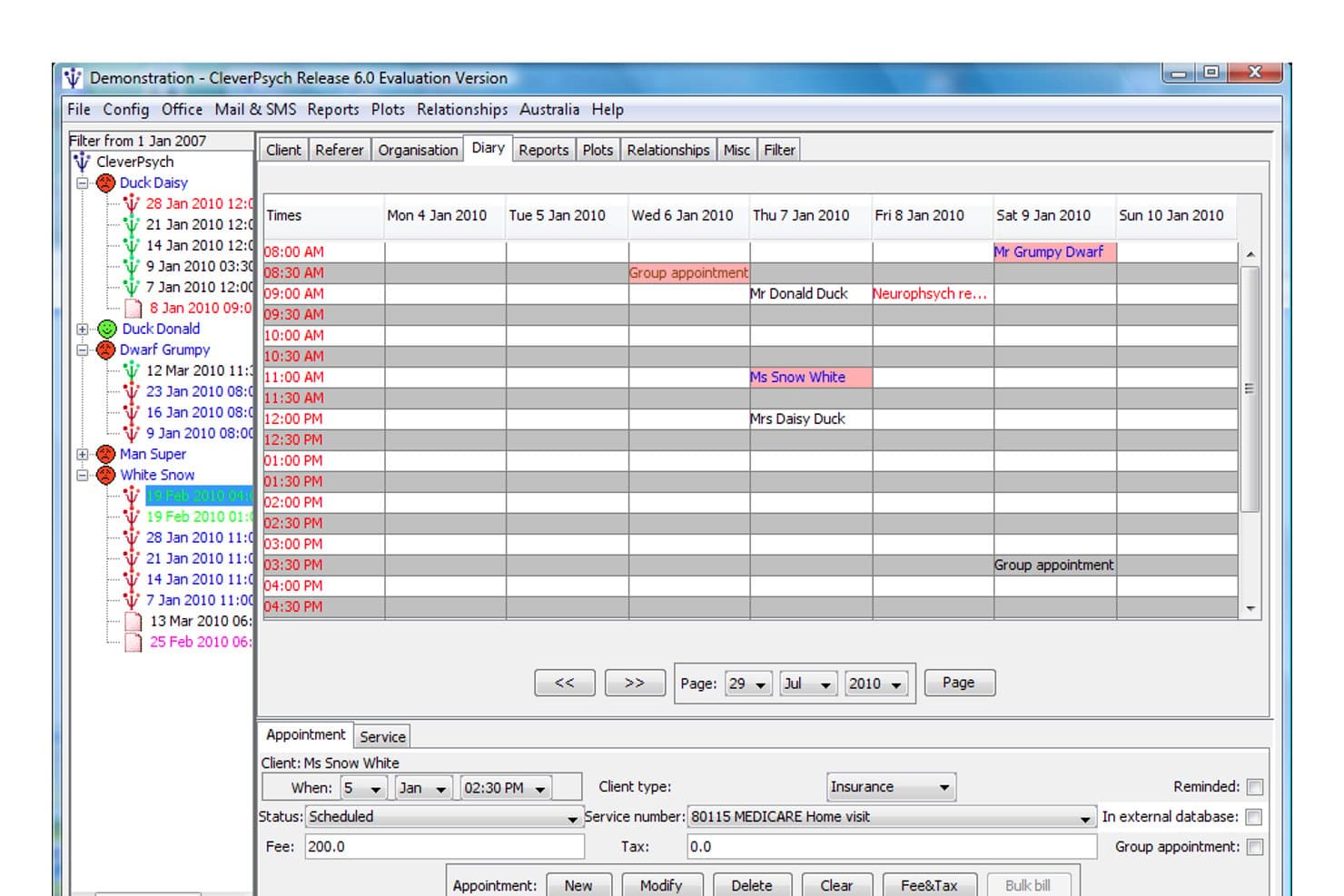
CleverPsych offers a weekly diary view for scheduling and managing patient appointments with billing details. CleverPsych is a free, open-source desktop practice management tool built specifically for solo psychologists and allied health professionals, covering client records, appointment scheduling, letter templating, and Medicare claiming.
Who Is CleverPsych Best For?
CleverPsych suits solo-practitioner psychology and allied health clinics in Australia that operate without dedicated IT staff and need a self-hosted, zero-cost system.
Why I Picked CleverPsych
I've included CleverPsych in my top picks because it's one of the few free tools purpose-built by a practicing psychologist for solo behavioral health work. The appointment diary with built-in SMS and email reminders covers the day-to-day scheduling demands of a one-person practice. I also like the letter and treatment note templating, which lets you generate clinical correspondence directly from client records without switching between systems.
CleverPsych Key Features
- Medicare Australia claiming: Lets you generate and submit claims directly to Medicare for eligible services.
- Referrer management: Tracks referring doctors and organizations within client records for easy reference.
- Customizable practice reports: Produces income, client, and appointment reports for your own recordkeeping.
- Multi-platform compatibility: Runs locally on Windows, macOS, and Linux, with data stored in standard folder structure.
CleverPsych Integrations
CleverPsych supports integrations with OneDrive, Google Drive, Dropbox, Microsoft Word, LibreOffice, and OpenOffice, and offers an API for custom integrations.
Pros and Cons
Pros:
- Works offline without server setup
- Direct Medicare claiming for Australian users
- Letter templates adapted for psychology workflows
Cons:
- No patient portal or online booking
- Lacks medical coding and diagnosis fields
Learn more about CleverPsych:
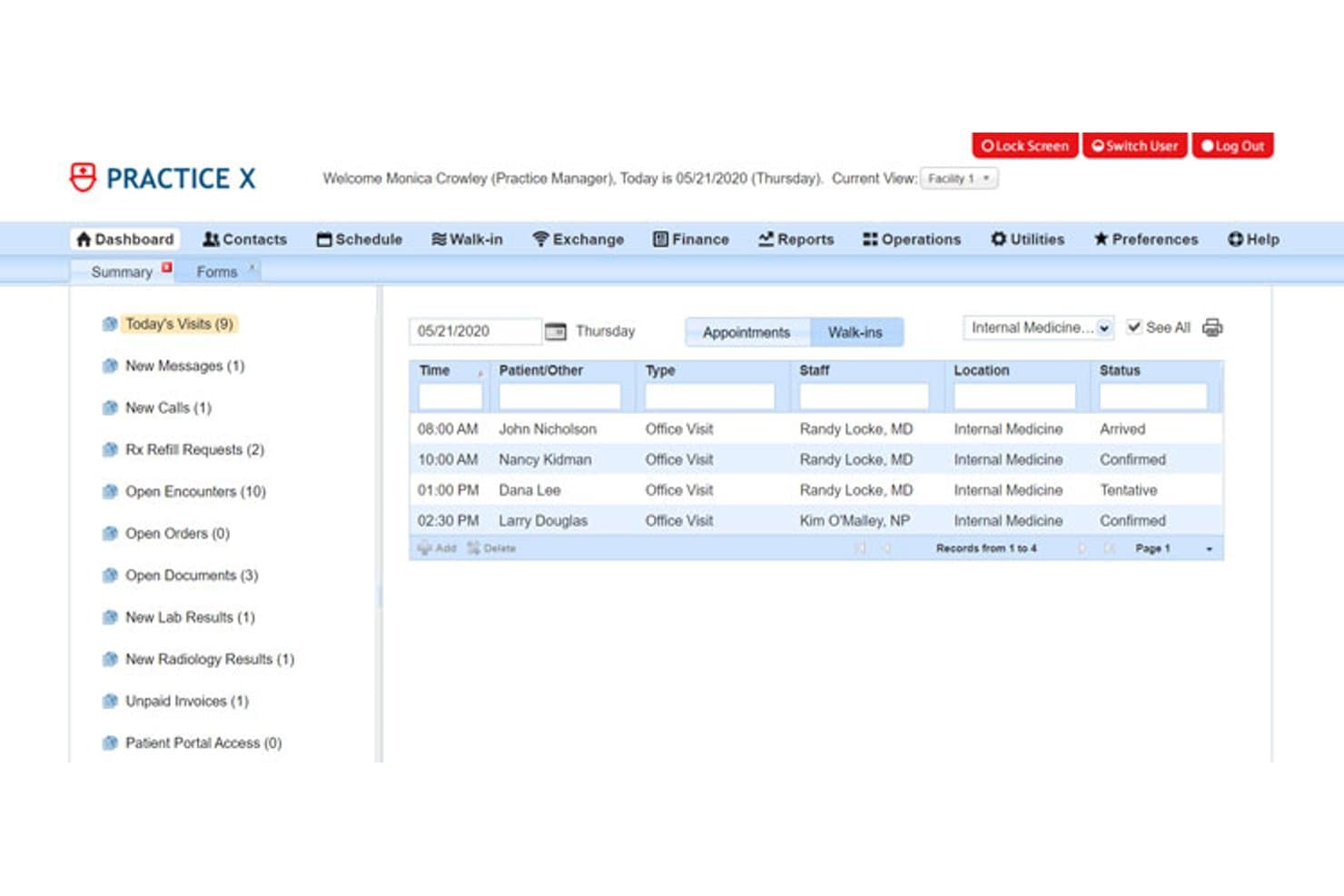
Solismed offers a dashboard view displaying today's appointments, patient visit statuses, and a summarized task list for practice managers. Solismed is a self-hostable medical practice management system with a genuinely free tier that covers appointment scheduling, EHR, patient billing, insurance claims, inventory management, and a patient portal in one integrated platform.
Who Is Solismed Best For?
Solismed is a strong fit for small clinics and startup practices that need a full-featured, budget-conscious system to coordinate care across multiple providers.
Why I Picked Solismed
I've included Solismed in my top picks because it genuinely supports multi-provider coordination in the free tier. I like that the scheduler runs separate calendars per provider and handles walk-in registrations alongside booked appointments. What I find especially useful is the ability to open multiple patient encounter tabs simultaneously, so staff can compare cases or cross-reference records without switching contexts.
Solismed Key Features
- Contacts management: Store detailed patient, supplier, volunteer, pharmacy, and lab records in one place.
- Integrated EHR: Document patient encounters, track medical history, and attach clinical documents directly to records.
- Insurance coding libraries: Access integrated ICD-10-CM, CPT, and SNOMED codes for visits and billing.
- Patient portal: Let patients access records, schedule appointments, view billing, and securely message staff.
Solismed Integrations
Solismed offers native integrations with OfficeAlly, Stripe, PayPal, InterFAX, and Weno Exchange for e-prescribing. An API is available for custom integrations.
Pros and Cons
Pros:
- Supports walk-in registrations and inpatient workflows
- Free tier with EHR and billing included
- Multi-provider and multi-location appointment management
Cons:
- E-prescribing not included in free tier
- No dedicated mobile app available
Learn more about Solismed:
- 11GNU HealthBest for public health and medicine management
- 12FreeMEDBest for open source medical records access
- 13SimplePracticeBest for behavioral health practice management
- 14OptiMantraBest for functional medicine practices
Related Reviews
How I Evaluate Free Medical Practice Management Software
I split my evaluation into must-have basics—like free HIPAA-compliant scheduling and claims support—and the differentiators that separate truly useful tools from bare-minimum freemium offerings.
Core Functionality (Table Stakes For This List)
When I'm selecting tools for my list, I rank each one on a scale from 0 (does not offer the functionality) to 5 (excels in this area) for each core functionality listed below. Then, I calculate the tool's total score into a percentage. Each tool needs to achieve a minimum total score of 65% to be considered for inclusion.
- Free Pricing Tier: I look for a genuinely free plan—not just a trial—that a solo practitioner can rely on for daily scheduling, billing, and records.
- Appointment Scheduling: The calendar should handle multi-provider booking, automated reminders, and recurring visits like weekly therapy sessions.
- Patient Records Management: I check whether demographics, visit notes, and uploaded documents live in one accessible patient profile.
- Medical Billing & Claims: Tools should support invoicing, claim generation, and payment posting—ideally with electronic clearinghouse submission.
- Insurance Eligibility & Coding: Built-in ICD-10 and CPT libraries matter, and I look for eligibility checks that front-desk staff can run at intake.
- HIPAA Compliance: The vendor should provide a signed BAA on the free tier, plus encryption, audit logs, and role-based access controls.
Once I have a list of tools that meet the criteria, I consider what sets each platform apart.
Differentiating Factors (What Sets Vendors Apart)
Here's how I compare and contrast different vendors:
Standout Features
Built-in telehealth is a big one—I look for HIPAA-compliant video visits baked into the platform so a small practice doesn't need a separate tool just to see patients remotely. Patient self-scheduling portals also matter because they let patients book, fill out intake forms, and pay online without tying up front-desk staff. I evaluate clearinghouse connectivity closely too, since direct electronic claim submission with real-time status tracking can save a practice from paying extra third-party fees. Customizable specialty templates round things out by helping niche practices like behavioral health or pediatrics get up and running faster.
Beyond Features
The true cost of a "free" plan deserves a close look—I check whether the vendor charges hidden fees for claims processing, SMS reminders, or e-prescribing that can quietly add up. HIPAA compliance is another area I evaluate carefully, especially whether a signed BAA is included on the free tier and not reserved for paid users. Scalability matters too, since a practice that starts solo but adds a second provider needs to know if the free plan supports multi-user access or forces an upgrade.
How to Choose Free Medical Practice Management Software
It’s easy to get bogged down in long feature lists and complex pricing structures. To help you stay focused as you work through your unique software selection process, here’s a checklist of factors to keep in mind:
| Factor | What to Consider |
| Scalability | Will the platform accommodate growth—like adding new providers, locations, or patient panels—or does the free plan have strict user or storage caps? |
| Integrations | Can you connect the software with your EHR, billing, telehealth, or accounting tools without paid add-ons or technical workarounds? |
| Customizability | Does the system let you tailor intake forms, templates, and workflows to fit your specialty or administrative needs? |
| Ease of use | Will your staff and providers learn the system quickly, or does it require significant training and detailed manuals to operate daily? |
| Implementation and onboarding | What training or migration help is included? Does the vendor provide clear resources, or will you be left to figure it out alone? |
| Cost | Are there hidden fees for extra features, claims, storage, or support that could result in unexpected out-of-pocket costs? |
| Security safeguards | Does the vendor offer encryption, audit trails, and access controls to protect patient data, even on the free plan? |
| Support availability | Can you reach vendor support via email or chat when you need answers, or is response time slow or limited for free users? |
What Are Free Medical Practice Management Software?
Free medical practice management software are digital tools that let healthcare practices handle patient management, scheduling, records, and billing without upfront or recurring licensing fees. These platforms typically offer essential administrative features at no cost, helping small practices streamline daily operations, stay compliant with privacy regulations, and efficiently coordinate care, all while keeping budget constraints and resource limitations in mind.
Features of Free Medical Practice Management Software
When selecting free medical practice management software, keep an eye out for the following key features:
- Appointment scheduling: Lets you book, reschedule, and cancel patient appointments, manage provider calendars, and often includes recurring appointment settings.
- Patient record management: Stores patient contact details, demographics, medical histories, and visit notes in one accessible digital file for each patient.
- Medical billing and claims: Generates invoices, manages payment tracking, and facilitates the creation and submission of insurance claims for patient visits.
- Insurance eligibility verification: Checks insurance coverage before appointments so providers can avoid coverage surprises and patient billing disputes.
- HIPAA compliance: Ensures patient data is secure and meets required privacy safeguards with encryption, access controls, and audit trails.
- Provider scheduling: Assigns appointments across different providers, manages availability, and supports multi-provider practices in one system.
- Patient portal: Gives patients secure online access to appointment scheduling, billing, and sometimes intake forms or communication with the provider.
- Reporting and analytics: Offers tools to monitor appointment activity, billing status, outstanding claims, and other practice metrics at a glance.
- Multi-location support: Manages scheduling, billing, and patient records across more than one clinic location within a single software account.
Free medical practice management software solutions do not typically include AI as part of their feature offering.
Benefits of Free Medical Practice Management Software
Implementing free medical practice management software provides several benefits for your team and your business. Here are a few you can look forward to:
- Cost savings: You get core scheduling, billing, and records features without monthly licensing fees, making it easier to manage budgets for small or new practices.
- Streamlined administrative tasks: Centralized scheduling, billing, and patient information cut down on paperwork and redundant data entry.
- Greater accessibility: Secure cloud access means providers and staff can manage patient and appointment information from anywhere.
- Improved compliance: Built-in HIPAA safeguards help ensure patient data security and regulatory peace of mind.
- Easier patient engagement: Portals and self-scheduling empower patients through patient engagement tools to book appointments and access their information without constant staff intervention.
- Scalability as you grow: The right solution accommodates increased patient loads, additional providers, or new clinic locations with minimal disruption.
- Faster onboarding: Clear setup resources and self-guided workflows let your practice start using essential tools quickly, even with limited IT support.
Costs and Pricing of Free Medical Practice Management Software
Selecting free medical practice management software requires an understanding of the various pricing models and plans available. Costs vary based on features, team size, add-ons, and more. The table below summarizes common plans, their average prices, and typical features included in free medical practice management software solutions:
Plan Comparison Table for Free Medical Practice Management Software
| Plan Type | Average Price | Common Features |
| Free Plan | $0 | Includes basic appointment scheduling, patient records, limited billing, and standard reporting. |
| Personal Plan | $10–$25/user/month | Adds advanced billing, basic integrations, patient reminders, and phone or email support. |
| Business Plan | $30–$60/user/month | Provides multi-provider scheduling, custom templates, insurance claims, and enhanced analytics. |
| Enterprise Plan | $65–$120/user/month | Offers API access, advanced security, multi-location management, priority support, and data migration. |
Free Medical Practice Management Software FAQs
Here are some answers to common questions about free medical practice management software:
Are free medical practice management software solutions actually secure?
Yes, the leading free tools offer HIPAA-compliant data security, including encryption and access controls. Always confirm the vendor signs a Business Associate Agreement and check their data handling policies to ensure your patient information stays protected.
Can free medical practice management software handle multi-provider or multi-location practices?
Some free solutions support limited multi-provider or multi-location access, but many restrict these features to paid tiers. Be sure to check for user, location, or patient volume limits if you expect your practice to grow.
Do free plans really include billing and insurance claims features?
Many free platforms include basic billing and claims management, but you’ll often find limits on claim volumes or fees for electronic submissions. Review what’s included to avoid surprise costs for essential revenue cycle tasks.
Will I have access to customer support on the free plan?
Support for free plans is usually limited to self-help resources like FAQs, video tutorials, or email. Phone or chat support typically comes with paid upgrades, so evaluate your team’s support needs when choosing a platform.
Can I migrate my practice data if I switch from a free platform later?
Yes, reputable vendors allow you to export patient records, schedules, and billing data for use elsewhere. Still, check if exporting is limited by the free plan or if custom migrations require payment.