

Software-ul EMR în cloud este o tehnologie pentru gestionarea dosarelor medicale electronice, care stochează, gestionează și partajează în siguranță datele pacienților în cloud, astfel încât echipa dvs. să poată accesa dosarele de oriunde. Dacă sunteți în căutarea celui mai bun software EMR în cloud, este posibil să vă confruntați cu accesul inconsistent, actualizări greoaie sau presiunea de a ține pasul cu standardele de conformitate în schimbare.
Acest ghid se concentrează pe cele mai bune soluții EMR în cloud și sisteme EHR bazate pe cloud pentru 2026, ajutându-vă să treceți prin multitudinea de opțiuni, să le evaluați și să alegeți instrumente concepute pentru a susține îngrijirea mai sigură și mai bine conectată, fără să pierdeți timpul analizând informații nesigure.
Why Trust Our Software Recommendations
6,700+
Reviews
20
Industry experts
16+
Evaluation factors
14
Years
Our team has been testing and reviewing software since 2012. As medical practice leaders ourselves, we know how difficult—and important—it is to choose the right software.
For this guide, we evaluated tools using hands-on testing and independent research, scoring tools using our selection criteria.
Our reviews reflect our human editorial judgment, not a sales pitch.
Tabel comparativ pentru software-ul EMR în cloud
Acest tabel comparativ rezumă detaliile privind prețurile pentru selecțiile mele de top de software EMR în cloud
Score legend (out of 5)
- Excellent4.5–5
- Good4–4.4
- Average3–3.9
- Below average2–2.9
- Poor1–1.9
Sorted by: Default
| Tool | Starting Price | Website | |||||||
|---|---|---|---|---|---|---|---|---|---|
Best for region-based data continuity | 2.8 out of 5 | 3 | 1 | 3 | 4 | 2 | 4 | $29/user/month Free demo + 14-day free trial available | Website |
Best for AI-driven documentation workflow | 3.8 out of 5 | 4 | 4 | 4 | 4 | 4 | 3 | Pricing upon request Free demo available | Website |
Best for specialty-specific clinical charting | 3.8 out of 5 | 3 | 4 | 5 | 4 | 4 | 3 | Pricing upon request Free demo available | Website |
Best for specialty practice adaptability | 3.8 out of 5 | 3 | 4 | 4 | 4 | 4 | 4 | Pricing upon request Free demo available | Website |
Best for flexible per-encounter or per-provider pricing | 3.8 out of 5 | 4 | 4 | 4 | 4 | 3 | 4 | $25/month Free plan + free demo available | Website |
Best for intuitive charting and patient care tools | 3.7 out of 5 | 3 | 3 | 4 | 4 | 4 | 4 | Pricing upon request Free demo available | Website |
Best for telemedicine integration features | 3.8 out of 5 | 3 | 4 | 4 | 4 | 4 | 4 | Pricing upon request Free demo available | Website |
Best for mobile-friendly clinical documentation | 3.8 out of 5 | 4 | 4 | 4 | 4 | 3 | 4 | Pricing upon request Free demo available | Website |
Best for streamlined e-prescribing capabilities | 3.8 out of 5 | 4 | 5 | 3 | 4 | 3 | 4 | $199/provider/month 14-day free trial + free demo available | Website |
Best for customizable clinical workflows | 3.7 out of 5 | 3 | 3 | 4 | 4 | 4 | 4 | $130/user/month 30-day free trial + free demo available | Website |


Recenzii ale celor mai bune software-uri EMR în cloud
Mai jos sunt rezumatele mele detaliate ale celor mai bune software-uri EMR în cloud care au ajuns pe lista mea scurtă. Recenziile mele oferă o analiză detaliată a funcțiilor, integrărilor și celor mai potrivite cazuri de utilizare pentru fiecare platformă, pentru a vă ajuta să o găsiți pe cea mai potrivită pentru dvs.
 Best for region-based data continuity
- Free demo + 14-day free trial available
- From $29/user/month
Visit WebsiteCustomer Rating:4.7/5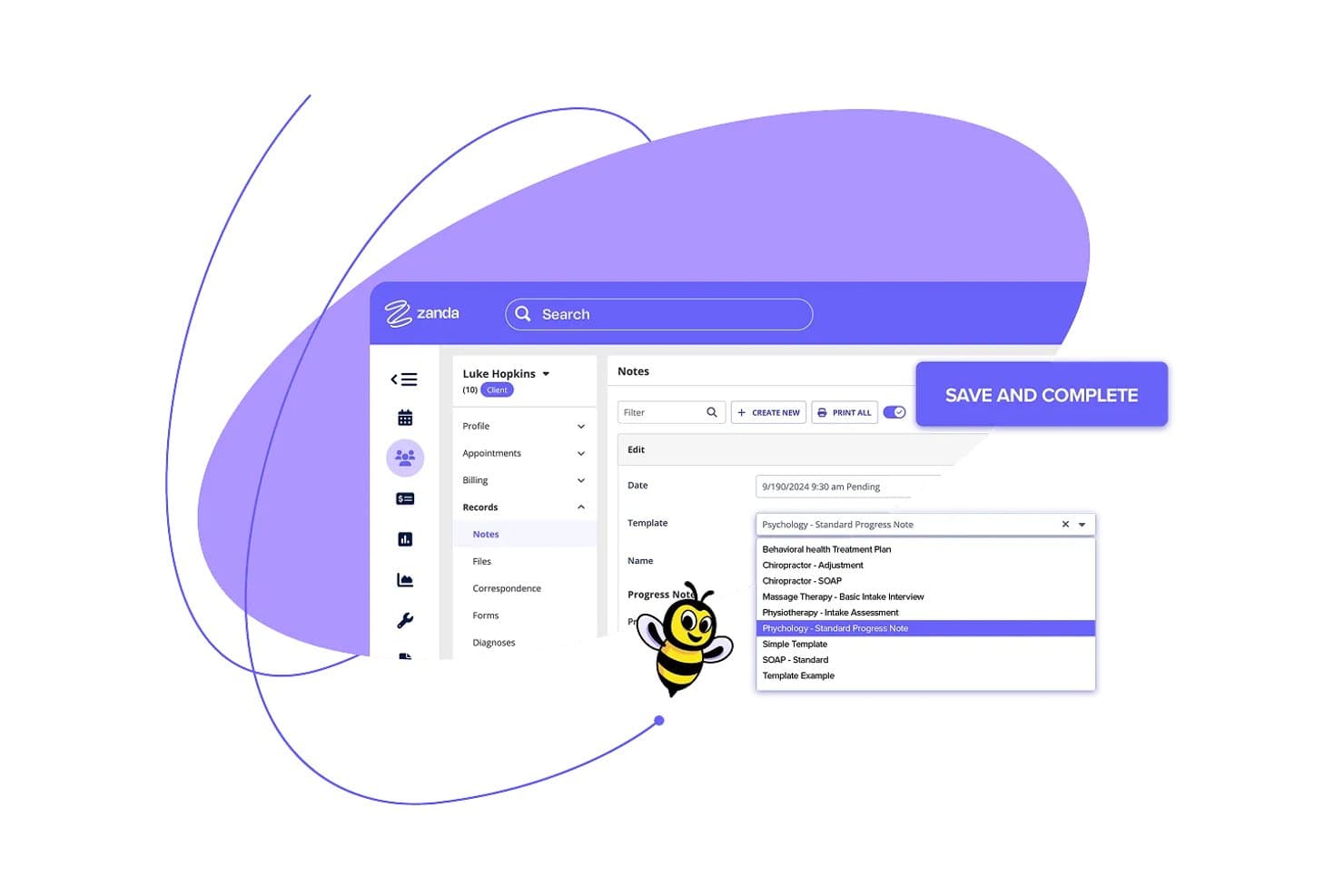
Here's where you can create clinical notes from customizable templates in Zanda. Zanda is a cloud-based practice management and EMR platform for health and allied-health practices, combining scheduling, clinical documentation, billing, telehealth, and AI-assisted note-taking in one system.
Who Is Zanda Best For?
Zanda suits allied health and mental health practices that need their patient data hosted within a specific jurisdiction and want scheduling, notes, billing, and AI-assisted documentation in one place.
Why I Picked Zanda
I picked Zanda as one of the best because its regional data hosting is built into how the platform works, not bolted on as an afterthought. Your account data, backups, and uploaded files all stay within your jurisdiction's region, with the database mirrored across three in-region locations. That architecture matters if you're operating under PIPEDA or PHIPA and need documented evidence of where patient records actually live. BizzyAI Scribe adds ambient note drafting on top, so practitioners can record sessions and get a template-ready draft without data leaving the region.
Zanda Key Features
- BizzyAI Scribe: Records live sessions or dictation and drafts clinical notes directly into your selected note template for practitioner review.
- Scored assessment forms: Collects client responses through online intake and assessment forms, with scores automatically calculated and displayed in the client profile.
- Two-factor authentication: Adds a second verification step to user logins to restrict unauthorized access to patient records.
- Automated invoice workflows: Generates invoices after sessions, attaches payment links, and sends follow-up reminders for unpaid balances without manual input.
Zanda Integrations
Zanda offers native integrations with Physitrack, Zoom, Stripe, Xero, and Google, Apple, and Outlook calendars. It also lists a read-oriented Public API beta, but enrolment is closed to new practices and write access isn’t documented.
Pros and Cons
Pros:
- Automated reminders and invoice follow-ups
- AI drafts notes into clinical templates
- Region-resident records with replicated backups
Cons:
- Read-only API limits data exchange
- Browser-only mobile access constrains calendar use
Learn more about Zanda: Best for AI-driven documentation workflow
- Free demo available
- Pricing upon request
Visit WebsiteCustomer Rating:5/5
Praxis EMR offers a patient dashboard for clinical documentation and care. Praxis EMR is a cloud-based EMR built around a concept-based documentation engine rather than fixed templates, combining charting, e-prescribing, scheduling, and medical coding in a single platform.
Who Is Praxis EMR Best For?
Praxis EMR is a strong fit for independent physicians and small specialty practices who document heavy patient volumes and need charting that adapts to their clinical style.
Why I Picked Praxis EMR
Praxis EMR earns its spot on my shortlist because no other cloud EMR I've used builds documentation intelligence from your own clinical history the way the Concept Processor does. Rather than selecting from pre-built templates, you chart naturally and the system learns your patterns over time. I also like that PraxCoder works within the same workflow to flag coding gaps before a claim is submitted, keeping the entire documentation-to-billing loop inside one system.
Praxis EMR Key Features
- e-Prescribing: Send prescriptions electronically, including controlled substances, directly from within the patient chart.
- Patient portal: Patients access visit summaries, request appointments, and message their care team through a web-based portal.
- Appointment scheduler: Book, modify, and track patient appointments using a built-in scheduling calendar.
- PraxMobile: Access patient records, charts, and clinical tools from a mobile device.
Praxis EMR Integrations
Praxis EMR interfaces with leading laboratory, billing, health information exchange (HIE), e-prescribing, and patient demographic systems. All interfaces use HL7 following ONC MU interoperability standards. Documented interfacing partners include Surescripts for e-prescribing, plus billing and practice management systems like athenahealth, Allscripts, Kareo (Tebra), CollaborateMD, Azalea Health, and NetPractice, and laboratory systems like Labcorp, Quest, Dynacare, and Orchard Software. Praxis EMR supports HL7-based data exchange, but Zapier and a public API for custom integrations are not clearly documented.
Pros and Cons
Pros:
- Notes improve with each patient encounter
- Automated MIPS and quality measure reporting
- Template-free AI adapts to your charting style
Cons:
- Interface looks dated compared to competitors
- Initial database setup takes significant patience
Learn more about Praxis EMR: Best for specialty-specific clinical charting
- Free demo available
- Pricing upon request
Visit WebsiteCustomer Rating:4.5/5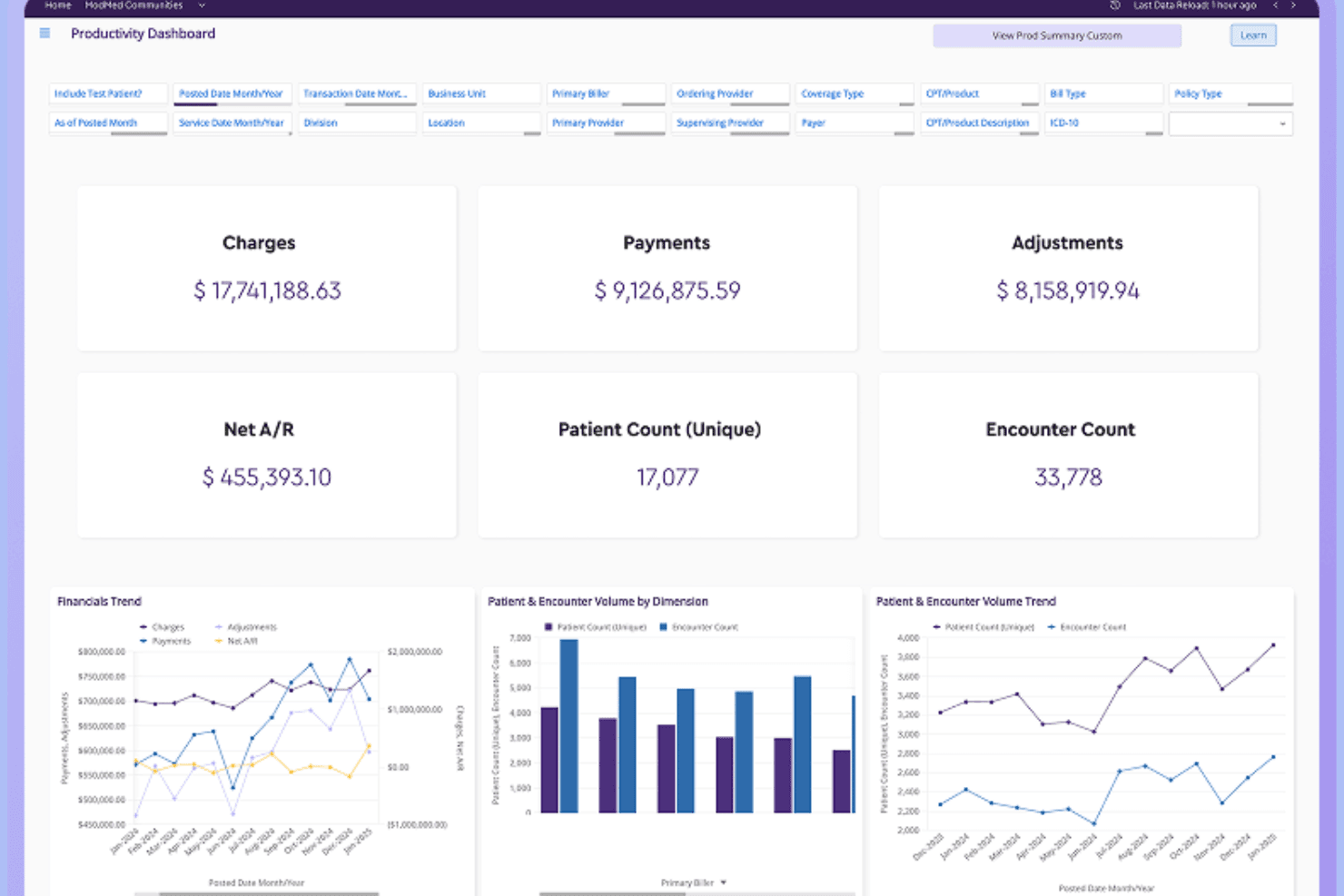
ModMed offers a comprehensive podiatry exam interface with condition-specific treatment plans, findings, and billing tools tailored for foot and ankle care. ModMed EMA is a cloud-based EHR built for specialty medical practices, offering adaptive clinical documentation, AI-assisted charting, e-prescribing, lab ordering, patient engagement tools, and integrated practice management workflows.
Who Is ModMed Best For?
ModMed EMA is a strong fit for specialty medical practices—dermatology, orthopedics, OBGYN, podiatry, and similar fields—that need clinical documentation built around their specific workflows.
Why I Picked ModMed
I picked ModMed as one of the best because its EMA EHR is built from the ground up for specialty practices, not retrofitted. I love how EMA preloads clinical content specific to your specialty, whether that's dermatology, orthopedics, or podiatry, so charting reflects how you actually work. ModMed Scribe 2.0 listens to patient-provider conversations and suggests visit notes, lab orders, and ICD-10 codes for your review, cutting documentation time without removing clinical judgment from the process.
ModMed Key Features
- Patient portal and APPatient app: Patients can view lab results, notes, and handouts, message the practice, request refills, and manage appointments through a web portal or mobile app.
- Surescripts-certified e-prescribing: Providers can queue and send prescriptions to a patient's preferred pharmacy directly from the visit workflow, with formulary lookup and electronic refill requests.
- Bidirectional lab integration: EMA connects with 1,200+ lab entities across the U.S. to send electronic orders and receive results, including digital photos and visit notes with pathology orders.
- AI Analytics dashboard: Built-in administrative, clinical, and financial analytics let practices track visit volume, E/M distribution, reimbursement trends, and high-risk diagnosis follow-ups in near real time.
ModMed Integrations
EMA connects with more than 1,200 lab entities through Change Healthcare, plus 100+ practice-management systems and 150+ pathology labs, including Labcorp and Quest Diagnostics. Its FHIR/OAuth2 APIs support custom integrations.
Pros and Cons
Pros:
- iPad charting supports work away from desk
- AI drafts notes for clinician review
- Specialty-specific charting reduces repetitive entry
Cons:
- Reviewers report mobile crashes and uneven workflows
- Extra clicks interrupt encounter documentation
Learn more about ModMed: Best for specialty practice adaptability
- Free demo available
- Pricing upon request
Visit WebsiteCustomer Rating:4.4/5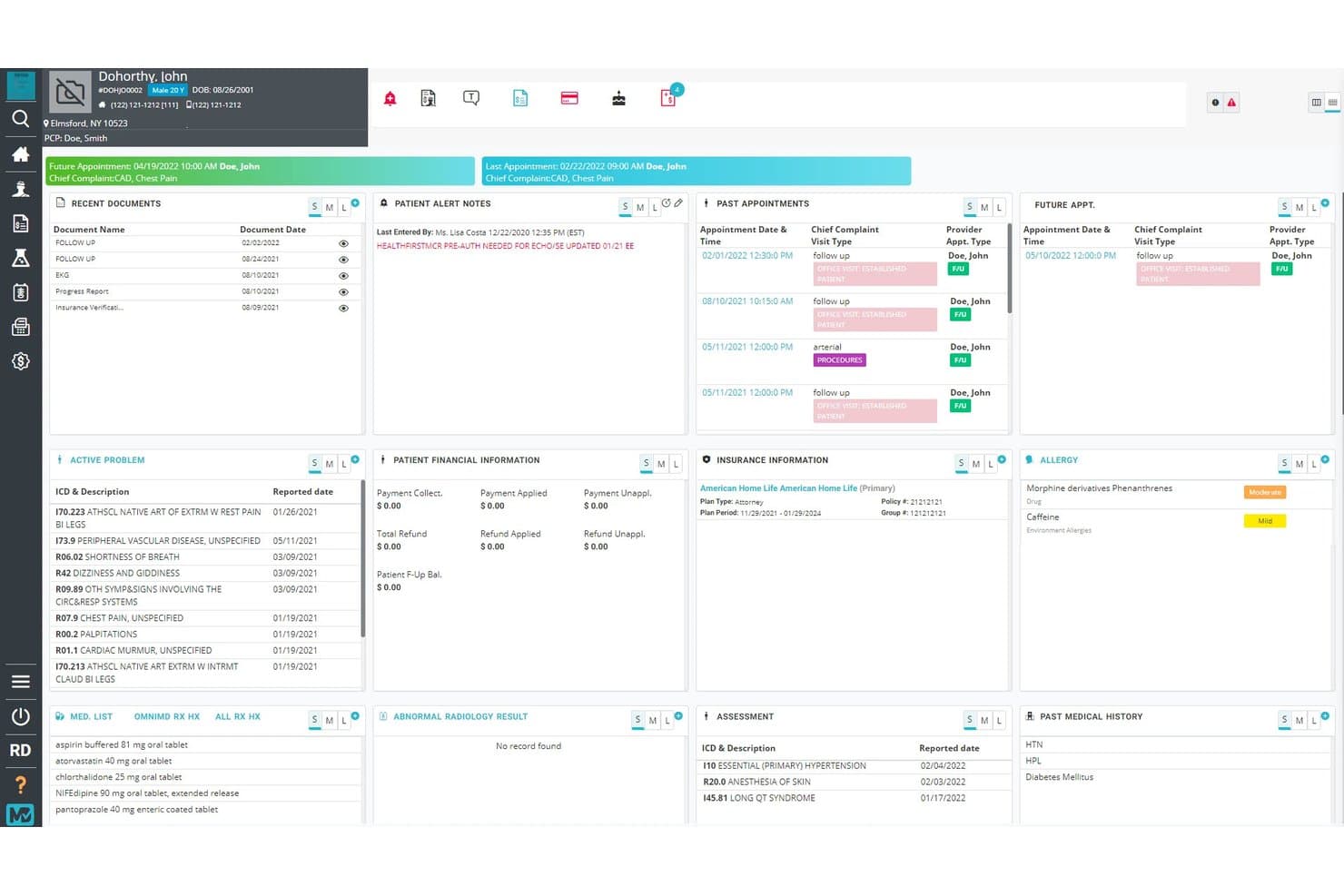
OmniMD centralizes patient health data in one cloud dashboard. OmniMD is a cloud-based EHR platform built for ambulatory practices that combines clinical documentation, AI-assisted charting, e-prescribing, specialty templates, patient portal, and telehealth across more than 20 specialty areas.
Who Is OmniMD Best For?
OmniMD is a strong fit for ambulatory practices that serve patients across multiple specialty areas and need documentation tools that adapt to each one.
Why I Picked OmniMD
I've included OmniMD in my top picks because no other tool on this list matches its depth of specialty-specific clinical documentation, with preloaded templates for more than 50 specialties covering everything from cardiology and OB/GYN to nephrology and ASC. I particularly like how the AI Medical Scribe generates specialty-aware draft notes during the visit, pulling in patient history, medications, and prior encounters as context. A cardiologist and a mental health provider can each work from templates built for their discipline, without reconfiguring anything.
OmniMD Key Features
- E-prescribing with EPCS: Providers can send prescriptions, including controlled substances, directly from the patient chart with drug-interaction and allergy-risk alerts built in.
- Patient portal: Patients can view lab results, visit notes, medications, and visit history through a browser-based portal that syncs directly with the EHR.
- Telehealth integration: Providers launch video visits from within the EHR, with documentation and billing workflows running in the same system.
- OmniXchange lab interface: Bidirectional lab data exchange sends orders and returns structured results to the patient chart, with abnormal-value notifications for the provider.
OmniMD Integrations
OmniMD lists Athenahealth as a native integration, plus Epic, Cerner, eClinicalWorks, Allscripts, LabCorp, and Quest Diagnostics. It supports SMART-on-FHIR, FHIR APIs, HL7, and secure API bridges for custom healthcare data exchange.
Pros and Cons
Pros:
- Reviewers praise responsive, patient support
- Charting connects with billing and scheduling
- Specialty-aware drafts reduce documentation burden
Cons:
- Complex-case templates may need clinician edits
- Older notes can take effort to retrieve
Learn more about OmniMD: Best for flexible per-encounter or per-provider pricing
- Free plan + free demo available
- From $25/month
Visit WebsiteCustomer Rating:4.2/5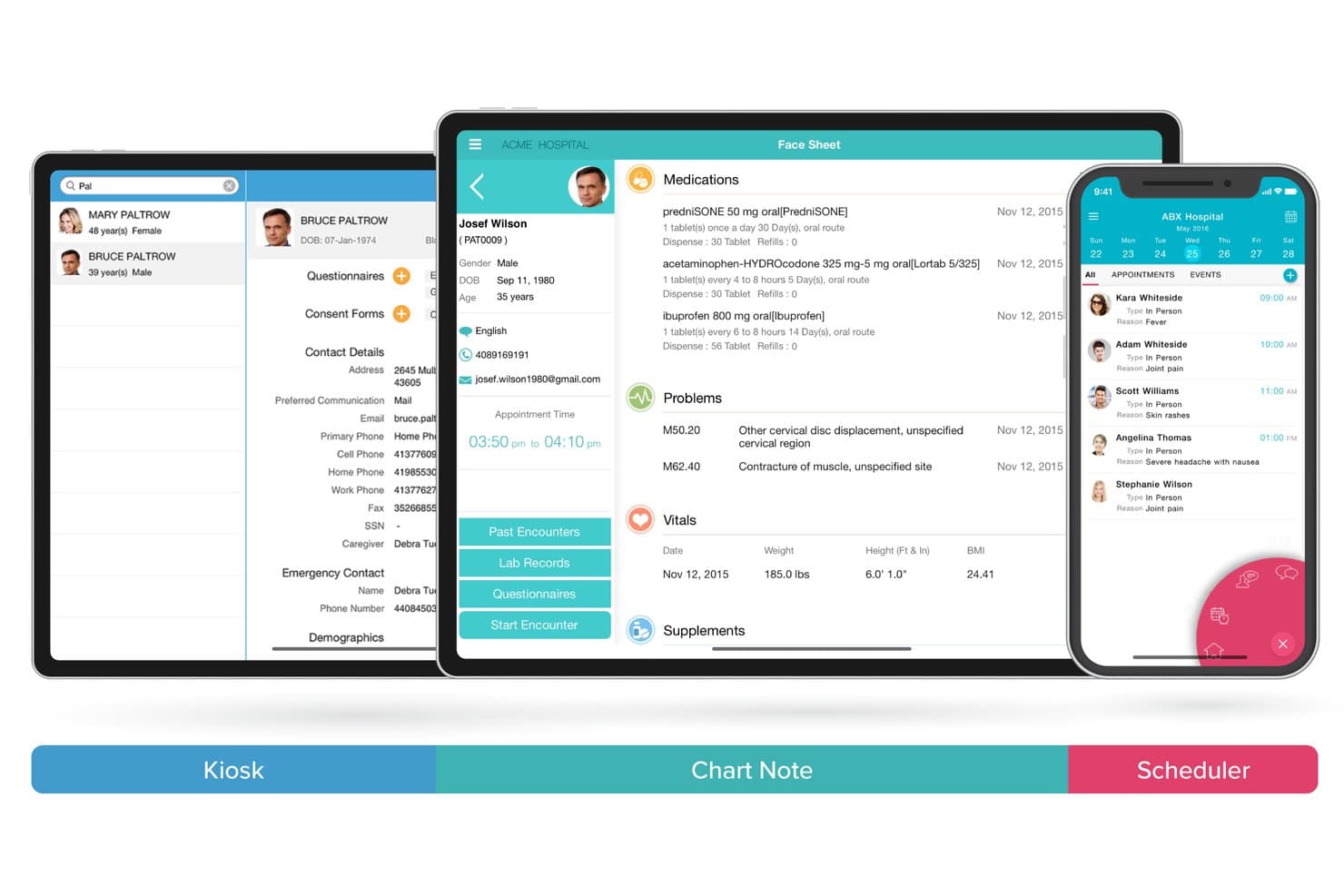
CharmHealth unifies kiosk, chart notes, and scheduling across devices. CharmHealth is a cloud-based EHR platform that covers clinical documentation, e-prescribing, practice management, patient engagement, telehealth, and medical billing across solo practices and multi-location organizations.
Who Is CharmHealth Best For?
CharmHealth is a strong fit for solo providers and small practices that want to pay only for what they use, thanks to its encounter-based pricing model.
Why I Picked CharmHealth
I've included CharmHealth in my top picks because its flexible pricing model is genuinely rare in the EHR space: you can pay $0.50 per encounter with a $25 monthly minimum, or switch to a flat $200 per-provider monthly rate once volume justifies it. I love that solo providers can start on the free plan (capped at 50 encounters and one provider) and scale up without renegotiating a contract. The AI Scribe add-on, which transcribes consultations and generates categorized SOAP note sections with suggested diagnosis codes, makes CharmHealth especially practical for high-volume practices watching costs closely.
CharmHealth Key Features
- FHIR API access: CharmHealth exposes FHIR Version 4.0.1 APIs covering patient, encounter, condition, care plan, medication, and lab data for third-party integrations.
- Patient engagement portal: Patients can request appointments, complete pre-visit questionnaires, view lab results, send refill requests, and message their care team securely.
- Specialty-customizable SOAP templates: Clinicians can import templates from CharmHealth's library, modify them, or build their own to match specialty-specific documentation workflows.
- Telehealth video consultations: The TeleHealth add-on enables video visits with patients directly within the EHR, with support also available through the Charm Chart Note iPad app.
CharmHealth Integrations
CharmHealth offers native integrations with Surescripts, LabCorp, Quest Diagnostics, Google Calendar, QuickBooks, Bluefin, and Fullscript. It also supports HL7-based lab interfaces and REST and FHIR APIs for custom integrations.
Pros and Cons
Pros:
- Scheduling, charting, and billing share one platform
- Patient portal supports records and refill requests
- Customizable SOAP templates support varied workflows
Cons:
- Large charts can load slowly, reviewers report
- Reviewers report delayed support for complex issues
Learn more about CharmHealth: Best for intuitive charting and patient care tools
- Free demo available
- Pricing upon request
Visit WebsiteCustomer Rating:4.4/5
ElationEMR offers a cloud-based EHR for records, e-prescribing, and practice management. Elation Health is a cloud-based EHR and medical billing platform built specifically for independent primary care practices, combining clinical documentation, AI-assisted note-taking, revenue cycle management, and patient care tools in one system.
Who Is Elation Health Best For?
Elation Health is a strong fit for independent primary care physicians and small practices that prioritize clinical documentation quality over administrative complexity.
Why I Picked Elation Health
Elation Health earns its spot on my shortlist because of its three-panel console, which puts the patient chart, visit note, and a summary of relevant history on one screen simultaneously. That layout alone cuts a significant amount of clicking during visits. I also find Note Assist genuinely useful: it records the encounter, pulls in existing chart data, and generates a structured note in real time, without requiring manual cleanup afterward. The referral management workflow, including built-in provider directory access and close-the-loop tracking, rounds out what makes charting here feel complete.
Elation Health Key Features
- Patient passport: A patient-facing health record that gives patients access to their own clinical summaries, medications, and visit history.
- E-prescribing: Send prescriptions electronically, including controlled substances, directly to pharmacies from within the chart.
- Care plans: Build and assign structured care plans to individual patients to support chronic condition management between visits.
- Lab and imaging orders: Order labs and imaging directly from within a patient's chart and receive results back into the EHR automatically.
Elation Health Integrations
Elation Health integrates with labs, pharmacies, and care coordination tools, offering 300+ integrations through its Partner Hub, including Zocdoc, Fullscript, Zus Health, and Nsight Health, along with national labs, health information exchanges, and radiology centers. Additional integrations include Dock Health, IntakeQ, Kareo, Updox, and Puredi, and Elation's API platform supports custom integrations for practices that need to connect with other systems.
Pros and Cons
Pros:
- Single-page chart layout minimizes navigation
- Longitudinal records support chronic care tracking
- AI-assisted documentation reduces daily note time
Cons:
- Reporting tools lack detailed customization
- No phone-based customer support option
Learn more about Elation Health: Best for telemedicine integration features
- Free demo available
- Pricing upon request
Visit WebsiteCustomer Rating:4/5
PrognoCIS offers an appointment scheduler for managing patient visits. PrognoCIS is a cloud-based EHR platform built for multi-specialty and single-specialty practices, combining clinical documentation, telemedicine, medical billing, and patient engagement tools in one system.
Who Is PrognoCIS Best For?
PrognoCIS is a strong fit for independent and group practices across 50+ specialties that want to run in-person and virtual care visits from a single platform.
Why I Picked PrognoCIS
I've included PrognoCIS in my top picks because its telemedicine module is built directly into the EHR, not bolted on as a third-party add-on. I particularly like the virtual waiting room, which notifies providers the moment a patient checks in, and the ability to add family members or staff to a live session for real-time triage. You can also collect payments, order labs, and send e-prescriptions without leaving the virtual visit.
PrognoCIS Key Features
- AI medical scribe: PrognoAI transcribes provider-patient conversations in real time and auto-generates chart notes without manual documentation.
- Specialty-specific templates: Pre-built, customizable templates span 25+ specialties to support structured and consistent clinical documentation.
- Insurance eligibility verification: PrognoCIS checks patient coverage in real time before each appointment so billing issues are caught before the visit.
- Patient portal: Patients can schedule appointments, request prescription refills, make payments, and message their care team directly.
PrognoCIS Integrations
PrognoCIS integrates with a wide variety of healthcare systems, including lab systems, pharmacies, and insurance providers. The platform supports ordering, results, and reporting through integrations with labs, radiology companies, and vaccine registries. PrognoCIS supports HL7 and FHIR interoperability to connect with other third-party solutions, and it supports integration with various third-party applications via an API, allowing users to import patient and clinical data.
Pros and Cons
Pros:
- Shared database between EMR and billing
- Configurable to 25+ medical specialties
- AI scribe auto-generates notes during visits
Cons:
- Custom report generation is limited
- Sluggish screen transitions during heavy use
Learn more about PrognoCIS Psychiatry EHR: Best for mobile-friendly clinical documentation
- Free demo available
- Pricing upon request
Visit WebsiteCustomer Rating:3.9/5
DrChrono offers a provider dashboard for schedules and patient visits. DrChrono is a cloud EHR platform built for specialty practices, combining mobile charting, voice dictation, customizable templates, scheduling, and revenue cycle management in one system.
Who Is DrChrono Best For?
DrChrono suits physicians and clinicians who document primarily at the point of care and need a native iOS EHR that works across iPhone and iPad.
Why I Picked DrChrono
I picked DrChrono as one of the best because its mobile charting experience is genuinely built for clinical use, not just adapted for it. The native iOS app lets you chart, prescribe, review labs, and annotate images directly from an iPad or iPhone at the point of care. I also like the Free Draw tool, which lets providers mark up diagrams or images inline during a visit, a feature that's especially useful in specialties like orthopedics or wound care.
DrChrono Key Features
- Customizable clinical templates: Build and use specialty-specific templates for exams, assessments, and procedures directly within the charting workflow.
- Electronic prescribing (eRx): Send controlled and non-controlled substance prescriptions electronically from within the EHR, including Electronic Prescribing of Controlled Substances (EPCS) support.
- Integrated lab and imaging orders: Order labs, X-rays, and imaging from the EHR and receive results directly in the patient chart.
- Telehealth: Run HIPAA-compliant virtual visits directly from the platform, with no downloads required for patients.
DrChrono Integrations
DrChrono offers marketplace integrations through the DrChrono Marketplace, which connects third-party partner apps to the platform. Verified marketplace partners include Box, Square Point of Sale, Birdeye, Weave, Fullscript, Beam Health, and Podium. DrChrono also connects with Health Gorilla for lab ordering, with access to labs like Labcorp, Quest Diagnostics, and Lifepoint, and supports Iron Bridge for immunization registry reporting. A RESTful API is available for custom integrations. Zapier support is not clearly documented as native.
Pros and Cons
Pros:
- Built-in telehealth with no patient downloads
- Specialty-specific templates across 20+ disciplines
- Native iPad charting with photo annotation
Cons:
- Financial reporting figures often unreliable
- Support relies on email ticket system
Learn more about DrChrono: Best for streamlined e-prescribing capabilities
- 14-day free trial + free demo available
- From $199/provider/month
Visit WebsiteCustomer Rating:3.7/5
Practice Fusion offers an EHR workspace for clinical documentation and patient care. Practice Fusion is a cloud-based EHR and billing services platform built for independent practices, combining clinical documentation, e-prescribing, charting, and practice billing management in a single system.
Who Is Practice Fusion Best For?
Practice Fusion is a natural fit for small to mid-sized ambulatory practices, particularly those in primary care, pediatrics, and family medicine.
Why I Picked Practice Fusion
I picked Practice Fusion as one of the best because its e-prescribing workflow is genuinely one of the tightest I've seen built into a cloud EHR. You can send prescriptions to any e-prescribing-enabled pharmacy in the country directly from the patient chart, with automatic drug-drug and drug-allergy interaction checks running in real time. Prior authorization management and formulary checks also happen inside the EHR, which removes a common back-and-forth that eats up time. Two-click refill requests and prescription fulfillment tracking round out a workflow that keeps medication management fully contained.
Practice Fusion Key Features
- Customizable charting templates: Build and save specialty-specific note templates to match how your practice documents visits.
- Lab and imaging ordering: Send orders directly from the patient chart and receive results back into the record automatically.
- Patient scheduling: Manage appointment booking, provider calendars, and visit types from a single scheduling interface.
- Medical billing management: Submit claims, track denials, and manage the full revenue cycle from within the platform.
Practice Fusion Integrations
Practice Fusion partners with laboratories, imaging centers, billing solutions, ACOs, and numerous other service providers, with over 600 partners across its ecosystem. Practice Fusion offers proprietary APIs for custom bi-directional integration, and verified integrations include Updox, Medsender, CollaborateMD, PracticeSuite, OpenPM, Office Ally Service Center, DeepScribe, FollowMyHealth, OhMD, and Persivia CareTrak.
Pros and Cons
Pros:
- Charting templates are quick to customize
- Browser-based access with no installation needed
- Built-in e-prescribing includes controlled substances
Cons:
- Server slowdowns reported during peak hours
- Interoffice messaging lacks shared inbox access
Learn more about Practice Fusion: Best for customizable clinical workflows
- 30-day free trial + free demo available
- From $130/user/month
Visit WebsiteCustomer Rating:3.6/5
AdvancedMD offers a practice management platform for scheduling, clinical documentation, billing, and patient management. AdvancedMD is a cloud-based EHR and practice management platform that covers scheduling, clinical documentation, billing, revenue cycle management, and patient engagement in a single unified system.
Who Is AdvancedMD Best For?
AdvancedMD is a strong fit for independent medical practices and multi-specialty groups that need a configurable clinical and billing workflow in one platform.
Why I Picked AdvancedMD
I picked AdvancedMD as one of the best because of how far it goes with clinical workflow customization. What I find particularly useful is the specialty-specific template library, which lets clinicians build and tailor documentation to match exactly how they practice, whether that's family medicine, mental health, or pain management. The multi-location template sharing feature is also a clear differentiator, letting group practices standardize note structures across sites without rebuilding from scratch at every location.
AdvancedMD Key Features
- Electronic prescribing: Send prescriptions, including controlled substances, directly to pharmacies from within the EHR.
- Remote patient monitoring: Collect and review patient health data between visits to support ongoing clinical oversight.
- Patient health questionnaires: Send and receive intake forms and health assessments digitally before or during a visit.
- Immunization registry: Submit patient immunization data directly to state registries from within the platform.
AdvancedMD Integrations
AdvancedMD offers over 1,400 apps, software, and technology integrations through its Partner Marketplace, including QuickBooks, InstaMed, Healthix, Salesforce, NextPatient, and Insight Health. The platform also provides an open API that lets you push and pull data to and from AdvancedMD, including patient records, scheduling, and charge data, for custom integrations.
Pros and Cons
Pros:
- Built-in telemedicine for virtual visits
- Charge capture happens during charting automatically
- Templates are editable without vendor involvement
Cons:
- Onboarding and setup take significant effort
- E-prescribing workflows can be clunky
Alte software-uri EMR în cloud
Iată câteva opțiuni suplimentare de software EMR în cloud care nu au ajuns pe lista mea scurtă, dar care merită totuși analizate:
- 11CureMDBest for rapid implementation options
- 12Kareo ClinicalBest for independent practice end-to-end records
- 13RXNTBest for integrated scheduling and charting
- 14HealthieBest for wellness-focused multi-tool patient records
- 15Oracle HealthBest for enterprise-scale EHR interoperability
- 16eClinicalWorksBest for robust patient engagement options
- 17CareCloudBest for advanced workflow automation
- 18athenaOneBest for network-connected ambulatory EHR
- 19PCCBest for pediatric-only clinical charting
- 20Canvas MedicalBest for developer-extensible cloud EMR workflows
How I Evaluate Cloud EMR Software
I split my evaluation into three parts, giving the most weight to core needs: keep patient charts in the cloud and document encounters and clinical notes. Next, I look for standout features such as specialty-specific templates. Finally, I consider beyond-feature value, including onboarding, support, and pricing as a practice grows.
Core Functionality (Table Stakes For This List)
When I'm selecting tools for my list, I score each one on a scale from 0 (does not offer the functionality) to 5 (excels in this area) for each core functionality listed below. I then convert the total into a percentage to help assess each tool's overall fit, with extra weight on any functionalities I’ve deemed essential.
- Cloud Records (Essential): I look for cloud-hosted charts that keep notes, medication lists, and results accessible to authorized staff in the clinic or remotely.
- Clinical Documentation (Essential): I assess whether encounter templates capture diagnoses, plans, and specialty-specific notes without forcing clinicians into one-size-fits-all charting.
- Privacy Safeguards: Check for role-based access, audit trails, encryption, and privacy controls that support applicable health-data rules.
- E-Prescribing: I check whether clinicians can send prescriptions electronically and manage renewals within the chart, including applicable medication classes.
- Data Exchange: I look for secure exchange of records, lab results, and referrals with outside providers, not just downloadable files.
- Remote Access: Consider whether authorized clinicians can retrieve charts and document follow-ups across locations and devices.
Once I have a list of tools that meet the criteria, I consider what sets each platform apart.
Differentiating Factors (What Sets Vendors Apart)
Here's how I compare and contrast different vendors:
Standout Features
I look for AI-assisted documentation that auto-generates notes from visit audio, since it cuts charting time for physicians who'd otherwise spend evenings catching up. Specialty-specific templates matter just as much. A behavioral health practice needs intake forms and progress notes built for that workflow, not adapted from a general medicine template. I also evaluate telehealth integration, checking whether video visits run inside the chart so clinicians aren't toggling between apps mid-encounter.
Beyond Features
I evaluate how each vendor handles data migration, since a botched transition from a legacy system can mean lost charts and stalled operations during go-live. Total cost of ownership matters just as much—some platforms charge per-provider while others bill per-encounter, and add-on fees for things like controlled substance e-prescribing can quietly inflate the budget as your team grows. I also check whether the EMR connects natively to health information exchanges and existing billing systems, because duplicate data entry across disconnected tools drains staff time fast.
Cum să alegeți software-ul EMR în cloud
Este ușor să vă pierdeți în liste lungi de funcții și structuri complexe de prețuri. Pentru a vă ajuta să rămâneți concentrat în timp ce parcurgeți procesul dvs. unic de selectare a software-ului, iată o listă de verificare a factorilor pe care trebuie să îi aveți în vedere:
| Factor | Aspecte de luat în considerare |
| Scalabilitate | Software-ul va putea deservi furnizori individuali, cabinete de grup și organizații cu mai multe locații (la fel ca soluțiile de întreprindere de la Cerner), pe măsură ce organizația dvs. se dezvoltă sau se schimbă? |
| Integrări | Se poate conecta EMR-ul la laboratoarele, sistemele de facturare, centrele de imagistică sau rețelele de recomandări pe care le utilizați în prezent sau pe care intenționați să le utilizați în curând? |
| Posibilități de personalizare | Vă permite platforma să ajustați șabloanele, formularele și fluxurile de lucru pentru a corespunde specializării dvs. sau proceselor clinice locale? |
| Ușurință în utilizare | Va putea echipa dvs. să învețe rapid să îl utilizeze sau va încetini furnizarea îngrijirilor ori va necesita instruire continuă extinsă? |
| Implementare și configurare inițială | Ce resurse, asistență pentru migrare și suport în timp real sunt incluse în timpul configurării? Va trebui să coordonați separat activitatea cu consultanți externi? |
| Cost | Prețurile sunt transparente și includ toate elementele esențiale? Căutați taxe ascunse pentru integrări, utilizatori suplimentari sau suport premium. |
| Măsuri de securitate | Oferă soluția criptare, jurnale de audit și controale stricte ale accesului pentru a proteja dosarele și a respecta cerințele de confidențialitate? |
| Cerințe de conformitate | Furnizorul oferă suport pentru HIPAA, ONC și alte certificări relevante pentru regiunea dvs. și mediul de îngrijire? Ce documentație este furnizată? |
Ce este software-ul EMR în cloud?
Software-urile EMR în cloud sunt platforme online care stochează, gestionează și securizează dosarele medicale electronice prin intermediul internetului, eliminând necesitatea serverelor locale. Aceste soluții permit medicilor și personalului să acceseze informațiile pacienților, să documenteze îngrijirile și să coordoneze fluxurile de lucru de pe orice dispozitiv, sprijinind colaborarea securizată, accesul de la distanță, conformitatea și integrarea cu instrumentele clinice și administrative.
Funcțiile software-ului EMR în cloud
Când selectați un software EMR în cloud, urmăriți următoarele funcții esențiale:
- Documentație și note clinice: Le permite furnizorilor să creeze, să revizuiască și să editeze documentația structurată sau în text liber a consultațiilor pacienților, pentru păstrarea exactă a evidențelor și urmărirea clinică.
- Prescriere electronică: Permite transmiterea electronică a rețetelor direct către farmacii, contribuind la siguranța medicației și reducând volumul de muncă asociat apelurilor telefonice și faxurilor.
- Portal integrat pentru pacienți: Oferă pacienților acces online la dosarele medicale, programări, mesagerie securizată și facturare, îmbunătățind comunicarea și confortul.
- Programarea consultațiilor: Gestionează calendarele furnizorilor, permite programarea online, urmărește anulările și absențele și trimite mementouri automate pentru a reduce consultațiile ratate.
- Gestionarea comenzilor: Facilitează solicitarea digitală și obținerea rezultatelor pentru analize de laborator, investigații imagistice și teste de diagnostic, cu urmărirea stării și alerte care contribuie la finalizarea ciclurilor de îngrijire.
- Integrarea cererilor de rambursare și a facturării: Conectează fără întreruperi documentația clinică la fluxurile de codificare și facturare, reducând erorile și introducerea administrativă duplicată a datelor.
- Interoperabilitate: Permite schimbul securizat de date cu furnizori externi, laboratoare sau parteneri de trimitere, utilizând HL7, FHIR sau alte standarde pentru date medicale.
- Controale de acces bazate pe roluri: Restricționează ceea ce diferiți utilizatori pot vizualiza și edita, protejând informațiile sensibile și sprijinind respectarea reglementărilor privind confidențialitatea.
- Raportare de reglementare: Generează rapoarte privind conformitatea, calitatea și cerințele guvernamentale, utilizând date clinice în timp real și făcând sarcinile de reglementare mai puțin împovărătoare.
Funcții AI comune ale software-ului EMR în cloud
Pe lângă funcțiile standard ale software-ului EMR în cloud enumerate mai sus, multe dintre aceste soluții integrează inteligența artificială prin funcții precum:
- Redactare ambientală: Inteligența artificială ascultă în timpul consultațiilor pacienților și generează automat note clinice structurate, reducând documentarea manuală și eliberând timpul furnizorilor.
- Analiză predictivă: Inteligența artificială analizează datele pacienților pentru a-i identifica pe cei expuși riscului de readmisie, progresie a bolii sau neprezentare la consultațiile de urmărire, sprijinind gestionarea proactivă a îngrijirii.
- Asistență automatizată pentru codificare: Inteligența artificială verifică documentația clinică și sugerează coduri exacte de facturare, contribuind la reducerea respingerilor cererilor de rambursare și la îmbunătățirea eficienței ciclului de venituri.
- Sprijin pentru decizii clinice: Inteligența artificială oferă alerte în timp real privind interacțiunile medicamentoase, riscurile de alergii și recomandări de îngrijire bazate pe dovezi, la punctul de acordare a îngrijirii.
- Optimizarea inteligentă a programărilor: Inteligența artificială prezice absențele și recomandă modele optime de programare pentru a maximiza productivitatea furnizorilor și a minimiza intervalele libere din calendar.
Beneficiile software-ului EMR în cloud
Implementarea software-ului EMR în cloud oferă mai multe beneficii pentru echipa și compania dumneavoastră. Iată câteva dintre acestea:
- Acces de la distanță: Accesați și actualizați în siguranță dosarele pacienților de oriunde există o conexiune la internet, sprijinind echipele de îngrijire hibride și mobile.
- Coordonare mai bună a îngrijirii: Accesul la fișe în timp real, interoperabilitatea și mesageria securizată permit mai multor furnizori să contribuie la îngrijirea pacienților din locații diferite.
- Reducerea volumului de documentație: Șabloanele integrate, documentarea structurată și instrumente precum redactarea ambientală îi ajută pe furnizori să finalizeze mai rapid notele și să se concentreze asupra pacienților.
- Implicarea îmbunătățită a pacienților: Portalurile pentru pacienți oferă programare online, comunicare și acces la dosarul medical, facilitând participarea pacienților la propria îngrijire.
- Scalabilitate pentru creștere: Arhitectura bazată pe cloud și modelele de abonament permit cabinetelor să adauge furnizori, specializări sau locații fără modificări tehnice majore.
- Conformitate și securitate îmbunătățite: Jurnalele de audit automatizate, accesul bazat pe roluri și criptarea contribuie la îndeplinirea cerințelor HIPAA și de reglementare, protejând în același timp datele sensibile.
- Costuri IT și de întreținere mai mici: Găzduirea în cloud elimină nevoia de servere la sediu, actualizări de rutină și asistență tehnică internă, reducând cheltuielile generale.
Costurile și prețurile software-ului EMR în cloud
Selectarea software-ului EMR în cloud necesită înțelegerea diferitelor modele și planuri de preț disponibile. Costurile variază în funcție de funcții, dimensiunea echipei, suplimente și alți factori. Tabelul de mai jos rezumă planurile comune, prețurile medii ale acestora și funcțiile incluse de obicei în soluțiile software EMR în cloud:
Tabel comparativ al planurilor pentru software-ul EMR în cloud
| Tipul planului | Preț mediu | Funcții comune |
| Plan gratuit | $0 | Documentare de bază, programarea consultațiilor, spațiu de stocare limitat, asistență din partea comunității și acces pentru un singur furnizor. |
| Plan personal | $50-$100/utilizator/lună | Documentație securizată, prescriere electronică, gestionarea programărilor, portal pentru pacienți și integrare simplă a facturării. |
| Plan pentru companii | $100-$250/utilizator/lună | Asistență pentru mai mulți furnizori, facturare integrată, telemedicină, analiză, interoperabilitate de bază, asistență îmbunătățită și formulare personalizate. |
| Plan pentru întreprinderi | $250+/utilizator/lună | Interoperabilitate avansată, analiză pentru întreprinderi, fluxuri de lucru personalizate, asistență prioritară, migrarea datelor și raportare de conformitate. |
Întrebări frecvente despre software-ul EMR în cloud
Iată câteva răspunsuri la întrebările frecvente despre software-ul EMR în cloud:
Cât de sigur este software-ul EMR în cloud pentru datele medicale sensibile?
Da, software-ul EMR în cloud este conceput cu standarde de securitate precum criptarea, accesul bazat pe roluri și jurnalele de audit. Verificați întotdeauna că furnizorul oferă conformitate HIPAA și este dispus să semneze un acord de asociat comercial, pentru a vă asigura că respectați cerințele legale privind protecția datelor.
Poate software-ul EMR în cloud să susțină cabinete de specialitate sau cu mai multe locații?
Da, majoritatea platformelor EMR în cloud sunt concepute pentru a deservi cabinete de diferite dimensiuni și specialități. Căutați șabloane flexibile, acces scalabil pentru utilizatori și gestionarea mai multor locații dacă intenționați să vă extindeți sau să lucrați în diferite domenii clinice.
Ce presupune migrarea de la un sistem pe hârtie sau tradițional la un EMR în cloud?
Migrarea implică de obicei extragerea fișelor și documentelor pacienților, convertirea formatelor de date și validarea înregistrărilor după import. Întrebați furnizorii despre asistența inclusă, timpul de nefuncționare, instruire și dacă aceste costuri sunt incluse sau percepute separat, pentru a evita întreruperile.
Cât de des sunt aplicate actualizările și corecțiile de securitate?
Furnizorii de EMR în cloud gestionează, în general, automat actualizările, astfel încât beneficiați de corecții regulate de securitate și funcții noi fără intervenție manuală sau timp de nefuncționare — ceea ce vă ajută să rămâneți la zi cu reglementările și standardele din domeniu.
De ce fel de asistență IT va avea nevoie clinica noastră cu un sistem EMR în cloud?
Sistemele EMR în cloud reduc nevoia de servicii IT la fața locului, deoarece găzduirea, întreținerea și actualizările sunt gestionate de furnizor. Cu toate acestea, echipa dumneavoastră ar trebui să desemneze o persoană responsabilă pentru gestionarea utilizatorilor, supravegherea fluxurilor de lucru și coordonarea cu furnizorul.