

Soluțiile EHR bazate pe cloud elimină necesitatea serverelor locale și a actualizărilor manuale, permițând echipei dumneavoastră să se concentreze pe extinderea serviciilor și reducerea timpilor de nefuncționare. Menținerea accesului securizat și a performanței poate fi dificilă, însă asistența adecvată poate garanta fiabilitatea și economii de costuri.
În acest articol, compar și analizez cele mai bune instrumente EHR bazate pe cloud pentru a vă sprijini decizia de achiziție.
Why Trust Our Software Recommendations
6,700+
Reviews
20
Industry experts
16+
Evaluation factors
14
Years
Our team has been testing and reviewing software since 2012. As medical practice leaders ourselves, we know how difficult—and important—it is to choose the right software.
For this guide, we evaluated tools using hands-on testing and independent research, scoring tools using our selection criteria.
Our reviews reflect our human editorial judgment, not a sales pitch.
Tabel comparativ al soluțiilor EHR bazate pe cloud
Score legend (out of 5)
- Excellent4.5–5
- Good4–4.4
- Average3–3.9
- Below average2–2.9
- Poor1–1.9
Sorted by: Default
| Tool | Starting Price | Website | |||||||
|---|---|---|---|---|---|---|---|---|---|
Best for integrated patient portals | 3.7 out of 5 | 4 | 3 | 4 | 3 | 4 | 4 | $335/month Free demo available | Book Demo |
Best for customized patient charting | 3.0 out of 5 | 3 | 1 | 3 | 3 | 4 | 4 | $99/month 15-day free trial | Website |
Best for AI-assisted notes and practice admin | Not rated | Not rated | 1 | 4 | 2 | 5 | 3 | $29/user/month Free demo + 14-day free trial available | Website |
Best for encounter or provider-based pricing | 3.8 out of 5 | 4 | 3 | 3 | 4 | 5 | 4 | $25/month Free plan + free demo available | Website |
Best for practices needing custom data links | 3.8 out of 5 | 4 | 3 | 4 | 4 | 4 | 4 | Pricing upon request Free demo available | Website |
Best for US-wide controlled-drug prescribing | 3.8 out of 5 | 5 | 3 | 3 | 4 | 4 | 4 | $199/provider/month 14-day free trial + free demo available | Website |
Best for practices connecting existing systems | 3.8 out of 5 | 4 | 3 | 4 | 4 | 4 | 4 | $130/user/month 30-day free trial + free demo available | Website |
Best for cross-network clinical data exchange | 4.2 out of 5 | 2 | 4 | 5 | 5 | 4 | 5 | Pricing upon request Free demo available | Website |
Best for practices switching with clear pricing | 4.2 out of 5 | 4 | 3 | 5 | 4 | 5 | 4 | $499/user/month Free demo available | Website |
Best for chart review across care networks | 4.5 out of 5 | 4 | 4 | 5 | 5 | 5 | 4 | Pricing upon request Free demo available | Website |


Recenzii pentru cele mai bune soluții EHR bazate pe cloud
 1Best for integrated patient portals
RXNT
- Free demo available
- From $335/month(billed annually)
Visit WebsiteCustomer Rating:4.3/5
RXNT's patient dashboards provide a user-friendly interface for managing patient information, including demographics, medical history, and appointment details. RXNT is a cloud-based healthcare software suite designed to enhance the efficiency and quality of care in medical practices. The software offers a comprehensive range of services, including Electronic Health Records (EHR), electronic prescribing (eRx), practice management (PM), and medical billing. RXNT's EHR system is ONC-certified and HIPAA compliant, ensuring secure and efficient patient data management.
Why I Picked RXNT: RXNT's EHR system includes an integrated patient portal, which significantly improves patient engagement by allowing individuals to access their medical documents, pay bills, and schedule appointments online. This feature not only streamlines administrative tasks but also fosters better communication between patients and healthcare providers, leading to improved patient satisfaction and adherence to treatment plans. Additionally, the system's user-friendly interface ensures that healthcare staff can quickly adapt to the software, reducing the learning curve and minimizing disruptions to daily operations.
Standout feature & integrations:
RXNT's standout feature include practice management, which enhances efficiency in managing patient records and billing processes, medical scheduling, which simplifies the process of scheduling appointments, and an EHR system that allows healthcare providers to personalize charts and templates, facilitating faster data entry and more efficient patient documentation. Additionally, RXNT integrates well with tools such as Exym, EMSOW, OneMD, and Hospice Tools.
Pros and Cons
Pros:
- Software is regularly updated
- Efficient e-prescribing
- Responsive customer support
Cons:
- Some users find the interface difficult to navigate
- Some users have reported occasional glitches
- Limited advanced features
Learn more about RXNT: Best for customized patient charting
- 15-day free trial
- From $99/month
Visit WebsiteCustomer Rating:4.8/5
OptiMantra’s patient dashboard provides a clear overview of appointments, notes, and patient history in one place. OptiMantra is a cloud-based electronic health record (EHR) and practice management platform designed for integrative and wellness practitioners. It supports multiple modalities—including acupuncture, naturopathy, chiropractic, and behavioral health—while helping practitioners manage everything from patient engagement and scheduling to billing and inventory.
Why I Picked OptiMantra: I picked OptiMantra because of its powerful customization tools for patient charting and intake forms. You can tailor templates, questionnaires, and follow-up notes to match your unique practice style, helping you document patient interactions efficiently. I also like that it includes secure telehealth capabilities for HIPAA-compliant video consultations, plus integrated diagnostics for lab ordering and results retrieval—all within the same cloud-based system. This combination of flexibility and connected care makes it a strong choice for integrative practices.
Standout features & integrations:
OptiMantra includes features such as customizable charting templates, online patient payments, inventory management, and insurance billing with claims tracking. The system also offers reporting tools for financial insights and patient analytics. Integrations include Surescripts, LabCorp, Quest Diagnostics, Rupa Health, SimonMed, DigitalOne, Boston Heart Diagnostics, Fullscript, and Clinical Pathology Laboratories (CPL).
Pros and Cons
Pros:
- Seamless lab and pharmacy connections
- Integrated telehealth functionality
- Highly customizable charting options
Cons:
- Patient portal usability could improve
- Learning curve for new users
Learn more about OptiMantra: Best for AI-assisted notes and practice admin
- Free demo + 14-day free trial available
- From $29/user/month
Visit WebsiteCustomer Rating:4.7/5
Zanda displays a weekly calendar with appointments and group sessions. Zanda is a cloud-based practice management platform for allied health and clinical practices that brings together scheduling, clinical documentation, billing, client records, telehealth, and AI-assisted note-taking.
Who Is Zanda Best For?
Zanda is a strong fit for allied health and mental health practitioners—from solo clinicians to small group practices—who want scheduling, billing, and AI-assisted clinical notes in one place.
Why I Picked Zanda
I've included Zanda in my top picks because its BizzyAI Scribe tool genuinely changes how clinicians handle post-session documentation: it listens through your browser microphone, transcribes the session live, and drafts notes directly into your chosen clinical template. I also like that every plan includes AI Core, so you get four Scribe sessions per practitioner each month plus unlimited AI writing and editing without paying extra. For practices that run a high volume of sessions, the AI Pro add-on removes that cap entirely.
Zanda Key Features
- Configurable clinical note templates: Build note templates from text fields, selectable values, body charts, diagram annotations, and typed signatures to match your clinical workflow.
- Scored assessment forms: Create and send online assessment forms that automatically score responses and track client progress over time.
- Multi-practitioner calendar management: View and manage practitioner schedules side by side, with recurring appointments, conflict alerts, waitlist management, and room or resource allocation.
- Client self-booking portal: Clients can register, book, reschedule, cancel, and pay for appointments through a branded online portal without staff involvement.
Zanda Integrations
Zanda offers native integrations with Stripe, Xero, Physitrack, Google Calendar, Apple Calendar, Outlook Calendar, Zoom, Mailchimp, Gmail, and Microsoft Outlook. It also lists a beta REST API for custom connections, but enrollment is currently closed and the API is read-oriented.
Pros and Cons
Pros:
- Live-session transcription drafts clinical notes
- Automated reminders reduce front-desk follow-up
- Configurable notes suit allied-health workflows
Cons:
- Limited provider data exchange constrains referrals
- Mobile calendar feels cramped on phones
Learn more about Zanda: Best for encounter or provider-based pricing
- Free plan + free demo available
- From $25/month
Visit WebsiteCustomer Rating:4.2/5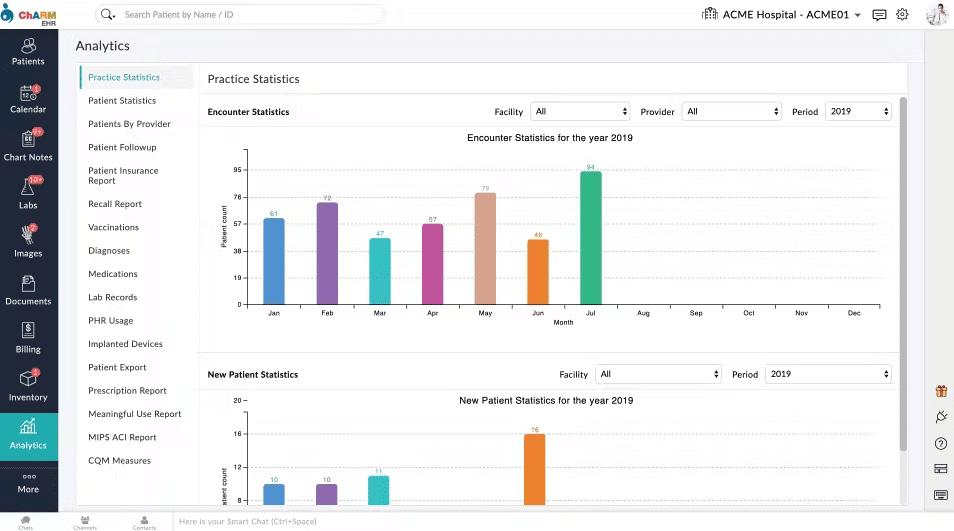
CharmHealth Cloud Based EHR Interface CharmHealth is a cloud-based EHR platform from MedicalMine Inc. that covers clinical charting, e-prescribing, practice management, patient engagement, and medical billing in a single system.
Who Is CharmHealth Best For?
CharmHealth is a strong fit for small to mid-sized independent practices that want to keep software costs tied to actual patient volume.
Why I Picked CharmHealth
I picked CharmHealth as one of the best because its encounter-based pricing model is genuinely rare in the EHR space. Rather than locking you into a fixed per-provider seat fee, the Encounter Plan charges $0.50 per visit with a $25 monthly minimum, so a practice seeing 40 patients a month pays far less than one billing at a flat rate. I also like CharmCopilot, which captures ambient conversation during visits and auto-generates clinical notes, and the built-in AI Scribe that transcribes patient-provider conversations in real time for charting.
CharmHealth Key Features
- e-Prescribing network: Sends electronic prescriptions and refill requests to a network of more than 70,000 pharmacies, with built-in drug interaction alerts.
- Patient portal: Gives patients access to their health records, appointment requests, secure provider messaging, and pre-visit questionnaires from one place.
- Electronic claims management: Handles claim preparation, real-time eligibility checks, ERA download, and payment posting through an integrated clearinghouse.
- HL7 lab integration: Routes lab orders directly to partners like LabCorp and Quest and returns results to the provider's chart automatically.
CharmHealth Integrations
CharmHealth offers native integrations with Surescripts, LabCorp, Quest, Fullscript, Google Calendar, QuickBooks, Bluefin, Optum, and digital scales. It also supports REST, HL7 FHIR, and SMART on FHIR APIs for custom integrations.
Pros and Cons
Pros:
- Charting, scheduling, and billing share one system
- Configurable workflows suit varied practice needs
- Patient portal supports ongoing patient engagement
Cons:
- Some users find SOAP templates restrictive
- Claim and ERA enrollment delays reported
Learn more about CharmHealth: Best for practices needing custom data links
- Free demo available
- Pricing upon request
Visit WebsiteCustomer Rating:3.9/5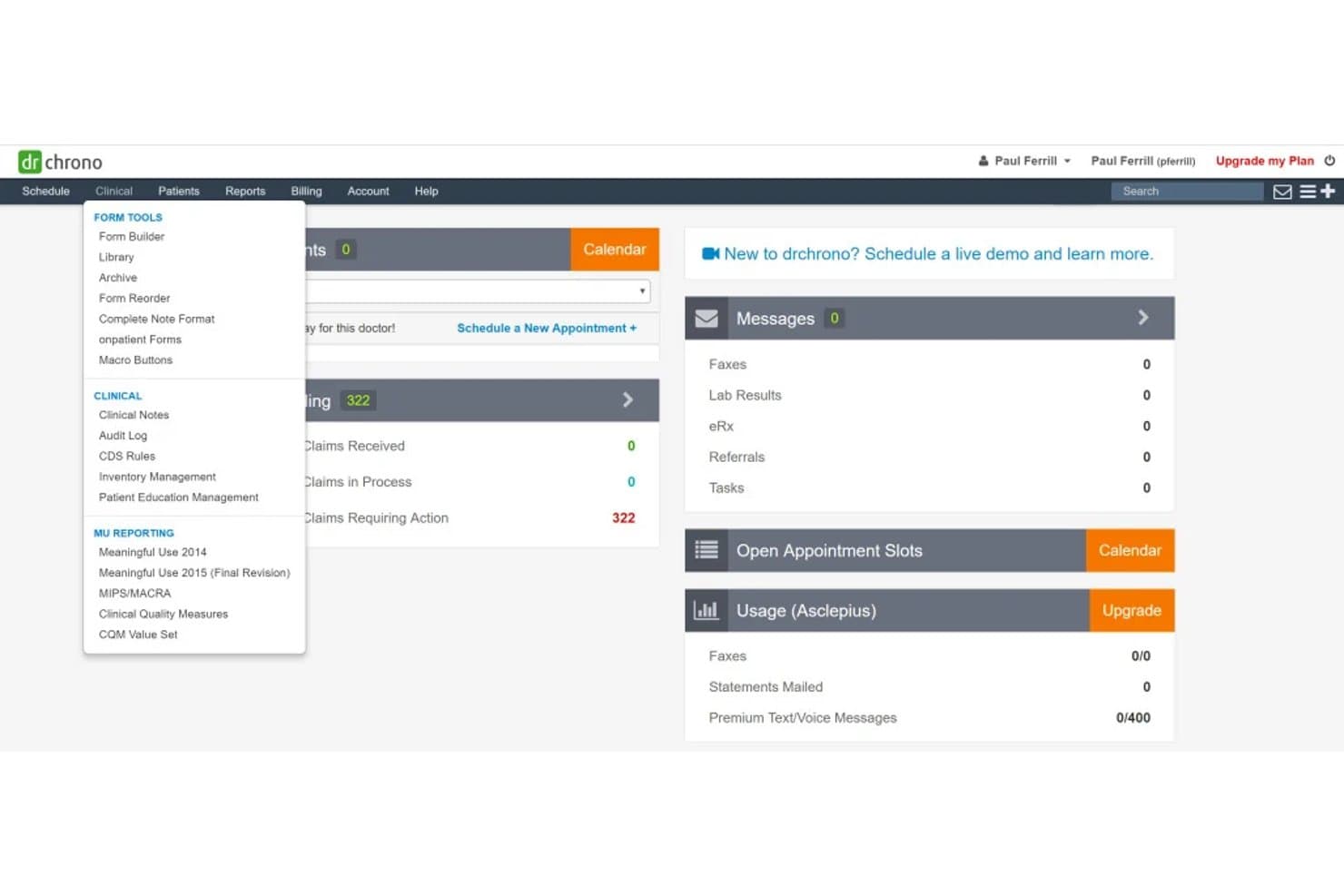
The DrChrono Clinical menu offers form tools, clinical notes, audit logs, and Meaningful Use reporting. DrChrono is a cloud-based EHR platform that covers clinical documentation, e-prescribing, practice management, medical billing, and telehealth, with a REST/FHIR API and a customizable form and template library built for specialty practices.
Who Is DrChrono Best For?
DrChrono works best for independent and specialty practices that need mobile-first clinical charting and highly customizable documentation workflows.
Why I Picked DrChrono
DrChrono earns its spot on my shortlist because of how well it handles custom data linking across clinical and billing workflows. I particularly like the REST and FHIR API, which lets practices connect DrChrono to external tools and pull structured data in both directions. The customizable specialty templates and text-expanding macros also mean you can build documentation workflows that map directly to your practice's data needs, not a generic default.
DrChrono Key Features
- EverHealth Scribe: An AI tool that listens to clinician-patient conversations and drafts structured clinical notes, including HPI, Assessment, Plan, and ICD-10 codes, for review and approval directly in the EHR.
- Surescripts e-prescribing: Lets providers send prescriptions electronically with real-time drug interaction checks, medication histories, and support for controlled substance prescribing.
- OnPatient portal: A patient-facing portal accessible via web, iOS, and Android that supports appointment scheduling, secure messaging, digital intake forms, and online payments.
- No-show predictor: An AI-powered tool that flags patients at higher risk of missing appointments so your team can prioritize proactive outreach.
DrChrono Integrations
DrChrono offers native integrations with Quest, LabCorp, Iron Bridge, Surescripts, and CoverMyMeds. It connects with hundreds of third-party applications through its marketplace and supports REST, FHIR, OAuth 2.0, and webhooks for custom integrations.
Pros and Cons
Pros:
- Custom macros reduce repetitive charting
- Specialty templates adapt to practice workflows
- Mobile charting earns reviewer praise
Cons:
- Billing errors and slow support frustrate teams
- Outages and save failures disrupt workflows
Learn more about DrChrono: Best for US-wide controlled-drug prescribing
- 14-day free trial + free demo available
- From $199/provider/month
Visit WebsiteCustomer Rating:3.7/5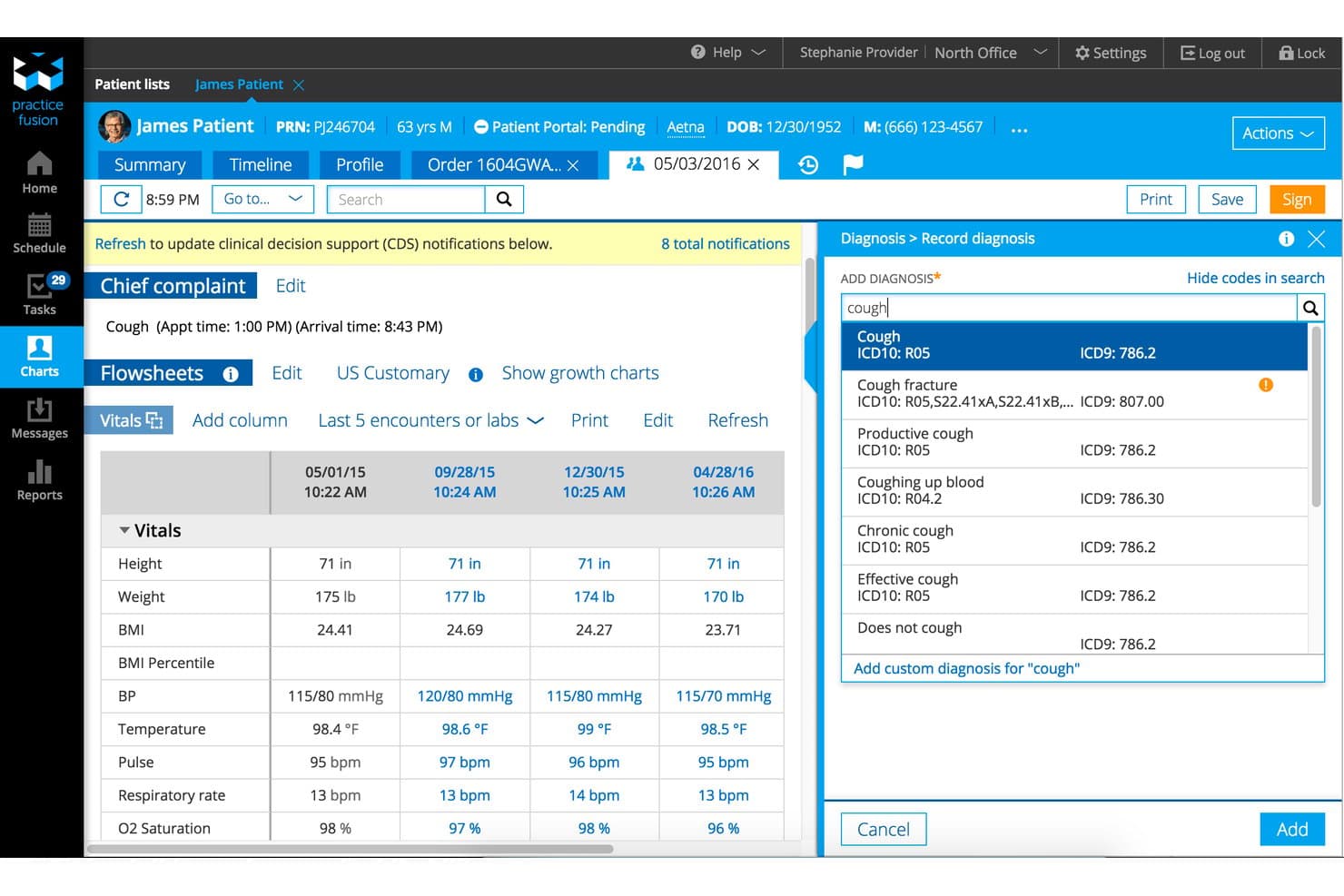
Practice Fusion chart showing vitals flowsheet history and ICD-10 diagnosis code search for a patient visit. Practice Fusion is a cloud-based EHR built for independent practices, offering clinical charting, e-prescribing including controlled substances, lab and imaging orders, a patient health record portal, and an optional billing services module.
Who Is Practice Fusion Best For?
Practice Fusion is a strong fit for independent physicians and small practices across the US that need reliable EPCS-enabled e-prescribing alongside core charting and patient record tools.
Why I Picked Practice Fusion
Practice Fusion earns its spot on my shortlist because it's the only cloud EHR I've found with EPCS enabled across all 50 states and DC, making it a go-to for independent physicians who prescribe controlled substances. I particularly like the built-in drug-drug and drug-allergy interaction checks that run automatically, plus the two-click refill workflow and formulary checks that keep prescribing fast without cutting corners on safety.
Practice Fusion Key Features
- Customizable charting templates: A library of specialty-specific templates lets providers tailor clinical documentation to their workflow and visit types.
- FollowMyHealth patient portal: Patients get around-the-clock access to their records, can schedule appointments online, and check in before visits through the integrated PHR.
- Lab and imaging order management: Providers can submit orders directly from the patient chart, track results in flowsheets, and receive abnormal findings flagged automatically.
- MIPS and quality reporting dashboards: Built-in dashboards track progress across MIPS performance categories and Medicare Promoting Interoperability requirements in one place.
Practice Fusion Integrations
Practice Fusion offers native connections to hundreds of lab and imaging centers, including Labcorp, Quest Diagnostics, 4medica, BioReference Laboratories, and Advanced Radiology Consultants. A public API for custom integrations isn’t documented.
Pros and Cons
Pros:
- Patient records keep clinical details organized
- Prescription workflows stay within patient charts
- Custom templates support faster charting
Cons:
- Billing workflows often need outside tools
- Reported outages interrupt chart and prescription access
Learn more about Practice Fusion: Best for practices connecting existing systems
- 30-day free trial + free demo available
- From $130/user/month
Visit WebsiteCustomer Rating:3.6/5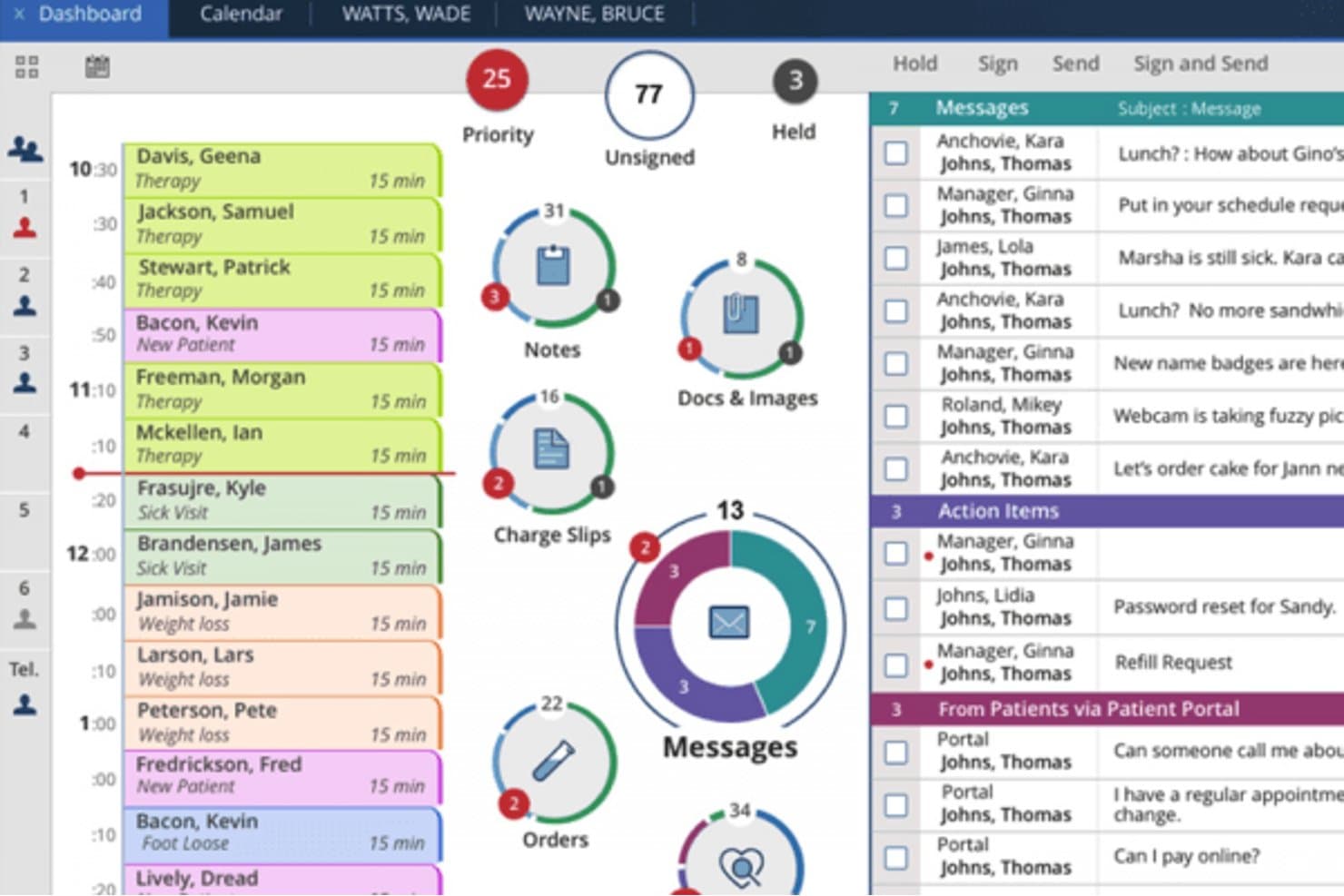
AdvancedMD dashboard showing daily appointments, charge slips, patient messages, and notes in one view. AdvancedMD is a cloud-based EHR and practice management platform built for independent practices, combining clinical charting, e-prescribing, scheduling, billing, RCM, and patient engagement tools with over 1,400 integrations.
Who Is AdvancedMD Best For?
AdvancedMD is a strong fit for independent practices that need to connect a wide range of existing tools, with 1,400+ integrations spanning billing, communication, labs, and more.
Why I Picked AdvancedMD
I've included AdvancedMD in my top picks because its 1,400+ integrations make it genuinely practical for independent practices that already rely on a mix of tools. I particularly like how its FHIR R4 and REST APIs connect with named lab, billing, and communication partners, so you're not forcing a rip-and-replace of systems that already work. The bidirectional sync between its EHR and practice management modules also means scheduling, demographics, and charges stay consistent across both without manual reconciliation.
AdvancedMD Key Features
- AI ambient transcription: Captures visit conversations in real time and produces a transcript for the clinician to review and edit before finalizing notes.
- Specialty-specific charting templates: Provides pre-built, customizable charting templates designed for distinct specialty workflows, from mental health to addiction medicine.
- Clinical mobile app: Lets providers edit notes, review and sign lab results, approve medication refill requests, and message patients or staff from iOS and Android devices.
- Patient kiosk: Offers an iPad-based, paper-free check-in option that lets patients complete intake and consent forms on arrival without front-desk involvement.
AdvancedMD Integrations
AdvancedMD offers 1,400+ marketplace integration offerings, including Weave, Zocdoc, QuickBooks through AutoSyncQB, Jopari Solutions, and Mental Health Technologies, plus 50+ billing partners. Its REST, XML-RPC, and FHIR R4 APIs, along with ODBC access, support custom connectivity.
Pros and Cons
Pros:
- Mobile app supports chart review remotely
- Scheduling, charting, and billing share workflows
- Customizable specialty templates fit varied charting
Cons:
- Users report intermittent slowness and outages
- E-prescribing can require excessive clicks
 Best for cross-network clinical data exchange
- Free demo available
- Pricing upon request
Visit WebsiteCustomer Rating:3.4/5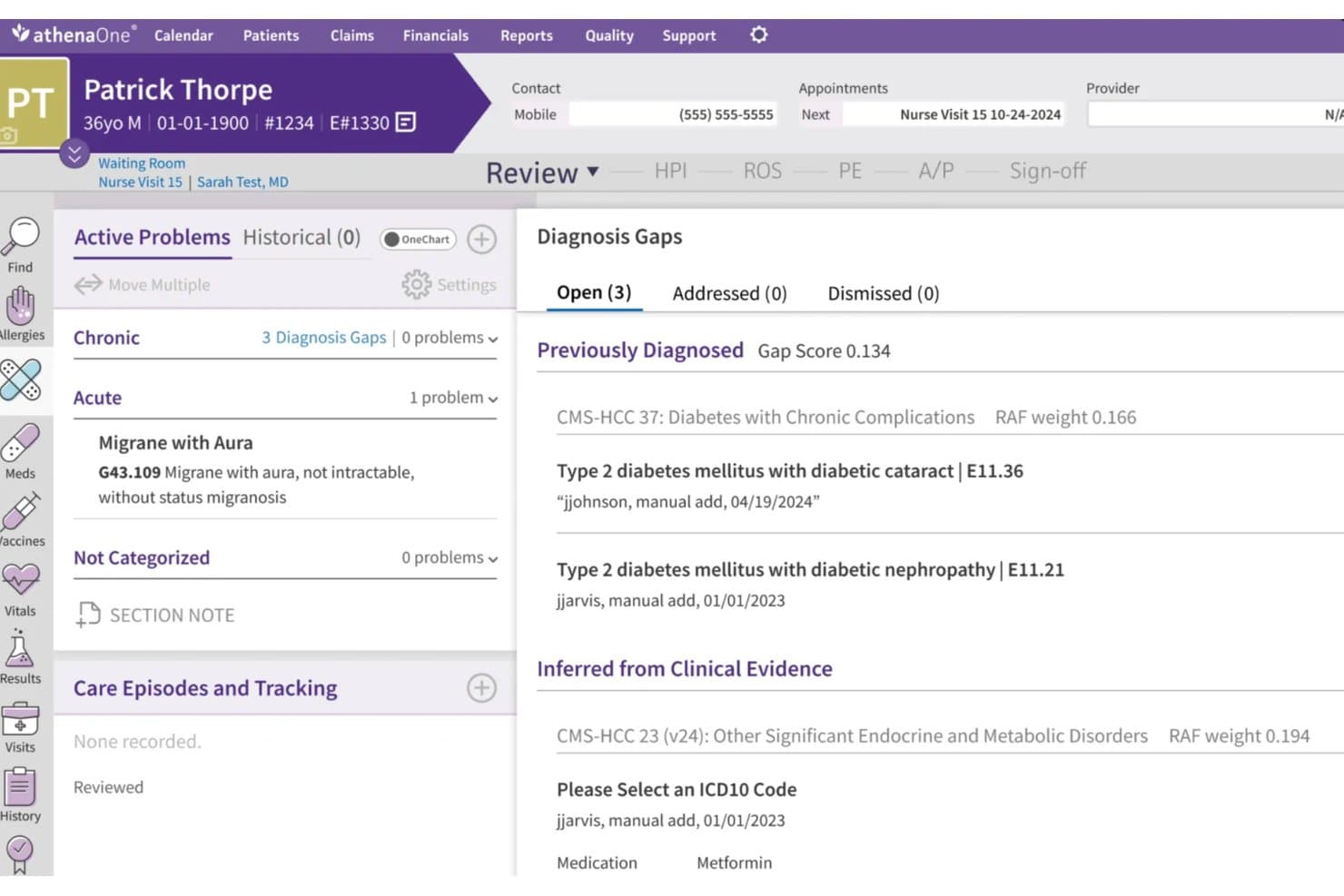
athenaOne chart view flagging open diagnosis gaps alongside a patient's active problem list. athenahealth is a cloud-based EHR platform that combines clinical documentation, AI-assisted charting, medical billing, practice management, and patient engagement tools within a single connected system built on a cross-network data infrastructure.
Who Is athenahealth Best For?
athenahealth is a strong fit for ambulatory practices and medical groups that need clinical, billing, and patient engagement workflows connected through a single networked platform.
Why I Picked athenahealth
athenahealth earns its spot on my shortlist because its cross-network clinical data exchange is genuinely built into the core of athenaOne, not bolted on as an afterthought. I'm especially drawn to how the platform aggregates real-time health histories, records, orders, and results from across its network directly into the patient chart before a clinician even walks into the room. Pair that with FHIR-based APIs and 277K+ direct clinical integrations spanning labs and pharmacies, and you get a system where data actually follows the patient.
athenahealth Key Features
- Ambient Notes: An AI-powered ambient scribe that listens to patient encounters and drafts structured clinical notes across 80+ languages for clinician review.
- Express Coding: A one-click coding tool that uses encounter documentation and practice rules to automate E&M and CPT charge capture.
- Patient self-scheduling: A patient-facing tool that lets individuals book, manage, and check in for appointments online before arrival.
- Data Explorer: A reporting tool that uses AI to help practices identify patient populations, track panel trends, and surface opportunities within their data.
athenahealth Integrations
athenaOne has 277K+ direct clinical integrations, including labs and pharmacies, plus 500+ marketplace tools such as Abridge, Suki AI, iScribeHealth, and Zio by iRhythm. RESTful FHIR and proprietary APIs support custom integrations.
Pros and Cons
Pros:
- Clinical and billing workflows share one platform
- Custom reports support practice benchmarking
- Network-wide records surface before visits
Cons:
- Support resolution varies by experience
- Routine tasks can require extra clicks
Learn more about athenahealth: Best for practices switching with clear pricing
- Free demo available
- From $499/user/month
Visit WebsiteCustomer Rating:3.4/5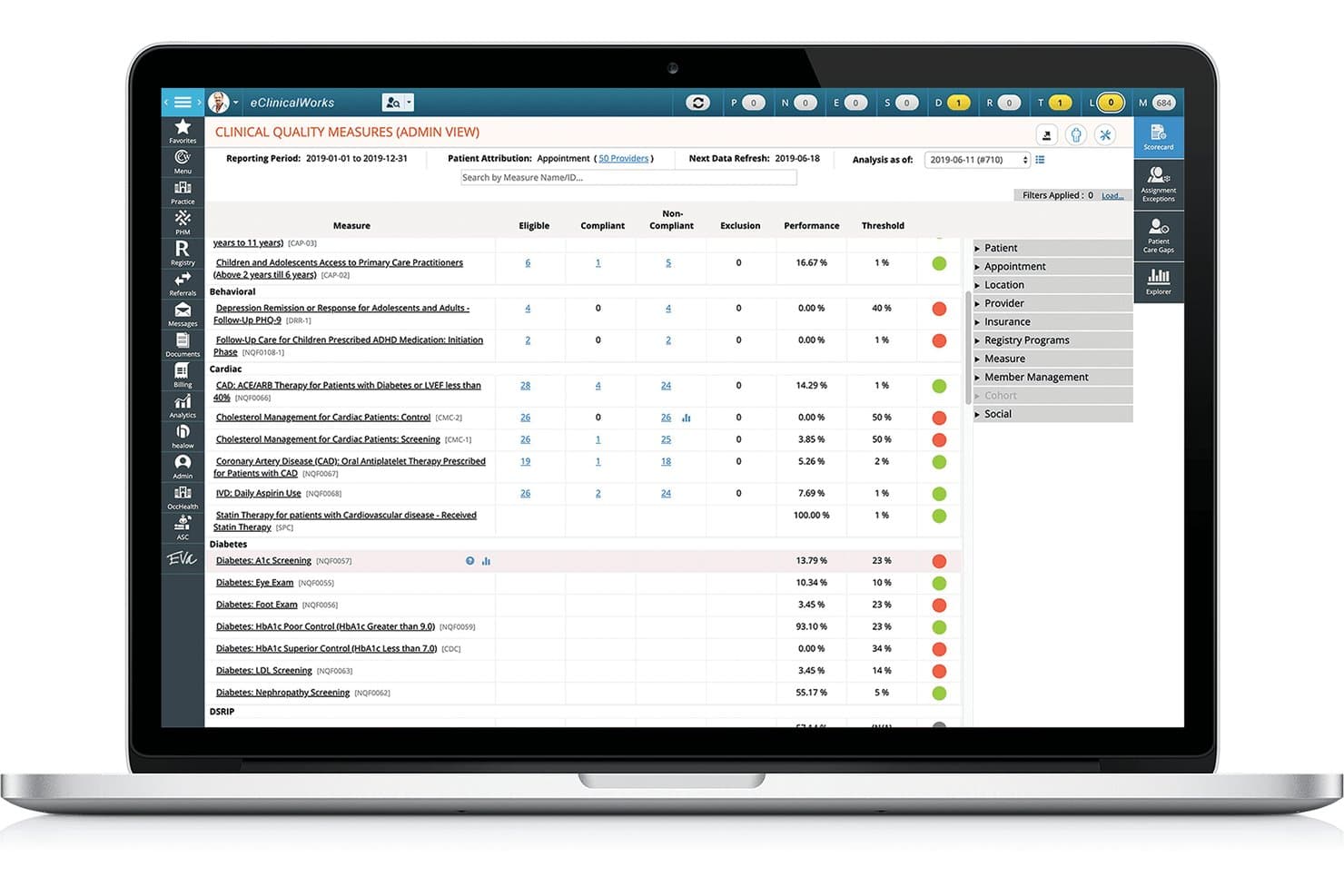
eClinicalWorks Clinical Quality Measures admin view tracking eligible, compliant and non-compliant patients by measure. eClinicalWorks is a cloud-based EHR that combines clinical documentation, e-prescribing, practice management, patient engagement, and AI-assisted charting tools like Sunoh.ai into a single platform.
Who Is eClinicalWorks Best For?
eClinicalWorks is a strong fit for independent and group practices that want transparent, per-provider pricing and free data migration when switching from another EHR.
Why I Picked eClinicalWorks
eClinicalWorks earns its spot on my shortlist because switching EHRs is notoriously painful, and eClinicalWorks removes two of the biggest blockers: cost uncertainty and data loss risk. The pricing is published upfront at $499 per provider per month, and free data migration is included. I also like that Sunoh.ai handles ambient note-taking during visits, so your team isn't rebuilding documentation habits from scratch after the switch.
eClinicalWorks Key Features
- Sunoh.ai ambient documentation: Listens to provider-patient conversations in real time and generates draft clinical notes automatically.
- PRISMA health information search: Aggregates patient records from providers, hospitals, payers, and wearable devices into a single searchable timeline.
- healow Genie AI contact center: Handles patient interactions via voice, text, email, or chatbot to manage appointments, referrals, and on-call access.
- Role-based security controls: Restricts system access by user role, with encryption at rest and in transit across the cloud environment.
eClinicalWorks Integrations
eClinicalWorks integrates with Surescripts, Waystar, Trizetto, Carequality, eClinicalDirect, and devices including Dexcom and Fitbit. FHIR and SMART on FHIR APIs support custom patient, provider, and bulk data integrations.
Pros and Cons
Pros:
- Ambient notes reduce manual encounter typing
- Automatic backups support cloud resilience
- Clinical records and scheduling share workflows
Cons:
- Users report slowdowns and freezes
- Common tasks can require multiple clicks
Learn more about eClinicalWorks: Best for chart review across care networks
- Free demo available
- Pricing upon request
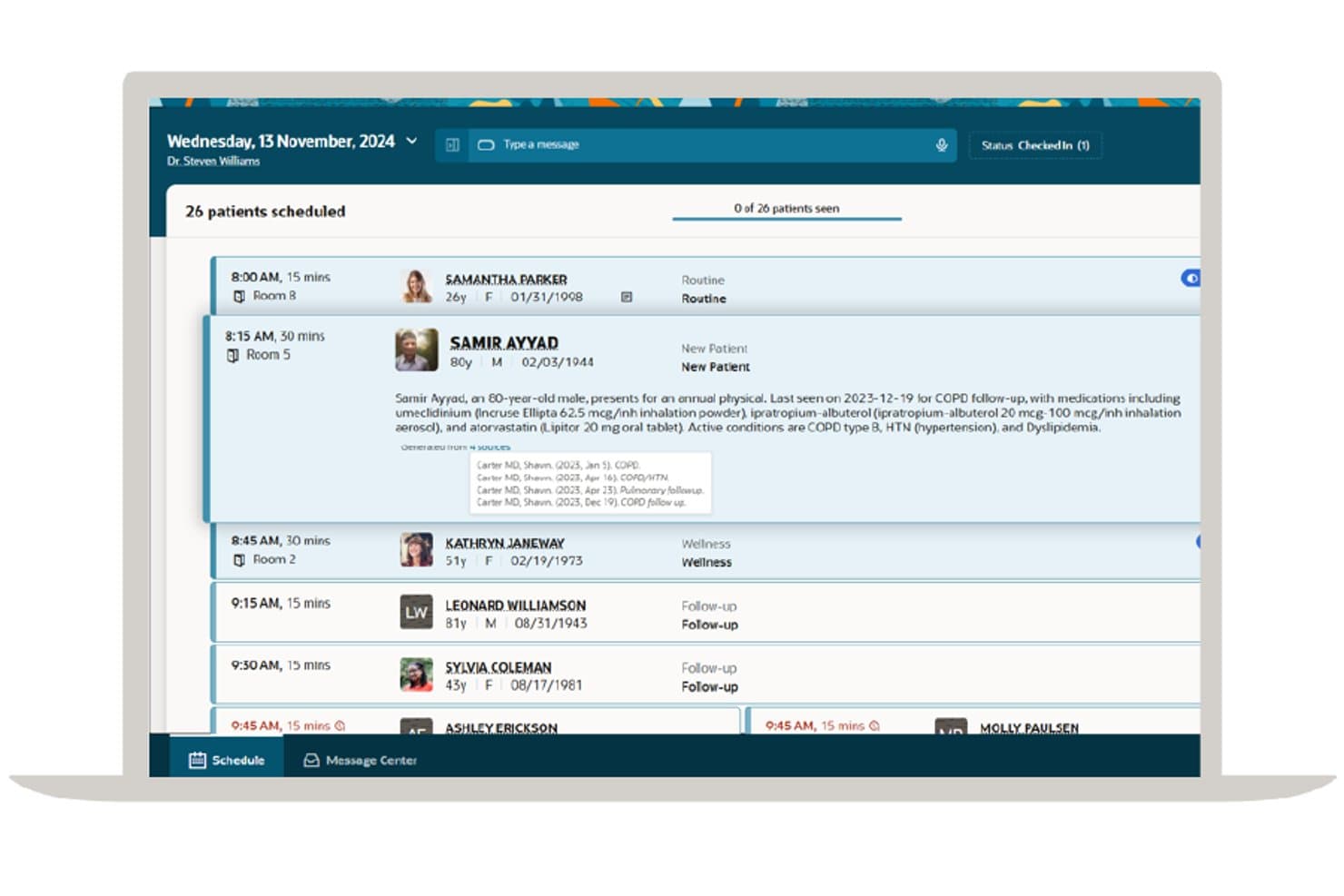
Oracle Health Millennium daily schedule with an AI-generated patient summary for a scheduled visit. Oracle Health Millennium is a cloud-based EHR built on Oracle Cloud Infrastructure that combines AI-assisted charting, patient timelines, clinical decision support, and interoperability tools for care networks.
Who Is Oracle Health Millennium Best For?
Oracle Health Millennium fits large health systems and care networks where clinicians need fast, organized access to patient records across multiple facilities and departments.
Why I Picked Oracle Health Millennium
I've included Oracle Health Millennium in my top picks because it's purpose-built for chart review across care networks, with patient timelines that surface encounters, diagnoses, medication histories, and dosage changes in a single chronological view. I also like that clinicians can use voice commands to pull near real-time patient insights during chart review, without breaking their workflow. AI-generated summaries pull data across multiple sources and adapt to the clinician's specialty and care setting, so a hospitalist and an ED physician see what's most relevant to them.
Oracle Health Millennium Key Features
- Clinical decision support: AI-powered clinical intelligence flags potential risks, care gaps, and readmission risks directly within the clinician's workflow.
- FHIR-based interoperability: Native FHIR R4 and DSTU 2 APIs enable data exchange between Oracle Health EHR and external systems or applications.
- E-prescribing with prior authorization: The Electronic Prescription Interoperability tool handles e-prescription transactions, drug-price transparency, and prior authorization requests.
- Near-real-time access auditing: End-user access to confidential patient data is monitored and audited in near real time, with configurable alerts tied to organizational thresholds.
Oracle Health Millennium Integrations
Oracle Health Millennium offers native integrations with CommonWell, Oracle Health HIE, Seamless Exchange, Clinical Data Exchange, Electronic Prescription Interoperability, Orders and Results, Care Notifications, and Reference Lab Network. FHIR R4, DSTU 2, and cloud-native APIs support custom integrations.
Pros and Cons
Pros:
- Near-real-time voice queries support chart review
- AI summaries surface specialty-relevant chart context
- Chronological timelines consolidate encounters and medication changes
Cons:
- Reviewers describe click-heavy navigation and duplicate entry
- Users report lag during clinical workflows
Learn more about Oracle Health Millennium:
Alte instrumente EHR bazate pe cloud
Mai jos este o listă de soluții EHR bazate pe cloud pe care le-am inclus pe lista scurtă, dar care nu au ajuns în top 10. Merită cu siguranță să le verificați.
- 11prognoCIS EHRBest for health data exchange across systems
- 12NextGENGood for small, independent medical practices
- 13ModMedBest for lab-heavy specialty practices
- 14Elation HealthBest for combining clinical and claims data
- 15CareCloudBest for app and immunization data exchange
- 16Kareo ClinicalBest for practices with no-fee staff access
Related Reviews
How I Evaluate Cloud-Based EHR
I split my evaluation into three parts, giving the most weight to securely accessing charts online and documenting structured encounters. Next, I look for specialty templates and integrated billing, such as visit-specific notes linked to claims. Finally, I consider onboarding, support, and total cost.
Core Functionality (Table Stakes For This List)
When I'm selecting tools for my list, I score each one on a scale from 0 (does not offer the functionality) to 5 (excels in this area) for each core functionality listed below. I then convert the total into a percentage to help assess each tool's overall fit, with extra weight on any functionalities I’ve deemed essential.
- Cloud Access (Essential): I look for browser-based chart access across clinic and remote settings, with updates handled by the vendor rather than local server maintenance.
- Electronic Records (Essential): Can clinicians capture structured histories, visit notes, and reusable specialty templates without forcing every encounter into free text?
- Security & Privacy: I assess role-based access, encryption, and audit logs, including whether teams can limit chart access by job and review record activity.
- Data Exchange: I check how patient information moves to labs, pharmacies, and other care systems, including whether results return to the chart.
- E-Prescribing: I look for prescription creation and transmission from the encounter, plus pharmacy selection and safety checks that fit prescribing workflows.
- Clinical Decision Support: Alerts for allergies, interactions, and preventive follow-ups matter when they appear in context and help clinicians act during the visit.
Once I have a list of tools that meet the criteria, I consider what sets each platform apart.
Differentiating Factors (What Sets Vendors Apart)
Here's how I compare and contrast different vendors:
Standout Features
I evaluate whether a platform's mobile charting app lets clinicians finish notes and sign orders from a phone—not just view records. Automated coding assistance also matters: I check if the system suggests billing codes directly from documentation, since even one missed code per day adds up in denied claims. Specialty-specific templates are another focus. A dermatology practice needs structured fields for lesion tracking, not a generic SOAP note, so I look at how deep the template customization goes for each specialty.
Beyond Features
I evaluate how each vendor handles data migration, since moving years of patient records from a legacy system can stall a go-live by weeks if the vendor lacks dedicated migration support. Total cost matters too—I check whether modules like e-prescribing or the patient portal carry add-on fees that inflate the subscription price. I also look at each platform's fit for specific practice sizes and specialties, because a system built for large multi-site groups often overwhelms a solo dermatology office, and vice versa.
Cum să alegeți o soluție EHR bazată pe cloud
Este ușor să vă pierdeți în liste lungi de funcții și structuri complexe de prețuri. Pentru a vă ajuta să rămâneți concentrat în timp ce parcurgeți procesul unic de selectare a software-ului, iată o listă de verificare cu factorii de care trebuie să țineți cont:
| Factor | Ce trebuie luat în considerare |
|---|---|
| FactorScalabilitate | Ce trebuie luat în considerareEvaluați dacă soluția EHR poate crește odată cu cabinetul dumneavoastră. Va putea gestiona mai mulți pacienți și utilizatori pe măsură ce cabinetul se extinde, fără costuri sau complexitate suplimentare? |
| FactorIntegrări | Ce trebuie luat în considerareVerificați dacă se conectează la instrumentele existente, precum software-ul de facturare și sistemele de laborator. Evitați instrumentele care necesită introducerea manuală a datelor pe mai multe platforme. |
| FactorPosibilitatea de personalizare | Ce trebuie luat în considerareStabiliți dacă puteți adapta soluția EHR la fluxurile dumneavoastră de lucru. Căutați șabloane și câmpuri personalizabile care să corespundă nevoilor specifice. |
| FactorUșurința de utilizare | Ce trebuie luat în considerareEvaluați interfața de utilizare. Este intuitivă pentru echipa dumneavoastră? Luați în considerare instrumente cu navigare simplă pentru a reduce timpul de instruire. |
| FactorImplementare și configurare inițială | Ce trebuie luat în considerareAnalizați timpul și resursele necesare pentru a începe. Sunt disponibile resurse de instruire, precum videoclipuri sau seminare web, pentru a facilita tranziția? |
| FactorCost | Ce trebuie luat în considerareComparați costul total, inclusiv taxele ascunse. Se încadrează prețul în bugetul dumneavoastră și există reduceri pentru angajamente pe termen lung? |
| FactorMăsuri de securitate | Ce trebuie luat în considerareAsigurați-vă că soluția respectă reglementările privind protecția datelor, precum HIPAA. Căutați funcții precum criptarea și controalele de acces pentru a proteja informațiile pacienților. |
| FactorDisponibilitatea asistenței | Ce trebuie luat în considerareLuați în considerare nivelul de asistență oferit. Există asistență non-stop și prin ce canale? Asigurați-vă că puteți primi ajutor atunci când aveți nevoie. |
Ce sunt soluțiile EHR bazate pe cloud?
Soluțiile EHR bazate pe cloud sunt platforme găzduite pe internet pentru gestionarea dosarelor pacienților. Utilizate atât de cabinete mici, cât și de spitale mari, acestea elimină necesitatea serverelor locale. Aceste sisteme abordează costurile ridicate de întreținere IT, provocările legate de securitatea datelor și dificultățile accesului de la distanță.
Funcții
Atunci când selectați o soluție EHR bazată pe cloud, urmăriți următoarele funcții esențiale:
- Acces de la distanță: Permite furnizorilor de servicii medicale să acceseze datele pacienților din orice locație, îmbunătățind flexibilitatea și timpii de răspuns.
- Portaluri pentru pacienți: Le permit pacienților să își vizualizeze dosarele medicale, să facă programări și să comunice cu furnizorii de servicii medicale, sporind implicarea pacienților.
- Stocare securizată a datelor: Protejează informațiile sensibile ale pacienților prin criptare și controale de acces, asigurând conformitatea cu reglementările privind protecția datelor.
- Șabloane personalizabile: Le permit utilizatorilor să adapteze sistemul la fluxuri de lucru specifice, sporind eficiența și reducând sarcina administrativă.
- Capacități de telemedicină: Facilitează consultațiile virtuale, extinzând accesul la îngrijire și răspunzând nevoilor pacienților.
- Programarea consultațiilor: Simplifică procesul de programare și gestionare a consultațiilor pacienților, reducând conflictele de programare.
- Facturare și emiterea facturilor: Automatizează procesul de facturare, asigurând plăți corecte și la timp și reducând volumul de muncă administrativă.
- Prescripții electronice: Le permit furnizorilor să trimită prescripțiile direct farmaciilor, îmbunătățind gestionarea medicamentelor și reducând erorile.
- Integrarea cu alte sisteme: Se conectează la instrumente existente, precum software-ul de facturare și sistemele de laborator, minimizând introducerea manuală a datelor.
- Analiză avansată a rapoartelor: Oferă informații despre performanța cabinetului și rezultatele pacienților, sprijinind luarea deciziilor bazate pe date.
Beneficii
Implementarea unui sistem EHR bazat pe cloud oferă mai multe beneficii pentru echipa și afacerea dumneavoastră. Iată câteva dintre acestea:
- Accesibilitate îmbunătățită: Accesul de la distanță la dosarele pacienților înseamnă că furnizorii de servicii medicale pot lucra de oriunde, asigurând luarea promptă a deciziilor și acordarea îngrijirilor.
- Implicarea sporită a pacienților: Portalurile pentru pacienți le permit acestora să interacționeze cu datele lor medicale, ceea ce duce la o implicare mai bună în propria îngrijire.
- Securitatea datelor: Stocarea securizată a datelor, cu criptare și controale de acces, protejează informațiile sensibile și contribuie la îndeplinirea cerințelor de conformitate.
- Eficiență sporită: Șabloanele personalizabile și facturarea automatizată reduc sarcinile administrative, eliberând timp pentru îngrijirea pacienților.
- Coordonarea mai bună a îngrijirii: Integrarea cu alte sisteme asigură centralizarea tuturor informațiilor despre pacienți, reducând erorile și îmbunătățind colaborarea în echipă.
- Economii de costuri: Soluțiile cloud elimină necesitatea unor echipamente și costuri de întreținere costisitoare, reducând costurile operaționale generale.
- Scalabilitate: Pe măsură ce cabinetul dumneavoastră se dezvoltă, sistemele EHR bazate pe cloud pot găzdui cu ușurință mai mulți utilizatori și mai multe date, fără modificări semnificative.
Costuri și prețuri
La fel ca în cazul software-ului EHR în general, alegerea unui sistem EHR bazat pe cloud necesită înțelegerea diferiților factori care determină costurile EHR, inclusiv funcționalitățile, dimensiunea echipei, suplimentele și modelul de tarifare. Tabelul de mai jos sintetizează planurile uzuale, prețurile medii ale acestora și funcționalitățile incluse de obicei în soluțiile EHR bazate pe cloud:
Tabel comparativ al planurilor pentru EHR bazat pe cloud
| Tipul planului | Preț mediu | Funcționalități uzuale |
|---|---|---|
| Tipul planuluiPlan gratuit | Preț mediu$0 | Funcționalități uzualeGestionarea de bază a dosarelor pacienților, programarea consultațiilor și stocarea limitată a datelor. |
| Tipul planuluiPlan personal | Preț mediu$10-$30/user/month | Funcționalități uzualeStocare extinsă a datelor, prescripții electronice, șabloane personalizabile și portaluri pentru pacienți. |
| Tipul planuluiPlan pentru companii | Preț mediu$50-$100/user/month | Funcționalități uzualeAnaliză avansată a rapoartelor, integrare cu alte sisteme, capacități de telemedicină și stocare securizată a datelor. |
| Tipul planuluiPlan pentru întreprinderi | Preț mediu$150-$300/user/month | Funcționalități uzualeOpțiuni complete de personalizare, asistență prioritară pentru clienți, manager de cont dedicat și instrumente complete de conformitate. |
Întrebări frecvente despre EHR bazat pe cloud
Iată câteva răspunsuri la întrebările frecvente despre EHR bazat pe cloud:
Cât de sigur este un EHR bazat pe cloud?
Sistemele EHR bazate pe cloud utilizează criptarea și controale de acces pentru a proteja datele pacienților, respectând reglementări precum HIPAA. Ar trebui să verificați dacă furnizorul oferă actualizări regulate de securitate și are un istoric solid în ceea ce privește protecția datelor. Luați în considerare reputația furnizorului și întrebați despre planurile sale de recuperare în caz de dezastru.
Care sunt costurile curente asociate cu un EHR în cloud?
Sistemele EHR în cloud au, de obicei, un model de abonament, care poate include costuri pentru asistență, actualizări și funcții suplimentare. Fiți atent la eventualele taxe ascunse, cum ar fi cele pentru spațiu de stocare suplimentar sau funcționalități avansate. Clarificați întotdeauna structura completă a costurilor cu furnizorul înainte de a lua o decizie.
Cum gestionează un EHR în cloud perioadele de nefuncționare ale sistemului?
Perioadele de nefuncționare ale sistemului pot afecta accesul la dosarele pacienților, de aceea este esențial să întrebați despre garanțiile furnizorului privind disponibilitatea. Căutați furnizori care oferă acorduri solide privind nivelul serviciilor (SLAs), pentru a asigura perioade minime de nefuncționare. De asemenea, întrebați despre sistemele lor de copii de siguranță și despre modul în care gestionează întreruperile.
Se poate integra un EHR în cloud cu sistemele existente?
Capacitățile de integrare pot varia, așa că asigurați-vă că EHR-ul în cloud se poate conecta la sistemele actuale de facturare, de laborator și la alte sisteme medicale. Confirmați că furnizorul acceptă API-urile necesare sau oferă integrări native, pentru a evita introducerea manuală a datelor și a asigura desfășurarea fără probleme a operațiunilor.
Ce opțiuni de asistență sunt disponibile pentru un EHR în cloud?
Asistența oferită de furnizor variază, așa că evaluați disponibilitatea serviciului pentru clienți prin canale precum telefonul, e-mailul și chatul. Verificați dacă oferă asistență 24/7 și dacă sunt disponibile resurse de instruire, precum videoclipuri și seminare web, pentru a vă ajuta echipa să profite la maximum de sistem.