

EHR pentru chiropractică eficientizează documentarea și completarea fișelor pacienților, eliberându-vă echipa pentru a se concentra pe îmbunătățirea educației și fidelizării pacienților. Ținerea pasului cu notițele SOAP poate fi dificilă, însă asistența adecvată poate reduce erorile manuale și accelera fluxurile de lucru.
În acest articol, compar și analizez cele mai bune instrumente EHR pentru chiropractică, pentru a vă sprijini decizia de achiziție.
Why Trust Our Software Recommendations
6,700+
Reviews
20
Industry experts
16+
Evaluation factors
14
Years
Our team has been testing and reviewing software since 2012. As medical practice leaders ourselves, we know how difficult—and important—it is to choose the right software.
For this guide, we evaluated tools using hands-on testing and independent research, scoring tools using our selection criteria.
Our reviews reflect our human editorial judgment, not a sales pitch.
Tabel comparativ: EHR pentru chiropractică
Acest tabel comparativ rezumă detaliile privind prețurile pentru selecțiile mele de top de EHR pentru chiropractică.
Sorted by: Default
| Tool | Starting Price | Website | |
|---|---|---|---|
Best for managing linked clinic accounts | 4.7 out of 5 | $29/user/month Free demo + 14-day free trial available | Website |
Best for customizable chiropractic charting | 4.8 out of 5 | $99/month 15-day free trial | Website |
Best for AI-powered SOAP note automation | 5.0 out of 5 | Pricing upon request Free demo available | Website |
Best for high-definition visual feedback tools | 4.8 out of 5 | $299/month Free demo available | Website |
Best for multi-specialty chiropractic clinics | 4.6 out of 5 | Pricing upon request Free demo available | Website |
Best for automatic billing and claims service | 4.5 out of 5 | $177/month Free demo available | Website |
Best for mobile access and compatibility | 4.1 out of 5 | Pricing upon request Free demo available | Website |
Best for customizable EHR workflows | 3.9 out of 5 | Pricing upon request Free demo available | Website |
Best for robust billing and claims processing | Not rated | $599/employee/month Free demo available | Website |
Best for efficient patient intake process | Not rated | $49.90/user/month. | Website |


Recenzii pentru cele mai bune EHR pentru chiropractică
Mai jos sunt prezentate rezumatele mele detaliate ale celor mai bune soluții EHR pentru chiropractică incluse în lista scurtă. Recenziile mele oferă o privire detaliată asupra funcțiilor principale, avantajelor și dezavantajelor, integrărilor și cazurilor de utilizare ideale ale fiecărui instrument, pentru a vă ajuta să îl găsiți pe cel mai potrivit pentru dumneavoastră.
 Best for managing linked clinic accounts
- Free demo + 14-day free trial available
- From $29/user/month
Visit WebsiteCustomer Rating:4.7/5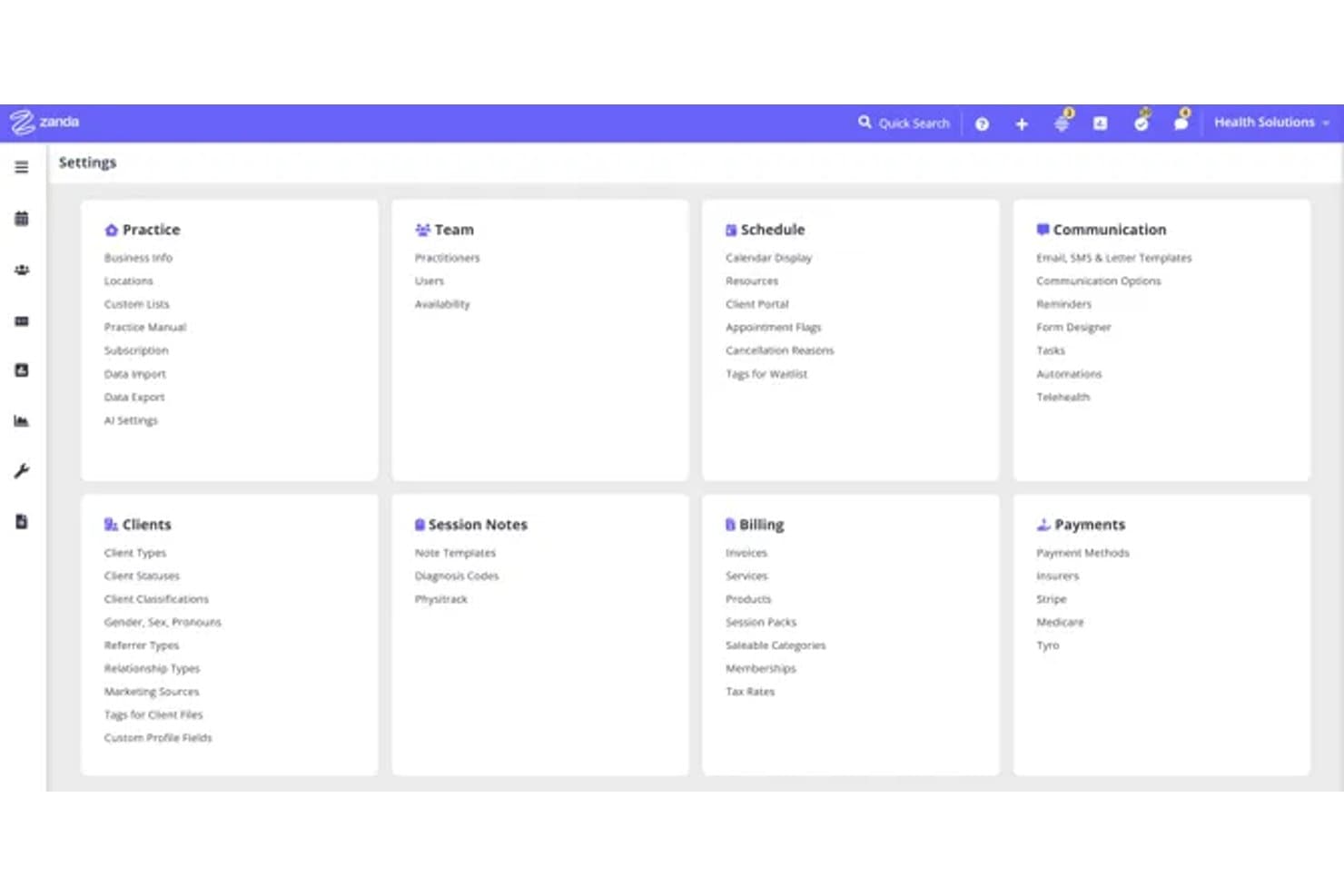
Zanda organizes chiropractic practice settings into clear categories. Zanda is an all-in-one practice management platform that brings together scheduling, clinical notes, digital intake forms, invoicing, and multi-location calendar management for health practices.
Who Is Zanda Best For?
Zanda works well for multi-location allied health practices that need to link and navigate between clinic accounts without juggling separate logins.
Why I Picked Zanda
I've included Zanda in my top picks because it's one of the few platforms that lets multi-location chiropractic groups link separate clinic accounts under a single umbrella, so you can navigate between locations without managing independent logins. I particularly like how the multi-practitioner calendar lets you view providers side by side and filter by location, which makes coordinating schedules across clinics genuinely practical. Automated digital intake forms also flow directly into client profiles, cutting down the manual data entry that slows front-desk staff between appointments.
Zanda Key Features
- Session note templates: Build clinical notes from configurable sections using text, choice, yes/no, signature, and image annotation fields.
- Digital intake forms with e-signature: Collect patient intake, consent, and assessment forms online, with submitted data flowing directly into client profiles.
- Scored assessments: Create forms that automatically calculate and track scores over time, displayed in a client progress report with graphs and trend data.
- US insurance claim workflows: Generate and submit CMS-1500 claims through Ensora Clearinghouse, with daily status updates and ERA/EOB return processing.
Zanda Integrations
Zanda offers native integrations with Stripe, Xero, Physitrack, Google Calendar, Apple Calendar, Outlook Calendar, Zoom, Mailchimp, and Google Analytics. A public API beta supports GET endpoints for custom integrations.
Pros and Cons
Pros:
- A chiropractor adapted forms to practice needs
- Reviewers praise appointment booking and scheduling
- Linked accounts simplify multi-clinic calendar access
Cons:
- Reviewers want more functional assessment measures
- No built-in chiropractic SOAP or adjustment charting
Learn more about Zanda: Best for customizable chiropractic charting
- 15-day free trial
- From $99/month
Visit WebsiteCustomer Rating:4.8/5
OptiMantra’s interface allows chiropractors to design and manage custom formulations and treatment templates—supporting more personalized charting and care plans. OptiMantra is an electronic health record (EHR) platform built for chiropractic and integrative medicine practices. It combines patient engagement, telehealth, and practice management tools to help clinicians streamline operations and enhance patient experiences. With its extensive customization capabilities, OptiMantra is well-suited for chiropractors who want to tailor their documentation workflows and intake forms to their specific treatment approaches.
Why I Picked OptiMantra: I included OptiMantra because of its customizable charting tools, which let you create personalized intake and SOAP note templates that fit your unique chiropractic workflows. This flexibility can help you reduce documentation time while maintaining detailed, accurate records. I also like how OptiMantra integrates with DeepCura for AI-assisted charting and major diagnostic labs like Quest and LabCorp, making it easier to manage test orders and results without leaving the platform. For practices offering telehealth, the HIPAA-compliant video consultations are another valuable addition that supports patient continuity of care.
Standout features & integrations:
OptiMantra offers electronic prescriptions via the Surescripts network, a built-in point-of-sale system for supplement or service sales, and inventory management for tracking products and orders. The platform’s administrative tools cover insurance billing, patient reminders, reporting, and secure document sharing.
Integrations include Surescripts, LabCorp, Mercy Diagnostics, Quest Diagnostics, Access Medical Lab, Rupa Health, SimonMed, DigitalOne, Boston Heart Diagnostics, Fullscript, and Clinical Pathology Laboratories, Inc.
Pros and Cons
Pros:
- Built-in telehealth and payment tools
- Strong diagnostics and lab integrations
- Highly customizable charting templates
Cons:
- Learning curve for advanced setup
- Pricing may be high for small clinics
Learn more about OptiMantra: Best for AI-powered SOAP note automation
- Free demo available
- Pricing upon request
Visit WebsiteCustomer Rating:5/5
NextGen Healthcare dashboard displaying recent activity summaries and financial reporting tools. NextGen Healthcare is a medical software platform offering AI-driven Electronic Health Records, practice management, and patient engagement tools. Its flexible, specialty-friendly interface makes it a good fit for chiropractic clinics focused on efficiency and documentation accuracy.
Why I Picked NextGen: I included NextGen because of its built-in ambient documentation tools that can convert provider-patient conversations into structured SOAP notes. This can help chiropractors reduce time spent charting. I also like its extensive configuration options and specialty-specific templates, which can be adapted to chiropractic workflows
Standout Features and Integrations:
NextGen’s chiropractic EHR offers ICD-10 code suggestions, AI-powered charge capture, and clinical documentation via mobile. The platform supports virtual care, scheduling, billing, and analytics—all in one system. It integrates with Mirth Connect, Appriss Health, Phreesia, Surescripts, and over 20 other healthcare tools, offering excellent interoperability for modern practices.
Pros and Cons
Pros:
- Wide integration support
- Customizable clinical templates
- Mobile documentation and chart access
Cons:
- Some features are iOS-optimized; Android support varies
- Initial setup and training may take time
Learn more about NextGEN: Best for high-definition visual feedback tools
- Free demo available
- $299/month
Visit WebsiteCustomer Rating:4.8/5
ChiroHD Chiropractic EHR provides a list of comprehensive features for your practice ChiroHD provides a comprehensive suite of tools designed specifically for chiropractors, covering all aspects from scheduling to patient management. Among its notable features, the high-definition visual feedback tools are particularly impressive, providing practitioners with a more insightful analysis of patient conditions.
Why I Picked ChiroHD: When selecting ChiroHD, I was significantly influenced by its unique high-definition visual feedback tools. These tools provide unique insights into patient conditions, differentiating it from competitors in the field. Because of this feature, I believe it's best for high-definition visual feedback tools.
Standout features & integrations:
ChiroHD offers a range of advanced features, but its high-definition visual feedback tools truly stand out. These tools help visualize the patient's spinal structure and alignment, enabling more accurate assessments.
Regarding integrations, ChiroHD supports various medical devices and applications, allowing data synchronization for better patient management.
Pros and Cons
Pros:
- Useful integrations with medical devices
- Comprehensive suite of chiropractic-specific tools
- High-definition visual feedback tools provide unique insights
Cons:
- Additional costs for premium support
- Not as versatile for non-chiropractic practices
- Pricing may be higher than some competitors
Learn more about ChiroHD: Best for multi-specialty chiropractic clinics
- Free demo available
- Pricing upon request
Visit WebsiteCustomer Rating:4.6/5
The EZBIS Chiropractic EHR Interface showcases its many features EZBis is a comprehensive practice management software designed specifically for chiropractic clinics. It offers a unique range of features, such as managing patient charts, that cater to the needs of multi-specialty clinics, making it a reliable choice for clinics offering diverse services.
Why I Picked EZBis: In making the decision, I noted how EZBis offered an all-encompassing solution to meet the diverse needs of multi-specialty chiropractic clinics. Its ability to cater to various services within the same clinic made it stand out. Hence, I find it best for multi-specialty chiropractic clinics.
Standout features & integrations:
One of the standout features of EZBis is its robust patient management system, which includes tools for appointments, billing, and reports. It also offers electronic health records (EHR), helping clinics go paperless.
In terms of integrations, EZBis works well with popular billing systems and EHR software, allowing seamless data transfer and ensuring efficient clinic operations.
Pros and Cons
Pros:
- Comprehensive patient management tools
- Integration with popular billing and EHR systems
- Robust feature set for multi-specialty clinics
Cons:
- Interface may require a learning curve for some users
- Billed annually, which may require a larger upfront investment
- High cost may be prohibitive for smaller clinics
Learn more about EZBIS: Best for automatic billing and claims service
- Free demo available
- From $177/month
Visit WebsiteCustomer Rating:4.5/5
A look at Genesis Chiropractic EHR's extensive features Genesis is an all-inclusive chiropractic practice management software that offers extensive features such as EHR, scheduling, reporting, and particularly shines in its automatic billing and claims services. This makes it an invaluable asset for practices that prioritize efficient, automated financial processes.
Why I Picked Genesis:
I chose Genesis for this list due to its robust, automated billing and claims service. Its ability to automate these complex and often time-consuming tasks sets it apart from other chiropractic software. This makes it ideal for practices that want to streamline their billing processes and reduce the risk of human error.
Standout Features & Integrations:
Genesis offers features such as a fully-integrated EHR, appointment scheduling, and performance analytics. However, its standout feature is undoubtedly its automated billing and claims service which can save time and reduce the risk of error.
As for integrations, Genesis works seamlessly with a variety of third-party apps including billing software and payment gateways, enhancing the convenience and efficiency of financial operations.
Pros and Cons
Pros:
- Integrations with various third-party apps enhance financial operations
- Comprehensive feature set including fully-integrated EHR
- Robust and automated billing and claims services
Cons:
- Customer service could be more responsive according to some user feedback
- It may be costly for small practices
- The user interface may seem complex to some users
Learn more about Genesis: Best for mobile access and compatibility
- Free demo available
- Pricing upon request
Visit WebsiteCustomer Rating:4.1/5
ChiroTouch Chiropractic EHR's Interface is simple and efficient Chirotouch is a chiropractic software that provides robust solutions for electronic health records (EHR), billing, patient scheduling, and practice management. Its high level of mobile compatibility sets it apart, making it an excellent choice for those who need to access their practice management tools on-the-go.
Why I Picked Chirotouch: In selecting Chirotouch, I was influenced by its focus on mobile compatibility. This feature is not common in most chiropractic software and hence it stands out. I consider it best for practices that value mobile access, since the software is compatible with a range of devices, allowing for easy access anywhere, anytime.
Standout features & integrations:
Chirotouch offers customizable EHR, integrated payment processing, patient engagement tools, and advanced reporting. These features help to provide a comprehensive practice management solution for any chiropractic practice.
In terms of integrations, Chirotouch syncs with popular apps and software such as QuickBooks, making it easier to manage financial data across platforms.
Pros and Cons
Pros:
- Efficient integration with other software like QuickBooks
- Robust feature set, including customizable EHR
- High level of mobile compatibility
Cons:
- Lacks a monthly billing option, it's billed annually
- The cost may be high for smaller practices
- Some may find the software complex due to its many features
Learn more about ChiroTouch: Best for customizable EHR workflows
- Free demo available
- Pricing upon request
Visit WebsiteCustomer Rating:3.9/5
DrChrono Chiropractic EHR is customizable DrChrono offers an EHR platform designed for customization, allowing medical practices to adjust workflows according to their specific needs. It provides tools for scheduling, billing, and patient communication, while its key strength lies in the customizable EHR workflows that can match the unique needs of any practice.
Why I Picked DrChrono: In deciding on DrChrono, the standout feature was the level of customization that it brings to EHR workflows. Such flexibility enables it to be tailored to the specific needs and processes of practice. This individualization makes it stand out from its competitors. Hence, I identified it as the best for customizable EHR workflows.
Standout features & integrations:
One of DrChrono's critical features is its robust EHR customization capabilities, allowing practices to create workflows that mirror their unique processes. Furthermore, its integrated practice management feature ensures seamless handling of administrative tasks.
DrChrono supports integrations with numerous third-party applications including billing services, laboratories, and pharmacies, enhancing the overall functionality of the platform.
Pros and Cons
Pros:
- Numerous third-party integrations
- Comprehensive suite of features
- High degree of EHR customization
Cons:
- Additional costs for premium support
- Interface may require some learning time
- Higher pricing compared to some competitors
Learn more about DrChrono: Best for robust billing and claims processing
- Free demo available
- From $599/employee/month

Atlas Chiropractic EHR is known of for its exceptional handling of billing and claims Atlas is a comprehensive chiropractic EHR system, noted for its exceptional handling of billing and claims. By providing robust functionality specifically tailored to billing processes, Atlas stands out as the best choice for those seeking an improved approach to financial management.
Why I Picked Atlas: Billing and claims processing can be a challenging facet of running a chiropractic practice. As I compared different systems, Atlas caught my attention as it not only assists in simplifying the process of insurance billing but also handles invoicing efficiently. I chose Atlas because of its capacity to simplify and streamline billing and claims tasks, making it the best choice for those who need a robust billing and claims processing tool.
Standout features & integrations:
Atlas features advanced billing capabilities, including insurance e-claims, patient billing, and financial reporting. It also has patient scheduling, SOAP notes, and a patient check-in system. The insurance e-claims feature, however, is the highlight of Atlas, providing an efficient method for managing insurance claims.
The platform also integrates with a range of services, including Telemedicine, MyChiroTown for patient communication, and TELUS Health eClaims, which further bolster its claim to being the best for billing and claims processing.
Pros and Cons
Pros:
- Useful integrations with other platforms
- Efficient insurance e-claims feature
- Advanced billing and claims processing
Cons:
- UI could be more modern and intuitive
- Steeper learning curve due to extensive features
- Extra cost for additional features
Learn more about Atlas:

A a sneak peek into IntakeQ Chiropractic EHR's Interface IntakeQ is a healthcare practice management software that specializes in the patient intake process. It streamlines and digitizes patient forms and onboarding, reducing the hassle for both the patient and the healthcare provider.
Why I Picked IntakeQ: I chose IntakeQ after comparing its patient intake efficiency with other tools. The difference was clear - its focus on making the intake process as easy as possible for clinics set it apart. This is why I believe it's the best for those prioritizing a smooth, efficient patient intake process.
Standout features & integrations:
IntakeQ provides custom online intake forms, appointment scheduling, and secure messaging. It also allows for the collection of e-signatures, making the patient onboarding process completely paperless.
As for integrations, IntakeQ works well with various EHRs and payment gateways, which aids in the streamlining of operations and billing procedures.
Pros and Cons
Pros:
- Customizable online intake forms
- Seamless integrations with EHRs and payment gateways
- Efficient patient intake process
Cons:
- Monthly price point may be high for some clinics
- Might be more features than needed for smaller practices
- Learning curve for fully utilizing all features
Learn more about IntakeQ:
Alte instrumente EHR pentru chiropractică
Mai jos este o listă cu alte soluții EHR pentru chiropractică pe care le-am inclus în lista scurtă, dar care nu au ajuns în primele 10. Merită cu siguranță să le verificați.
- 11Practice PerfectBest for comprehensive practice management
- 12Power DiaryBest for streamlined appointment scheduling
- 13PracticeEHRBest for intuitive patient records management
- 14ChiroFusionBest for cloud-based access and convenience
- 15OCA AspireBest for seamless integration with Canadian systems
- 16MedeskGood for managing large practices with multiple specialties
- 17ChiroSpringGood for appointment scheduling and smooth billing
- 18zHealthGood for telemedicine features and mobile compatibility
- 19EndoSoftGood for clinics seeking top-tier security features
- 20Pay DCGood for comprehensive financial management
- 21MacPractice EHRGood for Mac-based chiropractic clinics
How I Evaluate Chiropractic EHR
I split my evaluation into baseline requirements—like chiropractic-specific SOAP templates and claims handling—and the differentiators that separate a good fit from a great one.
Core Functionality (Table Stakes For This List)
When I'm selecting tools for my list, I rank each one on a scale from 0 (does not offer the functionality) to 5 (excels in this area) for each core functionality listed below. Then, I calculate the tool's total score into a percentage. Each tool needs to achieve a minimum total score of 55% to be considered for inclusion.
- Chiropractic SOAP Note Templates: I look for pre-built templates with spinal listing fields, adjustment codes, and macros so a chiropractor can document a visit between patients in under two minutes.
- Integrated Appointment Scheduling: Recurring visit scheduling matters here because chiropractic care plans often span weeks of multi-visit sequences that need to be booked and tracked in one step.
- Billing & Claims Management: I check whether the system handles chiropractic-specific CPT and ICD-10 codes, generates superbills, and connects to a clearinghouse for claim submission and ERA posting.
- Patient Charting & History: Longitudinal charting should capture subluxation listings, exam findings, and imaging references so providers can trace a patient's full treatment arc from initial intake through re-exam.
- HIPAA Compliance & Security: Each tool should offer encryption, audit trails, role-based access controls, and electronic consent signatures to keep patient records secure and meet regulatory standards.
- Patient Engagement Tools: I evaluate whether the platform includes digital intake forms, automated appointment reminders, and a patient portal that reduces front-desk phone volume on busy adjustment days.
Once I have a list of tools that meet this criteria, I consider what sets each platform apart.
Differentiating Factors (What Sets Vendors Apart)
Here's how I compare and contrast different vendors:
Standout Features
Care plan automation is a big differentiator—I look for tools that auto-schedule visit sequences and trigger re-exam reminders when a patient hits a phase milestone. Outcome assessment tools also matter. Built-in scoring for validated questionnaires like Oswestry or VAS helps providers track progress without manual calculations. I also evaluate whether a platform supports voice dictation or tap-based macros, since fast note entry between back-to-back adjustments keeps the schedule moving.
Beyond Features
Practice size fit is one of the first things I evaluate—a solo chiropractor running a cash-based clinic has very different needs than a multi-location group billing insurance. I also check clearinghouse and payment processor integrations, since a tool that doesn't connect to your existing claims workflow creates more work than it solves. Implementation support matters too; migrating patient records from a legacy system like ChiroTouch or Genesis can stall a go-live if the vendor doesn't offer guided data migration.
Cum să alegeți un EHR pentru chiropractică
Este ușor să vă pierdeți în liste lungi de funcții și structuri complexe de prețuri. Pentru a vă ajuta să rămâneți concentrat pe parcursul procesului unic de selectare a software-ului, iată o listă de verificare a factorilor de care trebuie să țineți cont:
| Factor | Aspecte de luat în considerare |
|---|---|
| FactorScalabilitate | Aspecte de luat în considerarePoate software-ul să se dezvolte odată cu cabinetul dumneavoastră? Luați în considerare numărul viitor de pacienți și personalul suplimentar. Căutați limite flexibile pentru utilizatori și funcții adaptabile. |
| FactorIntegrări | Aspecte de luat în considerareFuncționează cu instrumentele pe care le utilizați deja? Verificați compatibilitatea cu sistemele de programări, facturare și cu alte sisteme esențiale pentru a asigura un flux de lucru fără probleme. |
| FactorPosibilități de personalizare | Aspecte de luat în considerareÎl puteți adapta la nevoile dumneavoastră specifice? Căutați opțiuni pentru ajustarea fluxurilor de lucru, a șabloanelor și a rapoartelor, astfel încât să se potrivească proceselor unice ale cabinetului dumneavoastră. |
| FactorUșurința în utilizare | Aspecte de luat în considerareEste ușor de utilizat pentru echipa dumneavoastră? Evaluați interfața și navigarea. Luați în considerare curba de învățare pentru utilizatorii noi și timpul necesar instruirii. |
| FactorImplementare și integrare inițială | Aspecte de luat în considerareCât de repede puteți începe? Evaluați procesul de configurare, resursele de instruire disponibile și asistența oferită în timpul tranziției pentru a reduce la minimum timpul de nefuncționare. |
| FactorCost | Aspecte de luat în considerareSe încadrează în bugetul dumneavoastră? Comparați planurile de prețuri, inclusiv taxele ascunse. Luați în considerare costurile pe termen lung în raport cu investiția inițială și eventualele reduceri pentru contracte. |
| FactorMăsuri de securitate | Aspecte de luat în considerareCum protejează datele pacienților? Asigurați-vă că respectă reglementări precum HIPAA. Verificați existența criptării, a controalelor de acces și a opțiunilor de copii de siguranță pentru date. |
| FactorCerințe de conformitate | Aspecte de luat în considerareRespectă standardele din domeniu? Verificați respectarea reglementărilor și standardelor din domeniul sănătății specifice cabinetelor de chiropractică pentru a evita problemele juridice. |
Ce este un EHR pentru chiropractică?
EHR pentru chiropractică este un software pentru dosare medicale electronice adaptat cabinetelor de chiropractică. Chiropracticienii și profesioniștii din domeniile conexe ale sănătății utilizează aceste instrumente pentru a gestiona eficient dosarele pacienților, facturarea și programările. Funcțiile de programare, facturare și gestionare a pacienților contribuie la organizarea operațiunilor zilnice, asigurarea conformității și îmbunătățirea îngrijirii pacienților. În general, aceste instrumente sporesc eficiența cabinetului și satisfacția pacienților.
Funcții
Atunci când selectați un EHR pentru chiropractică, urmăriți următoarele funcții esențiale:
- Gestionarea dosarelor pacienților: Păstrează organizate și accesibile istoricul detaliat al pacienților, planurile de tratament și notițele.
- Funcții de programare: Permite programarea și reprogramarea cu ușurință a consultațiilor, precum și gestionarea calendarului.
- Facturare și emiterea facturilor: Gestionează tranzacțiile financiare, generează facturi și procesează plățile eficient.
- Conformitatea datelor: Asigură respectarea reglementărilor din domeniul sănătății, precum HIPAA, pentru gestionarea securizată a datelor.
- Șabloane personalizabile: Oferă flexibilitatea de a adapta documentele și fluxurile de lucru la nevoile cabinetului dumneavoastră.
- Reamintiri automatizate: Trimite reamintiri privind consultațiile și notificări pentru monitorizarea ulterioară, reducând numărul absențelor.
- Asistență pentru telesănătate: Oferă instrumente pentru consultații virtuale, extinzând accesul pacienților și sporind confortul acestora.
- Rapoarte și analize: Generează informații utile și rapoarte pentru monitorizarea performanței cabinetului și a rezultatelor pacienților.
- Posibilități de integrare: Se conectează cu alte instrumente esențiale, precum sistemele de facturare și software-ul de gestionare a pacienților.
- Portal de autoservire pentru pacienți: Le permite pacienților să își acceseze dosarele, să își programeze consultații și să comunice online cu cabinetul.
Beneficii
Implementarea unui sistem EHR pentru chiropracticieni oferă numeroase beneficii echipei și afacerii dumneavoastră. Iată câteva dintre acestea:
- Eficiență îmbunătățită: Automatizează sarcini precum programarea și facturarea, eliberând timpul personalului pentru a se concentra asupra îngrijirii pacienților.
- Precizie sporită a datelor: Păstrează dosarele pacienților organizate și actualizate, reducând riscul erorilor în tratamente și facturare.
- Implicare mai bună a pacienților: Funcții precum portalurile pentru pacienți și asistența pentru telesănătate îmbunătățesc accesibilitatea și comunicarea cu pacienții.
- Conformitatea cu reglementările: Asigură respectarea de către cabinetul dumneavoastră a reglementărilor privind protecția datelor, precum HIPAA, protejând informațiile pacienților.
- Analize utile: Oferă instrumente de raportare care furnizează informații despre performanța cabinetului, ajutându-vă să luați decizii informate.
- Reducerea absențelor: Reamintirile automatizate contribuie la reducerea numărului pacienților care nu se prezintă la consultații, îmbunătățind eficiența și veniturile cabinetului.
- Scalabilitate: Se adaptează dezvoltării cabinetului dumneavoastră, indiferent dacă adăugați mai mulți pacienți sau vă extindeți serviciile.
Costuri și prețuri
Alegerea unui sistem EHR pentru chiropracticieni necesită compararea unor aspecte privind prețurile EHR, precum structura planului, funcțiile, dimensiunea echipei și opțiunile suplimentare. Tabelul de mai jos sintetizează planurile uzuale, prețurile medii ale acestora și funcțiile incluse de obicei în soluțiile EHR pentru chiropracticieni:
Tabel comparativ al planurilor pentru EHR destinat chiropracticienilor
| Tipul planului | Preț mediu | Funcții uzuale |
|---|---|---|
| Tipul planuluiPlan gratuit | Preț mediu$0 | Funcții uzualeProgramare de bază, dosare limitate ale pacienților și asistență prin e-mail. |
| Tipul planuluiPlan personal | Preț mediu$25-$50/utilizator/lună | Funcții uzualeDosare complete ale pacienților, reamintiri privind consultațiile și facturare de bază. |
| Tipul planuluiPlan pentru afaceri | Preț mediu$50-$100/utilizator/lună | Funcții uzualeFacturare avansată, instrumente de raportare și portal de autoservire pentru pacienți. |
| Tipul planuluiPlan pentru întreprinderi | Preț mediu$100-$200/utilizator/lună | Funcții uzualeIntegrări personalizate, asistență pentru telesănătate și manager de cont dedicat. |
Întrebări frecvente despre EHR pentru chiropractică
Iată câteva răspunsuri la întrebările frecvente despre EHR pentru chiropractică:
Care este scopul principal al unui EHR pentru chiropractică?
Scopul principal al unui EHR pentru chiropractică este gestionarea electronică a dosarelor pacienților, îmbunătățind eficiența și organizarea cabinetului dumneavoastră. Acesta digitizează datele pacienților, facilitând accesarea și actualizarea informațiilor. Astfel, se reduce volumul de documente, se îmbunătățește acuratețea și se asigură securitatea datelor. Prin utilizarea unui EHR, vă puteți concentra mai mult asupra îngrijirii pacienților și mai puțin asupra sarcinilor administrative, ceea ce duce, în cele din urmă, la un cabinet mai bine organizat.
Cât de securizate sunt datele pacienților în sistemele EHR pentru chiropractică?
Sistemele EHR pentru chiropractică sunt concepute pentru a proteja datele pacienților prin criptare, controale de acces și respectarea standardelor din domeniu, precum HIPAA. Actualizările regulate ale software-ului și auditurile de securitate îmbunătățesc suplimentar protecția datelor. Este important să alegeți un furnizor EHR care acordă prioritate securității datelor, pentru a vă asigura că informațiile pacienților rămân confidențiale și protejate împotriva accesului neautorizat.
Cum mă asigur că datele din vechiul meu sistem sunt transferate fără probleme către un nou EHR pentru chiropractică?
Atunci când treceți cabinetul la un nou sistem, trebuie să stabiliți ce informații — precum datele demografice ale pacienților, istoricul tratamentelor și evidențele de facturare — vor fi transferate. Asigurați-vă că furnizorul se ocupă de migrarea în masă a datelor, verifică existența erorilor și vă oferă acces pe durata tranziției. De asemenea, planificați o perioadă de întrerupere minimă, astfel încât echipa să nu fie copleșită.
Ce impact va avea implementarea unui EHR destinat chiropracticii asupra fluxului de lucru al personalului meu?
criterii de selecțieIntroducerea unui nou EHR înseamnă că echipa dumneavoastră va trebui să învețe procese noi, ceea ce poate încetini temporar activitatea. Veți avea nevoie de roluri clar definite, programe de instruire și, eventual, de o implementare etapizată, astfel încât personalul de la recepție, asistenții chiropractici și medicii să se simtă confortabil. Atunci când sistemul este configurat corespunzător, fluxul de lucru ar trebui să devină mai previzibil și mai eficient.