

Epic oferă capacități clinice și administrative extinse, însă nu orice organizație medicală are nevoie de un sistem EHR de nivel corporativ. În funcție de dimensiunea și specialitatea cabinetului dumneavoastră, este posibil să preferați un sistem cu documentare mai simplă, facturare mai flexibilă sau instrumente dedicate pentru implicarea pacienților.
Am comparat alternativele la Epic în ceea ce privește fluxurile clinice, interoperabilitatea, raportarea și gestionarea cabinetului, pentru a identifica opțiuni care răspund diferitelor nevoi din domeniul medical.
Ce este Epic?
Epic este o platformă de dosare medicale electronice (EHR), dezvoltată de Epic Systems pentru a conecta dosarele pacienților și fluxurile de lucru medicale. Software-ul său susține îngrijirea clinică, accesul pacienților și schimbul de date între organizațiile medicale. Epic este un sistem integrat, nu un simplu instrument de creare a fișelor medicale, așa că evaluați dacă amploarea sa corespunde dimensiunii, specialităților și nevoilor operaționale ale cabinetului dumneavoastră înainte de a compara alternativele.
Tabel comparativ: alternative la Epic
Comparați prețurile și specificațiile alăturat pentru alternativele la Epic care au ajuns pe lista mea scurtă.
Score legend (out of 5)
- Excellent4.5–5
- Good4–4.4
- Average3–3.9
- Below average2–2.9
- Poor1–1.9
Sorted by: Default
| Tool | Starting Price | Website | |||||||
|---|---|---|---|---|---|---|---|---|---|
Best for ongoing specialty-care programs | 3.7 out of 5 | 3 | 4 | 4 | 4 | 3 | 4 | $49.99/month Free demo + 14-day free trial available | Website |
Best for behavioral health practice workflows | 3.7 out of 5 | 4 | 4 | 4 | 4 | 2 | 4 | $69/user/month 30-day free trial + demo available | Website |
Best for AI-powered healthcare automation | 3.7 out of 5 | 4 | 4 | 4 | 4 | 3 | 3 | Pricing upon request Free demo available | Website |
Best for small-practice pricing options | 3.5 out of 5 | 3 | 4 | 4 | 3 | 4 | 3 | $25/month Free plan + free demo available | Website |
Best for specialty care with managed billing | 3.8 out of 5 | 4 | 4 | 4 | 4 | 3 | 4 | Pricing upon request Free demo available | Website |
Best for independent practice care and billing | 3.8 out of 5 | 4 | 4 | 4 | 4 | 3 | 4 | Pricing upon request Free demo available | Website |
Best for iPad charting in specialty practices | 4.0 out of 5 | 4 | 4 | 4 | 4 | 4 | 4 | Pricing upon request Free demo available | Website |
Best for hands-on billing support | 4.0 out of 5 | 4 | 4 | 4 | 4 | 4 | 4 | Pricing upon request Free demo available | Website |
Best for specialty care and billing workflows | 3.8 out of 5 | 4 | 3 | 4 | 4 | 4 | 4 | Pricing upon request Free demo available | Website |
Best for EHR-based CMS quality reporting | 3.8 out of 5 | 4 | 4 | 4 | 4 | 3 | 4 | $130/user/month 30-day free trial + free demo available | Website |


Why Trust Our Software Recommendations
6,700+
Reviews
20
Industry experts
16+
Evaluation factors
14
Years
Our team has been testing and reviewing software since 2012. As medical practice leaders ourselves, we know how difficult—and important—it is to choose the right software.
For this guide, we evaluated tools using hands-on testing and independent research, scoring tools using our selection criteria.
Our reviews reflect our human editorial judgment, not a sales pitch.
Recenzii ale alternativelor la Epic
Mai jos sunt rezumatele mele ale celor mai bune alternative la Epic de pe lista mea scurtă. Recenziile acoperă funcțiile fiecărui sistem, fluxurile de facturare și cazurile de utilizare pentru care este cel mai potrivit, pentru a vă ajuta să alegeți opțiunea potrivită pentru cabinetul dumneavoastră.
 Best for ongoing specialty-care programs
- Free demo + 14-day free trial available
- From $49.99/month
Visit WebsiteCustomer Rating:4.4/5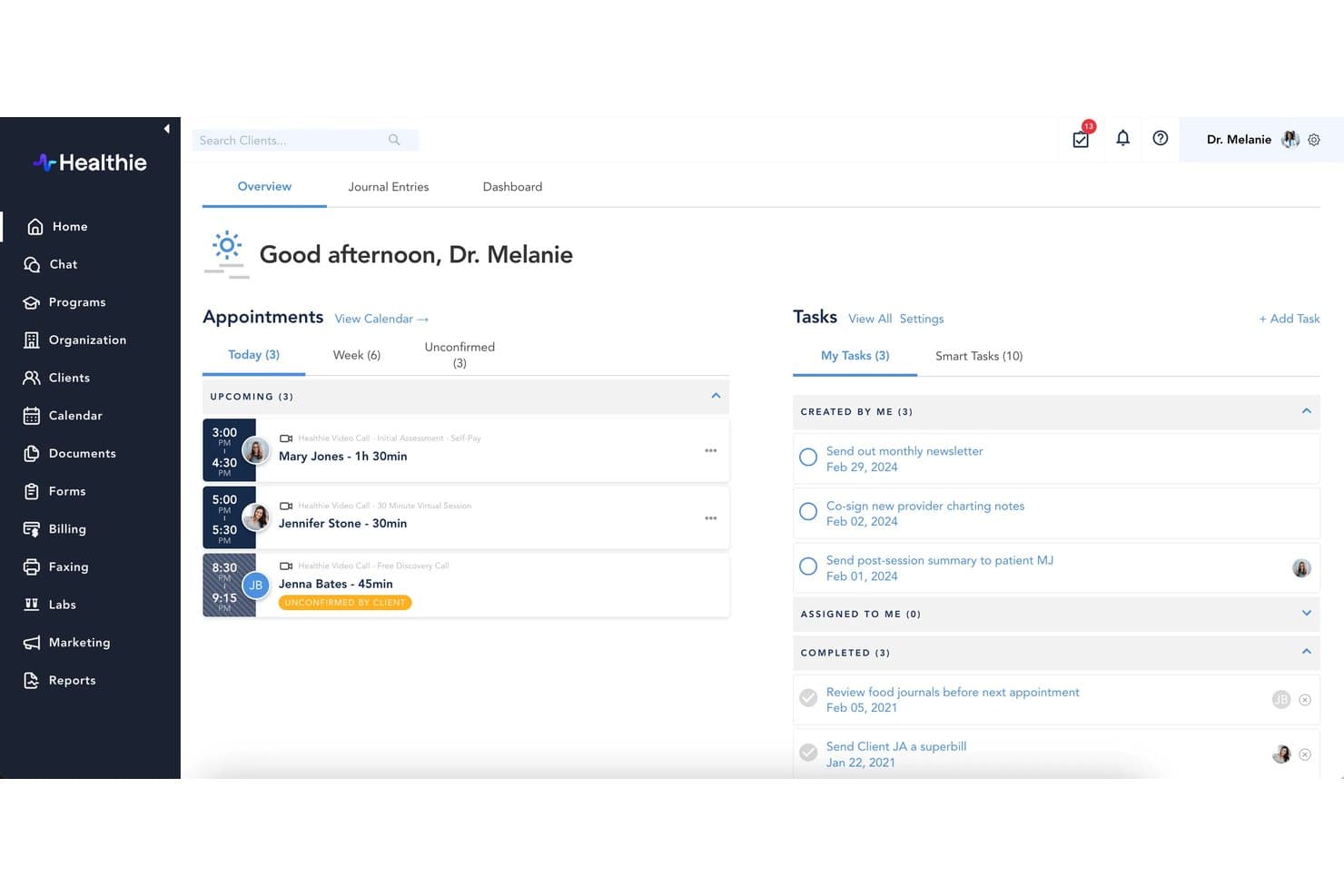
Healthie delivers AI-powered EHR charting, scheduling, billing, and patient engagement. Healthie is an AI-powered EHR and practice management platform built for independent and group practices that want charting, scheduling, billing, and patient engagement in one place.
Who Is Healthie Best For?
Healthie is a strong fit for independent and small-to-mid-sized specialty practices that need charting, scheduling, billing, and patient engagement in one connected platform.
Why I Picked Healthie
I picked Healthie as one of the best because it's purpose-built for specialty practices that run ongoing, structured care programs, think dietitians managing nutrition protocols or behavioral health providers running phased treatment plans. I love that providers can build out rolling or fixed-date care programs, pair them with journaling and care plan tracking, and deliver them directly through the patient portal. AI Scribe then captures session notes automatically, using templates like SOAP or ADIME, so clinicians stay focused on care rather than documentation between program touchpoints.
Healthie Key Features
- Insurance eligibility checks: Providers can run real-time eligibility checks through the Claim.MD integration directly within Healthie's billing workflow.
- Multi-provider scheduling: Healthie supports calendars across multiple providers, locations, and appointment types, with two-way sync to Google Calendar, iCal, and Outlook.
- Customizable intake forms: Providers can build and send intake forms electronically, with responses flowing directly into the client's EHR record.
- Group telehealth and webinars: Healthie supports both individual and group video sessions integrated with scheduling, charting, and billing workflows.
Healthie Integrations
Healthie offers native integrations with Claim.MD, DoseSpot, E-Labs Direct, Fullscript, Zoom, Google Calendar, iCal, and Outlook. It also supports a GraphQL API, SDKs, webhooks, and marketplace integrations including Metriport, Zus Health, and Candid Health.
Pros and Cons
Pros:
- AI drafts structured notes for clinician review
- Links care plans, journaling, and visit documentation
- Fits smaller specialty practices replacing enterprise-scale EHRs
Cons:
- Insurance claims workflows can feel clunky
- Migration imports don't maintain ongoing EHR sync
Learn more about Healthie: Best for behavioral health practice workflows
- 30-day free trial + demo available
- From $69/user/month
Visit WebsiteCustomer Rating:4.4/5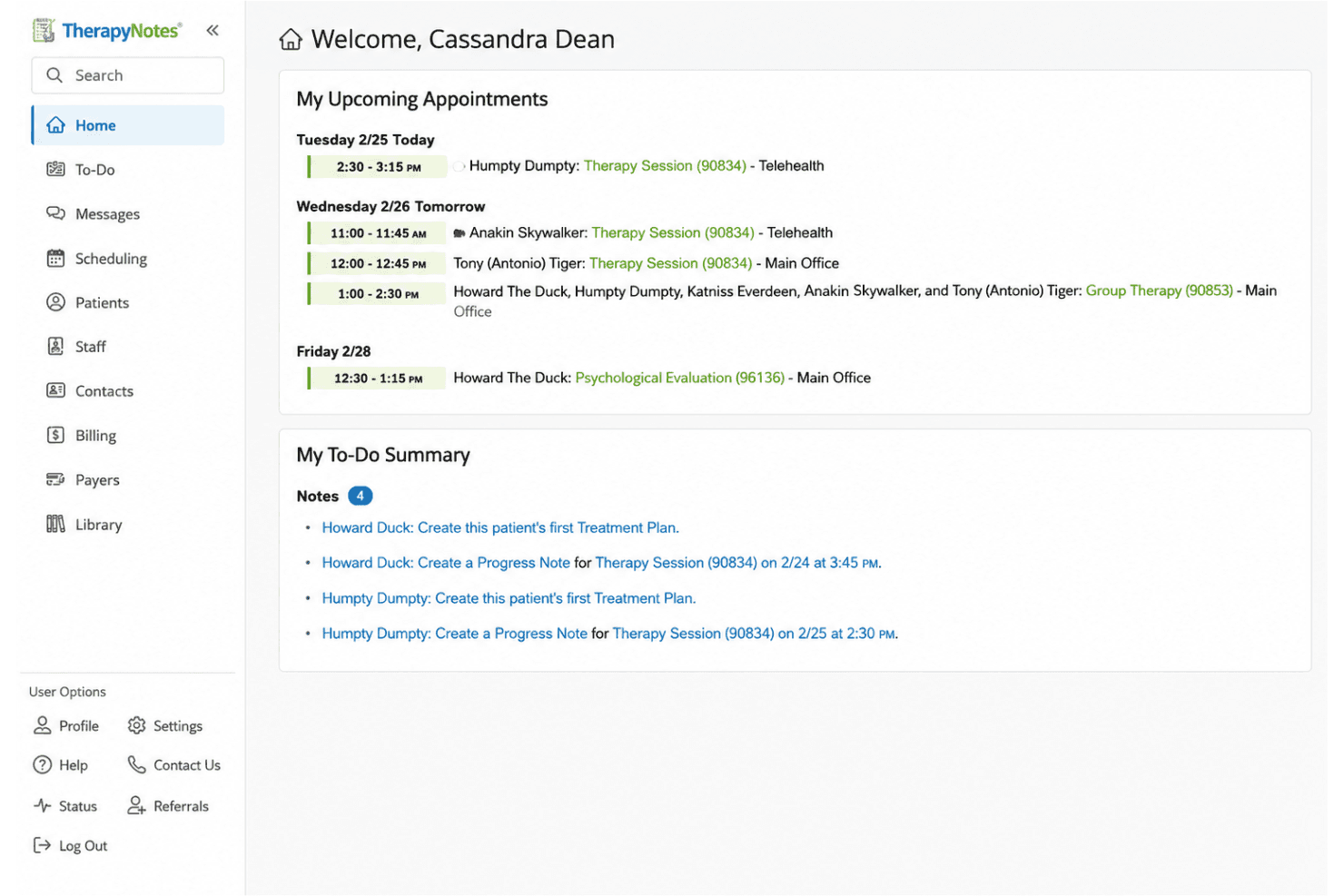
TherapyNotes manages clinical notes, scheduling, billing, and secure telehealth. TherapyNotes is a behavioral health EHR and practice management platform built for mental health clinicians and solo or group practices that need integrated clinical documentation, insurance billing, scheduling, and client engagement in one system.
Who Is TherapyNotes Best For?
TherapyNotes is a strong fit for solo and group behavioral health practices that need clinical documentation, scheduling, and insurance billing in one place.
Why I Picked TherapyNotes
I picked TherapyNotes as one of the best because it's purpose-built for behavioral health workflows in a way that general EHRs simply aren't. I especially appreciate how appointment details carry forward automatically into progress notes and claims, cutting the manual re-entry that slows down clinical and billing staff alike. TherapyFuel Scribe listens to sessions and drafts SOAP note sections in real time, so clinicians spend less time documenting and more time with clients.
TherapyNotes Key Features
- DSM-5 and ICD-10 diagnosis search: Note templates include a built-in search for DSM-5 and ICD-10 codes, letting clinicians find and apply diagnoses directly within documentation.
- TherapyPortal client portal: Clients can complete intake forms, request appointments, pay balances, and exchange secure messages through a branded self-service portal.
- Electronic claims and ERA: The billing module supports electronic claim submission to over 2,800 payers, ERA receipt and posting, and real-time eligibility checks via Claim.MD.
- HITRUST-certified security controls: TherapyNotes includes two-factor authentication, role-based permissions, activity audit trails, and FIPS 140-2-compliant encryption across stored data.
TherapyNotes Integrations
TherapyNotes connects to HealthConnex and Connie HIEs, Surescripts for medication history and formulary data, and Claim.MD for claims, ERA, and eligibility. An API and broader lab-interface ecosystem aren’t documented.
Pros and Cons
Pros:
- Appointment details carry into notes and claims
- Therapy-specific templates support behavioral-health charting
- Reviewers praise organized clinical documentation
Cons:
- Health-system data exchange remains narrow
- Behavioral-health focus excludes multispecialty care
Learn more about TherapyNotes: Best for AI-powered healthcare automation
- Free demo available
- Pricing upon request
Visit WebsiteCustomer Rating:4.4/5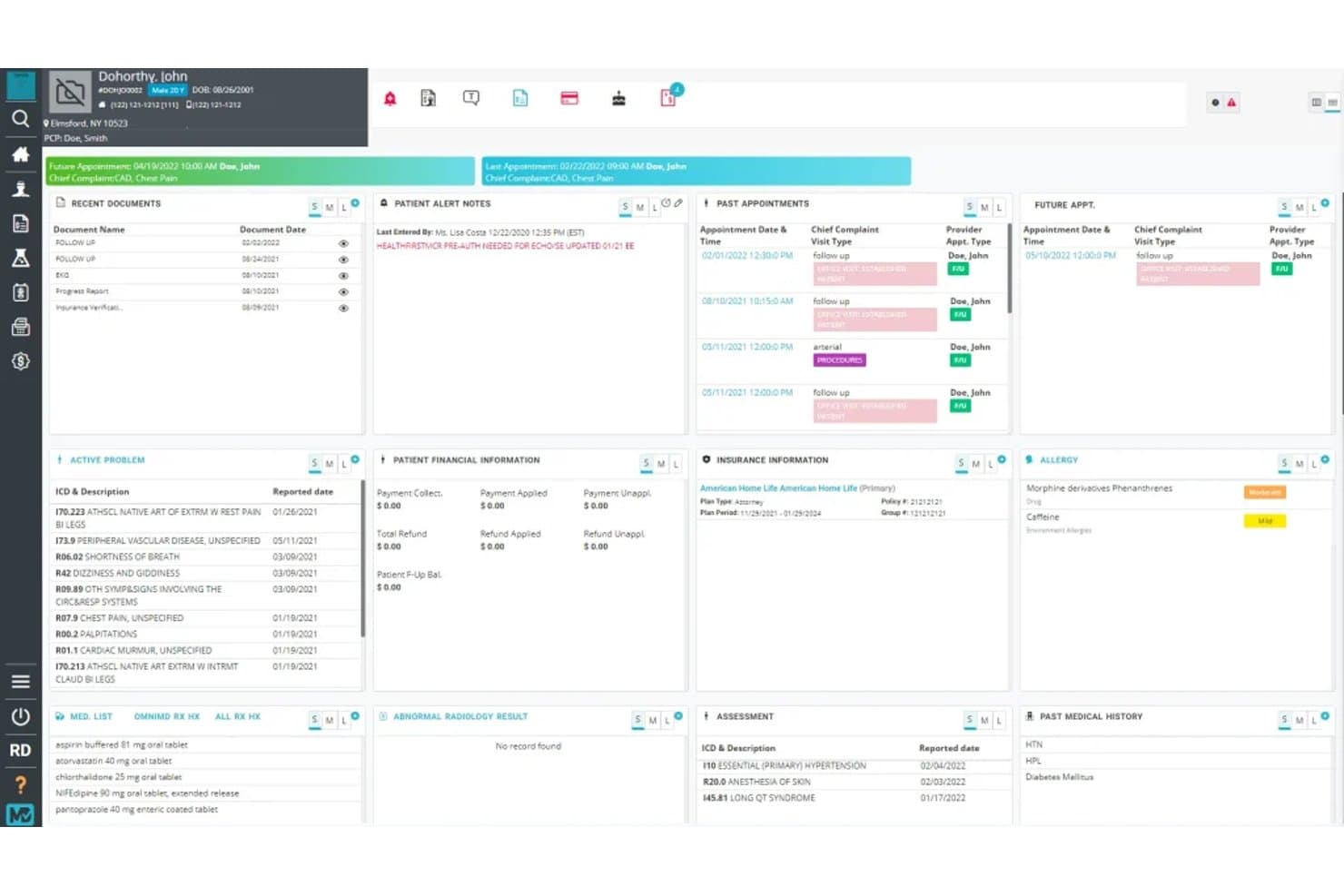
OmniMD offers cloud-based EHR, clinical charting, billing, and remote patient monitoring. OmniMD is a cloud-based EHR platform built for solo, small, and mid-sized practices that want to unify clinical charting, practice management, billing, and remote patient monitoring under one login—without the overhead that comes with enterprise-scale systems like Epic.
Who Is OmniMD Best For?
OmniMD is a strong fit for independent and small-to-mid-sized practices that want AI-driven documentation, billing, and clinical workflows unified in a single platform.
Why I Picked OmniMD
I picked OmniMD as one of the best because its AI-powered automation touches every layer of the clinical day, not just documentation. The AI Medical Scribe listens to patient-provider conversations and drafts specialty-aware SOAP notes for clinician review, while the AI Front Desk handles scheduling, eligibility checks, and copay collection automatically. I also appreciate that the AI Medical Coder generates ICD, CPT, and HCPCS codes directly from those notes and flags denial risks before a claim is ever submitted.
OmniMD Key Features
- Patient kiosk: Lets patients check in, complete intake forms, sign documents, and update demographic details through a self-service kiosk at the point of care.
- Remote patient monitoring: Collects data from connected devices and surfaces it in the patient chart, with alerts to support ongoing monitoring workflows.
- OmniXchange interoperability: Exchanges structured health data between EHRs, labs, and third-party systems using HL7 and FHIR standards.
- MIPS reporting dashboard: Tracks performance across all four QPP reporting categories from a single dashboard view.
OmniMD Integrations
OmniMD integrates with LabCorp and Quest for lab orders and results. Its AI Medical Scribe connects with 50+ EHR systems, including Epic, Cerner, athenahealth, eClinicalWorks, and Allscripts, using FHIR, HL7, and secure API bridges.
Pros and Cons
Pros:
- Reviewers praise organized charting and support
- AI drafts specialty-aware notes for review
- Unified EHR, practice management, and RCM
Cons:
- Reviewers cite inconsistent reports and limited filters
- Reviewers report extra steps finding prior notes
Learn more about OmniMD: Best for small-practice pricing options
- Free plan + free demo available
- From $25/month
Visit WebsiteCustomer Rating:4.2/5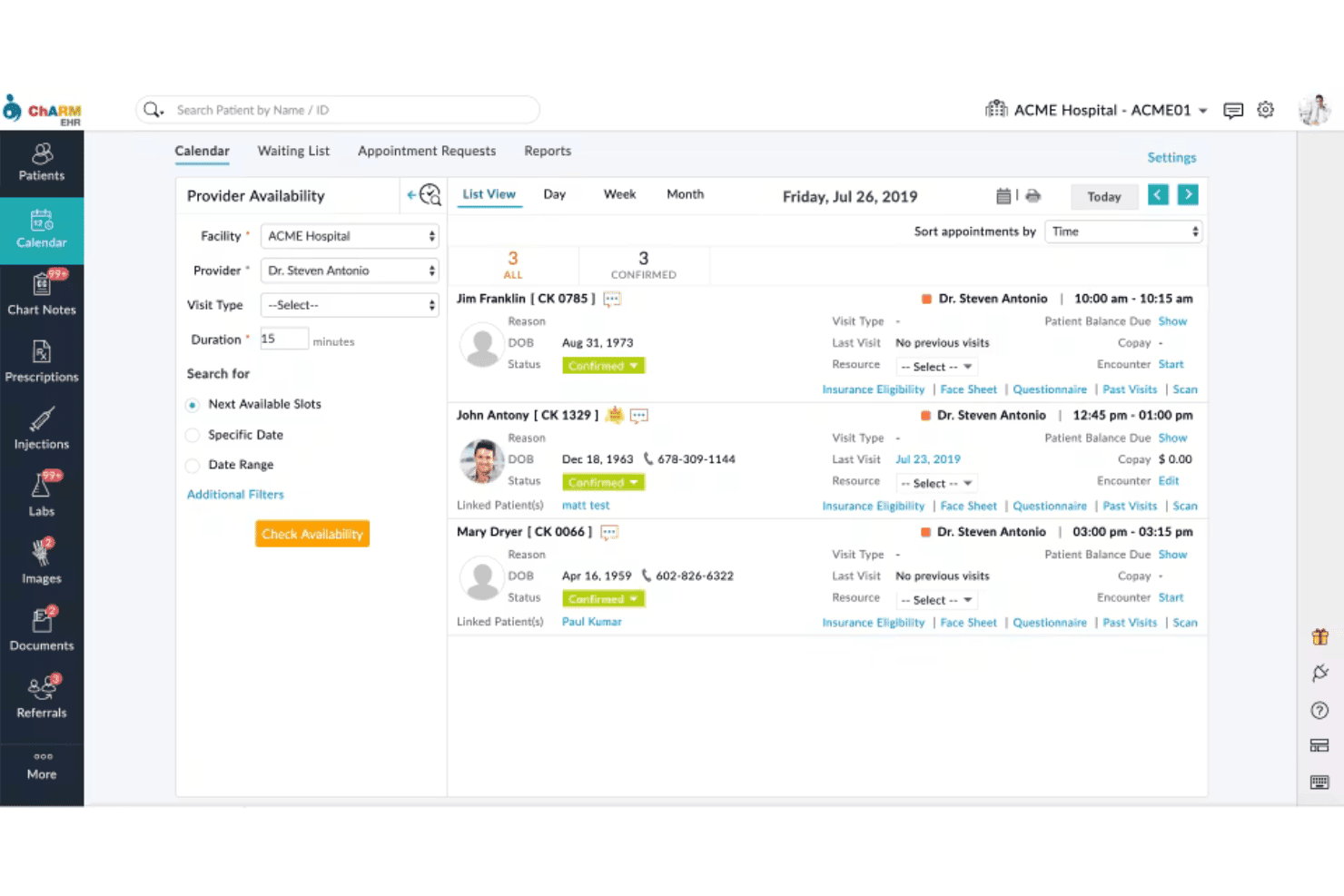
CharmHealth blends charting, e-prescribing, AI notes, billing, and virtual care. CharmHealth is a cloud-based EHR built for independent and small-to-midsize practices that need charting, e-prescribing, scheduling, and billing in one place—without the complexity or cost of enterprise systems like Epic.
Who Is CharmHealth Best For?
CharmHealth is a strong fit for independent and small-to-midsize practices that want transparent, usage-based pricing and a full suite of clinical and billing tools without an enterprise price tag.
Why I Picked CharmHealth
I've included CharmHealth in my top picks because its tiered pricing structure is genuinely built for smaller practices that can't justify Epic's enterprise costs. I appreciate that you can start on the encounter-based plan at $0.50 per visit, then move to the $200 per provider per month plan as your volume grows, without locking into a rigid contract upfront. The free plan (capped at 50 encounters per month) also makes it easy to test charting, SOAP notes, and the patient portal before committing.
CharmHealth Key Features
- AI Scribe: Records and transcribes patient encounters in real time, then generates structured clinical notes for SOAP, Comprehensive, and Brief encounter types.
- Bidirectional PointClickCare integration: Automatically syncs demographics, diagnoses, allergies, medications, and insurance between CharmHealth and PointClickCare, with signed notes transmitted back in real time.
- Drag-and-drop template builder: Lets clinicians build custom consultation, diagnosis, lab-order, and referral templates using configurable components like checklists, single choice, and multiple choice fields.
- FHIR R4 API with SMART App support: Provides HL7 FHIR 4.0.1 APIs and OAuth 2 authentication for connecting third-party applications to patient data.
CharmHealth Integrations
CharmHealth offers documented integrations with PointClickCare, LabCorp, Quest Diagnostics, Surescripts, Optum, Change Healthcare, Bluefin, QuickBooks, Google Calendar, and Fullscript. It also supports REST and HL7 FHIR APIs with SMART App support and OAuth 2 authentication for custom connections.
Pros and Cons
Pros:
- Patient portal supports self-service appointment requests
- Configurable templates support practice-specific documentation
- Small-practice workflows combine charting and billing
Cons:
- Some note formats constrain specialty workflows
- Payer enrollment delays can stall billing
Learn more about CharmHealth: Best for specialty care with managed billing
- Free demo available
- Pricing upon request
Visit WebsiteCustomer Rating:4.3/5
WRS Health provides specialty EHR, clinical charting, scheduling, billing, and revenue management. WRS Health is a cloud-based EHR and practice management platform built for specialty practices, connecting clinical documentation, scheduling, billing, and revenue cycle management in a single system.
Who Is WRS Health Best For?
WRS Health is a strong fit for specialty practices—particularly allergists and immunologists—that want clinical documentation, billing, and revenue cycle management handled in one connected system.
Why I Picked WRS Health
I picked WRS Health as one of the best because it's one of the few platforms that pairs specialty-specific clinical documentation with a built-in Billing Rules Engine and optional managed billing services. For an allergist running a busy immunotherapy schedule, that means charting and coding are connected from the moment a note is signed, with the rules engine flagging billing issues before a claim ever goes out. I also appreciate that WRS handles denial management and collections follow-up in-house, so revenue cycle work doesn't fall back on clinical staff.
WRS Health Key Features
- AI clinical scribe: Uses voice prompts or guided inputs to draft structured clinical notes directly into the patient chart.
- E/M coding assistant: Validates evaluation and management codes against CMS rules in real time during documentation.
- Patient portal with digital intake: Lets patients submit demographics, insurance, medication history, consent forms, and questionnaires before their visit.
- Multi-provider scheduling: Manages appointment calendars and eligibility verification workflows across multiple providers and locations.
WRS Health Integrations
WRS Health has a documented native integration with Bamboo Health PMP Gateway and supports Surescripts for e-prescribing. It connects with Medicity and OptumInsight for labs, imaging, and clinical summaries, and offers a FHIR-based API for custom integrations.
Pros and Cons
Pros:
- Allergy-focused workflows support specialty practices
- Billing rules flag issues before claim submission
- G2 reviewers rated setup easier than Epic
Cons:
- Reviewers report cumbersome chart and task navigation
- G2 reviewers favored Epic for broader needs
Learn more about WRS Health: Best for independent practice care and billing
- Free demo available
- Pricing upon request
Visit WebsiteCustomer Rating:3.9/5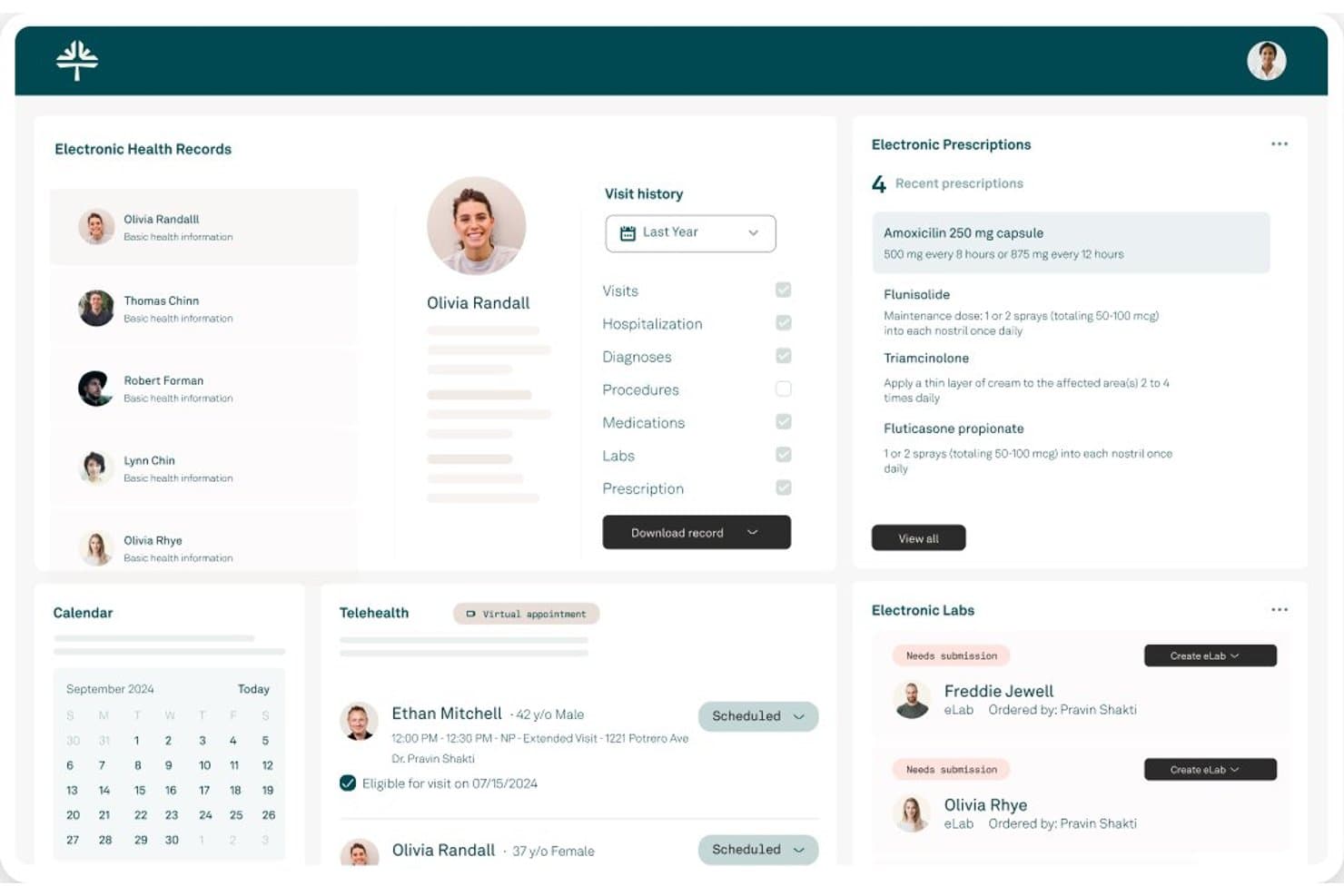
Tebra centralizes EHR, prescriptions, labs, and scheduling in one dashboard. Tebra is a cloud-based EHR built for independent practices that unifies clinical charting, e-prescribing, lab orders, billing, and patient engagement in one platform—making it a practical fit for small-to-mid-sized practices looking to move away from enterprise-heavy systems.
Who Is Tebra Best For?
Tebra is a strong fit for independent practices with up to 50 providers that need clinical charting, e-prescribing, and billing managed in a single platform.
Why I Picked Tebra
I picked Tebra as one of the best because it's purpose-built for independent practices that need clinical care and billing to work as one system, not two. I particularly like how AI Note Assist generates structured SOAP and therapy notes directly from patient conversations, and how charge capture ties those clinical notes straight into claims. The integrated denial management and payment posting mean my team isn't toggling between separate platforms to close out a visit from documentation to payment.
Tebra Key Features
- Patient portal: Patients can view lab results, problems, medications, and treatment plans, make payments, and send secure messages to providers.
- Electronic lab orders: Send lab requests to over 700 labs, receive real-time results, and have them automatically matched and recorded in the patient chart.
- MIPS dashboard: Tracks Promoting Interoperability measure scores, eligible-patient denominators, numerators, and gap lists for individual providers.
- Telehealth: Conduct video visits integrated directly with the provider schedule and clinical notes workflow.
Tebra Integrations
Tebra connects to over 700 labs for electronic orders and results and uses First Databank for formulary data. Its SOAP and FHIR APIs, delivered through SmileCDR for FHIR, support custom integrations.
Pros and Cons
Pros:
- Reviewers praise supportive onboarding and training
- Scheduling and billing share patient workflows
- Clinical notes connect directly to charge capture
Cons:
- Reviewers report glitches and service interruptions
- Complex billing tasks can require extra steps
Learn more about Tebra: Best for iPad charting in specialty practices
- Free demo available
- Pricing upon request
Visit WebsiteCustomer Rating:3.9/5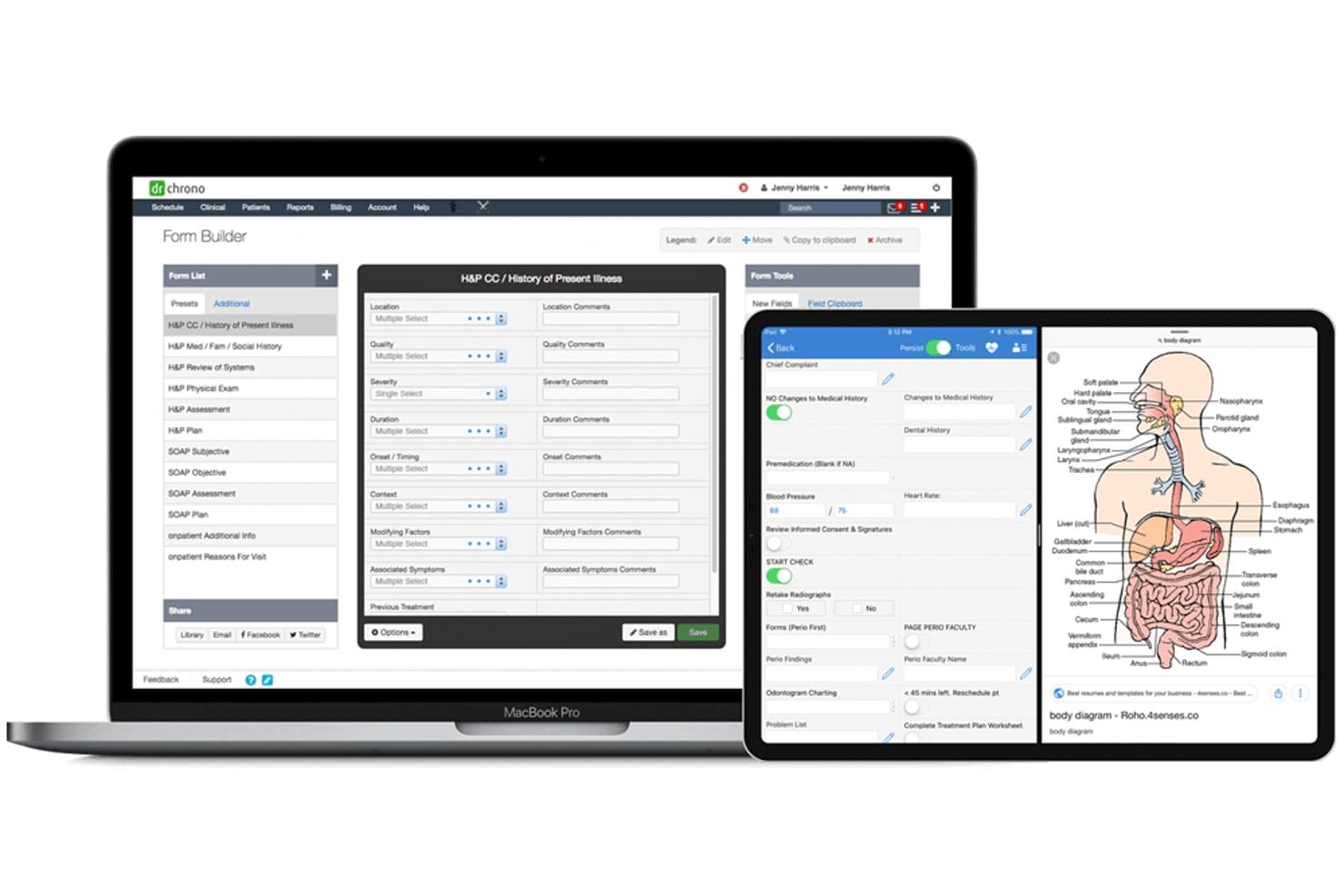
DrChrono lets users build custom clinical forms across devices. DrChrono is a cloud-based EHR built by EverHealth that combines clinical charting, billing, scheduling, and patient engagement for independent and specialty practices looking to replace or avoid large enterprise systems like Epic.
Who Is DrChrono Best For?
DrChrono is a strong fit for independent and specialty practices that run clinical workflows on iPads and want charting, billing, and patient engagement in one place.
Why I Picked DrChrono
I picked DrChrono as one of the best because it's built from the ground up around iPad workflows, which makes a genuine difference for specialty clinicians who chart bedside or room-to-room. Specialty-specific templates covering more than 20 medical fields let providers document within the clinical context of their discipline, and EverHealth Scribe layers ambient AI on top to draft structured SOAP and H&P notes for review before they ever reach the chart.
DrChrono Key Features
- OnPatient portal: Gives patients access to health records, test results, prescriptions, visit summaries, and billing details, with built-in appointment requests and secure messaging.
- Real-time insurance eligibility verification: Runs eligibility checks individually or in bulk before appointments and flags patients who may need billing follow-up.
- Electronic prior authorization: Submits and tracks prior authorizations through CoverMyMeds directly within the e-prescribing workflow.
- RecordSync record exchange: Uses HL7 FHIR transactions to retrieve records from prior providers in real time and merge them into the patient chart at no added cost.
DrChrono Integrations
DrChrono has native integrations with Quest Diagnostics, Labcorp, Iron Bridge, Surescripts RecordSync, Surescripts eRx, and CoverMyMeds, plus API integrations with Epic, eClinicalWorks, and Allscripts. It supports REST and FHIR APIs, webhooks, OAuth 2.0, and iframe integration for custom connectivity.
Pros and Cons
Pros:
- RecordSync brings outside records into charts
- Custom templates support specialty documentation
- iPad charting suits specialty workflows
Cons:
- Reviewers report inconsistent billing and slow support
- Users report notes failing to save
Learn more about DrChrono: Best for hands-on billing support
- Free demo available
- Pricing upon request
Visit WebsiteCustomer Rating:3.8/5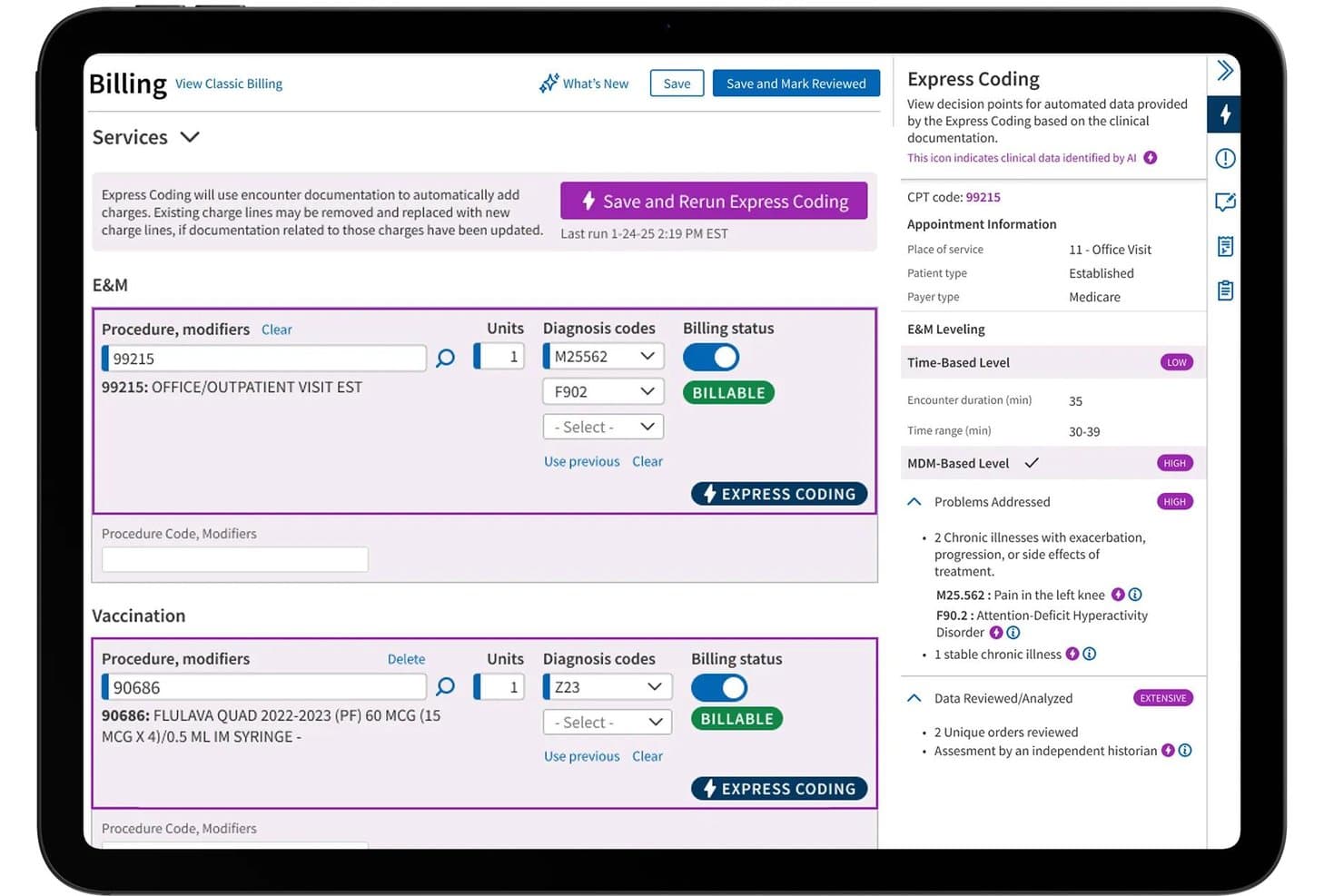
athenaOne delivers EHR, clinical charting, billing, revenue cycle, and patient engagement. athenaOne is an integrated EHR, billing, and practice management platform built for ambulatory practices that need clinical documentation, revenue cycle workflows, and patient engagement tools in one system.
Who Is athenaOne Best For?
athenaOne is a strong fit for ambulatory practices that want billing, clinical documentation, and patient engagement managed in one place—with dedicated support built into the service.
Why I Picked athenaOne
I picked athenaOne as one of the best because its billing support goes beyond software. A dedicated billing team actively reviews claims before submission, flags errors, and handles prior authorizations, which means your revenue cycle isn't just automated but actively managed. I also appreciate that the service description commits to specific performance thresholds: 95% of claims move forward within three business days, and 95% of payments are posted within four days of receipt.
athenaOne Key Features
- Ambient AI scribe: athenaAmbient listens to patient conversations and generates a structured draft note with suggested diagnoses and orders for clinician review.
- Patient portal and mobile app: Patients can access health records, lab results, and billing, send secure messages, and self-schedule appointments through the portal or athenaPatient app.
- CommonWell and Carequality integration: athenaOne automatically exchanges patient records with more than 84,000 care sites across both national health data networks.
- Population health dashboard: Data Explorer lets practices analyze patient populations, track care gaps, and monitor performance across quality programs like MIPS and ACO MSSP.
athenaOne Integrations
athenaOne supports 277K+ direct clinical integrations, including Epic and Cerner through CommonWell and Carequality, plus Surescripts and Zoom. Its marketplace offers 500+ third-party tools, and its developer portal provides 800+ API endpoints for custom integrations.
Pros and Cons
Pros:
- Integrated scheduling, charting, and billing suit outpatient practices
- Ambient scribe drafts notes for clinician review
- Defined claim and payment posting service commitments
Cons:
- Extra clicks and glitches slow outpatient workflows
- Users report claims and denial follow-up problems
Learn more about athenaOne: Best for specialty care and billing workflows
- Free demo available
- Pricing upon request
Visit WebsiteCustomer Rating:3.7/5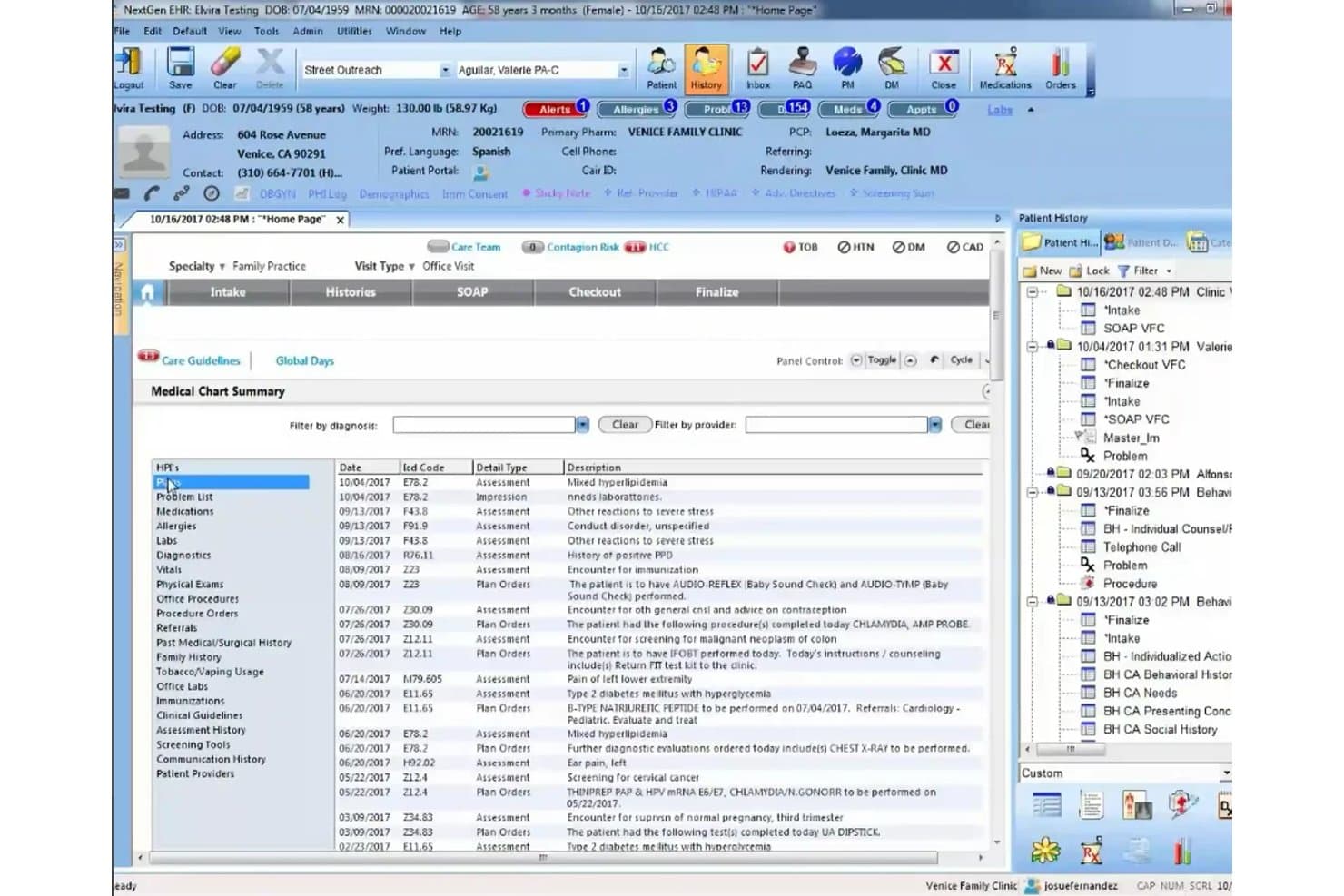
NextGen Healthcare supports EHR, practice management, billing, and patient care. NextGen Healthcare is an EHR platform built for ambulatory and specialty practices that want integrated clinical documentation, billing, and practice management in a single system.
Who Is NextGen Healthcare Best For?
NextGen Healthcare is a strong fit for mid-size ambulatory and specialty practices that need integrated clinical documentation, billing, and practice management in one platform.
Why I Picked NextGen Healthcare
I picked NextGen Healthcare because it's one of the few EHR platforms built around specialty practice workflows from the ground up, not retrofitted for them. I appreciate how specialty-specific templates let practices document cardiology, orthopedics, or behavioral health encounters without forcing a generic structure onto complex visits. The integrated billing and practice management module handles claims submission, real-time eligibility checks, and batch claim-status reporting in one place, which I find especially valuable when revenue cycle and clinical teams need to stay aligned without switching systems.
NextGen Healthcare Key Features
- Ambient AI documentation: Listens to patient-provider conversations and generates structured SOAP notes directly into the patient's EHR chart for provider review.
- Mirth Connect integration engine: Transforms, maps, and routes healthcare data across 800+ API routes using REST, FHIR, and SMART on FHIR protocols.
- Population health analytics: Provides care-management and value-based-care insights, including tools to identify care gaps and generate patient reminder communications.
- PxP patient portal: Lets patients view health records, schedule appointments, request prescription renewals, view lab results, and make payments online.
NextGen Healthcare Integrations
NextGen Healthcare supports integrations with Carequality, Surescripts Record Locator and Exchange, and Amazon Web Services through NextGen Share and cloud hosting. It also offers REST, FHIR, JSON, and SMART on FHIR APIs, plus Mirth Connect for custom data exchange.
Pros and Cons
Pros:
- Clinical and billing workflows share one platform
- Ambient notes can reduce charting time
- Specialty templates fit complex ambulatory visits
Cons:
- Patient portal setup can frustrate practices
- Routine charting takes multiple clicks
Learn more about NextGen Healthcare: Best for EHR-based CMS quality reporting
- 30-day free trial + free demo available
- From $130/user/month
Visit WebsiteCustomer Rating:3.6/5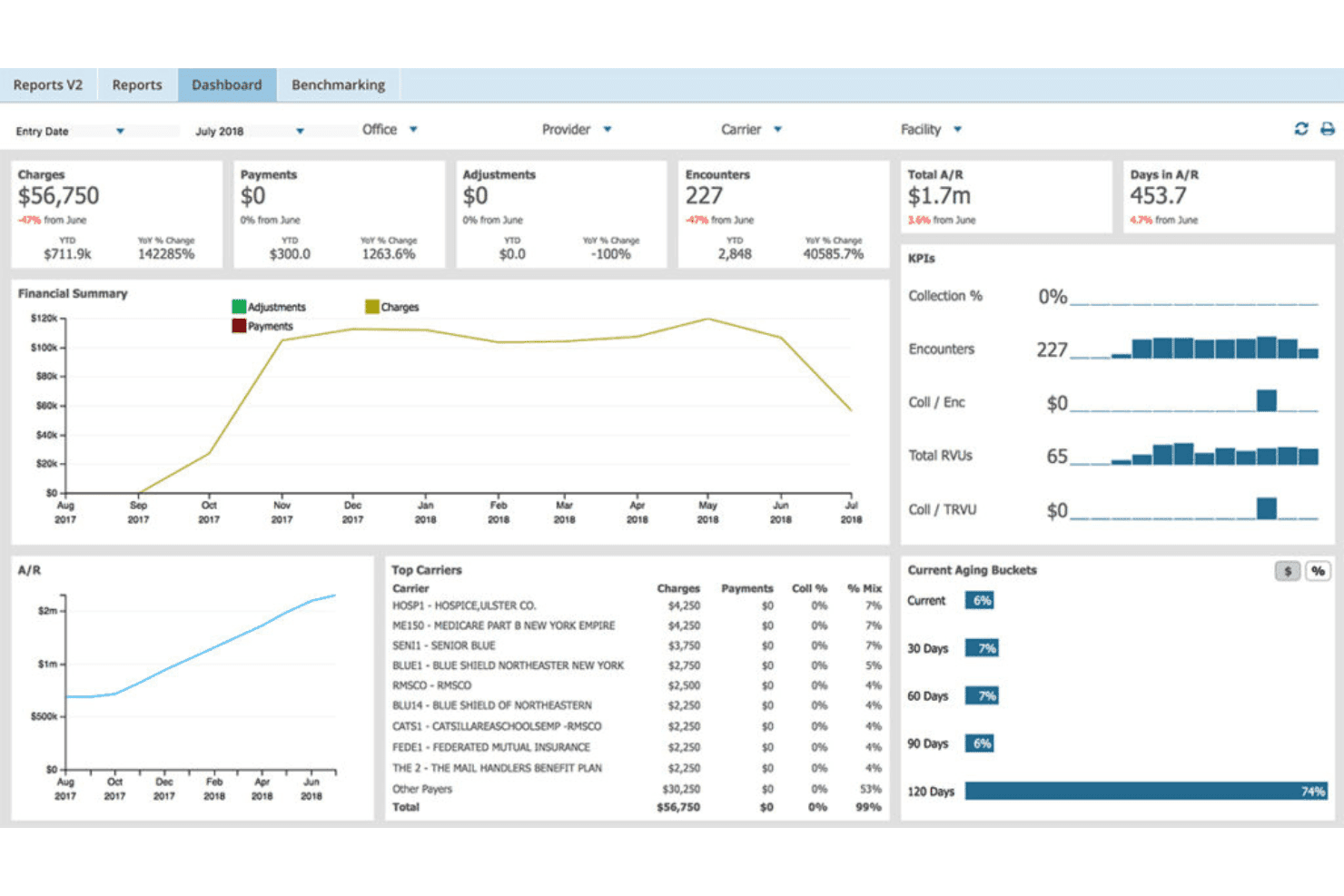
AdvancedMD unites cloud EHR, clinical charting, scheduling, billing, claims, and reporting. AdvancedMD is a cloud-based EHR built for independent and mid-sized practices that want scheduling, billing, claims, and clinical documentation managed in one platform.
Who Is AdvancedMD Best For?
AdvancedMD is a strong fit for independent and mid-sized specialty practices that need EHR, billing, and scheduling in one cloud-based system without enterprise-level complexity.
Why I Picked AdvancedMD
I picked AdvancedMD as one of the best because its built-in qualified registry and QCDR let you report Quality, Promoting Interoperability, and Improvement Activities data directly to CMS from inside the EHR, without routing through a third-party reporting tool. I especially like the patient-level quality measure filtering, daily score updates, and the all-in-one Population Health reporting system added in 2025 with MIPS and Qualified Registry capabilities. That's a meaningful advantage for independent practices that need CMS quality reporting without Epic's enterprise overhead.
AdvancedMD Key Features
- AI Clinical Assistant: Uses ambient listening and transcription to generate patient notes in five formats and suggest chart action items during visits.
- Clinical mobile app: Lets providers create and edit notes, review and sign lab results, manage documents, and message patients or staff from a mobile device.
- Telehealth scheduling and sessions: Supports browser-based video visits booked directly from the EHR, with screen sharing, participant controls, and file transmission to patient charts.
- Bidirectional practice-management sync: Automatically synchronizes patient, scheduling, and charge data across billing, claims, and clinical workflows in real time.
AdvancedMD Integrations
AdvancedMD lists 1,400+ integration offerings and 50+ billing partners, including Salesforce, Ellkay, and Falkon Data for lab and imaging interfaces. Connect APIs, FHIR R4, SMART on FHIR, and ODBC support custom data exchange.
Pros and Cons
Pros:
- Scheduling and billing share one ambulatory workflow
- Reviewers praise editable clinical note templates
- CMS quality reporting stays inside the EHR
Cons:
- Group scheduling can complicate billing workflows
- Reviewers report click-heavy controlled-substance prescribing
Alte alternative la Epic
Iată câteva opțiuni suplimentare care nu au ajuns pe lista mea scurtă, dar merită totuși luate în considerare:
- 11eClinicalWorksBest for AI-powered patient records
- 12RXNTBest for ambient notes across EHRs
- 13ModMedBest for dermatology image and pathology records
- 14Elation HealthBest for charting with fewer screen changes
- 15NextechBest for visual procedure documentation
- 16KipuBest for residential bed and occupancy planning
- 17Oracle HealthBest for AI-guided review of patient history
- 18OptiMantraBest for functional medicine supplement care
- 19MEDITECH ExpanseBest for reducing enterprise EHR hosting work
- 20Canvas MedicalBest for teams building custom EHR workflows
How I Evaluate Epic Alternatives
I split my evaluation into three parts: core functionality, where I look for tools that can structure and store patient records and exchange data with labs, pharmacies, and other providers—this carries the most weight. Then I look at standout features like AI-assisted documentation. Finally, I consider implementation support and pricing transparency.
Core Functionality (Table Stakes For This List)
When I'm selecting tools for my list, I score each one on a scale from 0 (does not offer the functionality) to 5 (excels in this area) for each core functionality listed below. I then convert the total into a percentage to help assess each tool's overall fit, with extra weight on any functionalities I’ve deemed essential.
- Electronic Charting (Essential): I look for structured notes, useful templates, and ways to retrieve a patient’s history across visits and care settings.
- Interoperability (Essential): I assess how tools exchange records with labs, pharmacies, and other providers, including support for standards such as HL7 or FHIR.
- Practice & Billing: I check whether scheduling, encounter documentation, claims, and billing work together across the practice’s day-to-day workflows.
- Security & Compliance: I look for access controls, audit trails, and documented safeguards for protecting patient data and meeting applicable requirements.
- E-Prescribing: I evaluate prescription creation and transmission, including controlled medications and medication history checks where supported.
- Patient Engagement: I consider whether patients can access records, schedule visits, and communicate securely through a portal or similar tools.
Once I have a list of tools that meet the criteria, I consider what sets each platform apart.
Differentiating Factors (What Sets Vendors Apart)
Here's how I compare and contrast different vendors:
Standout Features
I look for AI-assisted documentation that generates clinical notes from patient conversations, since it directly cuts charting time after visits. Specialty-specific templates also matter—a cardiology practice migrating off Epic needs structured workflows on day one, not a blank slate. I evaluate self-service configuration tools that let your admin team adjust forms and reports without filing a vendor change request.
Beyond Features
I evaluate how quickly a practice can go live, since migrating off Epic often means moving years of patient history. Vendors like athenaOne and NextGen Healthcare offer dedicated migration support, but timelines vary widely. I also check whether pricing stays predictable as you add providers or locations—per-transaction fees for claims or e-prescribing can quietly erode savings. Cloud hosting and clear data-export rights matter too, especially if you need to switch systems later without losing records.
De ce să căutați alternative la Epic?
Deși Epic este o alegere bună pentru software EHR, unele echipe caută alte soluții atunci când amploarea sau fluxurile sale de lucru nu corespund nevoilor lor. Este posibil să căutați o alternativă la Epic deoarece:
- Un cabinet mai mic are nevoie de un sistem dimensionat pentru fluxurile sale zilnice de lucru
- Specialitatea dumneavoastră are nevoie de șabloane personalizate, pregătite înainte de lansare
- Mutarea dosarelor pacienților din ultimii ani face ca migrarea să fie o preocupare majoră
- Aveți nevoie de costuri mai clare pe măsură ce adăugați furnizori sau locații
- Echipa dumneavoastră dorește instrumente de acces pentru pacienți și de facturare adaptate operațiunilor sale
Dacă oricare dintre aceste situații vi se potrivește, ați ajuns la locul potrivit. Lista mea include mai multe opțiuni de software EHR mai potrivite pentru echipele care se confruntă cu aceste provocări în utilizarea Epic și caută alternative.
Funcțiile principale ale Epic
Iată funcțiile principale ale Epic, pentru a vă ajuta să îl comparați cu opțiunile alternative:
- Dosar longitudinal al pacientului: Epic reunește informațiile despre pacient într-un dosar medical comun, de-a lungul diferitelor experiențe de îngrijire. Medicii pot utiliza acest dosar pentru a consulta istoricul pacientului și a documenta îngrijirea.
- Interoperabilitate: Care Everywhere permite schimbul de dosare între Epic și alte organizații care utilizează sisteme EHR. Acest lucru ajută echipele de îngrijire să acceseze informații externe despre pacienți, inclusiv notițe și imagini medicale, atunci când coordonează îngrijirea.
- Activitate clinică asistată de IA: Art poate rezuma istoricul pacientului, redacta notițe și pregăti răspunsuri la mesajele pacienților. Medicii verifică și editează schițele înainte de a le utiliza în îngrijirea pacienților.
- Programarea consultațiilor: Programarea integrată permite gestionarea consultațiilor, procedurilor și programărilor pentru investigații. Pacienții își pot gestiona programările prin MyChart, iar personalul poate coordona programările în cadrul sistemului.
- Accesul pacienților prin MyChart: Pacienții pot utiliza MyChart pentru a-și accesa informațiile medicale, a comunica cu echipele de îngrijire și a-și gestiona programările. Portalul acceptă, de asemenea, înregistrarea digitală și instrumente financiare destinate pacienților.
- Gestionarea trimiterilor și autorizărilor: Epic acceptă fluxuri de lucru pentru autorizări și urmărirea trimiterilor în cadrul unei organizații. Echipele pot gestiona electronic trimiterile și le pot urmări progresul.
- Instrumente pentru ciclul veniturilor: Fluxurile ciclului veniturilor includ verificări electronice ale acoperirii, înregistrarea, tarifarea, cererile de rambursare și plățile pacienților. Organizațiile pot conecta etapele administrative cu fluxurile de programare și îngrijire.
- Monitorizarea de la distanță a pacienților: Epic poate conecta dispozitivele de monitorizare la domiciliu cu MyChart și poate colecta valorile măsurate ale pacienților pentru echipele de îngrijire. Aceste valori pot susține monitorizarea continuă între consultații.
Prețuri
Prețurile variază în funcție de funcții, numărul de furnizori și necesitățile de implementare. Intervalele de mai jos sunt estimări lunare orientative în USD per furnizor; mulți furnizori stabilesc prețurile pe bază de ofertă.
Tabel comparativ al planurilor pentru alternativele la Epic
| Tipul planului | Preț mediu | Funcții comune |
|---|---|---|
| Tipul planuluiPlan gratuit | Preț mediu$0 | Funcții comuneDocumentație de bază, fișele pacienților, programarea consultațiilor și asistență limitată. |
| Tipul planuluiPlan personal | Preț mediu$25-$100 per furnizor/lună | Funcții comuneDocumentație electronică, prescriere electronică, acces pentru pacienți și facturare de bază. |
| Tipul planuluiPlan pentru companii | Preț mediu$100-$500 per furnizor/lună | Funcții comuneGestionarea cabinetului, fluxuri de lucru pentru cereri de rambursare, raportare, integrări și acces pentru mai mulți furnizori. |
| Tipul planuluiPlan pentru întreprinderi | Preț mediu$500-$1,000+ per furnizor/lună sau ofertă personalizată | Funcții comuneInteroperabilitate avansată, gestionarea mai multor locații, asistență pentru migrare, servicii de implementare și asistență dedicată. |