

O software EMR ortopédico (Registo Médico Eletrónico) simplifica a gestão dos dados dos pacientes, do historial médico e dos fluxos de trabalho das clínicas ortopédicas, poupando-lhe tempo em tarefas administrativas e melhorando os cuidados prestados aos pacientes. Ao utilizar o sistema EMR adequado, pode reduzir os encargos administrativos e colmatar falhas de comunicação com os seus pacientes.
Analisei as opções mais bem avaliadas, para que possa encontrar facilmente um EMR ortopédico que se adeque à sua clínica e o ajude a prestar melhores cuidados sem complicações desnecessárias.
Why Trust Our Software Recommendations
6,700+
Reviews
20
Industry experts
16+
Evaluation factors
14
Years
Our team has been testing and reviewing software since 2012. As medical practice leaders ourselves, we know how difficult—and important—it is to choose the right software.
For this guide, we evaluated tools using hands-on testing and independent research, scoring tools using our selection criteria.
Our reviews reflect our human editorial judgment, not a sales pitch.
Tabela comparativa de sistemas EMR ortopédicos
| Tool | Best For | Trial Info | Price | ||
|---|---|---|---|---|---|
| 1 | Best for its full-suite practice management system | Free demo + free expert consultation available | Pricing upon request | Website | |
| 2 | Best for integrated diagnostics and telehealth | 15-day free trial | From $99/month | Website | |
| 3 | Best for specialized orthopedic workflows | Free demo available | Pricing upon request | Website | |
| 4 | Best for specialty-built charting and PACS imaging | Free demo available | Pricing upon request | Website | |
| 5 | Best for customizability and interoperability | Free demo available | Pricing upon request | Website | |
| 6 | Best for orthopedic billing automation | Free demo available | Pricing upon request | Website | |
| 7 | Best for workers' comp and injury billing | Free demo available | Pricing upon request | Website | |
| 8 | Best for small to medium-sized orthopedic practices | Free demo available | From $229/user/month | Website |


Avaliações dos melhores sistemas EMR ortopédicos
 1Best for its full-suite practice management system
RXNT
- Free demo + free expert consultation available
- Pricing upon request
Visit WebsiteCustomer Rating:4.3/5
Image 12: RXNT Orthopedic EMR Interface RXNT offers a comprehensive and integrated EHR solution, combining functionalities like medical billing, practice management, and patient scheduling. It stands out for its full-suite practice management system, providing a wide array of tools that cater to the diverse administrative and clinical needs of orthopedic practices.
Why I Picked RXNT: I chose RXNT for its comprehensive practice management system. It distinguishes itself from other tools with its ability to offer a wide range of features within a single platform. After considering other options, I concluded that RXNT is the most suitable for practices requiring a fully integrated solution for managing different aspects of their operations.
Standout features & integrations:
Notable features of RXNT include automated reminders, electronic prescriptions, and real-time insurance eligibility checks. The platform is also designed to integrate smoothly with a wide array of medical billing and other healthcare systems, making it a versatile tool for many practices.
Pros and Cons
Pros:
- Real-time insurance eligibility checks simplify administrative tasks
- Integrates well with other healthcare systems
- Offers a wide range of features within a single platform
Cons:
- Annual billing may be a deterrent for some practices
- The interface could be improved for a better user experience
- The extensive suite of features may have a learning curve for some users
Learn more about RXNT: Best for integrated diagnostics and telehealth
- 15-day free trial
- From $99/month
Visit WebsiteCustomer Rating:4.8/5
OptiMantra’s booking interface confirms appointments and telehealth sessions, helping orthopedic practices streamline virtual and in-person patient scheduling. OptiMantra is a cloud-based EMR platform built to support orthopedic clinics with integrated diagnostics, telehealth, and practice management capabilities. The system combines patient charting, lab connectivity, and secure video consultations—helping orthopedic providers manage both in-office and remote patient care efficiently.
Why I Picked OptiMantra: I chose OptiMantra for its strong diagnostic and telehealth integration, which makes it ideal for orthopedic specialists managing both in-person and remote consultations. You can order imaging or lab tests directly from the platform, with results automatically attached to patient charts. I also like how its HIPAA-compliant telehealth feature allows you to hold virtual follow-ups, making postoperative care and patient check-ins more accessible. Combined with customizable templates and automated patient engagement, it’s a flexible solution for orthopedic workflows.
Standout Features & Integrations:
Features include customizable orthopedic charting templates, integrated telehealth, electronic prescriptions, and secure document sharing. OptiMantra connects with major labs like LabCorp, Quest Diagnostics, and Rupa Health, as well as payment and communication tools including Stripe, Zoom, and SendGrid. The platform also supports e-faxing and integrates with AWS and Box for secure data storage.
Pros and Cons
Pros:
- Secure document and lab sharing
- Customizable orthopedic charting
- Integrated telehealth and diagnostics
Cons:
- Learning curve for new users
- Reports section can feel complex
Learn more about OptiMantra: Best for specialized orthopedic workflows
- Free demo available
- Pricing upon request
Visit WebsiteCustomer Rating:5/5
NextGen Healthcare dashboard displaying recent activity summaries and financial reporting tools. NextGen Healthcare is an enterprise-grade orthopedic EMR and practice management platform designed for mid-sized to large practices. It combines AI-assisted documentation, mobile charting, and specialty-specific workflows to enhance orthopedic care and operational performance.
Why I Picked NextGen: I chose NextGen because it delivers orthopedic-specific clinical content and charting tools while also offering mobile documentation, which is a must-have for busy ortho practices. The Ambient Assist tool can generate SOAP notes from patient conversations, saving time and reducing the burden of manual documentation. Its broad marketplace of integrations—like surgical scheduling, remote monitoring, and patient engagement tools—adds a layer of flexibility that’s hard to beat.
Standout Features & Integrations:
Features include orthopedic-specific templates, AI-powered note-taking, telehealth, patient portals, and revenue cycle management. NextGen also provides analytics and regulatory reporting tools. Integrations include Relaymed, Medsender, Klara, Surgimate, Transform9, CallMyDoc, rater8, Arcadia, and more.
Pros and Cons
Pros:
- Built-in templates for various specialties
- Broad third-party integration marketplace
- AI-generated SOAP notes via mobile
Cons:
- Learning curve with more advanced capabilities
- Some features are iOS-optimized; Android support varies
Learn more about NextGEN: Best for specialty-built charting and PACS imaging
- Free demo available
- Pricing upon request
Visit WebsiteCustomer Rating:4.5/5
Image 2: ModMed Orthopedic EMR Interface ModMed, also known as Modernizing Medicine, is a robust EHR system designed with specialty-specific workflows, including orthopedics. Its intuitive and customizable platform is geared towards streamlining processes within orthopedic practices, offering seamless workflow integration that allows for efficient patient management.
Why I Picked ModMed: In my selection process, I focused on the ability of a tool to integrate seamlessly into an orthopedic practice's workflow. ModMed distinguished itself with its specialty-specific approach to workflow design, with a layout and functionality that aligns well with the unique needs of orthopedic practices. This integration efficiency is why I picked ModMed as the best choice for seamless workflow integration.
Standout features & integrations:
ModMed offers key features such as intuitive orthopedic-specific templates, built-in telehealth capabilities, and an efficient patient portal. Additionally, ModMed's EMA® interactive anatomical atlas allows for precise documentation of orthopedic examinations and treatments. The tool integrates with practice management systems, medical billing services, and patient engagement tools, providing a well-rounded solution for orthopedic clinics.
Pros and Cons
Pros:
- Comes with built-in orthopedic-specific billing
- Simplifies workflow with smart integrations
- Designed specifically for specialty practices including orthopedics
Cons:
- Learning curve may exist for some users due to its wide range of features
- May not be as comprehensive as some other EMRs on the market
- Pricing information not readily accessible
Learn more about ModMed: Best for customizability and interoperability
- Free demo available
- Pricing upon request
Visit WebsiteCustomer Rating:4/5
Image 4: PrognoCIS Orthopedic EMR Interface PrognoCIS is an award-winning cloud-based EMR solution that offers a highly customizable experience, enabling orthopedic practices to tailor the software to their specific needs. Notably, it emphasizes interoperability, facilitating easy sharing of data between different healthcare systems.
Why I Picked PrognoCIS: I selected PrognoCIS for this list mainly due to its high degree of customizability and impressive interoperability. Many EMR solutions come with a one-size-fits-all approach, but PrognoCIS stands out with its ability to adapt to unique practice requirements. Its commitment to interoperability means it can exchange data seamlessly with various systems, making it perfect for integrated healthcare networks.
Standout features & integrations:
PrognoCIS offers numerous features such as e-prescriptions, patient portals, appointment scheduling, and customizable templates specific to orthopedics. It also boasts a robust telemedicine module, a feature gaining importance in the current healthcare landscape. When it comes to integrations, PrognoCIS is compatible with several medical billing software and practice management systems, enhancing its versatility.
Pros and Cons
Pros:
- Includes features like e-prescribing, patient portal, and telemedicine
- Seamless interoperability with other systems
- High degree of customizability
Cons:
- Interface may seem complex to some users
- May require technical knowledge for customization
- Pricing information is not directly available
Learn more about PrognoCIS Psychiatry EHR: Best for orthopedic billing automation
- Free demo available
- Pricing upon request
Visit WebsiteCustomer Rating:3.6/5
Image 10: AdvancedMD Orthopedic EMR Interface AdvancedMD is a comprehensive medical software suite offering EHR, practice management, telemedicine, and patient engagement tools. This platform stands out for its robust automation features that simplify administrative tasks, making it particularly beneficial for orthopedic practices that desire streamlined operations.
Why I Picked AdvancedMD: I chose AdvancedMD because it offers powerful automation capabilities for administrative tasks. This feature is not commonplace among EHR providers and makes AdvancedMD distinguishable. I determined it to be the best option for orthopedic practices that are seeking ways to automate routine tasks and optimize their workflows.
Standout features & integrations:
AdvancedMD provides a range of features like automated appointment reminders, insurance eligibility verification, and claim management. These functionalities aim to reduce manual tasks and enhance practice efficiency. In terms of integrations, it offers seamless connectivity with major labs and radiology systems, improving care coordination.
Pros and Cons
Pros:
- Seamless connectivity with major labs and radiology systems
- Integrated suite of medical software tools
- Strong automation capabilities for administrative tasks
Cons:
- Annual billing could be a barrier for some practices
- The platform may be complex for new users
- High starting price point
 Best for workers' comp and injury billing
- Free demo available
- Pricing upon request
Visit WebsiteCustomer Rating:3.4/5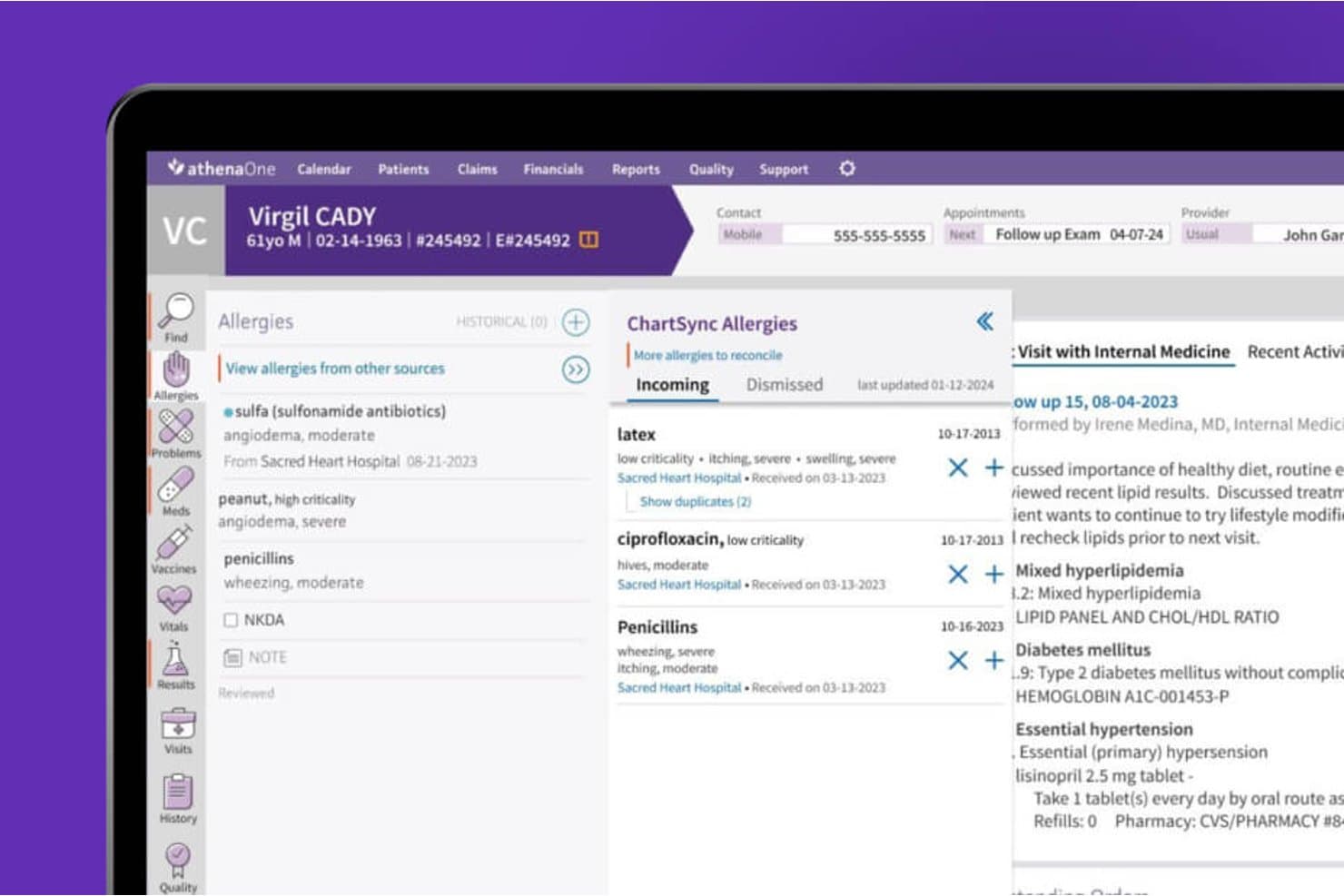
athenahealth syncs allergy data across sources for accurate patient records. athenaOne is an integrated EHR, practice management, and patient engagement platform from athenahealth that supports orthopedic practices with specialty-specific charting macros, surgical scheduling, ASC workflows, and revenue cycle management.
Who Is athenahealth Best For?
athenaOne is a strong fit for mid-sized orthopedic practices that want a single platform covering scheduling, billing, and patient engagement without managing multiple disconnected systems.
Why I Picked athenahealth
athenahealth earns its spot on my shortlist because its KLAS top-ranked ambulatory EHR status for medium-sized organizations reflects real-world performance that practice administrators and physician partners can trust. I like that athenaOne combines orthopedic-specific charting macros, surgical scheduling with linked procedure-room block time, and ASC pre-op and post-op documentation in one platform, so your team isn't bouncing between systems to manage a full surgical episode. The percentage-of-collections pricing model and no long-term contract also make it a lower-risk commitment for growing orthopedic groups.
athenahealth Key Features
- Patient self-scheduling and self check-in: Patients can book appointments online and complete check-in tasks, screeners, and consent forms before arriving at the clinic.
- Ambient documentation: Voice-driven ambient notes capture encounter details hands-free, reducing manual documentation time for orthopedic providers.
- Workers' compensation and personal-injury billing workflows: Built-in support for complex reimbursement scenarios common in orthopedic practices, including workers' comp and personal-injury cases.
- PROM screener automation: Practices can configure rules to automatically send digital outcome screeners to patients after qualifying appointments.
athenahealth Integrations
Native integrations include CommonWell Health Alliance, Carequality, and Surescripts. athenaOne connects with Tricefy through API or HL7 and supports Appriss Health and Logicoy for prescription monitoring; APIs are available for custom integrations.
Pros and Cons
Pros:
- Patient scheduling and reminders support daily clinic work
- Customizable chart templates and macros support routine visits
- Scheduling, records, and billing share one system
Cons:
- Imaging and surgical workflows lack orthopedic-specific depth
- iPad workflows can require too many clicks
Learn more about athenahealth: Best for small to medium-sized orthopedic practices
- Free demo available
- From $229/user/month

Image 6: PracticeEHR Orthopedic EMR Interface Practice EHR is an Electronic Health Record (EHR) solution designed specifically to meet the unique needs of small to medium-sized orthopedic practices. By offering streamlined scheduling, charting, and billing processes, Practice EHR simplifies practice management for these specific healthcare settings.
Why I Picked Practice EHR: I selected Practice EHR for this list due to its niche focus on small to medium-sized orthopedic practices. By understanding the specific needs and workflow of these healthcare setups, the tool stands apart from others that provide more generic solutions. I believe Practice EHR is best for these practices due to its user-friendly interface, tailored functionalities, and affordable pricing.
Standout features & integrations:
Practice EHR comes with a variety of useful features like digital charting, e-prescribing, and patient portals, all of which are particularly valuable in an orthopedic setting. As for integrations, Practice EHR syncs with multiple lab and imaging centers, enabling a more streamlined patient treatment process.
Pros and Cons
Pros:
- Variety of essential features for orthopedic practice
- User-friendly interface
- Tailored to the needs of small to medium-sized orthopedic practices
Cons:
- Limited customization capabilities
- May lack some advanced features present in more comprehensive systems
- Only offers annual billing, which may not be suitable for all practices
Learn more about Practice EHR:
How I Evaluate Orthopedic EMR
I split my evaluation into three parts, giving the most weight to core needs: document musculoskeletal exams and injuries, and access X-rays and MRIs in the patient record. Next, I consider differentiators such as PROM tracking. Finally, I assess specialty-specific onboarding, support, and pricing value beyond the feature set.
Core Functionality (Table Stakes For This List)
When I'm selecting tools for my list, I score each one on a scale from 0 (does not offer the functionality) to 5 (excels in this area) for each core functionality listed below. I then convert the total into a percentage to help assess each tool's overall fit, with extra weight on any functionalities I’ve deemed essential.
- Orthopedic Charting (Essential): I look for musculoskeletal exam and injury templates that capture joint-specific findings without relying on generic notes.
- Imaging Integration (Essential): I check whether clinicians can access X-rays and MRI results from the patient record and connect them to treatment decisions.
- Surgical Workflows: I assess how scheduling connects pre-op planning, procedure documentation, and post-op follow-up for each surgical episode.
- Coding & Billing: I look for coding support tied to fracture care, joint replacement, and DME claims, including relevant injury billing workflows.
- E-Prescribing: I consider support for routine prescriptions and controlled substances, along with medication safety checks for post-surgical care.
- Patient Portal: I evaluate patient access to visit summaries, records, appointment requests, and secure communication with the practice.
Once I have a list of tools that meet the criteria, I consider what sets each platform apart.
Differentiating Factors (What Sets Vendors Apart)
Here's how I compare and contrast different vendors:
Standout Features
I evaluate whether a platform automates PROMs collection for procedures like knee and hip replacements, since tracking patient-reported outcomes over time is key to demonstrating treatment value. DME and orthotics tracking also matters—practices that dispense braces or casting supplies in-office need inventory and billing tied directly to the patient encounter. I also check for mobile-optimized charting that lets surgeons document rounds or review records in the OR without switching devices.
Beyond Features
I check whether a platform supports HL7/FHIR data exchange with hospital and ASC systems, since surgeons splitting time between clinic and OR need shared surgical records without redundant documentation. Specialty-specific onboarding matters too—vendors that ship orthopedic templates and train billing staff on injury coding workflows cut time-to-value compared to generic build-outs. I also evaluate total cost of ownership against billing ROI, looking at how orthopedic-specific coding tools reduce claim denials for fracture care and joint replacement episodes.
Como escolher sistemas EMR ortopédicos
É fácil perder-se em listas extensas de funcionalidades e estruturas de preços complexas. Para o ajudar a manter o foco enquanto analisa o seu processo específico de seleção de software, apresentamos uma lista de verificação com os fatores a ter em conta:
| Fator | O que deve considerar |
|---|---|
| FatorEscalabilidade | O que deve considerarO software consegue acompanhar o crescimento da sua clínica? Considere a expansão futura e se a ferramenta consegue gerir mais pacientes ou localizações sem problemas. |
| FatorIntegrações | O que deve considerarFunciona com os seus sistemas atuais? Verifique a compatibilidade com outro software que utilize, como ferramentas de faturação ou agendamento. |
| FatorPersonalização | O que deve considerarPode adaptá-lo ao seu fluxo de trabalho? Procure opções para modificar modelos e relatórios de modo a corresponderem às necessidades da sua clínica. |
| FatorFacilidade de utilização | O que deve considerarÉ fácil de utilizar pela sua equipa? Avalie a curva de aprendizagem e se os funcionários conseguem navegar facilmente no sistema sem frustração. |
| FatorImplementação e integração inicial | O que deve considerarA transição é simples? Avalie o apoio prestado durante a configuração e os recursos disponíveis para formar a sua equipa de forma eficaz. |
| FatorCusto | O que deve considerarEnquadra-se no seu orçamento? Compare os planos de preços e certifique-se de que compreende que funcionalidades estão incluídas no preço base e quais são suplementos. |
| FatorMedidas de segurança | O que deve considerarOs registos dos pacientes estão protegidos? Certifique-se de que o software cumpre as leis de proteção de dados e dispõe de encriptação robusta e controlos de acesso. |
| FatorRequisitos de conformidade | O que deve considerarCumpre as normas do setor da saúde? Confirme que o software suporta os requisitos de conformidade necessários para a sua clínica, como os regulamentos HIPAA. |
O que são sistemas EMR ortopédicos?
O EMR ortopédico é um software concebido para gerir registos médicos eletrónicos especificamente para clínicas ortopédicas. Cirurgiões ortopédicos, fisioterapeutas e outros profissionais de saúde utilizam estas ferramentas para melhorar os cuidados prestados aos pacientes e simplificar as tarefas administrativas.
As funcionalidades de agendamento, faturação e acompanhamento de pacientes ajudam a assegurar uma gestão eficiente da clínica e a conformidade regulamentar. De um modo geral, estas ferramentas melhoram o fluxo de trabalho e a precisão dos dados dos pacientes em contextos ortopédicos.
Funcionalidades
Ao selecionar um EMR ortopédico, esteja atento às seguintes funcionalidades essenciais:
- Gestão dos registos dos doentes: Organiza e mantém informações detalhadas dos doentes para facilitar o acesso e as atualizações.
- Agendamento: Facilita a marcação e a gestão de consultas para otimizar o fluxo de doentes e reduzir as faltas.
- Faturação e emissão de faturas: Automatiza os processos de faturação e gera faturas para simplificar as operações financeiras.
- Segurança dos dados: Garante a proteção dos dados dos doentes através de encriptação e controlos de acesso, cumprindo as normas de conformidade.
- Modelos personalizáveis: Permite que as clínicas adaptem formulários e relatórios às necessidades específicas dos fluxos de trabalho.
- Funcionalidades de telemedicina: Permite consultas remotas para alargar o acesso aos cuidados de saúde e melhorar a flexibilidade.
- Análises e relatórios: Fornece informações sobre o desempenho da clínica e os resultados dos doentes através de relatórios detalhados.
- Integração com dispositivos: Liga-se a dispositivos vestíveis para acompanhar indicadores de saúde dos doentes e melhorar os planos de tratamento.
- Reconhecimento de voz: Permite documentar de forma eficiente as notas dos doentes através da funcionalidade de conversão de voz em texto.
- Recursos de formação: Disponibiliza vídeos, seminários online e guias para ajudar a equipa a aprender a utilizar o software de forma eficaz.
Vantagens
A implementação de um EMR ortopédico proporciona várias vantagens para a sua equipa e para a sua empresa. Eis algumas das que pode esperar:
- Maior eficiência: Automatiza tarefas como a faturação e o agendamento, libertando tempo para os cuidados aos doentes.
- Melhoria dos cuidados aos doentes: Permite um acesso rápido a registos detalhados dos doentes, apoiando um melhor diagnóstico e planeamento do tratamento.
- Segurança dos dados: Protege informações sensíveis dos doentes com encriptação robusta e controlos de acesso, garantindo o cumprimento dos regulamentos.
- Maior flexibilidade: Disponibiliza funcionalidades de telemedicina, permitindo que a sua equipa realize consultas remotas e alcance uma base de doentes mais ampla.
- Análises esclarecedoras: Fornece relatórios sobre o desempenho da clínica e os resultados dos doentes, ajudando-o a tomar decisões fundamentadas.
- Personalização: Adapta-se às necessidades específicas da sua clínica através de modelos e formulários personalizáveis, melhorando a adequação dos fluxos de trabalho.
Custos e preços
A seleção de um EMR ortopédico requer uma compreensão dos vários modelos de preços e planos disponíveis. Os custos variam consoante as funcionalidades, o tamanho da equipa, os complementos e outros fatores. A tabela abaixo resume os planos comuns, os respetivos preços médios e as funcionalidades normalmente incluídas nas soluções de EMR ortopédico:
Tabela de comparação de planos para EMR ortopédico
| Tipo de plano | Preço médio | Funcionalidades comuns |
|---|---|---|
| Tipo de planoPlano gratuito | Preço médio$0 | Funcionalidades comunsRegistos básicos dos doentes, agendamento limitado e suporte básico. |
| Tipo de planoPlano pessoal | Preço médio$20-$50/utilizador/mês | Funcionalidades comunsGestão dos registos dos doentes, agendamento de consultas e relatórios básicos. |
| Tipo de planoPlano empresarial | Preço médio$50-$100/utilizador/mês | Funcionalidades comunsAgendamento avançado, faturação e emissão de faturas, e modelos personalizáveis. |
| Tipo de planoPlano empresarial de grande dimensão | Preço médio$100-$200/utilizador/mês | Funcionalidades comunsRelatórios e análises completos, funcionalidades de telemedicina e suporte dedicado. |
Perguntas frequentes sobre sistemas de EMR ortopédicos
Eis algumas respostas a perguntas comuns sobre EMR ortopédica:
A EMR ortopédica pode integrar-se com outros sistemas de saúde?
Sim, muitas soluções de EMR ortopédica oferecem capacidades de integração com outros sistemas de saúde, como software de faturação, laboratório e farmácia. Isto garante um fluxo de dados contínuo e reduz os erros de introdução manual. Consulte o seu fornecedor sobre as integrações específicas disponíveis para garantir a compatibilidade com os seus sistemas existentes.
Como posso garantir a segurança dos dados com ferramentas de EMR ortopédica?
Garanta a segurança dos dados escolhendo uma EMR que cumpra normas de proteção de dados, como a HIPAA. Procure funcionalidades como encriptação, controlos de acesso dos utilizadores e atualizações de segurança regulares. Fale com o seu fornecedor sobre as medidas de segurança para compreender como protege as informações dos doentes.
As EMR ortopédicas incluem normalmente suporte integrado para fluxos de trabalho de imagiologia?
Sim, muitas plataformas ortopédicas foram concebidas para gerir imagiologia diagnóstica como parte do fluxo de trabalho clínico. Frequentemente, suportam a integração com sistemas PACS para aceder e armazenar radiografias, ressonâncias magnéticas ou TAC. A configuração e a compatibilidade variam consoante a plataforma.
É necessária formação para utilizar ferramentas de EMR ortopédica?
Sim, é frequentemente necessária formação para familiarizar a sua equipa com a interface e as funcionalidades do software. A maioria dos fornecedores disponibiliza recursos de formação, como tutoriais, seminários online e apoio ao cliente. Investir tempo na formação pode melhorar a adoção por parte dos utilizadores e a eficiência no seu consultório.
Estes sistemas podem ser utilizados tanto em hospitais como em consultórios privados?
Sim, embora algumas plataformas sejam mais adequadas a um contexto do que ao outro. Os sistemas concebidos para hospitais podem incluir integrações mais complexas e suporte para ambientes com vários profissionais. Outros são simplificados para clínicas em regime ambulatório, com equipas mais pequenas e fluxos de trabalho mais simples.