

Navegar pelo mundo do software EMR de Ginecologia e Obstetrícia pode ser avassalador. Quer uma solução que se adapte às necessidades únicas do seu consultório sem acrescentar complexidade. Na minha experiência, o software EMR adequado pode aliviar o peso da gestão dos registos dos doentes e melhorar a eficiência da sua equipa.
Testei e analisei de forma independente várias soluções de software e compreendo os desafios que enfrenta. Encontrará informações imparciais sobre as melhores opções de EMR de Ginecologia e Obstetrícia disponíveis, com foco nas funcionalidades que realmente importam.
Neste artigo, vou orientá-lo pelas minhas principais escolhas, destacando os principais benefícios e os aspetos que distinguem cada uma. Quer esteja à procura de uma melhor comunicação com os doentes ou de fluxos de trabalho simplificados, acredito que encontrará informações valiosas para o ajudar a tomar uma decisão informada para o seu consultório.
Why Trust Our Software Recommendations
6,700+
Reviews
20
Industry experts
16+
Evaluation factors
14
Years
Our team has been testing and reviewing software since 2012. As medical practice leaders ourselves, we know how difficult—and important—it is to choose the right software.
For this guide, we evaluated tools using hands-on testing and independent research, scoring tools using our selection criteria.
Our reviews reflect our human editorial judgment, not a sales pitch.
Tabela comparativa: software EMR de Ginecologia e Obstetrícia
Esta tabela comparativa resume os detalhes de preços das minhas principais escolhas de software EMR de Ginecologia e Obstetrícia.
| Tool | Best For | Trial Info | Price | ||
|---|---|---|---|---|---|
| 1 | Best for integrated e-prescribing capabilities | Free demo + free expert consultation available | Pricing upon request | Website | |
| 2 | Best for interoperability and patient experience | Free demo available | Pricing upon request | Website | |
| 3 | Best for analytics-driven decision making | Free demo available | Pricing upon request | Website | |
| 4 | Best for specialty-specific workflows | Free demo available | Pricing upon request | Website | |
| 5 | Best for AI-assisted scheduling and billing | Free demo available | Pricing upon request | Website | |
| 6 | Best for OB/GYN billing and charting history | Free demo available | Pricing upon request | Website | |
| 7 | Best for end-to-end OB global billing workflows | Free demo available | Pricing upon request | Website | |
| 8 | Best for ACOG-aligned prenatal charting | Free demo available | Pricing upon request | Website | |
| 9 | Best for comprehensive cloud-based operations | Free demo available | From $295/user/month | Website | |
| 10 | Good for integrated practice management | Free demo available | Pricing upon request | Website |


Análises do melhor software EMR de Ginecologia e Obstetrícia
Abaixo encontram-se os meus resumos detalhados do melhor software EMR de Ginecologia e Obstetrícia que integrou a minha seleção. As minhas análises oferecem uma visão detalhada das principais funcionalidades, vantagens e desvantagens, integrações e casos de utilização ideais de cada ferramenta, para o ajudar a encontrar a melhor opção para si.
 1Best for integrated e-prescribing capabilities
RXNT
- Free demo + free expert consultation available
- Pricing upon request
Visit WebsiteCustomer Rating:4.3/5
RXNT ePrescribing helps providers create, review, and send prescriptions electronically while checking medication interactions and patient-specific prescribing details. RXNT is a cloud-based EMR and practice management platform built for OB/GYN practices, combining specialty-specific charting templates, e-prescribing, scheduling, billing, and a patient portal in one system.
Who Is RXNT Best For?
RXNT serves independent OB/GYN practices and small-to-midsize women's health clinics that need a specialty-configured, all-in-one EMR and practice management system.
Why I Picked RXNT
I picked RXNT as one of the best for OB/GYN practices because its e-prescribing is built into the clinical workflow, not bolted on. As an OB/GYN provider, you can prescribe directly from the patient chart, with automatic drug interaction and allergy checks running in real time. RXNT is DEA-certified for EPCS, covering Schedule II–V controlled substances, and it connects directly to state Prescription Drug Monitoring Programs (PDMPs) via Bamboo Health, so you don't have to log into a separate database mid-visit.
RXNT Key Features
- OB/GYN charting templates: Access 36 pre-built, customizable templates for obstetric and gynecologic documentation.
- Lab order management: Order labs and receive results within the patient chart, with uploads to the patient record.
- Online patient intake forms: Send digital intake and consent forms to patients before their appointment so they can fill them out in advance.
- Mobile charge capture: Log charges from iOS or Android devices, keeping billing connected to point-of-care documentation.
RXNT Integrations
RXNT's e-prescribing software is available as part of its fully integrated suite or as a standalone product that works with most EHR systems. The platform connects to state PDMPs via Bamboo Health, is backed by Surescripts (connecting to over 95% of national pharmacies), and works with Change Healthcare for clearinghouse services. Providers can also use RXNT's VideoBridge tool to link with their preferred HIPAA-compliant video platform, such as Zoom or doxy.me. RXNT supports lab and radiology interfaces, and if your lab isn't connected, the platform can establish a connection to facilities across the country. The system follows interoperability standards like FHIR and HL7.
Pros and Cons
Pros:
- Mobile prescribing app works from any location
- Smart Forms and macros speed up charting
- Customizable prescription settings per patient
Cons:
- Occasional sluggishness delays record access
- Medication search and formulary data gaps
Learn more about RXNT: Best for interoperability and patient experience
- Free demo available
- Pricing upon request
Visit WebsiteCustomer Rating:5/5
Here is a screenshot of the NextGen EMR's generated patient report. NextGen is a powerful EMR solution for OB-GYN practices that emphasizes both interoperability and patient experience. It offers a blend of sophisticated functionality and integrative capabilities, ensuring both a smoother workflow for clinicians and a better experience for patients.
Why I Picked NextGen:
Selecting NextGen was an easy decision because of its superior capabilities in fostering interoperability and improving the patient experience. I have chosen it as the "Best for interoperability and patient experience" due to its seamless integration with other systems and patient-focused features.
Interoperability in healthcare is a critical factor for enhancing collaboration and coordination, and NextGen excels in this aspect.
What Do You Get for Free?
NextGen does not offer a free version of its EMR system. However, they do provide a complimentary demo for users to get a feel for the software's capabilities and potential benefits to their practice.
Standout Features and Integrations:
One of the standout features of NextGen is its unified and customizable dashboard that allows for efficient data management. Additionally, NextGen's mobile app enhances patient experience by providing easy access to health records, appointment scheduling, and communication with providers. The software also integrates seamlessly with multiple healthcare systems, pharmacies, and labs, which greatly improves practice workflow.
Pros and Cons
Pros:
- Customizable dashboard for efficient data management
- Patient-focused features enhance the overall patient experience
- Excellent interoperability with other systems
Cons:
- Learning curve may be steep for non-tech savvy users
- The cost might be higher for smaller practices
- Lack of a free version might be a deterrent for some
Learn more about NextGEN: Best for analytics-driven decision making
- Free demo available
- Pricing upon request
Visit WebsiteCustomer Rating:5/5
Here is a screenshot of the Athena Health vitals feature. Athena Health provides cloud-based services for electronic health records (EHR), revenue cycle management & medical billing services, patient engagement, and care coordination. Its robust analytics capabilities are particularly notable, equipping healthcare providers with the insights necessary for informed decision-making.
Why I Picked Athena Health:
I chose Athena Health for its focus on data analytics. In the vast landscape of EHR systems, Athena Health stands out with its sophisticated analytics capabilities. I believe these data-driven insights are crucial for improving patient outcomes, streamlining operations, and ultimately enhancing the overall efficiency of healthcare delivery. This is why Athena Health, in my opinion, is the best tool for analytics-driven decision-making.
What Do You Get for Free?
Athena Health does not provide a free tier or trial. However, they do offer a free demo that prospective users can request to get a sense of the software's capabilities and interface.
Standout Features and Integrations:
Athena Health's standout feature is its advanced analytics and reporting capabilities that allow users to track and evaluate key performance metrics. It also has an effective patient portal, providing patients with easy access to their health information.
In terms of integrations, Athena Health integrates well with a variety of hospital systems and third-party applications to ensure seamless data transfer and improved workflow efficiency.
Pros and Cons
Pros:
- Extensive integration possibilities
- Effective patient portal
- Advanced analytics and reporting capabilities
Cons:
- Potential for additional costs with certain integrations
- Customized pricing structure may not suit all practices
- No free tier or trial
Learn more about Athenahealth: Best for specialty-specific workflows
- Free demo available
- Pricing upon request
Visit WebsiteCustomer Rating:4.5/5
Here is a screenshot of ModMed's data analytics dashboard. ModMed, also known as Modernizing Medicine, offers a suite of healthcare IT solutions, including an advanced Electronic Health Record (EHR) system. With its specialized workflows, it caters to various medical specialties such as pediatrics, OB-GYN, cardiology, etc., making it ideal for practices looking for tailored solutions.
Why I Picked ModMed:
I picked ModMed for its specialty-specific focus, which differentiates it from more generic platforms. By tailoring its workflows to different medical specialties, it addresses unique needs that generalist tools often overlook. I believe ModMed is best for practices seeking solutions optimized for their specific field.
What Do You Get for Free?
ModMed doesn't offer a free plan. However, they do provide a free demo for interested users to understand the functionality and benefits of their system.
Standout Features and Integrations:
ModMed provides specialty-specific EHR, practice management, and revenue cycle management services, among other features. The platform's capability to create and customize workflows according to the needs of specific specialties is a standout feature. ModMed also integrates with various medical billing, telehealth, and lab service providers to extend its functionality.
Pros and Cons
Pros:
- Integrates with various external services
- Provides a suite of services including EHR, practice management, and revenue cycle management
- Tailored solutions for various medical specialties
Cons:
- Could be overwhelming for practices seeking simple solutions
- Pricing is not transparent, must contact them for a quote
- No free plan or trial
Learn more about ModMed: Best for AI-assisted scheduling and billing
- Free demo available
- Pricing upon request
Visit WebsiteCustomer Rating:4.3/5
Here is a screenshot of the Allegiance MD software on all devices. AllegianceMD is an electronic health records software developed for OB-GYN clinics. It leverages AI technology to streamline administrative tasks such as scheduling appointments for patients and medical professionals, and billing.
Why I Picked AllegianceMD:
I selected AllegianceMD for its innovative use of AI to automate administrative procedures, a feature I find quite unique among its competitors. This is why I believe it's "Best for AI-assisted scheduling and billing" - its AI features help save time and reduce errors in administrative tasks, contributing to the efficiency and accuracy of practice operations.
What Do You Get for Free?
While AllegianceMD doesn't provide a free plan, they do offer a free demo for interested customers. This is a chance for you to explore the software's capabilities and evaluate its fit for your specific needs.
Standout Features and Integrations:
AllegianceMD comes packed with a robust feature set, including charting, e-prescribing, and more. The key feature is its AI-driven technology that assists in scheduling and billing tasks, simplifying these critical operations. It also integrates with labs, pharmacies, and other healthcare service providers, creating a more seamless flow of patient data across different systems.
Pros and Cons
Pros:
- Integrates with various healthcare service providers for a seamless data flow
- Comprehensive set of features for practice management
- AI-assisted scheduling and billing improve efficiency and accuracy
Cons:
- Complexity of the AI feature may require a learning curve for some users
- Lack of a free plan or trial might deter some customers
- High starting price may be a barrier for smaller practices
Learn more about AllegianceMD: Best for OB/GYN billing and charting history
- Free demo available
- Pricing upon request
Visit WebsiteCustomer Rating:3.8/5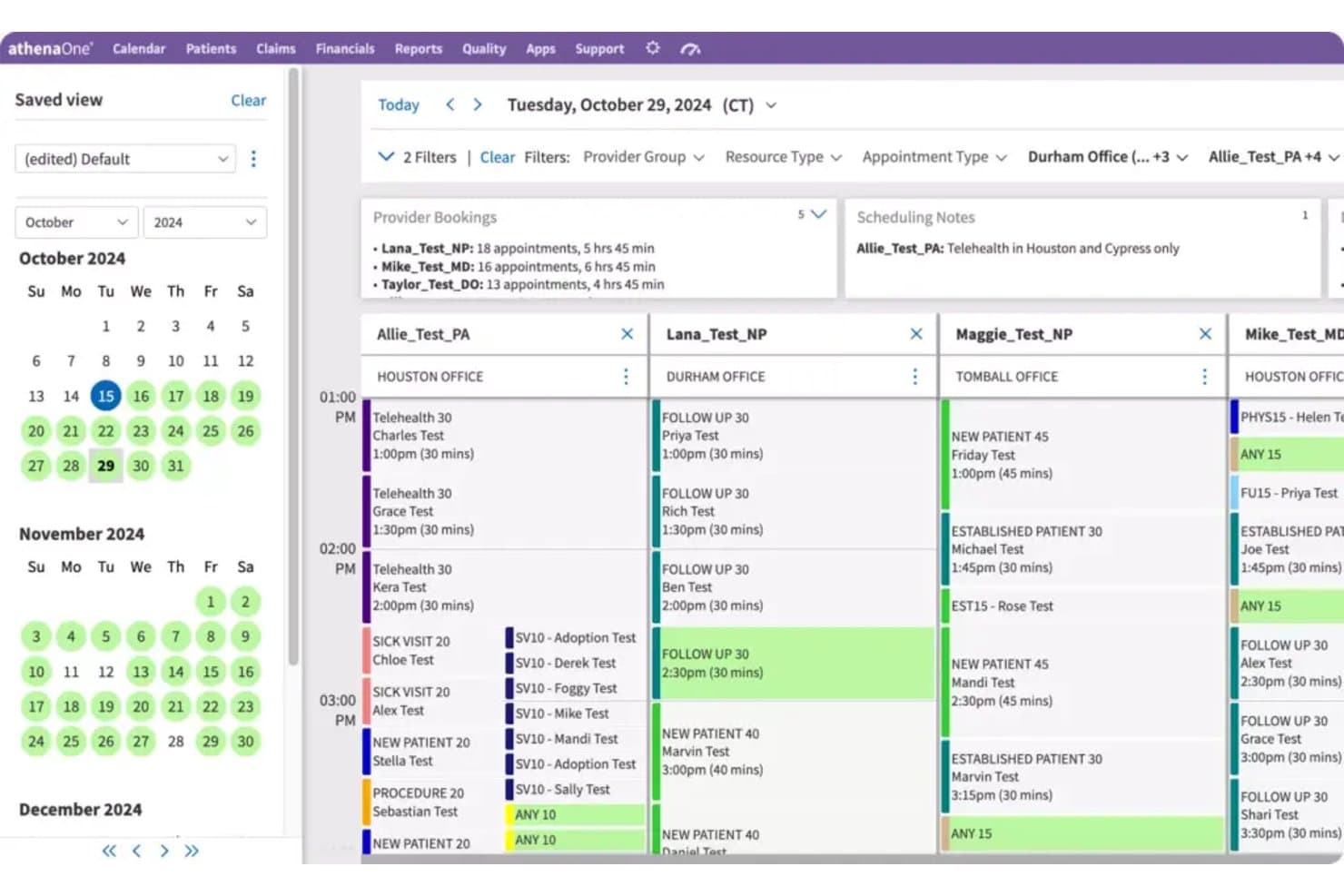
athenaOne lets users manage multi-provider daily schedules across office locations. athenaOne is an integrated EHR, medical billing, and practice management platform from athenahealth that includes a dedicated Women's Health module with OB/GYN-specific clinical templates, prenatal flowsheets, and specialty billing workflows.
Who Is athenaOne Best For?
athenaOne is a strong fit for OB/GYN practices that need a single platform to manage detailed pregnancy charting, longitudinal patient history, and specialty billing workflows.
Why I Picked athenaOne
athenaOne earns its spot on my shortlist because of how well it handles the two things OB/GYN practices wrestle with most: tracking a patient's full pregnancy history and keeping billing on track. The OB Episode API structures prenatal flowsheet data, including gestational age, fetal heart rate, fundal height, and cervix exams, so longitudinal records stay organized across the entire episode of care. I also like that encounter plans pre-populate routine orders by pregnancy stage, which cuts documentation time during prenatal visits.
athenaOne Key Features
- Specialty-specific clinical template library: athenaOne maintains a curated template library informed by specialty-society updates, clinician input, and Epocrates, with templates pre-loaded for specialty customers.
- Patient record sharing via CommonWell and Carequality: athenaOne automatically exchanges patient records across care sites through CommonWell and Carequality network connections.
- Role-based training journey: Onboarding includes structured core curriculums covering scheduling, check-in/check-out, exam, ordering, and revenue-cycle claims, plus OB/GYN-specific training and user groups.
- Women's health preventive outreach: Automated reminders support well visits, mammography, cancer screenings, and other women's health preventive care scheduling.
athenaOne Integrations
athenaOne offers native integrations with CommonWell Health Alliance and Carequality for patient-record exchange. It also provides 277K+ direct clinical integrations, 590+ Marketplace partners, and APIs for custom connections.
Pros and Cons
Pros:
- Reviewers value integrated charts and billing
- Reviewers praise scheduling and appointment reminders
- Pregnancy history stays organized across visits
Cons:
- Reviewers report click-heavy chart navigation
- Prenatal scheduling lacks gestational milestone automation
Learn more about athenaOne: Best for end-to-end OB global billing workflows
- Free demo available
- Pricing upon request
Visit WebsiteCustomer Rating:3.6/5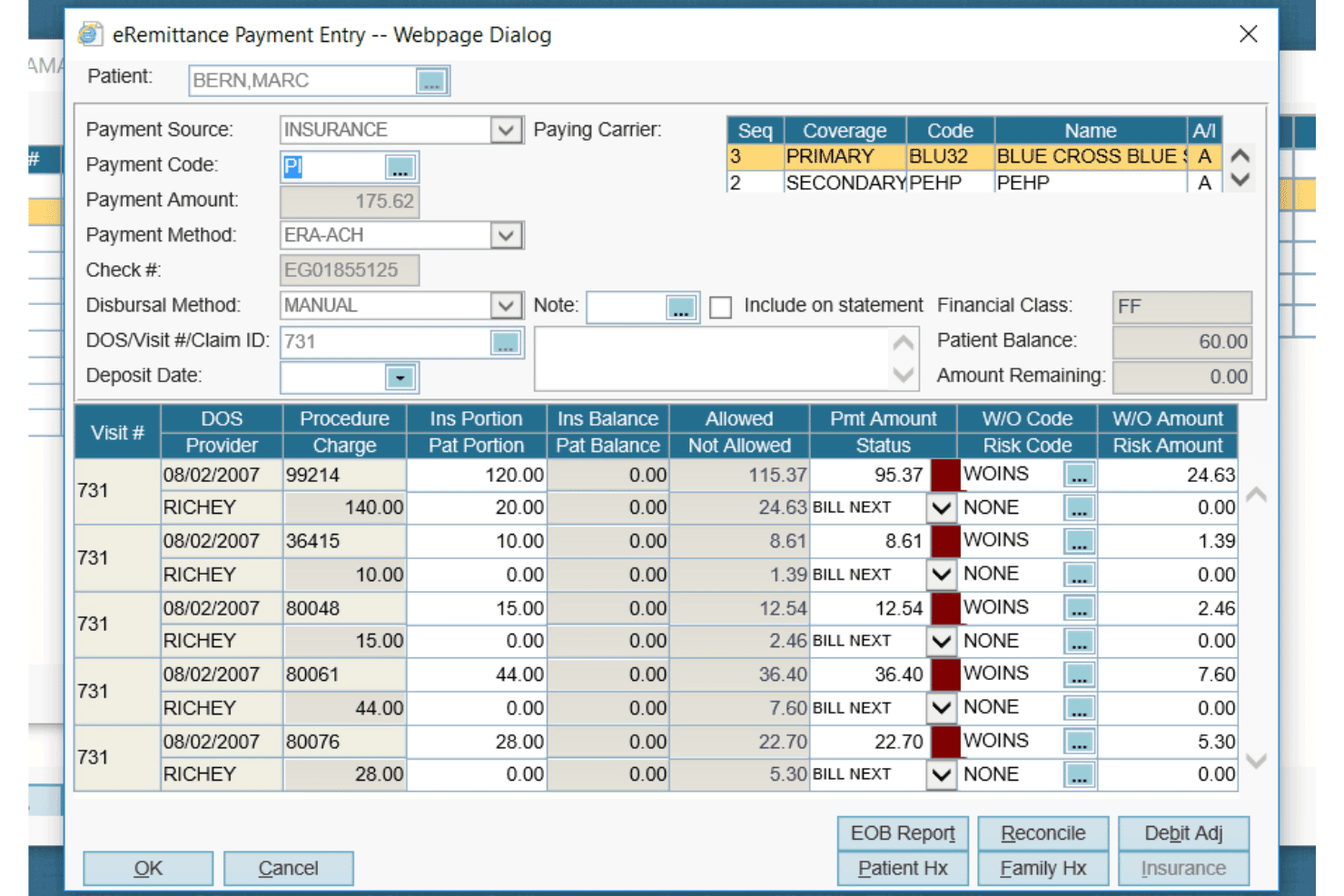
AdvancedMD offers a detailed eRemittance Payment Entry dialog for managing insurance billing, claim payments, and write-off codes per procedure. AdvancedMD is an OB/GYN practice management and EHR platform that combines obstetric charting, ACOG-similar prenatal flowsheets, global OB billing, scheduling, and patient engagement tools in a single suite.
Who Is AdvancedMD Best For?
AdvancedMD suits multi-provider OB/GYN practices that want billing, EHR, and patient engagement in one platform—especially those prioritizing OB global billing management.
Why I Picked AdvancedMD
AdvancedMD earns its spot on my list because of how it handles OB global billing, which is genuinely one of the trickiest parts of running an OB/GYN practice. The OB global package groups antepartum, delivery, and postpartum care into a single billable period, and quick charge entry feeds directly into Claims Center for scrubbing and submission. I also like that the ACOG-similar Show Date Vertical flowsheet and pregnancy note templates carry data forward visit to visit, keeping documentation tied tightly to billing.
AdvancedMD Key Features
- Bidirectional lab interface: Transfers patient data and lab orders in both directions and flags results that fall outside normal ranges.
- Patient portal: Lets patients self-schedule, complete intake forms, request prescription renewals, pay bills, and view lab results.
- AI Clinical Assistant: Uses ambient listening to generate visit notes in five formats and surface suggested chart action items.
- Electronic remittance advice: Automatically matches incoming payments and builds prioritized worklists for denials and unexpected payment amounts.
AdvancedMD Integrations
AdvancedMD offers 1,400+ integrations and 50+ billing partners through its marketplace, including InstaMed, Aquina, Healthix, NextPatient, and Falkondata. Its open API supports custom connections with laboratories, health information exchanges, and apps.
Pros and Cons
Pros:
- Reviewers praise billing reports and documentation
- Global billing connects care and claims
- Pregnancy notes carry data across visits
Cons:
- Reviewers report glitches and slowdowns
- Template setup takes substantial staff time
 Best for ACOG-aligned prenatal charting
- Free demo available
- Pricing upon request
Visit WebsiteCustomer Rating:3.5/5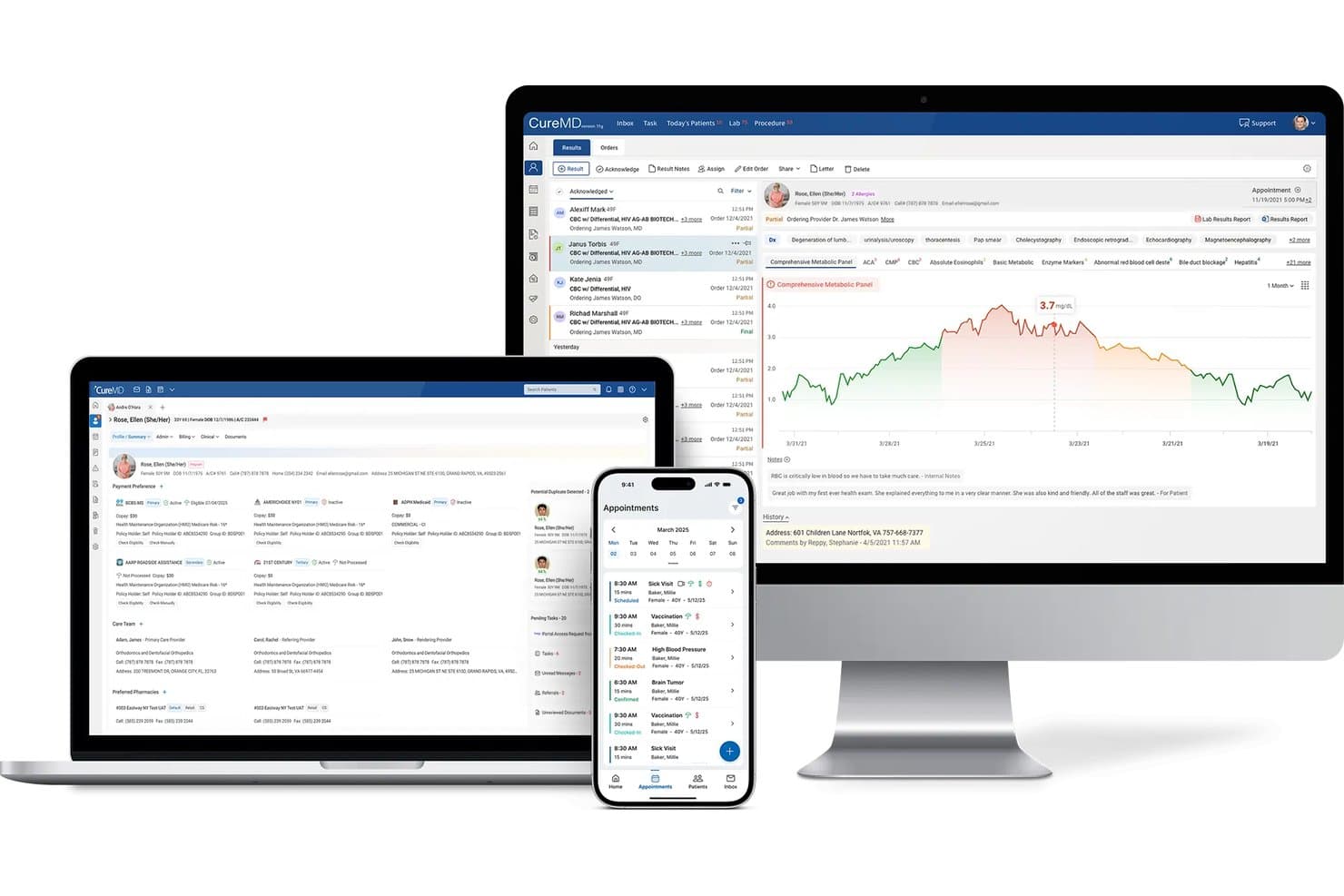
CureMD displays patient records, lab results, and appointments across devices. CureMD's ObGyn-Cloud is a cloud-based OB/GYN EHR that combines ACOG-aligned prenatal flowsheets, specialty charting templates, lab and ultrasound integration, and practice management tools built for obstetrics and gynecology workflows.
Who Is CureMD Best For?
CureMD's ObGyn-Cloud is a strong fit for OB/GYN practices that center their clinical workflow on ACOG-aligned prenatal documentation and need specialty charting built in from day one.
Why I Picked CureMD
I picked CureMD as one of the best because its ObGyn-Cloud is built squarely around ACOG-aligned prenatal flowsheets, which means your antepartum record, OB management list, and milestone tracking for things like fetal heart rate, weight gain, and glucose are structured to match the standards your practice already follows. I also like that preconfigured specialty templates cover GYN procedures like IUD insertion and Pap screenings, so charting doesn't require rebuilding workflows from scratch.
CureMD Key Features
- OB/GYN E&M coding: Automatically calculates service levels and applies OB/GYN-specific E&M codes at the point of charge entry.
- AI medical scribe: Listens to patient-provider encounters and generates specialty-tailored clinical notes with automated ICD-10 and CPT coding.
- Patient portal with self-scheduling: Lets patients book or reschedule appointments, request refills, and access lab results directly from the portal.
- Mobile EHR access: Supports real-time note capture, lab orders, and chart review on iOS and Android, including from hospital settings.
CureMD Integrations
CureMD documents 400+ plug-and-play connections, including Quest, LabCorp, Surescripts, HCA HealthCare, and GE Signature Series Ultrasound. It also offers a FHIR API for custom integrations.
Pros and Cons
Pros:
- Users report organized scheduling and faster reimbursement
- Reviewers value centralized patient records
- ACOG-aligned prenatal flowsheets structure milestone documentation
Cons:
- No documented partograph or postpartum outcome tracking
- Reviewers report lag, freezing, and workflow-disrupting bugs
Learn more about CureMD: Best for comprehensive cloud-based operations
- Free demo available
- From $295/user/month

Here is a screenshot of the Cure MD Mobile App with user panel. Cure MD is a cloud-based EMR software designed specifically for OB-GYN practices. Its central goal is to improve healthcare delivery through technology, offering a broad range of services from electronic health records to practice management and patient engagement.
Why I Picked Cure MD:
I chose Cure MD for its extensive, cloud-based capabilities that cover all aspects of OB-GYN EHR practices. Its distinguishing factor lies in its cloud-based structure that facilitates accessibility and data management. Thus, it's "Best for comprehensive cloud-based operations" because it provides a full suite of operations that are accessible anytime, anywhere, ensuring smooth workflows and improved patient care.
What Do You Get for Free?
Cure MD does not provide a free tier of their service, but they do offer a free demo. This provides a detailed walk-through of their platform and features to optimize practice management software, allowing you to gauge if it's the right fit for your practice.
Standout Features and Integrations:
Key features of Cure MD include charting, appointment scheduling, e-prescribing, and billing. These functions enable seamless day-to-day operations for an OB-GYN practice. It also integrates with lab systems, pharmacies, and radiology information systems, offering an interconnected network that enhances efficiency.
Pros and Cons
Pros:
- Seamless integrations with key systems such as labs and pharmacies
- Comprehensive suite of tools for efficient practice management
- Cloud-based platform ensures accessibility and ease of data management
Cons:
- Some may find the user interface less intuitive compared to other options
- Might require a learning curve to utilize the full feature set
- No free tier or trial could deter some users
Learn more about Cure MD:
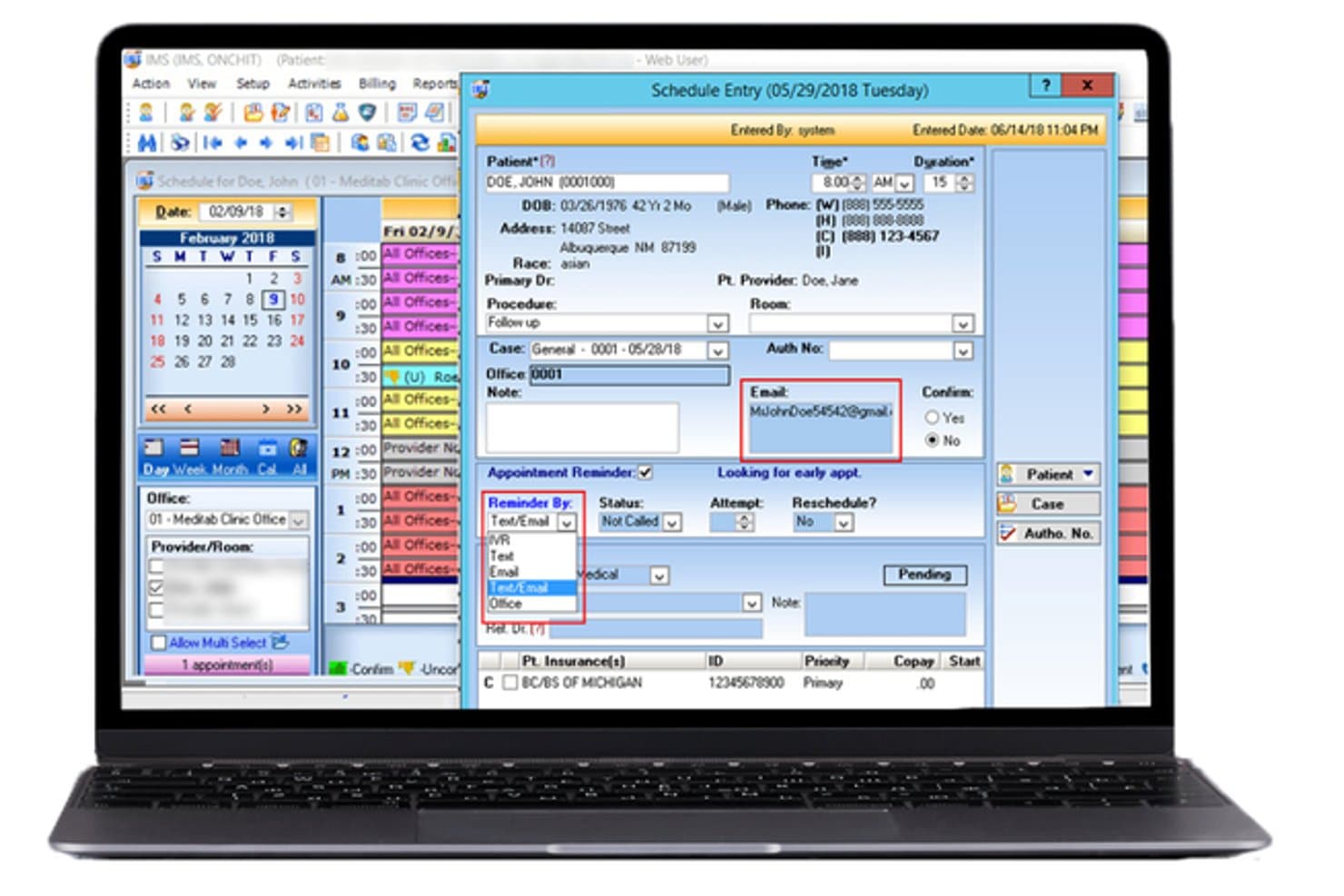
Meditab lets users schedule and confirm patient appointments with ease. Meditab's Intelligent Medical Software (IMS) is an OB/GYN EHR that combines clinical charting, antepartum records, prenatal flowsheets, practice management, and integrated billing in one platform.
Who Is Meditab Best For?
Meditab's IMS is a strong fit for OB/GYN practices that want EHR, practice management, billing, and office operations in a single integrated system.
Why I Picked Meditab
I picked Meditab's Intelligent Medical Software as one of the best because it brings EHR, practice management, billing, and office operations into a single system, which is genuinely useful for OB/GYN practices tired of stitching together separate tools. I especially like the antepartum record module, which consolidates current and past pregnancies, EDD/EGA calculations, labs, prescriptions, and vitals in one view alongside automatic Gravida/Para calculation. The prenatal flowsheets auto-import vitals and labs entered elsewhere in the system, so there's no manual re-entry between clinical and administrative workflows.
Meditab Key Features
- Built-in ACOG form: Generates an electronic ACOG pregnancy form that can be printed, faxed, shared to the patient portal, or saved as a patient document.
- Clinical decision support: Provides person-specific alerts to help identify potential adverse care events during clinical workflows.
- HL7 lab order and result integration: Sends lab orders and receives results electronically within the EHR using an HL7 interface.
- AI-powered ambient scribe: Listens to patient-provider conversations, produces real-time transcripts and structured summaries, and identifies codes and orders.
Meditab Integrations
Meditab's IMS documents integrations with Surescripts, Global Payments Integrated, Availity, BillFlash, and Nabla for HIE, payments, billing, and AI scribe workflows. REST and FHIR APIs support custom integrations, while ultrasound and laboratory connections are mentioned without vendor names.
Pros and Cons
Pros:
- Integrated tools support office workflows
- Reviewers praise configurable specialty templates
- Reviewers value quick chart lookup
Cons:
- Routine chart edits may take extra clicks
- Billing transfers can complicate claims work
Learn more about Meditab:
Outro software EMR de Ginecologia e Obstetrícia
Eis algumas opções adicionais de software EMR de Ginecologia e Obstetrícia que não integraram a minha seleção, mas que ainda vale a pena conhecer:
- 11EPICBest for large-system OB/GYN care continuity
- 12ObGyn CloudGood for cloud-based access and updates
- 13PrognoCIS Psychiatry EHRBest for secure patient data handling
- 14Praxis EMRBest for knowledge-based charting
- 15eClinicalWorksBest for large OB/GYN group scalability
- 16Practice FusionBest for OB/GYN-specific charting templates
- 17PracticeFusionBest for collaborative healthcare delivery
- 18Accuro EMRBest for streamlined patient engagement
- 19EHNOTEBest for intuitive and easy navigation
How I Evaluate OB/GYN EMR Software
I split my evaluation into three parts, giving the most weight to documenting visits, tracking pregnancy episodes, and supporting GYN exams. Next, I look for differentiators such as digital labor tracking. Finally, I consider OB/GYN-specific onboarding, support, and value for the practice’s size.
Core Functionality (Table Stakes For This List)
When I'm selecting tools for my list, I score each one on a scale from 0 (does not offer the functionality) to 5 (excels in this area) for each core functionality listed below. I then convert the total into a percentage to help assess each tool's overall fit, with extra weight on any functionalities I’ve deemed essential.
- EHR Charting (Essential): I look for structured encounter notes that capture histories, assessments, plans, and follow-ups across prenatal and GYN visits.
- OB/GYN Templates (Essential): Prenatal flowsheets, pregnancy episode tracking, and GYN exam templates should fit routine visits without requiring staff to rebuild notes.
- OB Scheduling: I check whether teams can plan recurring prenatal visits around gestational milestones and keep due dates visible alongside appointment calendars.
- Global OB Billing: I assess how the system tracks antepartum, delivery, and postpartum services within bundled billing and supports charge review.
- Results Integration: I look for lab and ultrasound results in the patient chart, with their status and clinical context easy to locate.
- Reproductive History: I consider whether staff can follow reproductive history across pregnancies and GYN visits without relying on disconnected notes.
Once I have a list of tools that meet the criteria, I consider what sets each platform apart.
Differentiating Factors (What Sets Vendors Apart)
Here's how I compare and contrast different vendors:
Standout Features
I check whether a platform includes digital partograph tools that visualize labor progression, contractions, and fetal heart tracings in real time. That matters when a provider needs to spot stalled labor or decelerations without flipping between paper records and separate monitors. I also evaluate risk stratification dashboards that flag conditions like preeclampsia or gestational diabetes across a full patient panel. A good dashboard surfaces these alerts before a visit, not during it. Finally, I look at mobile charting access, since labor events rarely wait for a desktop workstation.
Beyond Features
I evaluate whether a platform can exchange data with hospital labor and delivery systems, since many patients deliver at facilities outside the originating practice. Duplicate charting across ambulatory and inpatient settings is a real workflow drain. I also check each vendor's track record in OB/GYN—vendors with deep specialty roots tend to ship ACOG guideline updates faster than general-purpose EMRs retrofitted for women's health. Finally, given how sensitive reproductive health data is, I look at role-based access controls and data governance policies that limit who can view specific GYN and OB records.
Como escolher software EMR de Ginecologia e Obstetrícia
É fácil perder-se em listas extensas de funcionalidades e estruturas de preços complexas. Para o ajudar a manter o foco enquanto trabalha no seu processo único de seleção de software, eis uma lista de verificação dos fatores a ter em conta:
| Fator | O que considerar |
|---|---|
| FatorEscalabilidade | O que considerarO software pode crescer com o seu consultório? Considere o volume de doentes, o número de utilizadores e os planos de expansão futuros. Evite ferramentas que não consigam suportar mais utilizadores ou dados. |
| FatorIntegrações | O que considerarEstabelece ligação às ferramentas que já utiliza? Verifique a compatibilidade com sistemas de faturação, interfaces laboratoriais e outras aplicações de saúde que utiliza. |
| FatorPersonalização | O que considerarPode adaptá-lo aos seus fluxos de trabalho? Procure opções para modificar modelos, relatórios e painéis de controlo de modo a corresponderem às necessidades do seu consultório. |
| FatorFacilidade de utilização | O que considerarÉ fácil de utilizar pela sua equipa? Avalie a curva de aprendizagem e o design da interface. Evite sistemas excessivamente complexos que dificultem as operações diárias. |
| FatorImplementação e integração inicial | O que considerarQuanto tempo demora a começar? Considere o tempo de configuração, os materiais de formação e o apoio durante a transição. Certifique-se de que se adequa ao seu calendário e aos seus recursos. |
| FatorCusto | O que considerarQual é o seu orçamento? Compare planos de preços, taxas ocultas e custos a longo prazo. Certifique-se de que o software oferece valor sem sobrecarregar as suas finanças. |
| FatorMedidas de segurança | O que considerarOs dados e a privacidade dos doentes estão protegidos? Verifique a conformidade com a HIPAA e outros regulamentos, as normas de encriptação e o historial de violações de dados. |
O que é o software EMR OB-GYN?
O software EMR OB-GYN é uma solução digital concebida para gerir registos de pacientes, consultas e fluxos de trabalho clínicos específicos de clínicas de obstetrícia e ginecologia. Estas ferramentas são normalmente utilizadas por profissionais de saúde, como obstetras, ginecologistas e respetivo pessoal de apoio, proporcionando valor através da melhoria da eficiência e dos cuidados prestados aos pacientes. Funcionalidades como a gestão de registos de pacientes, o agendamento de consultas e o apoio à conformidade ajudam nas operações diárias de uma clínica médica. No geral, estas ferramentas melhoram a capacidade dos profissionais de saúde para prestarem cuidados eficazes e organizados.
Funcionalidades
Ao selecionar um software EMR OB-GYN, tenha em atenção as seguintes funcionalidades principais:
- Gestão de registos de pacientes: Organiza e armazena as informações dos pacientes de forma segura, tornando-as facilmente acessíveis ao pessoal médico.
- Agendamento de consultas: Ajuda a gerir e coordenar eficazmente as consultas dos pacientes, reduzindo as faltas e os conflitos de agendamento.
- Faturação e pagamentos: Simplifica as transações financeiras através do processamento de faturas e pagamentos, melhorando o ciclo de receitas.
- Modelos personalizáveis: Permite adaptar formulários e documentos às necessidades específicas da clínica, melhorando a eficiência do fluxo de trabalho.
- Integração de telessaúde: Facilita as consultas virtuais, alargando o acesso aos cuidados para os pacientes que não podem deslocar-se presencialmente.
- Acesso ao portal do paciente: Permite aos pacientes consultar os seus registos, marcar consultas e comunicar com os prestadores de cuidados de saúde online.
- Análise avançada: Fornece informações sobre os dados dos pacientes e o desempenho da clínica, apoiando a tomada de decisões e o planeamento estratégico.
- Segurança dos dados: Garante a conformidade com regulamentos como a HIPAA, protegendo as informações sensíveis dos pacientes contra violações.
- Suporte para várias localizações: Gere operações em vários locais da clínica, garantindo consistência e coordenação.
- Visitas guiadas interativas ao produto: Disponibiliza orientações passo a passo para ajudar os novos utilizadores a aprender rapidamente a utilizar o sistema e as suas funcionalidades.
Vantagens
A implementação de um software EMR OB-GYN proporciona várias vantagens para a sua equipa e para a sua empresa. Eis algumas das que pode esperar:
- Maior eficiência: Automatiza tarefas de rotina, como o agendamento e a faturação, libertando tempo para os cuidados aos pacientes.
- Melhoria dos cuidados aos pacientes: Permite um acesso rápido aos registos dos pacientes, ajudando os médicos a tomar decisões informadas.
- Exatidão dos dados: Reduz os erros nas informações dos pacientes e na faturação através de modelos e processos normalizados.
- Envolvimento dos pacientes: Disponibiliza portais para um acesso fácil às informações de saúde, promovendo uma melhor comunicação e participação.
- Conformidade regulamentar: Garante o cumprimento das leis de proteção de dados, salvaguardando as informações dos pacientes e evitando problemas legais.
- Escalabilidade: Apoia o crescimento, adaptando-se ao aumento do número de pacientes e à abertura de novos locais de atendimento.
- Poupança de custos: Simplifica as operações e reduz os custos administrativos, melhorando os resultados financeiros.
Custos e preços
A seleção de um software EMR OB-GYN exige uma compreensão dos vários modelos e planos de preços disponíveis. Os custos variam consoante as funcionalidades, o tamanho da equipa, os complementos, entre outros fatores. A tabela abaixo resume os planos comuns, os seus preços médios e as funcionalidades normalmente incluídas nas soluções de software EMR OB-GYN:
Tabela de comparação de planos para software EMR OB-GYN
| Tipo de plano | Preço médio | Funcionalidades comuns |
|---|---|---|
| Tipo de planoPlano gratuito | Preço médio$0/utilizador/mês | Funcionalidades comunsGestão básica de registos de pacientes, agendamento de consultas e suporte limitado. |
| Tipo de planoPlano pessoal | Preço médio$30-$50/utilizador/mês | Funcionalidades comunsGestão melhorada de registos, análise básica e suporte por e-mail. |
| Tipo de planoPlano empresarial | Preço médio$60-$100/utilizador/mês | Funcionalidades comunsAgendamento avançado, integração de faturação e modelos personalizáveis. |
| Tipo de planoPlano empresarial avançado | Preço médio$150-$300/utilizador/mês | Funcionalidades comunsPacote completo de análise, suporte para várias localizações e gestão dedicada da conta. |
Perguntas frequentes sobre software RME para OB-GYN
Eis algumas respostas a perguntas comuns sobre software RME para OB-GYN:
O software RME para OB-GYN pode integrar-se com outros sistemas de saúde?
Sim, o software RME para OB-GYN pode integrar-se com vários sistemas de saúde, como sistemas laboratoriais e plataformas de faturação. A integração ajuda a garantir a consistência dos dados e reduz a introdução manual de dados. Antes de comprar, verifique se o software é compatível com os sistemas que a sua clínica já utiliza, para evitar problemas de compatibilidade.
Como posso garantir a segurança dos dados com software RME para OB-GYN?
Para garantir a segurança dos dados, confirme que o software cumpre a HIPAA e outras regulamentações relevantes. Procure funcionalidades como encriptação de dados e controlos de acesso. Também é aconselhável perguntar aos fornecedores sobre os seus protocolos de segurança e sobre a forma como lidam com violações de dados, para proteger as informações dos seus pacientes.
É necessária formação para utilizar software RME para OB-GYN?
Sim, normalmente é necessária formação para tirar o máximo partido do software RME para OB-GYN. Os fornecedores disponibilizam frequentemente vários recursos, como seminários online, tutoriais e equipas de suporte, para ajudar o utilizador e a sua equipa. Certifique-se de que tira partido desses recursos para garantir uma transição tranquila e maximizar os benefícios do software.
Posso personalizar o software RME para OB-GYN de acordo com as necessidades da minha clínica?
Sim, a maioria dos softwares RME para OB-GYN permite personalizações para se adequar aos fluxos de trabalho específicos da sua clínica. Os modelos e as definições personalizáveis podem ajudar a adaptar o software a requisitos específicos. Antes de se comprometer, pergunte aos fornecedores sobre o nível de personalização disponível, para garantir que este corresponde às suas necessidades.
O software inclui normalmente formação ou suporte?
Sim, a maioria dos fornecedores de software RME para OB-GYN oferece formação e suporte aos utilizadores. Isto pode assumir a forma de tutoriais online, manuais de utilizador, formação online em direto ou até sessões de formação presenciais. Normalmente, também disponibilizam suporte contínuo ao cliente para resolver quaisquer problemas que os utilizadores possam encontrar.