

O software de RSE para iPad permite-lhe gerir processos clínicos, notas, agendamentos e faturação no seu tablet Apple, diretamente no local de prestação de cuidados. Se procura uma forma simples e fiável de gerir registos de saúde eletrónicos no seu iPad, precisa de ferramentas que funcionem realmente com os fluxos de trabalho clínicos — sem soluções alternativas complicadas ou funcionalidades exclusivas para computadores. Neste guia, vou explicar quais as aplicações de RSE que oferecem mobilidade real, quais as especialidades que servem melhor e o que deve considerar para tirar o máximo partido do seu iPad em 2026.
Why Trust Our Software Recommendations
6,700+
Reviews
20
Industry experts
16+
Evaluation factors
14
Years
Our team has been testing and reviewing software since 2012. As medical practice leaders ourselves, we know how difficult—and important—it is to choose the right software.
For this guide, we evaluated tools using hands-on testing and independent research, scoring tools using our selection criteria.
Our reviews reflect our human editorial judgment, not a sales pitch.
Tabela de comparação: software de RSE para iPad
Esta tabela de comparação apresenta os preços das minhas principais opções de software de RSE para iPad.
| Tool | Best For | Trial Info | Price | ||
|---|---|---|---|---|---|
| 1 | Best for mobile therapy documentation | 30-day free trial + free demo available | From $69/user/month | Website | |
| 2 | Best for affordable mobile EHR access | Free plan available | From $25/month | Website | |
| 3 | Best for mobile behavioral health charting | Free demo available | Pricing upon request | Website | |
| 4 | Best for independent practice mobility | Free demo available | Pricing upon request | Website | |
| 5 | Best for simple cloud EHR access | Free demo available | From $199/user/month | Website | |
| 6 | Best for specialty charting on iPad | Free demo available | Pricing upon request | Website | |
| 7 | Best for mobile behavioral health workflows | 30-day free trial available | From $49/month | Website | |
| 8 | Best for iPad-native clinical workflows | Free demo available | Pricing upon request | Website | |
| 9 | Best for mobile specialty practice workflows | Free demo available | Pricing upon request | Website | |
| 10 | Best for mobile cloud-based EHR access | Free demo available | Pricing upon request | Website |


Avaliações do melhor software de RSE para iPad
\u003cspan style=\u0022font-weight: 400;\u0022\u003eSeguem-se os meus resumos detalhados do melhor software de RSE para iPad que integrou a minha lista restrita. As minhas avaliações apresentam uma análise detalhada das funcionalidades, dos melhores casos de utilização e das vantagens e desvantagens de cada software, para o ajudar a encontrar a melhor opção para si.\u003c/span\u003e
 Best for mobile therapy documentation
- 30-day free trial + free demo available
- From $69/user/month
Visit WebsiteCustomer Rating:4.4/5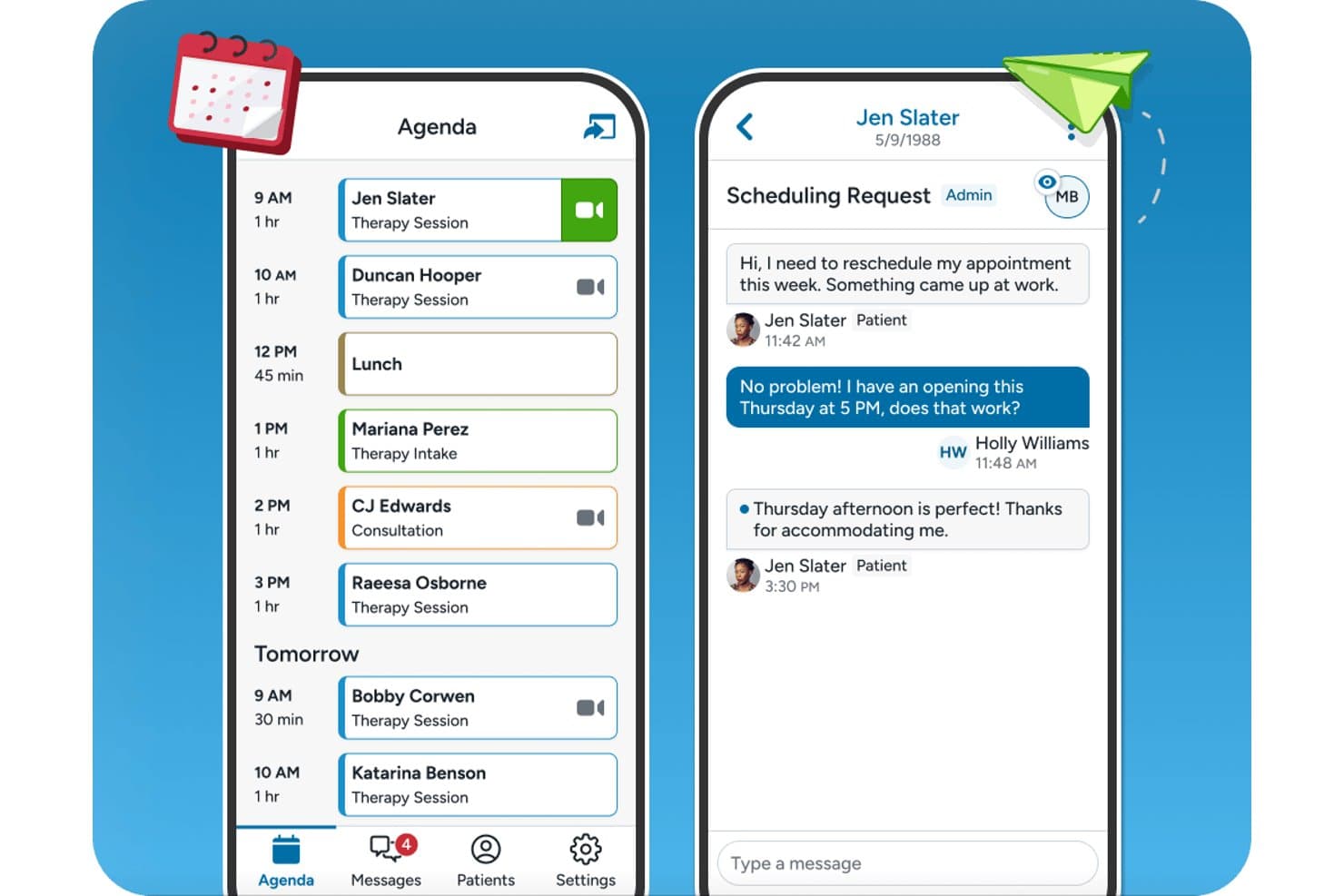
TherapyNotes offers a mobile-friendly agenda view and patient messaging interface designed for seamless scheduling and communication on iPad. TherapyNotes is a behavioral health EHR with a native iPad companion app that covers scheduling, secure client messaging, telehealth sessions, and offline access to client records and appointments.
Who Is TherapyNotes Best For?
Solo and small-group behavioral health practices — therapists, psychologists, and counselors — will find TherapyNotes fits their day-to-day clinical and billing workflows well.
Why I Picked TherapyNotes
I've included TherapyNotes in my top picks because its dedicated mobile companion app gives behavioral health clinicians on-the-go access to their schedule, client records, and telehealth sessions. I like that the app supports offline access to client details and appointments, so connectivity gaps during a packed day don't interrupt client prep. Biometric login via Face ID or Touch ID and secure messaging with clients and staff are both built directly into the iPad app.
TherapyNotes Key Features
- Telehealth integration: Launch HIPAA-compliant video sessions directly from the iPad companion app.
- Appointment management: View upcoming appointments, client schedules, and agenda details from your iPad.
- Secure messaging: Exchange encrypted messages with clients and staff right from the app.
- Client data access: Review essential client information and appointment history online or offline.
TherapyNotes Integrations
TherapyNotes offers native integrations with Google Calendar, Zee Medical Billing, OneLogin, and DemandHub. An API for custom integrations is not available.
Pros and Cons
Pros:
- DSM-aligned note templates for behavioral health
- Biometric login supported on the mobile app
- Built-in telehealth accessible from the iPad app
Cons:
- Low App Store rating signals usability concerns
- Mobile app lacks full note-writing capability
Learn more about TherapyNotes: Best for affordable mobile EHR access
- Free plan available
- From $25/month
Visit WebsiteCustomer Rating:4.2/5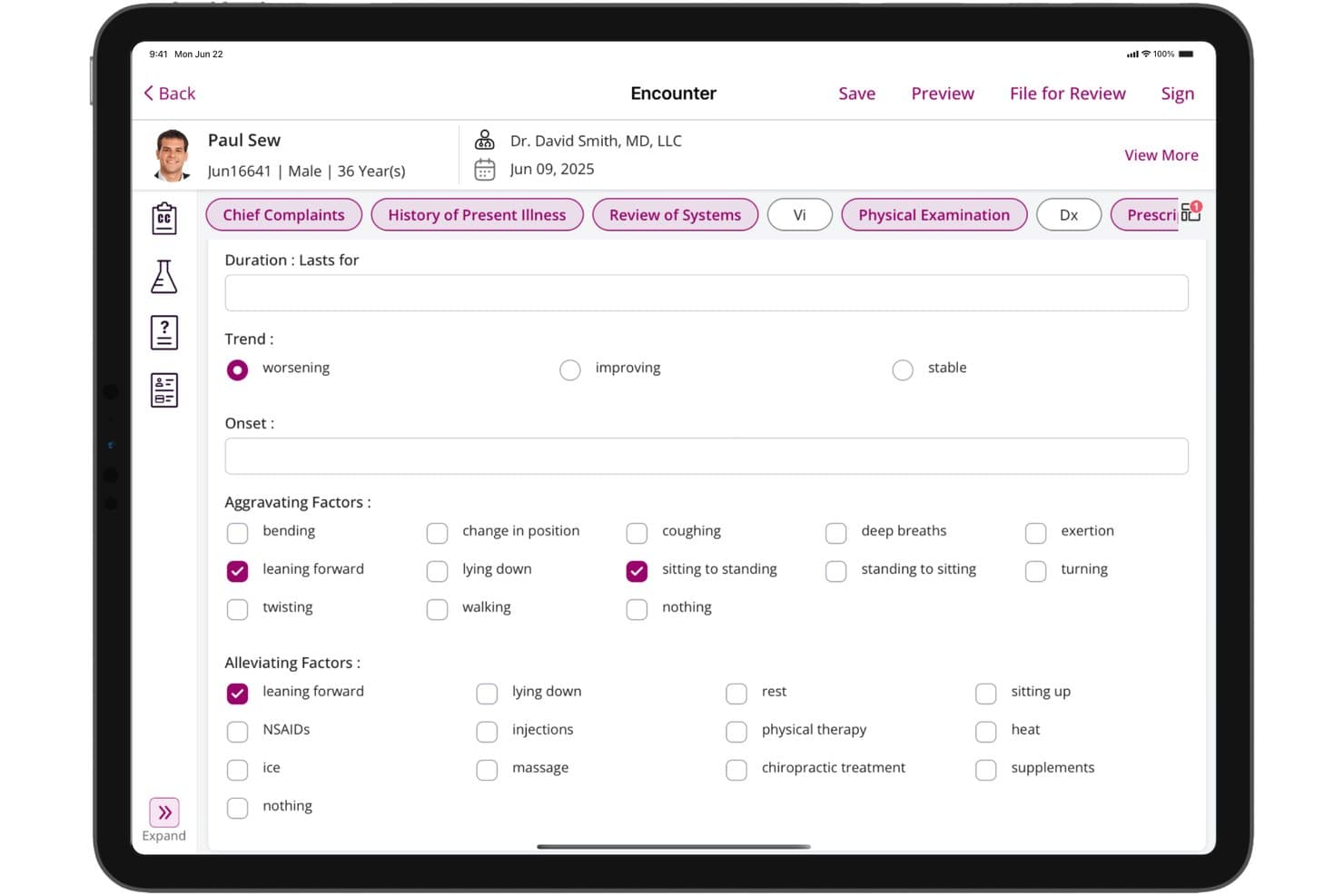
CharmHealth offers a detailed History of Present Illness form on iPad, capturing trend, onset, aggravating, and alleviating factors for patient encounters. CharmHealth is a cloud-based EHR platform with dedicated native iPadOS apps for clinical charting, e-prescribing, lab ordering, offline documentation, and integrated practice scheduling and billing.
Who Is CharmHealth Best For?
CharmHealth is a strong fit for independent practitioners and small practices that need a full-featured, iPad-compatible EHR without committing to high per-provider licensing costs.
Why I Picked CharmHealth
CharmHealth earns its spot on my shortlist because the Charm Chart Note iPad app supports full offline charting with auto-sync, so I can document encounters without reliable connectivity. I also like CharmAI Scribe, which listens in real time and generates the full clinical note, including assessment, diagnosis, and treatment plan, directly on the tablet. The free tier means I can access the full iPad EHR, including offline charting and AI scribing, before committing to a paid plan.
CharmHealth Key Features
- Native scheduling app: Manage appointments and track daily schedules using the dedicated Charm EHR Scheduler iPad app.
- Customizable specialty templates: Access and tailor SOAP note templates to fit behavioral health, pediatrics, primary care, and more.
- Patient portal with mobile branding: Offer a branded patient app for appointment access, secure messaging, and records review on iPad.
- Lab and imaging integration: Order labs and imaging, and review results directly within the iPad app connected to LabCorp and Quest.
CharmHealth Integrations
CharmHealth offers native integrations with Surescripts, LabCorp, Quest Diagnostics, Bluefin, QuickBooks, Optum clearinghouse, Fullscript, and Wellevate. An API is available for custom integrations.
Pros and Cons
Pros:
- EPCS-certified e-prescribing available directly on iPad
- CharmAI Scribe generates notes in real time
- Offline charting supported natively on iPad
Cons:
- iPad app lacks full desktop parity
- Apple Pencil support not clearly documented
Learn more about CharmHealth: Best for mobile behavioral health charting
- Free demo available
- Pricing upon request
Visit WebsiteCustomer Rating:4.1/5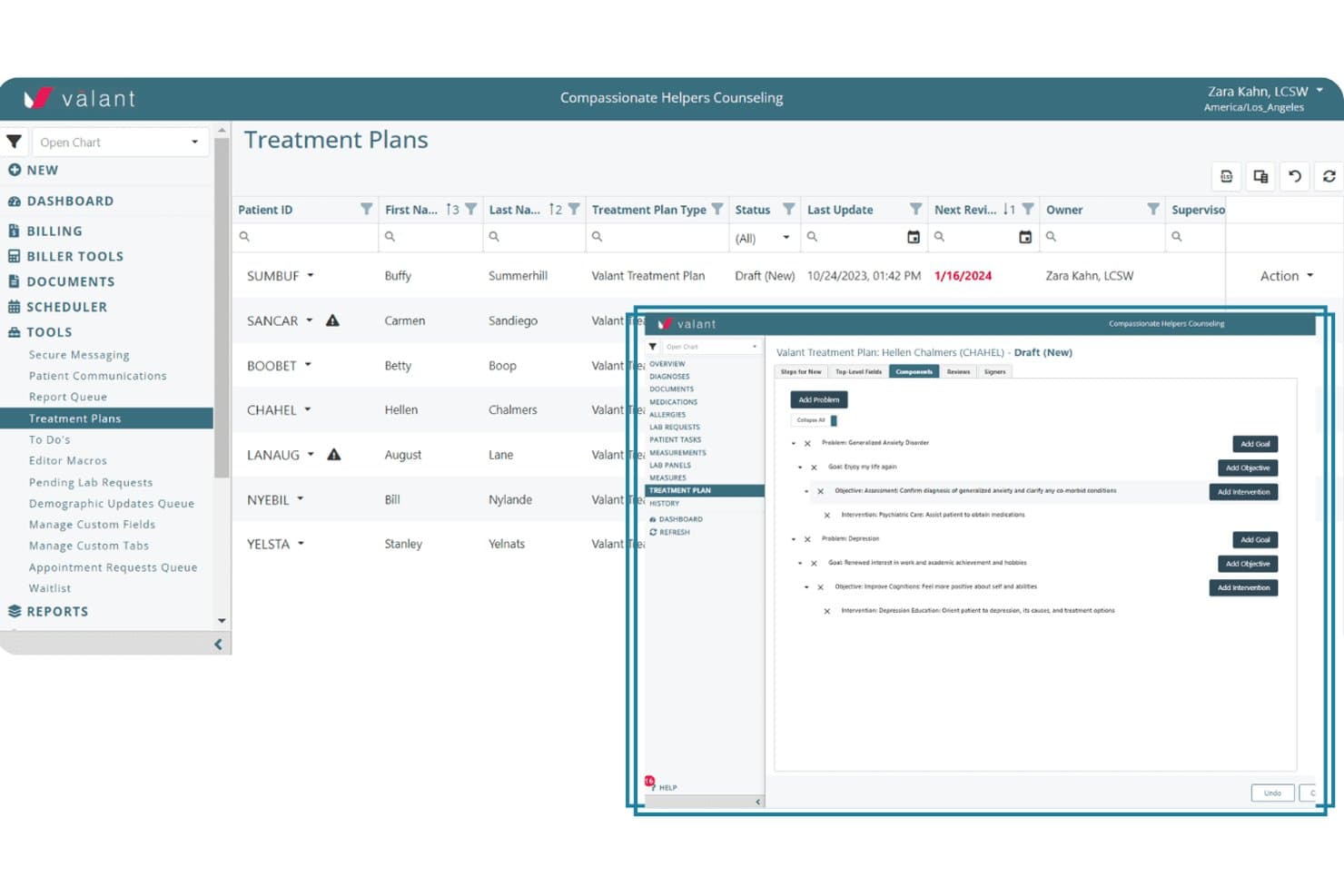
Valant offers a structured treatment planning interface where clinicians can add problems, goals, objectives, and interventions within a patient's EHR. Valant is a cloud-based behavioral health EHR that covers clinical documentation, AI-assisted note generation, e-prescribing, telehealth, lab ordering, scheduling, and billing, all accessible from a mobile browser on iPad.
Who Is Valant Best For?
Valant is purpose-built for behavioral health clinicians — including psychiatrists, therapists, and mental health practitioners — working in solo or small group practice settings.
Why I Picked Valant
I've included Valant in my top picks because its 100+ note templates, built specifically for psychiatric evaluations, CBT, DBT, and MFT workflows, let clinicians chart accurately right from a mobile session. The AI-assisted documentation auto-generates narrative notes mid-encounter, cutting documentation time on a tablet. I also like that EPCS-certified e-prescribing via DrFirst and native eLabs ordering are both accessible from the same mobile session.
Valant Key Features
- Integrated telehealth sessions: Launch HIPAA-compliant video visits directly within the platform from your iPad browser.
- Behavioral health outcome measurement tools: Track and document patient progress with over 80 standardized assessments and automated scoring.
- Comprehensive scheduling management: Access, adjust, and manage multiple calendars for providers and group sessions all from the mobile interface.
- Claim tracking and revenue cycle reporting: Monitor claims status and revenue analytics in real time, accessible from the same iPad session.
Valant Integrations
Valant offers native integrations with DrFirst for e-prescribing, Waystar and Optum for clearinghouse claim submission, and supports native eLabs ordering. An API is available for custom integrations.
Pros and Cons
Pros:
- EPCS e-prescribing accessible from iPad browser
- AI scribe generates notes mid-session
- 100+ behavioral health-specific charting templates included
Cons:
- No offline charting when connectivity drops
- No dedicated native clinician iPad app
Learn more about Valant: Best for independent practice mobility
- Free demo available
- Pricing upon request
Visit WebsiteCustomer Rating:3.9/5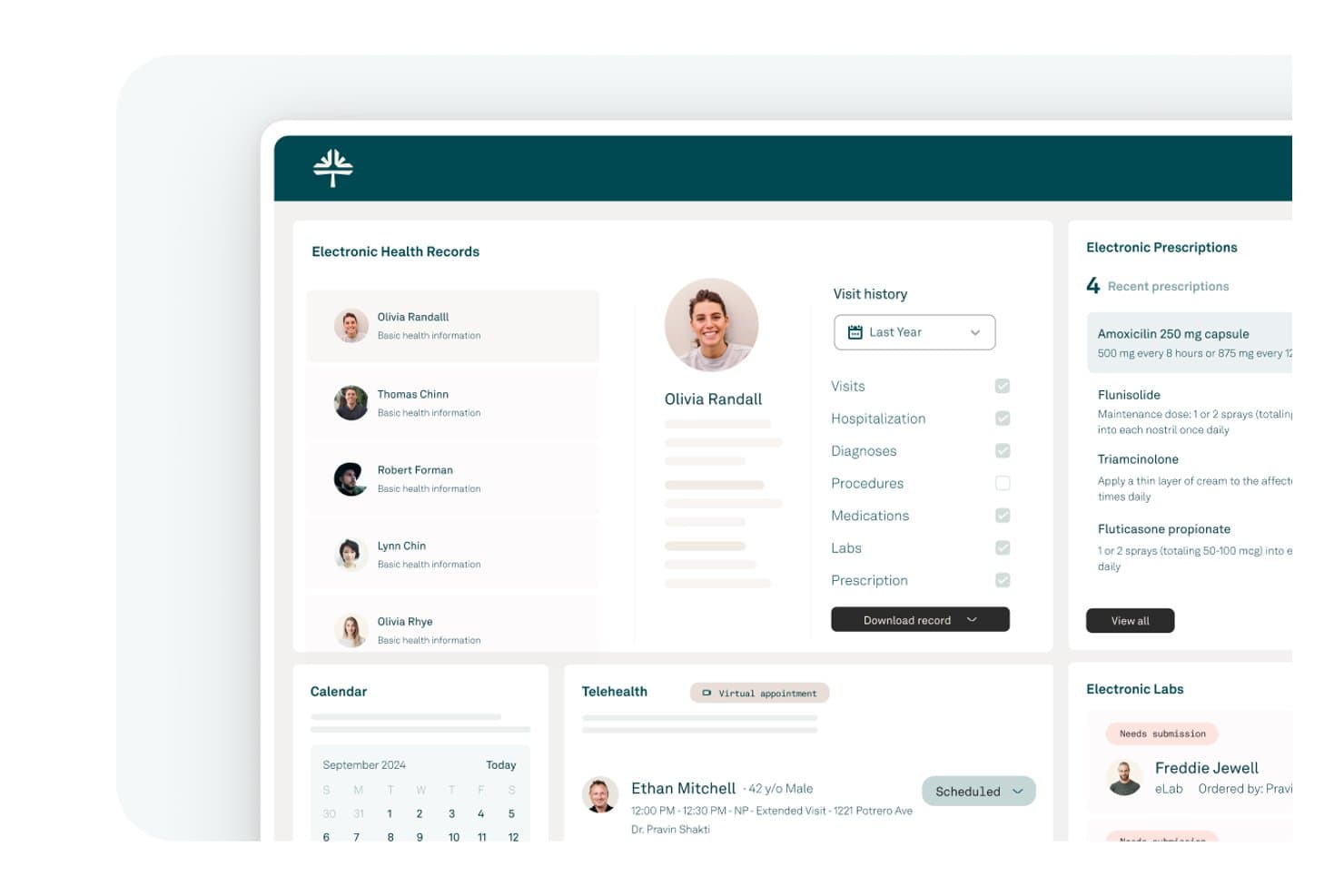
Tebra offers a comprehensive EHR dashboard displaying patient records, electronic prescriptions, telehealth appointments, and lab management in a clean iPad-friendly interface. Tebra is a cloud-based EHR and practice management platform built for independent practices, combining clinical charting, e-prescribing, scheduling, billing, and patient engagement in a single native iPad-compatible app.
Who Is Tebra Best For?
Tebra is a strong fit for independent, small-to-medium practices where providers need full EHR and billing access across both desktop and mobile devices.
Why I Picked Tebra
I've included Tebra in my top picks because it's genuinely built around mobile-first independent practice workflows. The single-login app covers clinical charting, scheduling, and billing across iPhone, iPad, and Apple Watch, so providers aren't locked to a desktop between patient encounters. I particularly like the AI Note Assist feature, which generates structured SOAP notes on the go, and the SALT shortcut that pulls details from a patient's last visit to speed up charting mid-encounter.
Tebra Key Features
- Native iPad EHR app: Access clinical, scheduling, and billing modules through a dedicated iPad application, not just a browser.
- HIPAA-compliant e-prescribing: Includes EPCS certification and PDMP monitoring for qualified providers within the integrated platform.
- Integrated telehealth: Launch HIPAA-compliant video visits directly from your iPad schedule or patient chart.
- Patient portal and digital intake: Enable patients to check in, complete forms, and update details via a secure, mobile-accessible platform.
Tebra Integrations
Tebra offers native integrations with LabCorp, Quest Diagnostics, DoseSpot, and Stripe, and provides an API for custom integrations.
Pros and Cons
Pros:
- Scheduling, billing, and charting in one app
- Single login works across all Apple devices
- AI Note Assist speeds up mobile charting
Cons:
- No documented offline charting mode
- iPad app can't send e-prescriptions
Learn more about Tebra: Best for simple cloud EHR access
- Free demo available
- From $199/user/month
Visit WebsiteCustomer Rating:3.7/5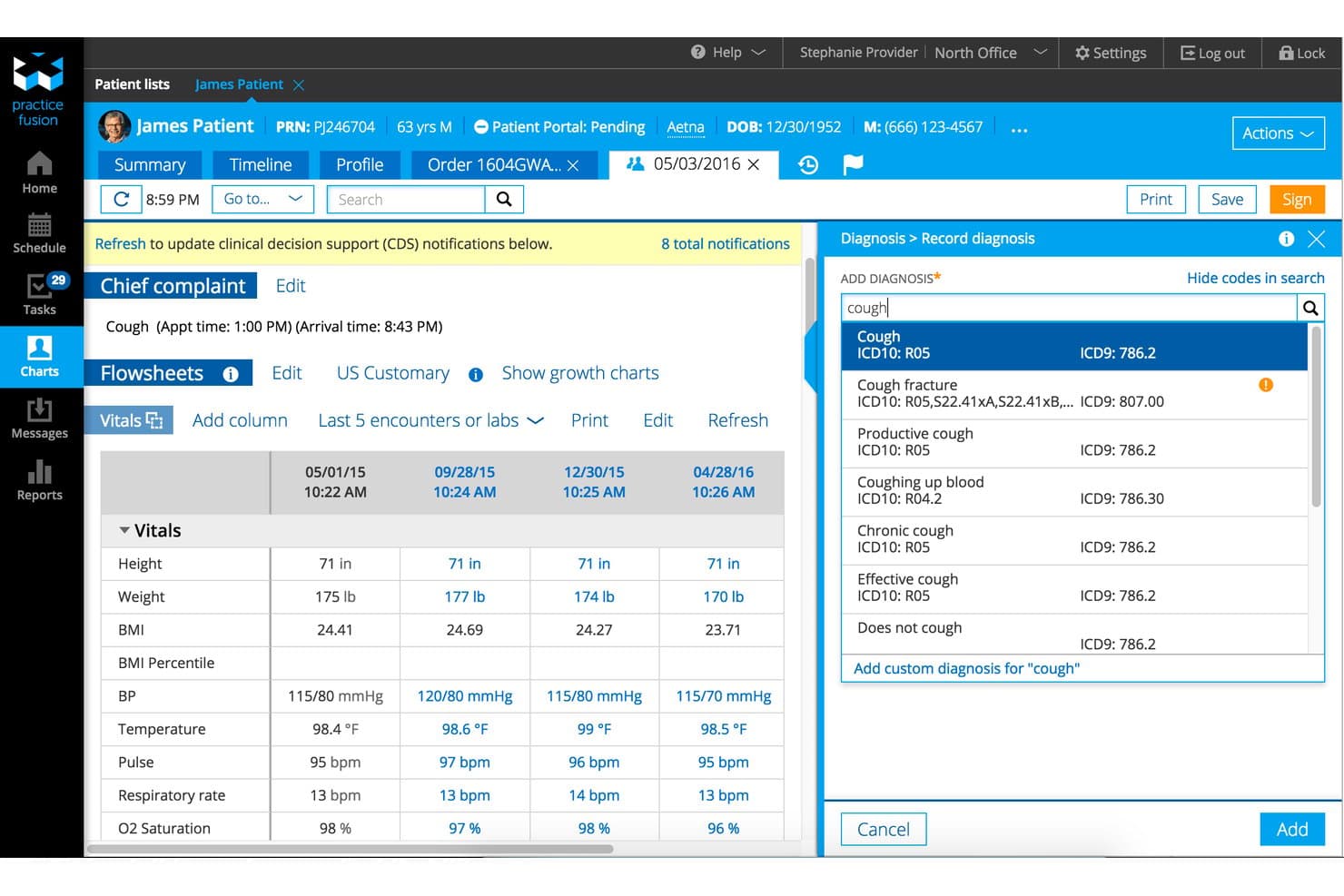
Practice Fusion offers an intuitive EHR interface with patient flowsheets, vitals tracking, and diagnosis search with ICD10/ICD9 codes in a single view. Practice Fusion is a cloud-based EHR platform for small and independent practices that delivers charting, e-prescribing, scheduling, and lab ordering through a touch-optimized interface accessible from any browser, including on iPad.
Who Is Practice Fusion Best For?
Practice Fusion is a good fit for solo and small-group clinicians across ambulatory specialties who need a no-install EHR they can access from any device.
Why I Picked Practice Fusion
I picked Practice Fusion because it delivers a full-featured EHR directly through the iPad's browser, with no app installation required. The touch-optimized charting includes Smart Charting shortcuts that reduce redundant data entry mid-encounter, and EPCS-certified e-prescribing connects to over 70,000 pharmacies directly from that same browser tab. I also like that there's no stripped-down "lite" version, meaning the tablet experience has complete parity with the desktop.
Practice Fusion Key Features
- Integrated patient portal: Patients can view their records, communicate, and access lab results from any device.
- Customizable charting templates: Users are able to create and modify encounter templates tailored to their clinical workflow.
- Electronic lab and imaging interface: Order tests and receive results directly within the EHR for streamlined processing on iPad.
- Scheduling management: Coordinate appointments and update patient schedules using touch-optimized tools within the platform.
Practice Fusion Integrations
Practice Fusion offers native integrations with LabCorp, Quest Diagnostics, Surescripts, and hundreds of regional labs and imaging centers. An API is available for custom integrations.
Pros and Cons
Pros:
- No app download or installation needed
- EPCS e-prescribing works from any browser tab
- Full desktop feature parity on iPad browser
Cons:
- No dedicated native iPadOS app available
- No offline charting without internet connection
Learn more about Practice Fusion: Best for specialty charting on iPad
- Free demo available
- Pricing upon request
Visit WebsiteCustomer Rating:4.5/5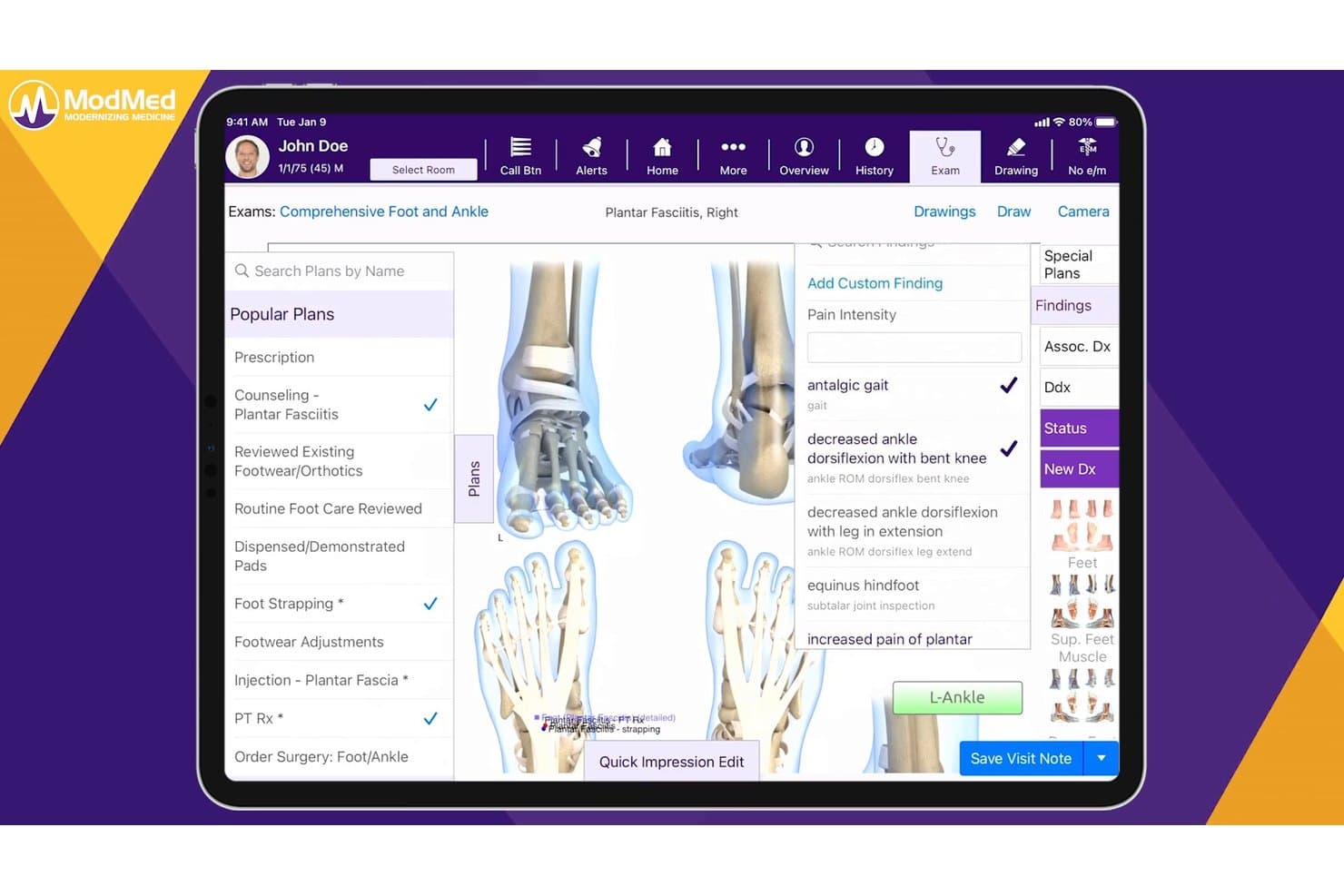
ModMed offers a comprehensive podiatry exam interface with condition-specific treatment plans, findings, and billing tools tailored for foot and ankle care. ModMed EMA is an iPad-native EHR built exclusively for medical specialists, combining specialty-specific charting, e-prescribing, lab ordering, and integrated practice management in a single touch-optimized platform.
Who Is ModMed Best For?
ModMed is a strong fit for independent specialty practices in fields like dermatology, ophthalmology, orthopedics, and gastroenterology that do most of their charting on iPad.
Why I Picked ModMed
ModMed EMA earns its spot as one of the best on my shortlist because the iPad isn't an afterthought: the entire EHR is designed around it. I especially like how EMA's adaptive engine learns your charting habits and autopopulates specialty-specific diagnoses and treatments as you tap through an encounter. Add ModMed Scribe 2.0, which listens to the patient conversation and suggests visit notes and ICD-10 codes in real time, and you can finalize charts before the patient leaves the room.
ModMed Key Features
- Integrated practice management: Scheduling, billing, and coding tools are fully accessible within the iPad app.
- HIPAA-compliant mobile authentication: Secure login with Face ID and Touch ID for added device security.
- Bidirectional lab and imaging ordering: Order and receive lab and imaging results directly from the iPad app.
- Customizable specialty templates: Each supported specialty includes tailored charting templates and protocols for efficient documentation.
ModMed Integrations
ModMed offers native integrations with Surescripts, LabCorp, Quest Diagnostics, and over 150 pathology labs. An API is available for custom integrations, and data can be exchanged via HL7 and FHIR standards.
Pros and Cons
Pros:
- Full practice management suite accessible on iPad
- Ambient scribe suggests ICD-10 codes in real time
- Specialty-specific adaptive charting on iPad
Cons:
- Customer support response times are inconsistent
- Only supports 11 medical specialties
Learn more about ModMed: Best for mobile behavioral health workflows
- 30-day free trial available
- From $49/month
Visit WebsiteCustomer Rating:4.6/5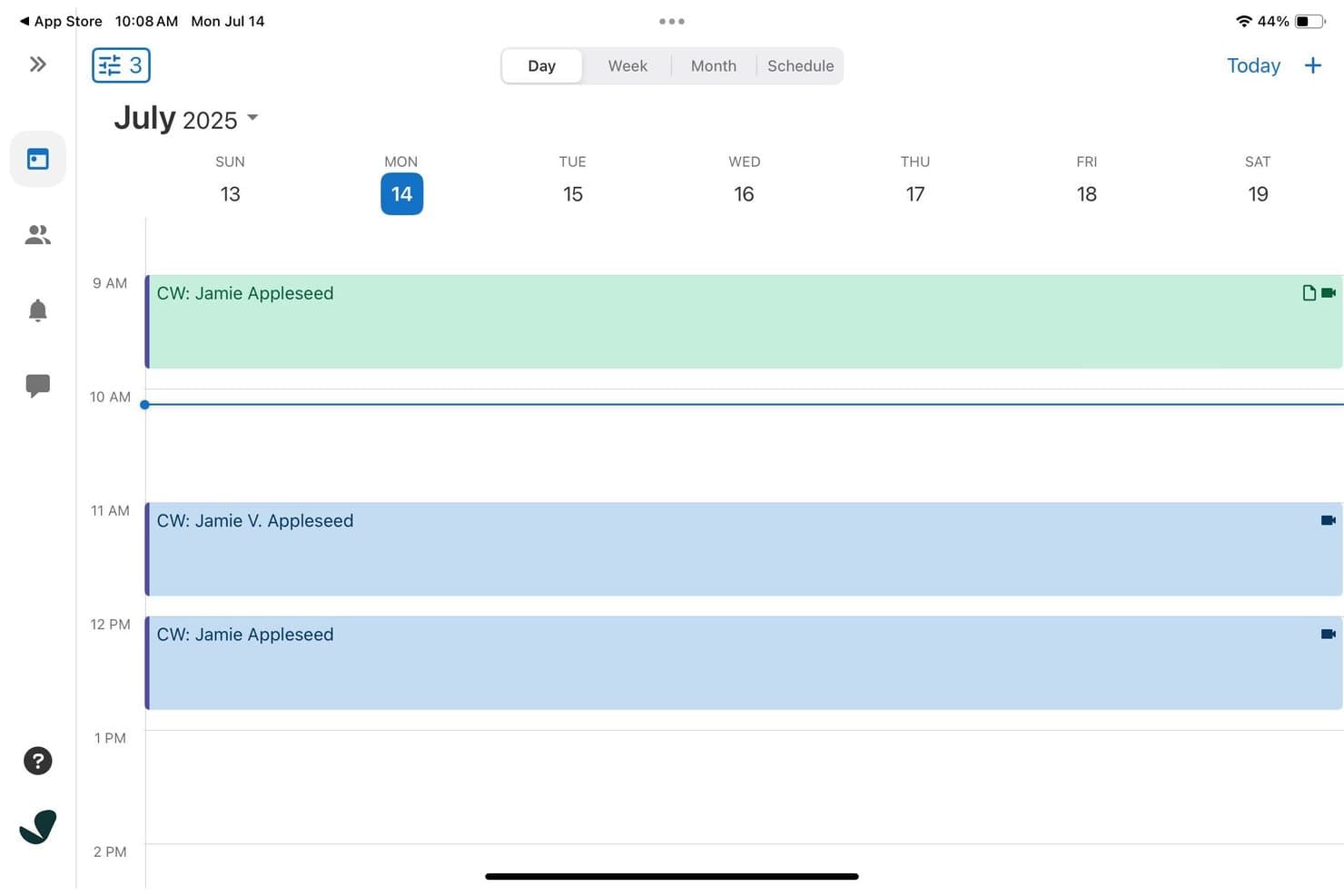
SimplePractice offers a weekly calendar view on iPad displaying color-coded client appointments with video session indicators throughout the day. SimplePractice is a cloud-based EHR and practice management platform for behavioral health practitioners, with a native iPad app that covers scheduling, clinical documentation, telehealth, billing, and insurance tools in one place.
Who Is SimplePractice Best For?
SimplePractice is built for solo and small-group behavioral health practitioners, including therapists, counselors, and social workers running private practices.
Why I Picked SimplePractice
I've included SimplePractice in my top picks because its July 2025 iPad update genuinely redesigned the tablet experience for behavioral health workflows. I like that you can pull up a client's full appointment history, outstanding balances, and intake forms from one screen without switching views. The AI Note Taker add-on transcribes and drafts therapy notes directly after a session, which cuts post-appointment documentation down significantly.
SimplePractice Key Features
- Integrated telehealth sessions: Launch secure video visits directly from the iPad app without third-party software.
- Customizable documentation templates: Choose and tailor forms for intake, progress, and treatment planning within your workflows.
- Insurance billing and claims management: Submit and track insurance claims in-app alongside session documentation and patient data.
- Secure client portal access: Enable clients to schedule appointments, complete intake paperwork, and message their provider from mobile devices.
SimplePractice Integrations
SimplePractice offers native integrations for calendar sync, e-prescribing (via DrFirst), and insurance clearinghouses. An API for custom integrations is not documented.
Pros and Cons
Pros:
- Telehealth video visits launch within the app
- AI Note Taker drafts therapy notes automatically
- iPad app redesigned specifically for behavioral health
Cons:
- Mobile note history limited to 30 days
- No offline charting mode for disconnected use
Learn more about SimplePractice: Best for iPad-native clinical workflows
- Free demo available
- Pricing upon request
Visit WebsiteCustomer Rating:3.9/5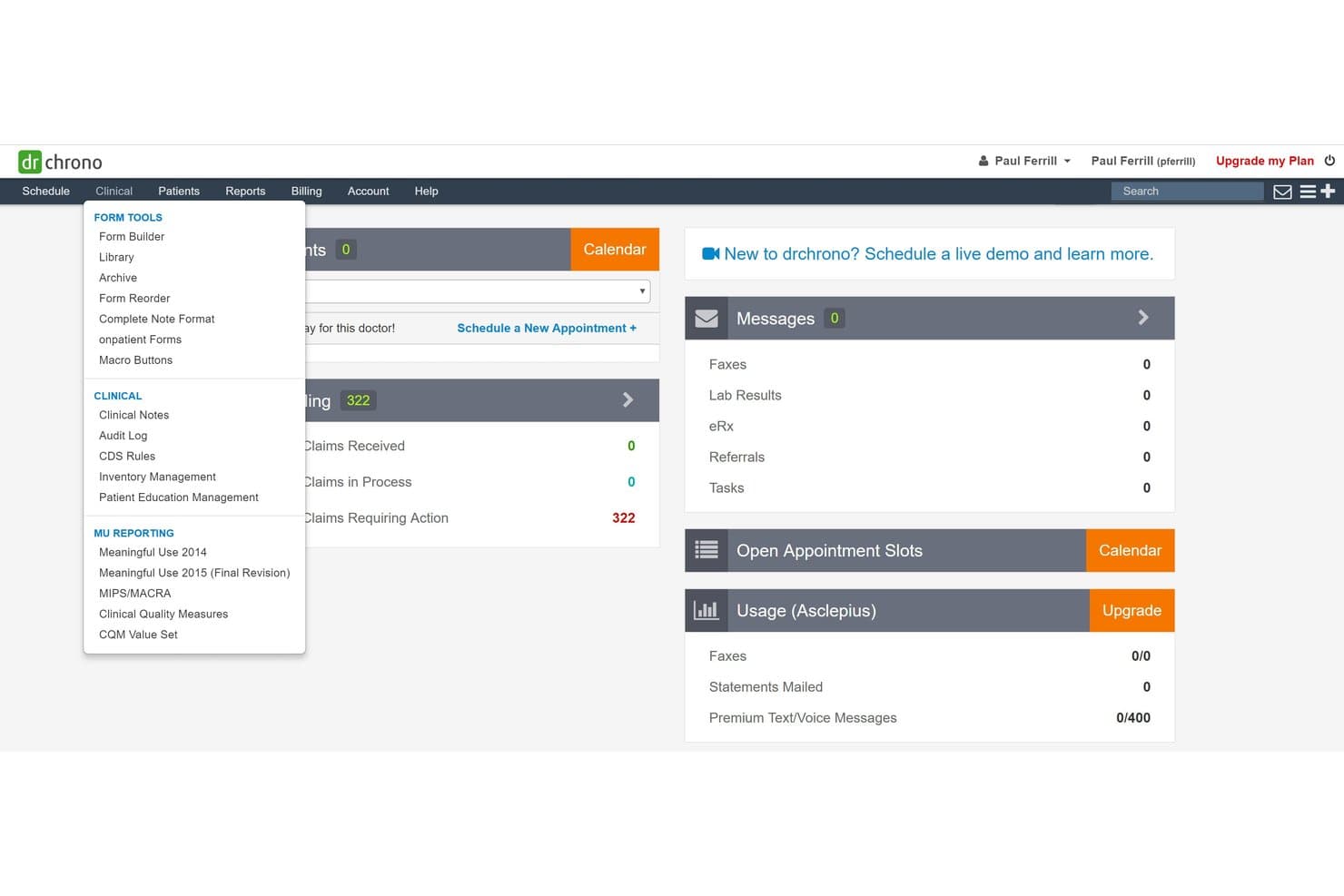
DrChrono offers a Clinical dropdown menu with Form Tools, Clinical, and MU Reporting sections accessible from the main dashboard. DrChrono is an iPad-native EHR platform that combines clinical charting, e-prescribing, lab ordering, practice management, and medical billing in a single iOS-first environment built for ambulatory and mobile care settings.
Who Is DrChrono Best For?
It's a natural fit for independent and small-group practices that run entirely on Apple devices and need a single platform for both clinical documentation and billing.
Why I Picked DrChrono
DrChrono earns its spot on my shortlist because it's the only EHR built from the ground up for iPadOS, not retrofitted from a desktop codebase. I particularly like EverHealth Scribe, which listens during a visit and writes structured notes directly into the patient chart on the iPad. What I find most useful is the ability to run a telehealth video visit while reviewing the full patient record in a separate window, all on one iPad screen.
DrChrono Key Features
- Customizable clinical forms: Create and modify pre-built templates to match different specialties and practice needs directly on the iPad.
- Integrated patient scheduling: Book, confirm, and manage appointments with real-time calendar syncing across devices.
- e-Prescribing with EPCS: Order both regular and controlled medications electronically from within the iPad app.
- OnPatient patient portal: Allow patients to access records, complete digital intake forms, and communicate securely with your practice on mobile or web.
DrChrono Integrations
DrChrono offers native integrations with Labcorp, Quest Diagnostics, Lifepoint, Box, Square Point of Sale, Updox, Birdeye, and Reputation.com, and provides an open API for custom integrations.
Pros and Cons
Pros:
- Full billing suite runs natively on iPad
- Scribe AI writes notes during patient visits
- Built exclusively for iPad from the start
Cons:
- Customer support response times can be slow
- Steep initial setup and onboarding process
Learn more about DrChrono: Best for mobile specialty practice workflows
- Free demo available
- Pricing upon request
Visit WebsiteCustomer Rating:3.7/5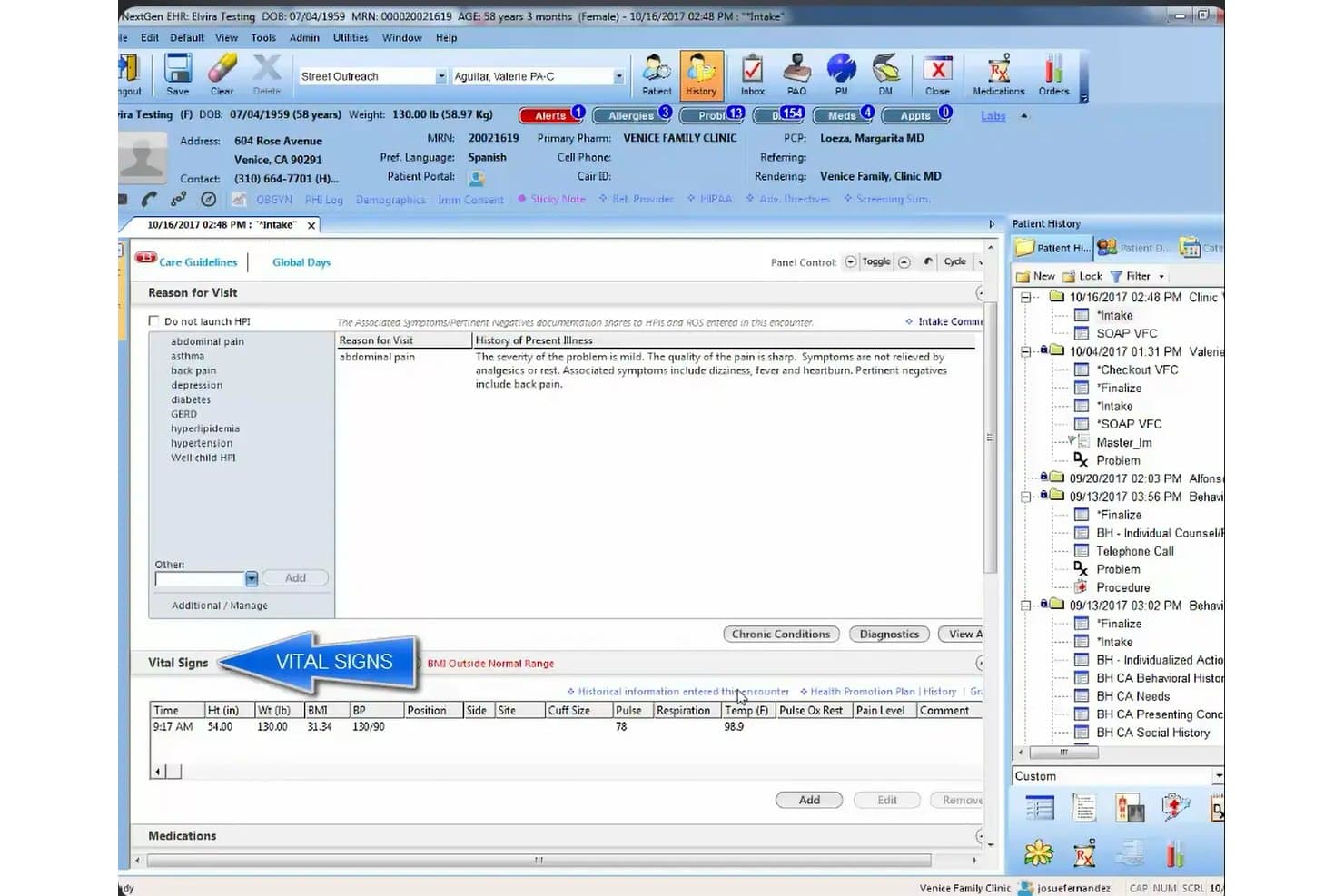
NextGen Healthcare offers a comprehensive EHR intake screen displaying patient vitals, reason for visit, and history of present illness in a structured clinical workflow. NextGen Healthcare is a cloud-based ambulatory EHR platform with a native mobile companion app that supports iPad-based charting, e-prescribing, lab ordering, telehealth visits, and integrated practice management across 30+ specialties.
Who Is NextGen Healthcare Best For?
It's a strong fit for independent specialty practices that need mobile-first clinical workflows, particularly those with providers charting across multiple locations or care settings.
Why I Picked NextGen Healthcare
I've included NextGen Healthcare in my top picks because of how well its mobile ecosystem supports specialty-specific clinical workflows on the go. The NextGen Mobile companion app lets providers generate fully structured SOAP notes directly from patient conversations using ambient AI, without typing a word. Pair that with 2,000+ specialty-specific templates across 30+ specialties, and you get a mobile charting environment built around clinical discipline, not generic documentation.
NextGen Healthcare Key Features
- Integrated patient portal: Patients can manage appointments, request refills, and access charts directly from their mobile devices.
- EPCS-certified e-prescribing: Secure prescribing of controlled and non-controlled substances is supported from the tablet interface.
- Lab and diagnostic ordering hub: Order labs and access results with connections to over 700 lab vendors through a unified platform.
- Role-based access controls: Customizable user permissions maintain HIPAA compliance and limit access to sensitive information on any device.
NextGen Healthcare Integrations
NextGen Healthcare offers native integrations with Surescripts for e-prescribing, a diagnostic hub for lab vendors like LabCorp and Quest Diagnostics, Inbox Health, SamaCare, and LinkMD AI. An API is available for custom integrations.
Pros and Cons
Pros:
- Telehealth built directly into the EHR
- Ambient AI generates SOAP notes hands-free
- 2,000+ specialty-specific charting templates available
Cons:
- Mobile app lacks full desktop parity
- No offline charting mode on iPad
Learn more about NextGen Healthcare: Best for mobile cloud-based EHR access
- Free demo available
- Pricing upon request
Visit WebsiteCustomer Rating:5/5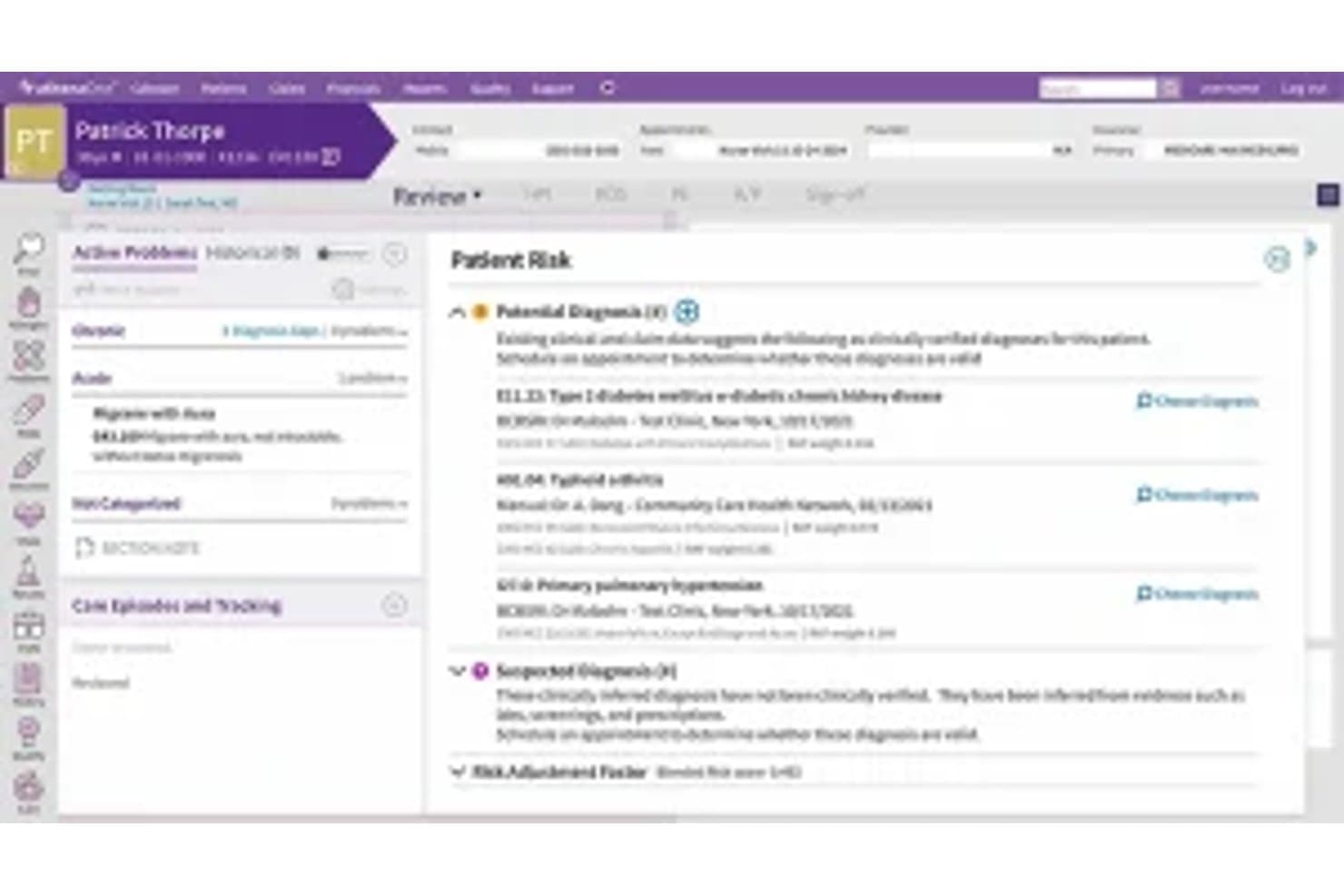
Athenahealth offers a Patient Sick visit summary screen displaying potential diagnoses, active problems, and clinical findings within its EHR interface. Athenahealth is a cloud-native EHR platform with a dedicated iOS app for iPad that gives clinicians access to patient records, clinical documentation, e-prescribing, lab ordering, scheduling, and revenue cycle management from a single mobile environment.
Who Is Athenahealth Best For?
Athenahealth is a strong fit for independent ambulatory practices and mobile clinicians who need full EHR access on an iPad rather than being tethered to a desktop workstation.
Why I Picked Athenahealth
I picked athenahealth as one of the best because its iOS-only mobile strategy means the iPad is a primary device, not an afterthought. The Athenahealth app carries the same templates, macros, and order sets as the desktop EHR, so documenting an encounter on an iPad feels identical to working at a workstation. I especially like the Ambient Notes feature: I can start recording at the top of a visit and Athenahealth automatically summarizes the conversation into a structured note placed directly in the patient's chart.
Athenahealth Key Features
- EPCS e-prescribing and lab ordering: Write, send, and track prescriptions including controlled substances, and order labs directly from the iPad app.
- Full practice management integration: Manage scheduling, billing, patient demographics, and authorizations inside the same mobile interface.
- HIPAA-compliant biometric login: Secure access via Face ID or Touch ID on supported iPad models with full BAA support.
- Patient portal access on iPad: Patients and staff can review charts, sign forms, and communicate securely through the mobile interface.
Athenahealth Integrations
Athenahealth offers native integrations with LabCorp, Quest Diagnostics, Surescripts, Nuance, and supports additional apps through the athenahealth Marketplace. An API is available for custom integrations.
Pros and Cons
Pros:
- Full RCM accessible on iPad
- Ambient Notes auto-generates notes from voice
- iOS-only app prioritizes native iPad experience
Cons:
- Android users have no mobile app option
- Limited offline charting capability
Learn more about Athenahealth:
Outro software de RSE para iPad
\u003cspan style=\u0022font-weight: 400;\u0022\u003eEis algumas opções adicionais de software de RSE para iPad que não integraram a minha lista restrita, mas que continuam a merecer consideração:\u003c/span\u003e
- 11AdvancedMDBest for mobile EHR and billing workflows
- 12EpicBest for enterprise mobile patient care
- 13RXNTBest for mobile charting and prescribing
- 14JaneBest for mobile allied health workflows
- 15Elation HealthBest for mobile primary care workflows
- 16NextechBest for mobile specialty care workflows
- 17ICANotesBest for mobile mental health charting
- 18eClinicalWorksBest for mobile patient care coordination
- 19CareCloudBest for cloud-based mobile practice management
How I Evaluate EHR Software for iPad
I split my evaluation into must-have baseline criteria—like native iPadOS apps and offline charting—and the differentiators that separate vendors for specific practice types.
Core Functionality (Table Stakes For This List)
When I'm selecting tools for my list, I rank each one on a scale from 0 (does not offer the functionality) to 5 (excels in this area) for each core functionality listed below. Then, I calculate the tool's total score into a percentage. Each tool needs to achieve a minimum total score of 65% to be considered for inclusion.
- Native iPad App: I check for a dedicated App Store download—not just a responsive website in Safari—that runs with full feature parity on iPadOS.
- Touch-Optimized Charting: Tap-and-swipe note entry, template dropdowns, and Apple Pencil support for annotations or consent signatures matter here.
- HIPAA-Compliant Security: I look for encryption, a signed BAA, and biometric login like Face ID so providers can securely switch users on shared iPads.
- Cloud Sync & Offline Mode: Home-visit clinicians need offline charting that auto-syncs once connectivity returns, so I evaluate how each app handles that.
- E-Prescribing & Orders: The iPad app should support EPCS-certified prescribing and lab ordering so providers can send scripts bedside without a desktop.
- Integrated Practice Workflows: Scheduling, billing, coding, and patient demographics should all be accessible within the same iPad app environment.
Once I have a list of tools that meet the criteria, I consider what sets each platform apart.
Differentiating Factors (What Sets Vendors Apart)
Here's how I compare and contrast different vendors:
Standout Features
Offline charting mode is a big deal for house-call providers or rural clinics where Wi-Fi drops mid-encounter. I look for apps that let you document a full visit offline and auto-sync once you're back online. Apple Pencil support also separates the best iPad EHRs—annotating diagrams, capturing patient signatures, or sketching wound assessments on-screen speeds up point-of-care documentation. Voice-to-text dictation matters too, especially when a provider needs to narrate notes between patients without typing on a tablet keyboard.
Beyond Features
Specialty fit matters—a behavioral health therapist needs SOAP note templates and treatment plan workflows that differ from what a pediatrician uses, so I evaluate how well each vendor's template library matches specific disciplines. Whether the iPad app is truly native or a browser wrapper also counts. I check for Split View support and smooth adaptation across iPad screen sizes. Pricing structure deserves a close look too. Some vendors include the iPad app in the base subscription while others charge extra, and migration fees can add up for a small practice.
Como escolher software de RSE para iPad
É fácil perder-se em listas extensas de funcionalidades e estruturas de preços complexas. Para o ajudar a manter o foco enquanto conduz o seu processo específico de seleção de software, apresentamos uma lista de verificação com os fatores a ter em conta:
| Fator | O que considerar |
| Escalabilidade | O software continuará a ser adequado à medida que a sua lista de pacientes cresce ou a sua equipa aumenta? Verifique se consegue suportar vários profissionais e localizações. |
| Integrações | Integra-se facilmente com as suas plataformas de faturação, análises clínicas ou telemedicina? Faça uma lista das integrações necessárias antes de começar a comparar fornecedores. |
| Capacidade de personalização | Pode ajustar modelos e fluxos de trabalho para se adaptarem à sua especialidade? Considere quanto tempo demora a ajustar formulários, tipos de notas e disposições de agendamento. |
| Facilidade de utilização | O fluxo de trabalho diário é intuitivo para os profissionais de saúde e o pessoal administrativo no iPad? Peça uma demonstração para ver o registo clínico, o agendamento e a introdução de dados em ação. |
| Implementação e integração inicial | Quanto tempo interno e apoio externo serão necessários para a configuração, migração e formação do pessoal? Esteja atento a taxas de integração inicial ocultas e a prazos longos. |
| Custo | Não se limite às mensalidades. Calcule os custos adicionais, os requisitos de hardware, a migração e o apoio — sobretudo se a aplicação para iPad tiver um custo adicional por utilizador. |
| Medidas de segurança | O fornecedor disponibiliza encriptação, eliminação remota e Face ID ou Touch ID? Certifique-se de que a segurança móvel cumpre os requisitos de conformidade da sua prática. |
| Disponibilidade do apoio | Que canais de apoio estão disponíveis e quando pode contactá-los? Se algo não estiver a funcionar no seu iPad a meio de uma consulta, vai querer obter ajuda real rapidamente. |
O que é o software de RSE para iPad?
Um RSE para iPad é uma versão móvel do software de RSE que permite aos prestadores de cuidados de saúde aceder, documentar e gerir diretamente no iPad os processos clínicos dos pacientes. Estas aplicações foram concebidas para fluxos de trabalho clínicos baseados no toque, suportando a introdução segura de dados, a prescrição eletrónica, o agendamento e a faturação a partir de qualquer lugar. A utilização de um iPad para RSE permite o registo clínico junto do paciente, atualizações em tempo real e acesso flexível ao longo de todo o percurso de cuidados.
Funcionalidades do software EHR para iPad
Ao selecionar software EHR para iPad, esteja atento às seguintes funcionalidades essenciais:
- Aplicação nativa para iPad: Uma aplicação desenvolvida especificamente para iPadOS, que otimiza o desempenho e os controlos por gestos, adaptando-se sem problemas aos diferentes tamanhos de ecrã do iPad.
- Registo clínico baseado no toque: Toque, deslize e arraste para preencher diretamente no tablet notas clínicas, modelos e avaliações, permitindo uma introdução de dados rápida e intuitiva.
- Suporte para Apple Pencil: Faça anotações em diagramas, assine formulários de consentimento e converta escrita manual em texto, para uma documentação clínica e um envolvimento dos doentes mais naturais.
- Acesso offline e sincronização: Documente consultas e consulte registos sem ligação à Internet, com sincronização automática dos dados assim que voltar a estar online, evitando falhas de informação.
- Segurança em conformidade com a HIPAA: A encriptação integrada, os inícios de sessão seguros com Face ID ou Touch ID e os registos de auditoria abrangentes mantêm os dados dos doentes protegidos em dispositivos móveis.
- Sincronização na nuvem em tempo real: Todas as atualizações efetuadas no iPad são sincronizadas instantaneamente com a nuvem, permitindo um acesso contínuo aos registos dos doentes através das aplicações móveis e de computador.
- Funcionalidades de prescrição eletrónica: Envie receitas, incluindo de substâncias controladas, diretamente do iPad para as farmácias, sem mudar de dispositivo.
- Agendamento e faturação integrados: Gira consultas, dados demográficos e pedidos de reembolso a partir da mesma aplicação, simplificando os fluxos de trabalho diários do consultório em mobilidade.
- Captura de fotografias e conteúdos multimédia dos doentes: Tire e armazene em segurança imagens dos doentes, digitalize documentos e adicione ficheiros multimédia diretamente aos registos dos doentes utilizando a câmara do iPad.
- Telemedicina integrada: Inicie consultas por vídeo seguras e em conformidade com a HIPAA a partir da aplicação EHR, para que as consultas à distância estejam totalmente integradas no seu fluxo de trabalho móvel.
Vantagens do software EHR para iPad
A implementação de software EHR móvel num iPad proporciona várias vantagens para a sua equipa e para a sua empresa. Eis algumas das vantagens que pode esperar:
- Flexibilidade no registo clínico móvel: Documente episódios, reveja registos e atualize informações a partir de qualquer lugar — junto à cama, em casa ou durante visitas domiciliárias — com uma aplicação para iPad otimizada para o toque.
- Fluxos de trabalho clínicos mais rápidos: Utilize o toque, os gestos de deslize e a introdução de dados através do Apple Pencil para simplificar a elaboração de notas, as assinaturas, os pedidos e a captura de fotografias dos doentes, sem os constrangimentos de um computador.
- Acesso seguro em mobilidade: Mantenha os dados dos doentes protegidos, permitindo simultaneamente a utilização do Face ID, do Touch ID e de funcionalidades em conformidade com a HIPAA para um tratamento seguro e prático dos registos.
- Sincronização de dados em tempo real: Sincronize instantaneamente as informações entre o iPad, o computador e a nuvem, para que os funcionários e os profissionais de saúde tenham sempre acesso a registos atualizados dos doentes.
- Gestão integrada do consultório: Agende consultas, faça a faturação e gira os dados demográficos dos doentes diretamente a partir da aplicação para iPad, reduzindo os silos administrativos e melhorando a continuidade dos fluxos de trabalho.
- Maior envolvimento dos doentes: Mostre imagens, recolha assinaturas e realize consultas de telemedicina por vídeo durante as consultas, tudo a partir do iPad, melhorando a interação e a compreensão dos doentes.
- Menos interrupções devido à conectividade: A documentação offline e a sincronização automática garantem que se mantém produtivo em zonas rurais ou em clínicas movimentadas com acesso pouco fiável à Internet.
Custos e preços do software EHR para iPad
A seleção de software EHR para iPad exige uma compreensão dos vários modelos de preços e planos disponíveis. Os custos variam consoante as funcionalidades, a dimensão da equipa, os complementos, entre outros fatores. A tabela abaixo resume os planos mais comuns, os respetivos preços médios e as funcionalidades habitualmente incluídas nas soluções de software EHR para iPad:
Tabela de comparação de planos de software EHR para iPad
| Tipo de plano | Preço médio | Funcionalidades comuns |
| Plano gratuito | $0 | Registo clínico básico, agendamento, suporte limitado e cópia de segurança na nuvem. |
| Plano pessoal | $50-$100/utilizador/mês | Registo clínico completo, prescrição eletrónica, modo offline, faturação básica e gestão de doentes. |
| Plano empresarial | $100-$200/utilizador/mês | Agendamento avançado, mensagens de equipa, faturação integrada, pedidos de análises, aplicação nativa para iPad e funcionalidades de segurança reforçadas. |
| Plano empresarial avançado | $200+/utilizador/mês | Integrações personalizadas, suporte prioritário, análise avançada, suporte para várias localizações, opções de gestão de dispositivos móveis e formação dedicada. |
Perguntas frequentes sobre software EHR para iPad
Eis algumas respostas a perguntas frequentes sobre software EHR para iPad:
Posso utilizar software EHR para iPad sem ligação à internet?
Sim, muitas aplicações EHR para iPad permitem o acesso offline. Pode documentar consultas, consultar registos dos doentes e, em seguida, sincronizar automaticamente os seus dados quando voltar a ligar-se à internet, algo essencial em contextos móveis ou rurais.
O software EHR para iPad é seguro e está em conformidade com a HIPAA?
Sim, os principais fornecedores concebem as suas aplicações EHR para iPad de modo a cumprirem os requisitos da HIPAA, com encriptação, registos de auditoria, Face ID ou Touch ID e compatibilidade com MDM. Confirme sempre que o seu fornecedor assina um Acordo de Associado Comercial (BAA) antes de armazenar dados dos doentes.
Os EHR para iPad integram-se com laboratórios, faturação ou outros sistemas médicos?
A maioria dos EHR orientados para iPad oferece integrações com laboratórios, ferramentas de faturação e redes de prescrição eletrónica. Verifique se o seu fornecedor suporta HL7, FHIR e interfaces comuns para uma troca de informações sem problemas.
Posso personalizar modelos e formulários numa aplicação EHR para iPad?
Sim, muitas soluções permitem ajustar modelos de notas, textos rápidos e conjuntos de pedidos diretamente no iPad. Alguns fornecedores disponibilizam bibliotecas por especialidade, facilitando a personalização do seu fluxo de trabalho clínico.
O que devo considerar ao mudar para um EHR baseado no iPad?
Avalie as suas necessidades de hardware, o apoio à migração e os requisitos de formação do pessoal, e verifique se existem custos ocultos. Certifique-se de que a aplicação para iPad do fornecedor oferece as funcionalidades e integrações de que a sua clínica depende no dia a dia.