Key Takeaways
Definition and Importance: What is medical practice management software covers tools that centralize scheduling, billing, and records to streamline daily operations.
Core Features: Expect capabilities like automated scheduling, insurance claims processing, and integrated reporting in most modern practice management software.
Primary Users: Medical clinics, multi-site organizations, billing teams, and administrators use practice management software for coordination and compliance.
Benefits and Risks: Using practice management software reduces admin errors and improves efficiency but may involve high costs and workflow disruptions.
Real-World Impact: Case studies show what is medical practice management software can achieve, including reduced scheduling issues and improved business performance.
Practice management software is the operational backbone of a well-run medical practice—and without it, I've watched teams drown in scheduling conflicts, billing errors, and compliance gaps. The administrative burden alone can pull clinicians away from patient care. This guide walks you through everything: core features, how these tools work in real clinical settings, what to look for when evaluating options, and how to build a case for adoption. Whether you're exploring this category for the first time or reassessing your current setup, you'll leave with a clear picture of what's possible.
What Is Practice Management Software?
Practice management software is a digital tool that centralizes scheduling, billing, patient records, and administrative tasks for medical practices. It helps you coordinate daily workflows, track appointments, and manage insurance claims from a single dashboard. You can also automate reminders, reduce paperwork, and keep records compliant. In my experience, these features give your team more time to focus on clinical care and fewer headaches with routine admin.
Examples of Practice Management Software
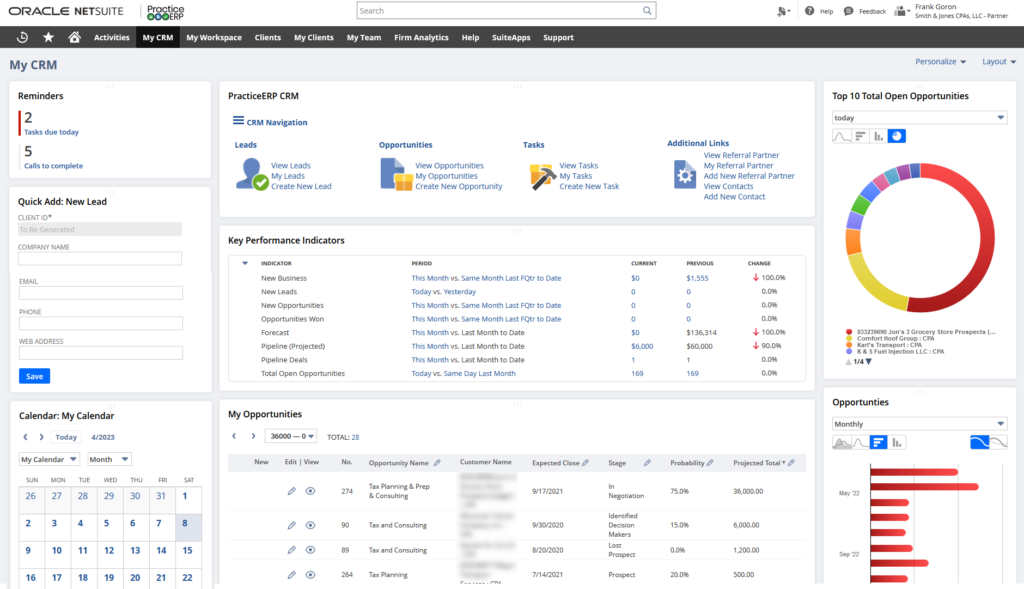
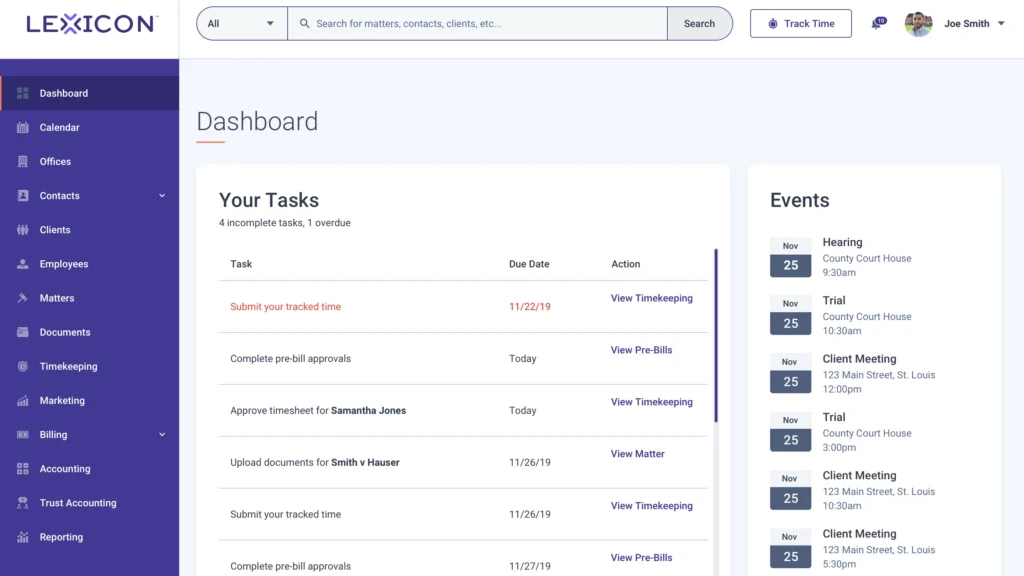
Here are a few examples of what practice management software interfaces look like in real medical settings:

Top Practice Management Software to Consider
Here's my shortlist of the best practice management software solutions:
Who Uses Practice Management Software?
You’ll find practice management software supporting these types of teams and organizations:
- Independent medical clinics: Small physician groups and specialty practices needing to control scheduling, billing, and admin from one system.
- Multi-location healthcare groups: Medical organizations operating across several sites that need consolidated workflows and patient records.
- Outpatient departments: Hospital-based teams managing appointments, referrals, and insurance before and after procedures.
- Billing and revenue cycle teams: Staff responsible for claims, coding, and collections across healthcare organizations.
- Medical office administrators: Operations leads, including practice administrators, who coordinate front-office activities, documentation, and compliance tracking.
Key Practice Management Software Benefits & Potential Business Impacts
Adopting practice management software brings measurable advantages like greater efficiency, fewer administrative errors, improved compliance, and more consistent revenue. While these solutions can require a significant investment and thoughtful implementation, the risks of not adopting them often include higher costs, lost revenue, and persistent compliance gaps.
Use this table to weigh the primary benefits against the possible risks when considering practice management software:
| Benefits | Risks |
|---|---|
| BenefitsCentralized patient scheduling | RisksImplementation delays |
| BenefitsAutomated billing and claims tracking | RisksHigh initial and ongoing costs |
| BenefitsReduced data entry errors | RisksStaff resistance to new workflows |
| BenefitsStronger compliance documentation | RisksData security vulnerabilities |
| BenefitsIntegrated reporting tools | RisksDisruption to existing operations |
| BenefitsEasier multi-site coordination | RisksVendor lock-in and limited flexibility |
| BenefitsStreamlined patient check-in | RisksInaccurate data migration from legacy systems |
Practice Management Software Case Studies
These real-world case studies show how practices operated before and after adopting practice management software. You’ll see the impact on workflows, patient experience, and overall business performance.
Case Study: Prime Clinic's Implementation of Medesk
Prime Clinic is a multidisciplinary outpatient clinic with more than 30 doctors across multiple specialties, and it turned to Medesk to replace disconnected tools and manual workflows with a single, integrated system. The clinic implemented Medesk from day one of opening, training its entire team in just a few hours per person and building transparent, role-based workflows across clinical and administrative functions.
Here are the results of Prime Clinic's implementation of practice management software:
- Optimized reception workload: Online booking and the patient portal allowed patients to self-schedule, which reduced phone traffic and front desk burden.
- Increased patient acquisition: The online booking module drove more appointment bookings directly through the clinic's website.
- Improved billing accuracy: Automated invoicing reduced payment delays and made cash flow more predictable.
- Eliminated scheduling errors: Manual booking mistakes were removed through automated scheduling and calendar management.
- Faster clinical documentation: Consultation note templates linked to ICD-10 coding allowed doctors to structure diagnoses and treatment plans quickly.
- Full inventory visibility: The stock control module gave the clinic real-time tracking of supplies, deliveries, and write-offs.
- Transparent team performance: Business intelligence dashboards gave practice managers live visibility into clinical and financial performance across the whole clinic.
Core Features & Capabilities of Practice Management Software
You should expect these core features in any practice management software built for medical settings:
- Centralized appointment scheduling: Manage clinician calendars, patient bookings, and automated confirmations in one place.
- Insurance claims processing: Automate claims submission, track statuses, and manage rejections to speed up reimbursement.
- Patient records management: Store, organize, and retrieve digital patient charts aligned with privacy regulations.
- Billing and invoicing: Generate invoices, accept payments, and monitor outstanding balances for every patient encounter.
- Task and workflow automation: Assign and track tasks for front desk, billing, and clinical teams to keep the practice running smoothly.
- Reporting and analytics: Access financial, operational, and clinical reports to spot trends and optimize resources.
- Patient communications: Send reminders, share lab results, and handle two-way messaging through secure patient portals.
- Inventory management: Track medical and office supplies to prevent shortages or overstocking.
Practice Management Software Use Cases: Typical Processes & Workflows
Practice management software helps you coordinate day-to-day operations like appointment scheduling, patient registration, billing, and insurance claims in one place. You can set up repeatable workflows that cut down on manual work, reduce errors, and keep teams aligned. This makes it easier to deliver care while staying on top of documentation and compliance requirements.
Use this table to see how practice management software supports key processes for medical practice managers:
| Process | Description | How Software Helps |
|---|---|---|
| ProcessAppointment Scheduling | DescriptionBook, reschedule, or cancel patient visits while managing provider calendars. | How Software HelpsAutomates confirmations, updates availability in real time, and reduces double-booking. |
| ProcessPatient Registration | DescriptionCollect, verify, and store patient demographics and insurance details. | How Software HelpsStreamlines data entry, minimizes paperwork, and makes patient info accessible across teams. |
| ProcessBilling and Invoicing | DescriptionGenerate and track patient invoices, insurance claims, and payments. | How Software HelpsAutomates calculations, manages claim status, and flags unpaid balances instantly. |
| ProcessClinical Documentation | DescriptionRecord encounter notes, diagnoses, and treatment plans for every patient. | How Software HelpsProvides templates, links records to patient files, and ensures data is searchable and secure. |
| ProcessCompliance Reporting | DescriptionPrepare and submit documentation required for regulatory and insurance standards. | How Software HelpsAutomatically compiles data and produces audit-ready reports for faster compliance checks. |
More Articles
Types of Practice Management Software & Similar Tools
Not all tools in this space are the same, and knowing the differences helps you choose the right fit for your practice's needs:
| Type | Differentiator |
|---|---|
| TypeElectronic Health Record (EHR) Software | DifferentiatorFocused on clinical documentation and patient health data rather than administrative workflows |
| TypeMedical Billing Software | DifferentiatorHandles claims, coding, and revenue cycle management without broader scheduling or operations tools |
| TypeTelehealth Platforms | DifferentiatorBuilt for remote care delivery, with limited admin and back-office functionality |
| TypePatient Engagement Software | DifferentiatorDesigned around patient communication, satisfaction, and self-service rather than internal operations |
| TypeHealthcare CRM Software | DifferentiatorManages patient relationships, referrals, and outreach rather than day-to-day clinical workflows |
Top 10 Medical Practice Management Software
Here are our top picks of the best medical practice management software to help you in your search:
Ready to Explore Your Software Options in More Detail?
Once you understand the core capabilities of practice management software, billing is often the next function worth evaluating closely—so take a look at our breakdown of the best medical billing software to see which tools fit your practice's revenue cycle needs.