Practice management software can sharpen your billing processes, improve patient scheduling, and free up more time for direct care—but it also comes with real implementation costs, workflow disruptions, and vendor dependencies worth thinking through. I've found the best way to approach this decision is to weigh both sides honestly against your practice's specific needs and capacity for change. The right tool can genuinely transform how your team operates, but only if you go in with clear expectations.
Here’s a quick look at the main pros and cons of practice management software:
| Pros | Cons |
|---|---|
| ProsStreamlined Administrative Workflow and Efficiency: Cuts down on manual tasks, making daily operations less stressful for your staff. | ConsHigh Implementation and Training Costs: Initial setup and training require significant investment of both money and staff time. |
| ProsImproved Billing and Revenue Cycle Management: Automates claims submission and payment tracking, making collections and reimbursements simpler to manage. | ConsWorkflow Disruptions During System Transitions: Changing systems can interrupt daily routines and temporarily slow down your team's productivity. |
| ProsEnhanced Patient Scheduling and Appointment Management: Makes it easier to manage calendars, reduce scheduling errors, and minimize patient no-shows. | ConsDependence on Vendor Support and Updates: Relies on the vendor’s responsiveness for troubleshooting and keeping software updated to meet regulations. |
| ProsBetter Regulatory Compliance and Data Security: Helps ensure patient data protection and compliance with healthcare regulations through built-in safeguards. | ConsTechnical Downtime Risks Patient Care: System outages can stall access to records and interrupt patient appointments, putting care delivery at risk. |
| ProsIncreased Focus on Patient Care: Frees up more time for clinical staff to spend with patients instead of paperwork. | Cons |
5 Advantages of Practice Management Software
Here are five key advantages I’ve experienced with practice management software:
1. Streamlined Administrative Workflow and Efficiency
Practice management software turns repetitive admin work—like managing patient files and tracking insurance claims—into quick, automated tasks. As a result, your team can focus more on tasks that need their attention and less on paperwork.
For example, athenahealth automates insurance eligibility checks and claim submissions, so front-desk teams don’t have to switch between programs or chase paperwork. DrChrono lets you digitize forms, schedule appointments, and track patient histories in one platform, helping you eliminate duplicate data entry. I’ve seen teams use features like one-click chart creation and automated reminders in AdvancedMD to reduce mistakes and save hours each week.
When everyone works from the same digital system, you get fewer miscommunications and your workflow feels a lot less hectic—even during the busiest shifts.
Here are a few best practices that can help your team get the most out of optimized workflows:
- Centralize information: Store all patient records, insurance details, and appointment data in one place.
- Automate routine tasks: Set up the system to handle appointment reminders and billing follow-ups for you.
- Use dashboard reporting: Monitor workflow bottlenecks and spot inefficiencies by tracking daily admin metrics.
2. Improved Billing and Revenue Cycle Management
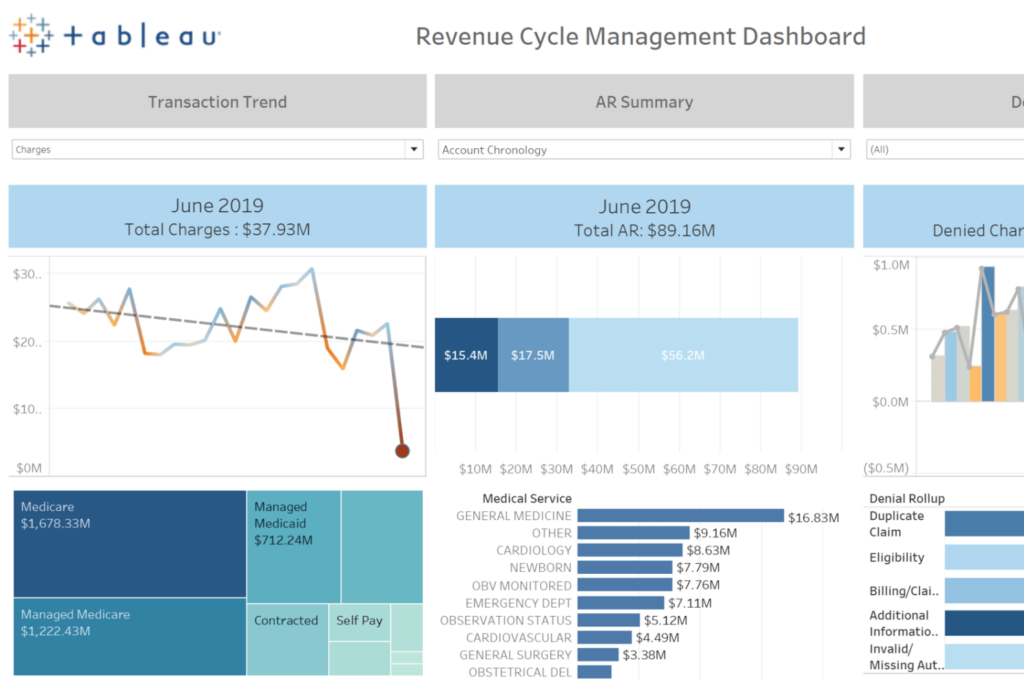
Using practice management software speeds up claims processing, catches billing errors early, and helps you get paid faster. This means fewer headaches for your billing staff and quicker, more predictable cash flow for your practice.
For example, Kareo flags insurance gaps and missing patient information before submitting claims, which reduces rejections and delays. NextGen Healthcare includes automated payment posting and claim follow-up workflows, so billing teams can easily track outstanding accounts. With eClinicalWorks, real-time eligibility checks and integrated payment processing help billing departments reduce time spent chasing down denied claims.
Switching to digital billing tools like these helps teams eliminate lost revenue from manual processes, stay on top of patient balances, and send reminders without lifting a finger.
Here are a few practical tips for making the most of enhanced billing tools:
- Audit claims regularly: Review denied or delayed claims to spot recurring issues you can address in your workflow.
- Train all billing staff: Make sure everyone understands the system’s tools for coding, payment tracking, and patient statements.
- Set clear follow-up intervals: Establish automated reminders for unpaid balances to maintain steady cash flow.
- Integrate with EHR systems: Connect billing with health records for faster data entry and fewer mistakes.

3. Enhanced Patient Scheduling and Appointment Management
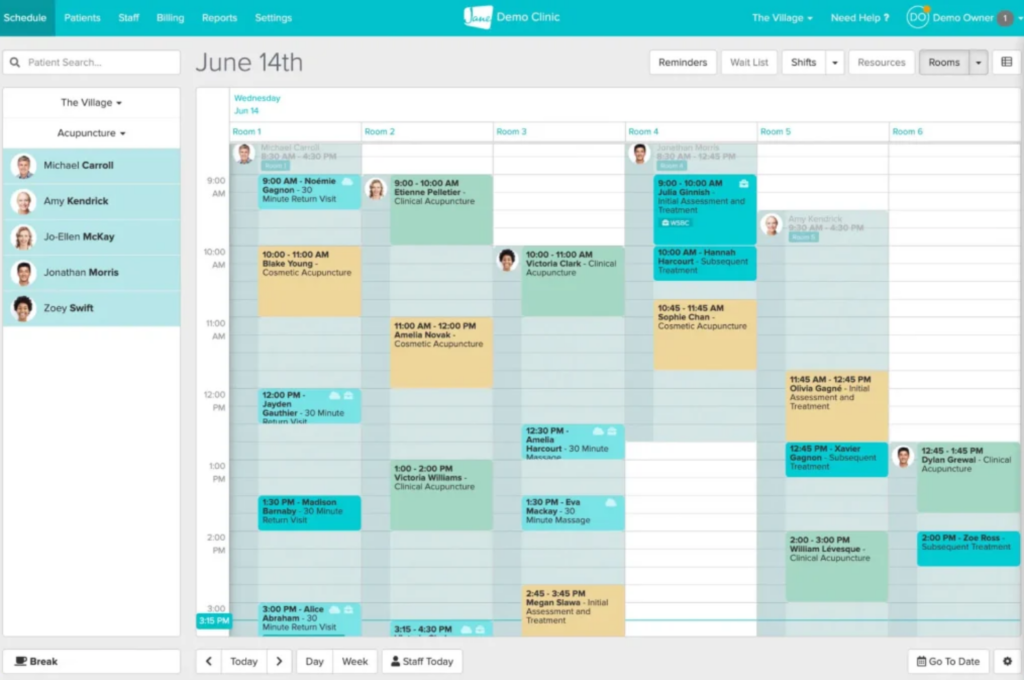
Practice management software lets your team fill schedules more efficiently, handle cancellations quickly, and reduce the chance of double-booking or missed appointments. This creates a smoother experience for both patients and staff.
For instance, SimplePractice offers online booking that allows patients to request appointments in real time, which frees up staff from phone duty and cuts back on scheduling confusion. AdvancedMD sends automated reminders to patients, reducing no-shows and last-minute cancellations. With Practice Fusion, you can set up color-coded calendars for different providers or appointment types, making it easier for front-desk staff to coordinate busy days.
Improved scheduling tools also let your staff track trends, like peak times, so you can adjust staffing and appointment slots to better meet demand.
To make the most of digital scheduling features, try these practical applications:
- Offer online self-scheduling: Give patients access to book, change, or cancel appointments anytime without calling.
- Use waitlists and quick fills: Automatically notify patients of open slots from last-minute cancellations to keep the schedule full.
- Analyze scheduling reports: Track no-show rates and appointment patterns so you can adjust office hours and staffing accordingly.
4. Better Regulatory Compliance and Data Security
Practice management software helps you protect patient information and keep up with changing privacy laws, lowering your risk of compliance violations and data breaches. This keeps your organization aligned with requirements like HIPAA and other healthcare regulations.
For example, CareCloud uses encrypted data storage and role-based access controls to restrict sensitive information to only those who need it. Greenway Health provides audit trails and customizable user permissions, so you can track who accessed or changed records at any time. NueMD offers built-in compliance checklists and real-time alerts to make following guidelines part of your daily routine.
With these features, teams can confidently manage records, billing, and communication, knowing their processes meet industry security standards and legal obligations.
Consider these tips to strengthen compliance and keep data secure:
- Review access levels: Regularly audit who can see or change sensitive information to match current roles and responsibilities.
- Enable automatic backups: Schedule frequent backups so you’re protected against data loss or system failures.
- Document compliance workflows: Keep written protocols for handling records and conducting audits to show you’re meeting standards.
- Stay updated on regulations: Assign someone to monitor rule changes and update policies and processes as needed.
5. Increased Focus on Patient Care
When you automate routine admin work and simplify scheduling, your team gets back more time for patient interactions and care planning. This leads to a better patient experience and improved satisfaction with every visit.
Practice management software like AdvancedMD allows clinical teams to quickly access up-to-date patient charts and medical histories, so you can start more meaningful conversations in the exam room. Kareo’s integrated task lists and telehealth options let providers prep for appointments and connect with patients virtually, cutting down on paperwork between visits. With DrChrono, features like quick templates and e-prescribing make charting and follow-ups less time-consuming.
Together, these tools shift attention away from screens and toward patient needs—giving clinicians a chance to focus on what matters most.
Here are some ways to help your team direct more energy toward patient care:
- Delegate admin tasks: Assign repetitive non-clinical work to support staff using built-in workflow tools.
- Standardize patient intake: Use digital forms and templates to speed up onboarding and focus more time on patient needs.
- Prioritize communication tools: Make secure messaging and telehealth a regular part of follow-up and patient engagement.
- Block protected time: Schedule no-interruption periods for providers to review complex cases and prep for care delivery.
4 Disadvantages of Practice Management Software
While practice management software offers many benefits, there are a few potential drawbacks that your team should consider:
1. High Implementation and Training Costs
Getting started with practice management software often means a significant upfront investment, which can strain budgets and cause delays in adoption. You’ll need to budget for not just the software itself, but also for training sessions, data migration, hardware upgrades, and possible consulting fees.
For example, Athenahealth offers onboarding support but charges extra for in-depth staff training, while NextGen Healthcare provides self-paced online modules that reduce costs but require more time from staff. PracticeSuite includes onboarding tools and support, yet moving legacy data and customizing templates may still require outside help. These early expenses and time commitments can create stress for smaller clinics working with limited resources.
Try these steps to control costs and use resources wisely during implementation and training:
- Phase your rollout: Start with one location or department, then expand as your team gets comfortable.
- Leverage in-house trainers: Identify team members as product champions to help coach others and answer questions after formal training ends.
- Negotiate with vendors: Ask about bundled training packages or price breaks on onboarding for larger groups.
- Plan for downtime: Schedule training during slower periods to minimize interruption to daily operations.
2. Workflow Disruptions During System Transitions
Switching to a new practice management system can temporarily throw off established routines, leading to frustration, slower service, and missed details. Teams may spend more time on screens or have trouble locating the tools and information they need during the transition period, which can impact both front-desk and clinical staff.
To reduce interruptions, some software providers offer support solutions—Cerner has dedicated go-live specialists who help practices navigate the first weeks with hands-on guidance. eClinicalWorks supplies ongoing training modules to reinforce key workflows as people adjust to the new system. AdvancedMD includes a sandbox environment where teams can practice real tasks before they go live. Even with these features, expect staff to need extra patience and support as everyone finds their footing again.
Use these strategies to keep your team on track during a system transition:
- Pilot processes: Test live workflows with a small group before rolling out changes to everyone.
- Map legacy workflows: Document old processes so you can identify what must be preserved, modified, or improved in the new system.
- Set realistic expectations: Let staff know there will be an adjustment period and set measurable goals for reaching full productivity.
- Offer peer support: Encourage team members who catch on quickly to help answer questions and troubleshoot common obstacles.
3. Dependence on Vendor Support and Updates
When your operations rely on practice management software, you’re tied to your vendor for timely technical support and regular updates, which can leave your team in a tough spot if response times are slow or updates introduce unexpected issues. Waiting for fixes or new feature rollouts may interrupt daily work and delay patient services, especially for smaller teams that don’t have in-house IT support.
Some vendors try to lessen this risk by offering 24/7 support chat and detailed help centers, so staff can get quick answers at any hour. Others provide regular release notes and user forums to share tips and workarounds as updates roll out. While these resources help, you’ll still need to monitor vendor performance and have a backup plan for handling critical issues or extended downtimes.
Here are steps you can take to stay prepared and reduce risks tied to vendor support:
- Document critical workflows: Keep internal step-by-step guides ready for common troubleshooting tasks.
- Assign a system liaison: Designate one staff member to manage vendor communication and track tickets or update notices.
- Schedule regular reviews: Set calendar reminders to assess system health and vendor response performance.
- Maintain backup protocols: Have manual or paper-based processes ready in case of software outages.
4. Technical Downtime Risks Patient Care
If your practice management software becomes unavailable, key information like appointment schedules, billing records, or patient histories might be out of reach when you need them most. Even a brief outage can cause missed appointments, billing errors, and delays in care, putting extra pressure on your staff and disrupting patient trust.
Cloud-based vendors often promote uptime guarantees and automatic backups to reduce the impact of outages—DrChrono offers performance dashboards so teams can monitor system status in real time, while Kareo and CareCloud both provide mobile access so some functions remain available even if the main system goes down. These tools help, but technical breakdowns can still create stressful situations and require fast thinking from your team.
Keep these actions in mind to protect patient care during technical downtime:
- Build paper backup kits: Prepare basic forms for scheduling, billing, and clinical notes that staff can use if the system is down.
- Train for downtime drills: Practice running core workflows manually so everyone knows their role during an outage.
- Identify quick-access contacts: Post emergency IT and support phone numbers so help is easy to find.
- Set up downtime logs: Track missed or delayed activities to follow up once systems are restored and avoid gaps in care or billing.
More Articles
Is Practice Management Software Right for You?
Every practice faces a tradeoff when deciding whether to bring in new technology. The right practice management software can simplify complex processes and help your team stay focused on patients, but it also introduces costs and potential complications. Weigh the benefits against the implementation challenges and support needs outlined above to decide what’s best for your organization.
Use this table to help determine if practice management software fits your practice’s needs and realities:
| Consider practice management software if… | Consider a different solution if… |
|---|---|
| Consider practice management software if…You manage multiple providers and need unified scheduling | Consider a different solution if…Your team is small and handles appointments with paper or simple tools |
| Consider practice management software if…You struggle with insurance claim errors and slow billing cycles | Consider a different solution if…Your budget cannot cover up-front or subscription software costs |
| Consider practice management software if…Your front-desk staff spends too much time on phone reminders or manual patient check-ins | Consider a different solution if…Staff pushback on technology is high or previous rollouts failed |
| Consider practice management software if…You want quick, accurate reporting on financial and operational performance | Consider a different solution if…You lack access to reliable internet or secure network infrastructure |
| Consider practice management software if…You face regulatory pressure to tighten data security and access controls | Consider a different solution if…You expect frequent, short-term staffing changes or temp agencies |
| Consider practice management software if…Your practice plans to grow or open new locations in the next year | Consider a different solution if…You need extreme customization that most vendors won’t support |
| Consider practice management software if…You rely heavily on referral tracking and multi-specialty scheduling | Consider a different solution if…Your practice can’t tolerate even minimal workflow disruptions |
Top Practice Management Software to Consider
Here's my shortlist of the best practice management software solutions:
Ready to Find the Right Fit for Your Practice?
If you've weighed the pros and cons and you're ready to explore your options, browse the best practice management software tools reviewed by The Medical Practice's editorial team to find a solution that matches your clinical and operational needs.