Running a dental practice involves more than managing appointments and patient records. Your team also needs to coordinate treatment plans, process insurance claims, collect payments, and keep patient information organized. The right dental software can support these tasks, but not every practice needs the same set of tools.
Dental practice management software covers daily administrative work, while billing software focuses on claims processing and payment collection. Other categories address specific needs, such as patient communication, imaging, and treatment planning.
Understanding where these tools differ—and where their features overlap—can prevent unnecessary purchases. In this guide, I'll walk through eight types of dental software, what each one does, and how to determine which ones your practice actually needs.
What Is Dental Software?
Dental software is a set of digital tools that supports a practice’s clinical, administrative, and financial work. Categories include practice management, dental imaging, treatment planning, billing, and patient communication software.
Some products combine several functions, while others focus on one part of the patient journey, such as capturing images or processing claims.
8 Key Types of Dental Software
The categories below explain what each tool handles, which features to compare, and how those features support clinical, administrative, and financial workflows:
1. Dental Practice Management Software
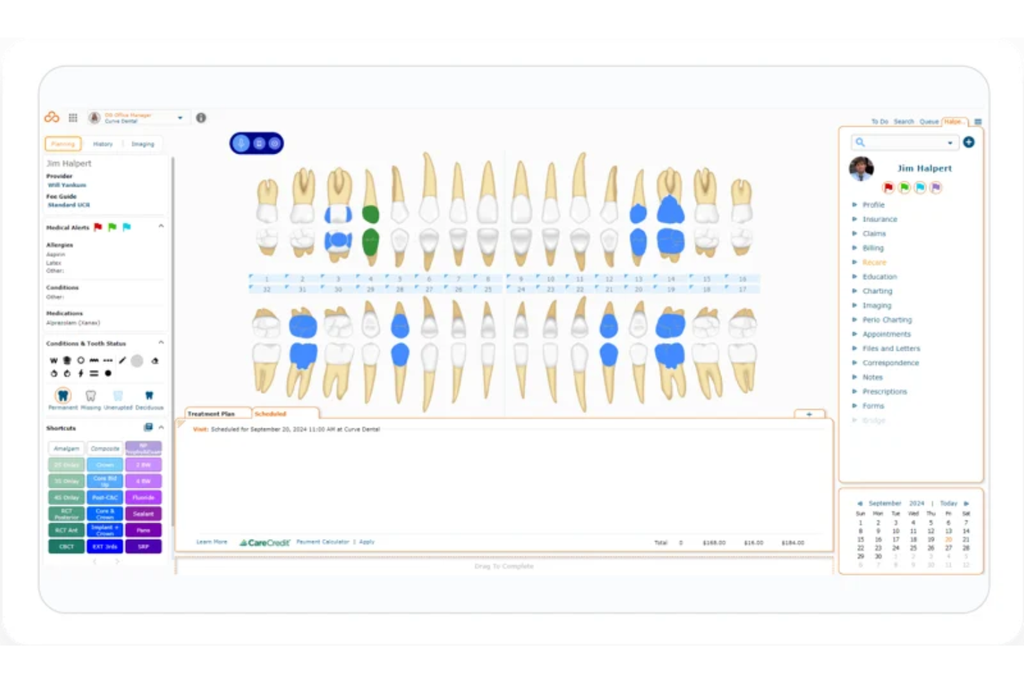
Curve Dental shows color-coded tooth conditions, patient records, and treatments.
From what I've seen, this type of dental software is the operational backbone most practices build everything else around—it handles scheduling, patient records, and front-desk workflows in one place. Dentists, office managers, and administrative staff rely on it daily to coordinate appointments, track patient histories, and manage the tasks that keep a practice running.
Benefits
Having everything—scheduling, patient records, and billing workflows—in one place cuts down on the tab-switching and double-entry that slow front desks down. In my experience, tools like Dentrix and Curve Dental do this well by connecting appointment calendars directly to patient charts, so your team isn't reconciling information across disconnected systems.
That means fewer data entry errors and better coordination between clinical and administrative staff.
Amy Kaminski, Business Manager at Dawson Family Dentistry, shared a practical example in a Dentrix case study. Her team reportedly saved approximately 20 minutes of front-desk work by allowing patients to complete forms before appointments and transferring their information directly into patient records.
Her experience shows how connected patient intake and recordkeeping can reduce repetitive administrative tasks and give staff more time to focus on patients.
Features
The features that matter most in dental practice management software are the ones your team touches every single day—here's what to look for:
- Appointment scheduling: A drag-and-drop calendar with real-time availability is the baseline. Dentrix, for example, lets you view chair time by operatory, which makes it easier to spot gaps and avoid double-booking.
- Patient records management: Look for charting tools that store clinical notes, treatment histories, and health forms in one place. The less your clinical staff has to toggle between screens, the fewer things get missed.
- Insurance verification: Built-in eligibility checks that pull coverage data before an appointment save your front desk from making manual calls. I've seen this single feature cut pre-appointment prep time significantly.
- Treatment plan tracking: You'll want a clear view of proposed, accepted, and completed treatments per patient. This keeps your clinical and administrative teams aligned without anyone having to re-explain what was discussed chairside.
- Reporting and analytics: Production reports, collection summaries, and provider performance breakdowns help you spot revenue trends before they become problems. Curve Dental surfaces these in a dashboard that doesn't require an export to make sense of.
- Task and workflow management: Internal task lists and notes tied to patient records keep follow-ups from slipping through. This is especially useful in multi-provider practices where handoffs between team members happen constantly.
- Multi-location support: If you operate more than one office, centralized scheduling and shared patient records across locations are non-negotiable. Not every platform handles this well at a mid-market price point, so it's worth testing before committing.
2. Dental Imaging Software
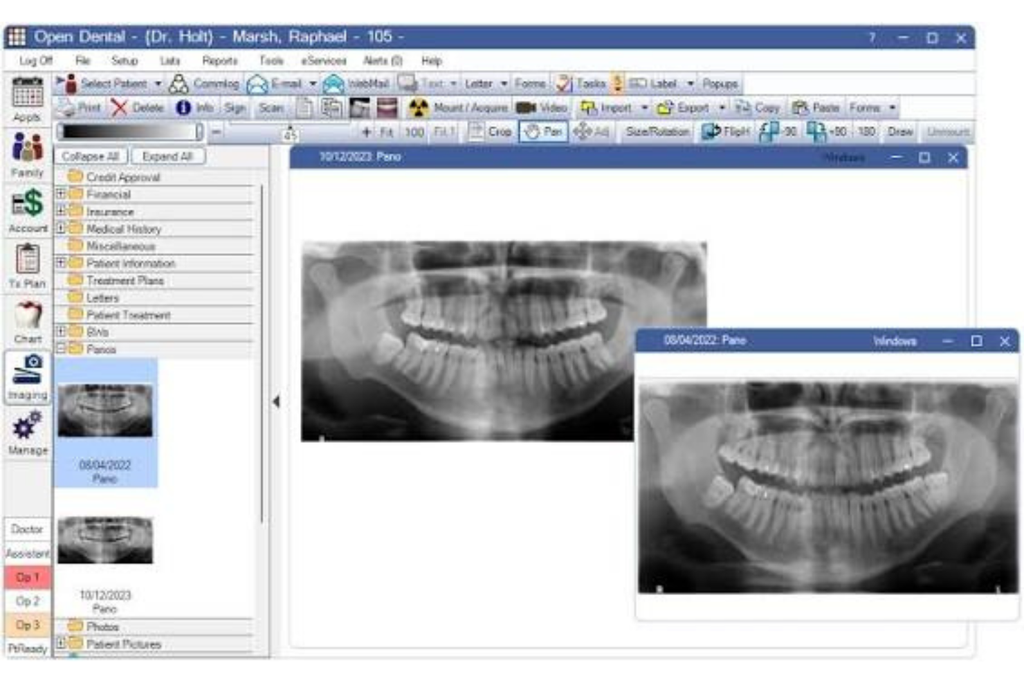
Radiographs, intraoral camera captures, and 3D scans all live here—this dental software category gives clinicians a digital space to capture, store, and interpret diagnostic images alongside patient records.
In my experience, it's where clinical decision-making gets grounded, since dentists and hygienists can pull up images chairside and walk patients through findings in real time.

Benefits
Having diagnostic images tied directly to patient records changes how you explain treatment to patients. I've found that pulling up a radiograph or intraoral camera capture chairside, using tools like Open Dental Software, makes it easier for patients to understand why a procedure is recommended.
That visual context can improve treatment acceptance by showing patients exactly what needs attention. It also keeps your clinical team working from the same information, so findings don't get lost between hygiene appointments and follow-up reviews.
Dr. Joseph Mazzola, DDS, MAGD, shares a similar experience in a Dental Economics case study. He explains how digital scans and impressions enabled him to walk a patient through treatment options, consult with an oral surgeon, and send the necessary information to a dental laboratory.
His experience shows how dental imaging software improves not only patient understanding but also communication between providers throughout treatment planning.
Features
The features that separate a capable dental imaging platform from a basic one come down to how well they support your diagnostic workflow and patient communication:
- Multi-modality image capture: Look for support across 2D radiographs, intraoral camera feeds, and 3D CBCT scans in a single platform. Having to switch applications between modalities is where diagnostic context gets lost.
- Image enhancement tools: Brightness, contrast, and color filter adjustments let clinicians sharpen diagnostic detail without retaking images. In my experience with tools like Dexis, these controls are fast enough to use chairside without breaking the flow of an appointment.
- Side-by-side comparison views: Placing current and historical images next to each other is one of the most underrated features in this category. It gives you a clear visual baseline for tracking changes over time.
- EHR and practice management integration: Images should link directly to the patient's chart, not sit in a separate folder system. Platforms like Apteryx handle this well by syncing captures automatically with patient records on acquisition.
- Patient-facing display mode: A clean, annotation-friendly view designed for patients—not just clinicians—makes it easier to walk someone through a finding and explain why treatment is being recommended.
- Cloud or server-based image storage: High-resolution images take up significant storage. Knowing whether a platform stores images locally or in the cloud affects your backup strategy, access speed, and long-term infrastructure costs.
- DICOM compliance: This is the standard format for dental and medical imaging. If your platform doesn't support DICOM, you'll run into compatibility issues when referring patients or integrating with third-party diagnostic tools.
3. CAD/CAM Software
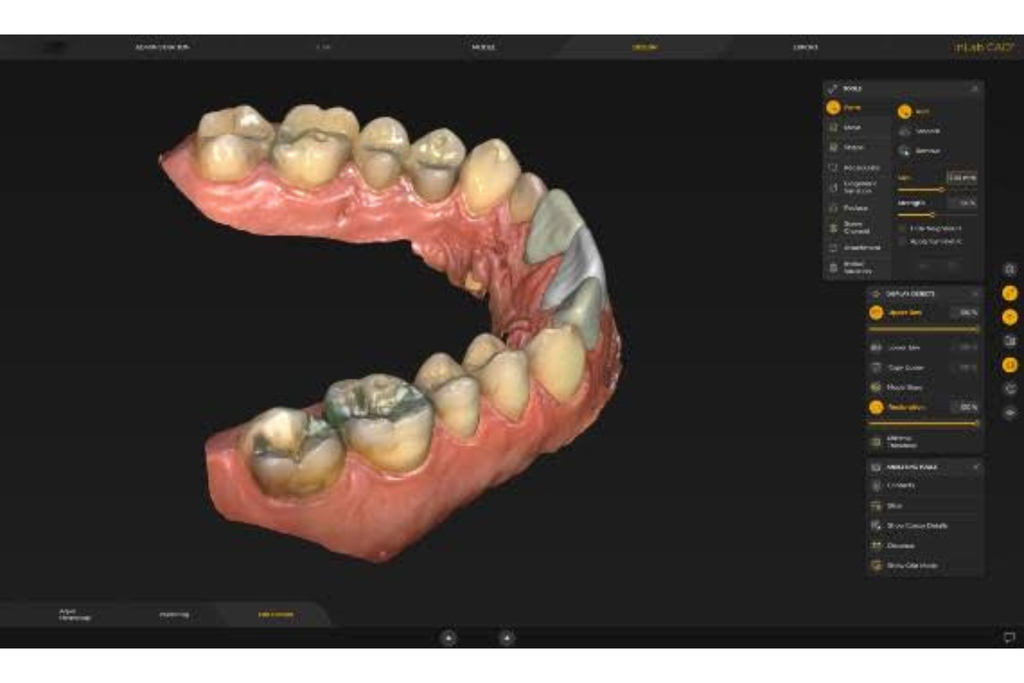
Used by dentists and lab technicians alike, dental CAD/CAM software translates digital scans into precise 3D models that drive in-office milling machines or guide external fabrication of crowns, bridges, and veneers. In my experience, the ability to design and mill a restoration in a single visit is where this category delivers its clearest clinical value.
Benefits
Designing and milling a restoration in a single visit is where I think CAD/CAM software makes its biggest impact. Patients leave with a finished crown instead of a temporary, and your schedule doesn't carry the overhead of a second seating appointment.
In my experience, platforms like CEREC and 3Shape connect digital scans with restoration design and milling, reducing some of the fit issues associated with traditional impressions and external lab workflows. That precision can mean fewer remakes and less chair time spent on adjustments.
Dr. Dan Butterman, a practicing dentist, shares a similar perspective in a Dentsply Sirona clinical case study. He describes how combining accurate digital scans, intuitive design software, and chairside milling improved efficiency and patient satisfaction. In one documented case, he completed a ceramic crown restoration in approximately 75 minutes.
His experience illustrates how CAD/CAM software can shorten restoration appointments while giving dentists greater control over the design and fabrication process.
Features
Getting the most out of dental CAD/CAM software comes down to a handful of features that directly affect restoration accuracy, turnaround time, and how smoothly your clinical workflow runs:
- Digital impression integration: Your CAD/CAM platform should accept intraoral scan files directly from leading scanners. In my experience with CEREC, the tighter the connection between your scanner and design software, the fewer manual file transfers you deal with—and fewer transfers mean fewer opportunities for data loss.
- 3D design and modeling tools: Look for intuitive sculpting and margin refinement tools that let clinicians adjust restoration geometry before sending to the mill. Platforms like 3Shape give you fine control over occlusal anatomy without requiring a lab technician's level of expertise.
- Milling machine compatibility: Not every software talks to every mill. Confirm that your platform supports your specific milling hardware before committing—some CAD/CAM ecosystems, like CEREC, are intentionally closed, while others are more open.
- Material library support: A well-stocked material library lets you select the right parameters for zirconia, lithium disilicate, or composite resin before milling begins. Using the wrong settings for a material is one of the fastest ways to produce a restoration that doesn't seat correctly.
- Occlusion and bite analysis: Built-in occlusal mapping tools flag contact points before you mill, which reduces chairside adjustment time after seating.
- STL file export: Open STL export gives you the flexibility to send cases to an external lab when in-office milling isn't the right fit. I'd prioritize this feature if your practice handles a mix of single-visit and lab-supported restorations.
- Case archive and retrieval: Storing completed case designs lets you reference past restorations when a patient returns for a replacement or adjacent work—a small feature that pays off over time in multi-provider practices.
4. Treatment Planning Software
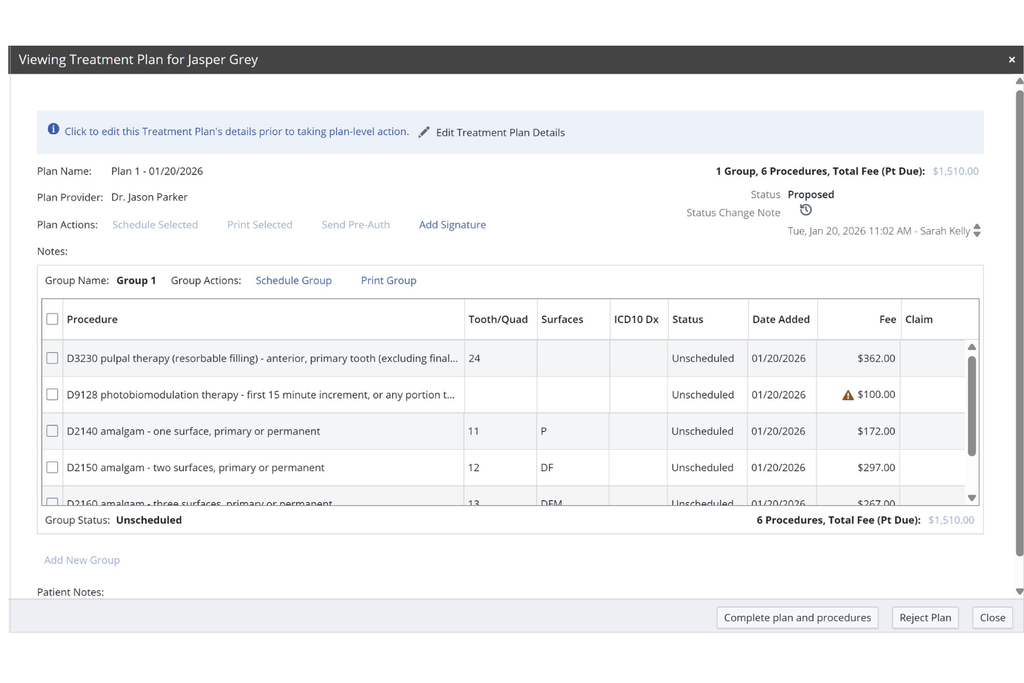
Used by dentists and treatment coordinators, this category gives your clinical and administrative teams a shared space to build, present, and track multi-step treatment plans tied directly to patient records.
In my experience, having proposed, accepted, and in-progress treatments visible in one view cuts down on the back-and-forth between the chair and the front desk significantly.
Benefits
Having proposed, accepted, and completed treatments tracked in one place is where treatment planning software earns its keep—your clinical and administrative teams are always working from the same picture, which cuts down on miscommunication between the chair and the front desk.
In my experience with platforms like Dentrix and Carestream Dental, the ability to present a phased treatment plan visually makes it easier for patients to understand sequencing and costs, which tends to move case acceptance forward. That clarity also makes follow-up easier, since coordinators can see exactly where each patient is in their plan without having to chase down notes from the provider.
Charlotte Skaggs, a Certified Dentrix Trainer and Founder of Vector Dental Consulting, reinforces this benefit in her Dentrix Magazine article. Drawing on more than 20 years of experience with Dentrix, she explains how updating treatment statuses, such as proposed, accepted, rejected, and completed, keeps the entire dental team informed about each patient's progress.
She also recommends reviewing treatment case reports regularly to identify outstanding procedures and follow-up opportunities. Her insights show how treatment planning software improves coordination while giving practices greater control over case acceptance and unfinished treatments.
Features
The features that matter most in dental treatment planning software are the ones that keep your clinical findings, proposed procedures, and patient decisions connected in a single, trackable record:
- Tooth chart integration: Your treatment plan should build directly from a visual tooth chart, with proposed procedures mapped to specific surfaces or teeth. In my experience with Dentrix, this level of specificity is what keeps clinical notes and billing codes aligned from the start.
- Multi-phase plan sequencing: Look for the ability to break a treatment plan into phases—urgent, short-term, and long-term—so patients can see a realistic timeline and cost breakdown. This is one of the features I think has the clearest impact on case acceptance.
- Fee and insurance estimate display: Showing a patient their estimated out-of-pocket cost alongside each treatment item, before they leave the chair, removes a major source of hesitation. Platforms like Carestream Dental handle this by pulling insurance fee schedules directly into the plan view.
- Patient consent and signature capture: Built-in consent workflows let patients review and sign off on proposed treatments digitally, which keeps your documentation audit-ready without adding a paper step.
- Plan status tracking: Each item in a treatment plan should carry a clear status—proposed, accepted, scheduled, or completed—so coordinators can follow up on pending work without pulling the provider back in.
- Treatment notes linking: Connecting clinical notes directly to specific plan items means any follow-up provider can see the reasoning behind a recommendation, not just the procedure code.
- Reporting and unscheduled treatment tracking: Practice-level reports that surface patients with accepted but unscheduled treatment are one of the more underutilized features in this category—and one of the fastest ways to recover revenue sitting in your existing patient base.
5. Patient Communication & Engagement Software
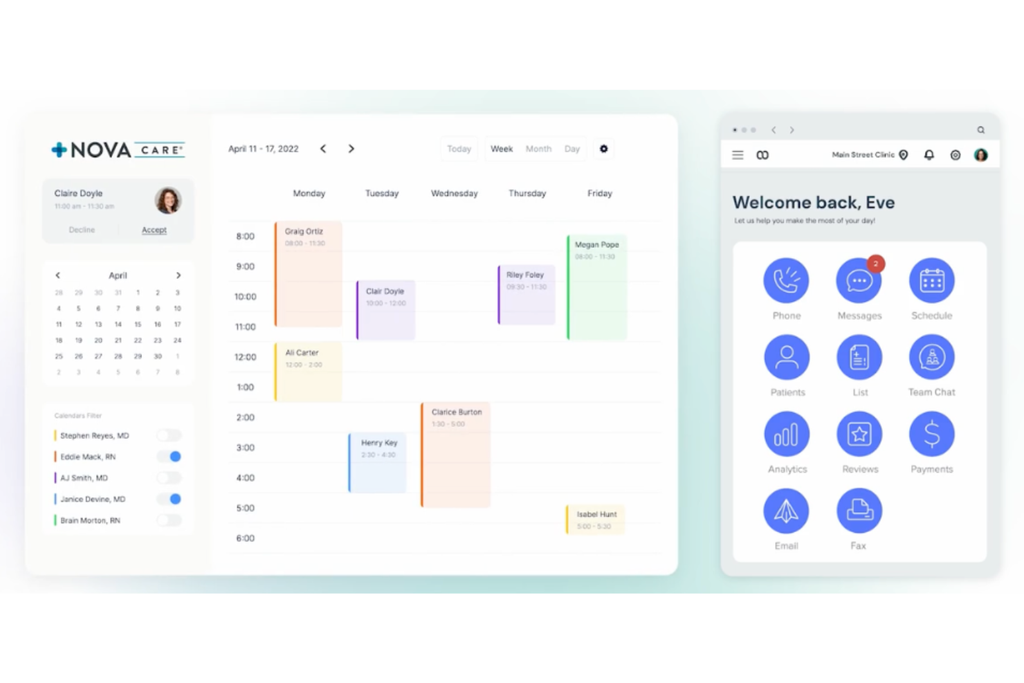
Used by front desk coordinators and practice managers, these tools handle appointment reminders, recall campaigns, two-way messaging, and post-visit follow-ups—all tied to your patient records. In my experience, practices that automate this layer of communication see fewer no-shows and more consistent recall rates than those relying on manual outreach alone.
Benefits
Automating appointment reminders and recall campaigns is where I think patient communication software makes its most immediate impact—platforms like Weave and Lighthouse 360 allow you to set up SMS and email sequences without anyone at the front desk manually dialing through a call list.
In my experience, that reduction in manual outreach can lower no-show rates and keep your hygiene schedule from developing gaps that are hard to fill last-minute. Two-way messaging also means patients can confirm, cancel, or ask questions without calling during peak hours, which takes real pressure off your front desk team.
Kim Jordan, former Office Manager at Weaver, Reckner & Reinhart Dental Associates, shared a similar experience in a Lighthouse 360 case study. As the practice grew to nearly 200 patients daily, manually confirming appointments became increasingly time-consuming.
After introducing automated reminders and email confirmations, her team significantly reduced confirmation calls and reported fewer cancellations and no-shows. Her experience shows how patient communication software can reduce front-desk workloads while keeping appointment schedules organized.
Features
The features that separate a capable patient communication platform from a basic reminder tool are the ones that keep your schedule full and your patients connected between visits:
- Automated appointment reminders: Look for platforms that send SMS and email reminders at configurable intervals before each appointment. In my experience with Weave, automated sequences cut the manual follow-up load on your front desk significantly without sacrificing the personal tone patients expect.
- Two-way messaging: Patients should be able to confirm, cancel, or ask questions directly from a text thread. I think this feature alone accounts for a measurable drop in no-shows, since patients can respond without making a phone call during office hours.
- Recall campaign automation: Your software should identify patients due for hygiene or follow-up appointments and trigger outreach automatically. Lighthouse 360 handles this well by pulling recall intervals directly from your practice management system.
- Online scheduling integration: Letting patients book or reschedule from a reminder link removes a step that often results in a lost appointment. The fewer barriers between a patient and a confirmed slot, the better.
- Broadcast messaging: The ability to send practice-wide updates—schedule changes, new services, or health notices—keeps your patient base informed without manual outreach for each contact.
- Review request automation: Triggered post-visit messages that invite patients to leave a review give your practice a consistent feedback loop that requires no manual effort from your team.
- Reporting on outreach performance: Message delivery rates, open rates, and confirmation rates tell you which communication channels your patient population actually uses, so you can adjust your recall strategy based on real behavior rather than assumptions.
6. Dental Billing & Revenue Cycle Management Software
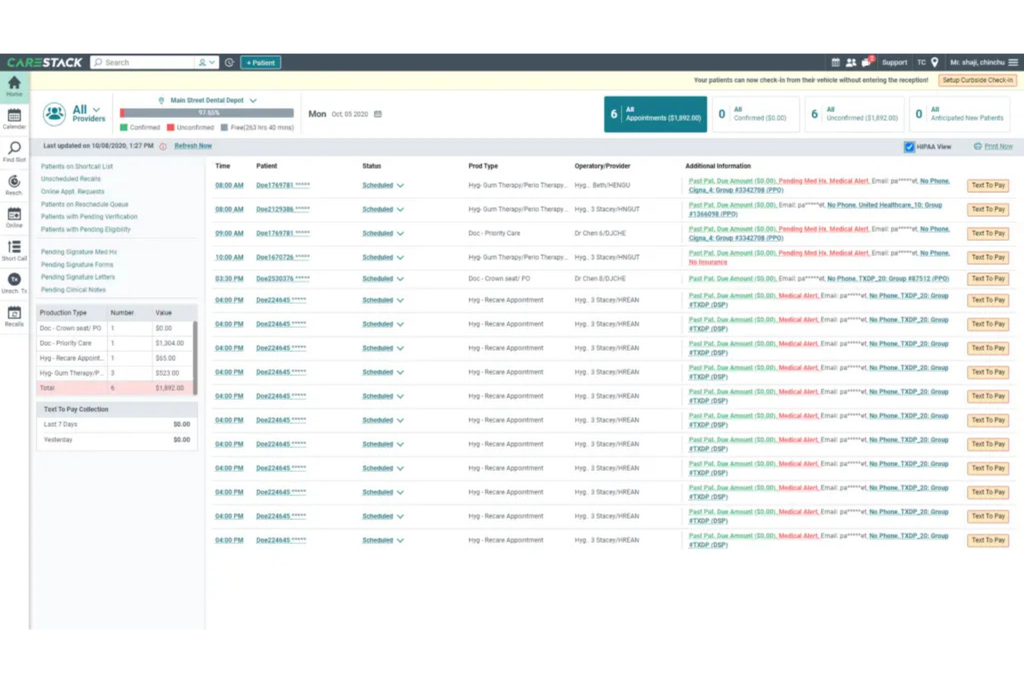
Billing software handles claims submission, insurance verification, payment posting, and accounts receivable tracking—managing the full revenue cycle from procedure coding to payment clearing.
In my experience, practices using a dedicated billing platform within their dental software stack see fewer claim denials and spend less time chasing down outstanding balances manually.
Benefits
Getting claims out clean the first time is where dedicated billing software pays for itself most visibly. In my experience with tools like Dentrix, the combination of automated eligibility verification and claim scrubbing catches coding issues before submission, which translates directly to fewer denials and faster insurance payments.
Platforms like Dentrix Ascend also surface accounts receivable aging data in a way that makes it easy for your billing team to prioritize follow-up on outstanding balances, so revenue you've already earned doesn't quietly age past 90 days, where recovery becomes much harder.
Jonas Tabolt, Operations and Technology Administrator at Hudson Dental Arts, shared a similar experience in a Dentrix Ascend case study. Before adopting the software, his team struggled to track rejected claims, sometimes waiting weeks for denial notifications while outstanding balances accumulated.
With Dentrix Ascend, they could identify rejected claims almost immediately, reducing billing backlogs and receiving insurance payments five to seven days sooner. His experience shows how dental billing software can improve cash flow by giving teams earlier visibility into claim issues and outstanding payments.
Features
The features that matter most in dental billing software are the ones that keep claims moving, catch errors before they become denials, and give your team clear visibility into where revenue is sitting:
- Eligibility verification: Your software should confirm a patient's insurance coverage automatically before they arrive, pulling benefit details directly from the payer. In my experience, this single feature prevents more claim rejections than anything else in the billing workflow.
- Claim scrubbing: Before a claim goes out the door, it should pass through an automated review that flags missing codes, mismatched procedure-to-diagnosis pairs, and payer-specific rule violations. Dentrix handles this well, catching issues that would otherwise come back as denials weeks later.
- Electronic claims submission: Direct submission to payers through clearinghouse connections shortens your payment cycle considerably compared to paper-based alternatives. Look for real-time submission status so your billing team isn't guessing where a claim stands.
- Payment posting: Automated posting of insurance payments and patient payments against the correct accounts keeps your ledger accurate without manual data entry for every remittance. I think this is where billing teams recover the most administrative time.
- Accounts receivable aging reports: A clear view of outstanding balances broken down by age and payer lets your team prioritize follow-up on claims before they cross the 90-day threshold where recovery becomes significantly harder.
- Denial management: Look for tools that track denied claims, categorize them by denial reason, and queue them for follow-up. Platforms like Dentrix Ascend surface this data in a way that makes it easy to spot patterns—like a payer consistently rejecting a specific code combination—so you can address the root cause rather than just resubmitting one claim at a time.
- Patient balance statements: Generating and sending itemized patient statements directly from your billing software, with clear breakdowns of what insurance paid and what remains, reduces the confusion that stalls patient payments.
My Top Dental Billing & Revenue Cycle Management Software Picks
7. Patient Education Software
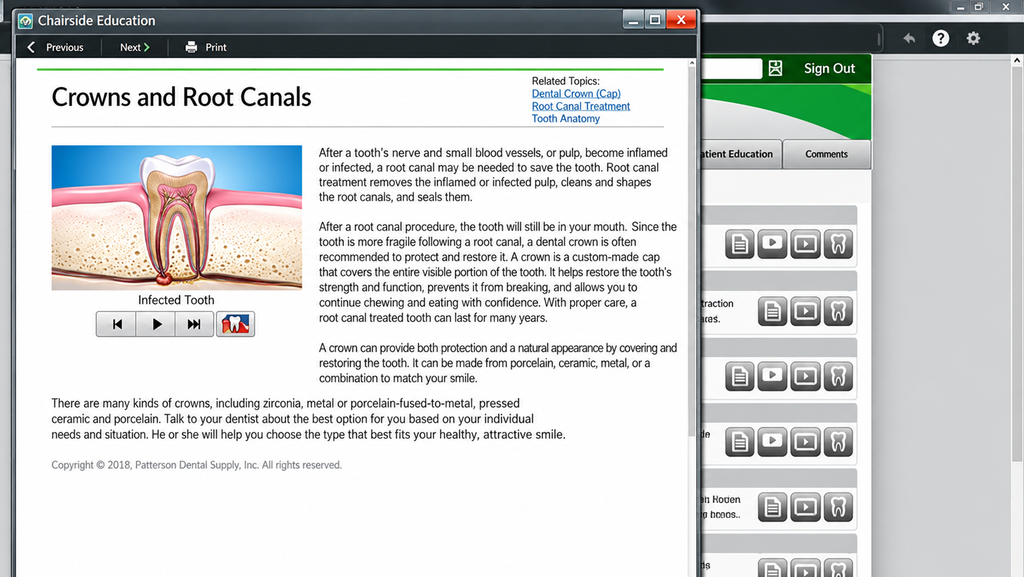
Dentists and hygienists use these tools chairside to show patients visual explanations of diagnoses, oral conditions, and proposed procedures in real time. In my experience, walking a patient through an animated procedure overview converts hesitation into a signed treatment plan faster than any verbal explanation will.
Benefits
Showing a patient an animated 3D walkthrough of a crown procedure can make a treatment plan easier to understand than a verbal explanation alone. CAESY Cloud provides access to more than 280 multimedia patient education presentations, and in my experience, pulling one up chairside during a diagnosis conversation can make patients more confident about their treatment decisions.
Platforms like Consult-PRO use 3D animations to demonstrate dental concepts and procedures, which I think is especially valuable when explaining something abstract—like bone loss or a root canal—where visuals can communicate details that are difficult to describe verbally.
Dr. Ronald Pross, DMD, FAGD, Founder of North Pointe Dental Associates, shares a similar experience in a Dental Economics article. After introducing animated patient education presentations, his practice reported an increase in case acceptance rates from approximately 50% to as high as 70%.
He explains that showing patients visual representations of procedures makes complex treatments easier to understand and encourages more informed discussions. His experience demonstrates how patient education software can improve treatment acceptance while giving patients greater confidence in their decisions.
Features
The features that make patient education software worth keeping in your operatory are the ones that move a patient from confused to committed before they leave the chair:
- Chairside presentation library: Your software should give you instant access to a wide range of condition- and procedure-specific presentations. CAESY Cloud, for example, offers more than 280 multimedia presentations, so you're never scrambling to explain a diagnosis verbally when a visual is available.
- 3D animations: Animated walkthroughs of procedures like root canals, implants, or crown placements do the explanatory work that words can't. In my experience, Consult-PRO's 3D animations are especially useful when the concept is abstract—like bone loss progression—where a patient genuinely can't picture what you're describing.
- Diagnosis-specific content matching: Look for software that lets you pull content by condition or procedure code, so the right presentation is a few taps away during a diagnosis conversation rather than something you have to hunt for mid-appointment.
- Multi-language support: Patients who aren't fluent in your practice's primary language shouldn't be left to interpret a verbal explanation. Platforms that offer content in multiple languages make informed consent more meaningful across your patient population.
- Patient-facing display integration: The software should run on a dedicated patient-facing screen or tablet so patients can watch without you narrating over them, which gives them space to absorb the information at their own pace.
- Integration with treatment planning: When your patient education platform connects to your practice management system, you can pull up relevant content directly from a patient's chart rather than toggling between separate applications mid-appointment.
- Post-visit content sharing: Sending patients a link to the same educational content after their appointment reinforces what you discussed chairside and gives them something concrete to reference when they're deciding whether to schedule the recommended procedure.
More Articles
8. Dental Analytics & Reporting Software
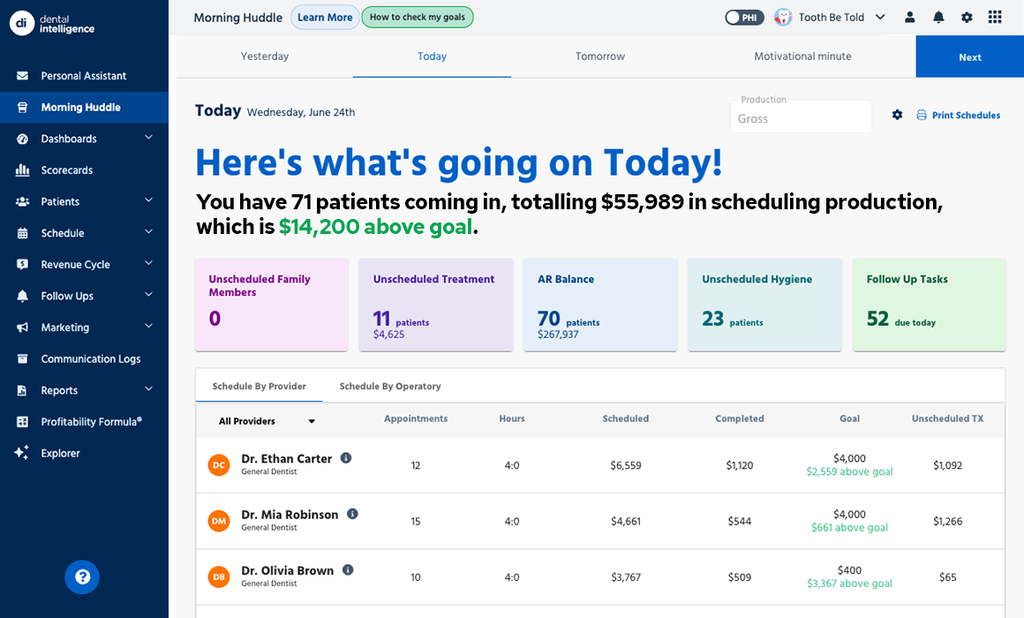
Analytics and reporting tools pull data from your practice management system to surface metrics like production, collections, case acceptance rates, and hygiene reappointment trends.
In my experience, having that data in a single dashboard—rather than scattered across separate reports—gives dentists and practice managers a much clearer picture of where the practice is performing and where revenue is slipping.
Benefits
When your practice data lives across separate reports in your practice management system, spotting a revenue leak or a drop in case acceptance means pulling multiple exports and piecing them together manually—and by the time you have the picture, you're already behind.
Dental analytics software like Dental Intelligence pulls production, collections, case acceptance, and hygiene reappointment data into a single dashboard, so you and your practice manager can see where things stand without building a report from scratch. In my experience, having that consolidated view is what turns a vague sense that "something's off" into a specific, fixable problem.
Dr. Devin Giron, a dental practice owner, shares a similar experience in a Dental Intelligence case study. He explains that before adopting the software, he often reacted to performance issues only after they had already affected his practice.
With access to daily metrics covering production, hygiene, new patients, and case acceptance, he could identify trends earlier and make more informed decisions.
His experience shows how dental analytics software shifts practice management from reacting to problems toward identifying opportunities for improvement before they affect revenue.
Features
The features worth prioritizing in dental analytics software are the ones that replace manual report-building with a live, actionable view of your practice's performance:
- Production and collections dashboard: Your software should pull production and collections data into a single view rather than requiring you to export and reconcile separate reports. Dental Intelligence does this well, giving you a real-time read on how revenue is tracking against your targets.
- Case acceptance tracking: Look for tools that show you how many treatment plans are being accepted, at what value, and by which provider. In my experience, this metric surfaces more about your practice's financial health than almost any other single number.
- Hygiene reappointment reporting: Your software should flag patients who are overdue for a recall appointment and show your reappointment rate as a percentage. A drop here is often the first sign that your schedule is going to get thin a few months out.
- Accounts receivable aging analysis: Analytics tools that break down outstanding balances by age and payer give your billing team a clear prioritization list instead of a static ledger to sort through manually.
- Provider-level production breakdowns: Seeing production data by provider, rather than only at the practice level, lets you identify performance gaps and have specific, data-backed conversations with your clinical team.
- Trend and period comparison: Look for software that lets you compare performance across time periods—month over month, year over year—so you can distinguish a slow week from a structural decline that needs attention.
- Automated alerts and goal tracking: Platforms that let you set production or collections targets and then alert you when you're trending off pace take the monitoring work off your plate and put the signal exactly where you need it.
The Right Dental Software Makes the Difference
Once you know which types of dental software your practice needs, the next step is finding the right tools within each category. Our guide to the best dental software covers top options for practice management, imaging, charting, billing, and more, with detailed reviews to make comparisons easier.