

Skybasert EHR-programvare lar praksisen din få sikker tilgang til pasientjournaler og administrere behandling fra alle internettilkoblede enheter – uten behov for servere eller lokal installasjon. Hvis du ser etter den beste skybaserte EHR-programvaren, ønsker du sannsynligvis å redusere IT-problemer, forbedre samarbeidet og holde teamet fokusert på pasientbehandling i stedet for teknisk feilsøking.
Denne veiledningen fremhever alternativene jeg mener vil hjelpe deg med å jobbe smartere, fortsatt være i samsvar med regelverket og tilpasse deg raskt til konstante endringer i 2026.
Why Trust Our Software Recommendations
6,700+
Reviews
20
Industry experts
16+
Evaluation factors
14
Years
Our team has been testing and reviewing software since 2012. As medical practice leaders ourselves, we know how difficult—and important—it is to choose the right software.
For this guide, we evaluated tools using hands-on testing and independent research, scoring tools using our selection criteria.
Our reviews reflect our human editorial judgment, not a sales pitch.
Sammendrag av den beste skybaserte EHR-programvaren
Denne sammenligningstabellen oppsummerer prisdetaljer for den skybaserte EHR-programvaren min, slik at du kan finne den beste løsningen for budsjettet og virksomhetens behov.
| Tool | Best For | Trial Info | Price | ||
|---|---|---|---|---|---|
| 1 | Best for specialty-driven automation | Free demo available | Pricing upon request | Website | |
| 2 | Best for rapid multi-location access | Free plan available | From $25/month | Website | |
| 3 | Best for longitudinal patient records | Free demo available | Pricing upon request | Website | |
| 4 | Best for integrated billing and scheduling | Free demo available | Pricing upon request | Website | |
| 5 | Best for quick implementation | Free demo available | From $199/user/month | Website | |
| 6 | Best for streamlined patient intake | Free demo available | Pricing upon request | Website | |
| 7 | Best specialty-specific configuration | Free demo available | Pricing upon request | Website | |
| 8 | Best patient charting flexibility | Free demo available | Pricing upon request | Website | |
| 9 | Best telehealth tools integration | Free demo available | Pricing upon request | Website | |
| 10 | Best for customizable clinical workflows | Free demo available | Pricing upon request | Website |


Anmeldelser av den beste skybaserte EHR-programvaren
Nedenfor finner du mine detaljerte sammendrag av den beste skybaserte EHR-programvaren som kom med på kortlisten min. Anmeldelsene mine gir et detaljert innblikk i funksjonene, integrasjonene og de beste bruksområdene for hver plattform, slik at du kan finne den beste løsningen for deg.
 Best for specialty-driven automation
- Free demo available
- Pricing upon request
Visit WebsiteCustomer Rating:4.5/5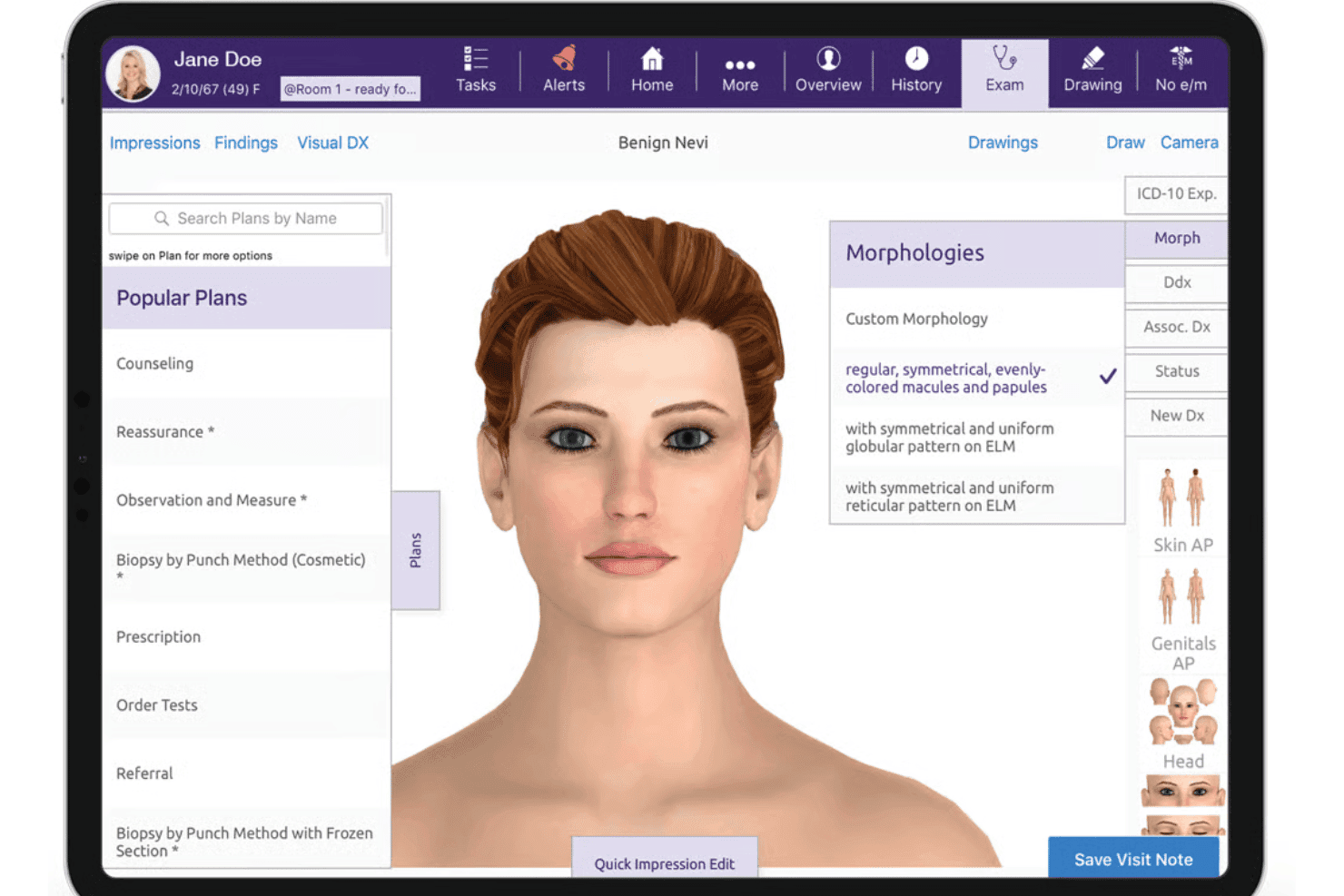
ModMed delivers specialty EHR, AI documentation, e-prescribing, billing, and RCM. ModMed is a cloud-based EHR, practice management, and RCM platform built for specialty medical practices, combining AI-assisted clinical documentation, e-prescribing, and integrated billing workflows.
Who Is ModMed Best For?
ModMed is a strong fit for independent specialty practices in dermatology, gastroenterology, ophthalmology, orthopedics, and related fields that need a fully integrated, specialty-configured clinical system.
Why I Picked ModMed
I picked ModMed as one of the best because no other cloud EHR matches its depth of specialty-specific automation. ModMed Scribe 2.0 listens to exam room conversations and suggests structured notes, billing codes, and downstream orders like prescriptions and lab requests, all without manual data entry. The EMA templates are built by practicing dermatologists, gastroenterologists, and other specialists, so the documentation logic already matches how those visits actually flow.
ModMed Key Features
- Integrated practice management: Offers appointment scheduling, patient check-in, and insurance verification within the same platform.
- Real-Time Prescription Benefit: Displays estimated patient drug costs and alternatives during prescribing.
- Pathology and image tracking: Supports image-based charting and organizes pathology results for specialties like dermatology.
- Certified FHIR API integration: Enables secure data exchange with labs, imaging centers, and external health systems.
ModMed Integrations
ModMed offers native integrations with Klara, Relatient, and TouchMD for patient communication, reminders, and photo documentation. It also supports data exchange via certified FHIR API and provides an API for custom integrations.
Pros and Cons
Pros:
- Real-Time Prescription Benefit for price transparency
- Templates tailored to nine medical specialties
- AI-driven note creation with Scribe 2.0
Cons:
- Occasional delays after software updates
- Limited flexibility for non-specialty practices
Learn more about ModMed: Best for rapid multi-location access
- Free plan available
- From $25/month
Visit WebsiteCustomer Rating:4.2/5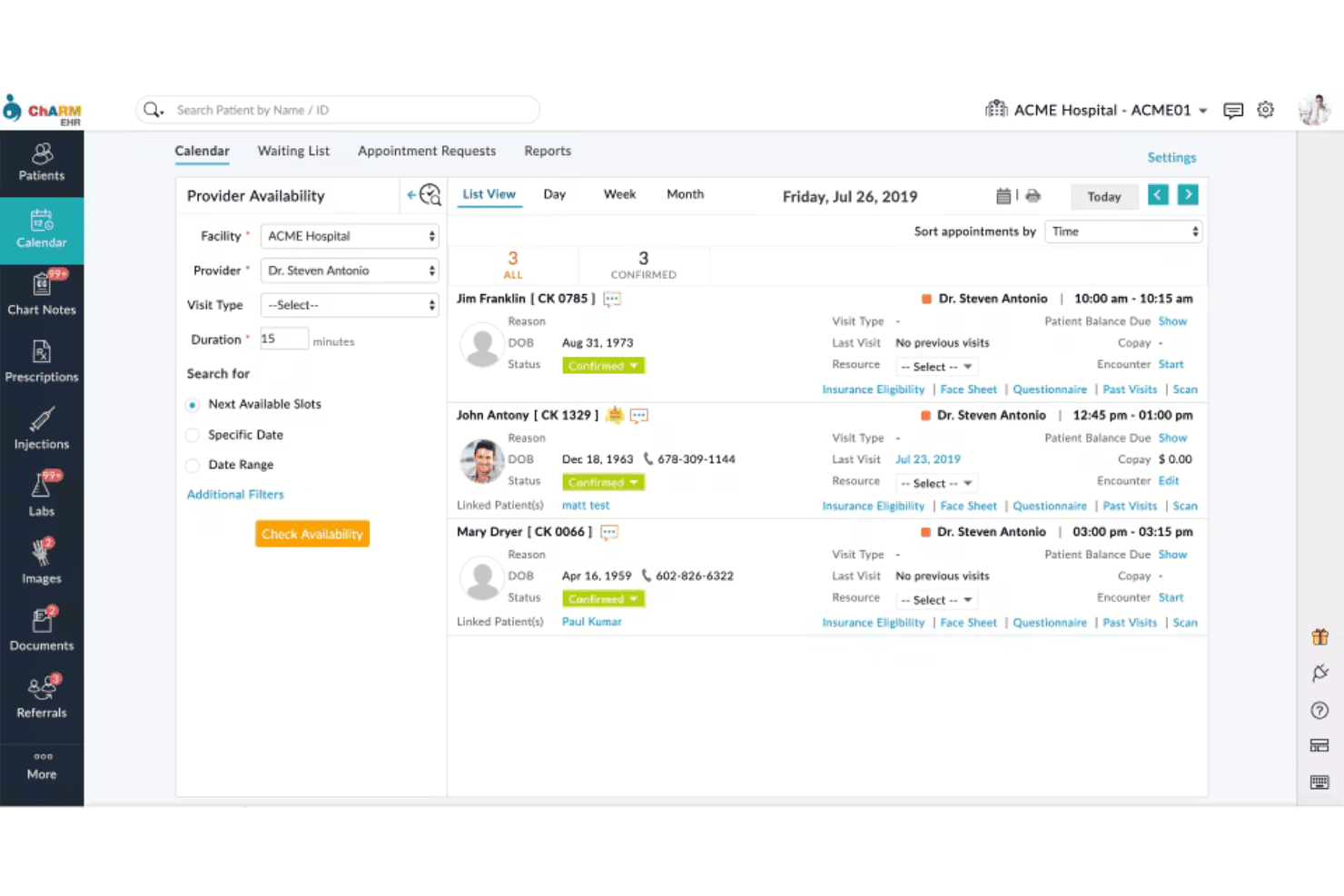
CharmHealth blends charting, e-prescribing, AI notes, billing, and virtual care. CharmHealth is a cloud-based EHR platform that combines clinical charting, e-prescribing, AI-assisted documentation, practice management, medical billing, and telehealth in a single browser-accessible system built for ambulatory practices.
Who Is CharmHealth Best For?
CharmHealth is a strong fit for small to mid-sized ambulatory practices, particularly independent providers and practice administrators managing one or more clinic locations.
Why I Picked CharmHealth
CharmHealth earns its spot on my shortlist because of how well it handles multi-site clinical workflows without any local setup required. I particularly like the location-filtered calendar, which lets providers and admins switch between clinic sites instantly without toggling between separate systems. Paired with its device-agnostic HTML5 architecture, I can pull up a full patient chart from any browser at any location, whether that's a satellite clinic, an urgent care site, or a remote session.
CharmHealth Key Features
- AI-powered charting tools: Streamline documentation with CharmAI Scribe and CharmAssist for real-time clinical content suggestions.
- Specialty-specific SOAP templates: Access customizable templates for family medicine, pediatrics, gynecology, psychiatry, and more.
- Integrated lab and pharmacy connections: Order labs, receive results, and send e-prescriptions directly within the patient chart.
- Configurable patient portal: Offer patients secure access to their medical records, forms, and communication tools online.
CharmHealth Integrations
CharmHealth offers native integrations with Zoom Workplace, Fullscript, Wellevate, Twilio, QuickBooks Online Advanced, Zoho CRM, Sfax, DeepScribe, LabCorp, Quest Diagnostics, and supports an open API for custom integrations.
Pros and Cons
Pros:
- Specialty templates for diverse ambulatory practices
- AI-powered charting and scribe tools included
- Multi-location appointment scheduling and reporting
Cons:
- E-prescribing features require additional fees
- Limited built-in reporting customization options
Learn more about CharmHealth: Best for longitudinal patient records
- Free demo available
- Pricing upon request
Visit WebsiteCustomer Rating:4.4/5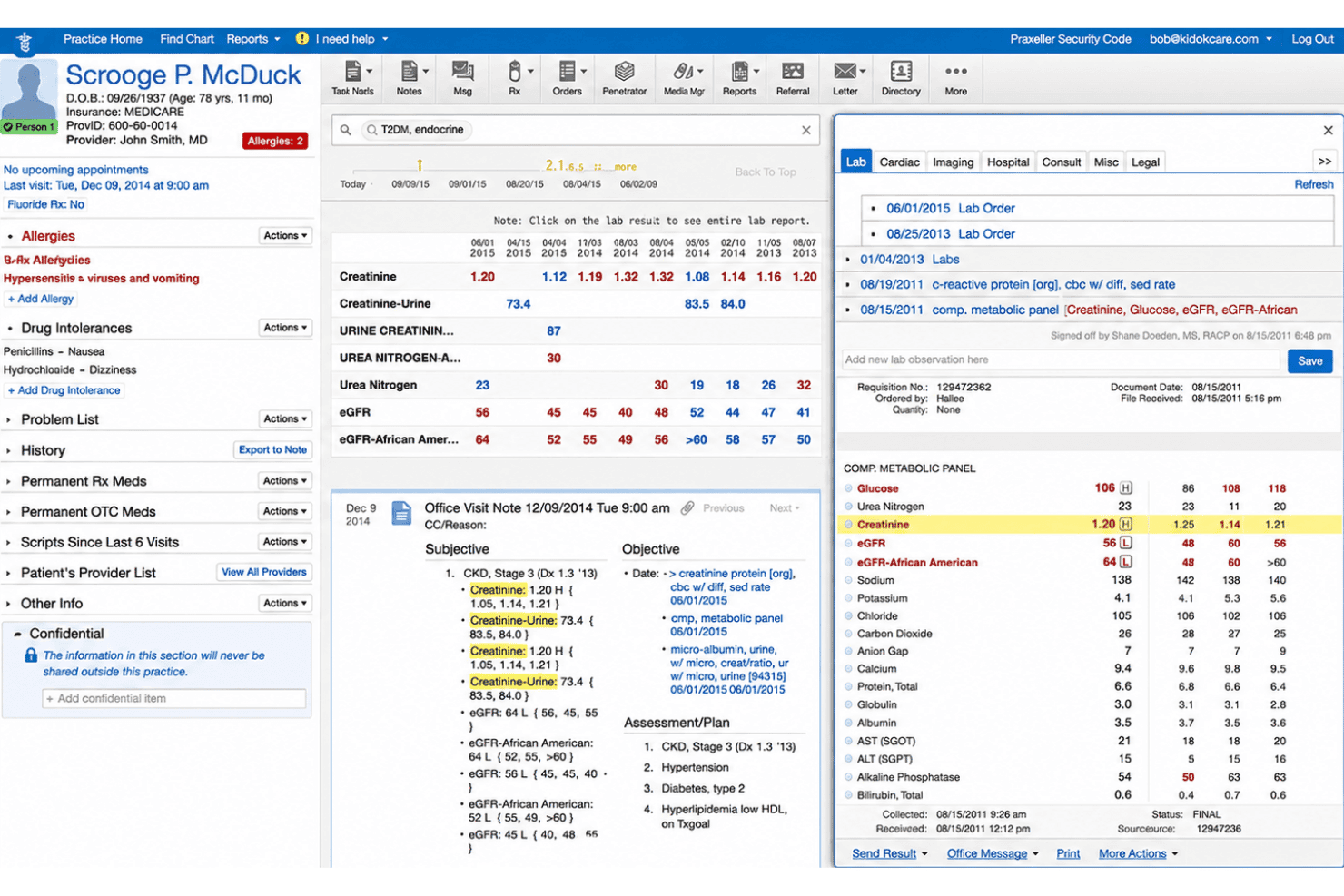
Elation Health pairs charting, e-prescribing, telehealth, billing, and AI tools. Elation Health is a cloud-based EHR platform built specifically for independent primary care practices, combining longitudinal patient charting, e-prescribing, telehealth, integrated billing, and AI-assisted clinical documentation.
Who Is Elation Health Best For?
Elation Health is a strong fit for small independent primary care clinics, including direct primary care and family medicine practices managing continuity-focused patient relationships.
Why I Picked Elation Health
I picked Elation Health because its consolidated patient chart is genuinely built around continuity of care. Each chart pulls together a patient's full medical history, active medications, allergies, and lab results into a single view my team can access from any browser. The Clinical Insights AI feature then surfaces relevant context from that longitudinal record before I walk into an appointment, which makes a real difference when managing patients with complex histories across multiple visits.
Elation Health Key Features
- Integrated e-prescribing with EPCS: Write and send prescriptions directly to pharmacies, including support for controlled substance prescribing.
- Telehealth powered by Zoom: Conduct secure video visits with patients using a built-in telehealth tool integrated in the platform.
- Referral management with provider directory: Manage outgoing referrals with an up-to-date directory and close-the-loop tracking system.
- Patient engagement portal (Elation Passport): Allow patients to view labs, message clinicians, and access their health records online.
Elation Health Integrations
Elation Health offers native integrations with Surescripts, Zocdoc, Ribbon Health, Zoom, Anthropic Claude, and Alliance Diagnostics, and provides an API for custom integrations.
Pros and Cons
Pros:
- AI note assist for clinical documentation
- Three-pane UI for fast chart navigation
- Longitudinal chart unifies complete patient history
Cons:
- Limited template customization for notes
- No Android mobile app available
Learn more about Elation Health: Best for integrated billing and scheduling
- Free demo available
- Pricing upon request
Visit WebsiteCustomer Rating:3.9/5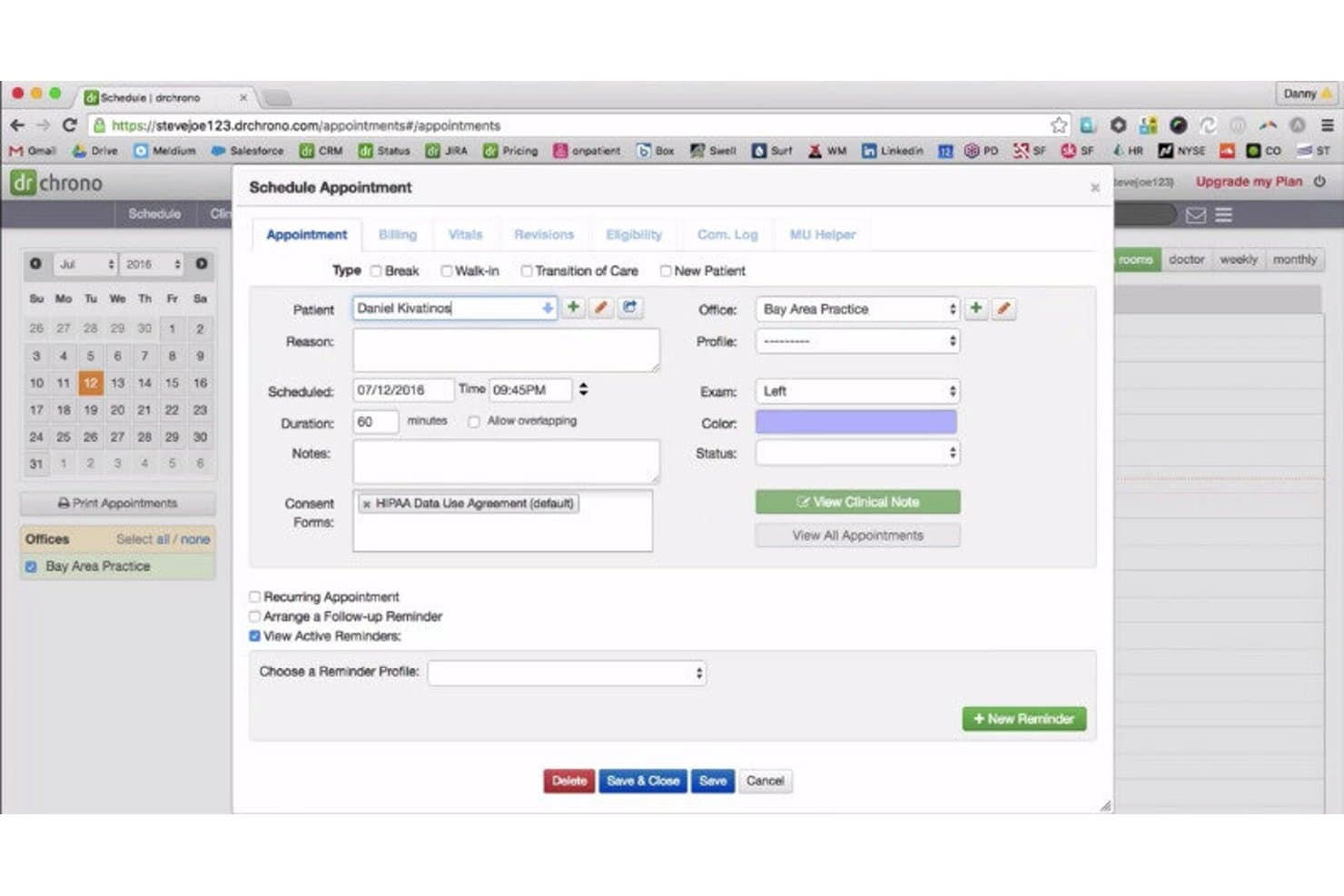
DrChrono EHR offers a cloud-based Schedule Appointment form with fields for patient details, billing, vitals, and consent forms. DrChrono is a cloud-based, iPad-native EHR platform that unifies clinical charting, e-prescribing, scheduling, and medical billing in a single system built for independent ambulatory practices.
Who Is DrChrono EHR Best For?
DrChrono is a strong fit for small to mid-sized independent practices that run on Apple devices and need a single system for charting, billing, and scheduling.
Why I Picked DrChrono EHR
DrChrono EHR earns its spot as one of the best on my shortlist because of how tightly its billing and scheduling connect to the clinical chart. I love that real-time insurance eligibility checks run directly from the scheduling view, so billing prep happens before a patient even arrives. The integrated claim management dashboard lets me track claim status and catch coding issues without jumping between separate systems.
DrChrono EHR Key Features
- iPad-native mobile app: Access all core EHR features on an iPad or iPhone for real-time charting in the exam room.
- Customizable clinical templates: Build, modify, or import specialty-specific charts to fit unique documentation workflows.
- EverHealth Scribe AI notes: Automatically generate draft clinical notes from visit conversations using integrated AI.
- Patient portal (OnPatient): Let patients request appointments, view results, and message your team securely online.
DrChrono EHR Integrations
DrChrono EHR offers native integrations with Surescripts, CoverMyMeds, Iron Bridge, eProvider Solutions, iHCFA, and Iron Bridge for immunization registry connections. An API is available for custom integrations and app marketplace connectivity.
Pros and Cons
Pros:
- EverHealth Scribe provides AI-generated visit notes
- Specialty templates include 20+ built-in options
- Real-time eligibility checks from the scheduler
Cons:
- Customer support responsiveness has declined recently
- No native Android mobile app
Learn more about DrChrono EHR: Best for quick implementation
- Free demo available
- From $199/user/month
Visit WebsiteCustomer Rating:3.7/5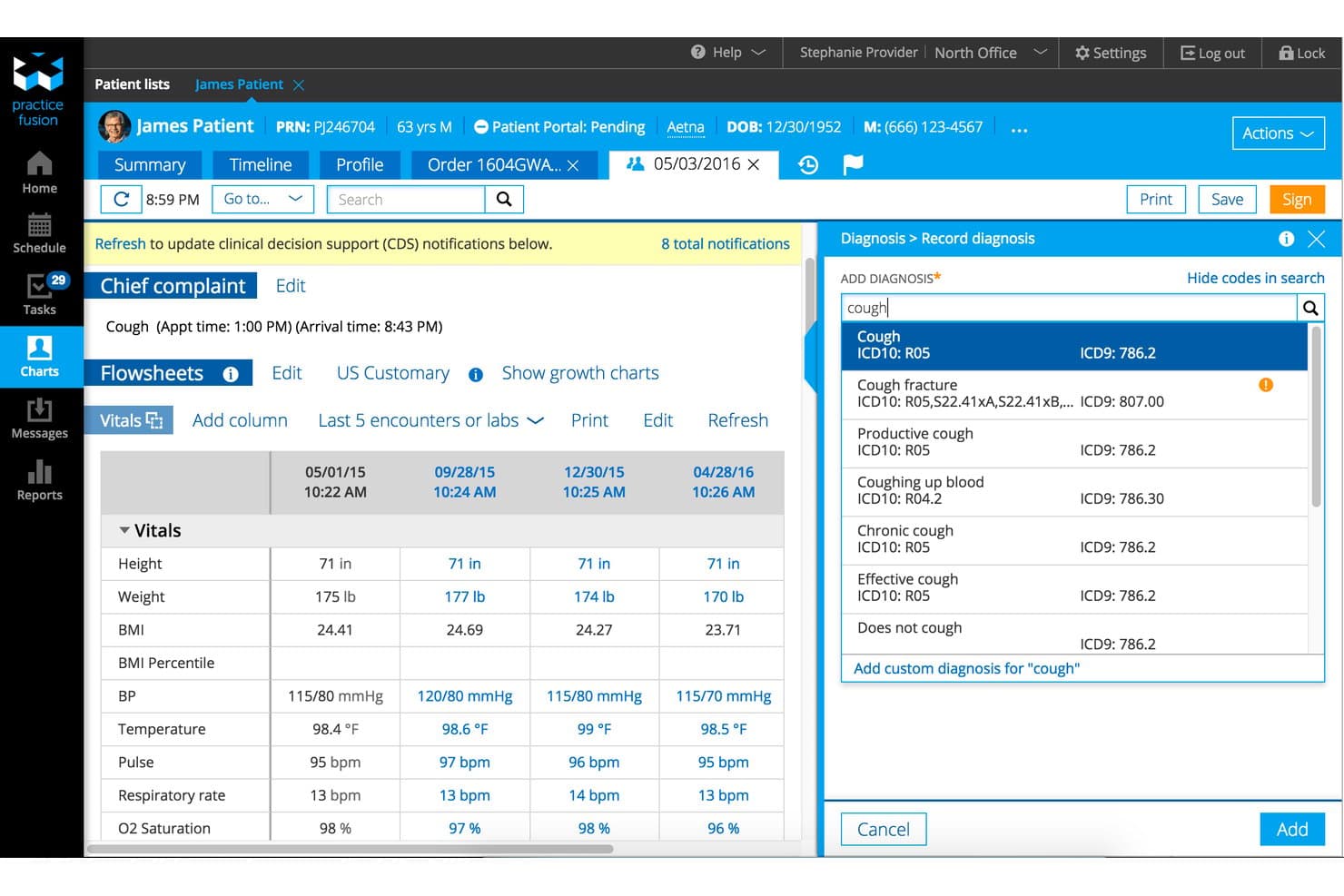
Practice Fusion offers a cloud-based EHR with integrated patient flowsheets, vitals tracking, and real-time ICD-10 diagnosis search within a single encounter view. Practice Fusion is a cloud-based EHR built for independent practices, combining customizable charting templates, e-prescribing (including EPCS), lab and imaging ordering, and integrated billing and practice management tools.
Who Is Practice Fusion Best For?
Practice Fusion is a strong fit for small to mid-sized independent practices looking for an affordable, easy-to-deploy cloud EHR without a steep learning curve.
Why I Picked Practice Fusion
Practice Fusion earns its spot on my shortlist because of how genuinely fast the path from sign-up to seeing patients is. Since it's fully cloud-based with no software to install, you can test-drive the system in minutes and go live in under 30 days. I particularly like the pre-built charting template library, which lets providers start documenting visits right away without building workflows from scratch.
Practice Fusion Key Features
- Integrated e-prescribing: Allows providers to send prescriptions electronically, including for controlled substances, directly from the patient chart.
- Patient portal: Lets patients access their health records, view lab results, and communicate securely with their provider online.
- Lab and imaging center connectivity: Supports direct ordering and receipt of results from over 500 connected labs and imaging centers.
- Quality and compliance dashboards: Provides real-time MIPS, Meaningful Use, and clinical quality measure tracking and reporting.
Practice Fusion Integrations
Practice Fusion offers native integrations with more than 500 labs and imaging centers, plus Surescripts for e-prescribing and pharmacy connectivity. An API is available for custom integrations.
Pros and Cons
Pros:
- Integrated e-prescribing with EPCS support
- Prebuilt templates for multiple specialties
- Quick workflow setup for new practices
Cons:
- Post-migration customer support delays reported
- No dedicated mobile app available
Learn more about Practice Fusion: Best for streamlined patient intake
- Free demo available
- Pricing upon request
Visit WebsiteCustomer Rating:3.9/5
Tebra offers a comprehensive cloud EHR dashboard featuring electronic health records, prescriptions, telehealth scheduling, lab management, and a calendar in one unified interface. Tebra is a cloud-based EHR and practice management platform built for independent medical practices that combines clinical documentation, e-prescribing, billing, scheduling, and patient engagement in one system.
Who Is Tebra Best For?
Tebra is a strong fit for small independent practices with up to 10 providers looking for a single platform that handles both clinical and administrative workflows.
Why I Picked Tebra
Tebra earns its spot on my shortlist because of how tightly its patient intake tools connect to the clinical record. Digital intake forms flow directly into the patient chart, so providers aren't re-entering data that's already been collected. I also like the two-way texting and custom appointment reminders, which cut down on no-shows before a patient even walks through the door.
Tebra Key Features
- AI Note Assist: Automatically generates clinical notes from patient encounters using artificial intelligence.
- Customizable chart templates: Lets you tailor documentation templates to match provider or specialty requirements.
- Integrated e-prescribing with EPCS: Allows electronic prescribing of controlled substances directly from the patient chart.
- Bidirectional lab integrations: Connects with LabCorp and Quest Diagnostics for ordering and receiving lab results within the EHR.
Tebra Integrations
Tebra offers native integrations with Surescripts, LabCorp, Quest Diagnostics, WebPT, and Practice Fusion, and provides API access for custom integrations.
Pros and Cons
Pros:
- AI-powered clinical note generation
- EPCS and PDMP built in for e-prescribing
- Digital intake forms populate patient charts
Cons:
- Specialty template options are somewhat limited
- Billing module lacks full cloud functionality
Learn more about Tebra: Best specialty-specific configuration
- Free demo available
- Pricing upon request
Visit WebsiteCustomer Rating:3.6/5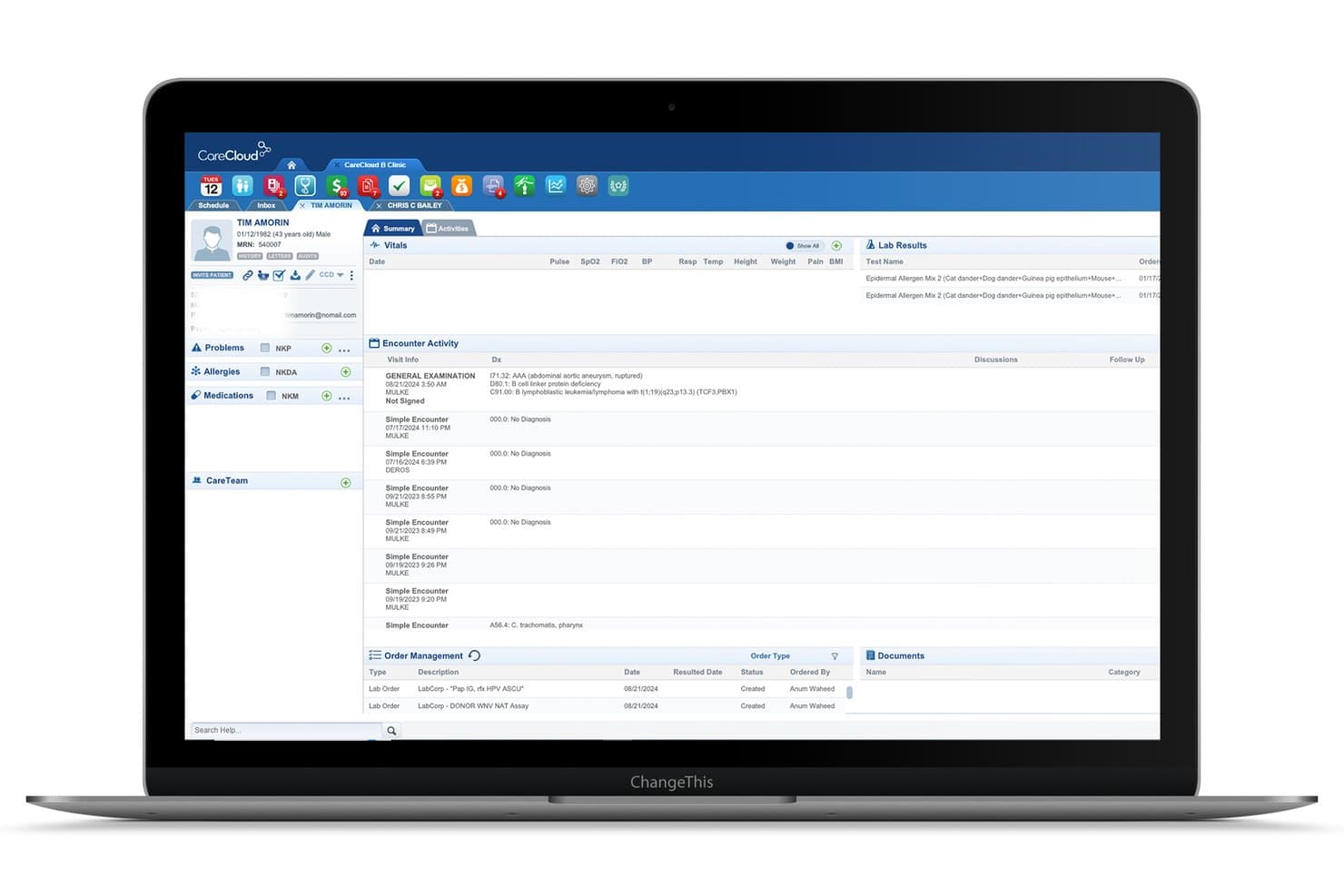
CareCloud offers a comprehensive patient summary view with encounter activity, lab results, vitals, and order management in its cloud EHR platform. CareCloud is a cloud-based EHR platform that combines clinical charting, e-prescribing, practice management, revenue cycle management, and AI-assisted documentation tools in a unified system for ambulatory medical practices.
Who Is CareCloud Best For?
CareCloud is a strong fit for independent and small-to-mid-size specialty practices that need an EHR configured to their clinical discipline from day one.
Why I Picked CareCloud
CareCloud earns its spot as one of the best on my shortlist because of how deeply it configures to individual specialties. Predefined templates and order sets span over 70 disciplines, from cardiology to rheumatology. That means I'm not rebuilding a generic SOAP note from scratch for each specialty. I also like cirrusAI Notes, which captures live patient conversations and generates structured documentation in real time, shaped to the clinical language of each specific discipline.
CareCloud Key Features
- Unified inbox: Manage all messages, tasks, lab results, and notifications from a single centralized location.
- CollectiveIQ rules engine: Access an automated library of over 180 million billing rules to detect errors in claims before submission.
- Integrated patient portal: Offer patients secure online scheduling, bill pay, forms, and messaging through the Breeze portal.
- Command Center dashboard: Monitor clinical and financial metrics in real time with customizable analytics and performance widgets.
CareCloud Integrations
CareCloud offers native integrations with Epic, ProPath, Meditech, HealthLink, CubixxMD, Contexture, and BRONSON, and supports HL7 and API-based connections for labs, imaging centers, pharmacies, and billing systems. An API is available for custom integrations.
Pros and Cons
Pros:
- Command Center dashboard for live analytics
- CirrusAI Notes generates ambient clinical documentation
- Specialty templates for 70+ disciplines
Cons:
- Support responsiveness varies after onboarding
- Occasional system reliability issues reported
Learn more about CareCloud: Best patient charting flexibility
- Free demo available
- Pricing upon request
Visit WebsiteCustomer Rating:3.6/5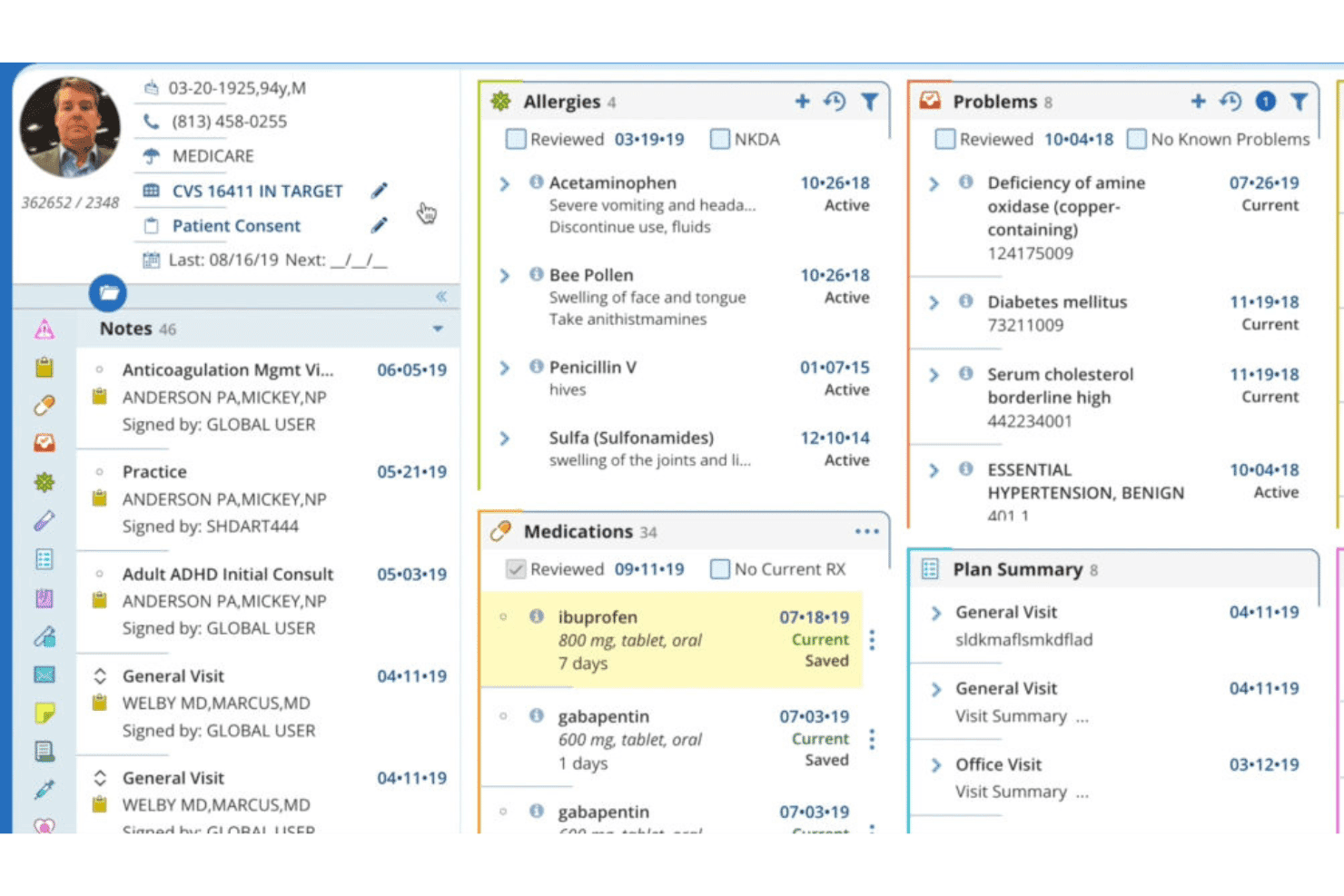
AdvancedMD unifies EHR, documentation, e-prescribing, billing, and engagement. AdvancedMD is a cloud-based EHR platform for independent and group medical practices that combines clinical documentation, e-prescribing, practice management, medical billing, and patient engagement tools in a unified system.
Who Is AdvancedMD Best For?
AdvancedMD is a strong fit for multi-provider independent practices and medical groups that need a unified EHR, billing, and practice management system under one platform.
Why I Picked AdvancedMD
AdvancedMD earns its spot on my shortlist because of its template builder, which lets admins customize clinical forms directly without submitting requests to the vendor. I use it to configure specialty-specific SOAP notes, treatment plans, and procedure documentation across more than 40 built-in specialty templates. More recently, the AI-generated notes feature has made charting noticeably faster during high-volume clinic days.
AdvancedMD Key Features
- Patient portal: Gives patients online access to lab results, secure messaging, appointment scheduling, and bill payment.
- Revenue cycle management suite: Automates claims scrubbing, denial management, and integrated payment processing.
- Mobile app support: Lets providers access schedules, charts, and clinical documentation on both iOS and Android devices.
- Telehealth integration: Offers HIPAA-compliant video visits directly through the EHR with scheduling and patient reminders.
AdvancedMD Integrations
AdvancedMD offers native integrations with Practice Fusion, QuickBooks Enterprise, and Zoom for telehealth. It provides an Integrations Marketplace, supports clearinghouse connectivity, and has an API for custom integrations.
Pros and Cons
Pros:
- Mobile apps for iOS and Android devices
- AI note assistant for rapid charting
- Template builder for custom clinical documentation
Cons:
- E-prescribing workflow can feel cumbersome
- Occasional system downtime during business hours
 Best telehealth tools integration
- Free demo available
- Pricing upon request
Visit WebsiteCustomer Rating:3.4/5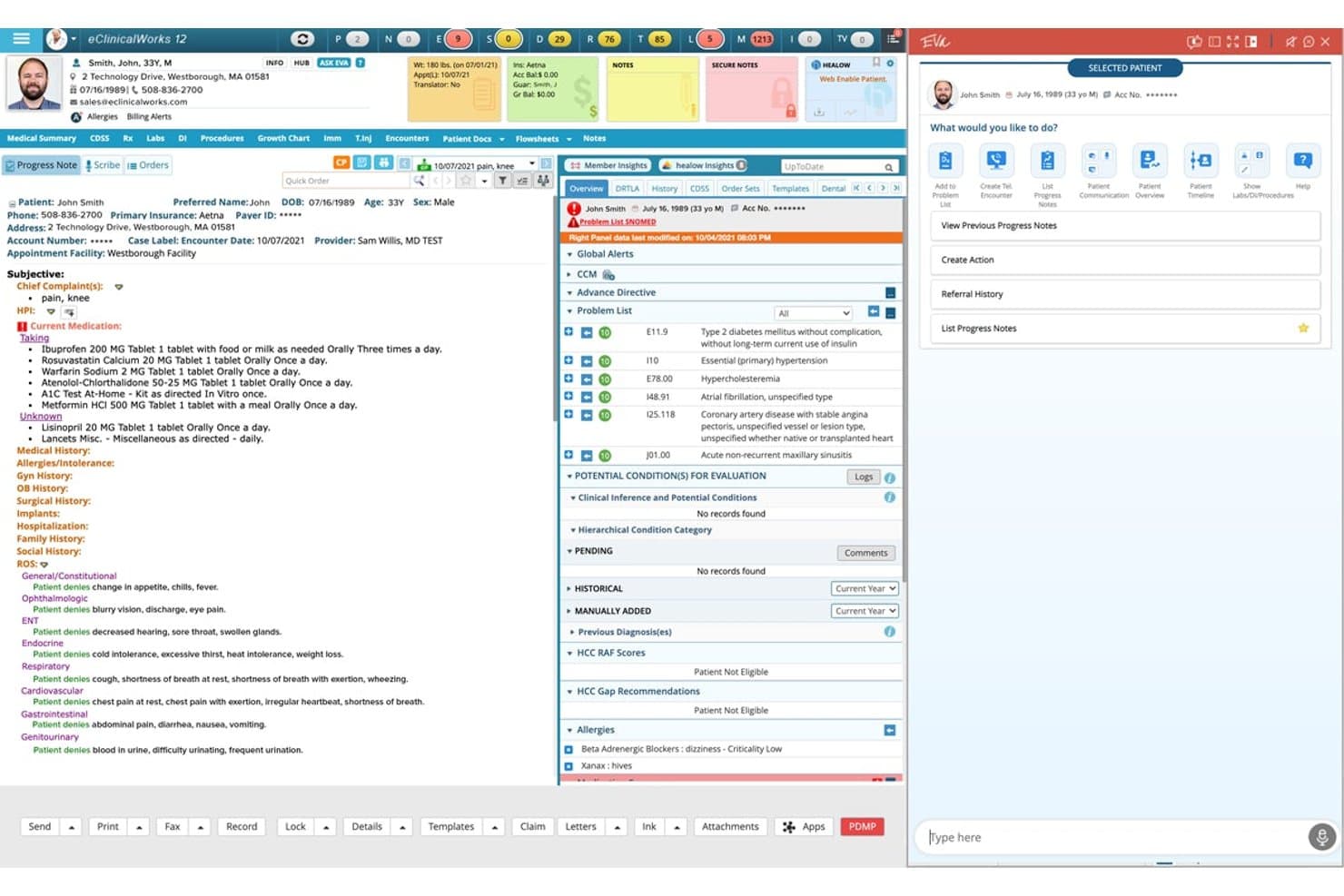
eClinicalWorks offers a comprehensive cloud EHR interface featuring patient progress notes, problem lists, medication management, and an AI assistant panel in a single unified view. eClinicalWorks is a cloud-based EHR platform for ambulatory practices that unifies clinical documentation, practice management, revenue cycle management, population health tools, and AI-assisted charting in a single system.
Who Is eClinicalWorks Best For?
It's a strong fit for independent and multi-location ambulatory practices that need a single platform covering both clinical and billing operations.
Why I Picked eClinicalWorks
eClinicalWorks earns its spot on my shortlist because of how tightly its telehealth tools are woven into the clinical workflow. I picked it specifically for healow TeleVisits and healow Meet, two native telehealth tools that live inside the EHR rather than linking out to a third-party platform. healow Meet supports group video visits, which I find particularly useful for behavioral health and patient education sessions that other EHRs route through external tools.
eClinicalWorks Key Features
- Customizable chart templates: Build and modify templates for SOAP notes, problem lists, and specialty-specific workflows.
- AI virtual assistant: Use Eva to pull up patient records, compare progress notes, and navigate data during clinical encounters.
- PRISMA health information search engine: Aggregate patient data from hospitals, clinics, and other EHRs nationwide for a unified view.
- Integrated revenue cycle management: Access claim creation, denial management, and A/R analytics within the same platform.
eClinicalWorks Integrations
eClinicalWorks offers native integrations with CommonWell, Carequality, Nuance Dragon Medical, M*Modal, and Sunoh.ai, and provides certified FHIR APIs for custom integrations with labs, imaging centers, and other health systems.
Pros and Cons
Pros:
- Extensive mobile and tablet support
- Customizable chart templates for multiple specialties
- Telehealth visits embedded within patient charts
Cons:
- Reporting module setup is time-consuming
- System updates can trigger workflow interruptions
Learn more about eClinicalWorks: Best for customizable clinical workflows
- Free demo available
- Pricing upon request
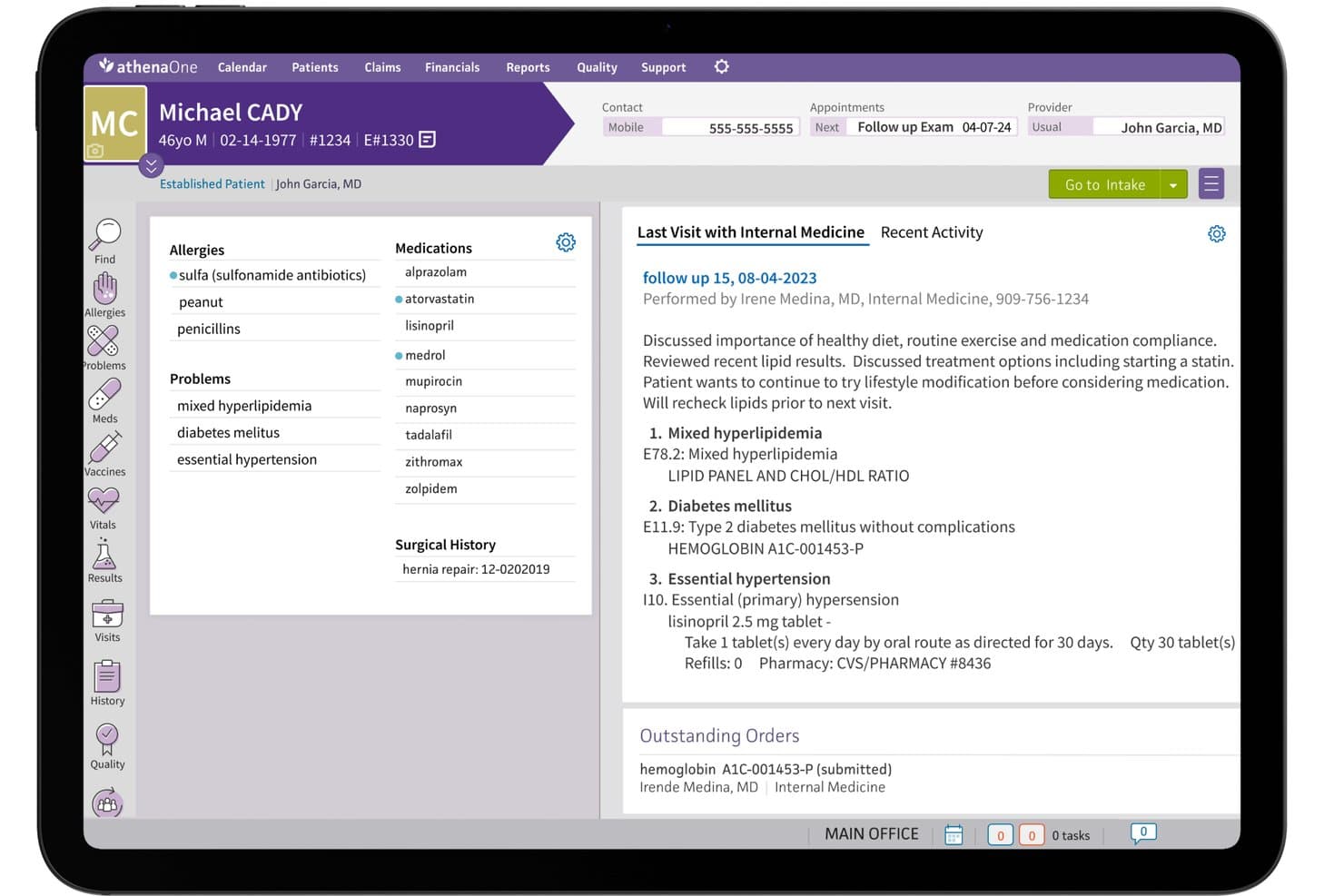
athenahealth (athenaOne) offers a comprehensive patient chart view displaying allergies, medications, problems, surgical history, and last visit notes in a cloud-based EHR interface. athenahealth's athenaOne is a cloud-based EHR platform that combines electronic charting, e-prescribing, practice management, revenue cycle management, and patient engagement in a single unified system.
Who Is athenahealth (athenaOne) Best For?
It's a strong fit for ambulatory practices of any size that need a single platform covering clinical documentation, billing, and patient communication.
Why I Picked athenahealth (athenaOne)
athenaOne earns its spot on my shortlist because of how far the clinical workflow customization actually goes. I can configure documentation templates at the encounter level, adjust workflow steps by provider or specialty, and layer in AI ambient notetaking to cut time spent on charting. The guided encounter model walks through each visit stage in a structured sequence, so my team builds consistent documentation without losing the flexibility to tailor it.
athenahealth (athenaOne) Key Features
- E-prescribing with EPCS: Providers send prescriptions, including controlled substances, directly to pharmacies from the patient chart.
- Integrated patient portal: Patients access records, request refills, schedule appointments, and send secure messages within one interface.
- Revenue cycle management tools: Built-in claim scrubbing and eligibility verification connect billing tasks with clinical workflows.
- Mobile app access: Clinicians review schedules, charts, and tasks from iOS and Android devices.
athenahealth (athenaOne) Integrations
athenaOne offers over 250 marketplace integrations, including Surescripts, CommonWell, Carequality, LabCorp, Quest Diagnostics, and Salesforce. The platform also supports FHIR R4 APIs for custom integrations.
Pros and Cons
Pros:
- Fast claim scrubbing and billing tools
- Built-in mobile app for clinicians
- Highly customizable encounter workflows
Cons:
- Support response times can be inconsistent
- Specialty template options may require setup
Learn more about athenahealth (athenaOne):
Annen skybasert EHR-programvare
Her er noen flere alternativer for skybasert EHR-programvare som ikke kom med på kortlisten min, men som likevel er verdt å se nærmere på:
- 11NextGen HealthcareBest for integrated population health tools
- 12RXNTBest for easy e-prescribing tools
- 13PrognoCISBest for advanced template customization
- 14OmniMDBest for specialty care workflows
- 15SimplePracticeBest for practice management and telehealth tools
- 16OptiMantraBest for integrative health practitioners
- 17Cerbo EHRBest for direct primary care practices
- 18Kipu EMRBest for behavioral health organizations
- 19Office Ally EHR 24/7Best for built-in clearinghouse integration
How I Evaluate Cloud EHR Software
I evaluate cloud EHR platforms in two layers: the baseline clinical and security requirements every ambulatory practice needs, and the differentiators that separate good tools from the right fit.
Core Functionality (Table Stakes For This List)
When I'm selecting tools for my list, I rank each one on a scale from 0 (does not offer the functionality) to 5 (excels in this area) for each core functionality listed below. Then, I calculate the tool's total score into a percentage. Each tool needs to achieve a minimum total score of 65% to be considered for inclusion.
- Cloud-Based Deployment: I check whether I can log in from a browser or mobile app and chart without needing a VPN or on-premise server setup.
- Electronic Charting & Documentation: I look for customizable SOAP note templates, structured problem lists, and specialty-specific workflows beyond basic free-text entry.
- E-Prescribing (eRx): EPCS support matters here. I evaluate whether providers can send controlled substance prescriptions and review drug interactions in-chart.
- HIPAA Compliance & Security: Every platform should offer a signed BAA, audit trails, and role-based access so a front-desk user can't view clinical notes meant for providers.
- Interoperability & Integrations: I look at whether the platform supports HL7, FHIR, or CCDA for exchanging data with labs, pharmacies, imaging centers, and HIEs.
- Practice Management Integration: Charting needs to connect to scheduling, demographics, and billing. I evaluate whether claims and appointments live in one system or require workarounds.
Once I have a list of tools that meet the criteria, I consider what sets each platform apart.
Differentiating Factors (What Sets Vendors Apart)
Here's how I compare and contrast different vendors:
Standout Features
Ambient AI scribing is a major differentiator. I look for platforms where providers can dictate during a visit and get a structured SOAP note drafted automatically, cutting after-hours charting. Integrated telehealth matters too, especially when video visits and charting happen on the same screen without a third-party add-on. I also evaluate revenue cycle analytics dashboards that track claim denials, days in A/R, and payer mix in real time so billing managers can spot issues before they snowball.
Beyond Features
Practice size and specialty fit shape everything. A solo dermatology clinic needs turnkey setup, while a multi-location group needs centralized reporting and location-level controls. I also evaluate implementation support—specifically whether a vendor handles data migration from legacy systems, including scanned documents and structured charts. Pricing transparency matters just as much. I check whether telehealth, patient portals, and EPCS are included or billed as add-ons, since those extras can quietly inflate total cost of ownership.
Slik velger du skybasert EHR-programvare
Det er lett å gå seg vill i lange funksjonslister og kompliserte prismodeller. For å hjelpe deg med å holde fokus når du arbeider deg gjennom den unike prosessen for valg av programvare, har jeg laget en sjekkliste over faktorer du bør ha i tankene:
| Faktor | Hva du bør vurdere |
|---|---|
| FaktorSkalerbarhet | Hva du bør vurdereVil denne plattformen håndtere veksten din – flere lokasjoner, nye behandlere eller flere spesialområder – uten en omfattende migrering? |
| FaktorIntegrasjoner | Hva du bør vurdereKan du koble til de foretrukne verktøyene dine for fakturering, laboratorier eller pasientengasjement direkte, eller vil det kreve ekstra arbeid? |
| FaktorTilpasningsmuligheter | Hva du bør vurdereTrenger du å tilpasse journalmaler, inntaksskjemaer eller rapportering til de unike arbeidsflytene og regulatoriske kravene dine? |
| FaktorBrukervennlighet | Hva du bør vurdereVil de ansatte raskt forstå grensesnittet, eller kreves det omfattende opplæring? Prøv demonstrasjoner eller be om en gjennomgang av arbeidsflyten. |
| FaktorImplementering og oppstart | Hva du bør vurdereTilbyr leverandøren praktisk hjelp med datamigrering, konfigurering og løpende opplæring, eller må IT-teamet ditt håndtere alt alene? |
| FaktorKostnad | Hva du bør vurdereEr viktige moduler, som telehelse eller e-resept, inkludert, eller vil tilleggstjenester og kundestøtte raskt føre kostnadene over budsjettet ditt? |
| FaktorSikkerhetstiltak | Hva du bør vurdereHvilke sikkerhetssertifiseringer, kontroller for brukertilgang og prosedyrer for katastrofegjenoppretting garanterer leverandøren skriftlig? |
| FaktorTilgjengelig kundestøtte | Hva du bør vurdereHva er de faktiske åpningstidene for kundestøtte? Får du tak i noen direkte når det virkelig gjelder, særlig utenom arbeidstid eller ved driftsstans? |
Hva er skybasert EHR-programvare?
Skybasert EHR-programvare er en type EHR-programvare som lagrer pasientjournaler og kliniske data på sikre eksterne servere, slik at du får tilgang fra alle internettilkoblede enheter. Du kan føre journal, skrive ut elektroniske resepter og administrere arbeidsflyter uten å installere programvare lokalt.
Denne tilnærmingen reduserer IT-belastningen, støtter team som arbeider eksternt og på flere lokasjoner, og bidrar til å holde praksisens helseinformasjon i samsvar med HIPAA.
Funksjoner i skybasert EHR-programvare
Ved valg av skybasert programvare for elektroniske pasientjournaler bør du se etter følgende viktige funksjoner i EHR-programvare:
- Skybasert tilgang: Logg inn fra hvilken som helst nettleser eller mobilenhet uten å installere eller vedlikeholde programvare på lokale servere.
- Elektronisk journalføring: Opprett strukturerte pasientjournaler ved hjelp av tilpassbare maler, SOAP-notater og sjekklister knyttet til pågående behandling.
- Elektronisk forskrivning (eRx): Send resepter – inkludert for kontrollerte legemidler – elektronisk direkte fra journalen til apotek, med kontroll av legemiddelinteraksjoner.
- Integrasjon med praksisadministrasjon: Koble sammen timebestilling, fakturering, forsikringskrav og pasientdemografi i ett system for å unngå dobbeltregistrering av data.
- Selvbetjeningsportal for pasienter: Gi pasientene en sikker måte å bestille timer, fylle ut registreringsskjemaer, se resultater, sende meldinger til personalet og betale regninger på nettet.
- Samhandling: Utveksle data med laboratorier, bildediagnostikksentre, oppgjørssentraler og andre systemer ved hjelp av standarder som HL7 eller FHIR.
- Rollebaserte sikkerhetskontroller: Angi detaljerte tillatelser slik at brukerne bare får tilgang til informasjon som er relevant for rollene deres – og beskytt pasientenes personvern.
- Revisjonsspor og logger: Spor automatisk systempålogginger, endringer i journaler og brukerhandlinger for å oppfylle krav og muliggjøre rettslig gjennomgang.
- Automatiske påminnelser: Send bekreftelser på timer, påminnelser om legemidler eller oppfølgingsoppgaver til pasienter og personale for å redusere uteblivelser.
- Rapportering og analyse: Generer sanntidsrapporter om klinisk kvalitet, økonomi og produktivitet for å støtte datadrevne beslutninger.
Fordeler med skybasert EHR-programvare
Implementering av skybasert EHR-programvare gir flere fordeler for teamet og virksomheten din. Her er noen av fordelene du kan se frem til:
- Tilgang eksternt: Du kan se og oppdatere pasientjournaler fra hvor som helst, noe som støtter fleksibelt arbeid og team på flere lokasjoner.
- Forenklet IT-administrasjon: Når du ikke trenger lokale servere eller programvare som må vedlikeholdes, reduserer praksisen teknologiske utfordringer og langsiktige maskinvarekostnader.
- Sikker datalagring: HIPAA-kompatibel kryptering, revisjonsspor og rollebasert tilgang sørger for at pasientinformasjonen forblir beskyttet.
- Effektiviserte arbeidsflyter: Integrert timebestilling, fakturering og journalføring på én skyplattform bidrar til å redusere dobbeltregistrering av data og administrativ belastning.
- Bedre pasientengasjement: Pasientportaler og automatiske påminnelser gjør det enklere for pasientene å holde seg informert, fylle ut skjemaer på nettet og kommunisere sikkert.
- Raskere implementering: Skybasert levering betyr at du raskt kan få nye medarbeidere i gang, uten tidkrevende installasjoner eller forstyrrende oppgraderinger.
- Skalerbar ved vekst: Legg til lokasjoner, spesialområder eller behandlere uten en komplisert teknisk overhaling, slik at systemet kan tilpasses behovene dine etter hvert som de utvikler seg.
Kostnader og priser for skybasert EHR-programvare
Valg av skybasert EHR-programvare krever en forståelse av de ulike prismodellene og abonnementene som er tilgjengelige. Kostnadene varierer basert på funksjoner, teamstørrelse, tillegg og mer. Tabellen nedenfor oppsummerer vanlige abonnementer, gjennomsnittsprisene deres og typiske funksjoner som inngår i skybaserte EHR-programvareløsninger:
Sammenligningstabell for abonnementer for skybasert EHR-programvare
| Abonnementstype | Gjennomsnittspris | Vanlige funksjoner |
|---|---|---|
| AbonnementstypeGratisabonnement | Gjennomsnittspris$0 | Vanlige funksjonerBegrenset antall brukerplasser, grunnleggende journalføring, standard sikkerhet og begrenset brukerstøtte. |
| AbonnementstypePersonlig abonnement | Gjennomsnittspris$30–$80/bruker/måned | Vanlige funksjonerTilgang for én behandler, elektronisk journalføring, elektronisk forskrivning, timebestilling og standard rapporteringsverktøy. |
| AbonnementstypeBedriftsabonnement | Gjennomsnittspris$100–$180/bruker/måned | Vanlige funksjonerStøtte for flere behandlere, faktureringsintegrasjon, pasientportal, telehelse, tilpassbare maler og analyse. |
| AbonnementstypeVirksomhetsabonnement | Gjennomsnittspris$200–$350/bruker/måned | Vanlige funksjonerAvanserte integrasjoner, API-tilgang, forbedret sikkerhet, dedikert brukerstøtte, administrasjon av lokasjoner og verktøy for overholdelse av regelverk. |
Vanlige spørsmål om skybasert EHR-programvare
Her er noen svar på vanlige spørsmål om skybasert EHR-programvare:
Hva bør jeg se etter når jeg vurderer skybasert EHR-programvare?
Fokuser på hvor godt løsningen passer til arbeidsflyten, brukervennlighet, integrasjonsmuligheter, sertifiseringer for datasikkerhet og åpenhet rundt priser. Vær oppmerksom på implementeringsstøtte og på om kjernemoduler som telehelse eller elektronisk forskrivning er inkludert eller krever ekstra kostnader.
Hvordan håndterer skybasert EHR-programvare datamigrering fra det gamle systemet mitt?
De fleste leverandører tilbyr datamigreringstjenester, inkludert import og konvertering av strukturerte data og skannede dokumenter. Spør om erfaringen deres med det nåværende systemet ditt, behandlingstiden og valideringsprosessene for å unngå datatap under overgangen.
Er skybasert EHR-programvare sikker nok for sensitive helseopplysninger?
Ja, ledende skybaserte EHR-plattformer bruker kryptering, revisjonsspor og rollebaserte tilgangskontroller for å opprettholde HIPAA-samsvar. Kontroller alltid at leverandøren tilbyr en signert BAA, publiserer sikkerhetspolicyer og gjennomgår regelmessige sikkerhetsrevisjoner utført av tredjeparter.
Kan jeg tilpasse skybasert EHR-programvare til min spesialitet?
Mange plattformer for skybasert EHR-programvare tilbyr tilpassbare maler, journalføringsalternativer for bestemte spesialiteter og konfigurerbare arbeidsflyter. Bekreft om skjemaer, dokumentasjonsfelt og kliniske prosesser kan justeres uten spesialutvikling eller løpende teknisk støtte.
Hvilken løpende støtte tilbyr skybasert EHR-programvare?
Støttealternativene varierer mellom leverandører av skybasert EHR-programvare og kan omfatte direktechat, telefonassistanse, kunnskapsbaser, opplæringsressurser og dedikerte kundeansvarlige. Se gjennom åpningstidene for brukerstøtte, svartidene og om hastesaker prioriteres utenom vanlig arbeidstid.