

EHR-programvare for iPad lar deg håndtere pasientjournaler, notater, timeplanlegging og fakturering på Apple-nettbrettet ditt, direkte der behandlingen skjer. Hvis du ser etter en smidig og pålitelig måte å administrere elektroniske helsejournaler på iPad-en din, trenger du verktøy som faktisk fungerer med kliniske arbeidsflyter – uten tungvinte omveier eller funksjoner som bare er tilgjengelige på datamaskin. I denne veiledningen går jeg gjennom hvilke EHR-apper som gir reell mobilitet, hvilke spesialiteter de egner seg best for, og hva du bør tenke på for å få mest mulig ut av iPad-en din i 2026.
Why Trust Our Software Recommendations
6,700+
Reviews
20
Industry experts
16+
Evaluation factors
14
Years
Our team has been testing and reviewing software since 2012. As medical practice leaders ourselves, we know how difficult—and important—it is to choose the right software.
For this guide, we evaluated tools using hands-on testing and independent research, scoring tools using our selection criteria.
Our reviews reflect our human editorial judgment, not a sales pitch.
Sammenligningstabell: EHR-programvare for iPad
Denne sammenligningstabellen viser prisene for mine beste EHR-programvare for iPad-utvalg.
| Tool | Best For | Trial Info | Price | ||
|---|---|---|---|---|---|
| 1 | Best for mobile therapy documentation | 30-day free trial | From $69/month | Website | |
| 2 | Best for affordable mobile EHR access | Free plan available | From $25/month | Website | |
| 3 | Best for mobile behavioral health charting | Free demo available | Pricing upon request | Website | |
| 4 | Best for independent practice mobility | Free demo available | Pricing upon request | Website | |
| 5 | Best for enterprise mobile patient care | Not available | Pricing upon request | Website | |
| 6 | Best for specialty charting on iPad | Free demo available | Pricing upon request | Website | |
| 7 | Best for mobile behavioral health workflows | 30-day free trial | From $49/month | Website | |
| 8 | Best for iPad-native clinical workflows | Free demo available | Pricing upon request | Website | |
| 9 | Best for mobile specialty practice workflows | Free demo available | Pricing upon request | Website | |
| 10 | Best for mobile cloud-based EHR access | Free demo available | Pricing upon request | Website |


Anmeldelser av den beste EHR-programvaren for iPad
Nedenfor finner du mine detaljerte sammendrag av den beste EHR-programvaren for iPad som kom med på kortlisten. Anmeldelsene mine gir en detaljert gjennomgang av funksjonene, de beste bruksområdene samt fordelene og ulempene ved hver programvare, slik at du kan finne den som passer best for deg.
 Best for mobile therapy documentation
- 30-day free trial
- From $69/month
Visit WebsiteCustomer Rating:4.4/5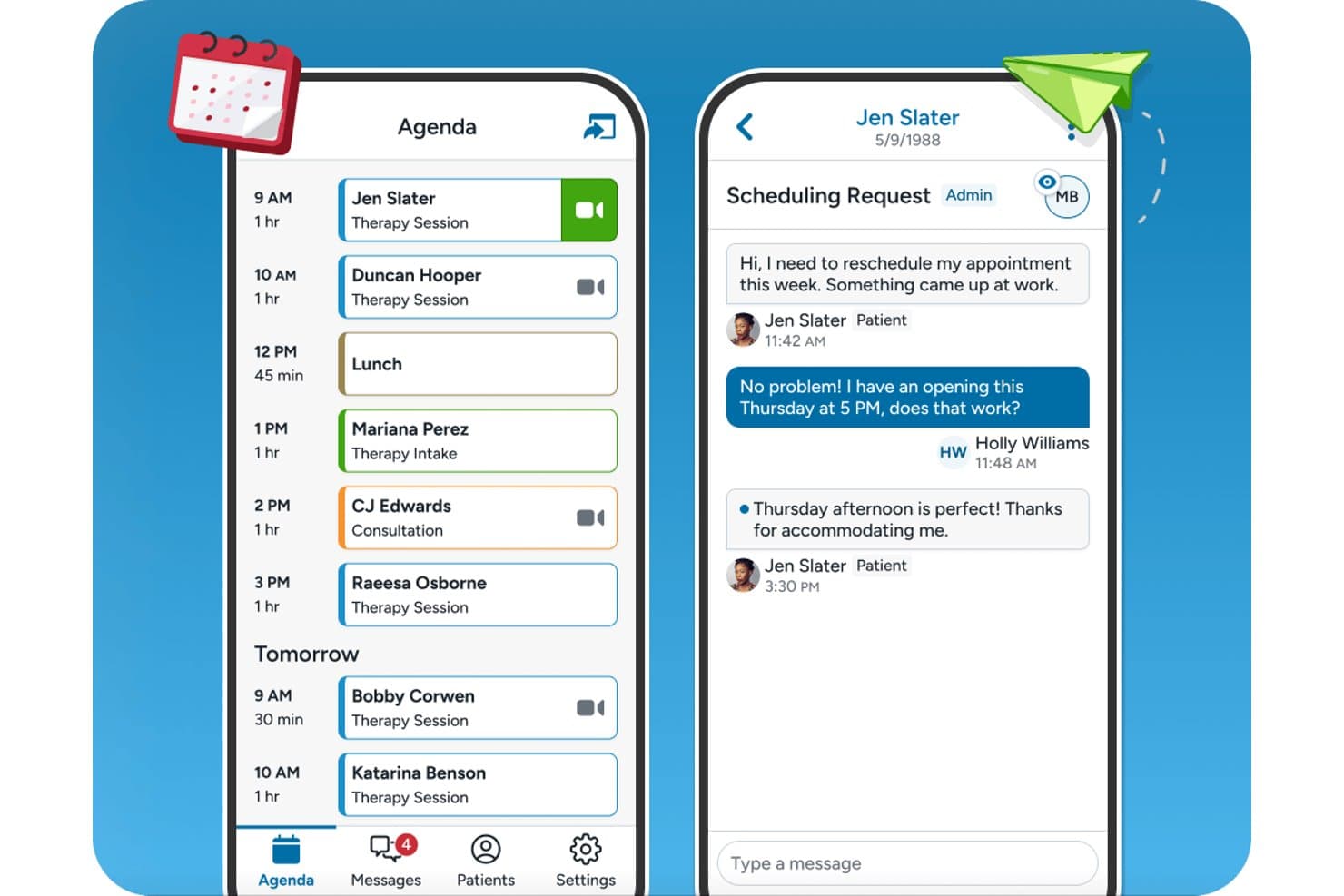
TherapyNotes offers a mobile-friendly agenda view and patient messaging interface designed for seamless scheduling and communication on iPad. TherapyNotes is a behavioral health EHR with a native iPad companion app that covers scheduling, secure client messaging, telehealth sessions, and offline access to client records and appointments.
Who Is TherapyNotes Best For?
Solo and small-group behavioral health practices — therapists, psychologists, and counselors — will find TherapyNotes fits their day-to-day clinical and billing workflows well.
Why I Picked TherapyNotes
I've included TherapyNotes in my top picks because its dedicated mobile companion app gives behavioral health clinicians on-the-go access to their schedule, client records, and telehealth sessions. I like that the app supports offline access to client details and appointments, so connectivity gaps during a packed day don't interrupt client prep. Biometric login via Face ID or Touch ID and secure messaging with clients and staff are both built directly into the iPad app.
TherapyNotes Key Features
- Telehealth integration: Launch HIPAA-compliant video sessions directly from the iPad companion app.
- Appointment management: View upcoming appointments, client schedules, and agenda details from your iPad.
- Secure messaging: Exchange encrypted messages with clients and staff right from the app.
- Client data access: Review essential client information and appointment history online or offline.
TherapyNotes Integrations
TherapyNotes offers native integrations with Google Calendar, Zee Medical Billing, OneLogin, and DemandHub. An API for custom integrations is not available.
Pros and Cons
Pros:
- DSM-aligned note templates for behavioral health
- Biometric login supported on the mobile app
- Built-in telehealth accessible from the iPad app
Cons:
- Low App Store rating signals usability concerns
- Mobile app lacks full note-writing capability
Learn more about TherapyNotes: Best for affordable mobile EHR access
- Free plan available
- From $25/month
Visit WebsiteCustomer Rating:4.2/5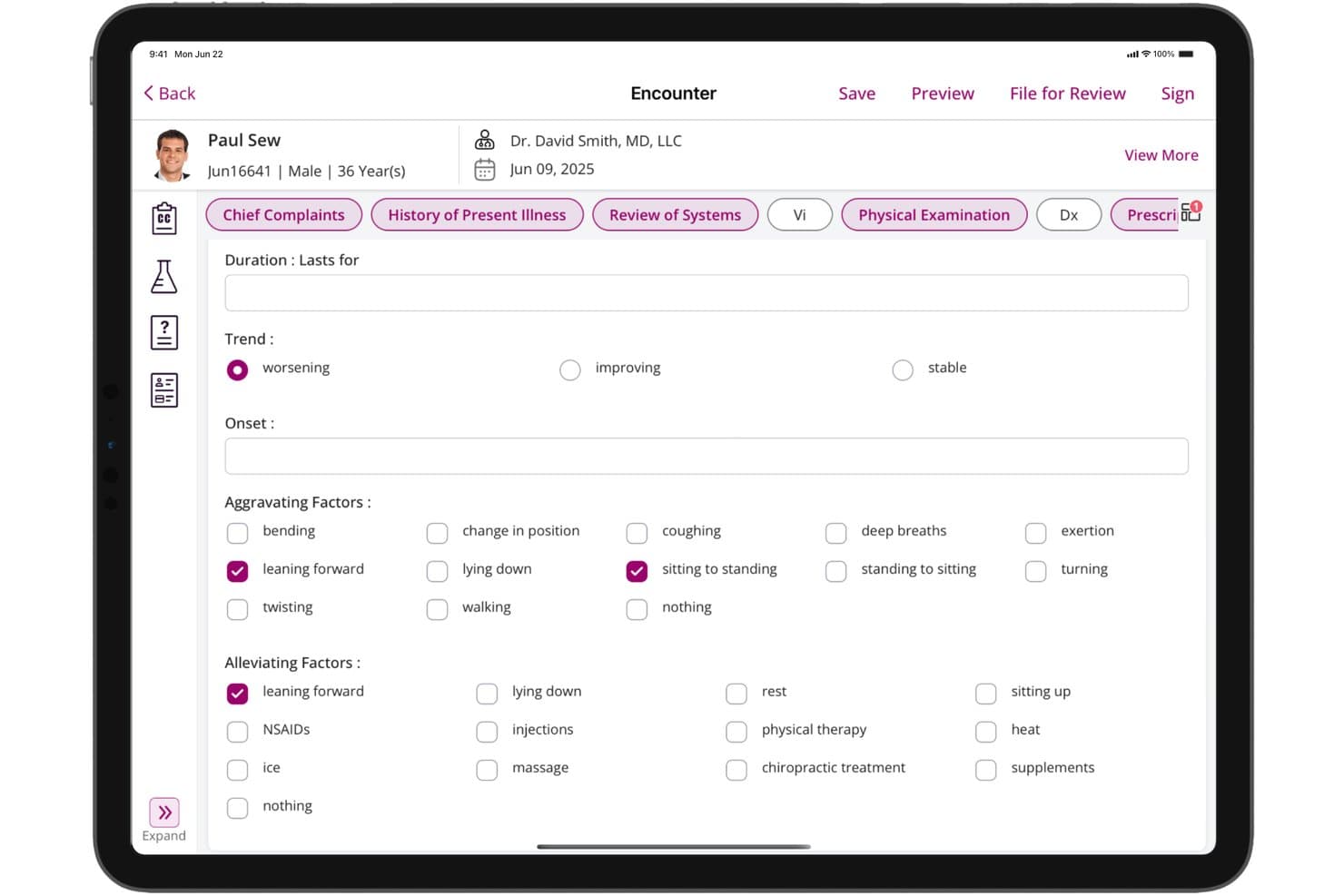
CharmHealth offers a detailed History of Present Illness form on iPad, capturing trend, onset, aggravating, and alleviating factors for patient encounters. CharmHealth is a cloud-based EHR platform with dedicated native iPadOS apps for clinical charting, e-prescribing, lab ordering, offline documentation, and integrated practice scheduling and billing.
Who Is CharmHealth Best For?
CharmHealth is a strong fit for independent practitioners and small practices that need a full-featured, iPad-compatible EHR without committing to high per-provider licensing costs.
Why I Picked CharmHealth
CharmHealth earns its spot on my shortlist because the Charm Chart Note iPad app supports full offline charting with auto-sync, so I can document encounters without reliable connectivity. I also like CharmAI Scribe, which listens in real time and generates the full clinical note, including assessment, diagnosis, and treatment plan, directly on the tablet. The free tier means I can access the full iPad EHR, including offline charting and AI scribing, before committing to a paid plan.
CharmHealth Key Features
- Native scheduling app: Manage appointments and track daily schedules using the dedicated Charm EHR Scheduler iPad app.
- Customizable specialty templates: Access and tailor SOAP note templates to fit behavioral health, pediatrics, primary care, and more.
- Patient portal with mobile branding: Offer a branded patient app for appointment access, secure messaging, and records review on iPad.
- Lab and imaging integration: Order labs and imaging, and review results directly within the iPad app connected to LabCorp and Quest.
CharmHealth Integrations
CharmHealth offers native integrations with Surescripts, LabCorp, Quest Diagnostics, Bluefin, QuickBooks, Optum clearinghouse, Fullscript, and Wellevate. An API is available for custom integrations.
Pros and Cons
Pros:
- EPCS-certified e-prescribing available directly on iPad
- CharmAI Scribe generates notes in real time
- Offline charting supported natively on iPad
Cons:
- iPad app lacks full desktop parity
- Apple Pencil support not clearly documented
Learn more about CharmHealth: Best for mobile behavioral health charting
- Free demo available
- Pricing upon request
Visit WebsiteCustomer Rating:4.1/5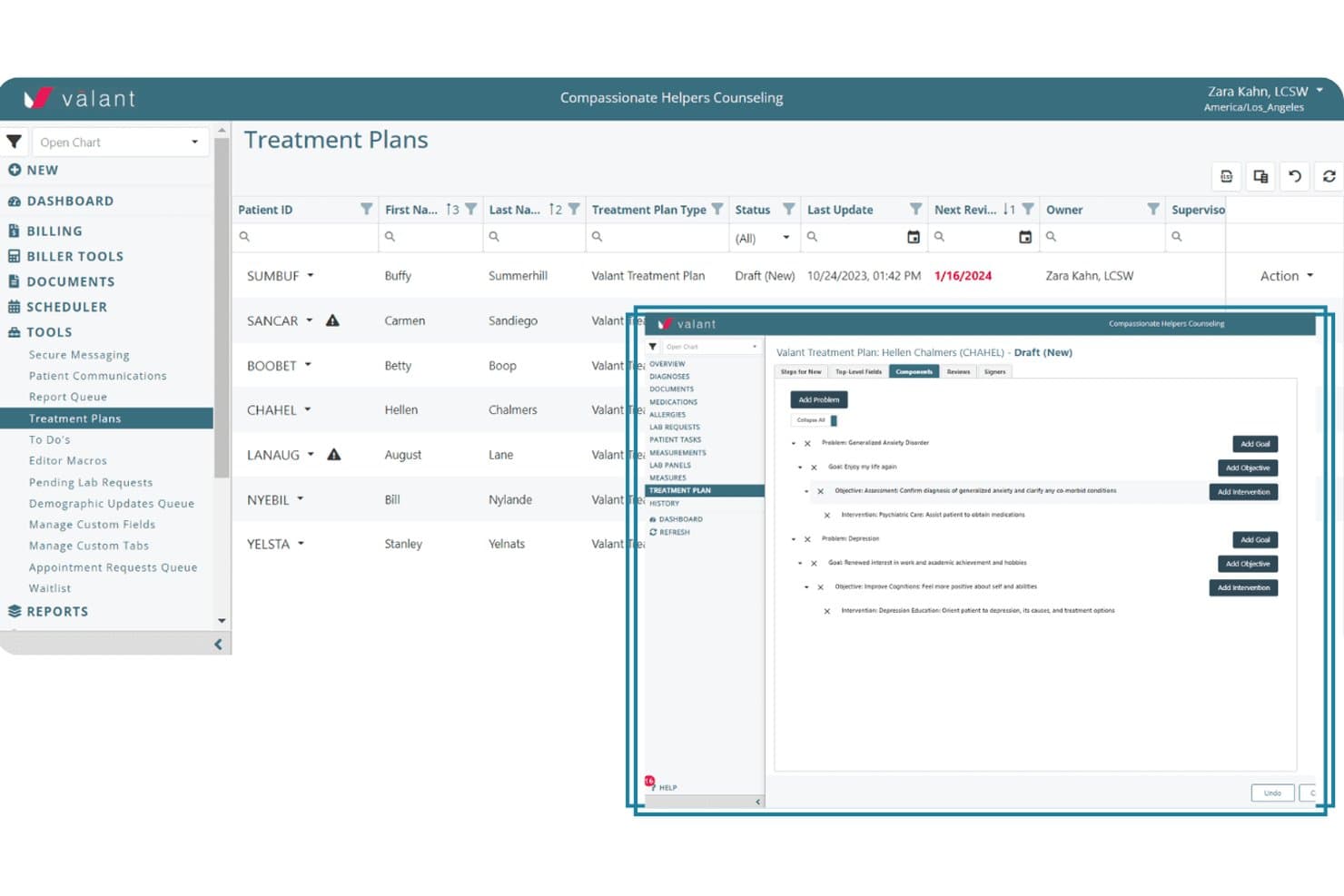
Valant offers a structured treatment planning interface where clinicians can add problems, goals, objectives, and interventions within a patient's EHR. Valant is a cloud-based behavioral health EHR that covers clinical documentation, AI-assisted note generation, e-prescribing, telehealth, lab ordering, scheduling, and billing, all accessible from a mobile browser on iPad.
Who Is Valant Best For?
Valant is purpose-built for behavioral health clinicians — including psychiatrists, therapists, and mental health practitioners — working in solo or small group practice settings.
Why I Picked Valant
I've included Valant in my top picks because its 100+ note templates, built specifically for psychiatric evaluations, CBT, DBT, and MFT workflows, let clinicians chart accurately right from a mobile session. The AI-assisted documentation auto-generates narrative notes mid-encounter, cutting documentation time on a tablet. I also like that EPCS-certified e-prescribing via DrFirst and native eLabs ordering are both accessible from the same mobile session.
Valant Key Features
- Integrated telehealth sessions: Launch HIPAA-compliant video visits directly within the platform from your iPad browser.
- Behavioral health outcome measurement tools: Track and document patient progress with over 80 standardized assessments and automated scoring.
- Comprehensive scheduling management: Access, adjust, and manage multiple calendars for providers and group sessions all from the mobile interface.
- Claim tracking and revenue cycle reporting: Monitor claims status and revenue analytics in real time, accessible from the same iPad session.
Valant Integrations
Valant offers native integrations with DrFirst for e-prescribing, Waystar and Optum for clearinghouse claim submission, and supports native eLabs ordering. An API is available for custom integrations.
Pros and Cons
Pros:
- EPCS e-prescribing accessible from iPad browser
- AI scribe generates notes mid-session
- 100+ behavioral health-specific charting templates included
Cons:
- No offline charting when connectivity drops
- No dedicated native clinician iPad app
Learn more about Valant: Best for independent practice mobility
- Free demo available
- Pricing upon request
Visit WebsiteCustomer Rating:3.9/5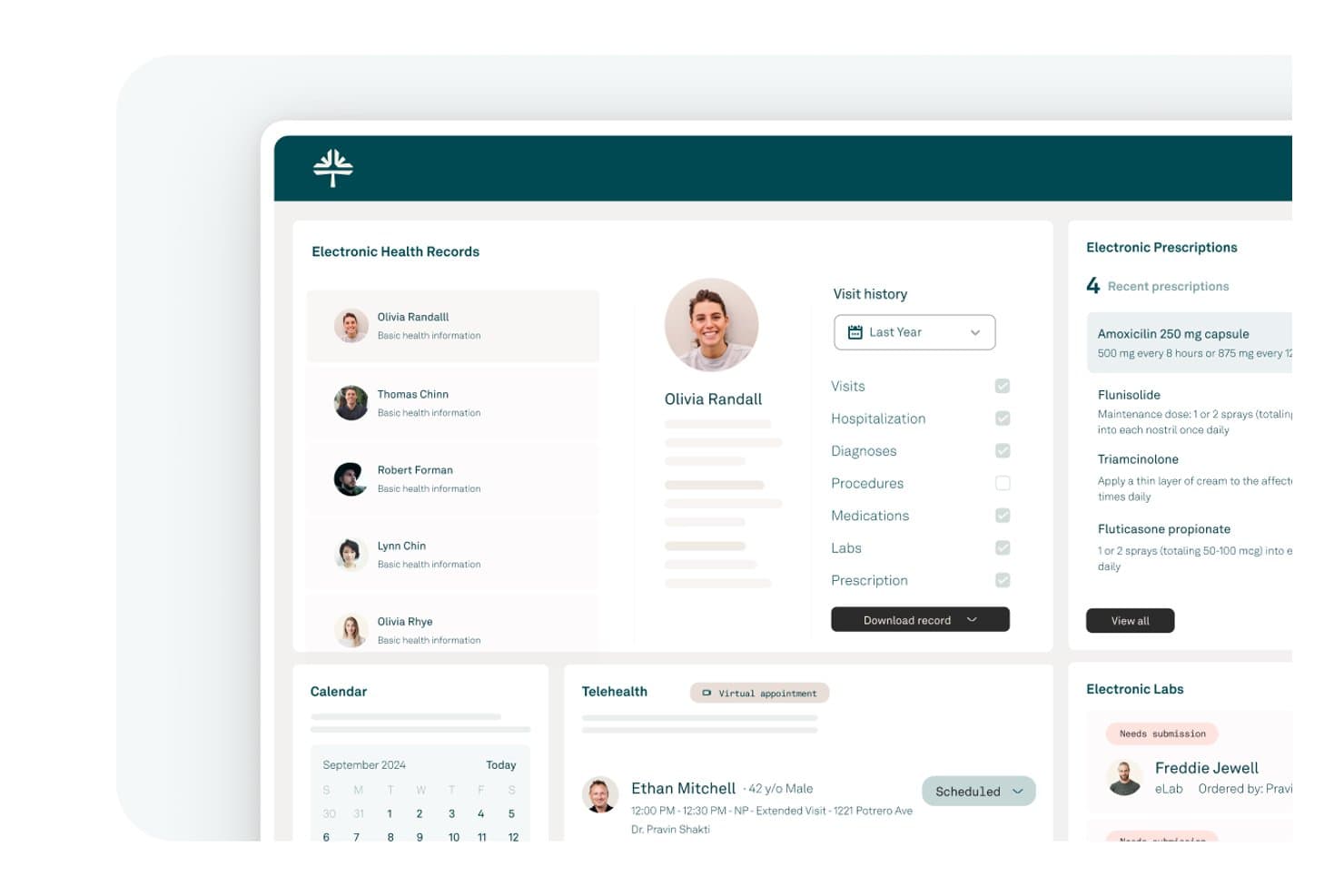
Tebra offers a comprehensive EHR dashboard displaying patient records, electronic prescriptions, telehealth appointments, and lab management in a clean iPad-friendly interface. Tebra is a cloud-based EHR and practice management platform built for independent practices, combining clinical charting, e-prescribing, scheduling, billing, and patient engagement in a single native iPad-compatible app.
Who Is Tebra Best For?
Tebra is a strong fit for independent, small-to-medium practices where providers need full EHR and billing access across both desktop and mobile devices.
Why I Picked Tebra
I've included Tebra in my top picks because it's genuinely built around mobile-first independent practice workflows. The single-login app covers clinical charting, scheduling, and billing across iPhone, iPad, and Apple Watch, so providers aren't locked to a desktop between patient encounters. I particularly like the AI Note Assist feature, which generates structured SOAP notes on the go, and the SALT shortcut that pulls details from a patient's last visit to speed up charting mid-encounter.
Tebra Key Features
- Native iPad EHR app: Access clinical, scheduling, and billing modules through a dedicated iPad application, not just a browser.
- HIPAA-compliant e-prescribing: Includes EPCS certification and PDMP monitoring for qualified providers within the integrated platform.
- Integrated telehealth: Launch HIPAA-compliant video visits directly from your iPad schedule or patient chart.
- Patient portal and digital intake: Enable patients to check in, complete forms, and update details via a secure, mobile-accessible platform.
Tebra Integrations
Tebra offers native integrations with LabCorp, Quest Diagnostics, DoseSpot, and Stripe, and provides an API for custom integrations.
Pros and Cons
Pros:
- Scheduling, billing, and charting in one app
- Single login works across all Apple devices
- AI Note Assist speeds up mobile charting
Cons:
- No documented offline charting mode
- iPad app can't send e-prescriptions
Learn more about Tebra: 5Best for enterprise mobile patient care
Epic
- Not available
- Pricing upon request
Visit WebsiteCustomer Rating:4.2/5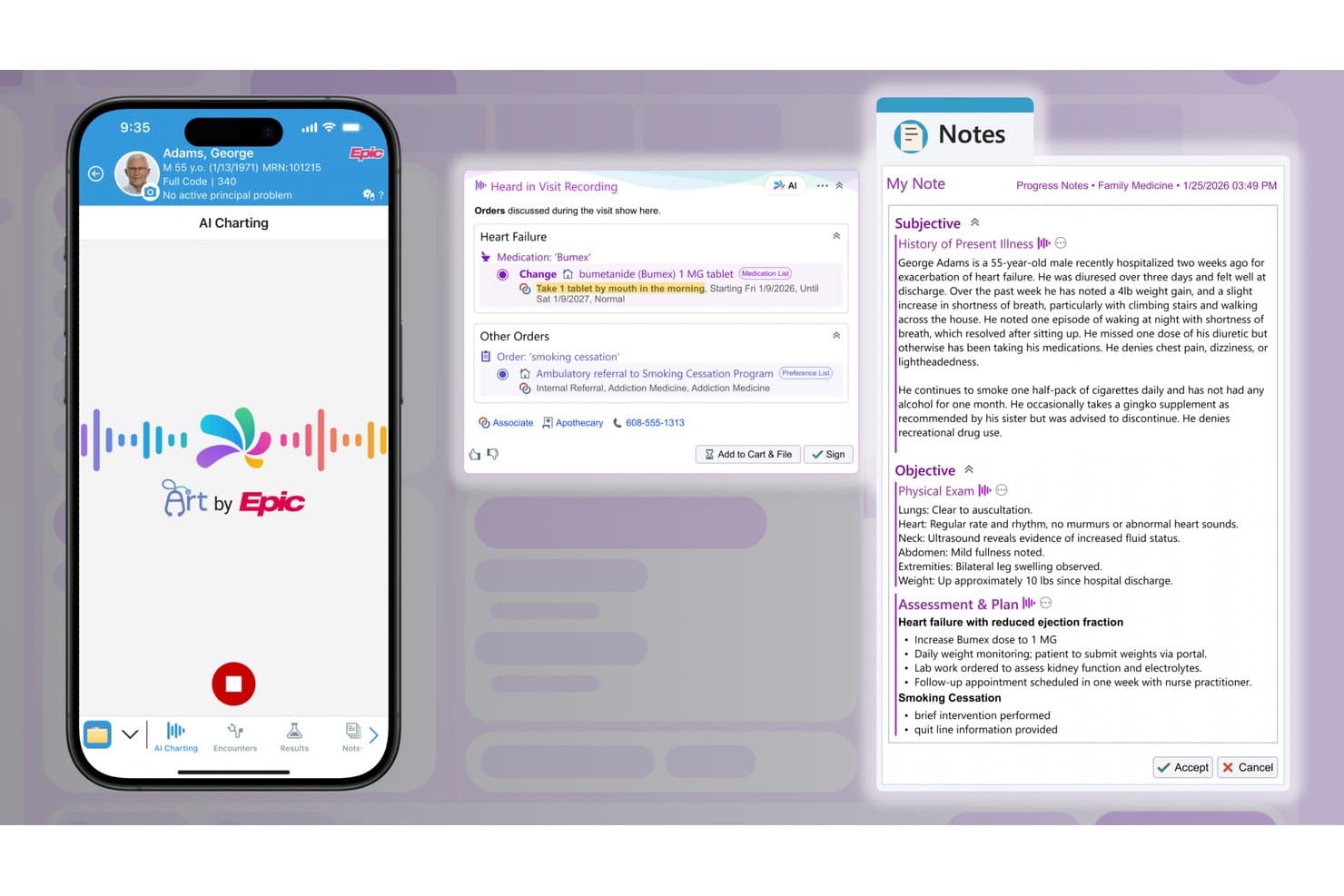
Epic offers AI-powered charting on iPad, automatically generating clinical notes and medication orders from recorded patient visits. Epic is an enterprise EHR platform that delivers clinical documentation, patient record access, medication administration, and care coordination through dedicated mobile apps, including a native iPad application for hospital-based clinicians.
Who Is Epic Best For?
Epic is a strong fit for large hospitals and enterprise health systems that need mobile EHR access across inpatient and outpatient settings at scale.
Why I Picked Epic
I picked Epic as one of the best because its mobile ecosystem for enterprise clinical teams is unmatched in scope. Canto gives physicians a native iPad interface for chart review and rounding workflows, while Rover handles nursing tasks like medication administration, vitals capture, and specimen collection at the bedside. That split-role mobile design means a single health system can deploy iPad-based workflows across both physician and nursing staff simultaneously.
Epic Key Features
- Customizable clinical templates: Clinicians can use specialty-specific templates to document patient encounters on their iPad.
- Secure messaging integration: Enables HIPAA-compliant communications between care team members within the mobile app.
- Patient list management: Provides fast access to schedules and filtered patient lists directly on iPad, supporting inpatient and outpatient workflows.
- Access to real-time test results: Clinicians can quickly view updated lab and imaging outcomes on their iPad as soon as they are available.
Epic Integrations
Epic offers native integrations with billing and revenue cycle management platforms, third-party clinical documentation tools, and diagnostic labs such as LabCorp and Quest. An API is available for custom integrations.
Pros and Cons
Pros:
- Enterprise-grade biometric login on shared devices
- Real-time chart access across inpatient units
- Canto and Rover support distinct iPad roles
Cons:
- Not suited for small or independent practices
- Outpatient note editing unavailable on iPad
Learn more about Epic: Best for specialty charting on iPad
- Free demo available
- Pricing upon request
Visit WebsiteCustomer Rating:4.5/5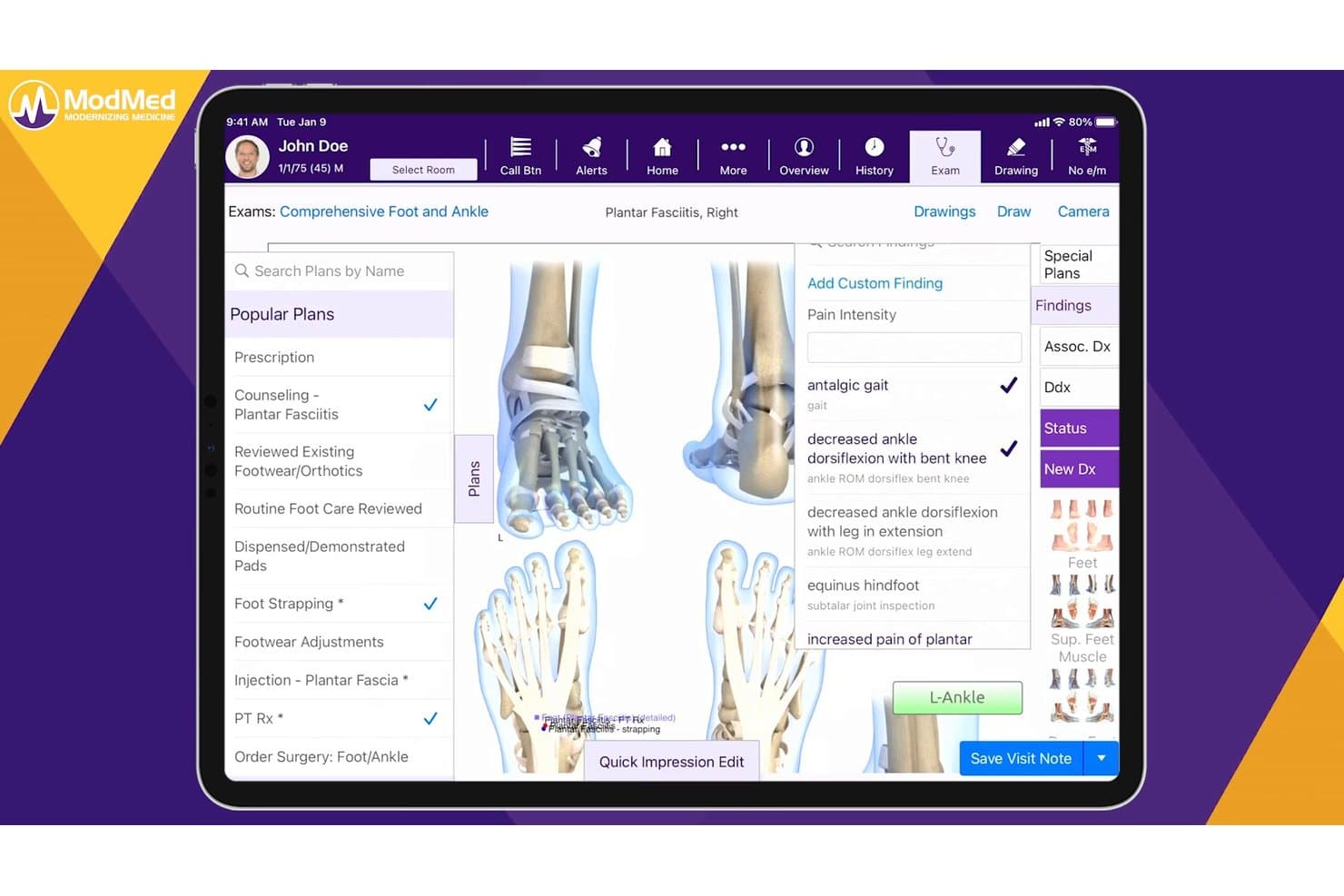
ModMed offers a comprehensive podiatry exam interface with condition-specific treatment plans, findings, and billing tools tailored for foot and ankle care. ModMed EMA is an iPad-native EHR built exclusively for medical specialists, combining specialty-specific charting, e-prescribing, lab ordering, and integrated practice management in a single touch-optimized platform.
Who Is ModMed Best For?
ModMed is a strong fit for independent specialty practices in fields like dermatology, ophthalmology, orthopedics, and gastroenterology that do most of their charting on iPad.
Why I Picked ModMed
ModMed EMA earns its spot as one of the best on my shortlist because the iPad isn't an afterthought: the entire EHR is designed around it. I especially like how EMA's adaptive engine learns your charting habits and autopopulates specialty-specific diagnoses and treatments as you tap through an encounter. Add ModMed Scribe 2.0, which listens to the patient conversation and suggests visit notes and ICD-10 codes in real time, and you can finalize charts before the patient leaves the room.
ModMed Key Features
- Integrated practice management: Scheduling, billing, and coding tools are fully accessible within the iPad app.
- HIPAA-compliant mobile authentication: Secure login with Face ID and Touch ID for added device security.
- Bidirectional lab and imaging ordering: Order and receive lab and imaging results directly from the iPad app.
- Customizable specialty templates: Each supported specialty includes tailored charting templates and protocols for efficient documentation.
ModMed Integrations
ModMed offers native integrations with Surescripts, LabCorp, Quest Diagnostics, and over 150 pathology labs. An API is available for custom integrations, and data can be exchanged via HL7 and FHIR standards.
Pros and Cons
Pros:
- Full practice management suite accessible on iPad
- Ambient scribe suggests ICD-10 codes in real time
- Specialty-specific adaptive charting on iPad
Cons:
- Customer support response times are inconsistent
- Only supports 11 medical specialties
Learn more about ModMed: Best for mobile behavioral health workflows
- 30-day free trial
- From $49/month
Visit WebsiteCustomer Rating:4.6/5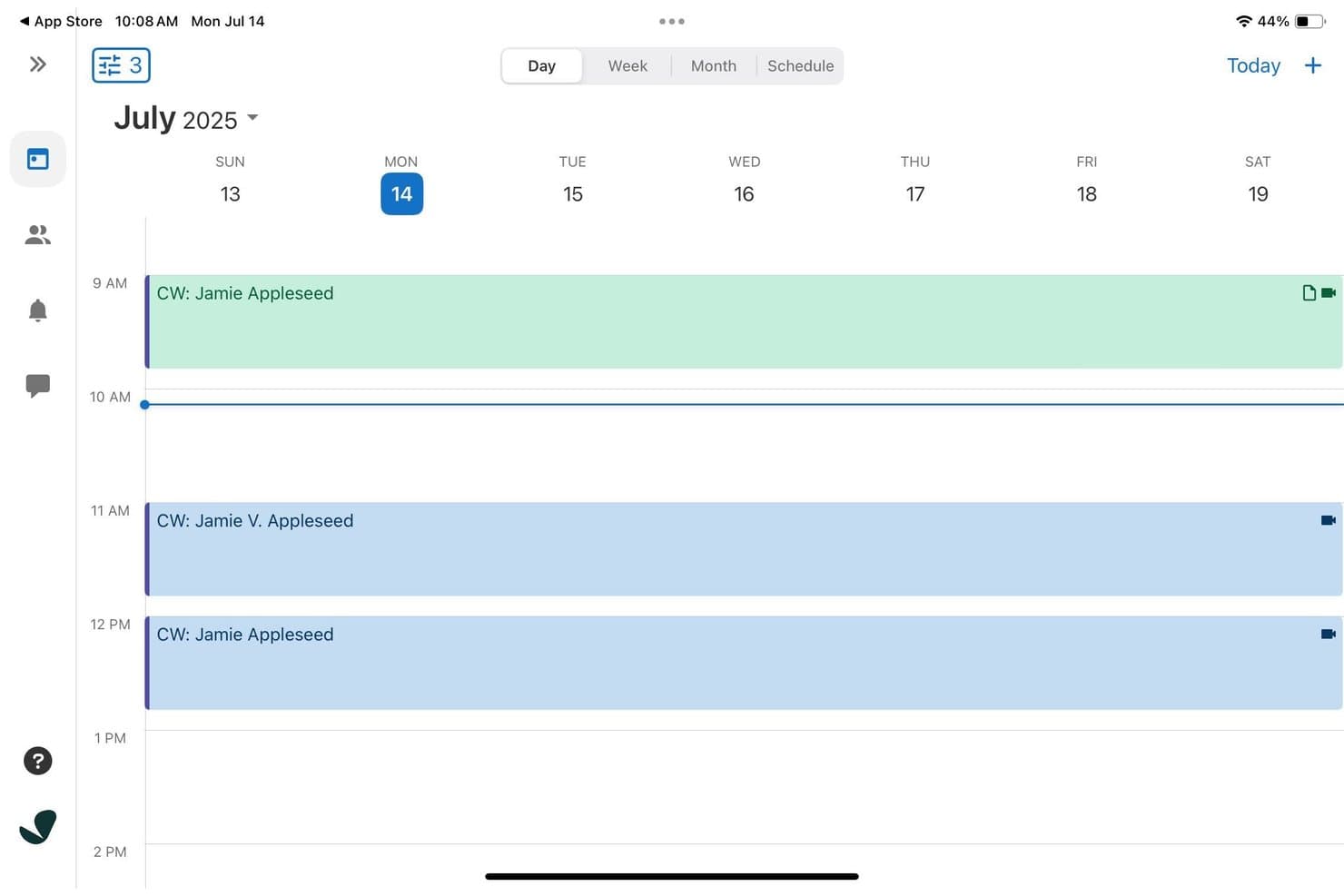
SimplePractice offers a weekly calendar view on iPad displaying color-coded client appointments with video session indicators throughout the day. SimplePractice is a cloud-based EHR and practice management platform for behavioral health practitioners, with a native iPad app that covers scheduling, clinical documentation, telehealth, billing, and insurance tools in one place.
Who Is SimplePractice Best For?
SimplePractice is built for solo and small-group behavioral health practitioners, including therapists, counselors, and social workers running private practices.
Why I Picked SimplePractice
I've included SimplePractice in my top picks because its July 2025 iPad update genuinely redesigned the tablet experience for behavioral health workflows. I like that you can pull up a client's full appointment history, outstanding balances, and intake forms from one screen without switching views. The AI Note Taker add-on transcribes and drafts therapy notes directly after a session, which cuts post-appointment documentation down significantly.
SimplePractice Key Features
- Integrated telehealth sessions: Launch secure video visits directly from the iPad app without third-party software.
- Customizable documentation templates: Choose and tailor forms for intake, progress, and treatment planning within your workflows.
- Insurance billing and claims management: Submit and track insurance claims in-app alongside session documentation and patient data.
- Secure client portal access: Enable clients to schedule appointments, complete intake paperwork, and message their provider from mobile devices.
SimplePractice Integrations
SimplePractice offers native integrations for calendar sync, e-prescribing (via DrFirst), and insurance clearinghouses. An API for custom integrations is not documented.
Pros and Cons
Pros:
- Telehealth video visits launch within the app
- AI Note Taker drafts therapy notes automatically
- iPad app redesigned specifically for behavioral health
Cons:
- Mobile note history limited to 30 days
- No offline charting mode for disconnected use
Learn more about SimplePractice: Best for iPad-native clinical workflows
- Free demo available
- Pricing upon request
Visit WebsiteCustomer Rating:3.9/5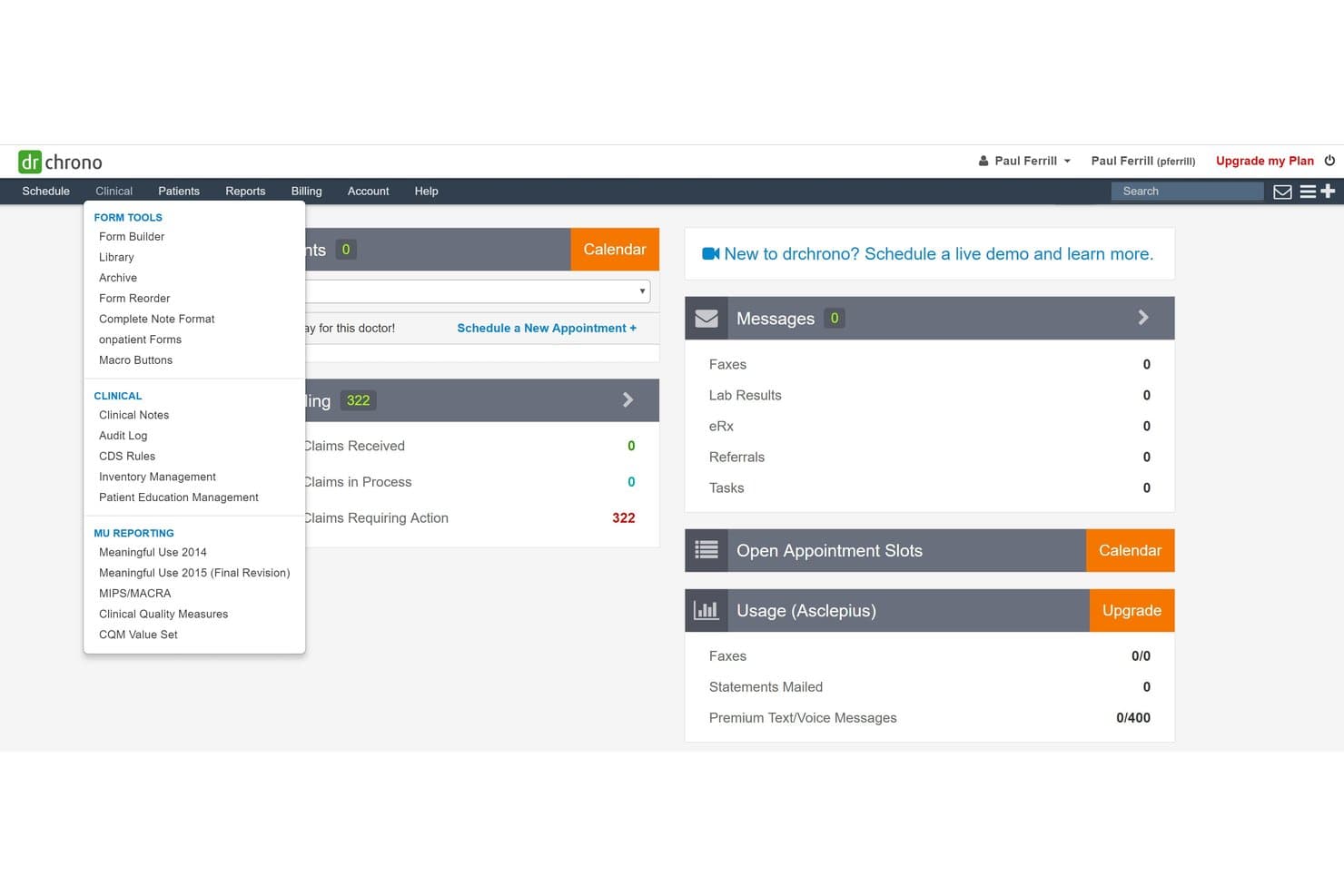
DrChrono offers a Clinical dropdown menu with Form Tools, Clinical, and MU Reporting sections accessible from the main dashboard. DrChrono is an iPad-native EHR platform that combines clinical charting, e-prescribing, lab ordering, practice management, and medical billing in a single iOS-first environment built for ambulatory and mobile care settings.
Who Is DrChrono Best For?
It's a natural fit for independent and small-group practices that run entirely on Apple devices and need a single platform for both clinical documentation and billing.
Why I Picked DrChrono
DrChrono earns its spot on my shortlist because it's the only EHR built from the ground up for iPadOS, not retrofitted from a desktop codebase. I particularly like EverHealth Scribe, which listens during a visit and writes structured notes directly into the patient chart on the iPad. What I find most useful is the ability to run a telehealth video visit while reviewing the full patient record in a separate window, all on one iPad screen.
DrChrono Key Features
- Customizable clinical forms: Create and modify pre-built templates to match different specialties and practice needs directly on the iPad.
- Integrated patient scheduling: Book, confirm, and manage appointments with real-time calendar syncing across devices.
- e-Prescribing with EPCS: Order both regular and controlled medications electronically from within the iPad app.
- OnPatient patient portal: Allow patients to access records, complete digital intake forms, and communicate securely with your practice on mobile or web.
DrChrono Integrations
DrChrono offers native integrations with Labcorp, Quest Diagnostics, Lifepoint, Box, Square Point of Sale, Updox, Birdeye, and Reputation.com, and provides an open API for custom integrations.
Pros and Cons
Pros:
- Full billing suite runs natively on iPad
- Scribe AI writes notes during patient visits
- Built exclusively for iPad from the start
Cons:
- Customer support response times can be slow
- Steep initial setup and onboarding process
Learn more about DrChrono: Best for mobile specialty practice workflows
- Free demo available
- Pricing upon request
Visit WebsiteCustomer Rating:3.7/5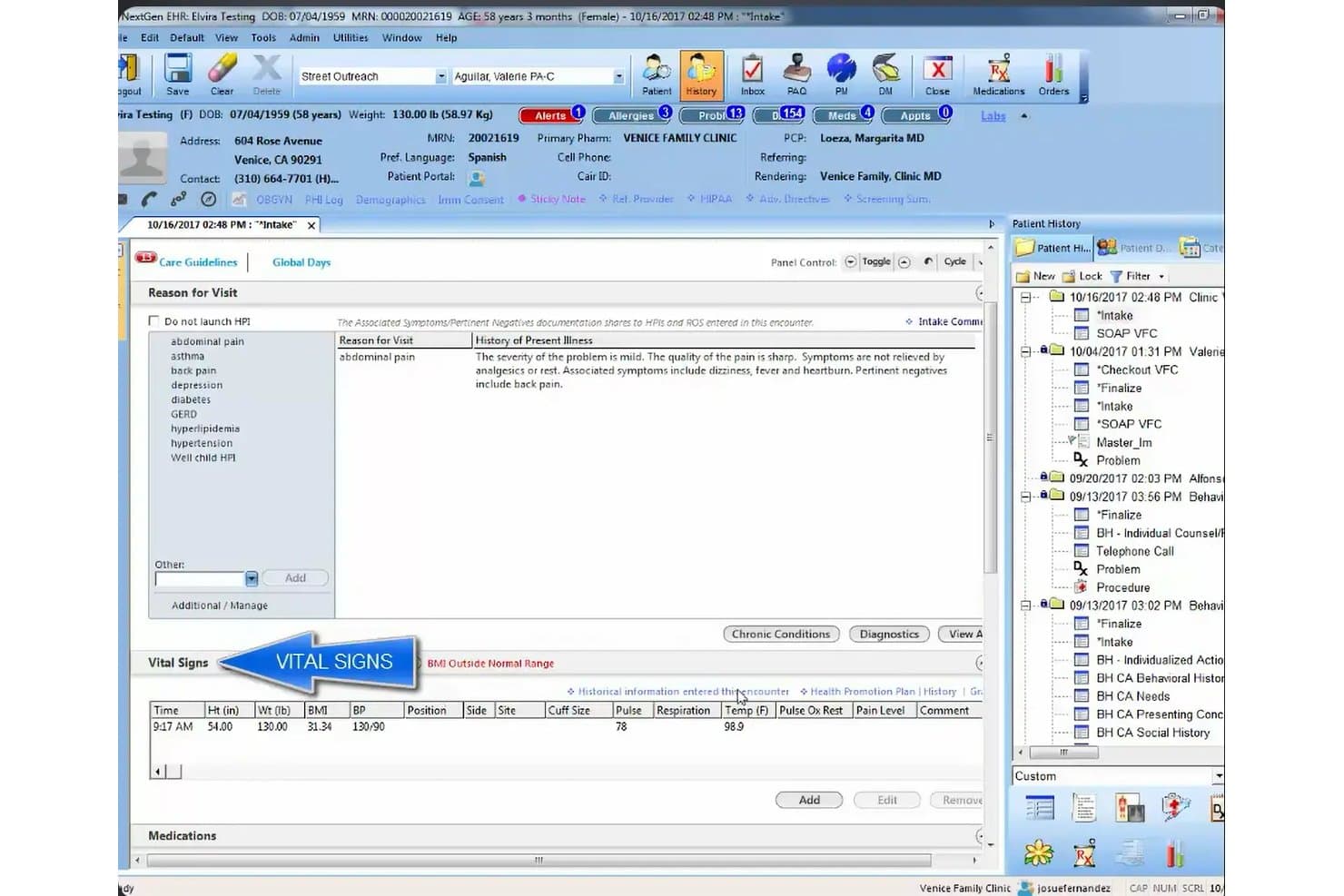
NextGen Healthcare offers a comprehensive EHR intake screen displaying patient vitals, reason for visit, and history of present illness in a structured clinical workflow. NextGen Healthcare is a cloud-based ambulatory EHR platform with a native mobile companion app that supports iPad-based charting, e-prescribing, lab ordering, telehealth visits, and integrated practice management across 30+ specialties.
Who Is NextGen Healthcare Best For?
It's a strong fit for independent specialty practices that need mobile-first clinical workflows, particularly those with providers charting across multiple locations or care settings.
Why I Picked NextGen Healthcare
I've included NextGen Healthcare in my top picks because of how well its mobile ecosystem supports specialty-specific clinical workflows on the go. The NextGen Mobile companion app lets providers generate fully structured SOAP notes directly from patient conversations using ambient AI, without typing a word. Pair that with 2,000+ specialty-specific templates across 30+ specialties, and you get a mobile charting environment built around clinical discipline, not generic documentation.
NextGen Healthcare Key Features
- Integrated patient portal: Patients can manage appointments, request refills, and access charts directly from their mobile devices.
- EPCS-certified e-prescribing: Secure prescribing of controlled and non-controlled substances is supported from the tablet interface.
- Lab and diagnostic ordering hub: Order labs and access results with connections to over 700 lab vendors through a unified platform.
- Role-based access controls: Customizable user permissions maintain HIPAA compliance and limit access to sensitive information on any device.
NextGen Healthcare Integrations
NextGen Healthcare offers native integrations with Surescripts for e-prescribing, a diagnostic hub for lab vendors like LabCorp and Quest Diagnostics, Inbox Health, SamaCare, and LinkMD AI. An API is available for custom integrations.
Pros and Cons
Pros:
- Telehealth built directly into the EHR
- Ambient AI generates SOAP notes hands-free
- 2,000+ specialty-specific charting templates available
Cons:
- Mobile app lacks full desktop parity
- No offline charting mode on iPad
Learn more about NextGen Healthcare: Best for mobile cloud-based EHR access
- Free demo available
- Pricing upon request
Visit WebsiteCustomer Rating:5/5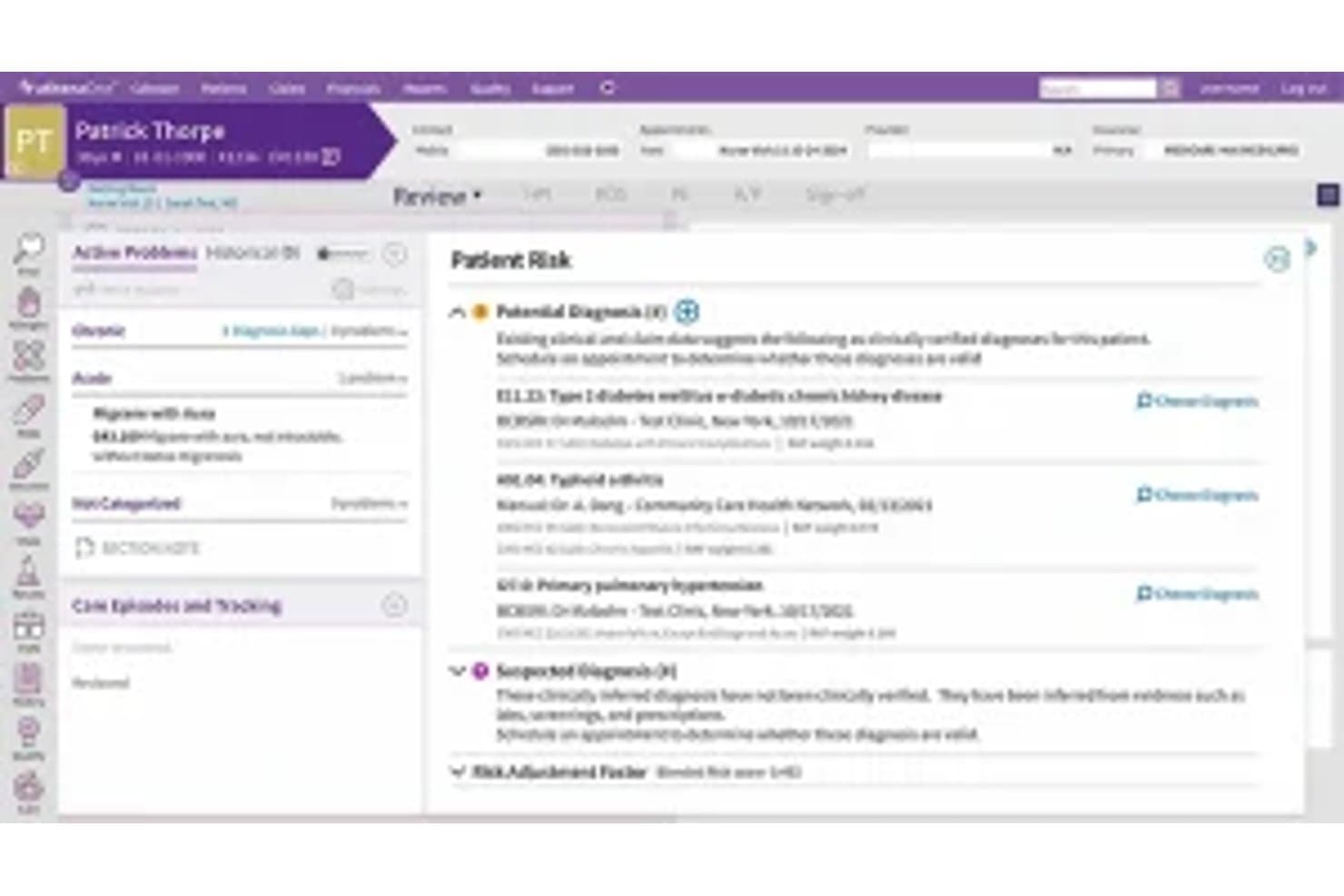
Athenahealth offers a Patient Sick visit summary screen displaying potential diagnoses, active problems, and clinical findings within its EHR interface. Athenahealth is a cloud-native EHR platform with a dedicated iOS app for iPad that gives clinicians access to patient records, clinical documentation, e-prescribing, lab ordering, scheduling, and revenue cycle management from a single mobile environment.
Who Is Athenahealth Best For?
Athenahealth is a strong fit for independent ambulatory practices and mobile clinicians who need full EHR access on an iPad rather than being tethered to a desktop workstation.
Why I Picked Athenahealth
I picked athenahealth as one of the best because its iOS-only mobile strategy means the iPad is a primary device, not an afterthought. The Athenahealth app carries the same templates, macros, and order sets as the desktop EHR, so documenting an encounter on an iPad feels identical to working at a workstation. I especially like the Ambient Notes feature: I can start recording at the top of a visit and Athenahealth automatically summarizes the conversation into a structured note placed directly in the patient's chart.
Athenahealth Key Features
- EPCS e-prescribing and lab ordering: Write, send, and track prescriptions including controlled substances, and order labs directly from the iPad app.
- Full practice management integration: Manage scheduling, billing, patient demographics, and authorizations inside the same mobile interface.
- HIPAA-compliant biometric login: Secure access via Face ID or Touch ID on supported iPad models with full BAA support.
- Patient portal access on iPad: Patients and staff can review charts, sign forms, and communicate securely through the mobile interface.
Athenahealth Integrations
Athenahealth offers native integrations with LabCorp, Quest Diagnostics, Surescripts, Nuance, and supports additional apps through the athenahealth Marketplace. An API is available for custom integrations.
Pros and Cons
Pros:
- Full RCM accessible on iPad
- Ambient Notes auto-generates notes from voice
- iOS-only app prioritizes native iPad experience
Cons:
- Android users have no mobile app option
- Limited offline charting capability
Learn more about Athenahealth:
Annen EHR-programvare for iPad
Her er noen flere alternativer for EHR-programvare for iPad som ikke kom med på kortlisten min, men som likevel er verdt å ta en titt på:
- 11Practice FusionBest for simple cloud EHR access
- 12AdvancedMDBest for mobile EHR and billing workflows
- 13RXNTBest for mobile charting and prescribing
- 14JaneBest for mobile allied health workflows
- 15Elation HealthBest for mobile primary care workflows
- 16NextechBest for mobile specialty care workflows
- 17ICANotesBest for mobile mental health charting
- 18eClinicalWorksBest for mobile patient care coordination
- 19CareCloudBest for cloud-based mobile practice management
How I Evaluate EHR Software for iPad
I split my evaluation into must-have baseline criteria—like native iPadOS apps and offline charting—and the differentiators that separate vendors for specific practice types.
Core Functionality (Table Stakes For This List)
When I'm selecting tools for my list, I rank each one on a scale from 0 (does not offer the functionality) to 5 (excels in this area) for each core functionality listed below. Then, I calculate the tool's total score into a percentage. Each tool needs to achieve a minimum total score of 65% to be considered for inclusion.
- Native iPad App: I check for a dedicated App Store download—not just a responsive website in Safari—that runs with full feature parity on iPadOS.
- Touch-Optimized Charting: Tap-and-swipe note entry, template dropdowns, and Apple Pencil support for annotations or consent signatures matter here.
- HIPAA-Compliant Security: I look for encryption, a signed BAA, and biometric login like Face ID so providers can securely switch users on shared iPads.
- Cloud Sync & Offline Mode: Home-visit clinicians need offline charting that auto-syncs once connectivity returns, so I evaluate how each app handles that.
- E-Prescribing & Orders: The iPad app should support EPCS-certified prescribing and lab ordering so providers can send scripts bedside without a desktop.
- Integrated Practice Workflows: Scheduling, billing, coding, and patient demographics should all be accessible within the same iPad app environment.
Once I have a list of tools that meet the criteria, I consider what sets each platform apart.
Differentiating Factors (What Sets Vendors Apart)
Here's how I compare and contrast different vendors:
Standout Features
Offline charting mode is a big deal for house-call providers or rural clinics where Wi-Fi drops mid-encounter. I look for apps that let you document a full visit offline and auto-sync once you're back online. Apple Pencil support also separates the best iPad EHRs—annotating diagrams, capturing patient signatures, or sketching wound assessments on-screen speeds up point-of-care documentation. Voice-to-text dictation matters too, especially when a provider needs to narrate notes between patients without typing on a tablet keyboard.
Beyond Features
Specialty fit matters—a behavioral health therapist needs SOAP note templates and treatment plan workflows that differ from what a pediatrician uses, so I evaluate how well each vendor's template library matches specific disciplines. Whether the iPad app is truly native or a browser wrapper also counts. I check for Split View support and smooth adaptation across iPad screen sizes. Pricing structure deserves a close look too. Some vendors include the iPad app in the base subscription while others charge extra, and migration fees can add up for a small practice.
Slik velger du EHR-programvare for iPad
Det er lett å gå seg vill i lange funksjonslister og kompliserte prisstrukturer. For å hjelpe deg med å holde fokus mens du går gjennom din unike prosess for valg av programvare, får du her en sjekkliste over faktorer du bør ha i tankene:
| Faktor | Hva du bør vurdere |
| Skalerbarhet | Vil programvaren fortsatt passe godt når pasientlisten vokser eller teamet utvides? Vurder om den støtter flere behandlere og lokasjoner. |
| Integrasjoner | Kan den kobles sømløst til fakturerings-, laboratorie- eller telehelseplattformene dine? Lag en liste over nødvendige integrasjoner før du begynner å sammenligne leverandører. |
| Tilpasningsmuligheter | Kan du justere maler og arbeidsflyter slik at de passer spesialiteten din? Vurder hvor mye tid det tar å tilpasse skjemaer, notattyper og oppsett for timeplanlegging. |
| Brukervennlighet | Er den daglige arbeidsflyten intuitiv for klinikere og kontorpersonale på iPad? Be om en demonstrasjon for å se journalføring, timeplanlegging og dataregistrering i praksis. |
| Implementering og oppstart | Hvor mye intern tid og ekstern hjelp vil gå med til oppsett, migrering og opplæring av ansatte? Vær oppmerksom på skjulte oppstartsgebyrer og lange tidsrammer. |
| Kostnad | Se lenger enn de månedlige avgiftene. Beregn kostnader for tillegg, maskinvarekrav, migrering og brukerstøtte – særlig hvis iPad-appen koster ekstra per bruker. |
| Sikkerhetstiltak | Tilbyr leverandøren kryptering, fjernsletting og Face ID eller Touch ID? Sørg for at mobilsikkerheten oppfyller kravene til samsvar for praksisen din. |
| Tilgjengelig brukerstøtte | Hvilke kanaler for brukerstøtte er tilgjengelige, og når kan du få kontakt med dem? Hvis noe ikke fungerer på iPad-en din midt i klinikkdagen, trenger du rask og reell hjelp. |
Hva er EHR-programvare for iPad?
En EHR-løsning for iPad er en mobil versjon av EHR-programvare som lar helsepersonell få tilgang til, dokumentere og administrere pasientjournaler direkte på iPad-en. Disse appene er utviklet for berøringsbaserte kliniske arbeidsflyter og støtter sikker dataregistrering, elektronisk forskrivning, timeplanlegging og fakturering fra hvor som helst. Når du bruker iPad til EHR, kan du føre journal ved pasientens seng, oppdatere informasjon i sanntid og få fleksibel tilgang gjennom hele behandlingsforløpet.
Funksjoner i EHR-programvare for iPad
Når du velger EHR-programvare for iPad, bør du se etter følgende viktige funksjoner:
- Innebygd iPad-app: En spesialutviklet applikasjon for iPadOS som optimaliserer ytelsen og bevegelseskontrollene, og tilpasser seg sømløst til ulike iPad-skjermstørrelser.
- Berøringsbasert journalføring: Trykk, sveip og dra for å fylle ut kliniske notater, maler og vurderinger direkte på nettbrettet for rask og intuitiv dataregistrering.
- Støtte for Apple Pencil: Kommenter diagrammer, signer samtykkeskjemaer og konverter håndskrift til tekst for mer naturlig klinisk dokumentasjon og pasientengasjement.
- Frakoblet tilgang og synkronisering: Dokumenter konsultasjoner og se journaler uten internettilkobling, med automatisk datasynkronisering når du er på nett igjen, slik at du unngår manglende informasjon.
- HIPAA-kompatibel sikkerhet: Innebygd kryptering, sikre innlogginger med Face ID eller Touch ID og omfattende revisjonsspor holder pasientdata trygge på mobile enheter.
- Synkronisering med skyen i sanntid: Alle oppdateringer på iPad synkroniseres umiddelbart med skyen, slik at du får sømløs tilgang til pasientjournaler på tvers av mobil- og skrivebordsapper.
- Mulighet for elektronisk reseptforskrivning: Send resepter, inkludert kontrollerte legemidler, direkte til apotek fra iPad uten å bytte enhet.
- Integrert timeplanlegging og fakturering: Administrer avtaler, demografiske opplysninger og krav fra samme app, slik at den daglige driften av kontoret blir mer effektiv også når du er på farten.
- Opptak av pasientbilder og medier: Ta og lagre pasientbilder på en sikker måte, skann dokumenter og legg til mediefiler direkte i pasientjournaler ved hjelp av iPad-kameraet.
- Innebygd telehelse: Start sikre, HIPAA-kompatible videokonsultasjoner fra EHR-appen, slik at fjernkonsultasjoner blir fullt integrert i den mobile arbeidsflyten.
Fordeler med EHR-programvare for iPad
Implementering av mobil EHR-programvare på en iPad gir flere fordeler for teamet og virksomheten din. Her er noen av fordelene du kan se frem til:
- Fleksibel mobil journalføring: Dokumenter konsultasjoner, gå gjennom journaler og oppdater opplysninger hvor som helst – ved pasientens seng, hjemme eller under hjemmebesøk – med en berøringsoptimalisert iPad-app.
- Raskere kliniske arbeidsflyter: Bruk trykk, sveiping og inndata med Apple Pencil for å effektivisere notatskriving, signeringer, bestillinger og fotografering av pasienter uten begrensninger fra stasjonære datamaskiner.
- Sikker tilgang på farten: Beskytt pasientdata samtidig som Face ID, Touch ID og HIPAA-kompatible funksjoner gir sikker og praktisk håndtering av journaler.
- Datasynkronisering i sanntid: Synkroniser informasjon umiddelbart mellom iPad, skrivebord og skyen, slik at ansatte og klinikere alltid har tilgang til oppdaterte pasientjournaler.
- Helhetlig praksisadministrasjon: Planlegg avtaler, fakturer og administrer pasientenes demografiske opplysninger direkte fra iPad-appen, slik at administrative siloer reduseres og kontinuiteten i arbeidsflyten forbedres.
- Bedre pasientengasjement: Vis bilder, innhent signaturer og gjennomfør videokonsultasjoner via telehelse under avtaler, alt fra iPad, noe som styrker samhandlingen med pasientene og deres forståelse.
- Færre tilkoblingsforstyrrelser: Frakoblet dokumentasjon og automatisk synkronisering sørger for at du kan være produktiv i distriktsområder eller travle klinikker med ustabil internettilgang.
Kostnader og priser for EHR-programvare for iPad
Når du velger EHR-programvare for iPad, må du ha oversikt over de ulike prismodellene og abonnementene som er tilgjengelige. Kostnadene varierer basert på funksjoner, teamstørrelse, tillegg og mer. Tabellen nedenfor oppsummerer vanlige abonnementer, gjennomsnittsprisene deres og typiske funksjoner som er inkludert i EHR-programvareløsninger for iPad:
Sammenligningstabell for abonnementer for EHR-programvare for iPad
| Abonnementstype | Gjennomsnittspris | Vanlige funksjoner |
| Gratisabonnement | $0 | Grunnleggende journalføring, timeplanlegging, begrenset brukerstøtte og sikkerhetskopiering i skyen. |
| Personlig abonnement | $50-$100/bruker/måned | Full journalføring, elektronisk reseptforskrivning, frakoblet modus, grunnleggende fakturering og pasientadministrasjon. |
| Forretningsabonnement | $100-$200/bruker/måned | Avansert timeplanlegging, teammeldinger, integrert fakturering, laboratoriebestillinger, innebygd iPad-app og forbedrede sikkerhetsfunksjoner. |
| Virksomhetsabonnement | $200+/bruker/måned | Tilpassede integrasjoner, prioritert brukerstøtte, avansert analyse, støtte for flere lokasjoner, MDM-alternativer og dedikert opplæring. |
EHR-programvare for iPad – vanlige spørsmål
Her er svar på vanlige spørsmål om EHR-programvare for iPad:
Kan jeg bruke EHR-programvare for iPad uten internettilkobling?
Ja, mange EHR-apper for iPad støtter frakoblet tilgang. Du kan dokumentere konsultasjoner, se pasientjournaler og deretter synkronisere dataene automatisk når du kobler til internett igjen, noe som er avgjørende i mobile eller landlige områder.
Er EHR-programvare for iPad sikker og HIPAA-kompatibel?
Ja, ledende leverandører utvikler EHR-appene sine for iPad slik at de oppfyller HIPAA-kravene, med kryptering, revisjonslogger, Face ID eller Touch ID og MDM-kompatibilitet. Bekreft alltid at leverandøren signerer en Business Associate-avtale (BAA) før du lagrer pasientdata.
Integreres EHR-systemer for iPad med laboratorier, fakturering eller andre medisinske systemer?
De fleste iPad-fokuserte EHR-systemer tilbyr integrasjoner med laboratorier, faktureringsverktøy og e-reseptnettverk. Kontroller om leverandøren støtter HL7, FHIR og vanlige grensesnitt for sømløs informasjonsutveksling.
Kan jeg tilpasse maler og skjemaer i en EHR-app for iPad?
Ja, mange løsninger lar deg justere notemaler, hurtigtekster og ordresett direkte på iPad-en. Noen leverandører tilbyr fagspesifikke biblioteker, noe som gjør det enklere å tilpasse løsningen til den kliniske arbeidsflyten din.
Hva bør jeg vurdere når jeg bytter til et iPad-basert EHR-system?
Vurder maskinvarebehovene dine, støtten for datamigrering og kravene til opplæring av ansatte, og se etter skjulte gebyrer. Sørg for at leverandørens iPad-app tilbyr funksjonene og integrasjonene virksomheten din er avhengig av i det daglige.