


RXNT vs. Dr Chrono: Comparison & Expert Reviews For 2026

We review tools independently, and commissions help fund our testing. See our transparency policy, our methodology, or suggest a tool.
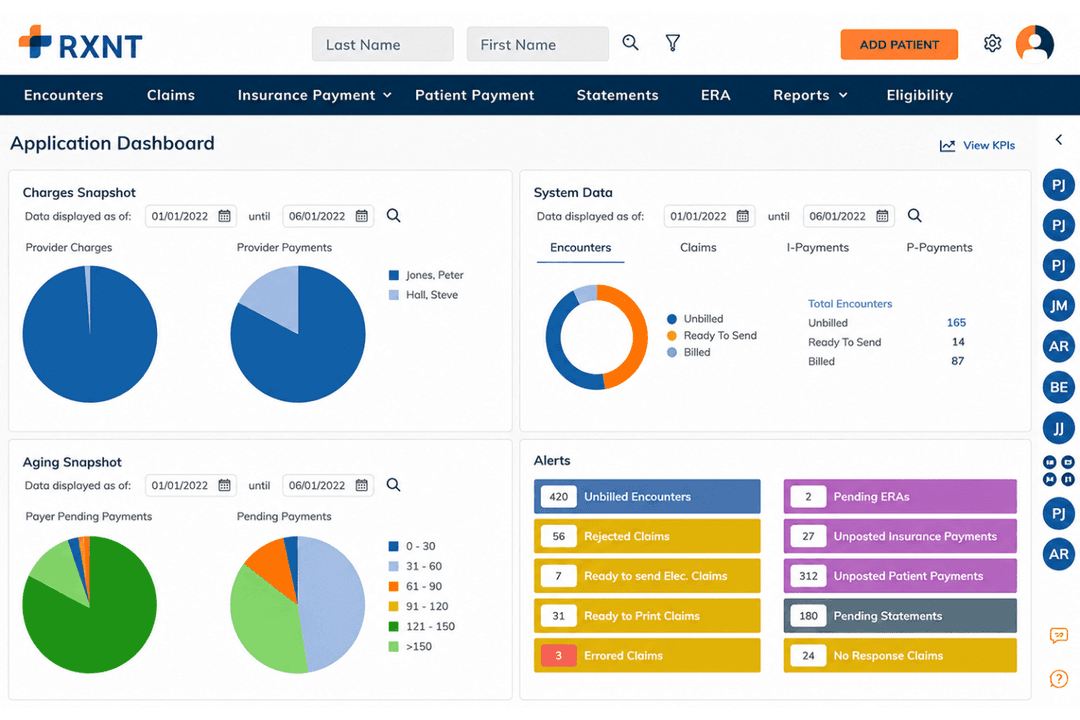
RXNT is a cloud-based practice management and EMR solution with full suite telehealth, e-prescribing, and patient portal for healthcare providers. Its specialities include patient engagement and electronic health record accessibility, making it an excellent all-in-one telemedicine option.
Dr Chrono provides a robust platform tailored to enhance patient care and streamline operations from revenue cycle management to basic practice management software. Dr Chrono is great for multi-specialty practices, offering a flexible electronic medical records system to suit any need.
While both RXNT and Dr Chrono are designed to improve efficiency, they differ in user experience and customization options.
In this article, we'll compare the tools and their features, pros and cons, pricing, and more, to help you choose the best EHR software for your practice.
RXNT
4.3/5
- Free demo + free expert consultation available
- Pricing upon request
DrChrono

3.9/5
- Free demo available
- Pricing upon request
Why Trust Our Software Recommendations
6,700+
Reviews
20
Industry experts
16+
Evaluation factors
14
Years
Our team has been testing and reviewing software since 2012. As medical practice leaders ourselves, we know how difficult—and important—it is to choose the right software.
For this guide, we evaluated tools using hands-on testing and independent research, scoring tools using our selection criteria.
Our reviews reflect our human editorial judgment, not a sales pitch.
| RXNT | DrChrono | |
|---|---|---|
| Free Trial | Free demo + free expert consultation available | Free demo available |
| Pricing | Pricing upon request | Pricing upon request |
RXNT vs. Dr Chrono Pricing & Hidden Costs
RXNT pricing is structured around a subscription model with optional add-ons that might lead to additional costs for features like billing or advanced reporting.
Dr Chrono pricing also follows a subscription model but may include extra fees for integrations or premium support services.
To select the tool with the right pricing for your practice, evaluate your specific needs and consider the total cost of ownership, including any additional services or features you might require. This approach ensures you choose a vendor that not only fits your budget but also supports your operational goals.
RXNT vs. Dr Chrono Feature Comparison
RXNT and DrChrono both offer comprehensive electronic health record (EHR) systems, but they serve different types of medical practices. RXNT provides a fully integrated suite with EHR, practice management, billing, and electronic prescribing. Its features include appointment scheduling, billing management, clinical workflow tools, document management, lab integration, patient history, patient portal, and e-prescription capabilities.
DrChrono also delivers an all-in-one platform with EHR, practice management, billing, and revenue cycle management. It stands out with customizable medical forms, built-in telehealth, an integrated patient portal (OnPatient), and a strong mobile app experience optimized for iOS devices.
RXNT is cloud-based and accessible via web and mobile, offering a straightforward interface that’s best for practices looking for simplicity. DrChrono is built with a mobile-first design and supports drag-and-drop functionality, with customizable templates that enhance user experience.
RXNT includes live, unlimited training as part of the subscription. DrChrono provides support via phone and online, with added perks in premium plans.
RXNT is ideal for small to medium practices needing a cost-effective, integrated system. DrChrono is better suited for practices that prioritize mobile access and customized workflows, including large or growing practices.
RXNT offers strong value with comprehensive features at a lower cost, while DrChrono excels in customization and mobile usability but comes with a higher price tag. The best choice depends on the specific needs and budget of your practice.
| Integration | RXNT | Dr Chrono |
|---|---|---|
| IntegrationQuickBooks | RXNT✅ | Dr Chrono✅ |
| IntegrationXero | RXNT✅ | Dr Chrono❌ |
| IntegrationSlack | RXNT❌ | Dr Chrono✅ |
| IntegrationTrello | RXNT❌ | Dr Chrono✅ |
| IntegrationGoogle Calendar | RXNT❌ | Dr Chrono✅ |
| IntegrationSalesforce | RXNT❌ | Dr Chrono✅ |
| IntegrationHubspot | RXNT❌ | Dr Chrono✅ |
| IntegrationAsana | RXNT❌ | Dr Chrono✅ |
| IntegrationAPI | RXNT✅ | Dr Chrono✅ |
| IntegrationZapier | RXNT✅ | Dr Chrono✅ |
RXNT's integration with QuickBooks lets you seamlessly handle financial tasks, which is crucial for maintaining accurate billing records in your practice.
Dr Chrono's integration with Slack is great for improving communication within your team, ensuring quick responses and collaboration.
While RXNT supports financial management, Dr Chrono enhances team interaction, offering different benefits for your practice.
| Factor | RXNT | Dr Chrono |
|---|---|---|
| FactorData Privacy | RXNTRXNT employs HIPAA-compliant data storage to protect patient information. | Dr ChronoDr Chrono ensures data privacy with HIPAA-compliant encryption protocols. |
| FactorRegulatory Compliance | RXNTRXNT regularly updates its system to stay compliant with healthcare regulations. | Dr ChronoDr Chrono provides compliance tools to meet healthcare standards like MACRA. |
| FactorEncryption | RXNTRXNT uses advanced encryption methods to secure data during transmission. | Dr ChronoDr Chrono offers end-to-end encryption to safeguard all communications. |
| FactorReliability | RXNTRXNT guarantees 99.9% uptime, ensuring your practice's operations run smoothly. | Dr ChronoDr Chrono offers robust system uptime and real-time data backups. |
RXNT and Dr Chrono both prioritize security and compliance, but their approaches differ in execution and focus areas. To choose the right vendor, evaluate how each provider's security measures align with your practice's specific regulatory needs and technology infrastructure.
| Factor | RXNT | Dr Chrono |
|---|---|---|
| FactorUser Interface | RXNTRXNT offers a straightforward interface with intuitive navigation for quick access to patient records. | Dr ChronoDr Chrono boasts a modern interface with customizable dashboards for personalized workflow. |
| FactorOnboarding Experience | RXNTRXNT provides guided tutorials and resources to ease the onboarding process for new users. | Dr ChronoDr Chrono offers personalized onboarding sessions to help practices get up and running efficiently. |
| FactorSetup | RXNTRXNT requires minimal setup time, allowing practices to quickly start using the system. | Dr ChronoDr Chrono's setup process is comprehensive, ensuring all features are tailored to your practice's needs. |
| FactorSupport | RXNTRXNT delivers responsive support through multiple channels, including phone and email. | Dr ChronoDr Chrono provides 24/7 support with dedicated account managers for ongoing assistance. |
RXNT is easy to navigate with its clear interface, but some might find its setup options less customizable compared to Dr Chrono.
Dr Chrono excels in personalization and support, although its comprehensive features might require more time to master.
Both have favorable user reviews, a deep knowledge base, and accessible customer support services.
RXNT
- Connects EMR, e-prescribing, scheduling, billing, and patient engagement workflows
- Includes hands-on onboarding, free data migration, and custom template setup
- Supports more than 45 specialties and ambulatory organizations of all sizes
- Limited customization may restrict established documentation and billing processes
- New releases may occasionally introduce bugs or temporary instability
- Not designed for hospitals, inpatient facilities, dental offices, or some urgent care settings
DrChrono
- Customizable digital forms streamline intake and patient data collection.
- iPad and mobile charting features support point-of-care documentation. Direct lab ordering and electronic prescribing reduce manual tasks.
- Direct lab ordering and electronic prescribing reduce manual tasks.
- Reporting tools lack advanced analytics and visualization options.
- Customer support hours are limited during nights and weekends.
- Some users report processing delays for insurance claims.
RXNT
- Healthcare ProfessionalsIndividual providers can use RXNT to manage documentation, prescribing, scheduling, patient communication, and billing without relying on a separate product for each task.
- Ambulatory Care OrganizationsThe platform is built around outpatient workflows, including patient records, appointments, prescriptions, claims, and everyday practice operations.
- Primary Care ProvidersPrimary care organizations can use RXNT for charting, medication management, preventive care documentation, patient engagement, and billing across a broad range of routine encounters.
- Mental and Behavioral Health ProvidersPsychiatry, mental health, and behavioral health organizations can manage documentation, prescribing, scheduling, patient communication, and reimbursement workflows within the system.
- Multi-Specialty and Multi-Location OrganizationsConnected patient records, scheduling, billing, and administrative tools can help larger ambulatory groups coordinate care across different specialties and locations.
- Medical Billing CompaniesBilling companies and central billing offices can use RXNT to manage claims, payments, accounts receivable, reporting, and revenue cycle workflows for multiple healthcare clients.
DrChrono
- Mobile ClinicsDrChrono’s iPad charting and mobile check-in support point-of-care needs without reliance on desktop computers.
- Small Group PracticesThe system’s monthly pricing, intuitive setup, and patient portal make it a cost-effective and easy-to-adopt solution.
- Telehealth ProvidersIntegrated video visit functionality means you can offer virtual care without complicated add-ons or external platforms.
- Mental Health CentersCustomizable template options and secure patient messaging streamline workflows for therapy and counseling practices.
- Solo ProvidersSingle-practitioner offices benefit from a unified platform that handles both scheduling and clinical documentation out of the box.
- Multispecialty Outpatient CentersDrChrono supports varied specialties with flexible charting templates, digital forms, and multi-provider scheduling.
Who Should Use RXNT, and Who Should Use Dr Chrono?
In my opinion, RXNT is ideal for smaller practices looking for a straightforward, budget-friendly EHR solution with essential features and reliable support. With RXNT's scheduling feature, you can efficiently manage patient appointments and reduce no-shows, which is particularly valuable for busy clinics.
Dr Chrono, on the other hand, suits larger practices or those needing extensive customization and advanced integrations to cater to complex workflows. Dr Chrono's customizable templates are great for tailoring patient records to fit your practice's specific needs, making documentation more efficient.
If your team values personalized onboarding and robust support, Dr Chrono might be the better fit. However, if you’re seeking simplicity and cost-effectiveness, RXNT could be the way to go.
| RXNT | DrChrono | |
|---|---|---|
| Customization | RXNT RXNT offers basic customization options. | DrChrono Dr Chrono excels in extensive customization for tailored workflows. |
| Integrations | RXNT RXNT supports key integrations like QuickBooks. | DrChrono Dr Chrono integrates with a wide range of platforms including Slack. |
| Pricing | RXNT RXNT uses a subscription model with optional add-ons. | DrChrono Dr Chrono also offers a subscription model but may include extra fees. |
| Support | RXNT RXNT offers responsive support via phone and email. | DrChrono Dr Chrono provides 24/7 support with dedicated account managers. |
| User Interface | RXNT RXNT provides a straightforward interface for easy navigation. | DrChrono Dr Chrono features a modern, customizable dashboard. |
| HIPAA Compliance | RXNT and Dr Chrono ensure HIPAA compliance, safeguarding patient data and meeting industry standards. |
|---|---|
| Key Features | Both have medical billing functionality, patient charts, appointment scheduling, claims management, and an EHR system. |
| Mobile Usability | RXNT and Dr Chrono offer mobile access, allowing you to manage your practice on-the-go with user-friendly mobile apps for iOS and Android. |
| Patient Management | Both platforms provide efficient patient management tools, helping you organize and access patient information quickly. |
| Subscription Model | Both RXNT and Dr Chrono use a subscription-based model, offering flexibility in choosing features that suit your practice's needs. |