


RXNT vs. Dr Chrono: Comparison & Expert Reviews For 2026



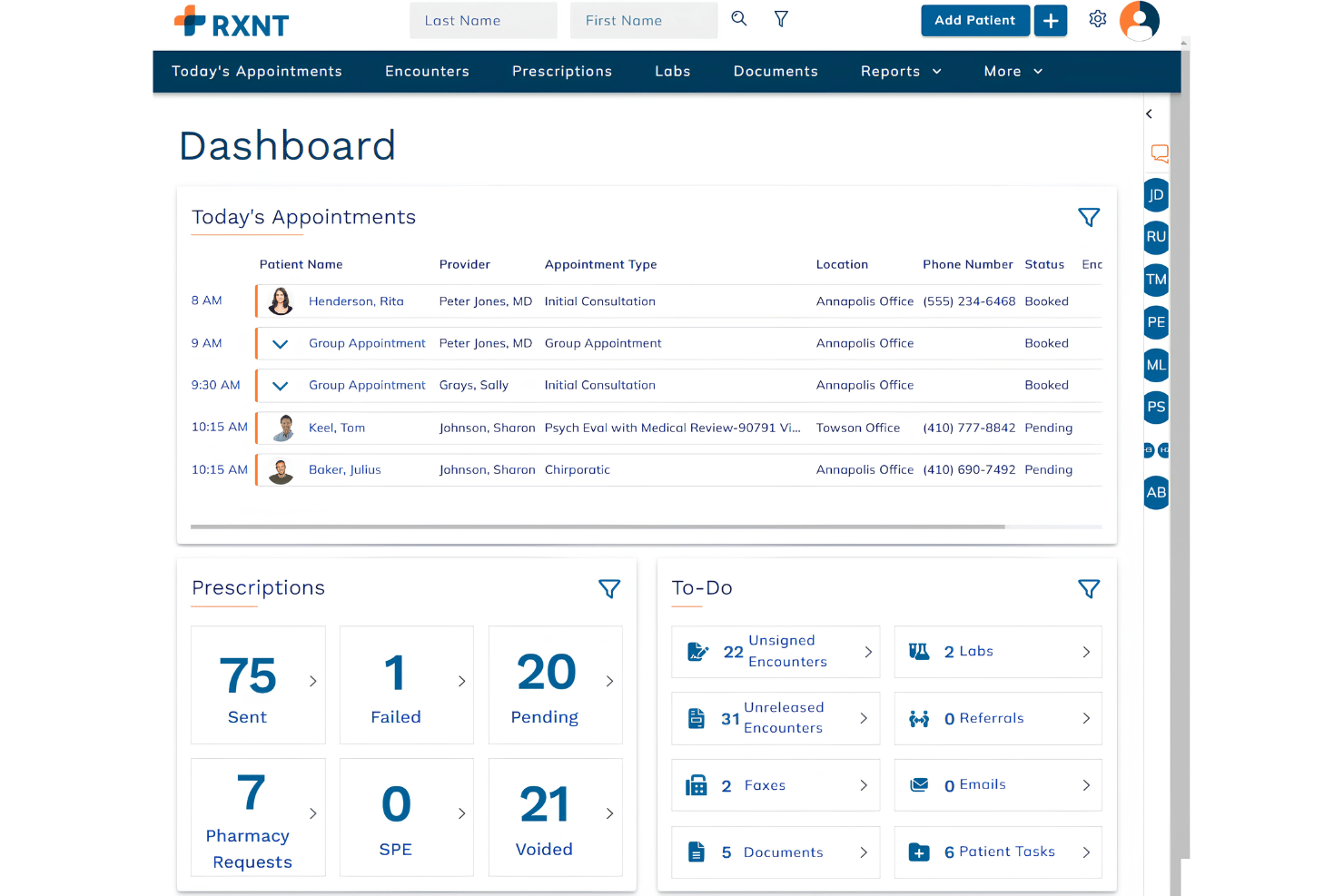
RXNT is a cloud-based practice management and EMR solution with full suite telehealth, e-prescribing, and patient portal for healthcare providers. Its specialities include patient engagement and electronic health record accessibility, making it an excellent all-in-one telemedicine option.
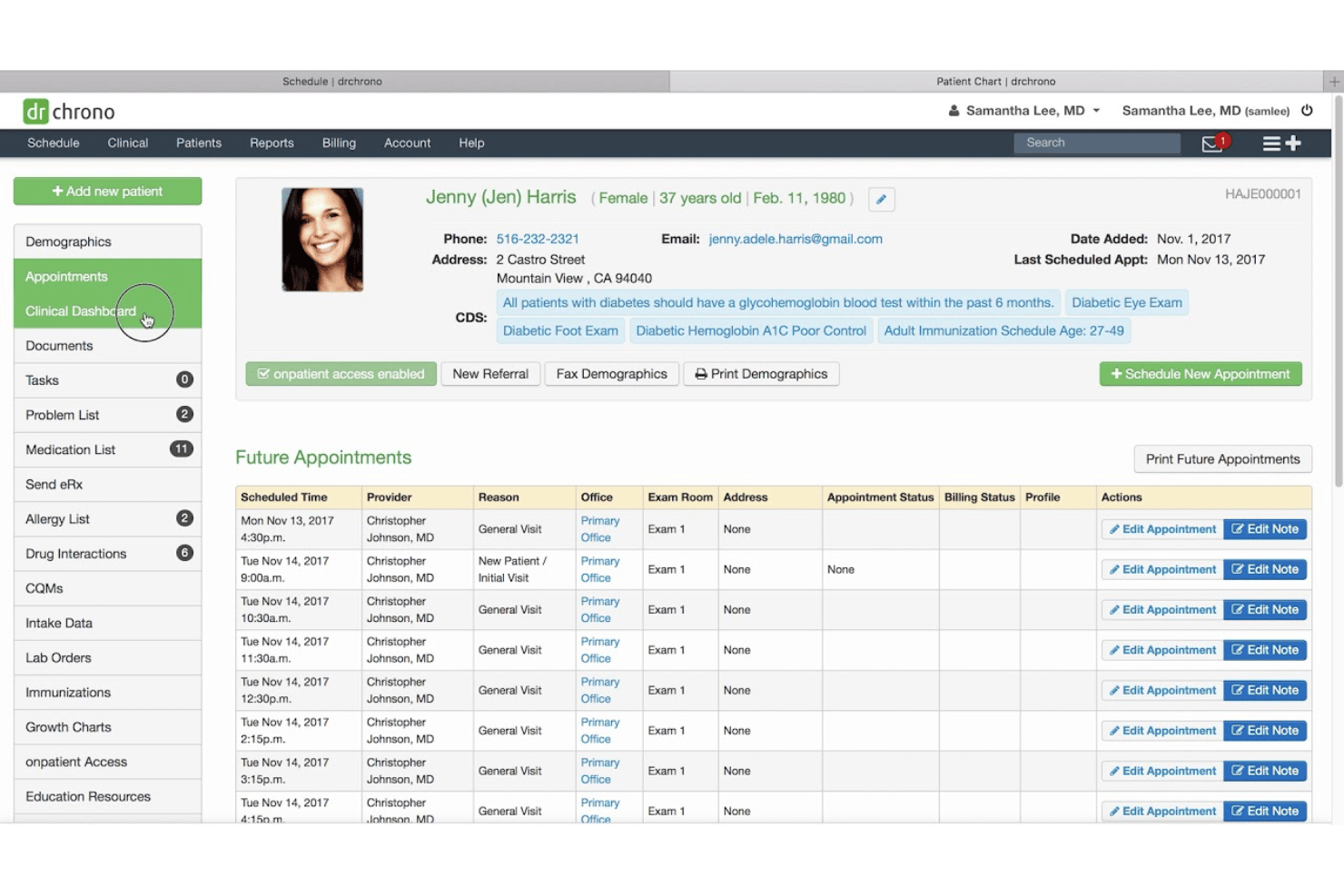
Dr Chrono provides a robust platform tailored to enhance patient care and streamline operations from revenue cycle management to basic practice management software. Dr Chrono is great for multi-specialty practices, offering a flexible electronic medical records system to suit any need.
While both RXNT and Dr Chrono are designed to improve efficiency, they differ in user experience and customization options.
In this article, we'll compare the tools and their features, pros and cons, pricing, and more, to help you choose the best EHR software for your practice.
RXNT vs. DrChrono: An Overview
RXNT


DrChrono


Why Trust Our Software Reviews
We’ve been testing and reviewing medical software since 2023. As medical practice leaders ourselves, we know how critical and difficult it is to make the right decision when selecting software.
We invest in deep research to help our audience make better software purchasing decisions. We’ve tested more than 2,000 tools for different medical practice use cases and written over 1,000 comprehensive software reviews. Learn how we stay transparent & our software review methodology.
RXNT vs. DrChrono Pricing Comparison
| RXNT | DrChrono | |
|---|---|---|
| Free Trial | Free demo available | Free demo available |
| Pricing | From $319/month/provider | Pricing upon request |
RXNT vs. Dr Chrono Pricing & Hidden Costs
RXNT pricing is structured around a subscription model with optional add-ons that might lead to additional costs for features like billing or advanced reporting.
Dr Chrono pricing also follows a subscription model but may include extra fees for integrations or premium support services.
To select the tool with the right pricing for your practice, evaluate your specific needs and consider the total cost of ownership, including any additional services or features you might require. This approach ensures you choose a vendor that not only fits your budget but also supports your operational goals.
RXNT vs. Dr Chrono Feature Comparison
RXNT and DrChrono both offer comprehensive electronic health record (EHR) systems, but they serve different types of medical practices. RXNT provides a fully integrated suite with EHR, practice management, billing, and electronic prescribing. Its features include appointment scheduling, billing management, clinical workflow tools, document management, lab integration, patient history, patient portal, and e-prescription capabilities.
DrChrono also delivers an all-in-one platform with EHR, practice management, billing, and revenue cycle management. It stands out with customizable medical forms, built-in telehealth, an integrated patient portal (OnPatient), and a strong mobile app experience optimized for iOS devices.
RXNT is cloud-based and accessible via web and mobile, offering a straightforward interface that’s best for practices looking for simplicity. DrChrono is built with a mobile-first design and supports drag-and-drop functionality, with customizable templates that enhance user experience.
RXNT includes live, unlimited training as part of the subscription. DrChrono provides support via phone and online, with added perks in premium plans.
RXNT is ideal for small to medium practices needing a cost-effective, integrated system. DrChrono is better suited for practices that prioritize mobile access and customized workflows, including large or growing practices.
RXNT offers strong value with comprehensive features at a lower cost, while DrChrono excels in customization and mobile usability but comes with a higher price tag. The best choice depends on the specific needs and budget of your practice.
RXNT vs. Dr Chrono Integrations
| Integration | RXNT | Dr Chrono |
|---|---|---|
| QuickBooks | ✅ | ✅ |
| Xero | ✅ | ❌ |
| Slack | ❌ | ✅ |
| Trello | ❌ | ✅ |
| Google Calendar | ❌ | ✅ |
| Salesforce | ❌ | ✅ |
| Hubspot | ❌ | ✅ |
| Asana | ❌ | ✅ |
| API | ✅ | ✅ |
| Zapier | ✅ | ✅ |
RXNT's integration with QuickBooks lets you seamlessly handle financial tasks, which is crucial for maintaining accurate billing records in your practice.
Dr Chrono's integration with Slack is great for improving communication within your team, ensuring quick responses and collaboration.
While RXNT supports financial management, Dr Chrono enhances team interaction, offering different benefits for your practice.
RXNT vs. Dr Chrono Security, Compliance & Reliability
| Factor | RXNT | Dr Chrono |
|---|---|---|
| Data Privacy | RXNT employs HIPAA-compliant data storage to protect patient information. | Dr Chrono ensures data privacy with HIPAA-compliant encryption protocols. |
| Regulatory Compliance | RXNT regularly updates its system to stay compliant with healthcare regulations. | Dr Chrono provides compliance tools to meet healthcare standards like MACRA. |
| Encryption | RXNT uses advanced encryption methods to secure data during transmission. | Dr Chrono offers end-to-end encryption to safeguard all communications. |
| Reliability | RXNT guarantees 99.9% uptime, ensuring your practice's operations run smoothly. | Dr Chrono offers robust system uptime and real-time data backups. |
RXNT and Dr Chrono both prioritize security and compliance, but their approaches differ in execution and focus areas. To choose the right vendor, evaluate how each provider's security measures align with your practice's specific regulatory needs and technology infrastructure.
RXNT vs. Dr Chrono Ease of Use
| Factor | RXNT | Dr Chrono |
|---|---|---|
| User Interface | RXNT offers a straightforward interface with intuitive navigation for quick access to patient records. | Dr Chrono boasts a modern interface with customizable dashboards for personalized workflow. |
| Onboarding Experience | RXNT provides guided tutorials and resources to ease the onboarding process for new users. | Dr Chrono offers personalized onboarding sessions to help practices get up and running efficiently. |
| Setup | RXNT requires minimal setup time, allowing practices to quickly start using the system. | Dr Chrono's setup process is comprehensive, ensuring all features are tailored to your practice's needs. |
| Support | RXNT delivers responsive support through multiple channels, including phone and email. | Dr Chrono provides 24/7 support with dedicated account managers for ongoing assistance. |
RXNT is easy to navigate with its clear interface, but some might find its setup options less customizable compared to Dr Chrono.
Dr Chrono excels in personalization and support, although its comprehensive features might require more time to master.
Both have favorable user reviews, a deep knowledge base, and accessible customer support services.
RXNT vs DrChrono: Pros & Cons
RXNT
- E-prescribing tools meet state and federal regulations.
- Appointment scheduling connects seamlessly with patient communication tools.
- Custom chart templates are included for various specialties.
- Reporting features lack advanced analytics customization.
- Mobile functionality is limited for some workflows.
- Billing tools require additional setup to access full features.
DrChrono
- Customizable digital forms streamline intake and patient data collection.
- iPad and mobile charting features support point-of-care documentation. Direct lab ordering and electronic prescribing reduce manual tasks.
- Direct lab ordering and electronic prescribing reduce manual tasks.
- Reporting tools lack advanced analytics and visualization options.
- Customer support hours are limited during nights and weekends.
- Some users report processing delays for insurance claims.
Best Use Cases for RXNT and DrChrono
RXNT
- Outpatient Clinics RXNT’s specialty templates and quick scheduling make it easy to manage high patient volume and routine visits.
- Behavioral Health Specialty charts and secure patient messaging help therapists keep accurate, confidential records.
- Solo Practices One-login access to EMR, billing, and scheduling creates a simple, self-managed setup for solo providers.
- Family Medicine Versatile charting and e-prescribing support diverse case mixes and frequent prescription needs.
- Ambulatory Surgical Centers Integrated document management and scheduling fit onsite care, post-op documentation, and patient handoffs.
- Small Medical Groups Gives small teams the essential workflow tools—charting, claims, and reminders—without requiring multiple vendors.
DrChrono
- Mobile Clinics DrChrono’s iPad charting and mobile check-in support point-of-care needs without reliance on desktop computers.
- Small Group Practices The system’s monthly pricing, intuitive setup, and patient portal make it a cost-effective and easy-to-adopt solution.
- Telehealth Providers Integrated video visit functionality means you can offer virtual care without complicated add-ons or external platforms.
- Mental Health Centers Customizable template options and secure patient messaging streamline workflows for therapy and counseling practices.
- Solo Providers Single-practitioner offices benefit from a unified platform that handles both scheduling and clinical documentation out of the box.
- Multispecialty Outpatient Centers DrChrono supports varied specialties with flexible charting templates, digital forms, and multi-provider scheduling.
Who Should Use RXNT, and Who Should Use Dr Chrono?
In my opinion, RXNT is ideal for smaller practices looking for a straightforward, budget-friendly EHR solution with essential features and reliable support. With RXNT's scheduling feature, you can efficiently manage patient appointments and reduce no-shows, which is particularly valuable for busy clinics.
Dr Chrono, on the other hand, suits larger practices or those needing extensive customization and advanced integrations to cater to complex workflows. Dr Chrono's customizable templates are great for tailoring patient records to fit your practice's specific needs, making documentation more efficient.
If your team values personalized onboarding and robust support, Dr Chrono might be the better fit. However, if you’re seeking simplicity and cost-effectiveness, RXNT could be the way to go.
Differences Between RXNT and DrChrono
| RXNT | DrChrono | |
|---|---|---|
| Customization | RXNT offers basic customization options. | Dr Chrono excels in extensive customization for tailored workflows. |
| Integrations | RXNT supports key integrations like QuickBooks. | Dr Chrono integrates with a wide range of platforms including Slack. |
| Pricing | RXNT uses a subscription model with optional add-ons. | Dr Chrono also offers a subscription model but may include extra fees. |
| Support | RXNT offers responsive support via phone and email. | Dr Chrono provides 24/7 support with dedicated account managers. |
| User Interface | RXNT provides a straightforward interface for easy navigation. | Dr Chrono features a modern, customizable dashboard. |
| Read RXNT ReviewOpens new window | Read DrChrono ReviewOpens new window |
Similarities Between RXNT and DrChrono
| HIPAA Compliance | RXNT and Dr Chrono ensure HIPAA compliance, safeguarding patient data and meeting industry standards. |
|---|---|
| Key Features | Both have medical billing functionality, patient charts, appointment scheduling, claims management, and an EHR system. |
| Mobile Usability | RXNT and Dr Chrono offer mobile access, allowing you to manage your practice on-the-go with user-friendly mobile apps for iOS and Android. |
| Patient Management | Both platforms provide efficient patient management tools, helping you organize and access patient information quickly. |
| Subscription Model | Both RXNT and Dr Chrono use a subscription-based model, offering flexibility in choosing features that suit your practice's needs. |
| Read RXNT ReviewOpens new window Read DrChrono ReviewOpens new window | |