

Podiatry billing software is specialized technology that helps podiatry clinics manage billing, insurance claims, and payment tracking for foot and ankle care. If you’re looking for the best podiatry billing software, you probably want to save time, reduce costly errors, and make life easier for your staff.
Staying on top of insurance rules, codes, and patient balances can feel impossible when you’re also focused on patient care. This guide cuts through the clutter so you can compare top solutions and find the one that actually meets your practice’s needs—all in just a few minutes.
Why Trust Our Software Recommendations
6,700+
Reviews
20
Industry experts
16+
Evaluation factors
14
Years
Our team has been testing and reviewing software since 2012. As medical practice leaders ourselves, we know how difficult—and important—it is to choose the right software.
For this guide, we evaluated tools using hands-on testing and independent research, scoring tools using our selection criteria.
Our reviews reflect our human editorial judgment, not a sales pitch.
Podiatry Billing Software Comparison Table
The table below compares pricing details for my top podiatry billing software selections.
| Tool | Best For | Trial Info | Price | ||
|---|---|---|---|---|---|
| 1 | Best for independent podiatry practices | 14-day free trial; Free demo available | Pricing upon request | Website | |
| 2 | Best for mobile podiatry charting | Free demo available | Pricing upon request | Website | |
| 3 | Best for podiatry claims management | Free demo available | Pricing upon request | Website | |
| 4 | Best for small podiatry practices | Not available | Pricing upon request | Website | |
| 5 | Best for customizable podiatry EHR | Free demo available | Pricing upon request | Website | |
| 6 | Best for adaptive podiatry charting | Free demo available | Pricing upon request | Website | |
| 7 | Best for podiatry billing workflows | Free demo available | Pricing upon request | Website | |
| 8 | Best for cloud podiatry workflows | Free demo available | Pricing upon request | Website | |
| 9 | Best for integrated podiatry billing | Free demo available | Pricing upon request | Website | |
| 10 | Best for all-in-one podiatry management | Free demo available | Pricing upon request | Website |


Best Podiatry Billing Software Reviews
Below are my detailed summaries of the best podiatry billing software that made it onto my shortlist. My reviews offer a detailed look at the features, best use cases, and integrations of each software to help you find the best one for you.
 Best for independent podiatry practices
- 14-day free trial; Free demo available
- Pricing upon request
Visit WebsiteCustomer Rating:3.9/5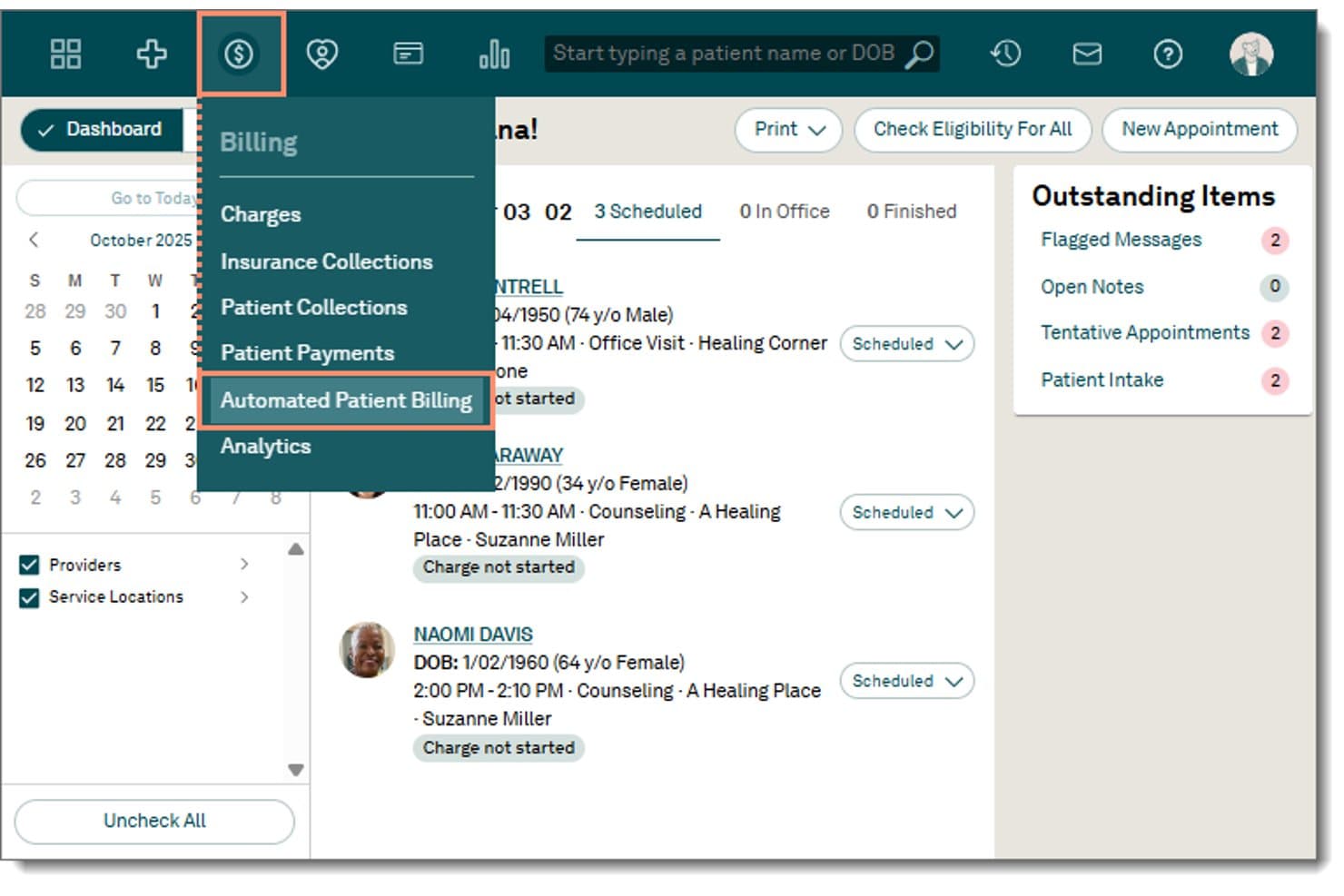
Tebra offers an Automated Patient Billing option within its Billing dropdown menu, accessible from the main navigation dashboard. Tebra is an all-in-one practice management platform that combines medical billing, EHR, claims management, and patient payment tools for independent specialty practices including podiatry.
Who Is Tebra Best For?
Tebra is a strong fit for independent podiatry practices that want billing, EHR, and patient engagement managed in a single platform without juggling multiple vendors.
Why I Picked Tebra
I picked Tebra as one of the best because it's built for the operational reality of independent practices running lean teams. I like that automated ERA posting via RPA handles payment reconciliation without manual intervention, and that charge capture ties directly into the native EHR so billing doesn't fall through the gaps between systems. The built-in patient billing tools, including QR-coded statements and text-to-pay links, let a small front desk team keep collections moving without a dedicated billing department.
Tebra Key Features
- Automated insurance eligibility checks: Instantly verifies coverage and benefits with over 2,700 payers.
- Batch electronic claim submission: Submits multiple claims at once with built-in error detection and payer-specific edits.
- Customizable specialty templates: Includes podiatry-focused charting and coding templates with ICD-10 and CPT support.
- Patient online payment portal: Lets patients pay balances through a secure, branded web portal linked to automated statements.
Tebra Integrations
Tebra offers native integrations with Quest Diagnostics, LabCorp, and eLabs via ELLKAY, as well as HL7 and FHIR integrations with over 60 EHR platforms. An API is available for custom integrations.
Pros and Cons
Pros:
- Denials worklist with customizable AR reporting
- Direct charge capture from EHR charting
- Robust patient billing and statement automation
Cons:
- No podiatry-specific LCD/NCD Medicare alerts
- Lacks preloaded podiatry modifier logic
Learn more about Tebra: Best for mobile podiatry charting
- Free demo available
- Pricing upon request
Visit WebsiteCustomer Rating:3.9/5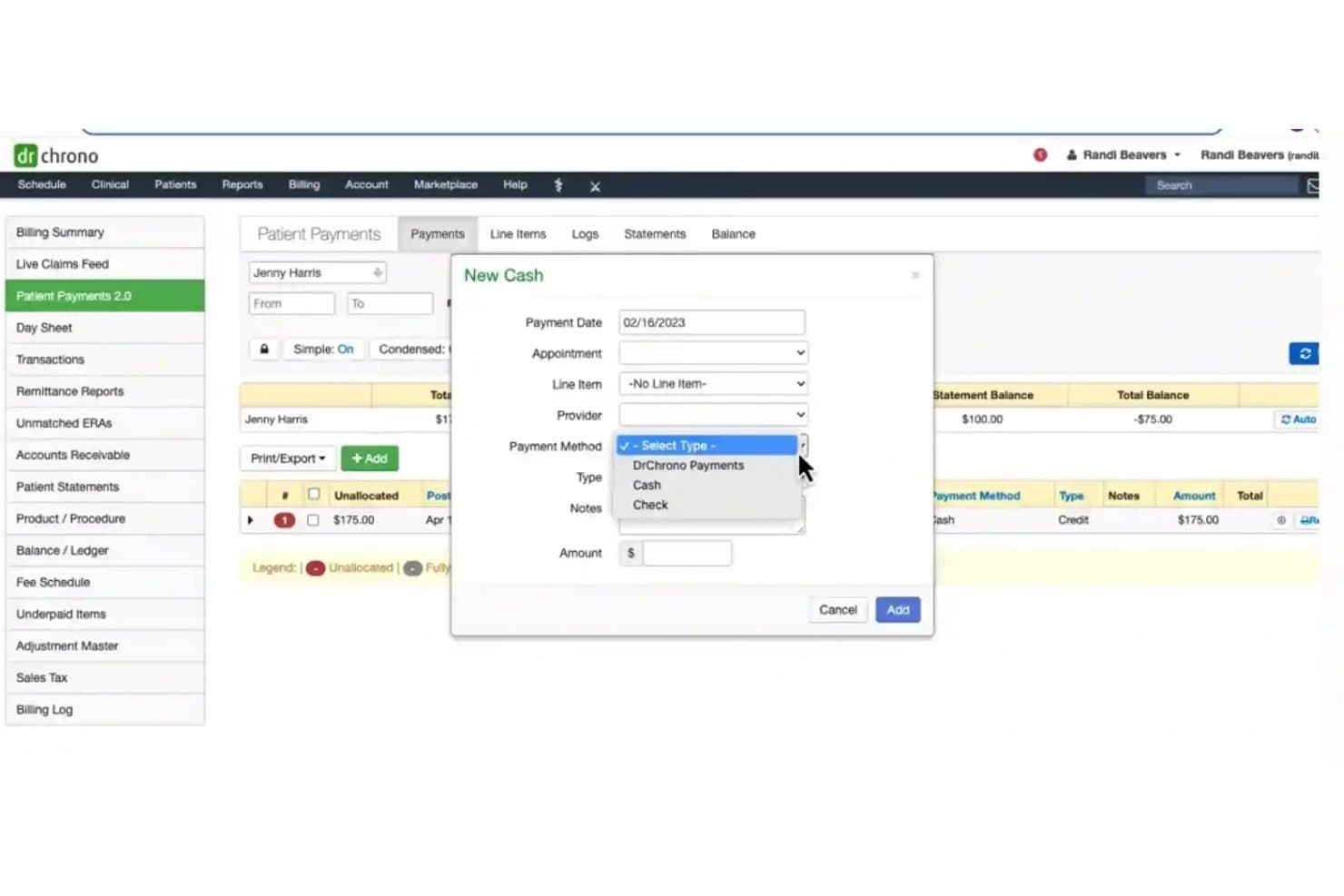
DrChrono offers a New Cash payment entry modal with fields for payment date, appointment, line item, provider, payment method, type, notes, and amount within its Patient Payments module. DrChrono is a mobile-first EHR and medical billing platform that combines podiatry-specific charting, integrated claims management, and revenue cycle tools in a single iPad-native system.
Who Is DrChrono Best For?
DrChrono is a good fit for small podiatry practices that chart on iPads and want EHR, scheduling, and billing managed in one place.
Why I Picked DrChrono
DrChrono earns its spot on my shortlist because of how tightly its mobile charting connects to billing. I like that I can annotate foot and ankle diagrams, photograph affected areas, and order X-rays or bone scans directly from the iPad, with results landing back in the patient record. The billing profile feature then picks up that visit data and feeds it straight into a claim, cutting duplicate entry between charting and coding.
DrChrono Key Features
- Integrated claims management: Track, submit, and follow up on claims within the same platform.
- DME and orthotics billing assistance: Access built-in workflows for diabetic shoes, orthotics, and podiatry-specific supplies.
- Automated insurance eligibility checks: Instantly verify insurance coverage from within the scheduling or billing workflow.
- Clearinghouse connectivity: Send electronic claims through built-in eProvider Solutions and iHCFA for workers’ comp and auto claims.
DrChrono Integrations
DrChrono offers native integrations with over 40,000 labs for electronic orders and results, eProvider Solutions for claims clearinghouse, iHCFA for workers’ comp and auto claims, Stripe for patient payments, and Physitrack for exercise programs. An API is available for custom integrations.
Pros and Cons
Pros:
- Built-in DME and orthotics billing workflows
- In-platform claims clearinghouse for direct billing
- Mobile charting on iPad with foot diagrams
Cons:
- Reported billing issues after clearinghouse migration
- Medicare LCD/NCD compliance tools are limited
Learn more about DrChrono: Best for podiatry claims management
- Free demo available
- Pricing upon request
Visit WebsiteCustomer Rating:4.3/5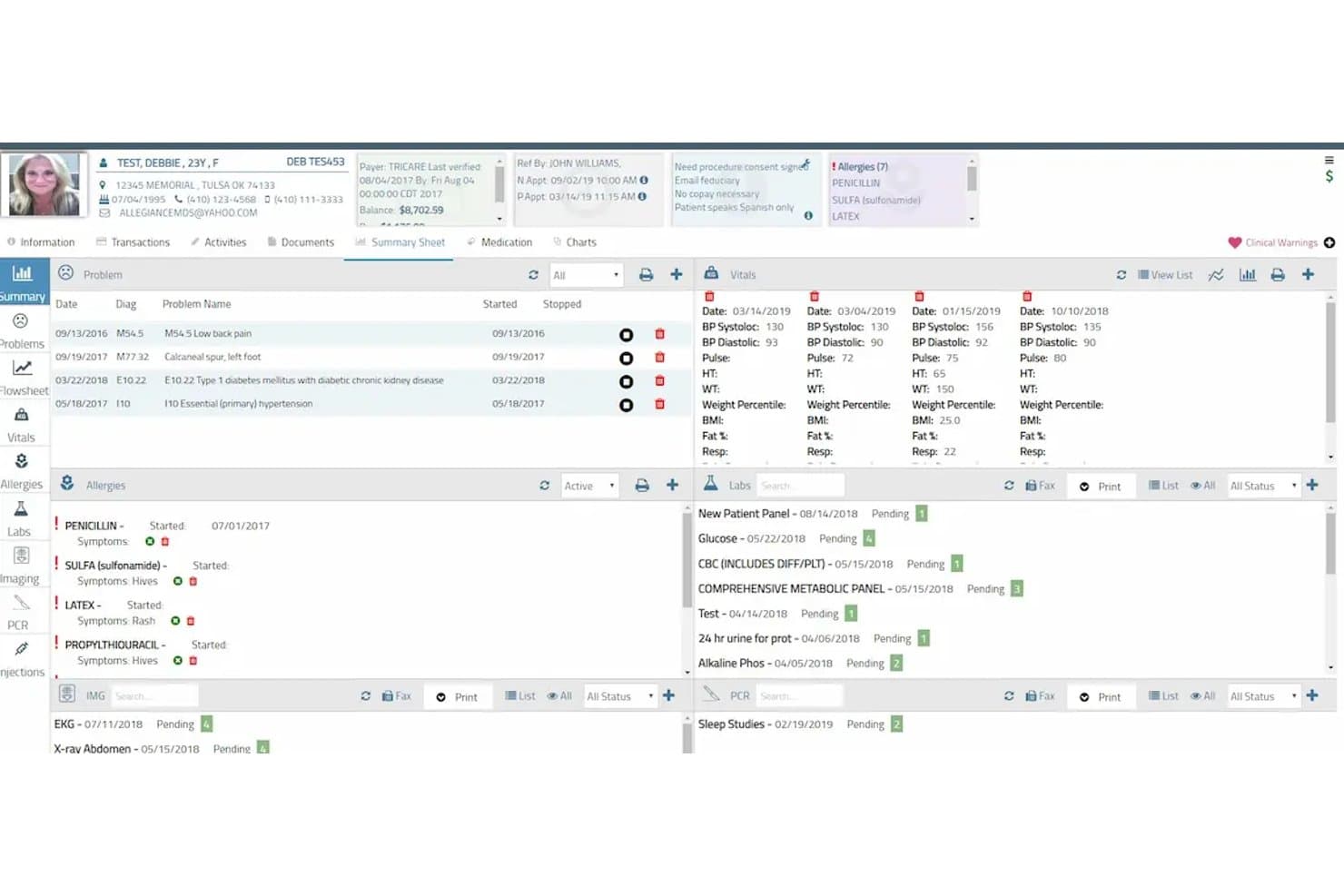
AllegianceMD offers a comprehensive patient summary sheet displaying problems, vitals, allergies, and pending labs within its EHR interface. AllegianceMD is a cloud-based podiatry EMR and practice management platform that combines specialty-specific clinical documentation, integrated claims management, and a built-in clearinghouse for end-to-end billing.
Who Is AllegianceMD Best For?
AllegianceMD is a strong fit for small to midsize podiatry practices that want a single all-in-one system covering clinical documentation, scheduling, and billing.
Why I Picked AllegianceMD
AllegianceMD earns its spot on my shortlist because of how it handles podiatry claims end to end. The built-in clearinghouse and intelligent claim scrubber mean my team can submit primary and secondary claims electronically without paying for a third-party service. I also like the AI-driven auto-billing, which flags and routes claims before they reach a payer, cutting down denial rates on common podiatry procedures.
AllegianceMD Key Features
- Podiatry-specific charting templates: Create encounter notes using templates designed for common podiatric procedures and diagnoses.
- Automated eligibility verification: Instantly check patient insurance eligibility before appointments or claim submission.
- Integrated patient portal: Offer patients secure access to statements, payment options, and appointment information.
- E-prescribing for controlled substances: Send prescriptions electronically, including medications regulated under DEA rules.
AllegianceMD Integrations
AllegianceMD offers native integrations with its built-in clearinghouse, e-prescription networks, e-fax system, lab interfaces, imaging systems, and immunization registries. An API is available for custom integrations.
Pros and Cons
Pros:
- Podiatry-focused chart templates and coding
- Built-in clearinghouse for electronic claims
- Includes AI-driven claim scrubber
Cons:
- Limited denial analytics and appeal templates
- Medicare LCD/NCD rule checks not automated
Learn more about AllegianceMD: Best for small podiatry practices
- Not available
- Pricing upon request
Visit WebsiteCustomer Rating:3.7/5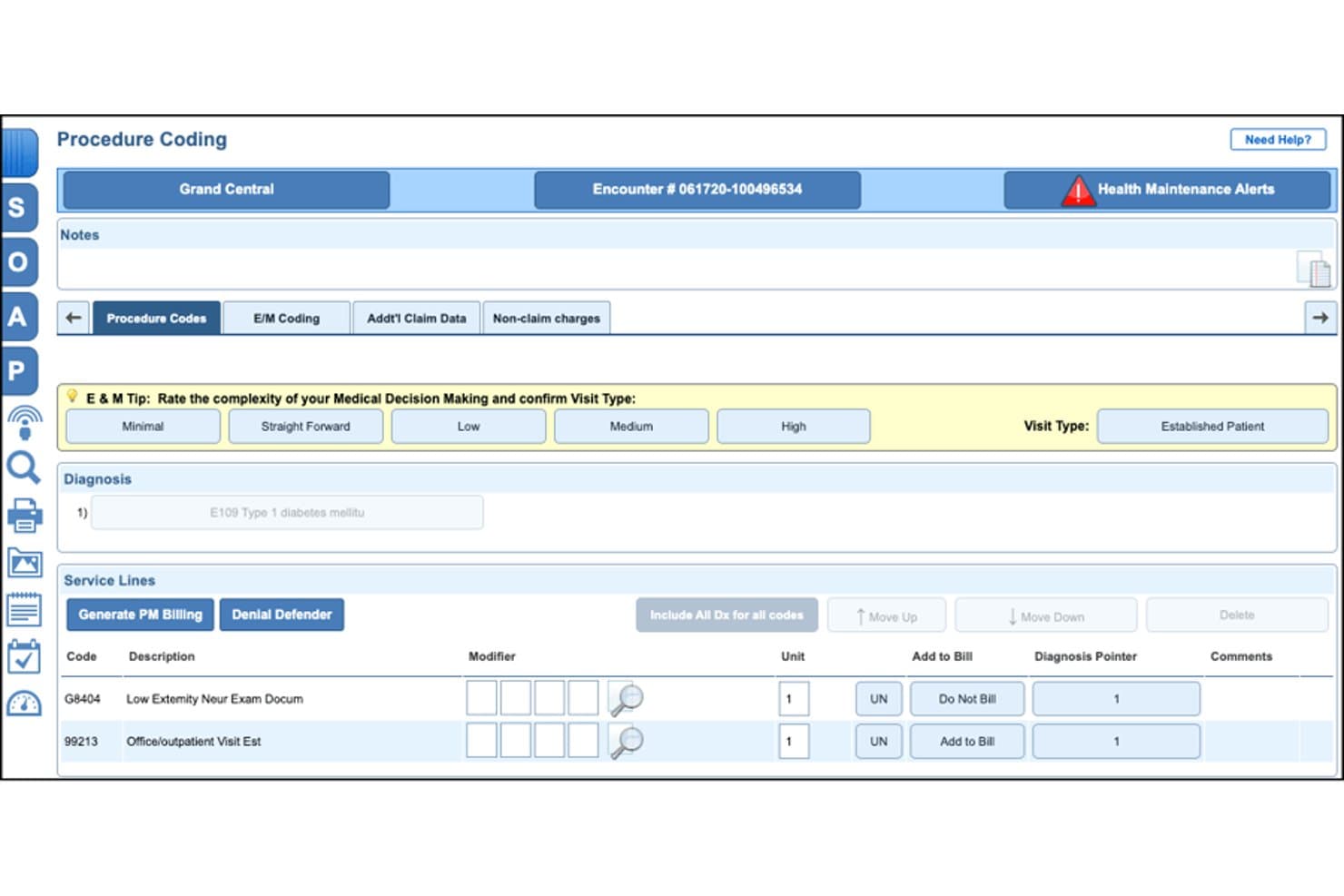
NextGen Office offers a Procedure Coding screen with E&M complexity rating, diagnosis entry, and service line billing codes tailored for podiatry workflows. NextGen Office is a cloud-based EHR and practice management platform built for small podiatry practices, combining podiatry-specific clinical workflows, integrated billing, claims management, and patient payment tools in a single system.
Who Is NextGen Office Best For?
NextGen Office is a strong fit for independent podiatry practices with 10 or fewer providers that need a single vendor to handle both clinical and billing workflows.
Why I Picked NextGen Office
I've included NextGen Office in my top picks because it's the only EHR directly partnered with the APMA, so the podiatry-specific code sets and clinical templates are shaped by practicing podiatrists rather than generic content teams. I also like the AI Ambient Assist, which turns patient-provider conversations into complete SOAP notes automatically, reducing the documentation burden that hits small practices hardest. The built-in clearinghouse submits claims within hours of a visit, with denial workflows tuned to podiatric billing patterns.
NextGen Office Key Features
- Podiatry-specific CPT and modifier library: Includes a built-in code library with toe and anatomical modifiers for accurate podiatric claim entry.
- Real-time eligibility verification: Instantly checks patient insurance eligibility for podiatry visits and procedures before submission.
- Integrated patient payment portal: Lets patients view, manage, and pay balances online following podiatry appointments and procedures.
- Denial management dashboard: Tracks and categorizes denied claims tied specifically to podiatry rules like Medicare LCD/NCDs and routine foot care.
NextGen Office Integrations
NextGen Office offers native integrations with the APMA Registry, Doctible for patient communications, InstaMed for payment processing, and includes a built-in claims clearinghouse. An API is available for custom integrations.
Pros and Cons
Pros:
- Built-in clearinghouse for fast claim submission
- Medicare LCD/NCD coverage prompts for foot care
- APMA-endorsed podiatry code libraries and templates
Cons:
- Routine updates may impact workflow reliability
- Reporting depth for AR and denials limited
Learn more about NextGen Office: Best for customizable podiatry EHR
- Free demo available
- Pricing upon request
Visit WebsiteCustomer Rating:3.5/5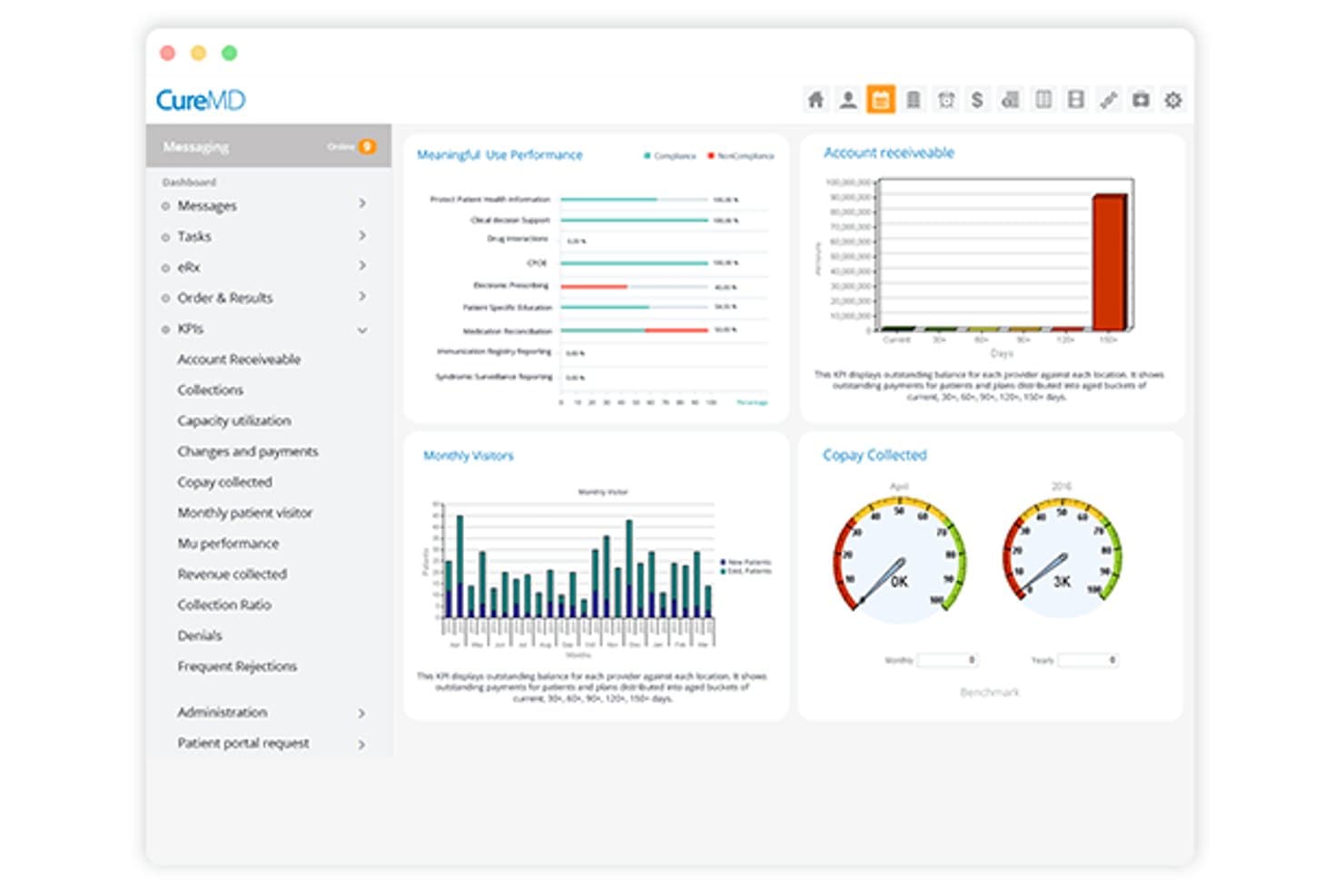
CureMD offers a KPI dashboard with billing metrics including accounts receivable, copay collected, monthly visitors, and Meaningful Use performance charts. CureMD is a cloud-based EHR, practice management, and medical billing platform with podiatry-specific coding support, claims scrubbing, Medicare compliance tools, denial management, and outsourced RCM services.
Who Is CureMD Best For?
CureMD suits podiatry practices that want clinical documentation, scheduling, and billing managed within a single integrated platform rather than separate tools.
Why I Picked CureMD
I picked CureMD because the EHR templates are genuinely built around podiatry from the ground up. I can customize charting for wound care, diabetic foot assessments, and foot/ankle procedures without adapting a generic clinical form. What I like most is how that documentation links directly to podiatry-specific CPT and HCPCS codes, so by the time a claim is generated, the clinical record already supports the billing.
CureMD Key Features
- Denial analytics dashboard: Offers visual tracking and classification of podiatry claim denials and appeals.
- Real-time eligibility verification: Checks insurance coverage and benefits before submitting podiatry claims.
- Integrated lab and imaging connections: Syncs with diagnostic labs and imaging systems commonly used in podiatry practices.
- Automated patient statements and payments: Generates patient statements and enables online payment through the patient portal.
CureMD Integrations
CureMD offers native integrations with over 9,000 diagnostic labs and 40,000 pharmacies, plus built-in connections for imaging devices and electronic prescribing. An API is available for custom integrations.
Pros and Cons
Pros:
- End-to-end claims scrubbing for podiatry codes
- Automated LCD/NCD compliance alerts
- Customizable podiatry EHR workflow templates
Cons:
- Limited modifier auto-suggestion for complex claims
- Occasional delays in customer support response
Learn more about CureMD: Best for adaptive podiatry charting
- Free demo available
- Pricing upon request
Visit WebsiteCustomer Rating:4.5/5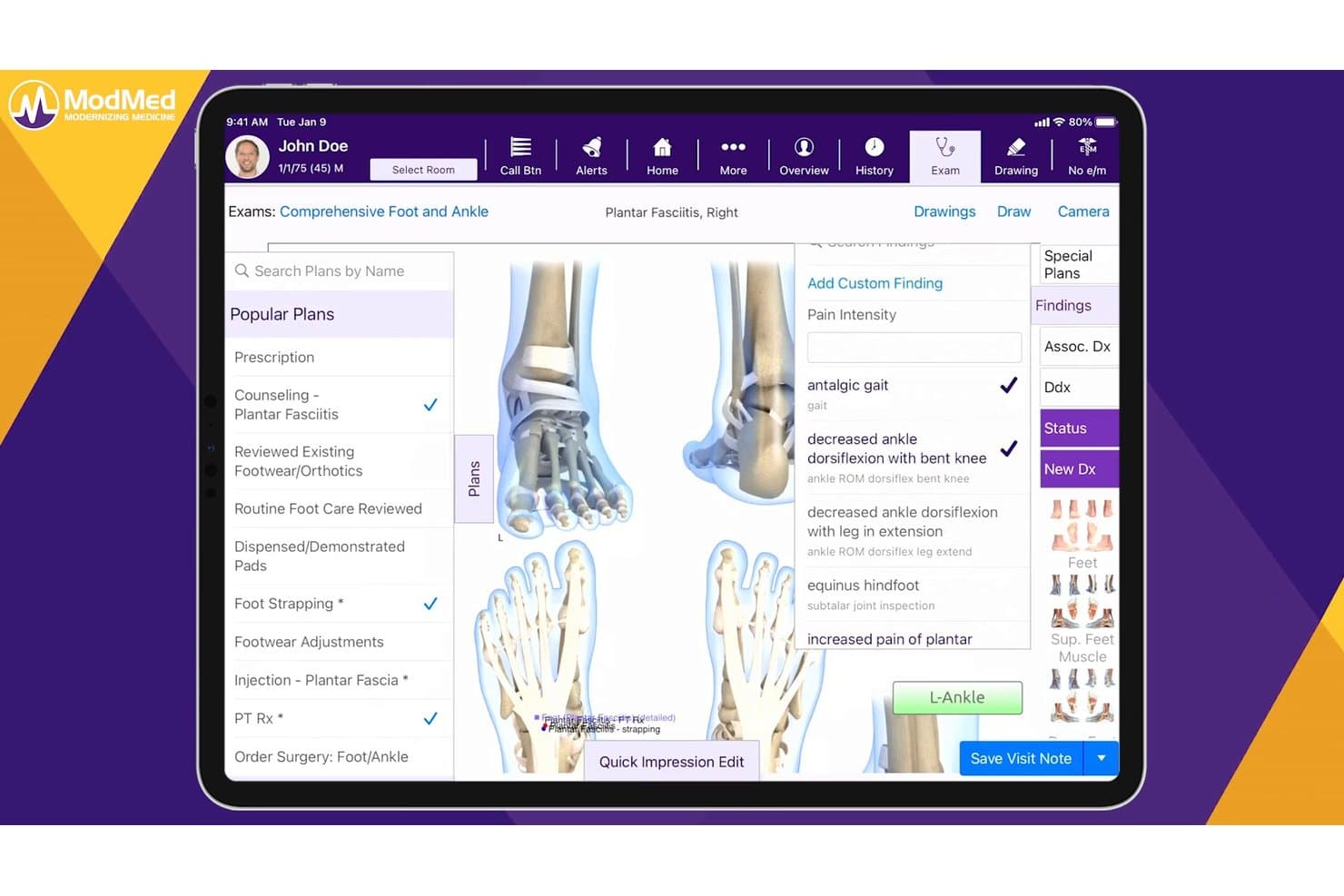
ModMed offers a comprehensive podiatry exam interface with condition-specific treatment plans, findings, and billing tools tailored for foot and ankle care. ModMed is a specialty-specific EHR, practice management, and billing platform built for podiatry practices, combining adaptive charting, podiatry-coded claim submission, denial management, and integrated payment processing in a single suite.
Who Is ModMed Best For?
ModMed is a strong fit for podiatry practices of any size that want a single platform covering clinical documentation, coding, and billing.
Why I Picked ModMed
I picked ModMed as one of the best because its EMA charting engine learns each podiatrist's documentation patterns and auto-suggests CPT, ICD-10, and Q-modifiers as notes are completed. What I really like is the Interactive Anatomical Atlas, where tapping a specific foot structure populates both the clinical note and the bill at the same time. On top of that, built-in NCCI edit checks catch podiatry-specific coding conflicts, like a matrixectomy and avulsion billed on the same toe, before the claim ever goes out.
ModMed Key Features
- MIPS and quality program dashboards: Track podiatry-relevant quality metrics and submit data directly to CMS.
- Integrated payment processing: Accept in-office and online payments using ModMed Pay without third-party gateways.
- Lab and imaging integrations: Connect directly with diagnostic labs and imaging centers to streamline order and result workflows.
- Automated patient reminders: Send appointment and balance reminders via text or email through built-in patient communication tools.
ModMed Integrations
ModMed offers native integrations with diagnostic labs, imaging centers, and pharmacy systems like GoodRx. It provides certified FHIR and HL7 APIs for custom integrations with other healthcare platforms.
Pros and Cons
Pros:
- At-risk foot modifier prompts reduce denials
- Medicare LCD/NCD compliance for foot care claims
- Adaptive charting suggests podiatry-specific codes
Cons:
- RCM team may require follow-up for denials
- Customer support response times can be slow
Learn more about ModMed: Best for podiatry billing workflows
- Free demo available
- Pricing upon request
Visit WebsiteCustomer Rating:4.1/5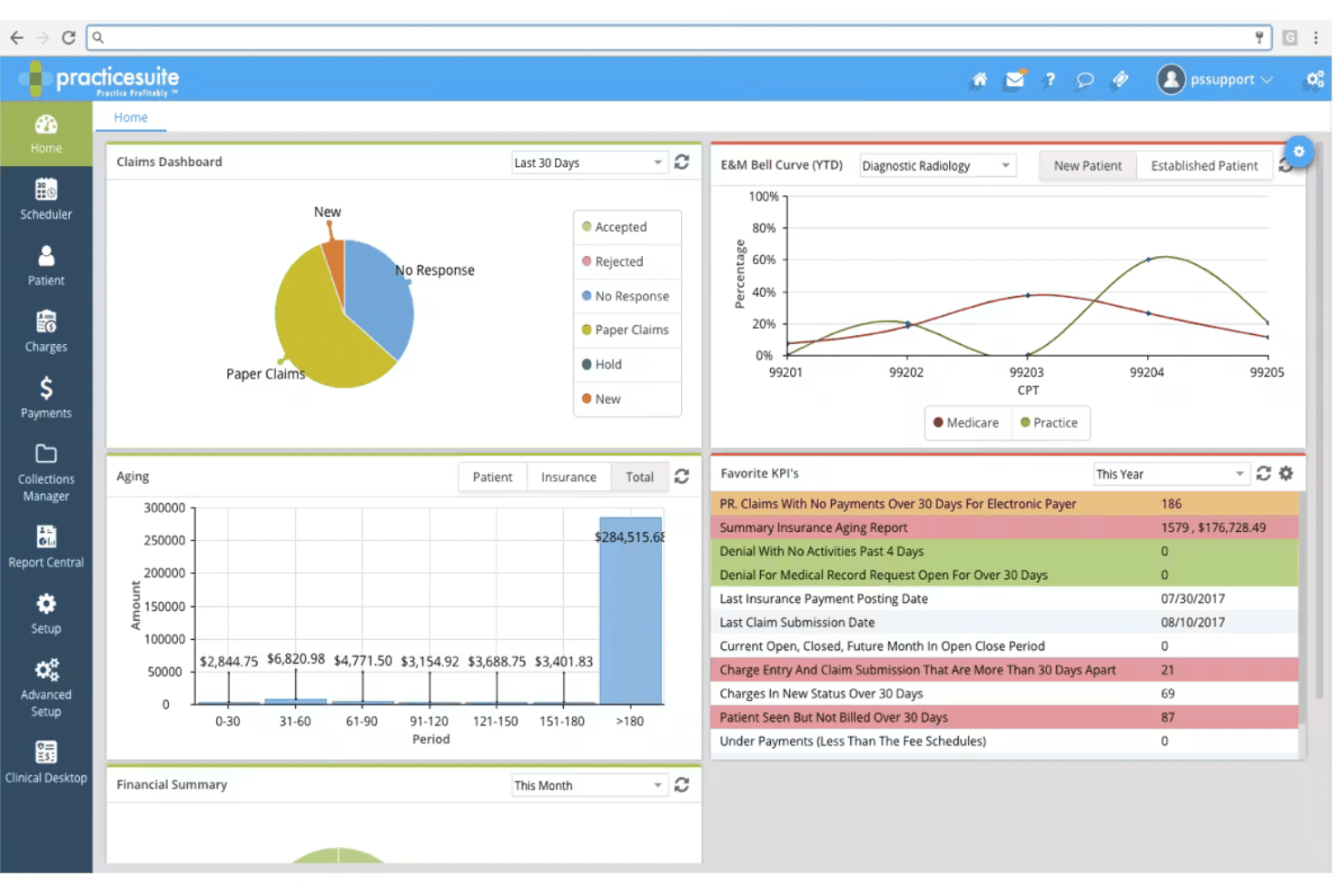
PracticeSuite spans claims, denials, ERA posting, eligibility, and billing. PracticeSuite is a cloud-based medical billing and practice management platform with a native podiatry module that covers end-to-end claims submission, EHR documentation, denial management, and patient billing in a single system.
Who Is PracticeSuite Best For?
PracticeSuite suits independent podiatry practices and medical billing companies that want practice management, EHR, and billing in one modular platform.
Why I Picked PracticeSuite
PracticeSuite earns its spot on my shortlist because the billing workflow is built around podiatry from the ground up. I like that podiatry-specific coding safeguards flag errors before submission, reducing denials on common foot and ankle procedure codes. The 3D foot and ankle diagram tool in the EHR feeds directly into charge capture, so documentation and billing stay in sync without manual re-entry.
PracticeSuite Key Features
- Batch insurance verification: Check insurance eligibility for multiple patients at once with automated payer connections.
- Patient engagement portal: Give patients access to their statements, payment options, and appointment schedules online.
- Analytics dashboard: Monitor revenue cycle metrics, aging accounts receivable, and claim statuses from a unified interface.
- Multi-location scheduling: Manage provider schedules, resource allocation, and patient appointments across several clinic sites.
PracticeSuite Integrations
PracticeSuite offers native integrations with PracticeFusion, major clearinghouses, labs, pharmacies, patient portals, and HIE networks. An API is available for custom integrations.
Pros and Cons
Pros:
- Multi-location scheduling for clinics and providers
- 3D foot and ankle diagram charge capture
- Podiatry coding safeguards reduce claim errors
Cons:
- Few podiatry EHR integration options
- Medicare LCD/NCD automation features limited
Learn more about PracticeSuite: Best for cloud podiatry workflows
- Free demo available
- Pricing upon request
Visit WebsiteCustomer Rating:3.6/5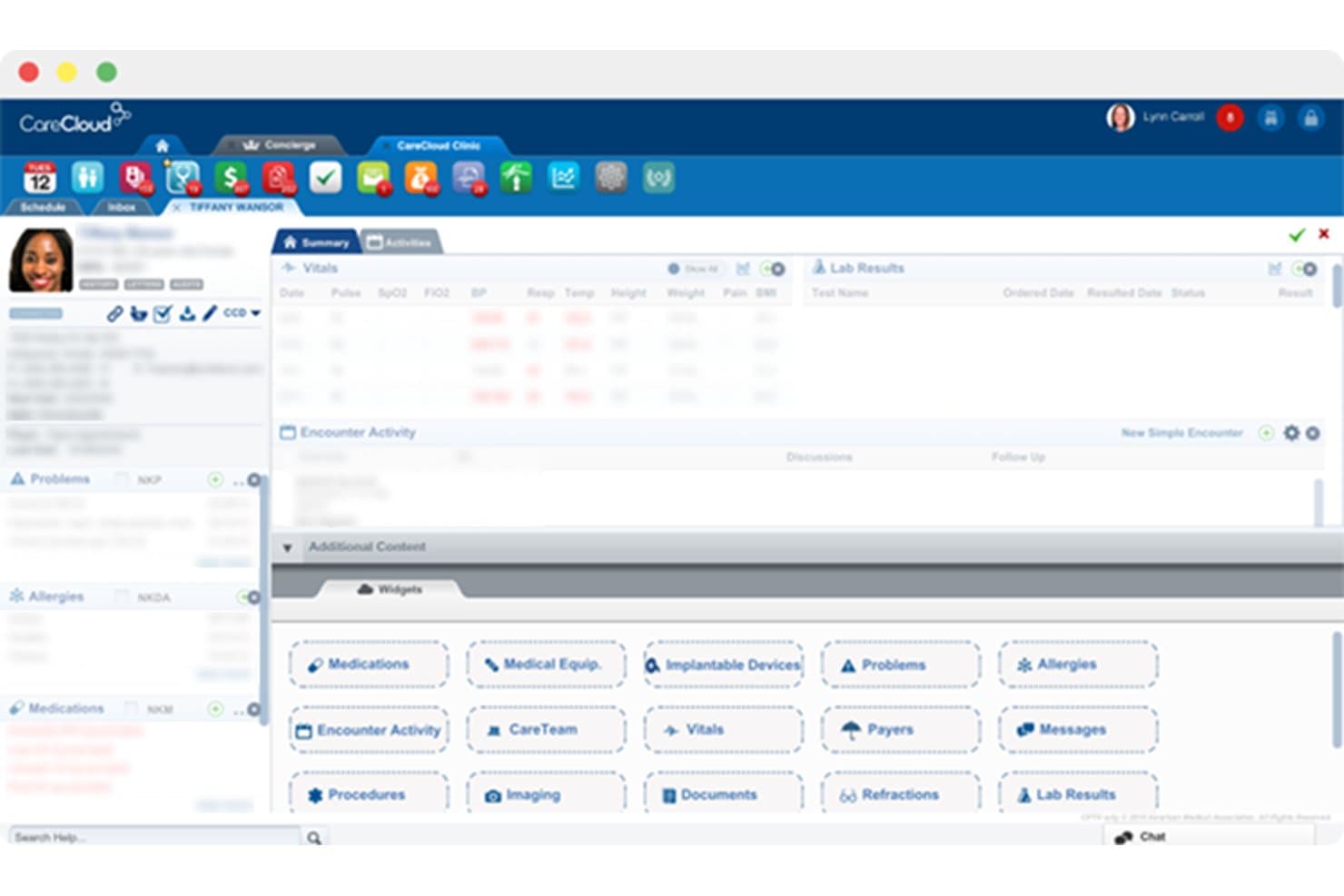
CareCloud offers a customizable patient chart interface with widgets for medications, vitals, lab results, allergies, and encounter activity management. CareCloud is a cloud-based EHR, practice management, and medical billing platform built for specialty practices, with dedicated podiatry workflows covering charge capture, claims scrubbing, denial management, and patient billing.
Who Is CareCloud Best For?
CareCloud suits small to mid-sized podiatry practices that want a single platform to handle clinical documentation, front-desk operations, and billing without managing separate systems.
Why I Picked CareCloud
CareCloud earns its spot on my shortlist because its billing workflows are built directly from podiatry-specific clinical templates, making charge capture a natural part of the encounter rather than a separate step. I like that the CollectiveIQ rules engine scrubs podiatry claims before submission, keeping first-pass rates above 94%. The platform also captures discrete foot-specific data like shoe sizes and abductions, so documentation feeds directly into billable codes.
CareCloud Key Features
- Centralized denial management dashboard: Review, categorize, and work podiatry-specific denials with built-in AR follow-up workflows.
- Configurable podiatry order sets: Build and use structured order sets that fit common foot and ankle procedures.
- Patient statement generation: Create and send detailed patient statements for each podiatry visit or procedure.
- Podiatry EHR/practice management integration: Sync patient demographics, scheduling, and billing across integrated clinical and administrative modules.
CareCloud Integrations
Native integrations are available with CareCloud’s own EHR and practice management modules. The platform supports integrations with third-party EHRs, and an API is available for custom integrations.
Pros and Cons
Pros:
- Built-in patient statement and payment tools
- Real-time claim tracking and denial reporting
- Specialty podiatry templates for coding and billing
Cons:
- Toe modifier automation not clearly documented
- Medicare LCD/NCD rules not always enforced
Learn more about CareCloud: Best for integrated podiatry billing
- Free demo available
- Pricing upon request
Visit WebsiteCustomer Rating:3.6/5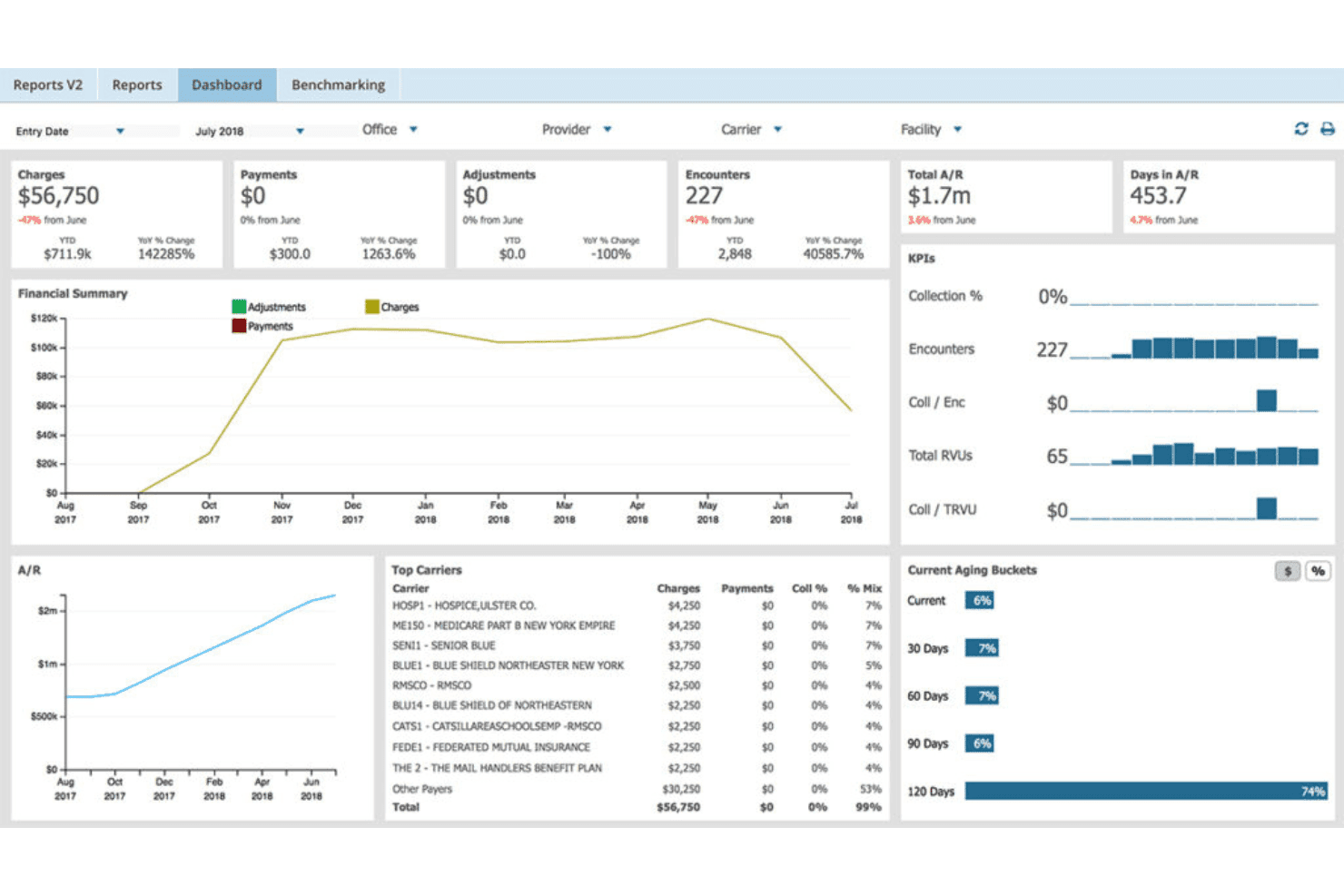
AdvancedMD unites EMR, documentation, billing, claims, eligibility, and RCM. AdvancedMD is an all-in-one cloud platform combining podiatry-specific EHR, practice management, medical billing, claims scrubbing, and patient payment tools in a single integrated system.
Who Is AdvancedMD Best For?
AdvancedMD suits independent podiatry practices that want to manage clinical documentation, scheduling, and billing from one platform rather than juggling separate systems.
Why I Picked AdvancedMD
AdvancedMD earns its spot on my shortlist because the billing module and EHR live in the same system, so charge capture flows directly from the clinical note to the claim without any manual handoff. I particularly like the claims scrubbing engine, which checks against more than 3.5 million known error patterns before a claim goes out. In practice, that means my team catches modifier issues and missing documentation at the source, not after a denial comes back.
AdvancedMD Key Features
- Automated modifier validation: Applies and verifies toe, laterality, and class findings modifiers for podiatry claims.
- Medicare LCD/NCD alerts: Flags claims missing required documentation for routine foot care and other podiatry Medicare rules.
- Advanced denial analytics: Categorizes and tracks denials by root cause, including podiatry-specific patterns and appeal automation.
- Patient payment portal: Lets patients pay balances online using credit, debit, FSA, or HSA through a branded portal.
AdvancedMD Integrations
AdvancedMD offers native integrations with ChartRequest, DAX Copilot, DeepScribe, Doctorsoft, InstaMed, LeadSquared, and NextPatient. An API is available for custom integrations, and its integration marketplace connects with additional healthcare IT providers.
Pros and Cons
Pros:
- Automated modifier validation for toe procedures
- Medicare LCD/NCD alerts for podiatry claims
- Integrated EHR, billing, and scheduling platform
Cons:
- Medicare compliance not fully podiatry-specific
- Limited built-in podiatry CPT code sets
 Best for all-in-one podiatry management
- Free demo available
- Pricing upon request
Visit WebsiteCustomer Rating:3.9/5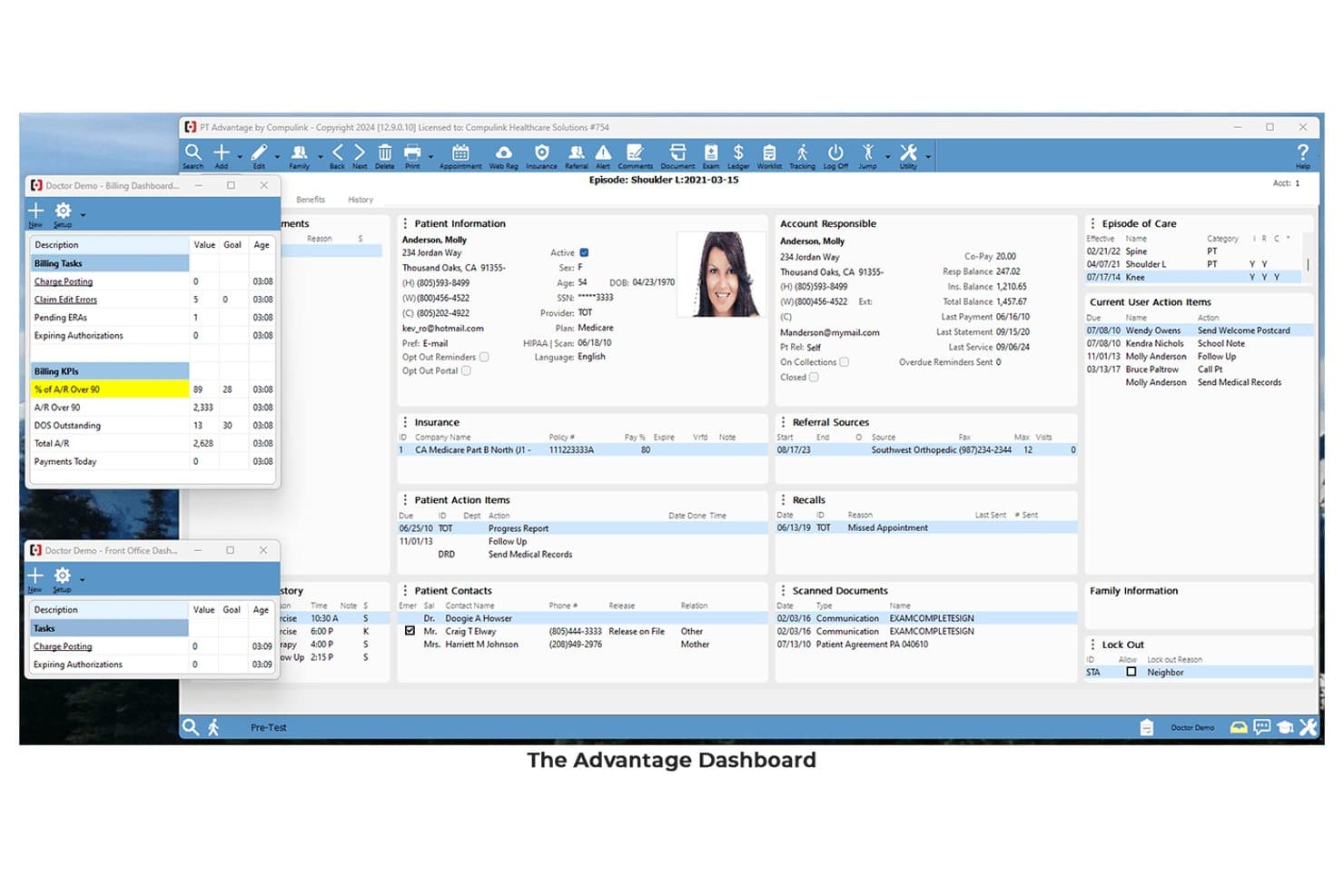
Compulink offers a comprehensive Advantage Dashboard displaying patient information, billing KPIs, episode of care, and action items in a single interface. Compulink is a specialty-specific EHR and practice management platform built for podiatry, combining AI-powered clinical documentation, insurance claims management, billing workflows, and patient payment tools in a single integrated system.
Who Is Compulink Best For?
Compulink is a strong fit for podiatry practice owners and administrators who want a single platform to handle clinical documentation, billing, and practice management without stitching together separate tools.
Why I Picked Compulink
I picked Compulink as one of the best because its EHR, practice management, and billing all run on the same native database. When a provider documents a diabetic foot ulcer using the built-in Wagner grading or UT Diabetic Foot Classification tools, the system auto-generates CPT and E&M codes ready for claim submission. I also like the built-in CCI edits by carrier, which catches coding conflicts before claims leave the practice.
Compulink Key Features
- Patient engagement portal: Lets patients schedule appointments, sign forms, and make payments online.
- Integrated eligibility verification: Automatically checks insurance coverage before visits and billing.
- ASC module: Connects podiatry clinics with ambulatory surgical center workflows for charge capture.
- Lab and imaging integration: Facilitates electronic ordering and receipt of podiatry-specific labs and imaging.
Compulink Integrations
Compulink offers native integrations with Waystar, Weave, Phreesia, MyEyeStore, QuickBooks, Great Plains, Peachtree, and supports lab and imaging system connections. An API is available for custom integrations.
Pros and Cons
Pros:
- Built-in rule checks for Medicare podiatry claims
- All-in-one EHR, PM, and billing platform
- Podiatry templates with automatic CPT code suggestions
Cons:
- System updates can disrupt existing clinical templates
- LCD/NCD compliance engine lacks explicit documentation
Learn more about Compulink:
Other Podiatry Billing Software
Here are some additional podiatry billing software options that didn’t make it onto my shortlist, but are still worth checking out:
- 11eClinicalWorksBest for connected podiatry care
- 12AthenahealthBest for podiatry billing automation
- 13DocVillaBest for cloud-based podiatry EHR
- 14EZClaimBest for simple podiatry billing
- 15Practice FusionBest for small-practice podiatry EHR
- 16Practice EHRBest for specialty podiatry workflows
- 171st Providers ChoiceBest for podiatry practice management
How I Evaluate Podiatry Billing Software
I evaluate podiatry billing tools in two layers: baseline claims and coding capabilities, then the differentiators—like modifier automation and LCD alerts—that separate good tools from great ones.
Core Functionality (Table Stakes For This List)
When I'm selecting tools for my list, I rank each one on a scale from 0 (does not offer the functionality) to 5 (excels in this area) for each core functionality listed below. Then, I calculate the tool's total score into a percentage. Each tool needs to achieve a minimum total score of 55% to be considered for inclusion.
- Podiatry-Specific Coding: I check whether the platform includes preloaded podiatry CPT, HCPCS, and ICD-10 code sets along with toe and anatomical modifiers like TA-T9 and Q7-Q9.
- Claims Management: End-to-end electronic claim submission matters here, from scrubbing and tracking to batch resubmission across multiple clearinghouses and payers.
- Medicare Compliance Rules: I look for automated LCD/NCD enforcement, especially around routine foot care classifications and at-risk foot documentation that trips up so many podiatry claims.
- Denial & AR Management: Tools should offer denial categorization, aging AR tracking, and appeal workflows—so your team can catch patterns like recurring routine foot care denials early.
- Patient Billing & Payments: I evaluate whether the platform supports automated statements, online payment portals, and flexible payment plans tied to podiatry visits and procedures.
- EHR/PM Integration: Native or API-based integration with podiatry EHR and practice management systems is key for charge capture and keeping demographic data in sync.
Once I have a list of tools that meet the criteria, I consider what sets each platform apart.
Differentiating Factors (What Sets Vendors Apart)
Here's how I compare and contrast different vendors:
Standout Features
LCD/NCD compliance alerts are a big differentiator. I look for platforms that flag missing routine foot care documentation or diabetic shoe program requirements before you hit submit. Modifier automation also matters, since tools that auto-apply Q7-Q9 class findings and TA-T9 toe modifiers save your team from preventable denials. I also evaluate denial analytics dashboards that categorize rejections by root cause, like bundling issues or routine foot care disputes, so you can spot trends and fix them fast.
Beyond Features
Practice size and setting fit is one of the first things I consider. A solo podiatrist doing house calls has very different needs than a multi-provider group with a wound care department. I check whether pricing scales per provider or as a percentage of collections. Billing service model options also vary widely. Some platforms offer pure software, while others include full-service RCM with podiatry-trained billers who can handle complex surgical or wound care claims. I also evaluate onboarding support, especially whether the vendor helps with chart conversion and podiatry fee schedule setup.
How to Choose Podiatry Billing Software
It’s easy to get bogged down in long feature lists and complex pricing structures. To help you stay focused as you work through your unique software selection process, here’s a checklist of factors to keep in mind:
| Factor | What to Consider |
| Scalability | Will the software support your practice as you add new providers, locations, or service lines in the future? Ask about limits or extra charges for growth. |
| Integrations | Check if the tool connects with your current EHR, clearinghouse, scheduling, or reporting systems. Lack of integrations adds manual work and risk of errors. |
| Customizability | Can you tailor workflows for your podiatry billing processes, or are you locked into presets that may not fit your claims patterns and codes? |
| Ease of use | Are billing, payment, and denial workflows intuitive for frontline staff? Request demos from vendors to see if daily use matches your team's comfort level. |
| Implementation and onboarding | How much support does the vendor offer for setup, data migration, and training? Are you left to self-implement, or do they guide you with podiatry-specific help? |
| Cost | Besides licensing, ask about fees for claims submissions, integrations, and support. Plan for costs as your volume or provider count grows. |
| Security safeguards | Review encryption, audit logs, access controls, and HIPAA compliance documentation. Check if safeguards meet your clinic's and payers' latest standards. |
| Support availability | Can you reach support quickly by phone or email when claims stall or coverage guidelines change? Make sure vendor hours match your team’s working hours. |
What Are Podiatry Billing Software?
Podiatry billing software is a specialized platform for managing insurance claims, coding, and payments related to foot and ankle care. It helps practices handle podiatry-specific CPT, HCPCS, and ICD-10 coding, enforce Medicare compliance rules, track denied claims, and automate patient billing tasks to keep cash flow steady and minimize administrative burden.
Features
When selecting podiatry billing software, keep an eye out for the following key features:
- Podiatry-specific coding: Enables accurate input of CPT, HCPCS, and ICD-10 codes unique to foot and ankle care, including support for modifiers relevant to podiatry claims.
- Automated claim submission: Sends claims electronically to payers, reduces manual entry, and improves tracking of submissions and responses for improved reimbursement.
- Medicare compliance tools: Flags missing documentation and applies LCD/NCD rules so you’re less likely to face delays or denials on routine foot care and at-risk foot visits.
- Denial management: Identifies, categorizes, and helps resolve denied claims while also tracking aging accounts receivable for faster resolution and revenue recovery.
- Patient billing and payment management: Generates statements, offers online bill pay portals, and supports payment plans to help patients meet obligations and keep collections steady.
- Integration with EHR and PM systems: Syncs patient demographics, charges, and encounter details with your practice management and electronic health record systems to eliminate duplicate entry.
- Modifier automation: Automatically applies and validates podiatry-specific modifiers (like Q7, Q8, Q9, TA-T9), reducing claim rejections due to coding errors.
- Eligibility verification: Confirms patients’ insurance coverage and benefits in real time—important for services like DME, orthotics, or surgical procedures.
- Custom reporting and analytics: Offers tools for tracking billing KPIs, denial trends, and productivity so administrators and billers can spot areas needing attention.
- Secure access controls: Enforces HIPAA-compliant access, data encryption, and detailed audit logs to protect patient information and support compliance.
Benefits
Implementing podiatry billing software provides several benefits for your team and your business. Here are a few you can look forward to:
- Fewer claim denials: Automated Medicare compliance checks and modifier prompts help ensure claims meet payer requirements before submission.
- Faster reimbursements: Electronic claim submission and denial management tools speed up resolution, so your practice sees payments sooner.
- Improved coding accuracy: Built-in podiatry code libraries and intelligent code suggestions reduce common coding errors tied to foot and ankle procedures.
- Reduced administrative burden: Integration with EHR and PM systems eliminates duplicate data entry and streamlines billing workflows for staff.
- Stronger patient collections: Patient-friendly billing portals and payment plan tools make it easier for patients to pay their balances.
- Better financial transparency: Custom dashboards and analytics give you visibility into denial trends, accounts receivable, and overall practice revenue health.
- Enhanced data security: HIPAA-compliant access controls and audit logs protect sensitive patient information throughout your billing process.
Costs and Pricing
Selecting podiatry billing software requires an understanding of the various pricing models and plans available. Costs vary based on features, team size, add-ons, and more. The table below summarizes common plans, their average prices, and typical features included in podiatry billing software solutions:
Plan Comparison Table for Podiatry Billing Software
| Plan Type | Average Price | Common Features |
| Free Plan | $0 | Basic claim entry, limited podiatry code support, manual statement generation, and no clearinghouse integration. |
| Personal Plan | $50-$150/month | Electronic claim submission, podiatry CPT/ICD-10 code library, simple denial alerts, and limited support access. |
| Business Plan | $200-$450/month | Full claims management, modifier automation, Medicare compliance checks, integration with EHR/PM, and AR dashboards. |
| Enterprise Plan | $500+/month | Multi-location support, advanced analytics, custom reporting, API access, premium onboarding, and dedicated support. |
Podiatry Billing Software FAQs
Here are some answers to common questions about podiatry billing software:
How does podiatry billing software help reduce claim denials?
Podiatry billing software helps reduce claim denials by flagging missing documentation, ensuring correct modifiers are applied, and enforcing Medicare coverage rules before claims are submitted. This proactive approach lowers the chances of claims being rejected for routine foot care or incomplete coding.
Is podiatry billing software compatible with my EHR?
Yes, most podiatry billing software can integrate with leading EHR and PM systems. This allows you to sync patient data, charge information, and encounter notes directly, which helps prevent duplication and speeds up the billing process.
Can podiatry billing software handle billing for custom orthotics and DME?
Yes, many solutions offer specific workflows for custom orthotics, diabetic shoes, and DME claims. They can automate eligibility verification, manage prior authorizations, and track policy requirements for these high-complexity services.
What support options are available if I have billing questions?
You can expect access to phone, email, or web-based support—some vendors also offer live chat or US-based teams trained in podiatry-specific billing. Look for platforms that provide dedicated onboarding and knowledgeable staff for tricky coverage issues.
How secure is patient data in podiatry billing software?
Patient data is protected through HIPAA-compliant access controls, audit trails, and data encryption. Always confirm that your chosen vendor offers business associate agreements and meets industry security standards.
Can the software scale with my practice as I grow?
Yes, reputable podiatry billing platforms offer scalable pricing and multi-location support. This means you can add providers, specialties, or new offices without losing billing accuracy or having to switch tools.