

EHR billing software is a digital tool that lets your team manage billing, insurance claims, and patient payments right from your electronic health records system. If you need software that organizes financial workflows without creating extra headaches—or you're tired of chasing payments and fixing claim errors—finding the right system matters.
In this guide, you'll see which top-rated EHR billing software options I think are most reliable, where they fit best, and how each can help your practice work smarter this year.
Why Trust Our Software Recommendations
6,700+
Reviews
20
Industry experts
16+
Evaluation factors
14
Years
Our team has been testing and reviewing software since 2012. As medical practice leaders ourselves, we know how difficult—and important—it is to choose the right software.
For this guide, we evaluated tools using hands-on testing and independent research, scoring tools using our selection criteria.
Our reviews reflect our human editorial judgment, not a sales pitch.
EHR Billing Software Comparison Table
This comparison table summarizes pricing details for my EHR billing software:
| Tool | Best For | Trial Info | Price | ||
|---|---|---|---|---|---|
| 1 | Best for streamlined insurance claims management | Free demo available | Pricing upon request | Website | |
| 2 | Best for rural and community health organizations | Free demo available | Pricing upon request | Website | |
| 3 | Best cloud-based option for independent clinics | Free demo available | From $199/user/month | Website | |
| 4 | Best for multispecialty practice integrations | Free demo available | Pricing upon request | Website | |
| 5 | Best specialty-specific billing automation | Free demo available | Pricing upon request | Website | |
| 6 | Best all-in-one platform for front desk workflows | Free demo available | Pricing upon request | Website | |
| 7 | Best customizable scheduling and billing rules | Free demo available | Pricing upon request | Website | |
| 8 | Best for flexible appointment and claims handling | Free demo available | Pricing upon request | Website | |
| 9 | Best built-in analytics for small practices | Not available | Pricing upon request | Website | |
| 10 | Best customizable workflows for billing teams | Free demo available | Pricing upon request | Website |


Best EHR Billing Software Reviews
Below are my detailed summaries of the best EHR billing software that made it onto my shortlist. My reviews offer a detailed look at the features, best use cases, and pricing of each software to help you find the best one for you.
 Best for streamlined insurance claims management
- Free demo available
- Pricing upon request
Visit WebsiteCustomer Rating:4.1/5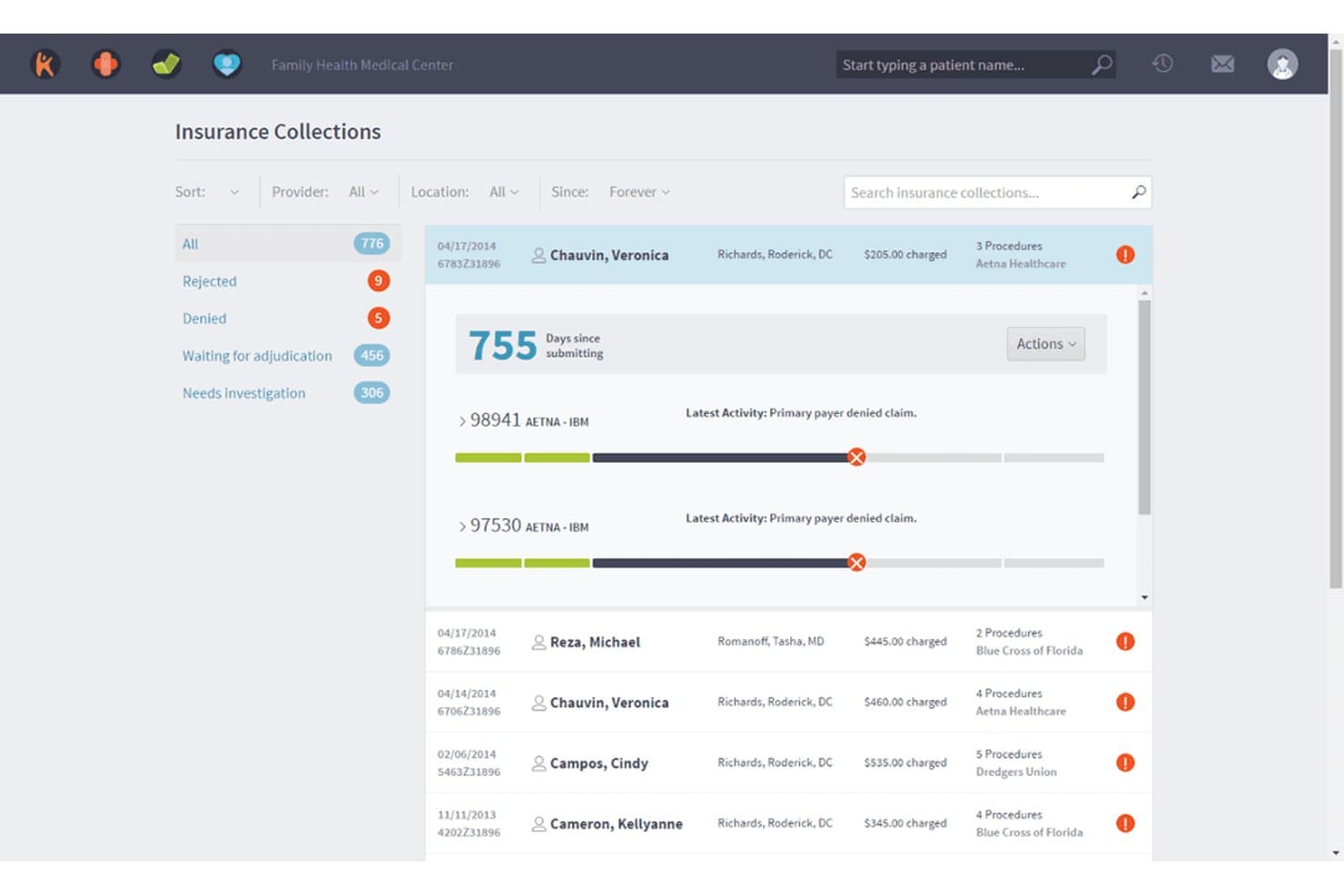
Kareo Billing offers an Insurance Collections dashboard that tracks claim statuses, rejected, denied, and pending adjudication cases with detailed patient and payer information. Kareo Billing is an EHR-integrated billing platform built for independent practices that combines electronic claims submission, insurance eligibility verification, automated payment posting, and patient billing in one system.
Who Is Kareo Billing Best For?
Solo practitioners and small independent practices that manage billing in-house will find Kareo Billing a practical fit.
Why I Picked Kareo Billing
I've included Kareo Billing in my top picks because its claims pipeline is built to reduce denials before they reach a payer. The automated claim scrubbing applies payer-specific rules pre-submission, and RPA-driven ERA auto-posting removes manual remittance work entirely. With connections to 2,700+ payers, my team can verify eligibility and submit 837 claims without toggling between platforms.
Kareo Billing Key Features
- Patient statements and online payments: Generate statements with QR codes and payment links for faster collections.
- Automated patient eligibility checks: Instantly verify insurance coverage details at intake and scheduling.
- Multi-client billing dashboard: Manage billing operations for multiple clients or providers in one view.
- Customizable financial and A/R reporting: Access and tailor revenue cycle dashboards and transaction reports for auditing and analysis.
Kareo Billing Integrations
Kareo Billing offers native integrations with Tebra EHR, Trizetto clearinghouse, and supports HL7 and FHIR connections to major external EHRs and labs. An API is available for custom integrations.
Pros and Cons
Pros:
- Detailed A/R and collections reporting tools
- Native integration with Trizetto clearinghouse workflows
- Automated insurance eligibility verification at intake
Cons:
- Multi-step navigation for correcting denied claims
- Inconsistent report customization feedback from users
Learn more about Kareo Billing: Best for rural and community health organizations
- Free demo available
- Pricing upon request
Visit WebsiteCustomer Rating:4.1/5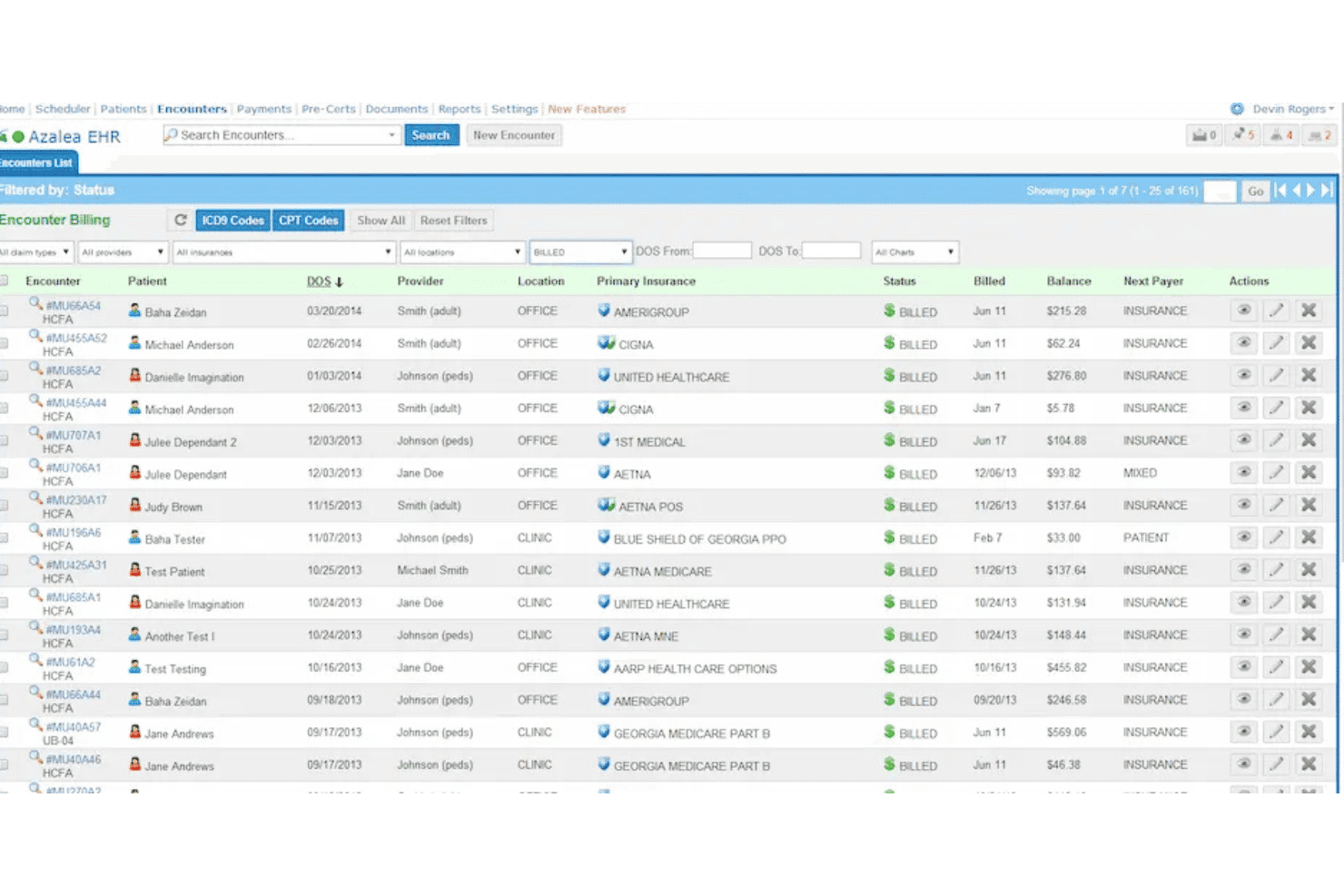
Azalea Health blends EHR, documentation, practice management, and AI claims. Azalea Health is a cloud-based EHR and billing platform that combines clinical documentation, practice management, and AI-assisted claims processing in a single system built for independent and rural ambulatory practices.
Who Is Azalea Health Best For?
Azalea Health is a strong fit for rural health clinics, Critical Access Hospitals, and multispecialty practices that need an integrated EHR and billing system built around their workflows.
Why I Picked Azalea Health
I picked Azalea Health as one of the best because it's one of the few EHR billing platforms purpose-built for CAHs, Rural Emergency Hospitals, and Rural Health Clinics. Its AI Billing Assistant automatically converts paper EOBs into 837 format for auto-posting, which is a real time-saver for small billing teams. I also like that an integrated clearinghouse comes standard in every package, so rural practices aren't paying extra to submit claims electronically.
Azalea Health Key Features
- Ambulatory EHR: Supports specialty and primary care clinical documentation directly linked to billing workflows.
- Patient engagement suite: Includes a patient portal, secure messaging, and online scheduling tools.
- Healthcare analytics dashboards: Gives billing teams access to real-time revenue cycle and financial reporting.
- AI Clinical Assistant: Offers ambient voice-enabled charting that helps speed up encounter documentation.
Azalea Health Integrations
Azalea Health includes a fully integrated clearinghouse in every package and offers FHIR API connections for labs, imaging, communications, and HIEs. It also provides an API for custom integrations and integrates natively with Dr. First for medication management.
Pros and Cons
Pros:
- AI assistant for coding and denial review
- Rural health and CAH billing workflows supported
- Built-in clearinghouse with auto-claim scrubbing
Cons:
- Complex contract terms for some RHCs
- No built-in prior authorization automation
Learn more about Azalea Health: Best cloud-based option for independent clinics
- Free demo available
- From $199/user/month
Visit WebsiteCustomer Rating:3.7/5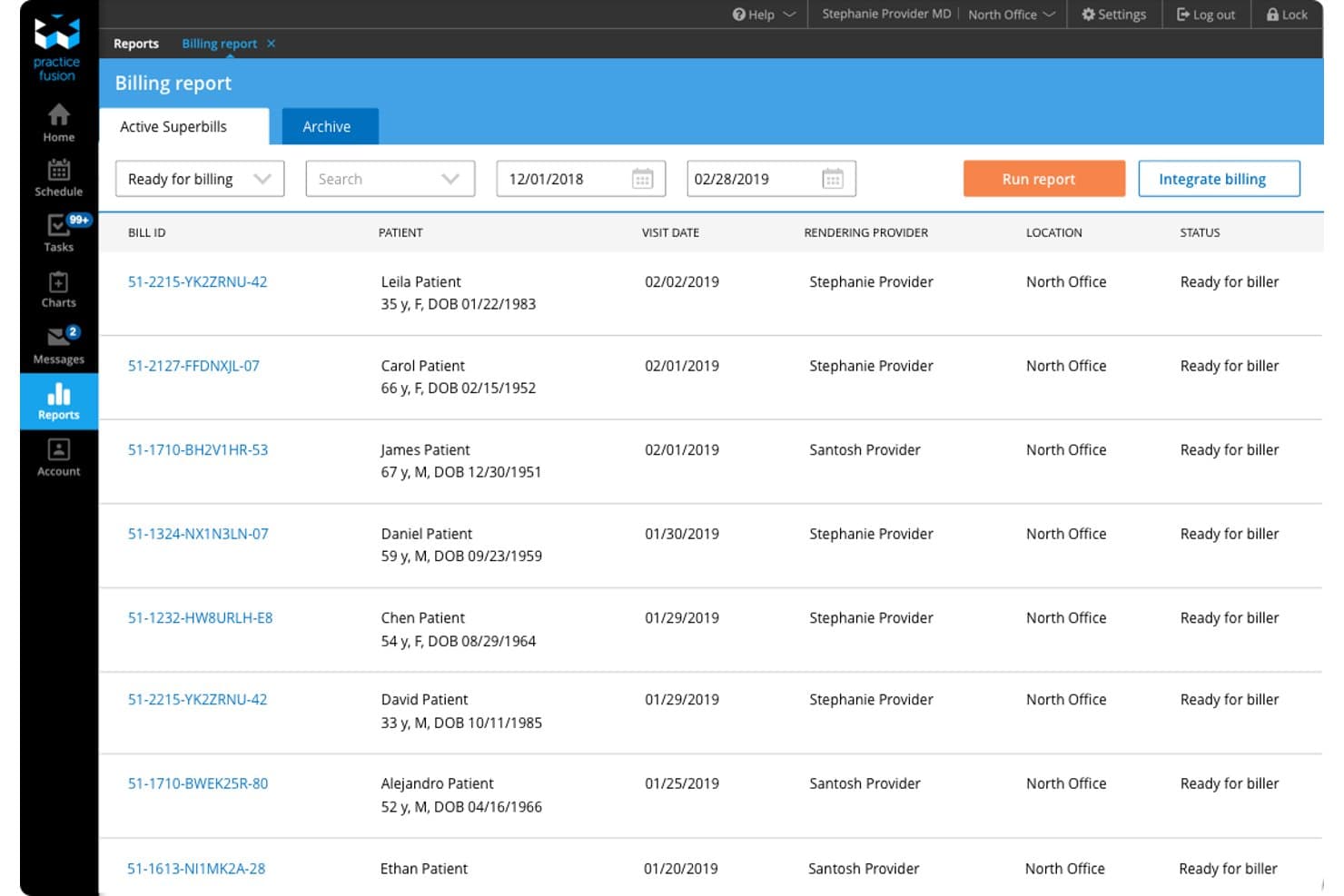
Practice Fusion offers a Billing Report screen displaying active superbills with patient details, visit dates, rendering providers, and billing statuses ready for submission. Practice Fusion is a cloud-based EHR platform that combines clinical charting, e-prescribing, and integrated billing services for independent medical practices.
Who Is Practice Fusion Best For?
Practice Fusion is a strong fit for solo physicians and small independent practices that need a fast-to-deploy, all-in-one EHR and billing solution without enterprise-level complexity.
Why I Picked Practice Fusion
Practice Fusion earns its spot on my shortlist because it's one of the few cloud-based EHRs built around the reality of running an independent clinic. I like that practices can be fully implemented in two weeks or less, and the bundled billing services, including claims scrubbing, same-day submission, and denial management, are handled by a dedicated billing team. The online check-in forms automatically populate chart notes, keeping clinical data connected to charge capture from the start.
Practice Fusion Key Features
- E-prescribing: Send prescriptions electronically to any pharmacy nationwide, including controlled substances, with integrated drug interaction checks.
- Lab and imaging integration: Connect directly to hundreds of diagnostic labs and imaging centers for seamless order and result management.
- Patient portal: Allow patients to access their health information, request refills, and communicate securely through a HIPAA-compliant portal.
- FHIR R4 HL7 API: Enable third-party apps or health systems to securely exchange patient data using modern, interoperable healthcare standards.
Practice Fusion Integrations
Practice Fusion offers native integrations with Zocdoc, Vaxcare, Veradigm Payer Insights, Updox, Fullscript, and Vytalize Health ACO. An API is available for custom integrations, and FHIR R4 HL7 API support allows secure data exchange with third-party applications.
Pros and Cons
Pros:
- Online check-in auto-populates patient chart notes
- Fast implementation for new independent clinics
- Billing services include dedicated follow-up team
Cons:
- Limited coding assistance inside the EHR
- No real-time eligibility checks for Medicaid
Learn more about Practice Fusion: Best for multispecialty practice integrations
- Free demo available
- Pricing upon request
Visit WebsiteCustomer Rating:3.6/5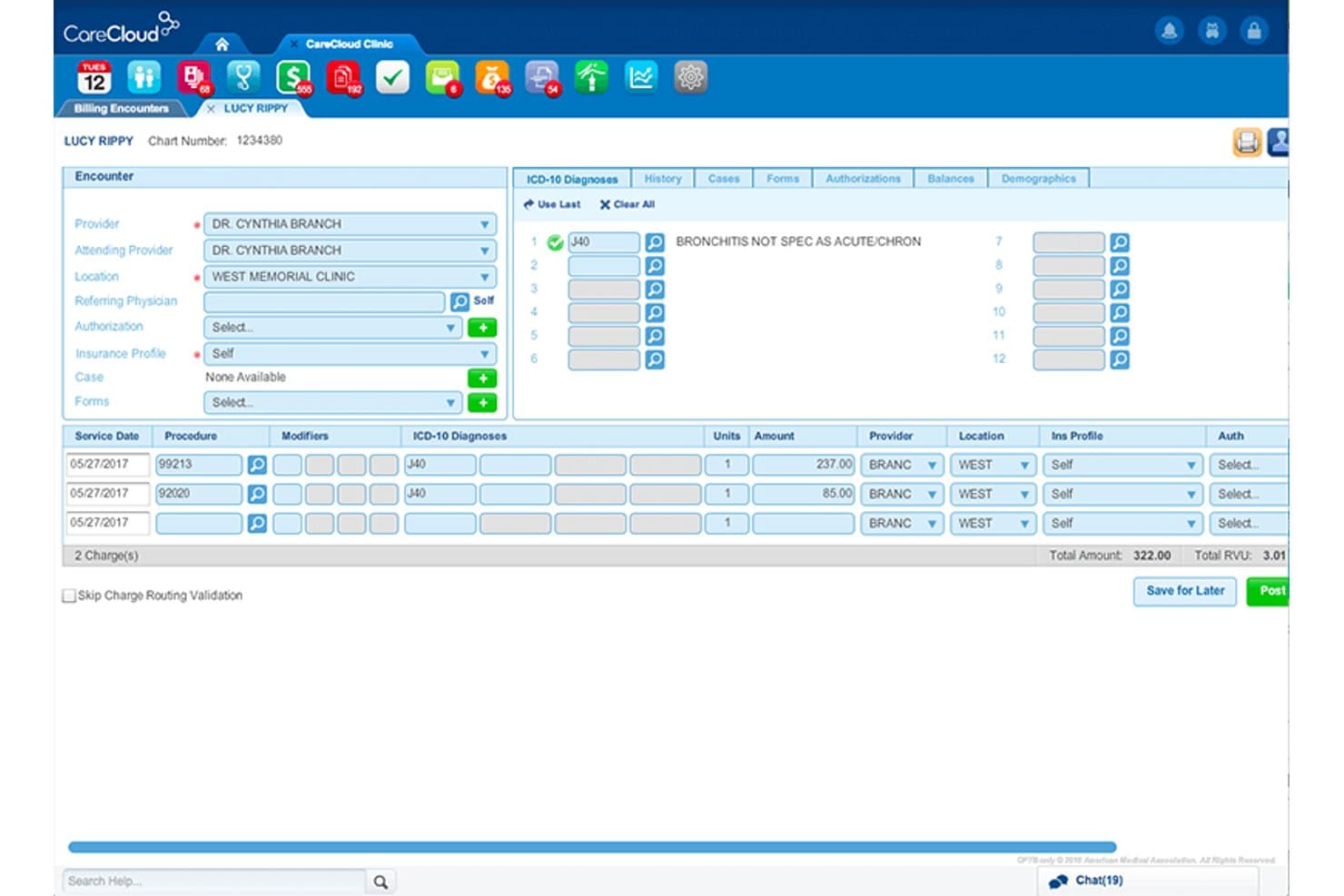
CareCloud offers a detailed billing encounter screen with ICD-10 diagnosis coding, procedure charges, and provider assignment for streamlined EHR billing. CareCloud is a cloud-based EHR and medical billing platform that combines clinical documentation, practice management, revenue cycle management, and AI-assisted coding and claims processing in a single system.
Who Is CareCloud Best For?
CareCloud is a strong fit for multispecialty medical practices that need a single platform to manage clinical workflows and billing across multiple provider types and departments.
Why I Picked CareCloud
CareCloud earns its spot on my shortlist because it handles billing across 70+ specialties without needing a separate system for each department. I like that the CollectiveIQ claims scrubber catches errors before submission. I find cirrusAI Appeals especially useful, too, as it auto-generates customized denial appeal letters based on individual claim details. In practice, a cardiology group and an orthopedic team can share the same billing pipeline, with specialty-specific coding applied at each step.
CareCloud Key Features
- Patient experience management: Breeze module offers digital check-in, appointment reminders, and online payment options.
- Integrated EHR and PM: Single platform unifies clinical documentation with scheduling and billing workflows.
- Telehealth module: HIPAA-compliant video visits are available directly from the platform.
- Business intelligence reporting: Custom dashboards display key revenue cycle and financial performance metrics.
CareCloud Integrations
CareCloud offers native integrations with pVerify for insurance eligibility verification and Modernizing Medicine. An API is available for custom integrations. Native integrations beyond these are not clearly documented.
Pros and Cons
Pros:
- AI-generated denial appeal letters
- Real-time claims scrubber for reduced denials
- Supports 70+ specialties with one system
Cons:
- Contract terms can limit flexibility
- Slow customer support response times
Learn more about CareCloud: Best specialty-specific billing automation
- Free demo available
- Pricing upon request
Visit WebsiteCustomer Rating:3.5/5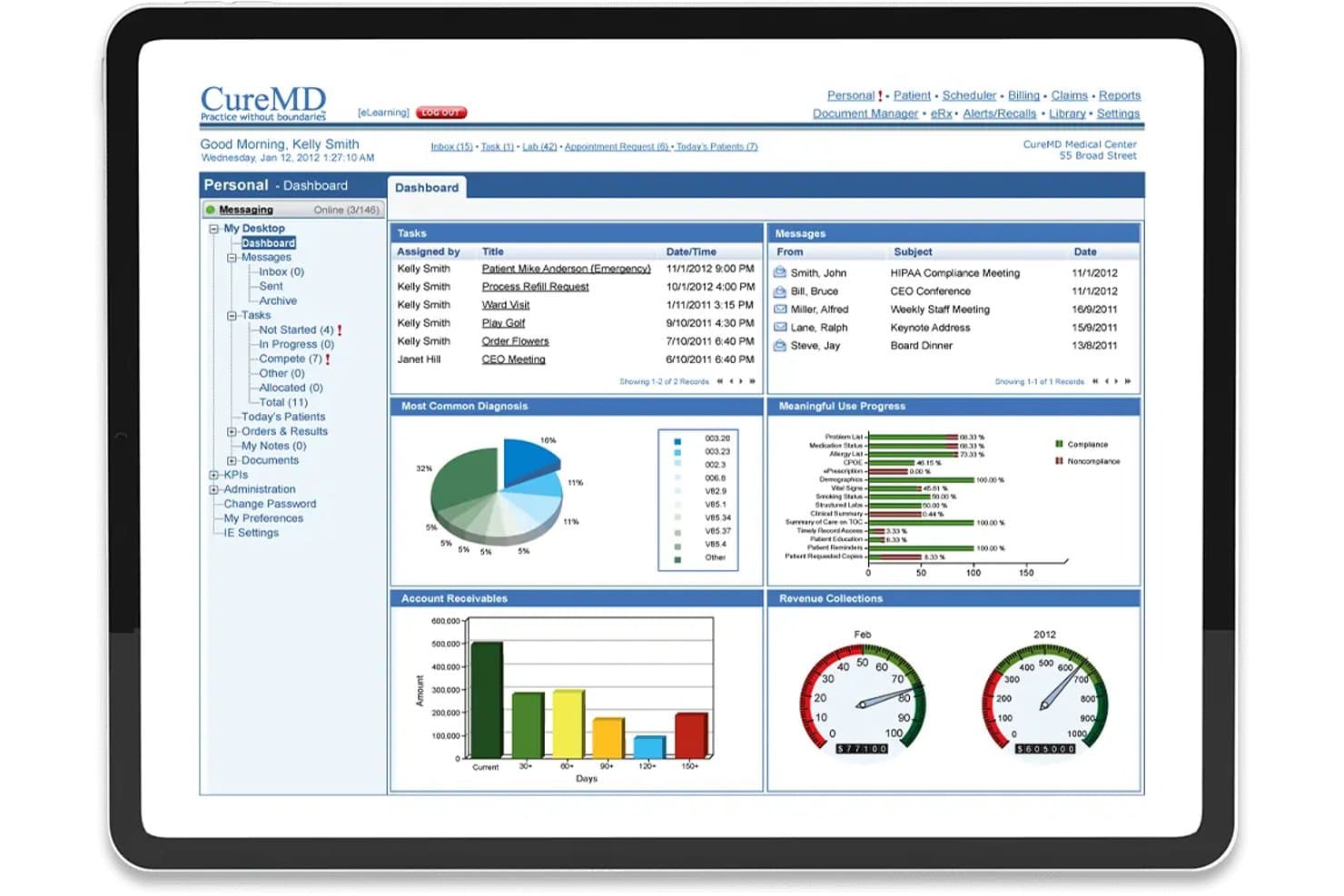
CureMD offers a comprehensive EHR billing dashboard with account receivables, revenue collections, tasks, and meaningful use progress tracking. CureMD is a cloud-based EHR and medical billing platform that combines clinical documentation, practice management, AI-assisted coding, claims submission, denial management, and patient billing in a single unified system built across 30+ specialties.
Who Is CureMD Best For?
CureMD is a strong fit for independent specialty practices and small-to-mid-sized medical groups that need specialty-specific billing workflows built directly into their EHR.
Why I Picked CureMD
I picked CureMD as one of the best because its billing automation is built around specialty-specific workflows, not bolted on as an afterthought. I especially like the e-Superbill, which validates E&M code levels in real time and flags missing documentation components before a claim goes out. The AI Coder layers on top of that with live ICD-10 and CPT suggestions tied directly to the clinical note, so coding decisions are grounded in what was actually documented.
CureMD Key Features
- Real-time eligibility verification: Instantly checks patient eligibility and coverage directly from the scheduling workflow.
- Patient portal: Lets patients access statements, pay bills, request appointments, and communicate securely with your office.
- Integrated clearinghouse: Supports electronic claims submission and ERA/EOB processing without requiring a third-party vendor.
- Denial management tracking: Monitors, organizes, and routes denied claims for follow-up and resolution within the billing platform.
CureMD Integrations
CureMD offers native integrations with SureScripts, EHNAC-accredited clearinghouses, and many national and regional lab partners. An API is available for custom integrations. Native integrations with other EHRs are not clearly documented.
Pros and Cons
Pros:
- Full billing and claim cycle automation
- Embedded real-time eligibility verification
- AI-driven medical coding suggestions
Cons:
- Some users report contract termination friction
- Occasional lag and system performance issues
Learn more about CureMD: Best all-in-one platform for front desk workflows
- Free demo available
- Pricing upon request
Visit WebsiteCustomer Rating:3.9/5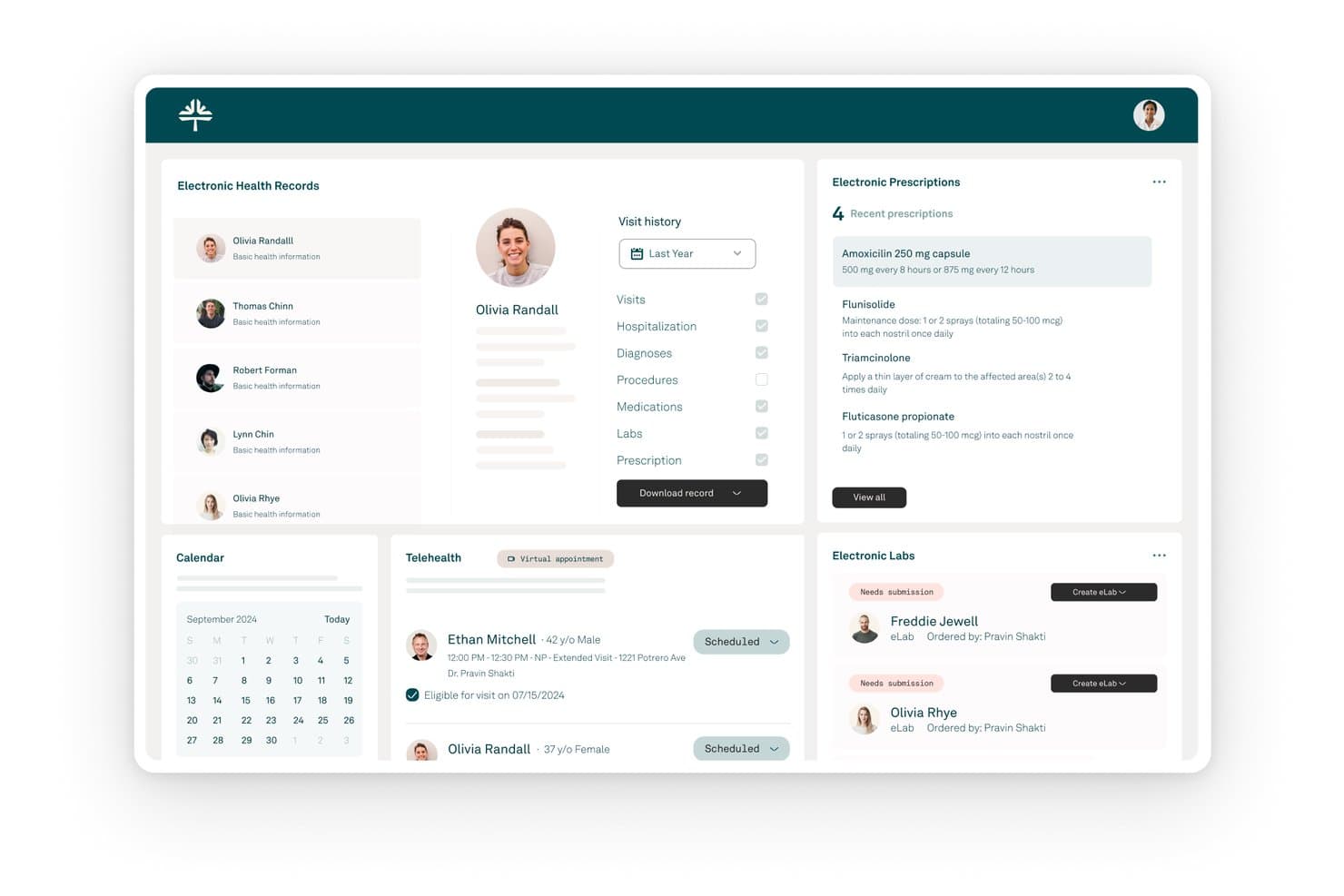
Tebra offers a comprehensive EHR dashboard featuring electronic health records, prescriptions, telehealth scheduling, electronic labs, and a patient visit history panel. Tebra is an all-in-one EHR and practice management platform that combines clinical documentation, medical billing, claims management, insurance eligibility verification, and patient payments in a single system built for independent medical practices.
Who Is Tebra Best For?
Tebra is a strong fit for small independent practices with up to 10 providers that need EHR and billing managed in one place.
Why I Picked Tebra
I've included Tebra in my top picks because of how tightly it connects front desk activity to the billing cycle. The automated insurance eligibility check runs at scheduling, sending ANSI-X12 270 inquiries to 2,700+ payers and returning coverage details in seconds. Digital patient intake then feeds directly into charge capture, so by the time a patient is seen, the billing workflow is already in motion.
Tebra Key Features
- AI-powered clinical documentation: Automatically generates clinical notes during patient encounters with AI Note Assist.
- Electronic prescription management: Supports e-prescribing and includes integrated PDMP and EPCS compliance.
- Automated claims scrubbing: Identifies billing errors and applies payer-specific edit rules before submission.
- Integrated patient payment tools: Enables card-on-file, text-to-pay, and in-person payment capture for outstanding balances.
Tebra Integrations
Tebra offers native integrations with Appriss Health for PDMP, EPCS for controlled substances, and supports HL7 and FHIR integrations with major EHRs. An API is available for custom integrations.
Pros and Cons
Pros:
- Patient payments fully integrated in one system
- Claims scrubbing applies payer-specific edit rules
- Automates eligibility checks during patient intake
Cons:
- Some legacy Kareo modules cause interface inconsistency
- Report customization options are limited
Learn more about Tebra: Best customizable scheduling and billing rules
- Free demo available
- Pricing upon request
Visit WebsiteCustomer Rating:3.9/5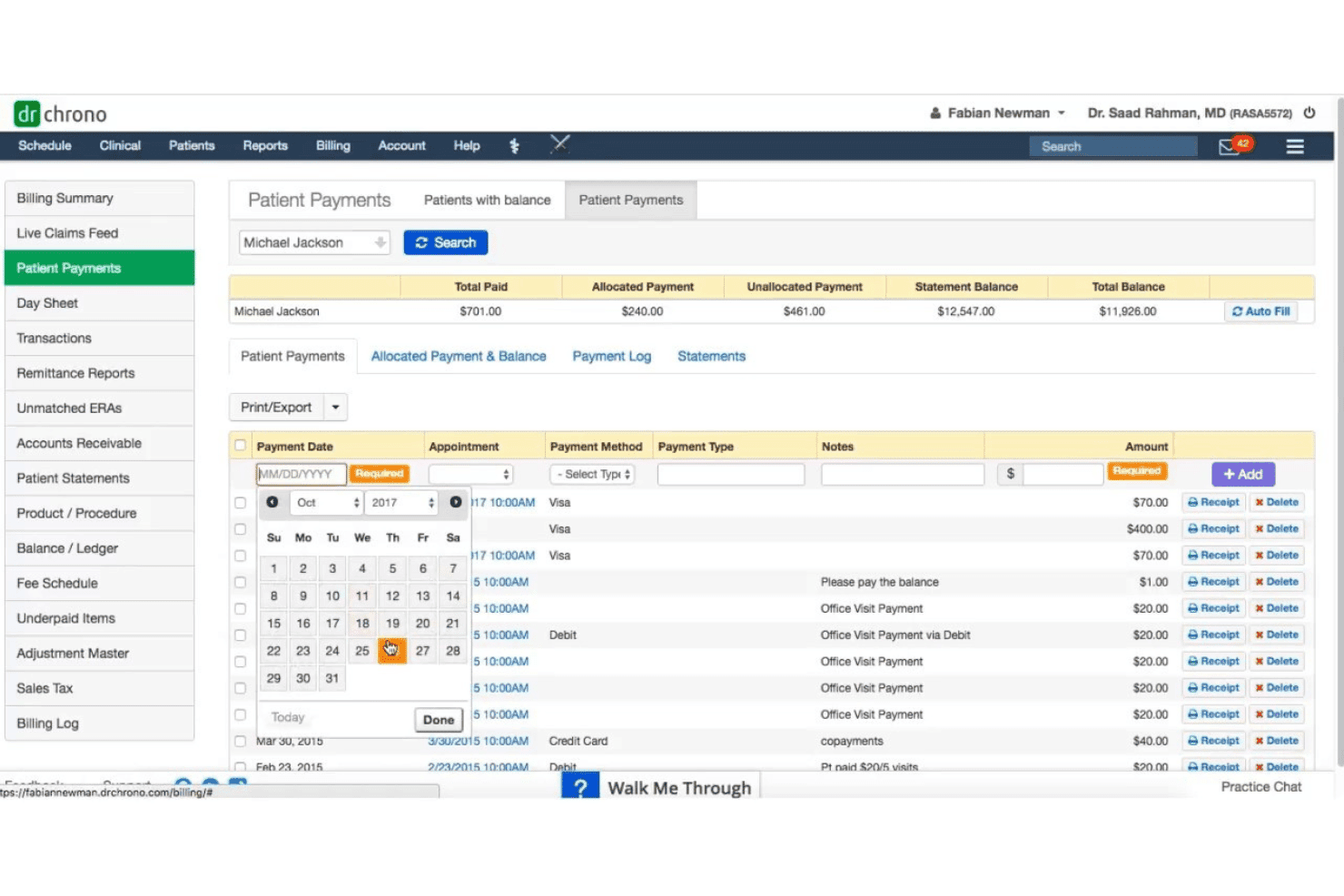
DrChrono unites EHR, documentation, coding, claims, practice tools, and RCM. DrChrono is a cloud-based EHR billing platform that unifies clinical documentation, practice management, medical coding, claims submission, and revenue cycle management in a single system built for independent medical practices.
Who Is DrChrono Best For?
DrChrono is a strong fit for independent practices and small-to-mid-size clinics that want a single platform to handle both clinical charting and billing.
Why I Picked DrChrono
DrChrono earns its spot on my shortlist because of how it handles billing profiles. I can build custom templates that store preferred CPT codes, diagnoses, and modifiers for specific encounter types, so charges generate consistently without manual re-entry each visit. Appointment profiles tie directly into charge capture, which means scheduling rules and billing rules work in tandem rather than as disconnected steps across two separate modules.
DrChrono Key Features
- Integrated telehealth: Schedule and conduct HIPAA-compliant video visits directly through the platform.
- Mobile EHR app: Access full EHR and billing functionality on iPad and iPhone, including clinical notes and order sets.
- Insurance eligibility verification: Run real-time or batch checks to confirm patient coverage before visits.
- OnPatient portal: Patients can self-schedule, complete intake forms, and pay bills online.
DrChrono Integrations
DrChrono offers native integrations with Quest Diagnostics, LabCorp, Surescripts, CoverMyMeds, Iron Bridge, and eProvider Solutions, and includes an open API for custom integrations.
Pros and Cons
Pros:
- Native mobile app supports clinical and billing work
- Real-time insurance eligibility verification workflows
- Customizable charge capture and billing profiles
Cons:
- Occasional claim batching and denial processing slowdowns
- Reporting requires mostly manual report generation
Learn more about DrChrono: Best for flexible appointment and claims handling
- Free demo available
- Pricing upon request
Visit WebsiteCustomer Rating:3.8/5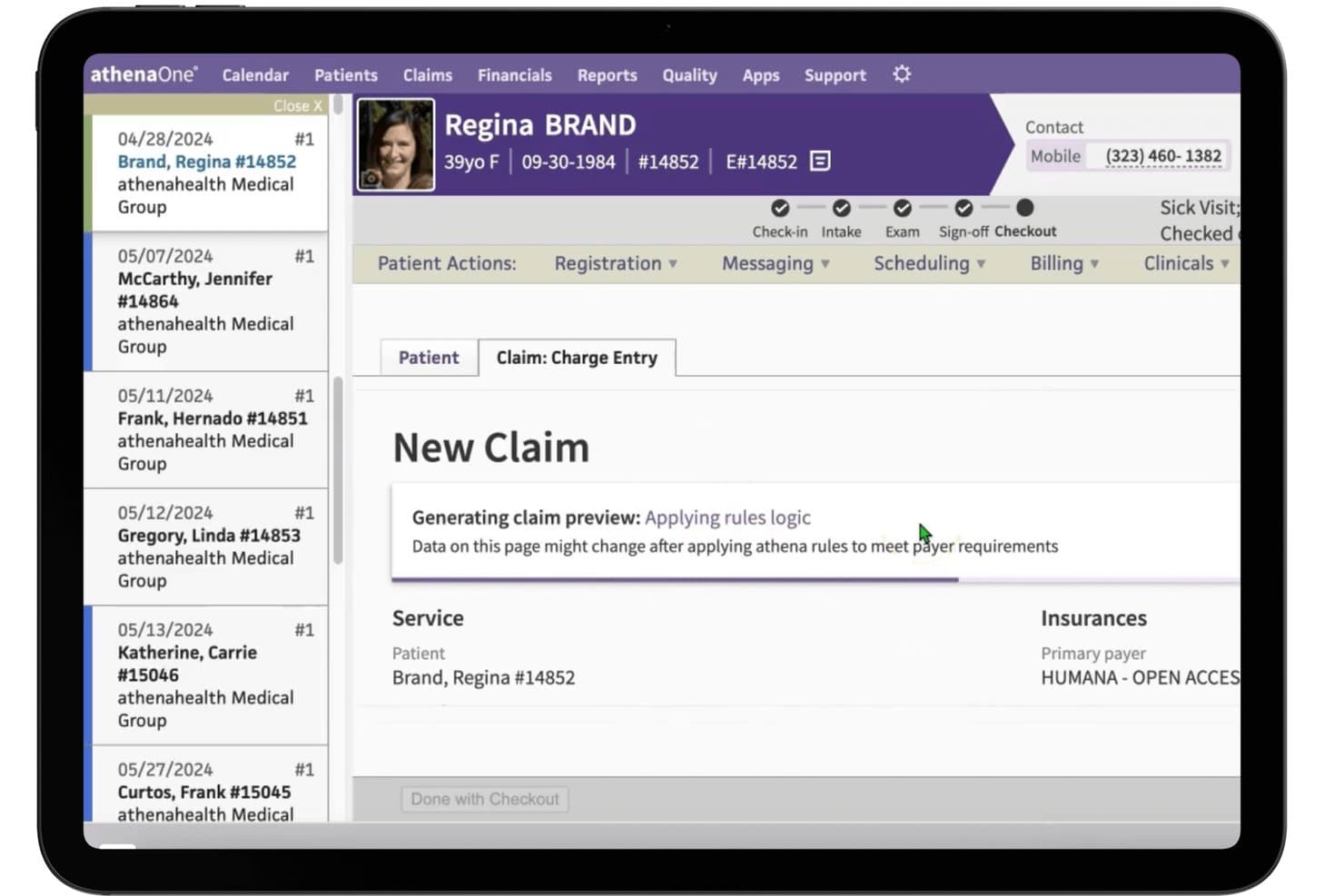
athenaOne offers an automated claim scrubbing workflow that applies rules logic during charge entry to meet payer requirements before submission. athenaOne is an all-in-one EHR, practice management, and medical billing platform that combines clinical documentation, claims management, revenue cycle automation, and patient engagement in a single system.
Who Is athenaOne Best For?
athenaOne is a strong fit for independent physician practices and small-to-mid-size medical groups managing their own revenue cycle.
Why I Picked athenaOne
I picked athenaOne as one of the best because its claims engine is genuinely hard to beat in this category. The platform runs every claim through 29,000+ rules before submission, catching coding errors and missing modifiers before they reach the payer. I also like how scheduling ties directly into real-time eligibility verification, so coverage is confirmed and prior authorization workflows are already moving before the patient even arrives.
athenaOne Key Features
- Customizable documentation templates: Create tailored clinical note and chart templates to fit your specialty’s workflows.
- Integrated telehealth visits: Schedule and conduct telehealth sessions within the same system as in-person appointments.
- Automated patient reminder system: Send automated appointment and payment reminders through email, text, or phone.
- Direct clinical integrations: Connect directly to labs, imaging centers, and pharmacies for seamless order entry and results.
athenaOne Integrations
athenaOne offers 250+ marketplace integrations, including Fullscript, Epion, DeepScribe, TimeDoc Health, LucidAct, Clearwave, and Epocrates. It supports direct clinical integrations with labs, pharmacies, and imaging centers. An API is available for custom integrations.
Pros and Cons
Pros:
- Direct connection to nationwide lab networks
- Real-time eligibility checks at scheduling step
- Proactive denial prevention with claims rules engine
Cons:
- Response time for support can be inconsistent
- Reporting module lacks detailed filtering options
Learn more about athenaOne: Best built-in analytics for small practices
- Not available
- Pricing upon request
Visit WebsiteCustomer Rating:3.7/5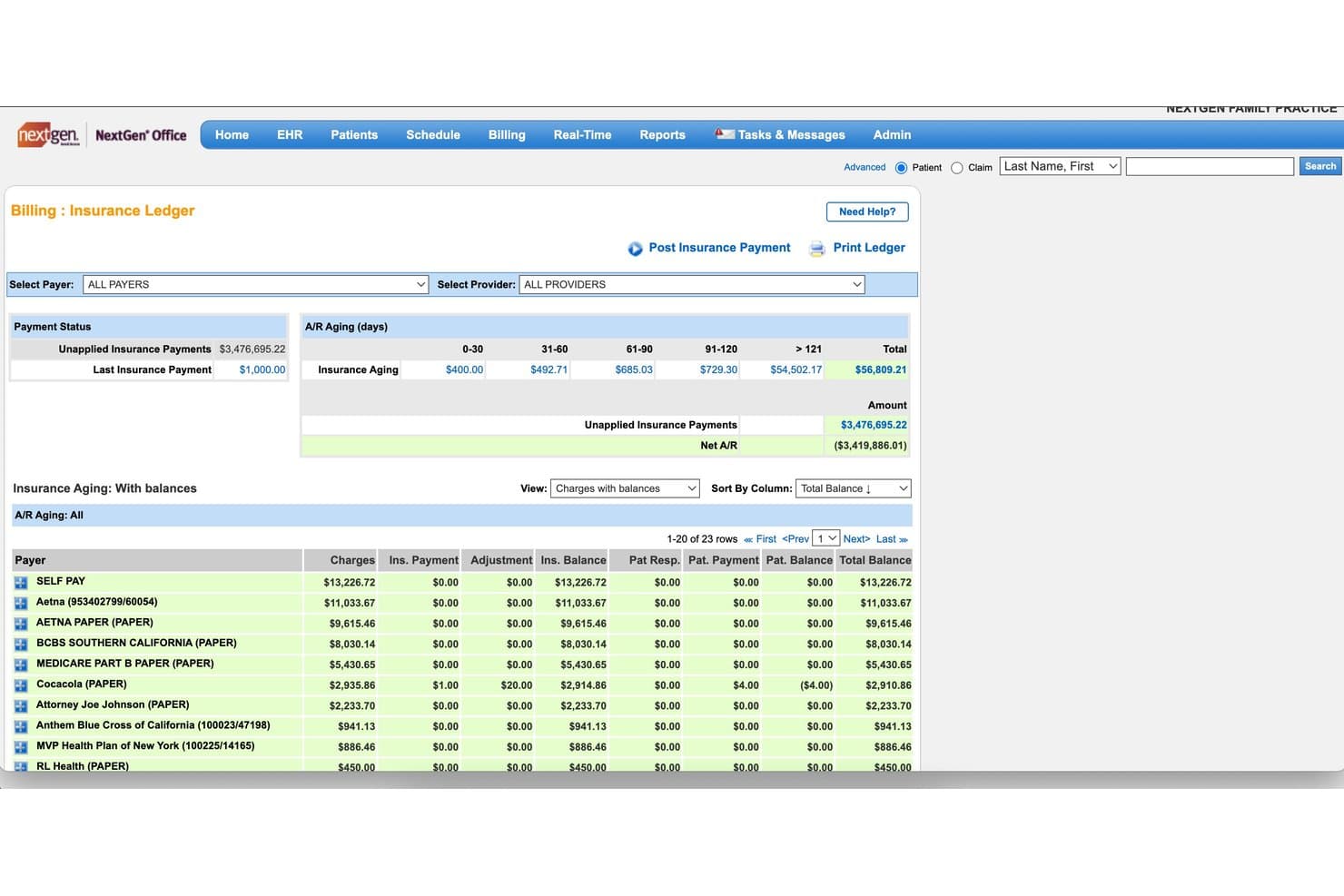
NextGen Office offers a detailed Insurance Ledger with A/R aging, unapplied insurance payments, and payer-level balance tracking for efficient billing management. NextGen Office is a cloud-based EHR and practice management platform for small independent practices that combines clinical documentation, medical coding, claims submission, eligibility verification, and patient billing in a single system.
Who Is NextGen Office Best For?
NextGen Office is built for independent physicians and practice administrators running small ambulatory practices with fewer than 10 providers.
Why I Picked NextGen Office
NextGen Office earns its spot on my shortlist because of how deeply its analytics are woven into the billing workflow. I particularly like that practice-wide financial reporting, including A/R aging and collections tracking, sits in the same system as clinical documentation. The MACRA/MIPS compliance reporting is also baked in, so I don't need to export data to a separate tool just to monitor revenue cycle performance.
NextGen Office Key Features
- Embedded practice management system: Access scheduling, patient intake, and denials tracking all in one platform.
- Integrated clearinghouse: Submit claims electronically and process 837/835 files from within the software.
- Real-time insurance eligibility checks: Verify patient benefits directly at check-in or scheduling.
- Specialty-specific charting templates: Use tailored forms and workflows for different medical specialties.
NextGen Office Integrations
NextGen Office offers marketplace integrations with tools like Demandforce, Forus, HST Price Transparency, Inbox Health, Clearwave, and Doctible. An API is available for custom integrations.
Pros and Cons
Pros:
- Embedded clearinghouse for electronic claims submission
- Practice-wide analytics and financial dashboards
- Unified platform for clinical and billing workflows
Cons:
- Payment posting workflow can be time-consuming
- Patient portal interface is cumbersome for users
Learn more about NextGen Office: Best customizable workflows for billing teams
- Free demo available
- Pricing upon request
Visit WebsiteCustomer Rating:3.6/5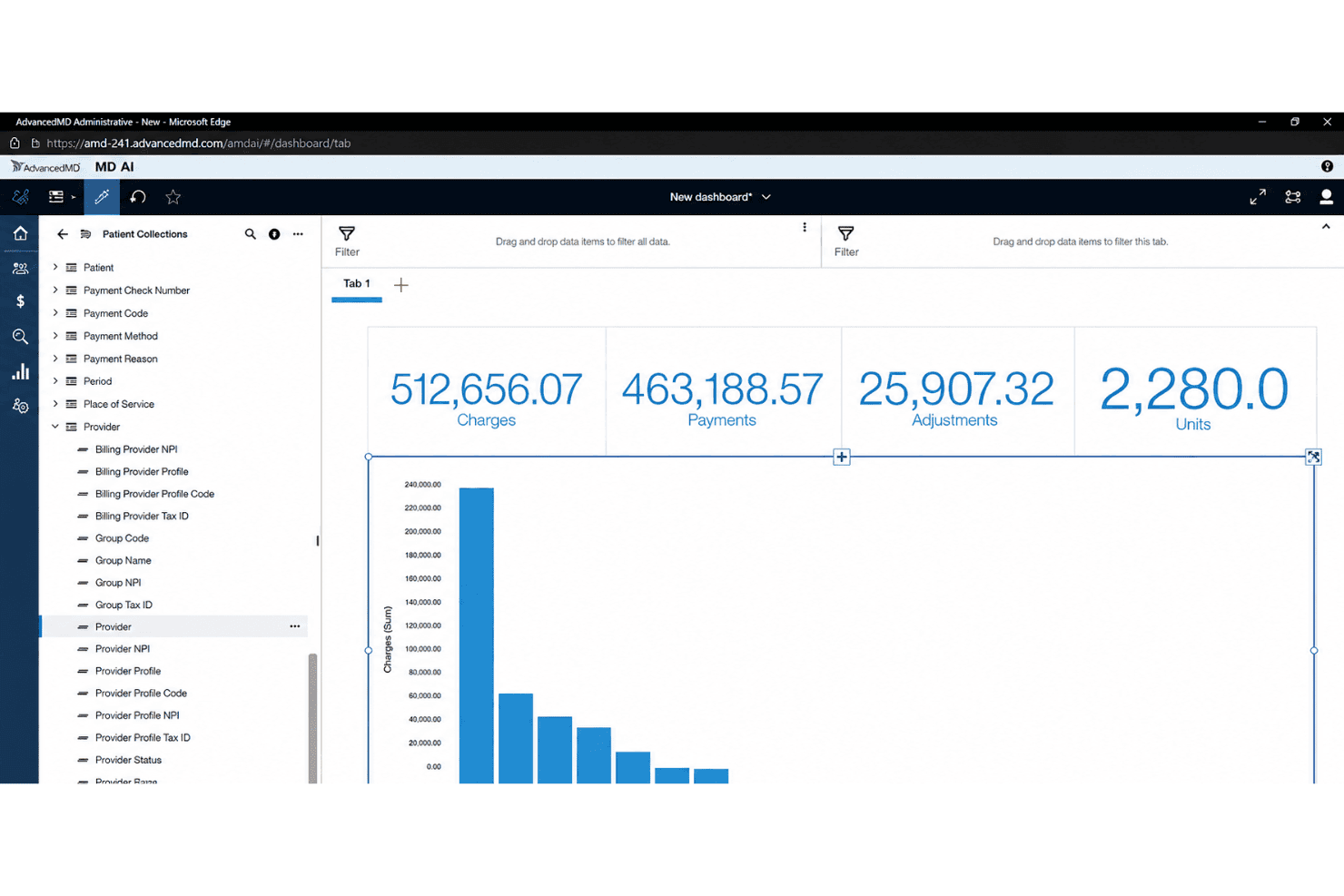
AdvancedMD centralizes EHR, billing, claims, eligibility, and patient payments. AdvancedMD is a cloud-based EHR and practice management platform that unifies clinical documentation, medical billing, claims management, insurance eligibility verification, and patient payments in a single system.
Who Is AdvancedMD Best For?
AdvancedMD is a strong fit for independent and multi-specialty practices with dedicated billing teams or billing service companies managing multiple client accounts.
Why I Picked AdvancedMD
AdvancedMD earns its spot as one of the best on my shortlist because of how deeply configurable the billing workflow actually is. I particularly like the Centralized Billing Office (CBO), which lets billing teams work across multiple client databases simultaneously without logging in and out. The Claim Inspector scrubs every claim through 3.5 million edits covering CCI, HIPAA, LCD, and carrier-specific rules. The denial module then auto-generates intelligent worklists, replacing paper-based tracking with structured queues.
AdvancedMD Key Features
- Integrated EHR and practice management: Connects clinical charting, scheduling, and billing within a single platform.
- Real-time insurance eligibility verification: Provides both batch and instant verification with payer benefit details.
- Patient payment portal: Lets patients pay bills online, view statements, and set up card-on-file payments.
- Open API and ODBC data access: Supports data exchange and direct access for custom reporting and analytics.
AdvancedMD Integrations
AdvancedMD offers integrations through its marketplace and open API, including native integrations with Health Information Exchanges (HIEs), PDMP registries, e-prescribing systems, digital faxing, and supporting EHR-agnostic billing workflows. An API is available for custom integrations.
Pros and Cons
Pros:
- Real-time insurance eligibility at scheduling
- Advanced claim scrubbing and edit engine
- Centralized billing office workspace for agencies
Cons:
- Coding AI is an extra paid add-on
- Reporting updates can be delayed after payer changes
Other EHR Billing Software
Here are some additional EHR billing software options that didn’t make it onto my shortlist, but are still worth checking out:
- 11eClinicalWorksBest integrated telehealth and billing tools
- 12RXNTBest unified billing and e-prescribing platform
- 13CollaborateMDBest real-time insurance eligibility checks
- 14PracticeSuiteBest claim management automation tools
- 15ModMedBest specialty-driven billing workflows
- 16NueMDBest for speedy system onboarding
- 17Elation HealthBest clinical-first focus for small groups
- 18EZClaimBest desktop solution for insurance billing
- 19MicroMDBest modular add-ons for scaling practices
- 20Greenway IntergyBest workflow customization for midsize clinics
How I Evaluate Ehr Billing Software
I split my evaluation into baseline criteria—like native EHR-to-billing charge flow and 837/835 claims support—and the differentiators that separate a good tool from the right one for your practice.
Core Functionality (Table Stakes for This List)
When I'm selecting tools for my list, I rank each one on a scale from 0 (does not offer the functionality) to 5 (excels in this area) for each core functionality listed below. Then, I calculate the tool's total score into a percentage. Each tool needs to achieve a minimum total score of 65% to be considered for inclusion.
- Integrated EHR & billing: I check whether clinical encounter data flows directly into charge capture, so your providers aren't re-entering diagnoses and procedures on the billing side.
- Claims management: The tool should support 837/835 transactions and include claim scrubbing that catches coding mismatches before submission hits the clearinghouse.
- Medical coding support: I look for up-to-date ICD-10, CPT, and HCPCS libraries with validation tools that flag issues like bundling conflicts during encounter documentation.
- Eligibility verification: Real-time or batch insurance checks at scheduling or check-in help front desk staff catch lapsed coverage before the patient is in the exam room.
- Patient billing & payments: I evaluate whether the platform offers online payment portals, card-on-file options, and payment plans that make it easier for patients to pay balances.
- HIPAA-compliant reporting: A/R aging, denial tracking, and collections dashboards should live within a HIPAA-compliant environment with audit logs and access controls.
Once I have a list of tools that meet the criteria, I consider what sets each platform apart.
Differentiating Factors (What Sets Vendors Apart)
Here's how I compare and contrast different vendors:
Standout Features
Denial management workflows are a big differentiator. I look for tools that auto-categorize rejections by root cause and generate appeal letters, so your billing team spends less time tracking down why a claim was denied. An integrated clearinghouse also matters because it eliminates the need for a separate payer submission service and keeps claim status updates in one place. For specialty practices like behavioral health or cardiology, I evaluate whether the platform includes pre-loaded code sets and scrubbing rules tuned to specialty-specific payer edits.
Beyond Features
Practice size and specialty fit shape which platform works best. A solo clinic needs a turnkey setup, while a multi-location group should look for centralized reporting and multi-entity billing. I also consider whether a vendor offers optional RCM services, since practices without dedicated billers can offload denial follow-up and A/R management to the vendor's team. Pricing structure matters too—per-provider, per-encounter, and percentage-of-collections models all scale differently, so I evaluate total cost of ownership including implementation and clearinghouse fees.
How to Choose EHR Billing Software
It’s easy to get bogged down in long feature lists and complex pricing structures. To help you stay focused as you work through your unique software selection process, here’s a checklist of factors to keep in mind:
| Factor | What to Consider |
|---|---|
| FactorScalability | What to ConsiderWill this software support your growth—from adding providers to opening new locations—without major change or excessive cost? |
| FactorIntegrations | What to ConsiderCan it connect to your existing clearinghouse, labs, or accounting tools? Ask about HL7/FHIR and open API support for connecting systems. |
| FactorCustomizability | What to ConsiderDoes the platform let you tailor workflows, user roles, or reporting to fit your specialty and practice patterns? |
| FactorEase of use | What to ConsiderCan your clinical and billing staff learn and use the system without constant IT help or frustration? Check the user interface firsthand. |
| FactorImplementation and onboarding | What to ConsiderHow long does it take to migrate data, train your team, and go live? Look for onboarding timelines, training, and post-launch support. |
| FactorCost | What to ConsiderBeyond subscription fees, are there clearinghouse charges, implementation fees, or training costs? Assess the true total cost of ownership. |
| FactorSecurity safeguards | What to ConsiderIs data encrypted in transit and at rest? Check for HIPAA compliance, audit trails, and role-based access controls. |
| FactorSupport availability | What to ConsiderIs live support offered by phone or chat, and in what hours? Consider how quickly you’ll get help in a claim or system emergency. |
What Is EHR Billing Software?
EHR billing software is a system that integrates electronic health records and medical billing tools into a single platform. These solutions let your team capture clinical documentation, assign codes, manage claims, and handle patient payments—all within one workflow. Using EHR billing software helps practices connect care delivery with the revenue cycle, reduce manual entry, and improve billing accuracy.
Features of EHR Billing Software
When selecting EHR billing software, keep an eye out for the following key features:
- Integrated EHR and billing: Links clinical documentation directly to billing workflows, minimizing duplicate data entry and increasing accuracy for charge capture.
- Claims management: Automates claim creation, scrubbing, submission to payers, and tracking, so your team spends less time on manual claims processing.
- Insurance eligibility checks: Verifies patient insurance details in real time or in batch before appointments to reduce claim denials due to ineligible coverage.
- Medical coding libraries: Allows easy access to regularly updated ICD-10, CPT, and HCPCS coding sets to support compliant and accurate charge entry.
- Patient statements and payments: Generates clear patient statements, supports online bill pay, and enables payment plans so you can collect balances more easily.
- Automated denial management: Helps categorize, prioritize, and route denied claims for timely follow-up—often with built-in appeal letter templates.
- Financial and compliance reporting: Delivers HIPAA-compliant dashboards on accounts receivable, collections, denial rates, and other key revenue cycle metrics.
- User roles and access control: Lets you set permissions so staff only access what they need, supporting both security and compliance requirements.
- Scheduling integration: Connects front office appointment calendars with billing, enabling charge posting based on scheduled and completed visits.
- Audit log tracking: Records every user action in the system for HIPAA compliance and supports audit readiness in the event of reviews or disputes.
Benefits of EHR Billing Software
Implementing EHR billing software provides several benefits for your team and your business. Here are a few you can look forward to:
- Improved billing accuracy: Directly linking clinical documentation with billing reduces coding errors and claim rejections.
- Faster claim turnaround: Automated claim scrubbing, eligibility checks, and electronic submissions help you get paid quicker with fewer delays.
- Better compliance support: Integrated audit logs and role-based access controls help maintain HIPAA compliance and prepare for audits.
- Simplified patient payments: Online portals and payment plans make it easy for patients to pay balances, improving your collection rates.
- Actionable revenue insights: Real-time dashboards and reporting help you monitor accounts receivable, denial rates, and practice performance.
- Streamlined workflows: Connecting scheduling, documentation, and billing in one system reduces manual work and supports efficient team collaboration.
- Scalability for growth: Centralized systems make it simpler to add new providers or locations without major disruptions.
Costs and Pricing of EHR Billing Software
Selecting EHR billing software requires an understanding of the various pricing models and plans available. Costs vary based on features, team size, add-ons, and more. The table below summarizes common plans, their average prices, and typical features included in EHR billing software solutions:
Plan Comparison Table for EHR Billing Software
| Plan Type | Average Price | Common Features |
|---|---|---|
| Plan TypeFree Plan | Average Price$0 | Common FeaturesBasic patient charting, limited claims submission, basic coding support, and email support. |
| Plan TypePersonal Plan | Average Price$59-$199/month | Common FeaturesSingle provider support, integrated scheduling, online claims, eligibility checks, and basic reporting. |
| Plan TypeBusiness Plan | Average Price$199-$499/month | Common FeaturesMulti-provider support, automated claims, customizable reports, patient payment portal, and code libraries. |
| Plan TypeEnterprise Plan | Average Price$500+/month | Common FeaturesMulti-location management, advanced analytics, dedicated onboarding, role-based access, and integration APIs. |
EHR Billing Software FAQs
Here are some answers to common questions about EHR billing software:
What is the difference between EHR billing software and standalone billing solutions?
EHR billing software combines patient care documentation and billing workflows on one platform, so your team can capture charges directly from clinical notes. Standalone billing solutions manage claims separately and usually require duplicate data entry.
Can EHR billing software handle multiple specialties within one practice?
Yes, most modern EHR billing software can support multiple specialties in a single system. Look for specialty-specific coding tools, templates, and customizable workflows to accommodate diverse clinical and billing requirements.
How long does it take to implement EHR billing software?
Implementation times vary based on your practice size and data migration needs but usually range from several weeks to a few months. Factoring in training and go-live planning is key to a smooth transition.
What integrations should I look for in EHR billing software?
You should look for integrations with clearinghouses, labs, accounting software, patient engagement tools, and other health IT platforms. HL7 or FHIR compatibility and open APIs help ensure smooth data flow between systems.
Is EHR billing software secure and HIPAA-compliant?
Yes, reputable EHR billing software is designed for HIPAA compliance, using encryption, access controls, and audit logs to protect patient and financial data. Always verify a vendor’s security certifications and practices.