

Navigarea în domeniul podologiei poate fi dificilă, mai ales atunci când trebuie să îmbinați îngrijirea pacienților cu sarcinile administrative. Soluțiile EHR pentru podologie sunt concepute pentru a vă ajuta, făcându-vă cabinetul mai eficient și mai concentrat pe pacienți.
Am petrecut timp testând și analizând software EHR pentru a vă oferi informații imparțiale. Din experiența mea, soluția EHR potrivită poate elimina multe dintre problemele cu care vă confruntați zilnic, de la gestionarea dosarelor pacienților până la asigurarea conformității.
În acest articol, voi prezenta principalele mele alegeri pentru sistemele EHR destinate podologiei. Veți găsi recenzii detaliate axate pe funcții, ușurință în utilizare și prețuri. Scopul meu este să vă ajut să luați o decizie informată pentru echipa dumneavoastră, astfel încât să vă puteți concentra pe oferirea celor mai bune îngrijiri posibile.
Why Trust Our Software Recommendations
6,700+
Reviews
20
Industry experts
16+
Evaluation factors
14
Years
Our team has been testing and reviewing software since 2012. As medical practice leaders ourselves, we know how difficult—and important—it is to choose the right software.
For this guide, we evaluated tools using hands-on testing and independent research, scoring tools using our selection criteria.
Our reviews reflect our human editorial judgment, not a sales pitch.
Tabel comparativ al soluțiilor EHR pentru podologie
Score legend (out of 5)
- Excellent4.5–5
- Good4–4.4
- Average3–3.9
- Below average2–2.9
- Poor1–1.9
Sorted by: Default
| Tool | Starting Price | Website | |||||||
|---|---|---|---|---|---|---|---|---|---|
Best for integrated e-prescriptions & diagnostics | 3.0 out of 5 | 3 | 4 | 3 | 1 | 3 | 4 | $99/month 15-day free trial | Website |
Good for cloud-based podiatry EHR functionality | 3.7 out of 5 | 3 | 4 | 4 | 4 | 3 | 4 | Pricing upon request Free demo available | Website |
Best for custom clinical data connections | 3.7 out of 5 | 4 | 4 | 3 | 4 | 3 | 4 | Pricing upon request Not available | Website |
Best for customizable workflows | 3.8 out of 5 | 4 | 3 | 4 | 4 | 4 | 4 | Pricing upon request Free demo available | Website |
Best for cloud-based convenience | 3.8 out of 5 | 5 | 3 | 4 | 4 | 3 | 4 | $199/provider/month 14-day free trial + free demo available | Website |
Best for coordinating office and ASC care | 4.2 out of 5 | 3 | 4 | 4 | 5 | 5 | 4 | Pricing upon request Free demo available | Website |
Best for AI-assisted front-office workflows | 3.8 out of 5 | 4 | 4 | 3 | 4 | 4 | 4 | Pricing upon request Free demo available | Website |
Best for office-to-ASC care | 4.2 out of 5 | 4 | 4 | 5 | 3 | 4 | 5 | $499/user/month Free demo available | Website |
Best for Medicare and modifier claim checks | 4.0 out of 5 | 4 | 4 | 4 | 4 | 4 | 4 | $229/user/month Free demo available | Website |
Best for personalized patient care | 3.8 out of 5 | 4 | 4 | 3 | 4 | 4 | 4 | $499/user/month Free demo available | Website |


Recenzii ale celor mai bune soluții EHR pentru podologie
 Best for integrated e-prescriptions & diagnostics
- 15-day free trial
- From $99/month
Visit WebsiteCustomer Rating:4.8/5
Manage podiatry workflows with OptiMantra’s customizable EHR platform. OptiMantra is an electronic health record (EHR) system designed for practices that want both clinical and administrative support in one platform. It offers customized charting, integrated diagnostics, and secure e-prescriptions, making it particularly useful for podiatry practices that need efficient ways to handle imaging, labs, and medication management.
Why I Picked OptiMantra: I picked OptiMantra for this list because of how well it handles e-prescriptions and diagnostics within the same system. With built-in connections to pharmacy networks and lab vendors, you can order tests, view results, and send prescriptions without leaving the platform. I also like that you can customize intake forms and treatment templates, which helps tailor podiatry workflows to your clinic’s needs.
Standout Features and Integrations:
Features include customizable charting and intake forms, HIPAA-compliant telehealth, inventory management, and electronic prescribing through Surescripts. Diagnostic ordering is fully integrated, so lab and imaging results flow directly into patient records. OptiMantra also supports secure e-faxing and payment processing.
Integrations include LabCorp, Quest Diagnostics, Rupa Health, SimonMed, Clinical Pathology Laboratories (CPL), Fullscript, Stripe, and Office Ally.
Pros and Cons
Pros:
- Secure telehealth capabilities
- Integrated labs and imaging
- Flexible charting templates
Cons:
- Learning curve for new users
- Reports navigation can be tricky
Learn more about OptiMantra: Good for cloud-based podiatry EHR functionality
- Free demo available
- Pricing upon request
Visit WebsiteCustomer Rating:4.5/5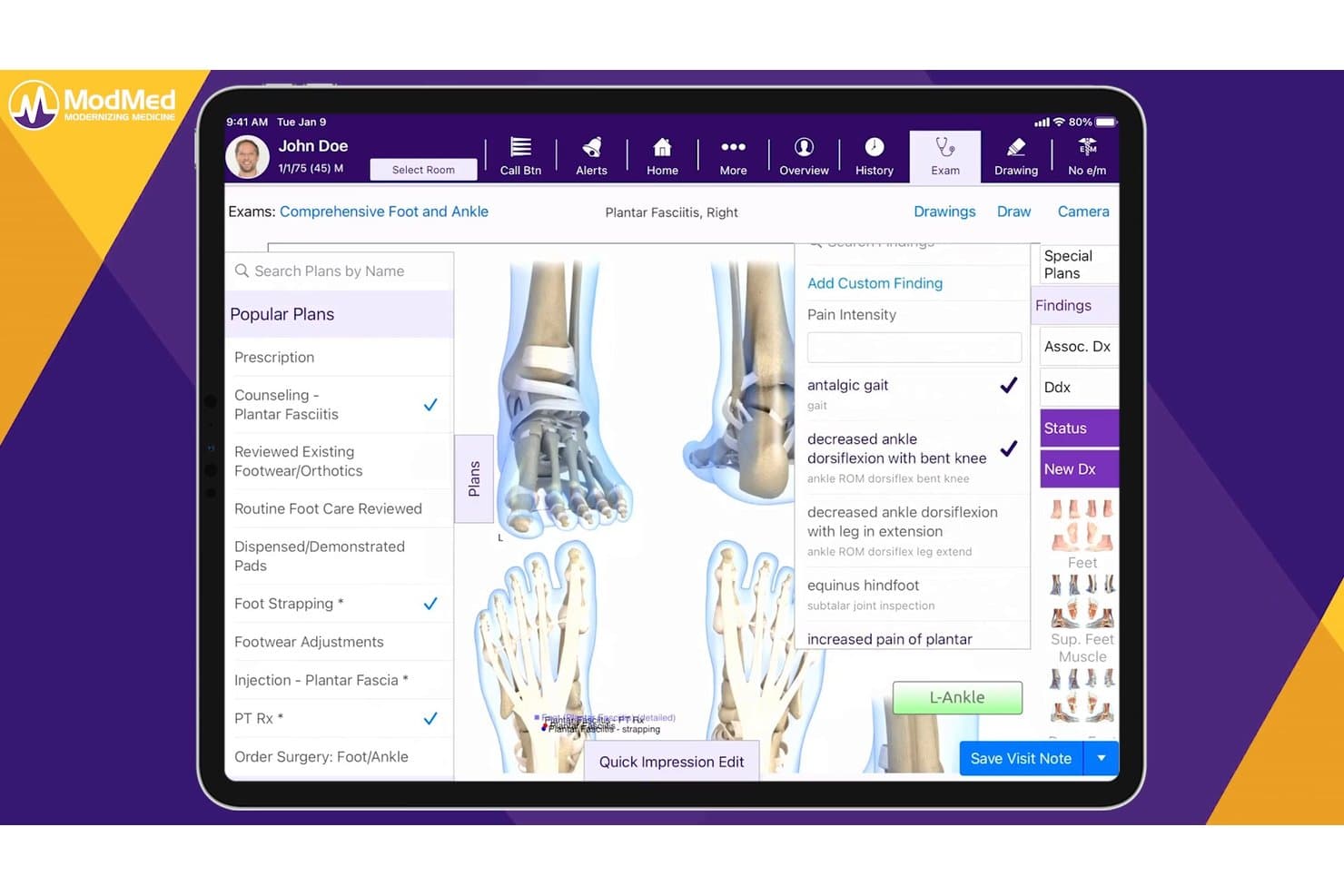
ModMed streamlines plantar fasciitis treatment planning and documentation. ModMed is a cloud-based, specialty-specific EHR platform that combines podiatry-tailored clinical documentation, practice management, patient engagement, and revenue cycle tools in one system.
Who Is ModMed Best For?
ModMed is a strong fit for podiatry practices that want a single, specialty-built platform covering clinical documentation, scheduling, and patient engagement.
Why I Picked ModMed
ModMed earns its spot on my shortlist because its cloud-based EHR is built specifically for podiatry, not retrofitted from a generic template. I particularly like the adaptive learning engine, which surfaces common podiatric diagnoses and treatments as you chart, cutting down the clicks needed to document a diabetic foot exam or nail procedure. The mobile EHR lets providers pull up charts, take clinical photos, and send prescriptions from an iPad mid-visit.
ModMed Key Features
- MIPS quality module: Collects and tracks MIPS data within the platform and supports direct submission to CMS through the Modernizing Medicine Qualified Registry.
- ModMed Records Exchange: Pulls compiled patient records and reconciled clinical data directly from the patient chart and shares data across a nationwide provider network.
- Practice management: Centralizes scheduling, appointments, billing, claims, and document management in one administrative system.
- Call-to-Text: Converts incoming phone calls into two-way text messaging between staff and patients.
ModMed Integrations
ModMed connects with over 1,200 lab entities through Change Healthcare and supports ModMed Records Exchange. It offers certified FHIR and SMART on FHIR APIs, plus marketplace integrations with PatientPop, Podium, Luma, and TriZetto.
Pros and Cons
Pros:
- Mobile charting supports in-room documentation
- Clinicians report faster note completion
- Podiatry-specific templates reduce repetitive charting
Cons:
- Support responses can lag issue resolution
- Reporting delays complicate practice oversight
Learn more about ModMed: Best for custom clinical data connections
- Not available
- Pricing upon request
Visit WebsiteCustomer Rating:4.2/5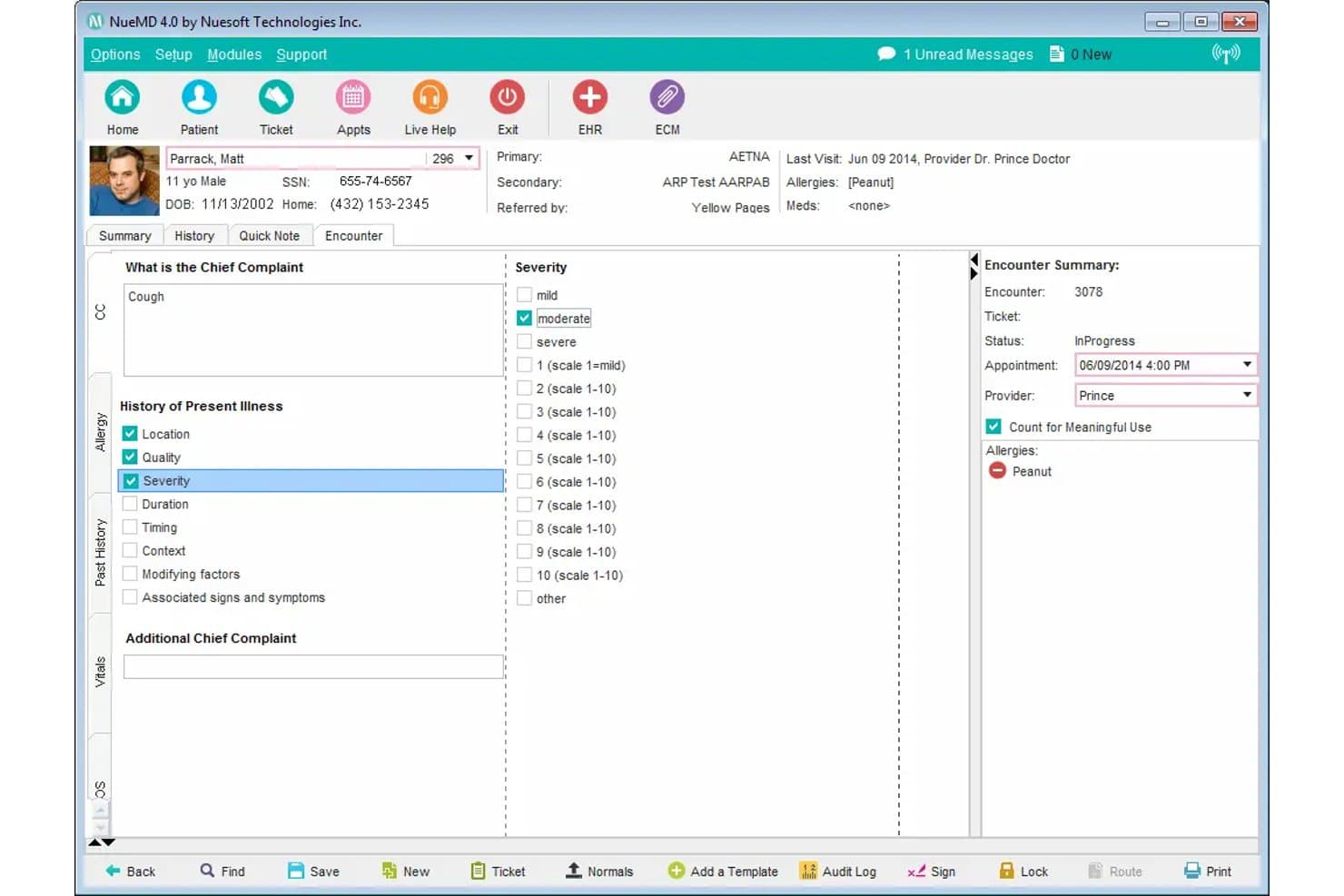
NueMD captures chief complaints and severity during patient encounters. NueMD is a cloud-based podiatry EHR that combines specialty-specific SOAP note templates, ePrescribing with controlled-substance support, AI-driven clinical alerts, and integrated practice management and billing tools.
Who Is NueMD Best For?
NueMD is a strong fit for independent and small-to-medium group podiatry practices that need their EHR, scheduling, and billing tools connected through a single shared database.
Why I Picked NueMD
I picked NueMD as one of the best because its ability to share clinical data across care partners, ambulatory surgical centers, and patients through both pre-built and custom APIs sets it apart for podiatry practices that coordinate care beyond their own walls. The podiatry-specific SOAP note templates, paired with AI-driven alerts that flag patient needs in real time, mean your documentation and clinical decisions stay connected. I also like that ePrescribing includes full controlled-substance support with drug-interaction checks built in.
NueMD Key Features
- Scheduling snapshot: A color-coded schedule displays daily appointments and tracks patient rooming status across providers in real time.
- AI clinical assistant: An ambient listening add-on transcribes visits, generates notes in five formats, and suggests chart action items automatically.
- Patient kiosk app: Patients complete self-service check-in, intake forms, demographic updates, and consent authorization from an in-office kiosk.
- CQM and MIPS reporting: Daily reports track quality measures and support MACRA and MIPS compliance for value-based care programs.
NueMD Integrations
NueMD offers marketplace integrations with Swift Medical, Medsender, and Falkondata. It also supports custom connectivity through REST and XML-RPC APIs, ODBC, and FHIR R4 with SMART on FHIR OAuth 2.0.
Pros and Cons
Pros:
- Connected scheduling and billing support daily workflows
- Custom notes support specialty-specific documentation
- Podiatry SOAP templates address common complaints
Cons:
- Template setup can take substantial staff time
- ePrescribing can require extra controlled-substance steps
Learn more about NueMD: Best for customizable workflows
- Free demo available
- Pricing upon request
Visit WebsiteCustomer Rating:4.5/5
The Sevocity Podiatry EHR freedom to customize your workflow Sevocity is a cloud-based electronic health records (EHR) system built to provide healthcare practitioners a reliable platform for managing their daily tasks. It's renowned for offering a high degree of workflow customization, making it an ideal choice for clinics and practices requiring specific workflow arrangements.
Why I Picked Sevocity:
I chose Sevocity primarily for its unique customization capabilities. This stood out to me during my selection process, as it's uncommon for EHR systems to offer such extensive adaptability. I believe Sevocity’s ability to adapt to a wide array of clinical workflows makes it the best tool for customizable workflows in healthcare settings.
Standout Features and Integrations:
Sevocity offers features such as E-prescribing, custom forms, lab and imaging integration, and patient portal. Its exceptional customization allows workflows to be tailored according to the unique needs of different practices. The platform integrates seamlessly with other popular health IT systems and third-party apps to enhance its functionality and adaptability.
Pros and Cons
Pros:
- Seamless integration with other health IT systems and apps
- Includes a variety of useful features for practices
- Excellent degree of workflow customization
Cons:
- Initial setup can be time-consuming
- The user interface may feel outdated compared to some competitors
- Pricing could be steep for smaller practices
Learn more about Sevocity: Best for cloud-based convenience
- 14-day free trial + free demo available
- From $199/provider/month
Visit WebsiteCustomer Rating:3.7/5
Unleash the power of the cloud with Practice Fusion Practice Fusion is an EHR solution designed to maximize convenience through its cloud-based platform. Its features help podiatry practices deliver efficient care while managing administrative tasks in an accessible, user-friendly environment.
Why I Picked Practice Fusion:
Practice Fusion stood out for its cloud-based approach when selecting tools for this list. Its distinguishing factor is the accessibility and convenience it provides by being a fully online platform. I judged it best for cloud-based convenience because it allows users to access the system anywhere and at any time, which greatly aids in ensuring continuous, efficient patient care.
Standout Features and Integrations:
Practice Fusion offers many valuable features, such as appointment scheduling, electronic prescribing, and charting. Moreover, its telehealth features facilitate remote patient care, which is crucial in the current healthcare landscape. When it comes to integrations, Practice Fusion partners with billing solutions, labs, pharmacies, and imaging centers, all of which add up to smooth and efficient practice operations.
Pros and Cons
Pros:
- Telehealth capabilities
- Easy integration with other systems
- Full-featured cloud-based EHR
Cons:
- Interface can be complex for new users
- Setup fee is required
- Annual billing only
Learn more about Practice Fusion: Best for coordinating office and ASC care
- Free demo available
- Pricing upon request
Visit WebsiteCustomer Rating:3.9/5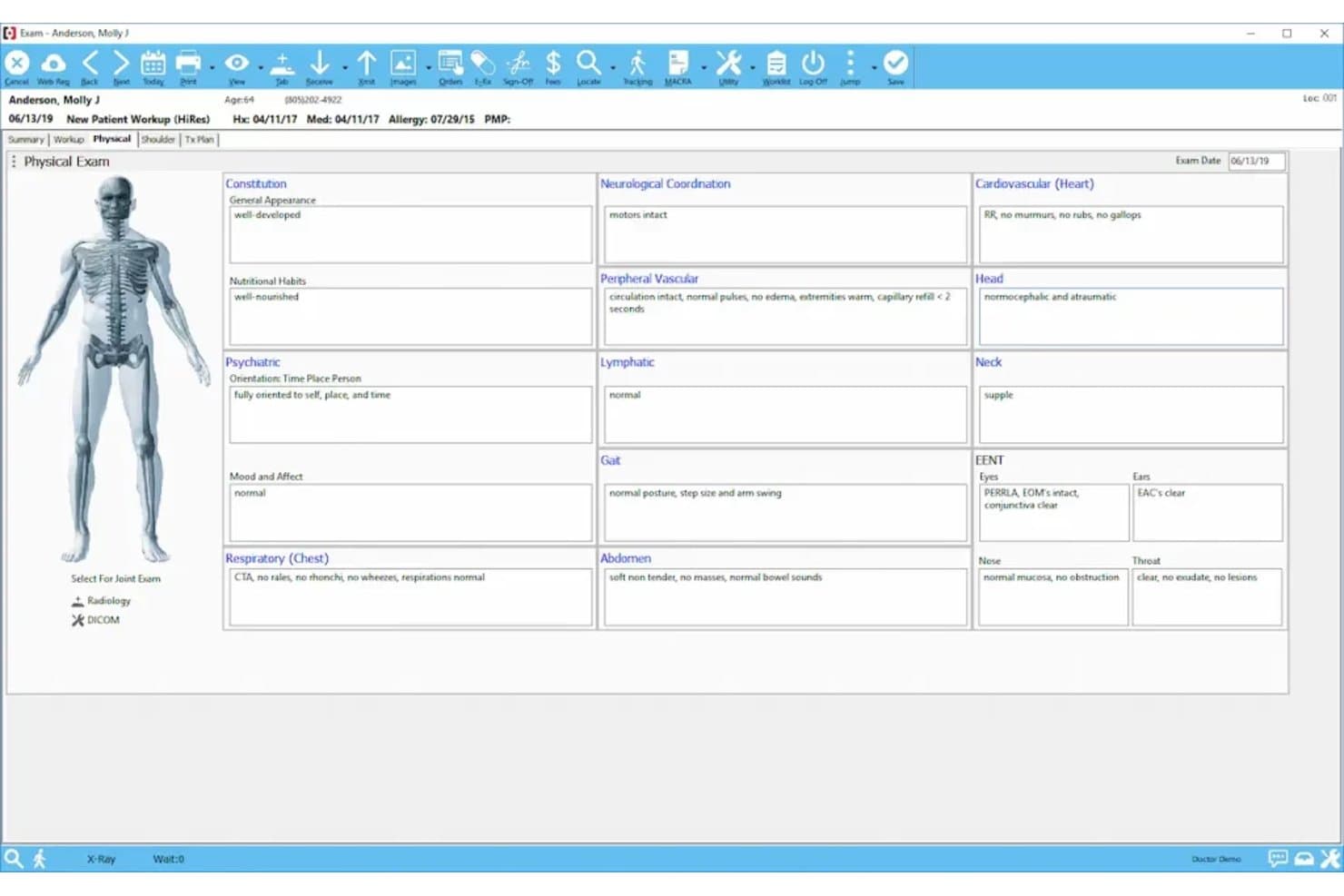
Compulink captures full physical exam findings across body systems. Compulink is a podiatry EHR and practice management platform that combines specialty-specific charting, billing and coding tools, scheduling, patient engagement, and built-in ASC EHR integration in a single system.
Who Is Compulink Best For?
Compulink is a strong fit for podiatry practices that perform surgical procedures and need a single system to coordinate both office-based and ASC workflows.
Why I Picked Compulink
I picked Compulink as one of the best because its built-in ASC EHR integration is something I rarely see handled this natively in podiatry software. When a patient moves from your office to your surgical center, the clinical record follows without manual re-entry. I also like that surgical case tracking and wound documentation, including Wagner grading and photo attachment, are part of the same system rather than bolted-on add-ons.
Compulink Key Features
- SMART Coding: Automatically suggests billing codes based on documented diagnoses and procedures to support accurate claim submission.
- PracticeWatch: Automates repetitive front-office tasks like eligibility checks, appointment reminders, and billing workflows.
- Ulcer and wound classification tools: Supports Wagner grading, University of Texas diabetic-foot classification, wound measurements, and photo documentation within the patient record.
- Advantage Analytics: Delivers interactive dashboards combining clinical, financial, and operational data with drill-down to the individual patient level.
Compulink Integrations
Compulink offers built-in ASC EHR integration plus integrations with Surescripts, Updox, and Phreesia. Its read-only RESTful HL7 FHIR R4 API and FHIR Bulk Data Access support custom connectivity.
Pros and Cons
Pros:
- Unified records simplify patient flow
- Billing workflows support podiatry claims
- Customizable foot and wound charting
Cons:
- Updates sometimes disrupt clinical workflows
- Treatment-plan templates can take setup
Learn more about Compulink: Best for AI-assisted front-office workflows
- Free demo available
- Pricing upon request
Visit WebsiteCustomer Rating:3.5/5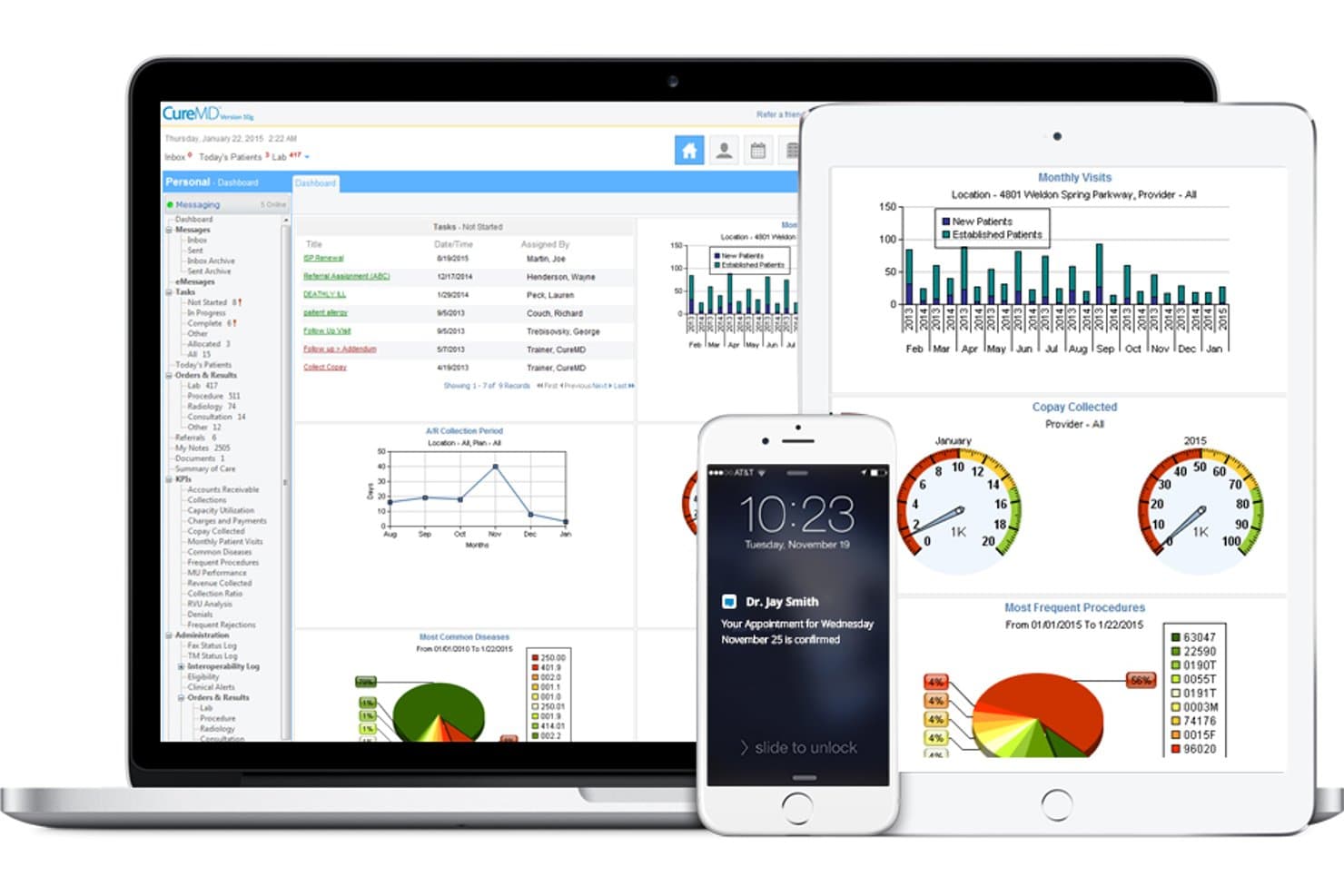
CureMD displays dashboards and KPIs across devices for podiatry practices. CureMD is a cloud-based podiatry EHR and practice management platform that combines specialty-specific charting templates, foot and ankle imaging, AI-assisted documentation, e-prescribing, scheduling, and integrated billing and claims management.
Who Is CureMD Best For?
CureMD is a strong fit for podiatry practices that want AI-driven front-office automation—like 24/7 scheduling, intake, and insurance handling—built into their EHR.
Why I Picked CureMD
I've included CureMD in my top picks because its AI Contact Center genuinely sets it apart from other podiatry EHRs. It handles 24/7 scheduling, insurance eligibility checks, and patient intake automatically, so your front desk isn't the bottleneck when a patient calls after hours to book a diabetic foot care appointment. I also like that the AI scribe captures podiatry-specific SOAP notes from ambient conversation and queues orders directly to labs or imaging centers after sign-off.
CureMD Key Features
- Foot and ankle imaging: Upload and annotate foot and ankle diagrams directly within the patient chart during documentation.
- Podiatry-specific coding support: Access built-in ICD-10 and CPT codes tailored to podiatric procedures, including diabetic foot care and nail treatments.
- Electronic lab orders and results: Send orders to more than 9,000 diagnostic labs and receive results directly in the EHR, with abnormal-result alerts.
- Inventory management: Track supplies, medications, and orthotics with barcode scanning, reorder alerts, and expiration-date monitoring across locations.
CureMD Integrations
CureMD integrates with Surescripts for e-prescribing and supports interoperability with pharmacies, payers, imaging services, and health information exchanges. Its FHIR API and HL7 support enable custom integrations.
Pros and Cons
Pros:
- AI handles after-hours booking and intake
- Scheduling and patient records share one system
- Podiatry templates pair with foot imaging
Cons:
- Support experiences vary between users
- Users report lag and occasional freezes
Learn more about CureMD: Best for office-to-ASC care
- Free demo available
- From $499/user/month
Visit WebsiteCustomer Rating:3.4/5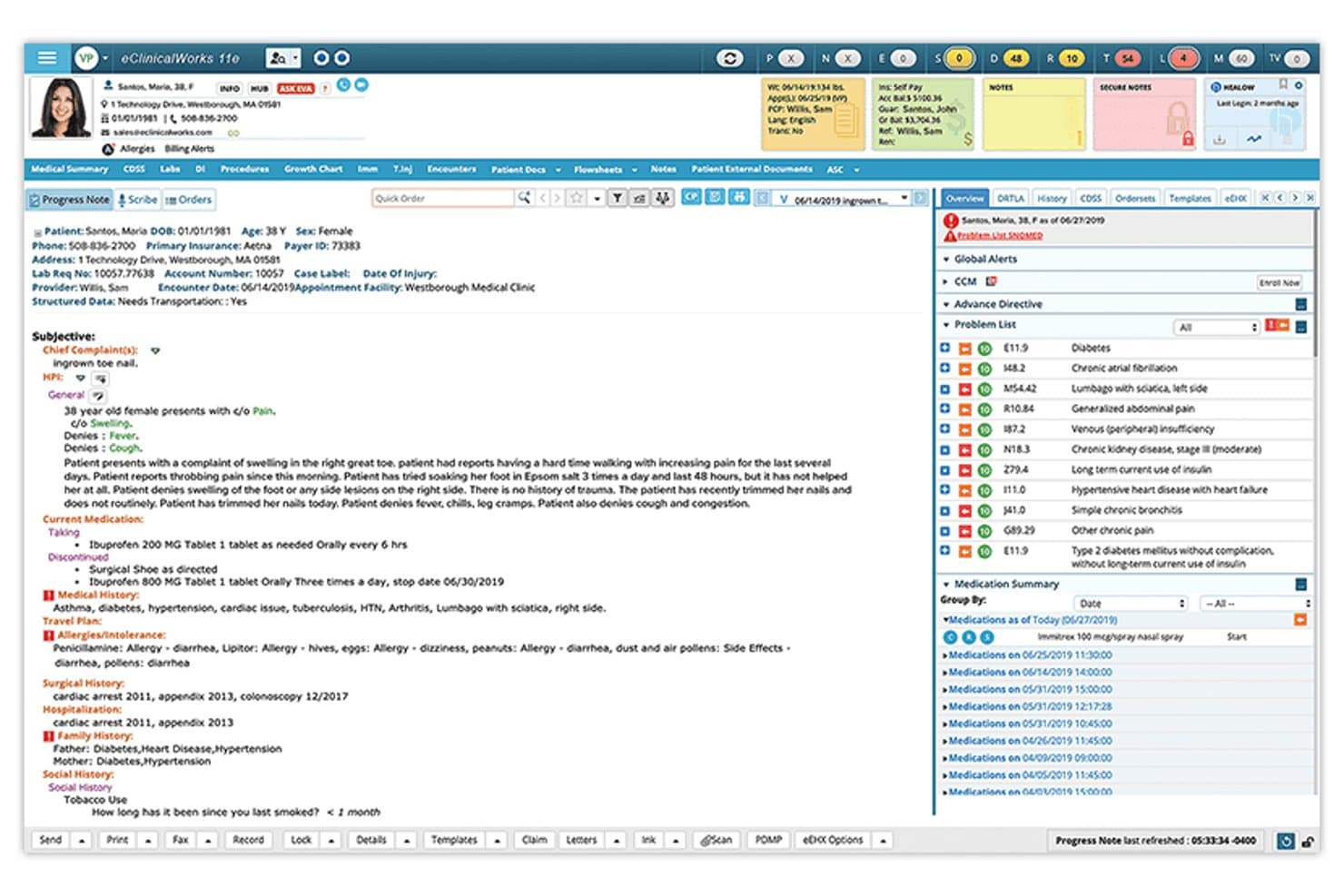
eClinicalWorks displays podiatry progress notes with patient history and problem list. eClinicalWorks is a cloud-based EHR and practice management platform built for specialty and ambulatory care, offering podiatry-specific documentation, AI-assisted charting, scheduling, patient engagement, and an integrated ambulatory surgery center solution.
Who Is eClinicalWorks Best For?
eClinicalWorks is a strong fit for podiatry practices that operate alongside or within an ambulatory surgery center and need their office and ASC workflows connected in one system.
Why I Picked eClinicalWorks
I've included eClinicalWorks in my top picks because it's the only option on my list with a built-in ambulatory surgery center solution that connects directly to the office-side EHR. If your podiatry practice shares patients with an ASC, that link matters: surgical histories, medications, and progress notes follow the patient without manual re-entry. I also like that the Eva Virtual Assistant lets clinicians pull up patient histories and book follow-up appointments by voice, which keeps documentation moving between the office and procedure setting.
eClinicalWorks Key Features
- healow CHECK-IN: Lets patients review demographics and insurance, sign consent forms, pay copays, and update medications and surgical histories before their appointment.
- eClinicalMessenger: Sends automated appointment reminders and customized health reminder campaigns directly to patients.
- PRISMA health information search: Pulls patient records from outside providers, urgent care centers, and hospitals into a single, searchable care timeline.
- RCM as a Service: Handles claim creation, denial and rejection management, appeals, and accounts-receivable tracking on behalf of your practice.
eClinicalWorks Integrations
eClinicalWorks offers native ASC-device integrations with Criticare, FujiFilm, Olympus, Pentax, and Mindray, plus an API integration with PointClickCare. FHIR APIs and PRISMANet support custom and nationwide health record exchange.
Pros and Cons
Pros:
- Configurable chart templates support clinic workflows
- Claims and denials visible in one workflow
- Office and ASC records stay connected
Cons:
- Podiatry-specific coding guidance remains unclear
- Reported lag can interrupt busy sessions
- Dense screens add extra charting clicks
Learn more about eClinicalWorks: Best for Medicare and modifier claim checks
- Free demo available
- From $229/user/month
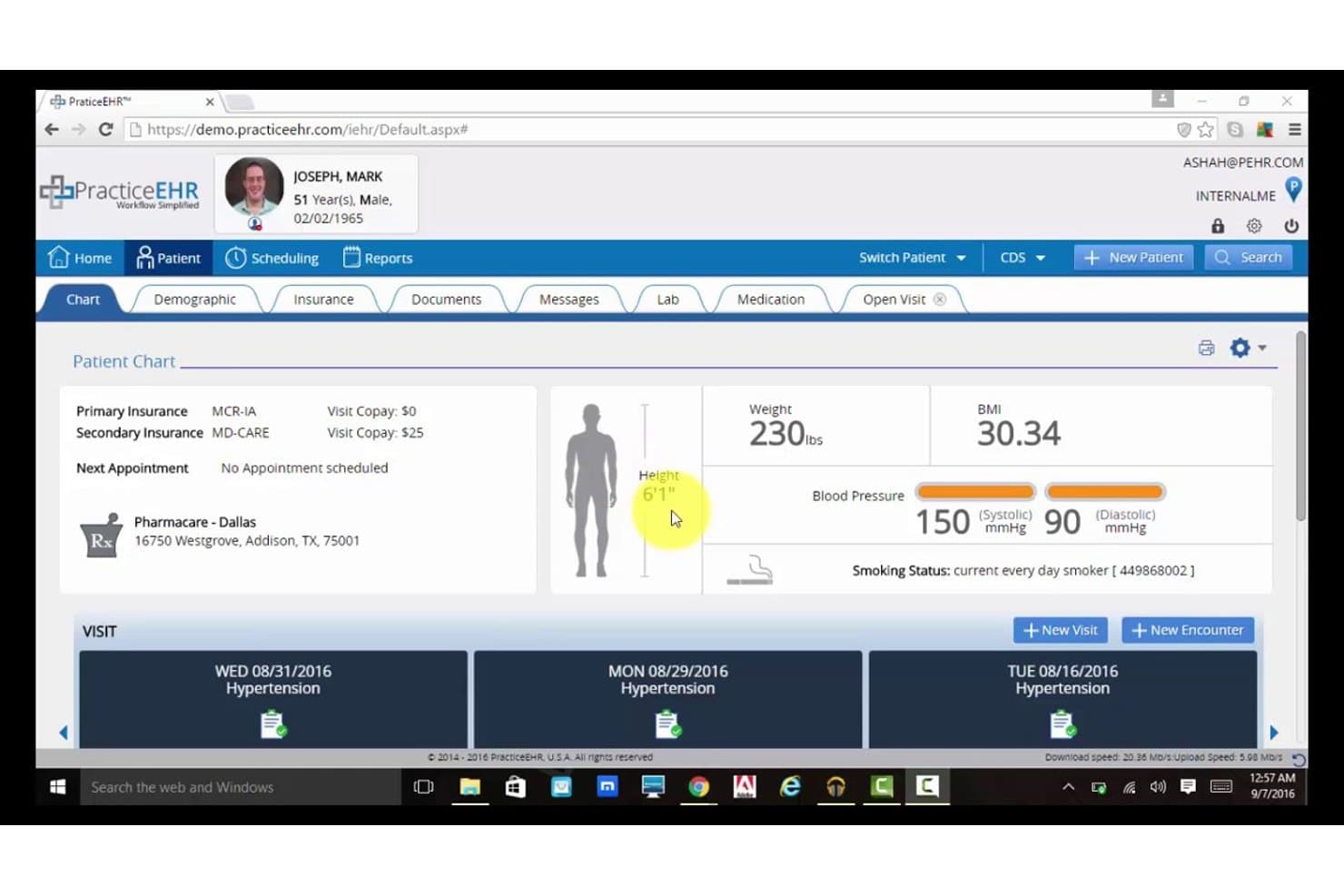
PracticeEHR displays patient vitals and visit history at a glance. PracticeEHR is a podiatry EHR and practice management platform that combines specialty charting with 3D foot and ankle diagrams, wound care documentation, DME and orthotics tracking, AI-assisted coding, and integrated billing tools.
Who Is PracticeEHR Best For?
PracticeEHR is a strong fit for podiatrists and billing staff who need built-in Medicare and modifier checks to reduce claim rejections.
Why I Picked PracticeEHR
I've included PracticeEHR in my top picks because its AI Claim Editor actively checks bilateral modifiers and Medicare-specific rules before a claim ever leaves your practice. That kind of built-in safeguard matters when podiatry billing is so prone to rejections over modifier errors. I also like that AI Coding pairs directly with this, suggesting CPT and ICD codes from visit documentation so your billing staff isn't catching errors after the fact.
PracticeEHR Key Features
- 3D foot and ankle diagrams: Annotate detailed 3D diagrams of the foot and ankle directly within the patient chart to document clinical findings.
- Wound care and diabetic foot exam documentation: Record wound measurements and photos, and complete structured diabetic foot exams with healing tracked across visits.
- DME and orthotics tracking: Prescribe, order, and track orthotics, braces, and boots in the chart, with device records linked to authorizations and claims.
- AI Scribe: Transcribes visits in over 20 languages and drafts SOAP notes with suggested ICD and CPT codes for provider review.
PracticeEHR Integrations
PracticeEHR offers integrations with Surescripts, Quest, Labcorp, Kno2, Carequality, TEFCA, CareLink, and Zoom. It also provides an open FHIR R4 API for custom integrations.
Pros and Cons
Pros:
- Scheduling and reports support multi-site practices
- Custom templates reduce repetitive charting
- Podiatry documentation supports foot-care workflows
Cons:
- Users report lag and inconsistent support
- Podiatry billing setup can take time
Learn more about PracticeEHR: Best for personalized patient care
- Free demo available
- From $499/user/month

ChartPerfect makes is super easy to keep track of all your patients' needs ChartPerfect is a podiatry-focused EHR and practice management platform that combines customizable clinical templates, integrated scheduling, e-prescribing with EPCS, patient engagement tools, and built-in billing with optional RCM services.
Who Is ChartPerfect Best For?
ChartPerfect is built for podiatrists and DPMs who want a single platform that handles clinical charting, billing, and patient engagement without piecing together separate tools.
Why I Picked ChartPerfect
ChartPerfect earns its spot on my shortlist because it's built specifically for podiatry, and that focus shows in how it handles patient care at the chart level. I particularly like that providers can customize clinical templates to match their exact workflows, so a DPM seeing a patient for diabetic foot monitoring versus a nail procedure isn't working around a generic template. The patient portal lets patients submit intake forms, view lab results, and request prescription refills before or between visits, keeping care continuous and personal.
ChartPerfect Key Features
- Color-coded scheduling: Appointments can be color-coded by provider or appointment type, with drag-and-drop rescheduling and recurring visit support.
- MIPS dashboard: Providers can track MIPS performance categories in a built-in dashboard, with guidance available from dedicated MIPS Success Coaches.
- Electronic prior authorizations: The ePA module lets providers submit and manage medication prior authorizations electronically from within the chart.
- Integrated telehealth: Providers can conduct virtual visits with in-session charting, secure file sharing, and a patient queue, all within ChartPerfect.
ChartPerfect Integrations
ChartPerfect offers native integrations with Dragon Medical, LabCorp, Quest, ClaimRemedi by Waystar, PayJunction, and SRfax. An API for custom integrations isn’t documented.
Pros and Cons
Pros:
- Billing tools include claim scrubbing and ERAs
- Portal supports intake and refill requests
- Podiatry templates adapt to foot-care workflows
Cons:
- Some users report billing and export difficulties
- Reviewers report occasional update glitches
Learn more about ChartPerfect:
How I Evaluate Podiatry EHR
I split my evaluation into three parts, giving the most weight to core functions: documenting podiatry exams and managing appointments and patient records. Next, I look for differentiators such as wound tracking. Finally, I consider support, onboarding, and whether pricing fits the practice.
Core Functionality (Table Stakes For This List)
When I'm selecting tools for my list, I score each one on a scale from 0 (does not offer the functionality) to 5 (excels in this area) for each core functionality listed below. I then convert the total into a percentage to help assess each tool's overall fit, with extra weight on any functionalities I’ve deemed essential.
- Podiatry Charting (Essential): I look for templates that cover foot and gait exams, diabetic foot care, nail procedures, and orthotics, with room to adapt notes to each visit.
- Clinical Records (Essential): I evaluate how clearly teams can review and update histories, diagnoses, treatment plans, and progress notes across visits.
- Scheduling: I check for multi-provider calendars, appointment types, and reminders that support routine visits and follow-ups.
- Billing and Claims: I look for claim workflows and coding support for podiatry services, including nail, orthotic, and surgical procedures.
- E-Prescribing: I assess whether clinicians can prescribe from the patient chart and manage medication details as part of the visit workflow.
- Patient Data Exchange: I check how securely staff can share or export records for referrals, labs, imaging, and other care coordination.
Once I have a list of tools that meet the criteria, I consider what sets each platform apart.
Differentiating Factors (What Sets Vendors Apart)
Here's how I compare and contrast different vendors:
Standout Features
Wound care measurement is where I start. Diabetic foot patients need visit-over-visit tracking of wound dimensions and photo comparisons, so I check whether a platform logs measurements and stores images in a timeline view. I also look at surgical case tracking—specifically, whether pre-op, operative, and post-op notes link together in one workflow rather than living as separate chart entries. Gait analysis documentation matters too; vendors like NexGen and ModMed handle orthotics-design notes differently, and I evaluate how well each one captures biomechanical findings beyond a basic exam template.
Beyond Features
I evaluate onboarding support closely because most podiatry practices don't have dedicated IT staff. Vendors like ModMed and DrChrono differ in whether they assign specialty-trained onboarding reps or generic EHR coaches, and that gap shapes how fast a team gets comfortable. I also check how pricing scales with practice growth—whether adding a provider or location means renegotiating a contract or simply activating a seat. Finally, I look at interoperability with orthotics labs and imaging systems, since podiatrists who order custom orthotics or store in-office X-rays need those connections working from day one.
Cum să alegeți o soluție EHR pentru podologie
Este ușor să vă pierdeți în liste lungi de funcții și structuri complexe de prețuri. Pentru a vă ajuta să rămâneți concentrat în timp ce parcurgeți procesul unic de selectare a software-ului, iată o listă de verificare a factorilor de care trebuie să țineți cont:
| Factor | Ce trebuie luat în considerare |
|---|---|
| FactorScalabilitate | Ce trebuie luat în considerarePoate software-ul să se dezvolte odată cu cabinetul dumneavoastră? Luați în considerare dezvoltarea viitoare și dacă soluția EHR poate gestiona un număr mai mare de pacienți fără costuri suplimentare. |
| FactorIntegrări | Ce trebuie luat în considerareSe conectează la sistemele pe care le utilizați în prezent, precum instrumentele de facturare sau de laborator? Căutați un schimb de date fără întreruperi pentru a evita introducerea manuală. |
| FactorPosibilități de personalizare | Ce trebuie luat în considerarePuteți adapta soluția EHR la fluxurile dumneavoastră de lucru? Verificați dacă șabloanele și câmpurile pot fi ajustate pentru a corespunde nevoilor specifice ale cabinetului. |
| FactorUșurință în utilizare | Ce trebuie luat în considerareEste interfața intuitivă? Asigurați-vă că personalul are nevoie de o instruire minimă și că sarcinile pot fi finalizate rapid. |
| FactorImplementare și integrare inițială | Ce trebuie luat în considerareCât timp va dura până când veți putea începe? Evaluați asistența și resursele disponibile în timpul configurării pentru a evita o tranziție lentă. |
| FactorCost | Ce trebuie luat în considerareExistă taxe ascunse? Comparați modelele de prețuri și asigurați-vă că există transparență pentru a vă încadra în buget. |
| FactorMăsuri de securitate | Ce trebuie luat în considerareRespectă standardele de protecție a datelor, precum HIPAA? Asigurați-vă că datele pacienților sunt criptate și că accesul este controlat. |
| FactorDisponibilitatea asistenței | Ce trebuie luat în considerareEste disponibil ajutorul atunci când aveți nevoie de el? Luați în considerare tipurile de asistență oferite și timpii de răspuns ai acestora. |
Ce este o soluție EHR pentru podologie?
Soluția EHR pentru podologie este un sistem digital conceput pentru gestionarea dosarelor pacienților, a facturării, a programărilor și a fluxurilor de lucru specializate, precum documentarea îngrijirii rănilor, în cabinetele de podologie. Podologii și personalul lor de asistență folosesc, în general, aceste soluții de dosare medicale electronice pentru a îmbunătăți îngrijirea pacienților și eficiența operațională. Funcțiile de programare a consultațiilor, gestionare a dosarelor pacienților și facturare ajută la operațiunile zilnice și la respectarea cerințelor de conformitate. În general, aceste instrumente simplifică sarcinile administrative și îmbunătățesc îngrijirea pacienților.
Funcții
Atunci când alegeți o soluție EHR pentru podologie, urmăriți următoarele funcții esențiale:
- Gestionarea dosarelor pacienților: Organizează și stochează în siguranță informațiile despre pacienți, făcându-le ușor accesibile furnizorilor de servicii medicale.
- Programarea consultațiilor: Simplifică programarea și gestionarea consultațiilor, reducând numărul absențelor și optimizând operațiunile clinicii.
- Facturarea și procesarea asigurărilor: Automatizează sarcinile de facturare și solicitările de despăgubire, contribuind la reducerea erorilor și la accelerarea ciclurilor de plată.
- Șabloane personalizabile: Permite crearea unor planuri de tratament și documentații personalizate, specifice nevoilor podiatriei.
- Capacități de telemedicină: Permite consultații la distanță, extinzând accesul la îngrijire și oferind pacienților mai multă comoditate.
- Integrarea cu instrumentele de diagnostic: Se conectează la instrumente precum dispozitivele de imagistică, asigurând transferul fără întreruperi al datelor și îngrijire cuprinzătoare.
- Acces la portalul pacientului: Oferă pacienților posibilitatea de a-și vizualiza dosarele, de a programa consultații și de a comunica online cu furnizorii de servicii medicale.
- Securitatea datelor și conformitatea: Asigură protejarea datelor pacienților și respectarea reglementărilor din domeniul medical, precum HIPAA.
- Analiză și raportare: Oferă informații despre performanța cabinetului și rezultatele pacienților prin rapoarte și analize detaliate.
- Accesibilitate mobilă: Permite furnizorilor de servicii medicale să acceseze sistemul EHR din mers, sporind flexibilitatea și eficiența.
Beneficii
Implementarea unui sistem EHR pentru podiatrie oferă numeroase beneficii echipei și afacerii dumneavoastră. Iată câteva dintre acestea:
- Îngrijire îmbunătățită a pacienților: Accesul la dosare detaliate ale pacienților și la planuri de tratament îi ajută pe furnizorii de servicii medicale să ofere îngrijire mai personalizată și mai eficientă.
- Eficiență sporită: Programarea și facturarea automatizate reduc sarcinile administrative, permițând personalului să se concentreze asupra îngrijirii pacienților.
- Conformitate îmbunătățită: Funcțiile integrate de securitate a datelor și conformitate asigură respectarea reglementărilor din domeniul medical, precum HIPAA.
- Comunicare îmbunătățită: Portalurile pacienților și capacitățile de telemedicină îmbunătățesc comunicarea dintre pacienți și furnizorii de servicii medicale, contribuind la dezvoltarea unor relații mai bune.
- Informații bazate pe date: Funcțiile de analiză și raportare oferă informații valoroase despre performanța cabinetului, sprijinind procesul decizional și elaborarea strategiei.
- Reducerea costurilor: Procesele eficiente de facturare și reducerea documentelor pe suport de hârtie conduc la economii ale costurilor administrative.
- Flexibilitate și acces: Accesibilitatea mobilă le permite furnizorilor de servicii medicale să acceseze informațiile oricând, sporind flexibilitatea fluxului de lucru.
Costuri și prețuri
Alegerea unui sistem EHR pentru podiatrie necesită înțelegerea diferitelor modele și planuri de preț disponibile. Costurile variază în funcție de funcții, dimensiunea echipei, suplimente și alți factori. Tabelul de mai jos rezumă planurile obișnuite, prețurile lor medii și funcțiile incluse de regulă în soluțiile EHR pentru podiatrie:
Tabel comparativ al planurilor pentru EHR de podiatrie
| Tipul planului | Preț mediu | Funcții comune |
|---|---|---|
| Tipul planuluiPlan gratuit | Preț mediu$0 | Funcții comuneDosare de bază ale pacienților, programarea consultațiilor și asistență limitată. |
| Tipul planuluiPlan personal | Preț mediu$20-$50/utilizator/lună | Funcții comuneGestionarea dosarelor pacienților, facturare de bază, programarea consultațiilor și asistență prin e-mail. |
| Tipul planuluiPlan pentru afaceri | Preț mediu$50-$100/utilizator/lună | Funcții comuneFacturare avansată, șabloane personalizabile, acces la portalul pacientului și asistență telefonică. |
| Tipul planuluiPlan pentru întreprinderi | Preț mediu$100+/utilizator/lună | Funcții comuneCapacități complete de integrare, analize avansate, funcții de telemedicină și asistență din partea unui manager de cont dedicat. |
EHR pentru podiatrie (Întrebări frecvente)
Se pot integra sistemele EHR pentru podiatrie cu instrumentele de diagnosticare?
Da, majoritatea sistemelor EHR pentru podiatrie se pot integra cu instrumente de diagnosticare, precum dispozitivele de imagistică. Această integrare vă permite să transferați fără probleme date între dispozitive și EHR, oferind o imagine cuprinzătoare a dosarelor pacienților. Aceasta îmbunătățește precizia diagnosticării și eficientizează procesul de planificare a tratamentului.
Sunt incluse funcționalități de telemedicină în EHR pentru podiatrie?
Multe sisteme EHR pentru podiatrie oferă funcționalități de telemedicină, permițându-vă să efectuați consultații virtuale. Această funcție este benefică pentru creșterea accesului pacienților și pentru furnizarea de îngrijiri celor care nu pot vizita fizic clinica. De asemenea, sprijină continuitatea îngrijirii și îmbunătățește satisfacția pacienților.
Cât de sigure sunt datele pacienților în sistemele EHR pentru podiatrie?
Sistemele EHR pentru podiatrie acordă prioritate securității datelor și conformității cu reglementări precum HIPAA. Acestea utilizează criptarea și controale de acces pentru a proteja informațiile pacienților. Actualizările și auditurile periodice de securitate asigură faptul că sistemul rămâne protejat împotriva potențialelor amenințări, protejând datele sensibile ale pacienților.
Cât de personalizabile sunt sistemele EHR pentru podiatrie?
Sistemele EHR pentru podiatrie oferă adesea opțiuni de personalizare pentru a răspunde nevoilor specifice ale cabinetului dumneavoastră. Puteți personaliza șabloanele, formularele și fluxurile de lucru pentru a corespunde proceselor dumneavoastră. Această flexibilitate vă ajută să creați un sistem care se aliniază cerințelor unice ale cabinetului și îmbunătățește eficiența generală.