

Software-ul de gestionare a cabinetului medical în cloud este o platformă digitală care permite echipei dumneavoastră medicale să gestioneze programările, facturarea, fișele pacienților și operațiunile zilnice din orice locație cu acces la internet. Dacă sunteți în căutarea unui software de încredere care reduce problemele administrative, vă ajută să vă organizați echipa și să oferiți îngrijiri excelente pacienților, ați ajuns în locul potrivit. Alegerea soluției potrivite înseamnă mai puțin timp petrecut pentru depanarea problemelor tehnice și mai mult timp dedicat pacienților. Vă voi prezenta cele mai bune instrumente disponibile, elementele care le diferențiază și modul în care puteți corela nevoile specifice ale cabinetului dumneavoastră cu platforma cea mai potrivită.
Why Trust Our Software Recommendations
6,700+
Reviews
20
Industry experts
16+
Evaluation factors
14
Years
Our team has been testing and reviewing software since 2012. As medical practice leaders ourselves, we know how difficult—and important—it is to choose the right software.
For this guide, we evaluated tools using hands-on testing and independent research, scoring tools using our selection criteria.
Our reviews reflect our human editorial judgment, not a sales pitch.
Tabel comparativ al software-urilor de gestionare a cabinetului medical în cloud
Acest tabel comparativ rezumă detaliile privind prețurile pentru selecția mea de software-uri de top pentru gestionarea cabinetului medical în cloud:
Sorted by: Default
| Tool | Starting Price | Website | |
|---|---|---|---|
Best for allied health scheduling and client intake | 4.7 out of 5 | $29/user/month Free demo + 14-day free trial available | Website |
Best for straightforward medical billing workflows | 4.1 out of 5 | Pricing upon request Free demo available | Website |
Best for affordable cloud-based management | 3.7 out of 5 | $199/provider/month 14-day free trial + free demo available | Website |
Best for data-driven practice and management | 3.6 out of 5 | Pricing upon request Free demo available | Website |
Best for multi-specialty practice management | 3.7 out of 5 | Pricing upon request Free demo available | Website |
Best for growing independent healthcare practices | 3.9 out of 5 | Pricing upon request Free demo available | Website |
Best for mobile-first practice management | 3.9 out of 5 | Pricing upon request Free demo available | Website |
Best for integrated clinical and revenue workflows | 3.8 out of 5 | Pricing upon request Free demo available | Website |
Best for practices needing scalable workflows | 3.7 out of 5 | Pricing upon request Not available | Website |
Best for independent practice operations | 3.6 out of 5 | $130/user/month 30-day free trial + free demo available | Website |


Recenzii ale celor mai bune software-uri de gestionare a cabinetului medical în cloud
Mai jos găsiți rezumatele mele detaliate ale celor mai bune software-uri de gestionare a cabinetului medical în cloud care au ajuns pe lista mea scurtă. Recenziile mele oferă o privire detaliată asupra funcțiilor, prețurilor și integrărilor fiecărei platforme, pentru a vă ajuta să o găsiți pe cea mai potrivită pentru dumneavoastră.
 Best for allied health scheduling and client intake
- Free demo + 14-day free trial available
- From $29/user/month
Visit WebsiteCustomer Rating:4.7/5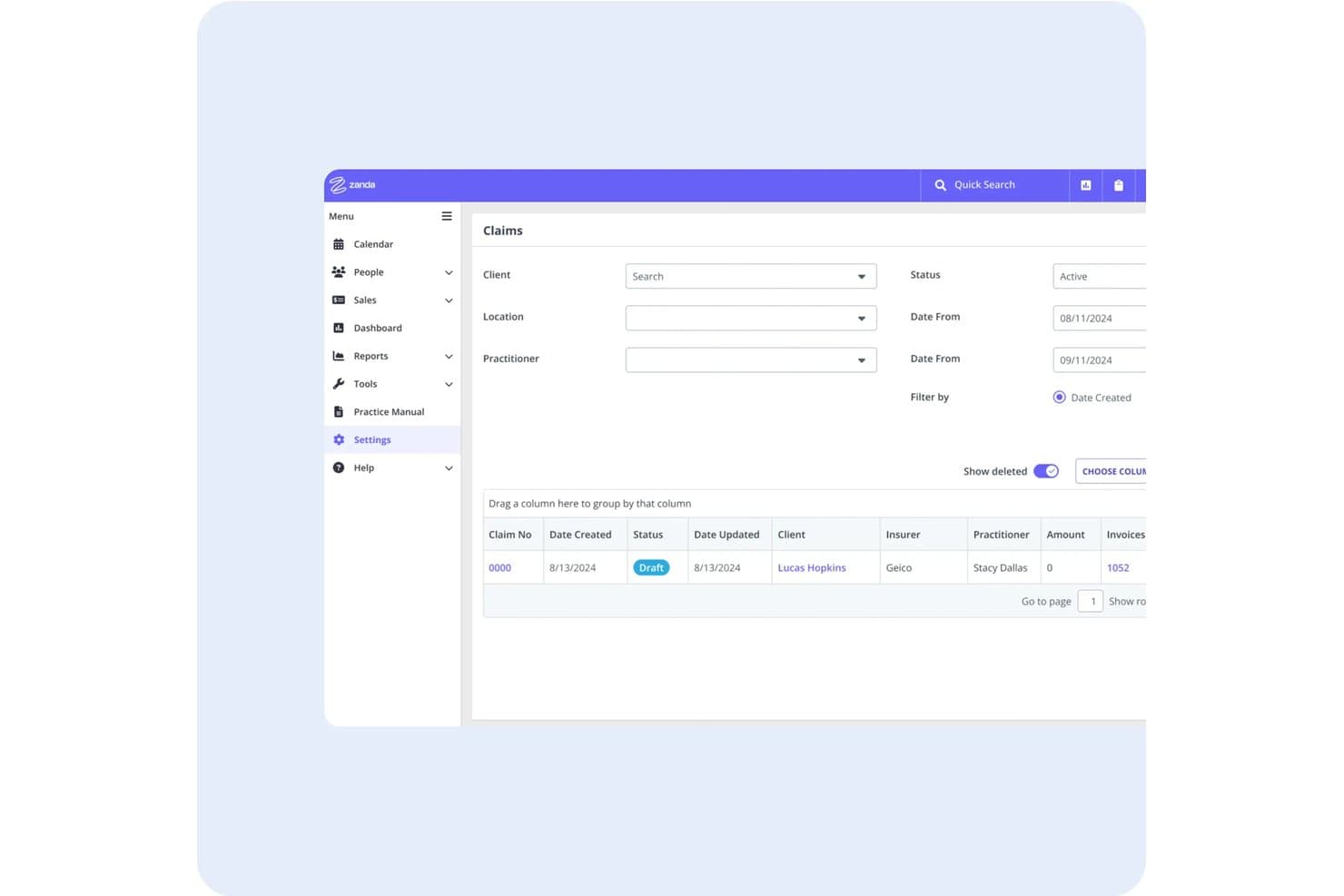
Zanda lets users track and filter insurance claims by status, date, and practitioner. Zanda is a cloud-based practice management platform built for allied health and mental health providers, offering scheduling, client intake, clinical notes, invoicing, and telehealth in one system.
Who Is Zanda Best For?
Zanda is a strong fit for allied health and mental health practitioners—such as psychologists, physiotherapists, and occupational therapists—who need scheduling and client intake in one cloud-based system.
Why I Picked Zanda
I've included Zanda in my top picks because it's one of the few cloud practice management platforms built specifically for allied health and mental health providers, and that focus shows in the scheduling tools. Its calendar handles multiple practitioners, room and equipment booking, and drag-and-drop appointment management across locations. I also like that the online self-booking portal runs 24/7 and pairs directly with automated intake forms, so new clients can book, pay, and complete consent forms before their first appointment.
Zanda Key Features
- BizzyAI session scribe: Automatically transcribes clinical sessions into structured notes, which can be reviewed, refined, and saved directly to the client profile.
- Customizable clinical note templates: Build note templates with body charts, diagrams, and visibility controls to suit different disciplines and multi-disciplinary team setups.
- ISO 27001-certified cloud hosting: Zanda runs on AWS with encrypted data storage, hourly backups, role-based access controls, 2FA, and audit logs.
- Xero and Stripe accounting integrations: Connect invoicing and payment processing to Xero for accounting reconciliation, with Stripe handling PCI Level 1-compliant online payments.
Zanda Integrations
Zanda offers integrations with Stripe, Square, Xero, Ensora Clearinghouse, Google Calendar, Outlook, Apple Calendar, Zoom, Mailchimp, and Physitrack. A read-only public API in beta supports custom integrations.
Pros and Cons
Pros:
- Reviewers praise responsive support and AI notes
- Client intake forms save directly to profiles
- Allied health scheduling handles rooms and resources
Cons:
- No native mobile app for field access
- Physician billing workflows lack deeper RCM tools
Learn more about Zanda: Best for straightforward medical billing workflows
- Free demo available
- Pricing upon request
Visit WebsiteCustomer Rating:4.1/5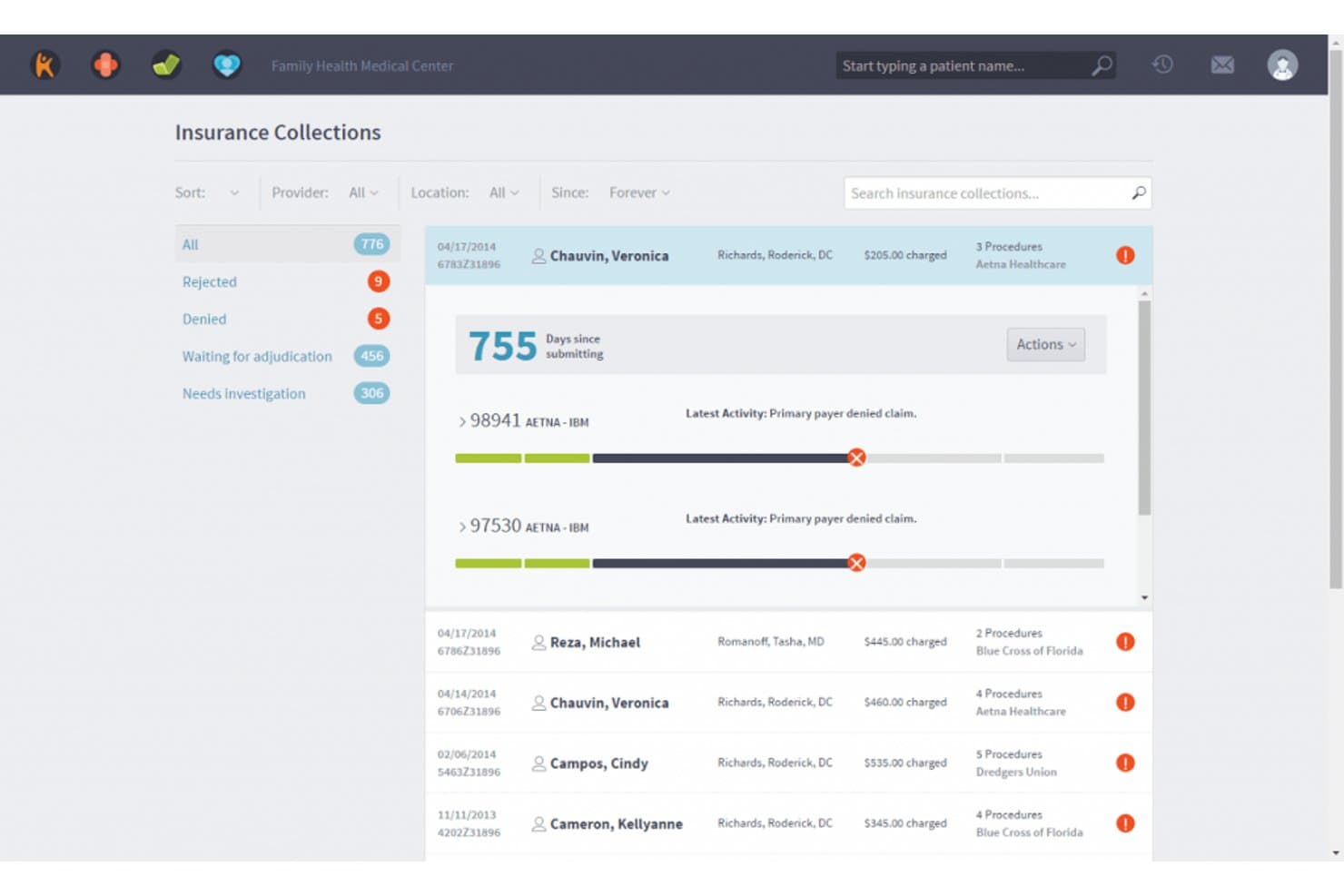
Kareo Billing offers an Insurance Collections dashboard that displays claim statuses, days since submission, and payer activity for efficient billing management. Kareo Billing is a cloud-based medical billing and practice management platform built for independent practices, combining electronic claims submission, insurance eligibility verification, revenue cycle management, patient scheduling, and EHR tools in one system.
Who Is Kareo Billing Best For?
Kareo Billing is a strong fit for small to mid-sized independent practices with 1–10 providers who manage billing in-house.
Why I Picked Kareo Billing
Kareo Billing earns its spot on my shortlist because of how cleanly it handles the claim lifecycle from submission to payment. I particularly like the automated claim scrubbing, which applies payer-specific rules before submission and flags errors before they trigger denials. The eligibility engine checks coverage against 2,700+ payers in seconds, and ERA auto-posting via RPA closes the loop by matching payments to claims without manual posting.
Kareo Billing Key Features
- Provider calendar and scheduling: Manage appointments, track provider availability, and coordinate multiple schedules in one interface.
- Patient portal: Offer patients secure access to records, appointment requests, and billing through a cloud-based portal.
- Integrated e-prescribing: Send prescriptions electronically to pharmacies with controlled substance and PDMP support.
- Automated patient statements: Generate digital or mailed billing statements with QR codes and payment links for patients.
Kareo Billing Integrations
Kareo Billing offers native integrations with WebPT, Stripe, Microsoft Excel, and QuickBooks Online Advanced. It also integrates with over 60 EHR systems and provides an API for custom integrations.
Pros and Cons
Pros:
- Connects billing with scheduling, EHR, and patient records
- Supports in-house and third-party medical billing teams
- Automates claims, payments, and patient billing workflows
Cons:
- Some features and fees depend on the selected Tebra package
- Kareo is now branded and sold as part of Tebra
Learn more about Kareo Billing: Best for affordable cloud-based management
- 14-day free trial + free demo available
- From $199/provider/month
Visit WebsiteCustomer Rating:3.7/5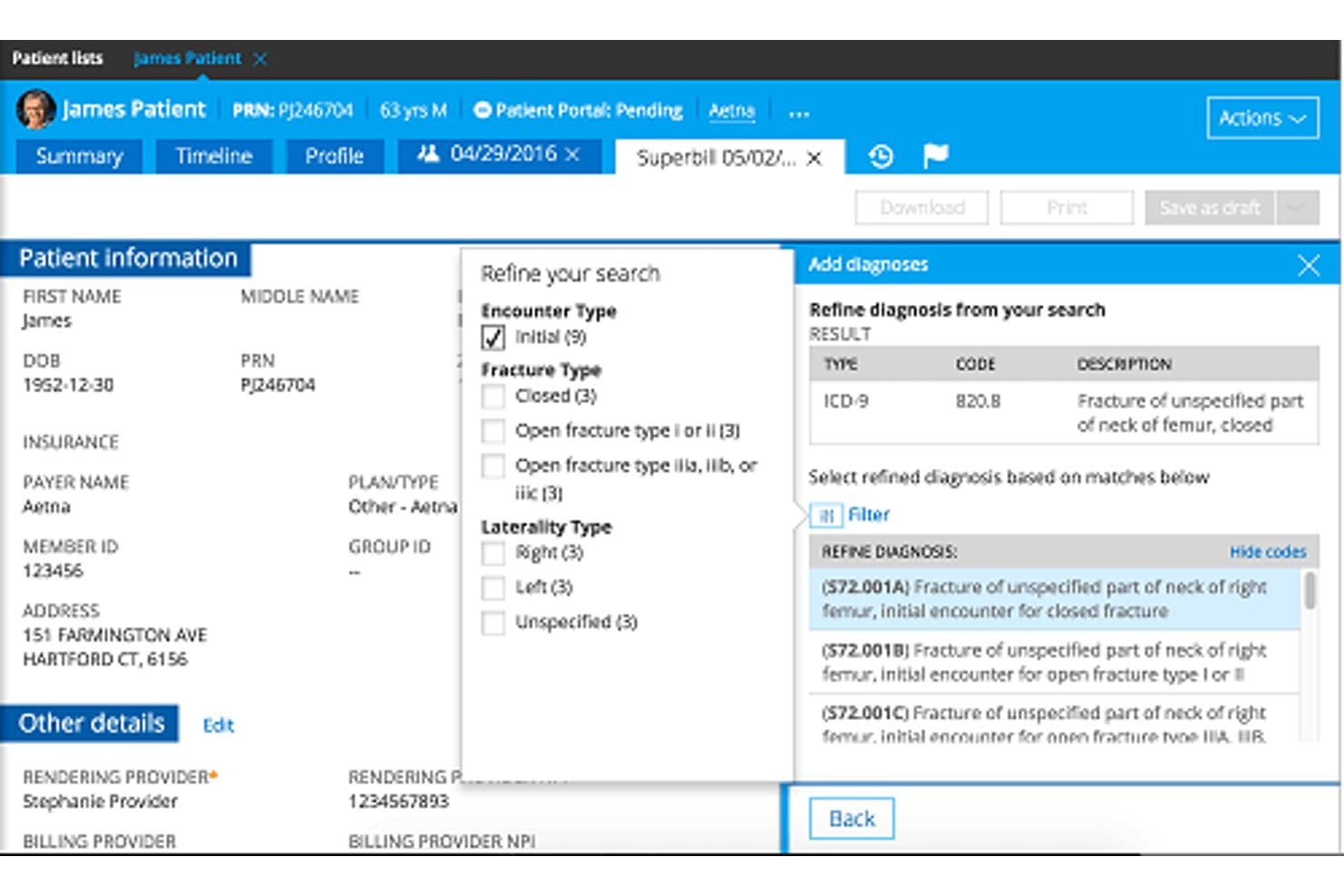
Practice Fusion offers a cloud-based superbill interface with diagnosis search, ICD-9 code selection, and patient insurance details for streamlined billing workflows. Practice Fusion is a cloud-based EHR and practice management platform for independent and small practices, combining charting, e-prescribing, patient scheduling, a patient portal, and medical billing services in one system.
Who Is Practice Fusion Best For?
Practice Fusion is a strong fit for independent physicians and small clinic teams who want a cloud-based EHR and billing system without heavy IT overhead.
Why I Picked Practice Fusion
Practice Fusion earns its spot as one of the best on my shortlist because the per-provider pricing bundles three signing staff licenses and unlimited non-signing staff into a single rate, which I think is genuinely rare in the EHR market. I like that the billing services layer includes same-day claims submission and denial management without requiring a separate RCM vendor. The free library of customizable charting templates also keeps documentation manageable for solo providers running high patient volumes.
Practice Fusion Key Features
- Cloud-based EHR platform: Access records, charting, and documentation from any web browser without on-premise servers.
- Integrated e-prescribing (including EPCS): Send electronic prescriptions for both regular and controlled substances directly to pharmacies.
- Patient portal and mobile access: Let patients view records, manage appointments, and complete intake forms online via the FollowMyHealth portal.
- Lab and imaging center integration: Receive structured results directly in the chart from major labs and imaging providers.
Practice Fusion Integrations
Practice Fusion offers native integrations with Quest Diagnostics, LabCorp, CGM LABDAQ, Updox, Medsender, Avalon Laboratory System, OpenPM, DeepScribe, Service Center, and QuickSlot Health. An API is available for custom integrations.
Pros and Cons
Pros:
- Transparent pricing and a 14-day free trial
- Customizable templates and connections with labs and imaging centers
- Cloud-based EHR with scheduling, charting, e-prescribing, and patient engagement tools
Cons:
- Advanced billing services may involve additional costs
- Requires an annual commitment
Learn more about Practice Fusion: Best for data-driven practice and management
- Free demo available
- Pricing upon request
Visit WebsiteCustomer Rating:3.6/5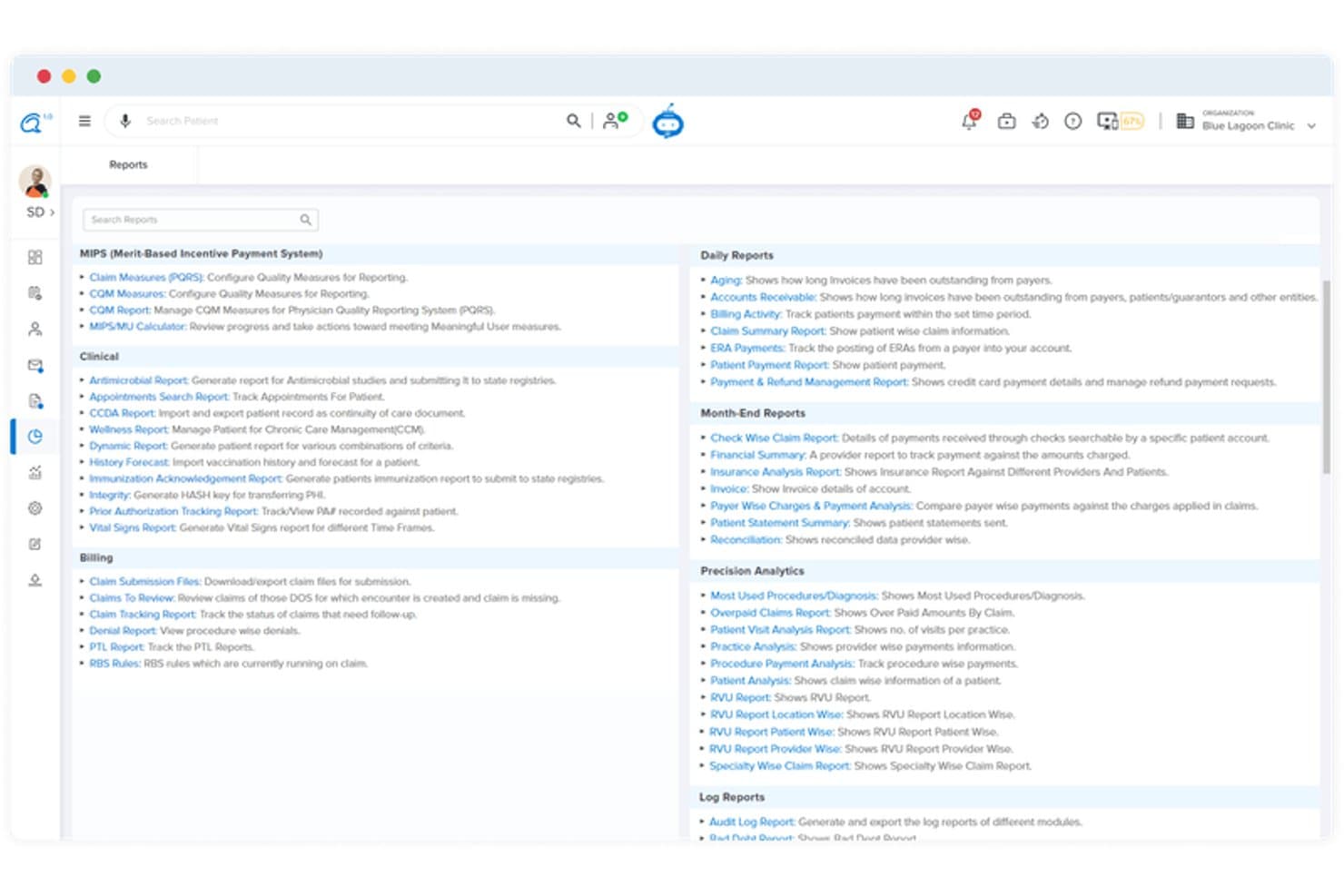
CareCloud offers a comprehensive Reports module with categorized reporting options including MIPS, Clinical, Billing, Daily, Month-End, Precision Analytics, and Log Reports. CareCloud is a cloud-based practice management platform that combines EHR, medical billing, patient scheduling, revenue cycle management, and AI-assisted clinical documentation in a single system.
Who Is CareCloud Best For?
CareCloud is a strong fit for independent and multi-location medical practices that need centralized billing, scheduling, and clinical workflows managed from a single platform.
Why I Picked CareCloud
I picked CareCloud because of how tightly its analytics layer connects clinical and financial performance in one view. The KPI dashboard surfaces billing bottlenecks and payer trends in real time, and the CollectiveIQ rules engine applies payer-specific edits before claims go out the door. I've found that combination especially useful when tracking denial patterns and identifying where A/R cycles are losing time.
CareCloud Key Features
- Integrated EHR: Manage patient records, charting, and e-prescribing within the same platform.
- Patient self-scheduling: Allow patients to book and manage their appointments online.
- Telehealth module: Conduct secure virtual visits and remote consultations with patients.
- Automated patient reminders: Send appointment reminders via SMS, email, or voice to reduce no-shows.
CareCloud Integrations
CareCloud offers native integrations with EHRYourWay, CodoniX EHR, ICANotes, MD Logic, Optivate, Praxis EMR, Sevocity, TeleVox, and Vital Interaction. An API is available for custom integrations.
Pros and Cons
Pros:
- Multi-location scheduling and centralized billing
- KPI dashboard for billing and clinical metrics
- Built-in claim scrubbing with payer-specific edits
Cons:
- Occasional system downtime interrupts workflows
- Support responsiveness is frequently reported as slow
Learn more about CareCloud: Best for multi-specialty practice management
- Free demo available
- Pricing upon request
Visit WebsiteCustomer Rating:3.7/5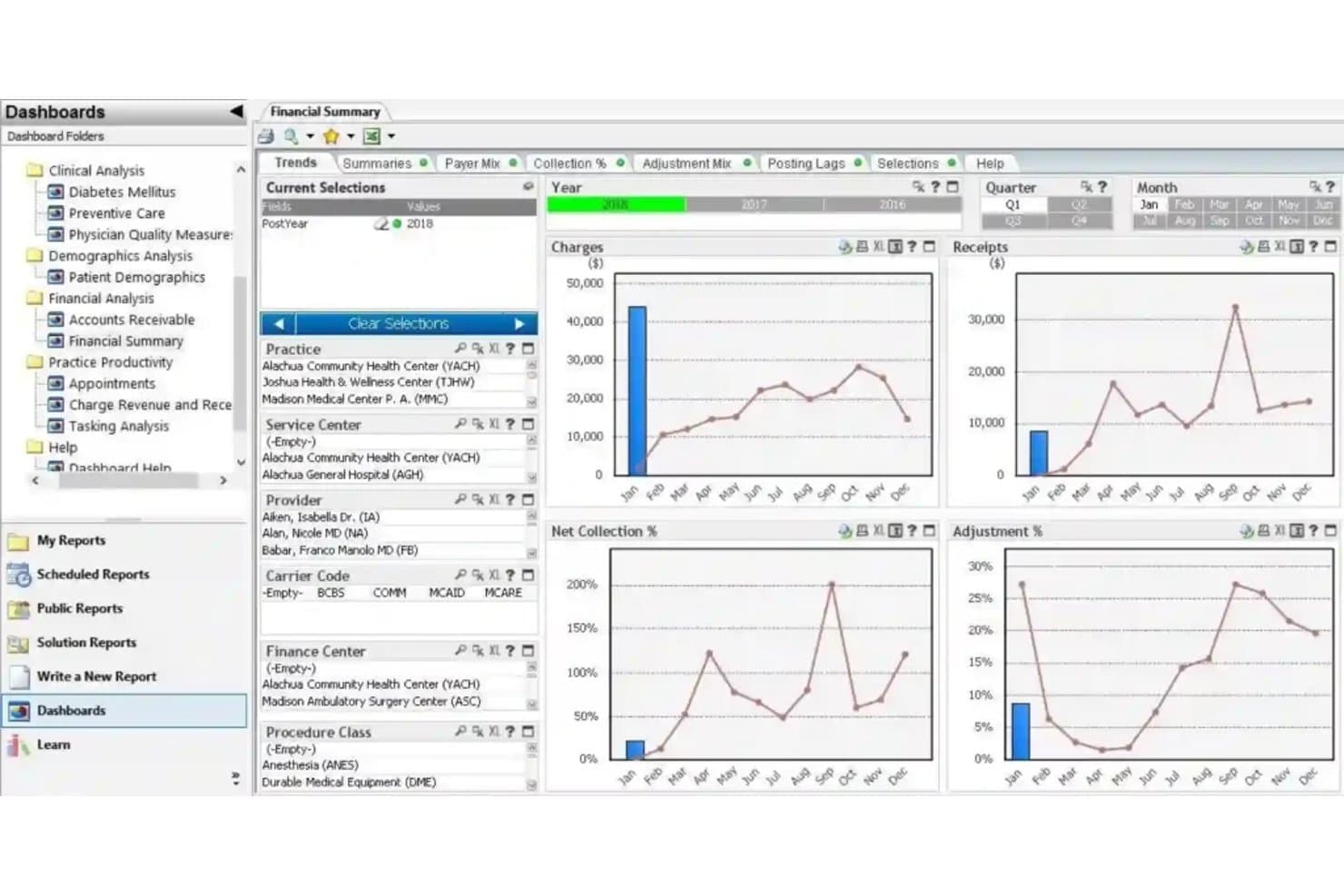
Greenway Health offers a comprehensive Financial Summary dashboard with trend charts for charges, receipts, net collection percentage, and adjustment percentage across monthly and quarterly views. Greenway Health is a cloud-based EHR and practice management platform that combines patient scheduling, medical billing, revenue cycle management, and clinical documentation tools for multi-specialty and multi-location medical practices.
Who Is Greenway Health Best For?
Practice administrators and billing managers at independent multi-specialty clinics will get the most out of Greenway Health's unified scheduling and RCM tools.
Why I Picked Greenway Health
Greenway Health earns its spot on my shortlist because its configurable specialty templates support how different clinical workflows can operate side by side. I like that a single Intergy instance handles OB/GYN charting, cardiology documentation, and pediatric scheduling without forcing each department into the same structure. Novare's AI-assisted coding also surfaces specialty-specific code suggestions and initiates prior authorizations in context.
Greenway Health Key Features
- Integrated patient portal: Lets patients view records, request appointments, and communicate with providers online.
- Automated eligibility verification: Checks insurance coverage in real time at scheduling and check-in.
- Multi-location scheduling: Handles appointments and provider calendars across several clinic sites.
- Built-in revenue cycle management: Supports claim submission, ERA/EOB processing, and payment posting within the platform.
Greenway Health Integrations
Greenway Health offers native integrations with Clearwave, CheckinAsyst, Charge Capture, Luma Health, MotionMD, PatientPop, Breg Vision, and InstaMed. Its Greenway Exchange platform supports data exchange via HL7 FHIR, Direct messaging, and Commonwell Health Alliance. An API is available for custom integrations.
Pros and Cons
Pros:
- Multi-location provider scheduling capabilities
- Real-time insurance verification at check-in
- Configurable templates for multiple specialties and workflows
Cons:
- Support response times are frequently delayed
- Cloud migration can disrupt legacy workflows
Learn more about Greenway Health: Best for growing independent healthcare practices
- Free demo available
- Pricing upon request
Visit WebsiteCustomer Rating:3.9/5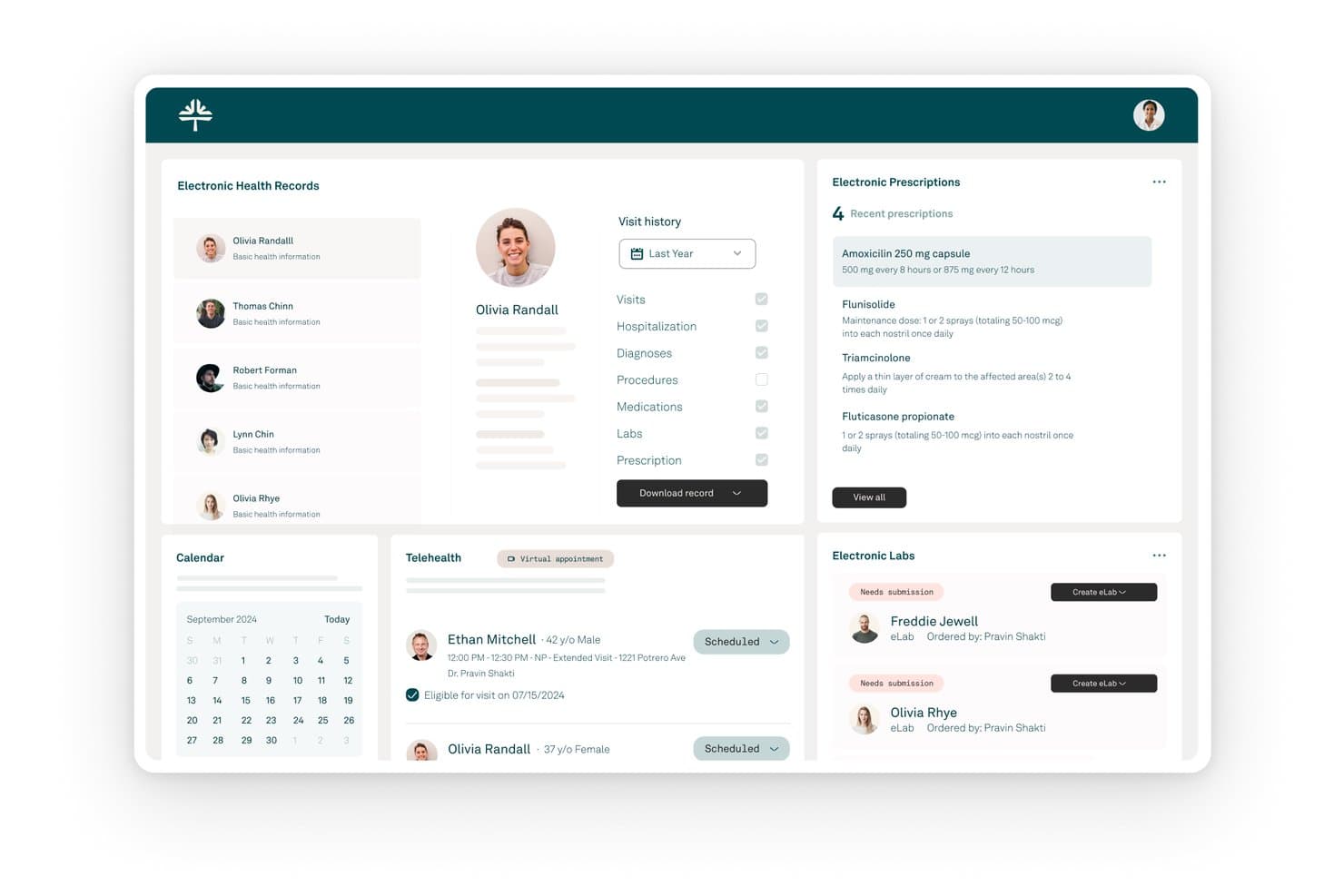
Tebra offers a unified cloud-based dashboard combining electronic health records, prescriptions, telehealth scheduling, labs, and a calendar in one interface. Tebra is a cloud-native practice management platform built for independent medical practices, combining EHR, patient scheduling, medical billing, revenue cycle management, and patient engagement tools in a single system.
Who Is Tebra Best For?
Tebra is a strong fit for small to mid-size independent practices, from solo providers to multi-provider clinics looking to manage growth without adding administrative headcount.
Why I Picked Tebra
I've included Tebra in my top picks because its per-provider pricing model is genuinely built around how independent practices grow. You pay per clinical provider, not per seat, so your entire front desk and billing team can work in the platform without adding to your monthly bill. I also like that Tebra bundles practice marketing tools, including reputation management and AI Review Replies across 80+ directories, inside the same platform where you manage scheduling and billing.
Tebra Key Features
- AI Note Assist: Creates clinical documentation from visit notes to speed up encounters.
- Automated eligibility checks: Verifies patient insurance coverage directly inside the workflow before appointments.
- Advanced telehealth: Hosts HIPAA-compliant virtual visits integrated with patient scheduling and charting.
- Digital intake forms: Lets patients complete and submit registration fields electronically before their appointment.
Tebra Integrations
Tebra offers native integrations with lab providers, imaging centers, Appriss Health for PDMP, EPCS providers, and Google Business Profile, and provides an API for custom integrations.
Pros and Cons
Pros:
- Real-time eligibility checks before appointments
- Built-in patient reputation management tools
- Unlimited non-provider staff seats per account
Cons:
- Built-in telehealth sometimes experiences minor glitches
- Occasional reports of slow customer support
Learn more about Tebra: Best for mobile-first practice management
- Free demo available
- Pricing upon request
Visit WebsiteCustomer Rating:3.9/5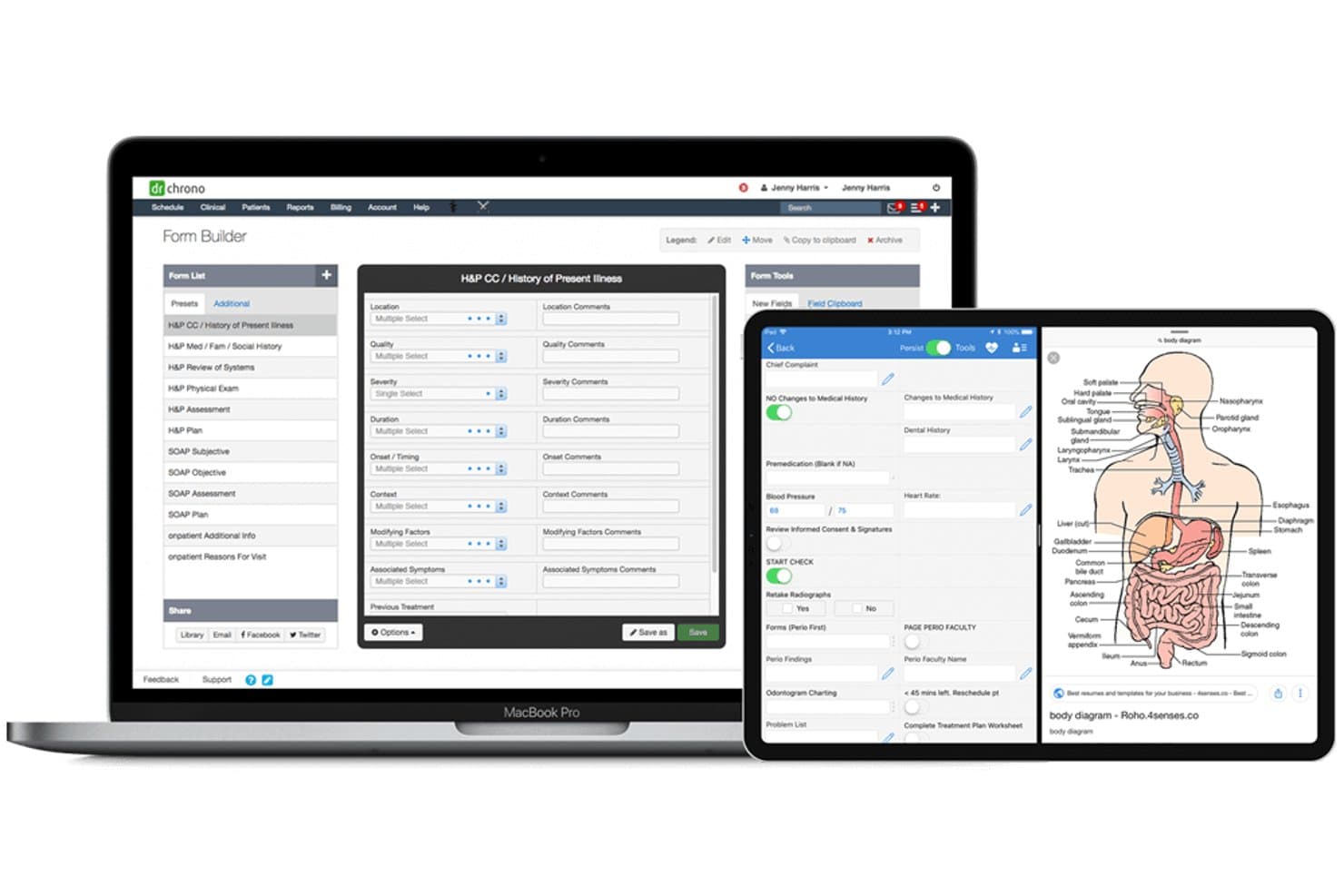
DrChrono offers a cloud-based Form Builder with customizable H&P templates, a mobile patient intake interface, and an anatomical body diagram tool across desktop and tablet devices. DrChrono is a cloud-native EHR and practice management platform that combines patient scheduling, medical billing, clinical charting, and revenue cycle management, built natively for Apple iOS devices alongside full browser-based access.
Who Is DrChrono Best For?
DrChrono is a strong fit for independent physician practices and specialty clinics that run Apple devices and want EHR, scheduling, and billing in one cloud platform.
Why I Picked DrChrono
I picked DrChrono as one of the best because it's built iOS-native from the ground up, not retrofitted for mobile after the fact. Charting on an iPad includes free-drawing directly on diagnostic images, and EverHealth Scribe captures notes hands-free during visits. I can complete a full clinical encounter from an iPhone without ever needing to open a desktop browser.
DrChrono Key Features
- Integrated telehealth: Hosts secure video visits with screen sharing and document upload directly inside the EHR.
- Real-time insurance eligibility checks: Verifies patient insurance coverage within the appointment workflow.
- Automated patient reminders: Sends SMS, email, and phone reminders to reduce no-shows and late cancellations.
- Practice chat: Enables secure in-app messaging between front office, clinical, and billing teams.
DrChrono Integrations
DrChrono offers native integrations with Fullscript, Square, Box, DeepScribe, CrelioHealth, Updox, Ambra Health, and Demandforce, plus marketplace integrations with Birdeye, Weave, Swell, rater8, Beam Health, and InvoiceSherpa. An open API is available for custom integrations.
Pros and Cons
Pros:
- Built-in check-in kiosk for patients
- AI-powered no-show and payment prediction
- Full clinical workflow from an iPad
Cons:
- Support response times can be inconsistent
- Occasional syncing delays with Apple devices
Learn more about DrChrono: Best for integrated clinical and revenue workflows
- Free demo available
- Pricing upon request
Visit WebsiteCustomer Rating:3.8/5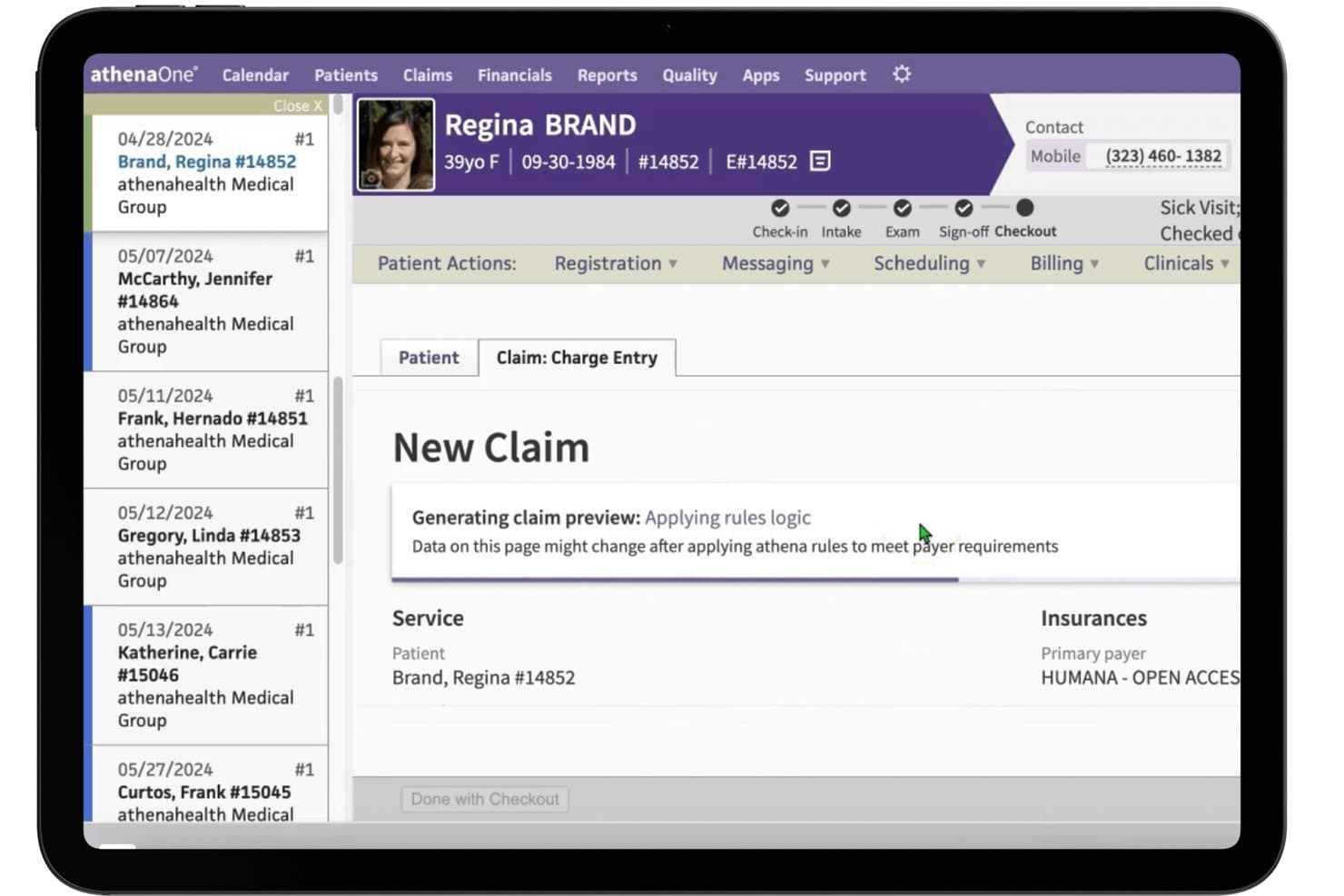
athenaOne offers automated claim scrubbing with rules logic applied during checkout to meet payer requirements before submission. athenaOne is a cloud-native platform that integrates EHR, practice management, medical billing, and patient engagement tools in a single suite built for ambulatory medical practices.
Who Is athenaOne Best For?
It's a strong fit for independent and small-to-mid-sized ambulatory practices that want clinical, billing, and patient engagement tools under one roof.
Why I Picked athenaOne
athenaOne earns its spot on my shortlist because the clinical and billing sides of the platform genuinely talk to each other. I like how Express Coding translates a completed encounter note into CPT and E&M codes in a single click, cutting the gap between documentation and claims submission. The automated claim scrubbing layer then catches errors before submission, which keeps denial rates low without requiring my billing team to manually review every claim.
athenaOne Key Features
- Patient portal: Patients can view lab results, request prescription refills, and message their provider online.
- Automated patient reminders: The system sends appointment reminders by SMS, email, or voice without manual effort.
- Eligibility verification: Insurance eligibility is checked automatically before each visit using data from card images.
- Executive summary dashboards: Management dashboards display revenue, claim status, and workflow bottlenecks in real time.
athenaOne Integrations
athenaOne offers 250+ native integrations through its Marketplace, including Surescripts, CommonWell Health Alliance, Carequality, Dulcian Health CCM Solution, Epion, GetWell Practice, PatientPop, Solutionreach, Experian Health, and esvyda. An API is available for custom integrations.
Pros and Cons
Pros:
- Built-in scheduling, telehealth, patient portal, and digital check-in tools
- AI-assisted billing workflows help reduce manual work and identify claim issues
- Combines practice management, EHR, medical billing, and patient engagement in one platform
Cons:
- The broad feature set may require more onboarding than simpler standalone tools
- Pricing is customized and based partly on practice collections
Learn more about athenaOne: Best for practices needing scalable workflows
- Not available
- Pricing upon request
Visit WebsiteCustomer Rating:3.7/5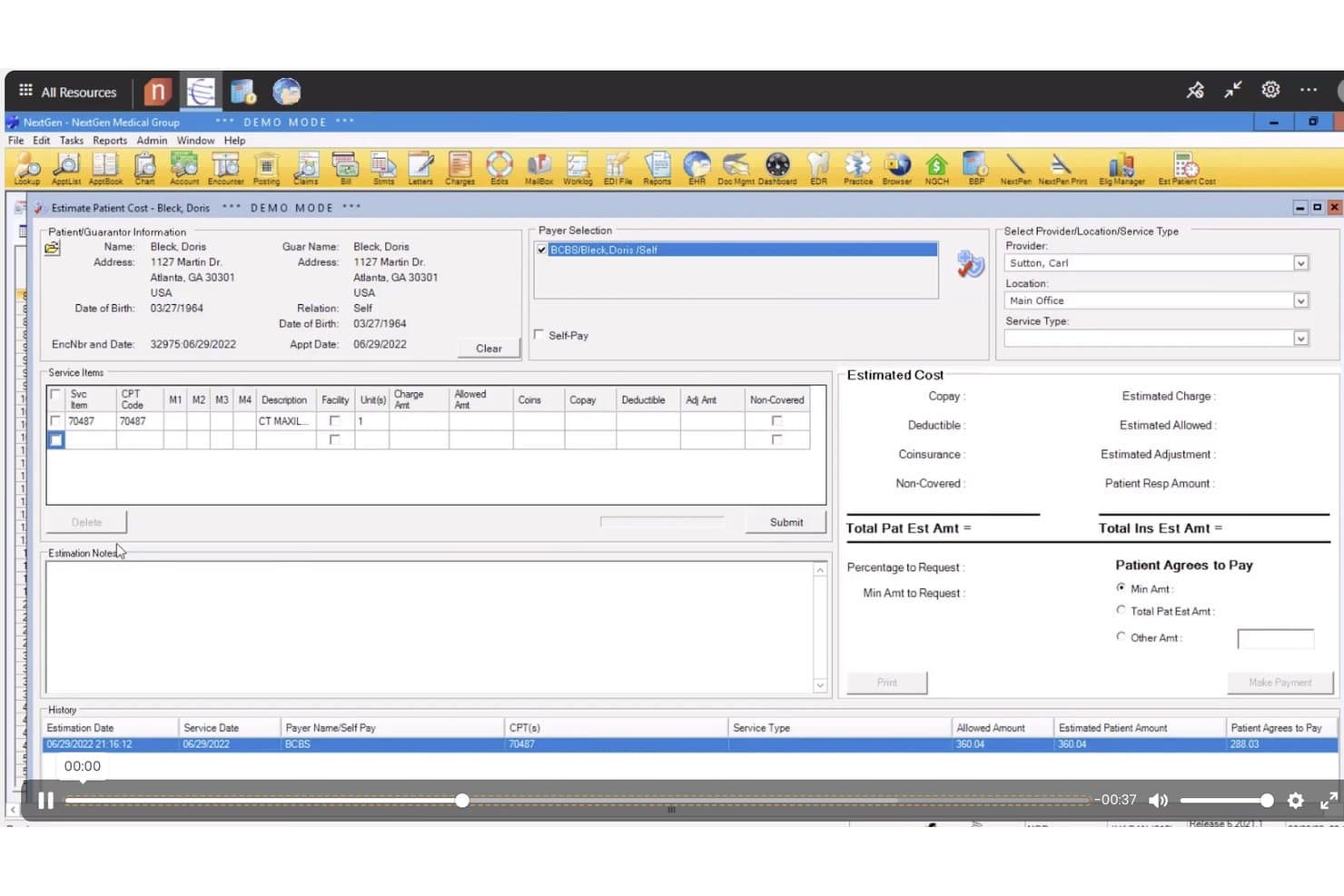
NextGen Office offers an Estimate Patient Cost tool that displays service items, payer selection, and estimated cost breakdowns including copay, deductible, and patient responsibility amounts. NextGen Office is a cloud-based EHR and practice management platform for small independent practices that combines clinical documentation, medical billing, patient scheduling, and revenue cycle management in a single system.
Who Is NextGen Office Best For?
NextGen Office is a strong fit for independent physicians and small practice administrators managing fewer than 10 providers who need an integrated clinical and billing platform.
Why I Picked NextGen Office
I picked NextGen Office as one of the best because the Closed Loop Experience links every patient touchpoint, from self-scheduling to billing, inside one cloud platform. The Clinical AI feature turns live provider-patient conversations into structured SOAP notes in seconds, cutting documentation time after visits. That means scaling your patient volume doesn't require reworking how your practice runs.
NextGen Office Key Features
- Integrated practice management system: Manage patient scheduling, billing workflows, and insurance eligibility checks in one interface.
- Specialty-specific EHR templates: Use prebuilt templates designed for a range of specialties and clinical documentation needs.
- Automated appointment reminders: Send customizable SMS and email reminders to reduce no-shows and keep appointment calendars up to date.
- Cloud-based patient portal: Let patients access their records, lab results, and financial statements securely from any device.
NextGen Office Integrations
NextGen Office offers native integrations with CoverMyMeds, Appriss Health, Surescripts, InstaMed, eFax/Consensus Cloud, Elsevier Infobutton, Waystar, TriZetto, and First Databank. An API is available for custom integrations.
Pros and Cons
Pros:
- Ambient AI auto-generates SOAP notes
- Specialty-specific templates for many practice types
- Closed Loop Experience links all workflows
Cons:
- Mobile app features are not comprehensive
- Reporting customization is limited for power users
Learn more about NextGen Office: Best for independent practice operations
- 30-day free trial + free demo available
- From $130/user/month
Visit WebsiteCustomer Rating:3.6/5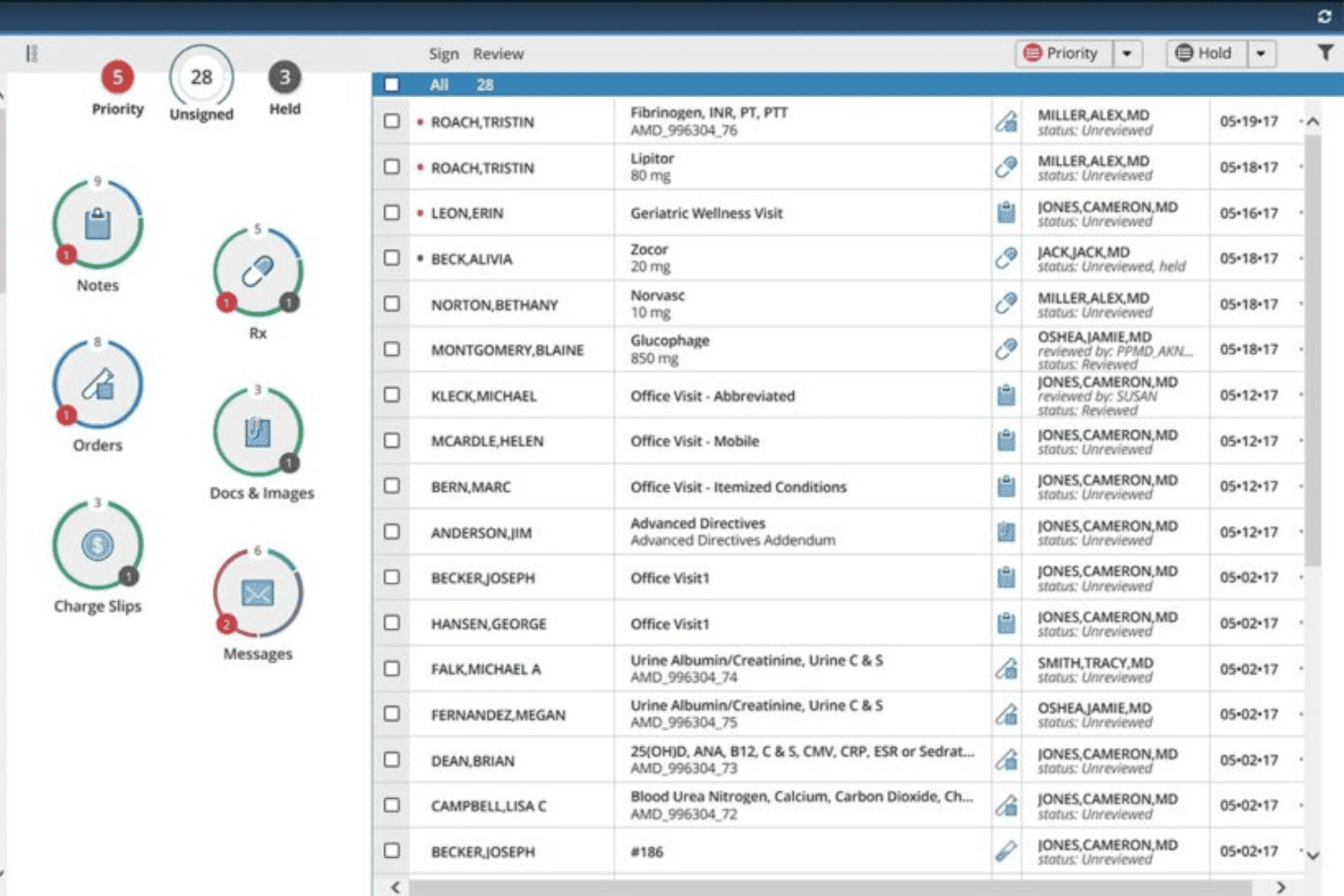
AdvancedMD dashboard for reviewing clinical notes, prescriptions, orders, documents, charge slips, and patient messages AdvancedMD is a cloud-based practice management platform combining EHR, scheduling, medical billing, RCM, and patient engagement in a single unified suite built for independent practices.
Who Is AdvancedMD Best For?
AdvancedMD is a strong fit for independent physician practices and specialty clinics that need a single platform covering clinical, billing, and front-office workflows.
Why I Picked AdvancedMD
I've included AdvancedMD in my top picks because independent practices get a genuinely unified operation, not a patchwork of tools. I particularly like the A/R Control Center, which gives billing staff a single dashboard for tracking outstanding claims, payment posting, and denial management. The AI Clinical Assistant is also worth noting, generating ambient visit notes in five formats directly from the patient encounter.
AdvancedMD Key Features
- Customizable chart templates: Lets you tailor clinical documentation to each provider’s workflow and specialty needs.
- Real-time insurance eligibility checks: Confirms patient coverage instantly before appointments or procedures.
- Integrated telehealth visits: Provides HIPAA-compliant video appointments from directly within the platform.
- Patient portal: Offers online access for patients to manage appointments, view records, and securely message your office.
AdvancedMD Integrations
AdvancedMD offers native integrations with QuickBooks, multiple lab providers, immunization registries, and PDMP registries. An integration marketplace is available, and an API supports custom integrations for group and enterprise practices.
Pros and Cons
Pros:
- Mobile EHR and practice management apps
- Granular A/R dashboard for billing staff
- Patient portal with customizable self-scheduling options
Cons:
- Frequent updates can disrupt user workflow
- Occasional delays with claims status updates
- 11CureMDBest for billing and administrative workflows
- 12eClinicalWorksBest for unified practice and patient management
- 13SimplePracticeBest for behavioral health and wellness practices
- 14RXNTBest for integrated practice management
- 15PracticeSuiteBest for flexible medical billing and RCM
Related Reviews
How I Evaluate Cloud Practice Management Software
I split my evaluation into baseline criteria—like cloud deployment, HIPAA compliance, and billing workflows—and the differentiating factors that separate good tools from great ones.
Core Functionality (Table Stakes for This List)
When I'm selecting tools for my list, I rank each one on a scale from 0 (does not offer the functionality) to 5 (excels in this area) for each core functionality listed below. Then, I calculate the tool's total score into a percentage. Each tool needs to achieve a minimum total score of 65% to be considered for inclusion.
- Cloud-Based Deployment: I check whether the platform runs entirely in a browser without requiring local server installs, and whether it offers mobile apps for providers who need chart access between exam rooms.
- Patient Scheduling & Appointments: Scheduling should include automated reminders, online self-booking, and waitlist management so your front desk isn't buried in phone calls confirming tomorrow's appointments.
- Medical Billing & Claims: I evaluate whether the platform supports electronic claims submission, CPT/ICD coding, ERA/EOB processing, and denial management—the full billing cycle from charge capture to payment posting.
- Patient Records & Demographics: Each tool should maintain patient demographics, insurance details, and chart data, ideally with integrated EHR/EMR functionality like e-prescribing and interoperability via HL7 or FHIR standards.
- HIPAA Compliance & Security: I look for documented HIPAA compliance with a signed BAA, role-based access controls, MFA, and audit trails that let you track exactly who accessed a patient record and when.
- Insurance Eligibility Verification: Real-time eligibility checks before a patient visit prevent claim denials down the line, so I evaluate whether verification is automated or requires manual lookups outside the system.
Once I have a list of tools that meet the criteria, I consider what sets each platform apart.
Differentiating Factors (What Sets Vendors Apart)
Here's how I compare and contrast different vendors:
Standout Features
A patient portal where individuals can book appointments, message providers, and view billing statements saves your front desk hours of phone time. Workflow automation matters too—I look for platforms that auto-assign tasks like pre-visit insurance checks or post-visit follow-ups based on appointment triggers. Reporting dashboards that show provider utilization, claim denial rates, and revenue trends help practice owners spot issues before they become costly.
Beyond Features
Practice size matters—a solo dermatologist needs a different setup than a multi-location primary care group, so I evaluate whether a platform scales from a handful of providers to dozens without requiring a costly tier jump. Integrations with lab systems, clearinghouses, and EHR platforms also factor heavily into my assessment. I look at onboarding support too, especially data migration help, since moving patient records from a legacy system mid-operations is one of the riskiest transitions a practice can make.
Cum să alegeți un software de gestionare a cabinetului medical în cloud
Este ușor să vă pierdeți în liste lungi de funcții și structuri de prețuri complexe. Pentru a vă ajuta să rămâneți concentrat în timp ce parcurgeți procesul unic de selecție a software-ului, iată o listă de factori de care trebuie să țineți cont:
| Factor | Aspecte de luat în considerare |
| Scalabilitate | Poate platforma să gestioneze numărul actual și estimat de pacienți, numărul de furnizori și extinderea la noi locații? Va trebui să migrați din nou pe măsură ce vă extindeți? |
| Integrări | Se conectează software-ul la EMR, casa de compensare a facturării, sistemele de laborator sau alte instrumente esențiale? Lipsa integrărilor poate crea probleme legate de introducerea duplicată a datelor. |
| Posibilitate de personalizare | Puteți ajusta fluxurile de lucru, șabloanele și rapoartele pentru a se potrivi tipului și nevoilor de specialitate ale cabinetului dumneavoastră, fără un sprijin IT semnificativ? |
| Ușurință în utilizare | Cât de repede pot angajații să învețe noțiunile de bază și să revină la îngrijirea pacienților? Fiți atenți la structurile neintuitive ale meniurilor și la setările ascunse care încetinesc echipa. |
| Implementare și integrare inițială | Ce termen și ce nivel de asistență oferă furnizorul pentru configurare și migrarea datelor? Sunt disponibile resurse pentru instruirea angajaților noi și gestionarea importurilor de fișe existente? |
| Cost | Priviți dincolo de taxele de bază — conectările la portalul pacienților, prescrierea electronică sau volumele de solicitări sunt contabilizate ca suplimente? Fiți atenți la costurile neașteptate pe măsură ce crește volumul de utilizare. |
| Măsuri de securitate | Oferă instrumentul autentificare multifactor, permisiuni bazate pe roluri, jurnale de audit și actualizări regulate de securitate pentru a proteja PHI? |
| Disponibilitatea asistenței | Atunci când apar probleme, puteți primi rapid ajutor prin chat, telefon sau e-mail? Dacă aveți o echipă restrânsă, asistența în timp real în timpul programului clinic este esențială. |
Ce este software-ul de gestionare a cabinetului medical în cloud?
Software-urile de gestionare a cabinetului medical în cloud sunt platforme bazate pe web care ajută cabinetele medicale să gestioneze programările pacienților, facturarea, fișele medicale și sarcinile legate de asigurări, în siguranță, de pe orice dispozitiv conectat la internet. Aceste sisteme vă permit să centralizați fluxurile de lucru clinice și administrative fără să întrețineți servere locale, oferă acces de la distanță pentru echipa dumneavoastră și pun la dispoziție instrumente integrate de securitate și conformitate pentru a proteja informațiile medicale sensibile.
Funcțiile software-ului de gestionare a cabinetului medical în cloud
Atunci când alegeți un software de gestionare a cabinetului medical în cloud, urmăriți următoarele funcții esențiale:
- Accesibilitate bazată pe cloud: Utilizatorii pot accesa în siguranță toate datele și fluxurile de lucru critice ale cabinetului prin orice browser web, fără a avea nevoie de servere sau hardware locale.
- Programarea pacienților: Instrumente pentru programarea, reprogramarea și confirmarea consultațiilor, gestionarea calendarelor furnizorilor și trimiterea automată de mementouri pacienților pentru reducerea absențelor.
- Facturarea medicală și gestionarea cererilor de despăgubire: Oferă suport pentru codificarea CPT/ICD, trimiterea electronică a cererilor, procesarea ERA/EOB și înregistrarea plăților pentru simplificarea ciclului de venituri.
- Integrarea dosarelor electronice de sănătate (EHR): Menține fișe complete ale pacienților, note clinice și istorice, sprijinind în același timp partajarea securizată a informațiilor între furnizorii autorizați.
- Verificarea eligibilității pentru asigurare: Verificările în timp real ale acoperirii pacientului înainte de consultații contribuie la evitarea respingerilor și la îmbunătățirea eficienței fluxului de lucru din front office.
- Securitate conformă cu HIPAA: Asigură protejarea datelor sensibile ale pacienților prin criptare, jurnale de audit, controale de acces bazate pe roluri și documentația necesară pentru conformitate.
- Raportare și analiză: Tablourile de bord și rapoartele personalizabile care urmăresc indicatorii-cheie de performanță clinici, operaționali și financiari îi ajută pe administratorii cabinetului să ia decizii informate.
- Portalul pacientului: Un portal securizat și ușor de utilizat care le oferă pacienților acces la programarea consultațiilor, dosarele medicale, informațiile de facturare și mesageria securizată cu personalul.
- Gestionarea documentelor: Instrumente digitale pentru stocarea, partajarea și organizarea formularelor scanate, trimiterilor medicale, cardurilor de asigurare și documentelor de consimțământ semnate într-o singură locație centrală.
- Automatizarea sarcinilor și a fluxurilor de lucru: Automatizează etapele administrative repetitive, precum mementourile pentru urmărire, monitorizarea cererilor și formularele de primire, astfel încât personalul să se poată concentra pe furnizarea îngrijirii.
Funcții AI comune ale software-ului cloud pentru gestionarea cabinetelor
Pe lângă funcțiile standard ale software-ului cloud pentru gestionarea cabinetelor enumerate mai sus, multe dintre aceste soluții integrează inteligența artificială prin funcții precum:
- Programarea predictivă a consultațiilor: Inteligența artificială analizează datele istorice despre consultații și comportamentul pacienților pentru a sugera intervale optime de programare, reducând absențele și îmbunătățind gradul de utilizare a furnizorilor.
- Asistență automatizată pentru codificare: Inteligența artificială analizează notele clinice și recomandă coduri CPT/ICD corecte, contribuind la reducerea erorilor din cereri și la accelerarea fluxurilor de lucru pentru facturare.
- Analiza inteligentă a respingerilor cererilor: Inteligența artificială identifică tipare în cererile respinse, semnalează problemele frecvente și sugerează acțiuni corective pentru îmbunătățirea ratelor de acceptare a cererilor viitoare.
- Procesarea limbajului natural pentru documentare: Inteligența artificială transformă notele furnizorilor, rostite sau introduse prin tastare, în înregistrări structurate în dosar, economisind timp la introducerea manuală a datelor și îmbunătățind acuratețea evidențelor.
- Analiza sentimentului pacienților: Inteligența artificială analizează mesajele și feedbackul pacienților pentru a detecta nemulțumirea sau nevoile urgente, ajutând personalul să prioritizeze contactarea acestora și să îmbunătățească experiența pacienților.
Beneficiile software-ului cloud pentru gestionarea cabinetelor
Implementarea software-ului cloud pentru gestionarea cabinetelor oferă mai multe beneficii echipei și afacerii dumneavoastră. Iată câteva dintre acestea:
- Acces de oriunde: Personalul și furnizorii pot gestiona în siguranță programările, evidențele pacienților și sarcinile de facturare de pe orice dispozitiv cu acces la internet.
- Eficiență îmbunătățită a facturării: Fluxurile de lucru integrate pentru facturare, instrumentele de codificare și gestionarea cererilor reduc la minimum erorile manuale și accelerează colectarea veniturilor.
- Programare simplificată: Mementourile automate și funcțiile de programare cu autoservire reduc absențele și eliberează timp administrativ pentru sarcini mai valoroase.
- Conformitate și securitate îmbunătățite a datelor: Măsurile de securitate conforme cu HIPAA, jurnalele de audit și controalele de acces contribuie la protejarea informațiilor sensibile și la simplificarea cerințelor de reglementare.
- Responsabilizarea pacienților: Portalurile pacienților le permit acestora să vizualizeze evidențele medicale, să plătească facturile online și să comunice în siguranță, îmbunătățind implicarea și satisfacția.
- Reducerea poverii IT: Eliminarea serverelor locale și reducerea activităților de întreținere a software-ului eliberează timp și resurse pentru cabinetul dumneavoastră.
- Luarea deciziilor pe baza datelor: Tablourile de bord și rapoartele personalizate evidențiază tendințele din fluxurile de lucru, situația financiară și implicarea pacienților, ajutându-vă să optimizați operațiunile.
Costurile și prețurile software-ului cloud pentru gestionarea cabinetelor
Alegerea software-ului cloud pentru gestionarea cabinetelor necesită înțelegerea diferitelor modele și planuri de preț disponibile. Costurile variază în funcție de funcții, dimensiunea echipei, extensii și alți factori. Tabelul de mai jos rezumă planurile comune, prețurile medii ale acestora și funcțiile incluse de obicei în soluțiile software cloud pentru gestionarea cabinetelor:
Tabel comparativ al planurilor pentru software-ul cloud de gestionare a cabinetelor
| Tipul planului | Preț mediu | Funcții comune |
| Plan gratuit | $0 | Programare de bază, evidențe limitate ale pacienților, instrumente de facturare restricționate și asistență minimă. |
| Plan personal | $25–$60/utilizator/lună | Programare standard, facturare de bază, gestionarea documentelor și funcții esențiale de raportare. |
| Plan pentru companii | $65–$130/utilizator/lună | Programare avansată, gestionarea completă a cererilor, portal integrat pentru pacienți, analize aprofundate și automatizarea fluxurilor de lucru ale cabinetului. |
| Plan pentru întreprinderi | $140–$250/utilizator/lună | Integrări personalizate, asistență premium, controale avansate de securitate, gestionarea mai multor locații și asistență dedicată pentru integrare. |
Întrebări frecvente despre software-ul de gestionare a cabinetului în cloud
Iată câteva răspunsuri la întrebările frecvente despre software-ul de gestionare a cabinetului în cloud:
Cât de sigur este software-ul de gestionare a cabinetului în cloud?
Software-ul de gestionare a cabinetului în cloud utilizează criptarea, permisiuni bazate pe roluri și jurnale de audit pentru a proteja datele pacienților. Multe platforme oferă, de asemenea, autentificare multifactor și actualizări regulate privind conformitatea, pentru a îndeplini standarde de reglementare precum HIPAA.
Pot migra datele existente ale pacienților către software-ul de gestionare a cabinetului în cloud?
Da, majoritatea furnizorilor oferă asistență pentru migrarea datelor. Aceasta include instrumente sau servicii profesionale pentru transferul programărilor, fișelor pacienților și datelor de facturare din sistemul anterior către noua platformă.
Va funcționa software-ul de gestionare a cabinetului în cloud cu sistemul meu EHR sau cu sistemele actuale de facturare?
Mulți furnizori oferă integrări cu dosare electronice de sănătate, sisteme de laborator și case de compensare pentru facturare, prin conexiuni încorporate sau API-uri. Verificați întotdeauna compatibilitatea cu instrumentele esențiale înainte de achiziție.
La ce fel de asistență mă pot aștepta?
Opțiunile de asistență variază, dar includ adesea chat live, asistență telefonică, e-mail și acces la centre de ajutor. Unii furnizori desemnează, de asemenea, un specialist dedicat pentru integrare, care să vă îndrume în configurarea sistemului și instruirea personalului.
Am nevoie de personal IT pentru a gestiona software-ul de gestionare a cabinetului în cloud?
Nu, sistemele bazate pe cloud sunt concepute pentru a reduce volumul de lucru IT. Furnizorii se ocupă de întreținerea serverelor, actualizările de securitate și copiile de siguranță, astfel încât echipa dumneavoastră să se poată concentra asupra îngrijirii pacienților, nu asupra întreținerii tehnice.
Pot accesa sistemul atunci când lucrez de la distanță?
Da, atât timp cât aveți o conexiune la internet și datele de autentificare corespunzătoare, puteți accesa în siguranță datele și fluxurile de lucru ale cabinetului de pe orice dispozitiv, inclusiv atunci când lucrați din afara sediului.