

Sistemele EMR pediatrice răspund nevoilor unice ale îngrijirii copiilor și monitorizării creșterii, permițând echipei să se concentreze pe monitorizarea etapelor de dezvoltare și implicarea familiei. Gestionarea fluxurilor de lucru specifice pediatriei poate fi dificilă, însă suportul potrivit poate simplifica documentarea și reduce erorile de înregistrare.
În acest articol, compar și analizez cele mai bune instrumente EMR pediatrice pentru a vă sprijini decizia de achiziție.
Why Trust Our Software Recommendations
6,700+
Reviews
20
Industry experts
16+
Evaluation factors
14
Years
Our team has been testing and reviewing software since 2012. As medical practice leaders ourselves, we know how difficult—and important—it is to choose the right software.
For this guide, we evaluated tools using hands-on testing and independent research, scoring tools using our selection criteria.
Our reviews reflect our human editorial judgment, not a sales pitch.
Tabel comparativ al sistemelor EMR pediatrice
Acest tabel comparativ rezumă detaliile de preț pentru selecția mea de top de sisteme EMR pediatrice:
Score legend (out of 5)
- Excellent4.5–5
- Good4–4.4
- Average3–3.9
- Below average2–2.9
- Poor1–1.9
Sorted by: Default
| Tool | Starting Price | Website | |||||||
|---|---|---|---|---|---|---|---|---|---|
Best for customizable pediatric charting | Not rated | 1 | Not rated | 2 | 2 | 2 | 3 | $99/month 15-day free trial | Website |
Best for sibling and family appointment booking | 3.5 out of 5 | 3 | 4 | 4 | 2 | 4 | 4 | $100/user/month Free demo available | Website |
Best for all-50-state immunization registry sync | 3.8 out of 5 | 4 | 2 | 4 | 5 | 5 | 3 | Pricing upon request Free demo available | Website |
Best for robust security and privacy features | Not rated | 4 | Not rated | 4 | 5 | 3 | 4 | Pricing upon request Free demo available | Website |
Best for pediatric-specific workflows | 4.3 out of 5 | 4 | 2 | 5 | 5 | 5 | 5 | Pricing upon request Free demo available | Website |
Best for collaborative care coordination | 3.5 out of 5 | 4 | 1 | 4 | 4 | 4 | 4 | $25/month Free plan + free demo available | Website |
Best for scaling multi-site pediatric billing | 3.7 out of 5 | 4 | 3 | 4 | 4 | 4 | 3 | Pricing upon request Free demo available | Website |
Best for iPad-based pediatric charting and billing | 3.3 out of 5 | 4 | 3 | 3 | 4 | 3 | 3 | Pricing upon request Free demo available | Website |
Best for customizable charting and reporting | 4.3 out of 5 | 4 | 4 | 4 | 5 | 4 | 5 | Pricing upon request Free demo available | Website |
Best for seamless patient documentation and tracking | 4.0 out of 5 | 4 | 4 | 5 | 4 | 4 | 3 | Pricing upon request Free demo available | Website |


Recenzii ale celor mai bune sisteme EMR pediatrice
Mai jos sunt prezentate rezumatele mele detaliate ale celor mai bune sisteme EMR pediatrice care au ajuns pe lista scurtă. Recenziile mele oferă o privire detaliată asupra funcționalităților principale, avantajelor și dezavantajelor, integrărilor și cazurilor ideale de utilizare pentru fiecare instrument, pentru a vă ajuta să îl găsiți pe cel mai potrivit pentru dumneavoastră.
 Best for customizable pediatric charting
- 15-day free trial
- From $99/month
Visit WebsiteCustomer Rating:4.8/5
OptiMantra’s patient portal enables families to update profiles, complete intake forms, and securely message practitioners—all from one place. OptiMantra is an electronic medical record (EMR) and practice management platform that helps healthcare providers streamline clinical and administrative workflows. While it was originally designed for integrative and wellness practices, its flexibility and customization options make it a strong fit for pediatric care, allowing clinicians to adapt templates and workflows to meet the needs of young patients.
Why I Picked OptiMantra: I picked OptiMantra because its customizable charting templates let you tailor documentation for different age groups and pediatric specialties. This flexibility helps you capture the right developmental and health data for each child, ensuring that visits are well-documented and compliant with pediatric standards. I also appreciate its telehealth functionality, which enables secure virtual consultations — something many pediatric practices now rely on for convenience and continuity of care.
Standout Features & Integrations:
OptiMantra includes features like customizable charting, electronic prescriptions, and a secure patient portal that allows parents to access their child’s health records and communicate directly with the practice. Its scheduling and reminder tools help you stay on top of routine pediatric check-ups and vaccination appointments. Insurance billing and reporting modules are built in, supporting the financial side of your pediatric operations. Integrations include Surescripts, LabCorp, Quest Diagnostics, Fullscript, Zoom, Stripe, Amazon Web Services (AWS), Box.com, SFax, Google Apps, SendGrid, and Fitbit.
Pros and Cons
Pros:
- Secure parent communication portal
- Integrated telehealth video consultations
- Customizable templates for pediatric needs
Cons:
- No native growth chart tracking
- Limited pediatric dosage calculator tools
Learn more about OptiMantra: Best for sibling and family appointment booking
- Free demo available
- From $100/user/month (billed annually)
Visit WebsiteCustomer Rating:5/5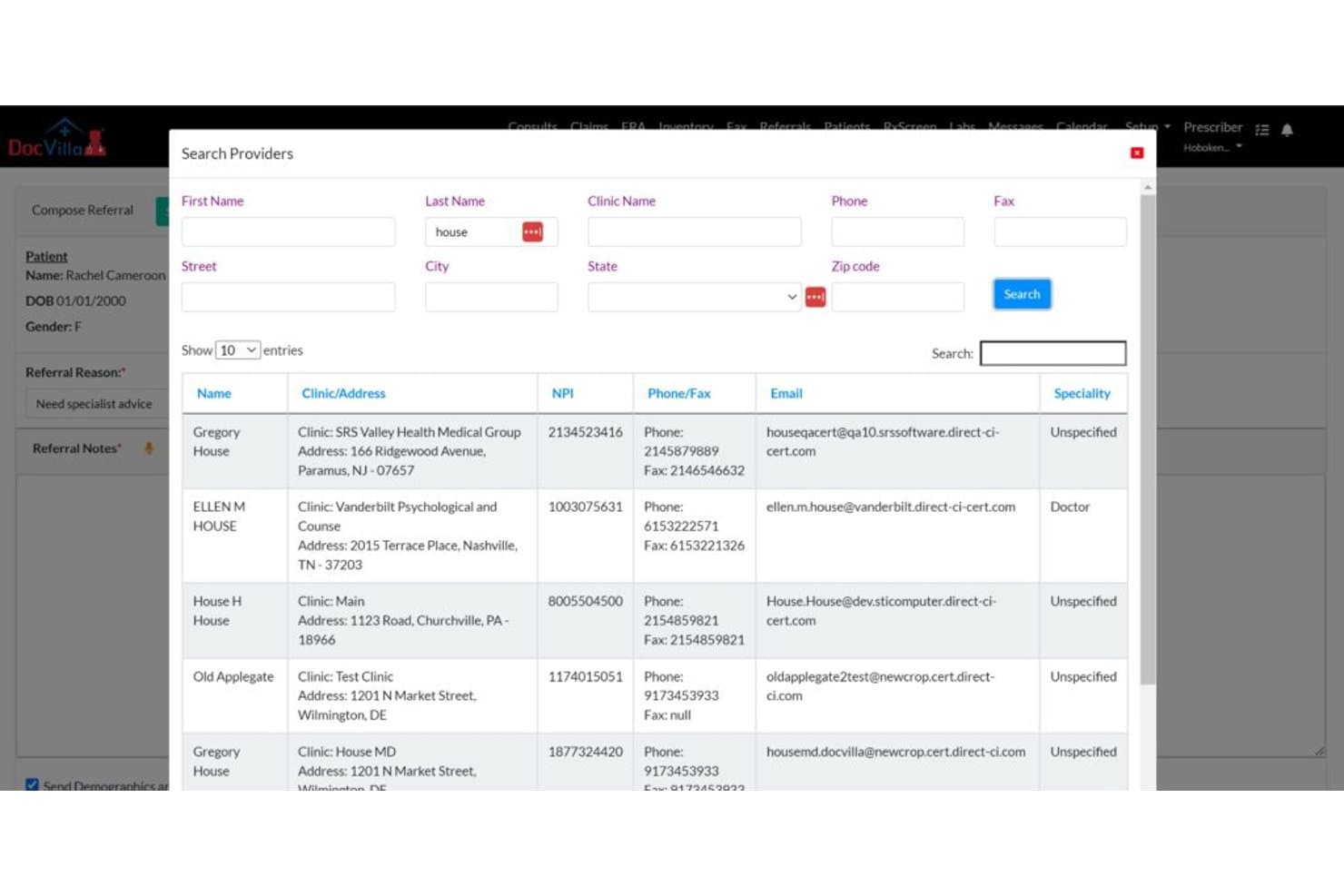
DocVilla lets users search and select referral providers by name or clinic. DocVilla is a cloud-based pediatric EHR platform that combines clinical documentation, growth charting, immunization tracking, e-prescribing, billing, and a parent-facing patient portal in a single system.
Who Is DocVilla Best For?
DocVilla is a strong fit for small to mid-sized pediatric practices that manage multiple siblings or family members and need scheduling, documentation, and billing in one place.
Why I Picked DocVilla
I've included DocVilla in my top picks because its sibling and family appointment booking sets it apart from most pediatric EMR platforms. I love that you can schedule a sibling pair back-to-back in a single workflow, with the parent portal letting one account manage multiple children's appointments, records, and messages simultaneously. Its vaccine-to-claim workflow, which tracks administration from inventory through CPT coding directly into the claim, keeps the clinical and billing sides tightly connected.
DocVilla Key Features
- CDC growth chart plotting: Height, weight, and BMI are automatically plotted against CDC growth charts, eliminating manual data entry for clinicians.
- Weight-based dosage alerts: The e-prescribing workflow fires automatic alerts when a prescribed dose falls outside age- or weight-appropriate ranges.
- Customizable pediatric templates: Over 50 specialty templates cover well-child visits, developmental milestones, sports physicals, and age-specific screenings.
- Two-way lab integration: Results from Quest Diagnostics and Labcorp flow directly into the patient chart and can be shared with parents through the portal.
DocVilla Integrations
DocVilla integrates with Quest Diagnostics, Labcorp, AccuReference, Vibrant Wellness, Surescripts, Bamboo, and supported state immunization registries. It also supports Direct Secure Messaging through DirectTrust and offers an HL7 FHIR API for custom integrations.
Pros and Cons
Pros:
- Vaccine administration connects directly to claims
- Pediatric templates support well-child documentation
- Sibling appointments fit one booking workflow
Cons:
- Growth charts omit head circumference and WHO curves
- Immunization forecasting and catch-up logic remain absent
Learn more about DocVilla: Best for all-50-state immunization registry sync
- Free demo available
- Pricing upon request
Visit WebsiteCustomer Rating:4.4/5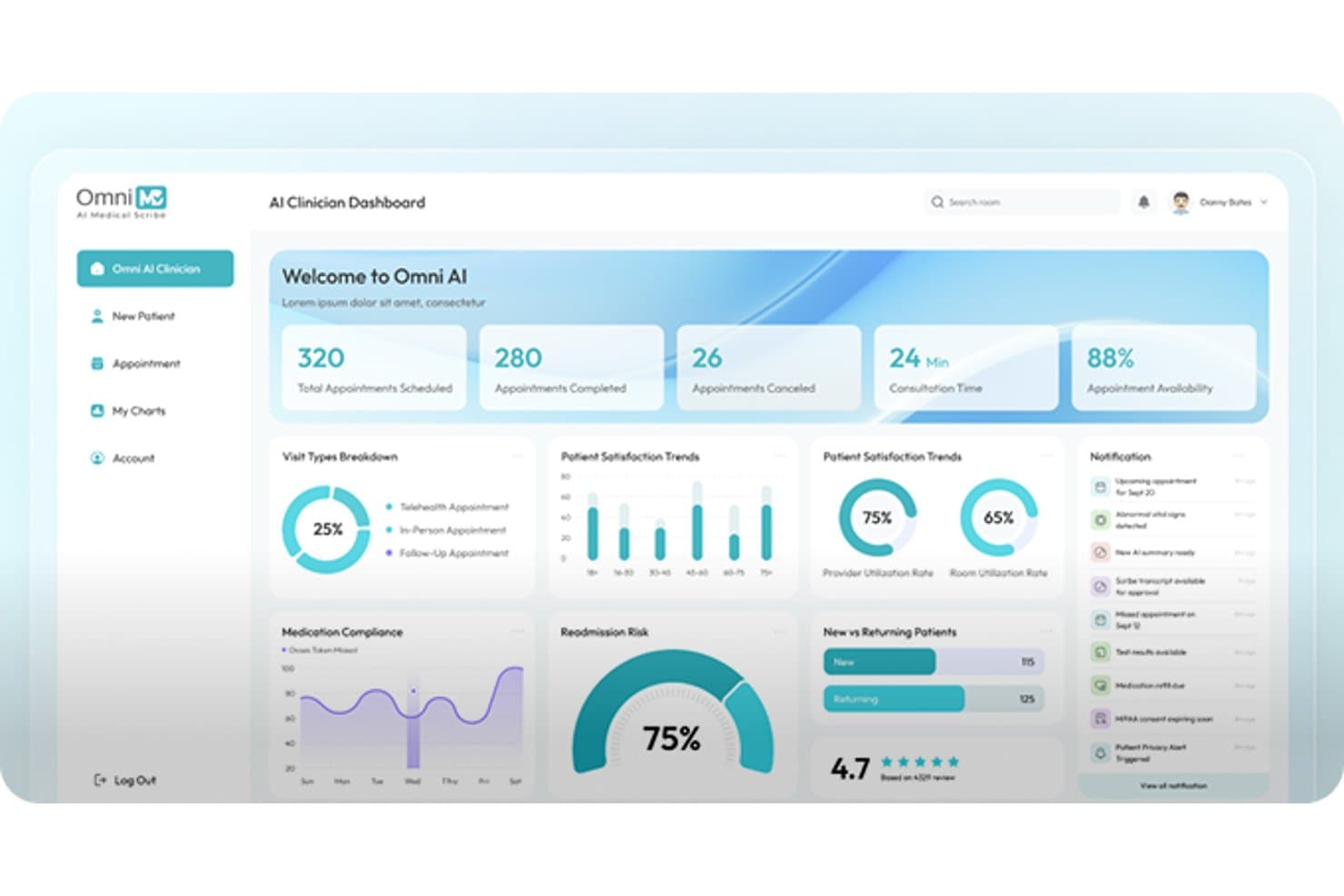
OmniMD centralizes appointment stats and patient trends in one dashboard. OmniMD is a pediatric EMR platform that integrates clinical charting, immunization tracking, developmental screenings, billing automation, and telehealth into a single system built for pediatric practices.
Who Is OmniMD Best For?
OmniMD is a strong fit for pediatric practices that need real-time, bidirectional immunization registry connections across all 50 states.
Why I Picked OmniMD
I picked OmniMD as one of the best because its bidirectional immunization registry connection across all 50 states is something I rarely see done this completely. When you open a child's chart, the system automatically queries the state registry and pulls in their full vaccine history, including doses given at CVS or Walgreens. It also tracks VFC and privately purchased vaccines in separate inventories and auto-calculates 90460/90461 units for combination vaccines, which removes a lot of manual billing work.
OmniMD Key Features
- Bright Futures-aligned well-child templates: Age-specific visit templates from 2 weeks through adolescence follow Bright Futures guidelines and include anticipatory guidance built into the workflow.
- Built-in developmental and behavioral screenings: Tools like M-CHAT-R/F, ASQ-3, Vanderbilt ADHD scales, PHQ-A, and CRAFFT auto-score and link results directly to billing codes 96110 and 96127.
- AI medical scribe trained on pediatric encounters: The scribe captures caregiver concerns during visits and generates documentation with an average note sign-off time of 18 seconds.
- Pediatric-specific billing rule engine: The system automatically applies preventive visit codes, newborn care codes, EPSDT billing, and modifier 25 flags for same-day sick and well visits.
OmniMD Integrations
OmniMD integrates with all 50 state immunization registries, LabCorp, Quest, HIEs, specialists, and hospitals through HL7 and FHIR. It can also pull vaccine histories from pharmacies such as CVS and Walgreens.
Pros and Cons
Pros:
- Support teams receive positive user reviews
- Validated developmental screenings score themselves
- Automated pediatric billing and screening codes
Cons:
- Charting workflows require too many saves
- Early-morning maintenance can slow server performance
Learn more about OmniMD: Best for robust security and privacy features
- Free demo available
- Pricing upon request
Visit WebsiteCustomer Rating:4.5/5
Sevocity's Interface Sevocity is a cloud-based electronic health record (EHR) system that puts a premium on security and privacy. Designed with compliance in mind, it provides robust safety measures to protect sensitive patient information, making it ideal for practices that prioritize privacy.
Why I Picked Sevocity: I selected Sevocity because of its exceptional focus on security and privacy. In the current landscape of healthcare, where patient information privacy is paramount, Sevocity sets itself apart with its stringent security metrics. For this reason, I find it best for robust security and privacy features.
Standout features & integrations:
Sevocity offers advanced user access controls and an audit trail to monitor data access. Its HIPAA compliant communication platform is another key feature that assures secure patient-practice interactions. It integrates seamlessly with popular practice management systems and billing tools, streamlining various administrative tasks.
Pros and Cons
Pros:
- HIPAA compliant communication platform
- Robust audit trails
- Advanced user access controls
Cons:
- Customization options might require some technical skills
- The interface could be more intuitive
- Steep pricing for small practices
Learn more about Sevocity: Best for pediatric-specific workflows
- Free demo available
- Pricing upon request
Visit WebsiteCustomer Rating:4.2/5
Office Practicum's Interface Office Practicum is a comprehensive EMR solution, specifically tailored to address the unique workflows of pediatric practices. This tool is committed to supporting child health providers, enabling them to manage patient health records efficiently.
Why I Picked Office Practicum: Office Practicum joined my list for its strong emphasis on pediatric-focused workflows. What sets it apart is its dedication to the unique needs of pediatric practices, providing a more focused and specialty-specific toolset compared to others. It's safe to say, it's "Best for pediatric-specific workflows", thanks to its comprehensive yet specialized tools that truly understand the pediatric landscape.
Standout Features & Integrations:
Office Practicum shines with its pediatric-specific features like growth charts, immunization tracking, and developmental screening tools. Not only this, but it also offers an integrated patient portal to foster better communication between families and providers. The system integrates with a variety of labs, pharmacies, and immunization registries, ensuring smooth data flow across the platform.
Pros and Cons
Pros:
- Robust integration with various labs, pharmacies, and registries
- Integrated patient portal for better family communication
- Pediatric-specific workflows and tools
Cons:
- The user interface might appear outdated to some users
- Learning curve may be steep for some users
- Pricing information is not readily available
Learn more about Office Practicum: Best for collaborative care coordination
- Free plan + free demo available
- From $25/month
Visit WebsiteCustomer Rating:4.2/5
CharmHealth's Interface CharmHealth is a cloud-based, comprehensive EMR solution built with the complexities of pediatric care in mind. It fosters seamless collaboration between healthcare professionals, patients, and their families.
Why I Picked CharmHealth: CharmHealth made the list for its exceptional capacity to facilitate collaborative care. In comparison to other systems, CharmHealth offers a unique framework that allows the entire care team to work together seamlessly. I believe it stands out as the "Best for collaborative care coordination" because of its integrated approach to care, where the focus is on collaboration between all parties involved.
Standout Features & Integrations:
CharmHealth is enriched with features like immunization tracking, growth chart plotting, and an integrated patient portal for family access. It excels in supporting a collaborative model of care, as it allows seamless communication between healthcare providers, patients, and their families. CharmHealth integrates well with laboratory, pharmacy, and billing systems, providing an uninterrupted flow of data across various functions.
Pros and Cons
Pros:
- Seamless integration with multiple systems
- Integrated patient portal for increased family engagement
- Strong collaborative care capabilities
Cons:
- Some users may find the pricing structure complex
- The abundance of features may overwhelm new users
- User interface might require some familiarization
Learn more about CharmHealth: Best for scaling multi-site pediatric billing
- Free demo available
- Pricing upon request
Visit WebsiteCustomer Rating:4/5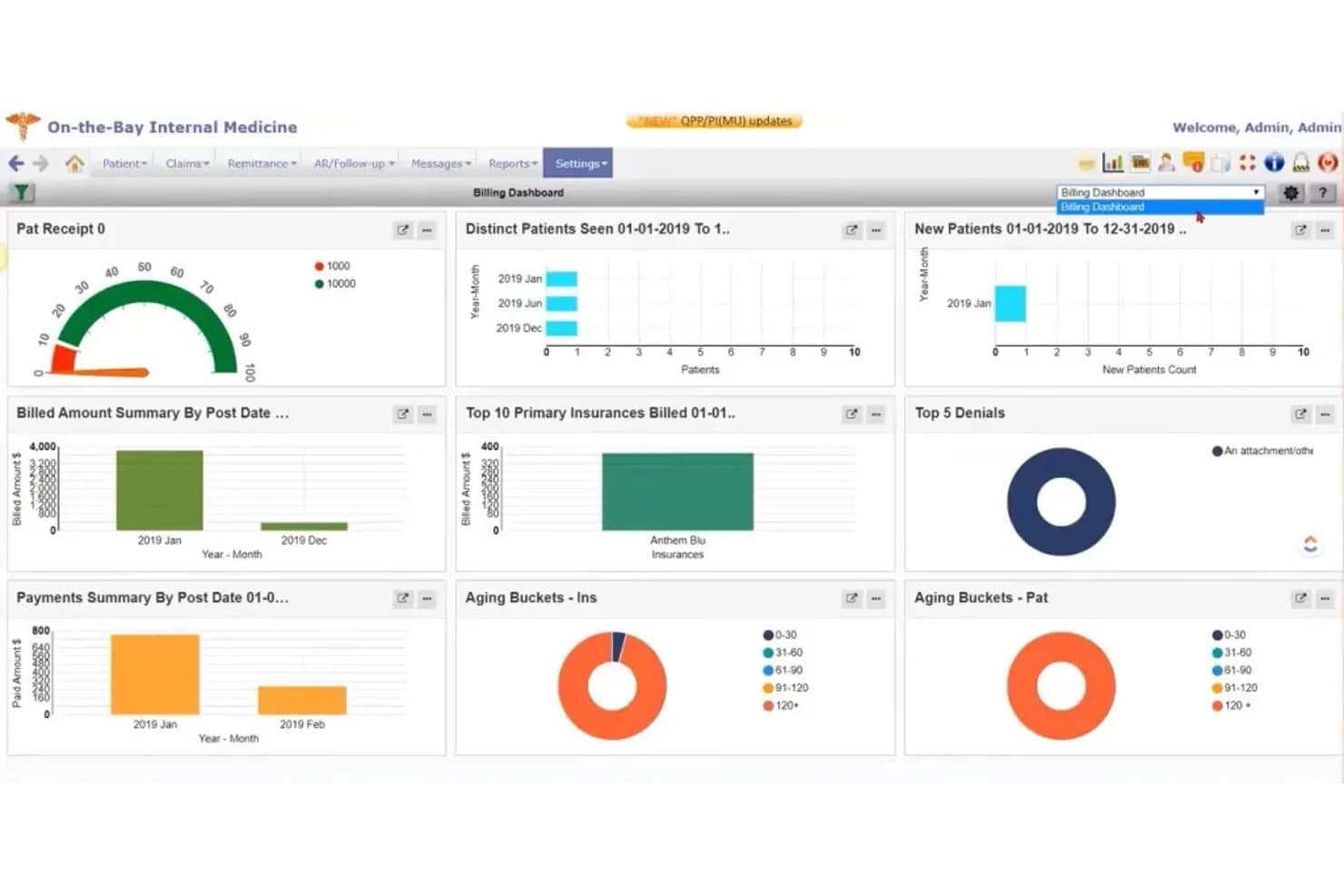
PrognoCIS billing dashboard showing payments, denials, insurance claims, and aging reports PrognoCIS is a cloud-based pediatric EMR platform that combines clinical charting, immunization tracking, growth charting, age-based documentation, billing, and a parent/guardian portal in a single integrated system.
Who Is PrognoCIS Best For?
PrognoCIS is a strong fit for growing pediatric practices managing billing across multiple locations or provider groups.
Why I Picked PrognoCIS
PrognoCIS earns its spot on my shortlist because of how well it handles billing across multiple locations without fragmenting the clinical side. I like that pediatric-specific code sets, AI-assisted claims scrubbing, and VFC-aware billing are all built into the same platform where charting happens. In practice, that means a practice running three or four sites can centralize reporting and catch claim errors before submission, without toggling between separate systems.
PrognoCIS Key Features
- CDC/WHO growth charting: Automatically plots height, weight, head circumference, and BMI on age- and gender-specific charts from birth to 20 years, including Down syndrome charts.
- Bidirectional immunization registry integration: Queries and imports vaccine history and forecasts from state registries using HL7 messaging, with overdue doses flagged on the patient facesheet.
- ASQ-3 and M-CHAT developmental screening forms: Includes 18 ASQ-3 forms covering ages 2–60 months, plus M-CHAT and Vanderbilt ADHD scales built directly into the encounter workflow.
- Sibling record linking: A popup connects sibling charts so staff can move between related patient records without leaving the current workflow.
PrognoCIS Integrations
PrognoCIS integrates with LabCorp, Pathology Inc., state immunization registries, Surescripts, Secure Connect, TriZetto, Waystar, Jopari, and Integrity/OpenEdge. It supports HL7, FHIR APIs, CCD/CCR exchange, and custom APIs for additional connectivity.
Pros and Cons
Pros:
- Centralized billing suits multi-site practices
- Two-way registry forecasting supports vaccine reconciliation
- Pediatric growth charts include Down syndrome
Cons:
- Portal lacks appointment cancellation and rescheduling
- Billing workflows can produce modifier rejections
Learn more about PrognoCIS Psychiatry EHR: Best for iPad-based pediatric charting and billing
- Free demo available
- Pricing upon request
Visit WebsiteCustomer Rating:3.9/5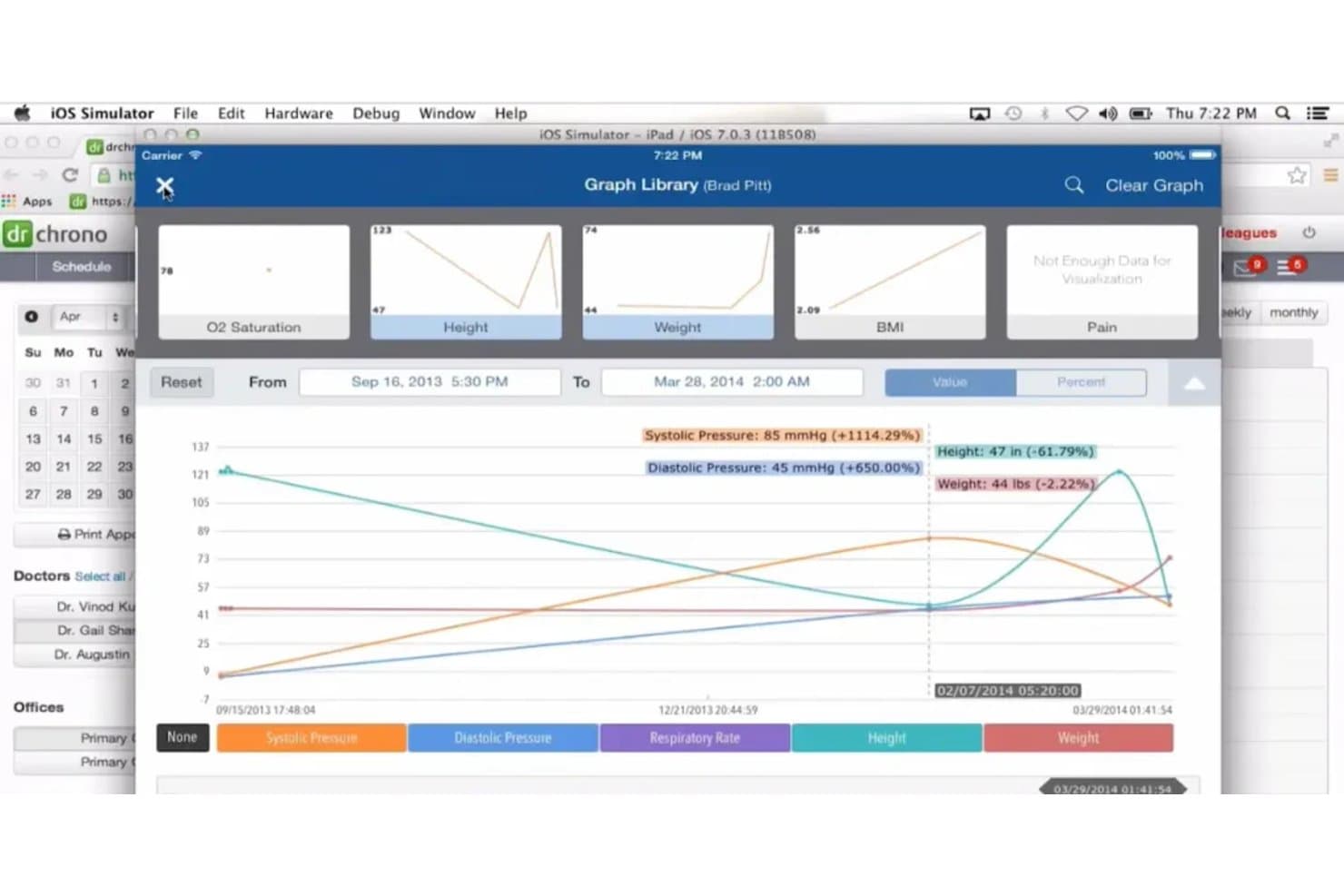
DrChrono tracks patient vitals like height, weight, and BMI over time. DrChrono is a mobile-first pediatric EMR platform that combines clinical charting, growth tracking, immunization management, e-prescribing, billing, telehealth, and a parent-facing patient portal in one system built to run natively on iPad, iPhone, and desktop.
Who Is DrChrono Best For?
DrChrono is a strong fit for independent pediatric practices that do most of their clinical work on iPad and want charting, billing, and the parent portal in one system.
Why I Picked DrChrono
DrChrono earns its spot on my shortlist because it's built to run natively on iPad, which makes it a natural fit for pediatric practices that chart at the bedside or between exam rooms. I particularly like that it includes WHO and CDC growth charts alongside Down Syndrome and Fenton preterm charts, so clinicians aren't manually tracking edge cases. The Iron Bridge registry integration also pulls vaccine history and forecasts from all state registries directly into the chart, which saves real time during well-child visits.
DrChrono Key Features
- Weight-based dosage calculator: Computes pediatric drug doses by body weight directly within the e-prescribing workflow on both web and iPad.
- VFC funding code support: Records Vaccines for Children funding eligibility and links it to vaccine inventory and billing codes on each immunization entry.
- OnPatient guardian portal: Gives parents secure messaging, online booking, digital intake forms, and access to visit summaries at no extra cost.
- EverHealth Scribe: An AI add-on that drafts clinical notes from the visit conversation, reducing manual documentation time after each appointment.
DrChrono Integrations
DrChrono integrates with Iron Bridge, Quest, LabCorp, Surescripts, CoverMyMeds, eProvider Solutions, and iHCFA. It also supports FHIR APIs, SMART on FHIR apps, and a partner marketplace for custom connectivity.
Pros and Cons
Pros:
- Vaccine documentation captures lots and funding eligibility
- Specialized growth charts support pediatric assessments
- Native iPad charting suits pediatric exam rooms
Cons:
- Separate child accounts complicate guardian access
- Users report slow support and service outages
Learn more about DrChrono:
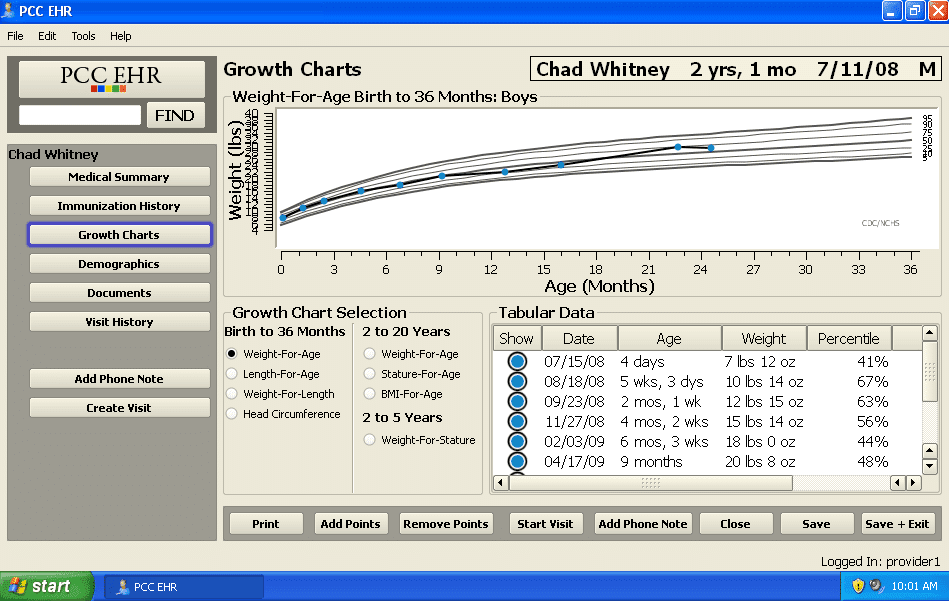
PCC's Interface PCC is a pediatrics-only EHR and practice management system that covers clinical charting, immunization tracking, e-prescribing, billing, and parent communication through a single platform built exclusively for pediatric practices.
Who Is PCC Best For?
PCC fits independent and group pediatric practices that need deep charting flexibility, from custom well-visit protocols to specialty growth charts for preterm or Trisomy 21 patients.
Why I Picked PCC
PCC earns its spot on my shortlist because no other pediatric EHR gives you this level of control over how chart notes are built and structured. Using the Protocol and Component Builder, I can create custom well-visit workflows from scratch, clone existing protocols, and map them to specific visit reasons or individual providers. I also love that specialty growth charts, like Fenton preterm and AAP Down syndrome charts, trigger automatically based on a patient's problem list.
PCC Key Features
- Immunization forecasting: IMMUCAST-based scheduling predicts each patient's next due dose, earliest allowed date, and past-due date at a glance.
- State registry integration: PCC connects bidirectionally with immunization registries in over 40 U.S. jurisdictions, letting you retrieve and submit records in real time.
- VFC inventory management: The Vaccine Lot Manager tracks private and VFC stock separately, auto-decrements counts with each dose given, and generates reconciliation reports.
- Practice Vitals Dashboard: Benchmarks your practice against other PCC clients on daily-updated metrics like A/R days, clean-claim rate, and well-visit rates.
PCC Integrations
PCC has documented integrations with immunization registries, Surescripts, Updox, CHADIS, Televox/Intrado, LabCorp, Quest, and PDMP links. No public FHIR or API program is documented for custom integrations.
Pros and Cons
Pros:
- Specialty growth charts support complex pediatric cases
- Vaccine forecasting supports overdue immunization outreach
- Custom chart protocols fit pediatric workflows
Cons:
- Patient portal tools remain relatively basic
- Legacy workflows slow billing and reporting
Learn more about PCC:
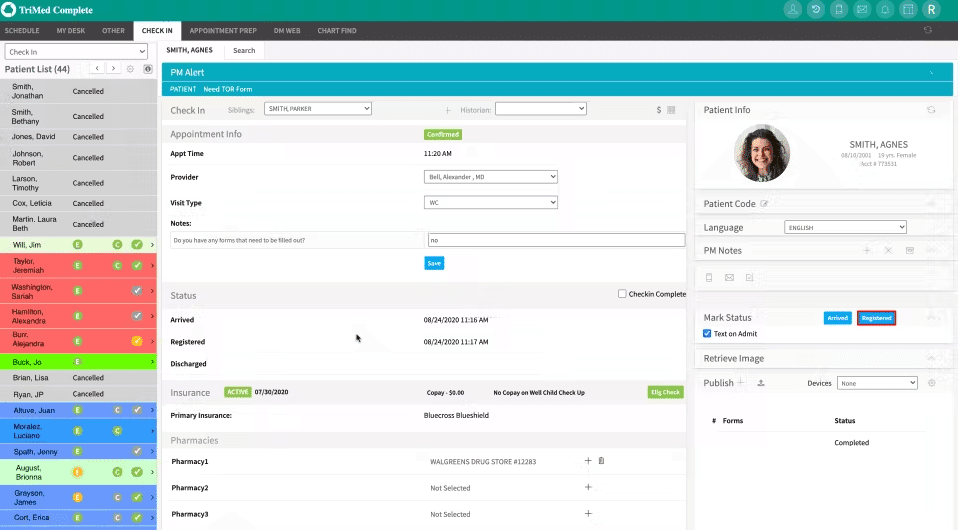
Trimed's Interface TriMed is a pediatric EMR platform that combines clinical documentation, growth charting, immunization tracking, weight-based dosing, family billing, and an integrated patient portal into a single system built specifically for pediatric practices.
Who Is TriMed Best For?
TriMed is a strong fit for independent pediatric practices of any size that need a single platform to handle clinical documentation, immunization tracking, and family billing without juggling multiple systems.
Why I Picked TriMed
I picked TriMed as one of the best because it's built from the ground up for pediatric documentation, and that focus shows in the details. Growth chart data plots the moment vitals are entered, percentiles appear directly in the visit note, and well-visit templates automatically age patients out of visits they no longer need. I also love how sibling history updates carry across all family charts at once, which cuts real documentation time on busy clinic days.
TriMed Key Features
- Weight-based dosing calculator: Computes doses from the patient's current weight, applies maximum daily dose limits, and rounds to standard units like teaspoons.
- Ambient AI documentation: Amazon HealthScribe listens during the visit and drafts the history, assessment, and plan for the provider to review and finalize.
- Family guarantor billing: Links every patient to a guarantor so staff can view family balances and switch between sibling accounts from one billing screen.
- State immunization registry reporting: Sends automated updates to state registries and selects the correct administration billing codes based on the patient's coverage type.
TriMed Integrations
TriMed integrates with Waystar, state immunization registries, Labcorp, Quest Diagnostics, VaxCare, InstaMed, Zocdoc, Surescripts, and Amazon HealthScribe. It also supports C-CDA, Direct messaging, patient and FHIR APIs for custom connectivity.
Pros and Cons
Pros:
- Reviewers praise responsive support and training
- Custom pediatric templates support age-specific visits
- Family charting connects siblings and guarantors
Cons:
- Custom reports require significant setup
- Billing workflows can feel cumbersome
Learn more about Trimed:
Alte instrumente EMR pediatrice
Mai jos este o listă cu instrumente EMR pediatrice suplimentare pe care le-am inclus pe lista scurtă, dar care nu au ajuns în top 10. Merită cu siguranță să le verificați.
How I Evaluate Pediatric EMR
I split my evaluation into three parts, with core functionality carrying the most weight: tools should plot growth, forecast vaccines, and support age-based visit notes. Next, I consider features such as sibling scheduling and immunization registry links. Finally, I weigh pediatric data migration, staff onboarding, and pricing that scales with practice growth.
Core Functionality (Table Stakes For This List)
When I'm selecting tools for my list, I score each one on a scale from 0 (does not offer the functionality) to 5 (excels in this area) for each core functionality listed below. I then convert the total into a percentage to help assess each tool's overall fit, with extra weight on any functionalities I’ve deemed essential.
- Growth Charting (Essential): I look for age-based curves for height, weight, head circumference, and BMI, with percentiles and trend flags to review at well visits.
- Immunization Tracking (Essential): I assess whether vaccine histories drive due and overdue forecasts, reminders, and records, including catch-up needs after missed visits.
- Pediatric Documentation: I check for well-child templates, developmental milestone tracking, and age-specific screening prompts that fit routine visits.
- Weight-Based Dosing: I look for prescribing calculations tied to current weight and safety alerts, especially when a child’s weight changes between visits.
- Guardian Portal: I assess secure guardian access to a minor’s records, messages, and appointments, with permissions for multiple caregivers.
- Pediatric Billing: I check for pediatric visit and immunization coding, claim workflows, and coding validation for routine well-child care.
Once I have a list of tools that meet the criteria, I consider what sets each platform apart.
Differentiating Factors (What Sets Vendors Apart)
Here's how I compare and contrast different vendors:
Standout Features
I look for bidirectional state immunization registry connections that push and pull records in real time, cutting duplicate entry during busy vaccine clinic days. Sibling and family scheduling matters too—I check whether a platform lets front desk staff book back-to-back well visits for three kids in one action. I also evaluate adolescent confidentiality controls, since practices need configurable age thresholds that automatically mask sensitive visit data from the guardian portal.
Beyond Features
I check whether a platform scales from a solo pediatric office to a multi-site group without forcing a migration midgrowth. Pricing tied to provider count rather than flat per-user fees keeps costs predictable as you add clinicians. Interoperability matters just as much—I look for HL7/FHIR support and live connections to labs, specialists, and health information exchanges so referrals don't stall in a fax queue. I also evaluate onboarding resources for pediatric-specific data like growth histories and immunization records, since a generic migration can drop years of vaccine data.
Cum să alegeți un sistem EMR pediatric
Este ușor să vă pierdeți în liste lungi de funcționalități și structuri complexe de prețuri. Pentru a vă menține concentrarea în timp ce parcurgeți procesul unic de selecție a software-ului, iată o listă de verificare a factorilor de care trebuie să țineți cont:
| Factor | Aspecte de luat în considerare |
|---|---|
| FactorScalabilitate | Aspecte de luat în considerarePoate sistemul EMR să se dezvolte odată cu cabinetul dumneavoastră? Luați în considerare volumul viitor de pacienți și dacă instrumentul acceptă echipe mai mari, atunci când este necesar. |
| FactorIntegrări | Aspecte de luat în considerareVerificați dacă sistemul EMR se integrează cu sistemele existente, precum software-ul de facturare sau de laborator. Evitați instrumentele care vă obligă să vă schimbați întreaga infrastructură tehnologică. |
| FactorPosibilități de personalizare | Aspecte de luat în considerareCât de flexibil este sistemul EMR în adaptarea la fluxul dumneavoastră de lucru? Căutați instrumente care vă permit să ajustați șabloanele sau tablourile de bord pentru a se potrivi nevoilor dumneavoastră. |
| FactorUșurință în utilizare | Aspecte de luat în considerareVa considera echipa dumneavoastră sistemul EMR intuitiv? Testați interfața și solicitați feedbackul personalului pentru a vă asigura că nu încetinește operațiunile zilnice. |
| FactorImplementare și inițiere | Aspecte de luat în considerareLuați în considerare timpul și resursele necesare pentru a începe. Căutați furnizori care oferă sesiuni de instruire și asistență pe durata tranziției. |
| FactorCost | Aspecte de luat în considerareSe încadrează prețul în bugetul dumneavoastră? Comparați costurile între furnizori, acordând atenție taxelor ascunse sau costurilor pentru funcționalități suplimentare. |
| FactorMăsuri de securitate | Aspecte de luat în considerareRespectă sistemul EMR reglementările privind protecția datelor? Asigurați-vă că acesta dispune de criptare și controale de acces pentru a proteja informațiile pacienților. |
| FactorCerințe de conformitate | Aspecte de luat în considerareVerificați dacă sistemul EMR respectă reglementările din domeniul sănătății, precum HIPAA. Nerespectarea acestora poate duce la sancțiuni, așa că alegeți un furnizor cu un istoric dovedit. |
Ce sunt sistemele EMR pediatrice?
Sistemele EMR pediatrice sunt registre medicale electronice adaptate îngrijirii medicale a copiilor. Pediatrii folosesc acest software pediatric pentru a urmări graficele de creștere, imunizările și nevoile de îngrijire specifice vârstei. Acestea abordează probleme precum calcularea greșită a dozelor, gestionarea complexă a datelor părinților sau tutorilor și urmărirea etapelor de dezvoltare.
Funcționalități
Atunci când selectați un sistem EMR pediatric, acordați atenție următoarelor funcționalități principale:
- Gestionarea fișelor pacienților: Păstrează fișe digitale complete cu informațiile pacienților, facilitând accesarea și actualizarea datelor.
- Programarea consultațiilor: Permite programarea, reprogramarea și gestionarea eficientă a consultațiilor, reducând absențele și îmbunătățind fluxul pacienților.
- Monitorizarea graficelor de creștere: Oferă instrumente pentru monitorizarea și reprezentarea grafică a creșterii copiilor în raport cu valorile de referință standard, sprijinind evaluări precise.
- Gestionarea imunizărilor: Monitorizează calendarele de vaccinare și trimite alerte pentru imunizările următoare sau restante, asigurând respectarea recomandărilor medicale.
- Calculatoare pentru dozele pediatrice: Oferă calcule pentru dozele de medicamente adaptate în mod special copiilor, sporind siguranța.
- Facturarea și emiterea facturilor: Simplifică procesul de facturare prin generarea facturilor și gestionarea plăților, reducând sarcinile administrative.
- Portaluri de comunicare cu părinții: Facilitează comunicarea securizată dintre furnizorii de servicii medicale și părinți, îmbunătățind implicarea și claritatea.
- Funcții de telemedicină: Permite consultații la distanță, oferind flexibilitate în furnizarea serviciilor medicale.
- Șabloane personalizabile: Permite adaptarea șabloanelor pentru diferite tipuri de consultații sau afecțiuni, îmbunătățind eficiența fluxului de lucru.
- Conformitatea cu reglementările: Asigură faptul că sistemul respectă reglementările din domeniul medical, precum HIPAA, protejând datele pacienților și evitând problemele juridice.
Beneficii
Implementarea unui EMR pediatric oferă mai multe beneficii pentru echipa și afacerea dumneavoastră. Iată câteva dintre avantajele de care vă puteți bucura:
- Îngrijirea îmbunătățită a pacienților: Accesul la fișe complete și precise ale pacienților ajută la luarea unor decizii clinice informate, îmbunătățind calitatea generală a îngrijirii.
- Eficiența operațiunilor: Funcții precum programarea consultațiilor și automatizarea facturării reduc sarcinile administrative, permițând echipei să se concentreze mai mult asupra îngrijirii pacienților.
- Comunicare îmbunătățită: Portalurile de comunicare cu părinții asigură interacțiuni clare și securizate cu familiile, consolidând încrederea și implicarea.
- Conformitatea cu reglementările: Funcțiile integrate de conformitate vă ajută să respectați reglementările din domeniul medical, reducând riscul problemelor juridice.
- Dozarea precisă a medicamentelor: Calculatoarele pentru dozele pediatrice asigură administrarea sigură și precisă a medicamentelor, minimizând erorile.
- Monitorizarea creșterii: Monitorizarea graficelor de creștere ajută la evaluarea și urmărirea dezvoltării copiilor, oferind informații valoroase pentru planificarea îngrijirii.
- Furnizarea de servicii medicale la distanță: Funcțiile de telemedicină oferă flexibilitate în furnizarea îngrijirii, fiind convenabile atât pentru furnizori, cât și pentru pacienți.
Costuri și prețuri
Alegerea unui EMR pediatric necesită înțelegerea diferitelor modele de preț și planuri disponibile. Costurile variază în funcție de funcții, dimensiunea echipei, suplimente și alți factori. Tabelul de mai jos prezintă planurile obișnuite, prețurile medii ale acestora și funcțiile incluse de regulă în soluțiile EMR pediatrice:
Tabel comparativ al planurilor pentru EMR pediatric
| Tipul planului | Preț mediu | Funcții obișnuite |
|---|---|---|
| Tipul planuluiPlan gratuit | Preț mediu$0 | Funcții obișnuiteGestionarea de bază a fișelor pacienților, programarea limitată a consultațiilor și funcții minime de raportare. |
| Tipul planuluiPlan personal | Preț mediu$10-$30/utilizator/lună | Funcții obișnuiteGestionarea fișelor pacienților, programarea consultațiilor, facturarea de bază și asistență prin e-mail. |
| Tipul planuluiPlan pentru companii | Preț mediu$40-$70/utilizator/lună | Funcții obișnuiteFacturare și emitere avansată a facturilor, monitorizarea graficelor de creștere, gestionarea imunizărilor și asistență telefonică. |
| Tipul planuluiPlan pentru întreprinderi | Preț mediu$80-$150/utilizator/lună | Funcții obișnuiteȘabloane personalizabile, calculatoare pentru dozele pediatrice, funcții de telemedicină și asistență dedicată. |
Întrebări frecvente despre EMR pediatric
Iată câteva răspunsuri la întrebările frecvente despre EMR pediatric:
Care este diferența dintre EMR pediatric și EMR general?
Sistemele EMR pediatrice sunt concepute special pentru a răspunde nevoilor cabinetelor de pediatrie. Acestea includ funcții precum monitorizarea imunizărilor și înregistrarea etapelor dezvoltării, care nu se regăsesc de obicei în sistemele EMR generale. Aceste instrumente specializate vă ajută să gestionați fluxurile de lucru specifice pediatriei și să îmbunătățiți îngrijirea pacienților.
Cât de securizate sunt datele pacienților în sistemele EMR pediatrice?
Sistemele EMR pediatrice acordă prioritate securității datelor pacienților. Acestea includ adesea funcții precum criptarea și controalele de acces pentru a proteja informațiile sensibile. Asigurați-vă că EMR-ul pe care îl analizați respectă reglementări precum HIPAA, care reglementează securitatea și confidențialitatea datelor pacienților din domeniul medical.
Este necesară instruirea pentru utilizarea sistemelor EMR pediatrice?
Da, de obicei este necesară instruirea pentru utilizarea eficientă a sistemelor EMR pediatrice. Mulți furnizori oferă resurse de instruire precum videoclipuri, seminare web și ghiduri pentru a ajuta echipa să se familiarizeze cu sistemul. Investiția în instruire vă asigură că beneficiați la maximum de avantajele sistemului și că îmbunătățiți eficiența cabinetului.