

Gode Tebra-alternativer kombinerer funksjoner for praksisadministrasjon, EHR, timebestilling og fakturering som passer til spesialiteten og driftsmodellen din. Den riktige plattformen bør støtte nøyaktig dokumentasjon, kravhåndtering, pasienttilgang, samsvar og vekst uten å skape ekstra arbeid for teamet ditt. Denne veiledningen sammenligner ledende alternativer basert på faktureringsstøtte, kliniske arbeidsflyter, AI-funksjoner, hjelp med migrering og hvor godt de passer for praksiser med ulike bemannings- og inntektsforvaltningsbehov.
Hva er Tebra?
Tebra er en plattform for helsetjenestepraksiser som kombinerer EHR, praksisadministrasjon, fakturering, timebestilling og verktøy for pasientengasjement. Den støtter uavhengige legepraksiser med klinisk dokumentasjon, timeadministrasjon, arbeidsflyter for krav, nettbetalinger og pasientkommunikasjon. Praksiser som sammenligner Tebra-alternativer, bør vurdere støtte for ulike spesialiteter, faktureringsalternativer, krav til implementering, integrasjoner og skalerbarhet før de bytter plattform.
Sammenlign de beste Tebra-alternativene
Sammenlign priser og spesifikasjoner side om side for Tebra-alternativene som kom med på kortlisten min.
Why Trust Our Software Recommendations
6,700+
Reviews
20
Industry experts
16+
Evaluation factors
14
Years
Our team has been testing and reviewing software since 2012. As medical practice leaders ourselves, we know how difficult—and important—it is to choose the right software.
For this guide, we evaluated tools using hands-on testing and independent research, scoring tools using our selection criteria.
Our reviews reflect our human editorial judgment, not a sales pitch.
Anmeldelser av Tebra-alternativer
Nedenfor finner du mine sammendrag av de beste Tebra-alternativene som kom med på kortlisten min. I anmeldelsene ser jeg nærmere på funksjonene, faktureringsmulighetene og de beste bruksområdene for hver helseplattform, slik at du kan finne den riktige for praksisen din.
 Best for rehab therapy billing and RCM
- Free demo available
- Pricing upon request
Visit WebsiteCustomer Rating:4.4/5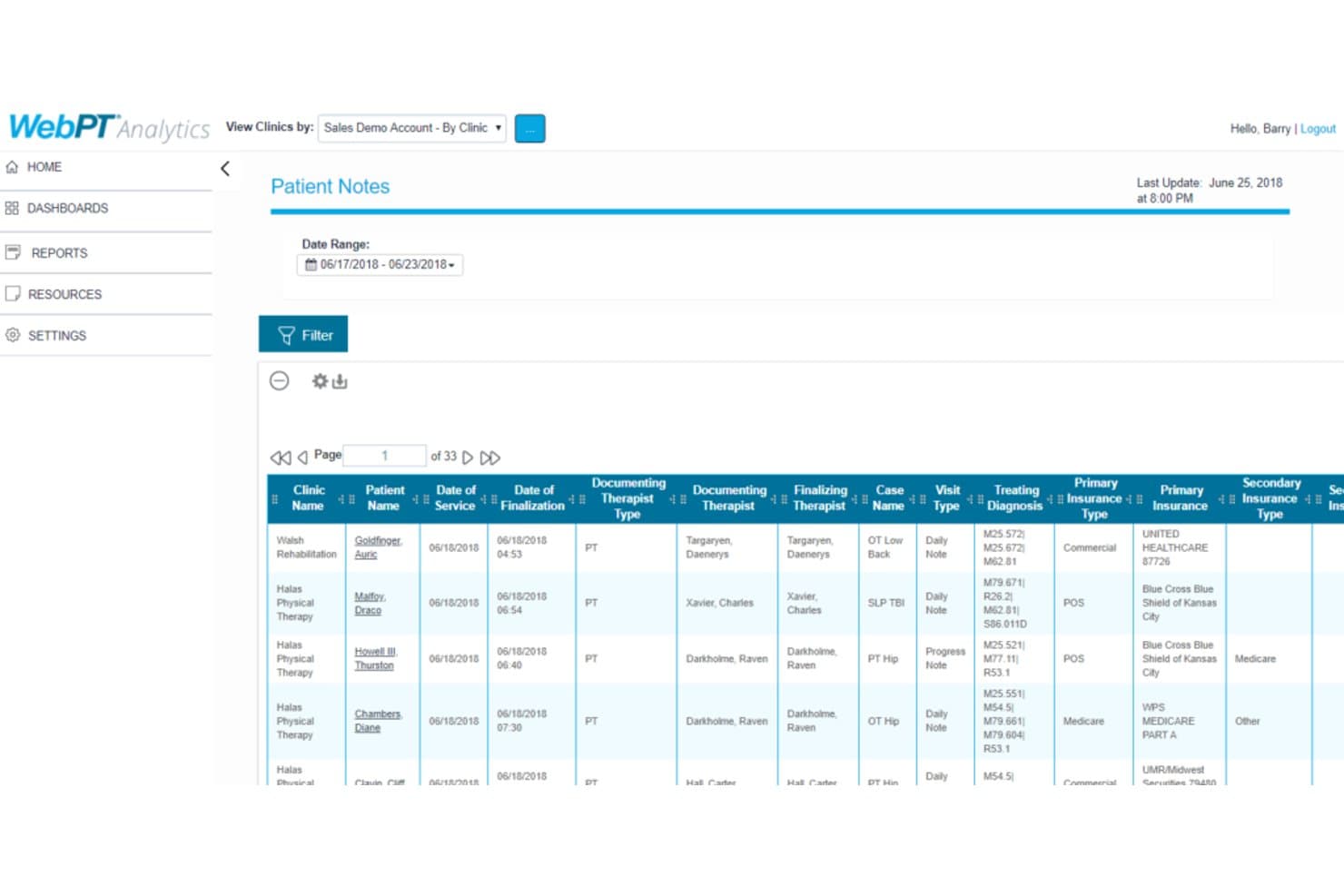
WebPT tracks patient notes with therapist and insurance details. WebPT is a practice management platform built for rehab therapy practices that need connected documentation, scheduling, billing, compliance, and patient outcome tracking in one system.
Who Is WebPT Best For?
WebPT suits outpatient physical, occupational, and speech therapy practices that need integrated billing and revenue cycle management.
Why WebPT Is a Good tebra alternatives
I picked WebPT because it connects rehab documentation, scheduling, billing, and revenue cycle management in one platform. I use its billing workflows alongside patient outcome tracking and compliance tools to support physical, occupational, and speech therapy practices. That focus makes WebPT Best for rehab therapy billing and RCM.
WebPT Key Features
- Patient intake: Collect patient information before appointments.
- Balance collection: Collect outstanding patient balances online.
- Performance dashboards: Monitor practice data through real-time dashboards.
- Review requests: Encourage patients to leave Google reviews.
WebPT Integrations
WebPT integrates with 60+ software partners, including Waystar, Worldpay, Kno2, PatientPay, Better Healthcare, PredictionHealth, and Patient360. It supports custom integration development for patient registration, billing, documentation, and healthcare interoperability workflows.
Pros and Cons
Pros:
- Online intake and balance collection tools
- Integrated billing and revenue cycle management
- Rehab-specific documentation and outcome tracking
Cons:
- Billing workflows can require staff oversight
- Less suitable for general medical practices
Learn more about WebPT: Best for switching from Kareo with in-house migration
- Free plan available
- From $25/month
Visit WebsiteCustomer Rating:4.2/5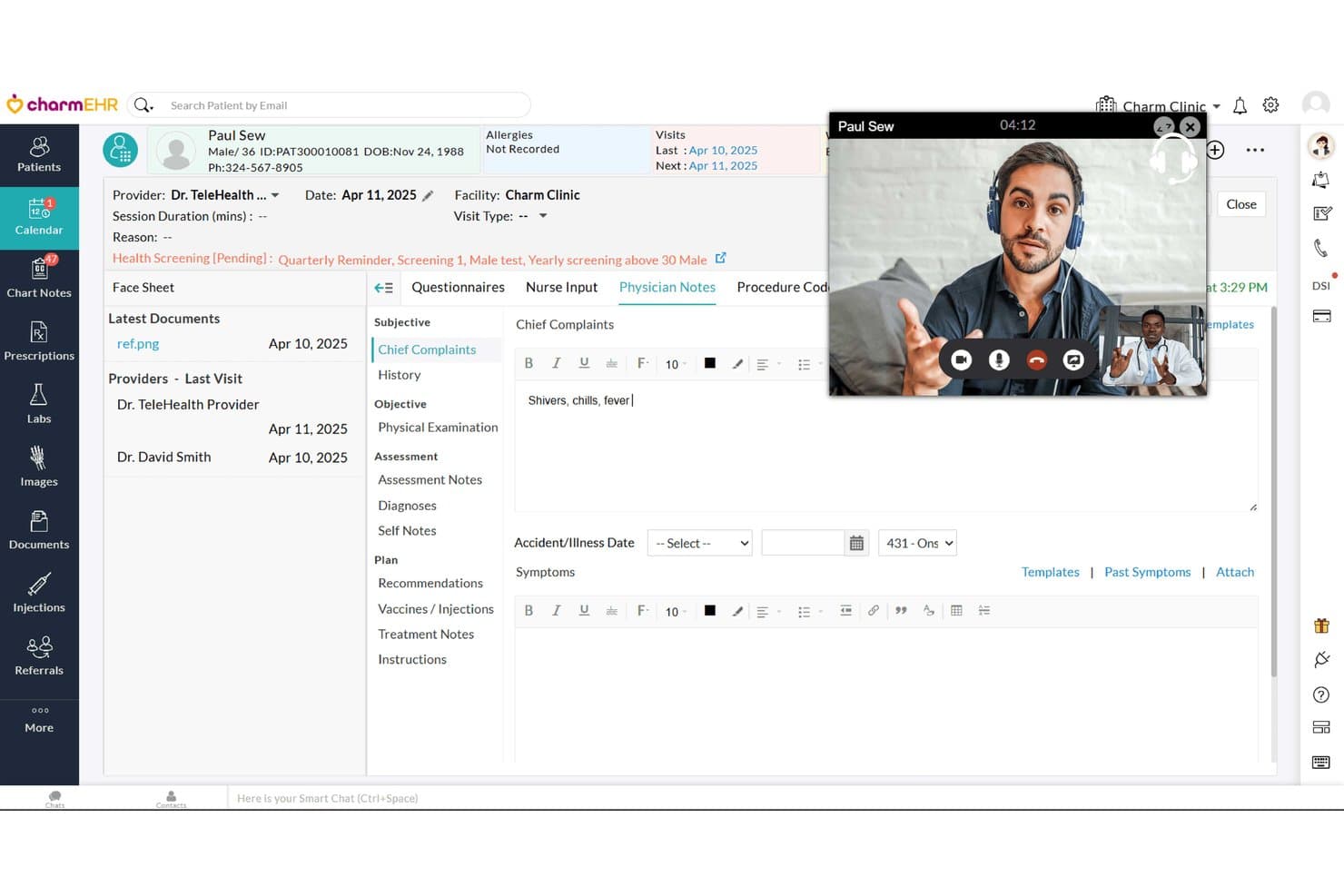
CharmHealth supports telehealth visits with live video inside the EHR. CharmHealth is an all-in-one, AI-enabled EHR and practice management platform for clinics that need connected scheduling, billing, patient engagement, and clinical documentation without piecing together separate systems.
Who Is CharmHealth Best For?
CharmHealth suits independent clinics moving from Kareo that want to manage their data migration in-house.
Why CharmHealth Is a Good tebra alternatives
I picked CharmHealth because it’s a practical choice for switching from Kareo with in-house migration. I use its scheduling, billing, patient engagement, and clinical documentation tools within one EHR and practice management platform. Its AI-enabled documentation also supports clinics replacing separate systems without relying on external migration services.
CharmHealth Key Features
- Role-based access: Set granular permissions and audit user actions.
- Inventory management: Track stock levels, expiry dates, and reorder thresholds.
- Patient check-in kiosk: Let patients enter details and complete questionnaires on an iPad.
- Analytics reports: Create custom reports on practice, patient, and clinical data.
CharmHealth Integrations
CharmHealth offers marketplace integrations through CharmHealthHub, including Fullscript and Bluefin, along with connections to labs, diagnostic centers, devices, and health technology applications. Its REST API, including FHIR API documentation, supports custom integrations with medical applications and devices.
Pros and Cons
Pros:
- AI tools support visit documentation
- Patient portal handles records and questionnaires
- Integrated clinical, billing, and scheduling workflows
Cons:
- Limited note templates beyond SOAP
- Support responses can take too long
Learn more about CharmHealth: Best for outsourced RCM with in-house billing
- Free demo available
- Pricing upon request
Visit WebsiteCustomer Rating:4.1/5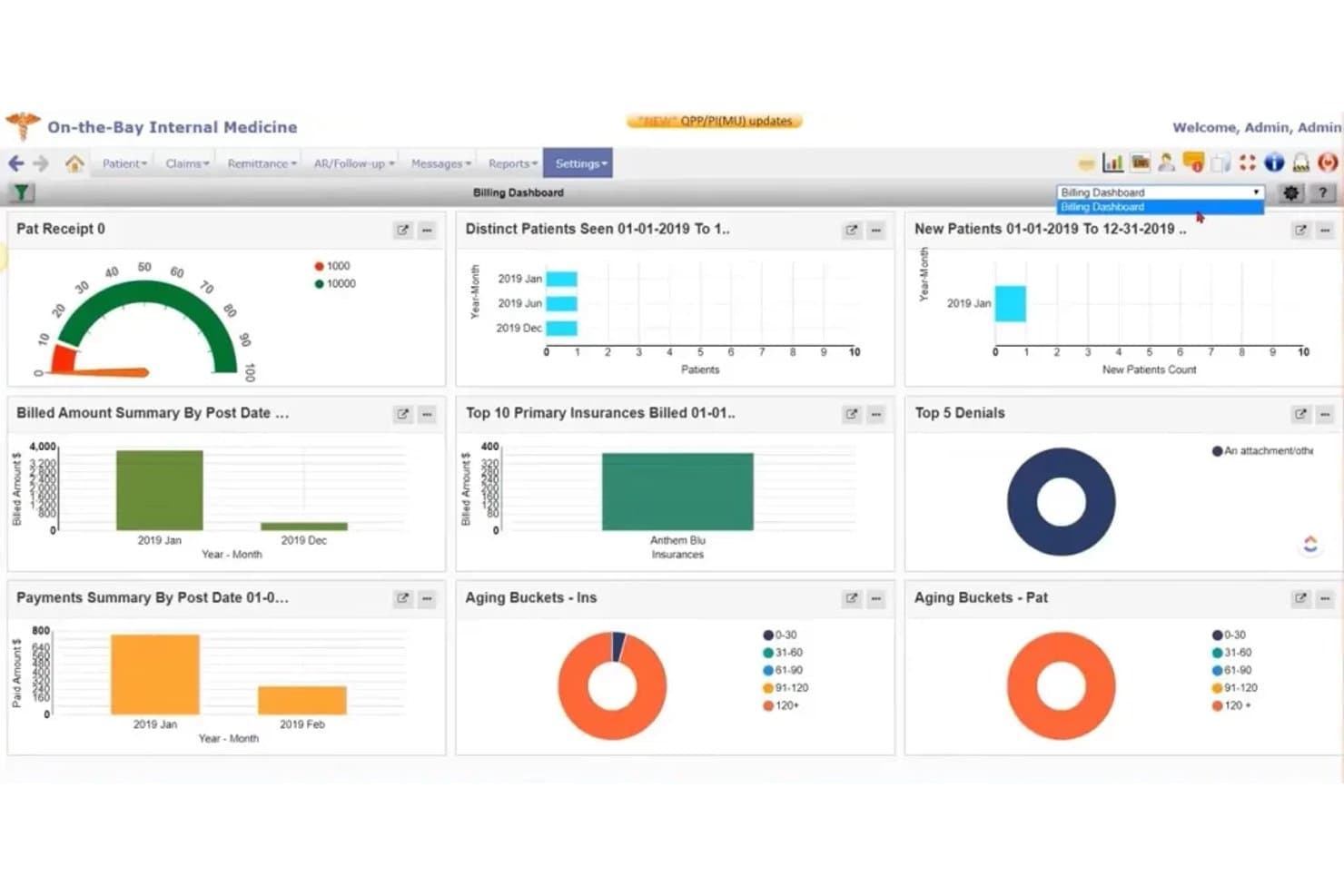
PrognoCIS billing dashboard showing payments, denials, insurance claims, and aging reports PrognoCIS is a cloud-based EHR and practice management platform for medical practices that combines clinical, scheduling, patient engagement, and billing workflows—Best for outsourced RCM with in-house billing.
Who Is PrognoCIS Best For?
PrognoCIS suits practice administrators and billing teams that need one cloud platform for clinical workflows, scheduling, patient engagement, and in-house billing.
Why PrognoCIS Is a Good tebra alternatives
I picked PrognoCIS as a tebra alternative because it is best for outsourced RCM with in-house billing. I use its integrated claims submission, denial tracking, coding assistance, and real-time eligibility checks to manage billing workflows. Its EHR also supports third-party billing, while in-house teams retain visibility into claims and payment activity.
PrognoCIS Key Features
- Patient portal: Offers secure messaging, document sharing, online payments, and appointment scheduling.
- E-prescribing: Lets providers send prescriptions electronically from the clinical workflow.
- E-faxing: Sends and receives faxes without requiring physical fax hardware.
- Referral management: Tracks referrals and related coordination tasks within the platform.
PrognoCIS Integrations
PrognoCIS integrates with LabCorp, Pathology Inc., TriCore, US Medical Scientific, and Bostwick Labs, with interoperability across pharmacies, radiology providers, payers, transcription services, appointment reminders, and vaccine registries. It also provides APIs for custom and standard EMR integrations.
Pros and Cons
Pros:
- Patient portal supports scheduling and payments
- Outsourced RCM retains in-house claims visibility
- Billing includes claim scrubbing and payment posting
Cons:
- Template customization takes time
- Billing adjustments can be complicated
Learn more about PrognoCIS: Best for outsourced RCM with in-house billing options
- Not available
- Pricing upon request
Visit WebsiteCustomer Rating:3.9/5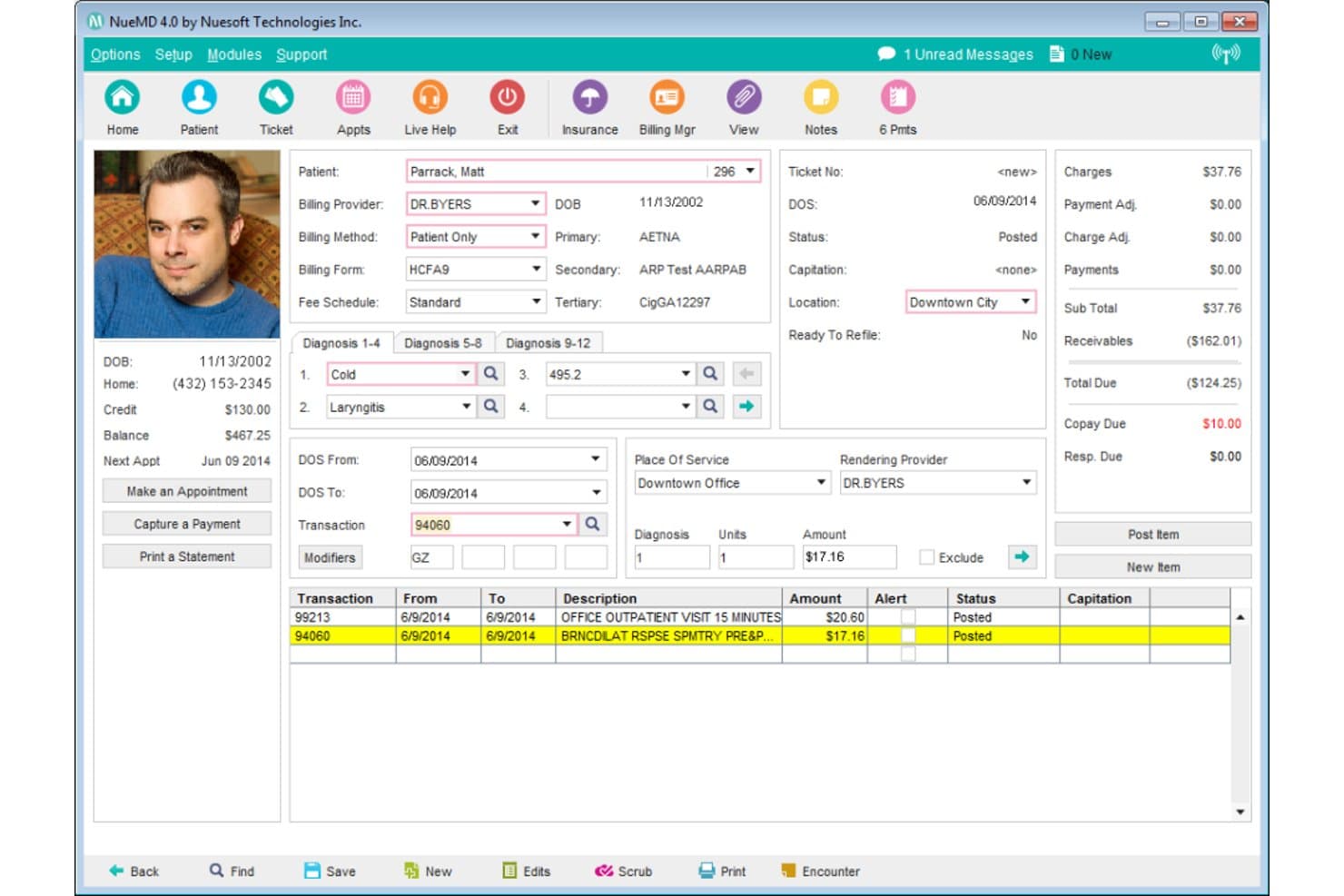
NueMD streamlines billing by displaying charges, payments, and diagnoses. NueMD is a practice management and medical billing platform for medical practices that need scheduling, clinical workflows, claims management, and reporting in one system, with optional revenue cycle support.
Who Is NueMD Best For?
Medical practices that want outsourced revenue cycle management while retaining the option to handle billing in-house.
Why NueMD Is a Good tebra alternatives
I picked NueMD because it supports outsourced RCM with in-house billing options. I use its scheduling, claims management, and reporting tools to keep billing workflows connected to practice operations. That flexibility lets my team retain billing control while adding revenue cycle support when claim volume or staffing changes.
NueMD Key Features
- Patient portal: Gives patients online access to their health information.
- Patient chart management: Organizes health snapshots, clinical summaries, and medication histories.
- E-prescribing: Sends prescriptions electronically to pharmacies from patient charts.
- E-labs: Supports electronic laboratory ordering and result management.
NueMD Integrations
NueMD’s native integrations aren’t clearly documented. It offers Certified API access for custom integrations, but AdvancedMD says NueMD software and support will be retired on December 31, 2026.
Pros and Cons
Pros:
- Color-coded scheduling supports appointment management
- Claims process quickly without frequent issues
- Billing and scheduling share one system
Cons:
- Scanning and uploading documents takes time
- Customer service sometimes involves long hold times
Learn more about NueMD: Best for small practices with built-in AI charting
- Not available
- Pricing upon request
Visit WebsiteCustomer Rating:3.7/5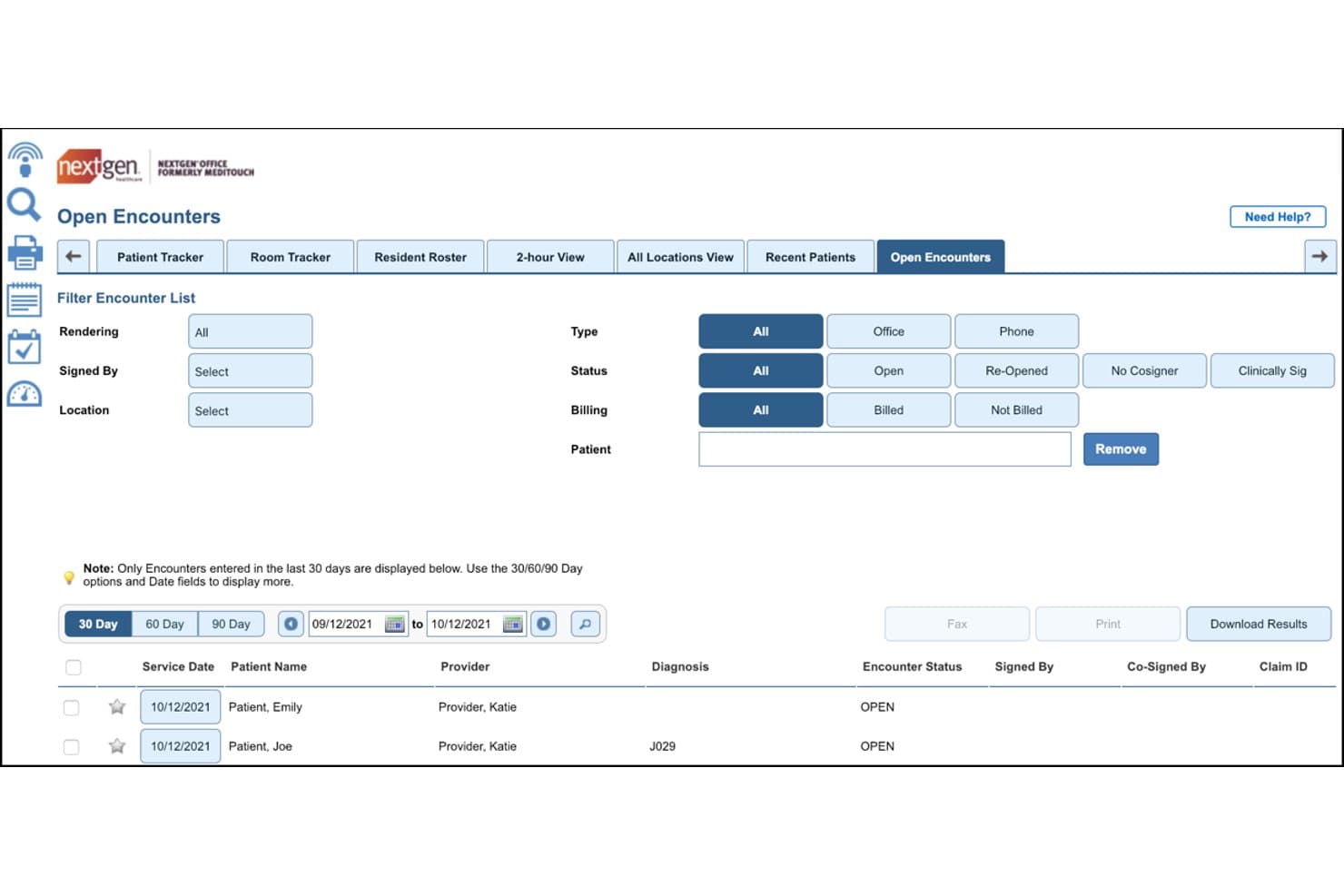
NextGen Office lets users filter and review open encounters by status and billing. NextGen Office is a cloud-based EHR and practice management platform for small practices that need unified tools for scheduling, billing, clinical documentation, and built-in AI charting.
Who Is NextGen Office Best For?
Small medical practices needing EHR, practice management, and AI charting in one cloud-based platform.
Why NextGen Office Is a Good tebra alternatives
I picked NextGen Office because it combines EHR and practice management tools for small practices with built-in AI charting. I like how teams can manage scheduling, billing, and clinical documentation in one cloud-based platform. Its AI charting supports documentation during routine patient visits.
NextGen Office Key Features
- Embedded patient portal: Supports secure messaging, online payments, and patient access.
- E-prescribing: Sends prescriptions electronically from the EHR.
- Telehealth visits: Supports virtual appointments through the patient portal.
- Eligibility verification: Checks patient coverage electronically before visits.
NextGen Office Integrations
NextGen Office supports Apple Health integration, lab connections, and clearinghouse integration. Specific connected vendors, native integration counts, and API availability aren't clearly documented.
Pros and Cons
Pros:
- Patient portal supports messaging and payments
- Integrated scheduling, billing, and clinical records
- AI-assisted charting supports routine visits
Cons:
- Users report occasional system lag
- Updates can disrupt the entire system
Learn more about NextGen Office: Best for iPad-native EHR across 11 specialties
- Free demo available
- Pricing upon request
Visit WebsiteCustomer Rating:4.5/5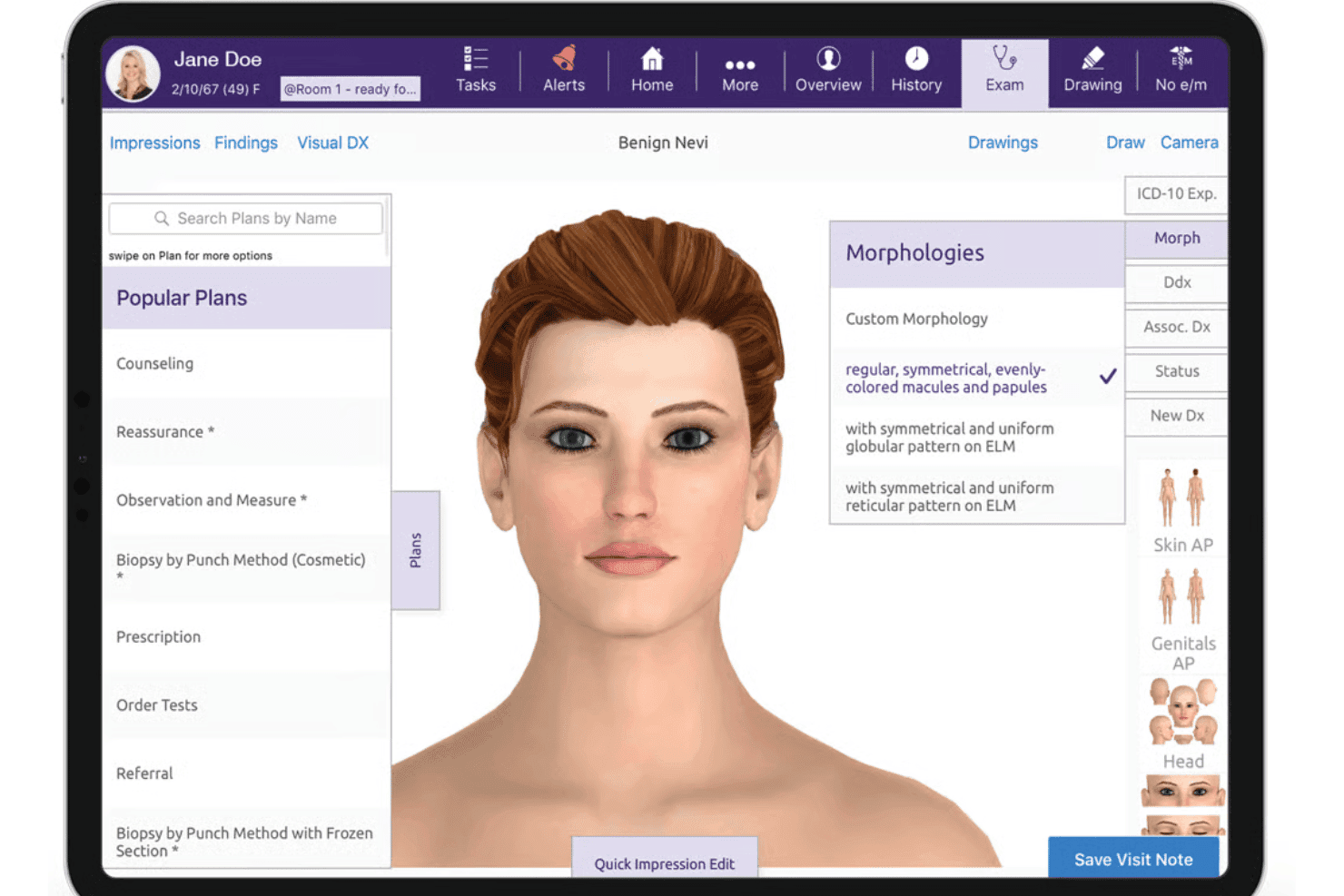
ModMed delivers specialty EHR, AI documentation, e-prescribing, billing, and RCM. ModMed is a specialty-focused EHR and practice management platform for medical practices that need connected clinical, billing, scheduling, and patient communication workflows.
Who Is ModMed Best For?
ModMed suits specialty medical practices that want an iPad-native EHR for clinical, billing, scheduling, and patient communication workflows.
Why ModMed Is a Good tebra alternatives
I picked ModMed because its iPad-native EHR supports clinical documentation across 11 specialties. My team uses connected clinical, billing, and scheduling workflows to manage visits from intake through claims. Patient communication tools also keep appointment updates and care-related messages in the same practice platform.
ModMed Key Features
- Missed-appointment reporting: Calculate missed appointments by month.
- Coding distribution reports: Compare E/M, modifier, and CPT code distributions.
- MIPS tracking: Monitor MIPS scores and progress with CMS.
- Reimbursement trend reports: Identify reimbursement trends before they affect cash flow.
ModMed Integrations
ModMed offers marketplace integrations with ClearWave, DrConnect, InstaMed, Inuvio, Luma, NextPatient, PatientPop, Podium, Relatient, and TriZetto. It also supports custom connectivity through Certified FHIR, proprietary, and HL7 APIs.
Pros and Cons
Pros:
- MIPS and reimbursement reporting included
- Tap-and-go notes suggest coding
- Specialty-specific templates support 11 disciplines
Cons:
- Implementation timelines can run long
- Rigid contracts limit practice flexibility
Learn more about ModMed: Best for independent practices rated #1 in KLAS
- Free demo available
- Pricing upon request
Visit WebsiteCustomer Rating:3.8/5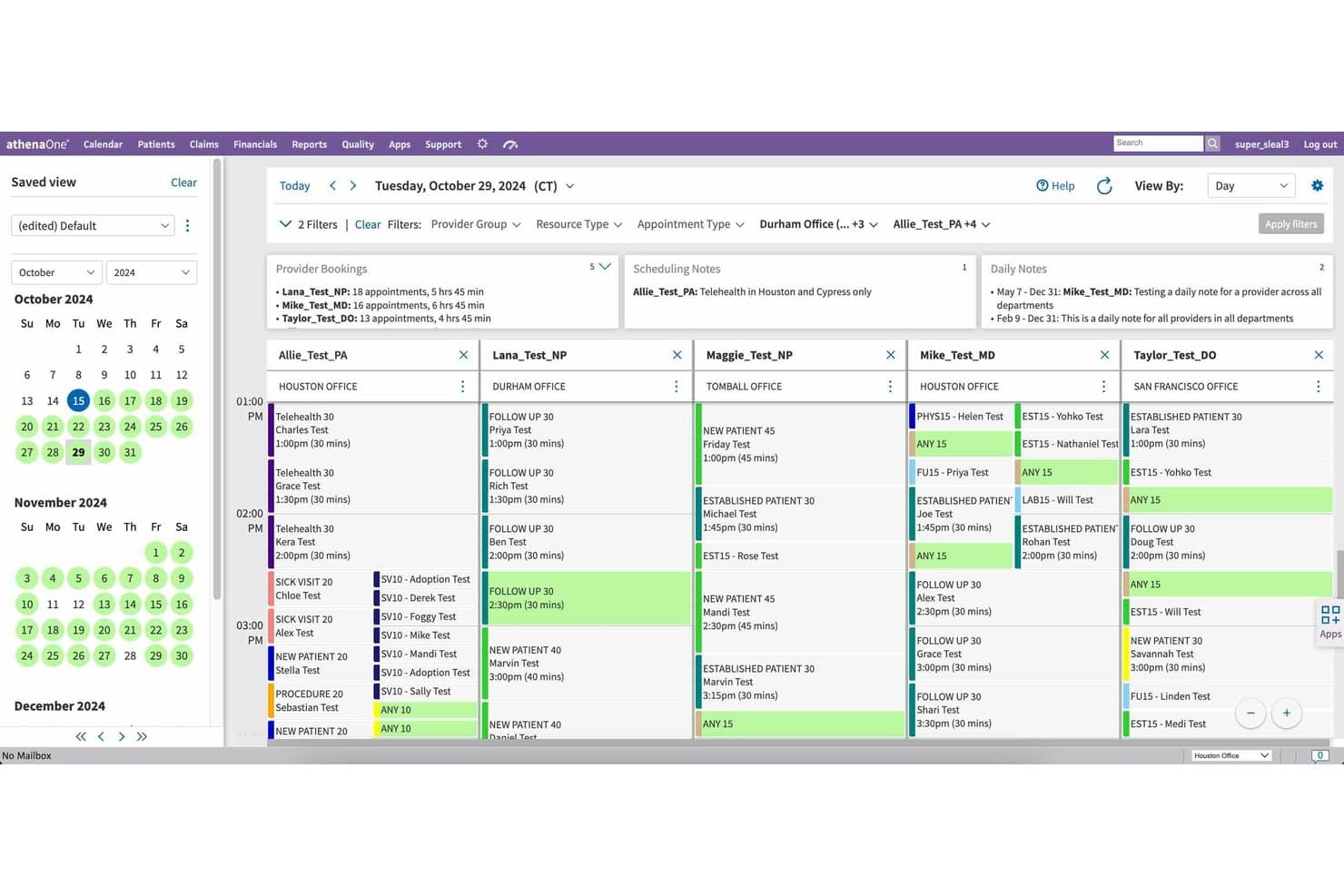
athenaOne lets users manage daily provider schedules across multiple offices. athenaOne is an AI-powered, all-in-one EHR and practice management platform for independent practices, bringing clinical workflows, patient engagement, and revenue cycle tasks into one system.
Who Is athenaOne Best For?
athenaOne fits independent medical practices that need one platform for clinical documentation, patient engagement, practice management, and revenue cycle tasks.
Why athenaOne Is a Good tebra alternatives
I picked athenaOne because its Best for independent practices rated #1 in KLAS positioning aligns with smaller practices seeking one system. I use its clinical documentation, patient engagement, practice management, and revenue cycle workflows together, rather than coordinating separate tools. This fits teams managing care delivery and billing within the same practice.
athenaOne Key Features
- Clinical decision support: Delivers clinical insights to support care decisions.
- Care Event Summaries: Distills hospital events and discharge documentation.
- Electronic ordering: Supports electronic ordering within the EHR.
- Group video conferencing: Adds up to four care team members to telehealth visits.
athenaOne Integrations
athenaOne offers marketplace integrations from over 300 partners, with solutions covering more than 60 capabilities. It also provides over 800 API endpoints for custom integrations and data exchange.
Pros and Cons
Pros:
- Care Event Summaries condense hospital documentation
- Clinical insights support point-of-care decisions
- Unified scheduling, charting, and billing
Cons:
- Staff training takes substantial time
- Customer support quality varies by reviewer
Learn more about athenaOne: Best for multi-specialty outsourced RCM billing
- Free demo available
- Pricing upon request
Visit WebsiteCustomer Rating:3.6/5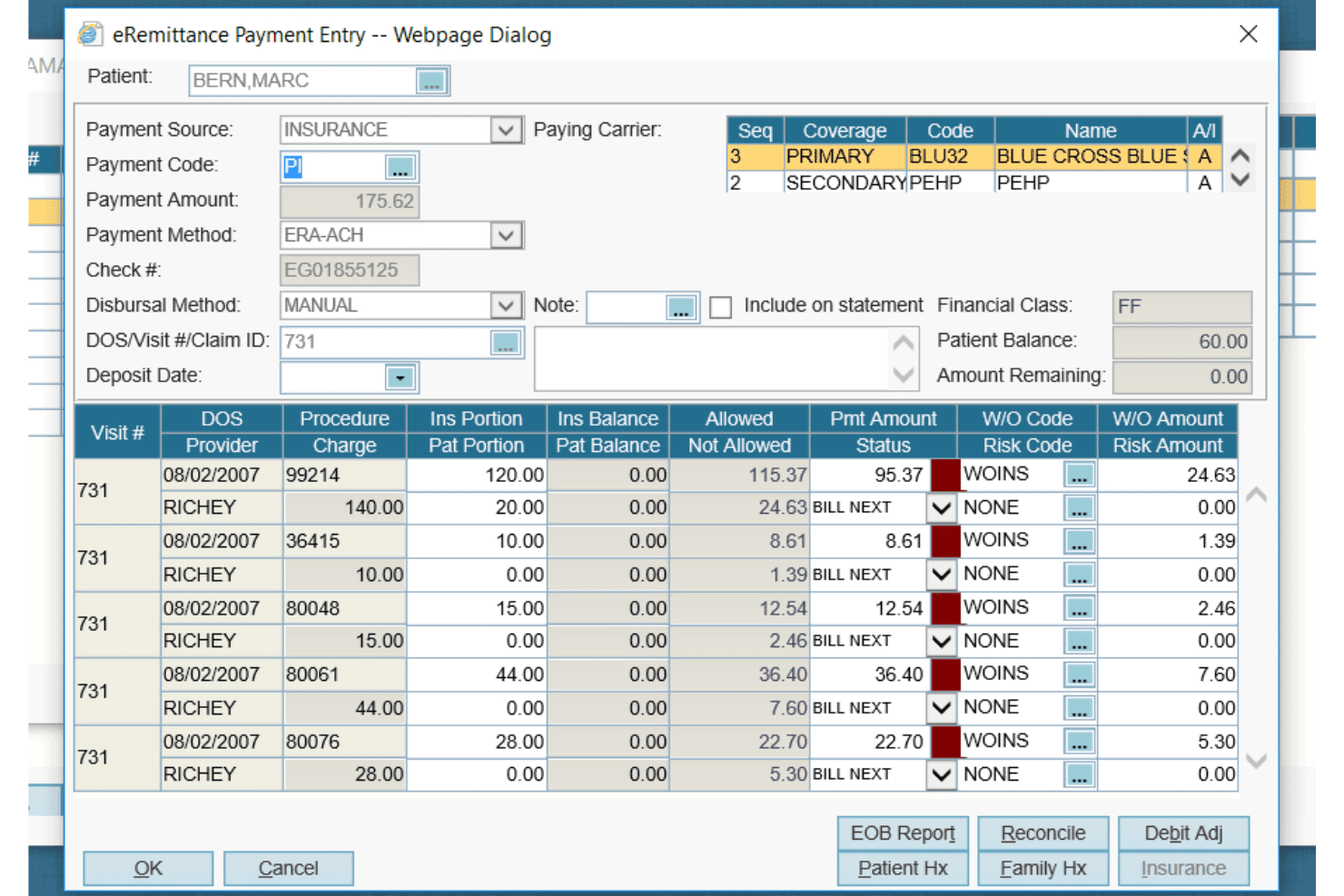
AdvancedMD offers a detailed eRemittance Payment Entry dialog for managing insurance billing, claim payments, and write-off codes per procedure. AdvancedMD is a cloud-based practice management platform for independent and multi-specialty practices that need unified scheduling, billing, EHR, patient engagement, and outsourced revenue cycle support.
Who Is AdvancedMD Best For?
Multi-specialty medical practices that need outsourced revenue cycle management alongside scheduling, billing, EHR, and patient engagement tools.
Why AdvancedMD Is a Good tebra Alternatives
I picked AdvancedMD because its outsourced revenue cycle support fits multi-specialty practices managing billing across varied workflows. My team uses its unified scheduling, billing, and EHR tools alongside outsourced RCM services, keeping practice and financial operations connected. That combination makes AdvancedMD a strong choice for multi-specialty outsourced RCM billing.
AdvancedMD Key Features
- Insurance eligibility verification: Checks coverage status in real time.
- Automated claim scrubbing: Identifies claim errors before submission.
- Ambient AI documentation: Transcribes visits and drafts clinical notes.
- Financial dashboards: Displays real-time data across providers and locations.
AdvancedMD Integrations
AdvancedMD offers 1,400+ marketplace integration and partner offerings, including Weave, InstaMed, Promptly, Healthix, Apollo CRM, LeadSquared, LunaJoy, Salesforce, Suite CRM, and Zoho. Its Open API supports custom connections with medical systems, laboratories, health information exchanges, and clinical information exchanges.
Pros and Cons
Pros:
- Financial dashboards cover providers and locations
- Claim scrubbing catches errors before submission
- Outsourced RCM supports multi-specialty billing
Cons:
- Users report recurring billing problems
- Support handoffs can delay issue resolution
 Best for outsourced RCM with specialty EHR built in
- Free demo available
- Pricing upon request
Visit WebsiteCustomer Rating:3.9/5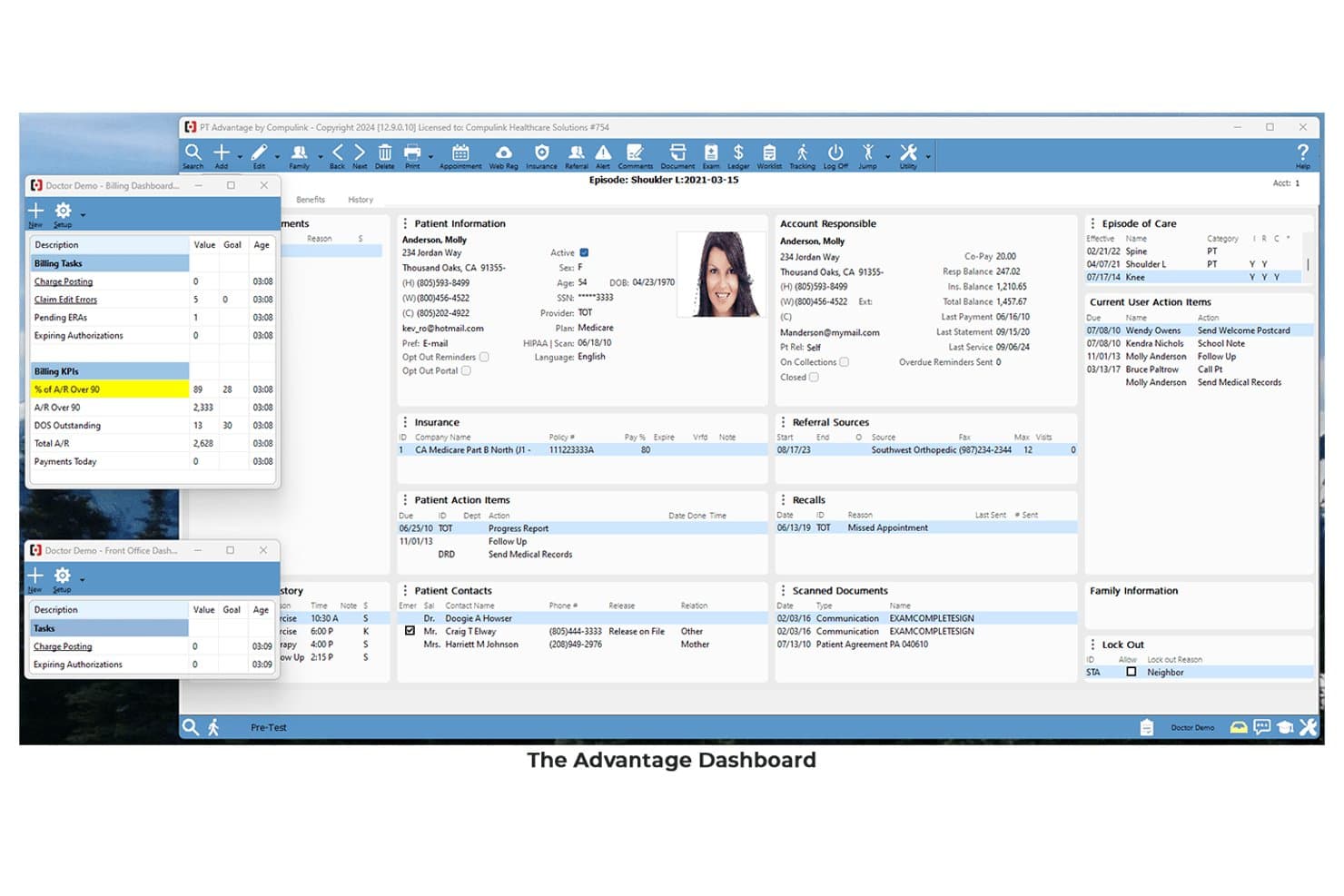
Compulink centralizes patient, billing, and scheduling data in one dashboard. For practices comparing Tebra alternatives, Compulink combines specialty EHR workflows, practice management, billing, patient engagement, and analytics to coordinate clinical and administrative work in one system.
Who Is Compulink Best For?
Compulink suits specialty medical practices that need an EHR with integrated practice management and outsourced revenue cycle management.
Why Compulink Is a Good tebra alternatives
I picked Compulink because it is best for outsourced RCM with specialty EHR built in. I use its specialty EHR workflows alongside practice management and billing tools, while its outsourced revenue cycle management supports claims and reimbursement work. Patient engagement and analytics keep clinical and administrative activity connected.
Compulink Key Features
- Customizable documentation: Configure charting templates around your specialty.
- OneTab layout: View chart details on a single page.
- Optical POS tools: Manage lens catalogs, inventory, and lab orders.
- Online patient store: Manage product orders, tracking, and notifications.
Compulink Integrations
Compulink documents API connections with ABB, VisionWeb, EdgePro, and Relatient, plus an integrated solution with Weave. It also offers an API partner program for custom integrations.
Pros and Cons
Pros:
- Outsourced billing includes dedicated revenue cycle support
- OneTab consolidates charting onto one screen
- Specialty workflows support tailored clinical documentation
Cons:
- Patient web registration remains slow and cumbersome
- Updates can reset customized workflow settings
Learn more about Compulink: 10Best for AI-driven scheduling across 30+ specialties
CureMD
- Free demo available
- Pricing upon request
Visit WebsiteCustomer Rating:3.5/5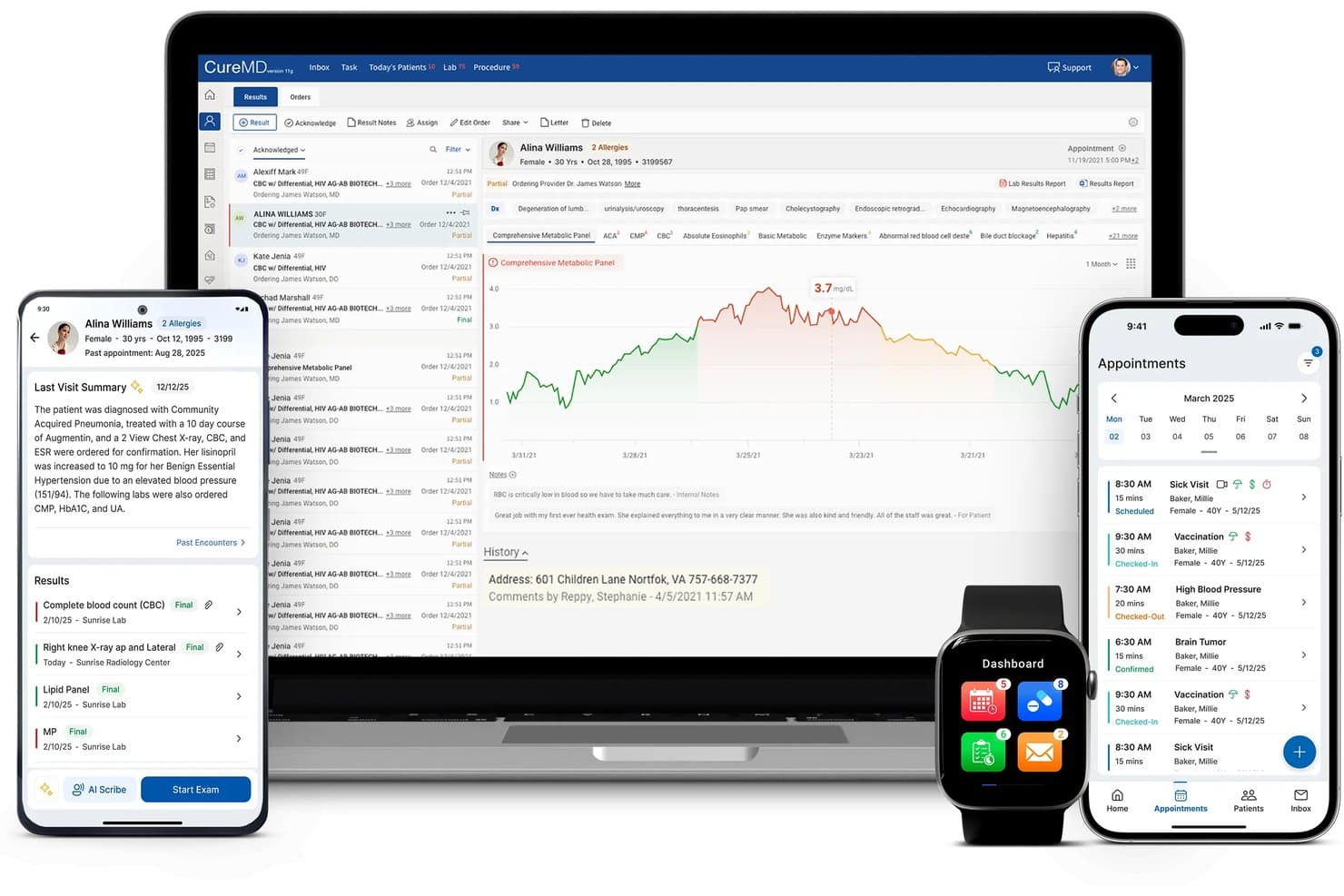
CureMD displays patient records across mobile, tablet, and watch. CureMD is a cloud-based practice management and EHR platform for medical practices that need specialty workflows, integrated billing, scheduling, and patient engagement in one Tebra alternative.
Who Is CureMD Best For?
CureMD suits specialty medical practices that need AI-assisted scheduling alongside EHR, billing, and patient engagement workflows.
Why CureMD Is a Good tebra alternatives
I picked CureMD because its AI-driven scheduling supports workflows across 30+ specialties. I use its AI Contact Center for automated appointment booking and intake, while specialty-specific templates support practices such as cardiology, dermatology, and OB/GYN. That combination gives my team a practical scheduling alternative to Tebra.
CureMD Key Features
- Real-time eligibility checks : Verify coverage before appointments.
- Billing automation : Automate billing and claims workflows.
- Mobile EHR : Access clinical records from mobile devices.
- Chronic care management : Track care plans and related billing.
CureMD Integrations
CureMD’s native integrations are not clearly documented, but it supports custom integrations with FHIR, HL7, and APIs for connecting labs, imaging systems, pharmacies, and other EHRs.
Pros and Cons
Pros:
- Cloud access unifies clinical and billing workflows
- AI contact center handles appointment booking
- Specialty templates cover 30-plus disciplines
Cons:
- Training and support experiences vary widely
- Users report freezing during clinical notes
Learn more about CureMD:
Andre Tebra-alternativer
Her er noen flere alternativer som ikke kom med på topplisten min, men som likevel er verdt å se nærmere på:
- 11CareCloudBest for outsourced RCM with built-in AI billing
- 12eClinicalWorksBest for outsourcing RCM at a flat percentage rate
- 13RXNTBest for per-provider pricing with an AI scribe
- 14ValantBest for behavioral health billing and EHR in one
- 15DrChronoBest for mobile EHR with iPad-native charting
- 16JaneBest for wellness clinics booking and billing in one
- 17ChiroTouchBest for chiropractic billing and EHR in one
- 18NextechBest for specialty EHR with built-in CRM marketing
- 19Veradigm EHRBest for AI-driven scheduling in multi-specialty groups
- 20IntergyBest for multispecialty PM with built-in clearinghouse
How I Evaluate Tebra Alternatives
I split my evaluation into three parts. First, I look for tools that can schedule patient appointments and submit and track insurance claims—these carry the most weight. Then I evaluate standout features like outsourced billing services and specialty-specific templates. Finally, I consider onboarding support, pricing transparency, and contract flexibility.
Core Functionality (Table Stakes For This List)
When I'm selecting tools for my list, I score each one on a scale from 0 (does not offer the functionality) to 5 (excels in this area) for each core functionality listed below. I then convert the total into a percentage to help assess each tool’s overall fit, with extra weight on any functionalities I’ve deemed essential.
- Patient Scheduling & Calendar (Essential): I look for multi-provider booking, location calendars, online self-scheduling, reminders, waitlists, and conflict handling.
- Medical Billing & Claims (Essential): I assess electronic claims, eligibility checks, claim tracking, denial workflows, payment posting, and collection reporting.
- Clinical Documentation: I evaluate encounter notes, templates, orders, prescriptions, and links between charts, appointments, and billing.
- Patient Intake: I check digital forms, demographic capture, insurance details, pre-visit registration, and updates to patient records.
- Reporting & Analytics: I look for dashboards and reports covering collections, claim status, denials, appointment activity, and provider performance.
- Patient Communication: I assess portals, two-way messaging, appointment reminders, recalls, follow-ups, and automated patient outreach.
Once I have a list of tools that meet the criteria, I consider what sets each platform apart.
Differentiating Factors (What Sets Vendors Apart)
Here's how I compare and contrast different vendors:
Standout Features
I look for outsourced billing services that let you offload claims submission and follow-up to a managed team. This matters most for small practices without dedicated billing staff. Telehealth is another key factor—I check whether video visits are built into scheduling and charting workflows or require a third-party add-on. Platforms like athenaOne and eClinicalWorks handle this differently, so the integration depth varies. I also evaluate credentialing support, since payer enrollment delays can stall revenue for new providers joining a growing practice.
Beyond Features
I check whether a vendor locks you into long-term contracts or offers month-to-month billing, since practices outgrow platforms faster than expected. Interoperability matters just as much—I look for HL7/FHIR support and pre-built connections to clearinghouses, labs, and pharmacy networks, because a platform that can't exchange data with your existing systems creates manual work. I also evaluate onboarding support, specifically whether the vendor assigns a dedicated migration specialist or leaves you with self-service setup docs when moving off a legacy system.
Hvorfor se etter Tebra-alternativer?
Selv om Tebra er et godt valg av programvare for praksisadministrasjon, finnes det flere grunner til at enkelte brukere ser etter alternative løsninger. Du ser kanskje etter et Tebra-alternativ fordi du har:
- Behov for kliniske arbeidsflyter som er tilpasset spesialiteten
- Et ønske om kontroll over intern fakturering
- Behov for utkontraktert inntektsforvaltning
- Bekymringer knyttet til skalering på tvers av flere lokasjoner
- Behov for bedre støtte til migrering og oppstart
Hvis noe av dette høres kjent ut, har du kommet til rett sted. Listen min inneholder flere alternativer for programvare til praksisadministrasjon som passer bedre for team som står overfor disse utfordringene med Tebra og ser etter alternative løsninger.
Tebras viktigste funksjoner
Her er Tebras viktigste funksjoner, slik at du kan sammenligne plattformen med alternative løsninger:
- Elektroniske pasientjournaler: Tebra tilbyr skybasert journalføring med gjenbrukbare maler, makroer og dokumentasjonsverktøy spesifikke for ulike fagområder. AI Note Assist kan konvertere pasientsamtaler til kliniske notater, mens arbeidsflyter for resepter og laboratorieundersøkelser holder relatert informasjon i pasientjournalen.
- Pasienttimeplanlegging: Praksiser kan konfigurere behandlernes tilgjengelighet, varighet på avtaler og besøksårsaker for nettbestilling. Planleggingsverktøyene kobles til kalendere, påminnelser og pasientjournaler, slik at resepsjonsteam kan administrere avtaler på tvers av behandlere og lokasjoner.
- Medisinsk fakturering: Tebra kobler klinisk dokumentasjon sammen med kontroller av forsikringsberettigelse, elektroniske krav, oppfølging av avslag og betalingsarbeidsflyter. Faktureringsverktøyene hjelper team med å gjennomgå kravstatus, identifisere problemer og håndtere oppgaver knyttet til inntektssyklusen fra én plattform.
- Pasientbetalinger: Plattformen støtter nettbetalinger, alternativer for lagrede kortopplysninger og automatiserte elektroniske eller utsendte kontoutskrifter. Team kan sende pasienter betalingslenker og følge opp saldoer sammen med fakturerings- og kontoinformasjon.
- Pasientinntak: Digitale inntaksskjemaer samler inn demografiske opplysninger, forsikringsinformasjon og besøksrelaterte data før avtaler. Utfylte skjemaer kan overføres til pasientjournaler, noe som reduserer manuell dataregistrering ved innsjekking.
- Pasientportal: Portalen gir pasienter sikker tilgang til sammendrag av besøk, testresultater, helseopplysninger, dokumenter, faktureringsverktøy og meldinger. Praksiser kan bruke den til å dele informasjon og opprettholde kommunikasjon utenom avtaler.
- Telehelse: Tebra tilbyr HIPAA-kompatible videobesøk koblet til timeplanlegging og kliniske notater. Behandlere kan gjennomføre fjernavtaler og dokumentere konsultasjonene i den samme arbeidsflyten for elektronisk pasientjournal.
- Elektroniske resepter og laboratorieundersøkelser: Behandlere kan sende resepter direkte til apotek, gjennomgå varsler om interaksjoner og følge opp fornyelser. De elektroniske laboratorieverktøyene støtter bestilling og visning av resultater uten behov for separate portaler.
Kostnader og priser for Tebra-alternativer
Kostnadene varierer basert på funksjoner, teamstørrelse, tilleggstjenester og faktureringstjenester. Her er prisintervallene du vanligvis kan forvente fra Tebra-alternativer:
Sammenligningstabell for abonnementer for Tebra-alternativer
| Abonnementstype | Gjennomsnittspris | Vanlige funksjoner |
| Personlig abonnement | $50–$150/behandler/måned | Timeplanlegging, klinisk dokumentasjon, pasientinntak og grunnleggende fakturering. |
| Forretningsabonnement | $150–$300/behandler/måned | Timeplanlegging for flere behandlere, kravbehandling, pasientkommunikasjon og rapportering. |
| Virksomhetsabonnement | $300–$600/behandler/måned | Administrasjon av flere lokasjoner, avansert rapportering, dedikert oppstart, tilpassede integrasjoner og alternativer for outsourcing av fakturering. |