

Skybasert EMR-programvare er teknologi for elektroniske pasientjournaler, ofte omtalt som elektroniske helsejournaler, som lagrer, administrerer og deler pasientdata sikkert i skyen, slik at teamet ditt kan få tilgang til journalene hvor som helst. Hvis du ser etter den beste skybaserte EMR-programvaren, opplever du sannsynligvis utfordringer med ujevn tilgang, tungvinte oppdateringer eller presset med å holde tritt med endrede krav til samsvar.
Denne veiledningen fokuserer på de beste skybaserte EMR-løsningene og skybaserte EHR-systemene for 2026. Den hjelper deg med å skille ut det viktigste, vurdere alternativene dine og velge verktøy som er utviklet for å støtte tryggere og mer sammenhengende behandling, uten at du kaster bort tid på å sortere gjennom upålitelig informasjon.
Why Trust Our Software Recommendations
6,700+
Reviews
20
Industry experts
16+
Evaluation factors
14
Years
Our team has been testing and reviewing software since 2012. As medical practice leaders ourselves, we know how difficult—and important—it is to choose the right software.
For this guide, we evaluated tools using hands-on testing and independent research, scoring tools using our selection criteria.
Our reviews reflect our human editorial judgment, not a sales pitch.
Sammenligningstabell for skybasert EMR-programvare
\u003cspan style=\u0022font-weight: 400;\u0022\u003eDenne sammenligningstabellen oppsummerer prisopplysningene for mine best utvalgte skybaserte EMR-programvarer\u003c/span\u003e
| Tool | Best For | Trial Info | Price | ||
|---|---|---|---|---|---|
| 1 | Best for specialty-specific clinical charting | Free demo available | Pricing upon request | Website | |
| 2 | Best for specialty practice adaptability | Free demo available, 7-day free trial for the standalone AI scribe | From $249/user/month | Website | |
| 3 | Best for flexible per-encounter or per-provider pricing | Free plan available | From $25/month | Website | |
| 4 | Best for telemedicine integration features | Free demo available | Pricing upon request | Website | |
| 5 | Best for intuitive charting and patient care tools | Free demo available | Pricing upon request | Website | |
| 6 | Best for mobile-friendly clinical documentation | Free demo available | Pricing upon request | Website | |
| 7 | Best for streamlined e-prescribing capabilities | Free demo available | From $199/user/month | Website | |
| 8 | Best for customizable clinical workflows | Free demo available | Pricing upon request | Website | |
| 9 | Best for rapid implementation options | Free demo available | Pricing upon request | Website | |
| 10 | Best for independent practice end-to-end records | Free demo available | From $99/user/month | Website |


Anmeldelser av den beste skybaserte EMR-programvaren
Nedenfor finner du mine detaljerte sammendrag av den beste skybaserte EMR-programvaren som kom med på kortlisten min. Anmeldelsene mine gir en detaljert oversikt over funksjonene, integrasjonene og de beste bruksområdene for hver plattform, slik at du kan finne den beste løsningen for deg.
 Best for specialty-specific clinical charting
- Free demo available
- Pricing upon request
Visit WebsiteCustomer Rating:4.5/5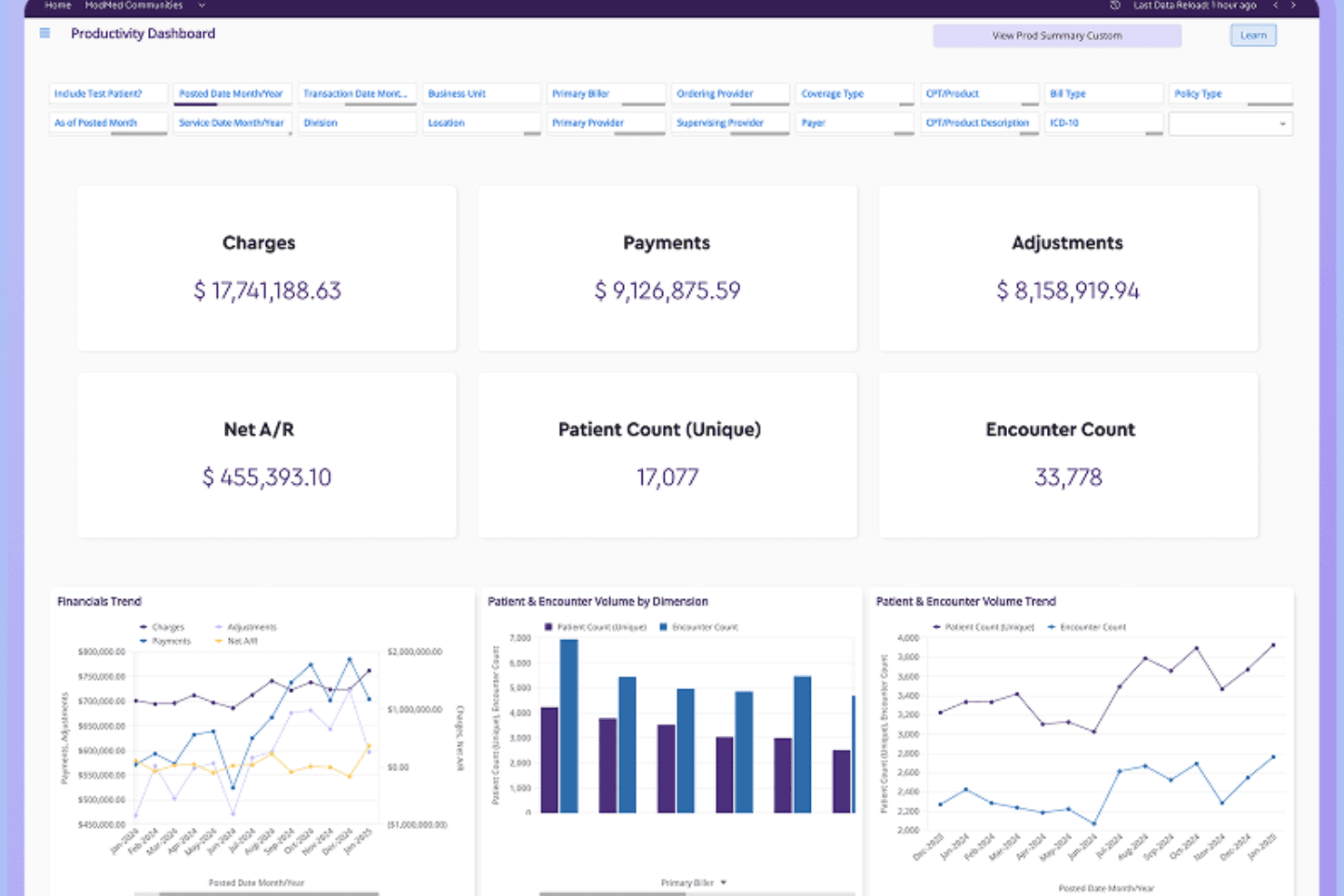
ModMed offers a comprehensive podiatry exam interface with condition-specific treatment plans, findings, and billing tools tailored for foot and ankle care. ModMed EMA is a cloud-based EHR built for specialty medical practices, offering adaptive clinical documentation, AI-assisted charting, e-prescribing, lab ordering, patient engagement tools, and integrated practice management workflows.
Who Is ModMed Best For?
ModMed EMA is a strong fit for specialty medical practices—dermatology, orthopedics, OBGYN, podiatry, and similar fields—that need clinical documentation built around their specific workflows.
Why I Picked ModMed
I picked ModMed as one of the best because its EMA EHR is built from the ground up for specialty practices, not retrofitted. I love how EMA preloads clinical content specific to your specialty, whether that's dermatology, orthopedics, or podiatry, so charting reflects how you actually work. ModMed Scribe 2.0 listens to patient-provider conversations and suggests visit notes, lab orders, and ICD-10 codes for your review, cutting documentation time without removing clinical judgment from the process.
ModMed Key Features
- Patient portal and APPatient app: Patients can view lab results, notes, and handouts, message the practice, request refills, and manage appointments through a web portal or mobile app.
- Surescripts-certified e-prescribing: Providers can queue and send prescriptions to a patient's preferred pharmacy directly from the visit workflow, with formulary lookup and electronic refill requests.
- Bidirectional lab integration: EMA connects with 1,200+ lab entities across the U.S. to send electronic orders and receive results, including digital photos and visit notes with pathology orders.
- AI Analytics dashboard: Built-in administrative, clinical, and financial analytics let practices track visit volume, E/M distribution, reimbursement trends, and high-risk diagnosis follow-ups in near real time.
ModMed Integrations
EMA connects with more than 1,200 lab entities through Change Healthcare, plus 100+ practice-management systems and 150+ pathology labs, including Labcorp and Quest Diagnostics. Its FHIR/OAuth2 APIs support custom integrations.
Pros and Cons
Pros:
- iPad charting supports work away from desk
- AI drafts notes for clinician review
- Specialty-specific charting reduces repetitive entry
Cons:
- Reviewers report mobile crashes and uneven workflows
- Extra clicks interrupt encounter documentation
Learn more about ModMed: Best for specialty practice adaptability
- Free demo available, 7-day free trial for the standalone AI scribe
- From $249/user/month
Visit WebsiteCustomer Rating:4.4/5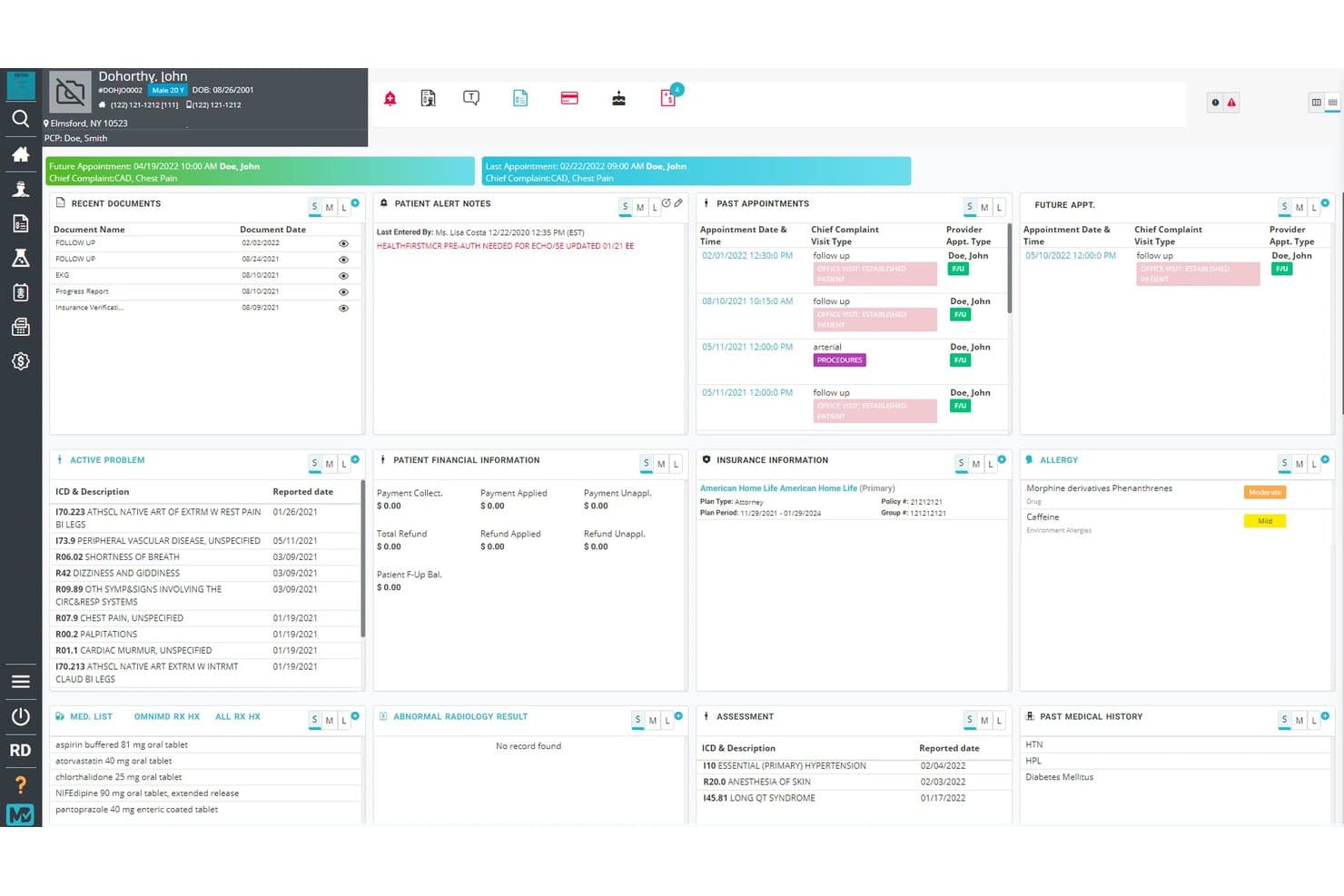
OmniMD centralizes patient health data in one cloud dashboard. OmniMD is a cloud-based EHR platform built for ambulatory practices that combines clinical documentation, AI-assisted charting, e-prescribing, specialty templates, patient portal, and telehealth across more than 20 specialty areas.
Who Is OmniMD Best For?
OmniMD is a strong fit for ambulatory practices that serve patients across multiple specialty areas and need documentation tools that adapt to each one.
Why I Picked OmniMD
I've included OmniMD in my top picks because no other tool on this list matches its depth of specialty-specific clinical documentation, with preloaded templates for more than 50 specialties covering everything from cardiology and OB/GYN to nephrology and ASC. I particularly like how the AI Medical Scribe generates specialty-aware draft notes during the visit, pulling in patient history, medications, and prior encounters as context. A cardiologist and a mental health provider can each work from templates built for their discipline, without reconfiguring anything.
OmniMD Key Features
- E-prescribing with EPCS: Providers can send prescriptions, including controlled substances, directly from the patient chart with drug-interaction and allergy-risk alerts built in.
- Patient portal: Patients can view lab results, visit notes, medications, and visit history through a browser-based portal that syncs directly with the EHR.
- Telehealth integration: Providers launch video visits from within the EHR, with documentation and billing workflows running in the same system.
- OmniXchange lab interface: Bidirectional lab data exchange sends orders and returns structured results to the patient chart, with abnormal-value notifications for the provider.
OmniMD Integrations
OmniMD lists Athenahealth as a native integration, plus Epic, Cerner, eClinicalWorks, Allscripts, LabCorp, and Quest Diagnostics. It supports SMART-on-FHIR, FHIR APIs, HL7, and secure API bridges for custom healthcare data exchange.
Pros and Cons
Pros:
- Reviewers praise responsive, patient support
- Charting connects with billing and scheduling
- Specialty-aware drafts reduce documentation burden
Cons:
- Complex-case templates may need clinician edits
- Older notes can take effort to retrieve
Learn more about OmniMD: Best for flexible per-encounter or per-provider pricing
- Free plan available
- From $25/month
Visit WebsiteCustomer Rating:4.2/5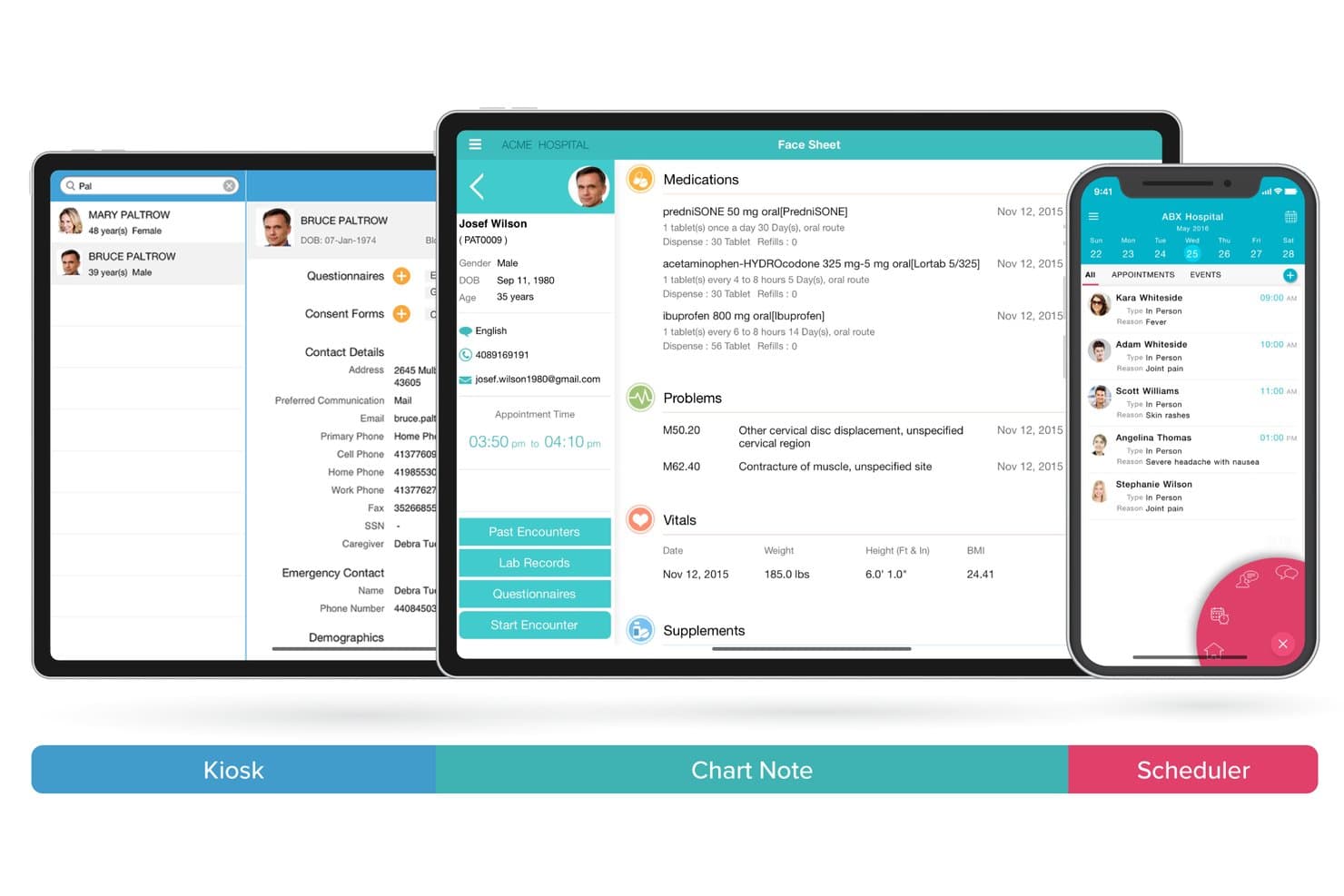
CharmHealth unifies kiosk, chart notes, and scheduling across devices. CharmHealth is a cloud-based EHR platform that covers clinical documentation, e-prescribing, practice management, patient engagement, telehealth, and medical billing across solo practices and multi-location organizations.
Who Is CharmHealth Best For?
CharmHealth is a strong fit for solo providers and small practices that want to pay only for what they use, thanks to its encounter-based pricing model.
Why I Picked CharmHealth
I've included CharmHealth in my top picks because its flexible pricing model is genuinely rare in the EHR space: you can pay $0.50 per encounter with a $25 monthly minimum, or switch to a flat $200 per-provider monthly rate once volume justifies it. I love that solo providers can start on the free plan (capped at 50 encounters and one provider) and scale up without renegotiating a contract. The AI Scribe add-on, which transcribes consultations and generates categorized SOAP note sections with suggested diagnosis codes, makes CharmHealth especially practical for high-volume practices watching costs closely.
CharmHealth Key Features
- FHIR API access: CharmHealth exposes FHIR Version 4.0.1 APIs covering patient, encounter, condition, care plan, medication, and lab data for third-party integrations.
- Patient engagement portal: Patients can request appointments, complete pre-visit questionnaires, view lab results, send refill requests, and message their care team securely.
- Specialty-customizable SOAP templates: Clinicians can import templates from CharmHealth's library, modify them, or build their own to match specialty-specific documentation workflows.
- Telehealth video consultations: The TeleHealth add-on enables video visits with patients directly within the EHR, with support also available through the Charm Chart Note iPad app.
CharmHealth Integrations
CharmHealth offers native integrations with Surescripts, LabCorp, Quest Diagnostics, Google Calendar, QuickBooks, Bluefin, and Fullscript. It also supports HL7-based lab interfaces and REST and FHIR APIs for custom integrations.
Pros and Cons
Pros:
- Scheduling, charting, and billing share one platform
- Patient portal supports records and refill requests
- Customizable SOAP templates support varied workflows
Cons:
- Large charts can load slowly, reviewers report
- Reviewers report delayed support for complex issues
Learn more about CharmHealth: Best for telemedicine integration features
- Free demo available
- Pricing upon request
Visit WebsiteCustomer Rating:4.1/5
PrognoCIS offers an appointment scheduler for managing patient visits. PrognoCIS is a cloud-based EHR platform built for multi-specialty and single-specialty practices, combining clinical documentation, telemedicine, medical billing, and patient engagement tools in one system.
Who Is PrognoCIS Best For?
PrognoCIS is a strong fit for independent and group practices across 50+ specialties that want to run in-person and virtual care visits from a single platform.
Why I Picked PrognoCIS
I've included PrognoCIS in my top picks because its telemedicine module is built directly into the EHR, not bolted on as a third-party add-on. I particularly like the virtual waiting room, which notifies providers the moment a patient checks in, and the ability to add family members or staff to a live session for real-time triage. You can also collect payments, order labs, and send e-prescriptions without leaving the virtual visit.
PrognoCIS Key Features
- AI medical scribe: PrognoAI transcribes provider-patient conversations in real time and auto-generates chart notes without manual documentation.
- Specialty-specific templates: Pre-built, customizable templates span 25+ specialties to support structured and consistent clinical documentation.
- Insurance eligibility verification: PrognoCIS checks patient coverage in real time before each appointment so billing issues are caught before the visit.
- Patient portal: Patients can schedule appointments, request prescription refills, make payments, and message their care team directly.
PrognoCIS Integrations
PrognoCIS integrates with a wide variety of healthcare systems, including lab systems, pharmacies, and insurance providers. The platform supports ordering, results, and reporting through integrations with labs, radiology companies, and vaccine registries. PrognoCIS supports HL7 and FHIR interoperability to connect with other third-party solutions, and it supports integration with various third-party applications via an API, allowing users to import patient and clinical data.
Pros and Cons
Pros:
- Shared database between EMR and billing
- Configurable to 25+ medical specialties
- AI scribe auto-generates notes during visits
Cons:
- Custom report generation is limited
- Sluggish screen transitions during heavy use
Learn more about PrognoCIS: Best for intuitive charting and patient care tools
- Free demo available
- Pricing upon request
Visit WebsiteCustomer Rating:4.4/5
ElationEMR offers a cloud-based EHR for records, e-prescribing, and practice management. Elation Health is a cloud-based EHR and medical billing platform built specifically for independent primary care practices, combining clinical documentation, AI-assisted note-taking, revenue cycle management, and patient care tools in one system.
Who Is Elation Health Best For?
Elation Health is a strong fit for independent primary care physicians and small practices that prioritize clinical documentation quality over administrative complexity.
Why I Picked Elation Health
Elation Health earns its spot on my shortlist because of its three-panel console, which puts the patient chart, visit note, and a summary of relevant history on one screen simultaneously. That layout alone cuts a significant amount of clicking during visits. I also find Note Assist genuinely useful: it records the encounter, pulls in existing chart data, and generates a structured note in real time, without requiring manual cleanup afterward. The referral management workflow, including built-in provider directory access and close-the-loop tracking, rounds out what makes charting here feel complete.
Elation Health Key Features
- Patient passport: A patient-facing health record that gives patients access to their own clinical summaries, medications, and visit history.
- E-prescribing: Send prescriptions electronically, including controlled substances, directly to pharmacies from within the chart.
- Care plans: Build and assign structured care plans to individual patients to support chronic condition management between visits.
- Lab and imaging orders: Order labs and imaging directly from within a patient's chart and receive results back into the EHR automatically.
Elation Health Integrations
Elation Health integrates with labs, pharmacies, and care coordination tools, offering 300+ integrations through its Partner Hub, including Zocdoc, Fullscript, Zus Health, and Nsight Health, along with national labs, health information exchanges, and radiology centers. Additional integrations include Dock Health, IntakeQ, Kareo, Updox, and Puredi, and Elation's API platform supports custom integrations for practices that need to connect with other systems.
Pros and Cons
Pros:
- Single-page chart layout minimizes navigation
- Longitudinal records support chronic care tracking
- AI-assisted documentation reduces daily note time
Cons:
- Reporting tools lack detailed customization
- No phone-based customer support option
Learn more about Elation Health: Best for mobile-friendly clinical documentation
- Free demo available
- Pricing upon request
Visit WebsiteCustomer Rating:3.9/5
DrChrono offers a provider dashboard for schedules and patient visits. DrChrono is a cloud EHR platform built for specialty practices, combining mobile charting, voice dictation, customizable templates, scheduling, and revenue cycle management in one system.
Who Is DrChrono Best For?
DrChrono suits physicians and clinicians who document primarily at the point of care and need a native iOS EHR that works across iPhone and iPad.
Why I Picked DrChrono
I picked DrChrono as one of the best because its mobile charting experience is genuinely built for clinical use, not just adapted for it. The native iOS app lets you chart, prescribe, review labs, and annotate images directly from an iPad or iPhone at the point of care. I also like the Free Draw tool, which lets providers mark up diagrams or images inline during a visit, a feature that's especially useful in specialties like orthopedics or wound care.
DrChrono Key Features
- Customizable clinical templates: Build and use specialty-specific templates for exams, assessments, and procedures directly within the charting workflow.
- Electronic prescribing (eRx): Send controlled and non-controlled substance prescriptions electronically from within the EHR, including Electronic Prescribing of Controlled Substances (EPCS) support.
- Integrated lab and imaging orders: Order labs, X-rays, and imaging from the EHR and receive results directly in the patient chart.
- Telehealth: Run HIPAA-compliant virtual visits directly from the platform, with no downloads required for patients.
DrChrono Integrations
DrChrono offers marketplace integrations through the DrChrono Marketplace, which connects third-party partner apps to the platform. Verified marketplace partners include Box, Square Point of Sale, Birdeye, Weave, Fullscript, Beam Health, and Podium. DrChrono also connects with Health Gorilla for lab ordering, with access to labs like Labcorp, Quest Diagnostics, and Lifepoint, and supports Iron Bridge for immunization registry reporting. A RESTful API is available for custom integrations. Zapier support is not clearly documented as native.
Pros and Cons
Pros:
- Built-in telehealth with no patient downloads
- Specialty-specific templates across 20+ disciplines
- Native iPad charting with photo annotation
Cons:
- Financial reporting figures often unreliable
- Support relies on email ticket system
Learn more about DrChrono: Best for streamlined e-prescribing capabilities
- Free demo available
- From $199/user/month
Visit WebsiteCustomer Rating:3.7/5
Practice Fusion offers an EHR workspace for clinical documentation and patient care. Practice Fusion is a cloud-based EHR and billing services platform built for independent practices, combining clinical documentation, e-prescribing, charting, and practice billing management in a single system.
Who Is Practice Fusion Best For?
Practice Fusion is a natural fit for small to mid-sized ambulatory practices, particularly those in primary care, pediatrics, and family medicine.
Why I Picked Practice Fusion
I picked Practice Fusion as one of the best because its e-prescribing workflow is genuinely one of the tightest I've seen built into a cloud EHR. You can send prescriptions to any e-prescribing-enabled pharmacy in the country directly from the patient chart, with automatic drug-drug and drug-allergy interaction checks running in real time. Prior authorization management and formulary checks also happen inside the EHR, which removes a common back-and-forth that eats up time. Two-click refill requests and prescription fulfillment tracking round out a workflow that keeps medication management fully contained.
Practice Fusion Key Features
- Customizable charting templates: Build and save specialty-specific note templates to match how your practice documents visits.
- Lab and imaging ordering: Send orders directly from the patient chart and receive results back into the record automatically.
- Patient scheduling: Manage appointment booking, provider calendars, and visit types from a single scheduling interface.
- Medical billing management: Submit claims, track denials, and manage the full revenue cycle from within the platform.
Practice Fusion Integrations
Practice Fusion partners with laboratories, imaging centers, billing solutions, ACOs, and numerous other service providers, with over 600 partners across its ecosystem. Practice Fusion offers proprietary APIs for custom bi-directional integration, and verified integrations include Updox, Medsender, CollaborateMD, PracticeSuite, OpenPM, Office Ally Service Center, DeepScribe, FollowMyHealth, OhMD, and Persivia CareTrak.
Pros and Cons
Pros:
- Charting templates are quick to customize
- Browser-based access with no installation needed
- Built-in e-prescribing includes controlled substances
Cons:
- Server slowdowns reported during peak hours
- Interoffice messaging lacks shared inbox access
Learn more about Practice Fusion: Best for customizable clinical workflows
- Free demo available
- Pricing upon request
Visit WebsiteCustomer Rating:3.6/5
AdvancedMD offers a practice management platform for scheduling, clinical documentation, billing, and patient management. AdvancedMD is a cloud-based EHR and practice management platform that covers scheduling, clinical documentation, billing, revenue cycle management, and patient engagement in a single unified system.
Who Is AdvancedMD Best For?
AdvancedMD is a strong fit for independent medical practices and multi-specialty groups that need a configurable clinical and billing workflow in one platform.
Why I Picked AdvancedMD
I picked AdvancedMD as one of the best because of how far it goes with clinical workflow customization. What I find particularly useful is the specialty-specific template library, which lets clinicians build and tailor documentation to match exactly how they practice, whether that's family medicine, mental health, or pain management. The multi-location template sharing feature is also a clear differentiator, letting group practices standardize note structures across sites without rebuilding from scratch at every location.
AdvancedMD Key Features
- Electronic prescribing: Send prescriptions, including controlled substances, directly to pharmacies from within the EHR.
- Remote patient monitoring: Collect and review patient health data between visits to support ongoing clinical oversight.
- Patient health questionnaires: Send and receive intake forms and health assessments digitally before or during a visit.
- Immunization registry: Submit patient immunization data directly to state registries from within the platform.
AdvancedMD Integrations
AdvancedMD offers over 1,400 apps, software, and technology integrations through its Partner Marketplace, including QuickBooks, InstaMed, Healthix, Salesforce, NextPatient, and Insight Health. The platform also provides an open API that lets you push and pull data to and from AdvancedMD, including patient records, scheduling, and charge data, for custom integrations.
Pros and Cons
Pros:
- Built-in telemedicine for virtual visits
- Charge capture happens during charting automatically
- Templates are editable without vendor involvement
Cons:
- Onboarding and setup take significant effort
- E-prescribing workflows can be clunky
 Best for rapid implementation options
- Free demo available
- Pricing upon request
Visit WebsiteCustomer Rating:3.5/5
CureMD offers an EHR workspace for clinical documentation and patient records. CureMD is a cloud EMR platform that combines clinical documentation, practice management, medical billing, and patient engagement tools within a single system built across 30+ specialty-specific workflows.
Who Is CureMD Best For?
CureMD is a strong fit for independent specialty practices and multi-location medical groups that need a fully integrated clinical and billing system up and running quickly.
Why I Picked CureMD
I picked CureMD as one of the best because of its fast-track implementation approach, which is rare to find paired with this level of specialty depth. The onboarding process includes pre-built, specialty-specific workflows across 30+ disciplines, so your team isn't configuring documentation templates from scratch. I also like that the Avalon iPad app lets providers start seeing patients and collecting charges right away, without waiting for full desktop deployment.
CureMD Key Features
- Electronic prescribing: Connect to over 40,000 pharmacies with built-in medication reconciliation, formulary checks, controlled substance e-prescribing, and age/weight-based dose adjustment.
- Electronic lab ordering and results: Send lab orders and receive results electronically, with abnormal result alerts, trend tracking, and side-by-side comparison of current and past values.
- Interoperability: Exchange data with health information exchanges, payers, hospital networks, imaging services, immunization registries, and DICOM-compliant equipment.
- AI contact center: Automates appointment booking, patient intake, and patient queries without staff involvement.
CureMD Integrations
CureMD integrates with leading laboratory systems, including LabCorp and Quest Diagnostics. It supports interoperability standards like HL7 and FHIR for data exchange with health information exchanges, pharmacies, payers, hospital networks, immunization registries, and PACS/DICOM imaging systems. APIs are available to connect CureMD with other healthcare applications.
Pros and Cons
Pros:
- Adapts workflows across 30+ specialties
- EHR, billing, and PM in one suite
- Includes free hosting, upgrades, and support
Cons:
- Interface screens feel dense and cluttered
- Cloud performance lags on slower connections
Learn more about CureMD: Best for independent practice end-to-end records
- Free demo available
- From $99/user/month
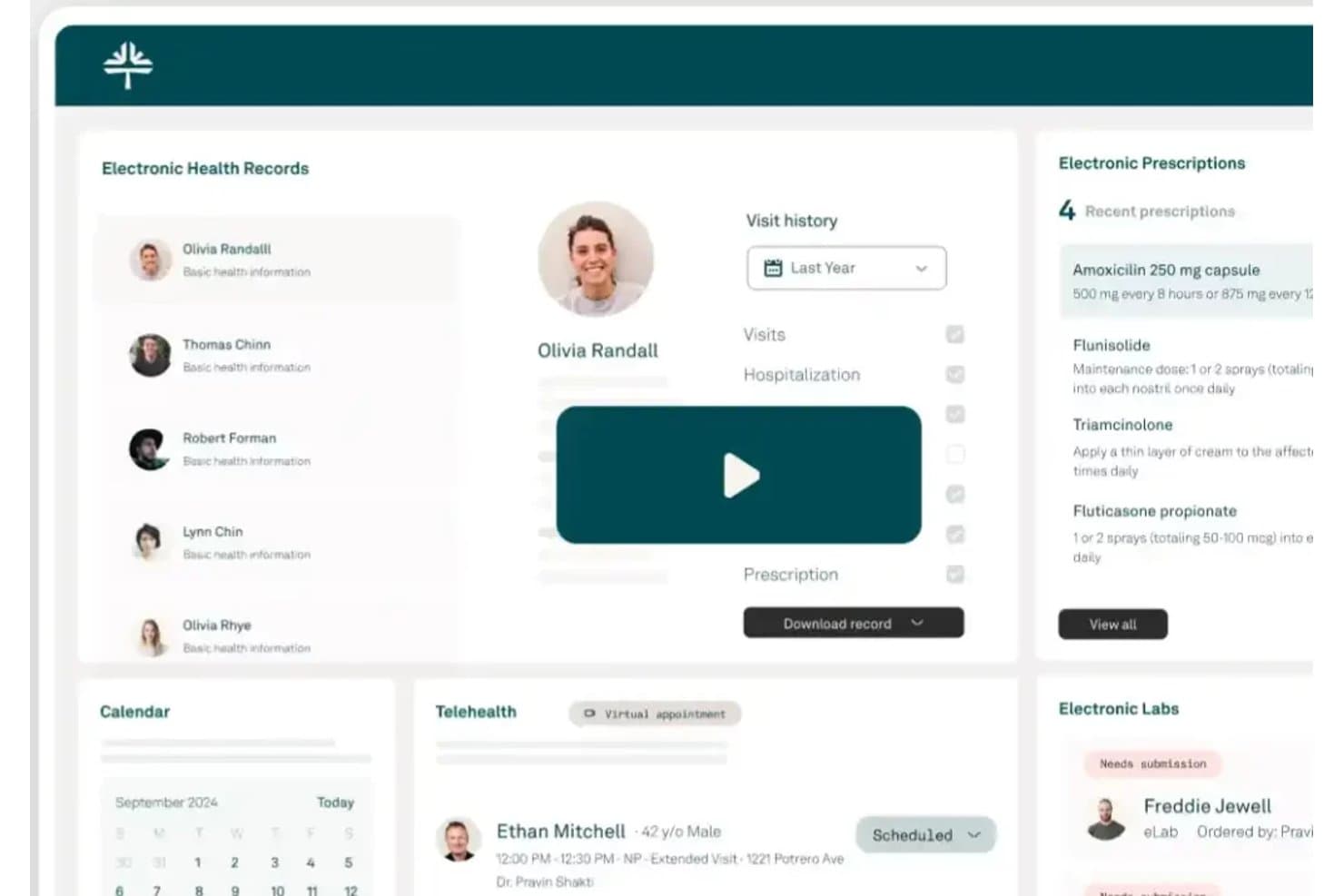
Kareo Clinical centralizes patient records, prescriptions, and telehealth in one view. Tebra EHR (formerly Kareo Clinical) is a cloud-based electronic health records system for independent practices that connects clinical charting, e-prescribing, electronic labs, telehealth, patient intake, and billing in one platform.
Who Is Kareo Clinical Best For?
Kareo Clinical is a strong fit for independent practice physicians and clinicians who want charting, e-prescribing, labs, telehealth, and billing in one cloud-based system.
Why I Picked Kareo Clinical
Kareo Clinical (now Tebra EHR) earns its spot on my shortlist because it's built specifically for independent practices that need charting, billing, labs, and telehealth running together without stitching multiple systems together. I particularly like how the electronic labs workflow connects to over 700 labs and auto-matches results directly to chart orders, so results don't get lost in a queue. The AI Note Assist also converts voice input into structured SOAP or therapy notes, cutting the time I'd otherwise spend typing after a visit.
Kareo Clinical Key Features
- Specialty-specific templates: Supports SOAP notes and customizable templates across dozens of specialties, including psychiatry, pediatrics, and OB/GYN, with selectable checklist items that generate note text automatically.
- Electronic labs workflow: Sends orders to more than 700 labs and automatically matches incoming results to the corresponding chart orders in real time.
- Digital patient intake: Collects demographics, insurance, medical history, consent, and signatures before visits via a web form or an in-office iOS/Android kiosk app.
- EPCS-enabled e-prescribing: Sends controlled-substance prescriptions electronically after provider enrollment, with medication history, refill tracking, and drug interaction alerts powered by First Databank.
Kareo Clinical Integrations
Integrations include First Databank, North Carolina HealthConnex, 700+ labs, and imaging centers. A SOAP API supports custom integrations.
Pros and Cons
Pros:
- Onboarding teams earn praise for patient training
- Clinical, scheduling, and billing workflows stay together
- Charting keeps encounter records easy to navigate
Cons:
- Some users report unreliable electronic prescriptions
- Recurring glitches can interrupt charting sessions
Learn more about Kareo Clinical:
Annen skybasert EMR-programvare
Her er noen flere alternativer for skybasert EMR-programvare som ikke kom med på kortlisten min, men som likevel er verdt å undersøke:
- 11Praxis EMRBest for AI-driven documentation workflow
- 12RXNTBest for integrated scheduling and charting
- 13HealthieBest for wellness-focused multi-tool patient records
- 14eClinicalWorksBest for robust patient engagement options
- 15CareCloudBest for advanced workflow automation
- 16athenaOneBest for network-connected ambulatory EHR
- 17PCCBest for pediatric-only clinical charting
- 18Oracle HealthBest for enterprise-scale EHR interoperability
- 19Canvas MedicalBest for developer-extensible cloud EMR workflows
- 20EPICBest for large-scale care network interoperability
How I Evaluate Cloud EMR Software
I split my evaluation into three parts, giving the most weight to securely storing charts in the cloud and documenting encounters, diagnoses, and plans. Next, I look for features such as specialty templates or patient portals. Finally, I consider migration support, onboarding, and pricing as practices grow.
Core Functionality (Table Stakes For This List)
When I'm selecting tools for my list, I score each one on a scale from 0 (does not offer the functionality) to 5 (excels in this area) for each core functionality listed below. I then convert the total into a percentage to help assess each tool's overall fit, with extra weight on any functionalities I’ve deemed essential.
- Cloud-Hosted Records (Essential): I check that charts, notes, and results remain retrievable online across locations, including during patient handoffs.
- Clinical Documentation (Essential): Look for structured encounter notes, diagnosis and plan fields, and adaptable templates that fit routine visits without duplicating chart details.
- Privacy And Security: I assess encryption, role-based access, audit logs, and controls aligned with applicable health-data privacy requirements.
- E-Prescribing: I check whether clinicians can send prescriptions electronically and manage medication details within the encounter workflow.
- Data Exchange: I look for secure exchange with labs and other providers, plus usable imports or exports for referrals and care transitions.
- Remote Access: Assess whether authorized staff can access core charts and workflows securely from the clinic, home, or another care location.
Once I have a list of tools that meet the criteria, I consider what sets each platform apart.
Differentiating Factors (What Sets Vendors Apart)
Here's how I compare and contrast different vendors:
Standout Features
I look for AI-assisted documentation that auto-generates clinical notes from ambient listening or voice input—this can reclaim significant charting time, especially for providers juggling back-to-back visits. Telehealth integration matters just as much; I check whether video visits run inside the same charting workflow so clinicians aren't toggling between platforms mid-encounter. I also evaluate specialty-specific templates, since a pre-built cardiology or behavioral health template that fits your documentation needs on day one speeds up adoption across the team.
Beyond Features
I evaluate how each platform handles data migration, since moving from a legacy system without losing chart history can derail a go-live. Total cost of ownership matters just as much—I check whether e-prescribing, integrations, or storage carry add-on fees that inflate the price as you scale. I also look at ecosystem fit: a system that connects to your existing billing or practice management tools and supports health information exchange saves staff from redundant data entry across systems.
Slik velger du skybasert EMR-programvare
Det er lett å gå seg vill i lange funksjonslister og kompliserte prismodeller. For å hjelpe deg med å holde fokus mens du arbeider deg gjennom den unike prosessen med å velge programvare, får du her en sjekkliste over faktorer du bør ha i mente:
| Faktor | Dette bør du vurdere |
| Skalerbarhet | Vil programvaren fungere for enkeltstående behandlere, gruppepraksiser og oppsett med flere lokasjoner (på samme måte som virksomhetsløsninger fra Cerner) etter hvert som organisasjonen vokser eller endres? |
| Integrasjoner | Kan EMR-systemet kobles til laboratorier, faktureringssystemer, bildediagnostikksentre eller henvisningsnettverk som du bruker i dag eller planlegger å ta i bruk snart? |
| Tilpasningsmuligheter | Lar plattformen deg justere maler, skjemaer og arbeidsflyter slik at de passer til spesialiteten din eller lokale kliniske prosesser? |
| Brukervennlighet | Vil teamet ditt kunne lære systemet raskt, eller vil det forsinke behandlingen eller kreve mye løpende opplæring? |
| Implementering og oppstart | Hvilke ressurser, hvilken hjelp med migrering og hvilken direkte brukerstøtte er inkludert under oppsettet? Må du koordinere separat med eksterne konsulenter? |
| Kostnad | Er prisene transparente, med alle nødvendige funksjoner inkludert? Se etter skjulte gebyrer for integrasjoner, flere brukere eller prioritert brukerstøtte. |
| Sikkerhetstiltak | Tilbyr løsningen kryptering, revisjonsspor og sterke tilgangskontroller for å beskytte journalene og oppfylle personvernkrav? |
| Krav til samsvar | Støtter leverandøren HIPAA, ONC og andre relevante sertifiseringer for ditt geografiske område og behandlingsmiljø? Hvilken dokumentasjon følger med? |
Hva er skybasert EMR-programvare?
Skybasert EMR-programvare er nettbaserte plattformer som lagrer, administrerer og sikrer elektroniske pasientjournaler via internett, slik at behovet for lokale servere elimineres. Disse løsningene lar klinikere og ansatte få tilgang til pasientinformasjon, dokumentere behandling og koordinere arbeidsflyter fra hvilken som helst enhet, og støtter sikkert samarbeid, ekstern tilgang, samsvar med regelverk og integrasjon med kliniske og administrative verktøy.
Funksjoner i skybasert EMR-programvare
Ved valg av skybasert EMR-programvare bør du se etter følgende viktige funksjoner:
- Journalføring og kliniske notater: Lar behandlere opprette, gjennomgå og redigere strukturert dokumentasjon eller fritekstdokumentasjon av pasientmøter for nøyaktig journalføring og klinisk oppfølging.
- Elektronisk reseptforskrivning: Gjør det mulig å sende resepter elektronisk direkte til apotek, noe som bidrar til tryggere legemiddelbehandling og reduserer belastningen med telefonsamtaler og faks.
- Integrert pasientportal: Gir pasienter nettbasert tilgang til helsejournaler, timebestilling, sikre meldinger og fakturering, noe som forbedrer kommunikasjonen og brukervennligheten.
- Timebestilling: Administrerer behandlernes kalendere, støtter nettbasert bestilling, registrerer avbestillinger og uteblivelser og sender automatiske påminnelser for å redusere antallet tapte konsultasjoner.
- Ordreadministrasjon: Tilrettelegger for digital bestilling og uthenting av resultater for laboratorieprøver, bildediagnostikk og diagnostiske tester, med statussporing og varsler som bidrar til å fullføre behandlingsforløp.
- Integrasjon med krav og fakturering: Kobler klinisk dokumentasjon sømløst til arbeidsflyter for koding og fakturering, noe som reduserer feil og dobbeltregistrering i administrasjonen.
- Samhandling: Støtter sikker utveksling av data med eksterne behandlere, laboratorier eller henvisningspartnere ved hjelp av HL7, FHIR eller andre standarder for helsedata.
- Rollebasert tilgangskontroll: Begrenser hva ulike brukere kan se og redigere, beskytter sensitiv informasjon og støtter personvernregelverket.
- Myndighetsrapportering: Genererer rapporter om samsvar, kvalitet og myndighetspålagte krav ved hjelp av kliniske data i sanntid, slik at regulatoriske oppgaver blir mindre krevende.
Vanlige AI-funksjoner i skybasert EMR-programvare
I tillegg til standardfunksjonene i skybasert EMR-programvare som er nevnt ovenfor, tar mange av disse løsningene i bruk AI med funksjoner som:
- Automatisk journalføring fra samtaler: AI lytter under pasientbesøk og genererer automatisk strukturerte kliniske notater, noe som reduserer manuelt dokumentasjonsarbeid og frigjør tid for behandlere.
- Prediktiv analyse: AI analyserer pasientdata for å identifisere personer med risiko for reinnleggelse, sykdomsprogresjon eller manglende oppfølging, og støtter proaktiv behandlingsoppfølging.
- Automatisert kodingsstøtte: AI gjennomgår klinisk dokumentasjon og foreslår nøyaktige faktureringskoder, noe som bidrar til å redusere avviste krav og forbedre effektiviteten i inntektssyklusen.
- Klinisk beslutningsstøtte: AI gir sanntidsvarsler om legemiddelinteraksjoner, allergirisiko og evidensbaserte behandlingsanbefalinger ved behandlingspunktet.
- Intelligent optimalisering av timeplaner: AI forutsier uteblivelser og anbefaler optimale planleggingsmønstre for å maksimere behandlernes produktivitet og minimere ledige tidsluker i kalenderen.
Fordeler med skybasert EMR-programvare
Implementering av skybasert EMR-programvare gir flere fordeler for teamet og virksomheten din. Her er noen av fordelene du kan se frem til:
- Ekstern tilgjengelighet: Få sikker tilgang til og oppdater pasientjournaler fra hvor som helst med internettilkobling, noe som støtter hybride og mobile behandlingsteam.
- Bedre samordning av behandlingen: Tilgang til journaler i sanntid, samhandling og sikre meldinger gjør det mulig for flere behandlere å bidra til pasientbehandlingen på tvers av lokasjoner.
- Redusert dokumentasjonsbyrde: Innebygde maler, strukturert journalføring og verktøy som automatisk journalføring fra samtaler hjelper behandlere med å fullføre notater raskere og fokusere på pasientene.
- Økt pasientengasjement: Pasientportaler tilbyr nettbasert timebestilling, kommunikasjon og tilgang til helsejournaler, slik at det blir enklere for pasienter å delta i egen behandling.
- Skalerbarhet for vekst: Skybasert arkitektur og abonnementsmodeller gjør det mulig for praksiser å legge til behandlere, spesialiteter eller lokasjoner uten omfattende tekniske omlegginger.
- Forbedret samsvar og sikkerhet: Automatiserte revisjonsspor, rollebasert tilgang og kryptering bidrar til å oppfylle HIPAA- og myndighetskrav samtidig som sensitive data beskyttes.
- Lavere IT- og vedlikeholdskostnader: Skyhosting fjerner behovet for lokale servere, rutinemessige oppdateringer og intern teknisk brukerstøtte, noe som reduserer kostnadene.
Kostnader og priser for skybasert EMR-programvare
Valg av skybasert EMR-programvare krever en forståelse av de ulike prismodellene og abonnementene som er tilgjengelige. Kostnadene varierer basert på funksjoner, teamstørrelse, tillegg og mer. Tabellen nedenfor oppsummerer vanlige abonnementer, deres gjennomsnittlige priser og typiske funksjoner som er inkludert i skybaserte EMR-programvareløsninger:
Sammenligningstabell for skybasert EMR-programvare
| Abonnementstype | Gjennomsnittspris | Vanlige funksjoner |
| Gratisabonnement | $0 | Grunnleggende journalføring, timebestilling, begrenset lagringsplass, brukerstøtte fra fellesskapet og tilgang for én behandler. |
| Personlig abonnement | $50-$100/bruker/måned | Sikker dokumentasjon, elektronisk forskrivning, timeadministrasjon, pasientportal og enkel integrasjon med fakturering. |
| Bedriftsabonnement | $100-$250/bruker/måned | Støtte for flere behandlere, integrert fakturering, telehelse, analyse, grunnleggende interoperabilitet, utvidet brukerstøtte og egendefinerte skjemaer. |
| Foretaksabonnement | $250+/bruker/måned | Avansert interoperabilitet, virksomhetsanalyse, egendefinerte arbeidsflyter, prioritert brukerstøtte, datamigrering og samsvarsrapportering. |
Vanlige spørsmål om skybasert EMR-programvare
Her er noen svar på vanlige spørsmål om skybasert EMR-programvare:
Hvor sikker er skybasert EMR-programvare for sensitive medisinske data?
Ja, skybasert EMR-programvare er utviklet med sikkerhetsstandarder som kryptering, rollebasert tilgang og revisjonsspor. Kontroller alltid at leverandøren tilbyr HIPAA-samsvar og er villig til å signere en avtale om forretningsforbindelse, slik at du oppfyller lovpålagte krav til databeskyttelse.
Kan skybasert EMR-programvare støtte spesialiserte praksiser eller praksiser på flere steder?
Ja, de fleste skybaserte EMR-plattformer er utviklet for å betjene praksiser av ulik størrelse og innen ulike spesialområder. Se etter fleksible maler, skalerbar brukertilgang og administrasjon av flere lokasjoner hvis du planlegger å vokse eller arbeide på tvers av ulike kliniske områder.
Hva innebærer det å migrere fra et papirbasert system eller et eldre system til en skybasert EMR-løsning?
Migrering innebærer vanligvis å hente ut pasientjournaler og dokumenter, konvertere dataformater og validere oppføringene etter import. Spør leverandørene om hvilken brukerstøtte som er inkludert, nedetid, opplæring og om kostnadene er samlet i prisen eller belastes separat, for å unngå driftsforstyrrelser.
Hvor ofte installeres oppdateringer og sikkerhetsoppdateringer?
\u003cspan style=\u0022font-weight: 400\u0022\u003eLeverandører av skybaserte EMR-løsninger håndterer vanligvis oppdateringer automatisk, slik at du får regelmessige sikkerhetsoppdateringer og nye funksjoner uten manuell inngripen eller nedetid – noe som hjelper deg med å holde tritt med regelverk og bransjestandarder.\u003c/span\u003e
Hva slags IT-støtte trenger klinikken vår med et skybasert EMR-system?
Skybaserte EMR-systemer reduserer behovet for lokal IT-støtte, siden leverandøren håndterer drift, vedlikehold og oppdateringer. Teamet ditt bør imidlertid utpeke en kontaktperson for brukeradministrasjon, oppfølging av arbeidsflyter og koordinering med leverandøren.