EHR software integrations connect your clinical platform to tools like practice management software, medical billing systems, and patient engagement platforms—keeping data consistent and reducing duplicate entry across your team.
In my experience, these connections give everyone a clearer, more accurate view of the patient journey. Choosing the right integrations isn’t easy, especially since different EHR types support different connection options.
This guide covers the main integration categories, what to evaluate before committing, and the problems that can arise when teams skip this step.
Why Integrate EHR Software?
Connecting your EHR software to other tools closes the gaps where errors and delays tend to occur. It can also affect EHR pricing, as some vendors include key integrations in their plans while others charge additional fees.
When lab results flow directly from your diagnostic platform into a patient’s chart, your care team receives the information without relying on phone calls or manual uploads.
Here are the most common reasons healthcare teams connect other tools to their EHR software:
- Eliminating duplicate data entry: Manually entering the same patient information across multiple systems increases error risk. Integrations push data between platforms automatically, keeping records accurate.
- Improving care coordination: When your EHR connects to specialist platforms or care management tools, every provider on the team sees the same up-to-date patient record.
- Accelerating billing workflows: Linking your EHR to a medical billing system reduces coding delays and claim errors by pulling clinical data directly into the billing process.
- Enhancing patient communication: Integrations with patient engagement platforms let appointment reminders, intake forms, and follow-up messages pull directly from your EHR data.
- Supporting lab and diagnostic results: Direct connections with lab systems deliver test results into the patient chart without manual intervention or fax-based workarounds.
- Strengthening compliance reporting: Connecting your EHR to reporting or analytics tools makes it easier to pull structured data for audits, quality measures, and regulatory submissions.
- Enabling telehealth visits: Telehealth platform integrations link video visit records, notes, and prescriptions back to the core patient chart automatically.
Most Common Integrations for EHR Software
Finding the right integrations helps your EHR software adapt to your workflow, not the other way around. Here are the most common integration options to consider for your clinical and operational needs.
Practice Management Software
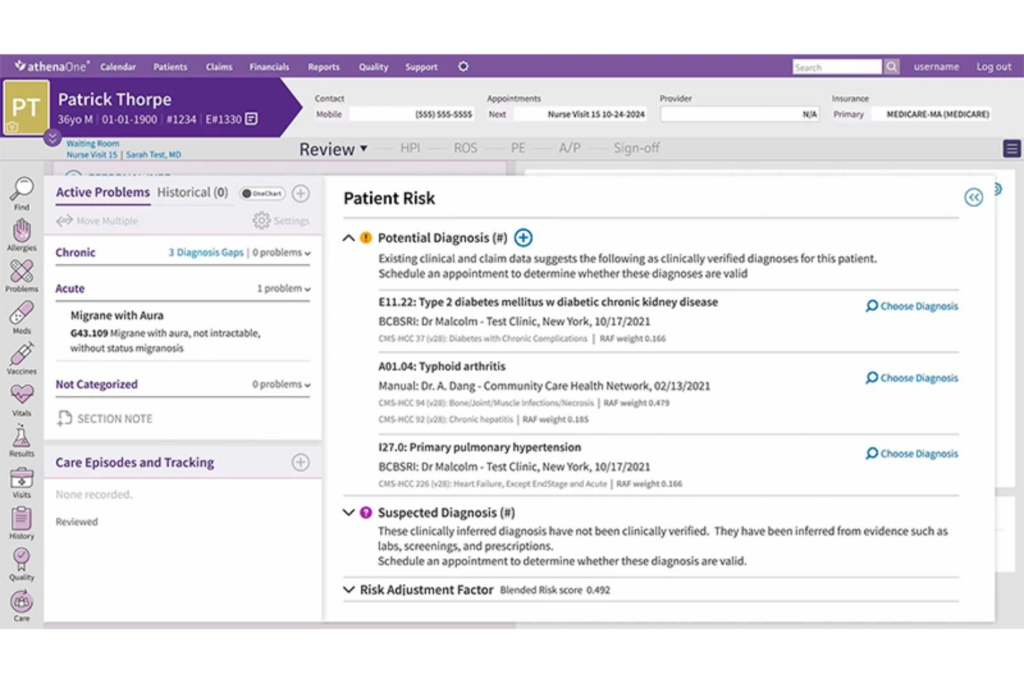
Practice management software handles the administrative side of running a medical practice—scheduling, patient registration, billing, and reporting. Tebra and athenahealth connect practice management with EHR data across front-office and clinical teams.
Connecting both systems syncs patient, insurance, and appointment data, reducing duplicate entry. Without this connection, staff must transfer data manually, slowing intake and increasing record errors and administrative work.
Here are common use cases for integrating practice management software with your EHR:
- Patient registration sync: New patient information entered at check-in flows directly into the EHR chart, eliminating duplicate data entry at the front desk.
- Appointment-driven chart prep: Scheduled visits automatically trigger chart preparation tasks, so clinicians have context before the patient arrives.
- Insurance verification: Eligibility checks run through the practice management system and update the patient's EHR record ahead of the visit.
- Referral tracking: Referrals created in the EHR carry over into the scheduling and administrative workflow without manual handoff.
- Billing code alignment: Diagnosis and procedure codes transfer directly from clinical charts to billing, reducing delays and errors.
- Reporting and performance metrics: Combined data provides a clearer view of patient volume, visit outcomes, and revenue performance.

Medical Billing and Revenue Cycle Management Software
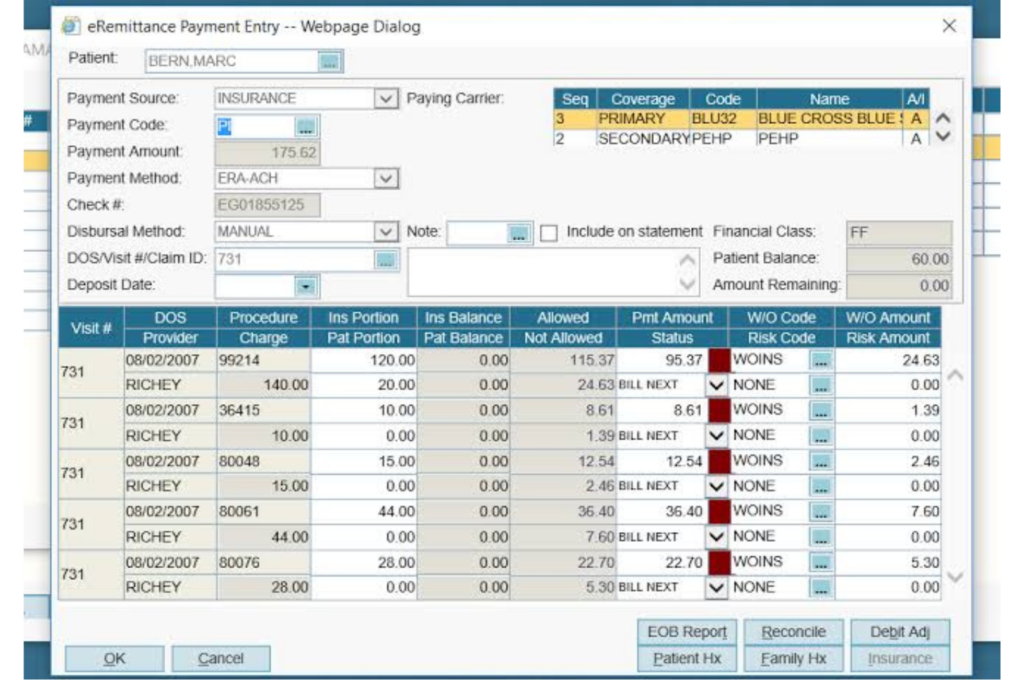
Medical billing and revenue cycle management (RCM) software manages the financial lifecycle of a patient encounter—from charge capture and claims submission to payment posting and denial management.
Platforms like AdvancedMD and Waystar are built to move claims through the payer process as cleanly as possible. EHR documentation flows into billing, ensuring provider codes match submitted claims.
Without this connection, billing teams must manually transfer encounter data between systems. That handoff creates coding lag, increases the risk of claim errors, and slows down reimbursement.
Here are common use cases for integrating medical billing and RCM software with your EHR:
- Automated charge capture: Visit codes transfer directly to billing, reducing manual entry and coding gaps.
- Claims scrubbing with clinical context: Clinical data flags missing or mismatched codes before submission.
- Prior authorization tracking: Authorization updates remain visible within the EHR workflow.
- Denial management with documentation support: Billing staff can access clinical notes to prepare appeals.
- Payment posting and patient balance updates: Payments automatically update the patient’s financial record.
- Revenue cycle reporting: Integrated data lets administrators track reimbursement trends alongside clinical volume, connecting financial performance to care delivery patterns.
Patient Portal Software
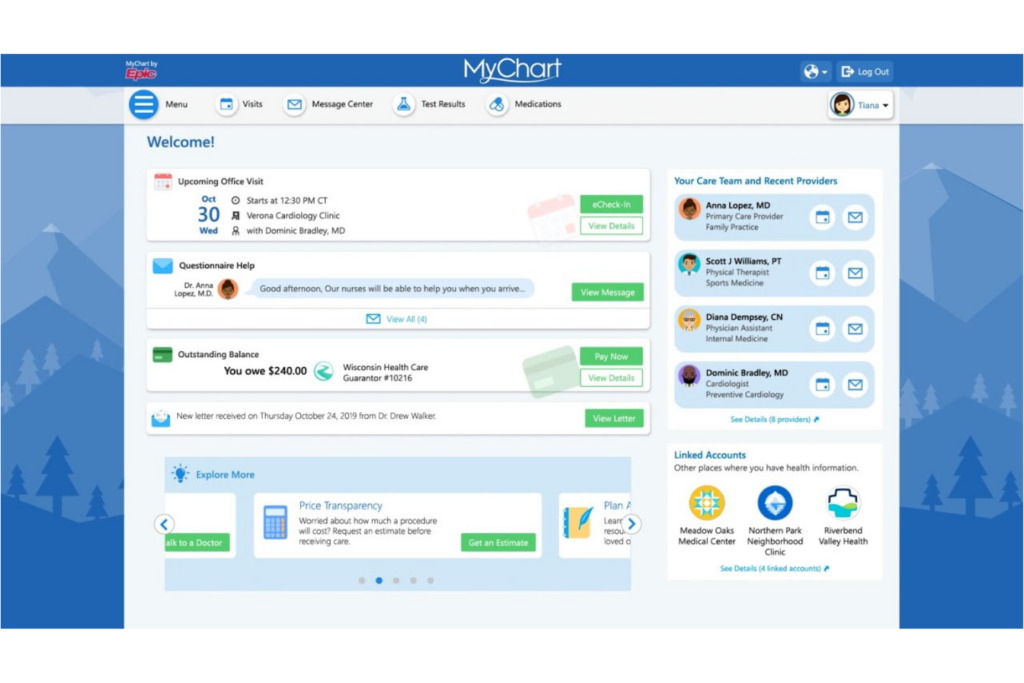
Patient portal software gives patients direct access to their health information—appointment scheduling, test results, care summaries, and secure messaging with their care team.
Platforms like MyChart and healow connect patients to their records between visits, reducing inbound calls and keeping communication documented. EHR integration keeps portal information accurate and current without manual exports or delays.
Without this connection, staff must manually send results, answer appointment questions, and enter patient forms into the EHR. That adds up fast in a busy practice.
Here are common use cases for integrating patient portal software with your EHR:
- Real-time results delivery: Lab results and imaging reports published in the EHR become visible to the patient in the portal automatically, without staff manually exporting and sending.
- Online appointment scheduling: Patients book or reschedule visits through the portal, and those changes reflect immediately in the EHR scheduling workflow.
- Digital intake and pre-visit forms: Patients complete registration and health history forms before arriving, and that data populates directly into their EHR chart.
- Secure patient-provider messaging: Messages sent through the portal are logged in the patient record, keeping communication visible across the care team.
- Medication and care plan visibility: Patients can view their active medications, care instructions, and referrals as documented in the EHR, reducing follow-up calls.
- After-visit summaries: Clinicians finalize visit notes in the EHR and patients receive a summary through the portal automatically, supporting care plan adherence.
Telehealth Software
Telehealth software enables video-based clinical visits, remote patient monitoring, and virtual care delivery outside of a traditional in-person setting. Platforms like Teladoc Health and Doxy.me give providers a way to see patients remotely while keeping the visit structured and documented.
When your telehealth platform connects to your EHR, visit notes, prescriptions, and follow-up orders from virtual encounters land in the same patient chart as in-person visits—giving your entire care team a complete picture.
Without this integration, virtual visit documentation lives in a separate system. Providers end up manually copying notes into the EHR after each call, and that creates gaps, delays, and a fragmented patient record that's easy to misread.
Here are common use cases for integrating telehealth software with your EHR:
- Virtual visit documentation sync: Clinical notes and assessments completed during a telehealth session transfer directly into the patient's EHR chart without manual re-entry.
- Appointment scheduling continuity: Telehealth visits scheduled through the EHR appear in the same calendar workflow as in-person appointments, keeping scheduling unified.
- E-prescribing from virtual visits: Prescriptions ordered during a virtual encounter route through the EHR's e-prescribing workflow, maintaining the same documentation standards as in-person care.
- Remote monitoring data capture: Vitals and health metrics collected between visits through connected devices feed into the EHR record for provider review.
- Insurance and billing alignment: Telehealth visit data pulls into the billing workflow using the same charge capture process as in-person encounters, reducing claim inconsistencies.
- Care plan follow-through: Referrals, lab orders, and follow-up tasks initiated during a virtual visit carry into the EHR workflow, so nothing falls through after the call ends.
Laboratory Information Management Systems (LIMS)
A LIMS tracks lab samples from collection and processing through results and reporting. Platforms like LabWare and STARLIMS are designed to handle high volumes of specimens accurately and efficiently.
A LIMS connection sends completed results to the EHR, giving providers faster access to findings.
Without this integration, results travel through slower, error-prone channels—faxes, phone calls, or staff manually entering values into the EHR. That lag creates clinical risk, especially when results require urgent follow-up.
Here are common use cases for integrating a LIMS with your EHR:
- Automated result delivery: Completed lab results post directly to the patient's EHR chart as soon as they're verified, eliminating manual entry and transmission delays.
- Order tracking visibility: Lab orders placed in the EHR sync to the LIMS, giving both clinical and lab staff a shared view of pending and completed work.
- Critical value alerts: When a result falls outside a defined threshold, the LIMS triggers an alert within the EHR, prompting the care team to respond quickly.
- Reference range display: Results appear in the patient chart with lab-defined reference ranges attached, giving providers immediate clinical context.
- Specimen collection documentation: Collection timestamps and sample identifiers logged in the LIMS link back to the corresponding EHR order, keeping the chain of custody traceable.
- Longitudinal result trending: Integrated data lets providers compare current results against historical values within the EHR, supporting pattern recognition over time.
Pharmacy Management Software
Pharmacy management software manages prescriptions, inventory, dispensing, and medication records. Platforms like PioneerRx and QS/1 give pharmacists a structured way to manage the dispensing process from verification to patient pickup.
When your pharmacy management system connects to your EHR, prescriptions ordered by a provider route directly to the dispensing workflow, and medication records stay consistent across both systems without a separate manual step.
Without this integration, prescriptions move between the clinical and pharmacy sides through fax or phone—methods that slow dispensing, introduce transcription errors, and make it harder to catch interactions or duplicate therapies across a patient's full medication list.
Here are common use cases for integrating pharmacy management software with your EHR:
- Electronic prescription routing: Prescriptions written in the EHR transmit directly to the pharmacy system, removing fax-based handoffs and reducing transcription errors.
- Medication history sync: Dispensing records from the pharmacy populate the patient's EHR medication list, giving providers a more complete view of what the patient is actually taking.
- Drug interaction checking: When the pharmacy system and EHR share medication data, interaction alerts can be cross-checked against the full medication record rather than a partial list.
- Refill request management: Refill requests initiated through the pharmacy route back to the prescribing provider in the EHR for review and approval without a phone call.
- Controlled substance monitoring: Dispensing data from the pharmacy feeds into the patient's EHR record, supporting compliance with prescription drug monitoring requirements.
- Medication reconciliation: Integrated dispensing records help care teams reconcile medications at transitions of care, reducing the risk of omissions or duplications during handoffs.
Remote Patient Monitoring Software
Remote patient monitoring software collects real-time patient data through connected health devices. Platforms like Withings Health Solutions and Biofourmis give care teams continuous visibility into a patient's condition between visits.
When RPM software connects to your EHR, that data flows into the patient chart automatically, so providers can identify concerning trends and intervene before a condition escalates into an emergency visit.
Without EHR integration, staff must manually review and transfer RPM data, increasing the risk of delayed action on critical changes.
Here are common use cases for integrating RPM software with your EHR:
- Continuous vitals documentation: Device readings collected between visits are posted directly to the patient's EHR chart, creating an ongoing clinical record outside of scheduled encounters.
- Threshold-based alerts: When a patient's readings exceed defined parameters, the RPM platform triggers an alert within the EHR, prompting the care team to follow up.
- Chronic disease management: Patients managing conditions like hypertension or diabetes transmit regular readings that providers can review in context with the full clinical record.
- Post-discharge monitoring: Patients discharged after a procedure or hospitalization are monitored remotely, and their data feeds into the EHR to support recovery tracking and reduce readmission risk.
- Care plan adjustments: Providers review RPM trends within the EHR and update medications, activity guidelines, or follow-up schedules based on real-world data rather than snapshot visits.
- Billing documentation support: RPM interactions and review time logged in the EHR support reimbursement claims for remote monitoring services under applicable billing codes.
Healthcare CRM Software
Healthcare CRM software manages patient relationships, outreach, and engagement at a population level—tracking communication history, care gaps, appointment patterns, and follow-up needs across your patient panel.
Salesforce Health Cloud and Veeva CRM connect EHR data with patient outreach, allowing teams to contact the right patients at the right time.
Without this integration, CRM teams work from exported lists and manually updated records that quickly fall out of sync with the EHR. That disconnect leads to redundant outreach, missed follow-ups, and patient communications that don't reflect their current care status.
Here are common use cases for integrating healthcare CRM software with your EHR:
- Care gap outreach: The CRM pulls clinical data from the EHR to identify patients overdue for preventive screenings or chronic disease check-ins, then triggers targeted outreach campaigns.
- Appointment follow-up automation: Post-visit follow-up communications are triggered by encounter data in the EHR, keeping outreach tied to actual care events rather than a generic schedule.
- Patient reactivation campaigns: Patients who haven't had a visit within a defined period are identified through EHR data and surfaced in the CRM for re-engagement outreach.
- Referral relationship tracking: Referral patterns documented in the EHR feed into the CRM, giving practice administrators visibility into which referral sources drive patient volume.
- Population health segmentation: Integrated clinical data lets the CRM segment patients by diagnosis, risk score, or care status for targeted health education or program enrollment.
- Communication history documentation: Outreach interactions logged in the CRM link back to the patient's EHR record, giving the care team context on recent touchpoints before a visit.
Common Integration Methods
Integration with EHR software, including cloud-based EHR platforms, usually happens through APIs, middleware platforms, native/built-in integrations, or plugins and apps.
For example, Epic EHR offers its App Orchard program for apps to connect directly using Epic’s APIs, while middleware tools like Redox and Bridge Connector manage data flows between otherwise incompatible systems.
Setup ranges from point-and-click app installations to more involved projects requiring IT oversight, and ongoing maintenance needs will depend on how often connected software updates or changes workflows.
Use this table to compare the strengths and limitations of each integration method:
| Integration Method | Pros | Cons |
|---|---|---|
| Integration MethodAPI | ProsFlexible; supports custom workflows; scales over time | ConsRequires technical expertise; higher upfront setup effort |
| Integration MethodMiddleware | ProsBridges many systems; less disruption to core platforms | ConsAdded cost; can introduce more points of troubleshooting |
| Integration MethodNative Integration | ProsEasier setup; often vendor-supported; less maintenance | ConsLimited to what’s offered; less customization or extensibility |
| Integration MethodPlugin/App | ProsEasiest install; fast deployment; simple user management | ConsMay lack depth; dependent on EHR marketplace/app updates |
More Articles
How To Choose The Right Integrations For EHR Software
Use this table to reflect on the most important factors and questions when evaluating EHR software integrations:
| Factor | What to Consider |
|---|---|
| FactorWorkflow compatibility | What to ConsiderDoes the tool fit your team’s daily workflow, or will it create extra steps or duplicate processes? Will end users be able to adapt easily? |
| FactorData accuracy | What to ConsiderWill the integration keep records consistent between systems, or is there risk of clashes, sync delays, or data loss? |
| FactorVendor support | What to ConsiderDoes the integration have active vendor backing, or will your team need to self-manage issues and updates? |
| FactorImplementation effort | What to ConsiderWill setup require heavy IT involvement, or is it plug-and-play? Are there hidden costs or technical requirements for getting started? |
| FactorCompliance alignment | What to ConsiderDoes the integrated product meet your data privacy, security, and audit needs (e.g., HIPAA, local regulations)? |
| FactorTotal cost | What to ConsiderWhat are the upfront and recurring costs—not just licensing, but integration builds or future customizations? |
| FactorReporting needs | What to ConsiderWill data from the integrated tool feed into the reporting you rely on, or will you need to harvest it manually? |
| FactorScalability | What to ConsiderCan the integration handle your expected growth in data, users, or organizational structure over the next one to three years? |
Best Practices For Implementing EHR Software Integrations
Follow these steps to get your EHR integrations set up right from the start:
Audit your current workflows first: Before selecting any tool, map out how your team currently manages the process you're trying to improve. Knowing where the manual steps, handoffs, and gaps are will help you evaluate whether an integration actually solves the problem.
Confirm compatibility before committing: Check that your EHR version supports the integration you're considering. Some integrations are only available on certain plans or require specific API access that may not be included in your current contract.
Involve end users early: The people using the integrated tools daily will spot workflow mismatches that administrators miss. Getting clinical and operational staff involved early in EHR implementation reduces resistance and surfaces practical issues before go-live.
Start with one integration at a time: Rolling out multiple integrations simultaneously makes it harder to isolate what's working and what isn't. Implement one, stabilize it, then move to the next.
Establish data governance rules upfront: Decide which system is the source of truth for each data type before you connect anything. Without clear rules, conflicting records across platforms become difficult to reconcile.
Test with real workflows, not demo data: Run your integration through actual clinical and operational scenarios during testing. Demo environments rarely reflect the volume, edge cases, or exceptions your team encounters daily.
Document the integration configuration: Keep a record of how each integration is set up, including field mappings, trigger conditions, and vendor contact information. This protects your team when staff turn over or an update breaks something unexpectedly.
Plan for ongoing maintenance: Integrations require attention after go-live. Software updates on either side can disrupt data flows, so build a review cadence into your operations to catch issues before they affect patient care.
Ready to Move Forward With Your EHR Decision?
Before choosing a platform, explore our guide to EHR implementation and benefits to understand how each option could affect your workflows, patient care, and long-term goals.