Not all ehr software is built the same—an inpatient EHR designed for hospital systems looks nothing like an ambulatory solution built for outpatient clinics. Choosing the wrong type means fighting your own tools instead of focusing on patient care. This guide covers every major EHR type, what each one does well, and which care settings it actually fits.
What Is EHR Software?
EHR software is a digital system that stores, manages, and shares patient health records across healthcare settings. It replaces paper charts with secure, accessible electronic files. Different EHR types are designed for specific care environments, such as hospitals, outpatient clinics, or specialty practices. These systems help teams document care, coordinate with other providers, and meet regulatory requirements, making them essential for modern healthcare delivery.
8 Key Types of EHR Software
Each EHR type offers unique features designed to support specific clinical workflows, regulatory needs, and deployment preferences—here’s what stands out in each category:
Based on my research, I have gathered sufficient information to identify the main distinct product categories within the EHR software market, segmented by care setting and deployment type, each with significant market presence.
EHR software spans multiple distinct categories, each designed to meet the clinical and operational demands of a specific care setting or infrastructure model. In my experience, understanding these categories upfront saves teams from costly mismatches between the software they choose and the workflows they actually need to support.
1. General-Purpose (All-in-One) EHR Software
Benefits
From my experience, the biggest advantage of choosing an EHR matched to your care setting is how naturally it fits your team's daily workflows. Tailoring EHRs to specific contexts enhances interoperability, data accuracy, and overall patient care. When the system is built for your environment—whether that's a hospital, outpatient clinic, or specialty practice—your staff spends less time adapting to the tool and more time on patient care. I've seen teams using well-matched systems like Epic for acute care or athenahealth for ambulatory settings document faster and coordinate more reliably across departments.
Features
Across all EHR categories, a set of foundational EHR features defines how well a system supports clinical and operational work in its intended environment:
- Setting-specific documentation templates: Each EHR type includes pre-built templates tailored to its care environment. Inpatient systems like Epic include ICU flowsheets, while ambulatory platforms like athenahealth offer outpatient SOAP note templates.
- Interoperability and data exchange: Most modern EHRs support HL7 and FHIR standards, allowing records to move across providers, labs, and health systems.
- Regulatory compliance tools: Built-in support for HIPAA documentation, Meaningful Use requirements, and billing code compliance keeps your team audit-ready.
- Integrated billing and coding: EHR types designed for specific settings align clinical documentation directly with relevant billing codes, reducing claim errors.
- Patient scheduling and registration: Most systems include appointment management tools scaled to the visit volume of their target care environment.
- Reporting and analytics dashboards: I've found these tools especially useful for tracking quality metrics, identifying documentation gaps, and preparing for accreditation reviews.
- Role-based access controls: Care-setting-specific EHRs typically offer permission structures that match clinical hierarchies, limiting data access to relevant staff.
Top EHR Software Options
Here’s my list of top EHR software options available, to help you get started in your search:
2. Inpatient (Acute Care) EHR Software
Designed for hospital and acute care environments, this EHR type manages the full complexity of inpatient stays—from admission and clinical documentation to discharge planning and billing. In my experience, these systems handle high patient volumes and multi-department coordination better than any other category, making them the backbone of hospital operations.
Benefits
Acute care EHRs give hospital teams a single, unified record that follows the patient across every department—from the ED to the ICU to discharge. These systems provide an all-in-one digital solution for complex hospital settings, linking departments like the lab, pharmacy, and imaging to centralize all relevant patient information. In my experience, platforms like Epic and Oracle Health stand out here because they're built for the scale and coordination demands that hospital environments actually require—something a general-purpose EHR simply can't replicate.

Features
Inpatient EHRs are built to handle the clinical complexity of hospital care, and these features reflect exactly what high-acuity environments demand:
- Admission, discharge, and transfer (ADT) management: ADT tracking keeps every department informed of patient movement in real time, reducing handoff errors across units.
- Clinical decision support: These tools flag drug interactions, alert clinicians to abnormal lab values, and surface evidence-based order sets. I've seen this feature alone prevent serious medication errors in high-volume settings.
- Inpatient order management (CPOE): Computerized provider order entry lets physicians place lab, pharmacy, and imaging orders directly in the system, cutting down on transcription mistakes.
- Nursing documentation and flowsheets: ICU flowsheets and shift-by-shift nursing notes are standard in platforms like Epic, giving care teams a continuous clinical picture.
- Integrated pharmacy management: Real-time medication dispensing, reconciliation, and administration records connect directly to the patient chart.
- Revenue cycle management: Inpatient billing is complex, and built-in charge capture and claims tools—like those in Oracle Health—align clinical documentation with inpatient billing requirements.
- Multi-department coordination tools: Shared care plans, interdisciplinary notes, and team messaging keep physicians, nurses, and specialists working from the same page across departments.
10 Top Care Coordination Options
Here’s my list of top care coordination software options available, to help you get started in your search:
3. Ambulatory (Outpatient) EHR Software
Built for clinics, physician offices, and outpatient care settings, this EHR type centers on appointment-based workflows—scheduling, visit documentation, e-prescribing, and follow-up care coordination. I find these systems far more intuitive for outpatient teams than scaled-down hospital platforms, since they're purpose-built for the faster patient turnover and lighter clinical complexity that defines outpatient care.
Benefits
Outpatient teams get the most value from an ambulatory EHR when the system is designed around visit-based care rather than adapted from an inpatient model. These platforms keep scheduling, documentation, billing, and patient communication in one place, which meaningfully reduces the administrative load on small-to-mid-size practices. In my experience, tools like athenahealth and eClinicalWorks are strong fits here because their workflows are built specifically for outpatient volume—not retrofitted from a hospital system.
Features
Ambulatory EHRs prioritize speed and simplicity at the point of care, and these features reflect what outpatient teams rely on most visit to visit:
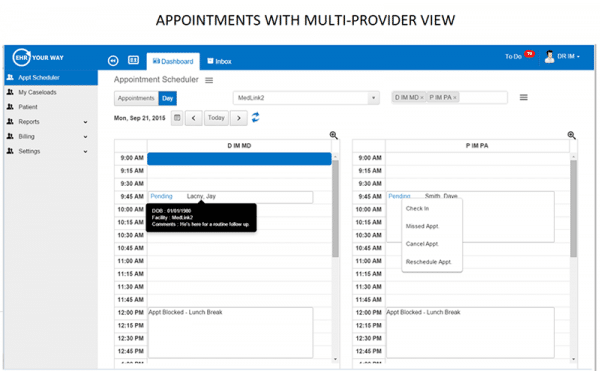
- Appointment scheduling and patient registration: Outpatient scheduling tools manage high daily visit volumes, automate reminders, and handle insurance verification before the patient even arrives.
- SOAP note and visit documentation templates: Pre-built outpatient templates let clinicians document encounters quickly. I've found that platforms like eClinicalWorks offer specialty-specific note templates that cut documentation time significantly.
- E-prescribing: Direct electronic prescription routing to pharmacies is standard, with built-in drug interaction checks and formulary lookups tied to the patient's insurance.
- Patient portal and communication tools: Most ambulatory EHRs include portals where patients can view results, request refills, and message their care team—reducing inbound call volume for front desk staff.
- Referral and care coordination management: Outbound referral tracking keeps care teams informed when patients are sent to specialists, closing the loop on follow-up care.
- Billing and claims management: Ambulatory billing tools like those in athenahealth automate claim submission and flag coding errors before they become denials.
- Population health and preventive care tracking: These tools help outpatient practices identify patients overdue for screenings or chronic disease follow-ups, supporting value-based care goals.

4. Specialty-Specific EHR Software
Tailored for disciplines like oncology, dermatology, behavioral health, and orthopedics, these EHRs replace generic documentation with workflows, terminology, and templates built for a single specialty. I've found that specialty-specific platforms like Modernizing Medicine or Kareo remove the workarounds that frustrate clinicians using general EHRs—letting specialists document in the language of their practice, not around it.
Benefits
The clearest advantage of a specialty-specific EHR is that it eliminates the configuration work that comes with adapting a general platform to a niche clinical environment. Workflows, coding sets, and documentation templates are pre-built for the specialty, which means your team spends less time customizing and more time delivering care. In my experience, platforms like Modernizing Medicine for dermatology or Valant for behavioral health give specialists a clinical environment that actually reflects how they practice—something a one-size-fits-all EHR rarely achieves.
Features
Where general EHRs require heavy customization to fit specialty workflows, these platforms come pre-configured with the tools clinicians in a given field actually use:
- Specialty-specific documentation templates: Pre-built note templates reflect the terminology, exam structures, and clinical patterns of a single specialty—Modernizing Medicine's dermatology templates are a good example of this done well.
- Specialty billing and coding tools: Procedure codes, modifiers, and billing rules are tailored to the specialty, reducing claim rejections tied to miscoded specialty services.
- Condition and disease management tracking: Longitudinal tracking tools let clinicians monitor chronic or complex conditions over time, which is especially valuable in oncology or behavioral health settings.
- Specialty-specific order sets and clinical protocols: Order sets reflect the evidence-based protocols of the discipline, so clinicians aren't building custom order workflows from scratch.
- Integrated diagnostic and imaging tools: Many specialty EHRs include built-in imaging viewers or diagnostic documentation tools. I've seen this feature significantly reduce tab-switching in orthopedic and radiology settings.
- Outcome and quality measure reporting: Specialty platforms like Valant include outcome tracking tied to specialty-specific quality measures, supporting value-based care reporting for niche disciplines.
- Patient education and care plan tools: Condition-specific patient education content and care plans are pre-loaded, giving clinicians ready-to-use materials tailored to their patient population.
Top Mental Health EHR Software
Here’s my list of top mental health EHR software options available, to help you get started in your search:
5. Behavioral Health EHR Software
Designed for psychiatrists, therapists, counselors, and addiction treatment programs, these EHRs handle the documentation, compliance, and care coordination demands unique to mental and behavioral health settings. I think behavioral health EHRs like Valant or TheraNest are worth evaluating separately from general EHRs because the privacy requirements, session-based documentation, and treatment planning workflows are distinct enough to warrant a purpose-built solution.
Benefits
Mental and behavioral health practices deal with a level of documentation complexity—treatment plans, progress notes, outcome tracking, and strict privacy compliance—that general EHRs aren't built to handle well. A purpose-built behavioral health EHR keeps all of that in one place while enforcing the confidentiality standards that these settings legally require. From my experience, platforms like Valant and TheraNest make a real difference here because they're designed around session-based care, not episodic clinical encounters.
Features
Behavioral health EHRs go well beyond standard clinical documentation, with features built around the therapeutic relationship, treatment continuity, and regulatory requirements that define this care setting:
- Session-based progress notes and psychotherapy documentation: Note templates are structured around therapy sessions rather than clinical encounters, with formats like DAP and SOAP pre-configured for behavioral health workflows. Valant handles this particularly well.
- Treatment plan creation and management: Clinicians can build, update, and track individualized treatment plans tied to patient goals and diagnostic criteria—something general EHRs rarely support natively.
- Outcome measurement and screening tools: Built-in standardized assessments like PHQ-9, GAD-7, and PCL-5 let clinicians track patient progress over time without relying on external tools.
- 42 CFR Part 2 and HIPAA compliance controls: Behavioral health EHRs include enhanced confidentiality controls for substance use disorder records, which carry stricter privacy protections than standard health information.
- Telehealth and virtual therapy integration: Most behavioral health platforms include integrated video visit tools. I've found this feature especially well-executed in TheraNest, where scheduling and virtual sessions are managed in one place.
- Medication management and e-prescribing: For psychiatric practices, e-prescribing with controlled substance support and medication history tracking is built into the core workflow.
- Scheduling and appointment reminders: High no-show rates are a real challenge in behavioral health, and platforms like Valant include automated reminders and waitlist management to keep schedules full.
Top Behavioral Health EHR software
Here’s my list of top behavioral EHR software options available, to help you get started in your search:
6. Long-Term and Post-Acute Care EHR Software
Built for skilled nursing facilities, rehabilitation centers, home health agencies, and hospice programs, these EHRs manage the documentation, care planning, and compliance demands of extended and transitional care settings. I think platforms like PointClickCare and MatrixCare stand apart from acute care EHRs because they're designed around resident-centered, longitudinal care rather than short-term clinical episodes.
Benefits
Extended and post-acute care settings operate under a distinct set of regulatory requirements, reimbursement models, and care coordination demands that general EHRs simply aren't built to address. Purpose-built platforms centralize MDS assessments, care plans, and skilled nursing documentation in workflows designed specifically for these environments. From my experience, PointClickCare in particular does a strong job of connecting clinical documentation to billing and compliance in a way that reduces the administrative burden on care teams managing high resident volumes.
Features
Long-term and post-acute care EHRs are built around the realities of extended care delivery—resident management, regulatory compliance, and care transitions that acute care platforms aren't equipped to handle:
- MDS assessment and RAI documentation: Minimum Data Set assessments are built directly into the clinical workflow, supporting accurate care planning and Medicare reimbursement. PointClickCare handles MDS documentation particularly well.
- Resident care planning and goal tracking: Care plans are built around long-term resident goals and updated collaboratively across the interdisciplinary care team, not structured around single clinical encounters.
- Medication administration records (MARs) and eMAR tools: Electronic medication administration records are integrated with pharmacy systems, giving nursing staff real-time visibility into medication schedules and administration history.
- Skilled nursing and therapy documentation: Discipline-specific documentation tools for physical, occupational, and speech therapy support both clinical accuracy and reimbursement documentation under PDPM and similar models.
- Regulatory compliance and survey readiness tools: Platforms like MatrixCare include compliance dashboards and audit tools that help facilities stay survey-ready under CMS requirements.
- Care transition and discharge planning: Structured transition documentation supports safe handoffs between acute, post-acute, and home settings—an area where poor coordination often leads to preventable readmissions.
- Family and caregiver communication portals: Many long-term care EHRs include portals that give authorized family members access to care updates, which I've found reduces inbound calls to nursing staff significantly.
Top Long-Term Care Software
Here’s my list of top 10 long-term care software options available, to help you get started in your search:
7. Cloud-Based EHR Software
Hosted on remote servers and accessed through a web browser or mobile app, these EHRs give clinicians and administrators access to patient records from any location with an internet connection. I think cloud-based platforms like Kareo and DrChrono are a strong fit for independent and multi-location practices that need flexible access without the overhead of managing on-premise infrastructure.
Benefits
The biggest practical advantage of a cloud-based EHR is that your team can access patient records, schedules, and documentation from anywhere—a clinic, a patient's home, or a remote office—without relying on a local server. Updates, security patches, and new features are pushed automatically by the vendor, which removes a significant IT burden from smaller practices. From my experience, platforms like Kareo make this particularly accessible for independent practices that don't have dedicated IT staff to manage system maintenance.
Features
Beyond remote access, cloud-based EHRs are built to reduce the technical overhead of running a practice while keeping clinical workflows fast and connected across devices and locations:
- Anywhere access via browser or mobile app: Clinicians can document, review records, and manage schedules from any device with an internet connection. DrChrono's mobile app, for example, is built for iPad-based workflows at the point of care.
- Automatic software updates and maintenance: Vendors handle all updates, patches, and infrastructure maintenance on the backend, so your team is always on the latest version without any manual intervention.
- Data backup and disaster recovery: Patient records are stored and backed up in the cloud, which eliminates the risk of data loss from on-site hardware failures or physical damage to a facility.
- Scalable user and location management: Adding new providers, locations, or users doesn't require hardware upgrades—cloud-based platforms like Kareo scale with your practice as it grows.
- Third-party integrations and API connectivity: Cloud architecture makes it easier to connect your EHR to labs, billing platforms, telehealth tools, and patient engagement software through standard APIs.
- Role-based access controls and audit logging: Granular permission settings let administrators control exactly what each user can view or edit, with full audit trails that support HIPAA compliance monitoring.
Top Cloud-Based EHR Software
Here’s my list of top 10 cloud-based EHR software options available, to help you get started in your search:
8. On-Premises EHR Software
Installed and maintained directly on a healthcare organization's own servers and infrastructure, these EHRs give IT teams full control over data storage, system configuration, and network security. I think on-premises platforms like Epic and Meditech are best suited to large health systems and hospital networks that have the technical resources to manage their own infrastructure and strict data sovereignty requirements.
Benefits
For large health systems with dedicated IT departments, the level of control an on-premises EHR provides is genuinely difficult to replicate with a cloud-based solution. Your team manages the servers, the security configuration, and the data—which matters significantly in environments with strict regulatory or data residency requirements. From my experience, platforms like Epic reward that investment with deep customization capabilities that let large organizations build workflows tailored precisely to their clinical and operational needs.
More Articles
Features
On-premises EHRs go beyond simple data control—they're built for organizations that need deep configurability, internal integration, and infrastructure ownership at an enterprise scale:
- Local data storage and full data sovereignty: All patient data is stored on your organization's own servers, giving IT teams complete control over where data lives and who can access it—a priority for health systems operating under strict regulatory frameworks.
- Deep system customization and configuration: On-premises platforms like Epic offer extensive build tools that let technical teams configure workflows, templates, and interfaces to match highly specific clinical and operational requirements.
- Internal network security management: Your IT team controls firewall rules, access protocols, and security configurations directly, rather than relying on a third-party vendor's shared infrastructure.
- Enterprise-grade integration with legacy systems: On-premises architecture supports complex integrations with existing hospital systems, medical devices, and departmental software that many cloud platforms struggle to accommodate.
- Controlled update and release management: IT teams decide when to apply patches and upgrades, which I've found is valuable for large organizations that need to validate changes before rolling them out across a multi-department environment.
- High-volume performance on dedicated infrastructure: Because system resources aren't shared with other organizations, on-premises EHRs like Meditech can be configured to deliver consistent performance under the high transaction loads typical of large hospital networks.
- Custom reporting and data warehouse connectivity: Direct database access lets analysts and IT teams build custom reports and connect patient data to enterprise data warehouses without going through vendor-controlled APIs.

9. Open-Source EHR Software
Open-source EHRs give healthcare organizations access to the underlying source code, letting technical teams modify and self-host the platform on their own terms. I think platforms like OpenMRS and GNU Health are a strong fit for resource-constrained health systems and research institutions that need a customizable foundation without proprietary licensing costs.
Benefits
The most compelling reason to consider an open-source EHR is the freedom it gives your technical team to build workflows and data structures that a proprietary platform simply won't allow. There are no per-seat licensing fees, which makes platforms like OpenMRS particularly attractive for global health organizations and under-resourced clinics operating on tight budgets. From my experience, the trade-off is that you need real development capacity in-house—open-source platforms require ongoing technical maintenance that proprietary vendors handle for you.
Features
What makes open-source EHRs genuinely different isn't just the price—it's the level of technical access and community-driven development that proprietary platforms can't match:
- Full source code access and modification rights: Your development team can inspect, modify, and extend the platform's codebase directly, enabling custom clinical workflows and data models that go far beyond what configurable proprietary tools allow.
- Self-hosting and deployment flexibility: Open-source EHRs like GNU Health can be deployed on your own servers or a private cloud environment, giving your organization complete control over infrastructure and data storage.
- Community-developed modules and extensions: Active developer communities continuously build and share modules for specialties, reporting, and integrations—OpenMRS, for example, has an extensive library of community-contributed add-ons that can significantly extend core functionality.
- No vendor licensing fees: Without per-user or per-module licensing costs, open-source platforms remove a major financial barrier for clinics and health systems operating under budget constraints.
- Interoperability and standards-based data exchange: Most open-source EHRs are built around HL7 and FHIR standards, which I've found makes connecting to external labs, imaging systems, and health information exchanges more straightforward.
- Transparent security and audit capabilities: Because the code is publicly available, security vulnerabilities can be identified and patched by the broader community, and your IT team can audit exactly how patient data is handled at every level.
Find the Right EHR for Your Practice
Once you know which type of EHR fits your practice's size, infrastructure, and clinical needs, the next step is finding a specific platform that meets your compliance requirements—our reviews of the best HIPAA-compliant EHR software break down the top options across categories so you can compare them side by side.