

Bir sağlık kuruluşunu yönetmek, hasta bakımı ile idari görevleri aynı anda yürütmeyi gerektirir; bu ikisi arasında denge kurmak zordur. Aşırı dolu programlar, kaçırılan randevular, son dakika iptalleri ve hastaların randevu saatlerinin basitçe karıştırılması her zaman baş edilmesi gereken sorunlardır.
Hasta randevu planlama yazılımı, randevu planlama süreçlerini otomatikleştirip kolaylaştırarak yardımcı olabilir ve hasta bakımına daha fazla odaklanmanız için zaman kazandırabilir. Bu yazılımlar, operasyonel verimlilik ve randevu iş akışlarını otomatikleştirme açısından son derece etkilidir; aynı zamanda sağlık kuruluşunuzdaki insan hatalarını azaltır.
Ben de bu durumu yaşadım, kaosla karşılaştım ve bunun üstesinden gelmenin bir yolunu buldum. Öyleyse, hasta randevu planlama yazılımları için özenle değerlendirdiğim seçenekleri inceleyelim; sağlık kuruluşunuz size teşekkür edecek!
Why Trust Our Software Recommendations
6,700+
Reviews
20
Industry experts
16+
Evaluation factors
14
Years
Our team has been testing and reviewing software since 2012. As medical practice leaders ourselves, we know how difficult—and important—it is to choose the right software.
For this guide, we evaluated tools using hands-on testing and independent research, scoring tools using our selection criteria.
Our reviews reflect our human editorial judgment, not a sales pitch.
Hasta Randevu Planlama Yazılımları Karşılaştırma Tablosu
Hasta randevu planlama yazılımı seçimlerim arasındaki en iyi seçeneklerin fiyatlandırma ayrıntıları bu karşılaştırma tablosunda özetlenmiştir:
Sorted by: Default
| Tool | Starting Price | Website | |
|---|---|---|---|
Best for group telehealth and class bookings | 4.7 out of 5 | $29/user/month Free demo + 14-day free trial available | Website |
Best for practices seeking robust e-prescribing features | 4.3 out of 5 | $335/month Free demo available | Book Demo |
Best for practices offering wellness services | 4.7 out of 5 | $30/month 30-day free trial + free demo available | Website |
Best for its impressive automation and patient communication tools | 4.8 out of 5 | Pricing upon request Free demo available | Website |
Best for patient intake and pre-visit planning | 4.2 out of 5 | Pricing upon request Free demo available | Website |
Best for managing multi-location schedules | 4.4 out of 5 | Pricing upon request Free demo available | Website |
Best for EHR integration and customizability | 3.9 out of 5 | Pricing upon request Free demo available | Website |
Best for integrated care management with intuitive features | 3.8 out of 5 | Pricing upon request Free demo available | Website |
Best for secure online intake forms and practice management | Not rated | $49.90/user/month. | Website |
Best for integrating HR and benefits with patient management | Not rated | Pricing upon request Free demo available | Website |


En İyi Hasta Randevu Planlama Yazılımları İncelemeleri
Aşağıda, kısa listeme giren en iyi hasta randevu planlama yazılımlarına ilişkin ayrıntılı özetlerimi bulabilirsiniz. İncelemelerim, size en uygun seçeneği bulmanıza yardımcı olmak için her aracın temel özelliklerine, artılarına ve eksilerine, entegrasyonlarına ve ideal kullanım alanlarına ayrıntılı bir bakış sunar.
 Best for group telehealth and class bookings
- Free demo + 14-day free trial available
- From $29/user/month
Visit WebsiteCustomer Rating:4.7/5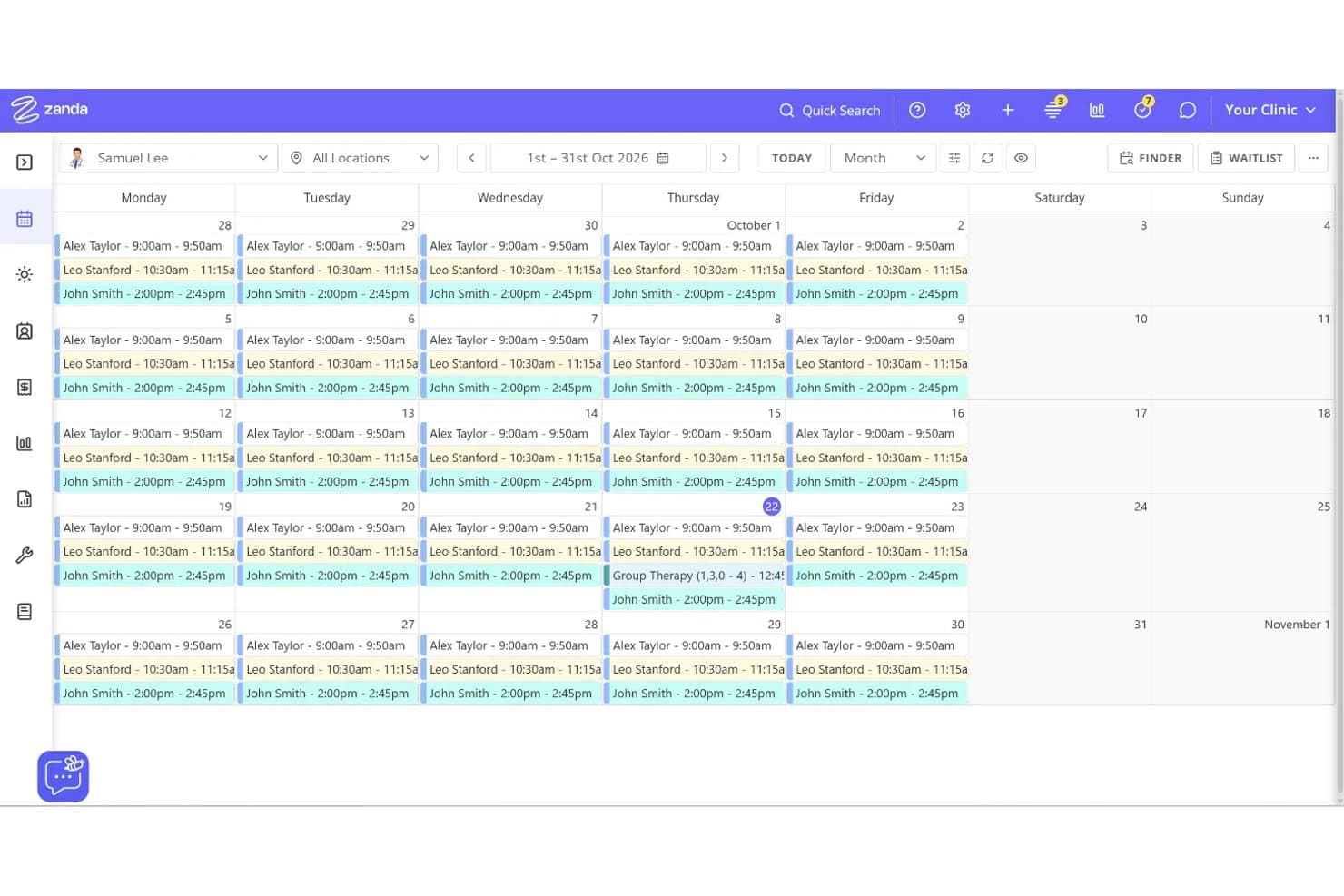
Zanda displays a full monthly calendar with recurring patient appointments. Zanda is an all-in-one practice management platform for health practices that combines appointment scheduling, client records, billing, telehealth, and group booking tools.
Who Is Zanda Best For?
Zanda is a strong fit for allied health practices—think physiotherapy, psychology, and speech therapy—that run group sessions or telehealth classes alongside individual appointments.
Why I Picked Zanda
I picked Zanda as one of the best because it handles group telehealth and class bookings in a way most scheduling tools simply don't. You can run a group physiotherapy session or psychology class with individual participant reminders, separate unique telehealth links per attendee, and prepayment enabled at booking. Clients can also self-book into group sessions through the portal, which cuts down on the back-and-forth your front desk would otherwise manage manually.
Zanda Key Features
- Automated appointment reminders: Zanda sends SMS and email reminders up to three times per appointment, with client replies updating appointment status using confirmation or cancellation keywords.
- Waitlist management: Staff can record client availability preferences, match waitlisted clients to newly opened slots, and send SMS notifications when a cancellation creates a fit.
- Two-way SMS messaging: Practitioners and admin staff can exchange SMS messages with clients directly inside Zanda, with all messages linked to the client's record.
- Role-based user permissions: Administrators can configure each team member's access to clinical, billing, reporting, communication, and export functions individually.
Zanda Integrations
Zanda offers native integrations with Google Calendar, Outlook Calendar, Apple Calendar, Zoom, Stripe, Xero, Physitrack, Mailchimp, and Google Analytics. Its public API is coming soon, with beta enrollment closed and documented access limited to read-oriented data.
Pros and Cons
Pros:
- Clients can book appointments through the portal
- SMS confirmations update appointment status automatically
- Group sessions provide individual reminders and telehealth links
Cons:
- Waitlist matches require staff to contact clients manually
- Google Calendar changes don’t reliably sync back
Learn more about Zanda: 2Best for practices seeking robust e-prescribing features
RXNT
- Free demo available
- From $335/month(billed annually)
Visit WebsiteCustomer Rating:4.3/5
RXNT Patient Scheduling Software Interface RXNT is a healthcare software provider offering an integrated suite of products, including electronic health records (EHR), practice management (PM), and a particularly robust e-prescribing system. With a primary focus on delivering efficient e-prescribing capabilities, RXNT stands out as a fitting choice for practices that value this feature.
Why I Picked RXNT: I chose RXNT for this list due to its high-level focus on e-prescribing, a feature that I found to be of great value in today's digital healthcare space. The tool stands out for its comprehensive e-prescribing functionality, enabling providers to send prescriptions directly to pharmacies, reducing wait times, and enhancing patient convenience. This dedication to optimizing e-prescribing processes is why I've determined RXNT as the "Best for" practices seeking robust e-prescribing features.
Standout features & integrations:
One of RXNT's key features is its extensive e-prescribing capabilities, which provide secure, immediate transmission of prescriptions to any retail or mail-order pharmacy. Additionally, RXNT's system offers medication history tracking and drug-drug and drug-allergy interaction checks. RXNT also integrates smoothly with other systems, including EHR and PM, for a more streamlined workflow.
Pros and Cons
Pros:
- Smooth integration with EHR and PM systems
- Direct transmission of prescriptions to pharmacies
- Comprehensive e-prescribing features
Cons:
- Occasional lag reported during peak usage times
- Some users reported difficulties in customizing certain features
- The user interface could be more intuitive
Learn more about RXNT: Best for practices offering wellness services
- 30-day free trial + free demo available
- From $30/month
Visit WebsiteCustomer Rating:4.7/5
Vagaro Patient Scheduling Software Interface Vagaro is a cloud-based platform designed for wellness practices. It not only handles appointment scheduling, but also offers a suite of marketing and POS solutions, making it an excellent choice for businesses focused on health and wellness services.
Why I Picked Vagaro: I picked Vagaro for its holistic approach towards the needs of wellness practices. What sets it apart is its specialized marketing and POS features that perfectly complement its scheduling capabilities, providing a comprehensive solution for wellness businesses. Hence, I concluded that Vagaro is best for practices offering wellness services, where it addresses the unique challenges and needs of such businesses.
Standout features & integrations:
Vagaro's main features include not only an intuitive appointment scheduling system but also marketing tools, such as email marketing and promotion management, and a built-in point-of-sale system. This platform integrates with popular payment processors and social media platforms, enabling online booking through these channels, which aids in boosting practice visibility and convenience.
Pros and Cons
Pros:
- Tiered pricing model suited to growing practices
- Integration with social media platforms for increased visibility
- Specialized marketing and POS tools
Cons:
- Limited EHR capabilities
- Learning curve for using the entire suite effectively
- May include more features than required for some practices
Learn more about Vagaro: Best for its impressive automation and patient communication tools
- Free demo available
- Pricing upon request
Visit WebsiteCustomer Rating:4.8/5
NexHealth Patient Scheduling Software Interface NexHealth is a patient experience management platform offering a suite of tools for effective patient communication and process automation. The software's robust automation capabilities and comprehensive communication features contribute to its suitability for healthcare practices aiming to enhance patient engagement and streamline administrative tasks.
Why I Picked NexHealth: In making my selection, I chose NexHealth due to its exceptional automation and patient communication tools. This platform stands out with its blend of automated workflows and wide-ranging communication options, which differentiate it from others. I, therefore, believe that NexHealth is best for practices looking for robust automation and communication solutions.
Standout features & integrations:
NexHealth offers a broad range of features such as automated appointment scheduling, reminders, and follow-ups, as well as comprehensive patient communication tools including email, text, and voice messaging. In terms of integrations, NexHealth plays well with various Electronic Health Record (EHR) systems and billing platforms, making it an adaptable choice for different healthcare practices.
Pros and Cons
Pros:
- Integrates with many EHR systems and billing platforms
- Comprehensive patient communication tools including email, text, and voice messaging
- Robust automation capabilities for appointment scheduling and reminders
Cons:
- Requires a learning curve to utilize all features efficiently
- Customer support is basic at the lower-priced tier
- Higher level features are available only in more expensive plans
Learn more about NexHealth: Best for patient intake and pre-visit planning
- Free demo available
- Pricing upon request
Visit WebsiteCustomer Rating:4.2/5
Phreesia Patient Scheduling Software Interface Phreesia offers a comprehensive patient intake solution that helps healthcare providers streamline patient registration, billing, and clinical workflows. Its strength lies in facilitating pre-visit planning, which sets it apart as a tool that enhances patient engagement and staff efficiency.
Why I Picked Phreesia: I chose Phreesia for this list for its robust patient intake features and its unique approach to pre-visit planning. This software stood out in how it streamlines the entire patient intake process, ensuring smooth clinic workflows and improved patient experiences. In my judgment, Phreesia is best for patient intake and pre-visit planning due to its functionality and its dedication to patient engagement and efficient clinical operations.
Standout features & integrations:
Phreesia boasts a suite of impressive features, including online registration, pre-visit planning, patient check-in, and patient tracking. These tools greatly reduce administrative burdens and allow clinics to focus more on patient care. Phreesia also integrates seamlessly with leading EHR and PM systems, offering a more connected and comprehensive healthcare experience.
Pros and Cons
Pros:
- Effective in enhancing patient engagement
- Seamless integration with leading EHR and PM systems
- Comprehensive pre-visit planning tools
Cons:
- Limited customization options for certain workflows
- Potential over-complexity for smaller practices
- No publically available pricing
Learn more about Phreesia: Best for managing multi-location schedules
- Free demo available
- Pricing upon request
Visit WebsiteCustomer Rating:4.4/5
Elation Health provides a robust patient scheduling interface. Elation Health is an Electronic Health Record (EHR) software tailored for small to medium-sized primary care practices, focusing on a clinical-first approach to improve patient care.
Why I Picked Elation Health: One standout feature is its enhanced scheduling capabilities, which allow you to manage provider availability across multiple locations and time zones. This flexibility ensures that your practice can accommodate diverse patient needs without compromising efficiency. By clearly displaying clinician availability, both your staff and patients can easily find and book suitable appointment times.
Standout features & integrations:
Other features include clinical reminders that help you stay on top of patient care tasks, ensuring timely follow-ups and adherence to treatment plans. Additionally, secure patient messaging facilitates direct communication between you and your patients. Elation Health integrates with various third-party systems.
Pros and Cons
Pros:
- Effectively manages billing and documentation
- Efficient patient engagement tools
- Real-time updates to patient records enhance accuracy.
Cons:
- Data migration can be complex
- Not ideal for larger medical practices
Learn more about Elation Health: Best for EHR integration and customizability
- Free demo available
- Pricing upon request
Visit WebsiteCustomer Rating:3.9/5
DrChrono Patient Scheduling Software Interface DrChrono is a comprehensive healthcare platform that offers an EHR system, practice management, and revenue cycle management services. Its forte lies in the level of EHR integration it provides, and the customizability that allows practices to tailor the system according to their unique needs.
Why I Picked DrChrono: The reason I selected DrChrono for this list is its strong emphasis on integrating Electronic Health Records (EHR) with all aspects of a medical practice. This platform stands out for the customizability it offers, allowing practices to adjust its functionalities according to their specific requirements. I determined that DrChrono is "best for" EHR integration and customizability because of its flexible and comprehensive approach to managing healthcare records and practice operations.
Standout features & integrations:
Among its many features, DrChrono provides EHR management, appointment scheduling, billing, and a patient portal. These features are designed to improve clinical efficiency and patient care. The system integrates well with numerous third-party apps and services, which extends the functionality of DrChrono and enables practices to have a fully connected operation.
Pros and Cons
Pros:
- Robust third-party integrations
- High level of customizability
- Excellent EHR integration
Cons:
- Some users have reported customer service issues
- Might require a steep learning curve for non-tech savvy users
- High starting price may be prohibitive for small practices
Learn more about DrChrono: Best for integrated care management with intuitive features
- Free demo available
- Pricing upon request
Visit WebsiteCustomer Rating:3.8/5
AthenaOne Patient Scheduling Software Interface athenaOne offers a patient scheduling solution designed to simplify the complex world of healthcare. The system unifies electronic health records, revenue cycle management, self-scheduling, patient engagement, and care coordination into one accessible platform.
Why I Picked athenaOne: In the process of selecting a top-tier appointment scheduling software, athenaOne stood out due to its intuitive features and integrated approach to care management. I found that it goes beyond basic scheduling and ventures into a unified health record system that encompasses a broader care management landscape. It's the best for integrated care management primarily because it doesn't isolate patient scheduling from other elements of a healthcare practice, which I believe is vital in our interconnected medical world today.
Standout features & integrations:
athenaOne's standout features include real-time patient check-ins, automated appointment reminders, and intelligent scheduling that reduces no-shows. Its integrated suite connects scheduling to electronic health records, revenue management, and patient communication seamlessly. The system also offers direct integrations with major EHR systems, third-party billing, and insurance verification platforms.
Pros and Cons
Pros:
- Robust EHR integration
- Intelligent scheduling reduces missed appointments
- Comprehensive, integrated patient management solution
Cons:
- Billed annually, which might not fit all budget structures
- Requires a learning curve due to its extensive features
- Might be pricy for small practices
Learn more about athenaOne: Best for secure online intake forms and practice management
- From $49.90/user/month.

IntakeQ Patient Scheduling Software Interface IntakeQ is a practice management platform that specializes in creating secure, customizable patient intake forms. This software tool allows healthcare practices to streamline the patient admission process, thus making it a preferred choice for practices seeking secure and efficient online intake form solutions.
Why I Picked IntakeQ: I selected IntakeQ for this list based on its ability to deliver secure online intake forms effectively. Its standout feature of providing customizable forms that integrate seamlessly into a practice's workflow aligns well with its purpose. Thus, I have determined IntakeQ as the best for practices that are seeking an efficient method for managing patient intake through secure online forms.
Standout features & integrations:
IntakeQ's standout feature is its customizable and HIPAA compliant online intake forms that can be sent to patients before their appointment. In addition, the tool has a built-in online booking system and a practice management module that enhances its functionality. Integrations include popular EHRs and billing systems, which are crucial for maintaining a comprehensive record and smooth operations.
Pricing:
The pricing for IntakeQ starts from $49.90/user/month. This price is for their Solo plan, which caters to individual practitioners.
Pros and Cons
Pros:
- Integrates with EHRs and billing systems
- Customizable forms that suit the needs of different practices
- HIPAA-compliant online intake forms
Cons:
- Limited integrations with other software compared to some competitors
- Users may need some time to familiarize themselves with form customization
- More advanced features require higher-tiered plans
Learn more about IntakeQ: Best for integrating HR and benefits with patient management
- Free demo available
- Pricing upon request

Rise People Patient Scheduling Software Interface Rise People is a comprehensive platform that offers a blend of patient management along with Human Resources (HR) and benefits administration. This tool ensures smooth interplay between patient handling, employee management, and benefits administration, making it particularly suitable for practices that need to seamlessly integrate these functionalities.
Why I Picked Rise People: Choosing Rise People was a natural choice, given its unique combination of patient management with HR and benefits. This dual capability sets it apart from many other tools on the market. Thus, in my judgment, Rise People is best for practices that require the integration of HR and benefits with patient management.
Standout features & integrations:
Rise People's unique feature is its ability to seamlessly integrate HR and benefits administration with patient management. It comes with a comprehensive benefits management system and a sophisticated HR module, all working alongside its patient management module. The tool also integrates with various payroll systems, accounting tools, and time tracking software, further enhancing its utility.
Pros and Cons
Pros:
- Offers a user-friendly interface
- Integrates with payroll, accounting, and time-tracking tools
- Provides a seamless combination of HR, benefits, and patient management
Cons:
- The setup process may be complex and time-consuming for some practices
- Limited HR functionalities in the basic 'Essentials' plan
- Pricing could be more competitive compared to similar tools
Learn more about Rise People:
Diğer Hasta Randevu Planlama Yazılımı Araçları
Aşağıda, kısa listemize aldığımız ancak ilk 10’a giremeyen ek Hasta Randevu Planlama Yazılımlarının bir listesini bulabilirsiniz. Kesinlikle göz atmaya değer.
- 11VecnaBest for advanced self-service patient portals
- 12TebraBest for small practices seeking a comprehensive solution
- 13WebPTGood for physical therapists seeking streamlined appointment scheduling
- 14SolutionReachGood for its multifaceted patient relationship management features
- 15CentralReachGood for ABA therapists needing practice management and data collection tools
- 16Raintree SystemsGood for specialized practices with its customizable templates
- 17ChartLogic EHRGood for its intuitive user interface and navigation
- 18PatientPopGood for practices aiming to enhance online presence and patient experience
- 19PatientNowGood for aesthetic medical practices seeking comprehensive management tools
- 20MendGood for its powerful telemedicine and patient scheduling functionalities
- 21Centricity Practice SolutionGood for practices requiring robust reporting and analytics features
- 22PROSchedulerGood for robust scheduling in high-volume testing environments
How I Evaluate Patient Scheduling Software
I split my evaluation into baseline requirements—like HIPAA compliance and EHR integration—and differentiators that separate tools built for multi-provider clinics from solo practices.
Core Functionality (Table Stakes For This List)
When I'm selecting tools for my list, I rank each one on a scale from 0 (does not offer the functionality) to 5 (excels in this area) for each core functionality listed below. Then, I calculate the tool's total score into a percentage. Each tool needs to achieve a minimum total score of 65% to be considered for inclusion.
- Online Patient Self-Scheduling: I check whether patients can book, reschedule, or cancel on their own through a portal—and whether it reflects real-time provider availability.
- Automated Reminders & Confirmations: The best tools let you set up multi-channel reminders via SMS, email, and voice with two-way confirmation to reduce no-shows.
- Multi-Provider Calendar Management: I evaluate how each tool handles scheduling across multiple providers, locations, rooms, and appointment types in a single view.
- EHR/PMS Integration: Bidirectional sync with systems like Epic, athenahealth, or DrChrono matters here—I look for certified connections, not just one-way data pushes.
- HIPAA-Compliant Data Handling: Every tool I consider should offer encrypted data storage and transmission, role-based access controls, and a signed BAA.
- Patient Intake & Insurance Verification: I look for digital intake forms patients complete before arrival, paired with real-time insurance eligibility checks during booking.
Once I have a list of tools that meet this criteria, I consider what sets each platform apart.
Differentiating Factors (What Sets Vendors Apart)
Here's how I compare and contrast different vendors:
Standout Features
Waitlist automation is a big one—when a patient cancels a Thursday morning slot, the right tool fills it by auto-notifying the next person in line. I also evaluate telehealth scheduling, where the platform generates video links at the time of booking so virtual visits don't require extra steps. Recall and recare campaigns matter for practices that depend on recurring visits, like annual physicals or six-month dental cleanings, and I look for tools that trigger outreach automatically based on each patient's visit history.
Beyond Features
Healthcare specialty fit is something I always evaluate—a tool built for dental practices may handle operatory-based scheduling well but fall short for behavioral health providers who need recurring session blocks. Implementation support also matters, especially for multi-location groups migrating years of patient data. I look at whether a vendor offers dedicated onboarding and staff training for front-desk teams. Pricing transparency rounds out my assessment; per-provider models work for small clinics, but growing practices need to know how costs scale as they add locations and staff.
Hasta Randevu Planlama Yazılımı Nasıl Seçilir?
Uzun özellik listeleri ve karmaşık fiyatlandırma yapıları arasında kaybolmak kolaydır. Kendinize özgü yazılım seçim sürecinizi yürütürken odaklanmanızı korumanıza yardımcı olmak için göz önünde bulundurmanız gereken faktörleri içeren bir kontrol listesi hazırladım:
| Faktör | Göz önünde bulundurulması gerekenler |
|---|---|
| FaktörÖlçeklenebilirlik | Göz önünde bulundurulması gerekenlerYazılım sağlık kuruluşunuzla birlikte gelişecek mi? Kuruluşunuz büyüdükçe daha fazla kullanıcıyı veya konumu destekleyip destekleyemeyeceğini değerlendirin. |
| FaktörEntegrasyonlar | Göz önünde bulundurulması gerekenlerMevcut araçlarınıza, örneğin EHR sistemlerine veya takvim uygulamalarına bağlanabiliyor mu? Veri silolarını önlemek için uyumluluğunu kontrol edin. |
| FaktörÖzelleştirilebilirlik | Göz önünde bulundurulması gerekenlerYazılımı belirli iş akışlarınıza uyacak şekilde uyarlayabiliyor musunuz? Ayarları ve kullanıcı izinlerini değiştirme seçeneklerini arayın. |
| FaktörKullanım kolaylığı | Göz önünde bulundurulması gerekenlerArayüz ekibiniz için sezgisel mi? Dik bir öğrenme eğrisi sağlık kuruluşunuzun işleyişini yavaşlatabilir. |
| FaktörUygulama ve işe alıştırma | Göz önünde bulundurulması gerekenlerNe kadar hızlı çalışmaya başlayabilirsiniz? Kurulum sırasında sunulan desteği ve kaynakları değerlendirin. |
| FaktörMaliyet | Göz önünde bulundurulması gerekenlerFiyatlandırma bütçenize uygun mu? Planları karşılaştırın ve gizli ücretler veya uzun vadeli sözleşmeler olup olmadığını kontrol edin. |
| FaktörGüvenlik önlemleri | Göz önünde bulundurulması gerekenlerHasta verilerini nasıl koruyor? HIPAA gibi sektörel standartları karşıladığından emin olun. |
| FaktörUyumluluk gereklilikleri | Göz önünde bulundurulması gerekenlerBölgenizdeki yasal ve düzenleyici standartları karşılıyor mu? Gerekli uyumluluk koşullarını desteklediğini doğrulayın. |
Hasta Randevu Planlama Yazılımı Nedir?
Hasta randevu planlama yazılımı, sağlık kuruluşlarının randevuları yönetmesine ve düzenlemesine yardımcı olan bir araçtır. Doktorlar, hemşireler ve idari personel gibi sağlık çalışanları, verimliliği ve hasta memnuniyetini artırmak için genellikle bu araçları kullanır. Randevu alma, hatırlatıcılar ve takvim senkronizasyonu, randevuya gelmeme oranlarını azaltmaya ve zaman yönetimini optimize etmeye yardımcı olur. Genel olarak bu araçlar, planlama görevlerini kolaylaştırarak sağlık ekiplerinin hasta bakımına daha fazla odaklanmasını sağlar.
Özellikler
Hasta randevu planlama yazılımı seçerken aşağıdaki temel özelliklere dikkat edin:
- Randevu alma: Hastaların randevularını çevrim içi olarak kendilerinin planlamasını sağlayarak idari iş yükünü azaltır.
- Otomatik hatırlatıcılar: Hastalara yaklaşan randevularını hatırlatmak için e-posta veya kısa mesaj göndererek randevuya gelmeme oranını azaltmaya yardımcı olur.
- Takvim senkronizasyonu: Tüm randevuların platformlar arasında güncel kalmasını sağlamak için popüler takvim uygulamalarıyla entegre olur.
- Hasta verilerinin yönetimi: Hasta bilgilerini güvenli bir şekilde depolar ve düzenler, böylece sağlık hizmeti sağlayıcılarının bu bilgilere kolayca erişmesini sağlar.
- Tele-tıp entegrasyonu: Yüz yüze ziyaret gerçekleştiremeyen hastaların sağlık hizmetlerine erişimini genişleterek sanal konsültasyonları kolaylaştırır.
- Özelleştirilebilir randevu formları: Sağlık kuruluşlarının, belirli hasta bilgilerini önceden toplamak için randevu formlarını ihtiyaçlarına göre uyarlamasını sağlar.
- Birden fazla konum desteği: Birden fazla sağlık kuruluşu konumundaki planlamayı yöneterek operasyonların tutarlı olmasını sağlar.
- Analiz ve raporlama: Randevu eğilimleri ve sağlık kuruluşu performansı hakkında öngörüler sunarak karar verme sürecine yardımcı olur.
- Bekleme listesi yönetimi: İptal edilen zaman dilimlerini bekleme listesindeki hastalarla otomatik olarak doldurarak randevu kullanılabilirliğini en üst düzeye çıkarır.
- HIPAA uyumluluğu: Hasta verilerinin sektör düzenlemelerine uygun şekilde korunmasını sağlayarak gizliliği sürdürür.
Avantajlar
Hasta randevu planlama yazılımını uygulamak, ekibiniz ve işletmeniz için çeşitli avantajlar sağlar. Yararlanabileceğiniz avantajlardan bazıları şunlardır:
- Geliştirilmiş verimlilik: Otomatik randevu alma ve hatırlatıcılar idari görevleri azaltarak personelinizin zamanını serbest bırakır.
- Azalan randevuya gelmeme oranı: Hatırlatıcı özellikleri hastaların randevularını hatırlamasına yardımcı olarak kaçırılan ziyaretleri azaltır.
- Artan hasta memnuniyeti: Kolay çevrim içi randevu alma ve tele-tıp seçenekleri kolaylık sağlayarak hasta deneyimini iyileştirir.
- Daha iyi veri yönetimi: Merkezi hasta bilgileri, hızlı erişim ve iyileştirilmiş bakım koordinasyonu sağlar.
- Artan randevu kullanımı: Bekleme listesi yönetimi, iptal edilen zaman dilimlerini verimli bir şekilde doldurarak programınızı en üst düzeye çıkarır.
- Ölçeklenebilirlik: Birden fazla konum desteği ve özelleştirilebilir özellikler, değişen ihtiyaçlara uyum sağlayarak sağlık kuruluşunuzla birlikte büyür.
- Uyumluluk güvencesi: HIPAA uyumluluğu özellikleri hasta verilerini koruyarak sağlık kuruluşunuzun düzenleyici standartları karşılamasını sağlar.
Maliyetler ve Fiyatlandırma
Hasta randevu planlama yazılımı seçerken mevcut çeşitli fiyatlandırma modellerini ve planları anlamak gerekir. Maliyetler özelliklere, ekip büyüklüğüne, eklentilere ve diğer unsurlara göre değişir. Aşağıdaki tablo, hasta randevu planlama yazılımı çözümlerinde yaygın olarak sunulan planları, ortalama fiyatlarını ve tipik özelliklerini özetlemektedir:
Hasta Randevu Planlama Yazılımı İçin Plan Karşılaştırma Tablosu
| Plan Türü | Ortalama Fiyat | Yaygın Özellikler |
|---|---|---|
| Plan TürüÜcretsiz Plan | Ortalama Fiyat$0 | Yaygın ÖzelliklerTemel randevu planlama, sınırlı hatırlatıcılar ve temel takvim senkronizasyonu. |
| Plan TürüKişisel Plan | Ortalama Fiyat$5-$25/kullanıcı/ay | Yaygın ÖzelliklerRandevu planlama, e-posta hatırlatıcıları, takvim senkronizasyonu ve temel raporlama. |
| Plan Türüİşletme Planı | Ortalama Fiyat$30-$60/kullanıcı/ay | Yaygın ÖzelliklerGelişmiş planlama, SMS hatırlatıcıları, birden fazla konum desteği ve özelleştirilebilir formlar. |
| Plan TürüKurumsal Plan | Ortalama Fiyat$100-$200/kullanıcı/ay | Yaygın ÖzelliklerTam entegrasyon seçenekleri, gelişmiş analizler, özel destek ve uyumluluk özellikleri. |
Hasta Randevu Planlama Yazılımı SSS
Hasta randevu planlama yazılımı hakkında sık sorulan soruların bazı yanıtlarını burada bulabilirsiniz:
Hasta randevu planlama yazılımı birden fazla konumu yönetebilir mi?
Evet, çoğu hasta randevu planlama yazılımı birden fazla konumu yönetebilir. Her konum için ayrı rezervasyon sayfaları oluşturmanıza olanak tanıyarak randevuların düzenli ve erişilebilir olmasını sağlar. Bu özellik, birden fazla şubesi olan kliniklerin tüm konumlarda verimliliği ve tutarlılığı korumasına yardımcı olur.
Hasta randevu planlama yazılımı hasta iletişimini nasıl geliştirir?
Hasta randevu planlama yazılımı, e-posta veya SMS yoluyla randevu onaylarını ve hatırlatıcılarını otomatikleştirerek iletişimi geliştirir. Bu, manuel takip ihtiyacını azaltır ve hastaların randevuları hakkında bilgi sahibi olmasını sağlar. Ayrıca yeniden randevu almayı kolaylaştırarak süreci hem hastalar hem de personel için daha pratik hâle getirir.
Hasta randevu planlama yazılımında veriler güvenli bir şekilde saklanır mı?
Evet, saygın hasta randevu planlama yazılımı çözümleri veri güvenliğine öncelik verir. Hasta bilgilerini korumak için şifreleme ve HIPAA gibi sektör standartlarına uyumluluk gibi önlemler uygularlar. Yazılımın güvenlik uygulamalarını, gizlilik ve mevzuat gereksinimlerinizi karşıladığından emin olmak için doğrulamalısınız.
En ucuz ve en pahalı hasta randevu planlama yazılımı hangisidir?
Hasta randevu planlama yazılımının maliyeti büyük ölçüde değişebilir. Daha uygun fiyatlı seçenekler arasında SimplePractice, ayda yaklaşık $39’dan başlayan planlar sunar. Daha yüksek fiyatlı seçeneklerde ise athenahealth gibi yazılımlar, sunulan özelliklere bağlı olarak kullanıcı başına aylık birkaç yüz dolara mal olabilir.