

Güçlü athenahealth alternatifleri, kliniğinizin hasta dosyası oluşturma, randevu planlama, faturalandırma ve bakım koordinasyonu iş akışlarına uyum sağlayan EHR sistemleridir. Doğru seçim; uzmanlık alanınıza, ekip büyüklüğünüze ve büyüme planlarınıza bağlıdır. Kliniğimi tek hekimli bir muayenehaneden 15 hekimli bir yapıya büyütmeye yardımcı oldum ve günlük operasyonların ekibe uygun sistemlere ne kadar bağlı olduğunu biliyorum. Bu rehberde, bağımsız muayenehanelere yönelik araçlardan hastaneler ve klinikler arasında bakım için tasarlanmış platformlara kadar 10 seçeneği karşılaştırıyorum.
athenahealth Nedir?
athenahealth, ayaktan tedavi sunan muayenehaneler için athenaOne platformunda elektronik sağlık kayıtlarını (EHR), muayenehane yönetimini, tıbbi faturalandırmayı ve hasta etkileşimi özelliklerini bir araya getiren bir sağlık teknolojisi şirketidir. Araçları, klinik dokümantasyonu ve idari iş akışlarını tek bir platformda destekler. Alternatifleri karşılaştırırken her seçeneğin uzmanlık alanınıza, personel yapınıza, faturalandırma modelinize ve büyüme planlarınıza ne ölçüde uyduğunu değerlendirin.
Karşılaştırma Tablosu: athenahealth Alternatifleri
Kısa listeme giren athenahealth alternatiflerinin fiyatlarını ve teknik özelliklerini yan yana karşılaştırın.
Score legend (out of 5)
- Excellent4.5–5
- Good4–4.4
- Average3–3.9
- Below average2–2.9
- Poor1–1.9
Sorted by: Default
| Tool | Starting Price | Website | |||||||
|---|---|---|---|---|---|---|---|---|---|
Best for pediatric care and family records | 3.8 out of 5 | 3 | 4 | 4 | 4 | 4 | 4 | Pricing upon request Free demo available | Website |
Best for mobile charting during video visits | 3.8 out of 5 | 4 | 4 | 4 | 4 | 3 | 4 | Pricing upon request Free demo available | Website |
Best for EHR with outsourced billing | 3.7 out of 5 | 3 | 4 | 4 | 4 | 3 | 4 | $130/user/month Free demo available | Website |
Best for cross-setting care coordination | 3.8 out of 5 | 3 | 4 | 4 | 4 | 4 | 4 | Pricing upon request Not available | Website |
Best for switching from athenahealth | 3.8 out of 5 | 3 | 4 | 4 | 4 | 4 | 4 | Pricing upon request Free demo available | Website |
Best for care across hospitals and clinics | 4.0 out of 5 | 4 | 4 | 4 | 4 | 4 | 4 | Pricing upon request Free demo available | Website |
Best for in-house billing or outsourced RCM | 4.0 out of 5 | 4 | 4 | 4 | 4 | 4 | 4 | $280/user/month Free demo available | Website |
Best for tribal health program reporting | 3.8 out of 5 | 3 | 4 | 4 | 4 | 4 | 4 | Pricing upon request Free demo available | Website |
Best for therapy workflows from intake to notes | 3.0 out of 5 | 2 | 4 | 4 | 3 | 1 | 4 | $49/month Free demo + 30-day free trial available | Website |
Best for no-cost ambient notes for EHR users | 3.3 out of 5 | 4 | 3 | 4 | 2 | 3 | 4 | $335/month Free demo available | Book Demo |


Why Trust Our Software Recommendations
6,700+
Reviews
20
Industry experts
16+
Evaluation factors
14
Years
Our team has been testing and reviewing software since 2012. As medical practice leaders ourselves, we know how difficult—and important—it is to choose the right software.
For this guide, we evaluated tools using hands-on testing and independent research, scoring tools using our selection criteria.
Our reviews reflect our human editorial judgment, not a sales pitch.
athenahealth Alternatifleri İncelemeleri
Aşağıda, kısa listemde yer alan en iyi athenahealth alternatiflerine dair özetlerimi bulabilirsiniz. İncelemelerimde, doğru seçeneği bulmanıza yardımcı olmak için her EHR platformunun özelliklerini, faturalandırma iş akışlarını ve fiyatlandırmasını ele alıyorum.
 Best for pediatric care and family records
- Free demo available
- Pricing upon request
Visit WebsiteCustomer Rating:4.2/5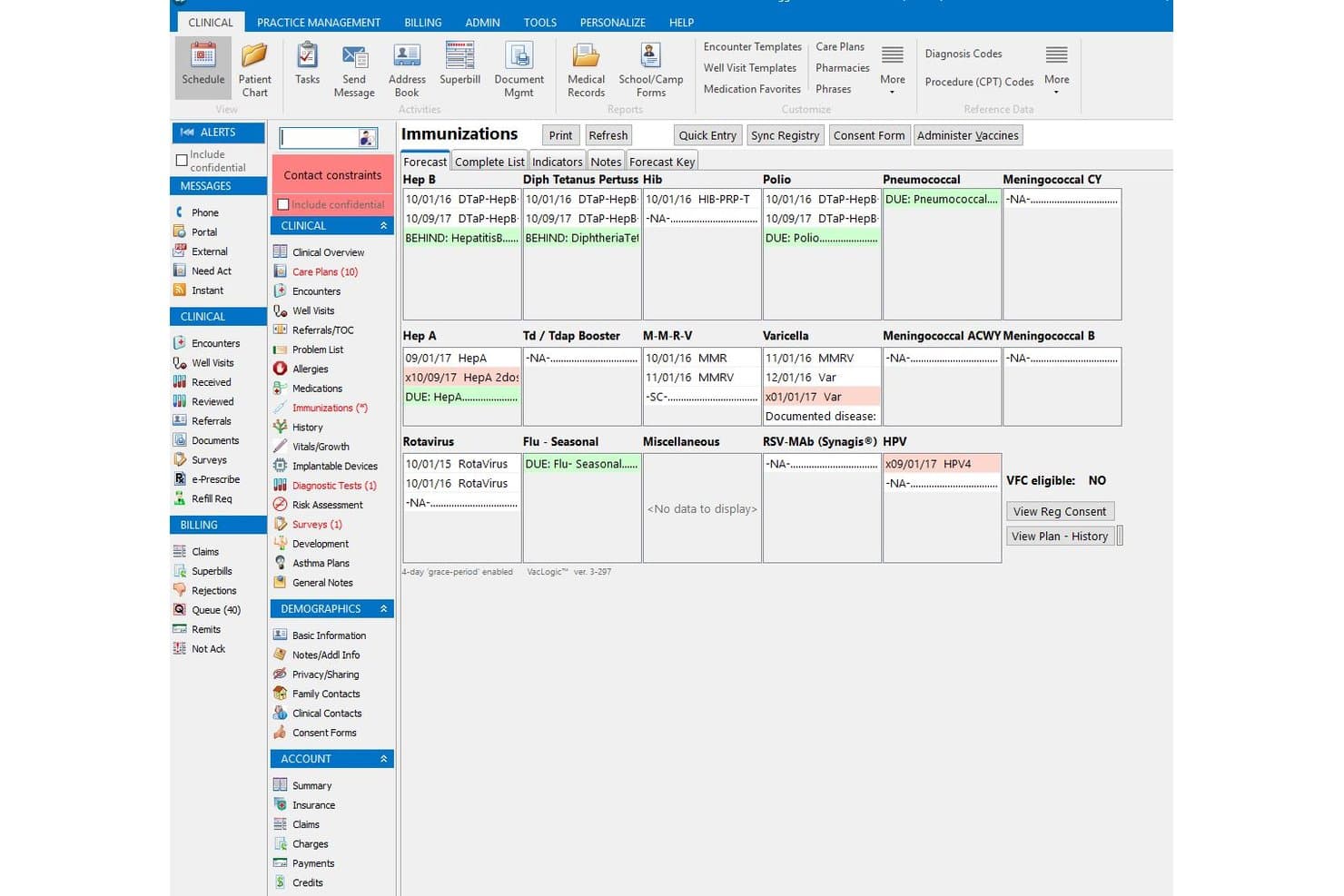
Office Practicum provides a patient's full immunization forecast and history. Office Practicum is a pediatric EHR and practice management platform designed for children's practices that need purpose-built clinical workflows, including vaccine management, growth charts, AI-assisted documentation, and pediatric billing tools.
Who Is Office Practicum Best For?
Office Practicum is built for pediatric practices that need a purpose-built clinical and billing platform, from small independent offices to multi-location children's practices.
Why I Picked Office Practicum
I picked Office Practicum because no other tool on this list is built from the ground up for pediatric care the way this one is. I particularly appreciate VacLogic+, which forecasts due vaccines under AAP guidelines and manages catch-up schedules, inventory, and patient recalls automatically. Pair that with Opie AI drafting structured notes from live pediatric visits, including multi-speaker, multi-language conversations, and clinical documentation actually fits how children's practices work.
Office Practicum Key Features
- Pediatric billing workflows: Supports combination sick-and-well visit billing, VFC, EPSDT, and family billing with customizable claim-scrubbing rules and real-time eligibility checks.
- Patient portal: Lets families access visit summaries, request refills, schedule appointments, make payments, and message the practice through a single account covering multiple children.
- Practice analytics and benchmarking: Delivers financial, operational, and clinical dashboards and benchmarks practice metrics against a nationwide network of pediatric practices.
- Interoperability connections: Provides bi-directional eLab connections, Carequality and HIE access, supported immunization-registry links, and FHIR-based APIs for sharing patient data across systems.
Office Practicum Integrations
Office Practicum lists NLM API, First Databank, and Kno2 as additional software used with Office Practicum 21, though their functions aren't specified. It also offers FHIR, administrative, and advanced clinical APIs, plus Carequality/HIE access and connections to supported labs, pharmacies, and registries.
Pros and Cons
Pros:
- Family scheduling and messaging tools
- Billing supports pediatric claims workflows
- Pediatric templates fit children’s care
Cons:
- Updates can bring lag and glitches
- Navigation can take too many clicks
Learn more about Office Practicum: Best for mobile charting during video visits
- Free demo available
- Pricing upon request
Visit WebsiteCustomer Rating:3.9/5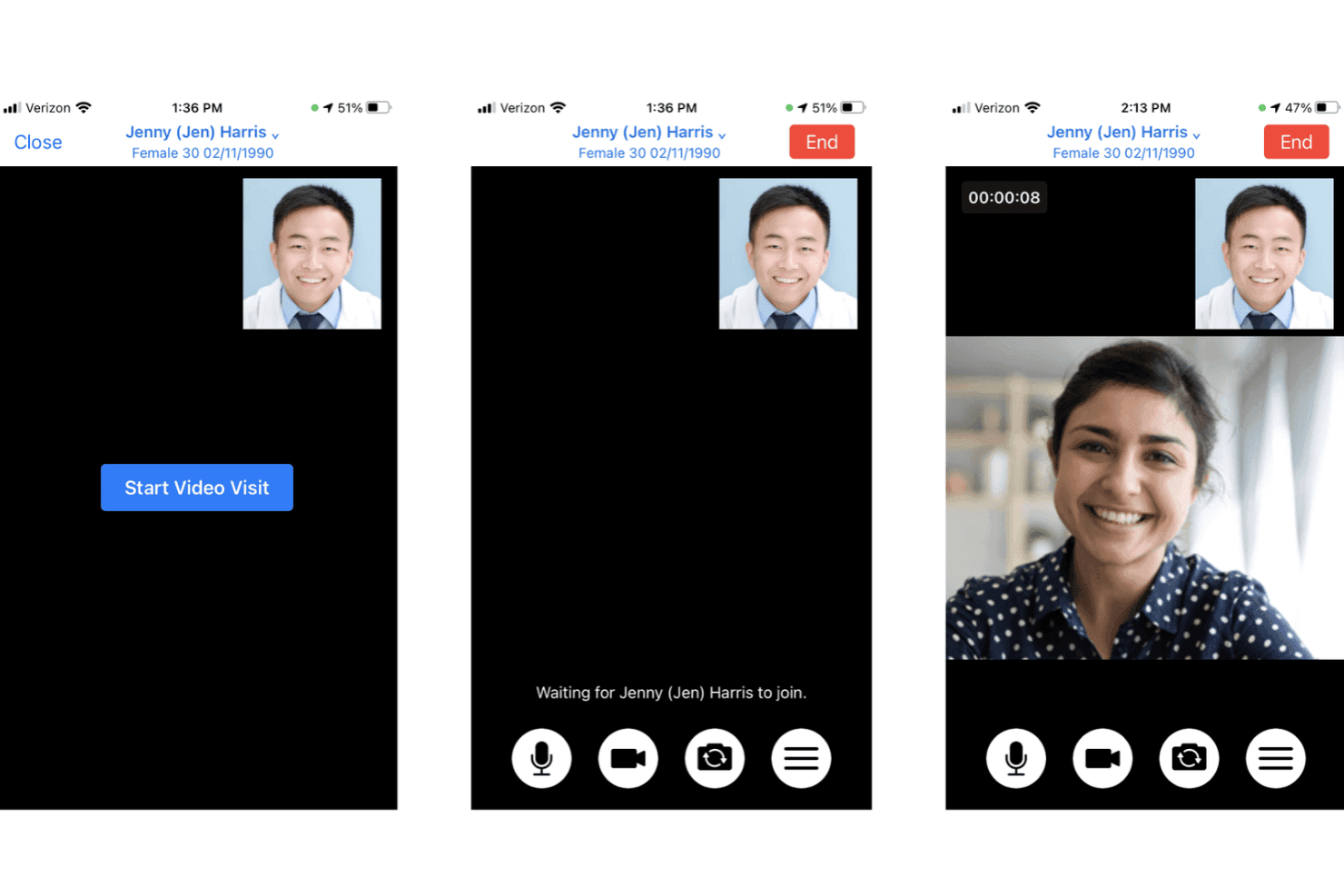
DrChrono enables providers to conduct video visits with patients via mobile. DrChrono is a cloud-based EHR built for independent practices that want mobile-first charting, integrated telehealth, and billing tools in a single platform.
Who Is DrChrono Best For?
DrChrono is a strong fit for independent practices where clinicians document and conduct patient visits from an iPad or iPhone.
Why I Picked DrChrono
I picked DrChrono as one of the best because it's built around the iPad and iPhone in a way most EHRs aren't, making it genuinely practical for providers who document during video visits. I particularly like that telehealth is baked directly into the EHR app, so I can pull up a patient chart, run the visit, and use EverHealth Scribe to auto-draft the note, including HPI, Assessment, Plan, and ICD-10 codes, all without switching between tools.
DrChrono Key Features
- OnPatient portal: Patients can access health records, test results, prescriptions, visit summaries, and billing details, and request appointments through a dedicated portal.
- EverHealth Scribe: Ambient AI listens to patient-provider conversations and auto-drafts structured notes, including HPI, Assessment, Plan, and ICD-10 codes, for clinician review before signing.
- Live Claims Feed: Users can submit claims electronically and track claim status in real time, with denial management and appeal tools built into the billing workflow.
- No-Show Predictor: AI-driven tool identifies patients at risk of missing appointments to support proactive outreach and reminder scheduling.
DrChrono Integrations
DrChrono has documented native integrations with Quest Diagnostics, Labcorp, Surescripts, Iron Bridge, and CoverMyMeds. It supports REST, FHIR, proprietary APIs, OAuth 2.0, and webhooks, while diagnostic connections may depend on Health Gorilla.
Pros and Cons
Pros:
- Scheduling includes self-check-in and no-show prediction
- Custom templates and macros support faster notes
- iPad charting carries into video visits
Cons:
- Migration can exclude financial and settings data
- Billing entries and claims need troubleshooting
Learn more about DrChrono: Best for EHR with outsourced billing
- Free demo available
- From $130/user/month
Visit WebsiteCustomer Rating:3.6/5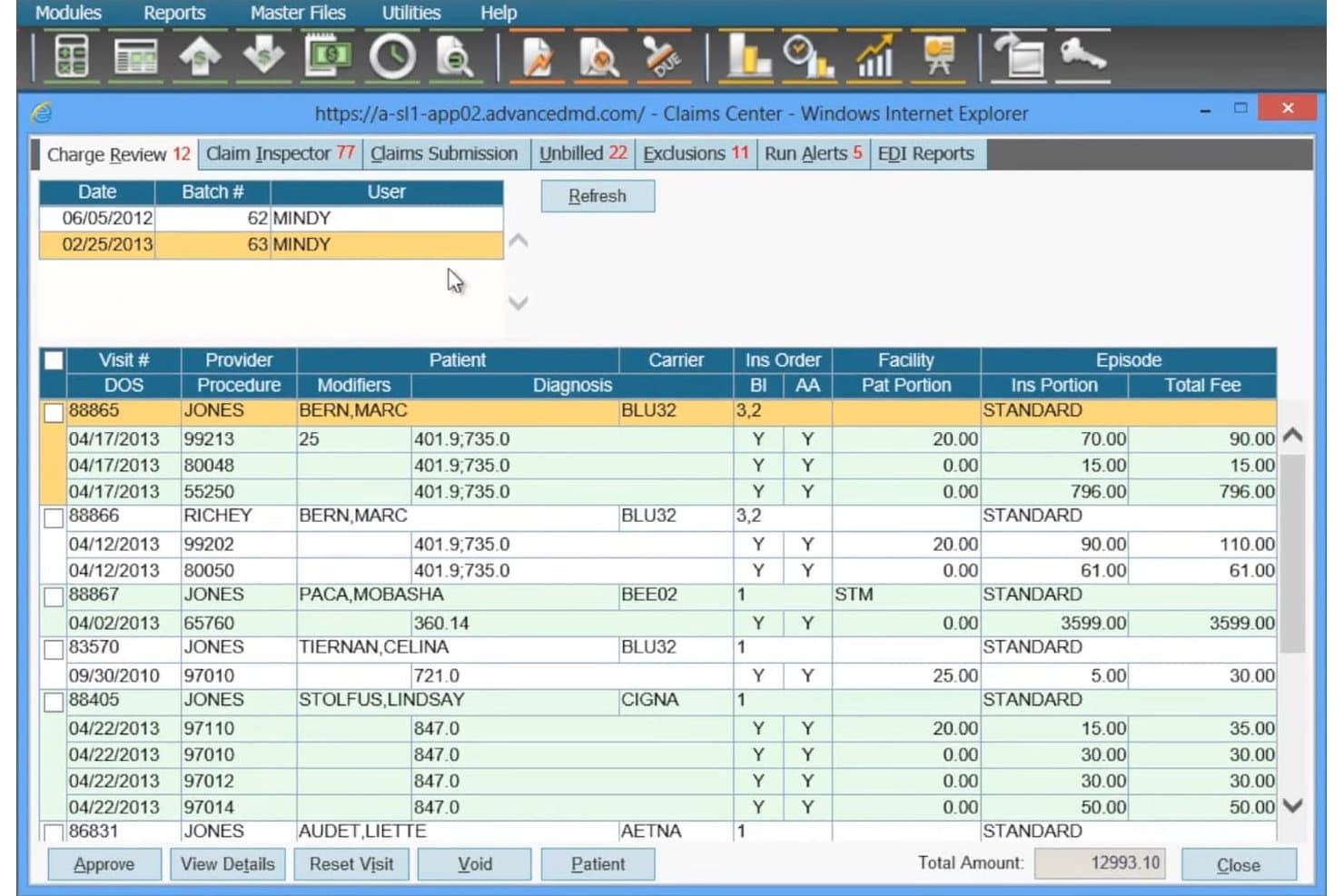
AdvancedMD helps users review and approve claims before submission. AdvancedMD is a cloud-based EHR and practice management platform built for independent practices that need customizable clinical charting, claims management, and patient engagement tools in one unified system.
Who Is AdvancedMD Best For?
AdvancedMD is a strong fit for independent practices that want to offload billing to a managed service while keeping clinical documentation and scheduling in-house.
Why I Picked AdvancedMD
I've included AdvancedMD in my top picks because it's one of the few platforms that pairs a full EHR with a genuinely managed billing option, letting your clinical staff stay focused on charting while a dedicated team handles claims submission, denial management, and payment posting. I appreciate that the practice management side includes claims scrubbing against payer rules before anything goes out the door, plus AR worklists that surface aging claims and denials for follow-up. The full-service RCM option requires no long-term agreement, so you can use it during a transition period without being locked in.
AdvancedMD Key Features
- Customizable note templates: Build and reuse note and sub-note templates tailored to your practice's charting workflows.
- AI ambient transcription: Captures visit conversations and generates documentation in formats including SOAP, psychiatric evaluation, and treatment plans.
- Patient portal: Lets patients schedule appointments, pay bills, complete intake forms, view lab results, and message your practice.
- Insurance eligibility verification: Checks patient coverage before appointments and updates chart files with current payer information.
AdvancedMD Integrations
AdvancedMD has marketplace integrations with Weave and Zocdoc, plus partner-supported lab and radiology interfaces through Ellkay and Falkon Data. Connect APIs, FHIR R4 APIs, ODBC, and HL7 2.x support enable custom data exchange.
Pros and Cons
Pros:
- Outsourced billing complements claims worklists
- Users value flexible appointment scheduling
- Reviewers praise customizable charting templates
Cons:
- Reviewers cite onboarding and training gaps
- Some users report claims-processing failures
 4Best for cross-setting care coordination
Epic
- Not available
- Pricing upon request
Visit WebsiteCustomer Rating:3.9/5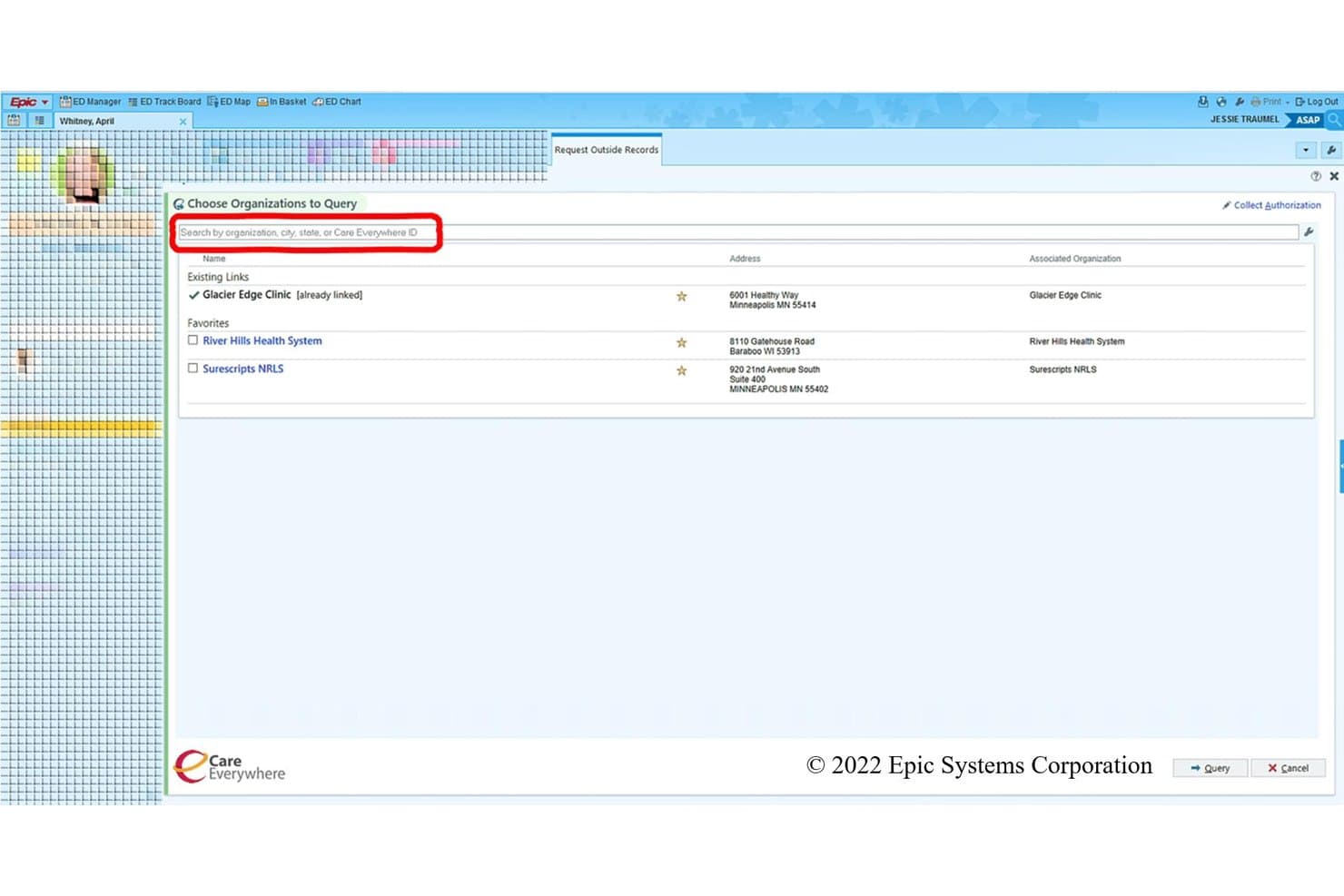
Epic lets users query outside organizations for patient records. Epic is an enterprise EHR platform built for health systems and large clinics that need a single, integrated record spanning inpatient, outpatient, post-acute, and health plan settings.
Who Is Epic Best For?
Epic is a strong fit for large health systems and multi-site hospital networks that need a single record spanning inpatient, outpatient, post-acute, and health plan settings.
Why I Picked Epic
I picked Epic as one of the best athenahealth alternatives because of how it handles cross-setting care coordination, which is where it genuinely stands out. Care Everywhere exchanges tens of millions of records daily across hospitals, clinics, post-acute facilities, and health plans, so a patient's chart follows them whether they're seen inpatient or in a specialty clinic. I also appreciate the depth of specialty-specific workflows, covering 60+ specialties with templates built by specialists, from cardiology structured reporting to orthopaedic procedural documentation.
Epic Key Features
- MyChart patient portal: Gives patients self-service access to health records, appointment scheduling, digital check-in, messaging, and bill pay from web or mobile.
- Revenue cycle automation: Handles 837/277/835 claims transactions, eligibility checks, and routine registration and charging tasks through standardized HIPAA interfaces.
- AI-assisted workflows: Art supports clinicians with clinical tasks, Penny handles revenue cycle and operations, and Emmie assists patients with scheduling and billing.
- Capacity and staffing optimization: Integrates census management and staffing tools directly with clinical and scheduling software for operational decision-making.
Epic Integrations
Epic documents connectivity with Carequality, eHealth Exchange, and Surescripts. It also provides FHIR and standards-based APIs, with more than 1,000 publicly available API and interface specifications for custom connectivity.
Pros and Cons
Pros:
- Connected scheduling and claims workflows support billing teams
- Longitudinal records support cross-setting care coordination
- Specialty-specific charting supports complex clinical workflows
Cons:
- Enterprise-first design can burden smaller practices
- Complex implementation complicates athenahealth transitions
- Many menus make chart navigation click-heavy
Learn more about Epic: Best for switching from athenahealth
- Free demo available
- Pricing upon request
Visit WebsiteCustomer Rating:3.5/5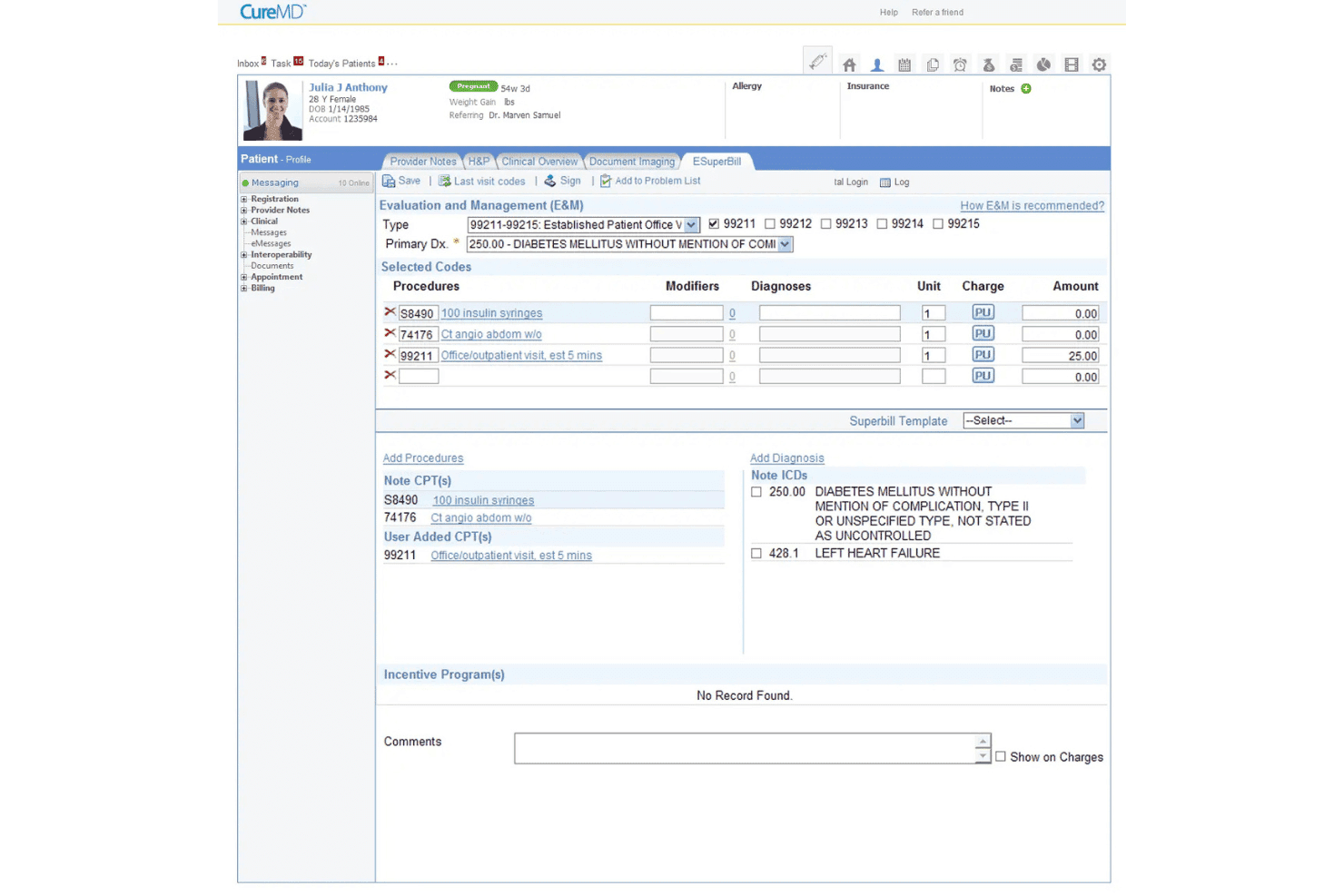
CureMD lets users manage billing codes and E&M charges in one view. CureMD is an AI-powered EHR and practice management platform built for independent and mid-sized practices that need clinical documentation, revenue cycle management, and patient engagement tools in one system.
Who Is CureMD Best For?
CureMD is a good fit for independent and mid-sized practices ready to move off athenahealth and wanting EHR, billing, and practice management in one platform.
Why I Picked CureMD
I picked CureMD as one of the best because it's one of the few platforms with a dedicated athenahealth switching program, including a migration team that handles patient charts, problem lists, allergies, medications, and historical claims. I also appreciate the AI Medical Scribe, which captures SOAP notes and suggested coding directly from patient conversations, cutting post-visit documentation time. The managed billing services, starting at 3% of collections, give practices a built-in RCM alternative to athenahealth's model.
CureMD Key Features
- Specialty-specific templates: Access configurable clinical templates, order sets, and workflows covering more than 30 specialties.
- AI contact center: Handles appointment booking, refills, eligibility checks, and routine patient inquiries across 14 languages without staff involvement.
- Patient portal: Lets patients request appointments and refills, view test results, update health information, and make payments online.
- Mobile EHR app: The Avalon app gives providers iOS access to patient records, scheduling, e-prescribing, eligibility verification, and document management.
CureMD Integrations
CureMD lists 500+ pre-built integrations across 300+ healthcare vendors, including marketplace integrations with Oracle Health, Cerner, NextGen, eClinicalWorks, Allscripts, and Practice Fusion. FHIR APIs and HL7 interfaces support custom connectivity.
Pros and Cons
Pros:
- Reviewers appreciate billing and EHR together
- Users describe provider scheduling as straightforward
- Reviewers value organized patient charts
Cons:
- Users report glitches and inconsistent support
- Some reviewers report unreliable billing reports
Learn more about CureMD: Best for care across hospitals and clinics
- Free demo available
- Pricing upon request
Visit WebsiteCustomer Rating:3.1/5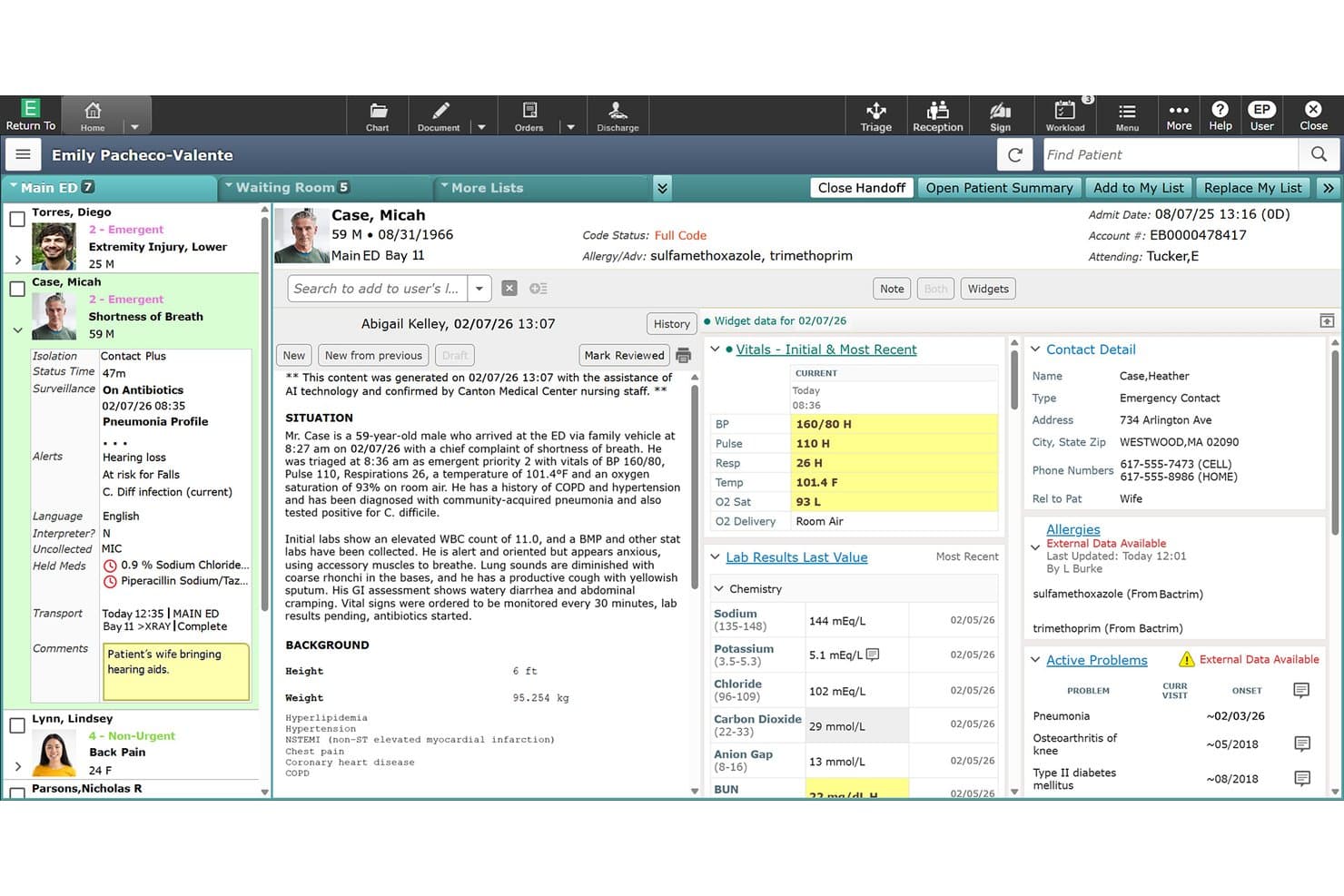
MEDITECH Expanse provides AI-assisted nursing handoff notes with vitals and lab results. MEDITECH Expanse is a cloud-native EHR built for health systems that need a single platform connecting hospital and ambulatory care, with tools spanning clinical documentation, revenue cycle management, and patient engagement.
Who Is MEDITECH Expanse Best For?
MEDITECH Expanse is a strong fit for health systems and hospital networks that need a single EHR connecting inpatient, ambulatory, and specialty care under one platform.
Why I Picked MEDITECH Expanse
I've included MEDITECH Expanse in my top picks because it's one of the few EHRs that genuinely unifies hospital and ambulatory care under a single chart, so a patient seen in the ED and then followed up in a specialty clinic doesn't fall through documentation gaps. I particularly like Traverse Exchange, which pulls external records like imaging, lab results, and consults directly into the clinician's workflow without manual hunting. The 40-plus specialty-specific templates in Expanse Ambulatory also mean that an orthopedics team and a behavioral health team aren't forcing their workflows into the same generic structure.
MEDITECH Expanse Key Features
- Ambient documentation: Captures provider-patient conversations and generates clinical notes for clinicians to review and edit before finalizing.
- No-show prediction: An AI model flags appointment no-show risk and alerts staff so they can follow up with patients proactively.
- Electronic prior authorization: Processes ePrior Authorization requests using real-time FHIR-based provider-access APIs and integrations with payers.
- Virtual care: Providers can conduct scheduled video visits and on-demand urgent care appointments while viewing the patient chart simultaneously.
MEDITECH Expanse Integrations
MEDITECH Expanse integrates with Artera and Phreesia through its approved partner ecosystem, plus Google Cloud for MaaS hosting. It supports FHIR US Core R4 and FHIR Scheduling APIs for custom integrations.
Pros and Cons
Pros:
- Reviewers praise quick access to organized records
- Specialty templates cover more than 40 specialties
- Connected records span hospital and clinic workflows
Cons:
- Users cite dated screens and extra clicks
- Reviewers report rigid notes and duplicate entry
Learn more about MEDITECH Expanse: Best for in-house billing or outsourced RCM
- Free demo available
- From $280/user/month
Visit WebsiteCustomer Rating:4.2/5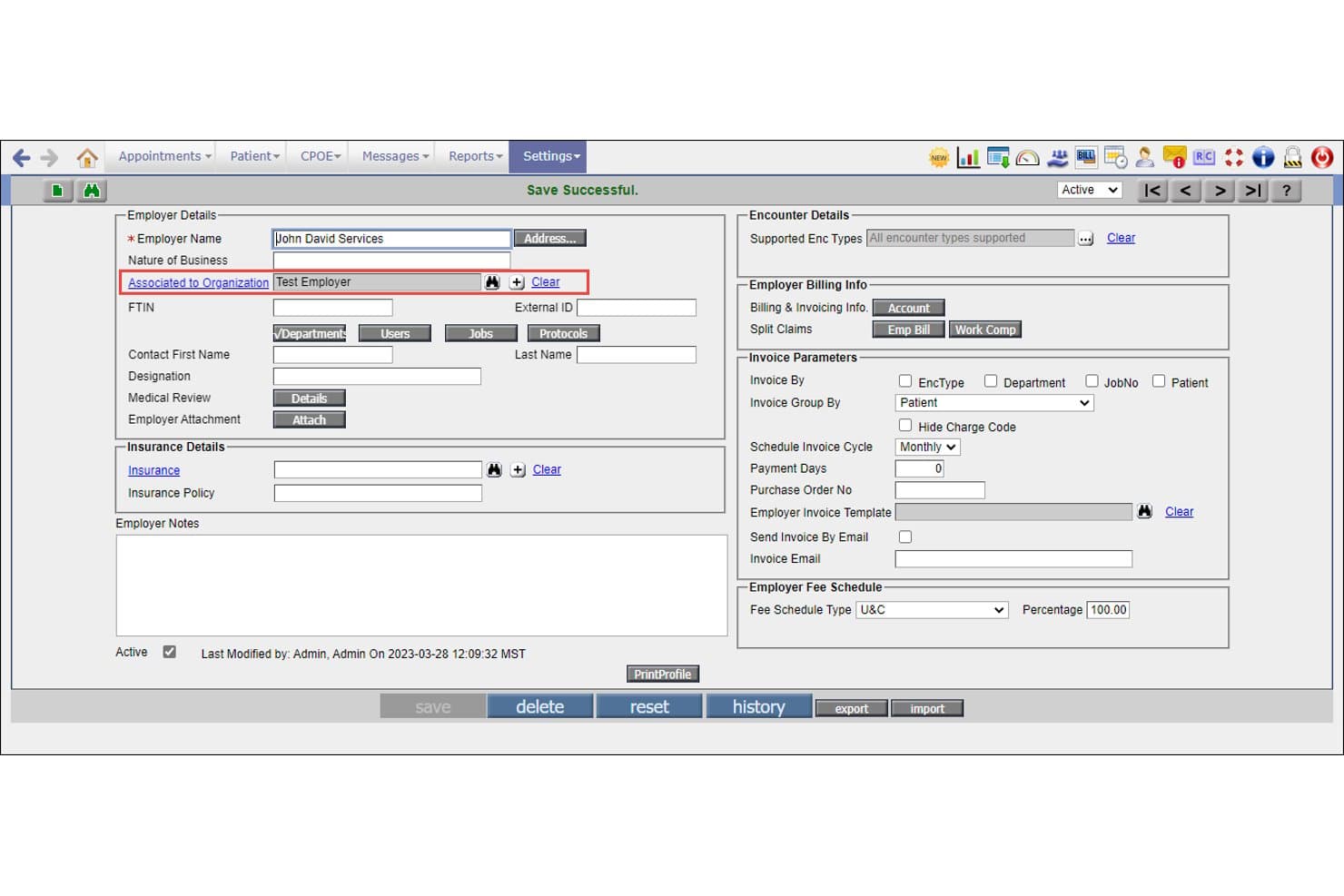
PrognoCIS links employers to organizations via the Associated to Organization field. PrognoCIS is a cloud-based EHR platform from Bizmatics designed for ambulatory practices that want tight integration between clinical documentation, scheduling, and billing—including an optional outsourced RCM service for practices that don't want to manage claims in-house.
Who Is PrognoCIS Best For?
PrognoCIS is a strong fit for ambulatory practices that want a single platform covering clinical documentation, scheduling, and billing—with the option to hand off claims management entirely to an RCM team.
Why I Picked PrognoCIS (Bizmatics)
I picked PrognoCIS because it's one of the few EHR platforms that lets you choose how to handle billing: run claims in-house using the integrated billing and denial tracking tools, or hand everything off to PrognoCIS's RCM team, which covers eligibility checks, scrubber rules, appeals management, and a dedicated call center for patient billing calls. I also like that PrognoAI Scribe captures provider-patient conversations and drafts structured clinical notes for review, cutting documentation time without requiring manual dictation.
PrognoCIS Key Features
- Specialty-specific templates: Preloaded templates for 25+ specialties are included in each database, with customizable input/output templates, screen layouts, and smart phrases.
- Patient portal: Patients can view records, complete intake forms, request refills, pay bills, and exchange secure messages directly through the portal.
- Multi-location scheduling: Centralized scheduling supports location-specific calendars, recurring appointments, waitlists, and configurable call lists across multiple providers and sites.
- HIPAA-compliant cloud hosting: AES-256 encryption, role-based access controls, audit trails, and a 99.99% uptime commitment are included in the cloud-hosted platform.
PrognoCIS Integrations
PrognoCIS documents bidirectional eLAB integrations with Labcorp and Quest, plus Surescripts for medication history and formulary data. It also lists Athena Health PM connectivity and supports API, HL7, FHIR, and web services for custom integrations.
Pros and Cons
Pros:
- Optional RCM supports outsourced claims operations
- Specialty templates adapt to clinic workflows
- Integrated billing links claims to charting
Cons:
- Support response quality is inconsistent
- Interface can feel dated beside newer EHRs
Learn more about PrognoCIS (Bizmatics): Best for tribal health program reporting
- Free demo available
- Pricing upon request
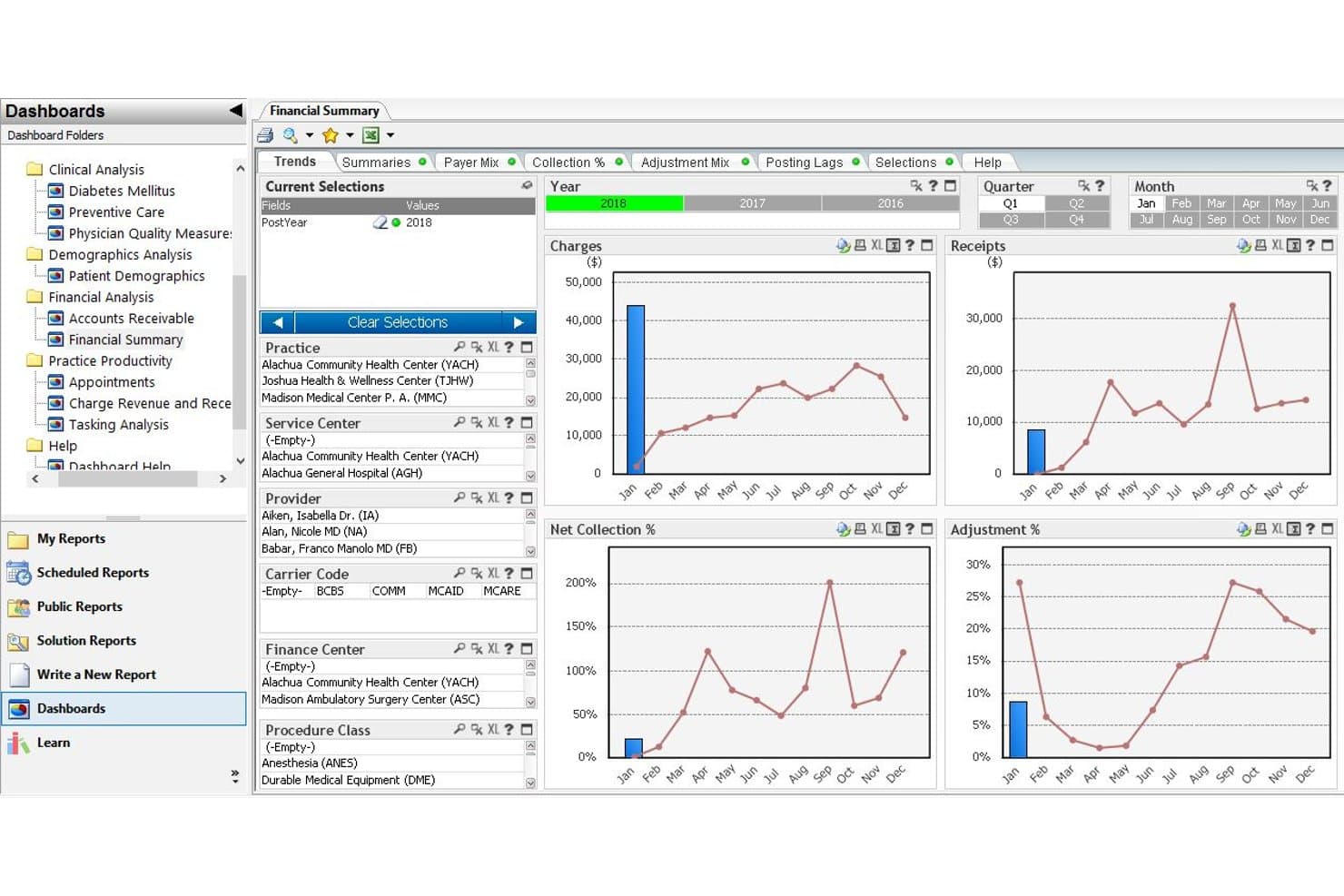
Intergy's Financial Summary dashboard tracks charges, receipts, and collection trends. Intergy by Greenway Health is an ambulatory EHR and practice management platform built for multi-specialty practices that need customizable clinical workflows, integrated claims management, and specialty-specific documentation tools.
Who Is Greenway Health's Intergy Best For?
Intergy is a strong fit for multi-specialty ambulatory practices that need specialty-adaptable clinical workflows and integrated claims management across multiple locations.
Why I Picked Greenway Health's Intergy
I picked Intergy because it's one of the few ambulatory EHRs with built-in reporting for tribal health programs, including National Data Warehouse, GPRA, and SDPI requirements. The tribal-health solution also includes bidirectional lab, pharmacy, and dental connectivity, so your clinical data flows directly into the records you're reporting on. On top of that, the Claim Control dashboard flags at-risk claims by rejection type, timely-filing risk, or denial, giving billing staff a clear action list rather than a pile of unfiltered rejections.
Greenway Health's Intergy Key Features
- Customizable clinical workflows: Providers can tailor chart layouts, templates, flowsheets, questionnaires, and checklists to match specialty-specific documentation needs.
- Intergy Practice Analytics: Dynamic dashboards display clinical and performance indicators, including meaningful-use measures, with customized analytics and reporting exports.
- Multi-practice scheduling rules: Scheduling can be configured by appointment type or insurance plan across multiple practice locations from a centralized management view.
- Greenway Patient Portal: A 24/7 patient-facing portal gives patients access to lab results, medications, immunizations, secure messaging, refill requests, and online bill pay via Greenway Health Pay.
Greenway Health's Intergy Integrations
Intergy connects with InstaMed through Greenway Health Pay and supports bidirectional lab, pharmacy, and dental connectivity, plus HIE exchange. It offers FHIR R4 and proprietary GAPI APIs for custom integrations, along with HL7-compliant interfaces.
Pros and Cons
Pros:
- Scheduling handles multiple providers and appointment types
- Claim Control flags denials and timely-filing risks
- Tribal health reporting includes GPRA and SDPI
Cons:
- Some built-in reports lack site-level detail
- Routine charting can require many clicks
Learn more about Greenway Health's Intergy: Best for therapy workflows from intake to notes
- Free demo + 30-day free trial available
- From $49/month
Visit WebsiteCustomer Rating:4.6/5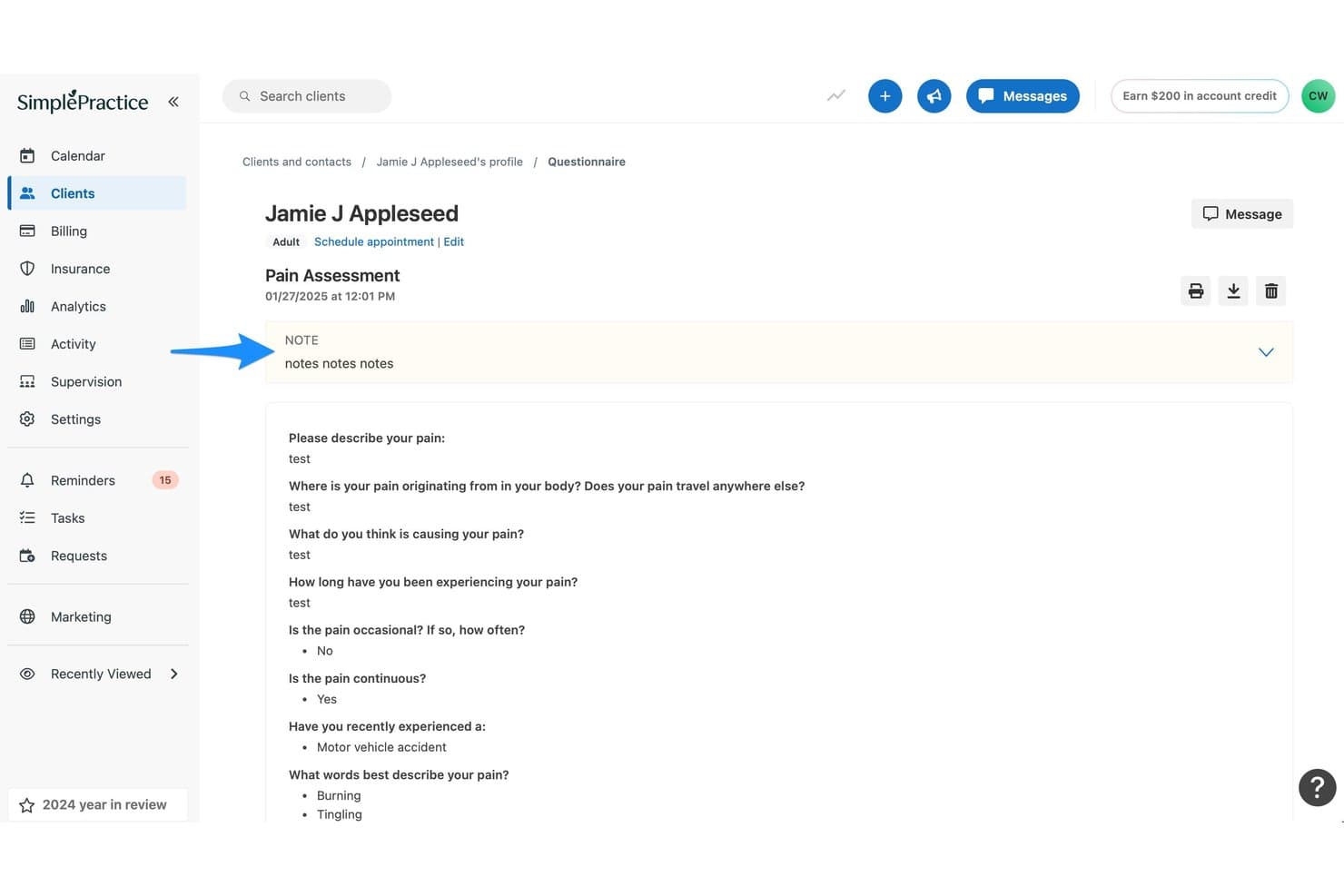
SimplePractice provides client pain assessment questionnaire responses with notes. SimplePractice is a practice management and EHR platform built for mental and behavioral health providers who need scheduling, clinical documentation, insurance billing, and telehealth in one place.
Who Is SimplePractice Best For?
SimplePractice is a strong fit for mental and behavioral health practitioners in solo or small group settings who need scheduling, notes, and insurance billing in one place.
Why I Picked SimplePractice
I picked SimplePractice because it handles the full therapy workflow without making you stitch together separate tools. The specialty-based template library covers everything from intake questionnaires to SOAP and DAP progress notes, and those notes link directly to ICD-10 codes and insurance claims. I also rely on Note Taker to transcribe sessions and draft structured notes for review, which cuts the time between session and submission significantly.
SimplePractice Key Features
- Client portal: Clients can book appointments, complete intake paperwork, send secure messages, upload documents, and pay for sessions through a self-service portal.
- Insurance claims filing: Submit electronic claims, track claim statuses from submission through payment or denial, and download CMS-1500 forms for external filing.
- HIPAA-compliant telehealth: Built-in video sessions include waiting rooms, screen sharing, and interactive whiteboards, with no limits on session length or appointment count.
- Analytics dashboard: View financial and operational snapshots covering income, outstanding balances, submitted claims by status, appointments, and documentation metrics.
SimplePractice Integrations
SimplePractice has three documented native integrations: Google Calendar, iCal/Apple Calendar, and Microsoft Outlook, all for calendar synchronization. SimplePractice Enterprise offers an API, but no public-facing API is available for general integrations.
Pros and Cons
Pros:
- Clients handle paperwork, booking, and payments
- Note Taker drafts structured session notes
- Specialty templates support detailed therapy documentation
Cons:
- Behavioral health focus limits complex medical fit
- Claims may stall after payer acceptance
Learn more about SimplePractice: 10Best for no-cost ambient notes for EHR users
RXNT
- Free demo available
- From $335/month (billed annually)
Visit WebsiteCustomer Rating:4.3/5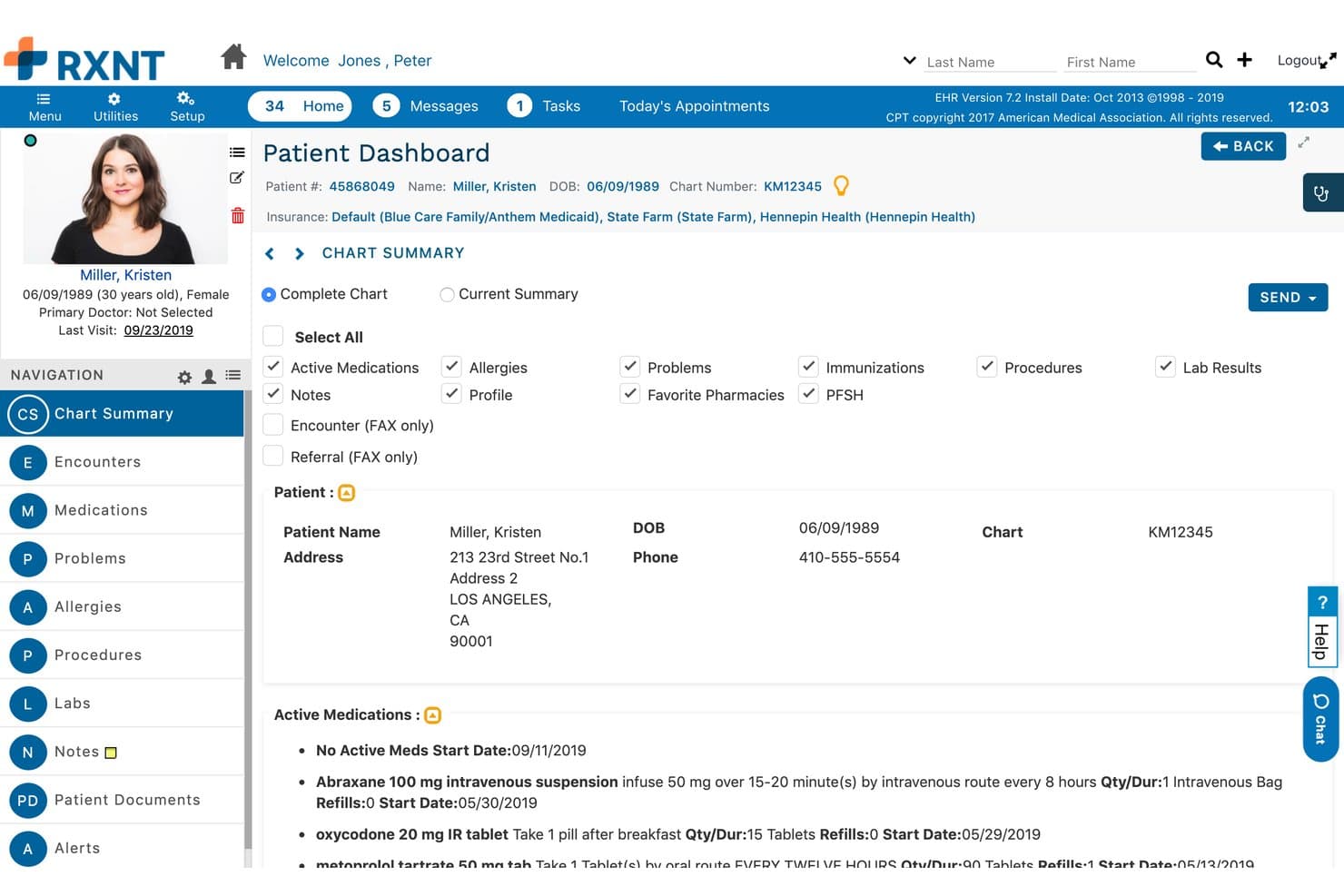
RXNT provides a patient chart summary with medications and demographic information. RXNT is a cloud-based EHR built for independent and multi-location practices that need customizable clinical workflows, integrated e-prescribing, and AI-assisted documentation in one system.
Who Is RXNT Best For?
RXNT is a strong fit for independent and multi-location practices where clinicians want AI-assisted documentation without paying extra for it.
Why I Picked RXNT
I picked RXNT because it includes Ambient IQ at no extra cost for existing EHR and Full Suite customers, which is genuinely rare. The feature captures provider-patient conversations and converts them into structured clinical notes, including SOAP-note templates, ready for review and direct copy into the chart. Pair that with built-in EPCS-certified e-prescribing and customizable specialty templates, and independent practices get a documentation-focused EHR without paying add-on fees for AI note generation.
RXNT Key Features
- Patient portal: Patients can view records and lab results, schedule appointments, pay bills, complete forms, and access prescriptions through a self-service portal.
- Lab order and result management: Place lab orders and receive results directly in the patient chart, with visibility into orders patients haven't yet completed.
- Multi-location access: Manage multiple practice locations through a single login, with patient data syncing across sites in real time.
- VideoBridge telehealth workflow: Connect appointments to any HIPAA-compliant video platform using its waiting-room URL, then document the virtual encounter alongside the video visit.
RXNT Integrations
RXNT offers a native Kno2 integration for TEFCA/QHIN data exchange and a SMART on FHIR API for custom integrations. VideoBridge connects appointments with Zoom for Healthcare, Doxy.me, Google Workspace, and RingCentral using waiting-room URLs.
Pros and Cons
Pros:
- Patient portal supports online bill payment
- Reviewers praise convenient prescription and refill workflows
- Ambient notes included for existing customers
Cons:
- Some reviewers find chart navigation unintuitive
- Reviewers report sluggishness, freezes, and glitches
Learn more about RXNT:
Diğer athenahealth Alternatifleri
Kısa listeme girmeyen ancak yine de göz atmaya değer birkaç ek seçenek şunlardır:
- 11TebraBest for billing without required RCM
- 12ValantBest for behavioral health workflows
- 13Azalea HealthBest for rural hospital and clinic workflows
- 14CharmHealthBest for athenahealth migration support
- 15ModMedBest for specialty-specific clinical workflows
- 16TherapyNotesBest for behavioral health documentation
- 17Elation HealthBest for primary care with included AI
- 18Kipu HealthBest for behavioral health intake and care
- 19eClinicalWorksBest for clinicians reviewing outside records
- 20CareCloudBest for specialty-specific care workflows
How I Evaluate Athenahealth Alternatives
I split my evaluation into three parts. First, I look at core functionality—specifically whether a platform can support clinical documentation and handle e-prescribing; these carry the most weight. Then I consider standout features like specialty-specific templates and revenue cycle services, followed by factors beyond features: implementation support, pricing transparency, and contract flexibility.
Core Functionality (Table Stakes For This List)
When I'm selecting tools for my list, I score each one on a scale from 0 (does not offer the functionality) to 5 (excels in this area) for each core functionality listed below. I then convert the total into a percentage to help assess each tool's overall fit, with extra weight on any functionalities I’ve deemed essential.
- Clinical Documentation (Essential): I look for structured, specialty-relevant notes and chart history clinicians can follow across visits and share with other members of the care team.
- E-Prescribing (Essential): I assess prescription creation and pharmacy transmission, plus medication history and safety checks that support prescribing during a visit.
- Patient Scheduling: I check how teams manage appointments across providers and locations, including reminders and patient self-booking.
- Billing and Claims: I look for claim submission and status tracking, with tools for handling rejections and denials through the billing workflow.
- Interoperability: I assess how the system exchanges patient data with labs, pharmacies, hospitals, or health information exchanges.
- Patient Portal: I check whether patients can access records, message the care team, manage appointments, and complete forms online.
Once I have a list of tools that meet the criteria, I consider what sets each platform apart.
Differentiating Factors (What Sets Vendors Apart)
Here's how I compare and contrast different vendors:
Standout Features
I look for specialty-specific templates that match how clinicians actually chart—a dermatology practice needs image-annotation tools, not the same note layout as a cardiology group. Revenue cycle services matter too, especially when a vendor staffs billing experts who handle denials rather than just providing claim-submission software. I also evaluate native telehealth, since built-in video visits tied to the chart and schedule cut out a separate platform. Mobile charting rounds out the picture: I check whether physicians can document and e-prescribe from a phone between rounds.
Beyond Features
I check whether a vendor offers dedicated onboarding specialists and guaranteed go-live timelines, since migrating patient charts and billing history from athenahealth can stall a practice for weeks without a clear data-migration plan. Pricing structure matters just as much—some platforms charge a flat per-provider fee while others take a percentage of collections, and the better fit depends on your volume and payer mix. I also look at contract length and cancellation terms, because a three-year lock-in feels different after your group adds five providers mid-cycle.
Neden athenahealth Alternatifleri Aranmalı?
athenahealth iyi bir EHR yazılımı seçeneği olsa da bazı kullanıcılar belirli iş akışı veya operasyonel ihtiyaçlar nedeniyle alternatif arar. Şu nedenlerle bir athenahealth alternatifi arıyor olabilirsiniz:
- Tahsilatlara bağlı fiyatlandırma yerine sabit ücreti tercih ediyorsanız
- Ayaktan tedavi iş akışlarının yanı sıra yatan hasta bakımını da desteklemeniz gerekiyorsa
- Hasta dosyası verilerinin toplu içe aktarımlardan daha esnek şekilde taşınmasını istiyorsanız
- Ekibinizin ayırabileceği eğitim süresine uygun bir başlangıç sürecine ihtiyacınız varsa
Bunlardan herhangi biri sizin durumunuzu anlatıyorsa doğru yere geldiniz. Listemde, athenahealth ile ilgili bu zorluklarla karşılaşan ve alternatif arayan ekipler için daha uygun birkaç EHR yazılımı seçeneği yer alıyor.
athenahealth Temel Özellikleri
athenahealth’i alternatif seçeneklerle karşılaştırmanıza yardımcı olması için temel özellikleri şunlardır:
- Yapay zekâ destekli klinik notlar: athenaAmbient, klinik notlar oluşturmak için yapay zekâ kullanırken sesli dikte, dokümantasyonu ve klinik görevleri destekler. Bu araçlar, klinisyenlerin ziyaret ayrıntılarını dokümantasyon iş akışları içinde kaydetmesine yardımcı olur.
- Hasta dosyası özetleri: Hasta Genel Bakışı, bir ziyaret öncesinde önemli dosya bilgilerini sunar; Sage içeren Grafik Asistanı ise görüşme sırasında soruları sade bir dille yanıtlar. Bu araçlar, klinisyenlerin birden fazla ekranı aramak zorunda kalmadan ilgili ayrıntıları incelemesine yardımcı olur.
- Hastane olay özetleri: Bakım Olayı Özetleri, hastane olaylarını ve taburculuk dokümantasyonunu klinik açıdan önemli bilgiler hâlinde özetler. Bakım ekipleri, hastane bakımından sonra hastaları takip ederken bu özetleri inceleyebilir.
- Klinik veri alışverişi: athenaOne, sağlık bilgi alışverişleri de dâhil olmak üzere dış kaynaklardan gelen klinik ve finansal verilerle sağlık kuruluşlarını birbirine bağlar. Platform, kuruluşlar arasındaki koordinasyonu desteklemek için dış bilgileri bakım iş akışına dâhil edebilir.
- Toplum sağlığı yönetimi: Platform, dış hesap verebilirlik verilerini athenaOne'a getirir ve toplum düzeyindeki bilgileri hasta içgörülerine dönüştürür. Bu, sağlık kuruluşlarının değere dayalı bakım programları için bakım gereksinimlerini ve raporlamayı takip etmesine yardımcı olabilir.
- Bekleme listesi planlaması: Yapay zekâ destekli Bekleme Listesi Planlaması, randevular iptal edildiğinde hastaların bekleme listelerini kontrol eder ve hastalarla uygun randevular hakkında iletişime geçer. Bu özellik, personelin mevcut bekleme listesini kullanarak uygun randevu zamanlarını doldurmasını sağlar.
- Hasta öz hizmeti: Hasta portalı ve mobil uygulama, hastaların kayıtları, sonuçları, ziyaret özetlerini ve randevu ayrıntılarını görüntülemesine olanak tanır. Hastalar ayrıca randevularını yönetebilir, bakım ekibine mesaj gönderebilir, formları doldurabilir ve ödeme yapabilir.
- Entegre teletıp: athenaTelehealth, görüntülü ziyaretleri athenaOne'ın randevu planlama ve faturalandırma iş akışlarına bağlar. Hastalar bir web tarayıcısından katılabilir ve hizmet sağlayıcılar ziyareti platform içinde belgeleyebilir.
Fiyatlandırma
Fiyatlandırma; özelliklere, hizmet sağlayıcı sayısına, talep hacmine ve eklentilere göre değişir. Her satıcı her plan türünü sunmasa da athenahealth alternatifleri için tipik fiyat aralıkları aşağıda verilmiştir.
athenahealth Alternatifleri için Plan Karşılaştırma Tablosu
| Plan Türü | Ortalama Fiyat | Yaygın Özellikler |
|---|---|---|
| Plan TürüÜcretsiz Plan | Ortalama Fiyat$0/ay | Yaygın ÖzelliklerSınırlı hasta kayıtları, görüşme sınırları, temel dosyalama ve hasta erişimi. |
| Plan TürüBireysel Plan | Ortalama Fiyat$25-$200/hizmet sağlayıcı/ay | Yaygın ÖzelliklerKlinik notlar, elektronik reçete yazma, randevu planlama ve hasta portalı. |
| Plan Türüİşletme Planı | Ortalama Fiyat$200-$600/hizmet sağlayıcı/ay | Yaygın ÖzelliklerSağlık kuruluşu yönetimi, talep iş akışları, teletıp ve raporlama araçları. |
| Plan TürüKurumsal Plan | Ortalama Fiyat$600-$1,100+/hizmet sağlayıcı/ay | Yaygın ÖzelliklerBirden fazla konum için denetimler, gelişmiş analizler, gelir döngüsü hizmetleri ve uygulama desteği. |