

Medical billing software for home based business is a digital tool that helps small and home-based healthcare providers manage patient billing, insurance claims, payments, and revenue tracking from one place. If you’re running your billing operations from home, you need software that’s reliable, easy to use, and keeps you compliant without long setup times or a steep learning curve. With the right solution, you can avoid costly errors, speed up reimbursements, and keep your focus on care—not paperwork. Below, you’ll find a shortlist of billing platforms designed for home businesses, with insights to help you compare features, pricing, and strengths so you can pick the best fit this 2026.
Why Trust Our Software Recommendations
6,700+
Reviews
20
Industry experts
16+
Evaluation factors
14
Years
Our team has been testing and reviewing software since 2012. As medical practice leaders ourselves, we know how difficult—and important—it is to choose the right software.
For this guide, we evaluated tools using hands-on testing and independent research, scoring tools using our selection criteria.
Our reviews reflect our human editorial judgment, not a sales pitch.
Medical Billing Software for Home-Based Businesses Comparison Table
The table below compares pricing details for my top medical billing software selections for home-based businesses.
| Tool | Best For | Trial Info | Price | ||
|---|---|---|---|---|---|
| 1 | Best for billing companies and practices | Free demo available | Pricing upon request | Website | |
| 2 | Best for small-practice billing workflows | Not available | Pricing upon request | Website | |
| 3 | Best for mobile billing workflows | Free demo available | Pricing upon request | Website | |
| 4 | Best for established billing offices | Free consultation available | Pricing upon request | Website | |
| 5 | Best for integrated billing and RCM | Free demo available | Price upon request | Website | |
| 6 | Best for affordable medical billing | Free demo + free expert consultation available | Pricing upon request | Website | |
| 7 | Best for simple claims management | Free demo available | From $199/user/month | Website | |
| 8 | Best for cloud-based medical billing | Free demo available | Pricing upon request | Website | |
| 9 | Best for independent practice billing | 14-day free trial; Free demo available | Pricing upon request | Website | |
| 10 | Best for automated billing and claims | 30-day free trial + free demo available | From $130/month | Website |


Best Medical Billing Software for Home Based Business Reviews
Below are my detailed summaries of the best medical billing software for home based business that made it onto my shortlist. My reviews offer a detailed look at the features, best use cases, and pricing of each software to help you find the best one for you.
 Best for billing companies and practices
- Free demo available
- Pricing upon request
Visit WebsiteCustomer Rating:4.1/5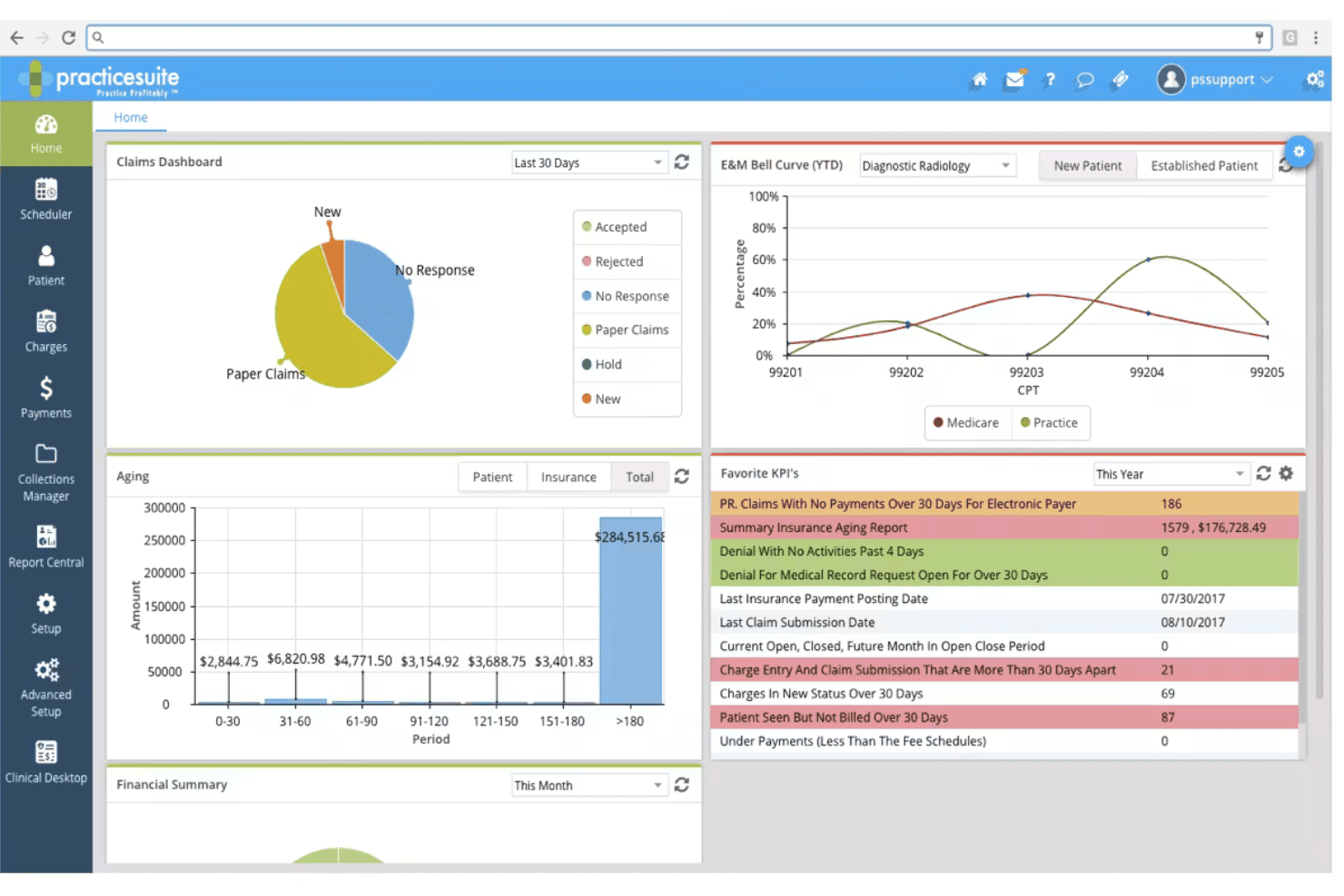
PracticeSuite coordinates claims, denials, eligibility, billing, and scheduling. PracticeSuite is a cloud-based medical billing and RCM platform built for both independent billing companies and medical practices, offering claims submission, denial management, multi-client account access, and patient billing across 150+ specialties.
Who Is PracticeSuite Best For?
It's a strong fit for independent billing services and third-party billing companies that manage claims across multiple provider clients from a single platform.
Why I Picked PracticeSuite
PracticeSuite earns its spot on my shortlist because of its Central Billing Office, which gives you single sign-on access across all your client practices without juggling separate logins. I also like the pre-submission denial intelligence, which flags potential claim issues before they go out. The month-end reconciliation reporting is purpose-built for billing services to track outstanding balances across each client account separately.
PracticeSuite Key Features
- Automated eligibility verification: Check patient insurance eligibility instantly through real-time integrations with payer databases.
- Bidirectional EHR integrations: Sync data with EHRs like Practice Fusion and Elation Health to eliminate manual entry between systems.
- 140-report financial dashboard: Run detailed, customizable reports for tracking AR, claims status, and collections by client or provider.
- Patient portal for online payments: Give patients a secure platform for viewing statements and making payments directly online.
PracticeSuite Integrations
PracticeSuite offers native integrations with Practice Fusion, Elation Health, and Opus EHR, and connects directly to clearinghouses like Availity, Change Healthcare, and Trizetto. An API is available for custom integrations.
Pros and Cons
Pros:
- Claims denials flagged before submission
- Extensive specialty and payer support included
- Central Billing Office for multi-client management
Cons:
- Full payer enrollment setup can be time-consuming
- Customized reporting can require vendor assistance
Learn more about PracticeSuite: Best for small-practice billing workflows
- Not available
- Pricing upon request
Visit WebsiteCustomer Rating:3.9/5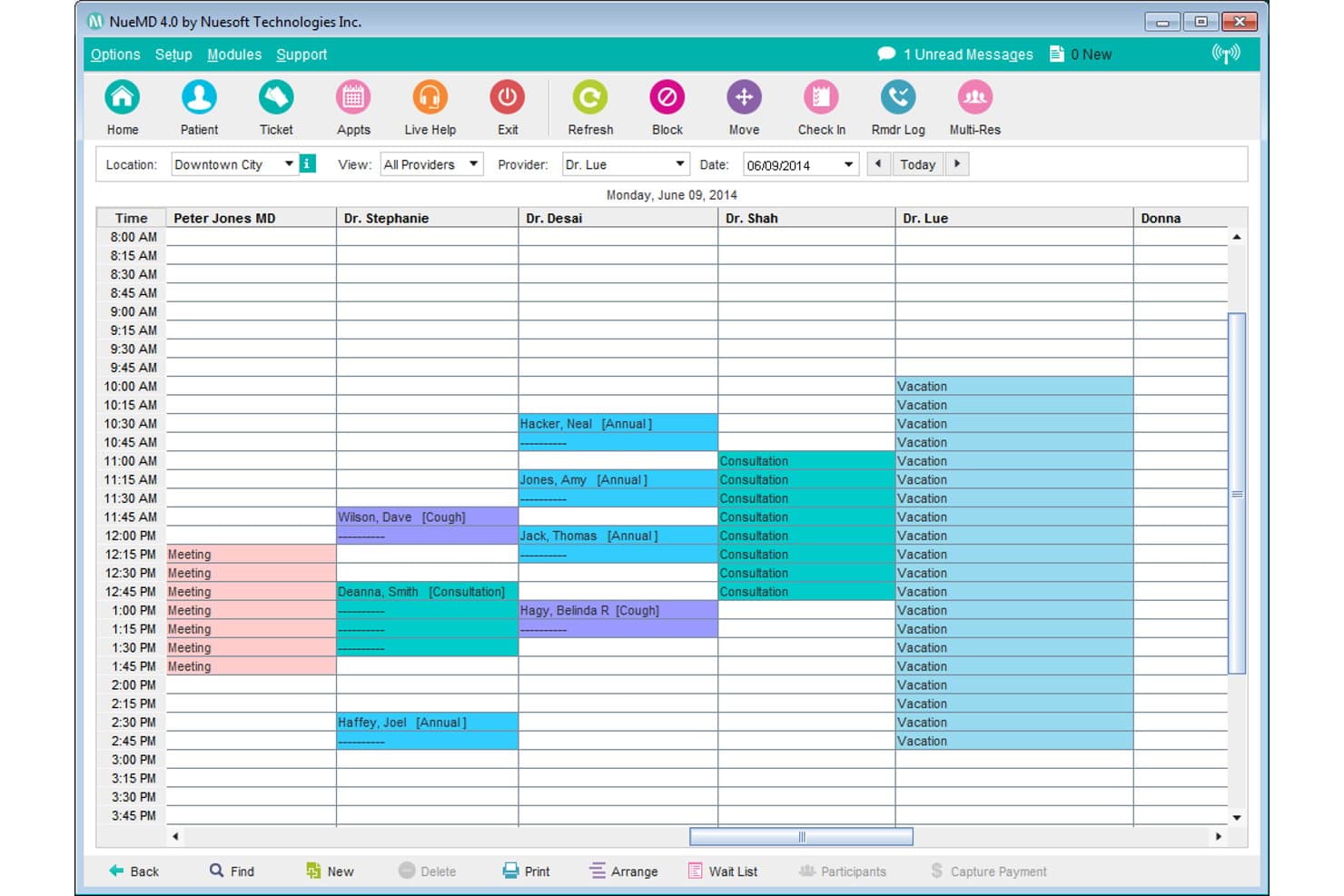
NueMD offers a multi-provider daily scheduling view that helps home-based medical billing businesses manage appointments, consultations, and provider availability in one calendar interface. NueMD is a cloud-based medical billing and practice management platform for small practices, combining claims submission through a native clearinghouse, patient statements, EHR, and appointment scheduling in one system.
Who Is NueMD Best For?
NueMD suits independent billers and small billing service owners managing claims for solo or small provider practices.
Why I Picked NueMD
I've included NueMD in my top picks because its native clearinghouse handles unlimited claim submissions, which is a real advantage when running a small billing service where per-claim fees add up. Patient statement generation and integrated credit card processing are built directly into the workflow, so closing a billing cycle doesn't require separate tools. The cloud-based setup lets me run the full billing workflow from a home office without any on-premise infrastructure.
NueMD Key Features
- Customizable reporting: Generate detailed reports on claim status, reimbursement, and accounts receivable for multiple providers or clients.
- Secure document management: Store and organize patient records, billing files, and EOBs in an encrypted environment.
- Integrated scheduling tools: Manage appointments, provider calendars, and patient reminders directly within the platform.
- Client and provider management: Handle billing and workflow for separate providers or practices from a single login.
NueMD Integrations
Native integrations are not clearly documented. The tool supports integrations via API and offers free integration with Practice Fusion through BillingParadise.
Pros and Cons
Pros:
- Multi-client management in one dashboard
- Built-in patient statement generation
- Unlimited electronic claim submissions included
Cons:
- Phone support discontinued for all users
- No longer available for new purchase
Learn more about NueMD: Best for mobile billing workflows
- Free demo available
- Pricing upon request
Visit WebsiteCustomer Rating:3.9/5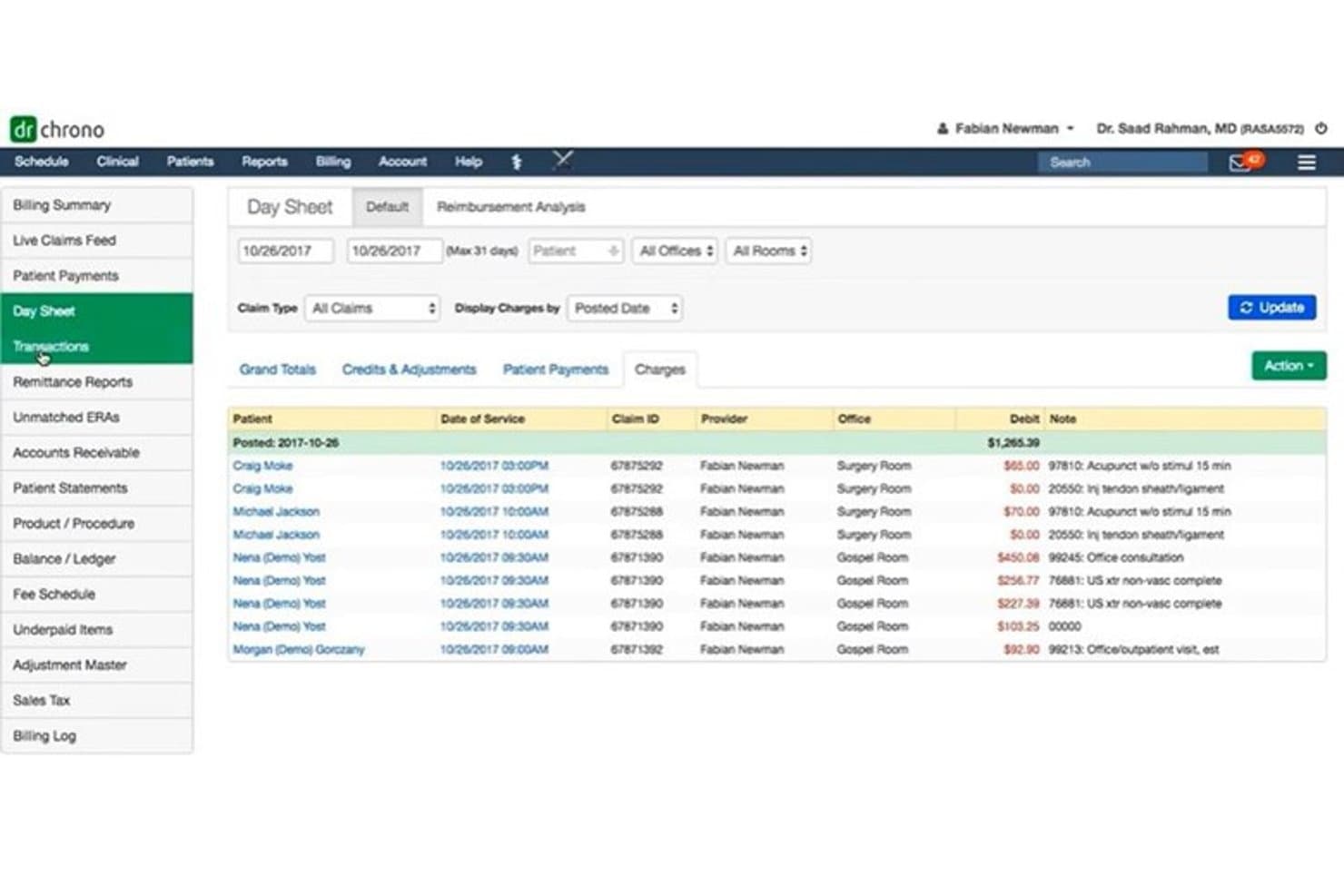
DrChrono offers a Day Sheet billing view that displays patient transactions, claim IDs, providers, and debit charges by posted date for home-based medical billing management. DrChrono is a cloud-based, iOS-native medical billing platform that combines electronic claims submission, ERA posting, denial management, and patient billing in one integrated, mobile-first system.
####Who Is DrChrono Best For?
DrChrono is a strong fit for small to mid-sized medical practices that run billing workflows on iPad or iPhone.
####Why I Picked DrChrono
DrChrono earns its spot on my shortlist because it's built natively for iOS, not just adapted for mobile. I use the Live Claims Feed to monitor claim status in real time directly from an iPad, without switching to a desktop portal. The Apple-native interface also lets me run real-time eligibility checks, submit claims through the built-in ePS clearinghouse, and post ERAs without being tied to a single workstation.
####DrChrono Key Features
- Real-time insurance eligibility checks: Instantly verify patient coverage across multiple payers at any point during the visit.
- Customizable medical billing profiles: Store frequently used codes and diagnoses for consistent, rapid claim creation.
- Denial pattern reporting: Analyze reasons for claim denials using built-in advanced reporting tools.
- Integrated patient portal: Give patients online access to statements, payment options, and communication with your billing office.
####DrChrono Integrations
DrChrono offers native integrations with eProvider Solutions, iHCFA, Quest Diagnostics, LabCorp, Collectly, Stripe, and ID.me. An API is available for building custom integrations.
Pros and Cons
Pros:
- Automated patient statement delivery options
- Real-time claims status and denial tracking
- Native iPad and iPhone billing functionality
Cons:
- Limited multi-client management for billing services
- Requires separate account for each provider
Learn more about DrChrono: Best for established billing offices
- Free consultation available
- Pricing upon request
Visit WebsiteCustomer Rating:4.4/5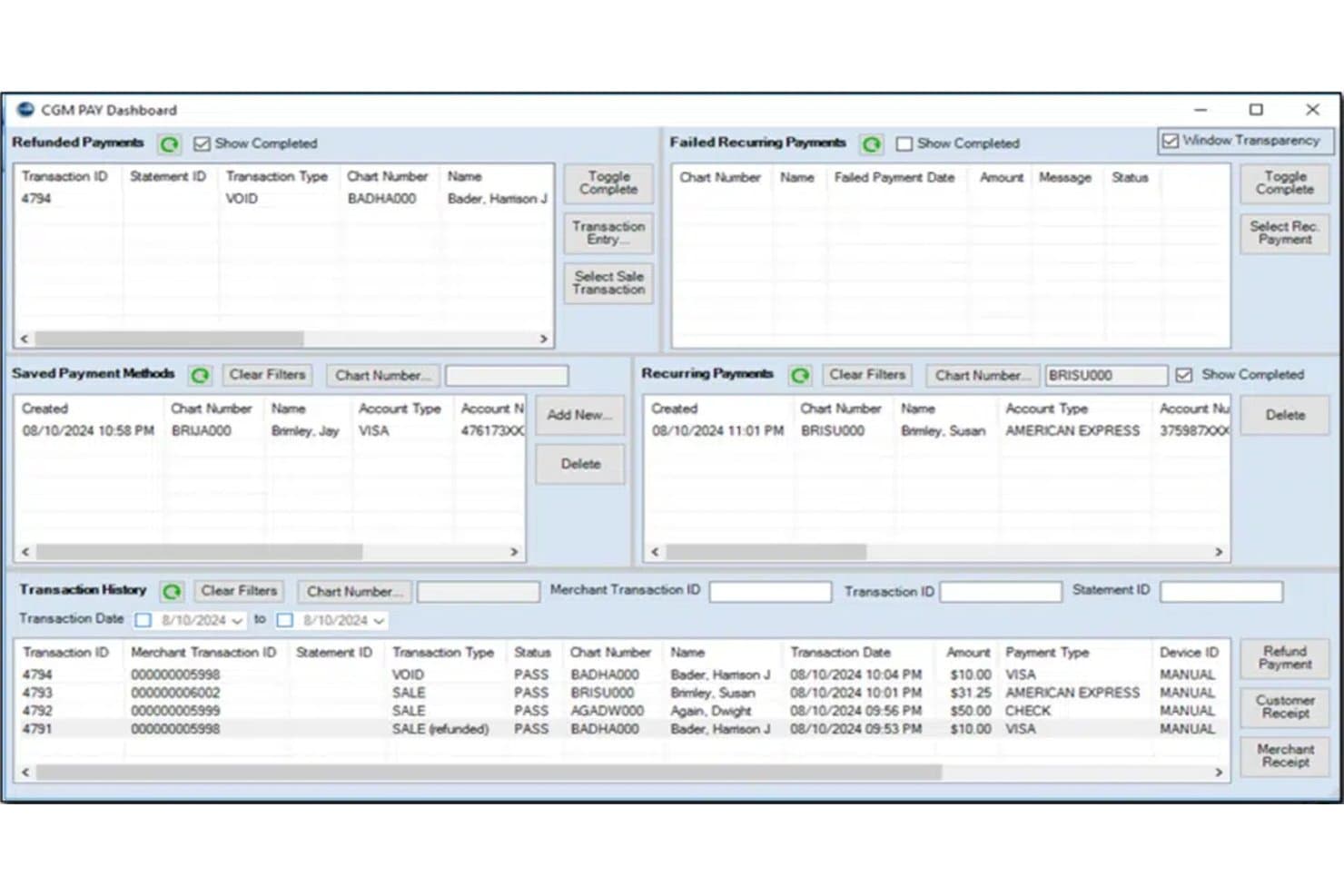
Medisoft's CGM PAY Dashboard offers home-based billing practices a centralized view of refunded payments, recurring payments, saved payment methods, and full transaction history. MEDISOFT is a practice management and medical billing platform that handles electronic claims submission, ERA posting, patient statements, payment collection, AR tracking, and multi-provider scheduling.
Who Is MEDISOFT Best For?
MEDISOFT is a strong fit for established medical billing offices and experienced independent billers managing claims across multiple provider clients.
Why I Picked MEDISOFT
I picked MEDISOFT as one of the best because it's built around the kind of volume and complexity that established billing offices actually deal with. I love how the AR tracker, KPI dashboards, and 200+ pre-built reports give me a real-time view of claim status across multiple providers. The Network Pro tier also lets my team work across multiple computers, which makes it practical for a billing office that has grown beyond a single-user setup.
MEDISOFT Key Features
- ERA posting and payment reconciliation: Post electronic remittance advice files and match payments within the platform.
- Eligibility verification add-on: Check patient insurance eligibility in real time through clearinghouse data.
- Patient kiosk and mobile app: Register patients or check them in using an iOS app or in-office kiosk mode.
- Customizable reporting suite: Access over 200 built-in reports for managed care, financials, marketing, and clinical data.
MEDISOFT Integrations
MEDISOFT offers native integrations with Aprima EHR, eMEDIX clearinghouse, CGM PAY, Vosita, RelayHealth, BillFlash, and Medisoft Clinical. An API is available for custom integrations.
Pros and Cons
Pros:
- Customizable reporting with over 200 templates
- Multi-provider scheduling within one platform
- Direct clearinghouse connections for claims and ERAs
Cons:
- Cloud HIPAA compliance details not fully transparent
- No built-in text message appointment reminders
Learn more about MEDISOFT: Best for integrated billing and RCM
- Free demo available
- Price upon request
Visit WebsiteCustomer Rating:3.6/5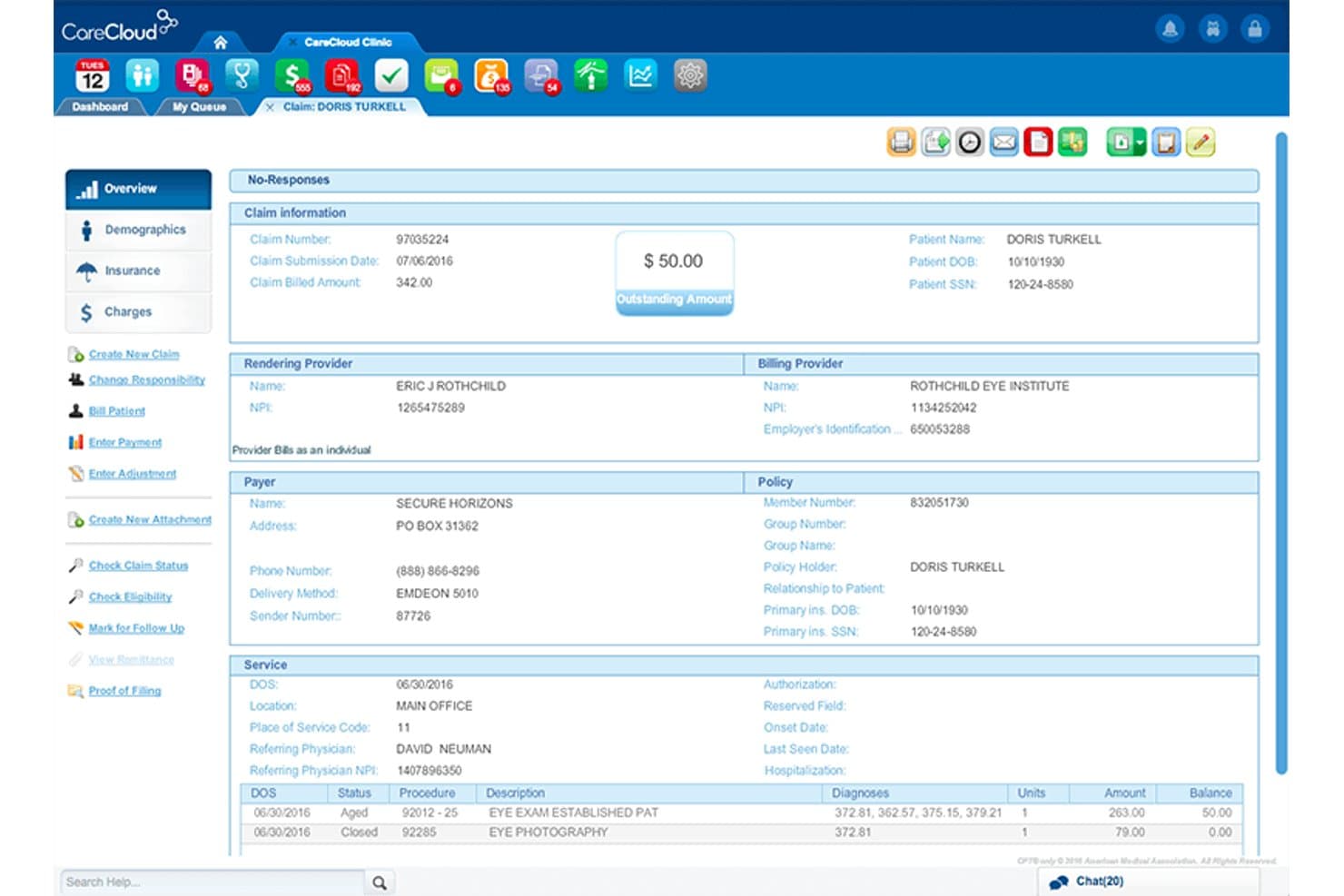
CareCloud Central offers a detailed claims management view displaying patient billing information, outstanding balances, provider details, payer information, and service line items for efficient medical billing. CareCloud Central is a cloud-based medical billing and practice management platform with a built-in clearinghouse, automated claims scrubbing via its CollectiveIQ rules engine, ERA posting, denial management, and centralized multi-provider billing.
Who Is CareCloud Central Best For?
CareCloud Central is a strong fit for billing contractors and solo practitioners managing higher-volume provider clients who need enterprise-grade RCM depth.
Why I Picked CareCloud Central
CareCloud Central earns its spot on my shortlist because of how deeply its billing and RCM capabilities are woven together in a single workflow. The CollectiveIQ rules engine runs automated billing rules directly inside the claims process, catching coding errors before submission rather than after rejection. I also like that its built-in clearinghouse handles direct payer submission with real-time scrubbing, and centralized billing lets me manage multiple provider NPIs from one login without juggling separate accounts.
CareCloud Central Key Features
- Centralized billing dashboard: Manage claims, payments, and reporting for multiple providers or locations from one interface.
- Real-time insurance eligibility checking: Instantly verify patient details and coverage before submitting claims.
- Automated patient statement generation: Create and send patient invoices and statements directly from the platform.
- Batch payment posting: Post payments to multiple claims at once to simplify reconciliation and speed up workflow.
CareCloud Central Integrations
CareCloud Central offers native integrations with CareCloud Charts (EHR), CareCloud Breeze (patient engagement), PrecisionBI (analytics), cirrusAI (AI clinical documentation), and CareCloud Concierge (RCM services). An API is available for custom integrations.
Pros and Cons
Pros:
- Real-time patient eligibility verification included
- Integrated denial tracking and appeals templates
- Centralized billing for multiple provider entities
Cons:
- Not tailored for third-party billing services
- Minimum contract length required for new users
Learn more about CareCloud Central: 6Best for affordable medical billing
RXNT
- Free demo + free expert consultation available
- Pricing upon request
Visit WebsiteCustomer Rating:4.3/5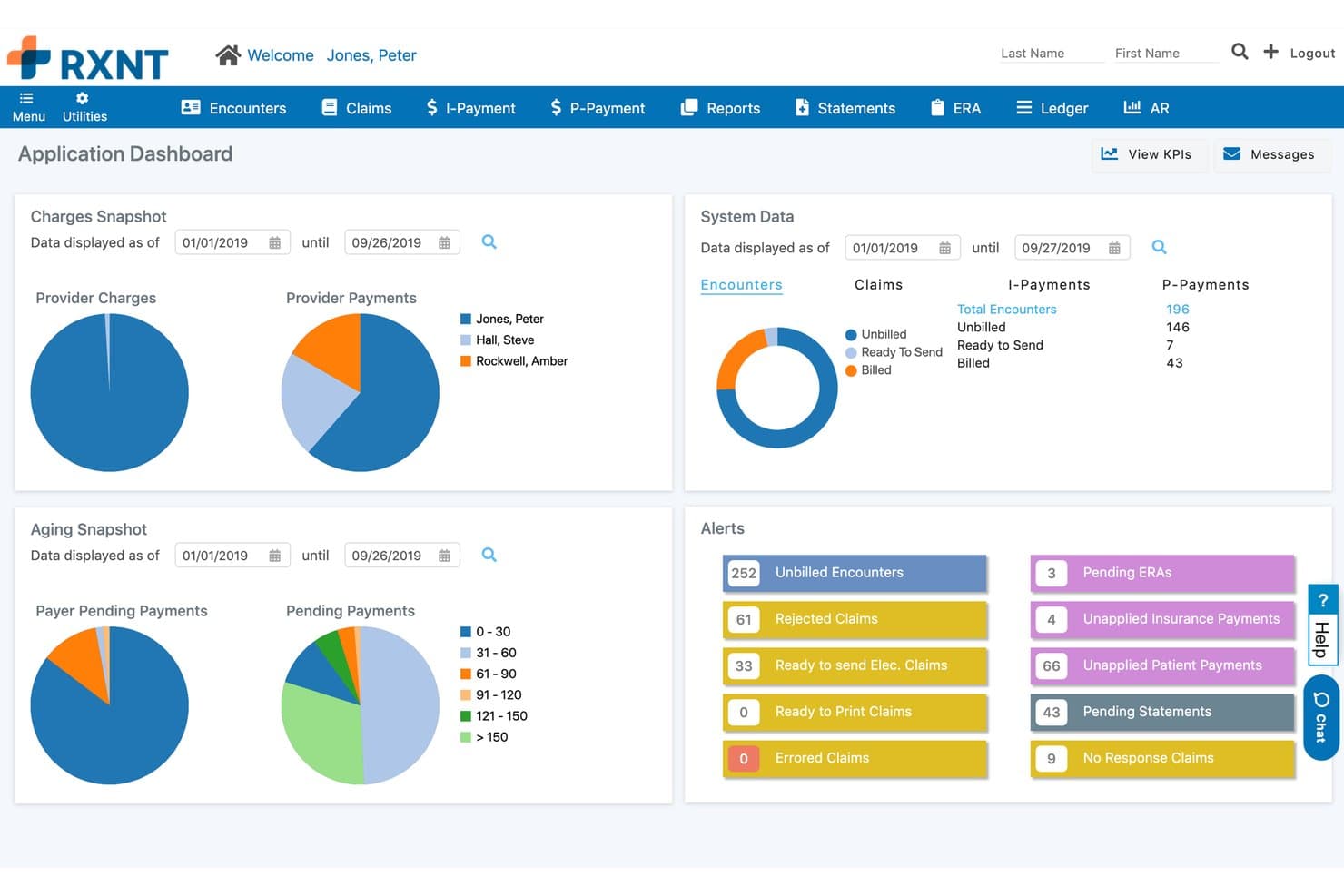
RXNT offers a comprehensive medical billing dashboard with charges, aging snapshots, system data, and real-time alerts for home-based billing management. RXNT is a cloud-based medical billing platform built for independent billers and small billing services, offering electronic claims submission, denial management, ERA posting, and multi-provider billing from a single account.
Who Is RXNT Best For?
RXNT is a strong fit for independent billers and small billing companies managing claims across multiple providers or practices from a home office.
Why I Picked RXNT
I picked RXNT as one of the best because its all-inclusive pricing model covers unlimited claims, unlimited eligibility checks, and unlimited ERAs with no clearinghouse fees added on top. That means I'm not watching per-claim costs climb as I add provider clients. The bulk charge uploader lets me process large batches of unbilled charges at once, and CBO-level reporting is included at no extra cost.
RXNT Key Features
- Central billing office reporting: Generate detailed reports segmented by provider, client, or practice for multi-client billing operations.
- Secure patient portal: Give patients access to view statements and pay bills online through a HIPAA-compliant web portal.
- Mobile charge capture app: Enter procedure, diagnosis, and modifier codes directly from iOS or Android devices without returning to your desk.
- Automated denial tracking: Track denial reasons and work them through configurable workflows with claim status updates and AR aging reports.
RXNT Integrations
RXNT offers a native integration with Relay Exchange for claims submission and ERA retrieval, and provides an API for custom integrations. Native integrations with other third-party billing or EHR systems are not clearly documented.
Pros and Cons
Pros:
- Mobile app for charge capture and billing
- Central billing features support multiple clients
- Includes unlimited claims and eligibility checks
Cons:
- Occasional delays in support response
- Scalability limited for large billing services
Learn more about RXNT: Best for simple claims management
- Free demo available
- From $199/user/month
Visit WebsiteCustomer Rating:4.5/5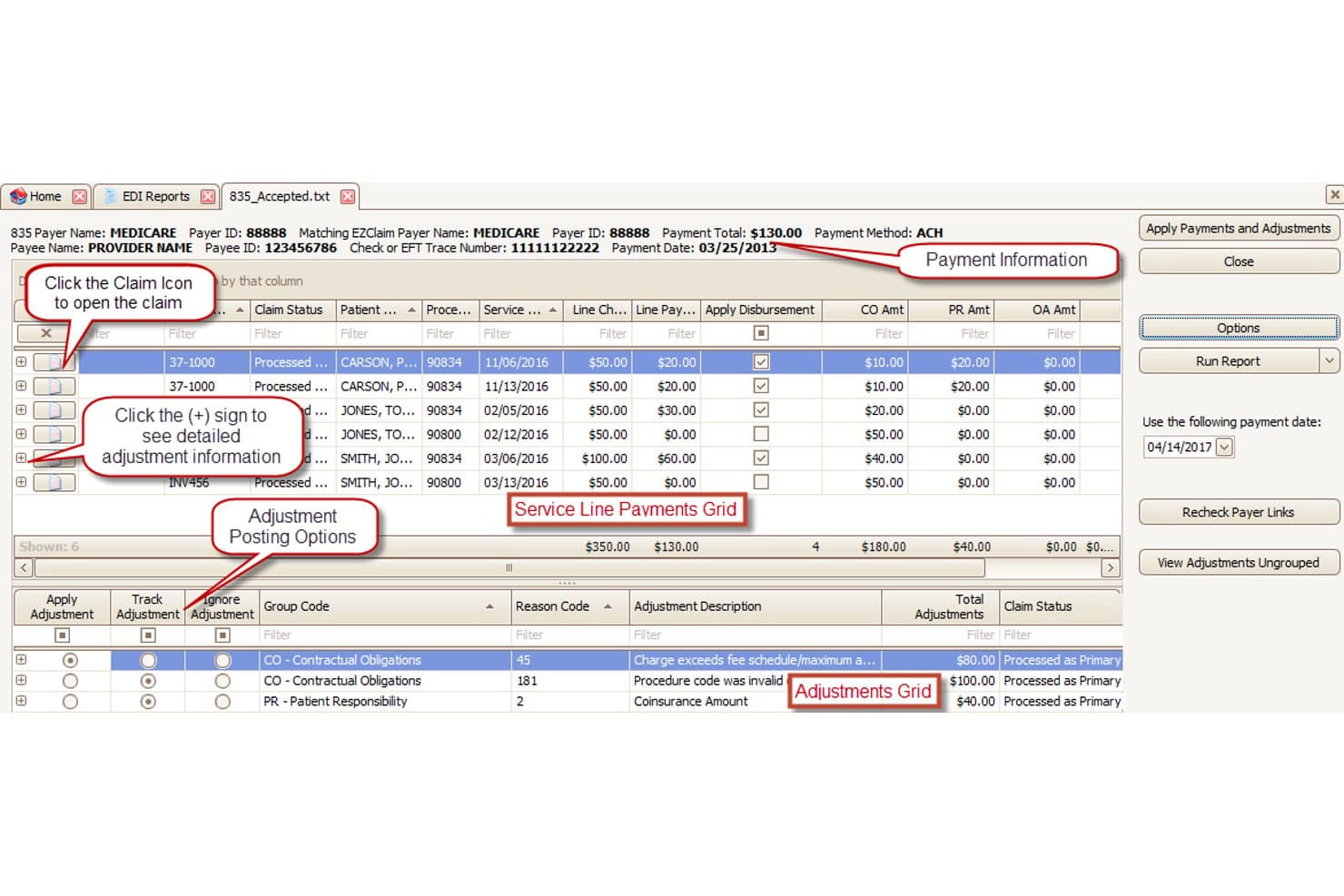
EZClaim offers an EDI 835 payment posting screen that displays service line payments, adjustment grids, and disbursement tools for streamlined medical billing workflows. EZClaim is a cloud-based medical billing platform built for small practices and independent billing services, covering electronic claims submission, real-time eligibility verification, payment posting, patient statements, and multi-client company file management.
Who Is EZClaim Best For?
EZClaim is a strong fit for home-based billing services and independent contractors managing claims across multiple provider clients from a single account.
Why I Picked EZClaim
I picked EZClaim as one of the best because its claims pipeline is genuinely uncomplicated without cutting corners. The 6,000+ payer connections include Medicare, Medicaid, Tricare, MCOs, and auto insurance, so I can take on new clients across specialties without rebuilding my payer list from scratch. Claim scrubbing catches errors before submission, and secondary claims management handles the downstream billing automatically once the primary payer responds.
EZClaim Key Features
- Multi-company file management: Track billing and payments separately for each client or provider using distinct, segmented files.
- HIPAA-compliant cloud access: Access the platform remotely with secure, encrypted login and user authentication from any Mac or PC.
- Real-time eligibility verification: Instantly check patient insurance eligibility before claim submission to reduce rejections.
- Custom patient statements: Generate and send branded statements with your company logo from within the billing platform.
EZClaim Integrations
EZClaim offers native integrations with TriZetto, Practice Fusion, Amazing Charts, Quick EMR, WebPT, AxisCare, and ElationHealth. An API is available for custom integrations.
Pros and Cons
Pros:
- Automated secondary claims handling
- Direct payer and clearinghouse connections included
- Multi-company management for billing services
Cons:
- Reporting tools lack advanced customization
- Limited denial management workflow features
Learn more about EZClaim: Best for cloud-based medical billing
- Free demo available
- Pricing upon request
Visit WebsiteCustomer Rating:4.1/5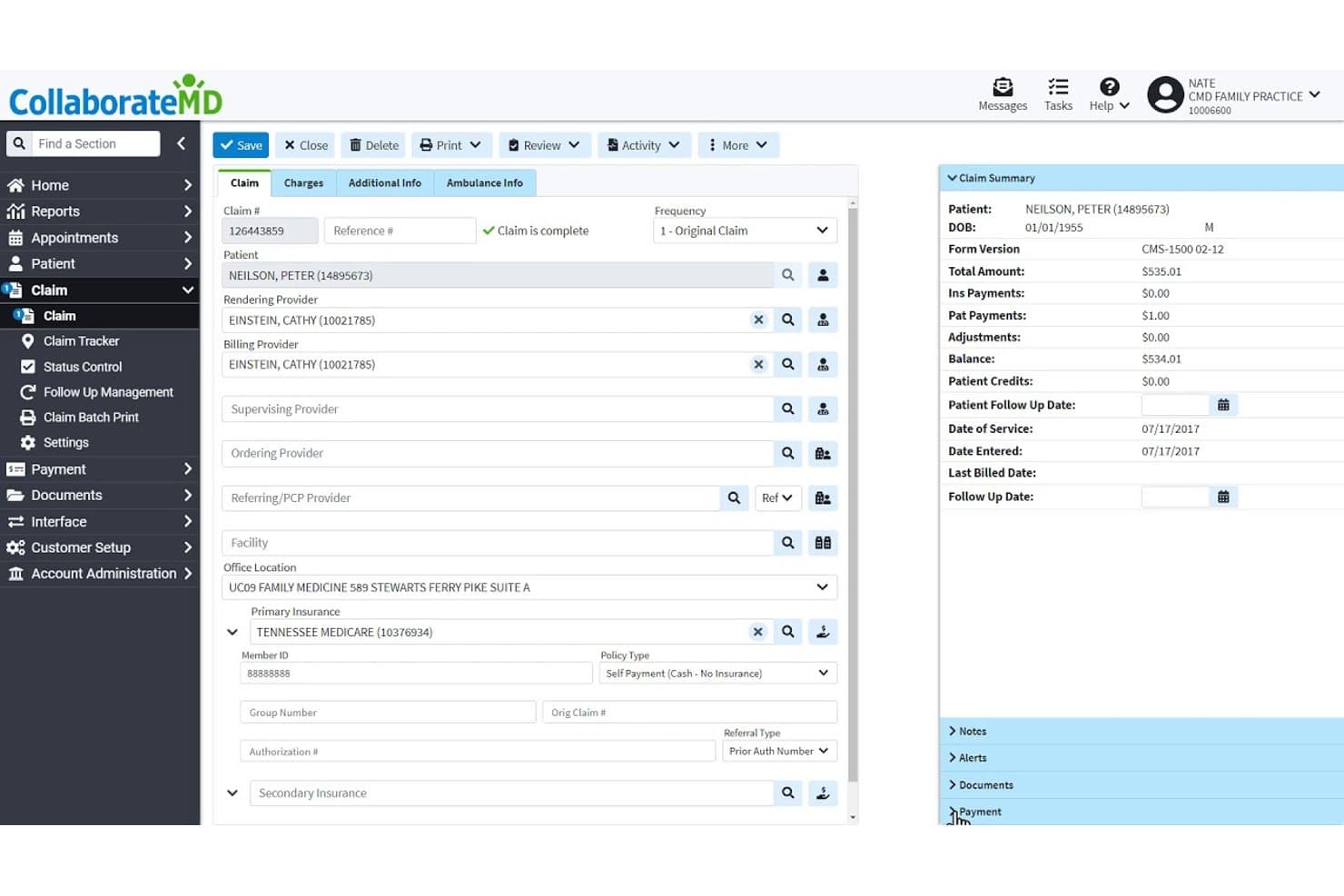
CollaborateMD offers a detailed claim management interface with patient info, provider fields, insurance details, and a claim summary panel showing balances and payments. CollaborateMD is a cloud-based medical billing platform built for independent billers and billing services, covering electronic claims submission, ERA posting, denial management, eligibility verification, and patient statements across multiple providers.
Who Is CollaborateMD Best For?
CollaborateMD suits independent medical billers and small billing services managing claims for multiple provider clients from a remote or home-based setup.
Why I Picked CollaborateMD
CollaborateMD earns its spot on my shortlist because its cloud-based architecture means I can run a full billing operation from a home office without any on-premise infrastructure. I particularly like the built-in clearinghouse with Level 2 claim scrubbing, which catches errors before submission. The AI-powered Intelligent Claim Rejection Support translates payer rejection codes into plain-language explanations with suggested next steps, cutting the time I spend chasing denial reasons.
CollaborateMD Key Features
- Automated eligibility verification: Instantly checks patient insurance details in real time for each claim.
- Integrated reporting suite: Offers 125+ customizable reports, dashboards, and KPI monitoring for multi-client tracking.
- Support for multiple specialties: Maintains specialty-specific fee schedules and code libraries for over 100 medical specialties.
- Patient payment plans: Lets you set up and manage custom payment schedules and prompt-pay discounts from within the platform.
CollaborateMD Integrations
CollaborateMD offers native integrations with Practice Fusion, Alleva, Amazing Charts, Elation Health, EyeMD EMR, Hello Health, Kipu EMR, and Medical Mime. API access is also available for custom integrations.
Pros and Cons
Pros:
- AI-powered claim rejection explanations provided
- Includes automated ERA posting with reconciliation
- Handles multi-provider billing in one account
Cons:
- Claim management dashboard lacks batch editing
- Limited reporting customization for advanced users
Learn more about CollaborateMD: Best for independent practice billing
- 14-day free trial; Free demo available
- Pricing upon request
Visit WebsiteCustomer Rating:3.9/5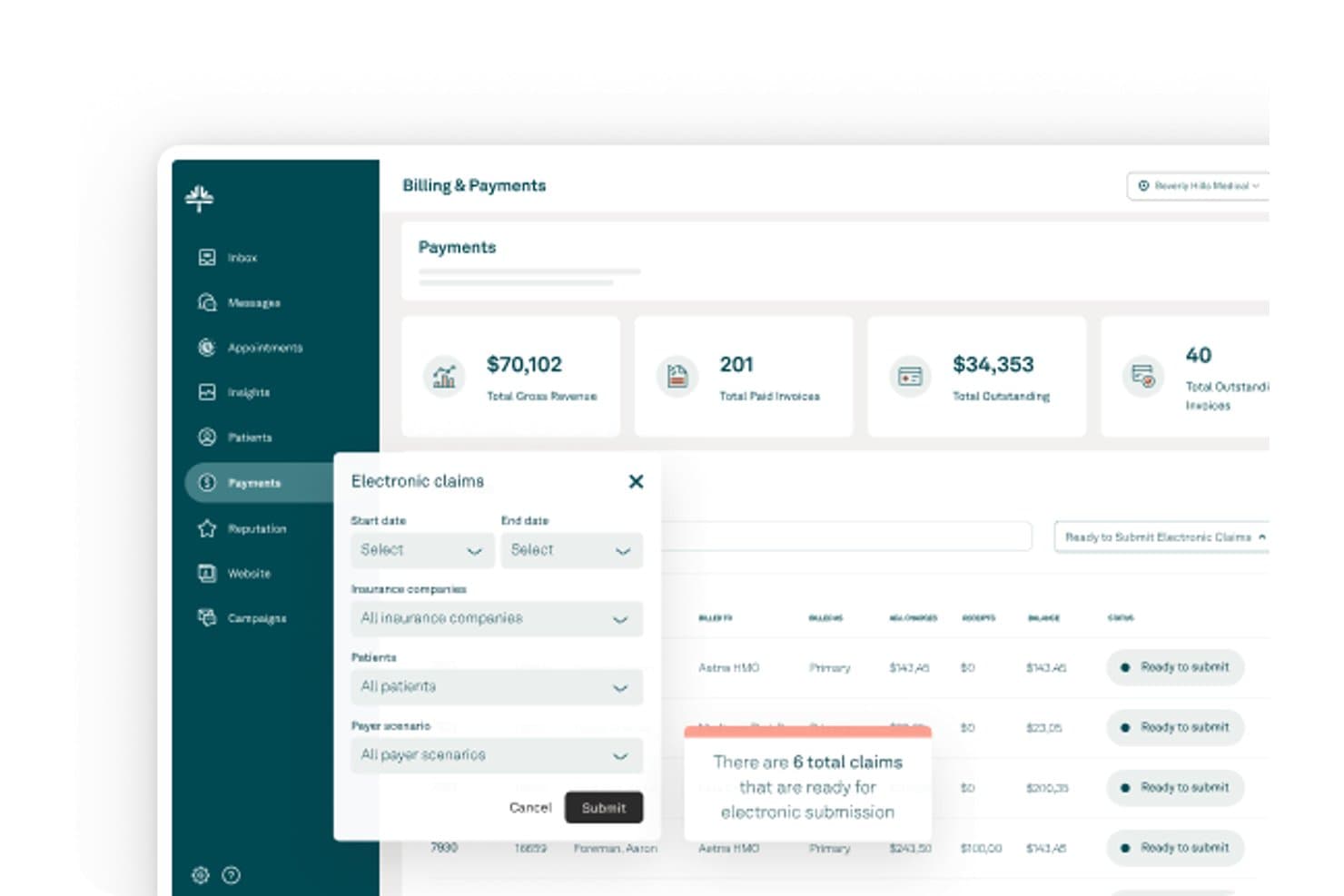
Tebra offers an Electronic Claims submission workflow with filtering options for insurance companies, patients, and payer scenarios within its Billing & Payments dashboard. Tebra is a cloud-based medical billing and practice management platform built for independent practices, combining electronic claims submission, integrated clearinghouse access, ERA posting, denial management, and patient billing tools.
Who Is Tebra Best For?
Tebra suits independent billers and small billing service owners who manage claims for multiple provider clients from a remote or home-based setup.
Why I Picked Tebra
I picked Tebra as one of the best because its native integrated clearinghouse connects to 2,700+ payers with real-time scrubbing and payer-specific rules applied at submission. I also rely on the RPA-driven ERA auto-posting, which processes remittances and unapplied payments without manual intervention. When a denial comes through, the rules engine queues it automatically for appeal or resubmission based on payer logic, which keeps AR moving without me manually triaging every rejection.
Tebra Key Features
- Real-time eligibility verification: Check patient insurance status instantly with integrated ANSI-X12 270/271 transactions.
- Multi-client account management: Organize billing for multiple practices and NPIs, each with separated data and reporting.
- Automated patient statements: Generate and send batch e-statements or paper statements with embedded payment links.
- Integrated eLabs connectivity: Connect with major labs like Quest and LabCorp for direct order and result syncing.
Tebra Integrations
Tebra offers native integrations with TriZetto, Quest, LabCorp, and over 2,700 payers through its built-in clearinghouse, plus HL7/FHIR and API options for connecting with certified EHRs and labs.
Pros and Cons
Pros:
- Handles multiple providers and client entities
- Auto-posts ERAs with RPA functionality
- Integrated clearinghouse supports 2,700+ payers
Cons:
- Customer support response times can be slow
- No free trial available
Learn more about Tebra: Best for automated billing and claims
- 30-day free trial + free demo available
- From $130/month
Visit WebsiteCustomer Rating:3.6/5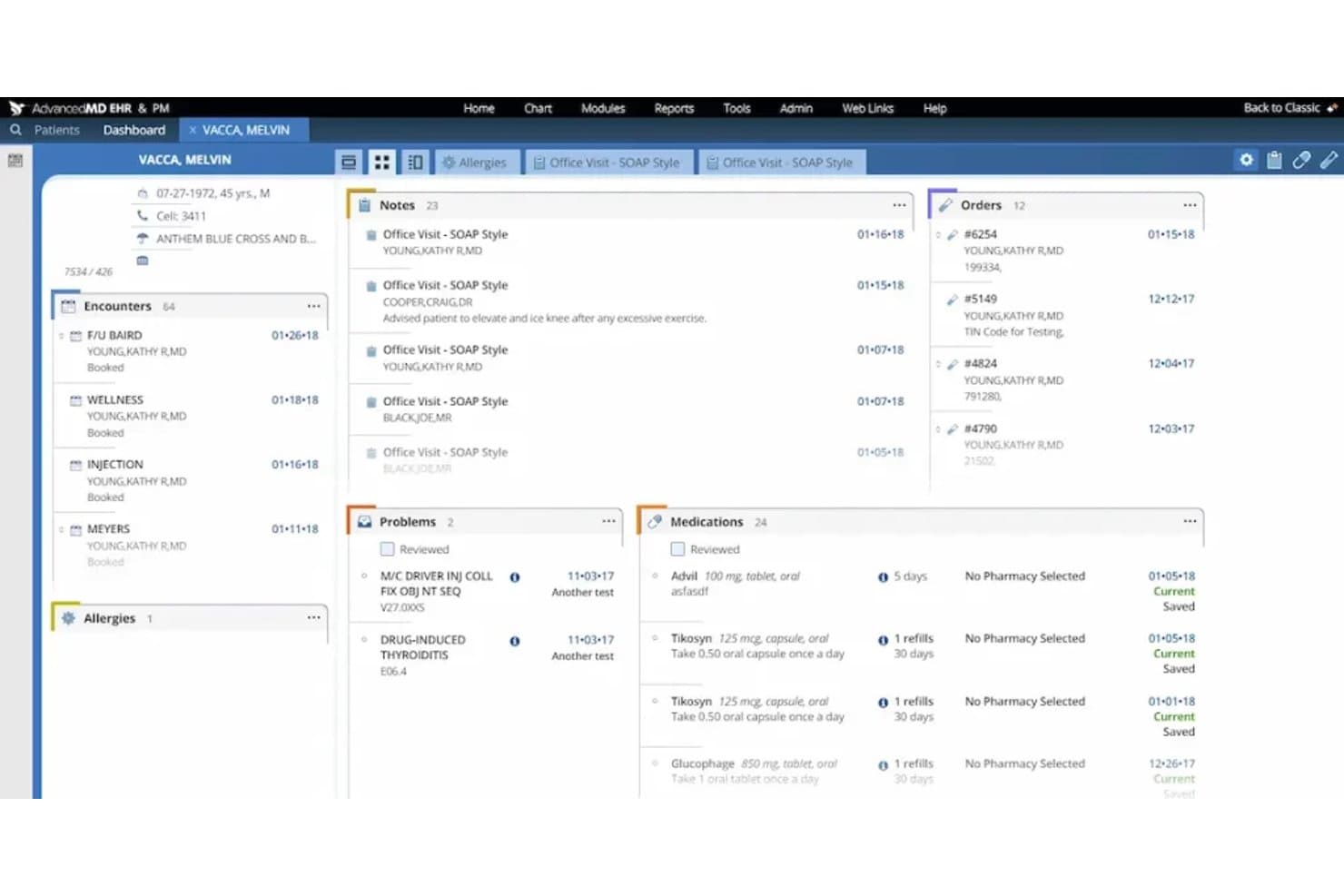
AdvancedMD offers a comprehensive patient dashboard displaying encounters, notes, orders, problems, medications, and allergies in a unified view. AdvancedMD is a cloud-based medical billing platform with a built-in clearinghouse, claims scrubbing, denial management, A/R tracking, and a Central Billing Office mode designed for independent billers managing multiple providers.
Who Is AdvancedMD Best For?
It's a strong fit for home-based billing services that manage multiple provider clients and need a single platform to handle the full billing cycle.
Why I Picked AdvancedMD
AdvancedMD earns its spot as one of the best on my shortlist because of how far it goes on automated claims processing. The built-in Claim Inspector scrubs every claim against compliance rules, code edits, and payer-specific requirements before submission, which is how the platform sustains a roughly 95% first-pass acceptance rate. I also like the A/R Control Center, which auto-routes denied claims into worklists with reason codes so I can track, correct, and resubmit without a single claim falling through the cracks.
AdvancedMD Key Features
- Central Billing Office mode: Lets you manage billing for multiple providers or clients from a single login with segmented data.
- Automated insurance eligibility checks: Verifies patient insurance coverage in real time before appointments and updates records.
- Integrated patient payment portal: Supports online payments, statement generation, and reconciliation directly within the system.
- Built-in iOS and Android mobile apps: Gives you mobile access to scheduling, patient information, and billing tools on the go.
AdvancedMD Integrations
AdvancedMD offers native integrations with ChartRequest, DAX Copilot, DeepScribe, Doctorsoft, InstaMed, LeadSquared, and NextPatient, plus has an Integration Marketplace and provides an API for custom integrations.
Pros and Cons
Pros:
- Real-time insurance eligibility verification included
- Multi-client management with segmented data access
- Automated claim scrubbing targets payer-specific edits
Cons:
- Some users report slow customer support
- Onboarding process can be time-consuming
Other Medical Billing Software for Home Based Business
Here are some additional medical billing software for home based business options that didn’t make it onto my shortlist, but are still worth checking out:
- 11TotalMDBest for affordable billing management
- 12AthenahealthBest for billing and collections automation
- 13PrognoCIS Psychiatry EHRBest for customizable billing workflows
- 14SimplePracticeBest for therapy insurance billing
- 15TherapyNotesBest for mental health billing
- 16Office Ally (Service Center)Best for clearinghouse and claims services
- 17CureMDBest for integrated billing and EHR
- 18NextGen OfficeBest for small-practice billing automation
- 19Claim.MDBest for fast electronic claims processing
How I Evaluate Medical Billing Software for Home Based Business
I split my evaluation into core functionality every home-based biller needs—like ERA posting and multi-provider management—and the factors that separate good tools from great ones.
Core Functionality (Table Stakes for This List)
When I'm selecting tools for my list, I rank each one on a scale from 0 (does not offer the functionality) to 5 (excels in this area) for each core functionality listed below. Then, I calculate the tool's total score into a percentage. Each tool needs to achieve a minimum total score of 65% to be considered for inclusion.
- Electronic Claims Submission: I check for 837 claim generation, built-in scrubbing rules, and direct clearinghouse connections so claims don't bounce before reaching payers.
- HIPAA-Compliant Cloud Access: Home-based billers need secure remote access. I look for encryption, MFA, audit logs, and a signed BAA included by default.
- Multi-Provider/Client Management: I evaluate whether a platform lets you manage separate NPIs, tax IDs, and client books under one login without data bleeding across accounts.
- ERA & Payment Posting: Handling 835 files manually slows everything down. I look for automated posting, exception flagging, and support for secondary claim generation.
- Denial & AR Management: I consider whether the tool offers denial worklists, reason-code tracking, and aging reports that help solo billers prioritize follow-ups by dollar value.
- Patient Billing & Statements: Generating patient statements and collecting balances matters. I evaluate statement automation, online payment options, and balance reconciliation tools.
Once I have a list of tools that meet the criteria, I consider what sets each platform apart.
Differentiating Factors (What Sets Vendors Apart)
Here's how I compare and contrast different vendors:
Standout Features
Direct clearinghouse connections matter here. I look for platforms that submit claims, pull ERAs, and track rejections through built-in links to clearinghouses like Availity or Change Healthcare—no portal hopping. Automated eligibility verification is another differentiator. Real-time insurance checks before claim submission save hours you'd otherwise spend logging into payer sites one by one. I also evaluate denial management workflows, specifically whether a tool offers reason-code categorization and appeal templates that help solo billers recover revenue without a manual tracking system.
Beyond Features
Pricing structure is a big differentiator. I look for per-claim or flat monthly pricing that scales with a small book of business—enterprise contracts with steep minimums aren't practical for solo operators. HIPAA compliance also varies widely. A signed BAA should come standard, and I check for MFA and role-based access controls, especially if you bring on a virtual assistant. Onboarding support matters too. Live payer enrollment help and EDI setup guidance can save weeks compared to vendors that leave you with self-service docs alone.
How to Choose Medical Billing Software for Home Based Business
It’s easy to get bogged down in long feature lists and complex pricing structures. To help you stay focused as you work through your unique software selection process, here’s a checklist of factors to keep in mind:
| Factor | What to Consider |
| Scalability | Will the platform support your growth if you add more provider clients or expand your service offerings? |
| Integrations | Does the tool connect easily to clearinghouses, EHRs, or accounting systems your clients already use? |
| Customizability | Can you tailor workflows, statements, and reporting to meet each provider client’s needs and preferences? |
| Ease of use | Is the system intuitive enough for daily claim workflows and basic troubleshooting without constant IT help? |
| Implementation and onboarding | Will you get live onboarding, payer enrollment support, and setup help to avoid weeks piecing things together alone? |
| Cost | Are there hidden fees, per-claim charges, or monthly minimums that may not fit your small or growing client base? |
| Security safeguards | Does the vendor offer MFA, audit logs, and a signed BAA to keep your home office HIPAA compliant? |
| Support availability | How quickly can you get real help (not just tickets) when a claim is stuck or you hit a billing issue? |
What Is Medical Billing Software for Home Based Business?
Medical billing software for home based business is a cloud-based platform that lets independent billers manage claims, payments, and patient billing for multiple provider clients from a home office. These tools offer secure, HIPAA-compliant access, multi-client management, and automation to simplify billing workflows without requiring on-premise infrastructure or IT support.
Features of Medical Billing Software for Home Based Business
When selecting medical billing software for home based business, keep an eye out for the following key features:
- Electronic claims submission: Lets you create, scrub, and submit HIPAA-compliant claims electronically to clearinghouses and payers, reducing manual paperwork and speeding up reimbursements.
- Multi-client management: Supports managing billing, payments, and reporting for multiple providers or practices under a single account with clear separation of client data.
- ERA and payment posting: Automatically imports electronic remittance advice files and posts payments, making it easier to reconcile insurance payments and spot discrepancies.
- Patient billing and statements: Generates patient statements and invoices, tracks balances, and helps you collect payments from patients, including co-pays and deductibles.
- Automated eligibility verification: Instantly checks patient insurance benefits and eligibility to reduce claim denials and save time spent on manual verification.
- Denial and AR management: Provides tools to track claim denials, record reasons, and manage accounts receivable aging to prioritize follow-ups and improve collections.
- HIPAA-compliant cloud access: Offers secure login, encrypted data storage, and audit trails so you can safely manage sensitive health information from your home office.
- Reporting and analytics: Delivers customizable reports on claims status, AR aging, payment trends, and client activity so you can monitor performance and share insights with clients.
- Online payment portal: Lets patients pay bills online using credit card or bank transfer, reducing collection times and improving the payment experience.
- Integration with EHR/PM systems: Syncs with electronic health records or practice management tools to eliminate duplicate data entry and streamline workflows across platforms.
Benefits of Medical Billing Software for Home Based Business
Implementing medical billing software for home based business provides several benefits for your team and your business. Here are a few you can look forward to:
- Increased billing efficiency: Automated claim creation, submission, and payment posting help you process more claims in less time with fewer manual steps.
- Improved cash flow: Real-time eligibility checks and faster denial management speed up payments from both insurers and patients.
- Greater data security: Cloud-based access with HIPAA-compliant safeguards protects sensitive information even when working from home.
- Flexible client management: Easily handle billing, reporting, and payment tracking for multiple providers or practices within one dashboard.
- Simplified compliance: Tools provide audit trails, BAAs, and role-based access controls to help meet regulatory requirements without extra overhead.
- Better patient experience: Online statements and payment options give patients quick, convenient ways to view and settle their balances.
- Data-driven insight: Built-in analytics show claim trends, AR aging, and client performance, informing better business decisions.
Costs and Pricing of Medical Billing Software for Home Based Business
Selecting medical billing software for home based business requires an understanding of the various pricing models and plans available. Costs vary based on features, team size, add-ons, and more. The table below summarizes common plans, their average prices, and typical features included in medical billing software for home based business solutions:
Plan Comparison Table for Medical Billing Software for Home Based Business
| Plan Type | Average Price | Common Features |
| Free Plan | $0 | Basic claim submission, limited provider support, and manual billing management. |
| Personal Plan | $30-$70/month | Electronic claim filing, ERA import, single provider tools, and phone or email support. |
| Business Plan | $90-$200/month | Multi-provider management, automated payment posting, reporting dashboards, and online patient payments. |
| Enterprise Plan | $250+/month | Unlimited clients, advanced integrations, HIPAA compliance tools, onboarding assistance, and custom reporting. |
Medical Billing Software for Home Based Business FAQs
Here are some answers to common questions about medical billing software for home based business:
Do I need special training to use medical billing software from home?
No, most platforms are designed to be intuitive with built-in tutorials and onboarding support. However, having a basic understanding of billing procedures and payer requirements helps you make the most of the software’s features.
Can I handle billing for multiple practices with one software account?
Yes, many medical billing software solutions let you manage separate providers or practices under one login, supporting separate tax IDs and keeping client data distinct.
How do these platforms keep patient data secure at home?
These tools use encryption, multi-factor authentication, and secure access controls. Look for vendors that provide audit logs and offer a signed Business Associate Agreement (BAA) to ensure HIPAA compliance in a home office setting.
Will medical billing software integrate with my client’s EHR or practice management system?
Many vendors offer direct integrations with popular EHR and PM tools, or support data import/export. Always check if your software connects to your clients’ preferred systems before subscribing.
What kind of support is available if I run into issues?
Most providers offer email, chat, or phone support, with some offering live onboarding and payer setup help. It’s important to confirm support hours and response times, especially if claim rejections affect your cash flow.