

Healthcare workforce management software helps your team handle scheduling, time tracking, and staffing compliance in one secure platform. If you’re looking for tools to keep your care teams coordinated and your organization compliant, you know every minute and shift counts. With patient care and regulatory requirements on the line, the right solution can make the difference between chaos and control. In this list, you’ll find top-rated options picked for real healthcare demands—so you can compare features, avoid common pitfalls, and make a choice that fits your workflows and staffing goals.
Why Trust Our Software Recommendations
6,700+
Reviews
20
Industry experts
16+
Evaluation factors
14
Years
Our team has been testing and reviewing software since 2012. As medical practice leaders ourselves, we know how difficult—and important—it is to choose the right software.
For this guide, we evaluated tools using hands-on testing and independent research, scoring tools using our selection criteria.
Our reviews reflect our human editorial judgment, not a sales pitch.
Healthcare Workforce Management Software Comparison Table
This comparison table summarizes pricing details for my top Healthcare Workforce Management Software selections.
| Tool | Best For | Trial Info | Price | ||
|---|---|---|---|---|---|
| 1 | Best with integrated biometric time tracking | 30-day free trial + free demo available | From $50/month | Website | |
| 2 | Best for float pool and agency spend control | Free demo available | Pricing upon request | Website | |
| 3 | Best AI-powered shift scheduling for compliance | 14-day free trial + free demo available | From $5/user/month | Website | |
| 4 | Best for centralized on-call physician visibility | Free demo available | Pricing upon request | Website | |
| 5 | Best for long-term care staffing stability | Free demo available | Pricing upon request | Website | |
| 6 | Best for multi-location team scheduling | Free trial + free plan available | From $1.70/user/month (billed annually) | Website | |
| 7 | Best mobile scheduling app built for nurses | 30-day free trial available | From $5/member/month | Website | |
| 8 | Best for real-time labour optimization | Free demo available | Pricing upon request | Website | |
| 9 | Best enterprise solution for physician call schedules | Not available | Pricing upon request | Website | |
| 10 | Best for automated staff scheduling | Free demo available | Pricing upon request | Website |


Best Healthcare Workforce Management Software Reviews
Below are my detailed summaries of the best healthcare workforce management software that made it onto my shortlist. My reviews offer a detailed look at the features, capabilities, and best use cases of each platform to help you find the best one for you.
 Best with integrated biometric time tracking
- 30-day free trial + free demo available
- From $50/month
Visit WebsiteCustomer Rating:4.5/5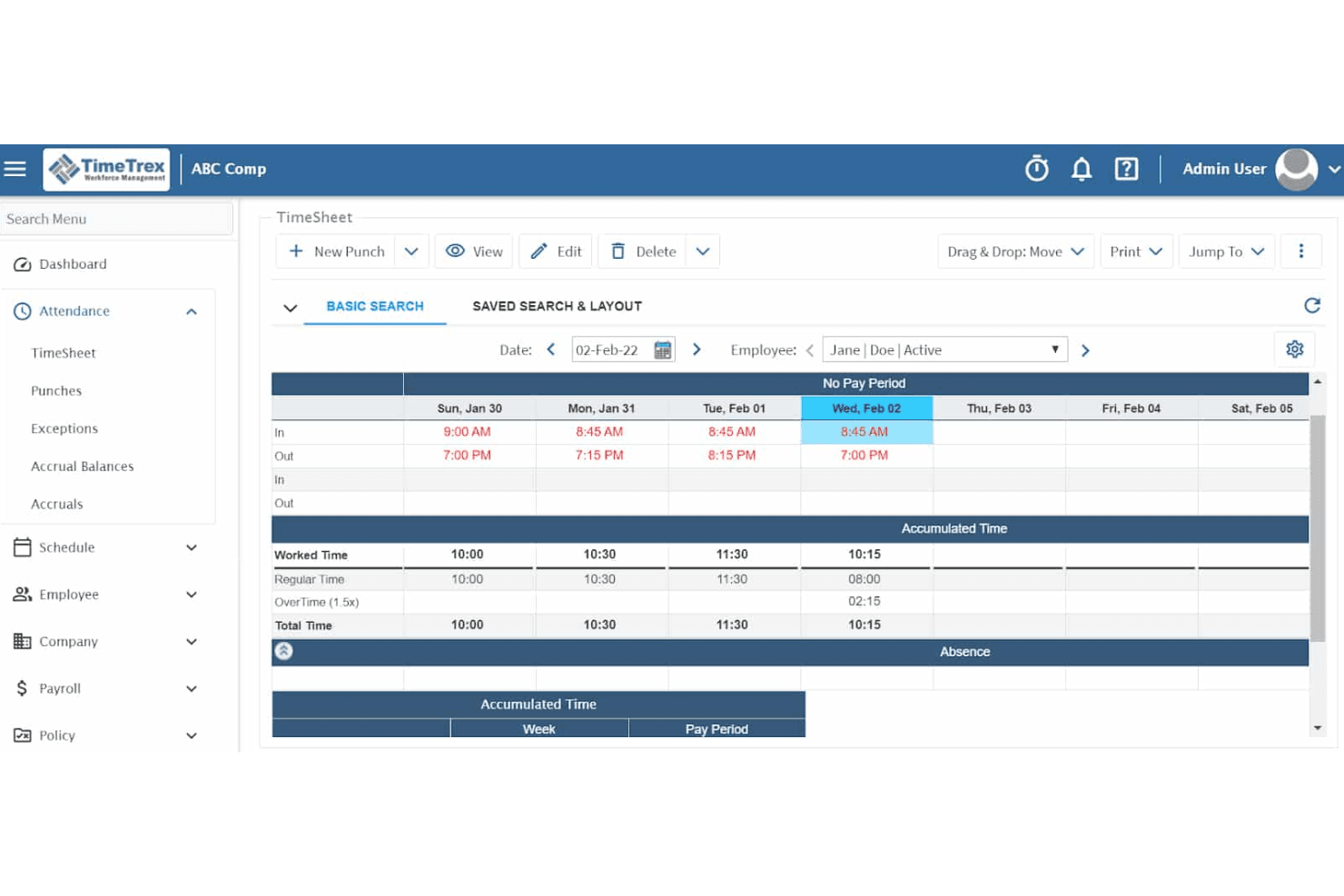
TimeTrex displays a weekly timesheet view with punch-in/out times, worked hours, regular time, and overtime tracking for an individual employee. TimeTrex is a workforce management platform that combines time and attendance tracking, employee scheduling, payroll processing, and HR management, with support for biometric time clocks across both cloud and open-source deployments.
Who Is TimeTrex Best For?
TimeTrex suits mid-to-large healthcare organizations that manage staff across multiple physical locations and need reliable, hardware-integrated time capture.
Why I Picked TimeTrex
TimeTrex earns its spot on my shortlist because its biometric facial recognition time clocks eliminate buddy punching, which is a persistent problem in shift-based clinical environments. I like that clock-in data feeds directly into payroll processing, so my team can reconcile worked hours without manual touchpoints. The geofencing layer adds another control, restricting punches to approved facility locations only.
TimeTrex Key Features
- Multi-location employee scheduling: Build and publish shift rosters for clinical staff across multiple sites with template support.
- Credential tracking module: Store healthcare staff certifications and manually track expiration dates within each employee profile.
- Payroll and tax engine: Automate wage calculations, deductions, and regional tax compliance for healthcare environments.
- Native mobile app: Enable staff to view schedules, submit PTO requests, and punch in or out from iOS and Android devices.
TimeTrex Integrations
TimeTrex offers native integrations with QuickBooks, ADP, Paychex, Ceridian, and Sage for payroll processing. An API is available for custom integrations.
Pros and Cons
Pros:
- Built-in payroll reduces third-party vendor dependency
- Self-hosted option gives IT teams full control
- Biometric time clocks eliminate buddy punching
Cons:
- Mobile self-scheduling tools are limited for clinicians
- Credential tracking lacks automated expiration alerts
Learn more about TimeTrex: Best for float pool and agency spend control
- Free demo available
- Pricing upon request
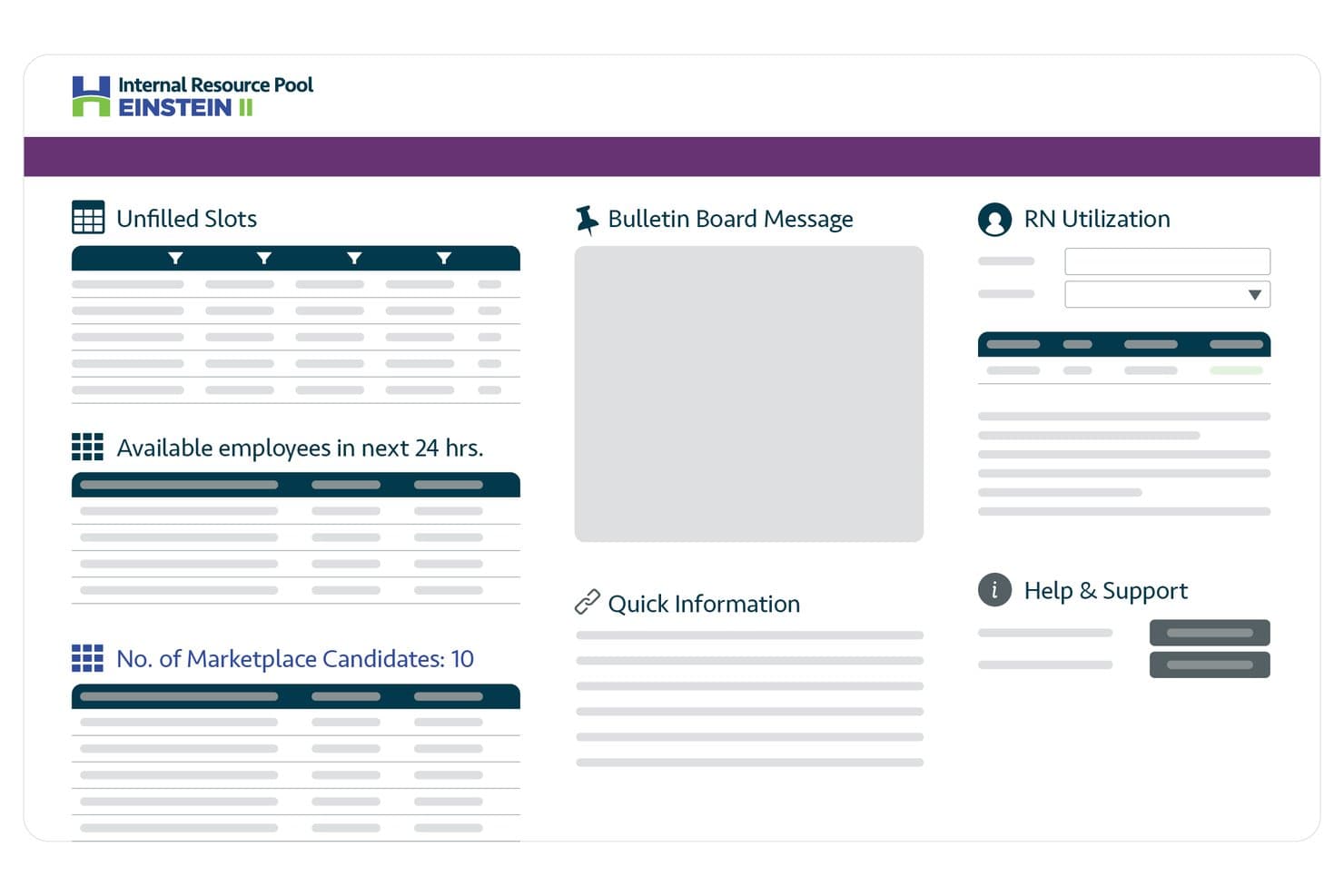
Hallmark Health Care Solutions centralizes staffing data on one dashboard. Hallmark Health Care Solutions is an enterprise healthcare workforce management platform that combines AI-driven clinician scheduling, float pool management, credential tracking, vendor management, and predictive staffing demand forecasting.
Who Is Hallmark Health Care Solutions Best For?
Hallmark is a strong fit for enterprise health systems that need to reduce agency spend by tightening control over float pool utilization and contingent labor.
Why I Picked Hallmark Health Care Solutions
I picked Hallmark Health Care Solutions because it's one of the few platforms built specifically to tighten the gap between float pool utilization and agency spend. Its AI eligibility engine automatically matches credentialed, available internal staff to open shifts before any external vendor is engaged, which directly cuts contingent labor costs. The vendor-neutral VMS layers on top, letting you run competitive bidding across 400+ staffing agencies when internal coverage falls short. I also like the rate management module, which centralizes bill rate data across units and regions so you can spot and eliminate overpayment in real time.
Hallmark Health Care Solutions Key Features
- Predictive staffing demand forecasting: AI models pull in real-time census, acuity, length of stay, and callout data to project staffing needs by unit and service line before gaps appear.
- Credential expiration monitoring: The credentialing module automatically tracks license and certification deadlines and flags exceptions in real time to keep your workforce audit-ready.
- Fatigue and overtime alerts: The platform flags consecutive shifts and hours-worked thresholds in real time so nurse leaders can intervene before overtime costs escalate.
- Executive workforce intelligence dashboards: Role-specific dashboards for CFOs, CHROs, and CNOs connect labor spend data directly to margin and patient outcome metrics.
Hallmark Health Care Solutions Integrations
Hallmark Health Care Solutions integrates with Epic, Oracle Health, UKG EZCall, Workday HCM, ADP, Oracle Payroll, and Microsoft Entra ID. It also supports API, webhooks, EDI, HL7, FHIR, and SFTP connectivity for custom integrations.
Pros and Cons
Pros:
- Purpose-built float pool and agency management
- Comprehensive credential and license tracking
- AI-driven demand forecasting for staffing needs
Cons:
- No free plan or trial available
- Lacks native time and attendance features
Learn more about Hallmark Health Care Solutions: Best AI-powered shift scheduling for compliance
- 14-day free trial + free demo available
- From $5/user/month
Visit WebsiteCustomer Rating:4.6/5
The Deputy scheduling dashboard shows employee shifts across locations. Deputy is a workforce management platform built for healthcare organizations, offering digital shift scheduling, time and attendance tracking, labour law compliance tools, and real-time staff communication.
Who Is Deputy Best For?
Nursing supervisors and operations leaders in healthcare facilities who need daily oversight of shift allocation and staffing rules will appreciate Deputy.
Why I Picked Deputy
I picked Deputy as one of the best because I use its AI scheduling engine to match staff to shifts while staying compliant with healthcare labour rules, and I can instantly flag overtime or credential conflicts as I build the rota.
Deputy Key Features
- Timesheet approvals: Managers can review and approve digital timesheets for each staff member.
- Mobile shift swapping: Staff can swap shifts and update availability directly from the mobile app.
- Task assignments: Assign and track non-clinical tasks alongside shift schedules.
- Payroll export: Export timesheet and pay data to popular payroll software.
Deputy Integrations
Integrations include Square, ADP, Gusto, BambooHR, QuickBooks, AirWatch, Clover, Dropbox, Epos Now, and HiBob.
Pros and Cons
Pros:
- AI matches staff to open shifts
- Flags overtime and credential conflicts
- Flags license and credential expirations
Cons:
- Advanced reporting requires higher-tier plans
- Limited bulk editing of published schedules
Learn more about Deputy: Best for centralized on-call physician visibility
- Free demo available
- Pricing upon request
Visit WebsiteCustomer Rating:4.5/5
QGenda on-call dashboard shows physician schedules and staff assignments. QGenda is a healthcare workforce management platform designed for medical organizations to handle complex physician scheduling, staff assignments, credentialing management, and time tracking in one place.
Who Is QGenda Best For?
Hospitals and large healthcare systems seeking unified, organization-wide physician scheduling and staff tracking will find QGenda especially relevant.
Why I Picked QGenda
I picked QGenda as one of the best because its centralized dashboard lets me instantly see who’s on call across all departments. I rely on the rule-based scheduling engine and transparent shift change tracking to avoid coverage gaps and miscommunications.
QGenda Key Features
- Mobile access: Secure app allows staff to view and manage their schedules on the go.
- Credential management: Stores and tracks provider credentials inside the same platform.
- Time and attendance tools: Records shifts, clock-ins, and work hours for payroll accuracy.
- Analytics and reporting: Generates workforce analytics for utilization and staffing trends.
QGenda Integrations
Integrations include Workday, Oracle, Voalte, Apple Calendar, Google Calendar, Outlook, Epic, MBMS, and MedHub.
Pros and Cons
Pros:
- Detailed audit trails for schedule changes
- Automated physician assignment
- Centralized physician and staff scheduling
Cons:
- Limited user interface customization
- Complex initial setup
Learn more about QGenda: Best for long-term care staffing stability
- Free demo available
- Pricing upon request

The OnShift mobile app shows employee schedules and open shift access. OnShift is a healthcare workforce management software platform designed for long-term and post-acute care that offers scheduling, call-off tracking, labour analytics, and employee engagement tools.
Who Is OnShift Best For?
OnShift fits staffing managers and HR teams in long-term care facilities and senior living organizations that need to improve workforce consistency and fill shifts quickly.
Why I Picked OnShift
I picked OnShift because I’ve managed staffing in long-term care where census forecasting and automated shift call-outs help keep teams stable. I like how OnShift alerts my team to overtime risk and lets us fill open shifts with just a few clicks.
OnShift Key Features
- Mobile scheduling app: Staff can swap shifts and check schedules from their phones.
- Employee rewards system: Managers can recognize team members with in-platform rewards and recognition features.
- Real-time attendance monitoring: Track clock-ins and absences as they happen.
- Credential tracking: Keep tabs on license and certification status for compliance.
OnShift Integrations
Integrations include isolved, Paylocity, Workday, ADP, UKG, Paycom, Viventium, MatrixCare, PointClickCare, and First Advantage.
Pros and Cons
Pros:
- Rewards staff to boost retention
- Real-time call-off and attendance alerts
- Identifies staffing needs using census
Cons:
- Onboarding process is time-intensive
- Limited customization for facility rules
Learn more about OnShift: Best for multi-location team scheduling
- Free trial + free plan available
- From $1.70/user/month (billed annually)

The Sling schedule dashboard shows shifts across teams and locations. Sling is a workforce management software designed for healthcare organizations that need to manage shift scheduling, time clocking, team messaging, and labour cost controls across multiple locations.
Who Is Sling Best For?
Sling is a strong match for healthcare administrators who coordinate staffing and schedules across several clinic or facility locations.
Why I Picked Sling
I’ve included Sling in my shortlist because I can create, publish, and manage schedules for different departments and locations in one place—plus, my team can handle shift swapping, open shifts, and location-specific availability simply.
Sling Key Features
- Time clock and attendance tools: Record worked hours, manage clock-ins and monitor tardiness digitally.
- labour cost tracking: Calculate and track labour costs in real time as you schedule.
- In-app chat: Communicate instantly with team members within the Sling platform.
- Employee task assignments: Assign specific tasks to staff members during each shift.
Sling Integrations
Integrations include Toast, Square, Gusto, Harbortouch, Restaurant Manager, POSiTouch, ADP, Shopify, and Google Calendar.
Pros and Cons
Pros:
- Built-in time clock with geofencing support
- Location-based shift notifications for employees
- Multisite scheduling from a single dashboard
Cons:
- Reporting export options are restricted
- Limited reporting for compliance tracking
Learn more about Sling: Best mobile scheduling app built for nurses
- 30-day free trial available
- From $5/member/month

The NurseGrid schedule overview shows nurse shifts across weekly calendars. NurseGrid is a mobile-first workforce management solution for healthcare organizations, offering nurse shift scheduling, real-time calendar syncing, internal messaging, and team coordination features.
Who Is NurseGrid Best For?
NurseGrid is a fit for frontline nurses and nurse managers in hospital departments or healthcare facilities needing app-based shift scheduling and team calendar management.
Why I Picked NurseGrid
I picked NurseGrid as one of the best because I can coordinate nursing teams directly from my phone—it’s the only app I use that lets my nurses sync schedules, swap shifts, and send instant scheduling updates on mobile.
NurseGrid Key Features
- Group messaging: Organize team discussions or urgent notifications inside the app.
- Shift reminders: Send automated push notifications before each scheduled shift.
- Availability tracking: Let staff indicate available or unavailable days in real time.
- Work history export: Export personal shift data for documentation and payroll needs.
NurseGrid Integrations
Integrates with enterprise scheduling systems, the NurseGrid mobile app, and personal digital calendars, such as Google Calendar and Apple Calendar.
Pros and Cons
Pros:
- Connects nursing teams across floors
- Real-time mobile team scheduling updates
- Built-in shift swapping for nurses
Cons:
- Lacks support for multi-location organizations
- No advanced analytics or reporting tools
Learn more about NurseGrid: Best for real-time labour optimization
- Free demo available
- Pricing upon request

SmartLinx's scheduling dashboard shows staffing ratios and labour tracking. SmartLinx is a healthcare workforce management platform focused on senior care that offers features for dynamic staff scheduling, time and attendance tracking, compliance monitoring, and real-time labour analytics.
Who Is SmartLinx Best For?
SmartLinx fits HR and operations leaders in senior care organizations who need detailed oversight of staffing, labour costs, and regulatory compliance.
Why I Picked SmartLinx
I picked SmartLinx as one of the best because I use its live scheduling dashboards to adjust staffing by census and see instant cost impacts. I rely on real-time reporting to control overtime and fill open shifts in our senior care facilities.
SmartLinx Key Features
- Credential compliance tracking: Monitors staff license and certification status for regulatory needs.
- Automated timeclock management: Captures punch-ins via biometric or mobile devices for time tracking accuracy.
- Payroll processing tools: Processes payroll within the platform and helps manage exceptions.
- Mobile employee self-service: Let staff request shifts, check schedules, and update availability on their phones.
SmartLinx Integrations
Integrations include DailyPay, Apex Global Solutions, PointClickCare, ADP Smart Compliance, FlexWage, and Rain.
Pros and Cons
Pros:
- Monitors staffing ratios in real time
- Calculates labour costs instantly
- Real-time shift adjustment for census changes
Cons:
- Limited non-senior care integrations
- Requires more dedicated system training
Learn more about Smartlinx : Best enterprise solution for physician call schedules
- Not available
- Pricing upon request

The AMiON mobile app shows physician schedules and on-call assignments. AMiON is a physician scheduling platform designed for hospitals and large healthcare groups, offering cloud-based management for call schedules, shift planning, rotation building, and automated notifications.
Who Is AMiON Best For?
AMiON is built for medical staff schedulers and department managers in enterprise hospitals and multi-specialty physician groups.
Why I Picked AMiON
I picked AMiON as one of the best because I use its on-call scheduling grids and rule-driven automation to manage complex physician rotations across departments, and real-time updates keep everyone synced around frequent last-minute changes.
AMiON Key Features
- Mobile app: Physicians and staff can view or update schedules on the go.
- Vacation and PTO tracking: Track vacation requests and manage approvals directly in the platform.
- HIPAA-compliant messaging: Securely communicates shift details and urgent updates within the app.
- Custom reporting: Build and export detailed reports on staffing, shifts, and call coverage.
AMiON Integrations
Integrations include Epic Systems, American Messaging, Spok, Verizon, LightningBolt, QGenda, Microsoft Azure, Okta, Imprivata Mobile Access Management, and Imprivata Enterprise Access Management.
Pros and Cons
Pros:
- Real-time sync of last-minute changes
- Supports HIPAA-compliant group messaging
- Handles complex physician shift rotations
Cons:
- Limited analytics beyond schedule reporting
- Requires more customization settings
Learn more about Amion: Best for automated staff scheduling
- Free demo available
- Pricing upon request

The Lightning Bolt schedule view shows automated staff assignments. Lightning Bolt is a healthcare staff scheduling software that automates provider shift scheduling, manages shift swaps and time-off requests, and supports complex rule-based assignments for hospital systems and clinics.
Who Is Lightning Bolt Best For?
Lightning Bolt is a strong fit for hospital scheduling administrators and medical group managers who need to automate and optimize complex provider shift schedules.
Why I Picked Lightning Bolt
I picked Lightning Bolt as one of the best because I can automatically generate complex staff schedules with just a few clicks—including preferences, rules, and compliance requirements—which saves my team time with every new schedule.
Lightning Bolt Key Features
- Mobile app access: Staff can view and manage schedules from their mobile devices.
- Real-time shift swap requests: Team members can request and accept shift swaps instantly.
- Integrated messaging: Facilitates direct communication between providers and schedulers within the platform.
- Reporting and analytics dashboard: Offers oversight into staffing patterns, trends, and schedule metrics.
Lightning Bolt Integrations
Integrations include Epic On Call Finder, Epic OpTime, New Innovations Duty Hours, Outlook, TigerConnect, and Workday.
Pros and Cons
Pros:
- Mobile app for real-time schedule access
- Advanced algorithms reduce coverage gaps
- Supports complex physician scheduling
Cons:
- Steep setup process for large organizations
- Lacks comprehensive time tracking
Learn more about Lightning Bolt:
Other Healthcare Workforce Management Software
Here are some additional healthcare workforce management software options that didn’t make it onto my shortlist, but are still worth checking out:
- 11Humanity by TCPBest AI forecasting for staff coverage needs
- 12StaffReadyBest for integrated competency tracking
- 13HealthStreamBest for automated provider enrollment
- 14Infor Best for complex union rule adherence
- 15ConnecteamBest mobile-first employee communication tools
- 16ShiftboardBest dynamic scheduling for high-volume shift
- 17Paychex Best for multi-state tax filing
- 18UKGBest integration of HR and workforce analytics
- 19ReliasBest for clinical competency assessments
- 20When I WorkBest intuitive shift swapping for hourly staff
- 21PaycorBest payroll-centred staff management
- 22ShiftMedBest for on-demand clinician marketplace
How I Evaluate Healthcare Workforce Management Software
Healthcare workforce management software is what CNOs, nursing directors, and HR teams turn to when manual scheduling can no longer keep a night-shift ICU adequately staffed, credential expirations tracked, and premium labor costs in check. When I evaluate options in this category, I separate what every tool needs to handle well enough to make the list from what actually sets the better picks apart.
Core Functionality (Table Stakes for This List)
For healthcare workforce management software, the core functionality I test and evaluate is:
- Shift Scheduling: I check whether the tool handles 24/7 rule-based scheduling that accounts for unit-specific skills, nurse-to-patient ratios, and float pool assignments.
- Time & Attendance: Accurate capture of shift differentials, overtime, and on-call hours matters. I look for biometric or badge-based clock-in options and exception alerts.
- Credential Tracking: Expired BLS certs or lapsed RN licenses can't slip through. I evaluate how the tool flags expirations and blocks unqualified staff from scheduling.
- Compliance Automation: The tool should enforce rest-period rules, mandatory overtime limits, and union seniority requirements without manual workarounds from schedulers.
- Open Shift Management: I look at how open or unfilled shifts are broadcast to eligible staff, whether through mobile push notifications, shift bidding, or marketplace-style claiming.
- Mobile Self-Service: Nurses and aides aren't at desks. I evaluate the mobile experience for viewing schedules, swapping shifts, submitting PTO, and picking up extra hours.
- Staffing Analytics: Dashboards that surface labor costs, agency utilization, overtime trends, and census-based demand forecasts are what I look for here.
- Payroll & EHR Integration: Connections to systems like Epic, Oracle Health, ADP, and UKG are appreciated. I check the depth of these integrations, not just their existence.
A tool has to deliver most of these capabilities to earn a spot on the list. From there, I consider what sets each tool apart.
Standout Features (What Separates the Picks)
Automated demand forecasting and AI-driven clinical staffing suggestions can really set a tool apart for organizations that live and die by their census. I also look for advanced contingent workforce management, like integrated VMS modules for per-diem pools and agency partnerships, which larger systems rely on. Built-in compliance audit tools—such as instant reporting against state-specific ratios or credentialing documentation—add real value for providers facing regulatory scrutiny.
What I Weigh Beyond Features
Implementation support matters a lot in this space. Rolling out a WFM platform across a hospital system with union contracts is a different challenge than onboarding a single outpatient clinic. I evaluate whether vendors offer healthcare-specific implementation teams and dedicated success managers. HIPAA compliance and SOC 2 certification are non-negotiable for any tool handling employee health records. I also consider buyer fit—some platforms serve enterprise health systems well, while others are better suited to smaller practices or staffing agencies.
How to Choose Healthcare Workforce Management Software
It’s easy to get bogged down in long feature lists and complex pricing structures. To help you stay focused as you work through your unique software selection process, here’s a checklist of factors to keep in mind:
| Factor | What to Consider |
|---|---|
| FactorScalability | What to ConsiderWill the platform support your organization as it grows, including handling more staff and locations? |
| FactorIntegrations | What to ConsiderCan it connect natively with your HR, payroll, or EMR systems without needing custom workarounds? |
| FactorCustomizability | What to ConsiderDoes the system let you adjust workflows, permissions, and views to match your operations and policies? |
| FactorEase of use | What to ConsiderAre routine tasks and reporting straightforward for staff and managers who may not be tech-savvy? |
| FactorImplementation and onboarding | What to ConsiderHow long will setup and user training take, and what resources or support will your team need? |
| FactorCost | What to ConsiderAre all costs (licensing, support, upgrades) clear upfront, and does the pricing model fit your budget? |
| FactorSecurity safeguards | What to ConsiderDoes the platform offer HIPAA-compliant security, audit trails, and restricted access for sensitive data? |
| FactorCompliance requirements | What to ConsiderDoes it support time tracking, documentation, and reporting for federal, state, and accreditation requirements? |
What Is Healthcare Workforce Management Software?
Healthcare workforce management software is a category of digital tools designed to automate staff scheduling, time tracking, credential monitoring, and compliance for medical organizations. These platforms help leaders allocate resources, monitor labour costs, and ensure regulatory requirements are met across clinics, hospitals, and care facilities while supporting a smoother experience for both staff and administrators.
Features of Healthcare Workforce Management Software
When selecting healthcare workforce management software, keep an eye out for the following key features:
- Shift scheduling: Allows managers to create, publish, and adjust staff schedules based on availability, licensure, and patient care demands.
- Time and attendance tracking: Accurately records shift start and end times, absences, and overtime through clock-in systems or mobile devices.
- Credential management: Monitors employee licenses and certifications, alerting administrators before expirations to maintain regulatory compliance.
- Payroll integration: Connects workforce data directly to payroll systems for automated calculation and wage payout, reducing errors and manual entry.
- Compliance reporting: Generates detailed reports to support audits and prove adherence to labour laws, healthcare standards, and accreditation requirements.
- labour cost analytics: Analyzes staffing patterns, overtime, and costs, helping leaders spot inefficiencies or trends that affect budgets.
- Mobile accessibility: Enables staff to review schedules, request shifts, and communicate with managers from any location using smartphones or tablets.
- Task and communication tools: Centralize announcements, shift-related messages, and task assignments within the same workforce platform.
- Self-service portals: Allow employees to update their availability, swap shifts, and view pay stubs without manager intervention.
- Automated alerts and notifications: Send reminders for missed punches, expiring credentials, open shifts, or last-minute schedule changes to the relevant staff.
Benefits of Healthcare Workforce Management Software
Implementing healthcare workforce management software provides several benefits for your team and your business. Here are a few you can look forward to:
- Better staffing coverage: Ensure the right healthcare staffing is scheduled at the right times, which helps optimize coverage, reducing under- or over-staffing and improving patient care.
- Improved compliance: Track credentialing, labour laws, and accreditation standards with automation, detailed reporting, and certification tracking.
- Lower administrative burden: Automate scheduling, time tracking, and payroll integration so managers spend less time on manual tasks.
- Greater cost control: Use forecasting to analyze staffing patterns and overtime, helping you spot inefficiencies and manage labour costs to achieve significant cost savings.
- Increased employee engagement: Improve the employee experience and retention by allowing staff to swap shifts and request time off through self-service tools, which helps mitigate burnout.
- Better visibility and analytics: Use data-driven dashboards to get a clear view of operational efficiency, compliance, and metrics across healthcare organizations.
- Reduced scheduling errors: Centralize workforce planning and send real-time notifications to healthcare providers to minimize miscommunication and last-minute changes.
Costs and Pricing of Healthcare Workforce Management Software
Selecting healthcare workforce management software requires an understanding of the various pricing models and plans available. Costs vary based on features, team size, add-ons, and more. The table below summarizes common plans, their average prices, and typical features included in healthcare workforce management software solutions:
Plan Comparison Table for Healthcare Workforce Management Software
| Plan Type | Average Price | Common Features |
|---|---|---|
| Plan TypeFree Plan | Average Price$0 | Common FeaturesBasic shift scheduling, limited reporting, self-service portals, and community support. |
| Plan TypePersonal Plan | Average Price$5-$15/user/month | Common FeaturesIndividual scheduling, attendance tracking, credential reminders, and access to mobile apps. |
| Plan TypeBusiness Plan | Average Price$15-$30/user/month | Common FeaturesAutomated scheduling, payroll integrations, compliance reporting, mobile accessibility, and time-off management. |
| Plan TypeEnterprise Plan | Average Price$30-$50/user/month | Common FeaturesAdvanced analytics, custom workflows, API access, dedicated account management, and premium customer support. |
Healthcare Workforce Management Software FAQs
Here are some answers to common questions about healthcare workforce management software:
How does healthcare workforce management software help with compliance?
It tracks certifications, licenses, and labour law requirements automatically. This means healthcare professionals get reminders before credentials expire, and built-in compliance management reports support audits by keeping all documentation in one place.
Can healthcare workforce management software integrate with payroll and HR systems?
Yes, most all-in-one solutions offer direct integrations with popular payroll and HR platforms. This lets you sync schedules, time tracking, and employee data across your systems with less manual entry and fewer errors.
What types of organizations use healthcare workforce management software?
Clinics, hospitals, long-term care facilities, and specialty practices all use these tools. Large health systems and any medical organization with multiple staff members or complex coverage needs can benefit from the automation and reporting these platforms provide.
Is mobile access available in most healthcare workforce management software?
Yes, many tools include user-friendly mobile apps or web-based portals. Caregivers and staff can check their schedules, request changes, and communicate on the go, which reduces missed shifts and miscommunication.
How long does implementation typically take?
Implementation varies by system and organization size. Small teams can often get up and running within a week, while large or multi-site facilities may need a few weeks for setup, integration, and staff training. Most vendors provide onboarding support to help you through the process.