

Healthcare project management software gives your team a centralized way to plan, assign, and track clinical and administrative projects in regulated care environments. Teams like yours need better tools to balance documentation, compliance, cross-team communication, and tight timelines—without putting patient safety at risk.
This list brings together top-rated platforms so you can quickly compare features for collaboration, compliance management, and workflow visibility. If you’re ready to reduce manual handoffs, improve oversight, and choose a solution that fits your goals, you’ll find everything you need here.
Why Trust Our Software Recommendations
6,700+
Reviews
20
Industry experts
16+
Evaluation factors
14
Years
Our team has been testing and reviewing software since 2012. As medical practice leaders ourselves, we know how difficult—and important—it is to choose the right software.
For this guide, we evaluated tools using hands-on testing and independent research, scoring tools using our selection criteria.
Our reviews reflect our human editorial judgment, not a sales pitch.
Comparison Table: Healthcare Project Management Software
This comparison table summarizes pricing details for my healthcare project management software selections.
| Tool | Best For | Trial Info | Price | ||
|---|---|---|---|---|---|
| 1 | Best for customizable clinical project dashboards | Free plan + free trial + free demo available | From $12/user/month | Website | |
| 2 | Best for tracking regulatory compliance milestones | Free plan + trial + demo available | From $10.99/user/month (billed annually) | Website | |
| 3 | Best for managing cross-functional clinic projects | Free plan + 14-day trial + demo available | From $9.99/user/month (billed annually) | Website | |
| 4 | Best for secure real-time staff communication | Free plan + 1-month free trial available | From $4/user/month (billed annually) | Website | |
| 5 | Best for analytics-driven resource allocation | Not available | Pricing upon request | Website | |
| 6 | Best for multi-site practice project oversight | 14-day free trial + demo available | From $8/user/month (billed annually) | Website | |
| 7 | Best for EHR rollout and onboarding templates | 30-day free trial | From $9/user/month (billed annually) | Website | |
| 8 | Best for role-based compliance workflows | Free plan + 14-day free trial + free demo available | From $10/user/month (billed annually) | Website | |
| 9 | Best for automating credentialing processes | 14-day free trial | From $9/seat/month (billed annually) | Website | |
| 10 | Best for HIPAA-compliant care team task tracking | Free demo available | Pricing upon request | Website |


Best Healthcare Project Management Software Reviews
Below are my detailed summaries of the best healthcare project management software that made it onto my shortlist. My reviews offer a detailed look at the features, best use cases, and integrations of each platform to help you find the best one for you.
 Best for customizable clinical project dashboards
- Free plan + free trial + free demo available
- From $12/user/month
Visit WebsiteCustomer Rating:4.6/5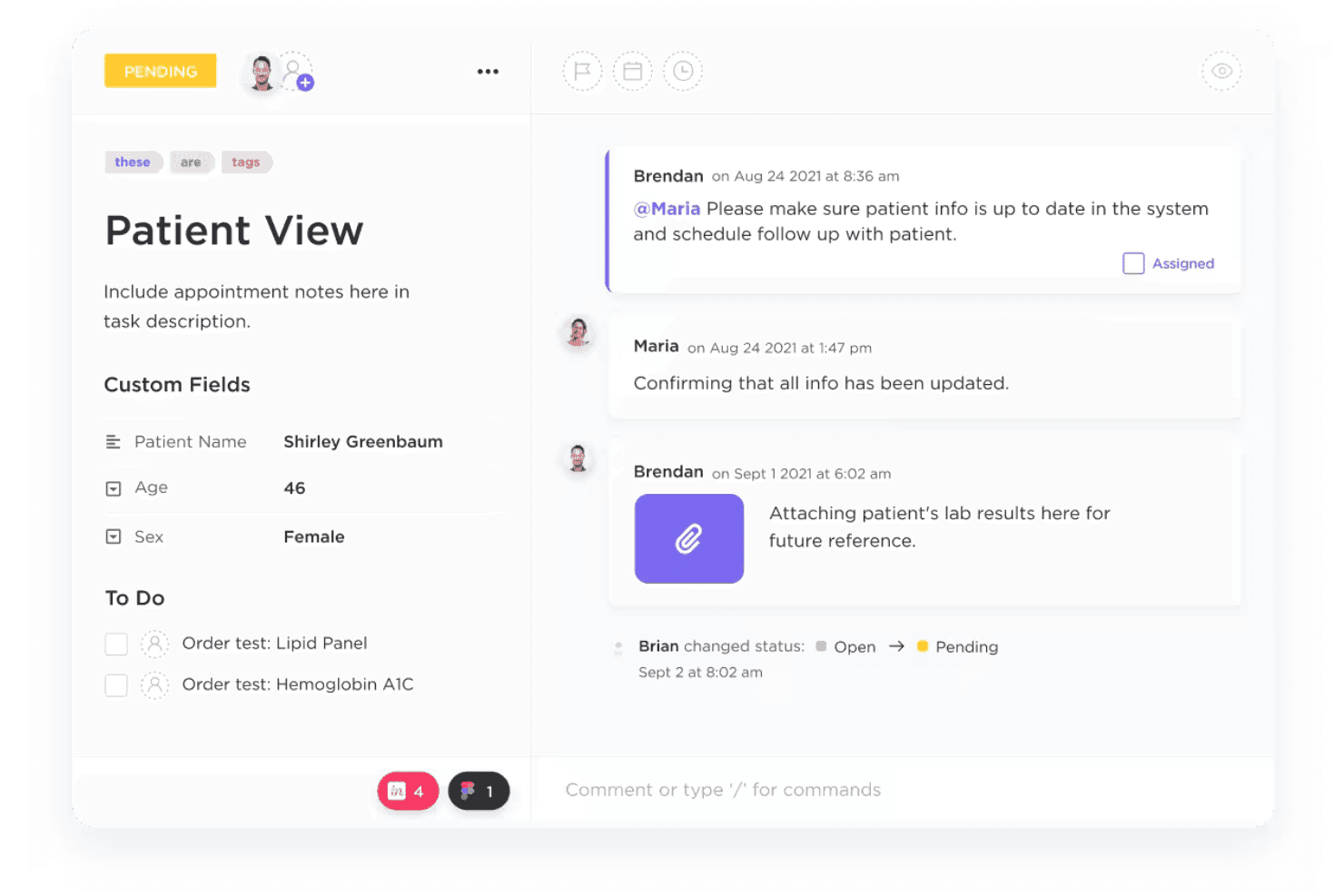
ClickUp configures healthcare tasks, workflows, dashboards, and HIPAA controls. ClickUp is a project management platform that adapts to healthcare teams through customizable workflows, task automation, HIPAA-compliant data handling, and multi-view dashboards for managing clinical, administrative, and compliance projects.
Who Is ClickUp Best For?
ClickUp is a strong fit for clinic operations managers and practice administrators at mid-to-large healthcare organizations coordinating projects across multiple departments.
Why I Picked ClickUp
I picked ClickUp as one of the best because the level of dashboard customization it offers is genuinely difficult to replicate in other tools. I use Custom Fields to track PHI access status, compliance milestone dates, and caregiver assignments all within a single dashboard view. Pair that with Workload view for balancing clinical staff capacity and Board view for visualizing supply replenishment timelines, and you get a setup that maps directly to how healthcare operations actually run.
ClickUp Key Features
- HIPAA-compliant workspace on Enterprise plan: Protects sensitive patient data with signed BAAs, advanced encryption, and audit logging.
- Role-based permission controls: Lets you restrict data and actions by job function or department within large healthcare teams.
- Healthcare-specific templates: Includes templates for patient intake, EHR update request workflows, and compliance documentation.
- Real-time collaboration tools: Offers in-app chat, secure file sharing, and document commenting to connect staff across clinical and administrative departments.
ClickUp Integrations
ClickUp offers native integrations with Google Workspace, Microsoft 365, Slack, Zoom, Drive, GitHub, Jira, Dropbox, Salesforce, and HubSpot. It also connects with Zapier and provides an API for custom integrations.
Pros and Cons
Pros:
- Multiple project views suit varied clinical needs
- HIPAA-compliant workspace available on Enterprise plan
- Highly customizable dashboards for clinical workflows
Cons:
- HIPAA compliance locked behind Enterprise tier only
- Setup complexity can overwhelm smaller clinical teams
Learn more about ClickUp: Best for tracking regulatory compliance milestones
- Free plan + trial + demo available
- From $10.99/user/month (billed annually)
Visit WebsiteCustomer Rating:4.4/5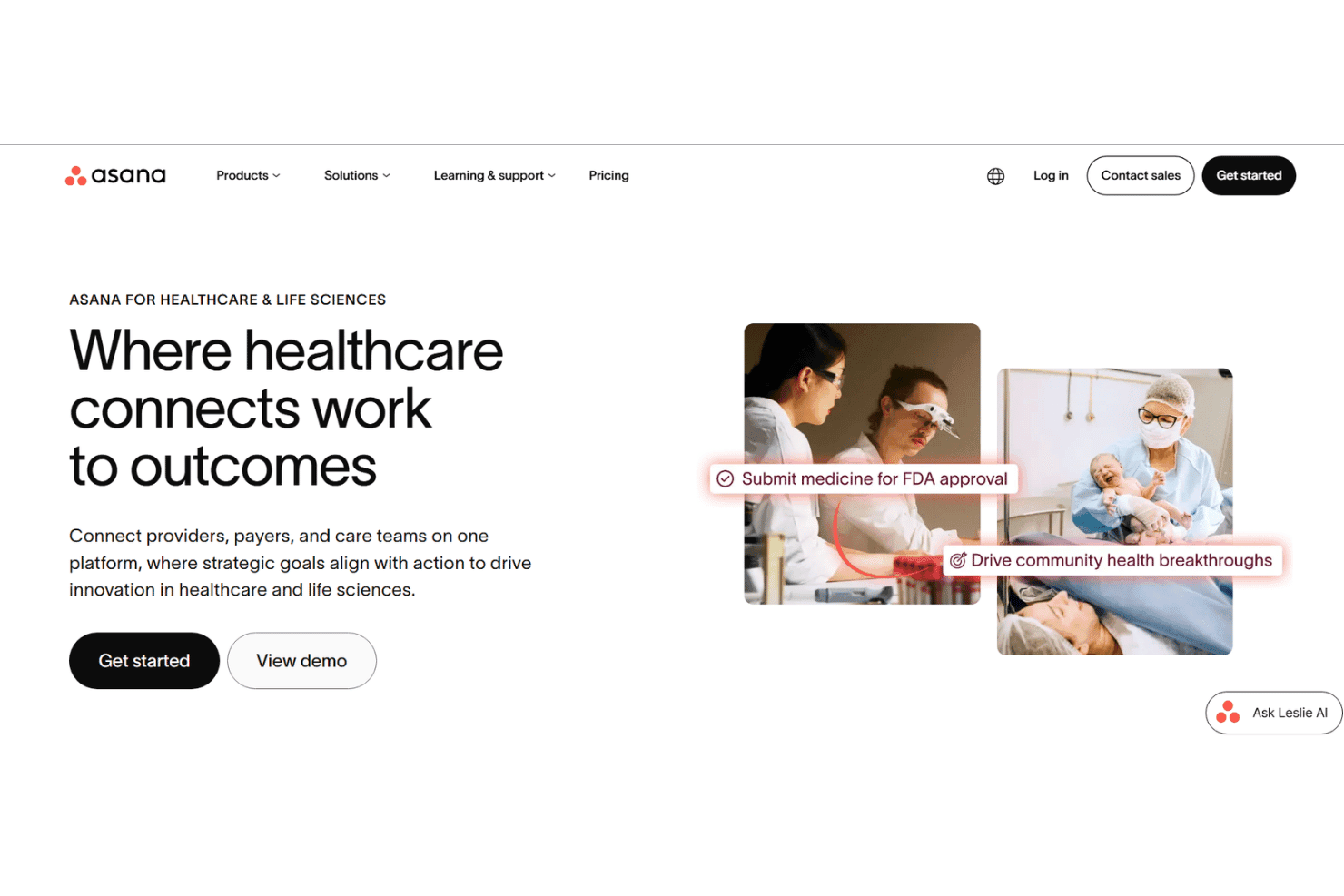
Asana coordinates healthcare projects, compliance, onboarding, and care teams. Asana is a work management platform built for healthcare organizations to coordinate clinical and administrative projects, track compliance workflows, manage credentialing and onboarding, and connect cross-functional teams across providers, payers, and care operations.
Who Is Asana Best For?
Asana is a strong fit for mid-to-large healthcare organizations with dedicated compliance, operations, or administrative teams managing complex, cross-departmental projects.
Why I Picked Asana
I picked Asana as one of the best because of how it handles regulatory compliance tracking at a structural level. I use the workflow builder to assign clear ownership and deadlines to each compliance milestone, so nothing slips through the gaps across departments. What really sets it apart is AI Studio, which actively flags missing documentation and compliance blockers in real time, rather than waiting for a manual review cycle.
Asana Key Features
- Healthcare project templates: Use pre-built workflows for onboarding, compliance, accreditation, and clinical operations projects.
- Role-based permissions: Assign granular access by user, team, or project to safeguard sensitive healthcare data.
- Advanced reporting dashboards: Generate customizable dashboards with real-time progress on tasks, resources, and compliance milestones.
- Secure external collaboration: Invite external stakeholders as guests for limited, project-specific access and file sharing.
Asana Integrations
Asana offers 200+ native integrations, including Slack, Microsoft Teams, Google Workspace, Salesforce, Zoom, Jira Cloud, Tableau, Zendesk, Okta, and Box. It also provides an API for custom integrations and connects with Zapier.
Pros and Cons
Pros:
- Granular role-based access controls built in
- Pre-built templates for healthcare onboarding workflows
- AI Studio flags compliance blockers automatically
Cons:
- Steep setup time for complex clinical workflows
- No built-in HIPAA-compliant messaging feature
Learn more about Asana: Best for managing cross-functional clinic projects
- Free plan + 14-day trial + demo available
- From $9.99/user/month (billed annually)
Visit WebsiteCustomer Rating:4.4/5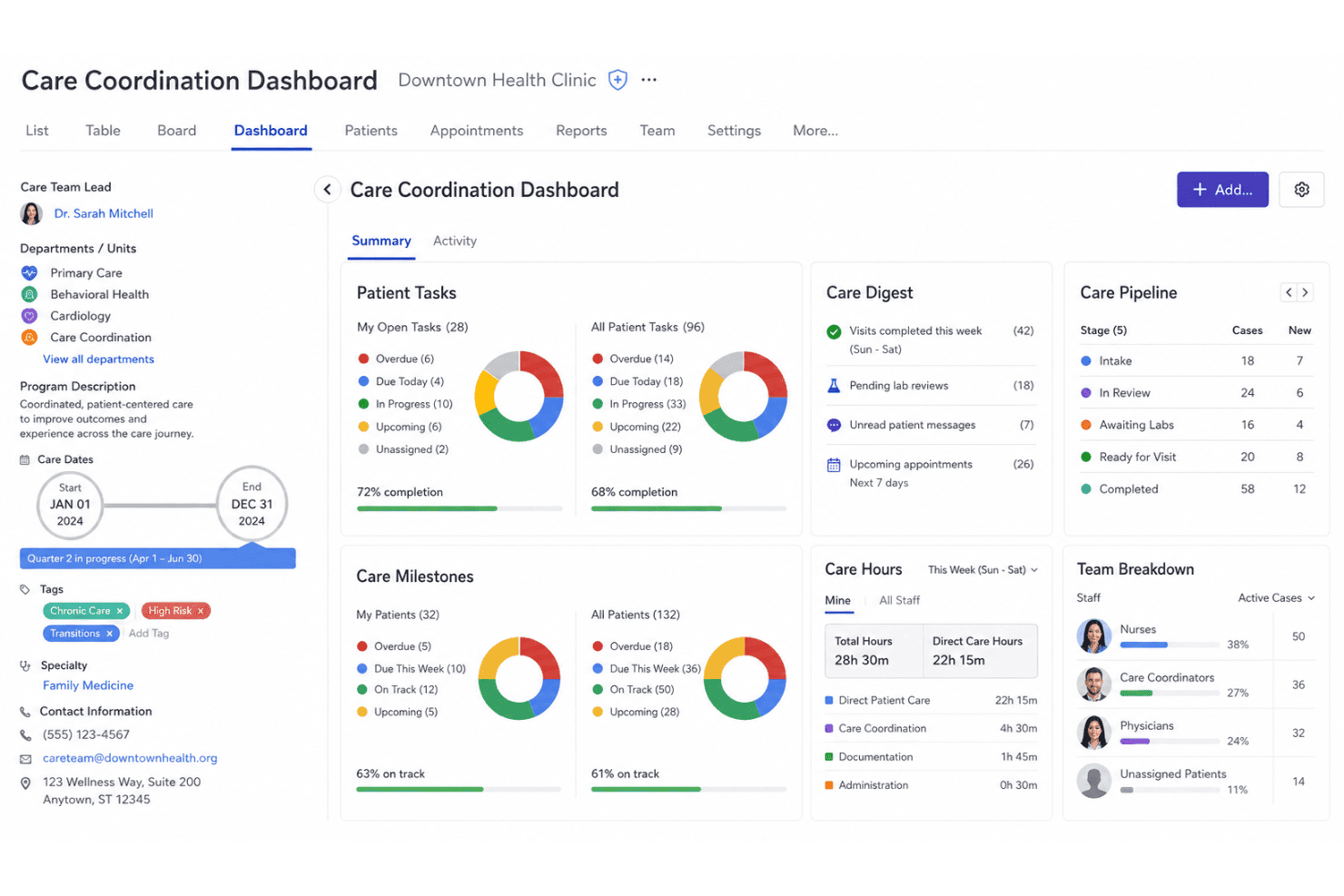
Teamwork.com coordinates tasks, time, resources, schedules, reports, and teams. Teamwork.com is a project management platform built around time tracking, task workflows, and cross-functional team coordination, with resource scheduling, Gantt charts, and reporting tools built into a single workspace.
Who Is Teamwork.com Best For?
Teamwork.com is a good fit for clinic operations managers who need to coordinate tasks, timelines, and resources across multiple departments simultaneously.
Why I Picked Teamwork.com
I've included Teamwork.com in my top picks because its workload planning and live capacity tools let me see how tasks are distributed across clinical and administrative teams in real time. When running multiple clinic projects, the Project Health dashboard gives an at-a-glance status across all of them without digging into individual task lists. I also use Gantt charts with dependency tracking to sequence cross-departmental steps, like linking credentialing milestones to onboarding tasks.
Teamwork.com Key Features
- Time tracking integration: Track billable and non-billable hours directly on tasks and projects for detailed recordkeeping.
- Project templates: Save and reuse custom project templates for recurring initiatives or administrative projects.
- Granular role-based permissions: Control access for each user or group across projects, boards, and sensitive project data.
- Resource management dashboard: Visualize and allocate team workloads to prevent bottlenecks and optimize daily operations.
Teamwork.com Integrations
Teamwork.com offers native integrations with Google Drive, Microsoft 365, Dropbox, SharePoint, Slack, HubSpot, QuickBooks, Xero, Harvest, and Zapier. An API is available for custom integrations.
Pros and Cons
Pros:
- Granular role-based permissions for project access
- Detailed time logs for each task
- Milestone tracking across multiple simultaneous projects
Cons:
- Mobile app lacks full desktop functionality
- No documented HIPAA compliance or BAA
Learn more about Teamwork.com: Best for secure real-time staff communication
- Free plan + 1-month free trial available
- From $4/user/month (billed annually)
Visit WebsiteCustomer Rating:4.3/5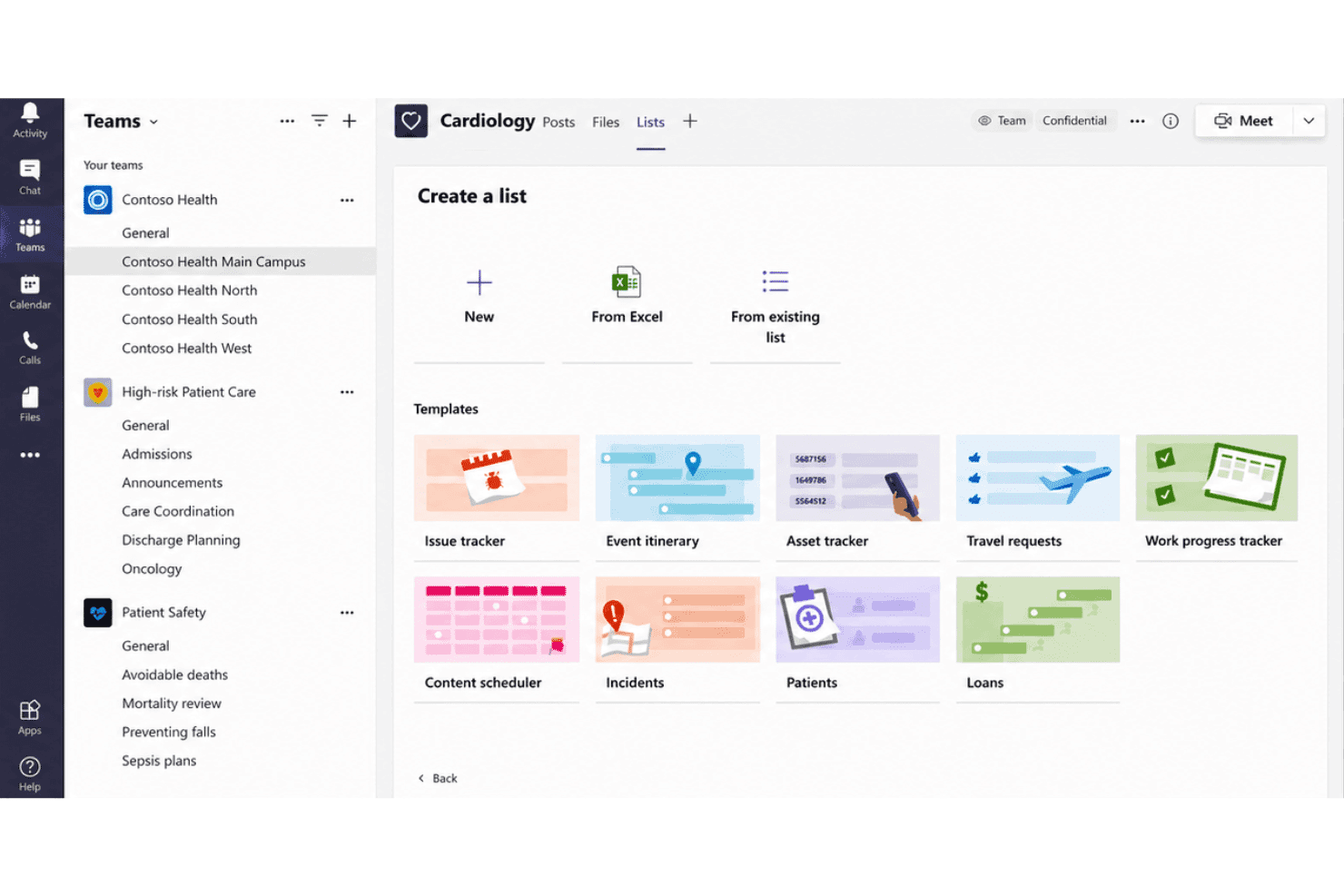
Microsoft Teams connects messaging, meetings, files, scheduling, and EHRs. Microsoft Teams is a communication and collaboration hub that combines secure messaging, video conferencing, file sharing, and scheduling with HIPAA-covered infrastructure and EHR integration for clinical and administrative healthcare teams.
Who Is Microsoft Teams Best For?
Microsoft Teams is a strong fit for healthcare organizations already running Microsoft 365 that need HIPAA-covered communication across clinical and administrative teams.
Why I Picked Microsoft Teams
Microsoft Teams earns its spot on my shortlist because the HIPAA Business Associate Agreement is automatically in effect for eligible Microsoft 365 subscriptions, removing a significant compliance setup burden. I particularly like the Shifts feature for coordinating clinical staff schedules in real time, and the Epic EHR connector lets clinicians launch virtual patient appointments directly from their Epic workflow without logging into a separate system.
Microsoft Teams Key Features
- Channel-based collaboration: Organize conversations, files, and meetings by specific clinical or administrative topics within dedicated channels.
- Role-based access controls: Set granular permissions for who can view, post, and access information in channels, chats, and files.
- EHR integration with Epic: Connects directly to Epic EHR systems, allowing providers to launch patient appointments and coordinate care from within Teams.
- HIPAA-compliant file sharing: Share patient documents and protected health information securely with built-in data encryption and compliance controls.
Microsoft Teams Integrations
Microsoft Teams has native integrations across the Microsoft ecosystem, including Microsoft 365 and Azure. It also offers a native integration with Epic and provides an API for custom integrations.
Pros and Cons
Pros:
- Epic EHR connector for virtual patient appointments
- Shifts feature built in for clinical scheduling
- HIPAA BAA included with Microsoft 365 subscriptions
Cons:
- Task management lacks clinical workflow automation
- No dedicated healthcare project tracking templates
Learn more about Microsoft Teams: Best for analytics-driven resource allocation
- Not available
- Pricing upon request
Visit WebsiteCustomer Rating:4.3/5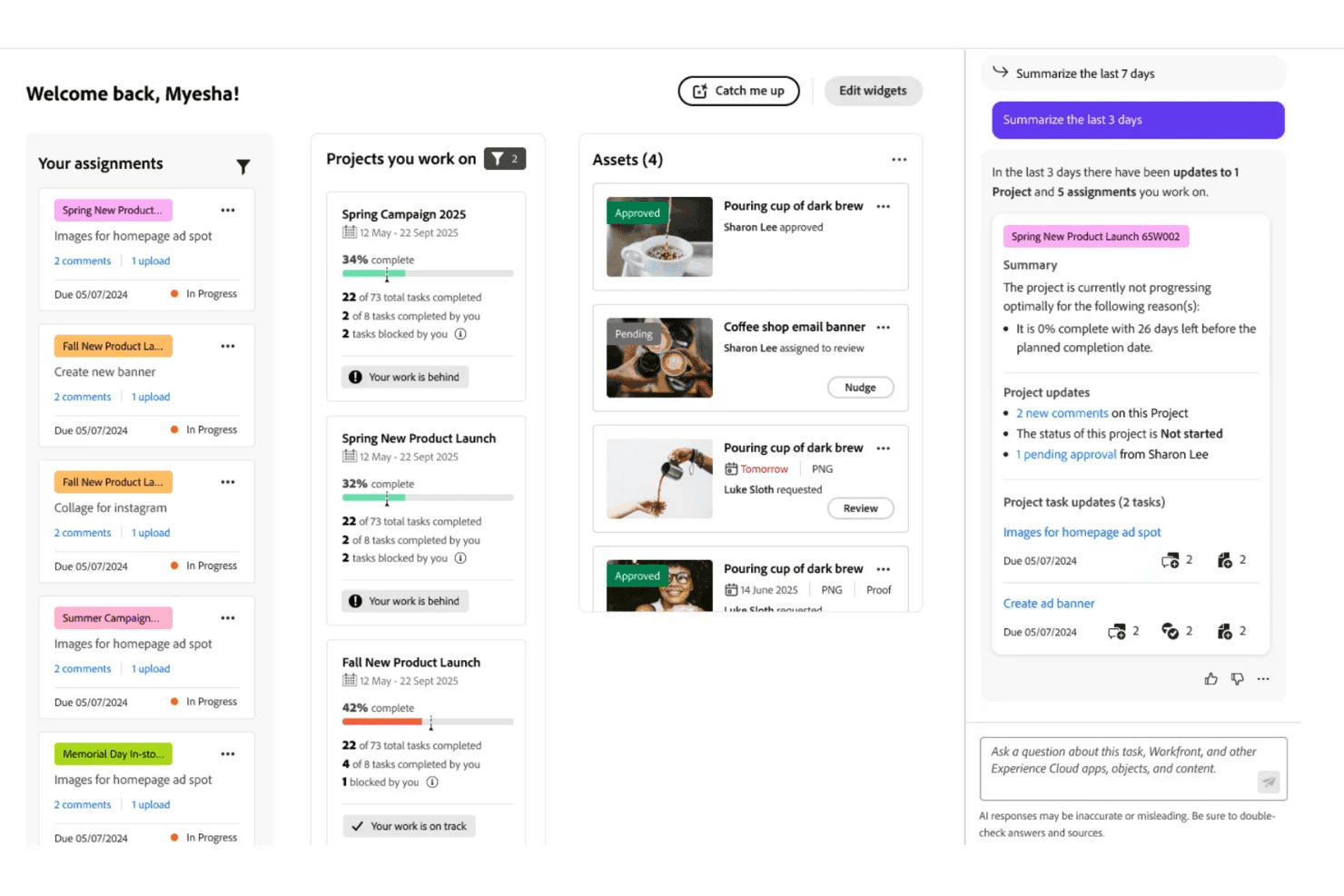
Adobe Workfront directs projects, tasks, resources, approvals, and workflows. Adobe Workfront is an enterprise work management platform that centralizes project planning, task automation, resource allocation, cross-team workflows, and review and approval processes across large clinical and administrative organizations.
Who Is Adobe Workfront Best For?
It's a strong fit for large health systems and enterprise healthcare organizations with complex, multi-team project portfolios managed by dedicated operations or compliance staff.
Why I Picked Adobe Workfront
Adobe Workfront earns its spot on my shortlist because of how precisely it handles resource allocation across large project portfolios. I like that Data Connect pipes workload data directly into BI tools, so I can see exactly where staff capacity is stretched before it becomes a scheduling problem. Portfolio-level reporting also lets me track compliance milestones and resource spend across multiple concurrent initiatives in a single view.
Adobe Workfront Key Features
- HIPAA-Ready package: Enables customers to obtain a signed BAA and advanced compliance tools for regulated workflows.
- Advanced digital proofing: Lets teams review, comment, and approve files or forms with version history and audit trails.
- Custom workflow automation: Supports building automated, role-based review and approval flows with conditional triggers.
- Granular role-based permissions: Allows administrators to define user access by role, team, data field, and project confidentiality.
Adobe Workfront Integrations
Native integrations include Adobe Experience Manager, Adobe Creative Cloud, Microsoft 365, Jira, Slack, Salesforce, and Tableau. An API is available for custom integrations.
Pros and Cons
Pros:
- Granular role-based access controls for PHI
- Highly customizable approval and review workflows
- Deep portfolio-level reporting for compliance tracking
Cons:
- Steep onboarding for non-technical clinical staff
- Complex initial setup requires significant IT involvement
Learn more about Adobe Workfront: Best for multi-site practice project oversight
- 14-day free trial + demo available
- From $8/user/month (billed annually)
Visit WebsiteCustomer Rating:4.7/5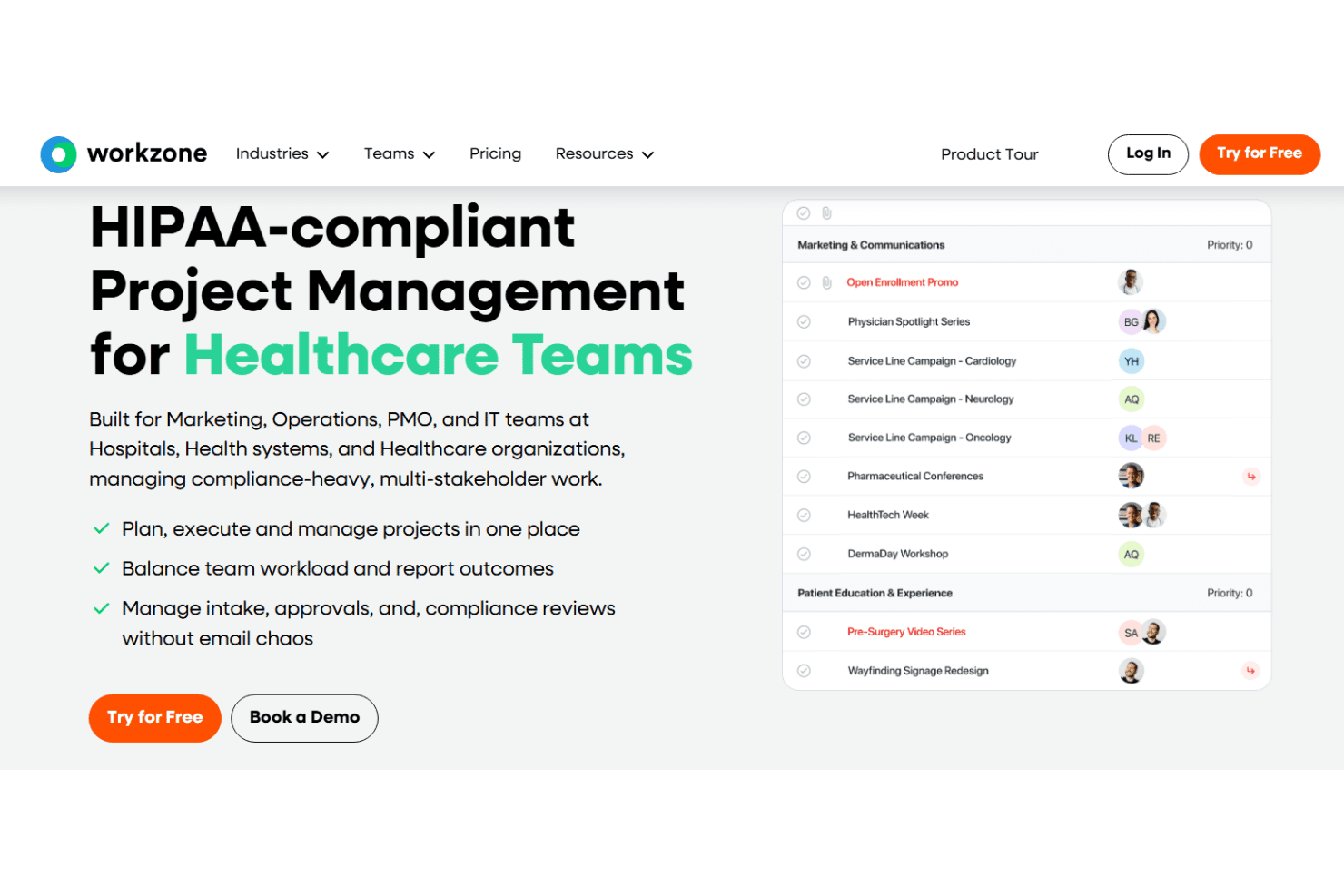
Workzone provides project visibility, workflows, resource planning, and proofing. Workzone is a HIPAA-compliant project management platform that gives healthcare organizations portfolio-level visibility, task and workflow management, resource planning, and proofing tools across clinical and administrative teams.
Who Is Workzone Best For?
Workzone is a strong fit for mid-to-large health systems and multi-site practices where operations and PMO teams need centralized oversight across departments and care locations.
Why I Picked Workzone
Workzone earns its spot on my shortlist because its portfolio view gives operations teams a single pane of glass across every department, care site, and project at once. I particularly like the workspace groups feature, which lets multi-site health systems segment projects by location or service line without losing cross-site visibility. The cross-project dependencies and critical path tools mean my team can flag when a delay at one site cascades into a broader rollout risk.
Workzone Key Features
- HIPAA compliant document management: Store, share, and manage sensitive healthcare files securely with audit trails and access controls.
- Healthcare project template library: Access 200+ templates tailored to accreditation, EHR rollouts, credentialing, and operational initiatives.
- Advanced proofing and approvals: Review, annotate, and request approvals for documents, graphics, and videos directly within the platform.
- Customizable intake forms: Standardize project and task requests across clinical, administrative, and IT workflows with configurable forms.
Workzone Integrations
Workzone offers native integrations with Microsoft Teams, Slack, SharePoint, Google Drive, Box, and OneDrive, and provides an API for custom integrations.
Pros and Cons
Pros:
- Healthcare-specific templates for EHR and credentialing projects
- HIPAA-compliant audit trails on all shared files
- Portfolio-level view across multiple care sites
Cons:
- Reporting customization is narrow compared to competitors
- Mobile app offers limited project management features
Learn more about Workzone: Best for EHR rollout and onboarding templates
- 30-day free trial
- From $9/user/month (billed annually)
Visit WebsiteCustomer Rating:4.4/5
Smartsheet manages clinical projects, compliance, EHR rollouts, and onboarding. Smartsheet is a work management platform built for healthcare organizations to plan, track, and automate projects across clinical operations, compliance, EHR rollouts, staff onboarding, credentialing, and capital initiatives.
Who Is Smartsheet Best For?
Smartsheet is a strong fit for mid-to-large health systems and multi-site clinic networks with dedicated operations or PMO teams managing multiple concurrent projects.
Why I Picked Smartsheet
I picked Smartsheet as one of the best because its IT/IS portfolio management solution is purpose-built for EHR rollout planning, covering everything from technology prioritization to go-live tracking. The clinician onboarding and credentialing templates let teams map out background checks, insurance enrollment, and training schedules in one place. Control Center lets me push template updates across every active project simultaneously, which matters when a rollout spans multiple departments or sites.
Smartsheet Key Features
- Role-based access controls: Set granular permissions for different user types, projects, or sensitive datasets.
- Advanced dashboards and reporting: Build live project dashboards and custom reports to visualize healthcare compliance milestones and resource allocation.
- Integration with Microsoft 365 and Google Workspace: Sync sheets, files, and communication directly with commonly used productivity platforms.
- Automated alerting and reminders: Use rule-based automations to notify staff and escalate critical accreditation or compliance deadlines.
Smartsheet Integrations
Smartsheet offers native integrations across the Microsoft ecosystem, including Microsoft 365 and Azure, as well as Google Workspace, Slack, DocuSign, Jira, Salesforce, ServiceNow, and connects with Zapier. An API is available for custom integrations.
Pros and Cons
Pros:
- HIPAA-compliant with BAA available
- Control Center scales templates across multiple sites
- Pre-built EHR rollout and credentialing templates
Cons:
- Complex setup for non-technical clinical administrators
- No native EHR or EMR system integrations
Learn more about Smartsheet: Best for role-based compliance workflows
- Free plan + 14-day free trial + free demo available
- From $10/user/month (billed annually)
Visit WebsiteCustomer Rating:4.3/5
Wrike coordinates healthcare tasks, schedules, approvals, access, and resources. Wrike is a work management platform with task automation, Gantt chart scheduling, role-based access controls, approval workflows, and resource management tools built for clinical and administrative healthcare teams.
Who Is Wrike Best For?
Wrike is a strong fit for mid-size to large healthcare organizations with dedicated operations or compliance teams managing multi-phase, cross-departmental projects.
Why I Picked Wrike
Wrike earns its spot on my shortlist because of how it handles role-based permissions across teams. I can assign access rights by user, role, or group, so a compliance officer's workspace looks completely different from a clinician's. Built-in approval workflows let me route policy documents for sign-off without leaving the platform, and Pinnacle-tier audit logs track every action for accountability during regulatory reviews.
Wrike Key Features
- Gantt chart scheduling: Visualize project timelines and manage dependencies across multi-phase healthcare initiatives.
- Healthcare project templates: Use ready-made templates for project scheduling, communication plans, and contract management workflows.
- Request forms for intake: Capture and auto-route clinical or administrative requests using standardized forms that create and assign tasks.
- Audit-ready reporting: Generate real-time reports and dashboards to track resource allocation, deadlines, and compliance milestones.
Wrike Integrations
Wrike offers hundreds of integrations through its built-in integrations and marketplace, including tools like Google Workspace, Microsoft 365, Salesforce, Slack, Box, Dropbox, Jira, GitHub, Zoom, and Adobe Creative Cloud. It also supports Zapier and provides an API for custom integrations.
Pros and Cons
Pros:
- Pre-built templates for healthcare project types
- Audit logs track every user action
- Granular role-based access controls for compliance
Cons:
- Setup complexity grows with larger healthcare teams
- Reporting customization locked behind higher-tier plans
Learn more about Wrike: Best for automating credentialing processes
- 14-day free trial
- From $9/seat/month (billed annually)
Visit WebsiteCustomer Rating:5/5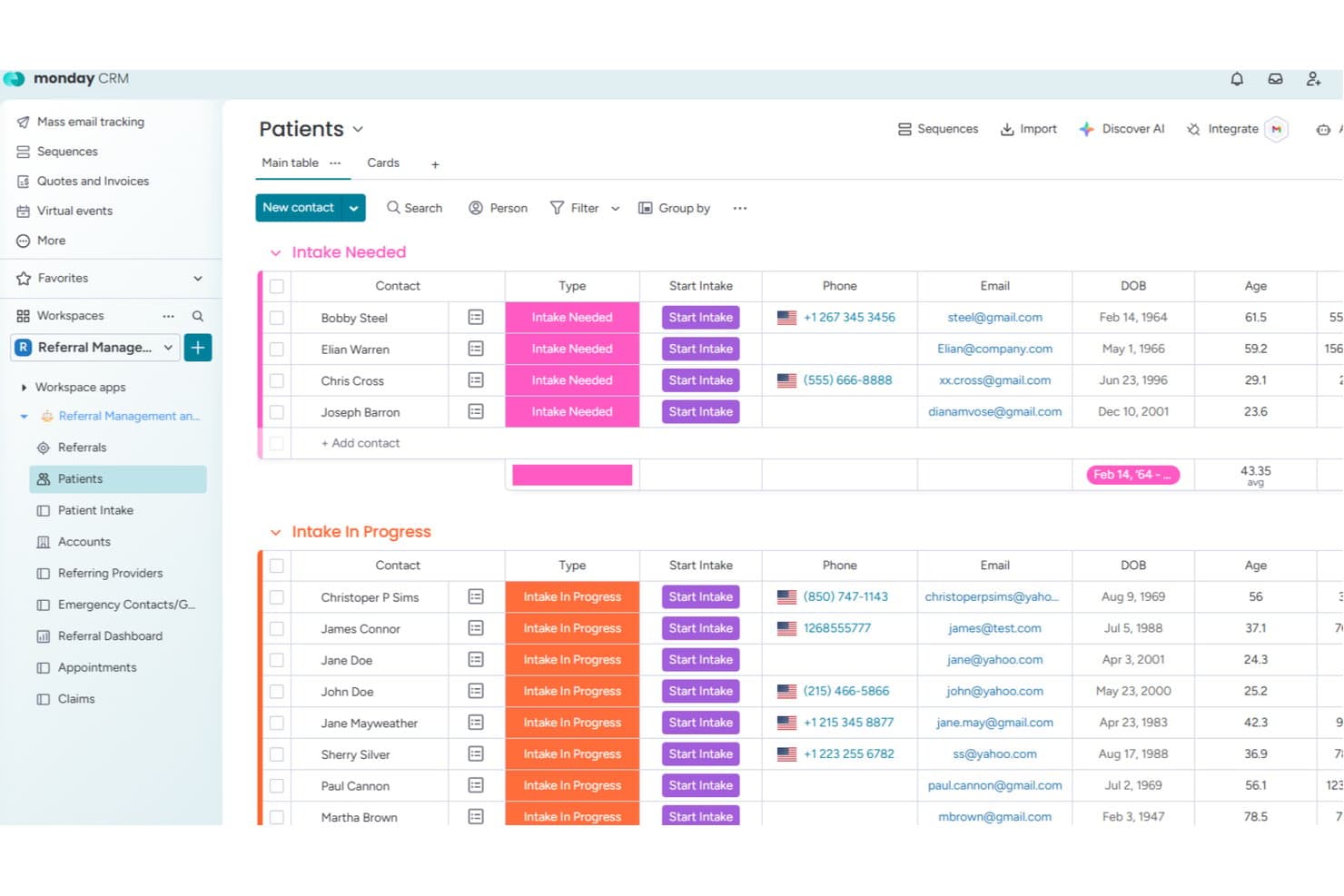
monday.com offers a dedicated Patients board with intake status tracking, contact details, DOB, and age columns for streamlined healthcare patient management. monday.com is a work management platform with a healthcare-specific configuration that includes pre-built boards for patient intake, referrals, appointments, and claims, alongside bi-directional EHR integrations and HIPAA-compliant workflow automations.
Who Is monday.com Best For?
It's a strong fit for mid-to-large healthcare organizations with clinic operations managers or practice administrators overseeing complex, multi-team workflows across clinical and administrative functions.
Why I Picked monday.com
monday.com earns its spot on my shortlist because of how well its automation engine handles the repetitive, step-heavy nature of credentialing. I use cross-board automations to trigger status updates, deadline reminders, and task assignments the moment a credential application moves stages. The pre-built provider boards make it easy to track active applications, expiration dates, and document submissions across multiple practitioners at once.
monday.com Key Features
- HIPAA mode and audit logs: Activate account-wide HIPAA protections and track every action taken on PHI within project workflows.
- Healthcare intake and referral boards: Use purpose-built boards to manage patient intake, referrals, appointments, and claims.
- Granular permission controls: Configure access at the workspace, board, or item level to safeguard project data and sensitive information.
- Bi-directional EHR integration: Sync patient, appointment, and claims data with leading EHR systems to keep records and workflows connected.
monday.com Integrations
monday.com offers hundreds of native integrations, including Slack, Salesforce, HubSpot, Google Workspace, Outlook, DocuSign, Zoom, Microsoft Teams, Jira, and OneDrive. It also connects with Zapier and provides an API for custom integrations.
Pros and Cons
Pros:
- Bi-directional EHR sync keeps data current
- HIPAA-compliant account mode with audit logs
- Pre-built provider credentialing boards available
Cons:
- PHI controls require a higher-tier plan
- No native clinical scheduling or shift tools
Learn more about monday.com: Best for HIPAA-compliant care team task tracking
- Free demo available
- Pricing upon request
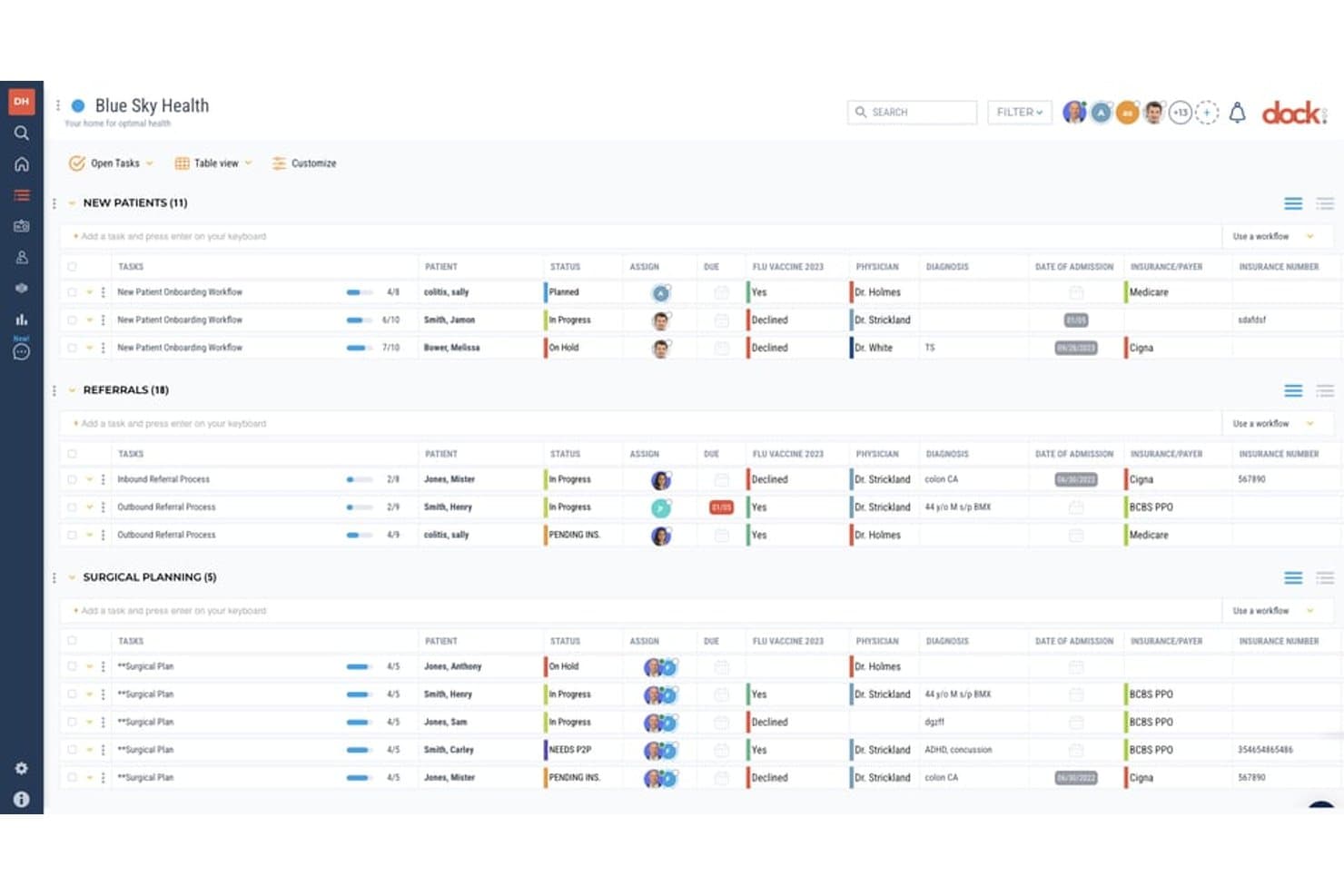
Dock Health offers a table-based project management view for organizing patient workflows, referrals, and surgical planning with fields for status, physician, diagnosis, insurance, and due dates. Dock Health is a HIPAA-native task management and workflow automation platform built specifically for healthcare teams, combining care team coordination, SmartFlows automation, EHR integrations, and patient workflow tracking across clinical and administrative operations.
Who Is Dock Health Best For?
Dock Health is a strong fit for independent medical practices, DPC clinics, and concierge medicine teams that need HIPAA-compliant task and workflow management built into their daily operations.
Why I Picked Dock Health
Dock Health earns its spot on my shortlist because it's the only task management platform I've found built HIPAA-compliant from the ground up, not retrofitted with a BAA. I particularly like SmartFlows, which triggers task workflows directly from EHR events, like a signed note in Elation or a membership status change in AdvancedMD. That means task creation is tied to the EHR itself, and every follow-up step links directly to a patient record inside Dock.
Dock Health Key Features
- Role-based access controls: Manage project and patient data permissions based on clinical or administrative role.
- Pre-built healthcare SmartFlows: Deploy customizable task templates for care transitions, billing, and patient onboarding.
- HIPAA-compliant team messaging: Communicate securely using in-app chat with audit trails for PHI.
- Analytics and dashboard module: Monitor project tasks, overdue items, and operational metrics with visual dashboards.
Dock Health Integrations
Dock Health offers native integrations with Elation, AdvancedMD, athenahealth, Epic, Cerner, DocuSign, Gmail, Google Calendar, Jotform, and RingCentral, and provides an API for custom integrations.
Pros and Cons
Pros:
- Supports care team task delegation by role
- Patient records link directly to tasks
- HIPAA-native design, not retrofitted compliance
Cons:
- Limited fit for large health system PMOs
- Reporting dashboards lack advanced analytics depth
Learn more about Dock Health:
Other Healthcare Project Management Software
Here are some additional healthcare project management software options that didn’t make it onto my shortlist, but are still worth checking out:
- 11MedTrainerBest for staff compliance and credential tracking
- 12Zoho ProjectsBest for integrating practice operations tools
- 13InsightlyBest for linking patient data with projects
- 14AirtableBest for building custom clinic workflow apps
- 15HiveBest for visualizing collaborative care projects
- 16NotionBest for organizing clinical SOPs and knowledge
- 17JiraBest for sprint-based healthcare IT rollouts
- 18Modio HealthBest for cross-practice credential management
- 19Comply AssistantBest for HIPAA and accreditation preparedness
- 20symplr ComplianceBest for automated healthcare compliance checks
How I Evaluate Healthcare Project Management Software
I evaluate these platforms on two levels: baseline requirements like HIPAA compliance and task tracking for clinical teams, and differentiators like EHR integrations and credentialing templates.
Core Functionality (Table Stakes For This List)
When I'm selecting tools for my list, I rank each one on a scale from 0 (does not offer the functionality) to 5 (excels in this area) for each core functionality listed below. Then, I calculate the tool's total score into a percentage. Each tool needs to achieve a minimum total score of 65% to be considered for inclusion.
- HIPAA Compliance: I check whether the vendor offers a signed BAA, encryption at rest and in transit, and audit logging suited for workflows that touch PHI.
- Task & Workflow Management: Assigning tasks across nursing, billing, and admin teams requires dependencies, automations, and multiple project views beyond basic to-do lists.
- Healthcare Templates: I look for pre-built templates tailored to projects like EHR rollouts, Joint Commission prep, credentialing cycles, or quality improvement initiatives.
- Role-Based Permissions: Clinical hierarchies matter, so I evaluate whether a tool supports granular access controls at the project, field, and data level for each role.
- Team Collaboration: Secure file sharing, @mentions, and messaging between clinicians and external stakeholders should work without forcing teams onto separate communication channels.
- Reporting & Dashboards: I look for visual dashboards that track compliance milestones, resource allocation, and project status in real time with customizable filters.
Once I have a list of tools that meet the criteria, I consider what sets each platform apart.
Differentiating Factors (What Sets Vendors Apart)
Here's how I compare and contrast different vendors:
Standout Features
Resource and credential tracking matters when you're assigning staff to projects based on active licensure and shift availability. During an EHR rollout, for example, only credentialed clinicians should lead go-live tasks. I also evaluate how well a platform tracks regulatory milestones like accreditation deadlines and ties automated alerts to project deliverables. Patient-centered care coordination is a real differentiator. I look for tools that manage multi-disciplinary care plans alongside operational projects, connecting referrals and case timelines to initiative tracking.
Beyond Features
EHR/EMR integrations are a big factor. I check whether a platform connects natively to systems like Epic or Cerner, or supports HL7 and FHIR standards for clinical data exchange. Implementation support also matters. Shift-based clinical staff can't sit through week-long training sessions, so I look for vendors with onboarding programs adapted to limited screen time. Scalability is worth evaluating too, especially flexible licensing that accommodates occasional physician users alongside daily PMO staff across multiple facilities.
How to Choose Healthcare Project Management Software
It’s easy to get bogged down in long feature lists and complex pricing structures. To help you stay focused as you work through your unique software selection process, here’s a checklist of factors to keep in mind:
| Factor | What to Consider |
|---|---|
| FactorScalability | What to ConsiderWill the tool support your clinic as you add users, sites, or service lines? Think about both clinical and administrative growth, not just headcount. |
| FactorIntegrations | What to ConsiderCan it connect to your EHR, scheduling, or credentialing systems? Ask for real-world integration examples, not just API documentation. |
| FactorCustomizability | What to ConsiderCan you tailor templates, roles, and workflows to mirror your care delivery processes and compliance needs? Avoid rigid systems that force workarounds. |
| FactorEase of use | What to ConsiderHow much training will staff need? Look for intuitive navigation and interface clarity—clinical staff have limited time for tech onboarding. |
| FactorImplementation and onboarding | What to ConsiderWhat’s the expected rollout timeline? Will the vendor provide healthcare-specific onboarding guidance tailored for shift-based and clinical teams? |
| FactorCost | What to ConsiderWhat is the true total cost—including add-ons or API access—over the next 1-3 years? Watch for per-user fees or hidden integration charges. |
| FactorSecurity safeguards | What to ConsiderAre BAA, encryption, and audit logs included? Look for proof of HIPAA readiness, not just claims on marketing pages. |
| FactorCompliance requirements | What to ConsiderDoes the tool align with your specific regulatory and audit needs (HIPAA, accreditation, data residency)? Misalignment can create costly risk later. |
What Is Healthcare Project Management Software?
Healthcare project management software is digital platforms designed to help clinical and administrative teams plan, organize, and oversee complex projects in care settings.
These tools facilitate task assignments, compliance tracking, workflow automation, and secure communication in regulated environments, supporting better oversight and helping teams balance patient safety with operational goals.
Features of Healthcare Project Management Software
When selecting healthcare project management software, keep an eye out for the following key features:
- HIPAA-compliant data handling: Enables secure management, storage, and sharing of sensitive patient information to meet privacy regulations and support compliance audits.
- Task assignment and tracking: Lets you allocate, prioritize, and monitor clinical and administrative tasks with clear due dates and responsibility tracking for each team member.
- Role-based permissions: Allows granular control over who can view, edit, and approve tasks or documents, matching clinical hierarchies and safeguarding confidential data.
- Customizable healthcare templates: Provides project templates for common healthcare workflows such as accreditation, EHR rollouts, and staff credentialing to speed up project launches.
- Secure team collaboration: Supports messaging, file sharing, and discussion threads within the platform, protecting sensitive conversations and ensuring everyone stays informed.
- Automated workflows: Streamlines repetitive or regulated project processes, such as compliance documentation and multi-step approvals, to reduce manual effort and minimize errors.
- Regulatory milestone tracking: Enables automated monitoring and reminders for accreditation deadlines, audits, grant reporting, and other critical compliance-related events.
- Visual dashboards and reports: Offers real-time, customizable analytics to track project progress, resource allocation, and regulatory status, helping leaders address issues proactively.
- Integration with clinical systems: Connects with EHRs, scheduling, and HR systems to reduce double entry, improve coordination, and maintain data consistency across operations.
- Mobile accessibility: Lets clinical and administrative staff access project details, update tasks, and communicate securely while on the move, supporting flexible work patterns.
Common Healthcare Project Management Software AI Features
Beyond the standard healthcare project management software features listed above, many of these solutions are incorporating AI with features like:
- Predictive resource allocation: Uses AI to analyze historical staffing and patient volume data, helping forecast future resource needs and optimize clinician scheduling for upcoming projects.
- Automated compliance monitoring: Continuously scans project activities and documentation for compliance gaps, alerting teams to potential HIPAA or accreditation risks before audits occur.
- Intelligent workflow suggestions: Recommends process improvements or automates repetitive steps by learning from past project patterns, reducing manual setup and streamlining clinical workflows.
- Natural language processing for documentation: Extracts key information from meeting notes, emails, or voice memos, automatically updating project records and reducing administrative burden.
- AI-driven risk identification: Flags potential delays, bottlenecks, or resource conflicts in real time by analyzing project data, enabling proactive intervention and smoother project delivery.
Benefits of Healthcare Project Management Software
Implementing healthcare project management software provides several benefits for your team and your business. Here are a few you can look forward to:
- Improved compliance oversight: Automates regulatory tracking and documentation, making it easier to stay audit-ready and meet HIPAA, accreditation, or certification requirements.
- Enhanced team collaboration: Offers secure messaging, file sharing, and workflow visibility, keeping administrative and clinical staff coordinated around shared goals.
- Streamlined clinical workflows: Uses templates, automation, and task tracking to help your team launch projects quickly and minimize manual steps.
- Greater resource efficiency: Tracks staff credentials, assignments, and availability, allowing you to allocate the right resources to the right projects in real time.
- Faster project turnaround: Centralizes communication, automates reminders, and provides visual dashboards so projects move forward without unnecessary delays.
- Actionable performance insights: Delivers real-time analytics, customizable dashboards, and reporting to help leaders identify bottlenecks and proactively address issues.
- Reduced administrative burden: Automates repetitive tasks like compliance checks or documentation updates, freeing up time for both clinicians and administrative teams.
Costs and Pricing of Healthcare Project Management Software
Selecting healthcare project management software requires an understanding of the various pricing models and plans available. Costs vary based on features, team size, add-ons, and more. The table below summarizes common plans, their average prices, and typical features included in healthcare project management software solutions:
Plan Comparison Table for Healthcare Project Management Software
| Plan Type | Average Price | Common Features |
|---|---|---|
| Plan TypeFree Plan | Average Price$0 | Common FeaturesBasic task management, limited user access, simple dashboards, and community support. |
| Plan TypePersonal Plan | Average Price$5–$15/user/month | Common FeaturesIndividual workspaces, basic integrations, standard templates, and limited document storage. |
| Plan TypeBusiness Plan | Average Price$15–$40/user/month | Common FeaturesAdvanced project templates, role-based permissions, team messaging, workflow automation, and standard integrations. |
| Plan TypeEnterprise Plan | Average Price$40–$100+/user/month | Common FeaturesHIPAA compliance, custom integrations, audit logs, advanced security controls, dedicated onboarding, and priority support. |
Healthcare Project Management Software FAQs
Here are some answers to common questions about healthcare project management software:
How does healthcare project management software help with regulatory compliance?
Healthcare project management software streamlines compliance by tracking accreditation deadlines, documenting audit trails, and supporting HIPAA requirements. This helps you stay audit-ready and reduces the risk of missing critical regulatory obligations.
Can these tools be integrated with EHR and EMR systems?
Yes, many solutions offer native or API integrations with major EHR and EMR platforms. This allows data sharing and project coordination across clinical systems, reducing manual entry and keeping all stakeholders aligned.
What should I look for in implementation and onboarding support?
Look for vendors that offer healthcare-specific onboarding tailored to shift-based clinical teams and administrative staff. Support for phased rollouts, training resources, and dedicated customer success managers can make adoption much smoother.
Are these tools suitable for both clinical and administrative teams?
Yes, most platforms support both clinical (physicians, nurses, coordinators) and administrative users. Flexible licensing and configurable permissions are important for managing different roles and usage patterns across your organization.
What are the key security features I should confirm?
Confirm the software includes HIPAA-compliant data handling, BAA agreements, encryption standards, and role-based access controls. These safeguards help protect sensitive patient and operational information.