

Cardiology billing software is specialized medical billing software designed to handle the complexities of cardiology coding, claims, and reimbursement. If you’re looking for ways to keep your billing accurate and your revenue cycle steady, finding the right platform is crucial. With payer rules and procedure codes always changing, teams in cardiology practices can’t afford delays or denied claims. This list covers the best cardiology billing software in 2026—so you can compare top options, see which fit your workflow, and feel confident your billing is in expert hands.
Why Trust Our Software Recommendations
6,700+
Reviews
20
Industry experts
16+
Evaluation factors
14
Years
Our team has been testing and reviewing software since 2012. As medical practice leaders ourselves, we know how difficult—and important—it is to choose the right software.
For this guide, we evaluated tools using hands-on testing and independent research, scoring tools using our selection criteria.
Our reviews reflect our human editorial judgment, not a sales pitch.
Cardiology Billing Software Comparison Table
This comparison table summarizes pricing details for my top cardiology billing software selections:
| Tool | Best For | Trial Info | Price | ||
|---|---|---|---|---|---|
| 1 | Best for specialty-specific reporting features | Free demo available | Pricing upon request | Website | |
| 2 | Best for flexible payment collection solutions | Free demo available | Pricing upon request | Website | |
| 3 | Best for iPad-based mobile charting | Free demo available | Pricing upon request | Website | |
| 4 | Best for cardiology coding intelligence | Free demo available | Pricing upon request | Website | |
| 5 | Best for cardiovascular clinical data integration | Free demo available | Pricing upon request | Website | |
| 6 | Best for integrated clinical and billing insights | Free demo available | Pricing upon request | Website | |
| 7 | Best for multi-location billing coordination | Free demo available | Pricing upon request | Website | |
| 8 | Best for customizable workflow automations | Free demo available | Pricing upon request | Website | |
| 9 | Best for easy claim management tools | Free demo available | Pricing upon request | Website | |
| 10 | Best for cardiology-specific template options | Free demo available | Pricing upon request | Website |


Best Cardiology Billing Software Reviews
Below are my detailed summaries of the best cardiology billing software that made it onto my shortlist. My reviews offer a detailed look at the features, best use cases, and integrations of each platform to help you find the best one for you.
 Best for specialty-specific reporting features
- Free demo available
- Pricing upon request
Visit WebsiteCustomer Rating:4/5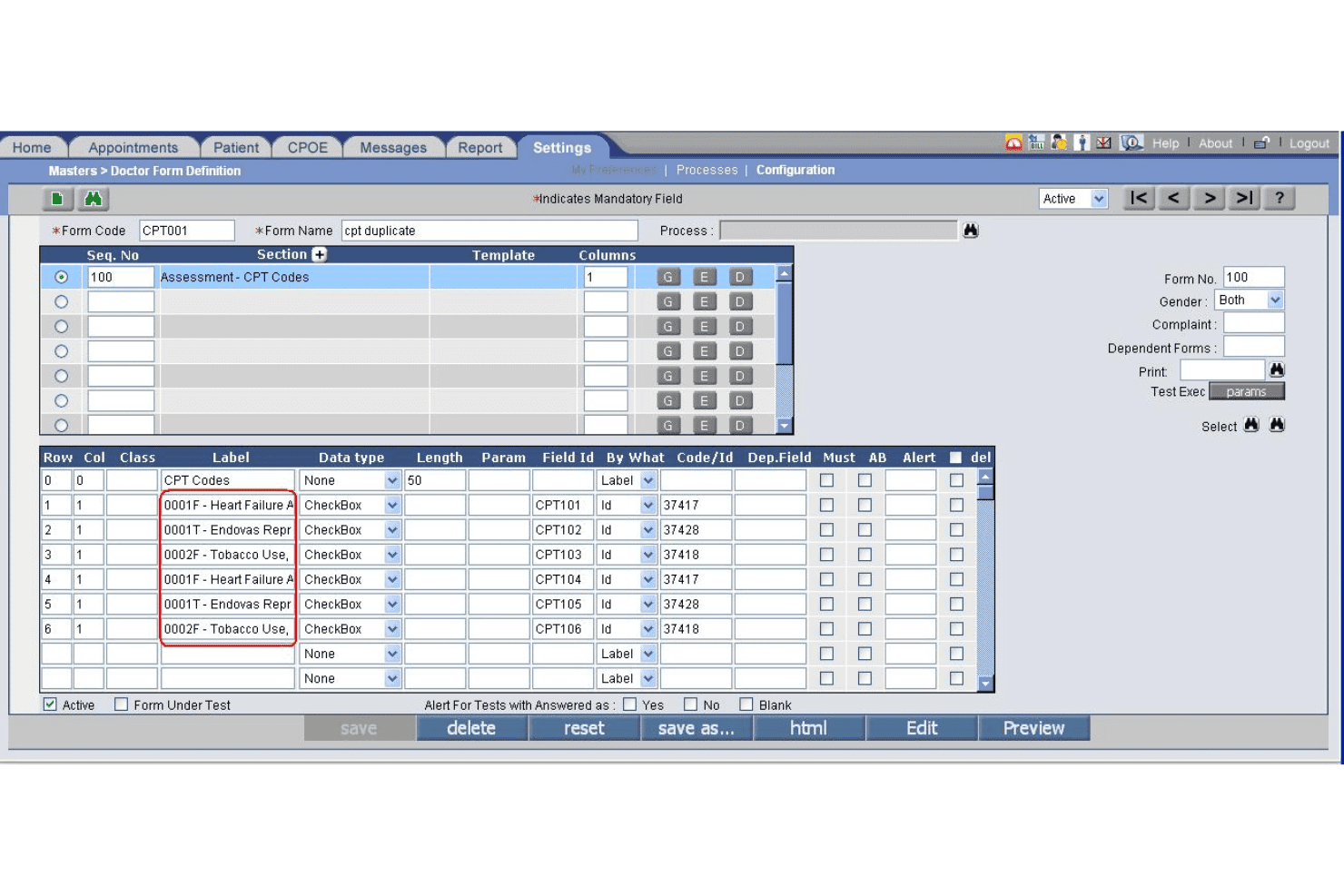
PrognoCIS specialty form builder supports custom reporting by clinical discipline. PrognoCIS is an integrated cardiology EHR and practice management platform with built-in medical billing, claim scrubbing, prior authorization tracking, denial management, and cardiology-specific coding templates.
Who Is PrognoCIS Best For?
PrognoCIS is a good fit for small to mid-sized cardiology practices that need a single platform covering both clinical documentation and revenue cycle management.
Why I Picked PrognoCIS
I picked PrognoCIS as one of the best because its reporting capabilities are built around cardiology-specific workflows rather than generic practice data. I particularly like the MACRA/MIPS reporting dashboard, which tracks performance metrics at the provider level without requiring manual data pulls. The platform also generates procedure-segmented reports, so I can break down reimbursement activity by cardiac procedure type and identify exactly where revenue gaps are occurring.
PrognoCIS Key Features
- Prior authorization tracking: Keeps tabs on auth requests from order through claim submission.
- Built-in claim scrubber: Flags coding errors before submission using CCI edits.
- Diagnostic device integration: Connects with EKG machines, echocardiograms, and Holter monitors for direct data import.
- Auto-payment posting: Posts electronic remittances (ERAs) and EOBs automatically to patient accounts.
PrognoCIS Integrations
PrognoCIS offers native integrations with diagnostic devices such as EKG machines, echocardiograms, and Holter monitors, as well as clearinghouses like Trizetto, Waystar, and Jopari. Lab and radiology system integrations are supported, and an API is available for custom integrations.
Pros and Cons
Pros:
- Diagnostic device data imports supported
- Built-in CCI edits for claims scrubber
- Cardiology-specific billing and coding templates
Cons:
- Handling claim takebacks can be complex
- Reporting is less robust than competitors
Learn more about PrognoCIS Psychiatry EHR: Best for flexible payment collection solutions
- Free demo available
- Pricing upon request
Visit WebsiteCustomer Rating:3.9/5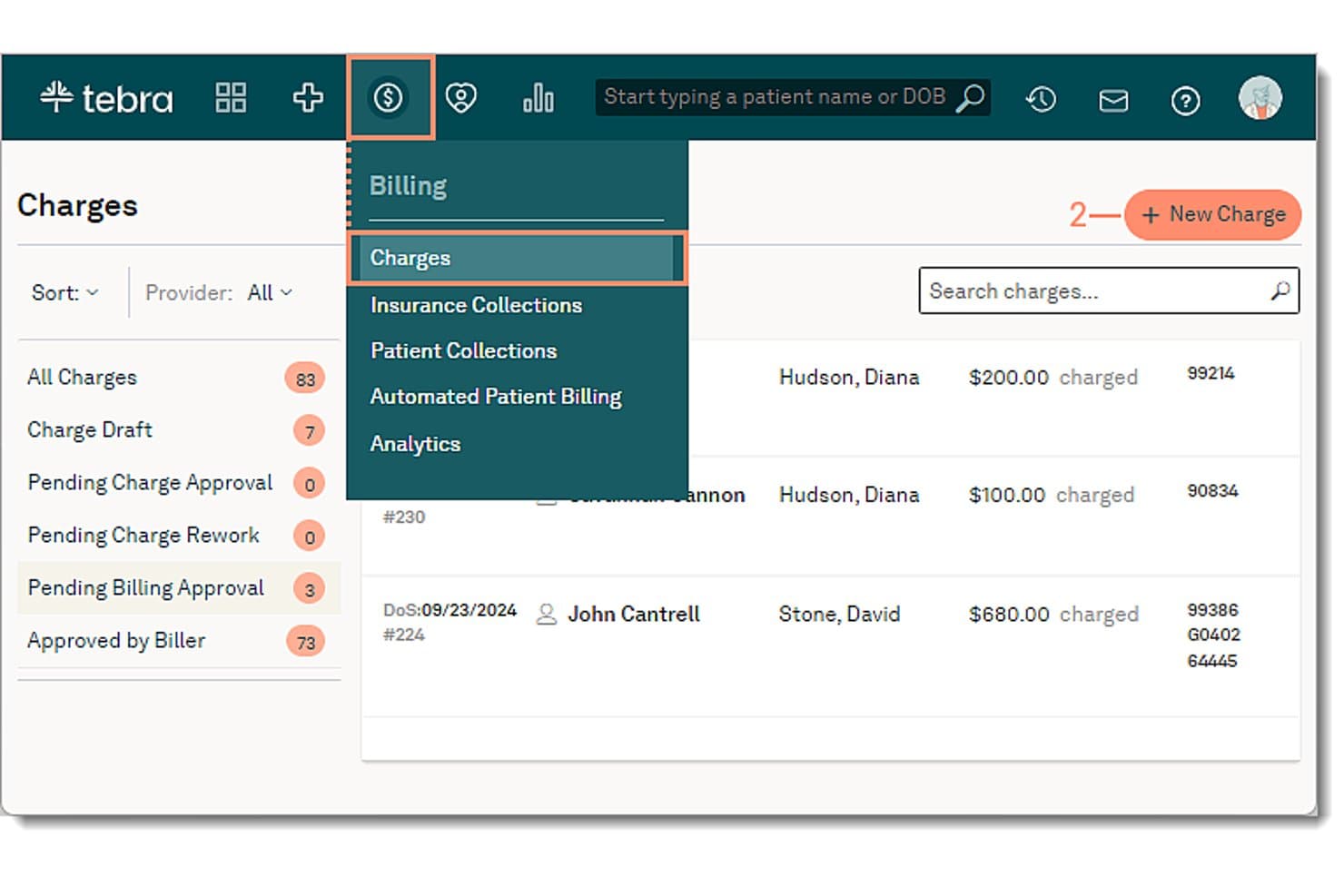
Tebra offers a Charges billing dashboard where users can create new charges, view patient billing statuses, and navigate billing collections from a centralized menu. Tebra is a cloud-based medical billing and practice management platform that combines EHR, electronic claims submission, automated payment collection, and A/R management for independent medical practices.
Who Is Tebra Best For?
Tebra is a strong fit for small independent practices with up to 10 providers that handle billing in-house and want scheduling, claims, and payments in one place.
Why I Picked Tebra
I've included Tebra in my top picks because its patient payment collection options go well beyond a standard billing portal. I like that practices can send direct payment links via text or email, store cards on file, and accept in-person payments through a terminal, all within one platform. Automated patient statements include QR codes that route directly to a payment page, which cuts the time between statement delivery and actual collection.
Tebra Key Features
- Automated insurance eligibility checks: Instantly verifies patient coverage, copays, and deductibles to prevent billing errors.
- Robotic process automation for billing: Uses RPA to auto-post ERAs and reduce manual reconciliation steps.
- Real-time claims tracking: Enables staff to monitor claim status from submission through reimbursement.
- Customizable specialty templates: Offers specialty-specific templates, including cardiology, for procedure and diagnostic coding.
Tebra Integrations
Tebra offers native integrations with Kareo Billing, WebPT, Stripe, Microsoft Excel, and QuickBooks Online Advanced. An API is available for custom integrations.
Pros and Cons
Pros:
- Automated ERA posting for insurance reimbursements
- Patient card-on-file and recurring billing features
- Real-time claims tracking and status alerts
Cons:
- Limited cardiology-focused reporting capabilities
- No cardiology-specific coding automation
Learn more about Tebra: Best for iPad-based mobile charting
- Free demo available
- Pricing upon request
Visit WebsiteCustomer Rating:3.9/5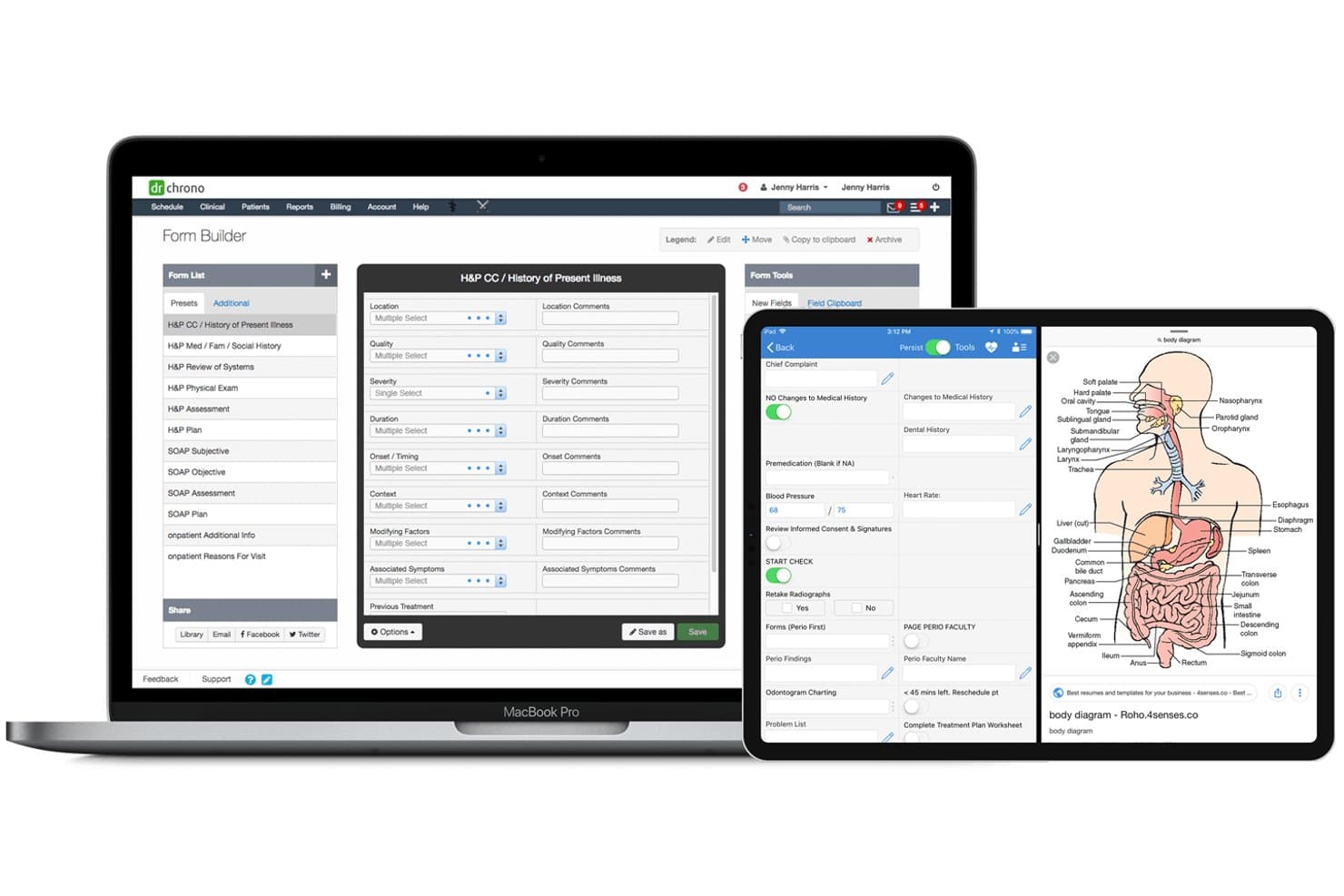
DrChrono offers a Form Builder interface with H&P and SOAP templates, but does not visibly display cardiology billing features. DrChrono is an iPad-native EHR and medical billing platform that combines clinical charting, practice management, revenue cycle management, and claims processing for cardiology and other specialty practices.
Who Is DrChrono Best For?
DrChrono is a strong fit for small to mid-sized cardiology practices that run on Apple devices and want a single platform for charting, billing, and RCM.
Why I Picked DrChrono
DrChrono earns its spot on my shortlist because of how tightly its iPad-native charting connects to the billing workflow. I like that cardiologists can capture charges at bedside on an iPhone or iPad, with those entries flowing directly into claim generation without manual re-entry. The platform also stores photos taken on the iPad directly in the patient record, which supports procedure documentation for cardiac device management or post-procedure notes.
DrChrono Key Features
- Integrated revenue cycle management: Billing, coding, and claim submission tools are built into the practice management workflow.
- Electronic prior authorization: Automates submission and tracking of prior auths for cardiac imaging, labs, and procedures.
- Real-time insurance eligibility checks: Instantly verifies patients’ coverage during scheduling or before claims submission.
- Denial management dashboard: Tracks denials, payment status, and supports appeals with organized worklists.
DrChrono Integrations
DrChrono offers native integrations with Quest Diagnostics, LabCorp, Box, Ambra, Curogram, Collectly, Holly, ClearGage, Demandforce, and Square Point of Sale, and provides an API for custom integrations.
Pros and Cons
Pros:
- Mobile photo uploads linked to cardiac records
- Real-time insurance eligibility verification
- iPad charting with charge capture for cardiology
Cons:
- Lacks integration with third-party cardiology EHRs
- No dedicated cardiology CPT code libraries
Learn more about DrChrono: Best for cardiology coding intelligence
- Free demo available
- Pricing upon request
Visit WebsiteCustomer Rating:3.5/5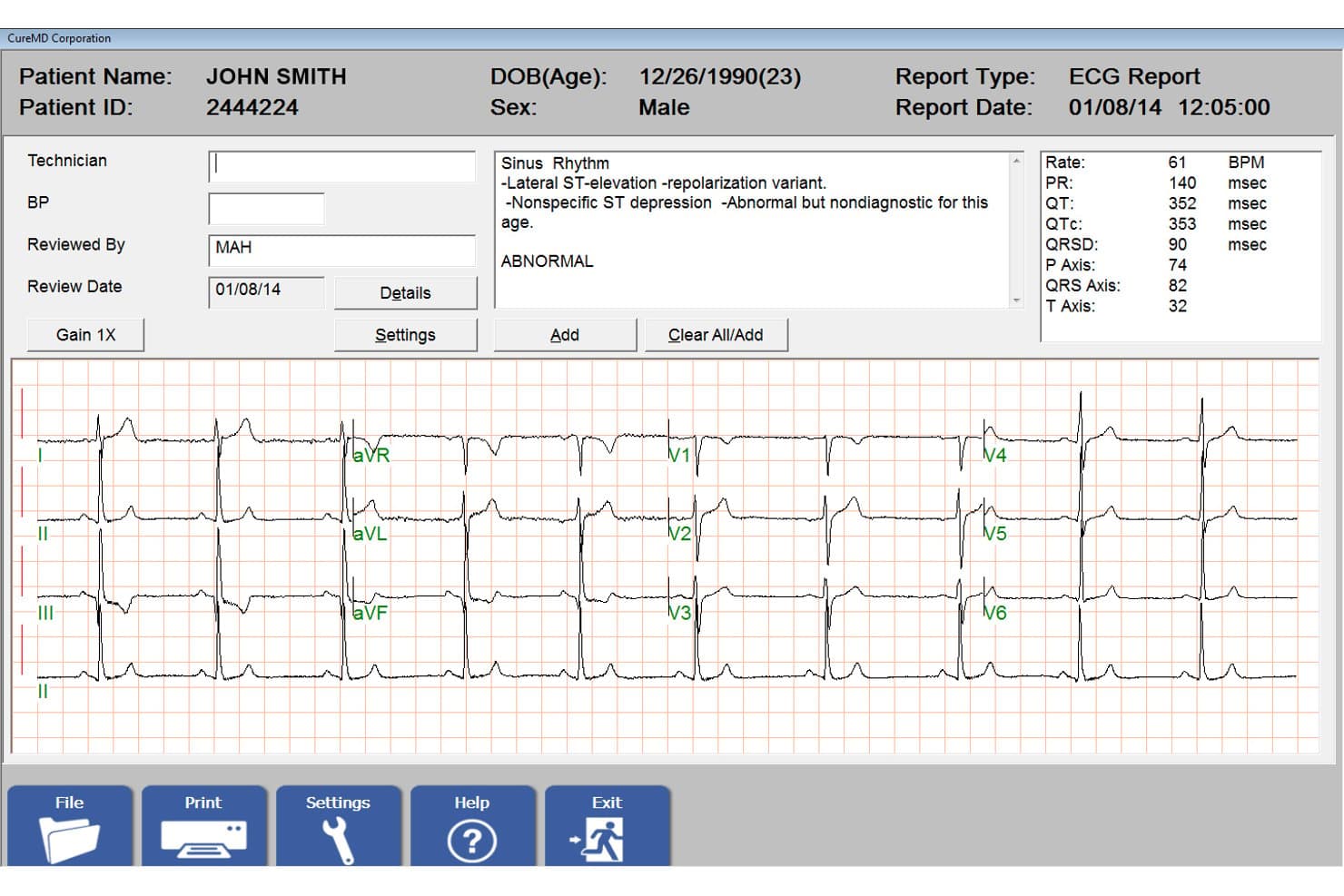
CureMD offers an integrated EKG/ECG report viewer with patient vitals, waveform readings, and diagnostic interpretation directly within its cardiology billing software. CureMD is a cloud-based cardiology billing service that handles end-to-end revenue cycle management, including AI-powered claims scrubbing, cardiology-specific coding, denial resolution, prior authorization, and reporting.
Who Is CureMD Best For?
CureMD is a strong fit for cardiology practices looking to outsource billing to a dedicated team rather than manage revenue cycle operations in-house.
Why I Picked CureMD
CureMD earns its spot on my shortlist because of how deeply it handles cardiology coding specifics. I like that the platform maps ICD-10 combination codes and applies CMS modifiers for procedures like electrophysiology studies and pacemaker insertions automatically. AI code scrubbing then validates those codes before submission, which I've found keeps first-pass claim rates high on the kinds of complex cardiac cases that most generic billing platforms struggle to get right.
CureMD Key Features
- Prior authorization management: Track and manage prior authorizations for cardiac imaging and interventional procedures.
- Custom cardiology fee schedules: Set and update procedure-specific billing rates for cardiology services like echocardiography.
- Integrated EHR and practice management: Access billing, scheduling, and clinical records in a unified cloud-based dashboard.
- Denial resolution worklists: Organize and follow up on claims requiring additional documentation or appeals directly from the platform.
CureMD Integrations
CureMD offers native integrations with SureScripts, electronic labs, and payment processing systems, and provides an API for custom integrations.
Pros and Cons
Pros:
- Custom reporting for cardiac procedure revenues
- AI scrubbing for specialty cardiac procedures
- Cardiology-trained billing and coding specialists
Cons:
- Limited documentation for third-party EHR connections
- Prior authorization workflows not fully automated
Learn more about CureMD: Best for cardiovascular clinical data integration
- Free demo available
- Pricing upon request
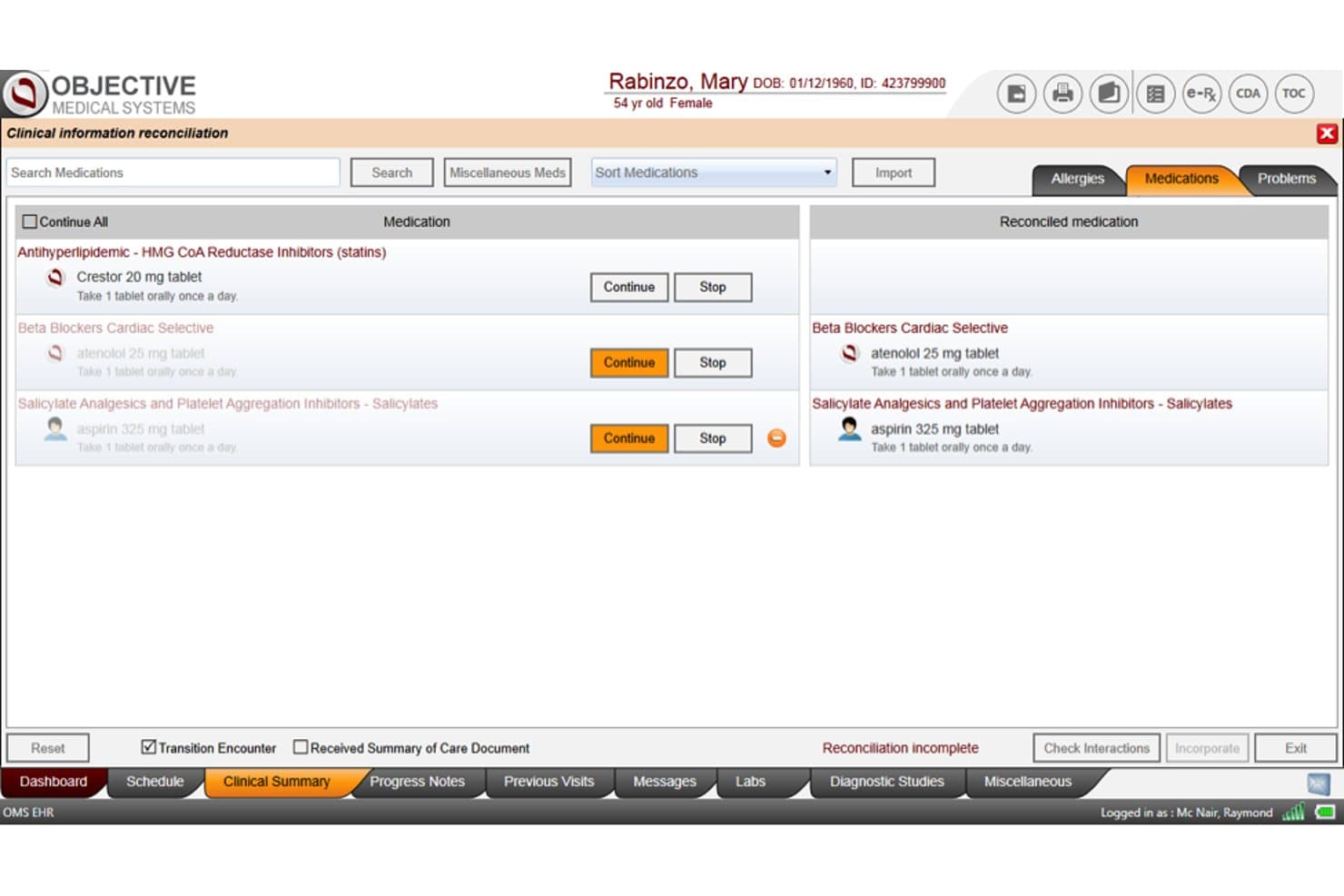
Objective Medical Systems (OMS) offers a Clinical Information Reconciliation screen that allows cardiology providers to review and continue or stop patient medications such as statins, beta blockers, and aspirin. Objective Medical Systems (OMS) is a cardiology-specific EHR and cardiovascular information system that combines structured diagnostic reporting, AI-assisted diagnosis detection, and clinical data integration across cardiovascular modalities.
Who Is Objective Medical Systems (OMS) Best For?
OMS is a strong fit for mid-to-large cardiology practices and hospital cardiology service lines that need a specialty-built EHR with integrated cardiovascular diagnostic reporting.
Why I Picked Objective Medical Systems (OMS)
I've included OMS in my top picks because its cardiovascular clinical data integration is built around the discrete data that drives accurate cardiology coding. The Diagnosis Detection module pulls from structured reports across modalities like echocardiography, cath lab, and nuclear cardiology to enhance coding at the point of documentation. With 1,000+ discrete data elements captured per chart, the clinical record is already prepped for charge capture before a billing manager touches a claim.
Objective Medical Systems (OMS) Key Features
- AskOMS AI assistant: Enables instant access to clinical guidance and workflow support for cardiology staff.
- Customizable cardiology templates: Lets users adjust documentation templates to fit specific subspecialties and workflow needs.
- Integrated ePrescribing: Allows physicians to generate and transmit prescriptions directly from the EHR.
- Patient no-show prediction: Uses analytics to identify which patients are at risk of missing appointments.
Objective Medical Systems (OMS) Integrations
OMS offers native integrations with White Plume Technologies for charge capture, MedAxiom for performance benchmarking, and supports diagnostic modality and lab integrations. An API is available for custom integrations.
Pros and Cons
Pros:
- AI-powered diagnosis detection for coding
- Captures granular data for charge capture
- Structured templates for cardiology documentation
Cons:
- Lacks automated denial and AR workflows
- No native claims management features
Learn more about Objective Medical Systems (OMS): Best for integrated clinical and billing insights
- Free demo available
- Pricing upon request
Visit WebsiteCustomer Rating:3.7/5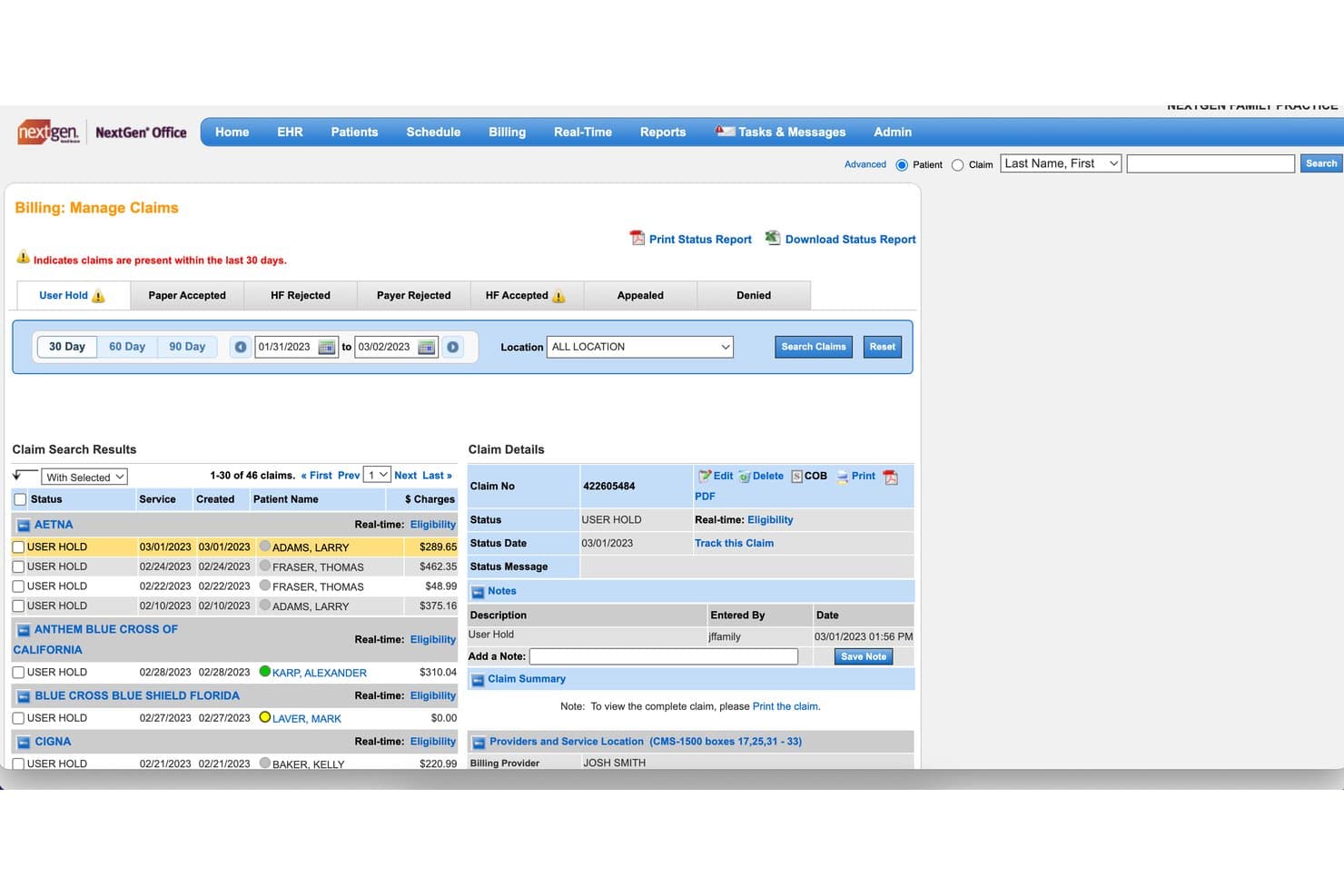
NextGen Healthcare offers a Billing: Manage Claims interface that allows cardiology practices to track, filter, and manage claim statuses such as User Hold, HF Rejected, and Payer Rejected across multiple insurers. NextGen Healthcare is an integrated EHR and practice management platform built for ambulatory cardiology practices, combining specialty-specific clinical documentation, charge capture, claims scrubbing, and revenue cycle management in a single system.
Who Is NextGen Healthcare Best For?
NextGen Healthcare is a strong fit for mid-to-large cardiology practices that want a single vendor handling both clinical documentation and billing workflows.
Why I Picked NextGen Healthcare
I picked NextGen Healthcare because the Charge Review Rules Engine sits directly between the EHR and practice management system, automatically creating charges from cardiology-specific encounter templates and flagging coding errors before a claim ever leaves the practice. I also like that Ambient Assist suggests ICD-10 codes during the patient visit itself, so the clinical note and the billing record stay in sync without manual reconciliation.
NextGen Healthcare Key Features
- Cardiology procedure scorecards: Built-in scorecards capture and track cardiovascular risk factors and outcomes.
- Patient portal: Lets patients view test results, message staff, and pay bills online.
- Mirth Connect integration engine: Supports data exchange with labs, registries, and third-party software.
- Custom reporting tools: Enables detailed financial and operational reports by payer, provider, or procedure type.
NextGen Healthcare Integrations
NextGen Healthcare offers native integrations with Doctible, Solutionreach, Clearwave, InstaMed, LabCorp, Quest Diagnostics, and immunization registries. The Mirth Connect engine supports data exchange with third-party health systems, and an API is available for custom integrations.
Pros and Cons
Pros:
- EHR and billing share one integrated workflow
- Automated rules engine flags coding errors instantly
- Cardiology-specific templates for complex procedures
Cons:
- Prior authorizations require third-party marketplace tools
- Reporting tools are complex to configure
Learn more about NextGen Healthcare: Best for multi-location billing coordination
- Free demo available
- Pricing upon request
Visit WebsiteCustomer Rating:3.6/5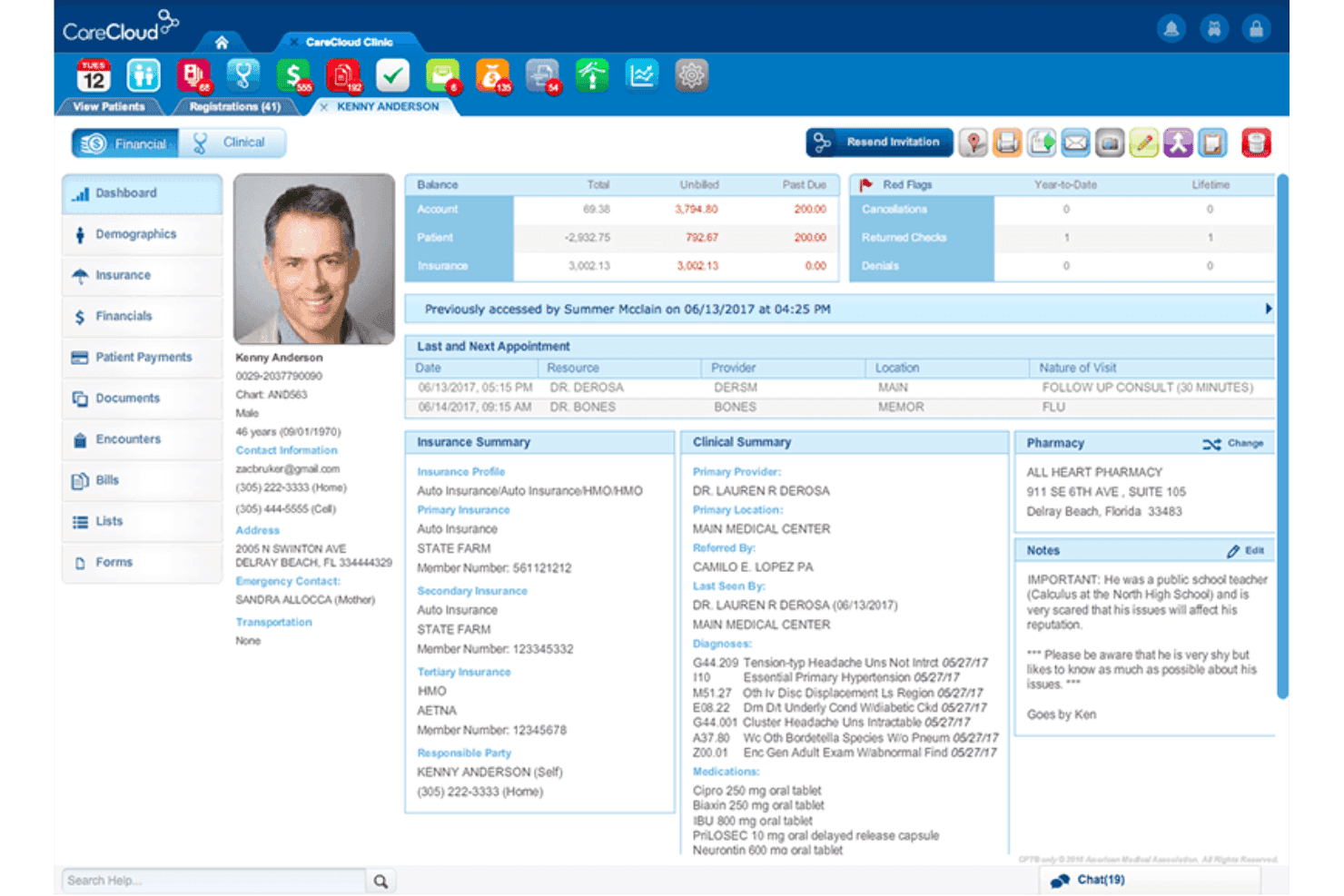
CareCloud tracks billing activity across providers and practice locations. CareCloud is a cloud-based revenue cycle management and medical billing platform that combines AI-driven cardiology coding, automated claims scrubbing, denial management, prior authorization tracking, and multi-location practice billing coordination.
Who Is CareCloud Best For?
CareCloud suits mid-to-large cardiology groups and multi-location practices that need centralized billing management across multiple providers and sites.
Why I Picked CareCloud
CareCloud earns its spot on my shortlist because of how well it handles billing across multiple cardiology sites from one platform. Its PM-agnostic architecture, which is rare among billing services, lets locations running different EHRs still funnel into one centralized billing workflow. I also like that each site can run custom billing workflows while consolidated payer performance dashboards let me track denial rates and procedure-level profitability across all locations at once.
CareCloud Key Features
- AI-driven coding assistance: Uses AI to suggest appropriate CPT, ICD-10, and HCPCS codes for cardiology diagnoses and procedures.
- Automated claim scrubbing: Checks claims for errors and compliance issues before submission using a database of 180 million billing rules.
- Prior authorization management: Tracks deadlines and manages documentation for prior authorizations needed in cardiac imaging and interventions.
- Customizable cardiology reporting: Offers dashboards and reporting options tailored to track reimbursements, denials, and procedure-level profitability for cardiology practices.
CareCloud Integrations
CareCloud offers native integrations with CodoniX EHR, EHRYourWay, ICANotes, MD Logic, Optivate, Praxis EMR, Sevocity, TeleVox, and Vital Interaction. Native integrations with Epic, ProPath, Meditech, HealthLink, and Cubixx MD are also supported. An API is available for custom integrations.
Pros and Cons
Pros:
- Real-time denial analytics across all locations
- Automated pre-claim scrubbing for cardiac procedures
- Dedicated cardiology coding and billing team
Cons:
- Requires multi-year contract commitments
- No transparent online pricing details
Learn more about CareCloud: Best for customizable workflow automations
- Free demo available
- Pricing upon request
Visit WebsiteCustomer Rating:3.6/5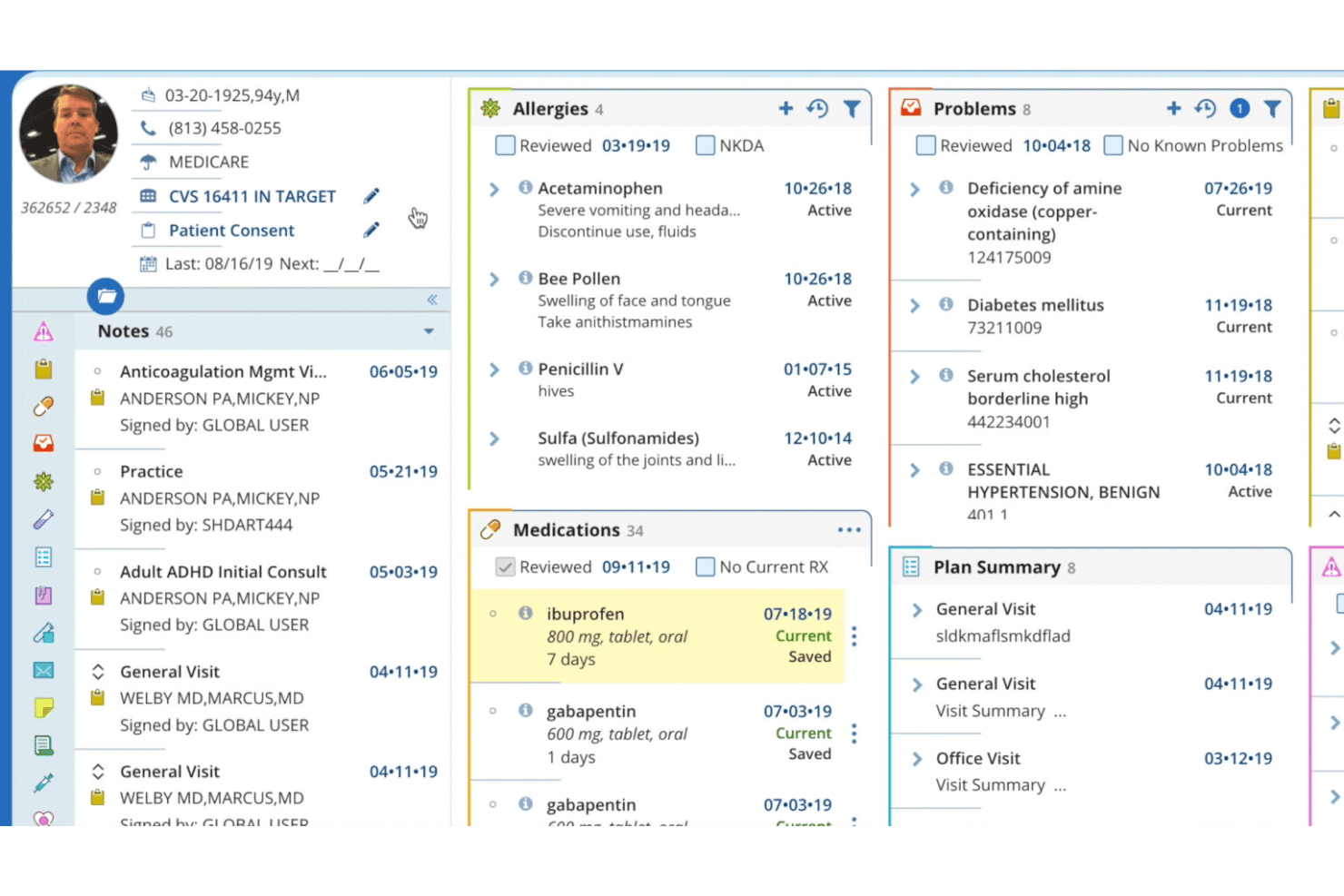
AdvancedMD patient record view with allergies, medications, and care plans. AdvancedMD is a cloud-based medical billing and practice management platform with built-in ICD-10, HCPCS, and CPT code libraries, automated claims scrubbing, denial management workflows, and revenue cycle reporting tailored for cardiology practices.
Who Is AdvancedMD Best For?
AdvancedMD is a strong fit for independent cardiology practices and multi-specialty groups that need a configurable billing and RCM platform.
Why I Picked AdvancedMD
AdvancedMD earns its spot on my shortlist because of how much of the billing workflow you can configure without relying on IT support. I especially like the automated insurance eligibility check that runs nightly for next-day patients, surfacing coverage issues before they reach the claim stage. The Claim Inspector then scrubs every submission against 3.5 million edits, including CCI and LCD rules that directly affect cardiology procedures like echocardiography and catheterization.
AdvancedMD Key Features
- Integrated clearinghouse: Submits claims directly to over 1,800 payors from within the platform.
- Denial worklists: Groups and routes denied claims for staff follow-up and appeals.
- Customizable reporting dashboard: Lets you track reimbursements, billing productivity, and payer performance by provider or procedure.
- Batch claims review: Enables bulk approval and exception handling for high-volume billing runs.
AdvancedMD Integrations
AdvancedMD offers native integrations with the Optum clearinghouse for claims submission and remittance management. An API is available for building custom integrations.
Pros and Cons
Pros:
- Supports batch charge entry and approval
- Claim Inspector checks LCD and CCI edits
- Configurable billing workflows for cardiology-specific steps
Cons:
- Cardiology procedure templates are not specialty-specific
- No built-in cardiology prior auth workflows
 Best for easy claim management tools
- Free demo available
- Pricing upon request
Visit WebsiteCustomer Rating:3.4/5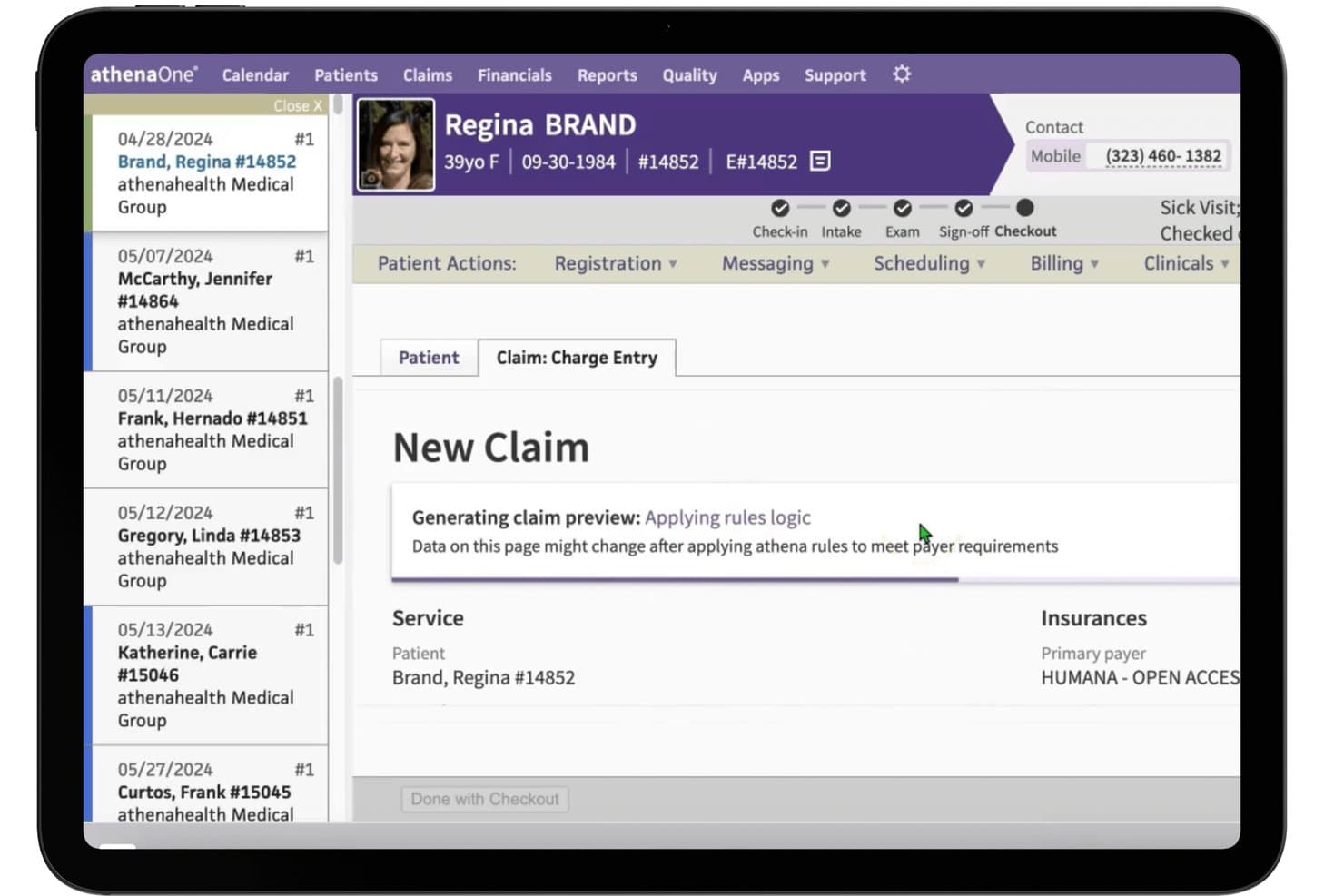
athenahealth offers a New Claim charge entry screen with automated rules logic and insurance payer details to streamline cardiology billing workflows. athenahealth is a cloud-based RCM and billing platform that combines claim scrubbing, denial management, prior authorization workflows, and cardiology-specific coding tools within an integrated EHR and practice management system.
Who Is athenahealth Best For?
athenahealth is a strong fit for independent and small-to-mid-sized cardiology practices that manage billing in-house alongside clinical operations.
Why I Picked athenahealth
I picked athenahealth as one of the best because its claim scrubbing engine runs over 30,000 rules, updated 4,500 times a year, to catch and correct cardiology claim errors before submission. In practice, that means my team can identify missing modifiers on echocardiography or catheterization codes before they ever reach a payer. I also like that athenahealth routes more than half of scrubbed claims directly to payers rather than through a third-party clearinghouse, cutting out a layer of handling that can delay resolution.
athenahealth Key Features
- Cardiology CPT and ICD-10 code library: The platform includes procedure codes specific to cardiac imaging, interventions, and electrophysiology.
- Prior authorization dashboard: See pending, approved, and denied auth requests for cardiac tests and procedures in one place.
- Integrated EHR and practice management: Manage clinical documentation and billing in a unified cardiology workflow.
- Customizable reimbursement reports: Analyze net collections and payer performance by cardiology procedure type and provider.
athenahealth Integrations
athenahealth offers over 277,000 native clinical integrations, including labs, pharmacies, imaging centers, and payers, plus connects to CommonWell and Carequality for health information exchange. An API is available for custom integrations.
Pros and Cons
Pros:
- Regular CPT code updates for cardiology
- Denial worklists tailored for cardiac procedures
- Cardiology-specific prior authorization workflows available
Cons:
- No transparent public pricing for practices
- Cardiology-modifier support could be stronger
Learn more about athenahealth: Best for cardiology-specific template options
- Free demo available
- Pricing upon request
Visit WebsiteCustomer Rating:3.4/5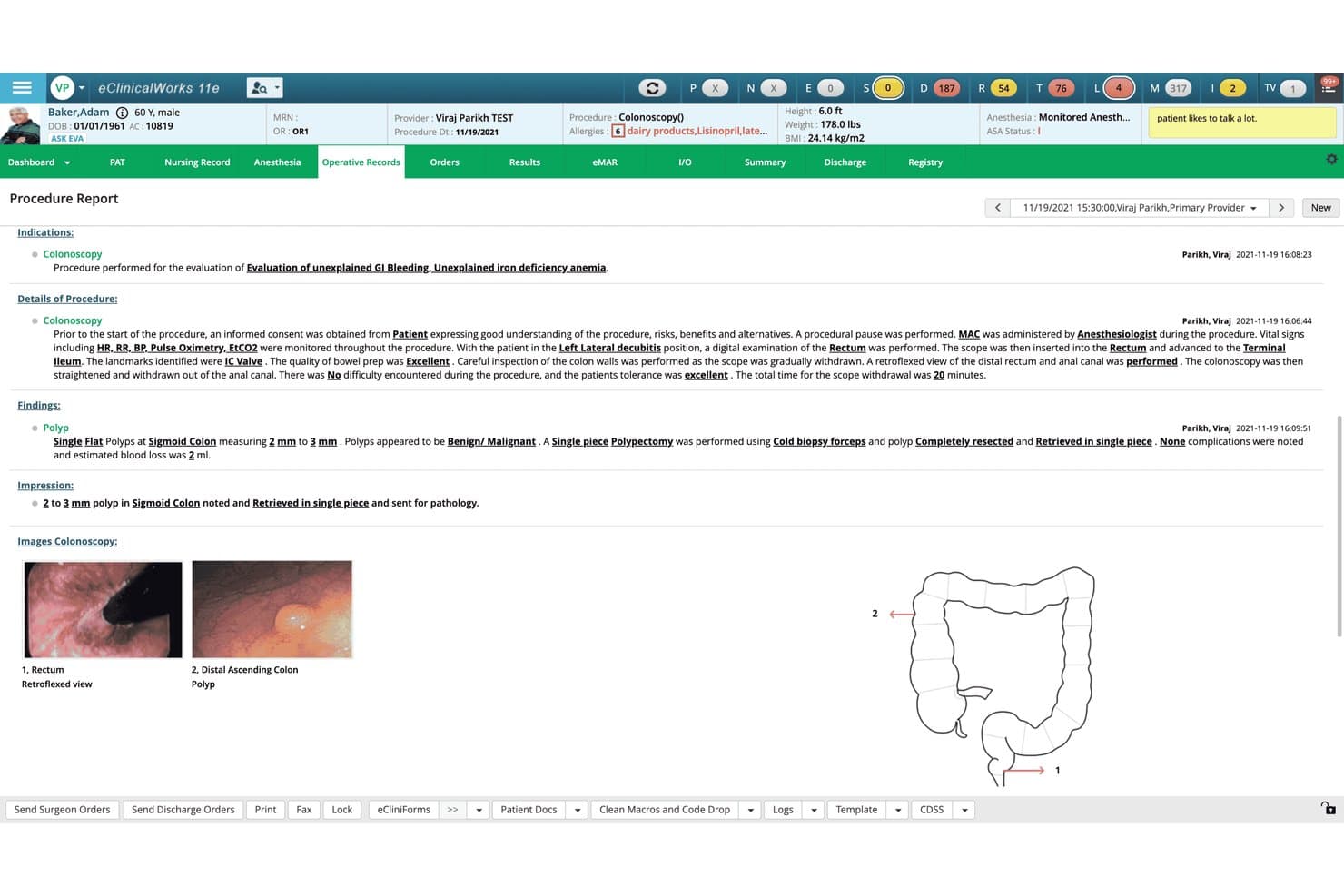
eClinicalWorks offers a detailed colonoscopy procedure report module with findings, polyp documentation, images, and anatomical diagrams for gastroenterology workflows. eClinicalWorks is a cardiology EHR and practice management platform with built-in billing, RCM, cardiology-specific coding templates, claim scrubbing, and denial management tools.
Who Is eClinicalWorks Best For?
It's a strong fit for cardiology practices that want a single platform handling both clinical documentation and billing without relying on separate systems.
Why I Picked eClinicalWorks
eClinicalWorks earns its spot on my shortlist because of how thoroughly it covers cardiology at the code-capture level. The template library includes condition-specific Order Sets and worksheets for procedures like echocardiograms, nuclear stress tests, and non-invasive arterial studies. Each of those templates feeds directly into the billing workflow, and the Clinical Rules Engine triggers coding alerts based on the diagnoses captured.
eClinicalWorks Key Features
- eBO View reporting: Create custom billing and reimbursement reports to track cardiology revenue performance.
- RCM as a service: Outsource claims processing, denial management, and appeals through eClinicalWorks' own revenue cycle management service.
- PRISMA health information search: Aggregate patient data from multiple EHRs and sources during the billing process.
- Cardiology device integration: Directly import results from supported cardiopulmonary devices for automatic billing code capture.
eClinicalWorks Integrations
eClinicalWorks offers native integrations with cardiopulmonary devices such as Burdick, CareCenter MD, Quinton, GE CardioSoft, Midmark, nSpire, OMI, QRS Diagnostics, and Welch Allyn. Native LabCorp integration is included, and FHIR and other APIs are available for custom integrations.
Pros and Cons
Pros:
- EHR and billing unified on one platform
- RCM service with denial management available
- Cardiology-specific procedure codes and templates included
Cons:
- Claims reporting setup can be complex
- Prior authorization automation limited for cardiology
Learn more about eClinicalWorks:
Other Cardiology Billing Software
Here are some additional cardiology billing software options that didn’t make it onto my shortlist, but are still worth checking out:
- 11Merative Merge CardioBest for interoperability with imaging systems
- 12OmniMDBest for MIPS-ready performance tracking
- 13BellMedExBest for real-time insurance eligibility checks
- 141st Providers Choice IMSBest for customizable patient charting
- 15MediBillMDBest for specialized AR follow-up services
- 16Medical Billers and Coders (MBC)Best for outsourced denial management expertise
- 17AnnexMedBest for cloud-based claims management
- 18MBW RCMBest for tailored compliance monitoring
- 19Rhythm360Best for advanced EP workflow integration
How I Evaluate Cardiology Billing Software
I split my evaluation into baseline requirements—like cardiology-specific CPT coding and claims scrubbing—and differentiators that separate good platforms from great ones.
Core Functionality (Table Stakes For This List)
When I'm selecting tools for my list, I rank each one on a scale from 0 (does not offer the functionality) to 5 (excels in this area) for each core functionality listed below. Then, I calculate the tool's total score into a percentage. Each tool needs to achieve a minimum total score of 65% to be considered for inclusion.
- Cardiology-Specific Coding: I check for built-in CPT, HCPCS, and ICD-10 code sets that cover cath lab, EP studies, echo, and nuclear cardiology procedures.
- Claims Scrubbing & Submission: Each tool should scrub claims against cardiology-specific payer rules, NCDs/LCDs, and modifier logic before submission.
- Denial & AR Management: I look for denial worklists and appeals workflows that address common cardiology rejections like bundling errors and medical necessity disputes.
- Prior Authorization Handling: Cardiac imaging and interventional procedures often require prior auth, so I evaluate how each tool tracks and submits authorization requests.
- EHR/PM Integration: Bi-directional data flow with cardiology EHRs and CVIS platforms matters here, especially for automated charge capture from diagnostic reports.
- Cardiology Reporting & Analytics: I look for reports segmented by procedure type and provider, such as reimbursement trends for echo vs. stress testing volumes.
Once I have a list of tools that meet the criteria, I consider what sets each platform apart.
Differentiating Factors (What Sets Vendors Apart)
Here's how I compare and contrast different vendors:
Standout Features
Bundled procedure logic is a big differentiator. When a patient undergoes a left heart cath with stenting in the same session, automated NCCI edits prevent costly coding mistakes. Real-time eligibility and prior auth tools also matter. Getting authorization confirmed for ablations or device implants before the patient arrives saves serious rework. Denial analytics dashboards round things out by surfacing payer-specific rejection trends so your team can address root causes instead of chasing individual claims.
Beyond Features
Service model matters a lot here. Some vendors offer software-only licensing, while others bundle full RCM services with certified cardiology coders. That's a good fit if your team lacks in-house expertise for complex cath lab or EP claims. Practice size also shapes the decision. A solo cardiologist needs a turnkey setup with minimal IT overhead. A multi-location group will want role-based workflows and scalable provider management. I also evaluate MIPS/MACRA reporting support, since cardiologists in value-based programs need that data flowing from the billing platform.
How to Choose Cardiology Billing Software
It’s easy to get bogged down in long feature lists and complex pricing structures. To help you stay focused as you work through your unique software selection process, here’s a checklist of factors to keep in mind:
| Factor | What to Consider |
|---|---|
| FactorScalability | What to ConsiderWill the platform support your growth—such as adding providers, new locations, or expanded service lines—without requiring a major overhaul or system migration? |
| FactorIntegrations | What to ConsiderDoes the tool offer seamless connections to your EHR, CVIS, and hospital systems? Check compatibility before you commit to avoid costly interfaces or double entry. |
| FactorCustomizability | What to ConsiderCan you tailor workflows, templates, and reporting for your unique billing structures? Autoposting rules and AR worklists should fit your day-to-day processes. |
| FactorEase of use | What to ConsiderIs the layout intuitive for both billing staff and clinicians? Try live demos so your team isn’t learning basic tasks on patient time when you go live. |
| FactorImplementation and onboarding | What to ConsiderWhat resources does the vendor provide to get you live? Ask about cardiology-specific training, data migration processes, and timeframes for billing setup. |
| FactorCost | What to ConsiderDo pricing models fit your budget and claims volume? Evaluate all-in costs, including clearinghouse fees, add-ons, and support beyond base licensing. |
| FactorSecurity safeguards | What to ConsiderDoes the vendor meet HIPAA, HITRUST, or SOC 2 standards for protecting PHI? Insist on clear policies for access controls, audit trails, and breach notification. |
| FactorCompliance requirements | What to ConsiderDoes the platform keep current with payer rules, NCDs/LCDs, and MIPS? Ask how updates and new requirements are rolled out to clients. |
What Are Cardiology Billing Software?
Cardiology billing software are specialized platforms built to manage coding, claims, and reimbursement processes unique to cardiology practices. These tools support automated cardiology CPT and ICD-10 coding, claims scrubbing, denial management, and prior authorization tracking. By addressing payer rules specific to cardiac procedures, they help medical billing managers and administrators improve accuracy, reduce denials, and keep practice revenue flowing smoothly.
Features of Cardiology Billing Software
When selecting cardiology billing software, keep an eye out for the following key features:
- Cardiology-specific coding: Supports CPT, HCPCS, and ICD-10 codes unique to cardiology, ensuring claim accuracy for cath lab, EP, and imaging procedures.
- Claims scrubbing: Automatically reviews claims for missing data, improper modifiers, and cardiology payer rules to prevent denials before submission.
- Denial management: Offers worklists, appeals tools, and tracking for common cardiology denial reasons like procedure bundling and medical necessity.
- Prior authorization tracking: Manages and monitors authorizations for stress tests, ablations, and device implants, reducing delays in care delivery.
- EHR and CVIS integration: Bi-directional interfaces connect to cardiology EHRs and cardiovascular information systems for seamless charge capture and data flow.
- Automated insurance eligibility checks: Verifies patient insurance status and specific cardiac coverage rules before scheduling high-cost procedures.
- Customizable reporting: Delivers financial and operational analytics segmented by provider, location, and procedure type for better business insight.
- Payment posting and reconciliation: Applies payments, adjustments, and write-offs accurately, minimizing errors and ensuring clean accounts receivable.
- Security and compliance safeguards: Enforces HIPAA, HITRUST, or SOC 2 protocols for PHI protection, audit trails, and regulatory alignment.
- User-friendly interface: Streamlines day-to-day billing and workflow management so staff can adapt with minimal training and fewer mistakes.
Benefits of Cardiology Billing Software
Implementing cardiology billing software provides several benefits for your team and your business. Here are a few you can look forward to:
- Fewer claim denials: Automated scrubbing against cardiology payer rules and built-in code edits reduce errors and rejected claims.
- Faster reimbursements: Real-time eligibility verification and prompt claims submission accelerate revenue collection after cardiac procedures.
- Improved compliance: Regular updates and NCD/LCD logic keep billing aligned with cardiology-specific regulatory requirements.
- Streamlined workflows: EHR integration and worklist automation help your billing and clinical staff handle tasks with fewer manual steps.
- Clearer business insights: Customizable analytics reveal trends in procedure reimbursement, denial reasons, and provider productivity.
- Better patient experience: Smoother prior authorization and billing processes prevent care delays and confusion for patients.
- Reduced administrative burden: Centralized denial tracking, automated payment posting, and built-in code libraries lighten staff workload.
Costs and Pricing of Cardiology Billing Software
Selecting cardiology billing software requires an understanding of the various pricing models and plans available. Costs vary based on features, team size, add-ons, and more. The table below summarizes common plans, their average prices, and typical features included in cardiology billing software solutions:
Plan Comparison Table for Cardiology Billing Software
| Plan Type | Average Price | Common Features |
|---|---|---|
| Plan TypeFree Plan | Average Price$0 | Common FeaturesIncludes limited cardiology code sets, basic claims logging, minimal reporting, and email support. |
| Plan TypePersonal Plan | Average Price$50-$150/user/month | Common FeaturesAdds integrated claims scrubbing, simple denial tracking, EHR import tools, and phone support. |
| Plan TypeBusiness Plan | Average Price$150-$500/user/month | Common FeaturesExpands with full cardiology code libraries, payer rules, AR worklists, prior auth tracking, and custom analytics. |
| Plan TypeEnterprise Plan | Average Price$500+/user/month | Common FeaturesOffers advanced EHR/CVIS integration, role-based access, automated eligibility, custom workflows, regulatory compliance, and dedicated support. |
Cardiology Billing Software FAQs
Here are some answers to common questions about cardiology billing software:
How does cardiology billing software help reduce claim denials?
Cardiology billing software uses built-in code edits, payer rules, and claims scrubbing to catch common coding errors and missing information before submission. This proactive approach helps reduce denials linked to inappropriate bundling, missing documentation, or medical necessity issues.
Can cardiology billing software integrate with my EHR?
Yes, most cardiology billing software platforms offer bi-directional integration with major EHRs and cardiovascular information systems. This lets your team capture charges directly from diagnostic reports and ensures smoother, faster billing workflows.
What should I look for in terms of compliance?
Look for platforms that offer regular coding updates, handle CMS changes, and meet HIPAA, HITRUST, or SOC 2 standards. It’s important to ask vendors how they manage updates for payer requirements, LCDs/NCDs, and MIPS/MACRA alignment.
How long does onboarding typically take?
Onboarding ranges from a few weeks to several months, depending on the size of your practice, the complexity of data migration, and the specificity of your billing workflows. Good vendors provide cardiology-trained onboarding specialists and tailored training materials to help speed the process.
Is it better to choose software or a full-service RCM solution?
This depends on your in-house expertise and practice needs. Software-only is a fit for teams with dedicated billing staff, while full-service RCM providers can take over claims management, appeals, and collections—especially useful for complex cardiology billing cycles.