Not all medical coding software works the same way—and choosing the wrong type can slow your revenue cycle and create compliance headaches. From computer-assisted coding (CAC) software that suggests codes in real time to standalone encoders built for speed and accuracy, each type serves a distinct purpose. Knowing what's available helps you match the right tool to your team's workflow, caseload, and risk profile.
What Is Medical Coding Software?
Medical coding software is a digital tool that helps healthcare teams assign standardized codes to diagnoses, procedures, and services. These codes are essential for billing, insurance claims, and regulatory compliance. The right software reduces manual errors, speeds up coding tasks, and supports accurate reimbursement. Different types of medical coding software offer features tailored to specific workflows, from automated code suggestions to audit and compliance support.
1. Computer-Assisted Coding (CAC) Software
CAC software analyzes clinical documentation in real time and suggests standardized codes, cutting the time coders spend manually reviewing charts. In my experience, it's most valuable in high-volume inpatient settings where speed and consistency matter most.
Benefits
CAC software helps coding teams reduce manual errors, maintain compliance with payer and regulatory requirements, and accelerate claim processing—all without removing human oversight from the process. From my experience, the real productivity gain shows up at scale: coders spend far less time on routine chart review and more time on complex cases that actually need clinical judgment. Tools like 3M's CAC solution are a good example of how this plays out in high-volume inpatient environments, where coder throughput is the primary bottleneck.
Features
CAC software works by sitting directly inside your clinical documentation workflow—here are the features that make that integration useful in practice:
- NLP-based code suggestion: Natural language processing (NLP) scans clinical notes and suggests ICD-10, CPT, and HCPCS codes based on documented terms and context.
- Real-time coding assistance: Code suggestions surface as documentation is entered, reducing the need for coders to review charts after the fact.
- EHR integration: CAC tools connect with your existing EHR system to pull structured and unstructured data directly into the coding workflow.
- Coder review and override controls: Coders can accept, reject, or modify suggestions, keeping human oversight in the loop for complex or ambiguous encounters.
- Coding accuracy tracking: Built-in reporting tools track suggestion acceptance rates and flag areas where documentation consistently leads to coding gaps.
- Multi-specialty support: Most CAC tools, including 3M's Computer-Assisted Coding solution, support a range of encounter types across inpatient, outpatient, and professional fee settings.
2. Standalone Encoder Software
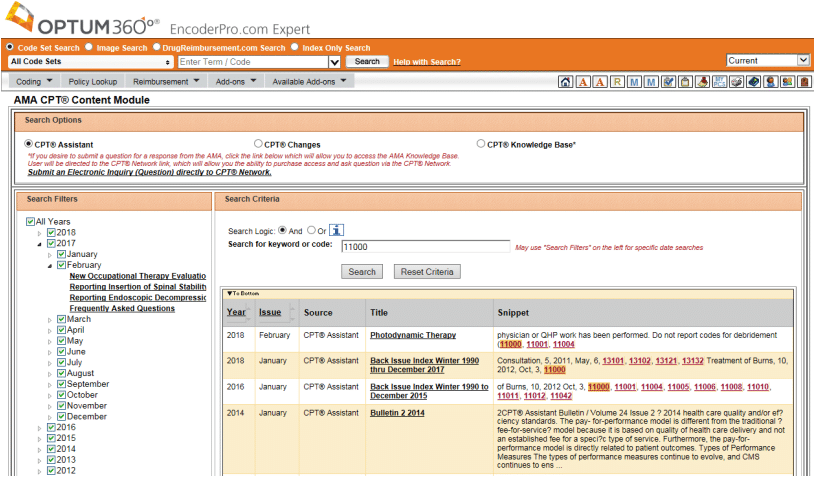
Standalone encoder software gives coders a dedicated tool for looking up, validating, and selecting accurate diagnosis and procedure codes. I've found it works best as a precision-focused reference for coders who need quick, reliable code verification without the overhead of a full coding platform.

Benefits
Encoders reduce human error, flag compliance issues, and support faster, more defensible code selection by surfacing official guidelines directly at the point of coding. In my experience, the biggest advantage is how much confidence they give coders when working through complex or unfamiliar cases. Tools like TruBridge Encoder provide structured guidance alongside code selection, which cuts down on the second-guessing and rework that slows teams down.
Features
Standalone encoder software is purpose-built for code lookup and validation—these are the features I rely on most when accuracy is non-negotiable:
- Code search and lookup: Coders can search ICD-10-CM, ICD-10-PCS, CPT, and HCPCS codes by keyword, description, or code number for fast, precise code selection.
- Built-in coding guidelines: Official guidelines, Coding Clinic references, and CPT Assistant notes appear alongside code selections to support defensible coding decisions.
- Cross-coding logic and edits: Encoders flag invalid code combinations and apply official sequencing logic, reducing claim rejections from bundling or ordering errors.
- DRG calculation: For inpatient encounters, encoders calculate the diagnosis-related group (DRG) and estimated reimbursement based on selected codes—a feature I find especially useful during complex inpatient cases.
- Code history and version tracking: Tools track code updates across fiscal years, so coders are always working with current, valid code sets rather than outdated references.
- Compliance alerts: Real-time alerts flag codes that are high-risk for payer audits or require additional documentation support before submission.
- Workflow integration: Encoders like Optum EncoderPro connect with EHR and billing systems, allowing coders to validate codes without leaving their primary workflow.
Need more medical billing guidance? Try my medical billing process flowchart.
3. Autonomous Medical Coding Software
Using AI and machine learning, this software assigns final codes to clinical encounters without requiring human review on qualifying cases. I think it's best suited for health systems processing high volumes of routine encounter types, where removing manual review from the workflow meaningfully reduces time-to-bill and coder workload.
Benefits
The most immediate benefit is throughput—high-confidence encounters move straight to billing without touching a coder's worklist, which frees your team to focus on cases that genuinely require clinical judgment. From my experience, organizations also see fewer delays tied to coder availability, which is a real advantage in environments dealing with staffing constraints. Platforms like Nym Health are built around this model, using confidence scoring to ensure that only appropriate encounters go through straight-through processing.
Features
Autonomous coding software goes beyond suggestions—it makes final coding decisions, and these are the features that determine how well it does that at scale:
- AI-driven code assignment: Machine learning models analyze clinical documentation and assign final ICD-10, CPT, and HCPCS codes without requiring coder input on qualifying encounters.
- Confidence scoring: Each coded encounter receives a confidence score, and only cases that meet a defined threshold move through straight-through processing—lower-confidence cases are routed to human review.
- Explainability and audit trails: The system documents which clinical evidence supported each code assignment, giving compliance teams a clear, reviewable rationale for every autonomous decision.
- Human review routing: Cases that fall below confidence thresholds are automatically flagged and queued for coder review, keeping your team in control of complex or ambiguous encounters.
- Specialty-specific models: Platforms like Nym Health train separate AI models for different encounter types and specialties, which I think meaningfully improves accuracy compared to one-size-fits-all approaches.
- Performance analytics: Built-in dashboards track autonomous coding rates, accuracy, and denial patterns over time, giving coding managers data to measure ROI and identify documentation gaps.
- EHR and billing system integration: Autonomous coding tools connect directly with EHR and practice management systems, so coded encounters move into billing queues without manual export or data entry.
4. Clinical Documentation Improvement (CDI) Software
To improve documentation before coding, CDI software reviews clinical documentation in real time and prompts providers or CDI specialists to clarify ambiguous, missing, or conflicting information. I've seen it make the biggest difference in inpatient settings, where documentation gaps directly affect DRG assignment and reimbursement accuracy.
Benefits
Catching documentation gaps before coding begins is far more efficient than querying providers after the fact—and that's exactly where CDI software earns its value. In my experience, the downstream effect on reimbursement accuracy and denial rates is significant, particularly for high-complexity cases where specificity in the record directly drives DRG weight. Platforms like Solventum's CDI solutions pair query management with analytics, giving CDI specialists a clearer picture of where documentation patterns are consistently falling short.
Features
CDI software works at the intersection of clinical documentation and coding accuracy—these are the features that make it effective before a chart ever reaches a coder:
- Real-time documentation alerts: The system flags incomplete, ambiguous, or conflicting documentation as providers write notes, prompting clarification while the encounter is still fresh.
- Automated query generation: CDI specialists can generate compliant, pre-built queries directly from the platform, reducing the time spent drafting and sending documentation requests manually.
- DRG impact analysis: Tools calculate the potential DRG and reimbursement impact of documentation improvements, which I find helps CDI teams prioritize which charts to focus on first.
- Concurrent and retrospective review: CDI software supports both real-time inpatient review and post-discharge retrospective review, giving teams flexibility depending on their workflow model.
- Provider feedback and education: Some platforms, including Solventum's CDI tools, track query response patterns by provider and surface trends that inform targeted documentation education.
- Coding and CDI collaboration tools: Shared worklists and communication features allow CDI specialists and coders to collaborate on complex charts without relying on email or phone-based back-and-forth.
- Performance dashboards: Built-in reporting tracks query volumes, response rates, case mix index, and documentation improvement trends over time, giving managers the data to measure program impact.
5. Risk Adjustment Coding Software
Designed for value-based care and managed care environments, this software identifies diagnosis codes that carry hierarchical condition category (HCC) weight and flags documentation gaps that could affect a patient's risk score. I think it's most valuable for health plans and provider groups participating in Medicare Advantage or ACO models, where accurate risk capture directly influences capitated payment rates.
Benefits
Accurate HCC capture is the foundation of fair reimbursement in value-based models, and risk adjustment coding software makes it far easier to identify missed or under-documented conditions across a patient population. From my experience, the biggest advantage is the ability to surface retrospective coding opportunities and prospective gaps before annual submission deadlines—something that's nearly impossible to manage manually at scale. Platforms like Apixio use AI to review clinical documentation across large member populations, helping organizations close risk gaps without dramatically expanding their coding teams.
Features
Risk adjustment coding software is built around a specific goal—ensuring every HCC-eligible diagnosis is captured, documented, and submitted accurately—and these features are what make that possible at scale:
- HCC identification and mapping: The software automatically identifies diagnoses that carry HCC weight and maps them to the appropriate risk adjustment model, whether that's CMS-HCC, HHS-HCC, or PACE.
- Retrospective chart review: AI-driven tools scan historical clinical documentation to surface previously missed or under-coded conditions, which I find is where a lot of organizations recover the most reimbursement value.
- Prospective gap identification: The system flags patients with suspected conditions that aren't yet documented or coded, giving care teams the opportunity to address gaps before the next encounter.
- NLP-powered clinical data extraction: Platforms like Apixio use natural language processing to extract relevant diagnoses from unstructured clinical notes, lab results, and discharge summaries at a scale that manual review can't match.
- Risk score modeling: Built-in analytics calculate current and projected risk scores at the member and population level, helping health plans and provider groups forecast capitated payment impacts.
- Compliance and audit support: The software maintains documentation of coding rationale and evidence sources, creating an audit trail that supports CMS risk adjustment data validation (RADV) audits.
- Payer and submission integration: Risk adjustment tools connect directly with payer portals and encounter data submission workflows, reducing manual steps in the annual diagnosis submission process.
6. Medical Billing and Charge Capture Software
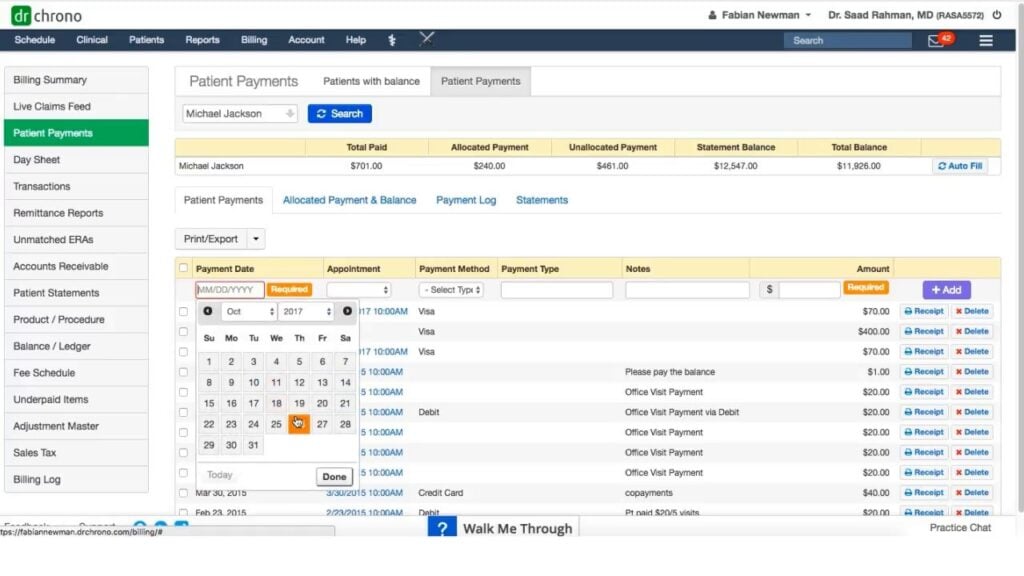
Sitting at the intersection of clinical documentation and revenue cycle management, this software helps providers capture billable charges at the point of care and translates them into clean claims for submission. I think it's most useful for outpatient practices and hospital-based providers where charge lag and missed charges quietly erode revenue over time.
Benefits
Reducing charge lag and missed charges has a direct, measurable impact on revenue—and that's where billing and charge capture software consistently delivers. In my experience, the shift from paper-based or manual charge entry to mobile, point-of-care capture alone can recover a meaningful percentage of previously lost revenue. Platforms like DrChrono and Kareo make it straightforward for smaller practices to capture charges at the bedside or exam room and move them into billing queues without a separate data entry step.
Features
The strongest billing and charge capture tools do more than generate claims—they close the gap between what's documented, what's coded, and what's actually billed:
- Point-of-care charge capture: Providers can enter charges directly from a mobile device during or immediately after an encounter, eliminating the charge lag that comes with end-of-day or batch entry workflows.
- CPT and ICD-10 code lookup: Built-in code search and suggestion tools help providers and coders select accurate procedure and diagnosis codes without switching between systems or reference materials.
- Charge reconciliation: The software automatically compares submitted charges against scheduled procedures and clinical documentation, flagging discrepancies before they result in missed or incorrect billing.
- Clean claim scrubbing: Claims are reviewed against payer-specific rules before submission, catching coding errors, missing modifiers, and mismatched diagnosis-procedure combinations that would otherwise trigger denials.
- EHR and PM system integration: Platforms like DrChrono connect charge capture directly to the patient record and practice management system, so charges, codes, and patient data stay in sync without duplicate entry.
- Denial management and tracking: The software tracks denied claims by reason code and payer, giving billing teams the data to identify patterns and address recurring issues at the coding or documentation level.
- Reporting and revenue cycle analytics: Built-in dashboards surface charge volume, collection rates, denial trends, and coder productivity, helping practice administrators and revenue cycle managers monitor billing performance over time.
More Articles
7. Coding Audit and Compliance Software
Built for compliance officers, coding managers, and internal audit teams, this software automates the review of coded claims against documentation, payer guidelines, and regulatory standards to identify billing errors and compliance risks before they escalate. In my experience, it's what separates organizations that proactively manage audit exposure from those that only discover coding problems after an external audit or OIG investigation.
Benefits
The real value of audit and compliance software is that it shifts your organization from reactive to proactive—catching coding errors and documentation gaps before they become overpayment demands or compliance violations. From my experience, the ability to run statistically valid random samples alongside targeted audits gives compliance teams a much clearer picture of coder accuracy than manual spot-checking ever could. Tools like Optum's Coding Audit Manager help organizations track findings by coder, payer, and code category, which makes it far easier to build focused education programs rather than broad, one-size-fits-all training.
Features
Good audit and compliance software doesn't just flag errors—it gives your team the structure to investigate, document, and correct coding issues in a way that holds up under external scrutiny:
- Automated claim auditing: The software compares coded claims against clinical documentation and payer-specific billing rules, identifying upcoding, undercoding, and unsupported diagnoses without requiring manual record-by-record review.
- Statistically valid sampling: Audit teams can generate random and targeted samples using statistically valid methodologies, which I find is essential for organizations that need defensible audit results under OIG or CMS scrutiny.
- Coder-level accuracy tracking: Findings are tracked by individual coder, code type, and payer, giving managers a granular view of where error patterns are concentrated rather than relying on aggregate accuracy rates alone.
- Regulatory rule library: Built-in libraries of CMS guidelines, LCD/NCD policies, and payer-specific rules are updated regularly, so audits are always benchmarked against current compliance standards.
- Feedback and education workflows: Platforms like Optum's Coding Audit Manager include built-in workflows for documenting audit findings, routing feedback to coders, and tracking whether corrections are applied—closing the loop between audit and education.
- Overpayment and risk quantification: The software calculates estimated overpayment exposure at the claim and aggregate level, helping compliance officers prioritize which findings warrant immediate remediation or voluntary repayment.
- Audit trail and documentation storage: Every audit finding, reviewer note, and corrective action is logged with timestamps and user attribution, creating a defensible record in the event of an external audit or investigation.
Top Medical Coding Software
Here are our top picks of the best medical coding software to help you in your search:
Find the Right Medical Coding Software for Your Practice
Once you know which type of medical coding software fits your workflow, the next step is finding the right platform—and our guide to the best medical billing software breaks down the top options across categories to help you make a confident, informed decision.