Using medical billing software well is the difference between a revenue cycle that runs itself and one that costs your practice time and money every single day. Most teams adopt a platform and then underuse it—missing features that could catch denials before they happen or flag coding gaps before a claim goes out.
This guide walks you through every stage, from initial setup to revenue analysis, so your team builds the habits and workflows that actually get results.
Selecting the Best Medical Billing Software
Keep these criteria in mind before you commit to a platform:
- Claim scrubbing capabilities: Look for built-in claim scrubbing that catches coding errors and missing data before a claim ever leaves your practice, since this directly impacts your clean claim rate.
- Specialty-specific coding support: Confirm the tool includes billing rules, code libraries, and templates suited to your specialty, as specialty-aligned systems reduce manual configuration and support accurate coding.
- Native EHR integration: A platform that connects directly to your EHR cuts duplicate data entry and reduces the transcription errors that trigger denials.
- Payer network and clearinghouse access: Check how many payers the software connects to and whether it supports your highest-volume payers, since gaps here create manual workarounds that slow reimbursements.
- Denial management workflows: Payer complexity and denial rates are rising, so evaluate how well the platform supports denial tracking, automated workflows, and end-to-end revenue cycle management.
- Pricing model transparency: Pricing models vary—per-provider, percentage of collections, flat monthly fee—and the headline rate rarely tells the full story, so factor in setup, training, clearinghouse, and integration costs when comparing vendors.
Step-by-Step Guide to Using Medical Billing Software
Getting your system up and running is just the beginning—your workflow choices here can make or break billing accuracy and cash flow. Here’s how I’d set up and use medical billing software to get reliable results:
1. Install and Configure the Software System
Configuration is where you shape the platform to fit your practice—not the other way around. This means entering your practice details, setting up user roles and permissions, and customizing billing workflows to match how your team actually operates. A solo dermatology practice, for example, has very different workflow needs than a multi-provider cardiology group. I'd take your time here—getting configuration right upfront prevents costly corrections down the line.
Watch for these common configuration mistakes before you go live:
- Generic user roles: Most platforms—like Kareo or AdvancedMD—let you define role-based permissions in detail. I'd avoid applying a blanket "admin" role to everyone; instead, limit access based on each staff member's specific billing responsibilities.
- Skipping the tax ID and NPI setup: Missing or incorrect National Provider Identifier (NPI) and Tax ID details at setup will cause claim rejections immediately, so verify these against your CAQH profile before submitting anything.
- Default workflow settings: Out-of-the-box workflows rarely match how a real practice operates. Walk through each default setting and adjust billing queues, claim holds, and approval steps to reflect your actual process.
- No test environment: If the platform offers a sandbox or test mode, use it. Running test claims before going live is the single best way to catch configuration errors without impacting real revenue.

2. Import Existing Patient and Payer Data
Clean data migration sets the foundation for every claim your practice will ever submit. This step involves transferring patient demographics, insurance details, and payer contracts from your old system—or paper records—into the new platform. A family practice switching from a legacy system, for example, needs to verify that every active patient's insurance information carried over accurately. I'd treat this as an audit opportunity, not just a file transfer.
Use this process to migrate patient and payer data without compromising accuracy:
- Export a clean data file: Pull a full export from your current system in a supported format—most platforms accept CSV or HL7 files. Tools like Tebra or DrChrono have dedicated import wizards that map fields automatically, but I'd still review the field mapping manually before finalizing.
- Standardize data before importing: Inconsistent formatting—like mixed date formats or abbreviated insurance names—causes import errors. Clean your spreadsheet first, standardizing fields like date of birth, payer IDs, and policy numbers.
- Verify payer contracts and fee schedules: Don't just import payer names—confirm that contracted rates and payer IDs are accurate and current. Outdated fee schedules imported from an old system will produce incorrect expected reimbursements from day one.
- Run a post-import audit: After importing, pull a sample of patient records and cross-reference them against your source data. I'd prioritize your highest-volume payers and most active patients first.
- Archive your source data: Keep your original export files in a secure location until you've confirmed the new system is running accurately. You'll want a reference point if discrepancies surface weeks later.
3. Set Up Billing Codes and Fee Schedules
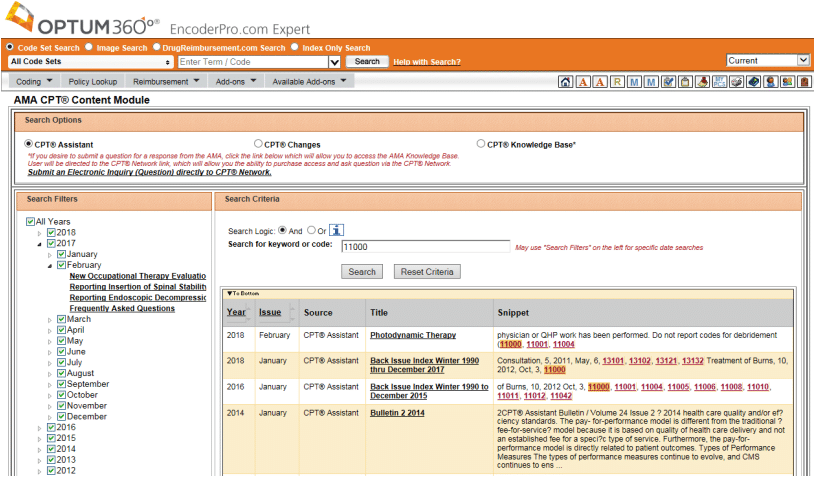
Accurate code and fee schedule setup is what connects the care your providers deliver to the revenue your practice collects. This step means loading your CPT, ICD-10, and HCPCS codes, then aligning them with payer-specific fee schedules and contracted rates. An orthopedic practice, for example, needs procedure codes configured with the correct modifiers for surgical versus office-based services. I've seen underconfigured fee schedules quietly underbill practices for months before anyone catches it.
Keep these best practices in mind when configuring billing codes and fee schedules:
- Load payer-specific fee schedules separately: Don't rely on a single master fee schedule. Medicare, Medicaid, and commercial payers each have different contracted rates—platforms like CollectiveMedical or Waystar let you assign fee schedules at the payer level, which I'd strongly recommend doing from the start.
- Configure modifiers carefully: Modifiers like -25 or -59 change how a claim is adjudicated, and incorrect modifier use is one of the most common denial triggers. Set up modifier rules within the platform to flag combinations that don't meet payer guidelines.
- Cross-reference your chargemaster: Your fee schedule in the billing software should align with your practice's chargemaster. Discrepancies between the two create billing inconsistencies that are hard to trace after the fact.
- Set up code bundles and exclusions: Many payers bundle certain procedure codes or exclude specific code combinations. Configuring these rules upfront—rather than learning about them through denials—saves significant rework.
- Schedule regular code updates: CPT and ICD-10 codes update annually. I'd build a recurring calendar reminder to audit and update your code library every January, since outdated codes are a clean and avoidable denial trigger.
4. Train Staff on Software Workflows
Even the best-configured system underperforms if your team doesn't know how to use it. Training should go beyond basic navigation—staff need to understand how their specific role interacts with the billing workflow. A front desk coordinator entering insurance details has very different training needs than a billing specialist managing denials. I'd prioritize role-specific training over general platform walkthroughs, since that's what actually translates to fewer errors at each stage of the revenue cycle.
Use these guidelines to build a training approach that sticks:
- Role-based training tracks: Segment training by job function rather than running everyone through the same sessions. Front desk staff need to master eligibility verification and patient registration, while billing specialists need hands-on practice with claim submission and denial management workflows.
- Use the vendor's built-in resources: Platforms like AdvancedMD and Kareo offer structured onboarding programs, video libraries, and knowledge bases. I'd use these as your training foundation before building any custom materials—they're built around the platform's actual workflows.
- Train in a sandbox environment: If your platform offers a test environment, run all initial training there. Staff can make mistakes, explore features, and build confidence without touching live patient data or real claims.
- Document your practice-specific workflows: Generic platform training won't cover how your practice handles edge cases—like split billing or coordination of benefits. Build short, written SOPs for these scenarios so staff have a reference point after training ends.
- Plan for turnover: Staff changes are inevitable in healthcare settings. I'd keep training materials updated and stored in a shared location so onboarding a new billing specialist doesn't require starting from scratch.
- Measure competency before go-live: Don't assume attendance equals readiness. Run each staff member through a practical exercise—like submitting a test claim or processing a mock denial—before they work in the live system.
5. Integrate With Your EHR Platform
Connecting your medical billing software to your electronic health record (EHR) system eliminates the manual handoff between clinical documentation and claim creation. When the integration works correctly, a completed clinical encounter automatically triggers a billable claim—with diagnosis codes, procedure codes, and patient details pulled directly from the provider's notes. I've found that practices without this integration spend significant time on redundant data entry, which introduces errors that wouldn't exist if both systems were talking to each other.
Review these considerations before and during your EHR integration setup:
- Confirm native vs. third-party integration: Some billing platforms integrate directly with specific EHRs—like Tebra's built-in connection with its own EHR, or Athenahealth's billing and clinical suite working as one system. Third-party integrations through middleware like Rhapsody or Mirth Connect add complexity and require more ongoing maintenance.
- Map your data fields before connecting: Just because two systems can connect doesn't mean they'll map data correctly. Verify that diagnosis codes, procedure codes, provider NPIs, and patient demographics transfer accurately between platforms before going live.
- Test with real encounter types: Run integration tests using your most common encounter types—annual wellness visits, follow-ups, and any specialty-specific procedure types. Edge cases like telehealth visits or split encounters often surface integration gaps that standard testing misses.
- Establish a reconciliation process: Even well-configured integrations occasionally drop or duplicate records. I'd set up a daily reconciliation check—comparing encounters logged in the EHR against claims generated in the billing system—so nothing falls through the cracks.
- Clarify support ownership: When an integration breaks, it's not always clear whether the EHR vendor or the billing software vendor is responsible. Get explicit clarity on support ownership before signing contracts with either party—this saves a lot of frustration during a live issue.
- Plan for EHR updates: EHR platform updates can silently break integrations. I'd make sure your IT team or vendor is notified of any planned updates on either side so the connection can be tested before changes go live.
6. Submit Claims and Monitor Their Status

Claim submission is where your billing workflow converts into actual revenue—and monitoring is what keeps it moving. Most medical billing platforms let you submit claims electronically to payers through a clearinghouse, then track their status in real time. A high-volume primary care practice, for example, might submit hundreds of claims daily and needs a dashboard view to catch rejections before they age. I'd treat claim monitoring as a daily task, not a weekly one.
Follow these best practices to keep your claims pipeline clean and moving:
- Run a pre-submission scrub: Most platforms—like Waystar or Change Healthcare—include claim scrubbing tools that flag errors before submission. I'd never skip this step, since a rejected claim costs you time twice: once to identify the issue and once to resubmit.
- Submit claims daily: Delays in submission directly delay reimbursement. Build claim submission into your daily billing workflow rather than batching claims at the end of the week, which pushes your entire revenue cycle back.
- Understand rejection vs. denial: Rejections happen before a claim is processed—usually due to formatting or eligibility errors—while denials happen after. Your response process for each is different, and conflating the two leads to misrouted follow-up work.
- Set up automated status alerts: Platforms like Tebra and AdvancedMD let you configure alerts for claim status changes. Use these to catch rejections and denials the same day they're returned rather than discovering them during a weekly audit.
- Prioritize aging claims: Sort your claims worklist by age and payer regularly. Claims approaching payer timely filing deadlines need immediate attention—missing a filing window means losing reimbursement entirely, regardless of claim accuracy.
- Track your clean claim rate: Your clean claim rate—the percentage of claims accepted on first submission—is one of the clearest indicators of billing workflow health. I'd benchmark this monthly and investigate any drop below 95%.
7. Review Denials and Resubmit Corrected Claims
Denials are unavoidable, but leaving them unworked is one of the fastest ways to erode practice revenue. Medical billing software gives you a structured place to track, categorize, and resolve denials before they expire. When a payer denies a claim for a missing prior authorization, for example, your billing team needs to pull the documentation, correct the claim, and resubmit within the payer's appeal window. I think of denial management as revenue recovery—every worked denial is money your practice has already earned.
Keep these best practices in mind when working your denials queue:
- Categorize denials by reason code: Payers return denials with standard reason codes—like CO-4 for incorrect procedure codes or CO-97 for bundling issues. Platforms like Waystar and Availity let you sort and filter by these codes, which I'd use to identify patterns rather than treating each denial as a one-off issue.
- Set appeal deadlines as hard stops: Every payer has a window for appeals and corrected claim submissions—missing it forfeits the reimbursement entirely. I'd configure task due dates or alerts in your billing platform the moment a denial lands so nothing ages past its deadline.
- Distinguish corrected claims from appeals: A corrected claim (with a frequency code 7) is appropriate when the original claim had a billing error. A formal appeal is needed when you're disputing the payer's decision. Using the wrong process delays resolution and can reset your timeline.
- Document every action taken: Log each step of your denial follow-up directly in the platform—what was corrected, when it was resubmitted, and who handled it. This creates an audit trail that's invaluable if a dispute escalates or a payer requests documentation.
- Analyze denial trends monthly: If CO-16 denials for missing information keep appearing from the same payer, that's a front-end intake problem, not a billing problem. I'd pull a monthly denial report and trace recurring patterns back to their root cause in the workflow.
- Set a denial rate benchmark: Industry standard puts an acceptable denial rate at around 5% or lower. Track yours monthly in your billing platform's reporting dashboard—a rate creeping above that threshold is a signal to audit your claim preparation process.
8. Analyze Reports to Optimize Revenue Cycle
Reporting turns your billing data into actionable intelligence. Most medical billing platforms include built-in dashboards that track key revenue cycle metrics—days in accounts receivable, collection rates, denial rates, and payer mix. A practice noticing its days in AR climbing above 40, for example, can use reporting to pinpoint exactly where claims are stalling. I'd run these reports on a set schedule rather than reactively—consistent analysis is what separates practices that catch problems early from those that don't.
Use this table to understand the key reports your billing platform should be generating regularly:
| Report Type | What It Measures | Why It Matters |
|---|---|---|
| Report TypeDays in AR | What It MeasuresAverage time to collect payment after service | Why It MattersFlags slowdowns in payer reimbursement or follow-up gaps |
| Report TypeClean claim rate | What It MeasuresPercentage of claims accepted on first submission | Why It MattersReflects the accuracy of your front-end billing process |
| Report TypeDenial rate by payer | What It MeasuresVolume and reason for denials, broken down by payer | Why It MattersSurfaces payer-specific patterns that need workflow adjustments |
| Report TypeCollection rate | What It MeasuresPercentage of billed charges actually collected | Why It MattersMeasures overall revenue cycle performance against benchmarks |
| Report TypeAging AR report | What It MeasuresOutstanding balances segmented by age and payer | Why It MattersIdentifies claims at risk of missing timely filing deadlines |
| Report TypePayer mix report | What It MeasuresRevenue breakdown by insurance type and payer | Why It MattersInforms contract negotiations and financial planning |
Keep these best practices in mind when building your reporting routine:
- Schedule reports, don't pull them manually: Platforms like Kareo and athenahealth let you automate report delivery on a daily, weekly, or monthly cadence. I'd set this up during implementation so reporting becomes a built-in habit rather than an afterthought.
- Benchmark against industry standards: Raw numbers mean little without context. Compare your days in AR against the industry benchmark of 30-40 days and your denial rate against the 5% threshold to assess where your practice actually stands.
- Segment by payer and provider: A blended collection rate can mask serious problems. I'd always break reports down by individual payer and provider—a single underperforming payer contract or a provider with frequent coding errors will hide inside an aggregate number.
- Share reports with clinical leadership: Revenue cycle problems often originate in clinical workflows—incomplete documentation, missing orders, or inconsistent coding. Bringing report findings to providers and clinical leads creates shared accountability for billing outcomes.
- Use reports to drive renegotiations: If your payer mix report consistently shows low reimbursement rates from a specific payer, that's concrete data to bring to a contract renegotiation. I've found that billing data is far more persuasive in those conversations than anecdotal frustration.
More Articles
Common Challenges of Using Medical Billing Software (and How to Address Them)
Even well-implemented billing platforms create friction when workflows, configurations, or team habits don't align with how the software actually operates. Here are the most common issues practices run into—and what to do about them:
| Problem | Solution |
|---|---|
| ProblemClaim rejections from data entry errors | SolutionEnable your platform's claim scrubbing tool and require a pre-submission review step before any batch is released to the clearinghouse. |
| ProblemEHR integration breaks after system update | SolutionEstablish a written protocol with both vendors requiring advance notice of updates and a post-update integration test before resuming live claim submission. |
| ProblemDenial rate creeping above 5% | SolutionPull a denial report filtered by reason code and payer to identify whether the root cause is a coding issue, eligibility gap, or payer-specific rule change. |
| ProblemStaff underusing available platform features | SolutionSchedule a focused retraining session on the specific features your team is skipping—most vendors like Waystar and AdvancedMD offer on-demand training resources at no extra cost. |
| ProblemSlow patient payment collection | SolutionActivate patient-facing payment tools like automated balance notifications and online payment portals, which most platforms include but practices frequently leave unconfigured. |
| ProblemInconsistent coding across providers | SolutionRun a monthly provider-level coding audit using your platform's reporting tools and share results individually with each provider to correct patterns before they generate denials. |
| ProblemReporting data not matching expectations | SolutionAudit your charge capture and fee schedule setup—inaccurate reimbursement or collection rate reports almost always trace back to incorrectly configured base data, not a reporting error. |
Advanced Uses & Maximizing ROI From Medical Billing Software
Most practices use billing software to submit claims and collect payments—but the platforms that deliver the strongest ROI are the ones used to actively manage financial strategy, not just execute transactions. Here's where deeper adoption starts paying off:
- Payer contract benchmarking: Use your payer mix and reimbursement reports to compare actual payments against contracted rates for every payer. I've seen practices recover significant revenue simply by identifying a payer that had been systematically underpaying against their contracted fee schedule for months—something that's invisible without systematic report analysis.
- Predictive denial management: Platforms like Waystar use AI-driven analytics to flag claims likely to be denied before submission, based on historical payer behavior. I'd prioritize this feature if your practice deals with high volumes of specialty procedures that attract frequent payer scrutiny.
- Automated patient payment plans: Rather than manually negotiating payment arrangements, platforms like Kareo and Modernizing Medicine let you configure automated installment plans triggered by balance thresholds. This reduces the administrative burden on front desk staff while improving patient payment follow-through.
- Provider productivity reporting: Billing data can surface provider-level productivity metrics—charges generated, collections per encounter, and coding patterns—that inform staffing decisions and compensation models. I think this is one of the most underused capabilities in most billing platforms.
- Revenue forecasting: Platforms with built-in forecasting tools let you project monthly collections based on your current AR pipeline, payer mix, and historical collection rates. This gives practice administrators data they can bring directly into budget planning conversations.
- Custom fee schedule optimization: Regularly modeling your fee schedules against Medicare rates and local market benchmarks inside your billing platform helps you identify where your billed charges may be leaving reimbursement on the table—particularly after annual Medicare rate updates.
Start With the Right Medical Billing Software
The steps and strategies covered here only work as well as the platform behind them—so if you're still evaluating your options, browsing a curated breakdown of the best medical billing software can help you find a solution that fits your practice's size, specialty, and workflow needs.